JavaScript 101
Review from Codecademy exercises
Parts 1–12
http://www.codecademy.com/tracks/javascript
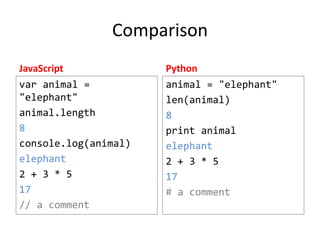
Comparison
JavaScript

Python

var animal =
"elephant"
animal.length
8
console.log(animal)
elephant
2 + 3 * 5
17
// a comment

animal = "elephant"
len(animal)
8
print animal
elephant
2 + 3 * 5
17
# a comment
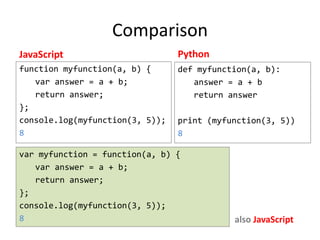
Comparison
JavaScript

Python

function myfunction(a, b) {
var answer = a + b;
return answer;
}
console.log(myfunction(3, 5));
8

def myfunction(a, b):
answer = a + b
return answer
print (myfunction(3, 5))
8

var myfunction = function(a, b) {
var answer = a + b;
return answer;
}
console.log(myfunction(3, 5));
8

also JavaScript
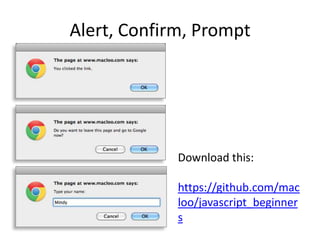
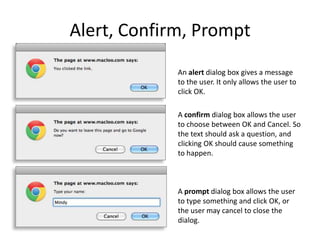
Alert, Confirm, Prompt
An alert dialog box gives a message
to the user. It only allows the user to
click OK.
A confirm dialog box allows the user
to choose between OK and Cancel. So
the text should ask a question, and
clicking OK should cause something
to happen.

A prompt dialog box allows the user
to type something and click OK, or
the user may cancel to close the
dialog.
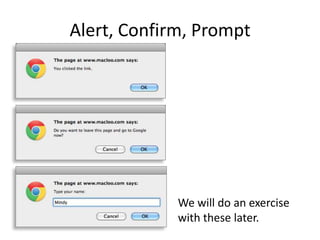
Alert, Confirm, Prompt

We will do an exercise
with these later.
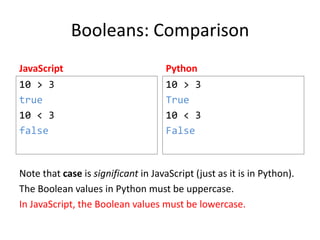
Booleans: Comparison
JavaScript

Python

10 > 3
true
10 < 3
false

10 > 3
True
10 < 3
False

Note that case is significant in JavaScript (just as it is in Python).
The Boolean values in Python must be uppercase.
In JavaScript, the Boolean values must be lowercase.
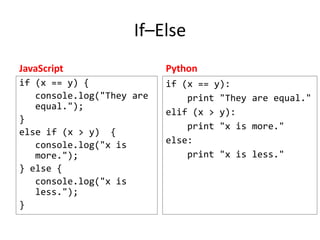
If–Else
JavaScript

Python

if (x == y) {
console.log("They are
equal.");
}
else if (x > y) {
console.log("x is
more.");
} else {
console.log("x is
less.");
}

if (x == y):
print "They are equal."
elif (x > y):
print "x is more."
else:
print "x is less."
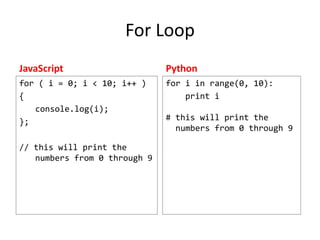
For Loop
JavaScript

Python

for ( i = 0; i < 10; i++ )
{
console.log(i);
}

for i in range(0, 10):
print i

// this will print the
numbers from 0 through 9

# this will print the
numbers from 0 through 9
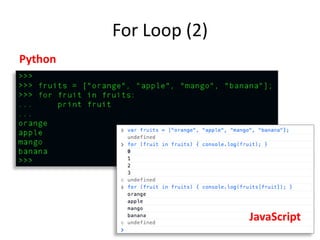
For Loop (2)
Python

JavaScript
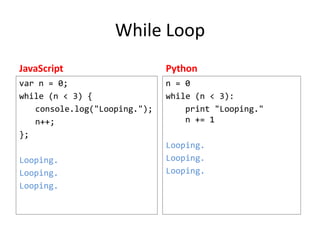
While Loop
JavaScript

Python

var n = 0;
while (n < 3) {
console.log("Looping.");
n++;
}

n = 0
while (n < 3):
print "Looping."
n += 1

Looping.
Looping.
Looping.

Looping.
Looping.
Looping.
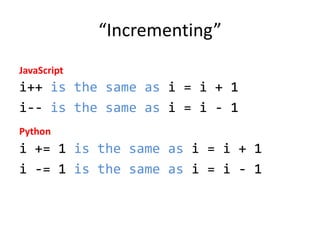
“Incrementing”
JavaScript

i++ is the same as i = i + 1
i-- is the same as i = i - 1
Python

i += 1 is the same as i = i + 1
i -= 1 is the same as i = i - 1
Extracting a substring
JavaScript

Python

var mystring = "the
word swagger"

mystring = "the word
swagger"

console.log(mystring.s
ubstring(9,13));

print mystring[9:13]
swag

swag
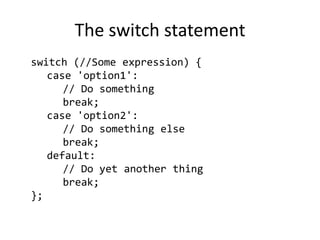
The switch statement
switch (//Some expression) {
case 'option1':
// Do something
break;
case 'option2':
// Do something else
break;
default:
// Do yet another thing
break;
}
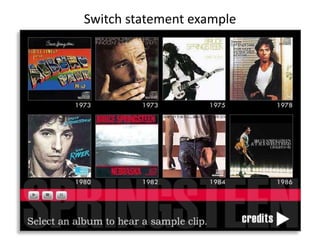
Switch statement example
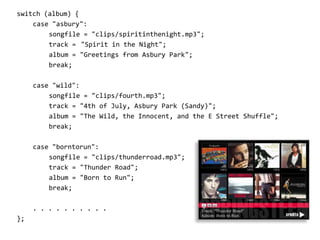
switch (album) {
case "asbury":
songfile = "clips/spiritinthenight.mp3";
track = "Spirit in the Night";
album = "Greetings from Asbury Park";
break;
case "wild":
songfile = "clips/fourth.mp3";
track = "4th of July, Asbury Park (Sandy)";
album = "The Wild, the Innocent, and the E Street Shuffle";
break;
case "borntorun":
songfile = "clips/thunderroad.mp3";
track = "Thunder Road";
album = "Born to Run";
break;
. . . . . . . . . .
};
Arrays (Lists)
JavaScript
var mylist = ["red", "white", "blue"];
console.log(mylist[2]);
blue
Python
mylist = ["red", "white", "blue"]
print mylist[2]
blue
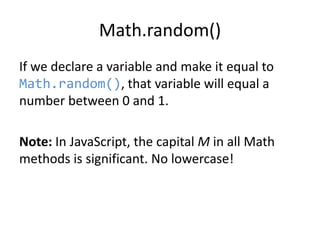
Math.random()
If we declare a variable and make it equal to
Math.random(), that variable will equal a
number between 0 and 1.

Note: In JavaScript, the capital M in all Math
methods is significant. No lowercase!
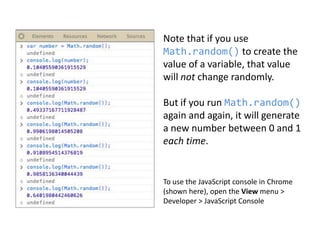
Note that if you use
Math.random() to create the
value of a variable, that value
will not change randomly.

But if you run Math.random()
again and again, it will generate
a new number between 0 and 1
each time.

To use the JavaScript console in Chrome
(shown here), open the View menu >
Developer > JavaScript Console
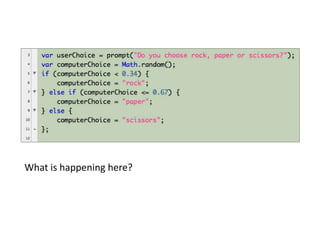
What is happening here?
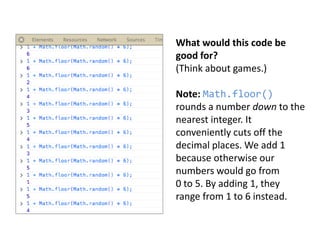
What would this code be
good for?
(Think about games.)
Note: Math.floor()
rounds a number down to the
nearest integer. It
conveniently cuts off the
decimal places. We add 1
because otherwise our
numbers would go from
0 to 5. By adding 1, they
range from 1 to 6 instead.
Guessing a number
• In-class assignment: Create a little game with
an HTML page, a confirm dialog box and
JavaScript.
• Your game will use Math.Random() to pick a
number between 1 and … ? (You choose.)
• Then the user has to guess the number, by
typing it into the confirm dialog.
• A new alert box will open and tell the user if
the guess is right or wrong.
Alert, Confirm, Prompt

Download this:
https://github.com/maclo
o/javascript_beginners
JavaScript 101
Review from Codecademy exercises
Parts 1–12
http://www.codecademy.com/tracks/javascript

JavaScript 101

  • 1.
    JavaScript 101 Review fromCodecademy exercises Parts 1–12 http://www.codecademy.com/tracks/javascript
  • 2.
    Comparison JavaScript Python var animal = "elephant" animal.length 8 console.log(animal) elephant 2+ 3 * 5 17 // a comment animal = "elephant" len(animal) 8 print animal elephant 2 + 3 * 5 17 # a comment
  • 3.
    Comparison JavaScript Python function myfunction(a, b){ var answer = a + b; return answer; } console.log(myfunction(3, 5)); 8 def myfunction(a, b): answer = a + b return answer print (myfunction(3, 5)) 8 var myfunction = function(a, b) { var answer = a + b; return answer; } console.log(myfunction(3, 5)); 8 also JavaScript
  • 4.
    Alert, Confirm, Prompt Analert dialog box gives a message to the user. It only allows the user to click OK. A confirm dialog box allows the user to choose between OK and Cancel. So the text should ask a question, and clicking OK should cause something to happen. A prompt dialog box allows the user to type something and click OK, or the user may cancel to close the dialog.
  • 5.
    Alert, Confirm, Prompt Wewill do an exercise with these later.
  • 6.
    Booleans: Comparison JavaScript Python 10 >3 true 10 < 3 false 10 > 3 True 10 < 3 False Note that case is significant in JavaScript (just as it is in Python). The Boolean values in Python must be uppercase. In JavaScript, the Boolean values must be lowercase.
  • 7.
    If–Else JavaScript Python if (x ==y) { console.log("They are equal."); } else if (x > y) { console.log("x is more."); } else { console.log("x is less."); } if (x == y): print "They are equal." elif (x > y): print "x is more." else: print "x is less."
  • 8.
    For Loop JavaScript Python for (i = 0; i < 10; i++ ) { console.log(i); } for i in range(0, 10): print i // this will print the numbers from 0 through 9 # this will print the numbers from 0 through 9
  • 9.
  • 10.
    While Loop JavaScript Python var n= 0; while (n < 3) { console.log("Looping."); n++; } n = 0 while (n < 3): print "Looping." n += 1 Looping. Looping. Looping. Looping. Looping. Looping.
  • 11.
    “Incrementing” JavaScript i++ is thesame as i = i + 1 i-- is the same as i = i - 1 Python i += 1 is the same as i = i + 1 i -= 1 is the same as i = i - 1
  • 12.
    Extracting a substring JavaScript Python varmystring = "the word swagger" mystring = "the word swagger" console.log(mystring.s ubstring(9,13)); print mystring[9:13] swag swag
  • 13.
    The switch statement switch(//Some expression) { case 'option1': // Do something break; case 'option2': // Do something else break; default: // Do yet another thing break; }
  • 14.
  • 15.
    switch (album) { case"asbury": songfile = "clips/spiritinthenight.mp3"; track = "Spirit in the Night"; album = "Greetings from Asbury Park"; break; case "wild": songfile = "clips/fourth.mp3"; track = "4th of July, Asbury Park (Sandy)"; album = "The Wild, the Innocent, and the E Street Shuffle"; break; case "borntorun": songfile = "clips/thunderroad.mp3"; track = "Thunder Road"; album = "Born to Run"; break; . . . . . . . . . . };
  • 16.
    Arrays (Lists) JavaScript var mylist= ["red", "white", "blue"]; console.log(mylist[2]); blue Python mylist = ["red", "white", "blue"] print mylist[2] blue
  • 17.
    Math.random() If we declarea variable and make it equal to Math.random(), that variable will equal a number between 0 and 1. Note: In JavaScript, the capital M in all Math methods is significant. No lowercase!
  • 18.
    Note that ifyou use Math.random() to create the value of a variable, that value will not change randomly. But if you run Math.random() again and again, it will generate a new number between 0 and 1 each time. To use the JavaScript console in Chrome (shown here), open the View menu > Developer > JavaScript Console
  • 19.
  • 20.
    What would thiscode be good for? (Think about games.) Note: Math.floor() rounds a number down to the nearest integer. It conveniently cuts off the decimal places. We add 1 because otherwise our numbers would go from 0 to 5. By adding 1, they range from 1 to 6 instead.
  • 21.
    Guessing a number •In-class assignment: Create a little game with an HTML page, a confirm dialog box and JavaScript. • Your game will use Math.Random() to pick a number between 1 and … ? (You choose.) • Then the user has to guess the number, by typing it into the confirm dialog. • A new alert box will open and tell the user if the guess is right or wrong.
  • 22.
    Alert, Confirm, Prompt Downloadthis: https://github.com/maclo o/javascript_beginners
  • 23.
    JavaScript 101 Review fromCodecademy exercises Parts 1–12 http://www.codecademy.com/tracks/javascript

Editor's Notes

  • #2 Presentation by Mindy McAdams, (updated) February 2014. ------ CONTACT ----- http://mindymcadams.com/
  • #3 All programming languages have similarities.
  • #4 Because JavaScript interacts with Web pages and HTML, it does not have the usual PRINT statement. But we can use console.log to “print” when we are testing JavaScript code. Also, JavaScript has two ways to create a new function.
  • #5 One of the common uses of JavaScript on Web pages is to pop up a dialog box. The appearance of these dialog is determined by the browser, so they look different on Mac and Windows. These examples are from the Google Chrome browser on Mac OS.
  • #6 Go to the URL to find code to create these dialog boxes on your own Web pages.
  • #7 All programming languages have similarities.
  • #8 All programming languages have similarities.
  • #9 All programming languages have similarities.
  • #10 All programming languages have similarities.
  • #11 All programming languages have similarities.
  • #13 All programming languages have similarities. The way of counting characters or items (from 0) is identical in JavaScript and Python. Finding a part of a string in this way is part of searching – for example, if you were programming a search engine.
  • #14 NOTE the break – MUST have this. THIS IS IN CODECADEMY PART 9 NOW
  • #15 http://www.jou.ufl.edu/faculty/mmcadams/flash/flashExercise.htmlSEE CODECADEMY PART 9
  • #16 This switch statement (in ActionScript) was used in the Flash graphic shown in the previous slide. Each album cover was a button. When it was clicked, the switch statement changed the value of three different variables depending on which album had been selected. SEE CODECADEMY PART 9
  • #17 All programming languages have similarities.THIS IS IN CODECADEMY PART 11 NOW
  • #18 Codecademy: Math.random() is introduced here -- http://www.codecademy.com/courses/javascript-beginner-en-Bthev-mskY8
  • #19 To use the JavaScript console in Chrome, open the View menu &gt; Developer &gt; JavaScript Consolehttps://developer.mozilla.org/en-US/docs/JavaScript/Reference/Global_Objects/Math/random
  • #20 Codecademy -- http://www.codecademy.com/courses/javascript-beginner-en-Bthev-mskY8
  • #21 In the WHILE LOOP section, in Codecademy ------- var coin = Math.floor(Math.random() * 2); To use the JavaScript console in Chrome, open the View menu &gt; Developer &gt; JavaScript ConsoleCode: http://www.the-art-of-web.com/javascript/random/
  • #23 In-class exercise - https://github.com/macloo/javascript_beginners
  • #24 Presentation by Mindy McAdams, (updated) February 2014. ------ CONTACT ----- http://mindymcadams.com/