REACT | REDUX | ES6/7
THE 2ND MPO COP
– by Jabi (Cho Dongho)
AGENDA
1. 가볍게 훑어보는 React
2. 대충 보는 Redux
3. 자주 쓰이는 ES6/7 문법
4. 알아두면 좋을 ES6 문법
가볍게 훑어보는 REACT
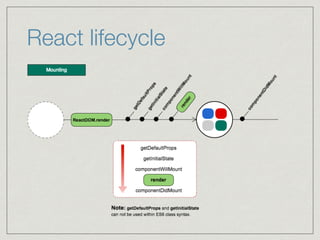
React lifecycle
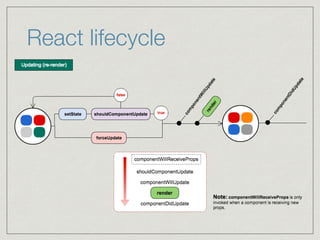
React lifecycle
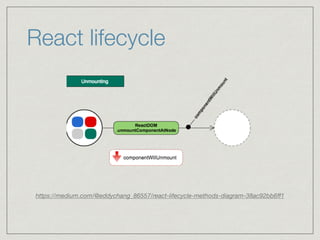
React lifecycle
https://medium.com/@eddychang_86557/react-lifecycle-methods-diagram-38ac92bb6ff1
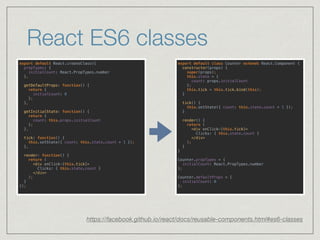
React ES6 classes
https://facebook.github.io/react/docs/reusable-components.html#es6-classes
export default class Counter extends React.Component {

constructor(props) {

super(props);

this.state = {
count: props.initialCount
};

this.tick = this.tick.bind(this);

}


tick() {

this.setState({ count: this.state.count + 1 });

}


render() {

return (

<div onClick={this.tick}>

Clicks: { this.state.count }

</div>

);

}

}


Counter.propTypes = {

initialCount: React.PropTypes.number

};


Counter.defaultProps = {

initialCount: 0

};
export default React.createClass({

propTypes: {

initialCount: React.PropTypes.number

},


getDefaultProps: function() {

return {

initialCount: 0

};

},


getInitialState: function() {

return {
count: this.props.initialCount
};

},


tick: function() {

this.setState({ count: this.state.count + 1 });

},


render: function() {

return (

<div onClick={this.tick}>

Clicks: { this.state.count }

</div>

);

}

});
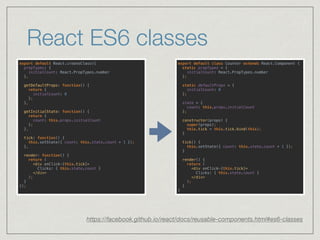
React ES6 classes
https://facebook.github.io/react/docs/reusable-components.html#es6-classes
export default React.createClass({

propTypes: {

initialCount: React.PropTypes.number

},


getDefaultProps: function() {

return {

initialCount: 0

};

},


getInitialState: function() {

return {
count: this.props.initialCount
};

},


tick: function() {

this.setState({ count: this.state.count + 1 });

},


render: function() {

return (

<div onClick={this.tick}>

Clicks: { this.state.count }

</div>

);

}

});
export default class Counter extends React.Component {

static propTypes = {

initialCount: React.PropTypes.number

};


static defaultProps = {

initialCount: 0

};


state = {
count: this.props.initialCount
};


constructor(props) {

super(props);

this.tick = this.tick.bind(this);

}


tick() {

this.setState({ count: this.state.count + 1 });

}


render() {

return (

<div onClick={this.tick}>

Clicks: { this.state.count }

</div>

);

}

}
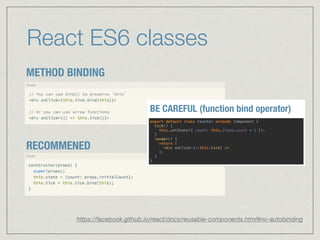
React ES6 classes
METHOD BINDING
RECOMMENED
https://facebook.github.io/react/docs/reusable-components.html#no-autobinding
React ES6 classes
METHOD BINDING
RECOMMENED
https://facebook.github.io/react/docs/reusable-components.html#no-autobinding
export default class Counter extends Component {

tick() {

this.setState({ count: this.state.count + 1 });

}

render() {

return (

<div onClick={::this.tick} />

);

}

}
BE CAREFUL (function bind operator)
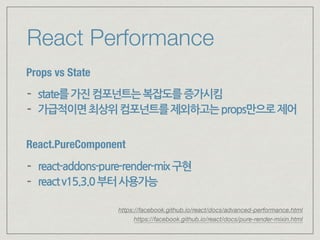
React Performance
Props vs State
- state를가진컴포넌트는복잡도를증가시킴
- 가급적이면최상위컴포넌트를제외하고는props만으로제어
React.PureComponent
- react-addons-pure-render-mix구현
- reactv15.3.0부터사용가능
https://facebook.github.io/react/docs/pure-render-mixin.html
https://facebook.github.io/react/docs/advanced-performance.html
대충 보는 REDUX
official: http://redux.js.org
official (ko): http://dobbit.github.io/redux
cartoon intro to redux: 

http://bestalign.github.io/2015/10/26/cartoon-intro-to-redux
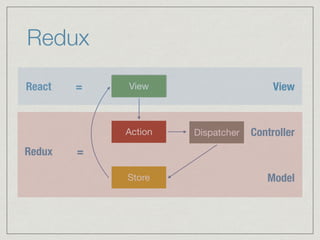
Redux
View
Action Dispatcher
Store
React =
Redux =
View
Controller
Model
Redux
데이터의흐름이단방향
애플리케이션의모든데이터(state)는

하나의모델(store)안에하나의객체트리구조로저장됨
데이터(state)는읽기전용
Redux
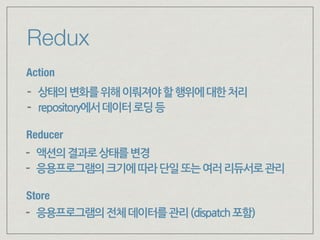
Action
Store
Reducer
- 상태의변화를위해이뤄져야할행위에대한처리
- repository에서데이터로딩등
- 액션의결과로상태를변경
- 응용프로그램의크기에따라단일또는여러리듀서로관리
- 응용프로그램의전체데이터를관리(dispatch포함)
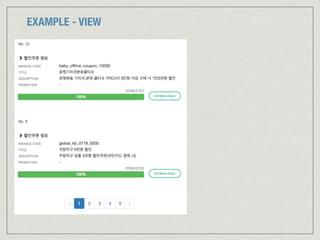
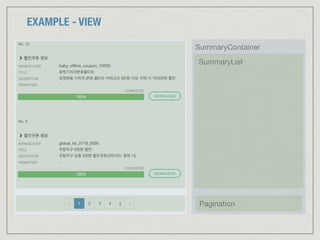
EXAMPLE - VIEW
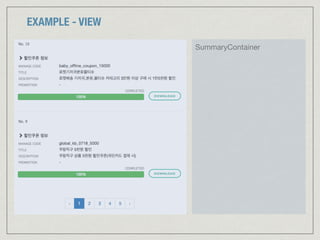
EXAMPLE - VIEW
SummaryContainer
EXAMPLE - VIEW
SummaryContainer
SummaryList
Pagination
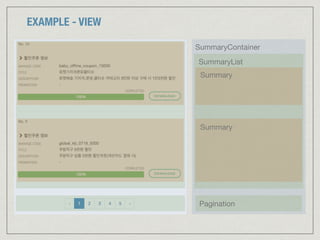
EXAMPLE - VIEW
SummaryContainer
SummaryList
Pagination
Summary
Summary
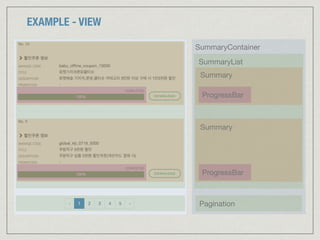
EXAMPLE - VIEW
SummaryContainer
SummaryList
Pagination
Summary
Summary
ProgressBar
ProgressBar
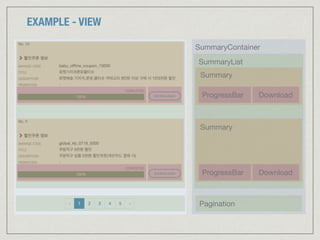
EXAMPLE - VIEW
SummaryContainer
SummaryList
Pagination
Summary
Summary
ProgressBar
ProgressBar
Download
Download
EXAMPLE - MODEL (APPLICATION STATE)
{
summaries: [
{
id: 10,
manageCode: 'baby_offline_coupon_15000',
title: '로켓배송기저귀분유물티슈',
description: '로켓배송 기저귀,분유,물티슈 카테고리 3만원 이상 구매 시 1만5천원 할인',
progress {
status: 'COMPLETED',
progress: 100
}
},
{ /* ... */ },
],
paging: {
page: 1,
size: 2,
totalPage: 5
}
}
EXAMPLE - REDUX
export function fetchSummary(params) {

return {

thunk: async(dispatch, getState, { repositories: { summary: repository } }) => {

const { data: summaries } = await repository.getSummaries(params);

const action = { type: 'UPDATE_SUMMARY', payload: summaries };

return dispatch(action);

}

};

}
summaryAction.js
const initialState = {

summaries: []

};


export default function summaryReducer(state = initialState, action) {

switch (action.type) {

case 'UPDATE_SUMMARY':

return {

...state,

summaries: action.payload.contents

}

}

}
summaryReducer.js
EXAMPLE - REDUX
export function fetchSummary(params) {

return {

thunk: async(dispatch, getState, { repositories: { summary: repository } }) => {

const { data: summaries } = await repository.getSummaries(params);

const action = { type: 'UPDATE_SUMMARY', payload: summaries };

return dispatch(action);

}

};

}
summaryAction.js
const initialState = {

summaries: []

};


export default function summaryReducer(state = initialState, action) {

switch (action.type) {

case 'UPDATE_SUMMARY':

return {

...state,

summaries: action.payload.contents

}

}

}
summaryReducer.js
import { combineReducers, createStore } from 'redux';

import summaryReducer from './summaryReducer';

import paginationReducer from './paginationReducer';

import otherReducer from './otherReducer';


const reducer = combineReducers({

summary: summaryReducer,

pagination: paginationReducer,

other: otherReducer

});


const store = createStore(reducer);
store.js
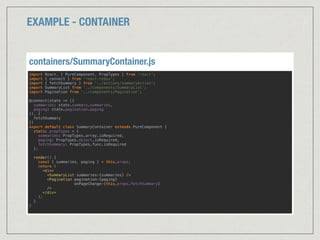
EXAMPLE - CONTAINER
import React, { PureComponent, PropTypes } from 'react';

import { connect } from 'react-redux';

import { fetchSummary } from '../actions/summaryAction';

import SummaryList from ‘../components/SummaryList’;

import Pagination from ‘../components/Pagination’;


@connect(state => ({

summaries: state.summary.summaries,

paging: state.pagination.paging

}), {

fetchSummary

})

export default class SummaryContainer extends PureComponent {

static propTypes = {

summaries: PropTypes.array.isRequired,

paging: PropTypes.object.isRequired,

fetchSummary: PropTypes.func.isRequired

};


render() {

const { summaries, paging } = this.props;

return (

<div>

<SummaryList summaries={summaries} />

<Pagination pagination={paging}

onPageChange={this.props.fetchSummary}

/>

</div>

);

}

}

containers/SummaryContainer.js
EXAMPLE - COMPONENT
import React, { PureComponent, PropTypes } from 'react';

import Summary from './Summary';


export default class SummaryList extends PureComponent {

static propTypes = {

summaries: PropTypes.array.isRequired,

fetchSummary: PropTypes.func.isRequired

};


static defaultProps = {
summaries: []
};


render() {

const { summaries } = this.props;

return (

<div>

{ summaries.map(summary => <Summary summary={summary} />) }

</div> 

);

}

}

components/SummaryList.js
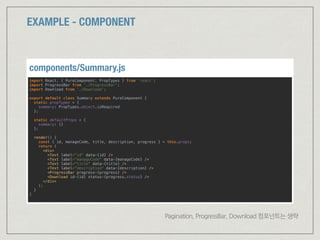
EXAMPLE - COMPONENT
import React, { PureComponent, PropTypes } from 'react';

import ProgressBar from './ProgressBar';

import Download from './Download';


export default class Summary extends PureComponent {

static propTypes = {

summary: PropTypes.object.isRequired

};


static defaultProps = {

summary: {}

};


render() {

const { id, manageCode, title, description, progress } = this.props;

return (

<div>

<Text label="id" data={id} />

<Text label="manageCode" data={manageCode} />

<Text label="title" data={title} />

<Text label="description" data={description} />

<ProgressBar progress={progress} />

<Download id={id} status={progress.status} />

</div>

);

}

}
components/Summary.js
Pagination, ProgressBar, Download 컴포넌트는 생략
개발 중에 발생했던 실수
만들려는 형태:
* 계층형카테고리구조에서앞서선택한카테고리의하위카테고리를계속해서선택
잘못된 예
export function fetchCategory(code) {

return {

thunk: async(dispatch, getState, { repositories: { category: repository } }) => {

const { data: categories } = await repository.getCategoriesByCode({code});

const action = { type: 'UPDATE_CATEGORY', payload: categories };

return dispatch(action);

}

};

}
categoryAction.js
const initialState = {

categories: []

};


export default function categoryReducer(state = initialState, action) {

switch (action.type) {

case 'UPDATE_CATEGORY':

return {

...state,

categories: action.payload

}

}

}
categoryReducer.js
[
{ code: 1010, name: ‘패션/의류잡화’ },
{ code: 1011, name: ‘뷰티’ },
{ code: 1012, name: ‘출산/유아동’ },
]
request: { code: 0 }
실제 나타나는 결과
* 앞선depth의카테고리목록이마지막으로가져온카테고리목록으로대체됨
Why?
Why?
reducer에서 카테고리 계층을 표현하지 않고 상태값을 저장하기 때문
REDUCER 개선
categories: [
{ code: 1010, name: ‘패션/의류잡화’ },
{ code: 1011, name: ‘뷰티’ },
{ code: 1012, name: ‘출산/유아동’ },
]
categories: [
[
{ code: 1010, name: ‘패션/의류잡화’, selected: false },
{ code: 1011, name: ‘뷰티’, selected: false },
{ code: 1012, name: ‘출산/유아동’, selected: true },
],
[
{ code: 2010, name: ‘임신/출산준비할때’, selected: false },
{ code: 2011, name: ‘기저귀갈때’, selected: true },
{ code: 2012, name: ‘분유/유아식품’, selected: false },
],
[ /* .. */ ]
]
import { REQUEST_CATEGORIES, RECEIVE_CATEGORIES } from '../actions/categoryAction';


const initialState = {

categories: []

};


export default function reducer(state = initialState, { type, request, payload }) {

switch (type) {

case REQUEST_CATEGORIES:

return {

...state,

isFetching: true

};

case RECEIVE_CATEGORIES:

const { depth, code } = request;

const categories = state.categories.slice(0, depth);

if (depth > 0) {

categories[depth - 1] = categories[depth - 1].map(o => ({ 

code: o.code, 

name: o.name, 

selected: `${o.code}` === `${code}` 

}));

}

return {

...state,

categories: [...categories, payload],

isFetching: false

};

default:

return state;

}

}

categoryReducer.js
REDUCER 개선
const prefix = 'CATEGORY/';


export const REQUEST_CATEGORIES = `${prefix}REQUEST_CATEGORIES`;

export const RECEIVE_CATEGORIES = `${prefix}RECEIVE_CATEGORIES`;


export function fetchCategory(depth = 0, code = 0) {

return {

thunk: async(dispatch, getState, { repositories: { category: repository } }) => {

dispatch(requestCategory(code));

const having = getState().category.categories;

if (having.length > depth && !code) {

const requestDepth = depth > 1 ? depth - 1 : 0;

const categories = having[requestDepth].map(o => ({ code: o.code, name: o.name }));

const requestCode = requestDepth > 0 ? having[requestDepth - 1].find(o => o.selected).code : 0;

return dispatch(receiveCategory({ depth: requestDepth, code: requestCode }, categories));

}

const { data: categories } = await repository.getCategories(code);

return dispatch(receiveCategory({ depth, code }, categories));

}

};

}


const requestCategory = (params) => ({

type: REQUEST_CATEGORIES

});


const receiveCategory = (request, categories) => ({

type: RECEIVE_CATEGORIES,

request,

payload: categories

});

categoryAction.js
REDUCER 개선
자주 쓰이는 ES6/7 문법
VAR VS LET/CONST
* var의문제점

http://chanlee.github.io/2013/12/10/javascript-variable-scope-and-hoisting
var
함수범위변수를선언및초기화
const
읽기전용상수를선언
let
블록범위지역변수를선언및초기화
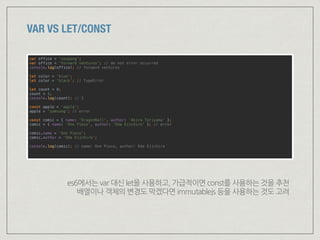
VAR VS LET/CONST
var office = 'coupang';

var office = 'forward ventures'; // do not error occurred

console.log(office); // forward ventures


let color = 'blue';

let color = 'black'; // TypeError


let count = 0;

count = 1;

console.log(count); // 1


const apple = 'apple';

apple = 'samsung'; // error


const comic = { name: 'DragonBall', author: ‘Akira Toriyama' };

comic = { name: ‘One Piece', author: ‘Oda Eiichiro‘ }; // error


comic.name = ‘One Piece';

comic.author = ‘Oda Eiichiro';


console.log(comic); // name: One Piece, author: Oda Eiichiro

es6에서는 var 대신 let을 사용하고, 가급적이면 const를 사용하는 것을 추천

배열이나 객체의 변경도 막겠다면 immutablejs 등을 사용하는 것도 고려
ARROW FUNCTION
// function

[ 1, 3, 7 ].map(function(value) {

return value * 2;

});


// arrow function

[ 1, 3, 7 ].map(value => value * 2);


// object를 반환하는 arrow function

const toMap = name => {

return { name: name };

};


// object를 반환하는 arrow function 간략 표기

const toMap = name => ({ name: name });


// compare ‘this’ with arrow function and function


const object = {

f1: function() {

console.log('f1', this);

function f1_1() { console.log('f1_1', this) }

setTimeout(f1_1, 1000);

setTimeout(() => { console.log('f1_2', this) }, 1000);

},

f2: () => {

console.log('f2', this);

function f2_1() { console.log('f2_1', this) }

setTimeout(f2_1, 1000);

setTimeout(() => { console.log('f2_2', this) }, 1000);

}

};

object.f1(); // Object, Window, Window

object.f2(); // Window, Window, Window
arrowfunction에서의this는arrowfunction이정의된지점의this값과같다
DEFAULT PARAMETERS
// 파라미터 기본값이 없는 경우
function increase(number) {

if (typeof number === 'undefined') return '[ERROR] number is undefined’;
return number + 1;

}
console.log(increase()); // [ERROR] number is undefined

console.log(increase(undefined)); // [ERROR] number is undefined

console.log(increase(10)); // 11


// 파라미터 기본값을 할당한 경우

function increase(number = 0) {

return number + 1;

}
console.log(increase()); // 1

console.log(increase(undefined)); // 1

console.log(increase(10)); // 11
OBJECT LITERAL : SHORTHAND
// es5

var x = 1;

var y = 2;

var object = {

x: x, y: y

};


// es6

const x = 1;

const x = 2;

const object = { x, y };

SPREAD SYNTAX
// spread syntax


function myFunction(x, y, z) {

console.log(`x: ${x}, y: ${y}, z: ${z}`);

}


const args1 = [ 1, 3, 5 ];

const args2 = [ 'foo', 'bar' ];


myFunction(...args1); // x: 1, y: 3, z: 5

myFunction(...args2); // x: foo, y: bar, z: undefuned


// rest parameters


function restSyntax(x, y, z, ...rest) {

console.log(`x: ${x}, y: ${y}, z: ${z}, rest: ${rest}`);

}


restSyntax(...args1); // x: 1, y: 3, z: 5, rest:

restSyntax(...args1, ...args2); // x: 1, y: 3, z: 5, rest: foo, bar

restSyntax(9, 8, 7, 6, 5, 4, 3, 2, 1); // x: 9, y: 8, z: 7, rest: 6, 5, 4, 3, 2, 1

// assign


const arr1 = [ 1, 2 ];

const arr2 = [ 4, 5, 6 ];

const arr3 = [ ...arr1, 3, ...arr2 ];


console.log(arr1); // 1, 2

console.log(arr2); // 4, 5, 6

console.log(arr3); // 1, 2, 3, 4, 5, 6
DESTRUCTURING ASSIGNMENT : ARRAY
const arr = [ 1, 2, 3, 4, 5, 6 ];


// assign

const [ first, second ] = arr;

console.log(first); // 1

console.log(second); // 2


// assign with pass some value

const [ first, , , fourth ] = arr;

console.log(first, fourth); // 1, 4


// assign rest

const [ first, second, ...rest ] = arr;

console.log(first, second); // 1, 2

console.log(rest); // [ 3, 4, 5, 6 ]


// assign with default value

const [ x, y = 999 ] = [ 1 ];

console.log(x); // 1

console.log(y); // 999


// nested array

const [ a, [ b ]] = [ 1, [ 2 ]];

console.log(a); // 1

console.log(b); // 2

// function

function myFunction([ x, y, z = 999]) {
console.log(`x: ${x}, y: ${y}, z: ${z}`);
}

myFunction([ 1, 2, 3 ]); // x: 1, y: 2, z: 3

myFunction([ 1, 2 ]); // x: 1, y: 2, z: 999

myFunction(undefined); // Error


// function with default value

function myFunctionWithDefault([ x, y, z = 999] = []) {
console.log(`x: ${x}, y: ${y}, z: ${z}`);
}

myFunctionWithDefault(undefined); // x: undefined, y: undefined, z: 999
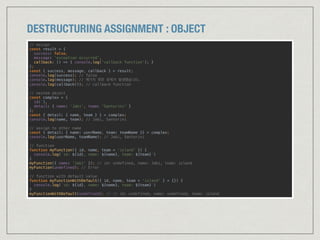
DESTRUCTURING ASSIGNMENT : OBJECT
// assign
const result = {

success: false,

message: ‘exception occurred’,

callback: () => { console.log('callback function’); }

};
const { success, message, callback } = result;

console.log(success); // false

console.log(message); // 예기치 못한 문제가 발생했습니다.

console.log(callback()); // callback function

// nested object
const complex = {

id: 1,

detail: { name: ‘Jabi', team: 'Santorini' }

};

const { detail: { name, team } } = complex;

console.log(name, team); // Jabi, Santorini

// assign to other name

const { detail: { name: userName, team: teamName }} = complex;

console.log(userName, teamName); // Jabi, Santorini

// function
function myFunction({ id, name, team = 'island' }) {

console.log(`id: ${id}, name: ${name}, team: ${team}`)

}

myFunction({ name: 'Jabi' }); // id: undefined, name: Jabi, team: island

myFunction(undefined); // Error

// function with default value

function myFunctionWithDefault({ id, name, team = 'island' } = {}) {

console.log(`id: ${id}, name: ${name}, team: ${team}`)

}

myFunctionWithDefault(undefined); // // id: undefined, name: undefined, team: island
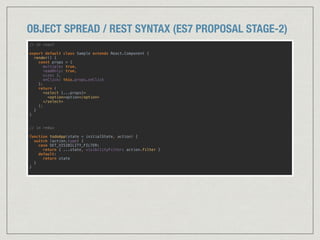
OBJECT SPREAD / REST SYNTAX (ES7 PROPOSAL STAGE-2)
// in react


export default class Sample extends React.Component {

render() {

const props = {

multiple: true,

readOnly: true,

size: 3,

onClick: this.props.onClick

};

return (

<select {...props}>

<option>option</option>

</select>

);

}

}


// in redux


function todoApp(state = initialState, action) {

switch (action.type) {

case SET_VISIBILITY_FILTER:

return { ...state, visibilityFilter: action.filter }

default:

return state

}

}

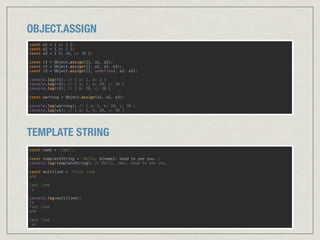
OBJECT.ASSIGN
const o1 = { a: 1 };

const o2 = { b: 2 };

const o3 = { b: 20, c: 30 };


const r1 = Object.assign({}, o1, o2);

const r2 = Object.assign({}, o1, o2, o3);

const r3 = Object.assign({}, undefined, o2, o3);


console.log(r1); // { a: 1, b: 2 }

console.log(r2); // { a: 1, b: 20, c: 30 }

console.log(r3); // { b: 20, c: 30 }


const warning = Object.assign(o1, o2, o3);


console.log(warning); // { a: 1, b: 20, c: 30 }

console.log(o1); // { a: 1, b: 20, c: 30 }
TEMPLATE STRING
const name = 'Jabi';


const templateString = `Hello, ${name}. Good to see you.`;

console.log(templateString); // Hello, Jabi. Good to see you.


const multiline = `first line

and


last line

`;


console.log(multiline);

/*

fist line

and


last line

*/
알아두면 좋을 ES6 문법
알아두면 좋을 ES6 문법
Promise
Set / Map
yield / generator
비동기관련하여자주쓰이므로흐름정도는알아두면좋음
new Set([1,2,3]).has(2), new Map({foo:’bar’}).has(‘foo’)
javascript에 대해 좀 더 파고 싶다면. ( #MDN / Ben Nadel's blog )
자주 쓰지만 안본 ES6/7 문법
자주 쓰지만 안본 ES6/7 문법
뻔한 내용이라…
자주 쓰지만 안본 ES6/7 문법
classes (es6)
https://developer.mozilla.org/en-US/docs/Web/JavaScript/Reference/Classes
뻔한 내용이라…
자주 쓰지만 안본 ES6/7 문법
classes (es6)
https://developer.mozilla.org/en-US/docs/Web/JavaScript/Reference/Classes
뻔한 내용이라…
export / import (es6)
https://developer.mozilla.org/en-US/docs/Web/JavaScript/Reference/Statements/export

https://developer.mozilla.org/en-US/docs/Web/JavaScript/Reference/Statements/import
자주 쓰지만 안본 ES6/7 문법
classes (es6)
https://developer.mozilla.org/en-US/docs/Web/JavaScript/Reference/Classes
뻔한 내용이라…
export / import (es6)
https://developer.mozilla.org/en-US/docs/Web/JavaScript/Reference/Statements/export

https://developer.mozilla.org/en-US/docs/Web/JavaScript/Reference/Statements/import
설명하려니 내용도 길고 귀차니즘의 압박
자주 쓰지만 안본 ES6/7 문법
classes (es6)
https://developer.mozilla.org/en-US/docs/Web/JavaScript/Reference/Classes
뻔한 내용이라…
export / import (es6)
https://developer.mozilla.org/en-US/docs/Web/JavaScript/Reference/Statements/export

https://developer.mozilla.org/en-US/docs/Web/JavaScript/Reference/Statements/import
설명하려니 내용도 길고 귀차니즘의 압박
(실은 잘 몰라서)
자주 쓰지만 안본 ES6/7 문법
async / await (es7)
https://jakearchibald.com/2014/es7-async-functions/
classes (es6)
https://developer.mozilla.org/en-US/docs/Web/JavaScript/Reference/Classes
뻔한 내용이라…
export / import (es6)
https://developer.mozilla.org/en-US/docs/Web/JavaScript/Reference/Statements/export

https://developer.mozilla.org/en-US/docs/Web/JavaScript/Reference/Statements/import
설명하려니 내용도 길고 귀차니즘의 압박
(실은 잘 몰라서)
THANK YOU

React, Redux and es6/7

  • 1.
    REACT | REDUX| ES6/7 THE 2ND MPO COP – by Jabi (Cho Dongho)
  • 2.
    AGENDA 1. 가볍게 훑어보는React 2. 대충 보는 Redux 3. 자주 쓰이는 ES6/7 문법 4. 알아두면 좋을 ES6 문법
  • 3.
  • 4.
  • 5.
  • 6.
  • 7.
    React ES6 classes https://facebook.github.io/react/docs/reusable-components.html#es6-classes exportdefault class Counter extends React.Component {
 constructor(props) {
 super(props);
 this.state = { count: props.initialCount };
 this.tick = this.tick.bind(this);
 }
 
 tick() {
 this.setState({ count: this.state.count + 1 });
 }
 
 render() {
 return (
 <div onClick={this.tick}>
 Clicks: { this.state.count }
 </div>
 );
 }
 }
 
 Counter.propTypes = {
 initialCount: React.PropTypes.number
 };
 
 Counter.defaultProps = {
 initialCount: 0
 }; export default React.createClass({
 propTypes: {
 initialCount: React.PropTypes.number
 },
 
 getDefaultProps: function() {
 return {
 initialCount: 0
 };
 },
 
 getInitialState: function() {
 return { count: this.props.initialCount };
 },
 
 tick: function() {
 this.setState({ count: this.state.count + 1 });
 },
 
 render: function() {
 return (
 <div onClick={this.tick}>
 Clicks: { this.state.count }
 </div>
 );
 }
 });
  • 8.
    React ES6 classes https://facebook.github.io/react/docs/reusable-components.html#es6-classes exportdefault React.createClass({
 propTypes: {
 initialCount: React.PropTypes.number
 },
 
 getDefaultProps: function() {
 return {
 initialCount: 0
 };
 },
 
 getInitialState: function() {
 return { count: this.props.initialCount };
 },
 
 tick: function() {
 this.setState({ count: this.state.count + 1 });
 },
 
 render: function() {
 return (
 <div onClick={this.tick}>
 Clicks: { this.state.count }
 </div>
 );
 }
 }); export default class Counter extends React.Component {
 static propTypes = {
 initialCount: React.PropTypes.number
 };
 
 static defaultProps = {
 initialCount: 0
 };
 
 state = { count: this.props.initialCount };
 
 constructor(props) {
 super(props);
 this.tick = this.tick.bind(this);
 }
 
 tick() {
 this.setState({ count: this.state.count + 1 });
 }
 
 render() {
 return (
 <div onClick={this.tick}>
 Clicks: { this.state.count }
 </div>
 );
 }
 }
  • 9.
    React ES6 classes METHODBINDING RECOMMENED https://facebook.github.io/react/docs/reusable-components.html#no-autobinding
  • 10.
    React ES6 classes METHODBINDING RECOMMENED https://facebook.github.io/react/docs/reusable-components.html#no-autobinding export default class Counter extends Component {
 tick() {
 this.setState({ count: this.state.count + 1 });
 }
 render() {
 return (
 <div onClick={::this.tick} />
 );
 }
 } BE CAREFUL (function bind operator)
  • 11.
    React Performance Props vsState - state를가진컴포넌트는복잡도를증가시킴 - 가급적이면최상위컴포넌트를제외하고는props만으로제어 React.PureComponent - react-addons-pure-render-mix구현 - reactv15.3.0부터사용가능 https://facebook.github.io/react/docs/pure-render-mixin.html https://facebook.github.io/react/docs/advanced-performance.html
  • 12.
  • 13.
    official: http://redux.js.org official (ko):http://dobbit.github.io/redux cartoon intro to redux: 
 http://bestalign.github.io/2015/10/26/cartoon-intro-to-redux
  • 14.
  • 15.
  • 16.
    Redux Action Store Reducer - 상태의변화를위해이뤄져야할행위에대한처리 - repository에서데이터로딩등 -액션의결과로상태를변경 - 응용프로그램의크기에따라단일또는여러리듀서로관리 - 응용프로그램의전체데이터를관리(dispatch포함)
  • 17.
  • 18.
  • 19.
  • 20.
  • 21.
  • 22.
  • 23.
    EXAMPLE - MODEL(APPLICATION STATE) { summaries: [ { id: 10, manageCode: 'baby_offline_coupon_15000', title: '로켓배송기저귀분유물티슈', description: '로켓배송 기저귀,분유,물티슈 카테고리 3만원 이상 구매 시 1만5천원 할인', progress { status: 'COMPLETED', progress: 100 } }, { /* ... */ }, ], paging: { page: 1, size: 2, totalPage: 5 } }
  • 24.
    EXAMPLE - REDUX exportfunction fetchSummary(params) {
 return {
 thunk: async(dispatch, getState, { repositories: { summary: repository } }) => {
 const { data: summaries } = await repository.getSummaries(params);
 const action = { type: 'UPDATE_SUMMARY', payload: summaries };
 return dispatch(action);
 }
 };
 } summaryAction.js const initialState = {
 summaries: []
 };
 
 export default function summaryReducer(state = initialState, action) {
 switch (action.type) {
 case 'UPDATE_SUMMARY':
 return {
 ...state,
 summaries: action.payload.contents
 }
 }
 } summaryReducer.js
  • 25.
    EXAMPLE - REDUX exportfunction fetchSummary(params) {
 return {
 thunk: async(dispatch, getState, { repositories: { summary: repository } }) => {
 const { data: summaries } = await repository.getSummaries(params);
 const action = { type: 'UPDATE_SUMMARY', payload: summaries };
 return dispatch(action);
 }
 };
 } summaryAction.js const initialState = {
 summaries: []
 };
 
 export default function summaryReducer(state = initialState, action) {
 switch (action.type) {
 case 'UPDATE_SUMMARY':
 return {
 ...state,
 summaries: action.payload.contents
 }
 }
 } summaryReducer.js import { combineReducers, createStore } from 'redux';
 import summaryReducer from './summaryReducer';
 import paginationReducer from './paginationReducer';
 import otherReducer from './otherReducer';
 
 const reducer = combineReducers({
 summary: summaryReducer,
 pagination: paginationReducer,
 other: otherReducer
 });
 
 const store = createStore(reducer); store.js
  • 26.
    EXAMPLE - CONTAINER importReact, { PureComponent, PropTypes } from 'react';
 import { connect } from 'react-redux';
 import { fetchSummary } from '../actions/summaryAction';
 import SummaryList from ‘../components/SummaryList’;
 import Pagination from ‘../components/Pagination’;
 
 @connect(state => ({
 summaries: state.summary.summaries,
 paging: state.pagination.paging
 }), {
 fetchSummary
 })
 export default class SummaryContainer extends PureComponent {
 static propTypes = {
 summaries: PropTypes.array.isRequired,
 paging: PropTypes.object.isRequired,
 fetchSummary: PropTypes.func.isRequired
 };
 
 render() {
 const { summaries, paging } = this.props;
 return (
 <div>
 <SummaryList summaries={summaries} />
 <Pagination pagination={paging}
 onPageChange={this.props.fetchSummary}
 />
 </div>
 );
 }
 }
 containers/SummaryContainer.js
  • 27.
    EXAMPLE - COMPONENT importReact, { PureComponent, PropTypes } from 'react';
 import Summary from './Summary';
 
 export default class SummaryList extends PureComponent {
 static propTypes = {
 summaries: PropTypes.array.isRequired,
 fetchSummary: PropTypes.func.isRequired
 }; 
 static defaultProps = { summaries: [] };
 
 render() {
 const { summaries } = this.props;
 return (
 <div>
 { summaries.map(summary => <Summary summary={summary} />) }
 </div> 
 );
 }
 }
 components/SummaryList.js
  • 28.
    EXAMPLE - COMPONENT importReact, { PureComponent, PropTypes } from 'react';
 import ProgressBar from './ProgressBar';
 import Download from './Download';
 
 export default class Summary extends PureComponent {
 static propTypes = {
 summary: PropTypes.object.isRequired
 }; 
 static defaultProps = {
 summary: {}
 }; 
 render() {
 const { id, manageCode, title, description, progress } = this.props;
 return (
 <div>
 <Text label="id" data={id} />
 <Text label="manageCode" data={manageCode} />
 <Text label="title" data={title} />
 <Text label="description" data={description} />
 <ProgressBar progress={progress} />
 <Download id={id} status={progress.status} />
 </div>
 );
 }
 } components/Summary.js Pagination, ProgressBar, Download 컴포넌트는 생략
  • 29.
  • 30.
  • 31.
    잘못된 예 export functionfetchCategory(code) {
 return {
 thunk: async(dispatch, getState, { repositories: { category: repository } }) => {
 const { data: categories } = await repository.getCategoriesByCode({code});
 const action = { type: 'UPDATE_CATEGORY', payload: categories };
 return dispatch(action);
 }
 };
 } categoryAction.js const initialState = {
 categories: []
 };
 
 export default function categoryReducer(state = initialState, action) {
 switch (action.type) {
 case 'UPDATE_CATEGORY':
 return {
 ...state,
 categories: action.payload
 }
 }
 } categoryReducer.js [ { code: 1010, name: ‘패션/의류잡화’ }, { code: 1011, name: ‘뷰티’ }, { code: 1012, name: ‘출산/유아동’ }, ] request: { code: 0 }
  • 32.
    실제 나타나는 결과 *앞선depth의카테고리목록이마지막으로가져온카테고리목록으로대체됨
  • 33.
  • 34.
    Why? reducer에서 카테고리 계층을표현하지 않고 상태값을 저장하기 때문
  • 35.
    REDUCER 개선 categories: [ {code: 1010, name: ‘패션/의류잡화’ }, { code: 1011, name: ‘뷰티’ }, { code: 1012, name: ‘출산/유아동’ }, ] categories: [ [ { code: 1010, name: ‘패션/의류잡화’, selected: false }, { code: 1011, name: ‘뷰티’, selected: false }, { code: 1012, name: ‘출산/유아동’, selected: true }, ], [ { code: 2010, name: ‘임신/출산준비할때’, selected: false }, { code: 2011, name: ‘기저귀갈때’, selected: true }, { code: 2012, name: ‘분유/유아식품’, selected: false }, ], [ /* .. */ ] ]
  • 36.
    import { REQUEST_CATEGORIES,RECEIVE_CATEGORIES } from '../actions/categoryAction';
 
 const initialState = {
 categories: []
 };
 
 export default function reducer(state = initialState, { type, request, payload }) {
 switch (type) {
 case REQUEST_CATEGORIES:
 return {
 ...state,
 isFetching: true
 };
 case RECEIVE_CATEGORIES:
 const { depth, code } = request;
 const categories = state.categories.slice(0, depth);
 if (depth > 0) {
 categories[depth - 1] = categories[depth - 1].map(o => ({ 
 code: o.code, 
 name: o.name, 
 selected: `${o.code}` === `${code}` 
 }));
 }
 return {
 ...state,
 categories: [...categories, payload],
 isFetching: false
 };
 default:
 return state;
 }
 }
 categoryReducer.js REDUCER 개선
  • 37.
    const prefix ='CATEGORY/';
 
 export const REQUEST_CATEGORIES = `${prefix}REQUEST_CATEGORIES`;
 export const RECEIVE_CATEGORIES = `${prefix}RECEIVE_CATEGORIES`;
 
 export function fetchCategory(depth = 0, code = 0) {
 return {
 thunk: async(dispatch, getState, { repositories: { category: repository } }) => {
 dispatch(requestCategory(code));
 const having = getState().category.categories;
 if (having.length > depth && !code) {
 const requestDepth = depth > 1 ? depth - 1 : 0;
 const categories = having[requestDepth].map(o => ({ code: o.code, name: o.name }));
 const requestCode = requestDepth > 0 ? having[requestDepth - 1].find(o => o.selected).code : 0;
 return dispatch(receiveCategory({ depth: requestDepth, code: requestCode }, categories));
 }
 const { data: categories } = await repository.getCategories(code);
 return dispatch(receiveCategory({ depth, code }, categories));
 }
 };
 }
 
 const requestCategory = (params) => ({
 type: REQUEST_CATEGORIES
 });
 
 const receiveCategory = (request, categories) => ({
 type: RECEIVE_CATEGORIES,
 request,
 payload: categories
 });
 categoryAction.js REDUCER 개선
  • 38.
  • 39.
    VAR VS LET/CONST *var의문제점
 http://chanlee.github.io/2013/12/10/javascript-variable-scope-and-hoisting var 함수범위변수를선언및초기화 const 읽기전용상수를선언 let 블록범위지역변수를선언및초기화
  • 40.
    VAR VS LET/CONST varoffice = 'coupang';
 var office = 'forward ventures'; // do not error occurred
 console.log(office); // forward ventures
 
 let color = 'blue';
 let color = 'black'; // TypeError
 
 let count = 0;
 count = 1;
 console.log(count); // 1
 
 const apple = 'apple';
 apple = 'samsung'; // error
 
 const comic = { name: 'DragonBall', author: ‘Akira Toriyama' };
 comic = { name: ‘One Piece', author: ‘Oda Eiichiro‘ }; // error
 
 comic.name = ‘One Piece';
 comic.author = ‘Oda Eiichiro';
 
 console.log(comic); // name: One Piece, author: Oda Eiichiro
 es6에서는 var 대신 let을 사용하고, 가급적이면 const를 사용하는 것을 추천
 배열이나 객체의 변경도 막겠다면 immutablejs 등을 사용하는 것도 고려
  • 41.
    ARROW FUNCTION // function
 [1, 3, 7 ].map(function(value) {
 return value * 2;
 });
 
 // arrow function
 [ 1, 3, 7 ].map(value => value * 2);
 
 // object를 반환하는 arrow function
 const toMap = name => {
 return { name: name };
 };
 
 // object를 반환하는 arrow function 간략 표기
 const toMap = name => ({ name: name }); 
 // compare ‘this’ with arrow function and function 
 const object = {
 f1: function() {
 console.log('f1', this);
 function f1_1() { console.log('f1_1', this) }
 setTimeout(f1_1, 1000);
 setTimeout(() => { console.log('f1_2', this) }, 1000);
 },
 f2: () => {
 console.log('f2', this);
 function f2_1() { console.log('f2_1', this) }
 setTimeout(f2_1, 1000);
 setTimeout(() => { console.log('f2_2', this) }, 1000);
 }
 };
 object.f1(); // Object, Window, Window
 object.f2(); // Window, Window, Window arrowfunction에서의this는arrowfunction이정의된지점의this값과같다
  • 42.
    DEFAULT PARAMETERS // 파라미터기본값이 없는 경우 function increase(number) {
 if (typeof number === 'undefined') return '[ERROR] number is undefined’; return number + 1;
 } console.log(increase()); // [ERROR] number is undefined
 console.log(increase(undefined)); // [ERROR] number is undefined
 console.log(increase(10)); // 11
 
 // 파라미터 기본값을 할당한 경우
 function increase(number = 0) {
 return number + 1;
 } console.log(increase()); // 1
 console.log(increase(undefined)); // 1
 console.log(increase(10)); // 11 OBJECT LITERAL : SHORTHAND // es5
 var x = 1;
 var y = 2;
 var object = {
 x: x, y: y
 };
 
 // es6
 const x = 1;
 const x = 2;
 const object = { x, y };

  • 43.
    SPREAD SYNTAX // spreadsyntax
 
 function myFunction(x, y, z) {
 console.log(`x: ${x}, y: ${y}, z: ${z}`);
 }
 
 const args1 = [ 1, 3, 5 ];
 const args2 = [ 'foo', 'bar' ];
 
 myFunction(...args1); // x: 1, y: 3, z: 5
 myFunction(...args2); // x: foo, y: bar, z: undefuned
 
 
 // rest parameters
 
 function restSyntax(x, y, z, ...rest) {
 console.log(`x: ${x}, y: ${y}, z: ${z}, rest: ${rest}`);
 }
 
 restSyntax(...args1); // x: 1, y: 3, z: 5, rest:
 restSyntax(...args1, ...args2); // x: 1, y: 3, z: 5, rest: foo, bar
 restSyntax(9, 8, 7, 6, 5, 4, 3, 2, 1); // x: 9, y: 8, z: 7, rest: 6, 5, 4, 3, 2, 1
 // assign
 
 const arr1 = [ 1, 2 ];
 const arr2 = [ 4, 5, 6 ];
 const arr3 = [ ...arr1, 3, ...arr2 ];
 
 console.log(arr1); // 1, 2
 console.log(arr2); // 4, 5, 6
 console.log(arr3); // 1, 2, 3, 4, 5, 6
  • 44.
    DESTRUCTURING ASSIGNMENT :ARRAY const arr = [ 1, 2, 3, 4, 5, 6 ];
 
 // assign
 const [ first, second ] = arr;
 console.log(first); // 1
 console.log(second); // 2
 
 // assign with pass some value
 const [ first, , , fourth ] = arr;
 console.log(first, fourth); // 1, 4
 
 // assign rest
 const [ first, second, ...rest ] = arr;
 console.log(first, second); // 1, 2
 console.log(rest); // [ 3, 4, 5, 6 ]
 
 // assign with default value
 const [ x, y = 999 ] = [ 1 ];
 console.log(x); // 1
 console.log(y); // 999
 
 // nested array
 const [ a, [ b ]] = [ 1, [ 2 ]];
 console.log(a); // 1
 console.log(b); // 2
 // function
 function myFunction([ x, y, z = 999]) { console.log(`x: ${x}, y: ${y}, z: ${z}`); }
 myFunction([ 1, 2, 3 ]); // x: 1, y: 2, z: 3
 myFunction([ 1, 2 ]); // x: 1, y: 2, z: 999
 myFunction(undefined); // Error
 
 // function with default value
 function myFunctionWithDefault([ x, y, z = 999] = []) { console.log(`x: ${x}, y: ${y}, z: ${z}`); }
 myFunctionWithDefault(undefined); // x: undefined, y: undefined, z: 999
  • 45.
    DESTRUCTURING ASSIGNMENT :OBJECT // assign const result = {
 success: false,
 message: ‘exception occurred’,
 callback: () => { console.log('callback function’); }
 }; const { success, message, callback } = result;
 console.log(success); // false
 console.log(message); // 예기치 못한 문제가 발생했습니다.
 console.log(callback()); // callback function
 // nested object const complex = {
 id: 1,
 detail: { name: ‘Jabi', team: 'Santorini' }
 };
 const { detail: { name, team } } = complex;
 console.log(name, team); // Jabi, Santorini
 // assign to other name
 const { detail: { name: userName, team: teamName }} = complex;
 console.log(userName, teamName); // Jabi, Santorini
 // function function myFunction({ id, name, team = 'island' }) {
 console.log(`id: ${id}, name: ${name}, team: ${team}`)
 }
 myFunction({ name: 'Jabi' }); // id: undefined, name: Jabi, team: island
 myFunction(undefined); // Error
 // function with default value
 function myFunctionWithDefault({ id, name, team = 'island' } = {}) {
 console.log(`id: ${id}, name: ${name}, team: ${team}`)
 }
 myFunctionWithDefault(undefined); // // id: undefined, name: undefined, team: island
  • 46.
    OBJECT SPREAD /REST SYNTAX (ES7 PROPOSAL STAGE-2) // in react
 
 export default class Sample extends React.Component {
 render() {
 const props = {
 multiple: true,
 readOnly: true,
 size: 3,
 onClick: this.props.onClick
 };
 return (
 <select {...props}>
 <option>option</option>
 </select>
 );
 }
 }
 
 // in redux
 
 function todoApp(state = initialState, action) {
 switch (action.type) {
 case SET_VISIBILITY_FILTER:
 return { ...state, visibilityFilter: action.filter }
 default:
 return state
 }
 }

  • 47.
    OBJECT.ASSIGN const o1 ={ a: 1 };
 const o2 = { b: 2 };
 const o3 = { b: 20, c: 30 };
 
 const r1 = Object.assign({}, o1, o2);
 const r2 = Object.assign({}, o1, o2, o3);
 const r3 = Object.assign({}, undefined, o2, o3);
 
 console.log(r1); // { a: 1, b: 2 }
 console.log(r2); // { a: 1, b: 20, c: 30 }
 console.log(r3); // { b: 20, c: 30 }
 
 const warning = Object.assign(o1, o2, o3);
 
 console.log(warning); // { a: 1, b: 20, c: 30 }
 console.log(o1); // { a: 1, b: 20, c: 30 } TEMPLATE STRING const name = 'Jabi';
 
 const templateString = `Hello, ${name}. Good to see you.`;
 console.log(templateString); // Hello, Jabi. Good to see you.
 
 const multiline = `first line
 and
 
 last line
 `;
 
 console.log(multiline);
 /*
 fist line
 and
 
 last line
 */
  • 48.
  • 49.
    알아두면 좋을 ES6문법 Promise Set / Map yield / generator 비동기관련하여자주쓰이므로흐름정도는알아두면좋음 new Set([1,2,3]).has(2), new Map({foo:’bar’}).has(‘foo’) javascript에 대해 좀 더 파고 싶다면. ( #MDN / Ben Nadel's blog )
  • 50.
  • 51.
    자주 쓰지만 안본ES6/7 문법 뻔한 내용이라…
  • 52.
    자주 쓰지만 안본ES6/7 문법 classes (es6) https://developer.mozilla.org/en-US/docs/Web/JavaScript/Reference/Classes 뻔한 내용이라…
  • 53.
    자주 쓰지만 안본ES6/7 문법 classes (es6) https://developer.mozilla.org/en-US/docs/Web/JavaScript/Reference/Classes 뻔한 내용이라… export / import (es6) https://developer.mozilla.org/en-US/docs/Web/JavaScript/Reference/Statements/export
 https://developer.mozilla.org/en-US/docs/Web/JavaScript/Reference/Statements/import
  • 54.
    자주 쓰지만 안본ES6/7 문법 classes (es6) https://developer.mozilla.org/en-US/docs/Web/JavaScript/Reference/Classes 뻔한 내용이라… export / import (es6) https://developer.mozilla.org/en-US/docs/Web/JavaScript/Reference/Statements/export
 https://developer.mozilla.org/en-US/docs/Web/JavaScript/Reference/Statements/import 설명하려니 내용도 길고 귀차니즘의 압박
  • 55.
    자주 쓰지만 안본ES6/7 문법 classes (es6) https://developer.mozilla.org/en-US/docs/Web/JavaScript/Reference/Classes 뻔한 내용이라… export / import (es6) https://developer.mozilla.org/en-US/docs/Web/JavaScript/Reference/Statements/export
 https://developer.mozilla.org/en-US/docs/Web/JavaScript/Reference/Statements/import 설명하려니 내용도 길고 귀차니즘의 압박 (실은 잘 몰라서)
  • 56.
    자주 쓰지만 안본ES6/7 문법 async / await (es7) https://jakearchibald.com/2014/es7-async-functions/ classes (es6) https://developer.mozilla.org/en-US/docs/Web/JavaScript/Reference/Classes 뻔한 내용이라… export / import (es6) https://developer.mozilla.org/en-US/docs/Web/JavaScript/Reference/Statements/export
 https://developer.mozilla.org/en-US/docs/Web/JavaScript/Reference/Statements/import 설명하려니 내용도 길고 귀차니즘의 압박 (실은 잘 몰라서)
  • 57.