Recipes of Data Warehouse and
Business Intelligence

Load a Data Source File
(.csv with header, rows counter in a separate file)
into a Staging Area table with a click
The Micro ETL Foundation
•
•

•

•

The Micro ETL Foundation is a set of ideas and solutions for Data Warehouse and
Business Intelligence Projects in Oracle environment.
It doesn’t use expensive ETL tools, but only your intelligence and ability to think,
configure, build and load data using the features and the programming language
of your RDBMS.
This recipes are another easy example with different type of data source. Copying
the content of the following slides with your editor and SQL Interface utility, you
can reproduce this example.
The first example is present in the slides of «Recipes 1 of Data Warehouse and
Business Intelligence»
The source data file
•
•
•
•
•
•

Get the data file to load. In this recipe we use a data file with these features:
One initial rows (is the header of the .csv file).
The reference day of the data is the current day.
No tail rows. The records number of the data file is in a separate file with «.row»
extension
Columns have «;» like separator.
The next figure is the content of the data file that we call employees1.csv
EMPLOYEE_ID FIRST_NAME
117 Sigal
118 Guy
119 Karen
120 Matthew
121 Adam
122 Payam
123 Shanta
124 Kevin
125 Julia
126 Irene

LAST_NAME
Tobias
Himuro
Colmenares
Weiss
Fripp
Kaufling
Vollman
Mourgos
Nayer
Mikkilineni

EMAIL
PHONE_NUMBER HIRE_DATE JOB_ID
SALARY COMMISSION_PCT MANAGER_ID DEPARTMENT_ID
STOBIAS
5.151.274.564 24/07/2005 PU_CLERK
2800
114
30
GHIMURO
5.151.274.565 15/11/2006 PU_CLERK
2600
114
30
KCOLMENA
5.151.274.566 10/08/2007 PU_CLERK
2500
114
30
MWEISS
6.501.231.234 18/07/2004 ST_MAN
8000
100
50
AFRIPP
6.501.232.234 10/04/2005 ST_MAN
8200
100
50
PKAUFLIN
6.501.233.234 01/05/2003 ST_MAN
7900
100
50
SVOLLMAN
6.501.234.234 10/10/2005 ST_MAN
6500
100
50
KMOURGOS
6.501.235.234 16/11/2007 ST_MAN
5800
100
50
JNAYER
6.501.241.214 16/07/2005 ST_CLERK
3200
120
50
IMIKKILI
6.501.241.224 28/09/2006 ST_CLERK
2700
120
50
The .row file
•
•
•

Get the .row file. It is a file with only one row that contains the number of rows of
the data file.
The next figure is the content of the data file that we call employees1.row
The rows number start from 17° char for 13 chars.

13 char
BANKIN14201312310000000000010

17° char
The definition file
•
•
•
•
•
•
•

Build the definition file from your documentation. It is the same of that seen in the
slides of «Recipes 1 of data Warehouse and Business Intelligence»
It has to be a «.csv» file because it must be seen by an external table.
For this example we define the minimum set of information.
COLUMN_COD will be the name of the column in the DWH.
FXV_TXT contains little transformations to be done.
COLSIZE_NUM is the size of the column in the data file.
The next is the content of the definition file that we call employees1.csv
COLUMN_ID HOST_COLUMN_COD
1 EMPLOYEE_ID
2 FIRST_NAME
3 LAST_NAME
4 EMAIL
5 PHONE_NUMBER
6 HIRE_DATE
7 JOB_ID
8 SALARY
9 COMMISSION_PCT
10 MANAGER_ID
11 DEPARTMENT_ID

COLUMN_COD
EMPLOYEE_ID
FIRST_NAME
LAST_NAME
EMAIL
PHONE_NUMBER
HIRE_DATE
JOB_ID
SALARY
COMMISSION_PCT
MANAGER_ID
DEPARTMENT_ID

TYPE_TXT
NUMBER (6)
VARCHAR2(20)
VARCHAR2(25)
VARCHAR2(25)
VARCHAR2(20)
NUMBER
VARCHAR2(10)
NUMBER (8,2)
NUMBER (2,2)
NUMBER (6)
NUMBER (4)

COLSIZE_NUM FXV_TXT
6 to_number(EMPLOYEE_ID)
20
25
25
20 replace(PHONE_NUMBER,'.','')
10 TO_NUMBER(to_char(to_date(HIRE_DATE,'dd/mm/yyyy'),'yyyymmdd'))
10
9 to_number(SALARY)
4 to_number(COMMISSION_PCT,'99.99')
6 to_number(MANAGER_ID)
4 to_number(DEPARTMENT_ID)
The physical/logical environment
•

•

•

Create two Operation System folder.
The first for the data file and the
second for the configuration file
Create some Oracle directories
needed for the external tables
definition
Position the data and the
configuration file in the folders.

DROP DIRECTORY STA_BCK;
CREATE DIRECTORY STA_BCK AS 'C:IOS';
DROP DIRECTORY STA_LOG;
CREATE DIRECTORY STA_LOG AS 'C:IOS';
DROP DIRECTORY STA_RCV;
CREATE DIRECTORY STA_RCV AS 'C:IOS';
DROP DIRECTORY STA_CFT;
CREATE DIRECTORY STA_CFT AS 'C:IOSCFT';
DROP DIRECTORY STA_CFT_LOG;
CREATE DIRECTORY STA_CFT_LOG AS 'C:IOSCFT';
The source configuration table
•
•
•
•
•

Create the configuration table of the data
source showed in the slide 1
It contains the unique identificator of data
source (IO_ID)
It contains the folder references (*_DIR)
It contains the information about the format
of different types of data source
Only some fields will be configured.

DROP TABLE STA_IO_CFT;
CREATE TABLE STA_IO_CFT
(
IO_COD
VARCHAR2(12),
RCV_DIR
VARCHAR2(30),
BCK_DIR
VARCHAR2(30),
LOG_DIR
VARCHAR2(30),
HEAD_CNT
NUMBER,
FOO_CNT
NUMBER,
SEP_TXT
VARCHAR2(1),
IDR_NUM
NUMBER,
IDC_NUM
NUMBER,
IDS_NUM
NUMBER,
IDF_TXT
VARCHAR2(30),
EDC_NUM
NUMBER,
EDS_NUM
NUMBER,
EDF_TXT
VARCHAR2(30),
RCR_NUM
NUMBER,
RCC_NUM
NUMBER,
RCS_NUM
NUMBER,
RCF_LIKE_TXT VARCHAR2(30),
FILE_LIKE_TXT VARCHAR2(60)
);
The load of configuration table
•
•
•
•
•
•

•

Load the table according to the features of
this example:
The folders reference (rcv_dir,bck_dir,log_dir)
The name of file (file_like_txt)
The number of header (head_cnt) and footer
rows (foo_cnt).
The separator character (sep_txt). It is a csv
file with «;» separator.
The reference day is the current day, so the
related info are all null.(idr_num, idc_num,
ids_num,idf_txt
The position in the external file, with «.row»
extension, of the rows number of the source
data file.

INSERT INTO STA_IO_CFT (
IO_COD
,RCV_DIR,BCK_DIR,LOG_DIR
,FILE_LIKE_TXT
,HEAD_CNT,FOO_CNT,SEP_TXT
,IDR_NUM,IDC_NUM,IDS_NUM,IDF_TXT
,RCR_NUM,RCC_NUM,RCS_NUM,RCF_LIKE_
TXT
)
VALUES (
'employees1'
,'STA_RCV','STA_BCK','STA_LOG'
,'employees1.csv'
,1,0,';'
,null,null,null,null
,0,17,13,'.row'
);
The source structure configuration table
•
•
•

Create the configuration table of the data
structure showed in the slide 5
It is a metadata table
You can add others info like the column
description.

DROP TABLE STA_EMPLOYEES1_CXT;
CREATE TABLE STA_EMPLOYEES1_CXT (
COLUMN_ID
VARCHAR2(4),
HOST_COLUMN_COD VARCHAR2(30),
COLUMN_COD
VARCHAR2(30),
TYPE_TXT
VARCHAR2(30),
COLSIZE_NUM
VARCHAR2(4),
FXV_TXT
VARCHAR2(200))
ORGANIZATION EXTERNAL (
TYPE ORACLE_LOADER
DEFAULT DIRECTORY STA_CFT
ACCESS PARAMETERS (
RECORDS DELIMITED BY NEWLINE
BADFILE STA_CFT:'EMPLOYEES1.BAD'
DISCARDFILE STA_CFT:'EMPLOYEES1.DSC'
LOGFILE STA_CFT:'EMPLOYEES1.LOG'
SKIP 1 FIELDS TERMINATED BY';' LRTRIM
MISSING FIELD VALUES ARE NULL
REJECT ROWS WITH ALL NULL FIELDS (
COLUMN_ID
,HOST_COLUMN_COD
,COLUMN_COD
,TYPE_TXT
,COLSIZE_NUM
,FXV_TXT))
LOCATION (STA_CFT:'EMPLOYEES1.CSV'))
REJECT LIMIT UNLIMITED
NOPARALLEL
NOMONITORING;
The source external table
•
•
•

Create the external table linked to the source
data file.
The name and type of columns have to be
the same of the configuration view.
ROW_CNT is a useful feature of the Oracle
external table to give a numbering to every
row

DROP TABLE STA_EMPLOYEES1_FXT;
CREATE TABLE STA_EMPLOYEES1_FXT (
EMPLOYEE_ID
VARCHAR2(11),
FIRST_NAME
VARCHAR2(20),
LAST_NAME
VARCHAR2(25),
EMAIL
VARCHAR2(25),
PHONE_NUMBER
VARCHAR2(20),
HIRE_DATE
VARCHAR2(10),
JOB_ID
VARCHAR2(10),
SALARY
VARCHAR2(9),
COMMISSION_PCT VARCHAR2(14),
MANAGER_ID
VARCHAR2(10),
DEPARTMENT_ID
VARCHAR2(13),
ROW_CNT
NUMBER)
ORGANIZATION EXTERNAL (
TYPE ORACLE_LOADER
DEFAULT DIRECTORY STA_BCK
ACCESS PARAMETERS (
RECORDS DELIMITED BY NEWLINE
BADFILE STA_LOG:'employees1.bad'
DISCARDFILE STA_LOG:'employees1.dsc'
LOGFILE STA_LOG:'employees1.log'
FIELDS TERMINATED BY ';' LRTRIM
MISSING FIELD VALUES ARE NULL
REJECT ROWS WITH ALL NULL FIELDS (
EMPLOYEE_ID
,FIRST_NAME
,LAST_NAME
,EMAIL
,PHONE_NUMBER
,HIRE_DATE
,JOB_ID
,SALARY
,COMMISSION_PCT
,MANAGER_ID
,DEPARTMENT_ID
,ROW_CNT RECNUM))
LOCATION (STA_BCK:'employees1.csv'))
REJECT LIMIT UNLIMITED
NOPARALLEL
NOMONITORING;
The external table to .row file
•

•
•

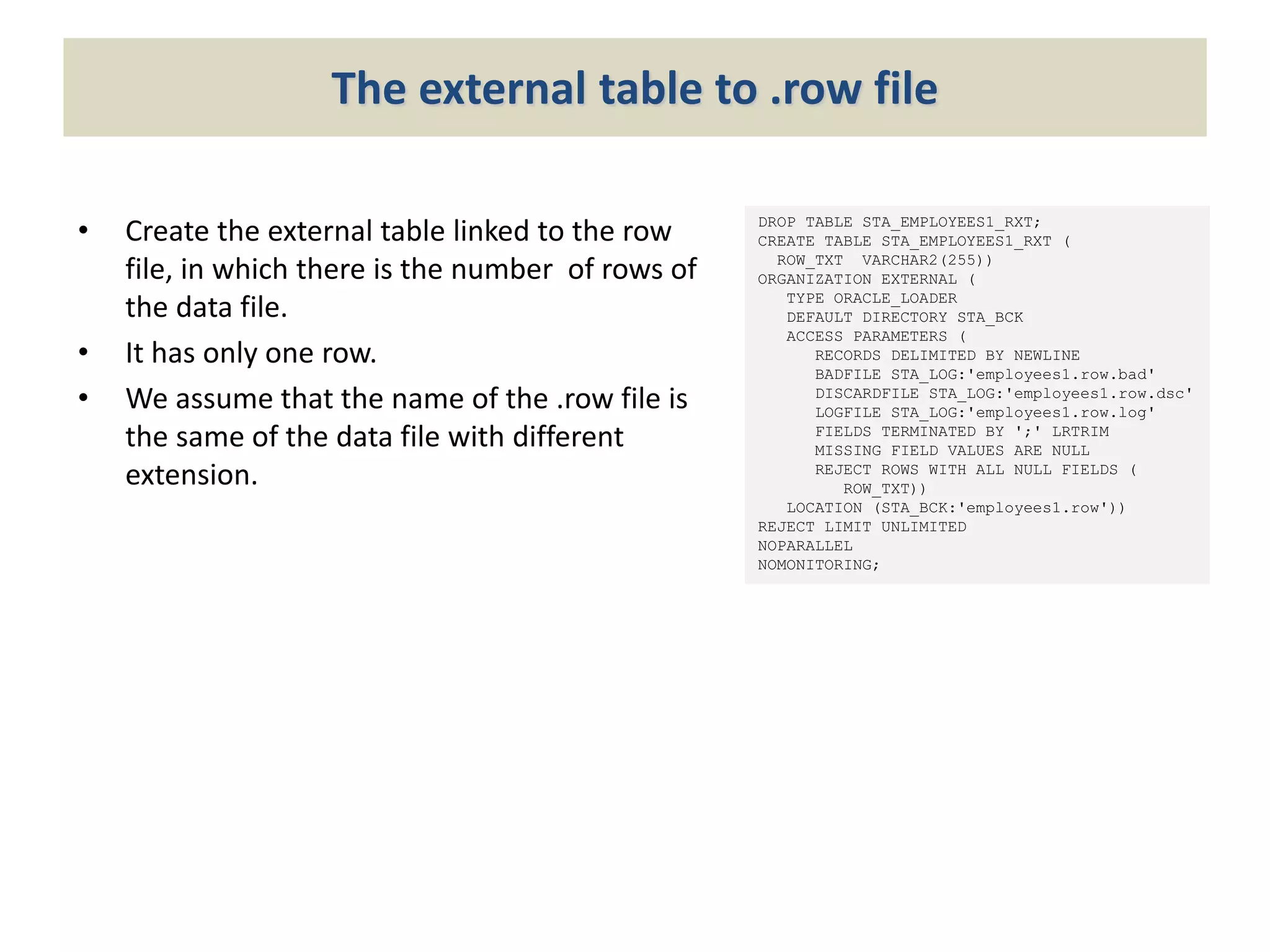
Create the external table linked to the row
file, in which there is the number of rows of
the data file.
It has only one row.
We assume that the name of the .row file is
the same of the data file with different
extension.

DROP TABLE STA_EMPLOYEES1_RXT;
CREATE TABLE STA_EMPLOYEES1_RXT (
ROW_TXT VARCHAR2(255))
ORGANIZATION EXTERNAL (
TYPE ORACLE_LOADER
DEFAULT DIRECTORY STA_BCK
ACCESS PARAMETERS (
RECORDS DELIMITED BY NEWLINE
BADFILE STA_LOG:'employees1.row.bad'
DISCARDFILE STA_LOG:'employees1.row.dsc'
LOGFILE STA_LOG:'employees1.row.log'
FIELDS TERMINATED BY ';' LRTRIM
MISSING FIELD VALUES ARE NULL
REJECT ROWS WITH ALL NULL FIELDS (
ROW_TXT))
LOCATION (STA_BCK:'employees1.row'))
REJECT LIMIT UNLIMITED
NOPARALLEL
NOMONITORING;
The source external view (1)
•
•

The goal of the view is to prepare the data to load in the staging table.
It will use the useful SQL clause «with» to build the information needed. See in
details the single sub-query blocks.
– T1 = get the name of the source data file using the table of the Oracle
dictionary
– T2 = get the reference day from the current sysdate.
– T3 = get the declared rows number in the row file using the external table.
– T4 = get the rows number using the row counter of the external table
– T5 = get the header/footer rows numbers.

•

You can control that the declared rows number and the rows number of the data
file are the same.
The source external view (2)
•

The complete SQL Statement is:

CREATE OR REPLACE FORCE VIEW STA_EMPLOYEES1_FXV AS
WITH T1 AS (SELECT SUBSTR(LOCATION,1,80) SOURCE_COD FROM USER_EXTERNAL_LOCATIONS
WHERE TABLE_NAME = 'STA_EMPLOYEES1_FXT')
,T2 AS (SELECT TO_CHAR(SYSDATE,'YYYYMMDD') DAY_KEY FROM DUAL)
,T3 AS (SELECT ROW_TXT FROM STA_EMPLOYEES1_RXT)
,T4 AS (SELECT MAX(ROW_CNT) R FROM STA_EMPLOYEES1_FXT)
,T5 AS (SELECT HEAD_CNT X,FOO_CNT Y,RCC_NUM RY,RCS_NUM S
FROM STA_IO_CFT WHERE IO_COD = 'employees1')
SELECT TO_NUMBER(EMPLOYEE_ID) EMPLOYEE_ID
,FIRST_NAME FIRST_NAME
,LAST_NAME LAST_NAME
,EMAIL EMAIL
,REPLACE(PHONE_NUMBER,'.','') PHONE_NUMBER
,TO_NUMBER(TO_CHAR(TO_DATE(HIRE_DATE,'DD/MM/YYYY'),'YYYYMMDD')) HIRE_DATE
,JOB_ID JOB_ID
,TO_NUMBER(SALARY) SALARY
,TO_NUMBER(COMMISSION_PCT,'99.99') COMMISSION_PCT
,TO_NUMBER(MANAGER_ID) MANAGER_ID
,TO_NUMBER(DEPARTMENT_ID) DEPARTMENT_ID
,SOURCE_COD
,DAY_KEY
,TO_NUMBER(SUBSTR(ROW_TXT,RY,S)) ROWS_NUM
FROM STA_EMPLOYEES1_FXT,T1,T2,T3,T4,T5
WHERE ROW_CNT > X AND ROW_CNT <= R-Y;
The Staging table
•
•

•

The Staging table will be loaded from
the previous view.
It has the 3 technical fields to remember
the name of the source data file, the
reference day, and the rows num.
The rows num can be avoided, (is the
same for all records) but it can be useful
for statistical checks.

DROP TABLE STA_EMPLOYEES1_STT;
CREATE TABLE STA_EMPLOYEES1_STT
(
EMPLOYEE_ID
NUMBER,
FIRST_NAME
VARCHAR2(20),
LAST_NAME
VARCHAR2(25),
EMAIL
VARCHAR2(25),
PHONE_NUMBER
VARCHAR2(20),
HIRE_DATE
NUMBER,
JOB_ID
VARCHAR2(10),
SALARY
NUMBER,
COMMISSION_PCT NUMBER,
MANAGER_ID
NUMBER,
DEPARTMENT_ID
NUMBER,
SOURCE_COD
VARCHAR2(320),
DAY_KEY
VARCHAR2(8),
ROWS_NUM
NUMBER
);
The final load
•

We are at the end of this recipes. Now we can do the final load with a simple SQL
statement

INSERT INTO STA_EMPLOYEES1_STT
SELECT * FROM STA_EMPLOYEES1_FXV;
•

I underline the following features:
– All is done without ETL Tool
– The only physical structure created in the DWH is the final staging table
– Everything is controlled by logical structures (external tables and views)
– Everything without writing any code
– If you create a SQL script of this recipe, you will load the staging table with a
click

Email - massimo_cenci@yahoo.it
Blog (italian/english) - http://massimocenci.blogspot.it/

Data Warehouse and Business Intelligence - Recipe 2

  • 1.
    Recipes of DataWarehouse and Business Intelligence Load a Data Source File (.csv with header, rows counter in a separate file) into a Staging Area table with a click
  • 2.
    The Micro ETLFoundation • • • • The Micro ETL Foundation is a set of ideas and solutions for Data Warehouse and Business Intelligence Projects in Oracle environment. It doesn’t use expensive ETL tools, but only your intelligence and ability to think, configure, build and load data using the features and the programming language of your RDBMS. This recipes are another easy example with different type of data source. Copying the content of the following slides with your editor and SQL Interface utility, you can reproduce this example. The first example is present in the slides of «Recipes 1 of Data Warehouse and Business Intelligence»
  • 3.
    The source datafile • • • • • • Get the data file to load. In this recipe we use a data file with these features: One initial rows (is the header of the .csv file). The reference day of the data is the current day. No tail rows. The records number of the data file is in a separate file with «.row» extension Columns have «;» like separator. The next figure is the content of the data file that we call employees1.csv EMPLOYEE_ID FIRST_NAME 117 Sigal 118 Guy 119 Karen 120 Matthew 121 Adam 122 Payam 123 Shanta 124 Kevin 125 Julia 126 Irene LAST_NAME Tobias Himuro Colmenares Weiss Fripp Kaufling Vollman Mourgos Nayer Mikkilineni EMAIL PHONE_NUMBER HIRE_DATE JOB_ID SALARY COMMISSION_PCT MANAGER_ID DEPARTMENT_ID STOBIAS 5.151.274.564 24/07/2005 PU_CLERK 2800 114 30 GHIMURO 5.151.274.565 15/11/2006 PU_CLERK 2600 114 30 KCOLMENA 5.151.274.566 10/08/2007 PU_CLERK 2500 114 30 MWEISS 6.501.231.234 18/07/2004 ST_MAN 8000 100 50 AFRIPP 6.501.232.234 10/04/2005 ST_MAN 8200 100 50 PKAUFLIN 6.501.233.234 01/05/2003 ST_MAN 7900 100 50 SVOLLMAN 6.501.234.234 10/10/2005 ST_MAN 6500 100 50 KMOURGOS 6.501.235.234 16/11/2007 ST_MAN 5800 100 50 JNAYER 6.501.241.214 16/07/2005 ST_CLERK 3200 120 50 IMIKKILI 6.501.241.224 28/09/2006 ST_CLERK 2700 120 50
  • 4.
    The .row file • • • Getthe .row file. It is a file with only one row that contains the number of rows of the data file. The next figure is the content of the data file that we call employees1.row The rows number start from 17° char for 13 chars. 13 char BANKIN14201312310000000000010 17° char
  • 5.
    The definition file • • • • • • • Buildthe definition file from your documentation. It is the same of that seen in the slides of «Recipes 1 of data Warehouse and Business Intelligence» It has to be a «.csv» file because it must be seen by an external table. For this example we define the minimum set of information. COLUMN_COD will be the name of the column in the DWH. FXV_TXT contains little transformations to be done. COLSIZE_NUM is the size of the column in the data file. The next is the content of the definition file that we call employees1.csv COLUMN_ID HOST_COLUMN_COD 1 EMPLOYEE_ID 2 FIRST_NAME 3 LAST_NAME 4 EMAIL 5 PHONE_NUMBER 6 HIRE_DATE 7 JOB_ID 8 SALARY 9 COMMISSION_PCT 10 MANAGER_ID 11 DEPARTMENT_ID COLUMN_COD EMPLOYEE_ID FIRST_NAME LAST_NAME EMAIL PHONE_NUMBER HIRE_DATE JOB_ID SALARY COMMISSION_PCT MANAGER_ID DEPARTMENT_ID TYPE_TXT NUMBER (6) VARCHAR2(20) VARCHAR2(25) VARCHAR2(25) VARCHAR2(20) NUMBER VARCHAR2(10) NUMBER (8,2) NUMBER (2,2) NUMBER (6) NUMBER (4) COLSIZE_NUM FXV_TXT 6 to_number(EMPLOYEE_ID) 20 25 25 20 replace(PHONE_NUMBER,'.','') 10 TO_NUMBER(to_char(to_date(HIRE_DATE,'dd/mm/yyyy'),'yyyymmdd')) 10 9 to_number(SALARY) 4 to_number(COMMISSION_PCT,'99.99') 6 to_number(MANAGER_ID) 4 to_number(DEPARTMENT_ID)
  • 6.
    The physical/logical environment • • • Createtwo Operation System folder. The first for the data file and the second for the configuration file Create some Oracle directories needed for the external tables definition Position the data and the configuration file in the folders. DROP DIRECTORY STA_BCK; CREATE DIRECTORY STA_BCK AS 'C:IOS'; DROP DIRECTORY STA_LOG; CREATE DIRECTORY STA_LOG AS 'C:IOS'; DROP DIRECTORY STA_RCV; CREATE DIRECTORY STA_RCV AS 'C:IOS'; DROP DIRECTORY STA_CFT; CREATE DIRECTORY STA_CFT AS 'C:IOSCFT'; DROP DIRECTORY STA_CFT_LOG; CREATE DIRECTORY STA_CFT_LOG AS 'C:IOSCFT';
  • 7.
    The source configurationtable • • • • • Create the configuration table of the data source showed in the slide 1 It contains the unique identificator of data source (IO_ID) It contains the folder references (*_DIR) It contains the information about the format of different types of data source Only some fields will be configured. DROP TABLE STA_IO_CFT; CREATE TABLE STA_IO_CFT ( IO_COD VARCHAR2(12), RCV_DIR VARCHAR2(30), BCK_DIR VARCHAR2(30), LOG_DIR VARCHAR2(30), HEAD_CNT NUMBER, FOO_CNT NUMBER, SEP_TXT VARCHAR2(1), IDR_NUM NUMBER, IDC_NUM NUMBER, IDS_NUM NUMBER, IDF_TXT VARCHAR2(30), EDC_NUM NUMBER, EDS_NUM NUMBER, EDF_TXT VARCHAR2(30), RCR_NUM NUMBER, RCC_NUM NUMBER, RCS_NUM NUMBER, RCF_LIKE_TXT VARCHAR2(30), FILE_LIKE_TXT VARCHAR2(60) );
  • 8.
    The load ofconfiguration table • • • • • • • Load the table according to the features of this example: The folders reference (rcv_dir,bck_dir,log_dir) The name of file (file_like_txt) The number of header (head_cnt) and footer rows (foo_cnt). The separator character (sep_txt). It is a csv file with «;» separator. The reference day is the current day, so the related info are all null.(idr_num, idc_num, ids_num,idf_txt The position in the external file, with «.row» extension, of the rows number of the source data file. INSERT INTO STA_IO_CFT ( IO_COD ,RCV_DIR,BCK_DIR,LOG_DIR ,FILE_LIKE_TXT ,HEAD_CNT,FOO_CNT,SEP_TXT ,IDR_NUM,IDC_NUM,IDS_NUM,IDF_TXT ,RCR_NUM,RCC_NUM,RCS_NUM,RCF_LIKE_ TXT ) VALUES ( 'employees1' ,'STA_RCV','STA_BCK','STA_LOG' ,'employees1.csv' ,1,0,';' ,null,null,null,null ,0,17,13,'.row' );
  • 9.
    The source structureconfiguration table • • • Create the configuration table of the data structure showed in the slide 5 It is a metadata table You can add others info like the column description. DROP TABLE STA_EMPLOYEES1_CXT; CREATE TABLE STA_EMPLOYEES1_CXT ( COLUMN_ID VARCHAR2(4), HOST_COLUMN_COD VARCHAR2(30), COLUMN_COD VARCHAR2(30), TYPE_TXT VARCHAR2(30), COLSIZE_NUM VARCHAR2(4), FXV_TXT VARCHAR2(200)) ORGANIZATION EXTERNAL ( TYPE ORACLE_LOADER DEFAULT DIRECTORY STA_CFT ACCESS PARAMETERS ( RECORDS DELIMITED BY NEWLINE BADFILE STA_CFT:'EMPLOYEES1.BAD' DISCARDFILE STA_CFT:'EMPLOYEES1.DSC' LOGFILE STA_CFT:'EMPLOYEES1.LOG' SKIP 1 FIELDS TERMINATED BY';' LRTRIM MISSING FIELD VALUES ARE NULL REJECT ROWS WITH ALL NULL FIELDS ( COLUMN_ID ,HOST_COLUMN_COD ,COLUMN_COD ,TYPE_TXT ,COLSIZE_NUM ,FXV_TXT)) LOCATION (STA_CFT:'EMPLOYEES1.CSV')) REJECT LIMIT UNLIMITED NOPARALLEL NOMONITORING;
  • 10.
    The source externaltable • • • Create the external table linked to the source data file. The name and type of columns have to be the same of the configuration view. ROW_CNT is a useful feature of the Oracle external table to give a numbering to every row DROP TABLE STA_EMPLOYEES1_FXT; CREATE TABLE STA_EMPLOYEES1_FXT ( EMPLOYEE_ID VARCHAR2(11), FIRST_NAME VARCHAR2(20), LAST_NAME VARCHAR2(25), EMAIL VARCHAR2(25), PHONE_NUMBER VARCHAR2(20), HIRE_DATE VARCHAR2(10), JOB_ID VARCHAR2(10), SALARY VARCHAR2(9), COMMISSION_PCT VARCHAR2(14), MANAGER_ID VARCHAR2(10), DEPARTMENT_ID VARCHAR2(13), ROW_CNT NUMBER) ORGANIZATION EXTERNAL ( TYPE ORACLE_LOADER DEFAULT DIRECTORY STA_BCK ACCESS PARAMETERS ( RECORDS DELIMITED BY NEWLINE BADFILE STA_LOG:'employees1.bad' DISCARDFILE STA_LOG:'employees1.dsc' LOGFILE STA_LOG:'employees1.log' FIELDS TERMINATED BY ';' LRTRIM MISSING FIELD VALUES ARE NULL REJECT ROWS WITH ALL NULL FIELDS ( EMPLOYEE_ID ,FIRST_NAME ,LAST_NAME ,EMAIL ,PHONE_NUMBER ,HIRE_DATE ,JOB_ID ,SALARY ,COMMISSION_PCT ,MANAGER_ID ,DEPARTMENT_ID ,ROW_CNT RECNUM)) LOCATION (STA_BCK:'employees1.csv')) REJECT LIMIT UNLIMITED NOPARALLEL NOMONITORING;
  • 11.
    The external tableto .row file • • • Create the external table linked to the row file, in which there is the number of rows of the data file. It has only one row. We assume that the name of the .row file is the same of the data file with different extension. DROP TABLE STA_EMPLOYEES1_RXT; CREATE TABLE STA_EMPLOYEES1_RXT ( ROW_TXT VARCHAR2(255)) ORGANIZATION EXTERNAL ( TYPE ORACLE_LOADER DEFAULT DIRECTORY STA_BCK ACCESS PARAMETERS ( RECORDS DELIMITED BY NEWLINE BADFILE STA_LOG:'employees1.row.bad' DISCARDFILE STA_LOG:'employees1.row.dsc' LOGFILE STA_LOG:'employees1.row.log' FIELDS TERMINATED BY ';' LRTRIM MISSING FIELD VALUES ARE NULL REJECT ROWS WITH ALL NULL FIELDS ( ROW_TXT)) LOCATION (STA_BCK:'employees1.row')) REJECT LIMIT UNLIMITED NOPARALLEL NOMONITORING;
  • 12.
    The source externalview (1) • • The goal of the view is to prepare the data to load in the staging table. It will use the useful SQL clause «with» to build the information needed. See in details the single sub-query blocks. – T1 = get the name of the source data file using the table of the Oracle dictionary – T2 = get the reference day from the current sysdate. – T3 = get the declared rows number in the row file using the external table. – T4 = get the rows number using the row counter of the external table – T5 = get the header/footer rows numbers. • You can control that the declared rows number and the rows number of the data file are the same.
  • 13.
    The source externalview (2) • The complete SQL Statement is: CREATE OR REPLACE FORCE VIEW STA_EMPLOYEES1_FXV AS WITH T1 AS (SELECT SUBSTR(LOCATION,1,80) SOURCE_COD FROM USER_EXTERNAL_LOCATIONS WHERE TABLE_NAME = 'STA_EMPLOYEES1_FXT') ,T2 AS (SELECT TO_CHAR(SYSDATE,'YYYYMMDD') DAY_KEY FROM DUAL) ,T3 AS (SELECT ROW_TXT FROM STA_EMPLOYEES1_RXT) ,T4 AS (SELECT MAX(ROW_CNT) R FROM STA_EMPLOYEES1_FXT) ,T5 AS (SELECT HEAD_CNT X,FOO_CNT Y,RCC_NUM RY,RCS_NUM S FROM STA_IO_CFT WHERE IO_COD = 'employees1') SELECT TO_NUMBER(EMPLOYEE_ID) EMPLOYEE_ID ,FIRST_NAME FIRST_NAME ,LAST_NAME LAST_NAME ,EMAIL EMAIL ,REPLACE(PHONE_NUMBER,'.','') PHONE_NUMBER ,TO_NUMBER(TO_CHAR(TO_DATE(HIRE_DATE,'DD/MM/YYYY'),'YYYYMMDD')) HIRE_DATE ,JOB_ID JOB_ID ,TO_NUMBER(SALARY) SALARY ,TO_NUMBER(COMMISSION_PCT,'99.99') COMMISSION_PCT ,TO_NUMBER(MANAGER_ID) MANAGER_ID ,TO_NUMBER(DEPARTMENT_ID) DEPARTMENT_ID ,SOURCE_COD ,DAY_KEY ,TO_NUMBER(SUBSTR(ROW_TXT,RY,S)) ROWS_NUM FROM STA_EMPLOYEES1_FXT,T1,T2,T3,T4,T5 WHERE ROW_CNT > X AND ROW_CNT <= R-Y;
  • 14.
    The Staging table • • • TheStaging table will be loaded from the previous view. It has the 3 technical fields to remember the name of the source data file, the reference day, and the rows num. The rows num can be avoided, (is the same for all records) but it can be useful for statistical checks. DROP TABLE STA_EMPLOYEES1_STT; CREATE TABLE STA_EMPLOYEES1_STT ( EMPLOYEE_ID NUMBER, FIRST_NAME VARCHAR2(20), LAST_NAME VARCHAR2(25), EMAIL VARCHAR2(25), PHONE_NUMBER VARCHAR2(20), HIRE_DATE NUMBER, JOB_ID VARCHAR2(10), SALARY NUMBER, COMMISSION_PCT NUMBER, MANAGER_ID NUMBER, DEPARTMENT_ID NUMBER, SOURCE_COD VARCHAR2(320), DAY_KEY VARCHAR2(8), ROWS_NUM NUMBER );
  • 15.
    The final load • Weare at the end of this recipes. Now we can do the final load with a simple SQL statement INSERT INTO STA_EMPLOYEES1_STT SELECT * FROM STA_EMPLOYEES1_FXV; • I underline the following features: – All is done without ETL Tool – The only physical structure created in the DWH is the final staging table – Everything is controlled by logical structures (external tables and views) – Everything without writing any code – If you create a SQL script of this recipe, you will load the staging table with a click Email - massimo_cenci@yahoo.it Blog (italian/english) - http://massimocenci.blogspot.it/