ODI Multiple Flat Files to Table 2016
1
ODI (11.1.1.6)
Multiple CSV to Table via Interface with
dynamically getting of File Name with Status and
File Moved to Archive Folder
Document Made by: Darshankumar Prajapati & Ravindrakumar
Document Version: 1.0
Document Date: 07-May-2016
Document LastUpdated: 07-May-2016
ODI Multiple Flat Files to Table 2016
2
ODI Multiple Flat Files to Table 2016
3
Purpose: Suppose we have multipleCSV Files,thatwe have toloadinto Single Table viaSingle
Interface,alsoFile Name musttakenDynamic;alsowe have tomake a table withFile Name’sListwith
Loadedinto Table Status alongwiththeirRecordCount.
Prerequisites : It was assumed that before this Tutorial you are able to load a Data from Flat
File to Table via Single Interface in ODI(11.1.1.6 or Greater).
Software and Hardware Requirements (Optional):
The followingisalistof software requirements:
The systemshouldinclude the followinginstalledproducts:
Oracle Database 11g
Oracle Data Integrator11gR1
If notdone before,startthe servicesandcomponentsforOracle Database 11g.
Created Model:
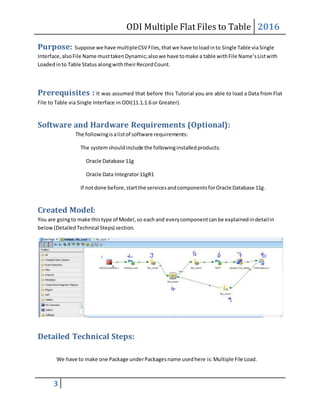
You are goingto make thistype of Model,so eachand everycomponentcanbe explainedindetailin
below(DetailedTechnical Steps) section.
Detailed Technical Steps:
We have to make one Package underPackagesname usedhere is:Multiple File Load.
ODI Multiple Flat Files to Table 2016
4
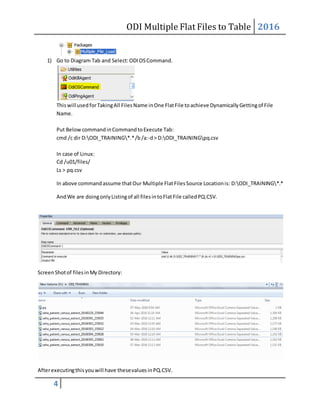
1) Go to Diagram Tab and Select:ODIOSCommand.
Thiswill usedforTakingAll FilesName inOne FlatFile toachieve DynamicallyGettingof File
Name.
Put BelowcommandinCommandtoExecute Tab:
cmd /c dir D:ODI_TRAINING*.*/b/a:-d> D:ODI_TRAININGpq.csv
In case of Linux:
Cd /u01/files/
Ls > pq.csv
In above commandassume thatOur Multiple FlatFilesSource Locationis: D:ODI_TRAINING*.*
AndWe are doingonlyListingof all filesintoFlatFile calledPQ.CSV.
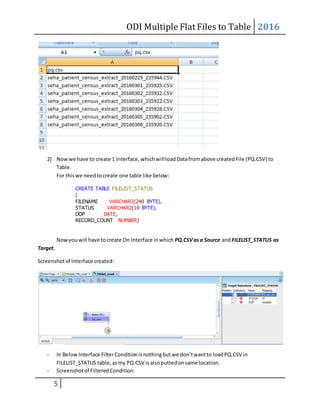
ScreenShotof filesinMy Directory:
Afterexecutingthisyouwill have thesevalues inPQ.CSV.
ODI Multiple Flat Files to Table 2016
5
2) Nowwe have to create 1 Interface,whichwillloadDatafromabove createdFile (PQ.CSV) to
Table.
For thiswe needtocreate one table like below:
CREATE TABLE FILELIST_STATUS
(
FILENAME VARCHAR2(240 BYTE),
STATUS VARCHAR2(10 BYTE),
DOP DATE,
RECORD_COUNT NUMBER)
Nowyouwill have tocreate On Interface inwhich PQ.CSVasa Source andFILELIST_STATUS as
Target.
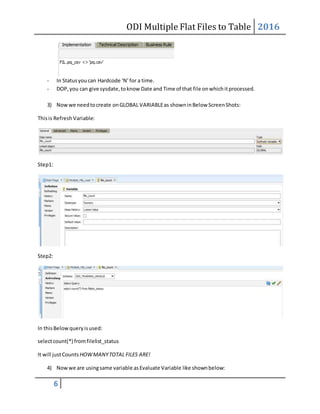
Screenshotof Interface created:
- In Below Interface FilterConditionisnothingbutwe don’twantto loadPQ.CSV in
FILELIST_STATUS table,asmy PQ.CSV isalsoputtedonsame location.
- Screenshotof FilteredCondition:
ODI Multiple Flat Files to Table 2016
6
- In Statusyoucan Hardcode ‘N’for a time.
- DOP,you can give sysdate,toknow Date and Time of that file onwhichitprocessed.
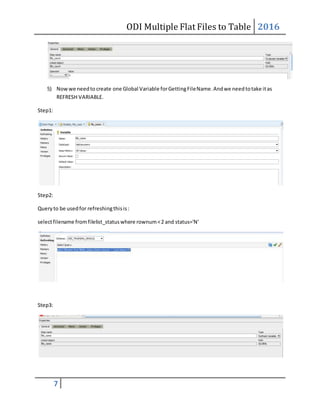
3) Nowwe needtocreate onGLOBAL VARIABLEas showninBelow ScreenShots:
Thisis Refresh Variable:
Step1:
Step2:
In thisBelowqueryisused:
selectcount(*) fromfilelist_status
It will justCounts HOWMANYTOTAL FILES ARE!
4) Nowwe are usingsame variable asEvaluate Variable like shownbelow:
ODI Multiple Flat Files to Table 2016
7
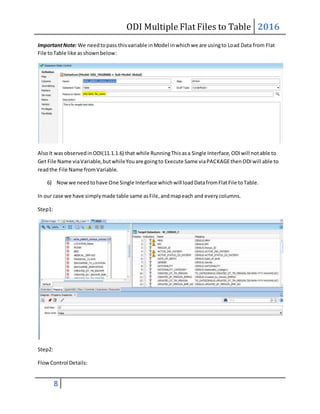
5) Nowwe needto create one Global Variable forGettingFileName.Andwe needtotake itas
REFRESH VARIABLE.
Step1:
Step2:
Queryto be usedfor refreshingthisis:
selectfilename fromfilelist_statuswhere rownum<2 and status='N'
Step3:
ODI Multiple Flat Files to Table 2016
8
ImportantNote: We needtopass thisvariable inModel inwhichwe are usingto Load Data from Flat
File toTable like asshownbelow:
AlsoIt wasobservedinODI(11.1.1.6) that while RunningThisasa Single Interface,ODIwill notable to
Get File Name viaVariable,butwhileYouare goingto Execute Same viaPACKAGEthenODIwill able to
readthe File Name fromVariable.
6) Nowwe needtohave One Single Interface whichwill loadDatafromFlatFile toTable.
In our case we have simplymade table same asFile,andmapeach and everycolumns.
Step1:
Step2:
FlowControl Details:
ODI Multiple Flat Files to Table 2016
9
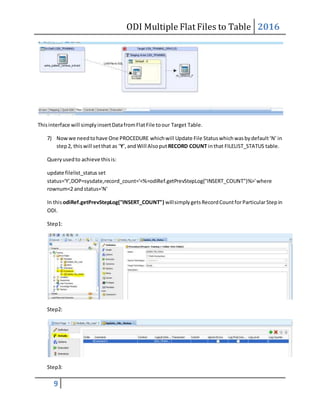
Thisinterface will simply insertDatafromFlatFile toour Target Table.
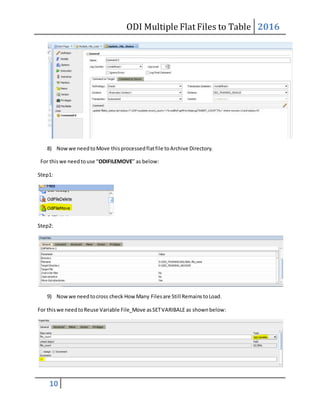
7) Nowwe needtohave One PROCEDURE whichwill Update File Statuswhichwasbydefault‘N’in
step2, thiswill setthat as ‘Y’,andWill Alsoput RECORD COUNT inthat FILELIST_STATUS table.
Queryusedto achieve thisis:
update filelist_status set
status='Y',DOP=sysdate,record_count='<%=odiRef.getPrevStepLog("INSERT_COUNT")%>'where
rownum<2 andstatus='N'
In this odiRef.getPrevStepLog("INSERT_COUNT") willsimplygetsRecordCountforParticularStepin
ODI.
Step1:
Step2:
Step3:
ODI Multiple Flat Files to Table 2016
10
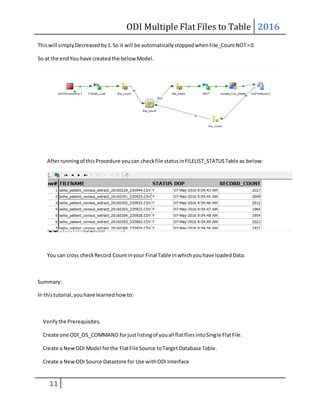
8) Nowwe needtoMove thisprocessedflatfile toArchive Directory.
For thiswe needtouse “ODIFILEMOVE” as below:
Step1:
Step2:
9) Nowwe needtocross check How Many Filesare Still RemainstoLoad.
For thiswe needtoReuse Variable File_Move asSETVARIBALE as shownbelow:
ODI Multiple Flat Files to Table 2016
11
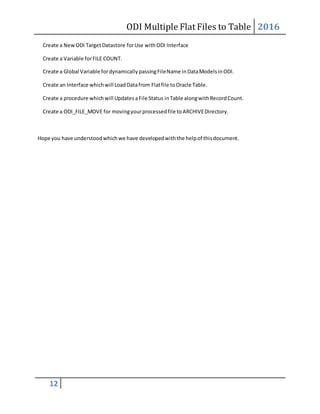
Thiswill simply Decreasedby1.So it will be automaticallystoppedwhenFile_CountNOT>0.
So at the endYou have createdthe below Model.
Afterrunningof thisProcedure youcan checkfile statusinFILELIST_STATUSTable as below:
You can cross checkRecord Countinyour Final Table inwhichyouhave loadedData.
Summary:
In thistutorial,youhave learnedhowto:
Verifythe Prerequisites.
Create one ODI_OS_COMMAND forjustlistingof youall flatfliesintoSingle FlatFile.
Create a NewODI Model forthe FlatFile Source toTarget Database Table.
Create a NewODI Source Datastore for Use withODI Interface
ODI Multiple Flat Files to Table 2016
12
Create a NewODI TargetDatastore forUse withODI Interface
Create a Variable forFILE COUNT.
Create a Global Variable fordynamicallypassingFileName inDataModelsinODI.
Create an Interface whichwill LoadDatafrom Flatfile toOracle Table.
Create a procedure whichwill UpdatesaFile Status inTable alongwithRecordCount.
Create a ODI_FILE_MOVE for movingyourprocessedfile toARCHIVEDirectory.
Hope you have understoodwhichwe have developedwiththe helpof thisdocument.

ODI 11g - Multiple Flat Files to Oracle DB Table by taking File Name dynamically

  • 1.
    ODI Multiple FlatFiles to Table 2016 1 ODI (11.1.1.6) Multiple CSV to Table via Interface with dynamically getting of File Name with Status and File Moved to Archive Folder Document Made by: Darshankumar Prajapati & Ravindrakumar Document Version: 1.0 Document Date: 07-May-2016 Document LastUpdated: 07-May-2016
  • 2.
    ODI Multiple FlatFiles to Table 2016 2
  • 3.
    ODI Multiple FlatFiles to Table 2016 3 Purpose: Suppose we have multipleCSV Files,thatwe have toloadinto Single Table viaSingle Interface,alsoFile Name musttakenDynamic;alsowe have tomake a table withFile Name’sListwith Loadedinto Table Status alongwiththeirRecordCount. Prerequisites : It was assumed that before this Tutorial you are able to load a Data from Flat File to Table via Single Interface in ODI(11.1.1.6 or Greater). Software and Hardware Requirements (Optional): The followingisalistof software requirements: The systemshouldinclude the followinginstalledproducts: Oracle Database 11g Oracle Data Integrator11gR1 If notdone before,startthe servicesandcomponentsforOracle Database 11g. Created Model: You are goingto make thistype of Model,so eachand everycomponentcanbe explainedindetailin below(DetailedTechnical Steps) section. Detailed Technical Steps: We have to make one Package underPackagesname usedhere is:Multiple File Load.
  • 4.
    ODI Multiple FlatFiles to Table 2016 4 1) Go to Diagram Tab and Select:ODIOSCommand. Thiswill usedforTakingAll FilesName inOne FlatFile toachieve DynamicallyGettingof File Name. Put BelowcommandinCommandtoExecute Tab: cmd /c dir D:ODI_TRAINING*.*/b/a:-d> D:ODI_TRAININGpq.csv In case of Linux: Cd /u01/files/ Ls > pq.csv In above commandassume thatOur Multiple FlatFilesSource Locationis: D:ODI_TRAINING*.* AndWe are doingonlyListingof all filesintoFlatFile calledPQ.CSV. ScreenShotof filesinMy Directory: Afterexecutingthisyouwill have thesevalues inPQ.CSV.
  • 5.
    ODI Multiple FlatFiles to Table 2016 5 2) Nowwe have to create 1 Interface,whichwillloadDatafromabove createdFile (PQ.CSV) to Table. For thiswe needtocreate one table like below: CREATE TABLE FILELIST_STATUS ( FILENAME VARCHAR2(240 BYTE), STATUS VARCHAR2(10 BYTE), DOP DATE, RECORD_COUNT NUMBER) Nowyouwill have tocreate On Interface inwhich PQ.CSVasa Source andFILELIST_STATUS as Target. Screenshotof Interface created: - In Below Interface FilterConditionisnothingbutwe don’twantto loadPQ.CSV in FILELIST_STATUS table,asmy PQ.CSV isalsoputtedonsame location. - Screenshotof FilteredCondition:
  • 6.
    ODI Multiple FlatFiles to Table 2016 6 - In Statusyoucan Hardcode ‘N’for a time. - DOP,you can give sysdate,toknow Date and Time of that file onwhichitprocessed. 3) Nowwe needtocreate onGLOBAL VARIABLEas showninBelow ScreenShots: Thisis Refresh Variable: Step1: Step2: In thisBelowqueryisused: selectcount(*) fromfilelist_status It will justCounts HOWMANYTOTAL FILES ARE! 4) Nowwe are usingsame variable asEvaluate Variable like shownbelow:
  • 7.
    ODI Multiple FlatFiles to Table 2016 7 5) Nowwe needto create one Global Variable forGettingFileName.Andwe needtotake itas REFRESH VARIABLE. Step1: Step2: Queryto be usedfor refreshingthisis: selectfilename fromfilelist_statuswhere rownum<2 and status='N' Step3:
  • 8.
    ODI Multiple FlatFiles to Table 2016 8 ImportantNote: We needtopass thisvariable inModel inwhichwe are usingto Load Data from Flat File toTable like asshownbelow: AlsoIt wasobservedinODI(11.1.1.6) that while RunningThisasa Single Interface,ODIwill notable to Get File Name viaVariable,butwhileYouare goingto Execute Same viaPACKAGEthenODIwill able to readthe File Name fromVariable. 6) Nowwe needtohave One Single Interface whichwill loadDatafromFlatFile toTable. In our case we have simplymade table same asFile,andmapeach and everycolumns. Step1: Step2: FlowControl Details:
  • 9.
    ODI Multiple FlatFiles to Table 2016 9 Thisinterface will simply insertDatafromFlatFile toour Target Table. 7) Nowwe needtohave One PROCEDURE whichwill Update File Statuswhichwasbydefault‘N’in step2, thiswill setthat as ‘Y’,andWill Alsoput RECORD COUNT inthat FILELIST_STATUS table. Queryusedto achieve thisis: update filelist_status set status='Y',DOP=sysdate,record_count='<%=odiRef.getPrevStepLog("INSERT_COUNT")%>'where rownum<2 andstatus='N' In this odiRef.getPrevStepLog("INSERT_COUNT") willsimplygetsRecordCountforParticularStepin ODI. Step1: Step2: Step3:
  • 10.
    ODI Multiple FlatFiles to Table 2016 10 8) Nowwe needtoMove thisprocessedflatfile toArchive Directory. For thiswe needtouse “ODIFILEMOVE” as below: Step1: Step2: 9) Nowwe needtocross check How Many Filesare Still RemainstoLoad. For thiswe needtoReuse Variable File_Move asSETVARIBALE as shownbelow:
  • 11.
    ODI Multiple FlatFiles to Table 2016 11 Thiswill simply Decreasedby1.So it will be automaticallystoppedwhenFile_CountNOT>0. So at the endYou have createdthe below Model. Afterrunningof thisProcedure youcan checkfile statusinFILELIST_STATUSTable as below: You can cross checkRecord Countinyour Final Table inwhichyouhave loadedData. Summary: In thistutorial,youhave learnedhowto: Verifythe Prerequisites. Create one ODI_OS_COMMAND forjustlistingof youall flatfliesintoSingle FlatFile. Create a NewODI Model forthe FlatFile Source toTarget Database Table. Create a NewODI Source Datastore for Use withODI Interface
  • 12.
    ODI Multiple FlatFiles to Table 2016 12 Create a NewODI TargetDatastore forUse withODI Interface Create a Variable forFILE COUNT. Create a Global Variable fordynamicallypassingFileName inDataModelsinODI. Create an Interface whichwill LoadDatafrom Flatfile toOracle Table. Create a procedure whichwill UpdatesaFile Status inTable alongwithRecordCount. Create a ODI_FILE_MOVE for movingyourprocessedfile toARCHIVEDirectory. Hope you have understoodwhichwe have developedwiththe helpof thisdocument.