SIREN SUNGKAR SYNDICATE
Lukman Kresno O. 29110394
Yohannes De Deo Tedo 29110399
Anggi Fitrining Tyas 29110400
Ronaldo Bagus Putra 29110xxx
Wisnumurti Rahardjo 29110412
DISNEY CONSUMER PRODUCT
SELLING NUTRITION TO CHILDREN
SUPPORTED BY
PINISI BACKPACKER HOSTEL
JL. Musaen 192/6A
BANDUNG
INDONESIA
+6222-86868610
SUPPORTED BY
PINISI RELAXATION
Jl. Halmahera no. 2 Bandung 0224240065
Jl. Kenari no. 14 Sukabumi 0266231016
SUPPORTED BY
ORANGE BUTTON
Jl. Baladewa Asri no. 14 Bandung - Indonesia
orangebutton@pinisirelaxation.com
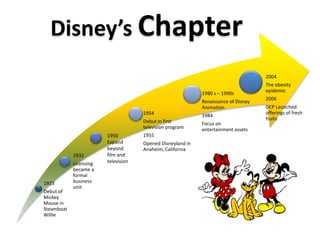
1923
Debut of
Mickey
Mouse in
Steamboat
Willie
1932
Licensing
became a
formal
business
unit
1954
Debut in first
television program
1955
Opened Disneyland in
Anaheim, California
1980 s – 1990s
Renaissance of Disney
Animation
1984
Focus on
entertainment assets
2004
The obesity
epidemic
2006
DCP Launched
offerings of fresh
fruits
Disney’s Chapter
1950
Expand
beyond
film and
television
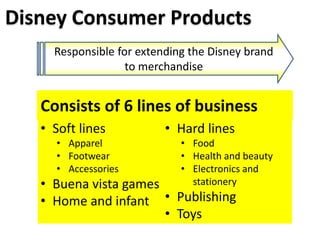
Disney Consumer Products
Responsible for extending the Disney brand
to merchandise
• Soft lines
• Apparel
• Footwear
• Accessories
• Buena vista games
• Home and infant
• Hard lines
• Food
• Health and beauty
• Electronics and
stationery
• Publishing
• Toys
Consists of 6 lines of business
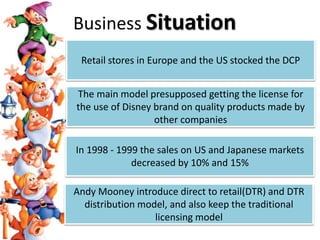
Retail stores in Europe and the US stocked the DCP
The main model presupposed getting the license for
the use of Disney brand on quality products made by
other companies
In 1998 - 1999 the sales on US and Japanese markets
decreased by 10% and 15%
Andy Mooney introduce direct to retail(DTR) and DTR
distribution model, and also keep the traditional
licensing model
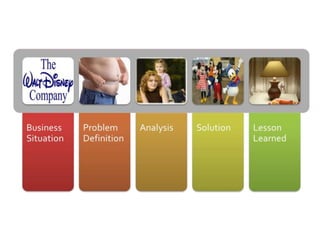
Business Situation
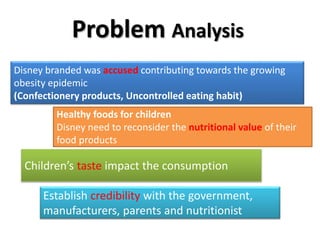
Disney branded was accused contributing towards the growing
obesity epidemic
(Confectionery products, Uncontrolled eating habit)
Healthy foods for children
Disney need to reconsider the nutritional value of their
food products
Establish credibility with the government,
manufacturers, parents and nutritionist
Problem Analysis
Children’s taste impact the consumption
Could Disney use it “magic” to switch children
from sugary to more nutritious diet ? Could
they sustain ?
Problem Definition
Product Development
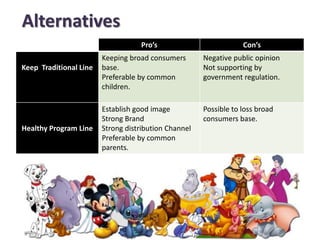
Alternatives
Pro’s Con’s
Keep Traditional Line
Keeping broad consumers
base.
Preferable by common
children.
Negative public opinion
Not supporting by
government regulation.
Healthy Program Line
Establish good image
Strong Brand
Strong distribution Channel
Preferable by common
parents.
Possible to loss broad
consumers base.
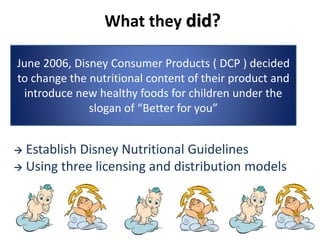
What they did?
 Establish Disney Nutritional Guidelines
 Using three licensing and distribution models
June 2006, Disney Consumer Products ( DCP ) decided
to change the nutritional content of their product and
introduce new healthy foods for children under the
slogan of “Better for you”
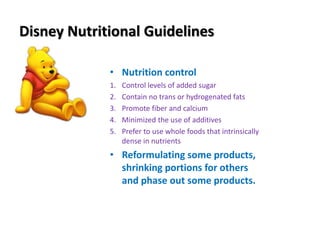
Disney Nutritional Guidelines
• Nutrition control
1. Control levels of added sugar
2. Contain no trans or hydrogenated fats
3. Promote fiber and calcium
4. Minimized the use of additives
5. Prefer to use whole foods that intrinsically
dense in nutrients
• Reformulating some products,
shrinking portions for others
and phase out some products.
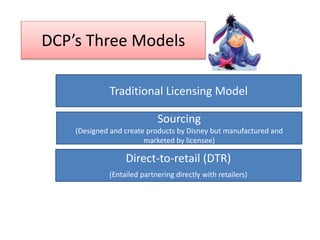
DCP’s Three Models
Traditional Licensing Model
Sourcing
(Designed and create products by Disney but manufactured and
marketed by licensee)
Direct-to-retail (DTR)
(Entailed partnering directly with retailers)
Analysi
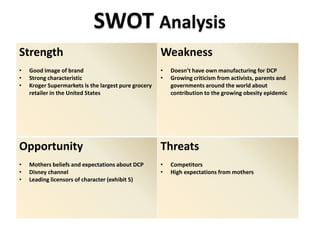
SWOT Analysis
Strength
• Good image of brand
• Strong characteristic
• Kroger Supermarkets is the largest pure grocery
retailer in the United States
Weakness
• Doesn’t have own manufacturing for DCP
• Growing criticism from activists, parents and
governments around the world about
contribution to the growing obesity epidemic
Opportunity
• Mothers beliefs and expectations about DCP
• Disney channel
• Leading licensors of character (exhibit 5)
Threats
• Competitors
• High expectations from mothers
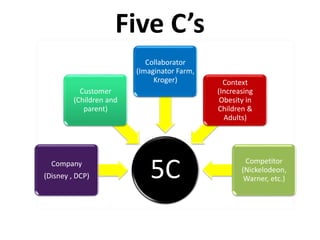
Five C’s
5CCompany
(Disney , DCP)
Customer
(Children and
parent)
Collaborator
(Imaginator Farm,
Kroger) Context
(Increasing
Obesity in
Children &
Adults)
Competitor
(Nickelodeon,
Warner, etc.)
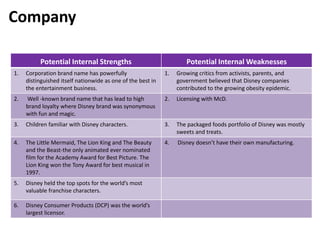
Potential Internal Strengths Potential Internal Weaknesses
1. Corporation brand name has powerfully
distinguished itself nationwide as one of the best in
the entertainment business.
1. Growing critics from activists, parents, and
government believed that Disney companies
contributed to the growing obesity epidemic.
2. Well -known brand name that has lead to high
brand loyalty where Disney brand was synonymous
with fun and magic.
2. Licensing with McD.
3. Children familiar with Disney characters. 3. The packaged foods portfolio of Disney was mostly
sweets and treats.
4. The Little Mermaid, The Lion King and The Beauty
and the Beast-the only animated ever nominated
film for the Academy Award for Best Picture. The
Lion King won the Tony Award for best musical in
1997.
4. Disney doesn’t have their own manufacturing.
5. Disney held the top spots for the world’s most
valuable franchise characters.
6. Disney Consumer Products (DCP) was the world’s
largest licensor.
Company
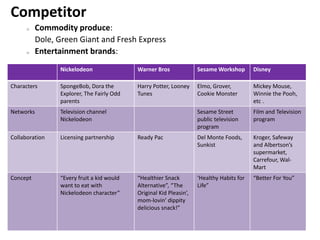
Competitor
o Commodity produce:
Dole, Green Giant and Fresh Express
o Entertainment brands:
Nickelodeon Warner Bros Sesame Workshop Disney
Characters SpongeBob, Dora the
Explorer, The Fairly Odd
parents
Harry Potter, Looney
Tunes
Elmo, Grover,
Cookie Monster
Mickey Mouse,
Winnie the Pooh,
etc .
Networks Television channel
Nickelodeon
Sesame Street
public television
program
Film and Television
program
Collaboration Licensing partnership Ready Pac Del Monte Foods,
Sunkist
Kroger, Safeway
and Albertson’s
supermarket,
Carrefour, Wal-
Mart
Concept “Every fruit a kid would
want to eat with
Nickelodeon character”
“Healthier Snack
Alternative”, “The
Original Kid Pleasin’,
mom-lovin’ dippity
delicious snack!”
‘Healthy Habits for
Life”
“Better For You”
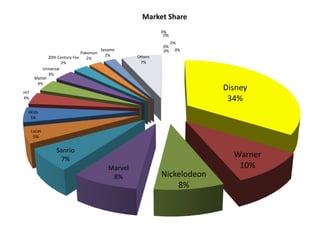
Disney
34%
Warner
10%
Nickelodeon
8%
Marvel
8%
Sanrio
7%
Lucas
5%
4Kids
5%
HIT
4%
Mattel
4%
Universal
3%
20th Century Fox
2%
Pokemon
2%
Sesame
2% Others
7%
0%
0%
0%
0%
0%
0%
Market Share
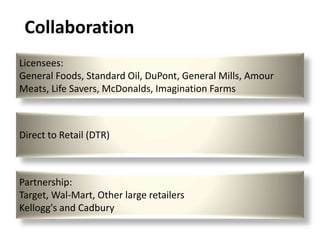
Licensees:
General Foods, Standard Oil, DuPont, General Mills, Amour
Meats, Life Savers, McDonalds, Imagination Farms
Direct to Retail (DTR)
Partnership:
Target, Wal-Mart, Other large retailers
Kellogg's and Cadbury
Collaboration
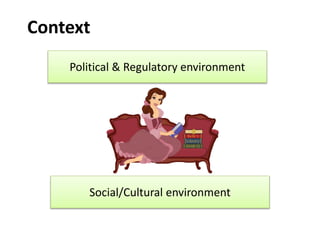
Context
Political & Regulatory environment
Social/Cultural environment
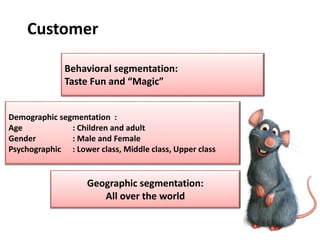
Customer
Geographic segmentation:
All over the world
Demographic segmentation :
Age : Children and adult
Gender : Male and Female
Psychographic : Lower class, Middle class, Upper class
Behavioral segmentation:
Taste Fun and “Magic”
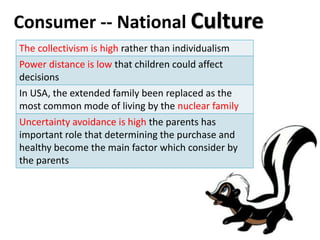
Consumer -- National Culture
The collectivism is high rather than individualism
Power distance is low that children could affect
decisions
In USA, the extended family been replaced as the
most common mode of living by the nuclear family
Uncertainty avoidance is high the parents has
important role that determining the purchase and
healthy become the main factor which consider by
the parents
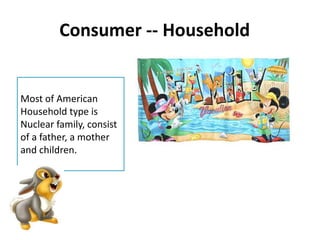
Consumer -- Household
Most of American
Household type is
Nuclear family, consist
of a father, a mother
and children.
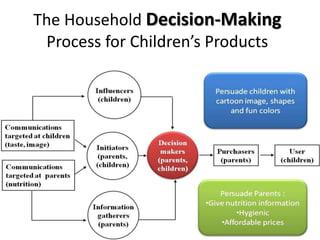
The Household Decision-Making
Process for Children’s Products
Influencers
(children)
Communications
targeted at children
(taste, image)
Communications
targeted at parents
(nutrition)
Purchasers
(parents)
User
(children)
Information
gatherers
(parents)
Initiators
(parents,
(children)
Decision
makers
(parents,
children)
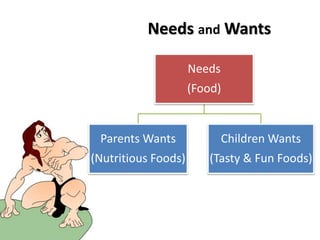
Needs and Wants
Needs
(Food)
Parents Wants
(Nutritious Foods)
Children Wants
(Tasty & Fun Foods)
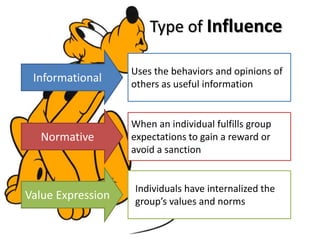
Uses the behaviors and opinions of
others as useful information
Informational
When an individual fulfills group
expectations to gain a reward or
avoid a sanction
Normative
Individuals have internalized the
group’s values and norms
Value Expression
Type of Influence
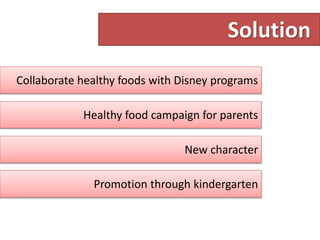
Solution
Collaborate healthy foods with Disney programs
Healthy food campaign for parents
New character
Promotion through kindergarten
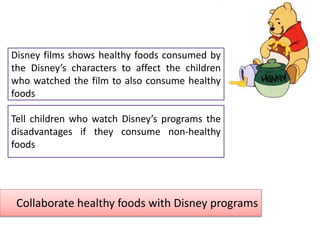
Collaborate healthy foods with Disney programs
Disney films shows healthy foods consumed by
the Disney’s characters to affect the children
who watched the film to also consume healthy
foods
Tell children who watch Disney’s programs the
disadvantages if they consume non-healthy
foods
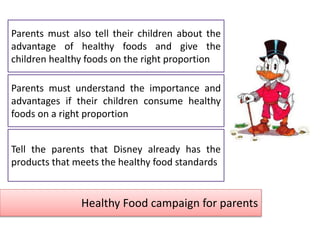
Healthy Food campaign for parents
Parents must understand the importance and
advantages if their children consume healthy
foods on a right proportion
Tell the parents that Disney already has the
products that meets the healthy food standards
Parents must also tell their children about the
advantage of healthy foods and give the
children healthy foods on the right proportion
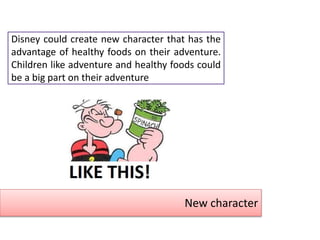
New character
Disney could create new character that has the
advantage of healthy foods on their adventure.
Children like adventure and healthy foods could
be a big part on their adventure
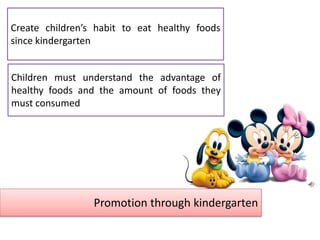
Promotion through kindergarten
Children must understand the advantage of
healthy foods and the amount of foods they
must consumed
Create children’s habit to eat healthy foods
since kindergarten
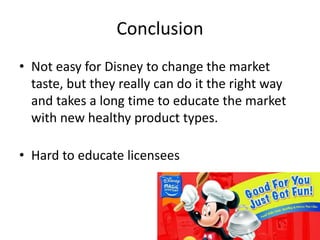
• Not easy for Disney to change the market
taste, but they really can do it the right way
and takes a long time to educate the market
with new healthy product types.
• Hard to educate licensees
Conclusion
Disney Consumer Product: Marketing, Nutrition

Disney Consumer Product: Marketing, Nutrition

  • 1.
    SIREN SUNGKAR SYNDICATE LukmanKresno O. 29110394 Yohannes De Deo Tedo 29110399 Anggi Fitrining Tyas 29110400 Ronaldo Bagus Putra 29110xxx Wisnumurti Rahardjo 29110412 DISNEY CONSUMER PRODUCT SELLING NUTRITION TO CHILDREN
  • 2.
    SUPPORTED BY PINISI BACKPACKERHOSTEL JL. Musaen 192/6A BANDUNG INDONESIA +6222-86868610
  • 3.
    SUPPORTED BY PINISI RELAXATION Jl.Halmahera no. 2 Bandung 0224240065 Jl. Kenari no. 14 Sukabumi 0266231016
  • 4.
    SUPPORTED BY ORANGE BUTTON Jl.Baladewa Asri no. 14 Bandung - Indonesia orangebutton@pinisirelaxation.com
  • 7.
    1923 Debut of Mickey Mouse in Steamboat Willie 1932 Licensing becamea formal business unit 1954 Debut in first television program 1955 Opened Disneyland in Anaheim, California 1980 s – 1990s Renaissance of Disney Animation 1984 Focus on entertainment assets 2004 The obesity epidemic 2006 DCP Launched offerings of fresh fruits Disney’s Chapter 1950 Expand beyond film and television
  • 8.
    Disney Consumer Products Responsiblefor extending the Disney brand to merchandise • Soft lines • Apparel • Footwear • Accessories • Buena vista games • Home and infant • Hard lines • Food • Health and beauty • Electronics and stationery • Publishing • Toys Consists of 6 lines of business
  • 9.
    Retail stores inEurope and the US stocked the DCP The main model presupposed getting the license for the use of Disney brand on quality products made by other companies In 1998 - 1999 the sales on US and Japanese markets decreased by 10% and 15% Andy Mooney introduce direct to retail(DTR) and DTR distribution model, and also keep the traditional licensing model Business Situation
  • 11.
    Disney branded wasaccused contributing towards the growing obesity epidemic (Confectionery products, Uncontrolled eating habit) Healthy foods for children Disney need to reconsider the nutritional value of their food products Establish credibility with the government, manufacturers, parents and nutritionist Problem Analysis Children’s taste impact the consumption
  • 12.
    Could Disney useit “magic” to switch children from sugary to more nutritious diet ? Could they sustain ? Problem Definition
  • 13.
    Product Development Alternatives Pro’s Con’s KeepTraditional Line Keeping broad consumers base. Preferable by common children. Negative public opinion Not supporting by government regulation. Healthy Program Line Establish good image Strong Brand Strong distribution Channel Preferable by common parents. Possible to loss broad consumers base.
  • 14.
    What they did? Establish Disney Nutritional Guidelines  Using three licensing and distribution models June 2006, Disney Consumer Products ( DCP ) decided to change the nutritional content of their product and introduce new healthy foods for children under the slogan of “Better for you”
  • 15.
    Disney Nutritional Guidelines •Nutrition control 1. Control levels of added sugar 2. Contain no trans or hydrogenated fats 3. Promote fiber and calcium 4. Minimized the use of additives 5. Prefer to use whole foods that intrinsically dense in nutrients • Reformulating some products, shrinking portions for others and phase out some products.
  • 16.
    DCP’s Three Models TraditionalLicensing Model Sourcing (Designed and create products by Disney but manufactured and marketed by licensee) Direct-to-retail (DTR) (Entailed partnering directly with retailers)
  • 17.
  • 18.
    SWOT Analysis Strength • Goodimage of brand • Strong characteristic • Kroger Supermarkets is the largest pure grocery retailer in the United States Weakness • Doesn’t have own manufacturing for DCP • Growing criticism from activists, parents and governments around the world about contribution to the growing obesity epidemic Opportunity • Mothers beliefs and expectations about DCP • Disney channel • Leading licensors of character (exhibit 5) Threats • Competitors • High expectations from mothers
  • 19.
    Five C’s 5CCompany (Disney ,DCP) Customer (Children and parent) Collaborator (Imaginator Farm, Kroger) Context (Increasing Obesity in Children & Adults) Competitor (Nickelodeon, Warner, etc.)
  • 20.
    Potential Internal StrengthsPotential Internal Weaknesses 1. Corporation brand name has powerfully distinguished itself nationwide as one of the best in the entertainment business. 1. Growing critics from activists, parents, and government believed that Disney companies contributed to the growing obesity epidemic. 2. Well -known brand name that has lead to high brand loyalty where Disney brand was synonymous with fun and magic. 2. Licensing with McD. 3. Children familiar with Disney characters. 3. The packaged foods portfolio of Disney was mostly sweets and treats. 4. The Little Mermaid, The Lion King and The Beauty and the Beast-the only animated ever nominated film for the Academy Award for Best Picture. The Lion King won the Tony Award for best musical in 1997. 4. Disney doesn’t have their own manufacturing. 5. Disney held the top spots for the world’s most valuable franchise characters. 6. Disney Consumer Products (DCP) was the world’s largest licensor. Company
  • 21.
    Competitor o Commodity produce: Dole,Green Giant and Fresh Express o Entertainment brands: Nickelodeon Warner Bros Sesame Workshop Disney Characters SpongeBob, Dora the Explorer, The Fairly Odd parents Harry Potter, Looney Tunes Elmo, Grover, Cookie Monster Mickey Mouse, Winnie the Pooh, etc . Networks Television channel Nickelodeon Sesame Street public television program Film and Television program Collaboration Licensing partnership Ready Pac Del Monte Foods, Sunkist Kroger, Safeway and Albertson’s supermarket, Carrefour, Wal- Mart Concept “Every fruit a kid would want to eat with Nickelodeon character” “Healthier Snack Alternative”, “The Original Kid Pleasin’, mom-lovin’ dippity delicious snack!” ‘Healthy Habits for Life” “Better For You”
  • 22.
  • 23.
    Licensees: General Foods, StandardOil, DuPont, General Mills, Amour Meats, Life Savers, McDonalds, Imagination Farms Direct to Retail (DTR) Partnership: Target, Wal-Mart, Other large retailers Kellogg's and Cadbury Collaboration
  • 24.
    Context Political & Regulatoryenvironment Social/Cultural environment
  • 25.
    Customer Geographic segmentation: All overthe world Demographic segmentation : Age : Children and adult Gender : Male and Female Psychographic : Lower class, Middle class, Upper class Behavioral segmentation: Taste Fun and “Magic”
  • 26.
    Consumer -- NationalCulture The collectivism is high rather than individualism Power distance is low that children could affect decisions In USA, the extended family been replaced as the most common mode of living by the nuclear family Uncertainty avoidance is high the parents has important role that determining the purchase and healthy become the main factor which consider by the parents
  • 27.
    Consumer -- Household Mostof American Household type is Nuclear family, consist of a father, a mother and children.
  • 28.
    The Household Decision-Making Processfor Children’s Products Influencers (children) Communications targeted at children (taste, image) Communications targeted at parents (nutrition) Purchasers (parents) User (children) Information gatherers (parents) Initiators (parents, (children) Decision makers (parents, children)
  • 29.
    Needs and Wants Needs (Food) ParentsWants (Nutritious Foods) Children Wants (Tasty & Fun Foods)
  • 30.
    Uses the behaviorsand opinions of others as useful information Informational When an individual fulfills group expectations to gain a reward or avoid a sanction Normative Individuals have internalized the group’s values and norms Value Expression Type of Influence
  • 32.
    Solution Collaborate healthy foodswith Disney programs Healthy food campaign for parents New character Promotion through kindergarten
  • 33.
    Collaborate healthy foodswith Disney programs Disney films shows healthy foods consumed by the Disney’s characters to affect the children who watched the film to also consume healthy foods Tell children who watch Disney’s programs the disadvantages if they consume non-healthy foods
  • 34.
    Healthy Food campaignfor parents Parents must understand the importance and advantages if their children consume healthy foods on a right proportion Tell the parents that Disney already has the products that meets the healthy food standards Parents must also tell their children about the advantage of healthy foods and give the children healthy foods on the right proportion
  • 35.
    New character Disney couldcreate new character that has the advantage of healthy foods on their adventure. Children like adventure and healthy foods could be a big part on their adventure
  • 36.
    Promotion through kindergarten Childrenmust understand the advantage of healthy foods and the amount of foods they must consumed Create children’s habit to eat healthy foods since kindergarten
  • 38.
    • Not easyfor Disney to change the market taste, but they really can do it the right way and takes a long time to educate the market with new healthy product types. • Hard to educate licensees Conclusion

Editor's Notes

  • #2 Animated picture list with color text tabs(Intermediate)To reproduce the SmartArt effects on this page, do the following:On the Home tab, in the Slides group, click Layout, and then clickBlank. On the Insert tab, in the Illustrations group, click SmartArt.In the Choose a SmartArt Graphic dialog box, in the left pane, click List. In the List pane, double-click Horizontal Picture List (fifth row, second option from the left) to insert the graphic into the slide. Press and hold CTRL, and select the picture placeholder and text shape (top and bottom shape) in one of the objects. Under SmartArt Tools,on the Design tab, in the Create Graphic group, click Add Shape, and then click Add Shape After. Repeat this process one more time for a total of five picture placeholders and text shapes. Select the graphic. Under SmartArt Tools, on the Format tab, click Size, and then do the following:In the Height box, enter 4.44”.In the Width box, enter 9.25”.Under SmartArt Tools, on the Format tab, click Arrange, click Align, and then do the following:Click Align to Slide.Click Align Middle. Click Align Center. Select the graphic, and then click one of the arrows on the left border. In the Type your text here dialog box, enter text.Press and hold CTRL, and then select all five text boxes in the graphic. On the Home tab, in the Font group, select Corbel from the Font list,and then enter 22 in the Font Size box.Select the graphic. Under SmartArtTools, on the Design tab, in the SmartArtStyles group, do the following: Click ChangeColors, and then under Colorful click Colorful Range – Accent Colors 2 to 3 (second option from the left).Click More, and then under Best Match for Document click Moderate Effect (fourth option from the left).Select the rounded rectangle at the top of the graphic. Under SmartArtTools, on the Format tab, in the ShapeStyles group, click the arrow next to ShapeFill, and then under Theme Colors clickWhite, Background 1, Darker 35% (fifth row, first option from the left).Click each of the five picture placeholders in the SmartArt graphic, select a picture, and then click Insert.To reproduce the animation effects on this slide, do the following:On the Animations tab, in the Advanced Animations group, click Animation Pane.On the slide, select the graphic. On the Animations tab, in the Animation group, click the More arrow at the Effects Gallery and under Entrance, click Float In.In the Animation group, click Effect Options, and under Sequence, click One by One. In the Timing group, in the Duration list, click 01.00.In the Animation Pane, click the double-arrow below the animation effect to expand the list of effects, then do the following to modify the list of effects:Select the first animation effect, and then do the following:On the Animations tab, in the Animation group, click the More arrow at the Effects Gallery and then click More Entrance Effects. In the Change Entrance Effects dialog box, under Moderate, click Basic Zoom.Click Effect Options, and under Zoom, click Out Slightly. In the Timing group, in the Start list, select With Previous.Also in the Timing group, in the Duration list, click 01.00.Press and hold CTRL, select the third, fifth, seventh, ninth, and 11th animation effects (effects for the text shapes), and then do the following:On the Animations tab, in the Animation group, click the More arrow at the Effects Gallery and then click More Entrance Effects. In the Change Entrance Effects dialog box, under Basic, click Peek In, and then click OK. In the Animation group, click Effect Options, and underDirection, click From Top.In the Timing group, in the Duration list, click 01.00.Press and hold CTRL, select the second, fourth, sixth, eighth, and 10th animation effects (effects for the pictures). In the Timing group, in the Start list, selectAfter Previous.To reproduce the background effects on this slide, do the following:Right-click the slide background area, and then click Format Background. In the Format Background dialog box, click Fill in the left pane, select Gradient fill in the Fill pane, and then do the following:In the Type list, select Linear.Click the button next to Direction, and then click Linear Down (first row, second option from the left).Under Gradient stops, click Add gradient stop or Remove gradient stop until two stops appear on the slider, then customize the gradient stops as follows:Select the first stop in the slider, and then do the following:In the Position box, enter 0%.Click the button next to Color, click More Colors, and then in the Colors dialog box, on the Custom tab, enter values for Red: 130, Green: 126, and Blue: 102.Select the last stop on the slider, and then do the following: In the Position box, enter 71%.Click the button next to Color, and then click Black, Text 1(first row, second option from the left).
  • #24 Political & Regulatory environment U.S. Department of Agriculture (USDA) updated its official federal nutrition recommendations on what Americans should eat to meet nutrient requirements, promote health, and reduce risk of chronic disease. Dietary Guidelines for Americans recommended that children and adult should adopt a “balanced eating pattern”, consume a variety of nutrient-dense foods and beverages and limit their intake of saturated trans fat, cholesterol, added sugars and salt. Social/Cultural environment Social trends such as increased portion sizes, eating out more often, increased consumption of sugar-sweetened foods and lack of exercise. 
  • #25 Animated picture list with color text tabs(Intermediate)To reproduce the SmartArt effects on this page, do the following:On the Home tab, in the Slides group, click Layout, and then click Blank. On the Insert tab, in the Illustrations group, click SmartArt.In the Choose a SmartArt Graphic dialog box, in the left pane, click List. In the List pane, double-click Horizontal Picture List (fifth row, second option from the left) to insert the graphic into the slide. Press and hold CTRL, and select the picture placeholder and text shape (top and bottom shape) in one of the objects. Under SmartArt Tools,on the Design tab, in the Create Graphic group, click Add Shape, and then click Add Shape After. Repeat this process one more time for a total of five picture placeholders and text shapes. Select the graphic. Under SmartArt Tools, on the Format tab, click Size, and then do the following:In the Height box, enter 4.44”.In the Width box, enter 9.25”.Under SmartArt Tools, on the Format tab, click Arrange, click Align, and then do the following:Click Align to Slide.Click Align Middle. Click Align Center. Select the graphic, and then click one of the arrows on the left border. In the Type your text here dialog box, enter text.Press and hold CTRL, and then select all five text boxes in the graphic. On the Home tab, in the Font group, select Corbel from the Font list,and then enter 22 in the Font Size box.Select the graphic. Under SmartArtTools, on the Design tab, in the SmartArtStyles group, do the following: Click ChangeColors, and then under Colorful click Colorful Range – Accent Colors 2 to 3 (second option from the left).Click More, and then under Best Match for Document click Moderate Effect (fourth option from the left).Select the rounded rectangle at the top of the graphic. Under SmartArtTools, on the Format tab, in the ShapeStyles group, click the arrow next to ShapeFill, and then under Theme Colors click White, Background 1, Darker 35% (fifth row, first option from the left).Click each of the five picture placeholders in the SmartArt graphic, select a picture, and then click Insert.To reproduce the animation effects on this slide, do the following:On the Animations tab, in the Advanced Animations group, click Animation Pane.On the slide, select the graphic. On the Animations tab, in the Animation group, click the More arrow at the Effects Gallery and under Entrance, click Float In.In the Animation group, click Effect Options, and under Sequence, click One by One. In the Timing group, in the Duration list, click 01.00.In the Animation Pane, click the double-arrow below the animation effect to expand the list of effects, then do the following to modify the list of effects:Select the first animation effect, and then do the following:On the Animations tab, in the Animation group, click the More arrow at the Effects Gallery and then click More Entrance Effects. In the Change Entrance Effects dialog box, under Moderate, click Basic Zoom.Click Effect Options, and under Zoom, click Out Slightly. In the Timing group, in the Start list, select With Previous.Also in the Timing group, in the Duration list, click 01.00.Press and hold CTRL, select the third, fifth, seventh, ninth, and 11th animation effects (effects for the text shapes), and then do the following:On the Animations tab, in the Animation group, click the More arrow at the Effects Gallery and then click More Entrance Effects. In the Change Entrance Effects dialog box, under Basic, click Peek In, and then click OK. In the Animation group, click Effect Options, and under Direction, click From Top.In the Timing group, in the Duration list, click 01.00.Press and hold CTRL, select the second, fourth, sixth, eighth, and 10th animation effects (effects for the pictures). In the Timing group, in the Start list, select After Previous.To reproduce the background effects on this slide, do the following:Right-click the slide background area, and then click Format Background. In the Format Background dialog box, click Fill in the left pane, select Gradient fill in the Fill pane, and then do the following:In the Type list, select Linear.Click the button next to Direction, and then click Linear Down (first row, second option from the left).Under Gradient stops, click Add gradient stop or Remove gradient stop until two stops appear on the slider, then customize the gradient stops as follows:Select the first stop in the slider, and then do the following:In the Position box, enter 0%.Click the button next to Color, click More Colors, and then in the Colors dialog box, on the Custom tab, enter values for Red: 130, Green: 126, and Blue: 102.Select the last stop on the slider, and then do the following: In the Position box, enter 71%.Click the button next to Color, and then click Black, Text 1 (first row, second option from the left).