
ACEScg:
A Common Color Encoding for Visual Effects Applications
Haarm-Pieter Duiker
Duiker Research
Alexander Forsythe
The Academy
Scott Dyer
The Academy
Ray Feeney
RFX
Will McCown
Consultant
Jim Houston
Starwatcher Digital
Andy Maltz
The Academy
Doug Walker
Autodesk
ACES Background
• The Academy Color Encoding System, ACES, is a free, open, device-independent
color management and image interchange system
• Intended to address the loss of underlying standards in the film to digital transition
• Developed by hundreds of the industry’s top scientists, engineers, cinematographers,
colorists, visual effects artists, and other motion picture creatives working together
under the auspices of the Academy of Motion Picture Arts and Sciences.
• ACES 1.0 is the first production-ready release of the system, the result of over 10
years of research, testing and field trials.
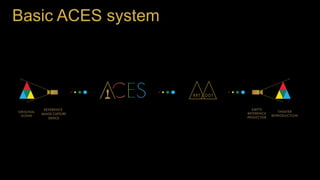
Basic ACES system
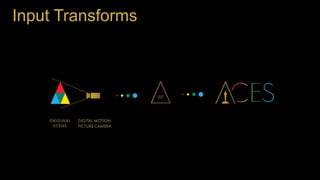
Input Transforms
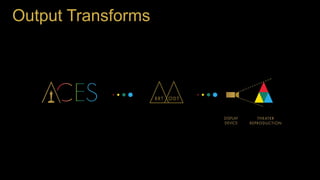
Output Transforms
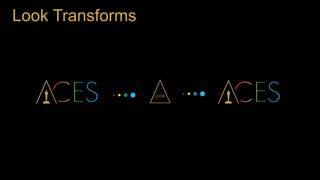
Look Transforms
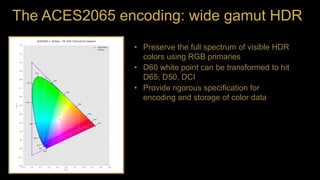
The ACES2065 encoding: wide gamut HDR
• Preserve the full spectrum of visible HDR
colors using RGB primaries
• D60 white point can be transformed to hit
D65, D50, DCI
• Provide rigorous specification for
encoding and storage of color data
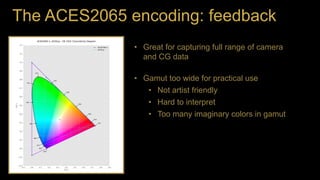
The ACES2065 encoding: feedback
• Great for capturing full range of camera
and CG data
• Gamut too wide for practical use
• Not artist friendly
• Hard to interpret
• Too many imaginary colors in gamut
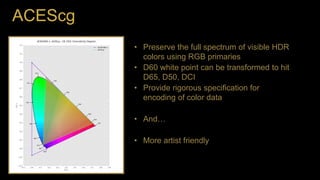
ACEScg
• Preserve the full spectrum of visible HDR
colors using RGB primaries
• D60 white point can be transformed to hit
D65, D50, DCI
• Provide rigorous specification for
encoding of color data
• And…
• More artist friendly
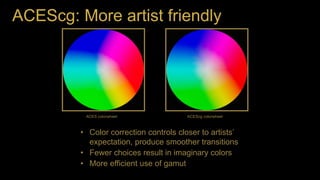
ACEScg: More artist friendly
• Color correction controls closer to artists’
expectation, produce smoother transitions
• Fewer choices result in imaginary colors
• More efficient use of gamut
ACES colorwheel ACEScg colorwheel
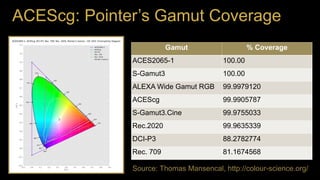
ACEScg: Pointer’s Gamut Coverage
Gamut % Coverage
ACES2065-1 100.00
S-Gamut3 100.00
ALEXA Wide Gamut RGB 99.9979120
ACEScg 99.9905787
S-Gamut3.Cine 99.9755033
Rec.2020 99.9635339
DCI-P3 88.2782774
Rec. 709 81.1674568
Source: Thomas Mansencal, http://colour-science.org/
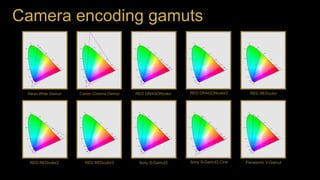
Camera encoding gamuts
Alexa Wide Gamut Canon Cinema Gamut RED DRAGONcolor RED DRAGONcolor2 RED REDcolor
RED REDcolor2 RED REDcolor3 Sony S-Gamut3 Sony S-Gamut3.Cine Panasonic V-Gamut
The multi-gamut world: camera encodings
• a lot of camera encoding gamuts
• Many use imaginary primaries
• ACEScg allows for the encoding of the
majority of the visible spectrum
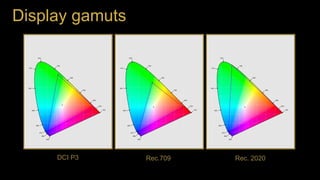
Display gamuts
DCI P3 Rec.709 Rec. 2020
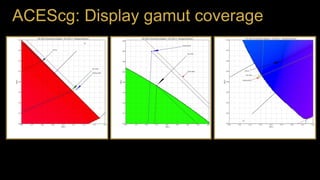
ACEScg: Display gamut coverage
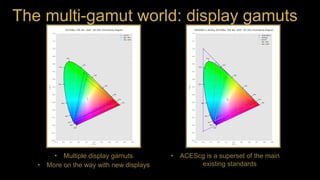
The multi-gamut world: display gamuts
• Multiple display gamuts
• More on the way with new displays
• ACEScg is a superset of the main
existing standards
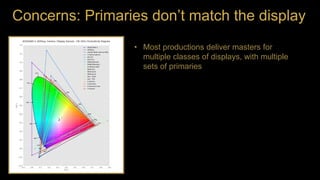
Concerns: Primaries don’t match the display
• Most productions deliver masters for
multiple classes of displays, with multiple
sets of primaries
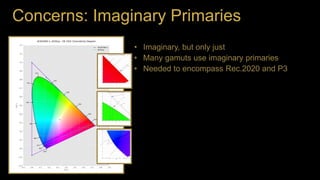
Concerns: Imaginary Primaries
• Imaginary, but only just
• Many gamuts use imaginary primaries
• Needed to encompass Rec.2020 and P3
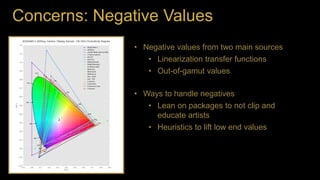
Concerns: Negative Values
• Negative values from two main sources
• Linearization transfer functions
• Out-of-gamut values
• Ways to handle negatives
• Lean on packages to not clip and
educate artists
• Heuristics to lift low end values
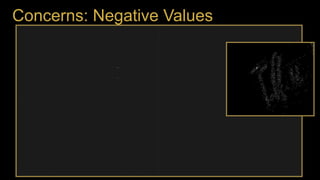
Concerns: Negative Values
Source: Academy’s Next Gen Cinema Test
Concerns: Negative Values
Source: Academy’s Next Gen Cinema Test
Concerns: Negative Values
ACEScg in Production
Slides not available for public relsese
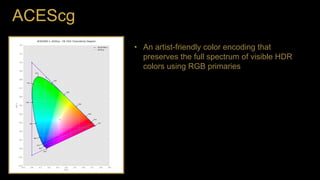
ACEScg
• An artist-friendly color encoding that
preserves the full spectrum of visible HDR
colors using RGB primaries
Thanks
Thanks to all the authors and contributors
Special thanks to
Nick Cannon
Thomas Mansencal / colour-science.org
Will McCown
Miaoqi Zhu
Questions
Sign up for email  oscars.org/aces
Twitter  @AcademyACES
Questions  acessupport@oscars.org
Haarm-Pieter Duiker
Duiker Research
Alexander Forsythe
The Academy
Scott Dyer
The Academy
Ray Feeney
RFX
Will McCown
Consultant
Jim Houston
Starwatcher Digital
Andy Maltz
The Academy
Doug Walker
Autodesk

ACEScg: A Common Color Encoding for Visual Effects Applications - DigiPro 2015

  • 1.
     ACEScg: A Common ColorEncoding for Visual Effects Applications Haarm-Pieter Duiker Duiker Research Alexander Forsythe The Academy Scott Dyer The Academy Ray Feeney RFX Will McCown Consultant Jim Houston Starwatcher Digital Andy Maltz The Academy Doug Walker Autodesk
  • 2.
    ACES Background • TheAcademy Color Encoding System, ACES, is a free, open, device-independent color management and image interchange system • Intended to address the loss of underlying standards in the film to digital transition • Developed by hundreds of the industry’s top scientists, engineers, cinematographers, colorists, visual effects artists, and other motion picture creatives working together under the auspices of the Academy of Motion Picture Arts and Sciences. • ACES 1.0 is the first production-ready release of the system, the result of over 10 years of research, testing and field trials.
  • 3.
  • 4.
  • 5.
  • 6.
  • 7.
    The ACES2065 encoding:wide gamut HDR • Preserve the full spectrum of visible HDR colors using RGB primaries • D60 white point can be transformed to hit D65, D50, DCI • Provide rigorous specification for encoding and storage of color data
  • 8.
    The ACES2065 encoding:feedback • Great for capturing full range of camera and CG data • Gamut too wide for practical use • Not artist friendly • Hard to interpret • Too many imaginary colors in gamut
  • 9.
    ACEScg • Preserve thefull spectrum of visible HDR colors using RGB primaries • D60 white point can be transformed to hit D65, D50, DCI • Provide rigorous specification for encoding of color data • And… • More artist friendly
  • 10.
    ACEScg: More artistfriendly • Color correction controls closer to artists’ expectation, produce smoother transitions • Fewer choices result in imaginary colors • More efficient use of gamut ACES colorwheel ACEScg colorwheel
  • 11.
    ACEScg: Pointer’s GamutCoverage Gamut % Coverage ACES2065-1 100.00 S-Gamut3 100.00 ALEXA Wide Gamut RGB 99.9979120 ACEScg 99.9905787 S-Gamut3.Cine 99.9755033 Rec.2020 99.9635339 DCI-P3 88.2782774 Rec. 709 81.1674568 Source: Thomas Mansencal, http://colour-science.org/
  • 12.
    Camera encoding gamuts AlexaWide Gamut Canon Cinema Gamut RED DRAGONcolor RED DRAGONcolor2 RED REDcolor RED REDcolor2 RED REDcolor3 Sony S-Gamut3 Sony S-Gamut3.Cine Panasonic V-Gamut
  • 13.
    The multi-gamut world:camera encodings • a lot of camera encoding gamuts • Many use imaginary primaries • ACEScg allows for the encoding of the majority of the visible spectrum
  • 14.
    Display gamuts DCI P3Rec.709 Rec. 2020
  • 15.
  • 16.
    The multi-gamut world:display gamuts • Multiple display gamuts • More on the way with new displays • ACEScg is a superset of the main existing standards
  • 17.
    Concerns: Primaries don’tmatch the display • Most productions deliver masters for multiple classes of displays, with multiple sets of primaries
  • 18.
    Concerns: Imaginary Primaries •Imaginary, but only just • Many gamuts use imaginary primaries • Needed to encompass Rec.2020 and P3
  • 19.
    Concerns: Negative Values •Negative values from two main sources • Linearization transfer functions • Out-of-gamut values • Ways to handle negatives • Lean on packages to not clip and educate artists • Heuristics to lift low end values
  • 20.
    Concerns: Negative Values Source:Academy’s Next Gen Cinema Test
  • 21.
    Concerns: Negative Values Source:Academy’s Next Gen Cinema Test
  • 22.
  • 23.
    ACEScg in Production Slidesnot available for public relsese
  • 24.
    ACEScg • An artist-friendlycolor encoding that preserves the full spectrum of visible HDR colors using RGB primaries
  • 25.
    Thanks Thanks to allthe authors and contributors Special thanks to Nick Cannon Thomas Mansencal / colour-science.org Will McCown Miaoqi Zhu
  • 26.
    Questions Sign up foremail  oscars.org/aces Twitter  @AcademyACES Questions  acessupport@oscars.org Haarm-Pieter Duiker Duiker Research Alexander Forsythe The Academy Scott Dyer The Academy Ray Feeney RFX Will McCown Consultant Jim Houston Starwatcher Digital Andy Maltz The Academy Doug Walker Autodesk

Editor's Notes

  • #4 Cover Technical Goals as you talk through diagram Define a path from camera-native data to scene-referred imagery Process and store wide-gamut HDR color data Display consistently across multiple devices Provide a consistent basis for look authoring and application, on-set and in post
  • #5 Cover Technical Goals as you talk through diagram Define a path from camera-native data to scene-referred imagery Process and store wide-gamut HDR color data Display consistently across multiple devices Provide a consistent basis for look authoring and application, on-set and in post
  • #6 Cover Technical Goals as you talk through diagram Define a path from camera-native data to scene-referred imagery Process and store wide-gamut HDR color data Display consistently across multiple devices Provide a consistent basis for look authoring and application, on-set and in post
  • #7 Cover Technical Goals as you talk through diagram Define a path from camera-native data to scene-referred imagery Process and store wide-gamut HDR color data Display consistently across multiple devices Provide a consistent basis for look authoring and application, on-set and in post
  • #8 Maintain all the fidelity of original source material in a common scene referred color encoding. Archive that to avoid marrying master to a particular output display technology.
  • #9 Gamut too wide: Not artist friendly. Too easy for artists to create non-existent colors “The RGB color correction controls all feel different” Hard to interpret. Wide gamut workflows not in wide use. What is the data supposed to 'look like'? White point. Doesn't match white point of some common display targets like Rec.709 and artists may not understand how to handle that situation. Too many non-existent colors are represented. - Inefficient use of bits.
  • #10 These goals and features match the ACES color encoding Primaries are much closer to the spectral locus, but still encompass the main display targets
  • #11 Because the primaries are closer to the spectral locus… Note that the transitions between regions in the ACE colorwheel are more abrupt and there seem to be larger areas or redundant colors, with little variation More efficient use of gamut for integer encodings like ACESproxy
  • #12 The Pointer’s gamut is (an approximation of) the gamut of real surface colors as can be seen by the human eye, based on the research by Michael R. Pointer (1980). Because ACEScg is a floating-point encoding, it can represent the full visible spectrum
  • #13 Question: Why do we need a standard working space? Can’t we just use Camera X’s primaries? Not pictured: Gamuts from AJA, BlackMagic, GoPro, Apple Lots of imaginary primaries Reference: Michael Bay used 6 different ‘cinema’ cameras on the last Transformers
  • #14 Question: Why do we need a standard working space? Can’t we just use Camera X’s primaries?
  • #16 Why not just use Rec.2020? It is not a strict superset of P3 and Rec.709.
  • #17 HDR displays, OLED, quantum dot
  • #18 If you're only targeting one display, you could use the primaries for that display. Most films won't satisfy that constraint. ACES and ACEScg are scene-referred standards. Most displays don’t match the display targets… P3 and Rec.2020 are rarely actually covered by projectors or displays.
  • #19 They're imaginary, but only just. Lots of applications use them without issue A very small portion of the gamut is dedicated to non-visible colors Lots of other gamuts have imaginary primaries. Ex. Alexa Wide Gamut, REDcolor2, … If we didn’t have imaginary primaries, we wouldn’t be able to fill all of Rec.2020 if there is any desaturation in the rendering.
  • #21 Source: Academy’s “Next Generation CinemaTest”
  • #23 Pixels that go negative in ACEScg are only the most super saturated
  • #26 References Mansencal, T., Mauderer, M., & Parsons, M. (2015, May). Colour 0.3.5. doi:10.5281/zenodo.17370 Academy’s Next Generation Camera Text
  • #27 Transforms and colorspaces discussed here are implemented in the ACES 1.0 OpenColor IO configuration, linked to from the ACES site.