gFAST generic Framework for Automated Software Testing Experts in Automated Testing www.heydaysoft.com [email_address]
Why Automation ? Difficult to Test All Work Flows Manually Difficult to Validate all Fields Manually Difficult to Test on All Languages Difficult to Test All Negative Scenarios Difficult to Manage Data for All Work Flows Huge Effort Required for Manual Testing
Test Automation Benefits - I Broader - Wider testing coverage of features Deeper - more extensive variations within a feature Faster - Test Tools executes tests between 10 and 100 times faster than a human executes it Reliable Speed up testing to accelerate releases Allow testing to happen more frequently Insight about the risks Quickly Ensure consistency
Test Automation Benefits - II Reduction in Timelines/testing costs Un-attended repeatability Less machines & Improved machine utilization Shortened test lead times Manual test effort reduction Better Speed in executing tests Re-usable test ware Monitoring  ‘ Quality': Health of the product Insight about the risks Quickly Consistency across test runs Test frequently and thoroughly Early Time to Market
Keyword Driven Automation Characteristics: Re-usable, modular Test Automation Framework Simple spreadsheet interface to define Work Flows and business processes Key Benefits: Increase regression coverage Decrease time required to test Reduce costs to deliver new functionality  Incorporate best practices across global test organizations Improve Quality !
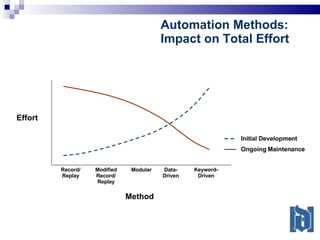
Record/ Replay Modified Record/ Replay Modular Data- Driven Keyword- Driven Effort Method Initial Development Ongoing Maintenance Automation Methods: Impact on Total Effort
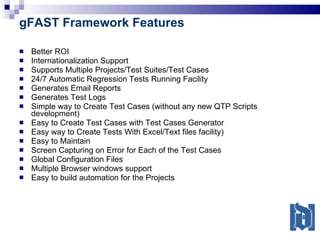
gFAST Framework Features Better ROI Internationalization Support Supports Multiple Projects/Test Suites/Test Cases 24/7 Automatic Regression Tests Running Facility Generates Email Reports Generates Test Logs Simple way to Create Test Cases (without any new QTP Scripts development) Easy to Create Test Cases with Test Cases Generator Easy way to Create Tests With Excel/Text files facility) Easy to Maintain Screen Capturing on Error for Each of the Test Cases Global Configuration Files Multiple Browser windows support Easy to build automation for the Projects
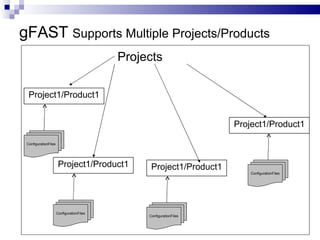
gFAST  Supports Multiple Projects/Products Projects Project1/Product1 ConfigurationFiles Project1/Product1 ConfigurationFiles Project1/Product1 ConfigurationFiles Project1/Product1 ConfigurationFiles
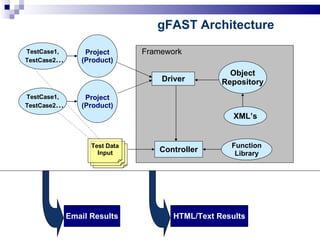
Controller Object Repository XML’s Function Library Driver HTML/Text Results Project (Product) TestCase1, TestCase2 … Test Data Input gFAST Architecture Framework Email Results Project (Product) TestCase1, TestCase2 …
gFAST Framework Benefits Easy Maintenance and Enhancement Test scripts for new features and new libraries can be added with little effort High Degree of Re-Usability Functions / scripts to be designed to facilitate reusability across different Deployments and Different Languages Easy Scalability Accommodates addition of new work flows/test cases to the framework with minimum effort Effective Reporting Reports can be analyzed to know the quality of the application
gFAST Framework highlights Supports Multiple Deployments/Projects Supports Multiple Languages Supports Multiple Work Flow/Test Cases Execution. Easy Maintenance Supports Dynamic (XML based) Web Pages Html/Text Reports for Work Flows Emailing the Results for Quicker Analysis Faster Work Flow/Test case development  Very flexible Keyword and Data-Driven approach to create Work Flows.
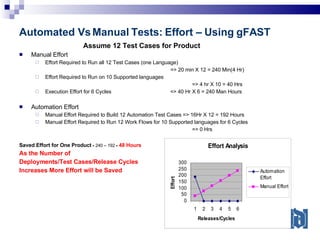
Automated Vs Manual Tests: Effort – Using gFAST Assume 12 Test Cases for Product Manual Effort Effort Required to Run all 12 Test Cases (one Language)    => 20 min X 12 = 240 Min(4 Hr) Effort Required to Run on 10 Supported languages   => 4 hr X 10 = 40 Hrs Execution Effort for 6 Cycles  => 40 Hr X 6 = 240 Man Hours Automation Effort Manual Effort Required to Build 12 Automation Test Cases => 16Hr X 12 = 192 Hours Manual Effort Required to Run 12 Work Flows for 10 Supported languages for 6 Cycles   => 0 Hrs Saved Effort for One Product  =  240 – 192  =  48 Hours As the Number of  Deployments/Test Cases/Release Cycles  Increases More Effort will be Saved
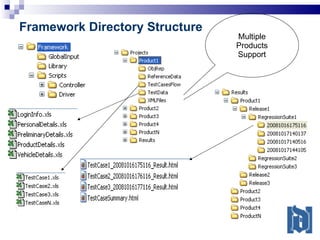
Framework Directory Structure Multiple Products Support
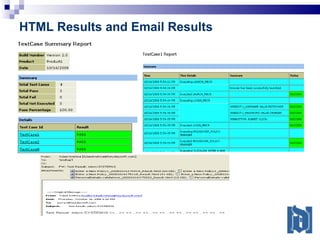
HTML Results and Email Results
Customizable Framework can be customized as per Your Needs You can choose the Tool for the Framework To Run on Many Test Machines for 24X7 To Integrate with Your existing Frameworks
Contact us [email_address] www.heydaysoft.com Need a Demo !

Automation Framework/QTP Framework

  • 1.
    gFAST generic Frameworkfor Automated Software Testing Experts in Automated Testing www.heydaysoft.com [email_address]
  • 2.
    Why Automation ?Difficult to Test All Work Flows Manually Difficult to Validate all Fields Manually Difficult to Test on All Languages Difficult to Test All Negative Scenarios Difficult to Manage Data for All Work Flows Huge Effort Required for Manual Testing
  • 3.
    Test Automation Benefits- I Broader - Wider testing coverage of features Deeper - more extensive variations within a feature Faster - Test Tools executes tests between 10 and 100 times faster than a human executes it Reliable Speed up testing to accelerate releases Allow testing to happen more frequently Insight about the risks Quickly Ensure consistency
  • 4.
    Test Automation Benefits- II Reduction in Timelines/testing costs Un-attended repeatability Less machines & Improved machine utilization Shortened test lead times Manual test effort reduction Better Speed in executing tests Re-usable test ware Monitoring ‘ Quality': Health of the product Insight about the risks Quickly Consistency across test runs Test frequently and thoroughly Early Time to Market
  • 5.
    Keyword Driven AutomationCharacteristics: Re-usable, modular Test Automation Framework Simple spreadsheet interface to define Work Flows and business processes Key Benefits: Increase regression coverage Decrease time required to test Reduce costs to deliver new functionality Incorporate best practices across global test organizations Improve Quality !
  • 6.
    Record/ Replay ModifiedRecord/ Replay Modular Data- Driven Keyword- Driven Effort Method Initial Development Ongoing Maintenance Automation Methods: Impact on Total Effort
  • 7.
    gFAST Framework FeaturesBetter ROI Internationalization Support Supports Multiple Projects/Test Suites/Test Cases 24/7 Automatic Regression Tests Running Facility Generates Email Reports Generates Test Logs Simple way to Create Test Cases (without any new QTP Scripts development) Easy to Create Test Cases with Test Cases Generator Easy way to Create Tests With Excel/Text files facility) Easy to Maintain Screen Capturing on Error for Each of the Test Cases Global Configuration Files Multiple Browser windows support Easy to build automation for the Projects
  • 8.
    gFAST SupportsMultiple Projects/Products Projects Project1/Product1 ConfigurationFiles Project1/Product1 ConfigurationFiles Project1/Product1 ConfigurationFiles Project1/Product1 ConfigurationFiles
  • 9.
    Controller Object RepositoryXML’s Function Library Driver HTML/Text Results Project (Product) TestCase1, TestCase2 … Test Data Input gFAST Architecture Framework Email Results Project (Product) TestCase1, TestCase2 …
  • 10.
    gFAST Framework BenefitsEasy Maintenance and Enhancement Test scripts for new features and new libraries can be added with little effort High Degree of Re-Usability Functions / scripts to be designed to facilitate reusability across different Deployments and Different Languages Easy Scalability Accommodates addition of new work flows/test cases to the framework with minimum effort Effective Reporting Reports can be analyzed to know the quality of the application
  • 11.
    gFAST Framework highlightsSupports Multiple Deployments/Projects Supports Multiple Languages Supports Multiple Work Flow/Test Cases Execution. Easy Maintenance Supports Dynamic (XML based) Web Pages Html/Text Reports for Work Flows Emailing the Results for Quicker Analysis Faster Work Flow/Test case development Very flexible Keyword and Data-Driven approach to create Work Flows.
  • 12.
    Automated Vs ManualTests: Effort – Using gFAST Assume 12 Test Cases for Product Manual Effort Effort Required to Run all 12 Test Cases (one Language) => 20 min X 12 = 240 Min(4 Hr) Effort Required to Run on 10 Supported languages => 4 hr X 10 = 40 Hrs Execution Effort for 6 Cycles => 40 Hr X 6 = 240 Man Hours Automation Effort Manual Effort Required to Build 12 Automation Test Cases => 16Hr X 12 = 192 Hours Manual Effort Required to Run 12 Work Flows for 10 Supported languages for 6 Cycles => 0 Hrs Saved Effort for One Product = 240 – 192 = 48 Hours As the Number of Deployments/Test Cases/Release Cycles Increases More Effort will be Saved
  • 13.
    Framework Directory StructureMultiple Products Support
  • 14.
    HTML Results andEmail Results
  • 15.
    Customizable Framework canbe customized as per Your Needs You can choose the Tool for the Framework To Run on Many Test Machines for 24X7 To Integrate with Your existing Frameworks
  • 16.
    Contact us [email_address]www.heydaysoft.com Need a Demo !