


Advanced Globus
System Administration
Vas Vasiliadis
vas@uchicago.edu
8 July 2022
Agenda
• Comparing GCS v4 and v5 comparison
• Migrating from GCS v4 to v5
• Multi-DTN deployments
• Supporting non-POSIX storage systems
• Optimizing (or not!) file transfer performance
• Modifying the data channel interface
2
Adding DTNs to your
endpoint
14
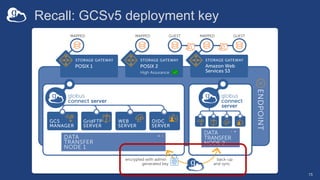
Recall: GCSv5 deployment key
15
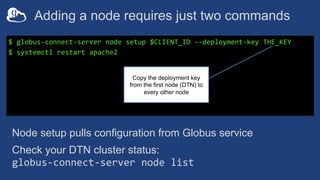
Adding a node requires just two commands
$ globus-connect-server node setup $CLIENT_ID --deployment-key THE_KEY
$ systemctl restart apache2
Copy the deployment key
from the first node (DTN) to
every other node
Node setup pulls configuration from Globus service
Check your DTN cluster status:
globus-connect-server node list
Multi-node DTN behavior
• Active nodes can receive transfer tasks
• Tasks on inactive node will pause until active again
• GCS manager assistant
– Synchronizes configuration among nodes in the endpoint
– Stores encrypted configuration values in Globus service
17
Migrating an endpoint to a new host (DTN)
• An endpoints is a logical construct è replace host
system without disrupting the endpoint
– Avoid replicating configuration data (esp. for guest collections!)
– Maintain continuity for custom apps, automation scripts, etc., that
use the endpoint UUID
• Using GCS’s multi-node configuration, add new node(s)
to endpoint and then remove original node(s)
• Again, deployment key is required
– Export node configuration with node setup --export-node
– Import on new DTN using node setup --import-node
Supporting non-POSIX systems
• Update your GCS packages
• Add the appropriate storage gateway
– Non-POSIX systems require add-on connector subscription(s)
• Gateway configuration options vary by connector
– e.g., specify bucket name(s) for AWS S3
• Collection authentication options vary by connector
– e.g., provide user access key and secret key for AWS S3
– Credentials must grant appropriate permissions
– Mapped collection may not actually “map” to local user account
Supporting access to
AWS S3
(and S3-compatible systems)
20
On performance…
21
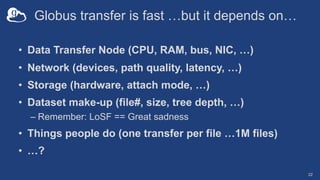
Globus transfer is fast …but it depends on…
• Data Transfer Node (CPU, RAM, bus, NIC, …)
• Network (devices, path quality, latency, …)
• Storage (hardware, attach mode, …)
• Dataset make-up (file#, size, tree depth, …)
– Remember: LoSF == Great sadness
• Things people do (one transfer per file …1M files)
• …?
22
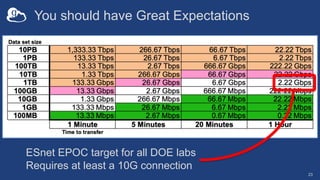
You should have Great Expectations
23
ESnet EPOC target for all DOE labs
Requires at least a 10G connection
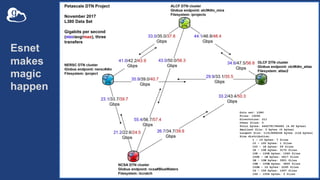
Esnet
makes
magic
happen
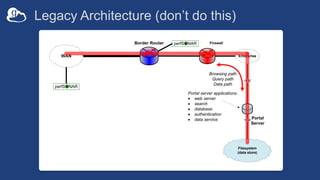
Legacy Architecture (don’t do this)
10GE
Border Router
WAN
Firewall
Enterprise
perfSONAR
perfSONAR
Filesystem
(data store)
10GE
Portal
Server
Browsing path
Query path
Data path
Portal server applications:
· web server
· search
· database
· authentication
· data service
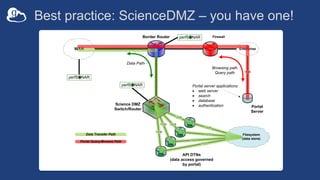
Best practice: ScienceDMZ – you have one!
10GE
10GE
10GE
10GE
Border Router
WAN
Science DMZ
Switch/Router
Firewall
Enterprise
perfSONAR
perfSONAR
10GE
10GE
10GE
10GE
DTN
DTN
API DTNs
(data access governed
by portal)
DTN
DTN
perfSONAR
Filesystem
(data store)
10GE
Portal
Server
Browsing path
Query path
Portal server applications:
· web server
· search
· database
· authentication
Data Path
Data Transfer Path
Portal Query/Browse Path
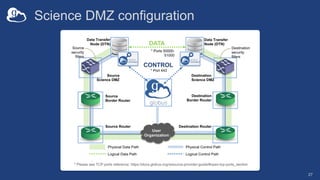
Science DMZ configuration
27
Source
security
filters
Destination
security
filters
Destination
Science DMZ
Source
Science DMZ
Source
Border Router
Destination
Border Router
Source Router Destination Router
User
Organization
DATA
CONTROL
Physical Control Path
Logical Control Path
Physical Data Path
Logical Data Path
* Port 443
* Ports 50000-
51000
Data Transfer
Node (DTN)
Data Transfer
Node (DTN)
* Please see TCP ports reference: https://docs.globus.org/resource-provider-guide/#open-tcp-ports_section
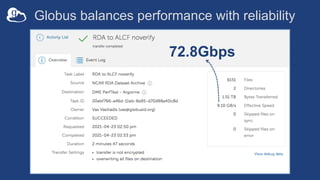
Globus balances performance with reliability
72.8Gbps
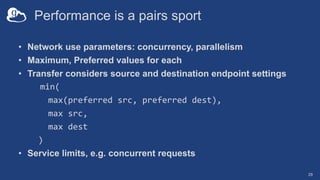
Performance is a pairs sport
• Network use parameters: concurrency, parallelism
• Maximum, Preferred values for each
• Transfer considers source and destination endpoint settings
min(
max(preferred src, preferred dest),
max src,
max dest
)
• Service limits, e.g. concurrent requests
29
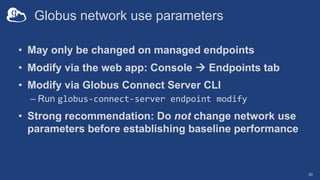
Globus network use parameters
• May only be changed on managed endpoints
• Modify via the web app: Console à Endpoints tab
• Modify via Globus Connect Server CLI
– Run globus-connect-server endpoint modify
• Strong recommendation: Do not change network use
parameters before establishing baseline performance
30
Modifying network
use parameters
31
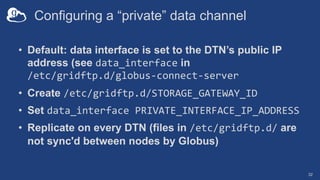
Configuring a “private” data channel
• Default: data interface is set to the DTN’s public IP
address (see data_interface in
/etc/gridftp.d/globus-connect-server
• Create /etc/gridftp.d/STORAGE_GATEWAY_ID
• Set data_interface PRIVATE_INTERFACE_IP_ADDRESS
• Replicate on every DTN (files in /etc/gridftp.d/ are
not sync'd between nodes by Globus)
32
Troubleshooting
Globus Connect
Server
33
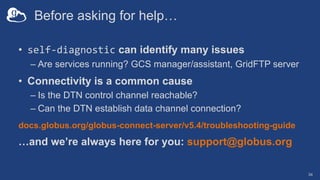
Before asking for help…
• self-diagnostic can identify many issues
– Are services running? GCS manager/assistant, GridFTP server
• Connectivity is a common cause
– Is the DTN control channel reachable?
– Can the DTN establish data channel connection?
docs.globus.org/globus-connect-server/v5.4/troubleshooting-guide
…and we’re always here for you: support@globus.org
34
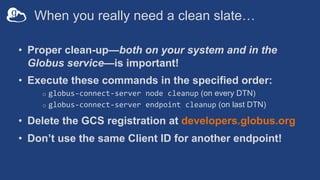
When you really need a clean slate…
• Proper clean-up—both on your system and in the
Globus service—is important!
• Execute these commands in the specified order:
o globus-connect-server node cleanup (on every DTN)
o globus-connect-server endpoint cleanup (on last DTN)
• Delete the GCS registration at developers.globus.org
• Don’t use the same Client ID for another endpoint!
Resources
• GCSv5 Guides: docs.globus.org/globus-connect-server/
• Migration: docs.globus.org/globus-connect-
server/migrating-to-v5.4/
• Globus support: support@globus.org
36

Advanced Globus System Administration

  • 1.
    Advanced Globus System Administration VasVasiliadis vas@uchicago.edu 8 July 2022
  • 2.
    Agenda • Comparing GCSv4 and v5 comparison • Migrating from GCS v4 to v5 • Multi-DTN deployments • Supporting non-POSIX storage systems • Optimizing (or not!) file transfer performance • Modifying the data channel interface 2
  • 3.
    Adding DTNs toyour endpoint 14
  • 4.
  • 5.
    Adding a noderequires just two commands $ globus-connect-server node setup $CLIENT_ID --deployment-key THE_KEY $ systemctl restart apache2 Copy the deployment key from the first node (DTN) to every other node Node setup pulls configuration from Globus service Check your DTN cluster status: globus-connect-server node list
  • 6.
    Multi-node DTN behavior •Active nodes can receive transfer tasks • Tasks on inactive node will pause until active again • GCS manager assistant – Synchronizes configuration among nodes in the endpoint – Stores encrypted configuration values in Globus service 17
  • 7.
    Migrating an endpointto a new host (DTN) • An endpoints is a logical construct è replace host system without disrupting the endpoint – Avoid replicating configuration data (esp. for guest collections!) – Maintain continuity for custom apps, automation scripts, etc., that use the endpoint UUID • Using GCS’s multi-node configuration, add new node(s) to endpoint and then remove original node(s) • Again, deployment key is required – Export node configuration with node setup --export-node – Import on new DTN using node setup --import-node
  • 8.
    Supporting non-POSIX systems •Update your GCS packages • Add the appropriate storage gateway – Non-POSIX systems require add-on connector subscription(s) • Gateway configuration options vary by connector – e.g., specify bucket name(s) for AWS S3 • Collection authentication options vary by connector – e.g., provide user access key and secret key for AWS S3 – Credentials must grant appropriate permissions – Mapped collection may not actually “map” to local user account
  • 9.
    Supporting access to AWSS3 (and S3-compatible systems) 20
  • 10.
  • 11.
    Globus transfer isfast …but it depends on… • Data Transfer Node (CPU, RAM, bus, NIC, …) • Network (devices, path quality, latency, …) • Storage (hardware, attach mode, …) • Dataset make-up (file#, size, tree depth, …) – Remember: LoSF == Great sadness • Things people do (one transfer per file …1M files) • …? 22
  • 12.
    You should haveGreat Expectations 23 ESnet EPOC target for all DOE labs Requires at least a 10G connection
  • 13.
  • 14.
    Legacy Architecture (don’tdo this) 10GE Border Router WAN Firewall Enterprise perfSONAR perfSONAR Filesystem (data store) 10GE Portal Server Browsing path Query path Data path Portal server applications: · web server · search · database · authentication · data service
  • 15.
    Best practice: ScienceDMZ– you have one! 10GE 10GE 10GE 10GE Border Router WAN Science DMZ Switch/Router Firewall Enterprise perfSONAR perfSONAR 10GE 10GE 10GE 10GE DTN DTN API DTNs (data access governed by portal) DTN DTN perfSONAR Filesystem (data store) 10GE Portal Server Browsing path Query path Portal server applications: · web server · search · database · authentication Data Path Data Transfer Path Portal Query/Browse Path
  • 16.
    Science DMZ configuration 27 Source security filters Destination security filters Destination ScienceDMZ Source Science DMZ Source Border Router Destination Border Router Source Router Destination Router User Organization DATA CONTROL Physical Control Path Logical Control Path Physical Data Path Logical Data Path * Port 443 * Ports 50000- 51000 Data Transfer Node (DTN) Data Transfer Node (DTN) * Please see TCP ports reference: https://docs.globus.org/resource-provider-guide/#open-tcp-ports_section
  • 17.
    Globus balances performancewith reliability 72.8Gbps
  • 18.
    Performance is apairs sport • Network use parameters: concurrency, parallelism • Maximum, Preferred values for each • Transfer considers source and destination endpoint settings min( max(preferred src, preferred dest), max src, max dest ) • Service limits, e.g. concurrent requests 29
  • 19.
    Globus network useparameters • May only be changed on managed endpoints • Modify via the web app: Console à Endpoints tab • Modify via Globus Connect Server CLI – Run globus-connect-server endpoint modify • Strong recommendation: Do not change network use parameters before establishing baseline performance 30
  • 20.
  • 21.
    Configuring a “private”data channel • Default: data interface is set to the DTN’s public IP address (see data_interface in /etc/gridftp.d/globus-connect-server • Create /etc/gridftp.d/STORAGE_GATEWAY_ID • Set data_interface PRIVATE_INTERFACE_IP_ADDRESS • Replicate on every DTN (files in /etc/gridftp.d/ are not sync'd between nodes by Globus) 32
  • 22.
  • 23.
    Before asking forhelp… • self-diagnostic can identify many issues – Are services running? GCS manager/assistant, GridFTP server • Connectivity is a common cause – Is the DTN control channel reachable? – Can the DTN establish data channel connection? docs.globus.org/globus-connect-server/v5.4/troubleshooting-guide …and we’re always here for you: support@globus.org 34
  • 24.
    When you reallyneed a clean slate… • Proper clean-up—both on your system and in the Globus service—is important! • Execute these commands in the specified order: o globus-connect-server node cleanup (on every DTN) o globus-connect-server endpoint cleanup (on last DTN) • Delete the GCS registration at developers.globus.org • Don’t use the same Client ID for another endpoint!
  • 25.
    Resources • GCSv5 Guides:docs.globus.org/globus-connect-server/ • Migration: docs.globus.org/globus-connect- server/migrating-to-v5.4/ • Globus support: support@globus.org 36