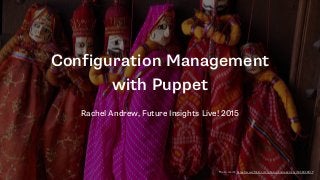


Configuration Management
with Puppet
Rachel Andrew, Future Insights Live! 2015
Photo credit: https://www.flickr.com/photos/andreakirkby/5450450019
@rachelandrew | Read more at http://rachelandrew.co.uk/presentations/puppet-developers
Rachel Andrew
http://rachelandrew.co.uk
@rachelandrew
http://grabaperch.com
@rachelandrew | Read more at http://rachelandrew.co.uk/presentations/puppet-developers
Many issues coming into support stem from
poor development and deployment processes.
@rachelandrew | Read more at http://rachelandrew.co.uk/presentations/puppet-developers
The Big Problems
• Developing directly on live sites or in subfolders of live sites
• Developing in subfolders locally
• Setting up local development environments that are so
different to the eventual live server that there is no
confidence when going live
• Working in teams where everyone has a slightly different
setup
@rachelandrew | Read more at http://rachelandrew.co.uk/presentations/puppet-developers
Improving workflow is the best way to give
yourself more hours in the day.
@rachelandrew | Read more at http://rachelandrew.co.uk/presentations/puppet-developers
Today we’re going to take a look at
• A really simple way to get started with Vagrant and Puppet
for those of you who haven’t used these tools before.
• Vagrant and Puppet fundamentals, how to start writing your
own manifests.
• How you can take this knowledge into production, even if you
manage just one or two servers.
@rachelandrew | Read more at http://rachelandrew.co.uk/presentations/puppet-developers
First Steps
@rachelandrew | Read more at http://rachelandrew.co.uk/presentations/puppet-developers
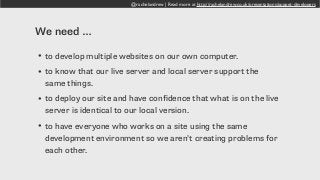
We need …
• to develop multiple websites on our own computer.
• to know that our live server and local server support the
same things.
• to deploy our site and have confidence that what is on the live
server is identical to our local version.
• to have everyone who works on a site using the same
development environment so we aren’t creating problems for
each other.
@rachelandrew | Read more at http://rachelandrew.co.uk/presentations/puppet-developers
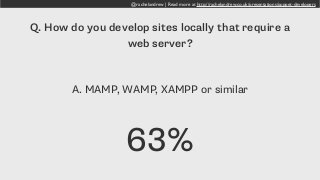
Q. How do you develop sites locally that require a
web server?
A. MAMP, WAMP, XAMPP or similar
63%
@rachelandrew | Read more at http://rachelandrew.co.uk/presentations/puppet-developers
In an ideal world your local development
environment is identical to the live server.
@rachelandrew | Read more at http://rachelandrew.co.uk/presentations/puppet-developers
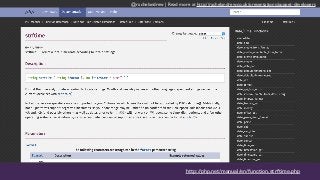
http://php.net/manual/en/function.strftime.php
@rachelandrew | Read more at http://rachelandrew.co.uk/presentations/puppet-developers
PHP Versions can be different. PHP modules
may not be available on the live server.
@rachelandrew | Read more at http://rachelandrew.co.uk/presentations/puppet-developers
Virtual Machines
@rachelandrew | Read more at http://rachelandrew.co.uk/presentations/puppet-developers
virtualbox.org
@rachelandrew | Read more at http://rachelandrew.co.uk/presentations/puppet-developers
vagrantup.com
@rachelandrew | Read more at http://rachelandrew.co.uk/presentations/puppet-developers
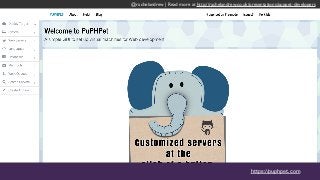
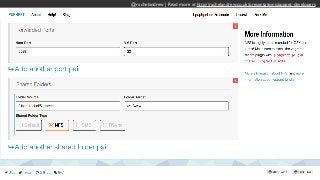
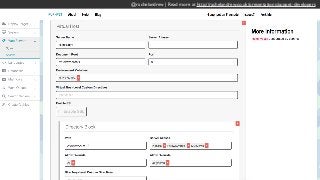
https://puphpet.com
@rachelandrew | Read more at http://rachelandrew.co.uk/presentations/puppet-developers
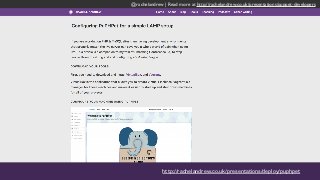
http://rachelandrew.co.uk/presentations/deploy/puphpet
@rachelandrew | Read more at http://rachelandrew.co.uk/presentations/puppet-developers
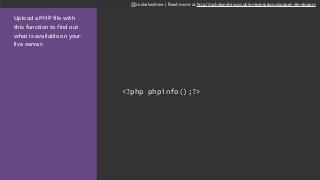
Upload a PHP file with
this function to find out
what is available on your
live server.
<?php phpinfo();?>
@rachelandrew | Read more at http://rachelandrew.co.uk/presentations/puppet-developers
Things to check on your live server
• PHP Version
• Installed modules such as gd for image processing
• post_max_size and upload_max_filesize determine the size
of files that can be uploaded
• max_input_vars is the number of form fields allowed in a
post
@rachelandrew | Read more at http://rachelandrew.co.uk/presentations/puppet-developers
Shared Folders
@rachelandrew | Read more at http://rachelandrew.co.uk/presentations/puppet-developers
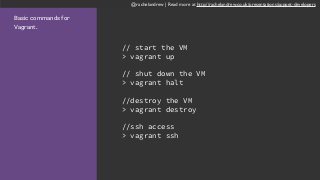
Basic commands for
Vagrant.
// start the VM
> vagrant up
// shut down the VM
> vagrant halt
//destroy the VM
> vagrant destroy
//ssh access
> vagrant ssh
@rachelandrew | Read more at http://rachelandrew.co.uk/presentations/puppet-developers
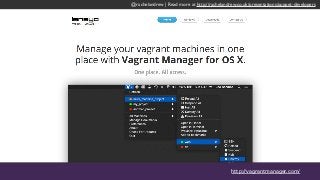
http://vagrantmanager.com/
@rachelandrew | Read more at http://rachelandrew.co.uk/presentations/puppet-developers
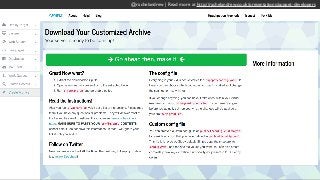
Share your package with anyone else working
on the site. The whole team can then have the
exact same development setup.
@rachelandrew | Read more at http://rachelandrew.co.uk/presentations/puppet-developers
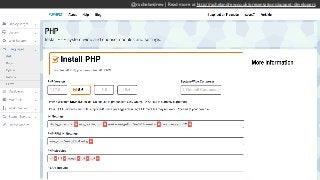
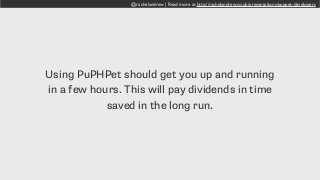
Using PuPHPet should get you up and running
in a few hours. This will pay dividends in time
saved in the long run.
@rachelandrew | Read more at http://rachelandrew.co.uk/presentations/puppet-developers
Getting Under the Hood
@rachelandrew | Read more at http://rachelandrew.co.uk/presentations/puppet-developers
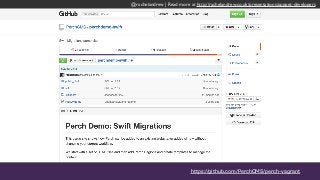
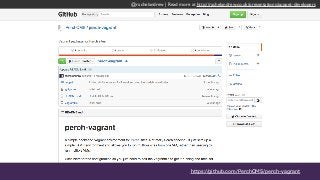
https://github.com/PerchCMS/perch-vagrant
@rachelandrew | Read more at http://rachelandrew.co.uk/presentations/puppet-developers
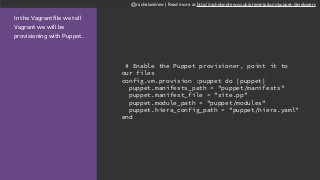
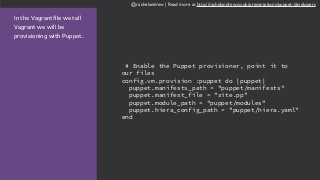
In the Vagrantfile we tell
Vagrant we will be
provisioning with Puppet.
# Enable the Puppet provisioner, point it to
our files
config.vm.provision :puppet do |puppet|
puppet.manifests_path = "puppet/manifests"
puppet.manifest_file = "site.pp"
puppet.module_path = "puppet/modules"
puppet.hiera_config_path = "puppet/hiera.yaml"
end
@rachelandrew | Read more at http://rachelandrew.co.uk/presentations/puppet-developers
What is Puppet?
• A Configuration Management solution
• Allows you to define in code the state of a server including
• Packages that should be installed
• Services that should be running
• Files and folders
• Permissions
• Cron jobs
@rachelandrew | Read more at http://rachelandrew.co.uk/presentations/puppet-developers
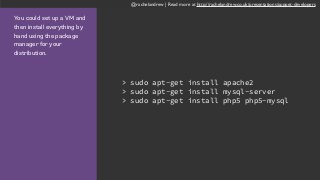
You could set up a VM and
then install everything by
hand using the package
manager for your
distribution.
> sudo apt-get install apache2
> sudo apt-get install mysql-server
> sudo apt-get install php5 php5-mysql
@rachelandrew | Read more at http://rachelandrew.co.uk/presentations/puppet-developers
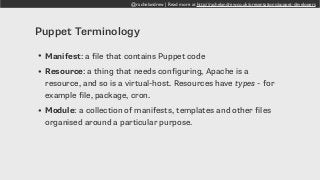
Puppet Terminology
• Manifest: a file that contains Puppet code
• Resource: a thing that needs configuring, Apache is a
resource, and so is a virtual-host. Resources have types - for
example file, package, cron.
• Module: a collection of manifests, templates and other files
organised around a particular purpose.
@rachelandrew | Read more at http://rachelandrew.co.uk/presentations/puppet-developers
Inside the Apache module
is a manifests folder. This
contains the manifests:
- init.pp
- vhost.pp puppet
modules
apache
manifests
- init.pp
- vhost.pp
templates
- vhost-default-conf.erb
@rachelandrew | Read more at http://rachelandrew.co.uk/presentations/puppet-developers
All modules need an
init.pp manifest. It is used
when the module is
included.
In the apache init.pp
- install the apache
package
- make sure apache is
running
- install the rewrite
module
class apache {
package { "apache2":
ensure => present,
}
service { "apache2":
ensure => running,
require => Package["apache2"],
}
file { "/etc/apache2/mods-enabled/rewrite.load":
ensure => link,
target => "/etc/apache2/mods-available/rewrite.load",
require => Package["apache2"]
}
}
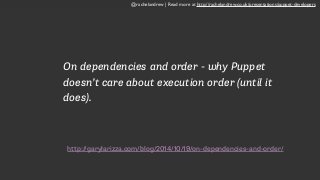
http://garylarizza.com/blog/2014/10/19/on-dependencies-and-order/
On dependencies and order - why Puppet
doesn’t care about execution order (until it
does).
@rachelandrew | Read more at http://rachelandrew.co.uk/presentations/puppet-developers
The manifest file vhost.pp
sets up a VirtualHost by
creating a file in sites-
available and symlinking it
into sites-enabled.
We notify the apache2
service, which will then
reload to pick up the new
config.
define apache::vhost(
$vhost_docroot = false,
$vhost_name = false,
$vhost_options =['Indexes','FollowSymLinks','MultiViews'],
) {
file {"/etc/apache2/sites-available/${vhost_name}":
content => template("apache/vhost-default.conf.erb"),
owner => 'root',
group => 'root',
mode => '755',
require => Package['apache2'],
notify => Service['apache2'];
"/etc/apache2/sites-enabled/${vhost_name}":
ensure => link,
target => "/etc/apache2/sites-available/${vhost_name}",
notify => Service['apache2'];
}
}
@rachelandrew | Read more at http://rachelandrew.co.uk/presentations/puppet-developers
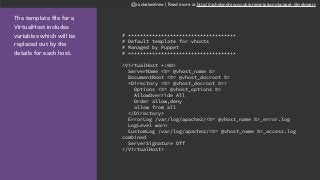
The template file for a
VirtualHost includes
variables which will be
replaced out by the
details for each host.
# ************************************
# Default template for vhosts
# Managed by Puppet
# ************************************
<VirtualHost *:80>
ServerName <%= @vhost_name %>
DocumentRoot <%= @vhost_docroot %>
<Directory <%= @vhost_docroot %>>
Options <%= @vhost_options %>
AllowOverride All
Order allow,deny
allow from all
</Directory>
ErrorLog /var/log/apache2/<%= @vhost_name %>_error.log
LogLevel warn
CustomLog /var/log/apache2/<%= @vhost_name %>_access.log
combined
ServerSignature Off
</VirtualHost>
@rachelandrew | Read more at http://rachelandrew.co.uk/presentations/puppet-developers
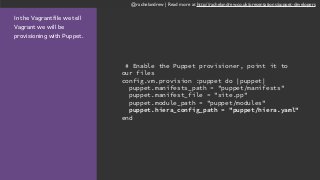
In the Vagrantfile we tell
Vagrant we will be
provisioning with Puppet.
# Enable the Puppet provisioner, point it to
our files
config.vm.provision :puppet do |puppet|
puppet.manifests_path = "puppet/manifests"
puppet.manifest_file = "site.pp"
puppet.module_path = "puppet/modules"
puppet.hiera_config_path = "puppet/hiera.yaml"
end
@rachelandrew | Read more at http://rachelandrew.co.uk/presentations/puppet-developers
The site.pp file is special
and kicks off the whole
process.
In my case it includes the
modules we want to run.
stage { 'setup':
before => Stage['main']
}
class { 'base':
stage => 'setup'
}
include base, apache, mysql, php,
bootstrap
@rachelandrew | Read more at http://rachelandrew.co.uk/presentations/puppet-developers
In the Vagrantfile we tell
Vagrant we will be
provisioning with Puppet.
# Enable the Puppet provisioner, point it to
our files
config.vm.provision :puppet do |puppet|
puppet.manifests_path = "puppet/manifests"
puppet.manifest_file = "site.pp"
puppet.module_path = "puppet/modules"
puppet.hiera_config_path = "puppet/hiera.yaml"
end
@rachelandrew | Read more at http://rachelandrew.co.uk/presentations/puppet-developers
The Hiera config file
defines a YAML backend
and gives the location of
the configuration data.
In my project that is in the
manifest directory, in a
folder named hiera.
---
:backends: yaml
:yaml:
:datadir: "%{settings::manifestdir}/
hiera"
:hierarchy:
- "%{::clientcert}"
- "%{::environment}"
- config
:logger: console
@rachelandrew | Read more at http://rachelandrew.co.uk/presentations/puppet-developers
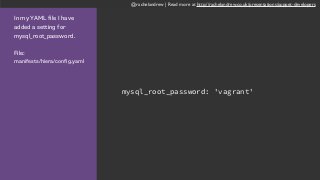
In my YAML file I have
added a setting for
mysql_root_password.
File: 

manifests/hiera/config.yaml
mysql_root_password: 'vagrant'
@rachelandrew | Read more at http://rachelandrew.co.uk/presentations/puppet-developers
I set the parameter
$root_pw with the value
using a hiera() function.
I can then use $root_pw
within the manifests.
File: 

modules/mysql/manifests/
init.pp
class mysql(
$root_pw = hiera('mysql_root_password'),
) {
package { "mysql-server":
ensure => present,
}
service { "mysql":
enable => true,
ensure => running,
require => Package["mysql-server"],
}
exec { "set-mysql-password":
unless => "/usr/bin/mysqladmin -uroot -p$root_pw status",
command => "/usr/bin/mysqladmin -uroot password $root_pw",
require => Service["mysql"],
}
}
@rachelandrew | Read more at http://rachelandrew.co.uk/presentations/puppet-developers
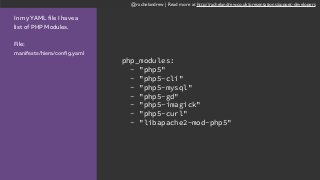
In my YAML file I have a
list of PHP Modules.
File: 

manifests/hiera/config.yaml
php_modules:
- "php5"
- "php5-cli"
- "php5-mysql"
- "php5-gd"
- "php5-imagick"
- "php5-curl"
- "libapache2-mod-php5"
@rachelandrew | Read more at http://rachelandrew.co.uk/presentations/puppet-developers
I get the php_modules
with the hiera function
and then pass the list to
the package resource
type.
File: 

modules/php/manifests/
init.pp
class php(
$packages = hiera('php_modules'),
$php_upload_max_filesize = hiera('php_upload_max_filesize'),
$php_max_file_uploads = hiera('php_max_file_uploads'),
$php_memory_limit = hiera('php_memory_limit'),
$php_error_reporting = hiera('php_error_reporting'),
$php_post_max_size = hiera('php_post_max_size'),
) {
package { $packages:
ensure => present,
}
file {'/etc/php5/apache2/php.ini':
ensure => file,
content => template("php/php.ini.erb"),
notify => Service["apache2"],
require => Package["php5"],
}
}
@rachelandrew | Read more at http://rachelandrew.co.uk/presentations/puppet-developers
The template file for a
VirtualHost includes
variables which will be
replaced out by the
details for each host.
# ************************************
# Default template for vhosts
# Managed by Puppet
# ************************************
<VirtualHost *:80>
ServerName <%= @vhost_name %>
DocumentRoot <%= @vhost_docroot %>
<Directory <%= @vhost_docroot %>>
Options <%= @vhost_options %>
AllowOverride All
Order allow,deny
allow from all
</Directory>
ErrorLog /var/log/apache2/<%= @vhost_name %>_error.log
LogLevel warn
CustomLog /var/log/apache2/<%= @vhost_name %>_access.log
combined
ServerSignature Off
</VirtualHost>
@rachelandrew | Read more at http://rachelandrew.co.uk/presentations/puppet-developers
In my YAML file I have
configures two sites.
apache_vhosts:
site1:
vhost_docroot: '/var/www/test_site1'
vhost_name: 'site1.dev'
vhost_options: 'All'
site2:
vhost_docroot: '/var/www/test_site2'
vhost_name: 'site2.dev'
vhost_options: 'All'
@rachelandrew | Read more at http://rachelandrew.co.uk/presentations/puppet-developers
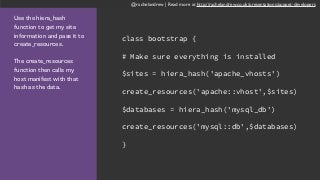
Use the hiera_hash
function to get my site
information and pass it to
create_resources.
The create_resources
function then calls my
host manifest with that
hash as the data.
class bootstrap {
# Make sure everything is installed
$sites = hiera_hash('apache_vhosts')
create_resources('apache::vhost',$sites)
$databases = hiera_hash('mysql_db')
create_resources('mysql::db',$databases)
}
@rachelandrew | Read more at http://rachelandrew.co.uk/presentations/puppet-developers
This is the manifest that
creates the databases I
need. define mysql::db(
$db_name = false,
$db_user = false,
$db_password = false,
$root_pw = hiera('mysql_root_password'),
) {
exec { "create-${db_name}":
unless => "/usr/bin/mysql -u${db_user} -p$
{db_password} ${db_name}",
command => "/usr/bin/mysql -uroot -p$
{root_pw} -e "create database ${db_name}; grant
all on ${db_name}.* to ${db_user}@localhost
identified by '$db_password';"",
require => Exec["set-mysql-password"],
}
}
@rachelandrew | Read more at http://rachelandrew.co.uk/presentations/puppet-developers
To set up a new VM
• git clone
• edit the Vagrantfile for IP address, project name
• edit the config.yaml to create sites and databases
• vagrant up
@rachelandrew | Read more at http://rachelandrew.co.uk/presentations/puppet-developers
Your entire development environment
can now be described in text files.
@rachelandrew | Read more at http://rachelandrew.co.uk/presentations/puppet-developers
Share your environment with your
team - they just edit the config.yaml.
@rachelandrew | Read more at http://rachelandrew.co.uk/presentations/puppet-developers
Provisioning files and data
@rachelandrew | Read more at http://rachelandrew.co.uk/presentations/puppet-developers
https://github.com/PerchCMS/perch-vagrant
@rachelandrew | Read more at http://rachelandrew.co.uk/presentations/puppet-developers
The challenge
• Take latest files and database dump from Github
• Deploy the three sites with the current Perch version and
add-ons
• Run the upgrade and change any templates as needed
• Produce the db dump with placeholders for Github and a Ruby
db template with placeholders for the demo server
• Produce zipped archives for use by the demo server
@rachelandrew | Read more at http://rachelandrew.co.uk/presentations/puppet-developers
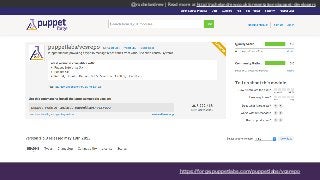
https://forge.puppetlabs.com/puppetlabs/vcsrepo
@rachelandrew | Read more at http://rachelandrew.co.uk/presentations/puppet-developers
Using the Puppetlabs
vcsrepo module to clone a
repository.
vcsrepo { '/path/to/repo':
ensure => present,
provider => git,
source => 'git://example.com/repo.git',
}
@rachelandrew | Read more at http://rachelandrew.co.uk/presentations/puppet-developers
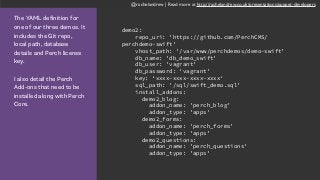
The YAML definition for
one of our three demos. It
includes the Git repo,
local path, database
details and Perch license
key.
I also detail the Perch
Add-ons that need to be
installed along with Perch
Core.
demo2:
repo_uri: 'https://github.com/PerchCMS/
perchdemo-swift'
vhost_path: '/var/www/perchdemos/demo-swift'
db_name: 'db_demo_swift'
db_user: 'vagrant'
db_password: 'vagrant'
key: ‘xxxx-xxxx-xxxx-xxxx‘
sql_path: '/sql/swift_demo.sql'
install_addons:
demo2_blog:
addon_name: 'perch_blog'
addon_type: 'apps'
demo2_forms:
addon_name: 'perch_forms'
addon_type: 'apps'
demo2_questions:
addon_name: 'perch_questions'
addon_type: 'apps'
@rachelandrew | Read more at http://rachelandrew.co.uk/presentations/puppet-developers
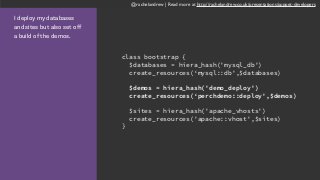
I deploy my databases
and sites but also set off
a build of the demos.
class bootstrap {
$databases = hiera_hash('mysql_db')
create_resources(‘mysql::db',$databases)
$demos = hiera_hash('demo_deploy')
create_resources(‘perchdemo::deploy',$demos)
$sites = hiera_hash('apache_vhosts')
create_resources('apache::vhost',$sites)
}
@rachelandrew | Read more at http://rachelandrew.co.uk/presentations/puppet-developers
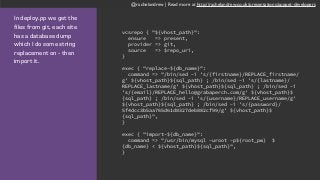
In deploy.pp we get the
files from git, each site
has a database dump
which I do some string
replacement on - then
import it.
vcsrepo { "${vhost_path}":
ensure => present,
provider => git,
source => $repo_uri,
}
exec { "replace-${db_name}":
command => "/bin/sed -i 's/{firstname}/REPLACE_firstname/
g' ${vhost_path}${sql_path} ; /bin/sed -i 's/{lastname}/
REPLACE_lastname/g' ${vhost_path}${sql_path} ; /bin/sed -i
's/{email}/REPLACE_hello@grabaperch.com/g' ${vhost_path}$
{sql_path} ; /bin/sed -i 's/{username}/REPLACE_username/g'
${vhost_path}${sql_path} ; /bin/sed -i 's/{password}/
5f4dcc3b5aa765d61d8327deb882cf99/g' ${vhost_path}$
{sql_path}",
}
exec { "import-${db_name}":
command => "/usr/bin/mysql -uroot -p${root_pw} $
{db_name} < ${vhost_path}${sql_path}",
}
@rachelandrew | Read more at http://rachelandrew.co.uk/presentations/puppet-developers
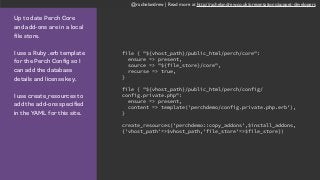
Up to date Perch Core
and add-ons are in a local
file store.
I use a Ruby .erb template
for the Perch Config so I
can add the database
details and license key.
I use create_resources to
add the add-ons specified
in the YAML for this site.
file { "${vhost_path}/public_html/perch/core":
ensure => present,
source => "${file_store}/core",
recurse => true,
}
file { "${vhost_path}/public_html/perch/config/
config.private.php":
ensure => present,
content => template('perchdemo/config.private.php.erb'),
}
create_resources('perchdemo::copy_addons',$install_addons,
{'vhost_path'=>$vhost_path,'file_store'=>$file_store})
@rachelandrew | Read more at http://rachelandrew.co.uk/presentations/puppet-developers
At the command line you
can run puppet apply to
run a manifest.
In this case I am running
builder.pp which builds
me an archive to upload
for each site. > puppet apply --modulepath=/vagrant/
puppet/modules --hiera_config /vagrant/
puppet/hiera.yaml -e "include
perchdemo::builder"
@rachelandrew | Read more at http://rachelandrew.co.uk/presentations/puppet-developers
Taking Puppet to Production
@rachelandrew | Read more at http://rachelandrew.co.uk/presentations/puppet-developers
Puppet Masters
@rachelandrew | Read more at http://rachelandrew.co.uk/presentations/puppet-developers
Masterless Puppet
@rachelandrew | Read more at http://rachelandrew.co.uk/presentations/puppet-developers
You don’t have to provision the entire server
using Puppet. Start with small tasks.
@rachelandrew | Read more at http://rachelandrew.co.uk/presentations/puppet-developers
Use Puppet to create user accounts with the correct
privileges and ssh keys on each server you set up.
@rachelandrew | Read more at http://rachelandrew.co.uk/presentations/puppet-developers
Use an inexpensive VPS for client staging
sites. Manage the VirtualHosts using Puppet.
@rachelandrew | Read more at http://rachelandrew.co.uk/presentations/puppet-developers
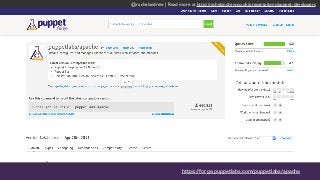
https://forge.puppetlabs.com/puppetlabs/apache
@rachelandrew | Read more at http://rachelandrew.co.uk/presentations/puppet-developers
Schedule regular Puppet runs to check that
services are running, and restart them if not
@rachelandrew | Read more at http://rachelandrew.co.uk/presentations/puppet-developers
Puppet can ensure files and directories exist
and they have the correct permissions set
@rachelandrew | Read more at http://rachelandrew.co.uk/presentations/puppet-developers
Using Puppet can allow people to edit
configs without needing privileges on
production servers.
@rachelandrew | Read more at http://rachelandrew.co.uk/presentations/puppet-developers
Configuration can be edited, checked into Git
and reviewed before being deployed.
@rachelandrew | Read more at http://rachelandrew.co.uk/presentations/puppet-developers
Modules you use on the server can
often be also used in development.
Ensuring the same environment.
@rachelandrew | Read more at http://rachelandrew.co.uk/presentations/puppet-developers
Change one small thing.
@rachelandrew | Read more at http://rachelandrew.co.uk/presentations/puppet-developers
Improve one thing about your
workflow. Build from there.
@rachelandrew | Read more at http://rachelandrew.co.uk/presentations/puppet-developers
Thank you FILIVE!
Rachel Andrew
http://rachelandrew.co.uk/presentations/puppet-developers
me@rachelandrew.co.uk
@rachelandrew

Configuration Management with Puppet (Rachel Andrew)

  • 1.
    Configuration Management with Puppet RachelAndrew, Future Insights Live! 2015 Photo credit: https://www.flickr.com/photos/andreakirkby/5450450019
  • 2.
    @rachelandrew | Readmore at http://rachelandrew.co.uk/presentations/puppet-developers Rachel Andrew http://rachelandrew.co.uk @rachelandrew http://grabaperch.com
  • 3.
    @rachelandrew | Readmore at http://rachelandrew.co.uk/presentations/puppet-developers Many issues coming into support stem from poor development and deployment processes.
  • 4.
    @rachelandrew | Readmore at http://rachelandrew.co.uk/presentations/puppet-developers The Big Problems • Developing directly on live sites or in subfolders of live sites • Developing in subfolders locally • Setting up local development environments that are so different to the eventual live server that there is no confidence when going live • Working in teams where everyone has a slightly different setup
  • 5.
    @rachelandrew | Readmore at http://rachelandrew.co.uk/presentations/puppet-developers Improving workflow is the best way to give yourself more hours in the day.
  • 6.
    @rachelandrew | Readmore at http://rachelandrew.co.uk/presentations/puppet-developers Today we’re going to take a look at • A really simple way to get started with Vagrant and Puppet for those of you who haven’t used these tools before. • Vagrant and Puppet fundamentals, how to start writing your own manifests. • How you can take this knowledge into production, even if you manage just one or two servers.
  • 7.
    @rachelandrew | Readmore at http://rachelandrew.co.uk/presentations/puppet-developers First Steps
  • 8.
    @rachelandrew | Readmore at http://rachelandrew.co.uk/presentations/puppet-developers We need … • to develop multiple websites on our own computer. • to know that our live server and local server support the same things. • to deploy our site and have confidence that what is on the live server is identical to our local version. • to have everyone who works on a site using the same development environment so we aren’t creating problems for each other.
  • 9.
    @rachelandrew | Readmore at http://rachelandrew.co.uk/presentations/puppet-developers Q. How do you develop sites locally that require a web server? A. MAMP, WAMP, XAMPP or similar 63%
  • 10.
    @rachelandrew | Readmore at http://rachelandrew.co.uk/presentations/puppet-developers In an ideal world your local development environment is identical to the live server.
  • 11.
    @rachelandrew | Readmore at http://rachelandrew.co.uk/presentations/puppet-developers http://php.net/manual/en/function.strftime.php
  • 12.
    @rachelandrew | Readmore at http://rachelandrew.co.uk/presentations/puppet-developers PHP Versions can be different. PHP modules may not be available on the live server.
  • 13.
    @rachelandrew | Readmore at http://rachelandrew.co.uk/presentations/puppet-developers Virtual Machines
  • 14.
    @rachelandrew | Readmore at http://rachelandrew.co.uk/presentations/puppet-developers virtualbox.org
  • 15.
    @rachelandrew | Readmore at http://rachelandrew.co.uk/presentations/puppet-developers vagrantup.com
  • 16.
    @rachelandrew | Readmore at http://rachelandrew.co.uk/presentations/puppet-developers https://puphpet.com
  • 17.
    @rachelandrew | Readmore at http://rachelandrew.co.uk/presentations/puppet-developers
  • 18.
    @rachelandrew | Readmore at http://rachelandrew.co.uk/presentations/puppet-developers http://rachelandrew.co.uk/presentations/deploy/puphpet
  • 19.
    @rachelandrew | Readmore at http://rachelandrew.co.uk/presentations/puppet-developers Upload a PHP file with this function to find out what is available on your live server. <?php phpinfo();?>
  • 20.
    @rachelandrew | Readmore at http://rachelandrew.co.uk/presentations/puppet-developers Things to check on your live server • PHP Version • Installed modules such as gd for image processing • post_max_size and upload_max_filesize determine the size of files that can be uploaded • max_input_vars is the number of form fields allowed in a post
  • 21.
    @rachelandrew | Readmore at http://rachelandrew.co.uk/presentations/puppet-developers Shared Folders
  • 22.
    @rachelandrew | Readmore at http://rachelandrew.co.uk/presentations/puppet-developers
  • 23.
    @rachelandrew | Readmore at http://rachelandrew.co.uk/presentations/puppet-developers
  • 24.
    @rachelandrew | Readmore at http://rachelandrew.co.uk/presentations/puppet-developers
  • 25.
    @rachelandrew | Readmore at http://rachelandrew.co.uk/presentations/puppet-developers
  • 26.
    @rachelandrew | Readmore at http://rachelandrew.co.uk/presentations/puppet-developers Basic commands for Vagrant. // start the VM > vagrant up // shut down the VM > vagrant halt //destroy the VM > vagrant destroy //ssh access > vagrant ssh
  • 27.
    @rachelandrew | Readmore at http://rachelandrew.co.uk/presentations/puppet-developers http://vagrantmanager.com/
  • 28.
    @rachelandrew | Readmore at http://rachelandrew.co.uk/presentations/puppet-developers Share your package with anyone else working on the site. The whole team can then have the exact same development setup.
  • 29.
    @rachelandrew | Readmore at http://rachelandrew.co.uk/presentations/puppet-developers Using PuPHPet should get you up and running in a few hours. This will pay dividends in time saved in the long run.
  • 30.
    @rachelandrew | Readmore at http://rachelandrew.co.uk/presentations/puppet-developers Getting Under the Hood
  • 31.
    @rachelandrew | Readmore at http://rachelandrew.co.uk/presentations/puppet-developers https://github.com/PerchCMS/perch-vagrant
  • 32.
    @rachelandrew | Readmore at http://rachelandrew.co.uk/presentations/puppet-developers
  • 33.
    @rachelandrew | Readmore at http://rachelandrew.co.uk/presentations/puppet-developers In the Vagrantfile we tell Vagrant we will be provisioning with Puppet. # Enable the Puppet provisioner, point it to our files config.vm.provision :puppet do |puppet| puppet.manifests_path = "puppet/manifests" puppet.manifest_file = "site.pp" puppet.module_path = "puppet/modules" puppet.hiera_config_path = "puppet/hiera.yaml" end
  • 34.
    @rachelandrew | Readmore at http://rachelandrew.co.uk/presentations/puppet-developers What is Puppet? • A Configuration Management solution • Allows you to define in code the state of a server including • Packages that should be installed • Services that should be running • Files and folders • Permissions • Cron jobs
  • 35.
    @rachelandrew | Readmore at http://rachelandrew.co.uk/presentations/puppet-developers You could set up a VM and then install everything by hand using the package manager for your distribution. > sudo apt-get install apache2 > sudo apt-get install mysql-server > sudo apt-get install php5 php5-mysql
  • 36.
    @rachelandrew | Readmore at http://rachelandrew.co.uk/presentations/puppet-developers
  • 37.
    @rachelandrew | Readmore at http://rachelandrew.co.uk/presentations/puppet-developers Puppet Terminology • Manifest: a file that contains Puppet code • Resource: a thing that needs configuring, Apache is a resource, and so is a virtual-host. Resources have types - for example file, package, cron. • Module: a collection of manifests, templates and other files organised around a particular purpose.
  • 38.
    @rachelandrew | Readmore at http://rachelandrew.co.uk/presentations/puppet-developers Inside the Apache module is a manifests folder. This contains the manifests: - init.pp - vhost.pp puppet modules apache manifests - init.pp - vhost.pp templates - vhost-default-conf.erb
  • 39.
    @rachelandrew | Readmore at http://rachelandrew.co.uk/presentations/puppet-developers All modules need an init.pp manifest. It is used when the module is included. In the apache init.pp - install the apache package - make sure apache is running - install the rewrite module class apache { package { "apache2": ensure => present, } service { "apache2": ensure => running, require => Package["apache2"], } file { "/etc/apache2/mods-enabled/rewrite.load": ensure => link, target => "/etc/apache2/mods-available/rewrite.load", require => Package["apache2"] } }
  • 40.
    http://garylarizza.com/blog/2014/10/19/on-dependencies-and-order/ On dependencies andorder - why Puppet doesn’t care about execution order (until it does). @rachelandrew | Read more at http://rachelandrew.co.uk/presentations/puppet-developers
  • 41.
    @rachelandrew | Readmore at http://rachelandrew.co.uk/presentations/puppet-developers The manifest file vhost.pp sets up a VirtualHost by creating a file in sites- available and symlinking it into sites-enabled. We notify the apache2 service, which will then reload to pick up the new config. define apache::vhost( $vhost_docroot = false, $vhost_name = false, $vhost_options =['Indexes','FollowSymLinks','MultiViews'], ) { file {"/etc/apache2/sites-available/${vhost_name}": content => template("apache/vhost-default.conf.erb"), owner => 'root', group => 'root', mode => '755', require => Package['apache2'], notify => Service['apache2']; "/etc/apache2/sites-enabled/${vhost_name}": ensure => link, target => "/etc/apache2/sites-available/${vhost_name}", notify => Service['apache2']; } }
  • 42.
    @rachelandrew | Readmore at http://rachelandrew.co.uk/presentations/puppet-developers The template file for a VirtualHost includes variables which will be replaced out by the details for each host. # ************************************ # Default template for vhosts # Managed by Puppet # ************************************ <VirtualHost *:80> ServerName <%= @vhost_name %> DocumentRoot <%= @vhost_docroot %> <Directory <%= @vhost_docroot %>> Options <%= @vhost_options %> AllowOverride All Order allow,deny allow from all </Directory> ErrorLog /var/log/apache2/<%= @vhost_name %>_error.log LogLevel warn CustomLog /var/log/apache2/<%= @vhost_name %>_access.log combined ServerSignature Off </VirtualHost>
  • 43.
    @rachelandrew | Readmore at http://rachelandrew.co.uk/presentations/puppet-developers In the Vagrantfile we tell Vagrant we will be provisioning with Puppet. # Enable the Puppet provisioner, point it to our files config.vm.provision :puppet do |puppet| puppet.manifests_path = "puppet/manifests" puppet.manifest_file = "site.pp" puppet.module_path = "puppet/modules" puppet.hiera_config_path = "puppet/hiera.yaml" end
  • 44.
    @rachelandrew | Readmore at http://rachelandrew.co.uk/presentations/puppet-developers The site.pp file is special and kicks off the whole process. In my case it includes the modules we want to run. stage { 'setup': before => Stage['main'] } class { 'base': stage => 'setup' } include base, apache, mysql, php, bootstrap
  • 45.
    @rachelandrew | Readmore at http://rachelandrew.co.uk/presentations/puppet-developers In the Vagrantfile we tell Vagrant we will be provisioning with Puppet. # Enable the Puppet provisioner, point it to our files config.vm.provision :puppet do |puppet| puppet.manifests_path = "puppet/manifests" puppet.manifest_file = "site.pp" puppet.module_path = "puppet/modules" puppet.hiera_config_path = "puppet/hiera.yaml" end
  • 46.
    @rachelandrew | Readmore at http://rachelandrew.co.uk/presentations/puppet-developers The Hiera config file defines a YAML backend and gives the location of the configuration data. In my project that is in the manifest directory, in a folder named hiera. --- :backends: yaml :yaml: :datadir: "%{settings::manifestdir}/ hiera" :hierarchy: - "%{::clientcert}" - "%{::environment}" - config :logger: console
  • 47.
    @rachelandrew | Readmore at http://rachelandrew.co.uk/presentations/puppet-developers
  • 48.
    @rachelandrew | Readmore at http://rachelandrew.co.uk/presentations/puppet-developers In my YAML file I have added a setting for mysql_root_password. File: 
 manifests/hiera/config.yaml mysql_root_password: 'vagrant'
  • 49.
    @rachelandrew | Readmore at http://rachelandrew.co.uk/presentations/puppet-developers I set the parameter $root_pw with the value using a hiera() function. I can then use $root_pw within the manifests. File: 
 modules/mysql/manifests/ init.pp class mysql( $root_pw = hiera('mysql_root_password'), ) { package { "mysql-server": ensure => present, } service { "mysql": enable => true, ensure => running, require => Package["mysql-server"], } exec { "set-mysql-password": unless => "/usr/bin/mysqladmin -uroot -p$root_pw status", command => "/usr/bin/mysqladmin -uroot password $root_pw", require => Service["mysql"], } }
  • 50.
    @rachelandrew | Readmore at http://rachelandrew.co.uk/presentations/puppet-developers In my YAML file I have a list of PHP Modules. File: 
 manifests/hiera/config.yaml php_modules: - "php5" - "php5-cli" - "php5-mysql" - "php5-gd" - "php5-imagick" - "php5-curl" - "libapache2-mod-php5"
  • 51.
    @rachelandrew | Readmore at http://rachelandrew.co.uk/presentations/puppet-developers I get the php_modules with the hiera function and then pass the list to the package resource type. File: 
 modules/php/manifests/ init.pp class php( $packages = hiera('php_modules'), $php_upload_max_filesize = hiera('php_upload_max_filesize'), $php_max_file_uploads = hiera('php_max_file_uploads'), $php_memory_limit = hiera('php_memory_limit'), $php_error_reporting = hiera('php_error_reporting'), $php_post_max_size = hiera('php_post_max_size'), ) { package { $packages: ensure => present, } file {'/etc/php5/apache2/php.ini': ensure => file, content => template("php/php.ini.erb"), notify => Service["apache2"], require => Package["php5"], } }
  • 52.
    @rachelandrew | Readmore at http://rachelandrew.co.uk/presentations/puppet-developers The template file for a VirtualHost includes variables which will be replaced out by the details for each host. # ************************************ # Default template for vhosts # Managed by Puppet # ************************************ <VirtualHost *:80> ServerName <%= @vhost_name %> DocumentRoot <%= @vhost_docroot %> <Directory <%= @vhost_docroot %>> Options <%= @vhost_options %> AllowOverride All Order allow,deny allow from all </Directory> ErrorLog /var/log/apache2/<%= @vhost_name %>_error.log LogLevel warn CustomLog /var/log/apache2/<%= @vhost_name %>_access.log combined ServerSignature Off </VirtualHost>
  • 53.
    @rachelandrew | Readmore at http://rachelandrew.co.uk/presentations/puppet-developers In my YAML file I have configures two sites. apache_vhosts: site1: vhost_docroot: '/var/www/test_site1' vhost_name: 'site1.dev' vhost_options: 'All' site2: vhost_docroot: '/var/www/test_site2' vhost_name: 'site2.dev' vhost_options: 'All'
  • 54.
    @rachelandrew | Readmore at http://rachelandrew.co.uk/presentations/puppet-developers Use the hiera_hash function to get my site information and pass it to create_resources. The create_resources function then calls my host manifest with that hash as the data. class bootstrap { # Make sure everything is installed $sites = hiera_hash('apache_vhosts') create_resources('apache::vhost',$sites) $databases = hiera_hash('mysql_db') create_resources('mysql::db',$databases) }
  • 55.
    @rachelandrew | Readmore at http://rachelandrew.co.uk/presentations/puppet-developers This is the manifest that creates the databases I need. define mysql::db( $db_name = false, $db_user = false, $db_password = false, $root_pw = hiera('mysql_root_password'), ) { exec { "create-${db_name}": unless => "/usr/bin/mysql -u${db_user} -p$ {db_password} ${db_name}", command => "/usr/bin/mysql -uroot -p$ {root_pw} -e "create database ${db_name}; grant all on ${db_name}.* to ${db_user}@localhost identified by '$db_password';"", require => Exec["set-mysql-password"], } }
  • 56.
    @rachelandrew | Readmore at http://rachelandrew.co.uk/presentations/puppet-developers To set up a new VM • git clone • edit the Vagrantfile for IP address, project name • edit the config.yaml to create sites and databases • vagrant up
  • 57.
    @rachelandrew | Readmore at http://rachelandrew.co.uk/presentations/puppet-developers Your entire development environment can now be described in text files.
  • 58.
    @rachelandrew | Readmore at http://rachelandrew.co.uk/presentations/puppet-developers Share your environment with your team - they just edit the config.yaml.
  • 59.
    @rachelandrew | Readmore at http://rachelandrew.co.uk/presentations/puppet-developers Provisioning files and data
  • 60.
    @rachelandrew | Readmore at http://rachelandrew.co.uk/presentations/puppet-developers https://github.com/PerchCMS/perch-vagrant
  • 61.
    @rachelandrew | Readmore at http://rachelandrew.co.uk/presentations/puppet-developers
  • 62.
    @rachelandrew | Readmore at http://rachelandrew.co.uk/presentations/puppet-developers The challenge • Take latest files and database dump from Github • Deploy the three sites with the current Perch version and add-ons • Run the upgrade and change any templates as needed • Produce the db dump with placeholders for Github and a Ruby db template with placeholders for the demo server • Produce zipped archives for use by the demo server
  • 63.
    @rachelandrew | Readmore at http://rachelandrew.co.uk/presentations/puppet-developers https://forge.puppetlabs.com/puppetlabs/vcsrepo
  • 64.
    @rachelandrew | Readmore at http://rachelandrew.co.uk/presentations/puppet-developers Using the Puppetlabs vcsrepo module to clone a repository. vcsrepo { '/path/to/repo': ensure => present, provider => git, source => 'git://example.com/repo.git', }
  • 65.
    @rachelandrew | Readmore at http://rachelandrew.co.uk/presentations/puppet-developers The YAML definition for one of our three demos. It includes the Git repo, local path, database details and Perch license key. I also detail the Perch Add-ons that need to be installed along with Perch Core. demo2: repo_uri: 'https://github.com/PerchCMS/ perchdemo-swift' vhost_path: '/var/www/perchdemos/demo-swift' db_name: 'db_demo_swift' db_user: 'vagrant' db_password: 'vagrant' key: ‘xxxx-xxxx-xxxx-xxxx‘ sql_path: '/sql/swift_demo.sql' install_addons: demo2_blog: addon_name: 'perch_blog' addon_type: 'apps' demo2_forms: addon_name: 'perch_forms' addon_type: 'apps' demo2_questions: addon_name: 'perch_questions' addon_type: 'apps'
  • 66.
    @rachelandrew | Readmore at http://rachelandrew.co.uk/presentations/puppet-developers I deploy my databases and sites but also set off a build of the demos. class bootstrap { $databases = hiera_hash('mysql_db') create_resources(‘mysql::db',$databases) $demos = hiera_hash('demo_deploy') create_resources(‘perchdemo::deploy',$demos) $sites = hiera_hash('apache_vhosts') create_resources('apache::vhost',$sites) }
  • 67.
    @rachelandrew | Readmore at http://rachelandrew.co.uk/presentations/puppet-developers In deploy.pp we get the files from git, each site has a database dump which I do some string replacement on - then import it. vcsrepo { "${vhost_path}": ensure => present, provider => git, source => $repo_uri, } exec { "replace-${db_name}": command => "/bin/sed -i 's/{firstname}/REPLACE_firstname/ g' ${vhost_path}${sql_path} ; /bin/sed -i 's/{lastname}/ REPLACE_lastname/g' ${vhost_path}${sql_path} ; /bin/sed -i 's/{email}/REPLACE_hello@grabaperch.com/g' ${vhost_path}$ {sql_path} ; /bin/sed -i 's/{username}/REPLACE_username/g' ${vhost_path}${sql_path} ; /bin/sed -i 's/{password}/ 5f4dcc3b5aa765d61d8327deb882cf99/g' ${vhost_path}$ {sql_path}", } exec { "import-${db_name}": command => "/usr/bin/mysql -uroot -p${root_pw} $ {db_name} < ${vhost_path}${sql_path}", }
  • 68.
    @rachelandrew | Readmore at http://rachelandrew.co.uk/presentations/puppet-developers Up to date Perch Core and add-ons are in a local file store. I use a Ruby .erb template for the Perch Config so I can add the database details and license key. I use create_resources to add the add-ons specified in the YAML for this site. file { "${vhost_path}/public_html/perch/core": ensure => present, source => "${file_store}/core", recurse => true, } file { "${vhost_path}/public_html/perch/config/ config.private.php": ensure => present, content => template('perchdemo/config.private.php.erb'), } create_resources('perchdemo::copy_addons',$install_addons, {'vhost_path'=>$vhost_path,'file_store'=>$file_store})
  • 69.
    @rachelandrew | Readmore at http://rachelandrew.co.uk/presentations/puppet-developers At the command line you can run puppet apply to run a manifest. In this case I am running builder.pp which builds me an archive to upload for each site. > puppet apply --modulepath=/vagrant/ puppet/modules --hiera_config /vagrant/ puppet/hiera.yaml -e "include perchdemo::builder"
  • 70.
    @rachelandrew | Readmore at http://rachelandrew.co.uk/presentations/puppet-developers Taking Puppet to Production
  • 71.
    @rachelandrew | Readmore at http://rachelandrew.co.uk/presentations/puppet-developers Puppet Masters
  • 72.
    @rachelandrew | Readmore at http://rachelandrew.co.uk/presentations/puppet-developers Masterless Puppet
  • 73.
    @rachelandrew | Readmore at http://rachelandrew.co.uk/presentations/puppet-developers You don’t have to provision the entire server using Puppet. Start with small tasks.
  • 74.
    @rachelandrew | Readmore at http://rachelandrew.co.uk/presentations/puppet-developers Use Puppet to create user accounts with the correct privileges and ssh keys on each server you set up.
  • 75.
    @rachelandrew | Readmore at http://rachelandrew.co.uk/presentations/puppet-developers Use an inexpensive VPS for client staging sites. Manage the VirtualHosts using Puppet.
  • 76.
    @rachelandrew | Readmore at http://rachelandrew.co.uk/presentations/puppet-developers https://forge.puppetlabs.com/puppetlabs/apache
  • 77.
    @rachelandrew | Readmore at http://rachelandrew.co.uk/presentations/puppet-developers Schedule regular Puppet runs to check that services are running, and restart them if not
  • 78.
    @rachelandrew | Readmore at http://rachelandrew.co.uk/presentations/puppet-developers Puppet can ensure files and directories exist and they have the correct permissions set
  • 79.
    @rachelandrew | Readmore at http://rachelandrew.co.uk/presentations/puppet-developers Using Puppet can allow people to edit configs without needing privileges on production servers.
  • 80.
    @rachelandrew | Readmore at http://rachelandrew.co.uk/presentations/puppet-developers Configuration can be edited, checked into Git and reviewed before being deployed.
  • 81.
    @rachelandrew | Readmore at http://rachelandrew.co.uk/presentations/puppet-developers Modules you use on the server can often be also used in development. Ensuring the same environment.
  • 82.
    @rachelandrew | Readmore at http://rachelandrew.co.uk/presentations/puppet-developers Change one small thing.
  • 83.
    @rachelandrew | Readmore at http://rachelandrew.co.uk/presentations/puppet-developers Improve one thing about your workflow. Build from there.
  • 84.
    @rachelandrew | Readmore at http://rachelandrew.co.uk/presentations/puppet-developers Thank you FILIVE! Rachel Andrew http://rachelandrew.co.uk/presentations/puppet-developers me@rachelandrew.co.uk @rachelandrew