

COFFEESCRIPT 
AN INTRODUCTION FOR NODE DEVELOPERS 
BY: MEHDI VALIKHANI 
SOFTWARE ENGINEER @ ALPHATISE 
Follow me: @mehdivk | 
mehdi@alphatise.com
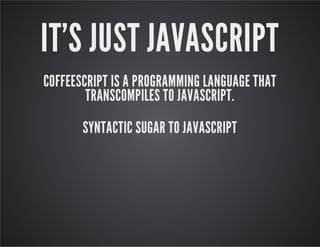
IT'S JUST JAVASCRIPT 
COFFEESCRIPT IS A PROGRAMMING LANGUAGE THAT 
TRANSCOMPILES TO JAVASCRIPT. 
SYNTACTIC SUGAR TO JAVASCRIPT
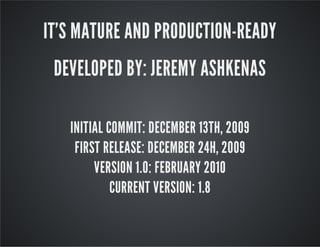
IT'S MATURE AND PRODUCTION-READY 
DEVELOPED BY: JEREMY ASHKENAS 
INITIAL COMMIT: DECEMBER 13TH, 2009 
FIRST RELEASE: DECEMBER 24H, 2009 
VERSION 1.0: FEBRUARY 2010 
CURRENT VERSION: 1.8
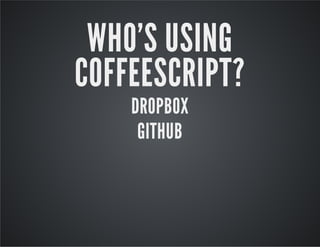
WHO'S USING 
COFFEESCRIPT? 
DROPBOX 
GITHUB
WRITE LESS, DO MORE 
HUMAN-READABLE CODE 
STAY AWAY FROM WEIRD JS BEHAVIOUR 
SAY GOODBYE TO PROTOTYPE! USE CLASSES 
ANY MANY MORE ...
COFFEESCRIPT SYNTAX
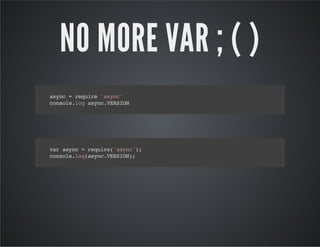
NO MORE VAR ; ( ) 
async = require 'async' 
console.log async.VERSION 
var async = require('async'); 
console.log(async.VERSION);
FUNCTIONS 
IT'S PART OF OUR EVERYDAY LIFE IN JS WORLD 
LET'S BE AGILE!
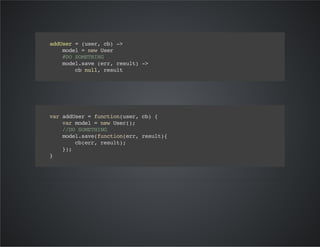
addUser = (user, cb) -> 
model = new User 
#DO SOMETHING 
model.save (err, result) -> 
cb null, result 
var addUser = function(user, cb) { 
var model = new User(); 
//DO SOMETHING 
model.save(function(err, result){ 
cb(err, result); 
}); 
}
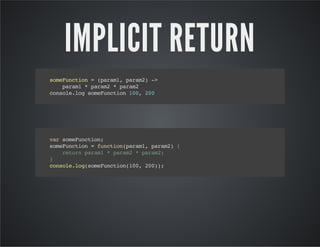
IMPLICIT RETURN 
someFunction = (param1, param2) -> 
param1 * param2 * param2 
console.log someFunction 100, 200 
var someFunction; 
someFunction = function(param1, param2) { 
return param1 * param2 * param2; 
} 
console.log(someFunction(100, 200));
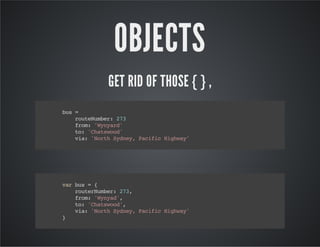
OBJECTS 
GET RID OF THOSE { } , 
bus = 
routeNumber: 273 
from: 'Wynyard' 
to: 'Chatswood' 
via: 'North Sydney, Pacific Highway' 
var bus = { 
routerNumber: 273, 
from: 'Wynyad', 
to: 'Chatswood', 
via: 'North Sydney, Pacific Highway' 
}
query = 
status: 
$in: ['active', 'pending_for_approval'] 
payment: 
$nin: ['invoice', 'free'] 
tc: 
$exists: true 
var query = { 
status: { 
$in: ['active', 'pending_for_approval'] 
}, 
payment: { 
$nin: ['invoice', 'free'] 
}, 
tc: { 
$exists: true 
} 
}
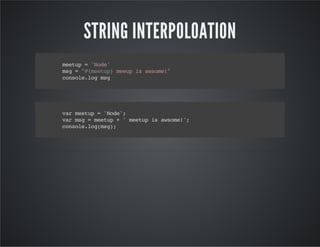
STRING INTERPOLOATION 
meetup = 'Node' 
msg = "#{meetup} meeup is awsome!" 
console.log msg 
var meetup = 'Node'; 
var msg = meetup + ' meetup is awsome!'; 
console.log(msg);
CLASSES 
BETTER INHERITANCE WITHOUT PROTOTYPE 
WE SHOULDN'T USE LIBRARIES TO HAVE CLASSES IN JS
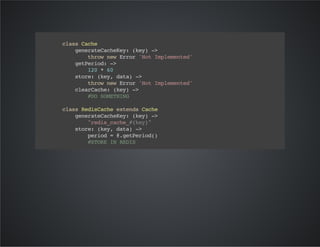
class Cache 
generateCacheKey: (key) -> 
throw new Error 'Not Implemented' 
getPeriod: -> 
120 * 60 
store: (key, data) -> 
throw new Error 'Not Implemented' 
clearCache: (key) -> 
#DO SOMETHING 
class RedisCache extends Cache 
generateCacheKey: (key) -> 
"redis_cache_#{key}" 
store: (key, data) -> 
period = @.getPeriod() 
#STORE IN REDIS
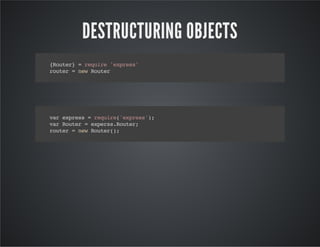
DESTRUCTURING OBJECTS 
{Router} = require 'express' 
router = new Router 
var express = require('express'); 
var Router = experss.Router; 
router = new Router();
DESTRUCTURING ARRAYS 
student = 'Mehdi Valikhani' 
[firstName, lastName] = student.split ' ' 
var student, ref, firstName, lastName; 
student = 'Mehdi Valikhani'; 
ref = student.split(' '); 
firstName = ref[0]; 
lastName = ref[1];
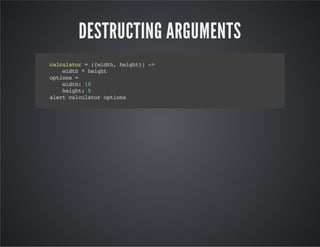
DESTRUCTING ARGUMENTS 
calculator = ({width, height}) -> 
width * height 
options = 
width: 10 
height: 5 
alert calculator options
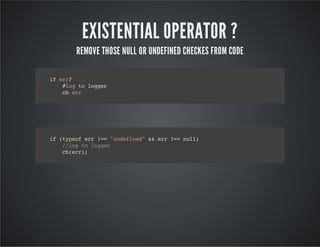
EXISTENTIAL OPERATOR ? 
REMOVE THOSE NULL OR UNDEFINED CHECKES FROM CODE 
if err? 
#log to logger 
cb err 
if (typeof err !== "undefined" && err !== null) 
//log to logger 
cb(err);
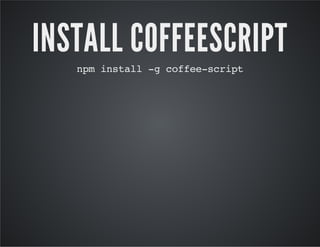
INSTALL COFFEESCRIPT 
npm install -g coffee-script
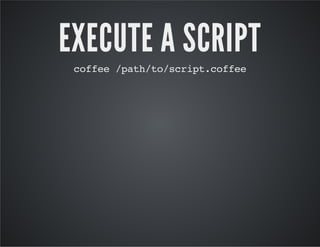
EXECUTE A SCRIPT 
coffee /path/to/script.coffee
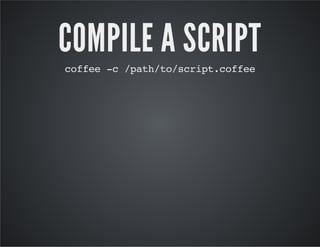
COMPILE A SCRIPT 
coffee -c /path/to/script.coffee
NODE + COFFEE 
FROM SCRATCH 
REST API DEVELOPMENT USING EXPRESS + NODE + COFFEE
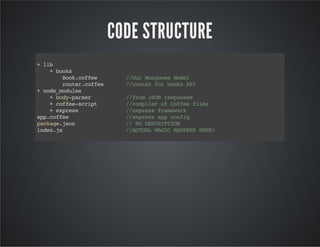
CODE STRUCTURE 
+ lib 
+ books 
Book.coffee //Our Mongoose Model 
router.coffee //router for books API 
+ node_modules 
+ body-parser //from JSON responses 
+ coffee-script //compiler of Coffee files 
+ express //express framework 
app.coffee //express app config 
package.json // NO DESCRIPTION 
index.js //ACTUAL MAGIC HAPPENS HERE!
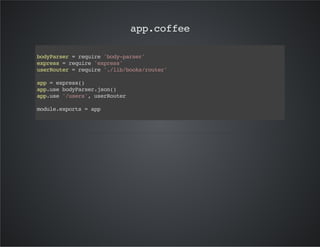
app.coffee 
bodyParser = require 'body-parser' 
express = require 'express' 
userRouter = require './lib/books/router' 
app = express() 
app.use bodyParser.json() 
app.use '/users', userRouter 
module.exports = app
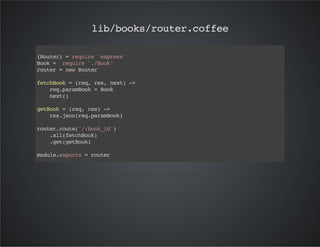
lib/books/router.coffee 
{Router} = require 'express' 
Book = require './Book' 
router = new Router 
fetchBook = (req, res, next) -> 
req.paramBook = Book 
next() 
getBook = (req, res) -> 
res.json(req.paramBook) 
router.route('/:book_id') 
.all(fetchBook) 
.get(getBook) 
module.exports = router
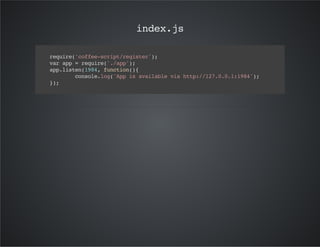
index.js 
require('coffee-script/register'); 
var app = require('./app'); 
app.listen(1984, function(){ 
console.log('App is available via http://127.0.0.1:1984'); 
});
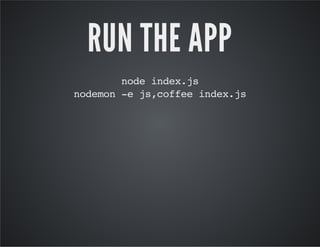
RUN THE APP 
node index.js 
nodemon -e js,coffee index.js
NODE + COFFEE 
AN EXISTING PROJECT
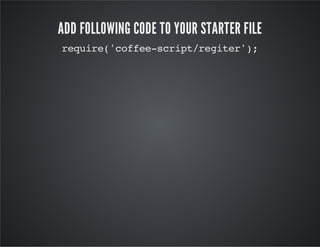
ADD FOLLOWING CODE TO YOUR STARTER FILE 
require('coffee-script/regiter');
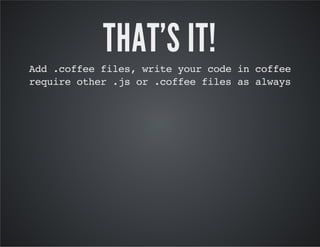
THAT'S IT! 
Add .coffee files, write your code in coffee 
require other .js or .coffee files as always
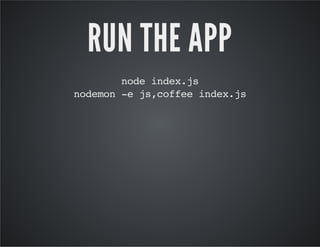
RUN THE APP 
node index.js 
nodemon -e js,coffee index.js
DEBUGGING 
COFFEESCRIPT 
APPLICATIONS
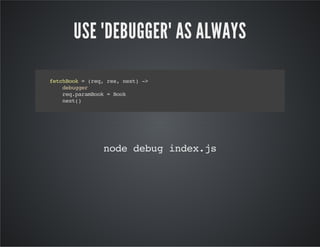
USE "DEBUGGER" AS ALWAYS 
fetchBook = (req, res, next) -> 
debugger 
req.paramBook = Book 
next() 
node debug index.js
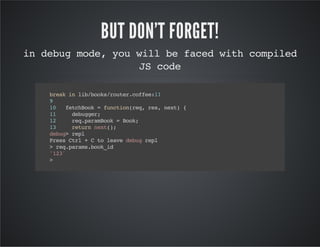
BUT DON'T FORGET! 
in debug mode, you will be faced with compiled 
JS code 
break in lib/books/router.coffee:11 
9 
10 fetchBook = function(req, res, next) { 
11 debugger; 
12 req.paramBook = Book; 
13 return next(); 
debug> repl 
Press Ctrl + C to leave debug repl 
> req.params.book_id 
'123' 
>
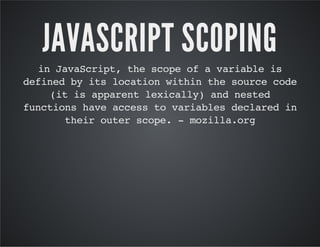
JAVASCRIPT SCOPING 
in JavaScript, the scope of a variable is 
defined by its location within the source code 
(it is apparent lexically) and nested 
functions have access to variables declared in 
their outer scope. - mozilla.org
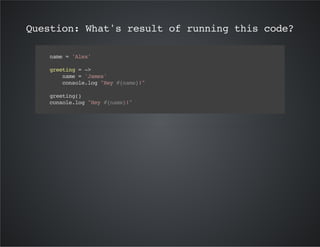
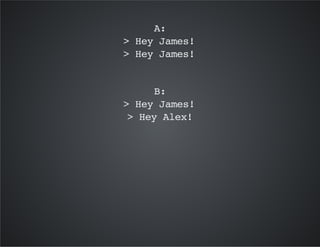
Question: What's result of running this code? 
name = 'Alex' 
greeting = -> 
name = 'James' 
console.log "Hey #{name}!" 
greeting() 
console.log "Hey #{name}!"
A: 
> Hey James! 
> Hey James! 
B: 
> Hey James! 
> Hey Alex!
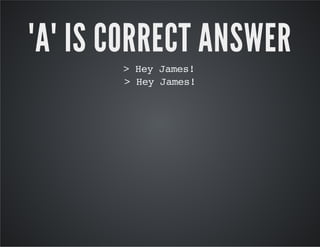
"A" IS CORRECT ANSWER 
> Hey James! 
> Hey James!
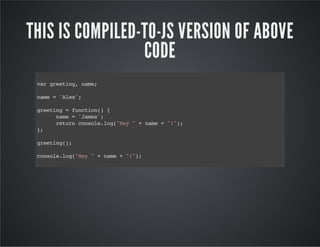
THIS IS COMPILED-TO-JS VERSION OF ABOVE 
CODE 
var greeting, name; 
name = 'Alex'; 
greeting = function() { 
name = 'James'; 
return console.log("Hey " + name + "!"); 
}; 
greeting(); 
console.log("Hey " + name + "!");
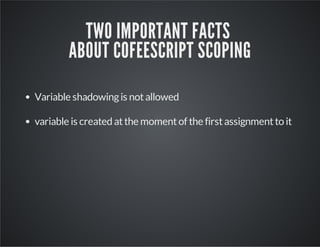
TWO IMPORTANT FACTS 
ABOUT COFEESCRIPT SCOPING 
Variable shadowing is not allowed 
variable is created at the moment of the first assignment to it
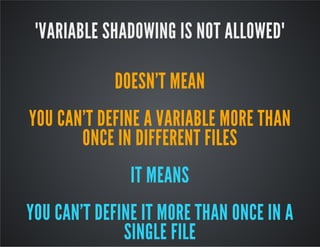
"VARIABLE SHADOWING IS NOT ALLOWED" 
DOESN'T MEAN 
YOU CAN'T DEFINE A VARIABLE MORE THAN 
ONCE IN DIFFERENT FILES 
IT MEANS 
YOU CAN'T DEFINE IT MORE THAN ONCE IN A 
SINGLE FILE
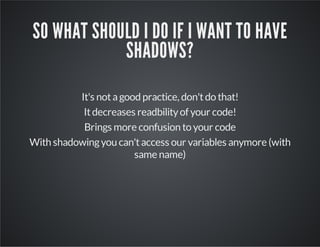
SO WHAT SHOULD I DO IF I WANT TO HAVE 
SHADOWS? 
It's not a good practice, don't do that! 
It decreases readbility of your code! 
Brings more confusion to your code 
With shadowing you can't access our variables anymore (with 
same name)
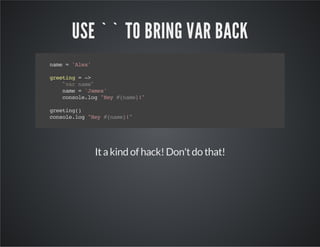
USE `` TO BRING VAR BACK 
name = 'Alex' 
greeting = -> 
` var name 
` 
name = 'James' 
console.log "Hey #{name}!" 
greeting() 
console.log "Hey #{name}!" 
It a kind of hack! Don't do that!
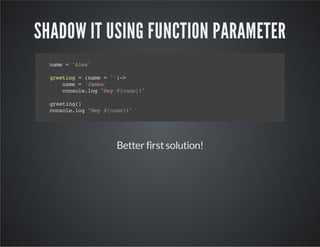
SHADOW IT USING FUNCTION PARAMETER 
name = 'Alex' 
greeting = (name = '')-> 
name = 'James' 
console.log "Hey #{name}!" 
greeting() 
console.log "Hey #{name}!" 
Better first solution!
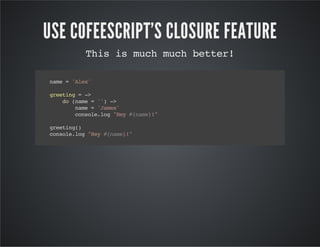
USE COFEESCRIPT'S CLOSURE FEATURE 
This is much much better! 
name = 'Alex' 
greeting = -> 
do (name = '') -> 
name = 'James' 
console.log "Hey #{name}!" 
greeting() 
console.log "Hey #{name}!"
MORE INFO ABOUT LEXICAL SCOPING: 
https://github.com/raganwald-deprecated/ 
homoiconic/blob/master/2012/09/actually-YOU-dont- 
understand-lexical-scope.md 
https://github.com/raganwald-deprecated/ 
homoiconic/blob/master/2012/09/lexical-scope-in- 
coffeescript.md
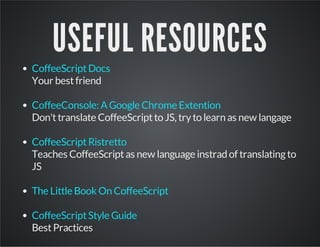
USEFUL RESOURCES 
CoffeeScript Docs 
Your best friend 
CoffeeConsole: A Google Chrome Extention 
Don't translate CoffeeScript to JS, try to learn as new langage 
CoffeeScript Ristretto 
Teaches CoffeeScript as new language instrad of translating to 
JS 
The Little Book On CoffeeScript 
CoffeeScript Style Guide 
Best Practices
Thank you!

CoffeeScript, An Introduction for Nodejs developers

  • 1.
    COFFEESCRIPT AN INTRODUCTIONFOR NODE DEVELOPERS BY: MEHDI VALIKHANI SOFTWARE ENGINEER @ ALPHATISE Follow me: @mehdivk | mehdi@alphatise.com
  • 2.
    IT'S JUST JAVASCRIPT COFFEESCRIPT IS A PROGRAMMING LANGUAGE THAT TRANSCOMPILES TO JAVASCRIPT. SYNTACTIC SUGAR TO JAVASCRIPT
  • 3.
    IT'S MATURE ANDPRODUCTION-READY DEVELOPED BY: JEREMY ASHKENAS INITIAL COMMIT: DECEMBER 13TH, 2009 FIRST RELEASE: DECEMBER 24H, 2009 VERSION 1.0: FEBRUARY 2010 CURRENT VERSION: 1.8
  • 4.
  • 5.
    WRITE LESS, DOMORE HUMAN-READABLE CODE STAY AWAY FROM WEIRD JS BEHAVIOUR SAY GOODBYE TO PROTOTYPE! USE CLASSES ANY MANY MORE ...
  • 6.
  • 7.
    NO MORE VAR; ( ) async = require 'async' console.log async.VERSION var async = require('async'); console.log(async.VERSION);
  • 8.
    FUNCTIONS IT'S PARTOF OUR EVERYDAY LIFE IN JS WORLD LET'S BE AGILE!
  • 9.
    addUser = (user,cb) -> model = new User #DO SOMETHING model.save (err, result) -> cb null, result var addUser = function(user, cb) { var model = new User(); //DO SOMETHING model.save(function(err, result){ cb(err, result); }); }
  • 10.
    IMPLICIT RETURN someFunction= (param1, param2) -> param1 * param2 * param2 console.log someFunction 100, 200 var someFunction; someFunction = function(param1, param2) { return param1 * param2 * param2; } console.log(someFunction(100, 200));
  • 11.
    OBJECTS GET RIDOF THOSE { } , bus = routeNumber: 273 from: 'Wynyard' to: 'Chatswood' via: 'North Sydney, Pacific Highway' var bus = { routerNumber: 273, from: 'Wynyad', to: 'Chatswood', via: 'North Sydney, Pacific Highway' }
  • 12.
    query = status: $in: ['active', 'pending_for_approval'] payment: $nin: ['invoice', 'free'] tc: $exists: true var query = { status: { $in: ['active', 'pending_for_approval'] }, payment: { $nin: ['invoice', 'free'] }, tc: { $exists: true } }
  • 13.
    STRING INTERPOLOATION meetup= 'Node' msg = "#{meetup} meeup is awsome!" console.log msg var meetup = 'Node'; var msg = meetup + ' meetup is awsome!'; console.log(msg);
  • 14.
    CLASSES BETTER INHERITANCEWITHOUT PROTOTYPE WE SHOULDN'T USE LIBRARIES TO HAVE CLASSES IN JS
  • 15.
    class Cache generateCacheKey:(key) -> throw new Error 'Not Implemented' getPeriod: -> 120 * 60 store: (key, data) -> throw new Error 'Not Implemented' clearCache: (key) -> #DO SOMETHING class RedisCache extends Cache generateCacheKey: (key) -> "redis_cache_#{key}" store: (key, data) -> period = @.getPeriod() #STORE IN REDIS
  • 16.
    DESTRUCTURING OBJECTS {Router}= require 'express' router = new Router var express = require('express'); var Router = experss.Router; router = new Router();
  • 17.
    DESTRUCTURING ARRAYS student= 'Mehdi Valikhani' [firstName, lastName] = student.split ' ' var student, ref, firstName, lastName; student = 'Mehdi Valikhani'; ref = student.split(' '); firstName = ref[0]; lastName = ref[1];
  • 18.
    DESTRUCTING ARGUMENTS calculator= ({width, height}) -> width * height options = width: 10 height: 5 alert calculator options
  • 19.
    EXISTENTIAL OPERATOR ? REMOVE THOSE NULL OR UNDEFINED CHECKES FROM CODE if err? #log to logger cb err if (typeof err !== "undefined" && err !== null) //log to logger cb(err);
  • 20.
    INSTALL COFFEESCRIPT npminstall -g coffee-script
  • 21.
    EXECUTE A SCRIPT coffee /path/to/script.coffee
  • 22.
    COMPILE A SCRIPT coffee -c /path/to/script.coffee
  • 23.
    NODE + COFFEE FROM SCRATCH REST API DEVELOPMENT USING EXPRESS + NODE + COFFEE
  • 24.
    CODE STRUCTURE +lib + books Book.coffee //Our Mongoose Model router.coffee //router for books API + node_modules + body-parser //from JSON responses + coffee-script //compiler of Coffee files + express //express framework app.coffee //express app config package.json // NO DESCRIPTION index.js //ACTUAL MAGIC HAPPENS HERE!
  • 25.
    app.coffee bodyParser =require 'body-parser' express = require 'express' userRouter = require './lib/books/router' app = express() app.use bodyParser.json() app.use '/users', userRouter module.exports = app
  • 26.
    lib/books/router.coffee {Router} =require 'express' Book = require './Book' router = new Router fetchBook = (req, res, next) -> req.paramBook = Book next() getBook = (req, res) -> res.json(req.paramBook) router.route('/:book_id') .all(fetchBook) .get(getBook) module.exports = router
  • 27.
    index.js require('coffee-script/register'); varapp = require('./app'); app.listen(1984, function(){ console.log('App is available via http://127.0.0.1:1984'); });
  • 28.
    RUN THE APP node index.js nodemon -e js,coffee index.js
  • 29.
    NODE + COFFEE AN EXISTING PROJECT
  • 30.
    ADD FOLLOWING CODETO YOUR STARTER FILE require('coffee-script/regiter');
  • 31.
    THAT'S IT! Add.coffee files, write your code in coffee require other .js or .coffee files as always
  • 32.
    RUN THE APP node index.js nodemon -e js,coffee index.js
  • 33.
  • 34.
    USE "DEBUGGER" ASALWAYS fetchBook = (req, res, next) -> debugger req.paramBook = Book next() node debug index.js
  • 35.
    BUT DON'T FORGET! in debug mode, you will be faced with compiled JS code break in lib/books/router.coffee:11 9 10 fetchBook = function(req, res, next) { 11 debugger; 12 req.paramBook = Book; 13 return next(); debug> repl Press Ctrl + C to leave debug repl > req.params.book_id '123' >
  • 36.
    JAVASCRIPT SCOPING inJavaScript, the scope of a variable is defined by its location within the source code (it is apparent lexically) and nested functions have access to variables declared in their outer scope. - mozilla.org
  • 37.
    Question: What's resultof running this code? name = 'Alex' greeting = -> name = 'James' console.log "Hey #{name}!" greeting() console.log "Hey #{name}!"
  • 38.
    A: > HeyJames! > Hey James! B: > Hey James! > Hey Alex!
  • 39.
    "A" IS CORRECTANSWER > Hey James! > Hey James!
  • 40.
    THIS IS COMPILED-TO-JSVERSION OF ABOVE CODE var greeting, name; name = 'Alex'; greeting = function() { name = 'James'; return console.log("Hey " + name + "!"); }; greeting(); console.log("Hey " + name + "!");
  • 41.
    TWO IMPORTANT FACTS ABOUT COFEESCRIPT SCOPING Variable shadowing is not allowed variable is created at the moment of the first assignment to it
  • 42.
    "VARIABLE SHADOWING ISNOT ALLOWED" DOESN'T MEAN YOU CAN'T DEFINE A VARIABLE MORE THAN ONCE IN DIFFERENT FILES IT MEANS YOU CAN'T DEFINE IT MORE THAN ONCE IN A SINGLE FILE
  • 43.
    SO WHAT SHOULDI DO IF I WANT TO HAVE SHADOWS? It's not a good practice, don't do that! It decreases readbility of your code! Brings more confusion to your code With shadowing you can't access our variables anymore (with same name)
  • 44.
    USE `` TOBRING VAR BACK name = 'Alex' greeting = -> ` var name ` name = 'James' console.log "Hey #{name}!" greeting() console.log "Hey #{name}!" It a kind of hack! Don't do that!
  • 45.
    SHADOW IT USINGFUNCTION PARAMETER name = 'Alex' greeting = (name = '')-> name = 'James' console.log "Hey #{name}!" greeting() console.log "Hey #{name}!" Better first solution!
  • 46.
    USE COFEESCRIPT'S CLOSUREFEATURE This is much much better! name = 'Alex' greeting = -> do (name = '') -> name = 'James' console.log "Hey #{name}!" greeting() console.log "Hey #{name}!"
  • 47.
    MORE INFO ABOUTLEXICAL SCOPING: https://github.com/raganwald-deprecated/ homoiconic/blob/master/2012/09/actually-YOU-dont- understand-lexical-scope.md https://github.com/raganwald-deprecated/ homoiconic/blob/master/2012/09/lexical-scope-in- coffeescript.md
  • 48.
    USEFUL RESOURCES CoffeeScriptDocs Your best friend CoffeeConsole: A Google Chrome Extention Don't translate CoffeeScript to JS, try to learn as new langage CoffeeScript Ristretto Teaches CoffeeScript as new language instrad of translating to JS The Little Book On CoffeeScript CoffeeScript Style Guide Best Practices
  • 49.