DRAFT VERSION v0.1 
First steps with Scrapy 
@Francisco Sousa
WHAT IS SCRAPY?
Scrapy is an open source and collaborative 
framework for extracting the data you 
need from websites. 
It’s made in Python!
Who is it for?
Scrapy is for everyone that want to collect 
data from one or many websites.
“The advantage of scraping is that you can 
do it with virtually any web site - from 
weather forecasts to government 
spending, even if that site does not have 
an API for raw data access” 
Friedrich Lindenberg
Alternatives?
There are many alternatives as: 

• Lxml 
• Beatiful Soup 
• Mechanize 
• Newspaper
Advantages of Scrapy?
• It’s free 
• It’s cross platform (Windows, 
Linux, Mac OS and BSD) 
• Fast and powerfull
Disadvantages of 
Scrapy?
• It’s only for python 2.7.+ 
• It’s has a bigger learnig curve that 
some other alternatives 
• Installation it’s different according 
the operating system
Let’s start!
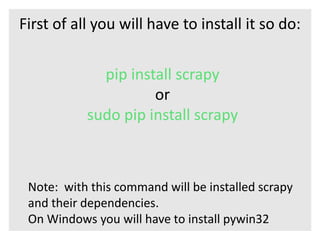
First of all you will have to install it so do: 
pip install scrapy 
or 
sudo pip install scrapy 
Note: with this command will be installed scrapy 
and their dependencies. 
On Windows you will have to install pywin32
Create our first project
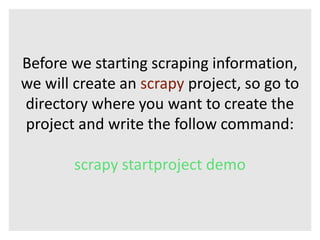
Before we starting scraping information, 
we will create an scrapy project, so go to 
directory where you want to create the 
project and write the follow command: 
scrapy startproject demo
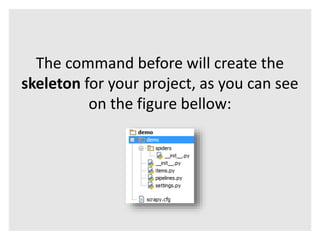
The command before will create the 
skeleton for your project, as you can see 
on the figure bellow:
The files created are the core of our 
project, so it’s important that you 
understand the basics: 
• scrapy.cfg: the project configuration file 
• demo/: the project’s python module, you’ll later import 
your code from here. 
• demo/items.py: the project’s items file. 
• demo/pipelines.py: the project’s pipelines file. 
• demo/settings.py: the project’s settings file. 
• demo/spiders/: a directory where you’ll later put your 
spiders.
Choose an Website to 
scrape
After we have the skeleton of the project, 
the next logical step is choose among the 
number of websites in the world, what is 
website that we want get information
I choose for this example scrape 
information from the website: 
That is an important website of technology 
news
Because the verge is a giant website, I 
decide that I will only try to get 
information from the last reviews of The 
Verge. 
So we have to follow the next steps: 
1 See what is the url for reviews 
2 Define how many pages we want to get of reviews 
3 Define what information to scrape 
4 Create a spider
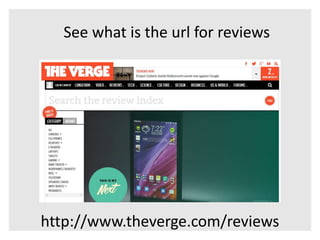
See what is the url for reviews 
http://www.theverge.com/reviews
Define how many pages we want to get of 
reviews. For simplicity we will choose 
scrape only the first 5 pages of The Verge 
• http://www.theverge.com/reviews/1 
• http://www.theverge.com/reviews/2 
• http://www.theverge.com/reviews/3 
• http://www.theverge.com/reviews/4 
• http://www.theverge.com/reviews/5
Define what information 
you want to scrape:
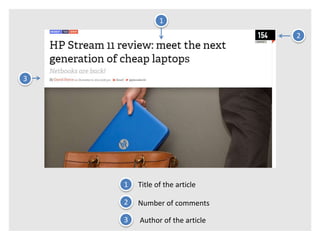
3 
1 
2 
1 Title of the article 
2 Number of comments 
3 Author of the article
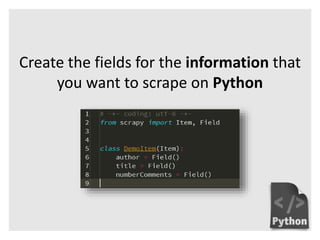
Create the fields for the information that 
you want to scrape on Python
Create a spider
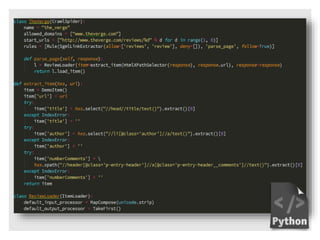
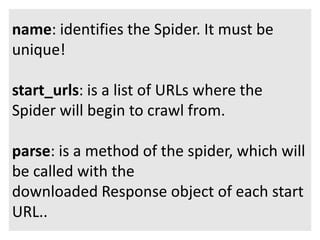
name: identifies the Spider. It must be 
unique! 
start_urls: is a list of URLs where the 
Spider will begin to crawl from. 
parse: is a method of the spider, which will 
be called with the 
downloaded Response object of each start 
URL..
How to run my spider?
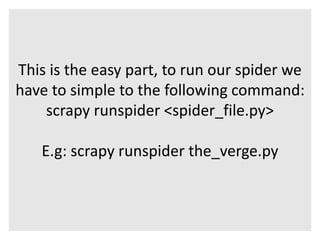
This is the easy part, to run our spider we 
have to simple to the following command: 
scrapy runspider <spider_file.py> 
E.g: scrapy runspider the_verge.py
How to store 
information of my spider 
on a file?
To store the information of our spider we 
have to execute the following command: 
scrapy runspider the_verge.py -o 
items.json
You have other formats like CSV and XML: 
CSV: 
scrapy runspider the_verge.py -o items.csv 
XML: 
scrapy runspider the_verge.py -o 
items.xml
Conclusion
In this presentation you learn the concepts 
key of scrapy and how to create a simple 
spider. Now is time to put hands to work 
and experiment other things :D
Thanks!
Appendix
Bibliography 
http://datajournalismhandbook.org/1.0/e 
n/getting_data_3.html 
https://pypi.python.org/pypi/Scrapy 
http://scrapy.org/ 
http://doc.scrapy.org/
Code available in: 
https://github.com/FranciscoSousaDeveloper/demo 
Contact: 
pt.linkedin.com/pub/francisco-sousa/4a/921/6a3/ 
@Francisco Sousa

Scrapy

  • 1.
    DRAFT VERSION v0.1 First steps with Scrapy @Francisco Sousa
  • 2.
  • 3.
    Scrapy is anopen source and collaborative framework for extracting the data you need from websites. It’s made in Python!
  • 4.
  • 5.
    Scrapy is foreveryone that want to collect data from one or many websites.
  • 6.
    “The advantage ofscraping is that you can do it with virtually any web site - from weather forecasts to government spending, even if that site does not have an API for raw data access” Friedrich Lindenberg
  • 7.
  • 8.
    There are manyalternatives as: • Lxml • Beatiful Soup • Mechanize • Newspaper
  • 9.
  • 10.
    • It’s free • It’s cross platform (Windows, Linux, Mac OS and BSD) • Fast and powerfull
  • 11.
  • 12.
    • It’s onlyfor python 2.7.+ • It’s has a bigger learnig curve that some other alternatives • Installation it’s different according the operating system
  • 13.
  • 14.
    First of allyou will have to install it so do: pip install scrapy or sudo pip install scrapy Note: with this command will be installed scrapy and their dependencies. On Windows you will have to install pywin32
  • 15.
  • 16.
    Before we startingscraping information, we will create an scrapy project, so go to directory where you want to create the project and write the follow command: scrapy startproject demo
  • 17.
    The command beforewill create the skeleton for your project, as you can see on the figure bellow:
  • 18.
    The files createdare the core of our project, so it’s important that you understand the basics: • scrapy.cfg: the project configuration file • demo/: the project’s python module, you’ll later import your code from here. • demo/items.py: the project’s items file. • demo/pipelines.py: the project’s pipelines file. • demo/settings.py: the project’s settings file. • demo/spiders/: a directory where you’ll later put your spiders.
  • 19.
  • 20.
    After we havethe skeleton of the project, the next logical step is choose among the number of websites in the world, what is website that we want get information
  • 21.
    I choose forthis example scrape information from the website: That is an important website of technology news
  • 22.
    Because the vergeis a giant website, I decide that I will only try to get information from the last reviews of The Verge. So we have to follow the next steps: 1 See what is the url for reviews 2 Define how many pages we want to get of reviews 3 Define what information to scrape 4 Create a spider
  • 23.
    See what isthe url for reviews http://www.theverge.com/reviews
  • 24.
    Define how manypages we want to get of reviews. For simplicity we will choose scrape only the first 5 pages of The Verge • http://www.theverge.com/reviews/1 • http://www.theverge.com/reviews/2 • http://www.theverge.com/reviews/3 • http://www.theverge.com/reviews/4 • http://www.theverge.com/reviews/5
  • 25.
    Define what information you want to scrape:
  • 26.
    3 1 2 1 Title of the article 2 Number of comments 3 Author of the article
  • 27.
    Create the fieldsfor the information that you want to scrape on Python
  • 28.
  • 30.
    name: identifies theSpider. It must be unique! start_urls: is a list of URLs where the Spider will begin to crawl from. parse: is a method of the spider, which will be called with the downloaded Response object of each start URL..
  • 31.
    How to runmy spider?
  • 32.
    This is theeasy part, to run our spider we have to simple to the following command: scrapy runspider <spider_file.py> E.g: scrapy runspider the_verge.py
  • 33.
    How to store information of my spider on a file?
  • 34.
    To store theinformation of our spider we have to execute the following command: scrapy runspider the_verge.py -o items.json
  • 35.
    You have otherformats like CSV and XML: CSV: scrapy runspider the_verge.py -o items.csv XML: scrapy runspider the_verge.py -o items.xml
  • 36.
  • 37.
    In this presentationyou learn the concepts key of scrapy and how to create a simple spider. Now is time to put hands to work and experiment other things :D
  • 38.
  • 39.
  • 40.
    Bibliography http://datajournalismhandbook.org/1.0/e n/getting_data_3.html https://pypi.python.org/pypi/Scrapy http://scrapy.org/ http://doc.scrapy.org/
  • 41.
    Code available in: https://github.com/FranciscoSousaDeveloper/demo Contact: pt.linkedin.com/pub/francisco-sousa/4a/921/6a3/ @Francisco Sousa

Editor's Notes

  • #27 Colocar em dois slides
  • #28 Colocar em dois slides