TEACHING THE WORLD
TO SING IN HARMONY
With Web Services
WHO AM I?
(JUSTIN PASCHAL)
Application Architect – ADI
18 yrs experience
Early Years: COBOL, Visual Basic 4
Lately: C#, PHP, JavaScript, etc.
justin.paschal@vanderbilt.edu
WHO ARE YOU? Intros.
WHY ARE YOU HERE? Applications love solos.
IN THE BEGINNING
THERE WERE
COMPUTERS.
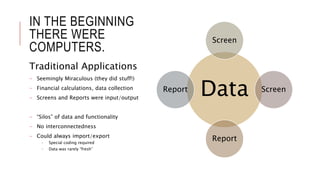
Data
Screen
Screen
Report
Report
Traditional Applications
- Seemingly Miraculous (they did stuff!)
- Financial calculations, data collection
- Screens and Reports were input/output
- “Silos” of data and functionality
- No interconnectedness
- Could always import/export
- Special coding required
- Data was rarely “fresh”
DISTRIBUTED
COMPUTING (RPC):
A SECOND
MELODY+ Allowed for inter-application
communication
• CORBA, DCOM, EDI
• MTS (Microsoft Transaction Server)
• JAVA Enterprise Beans
• COM+
+ Registry of available components/libraries
+ Used MOM (Message-Oriented
Middleware), a system of sending and
queuing messages
- Still closed systems, costly to develop and
maintain
- Required client/server to be on same
platform/language/architecture
- Not designed to be accessed publicly
Transaction Coordinator
DB Ops File Ops Msg Ops
WEB SERVICES: TRUE
HARMONY
La La La Laaaa!
WEB SERVICES: BEGINNINGS
HTTP became a communication standard in 1994.
XML became a standard in February, 1998.
“Web” and “Services” first put together by Bill Gates at the Microsoft
Developers Conference in July, 2000.
SOAP announced as first messaging specification by Microsoft in
2000. 1 month after the announcement of .NET Framework (June,
2000).*
“The problem was getting people to think it was good, even though
it came from Microsoft” – Andrew Layman (The First Web Services
Architect)
SOAP-CL (WSDL) arrives in fall, 2000.
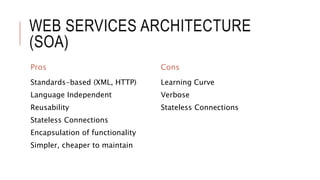
WEB SERVICES ARCHITECTURE
(SOA)
Pros
Standards-based (XML, HTTP)
Language Independent
Reusability
Stateless Connections
Encapsulation of functionality
Simpler, cheaper to maintain
Cons
Learning Curve
Verbose
Stateless Connections
WHY/WHEN WOULD YOU USE WEB
SERVICES?
External access to YOUR data or processes (server)
Want to consume other’s data or processes (client)
When data needs to be validated/approved
Make your web application *appear* to be faster or more responsive
Different applications need to use the same business rules
(reusability)
??
WEB SERVICE STANDARD:
SOAP
XML-based messaging in a
major key.
SIMPLE OBJECT ACCESS
PROTOCOL (SOAP)
Widely supported
HTTP as delivery mechanism, XML as messaging
Platform, Language independent
Uses “envelopes” to contain messages (request/response)
Dozens of specifications for enterprise
WS-Security
WS-Policy
WSDL for discovery
Many tools support proxy generation, language-specific
implementations
WEB SERVICES STANDARD:
XML/SOAP
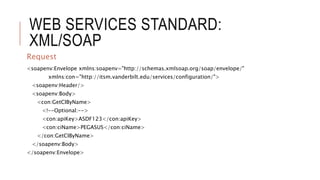
Request
<soapenv:Envelope xmlns:soapenv="http://schemas.xmlsoap.org/soap/envelope/"
xmlns:con="http://itsm.vanderbilt.edu/services/configuration/">
<soapenv:Header/>
<soapenv:Body>
<con:GetCIByName>
<!--Optional:-->
<con:apiKey>ASDF123</con:apiKey>
<con:ciName>PEGASUS</con:ciName>
</con:GetCIByName>
</soapenv:Body>
</soapenv:Envelope>
WEB SERVICES STANDARD:
XML/SOAP
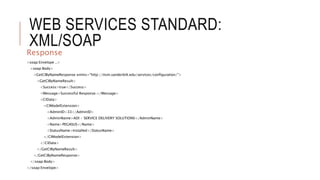
Response
<soap:Envelope ..>
<soap:Body>
<GetCIByNameResponse xmlns="http://itsm.vanderbilt.edu/services/configuration/">
<GetCIByNameResult>
<Success>true</Success>
<Message>Successful Response.</Message>
<CIData>
<CIModelExtension>
<AdminID>33</AdminID>
<AdminName>ADI - SERVICE DELIVERY SOLUTIONS</AdminName>
<Name>PEGASUS</Name>
<StatusName>Installed</StatusName>
</CIModelExtension>
</CIData>
</GetCIByNameResult>
</GetCIByNameResponse>
</soap:Body>
</soap:Envelope>
WEB SERVICE STANDARD:
REST
It doesn’t mean PAUSE.
REPRESENTATIONAL STATE
TRANSFER (REST)
New(er), young(er) than SOAP
Designed to be leaner, faster, less complicated than other options
Platform, Language independent
Uses URIs and HTTP Methods to determine actions and responses
5 basic principles:
Give every “thing” an ID
Link things together*
Use standard methods
Resources with multiple representations
Communicate statelessly
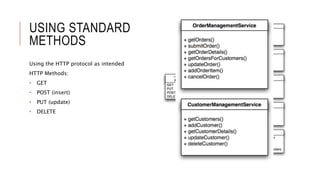
USING STANDARD
METHODS
Using the HTTP protocol as intended
HTTP Methods:
• GET
• POST (insert)
• PUT (update)
• DELETE
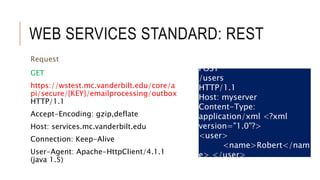
WEB SERVICES STANDARD: REST
GET
https://wstest.mc.vanderbilt.edu/core/a
pi/secure/{KEY}/emailprocessing/outbox
HTTP/1.1
Accept-Encoding: gzip,deflate
Host: services.mc.vanderbilt.edu
Connection: Keep-Alive
User-Agent: Apache-HttpClient/4.1.1
(java 1.5)
Request
POST
/users
HTTP/1.1
Host: myserver
Content-Type:
application/xml <?xml
version="1.0"?>
<user>
<name>Robert</nam
e> </user>
WEB SERVICES STANDARD: REST
{
"EmailItems": [ {
"ExchangeProperties": {
"Id": null,
"ConversationId": null
},
"ID": "ef70454ba333486c929b5bcaf8a0e212",
"FromName": null,
"FromAddress": null,
"To": “someone@Vanderbilt.Edu",
"Cc": null,
"Subject": "Incident created for {CI}",
"Body": “{BODY}”,
"HasAttachments": false,
"Attachments": [],
"ModuleID": 1,
"ItemResourceID": "IM1261589",
"EmailDate": "2015-07-21T22:20:11",
"EmailType": 0,
"ParentEmailTrackingID": null,
"IsRead": false,
"ReadDate": null,
"ReadBy": null,
"MatchesRule": false,
"MatchedRuleName": null
}],
"ConfigurationData": null,
"Success": true,
"Message": null,
"RawData": null
}
Response
DEMOS Watch me now, hey!
ONLINE RESOURCES
Understanding Web Services (Basics) -
http://www.ibm.com/developerworks/webservices/tutorials/ws-
understand-web-services1/ws-understand-web-services1.html
RESTful Web Services (Introduction) -
http://www.ibm.com/developerworks/library/ws-restful/
SOAP UI (free Web Services testing tool) -
http://www.soapui.org/downloads/soapui/open-source.html
Web Service Frameworks List -
https://en.wikipedia.org/wiki/List_of_web_service_frameworks

Teaching the world to sing in harmony with Web Services

  • 1.
    TEACHING THE WORLD TOSING IN HARMONY With Web Services
  • 2.
    WHO AM I? (JUSTINPASCHAL) Application Architect – ADI 18 yrs experience Early Years: COBOL, Visual Basic 4 Lately: C#, PHP, JavaScript, etc. justin.paschal@vanderbilt.edu
  • 3.
    WHO ARE YOU?Intros.
  • 4.
    WHY ARE YOUHERE? Applications love solos.
  • 5.
    IN THE BEGINNING THEREWERE COMPUTERS. Data Screen Screen Report Report Traditional Applications - Seemingly Miraculous (they did stuff!) - Financial calculations, data collection - Screens and Reports were input/output - “Silos” of data and functionality - No interconnectedness - Could always import/export - Special coding required - Data was rarely “fresh”
  • 6.
    DISTRIBUTED COMPUTING (RPC): A SECOND MELODY+Allowed for inter-application communication • CORBA, DCOM, EDI • MTS (Microsoft Transaction Server) • JAVA Enterprise Beans • COM+ + Registry of available components/libraries + Used MOM (Message-Oriented Middleware), a system of sending and queuing messages - Still closed systems, costly to develop and maintain - Required client/server to be on same platform/language/architecture - Not designed to be accessed publicly Transaction Coordinator DB Ops File Ops Msg Ops
  • 7.
  • 8.
    WEB SERVICES: BEGINNINGS HTTPbecame a communication standard in 1994. XML became a standard in February, 1998. “Web” and “Services” first put together by Bill Gates at the Microsoft Developers Conference in July, 2000. SOAP announced as first messaging specification by Microsoft in 2000. 1 month after the announcement of .NET Framework (June, 2000).* “The problem was getting people to think it was good, even though it came from Microsoft” – Andrew Layman (The First Web Services Architect) SOAP-CL (WSDL) arrives in fall, 2000.
  • 9.
    WEB SERVICES ARCHITECTURE (SOA) Pros Standards-based(XML, HTTP) Language Independent Reusability Stateless Connections Encapsulation of functionality Simpler, cheaper to maintain Cons Learning Curve Verbose Stateless Connections
  • 10.
    WHY/WHEN WOULD YOUUSE WEB SERVICES? External access to YOUR data or processes (server) Want to consume other’s data or processes (client) When data needs to be validated/approved Make your web application *appear* to be faster or more responsive Different applications need to use the same business rules (reusability) ??
  • 11.
    WEB SERVICE STANDARD: SOAP XML-basedmessaging in a major key.
  • 12.
    SIMPLE OBJECT ACCESS PROTOCOL(SOAP) Widely supported HTTP as delivery mechanism, XML as messaging Platform, Language independent Uses “envelopes” to contain messages (request/response) Dozens of specifications for enterprise WS-Security WS-Policy WSDL for discovery Many tools support proxy generation, language-specific implementations
  • 13.
    WEB SERVICES STANDARD: XML/SOAP Request <soapenv:Envelopexmlns:soapenv="http://schemas.xmlsoap.org/soap/envelope/" xmlns:con="http://itsm.vanderbilt.edu/services/configuration/"> <soapenv:Header/> <soapenv:Body> <con:GetCIByName> <!--Optional:--> <con:apiKey>ASDF123</con:apiKey> <con:ciName>PEGASUS</con:ciName> </con:GetCIByName> </soapenv:Body> </soapenv:Envelope>
  • 14.
    WEB SERVICES STANDARD: XML/SOAP Response <soap:Envelope..> <soap:Body> <GetCIByNameResponse xmlns="http://itsm.vanderbilt.edu/services/configuration/"> <GetCIByNameResult> <Success>true</Success> <Message>Successful Response.</Message> <CIData> <CIModelExtension> <AdminID>33</AdminID> <AdminName>ADI - SERVICE DELIVERY SOLUTIONS</AdminName> <Name>PEGASUS</Name> <StatusName>Installed</StatusName> </CIModelExtension> </CIData> </GetCIByNameResult> </GetCIByNameResponse> </soap:Body> </soap:Envelope>
  • 15.
    WEB SERVICE STANDARD: REST Itdoesn’t mean PAUSE.
  • 16.
    REPRESENTATIONAL STATE TRANSFER (REST) New(er),young(er) than SOAP Designed to be leaner, faster, less complicated than other options Platform, Language independent Uses URIs and HTTP Methods to determine actions and responses 5 basic principles: Give every “thing” an ID Link things together* Use standard methods Resources with multiple representations Communicate statelessly
  • 17.
    USING STANDARD METHODS Using theHTTP protocol as intended HTTP Methods: • GET • POST (insert) • PUT (update) • DELETE
  • 18.
    WEB SERVICES STANDARD:REST GET https://wstest.mc.vanderbilt.edu/core/a pi/secure/{KEY}/emailprocessing/outbox HTTP/1.1 Accept-Encoding: gzip,deflate Host: services.mc.vanderbilt.edu Connection: Keep-Alive User-Agent: Apache-HttpClient/4.1.1 (java 1.5) Request POST /users HTTP/1.1 Host: myserver Content-Type: application/xml <?xml version="1.0"?> <user> <name>Robert</nam e> </user>
  • 19.
    WEB SERVICES STANDARD:REST { "EmailItems": [ { "ExchangeProperties": { "Id": null, "ConversationId": null }, "ID": "ef70454ba333486c929b5bcaf8a0e212", "FromName": null, "FromAddress": null, "To": “someone@Vanderbilt.Edu", "Cc": null, "Subject": "Incident created for {CI}", "Body": “{BODY}”, "HasAttachments": false, "Attachments": [], "ModuleID": 1, "ItemResourceID": "IM1261589", "EmailDate": "2015-07-21T22:20:11", "EmailType": 0, "ParentEmailTrackingID": null, "IsRead": false, "ReadDate": null, "ReadBy": null, "MatchesRule": false, "MatchedRuleName": null }], "ConfigurationData": null, "Success": true, "Message": null, "RawData": null } Response
  • 20.
    DEMOS Watch menow, hey!
  • 21.
    ONLINE RESOURCES Understanding WebServices (Basics) - http://www.ibm.com/developerworks/webservices/tutorials/ws- understand-web-services1/ws-understand-web-services1.html RESTful Web Services (Introduction) - http://www.ibm.com/developerworks/library/ws-restful/ SOAP UI (free Web Services testing tool) - http://www.soapui.org/downloads/soapui/open-source.html Web Service Frameworks List - https://en.wikipedia.org/wiki/List_of_web_service_frameworks

Editor's Notes

  • #9 Interesting note: SOAP was held internally by Microsoft for a year due to internal politics. They wanted COM to be the standard. Others disagreed.
  • #17 * Formal definition is a bit weird. “Hypermedia as the engine of application state”, sometimes abbreviated as HATEOAS. Linking things together to create context, even outside of application boundaries. Ex: ‘ref=“http://example.com/product/1234”’ in the response for a product. Would work just as well in an ID relationship, but only inside the application context.