View live notes and ask questions about this session
    on Google Wave:


    View live notes and ask
    questions about this
    session on Google Wave:

http://bit.ly/cPEAgd
#android5


2
Android UI Design Patterns
Richard Fulcher, Chris Nesladek,
Jim Palmer, Christian Robertson
May 19, 2010
‣   Android: State of the UI
‣   Application UI design patterns
‣   Making Android apps look good
‣   Building a great Android app


4
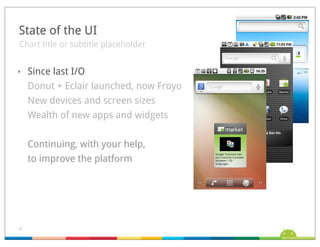
State of the UI
Chart title or subtitle placeholder


‣   Since last I/O
    Donut + Eclair launched, now Froyo
    New devices and screen sizes
    Wealth of new apps and widgets


    Continuing, with your help,
    to improve the platform


5
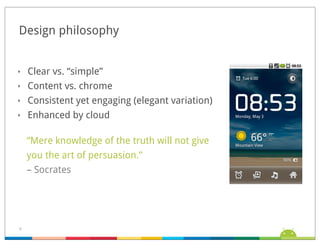
Design philosophy


‣   Clear vs. “simple”
‣   Content vs. chrome
‣   Consistent yet engaging (elegant variation)
‣   Enhanced by cloud

    “Mere knowledge of the truth will not give
    you the art of persuasion.”
    – Socrates


6
‣   Android: State of the UI
‣   Application UI design patterns
‣   Making Android apps look good
‣   Building a great Android app


7
UI Design Patterns


‣   Like a software design pattern, a UI design pattern
    describes a general solution to a recurring problem
‣   Patterns emerge as a natural by-product of the design
    process
‣   For each pattern:
    Title
    Example
    Problem
    Recommendations


8
5 UI Design Patterns


‣   Dashboard
‣   Action Bar
‣   Search Bar
‣   Quick Actions
‣   Companion Widget


9
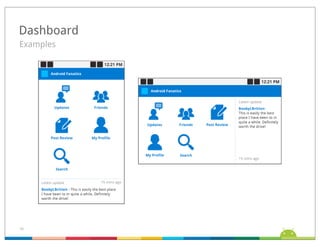
Dashboard
Examples


             MSN
             19%

                    Google
                     48%
            Yahoo
             33%


10
Dashboard
“What can I do with this app? What’s new?”


‣    A quick intro to an app, revealing capabilities and
     proactively highlighting new content
‣    Full-screen
‣    Can be organized by:
     Features
     Categories
     Accounts


11
Dashboard
Recommendations


‣    DO highlight what’s new
‣    DO focus on 3-6 most important choices
‣    DO be flavorful


12
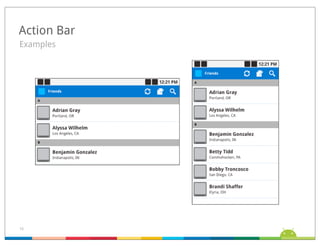
Action Bar
Examples


              MSN
              19%

                     Google
                      48%
             Yahoo
              33%


13
Action Bar
“How can I do <common action> quickly?”


‣    Dedicated real estate at top of the screen to support
     navigation and frequently used operations
‣    Replaces title bar
‣    Best for actions common across your app
     Search
     Refresh
     Compose (new)
‣    Can provide a quick link back to dashboard
     (or other app home)


14
Action Bar
Recommendations


‣    DO use to bring key actions onscreen
‣    DO help to convey a sense of place
‣    DO use consistently within your app
‣    DON’T use for contextual actions


15
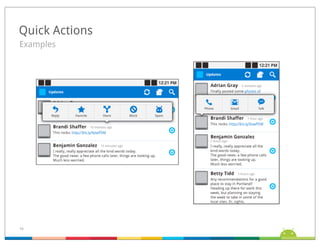
Quick Actions
Examples


                 MSN
                 19%

                        Google
                         48%
                Yahoo
                 33%


16
Quick Actions
“What can I do with this thing?”


‣    Action popup triggered from distinct visual target
‣    Minimally disruptive to screen context
‣    Actions are straightforward
‣    Fast & fun


17
Quick Actions
Recommendations


‣    DO use when items have competing internal targets
‣    DO present only the for most important and obvious actions
‣    DO use when the item doesn’t have a meaningful detail view
‣    DON’T use in contexts which support multiple selection


18
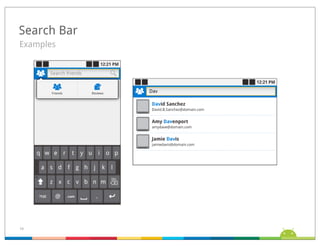
Search Bar
Examples


              MSN
              19%

                     Google
                      48%
             Yahoo
              33%


19
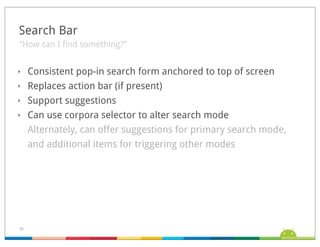
Search Bar
“How can I find something?”


‣    Consistent pop-in search form anchored to top of screen
‣    Replaces action bar (if present)
‣    Support suggestions
‣    Can use corpora selector to alter search mode
     Alternately, can offer suggestions for primary search mode,
     and additional items for triggering other modes


20
Search Bar
Recommendations


‣    DO use for simple searches
‣    DO present rich suggestions
‣    DO use the same behavior


21
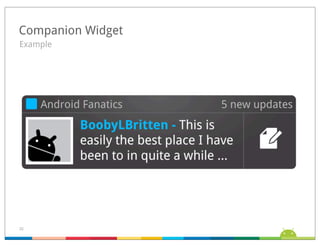
Companion Widget
Example


                    MSN
                    19%

                           Google
                            48%
                   Yahoo
                    33%


22
Companion Widget
“Can I make this app a fun part of my Home screen?”


‣    Supports the app by displaying its content and
     capabilities on the Home screen
‣    Makes Home feel more custom, personalized


23
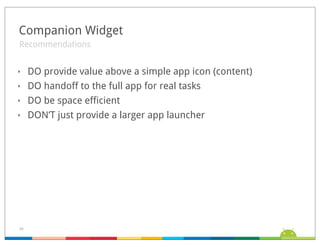
Companion Widget
Recommendations


‣    DO provide value above a simple app icon (content)
‣    DO handoff to the full app for real tasks
‣    DO be space efficient
‣    DON’T just provide a larger app launcher


24
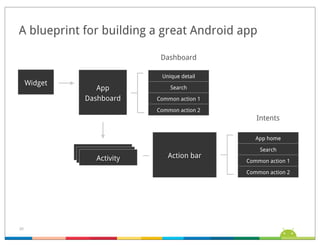
A blueprint for building a great Android app

                             Dashboard

                             Unique detail
     Widget
                 App            Search

              Dashboard     Common action 1

                            Common action 2
                                                 Intents

                                                 App home

                                                  Search
               Activity
                Activity       Action bar
                 Activity                     Common action 1

                                              Common action 2


25
‣    Android: State of the UI
‣    Application UI design patterns
‣    Making Android apps look good
‣    Building a great Android app


26
Enabling Device Diversity


‣    New devices mean:
     A. More choices for users
     B. Some new screen sizes to consider...


27
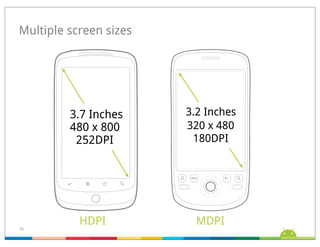
Multiple screen sizes


         3.7 Inches     3.2 Inches
         480 x 800      320 x 480
          252DPI         180DPI


28
           HDPI           MDPI
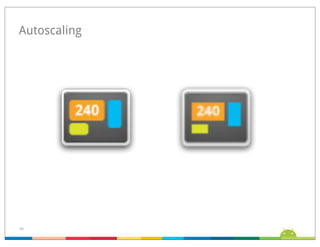
Autoscaling


        HDPI   MDPI


29
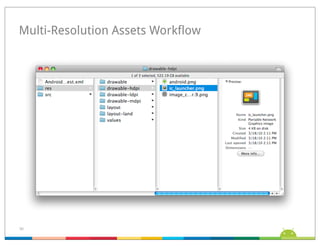
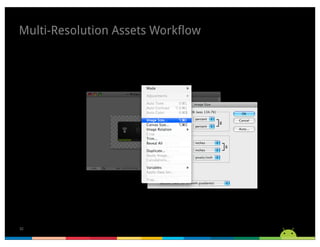
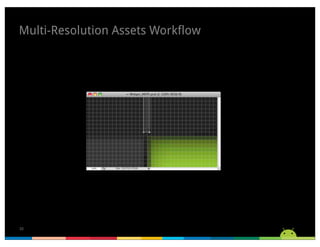
Multi-Resolution Assets Workflow


30
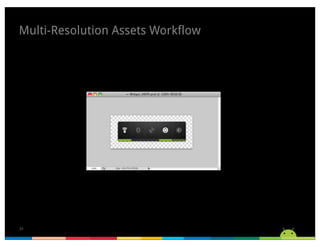
Multi-Resolution Assets Workflow


31
Multi-Resolution Assets Workflow


32
Multi-Resolution Assets Workflow


33
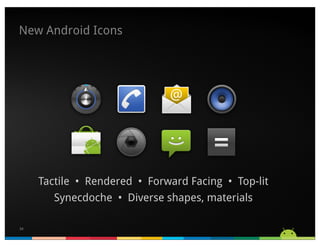
New Android Icons


     Tactile •  Rendered • Forward Facing • Top-lit
        Synecdoche • Diverse shapes, materials

34
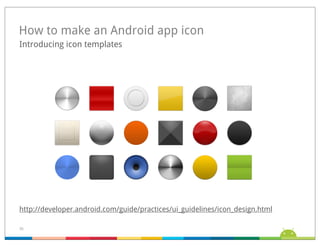
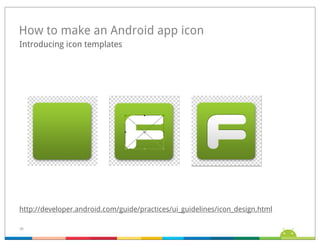
How to make an Android app icon
Introducing icon templates


http://developer.android.com/guide/practices/ui_guidelines/icon_design.html

35
How to make an Android app icon
Introducing icon templates


http://developer.android.com/guide/practices/ui_guidelines/icon_design.html

36
‣    Android: State of the UI
‣    Application UI design patterns
‣    Making Android apps look good
‣    Building a great Android app


37
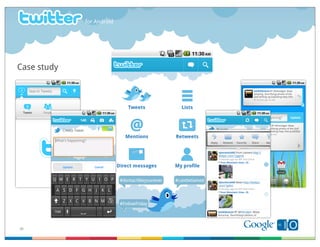
for Android


Case study


38   Google Confidential
View live notes and ask questions about this session
 on Google Wave:


 View live notes and ask
 questions about this
 session on Google Wave:

http://bit.ly/cPEAgd
#android5


39
Android android-ui-design-patterns

Android android-ui-design-patterns

  • 2.
    View live notesand ask questions about this session on Google Wave: View live notes and ask questions about this session on Google Wave: http://bit.ly/cPEAgd #android5 2
  • 3.
    Android UI DesignPatterns Richard Fulcher, Chris Nesladek, Jim Palmer, Christian Robertson May 19, 2010
  • 4.
    ‣ Android: State of the UI ‣ Application UI design patterns ‣ Making Android apps look good ‣ Building a great Android app 4
  • 5.
    State of theUI Chart title or subtitle placeholder ‣ Since last I/O Donut + Eclair launched, now Froyo New devices and screen sizes Wealth of new apps and widgets Continuing, with your help, to improve the platform 5
  • 6.
    Design philosophy ‣ Clear vs. “simple” ‣ Content vs. chrome ‣ Consistent yet engaging (elegant variation) ‣ Enhanced by cloud “Mere knowledge of the truth will not give you the art of persuasion.” – Socrates 6
  • 7.
    ‣ Android: State of the UI ‣ Application UI design patterns ‣ Making Android apps look good ‣ Building a great Android app 7
  • 8.
    UI Design Patterns ‣ Like a software design pattern, a UI design pattern describes a general solution to a recurring problem ‣ Patterns emerge as a natural by-product of the design process ‣ For each pattern: Title Example Problem Recommendations 8
  • 9.
    5 UI DesignPatterns ‣ Dashboard ‣ Action Bar ‣ Search Bar ‣ Quick Actions ‣ Companion Widget 9
  • 10.
    Dashboard Examples MSN 19% Google 48% Yahoo 33% 10
  • 11.
    Dashboard “What can Ido with this app? What’s new?” ‣ A quick intro to an app, revealing capabilities and proactively highlighting new content ‣ Full-screen ‣ Can be organized by: Features Categories Accounts 11
  • 12.
    Dashboard Recommendations ‣ DO highlight what’s new ‣ DO focus on 3-6 most important choices ‣ DO be flavorful 12
  • 13.
    Action Bar Examples MSN 19% Google 48% Yahoo 33% 13
  • 14.
    Action Bar “How canI do <common action> quickly?” ‣ Dedicated real estate at top of the screen to support navigation and frequently used operations ‣ Replaces title bar ‣ Best for actions common across your app Search Refresh Compose (new) ‣ Can provide a quick link back to dashboard (or other app home) 14
  • 15.
    Action Bar Recommendations ‣ DO use to bring key actions onscreen ‣ DO help to convey a sense of place ‣ DO use consistently within your app ‣ DON’T use for contextual actions 15
  • 16.
    Quick Actions Examples MSN 19% Google 48% Yahoo 33% 16
  • 17.
    Quick Actions “What canI do with this thing?” ‣ Action popup triggered from distinct visual target ‣ Minimally disruptive to screen context ‣ Actions are straightforward ‣ Fast & fun 17
  • 18.
    Quick Actions Recommendations ‣ DO use when items have competing internal targets ‣ DO present only the for most important and obvious actions ‣ DO use when the item doesn’t have a meaningful detail view ‣ DON’T use in contexts which support multiple selection 18
  • 19.
    Search Bar Examples MSN 19% Google 48% Yahoo 33% 19
  • 20.
    Search Bar “How canI find something?” ‣ Consistent pop-in search form anchored to top of screen ‣ Replaces action bar (if present) ‣ Support suggestions ‣ Can use corpora selector to alter search mode Alternately, can offer suggestions for primary search mode, and additional items for triggering other modes 20
  • 21.
    Search Bar Recommendations ‣ DO use for simple searches ‣ DO present rich suggestions ‣ DO use the same behavior 21
  • 22.
    Companion Widget Example MSN 19% Google 48% Yahoo 33% 22
  • 23.
    Companion Widget “Can Imake this app a fun part of my Home screen?” ‣ Supports the app by displaying its content and capabilities on the Home screen ‣ Makes Home feel more custom, personalized 23
  • 24.
    Companion Widget Recommendations ‣ DO provide value above a simple app icon (content) ‣ DO handoff to the full app for real tasks ‣ DO be space efficient ‣ DON’T just provide a larger app launcher 24
  • 25.
    A blueprint forbuilding a great Android app Dashboard Unique detail Widget App Search Dashboard Common action 1 Common action 2 Intents App home Search Activity Activity Action bar Activity Common action 1 Common action 2 25
  • 26.
    ‣ Android: State of the UI ‣ Application UI design patterns ‣ Making Android apps look good ‣ Building a great Android app 26
  • 27.
    Enabling Device Diversity ‣ New devices mean: A. More choices for users B. Some new screen sizes to consider... 27
  • 28.
    Multiple screen sizes 3.7 Inches 3.2 Inches 480 x 800 320 x 480 252DPI 180DPI 28 HDPI MDPI
  • 29.
    Autoscaling HDPI MDPI 29
  • 30.
  • 31.
  • 32.
  • 33.
  • 34.
    New Android Icons Tactile •  Rendered • Forward Facing • Top-lit Synecdoche • Diverse shapes, materials 34
  • 35.
    How to makean Android app icon Introducing icon templates http://developer.android.com/guide/practices/ui_guidelines/icon_design.html 35
  • 36.
    How to makean Android app icon Introducing icon templates http://developer.android.com/guide/practices/ui_guidelines/icon_design.html 36
  • 37.
    ‣ Android: State of the UI ‣ Application UI design patterns ‣ Making Android apps look good ‣ Building a great Android app 37
  • 38.
    for Android Case study 38 Google Confidential
  • 39.
    View live notesand ask questions about this session on Google Wave: View live notes and ask questions about this session on Google Wave: http://bit.ly/cPEAgd #android5 39