MYP – Curriculum
  2012 - 2013


          Grade 9
         Information Technology
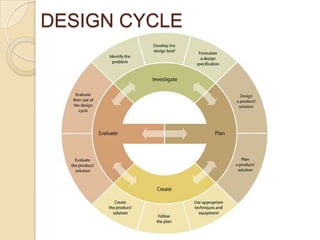
DESIGN CYCLE
Criteria Specific Objectives
   Investigate – Identify the problem, outlines a design brief ,
    formulates a design specification.

   Design – generate feasible designs that meet       the design
    specification

   Plan – construct a plan to create the product / solution that has
    series of logical steps

 Create - create a product/ solution of appropriate quality
 Evaluate – Students evaluate the success of the product/
    solution in an objective manner based on testing, their own
    views and the views of the intended user. Students also
    evaluate their performance at each stage of the design cycle.
Grade 9
    Spread Sheets
1.   Formulas
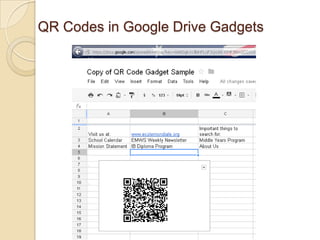
2.   Make Your Own QR Codes
3.   Make Your Own Custom Google Map
4.   Create Quick and Easy Organization Charts
5.   Produce an Interactive Table
6.   Create a Gantt Chart From Project Data
7.   Create an Animated Pie Chart
8.   Create a muti-user collaborative spreadsheet


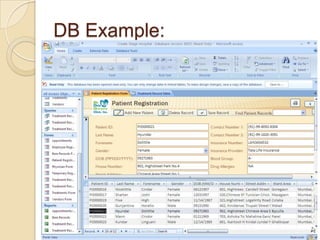
 Databases – Access / Open Office
1. Sample 1 (Arnav) ( Kanishk)
QR Codes in Google Drive Gadgets
DB Example:
Queries ?

MYP IT – Curriculum brief Grade 9

  • 1.
    MYP – Curriculum 2012 - 2013 Grade 9 Information Technology
  • 2.
  • 3.
    Criteria Specific Objectives  Investigate – Identify the problem, outlines a design brief , formulates a design specification.  Design – generate feasible designs that meet the design specification  Plan – construct a plan to create the product / solution that has series of logical steps  Create - create a product/ solution of appropriate quality  Evaluate – Students evaluate the success of the product/ solution in an objective manner based on testing, their own views and the views of the intended user. Students also evaluate their performance at each stage of the design cycle.
  • 4.
    Grade 9  Spread Sheets 1. Formulas 2. Make Your Own QR Codes 3. Make Your Own Custom Google Map 4. Create Quick and Easy Organization Charts 5. Produce an Interactive Table 6. Create a Gantt Chart From Project Data 7. Create an Animated Pie Chart 8. Create a muti-user collaborative spreadsheet  Databases – Access / Open Office 1. Sample 1 (Arnav) ( Kanishk)
  • 5.
    QR Codes inGoogle Drive Gadgets
  • 6.
  • 7.