PowerPoint 101A Guide To Making A+ PresentationsA+
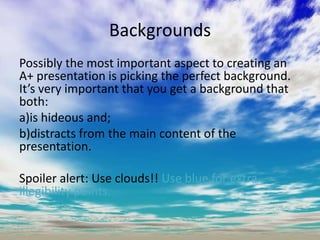
BackgroundsPossibly the most important aspect to creating an A+ presentation is picking the perfect background. It’s very important that you get a background that both:a)is hideous and;b)distracts from the main content of the presentation.Spoiler alert: Use clouds!! Use blue for extra illegibility points.
Make sure to make every title using word art, otherwise it’s just not a title right?Add reflection to the text to make the title even Word-Artier than standard Word Art.Word Art
Clip Art A PowerPoint is not completewithout at least one clip art image per page, none of this high quality photograph shit, clip art is charming.Make sure to awkwardly structuretext around images rather than vice versa.
Breath-taking TransitionsEach element, whether it be a single sentence or small image, should have it’s own transition, preferably coming from different directions.No presentation can achieve A+ status withoutthese awe-inspiring transitions, they conveniently combine ugliness with inertia.Together these two elements ensure an impeccable viewing experience.Bonus points for sound effects.
That’s It!!Don’t forgot to add a useless slide at the end, along the lines of “We’re done!” or “Good luck!”.Yeah you use the same PowerPoints every yearanddon’t know the name of some of your studentsbutthey’re sure to find this sentiment teeming withsincerity.
SummaryAdd all these elements together and you’ve got an A+AWFULPRESENTATIONLOOKSUGLY andSTUPIDDon’t forgot to add at least 1 picture of Einstein, bonus points for that picture where he has his tongue sticking out.FUCKIN’ AWESOME

PowerPoint 101

  • 1.
    PowerPoint 101A GuideTo Making A+ PresentationsA+
  • 2.
    BackgroundsPossibly the mostimportant aspect to creating an A+ presentation is picking the perfect background. It’s very important that you get a background that both:a)is hideous and;b)distracts from the main content of the presentation.Spoiler alert: Use clouds!! Use blue for extra illegibility points.
  • 3.
    Make sure tomake every title using word art, otherwise it’s just not a title right?Add reflection to the text to make the title even Word-Artier than standard Word Art.Word Art
  • 4.
    Clip Art APowerPoint is not completewithout at least one clip art image per page, none of this high quality photograph shit, clip art is charming.Make sure to awkwardly structuretext around images rather than vice versa.
  • 5.
    Breath-taking TransitionsEach element,whether it be a single sentence or small image, should have it’s own transition, preferably coming from different directions.No presentation can achieve A+ status withoutthese awe-inspiring transitions, they conveniently combine ugliness with inertia.Together these two elements ensure an impeccable viewing experience.Bonus points for sound effects.
  • 6.
    That’s It!!Don’t forgotto add a useless slide at the end, along the lines of “We’re done!” or “Good luck!”.Yeah you use the same PowerPoints every yearanddon’t know the name of some of your studentsbutthey’re sure to find this sentiment teeming withsincerity.
  • 7.
    SummaryAdd all theseelements together and you’ve got an A+AWFULPRESENTATIONLOOKSUGLY andSTUPIDDon’t forgot to add at least 1 picture of Einstein, bonus points for that picture where he has his tongue sticking out.FUCKIN’ AWESOME