


Computing and IT in the Workplace
CT006-1

Human Aspects of Computing
Learning Outcomes
At the end of this section, YOU should be able to:
•

To explain importance of the human computer interface aspects in IT

•

To explain and describe the concepts of ergonomics

•

To explain computer related health issues and the prevention

•

To explain and discuss the usable interface

Computing and IT in the Workplace

Chapter 2
Topics we will cover
•

Human Computer Interface (HCI)

•

The importance of HCI

•

Human Factors

•

Health concerns of Computer use

•

Ergonomics

Computing and IT in the Workplace

Chapter 2
Overview of Human Computer Interface
• Definition of HCI
– HCI is concerned with the design, evaluation
and implementation of interaction computing
systems for human use and with the study of
major phenomena surrounding them

Computing and IT in the Workplace

Chapter 2
Human Computer Interface
• Human
– Individual user, a group of users that work
together
– A sequence of user in an organization each
dealing with some part of the task or process.
– They use technology

Computing and IT in the Workplace

Chapter 2
Human Computer Interface
• Computer
– Any technology ranging from the general desktop
to a large scale computer system, a process
control or an embedded system

Computing and IT in the Workplace

Chapter 2
Human Computer Interface
• Interaction
– Communication between user and computer

Computing and IT in the Workplace

Chapter 2
Human Computer Interface
• Designing computer systems that support people so
that they can carry out their activities productively
and safely
• HCI is used to describe the interaction between a
user and a computer
• ‘Computer’ is not just the PC, but also machines like
photocopiers, microwave and etc.

Computing and IT in the Workplace

Chapter 2
Importance of HCI
The importance of HCI
– Concerned with the user performance (Human
Factors and Ergonomics)
– Produce usable and safe system as well as
functional system

Computing and IT in the Workplace

Chapter 2
Importance of HCI
To improve…
•
•
•
•
•
•

Safety
Utility (functionality)
Effectiveness (do the right thing)
Efficiency (do things right)
Usability
Simplicity

Computing and IT in the Workplace

Chapter 2
Importance of HCI
• System failure & HCI
–
–
–
–

16% of the projects are successful
31% are partially successful
53% of projects are fail
Failure is overwhelming due to human rather than
technical factors

Computing and IT in the Workplace

Chapter 2
Importance of HCI
• Why system fail?
–
–
–
–
–
–
–

Inadequate requirements 13%
Lack of user participation 12%
Inadequate resources 11%
Unrealistic expectation 10%
Lack of support at senior level 9%
Changing specifications 8%
Lack of planning 8%

Computing and IT in the Workplace

Chapter 2
Importance of HCI
• All the discipline that related to HCI…
– Psychology and cognitive science (give the
knowledge of user’s perceptual, Cognitive and
problem solving skills, ergonomics for the user’s
physical capabilities)

Computing and IT in the Workplace

Chapter 2
Importance of HCI
• Sociology and organization psychology
(understand the wider context of the interaction)
• Computer science and engineering (build the
necessary technology)
• Business (marketing)
• Graphic (effective interface presentation)
• Technical (produce user manual)

Computing and IT in the Workplace

Chapter 2
Health Concerns of Computer Use
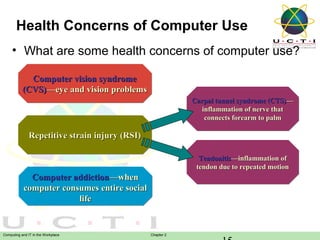
• What are some health concerns of computer use?
Computer vision syndrome
(CVS)—eye and vision problems
Carpal tunnel syndrome (CTS)—
inflammation of nerve that
connects forearm to palm

Repetitive strain injury (RSI)
Tendonitis—inflammation of
tendon due to repeated motion

Computer addiction—when
computer consumes entire social
life

Computing and IT in the Workplace

Chapter 2
Health Concerns of Computer Use
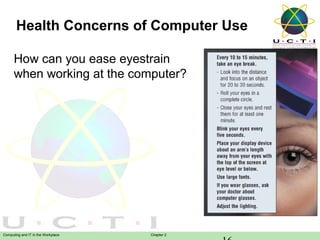
How can you ease eyestrain
when working at the computer?

Computing and IT in the Workplace

Chapter 2
Health Concerns of Computer Use
• Repetitive Strain Injuries (RSI)
– Wrist, hand, arm, and neck injuries as a
result of forced muscle groups through fast,
repetitive motions
• Typing on a keyboard-based device
(computer, musical instrument)
• Moving groceries items over a scanner

– Preventive measures: change in technique
of operating the instruments, take a rest

Computing and IT in the Workplace

Chapter 2
Health Concerns of Computer Use
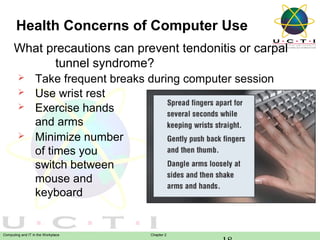
What precautions can prevent tendonitis or carpal
tunnel syndrome?





Take frequent breaks during computer session
Use wrist rest
Exercise hands
and arms
Minimize number
of times you
switch between
mouse and
keyboard

Computing and IT in the Workplace

Chapter 2
Health Concerns of Computer Use
• Back & Neck Pains
– Possible causes:
• Improper use of chairs
• Improper ways of positioning keyboard
and/or display screen

– Preventive measure: use adjustable,
special-purpose furniture

Computing and IT in the Workplace

Chapter 2
Health Concerns of Computer Use
• Electromagnetic Fields (EMFs)
– Waves of electrical and magnetic energies
generated by electrical devices
– Strongest fields are emitted from the sides
and backs of terminals and CRT display
screens
• Noise
– Generated by power supply fan, impact
printer

Computing and IT in the Workplace

Chapter 2
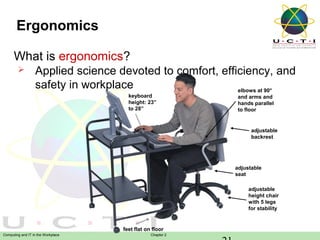
Ergonomics
What is ergonomics?


Applied science devoted to comfort, efficiency, and
safety in workplace
elbows at 90°
keyboard
height: 23”
to 28”

and arms and
hands parallel
to floor

adjustable
backrest

adjustable
seat
adjustable
height chair
with 5 legs
for stability

feet flat on floor
Computing and IT in the Workplace

Chapter 2
Green Computing


Reducing electricity and environmental waste while
using computer

Computing and IT in the Workplace

Chapter 2
Review Questions



How could health related disorders and injuries
due to computer use be prevented?
Explain and discuss an appropriate workplace
design.

Computing and IT in the Workplace

Chapter 2
Question and Answer Session

Q&A
Computing and IT in the Workplace

Chapter 2
What we will cover next
Topic and Structure of next session
Ethical and Legal Issues

Computing and IT in the Workplace

Chapter 2

human aspects of computing

  • 1.
    Computing and ITin the Workplace CT006-1 Human Aspects of Computing
  • 2.
    Learning Outcomes At theend of this section, YOU should be able to: • To explain importance of the human computer interface aspects in IT • To explain and describe the concepts of ergonomics • To explain computer related health issues and the prevention • To explain and discuss the usable interface Computing and IT in the Workplace Chapter 2
  • 3.
    Topics we willcover • Human Computer Interface (HCI) • The importance of HCI • Human Factors • Health concerns of Computer use • Ergonomics Computing and IT in the Workplace Chapter 2
  • 4.
    Overview of HumanComputer Interface • Definition of HCI – HCI is concerned with the design, evaluation and implementation of interaction computing systems for human use and with the study of major phenomena surrounding them Computing and IT in the Workplace Chapter 2
  • 5.
    Human Computer Interface •Human – Individual user, a group of users that work together – A sequence of user in an organization each dealing with some part of the task or process. – They use technology Computing and IT in the Workplace Chapter 2
  • 6.
    Human Computer Interface •Computer – Any technology ranging from the general desktop to a large scale computer system, a process control or an embedded system Computing and IT in the Workplace Chapter 2
  • 7.
    Human Computer Interface •Interaction – Communication between user and computer Computing and IT in the Workplace Chapter 2
  • 8.
    Human Computer Interface •Designing computer systems that support people so that they can carry out their activities productively and safely • HCI is used to describe the interaction between a user and a computer • ‘Computer’ is not just the PC, but also machines like photocopiers, microwave and etc. Computing and IT in the Workplace Chapter 2
  • 9.
    Importance of HCI Theimportance of HCI – Concerned with the user performance (Human Factors and Ergonomics) – Produce usable and safe system as well as functional system Computing and IT in the Workplace Chapter 2
  • 10.
    Importance of HCI Toimprove… • • • • • • Safety Utility (functionality) Effectiveness (do the right thing) Efficiency (do things right) Usability Simplicity Computing and IT in the Workplace Chapter 2
  • 11.
    Importance of HCI •System failure & HCI – – – – 16% of the projects are successful 31% are partially successful 53% of projects are fail Failure is overwhelming due to human rather than technical factors Computing and IT in the Workplace Chapter 2
  • 12.
    Importance of HCI •Why system fail? – – – – – – – Inadequate requirements 13% Lack of user participation 12% Inadequate resources 11% Unrealistic expectation 10% Lack of support at senior level 9% Changing specifications 8% Lack of planning 8% Computing and IT in the Workplace Chapter 2
  • 13.
    Importance of HCI •All the discipline that related to HCI… – Psychology and cognitive science (give the knowledge of user’s perceptual, Cognitive and problem solving skills, ergonomics for the user’s physical capabilities) Computing and IT in the Workplace Chapter 2
  • 14.
    Importance of HCI •Sociology and organization psychology (understand the wider context of the interaction) • Computer science and engineering (build the necessary technology) • Business (marketing) • Graphic (effective interface presentation) • Technical (produce user manual) Computing and IT in the Workplace Chapter 2
  • 15.
    Health Concerns ofComputer Use • What are some health concerns of computer use? Computer vision syndrome (CVS)—eye and vision problems Carpal tunnel syndrome (CTS)— Carpal tunnel syndrome (CTS)— inflammation of nerve that inflammation of nerve that connects forearm to palm connects forearm to palm Repetitive strain injury (RSI) Tendonitis—inflammation of Tendonitis—inflammation of tendon due to repeated motion tendon due to repeated motion Computer addiction—when computer consumes entire social life Computing and IT in the Workplace Chapter 2
  • 16.
    Health Concerns ofComputer Use How can you ease eyestrain when working at the computer? Computing and IT in the Workplace Chapter 2
  • 17.
    Health Concerns ofComputer Use • Repetitive Strain Injuries (RSI) – Wrist, hand, arm, and neck injuries as a result of forced muscle groups through fast, repetitive motions • Typing on a keyboard-based device (computer, musical instrument) • Moving groceries items over a scanner – Preventive measures: change in technique of operating the instruments, take a rest Computing and IT in the Workplace Chapter 2
  • 18.
    Health Concerns ofComputer Use What precautions can prevent tendonitis or carpal tunnel syndrome?     Take frequent breaks during computer session Use wrist rest Exercise hands and arms Minimize number of times you switch between mouse and keyboard Computing and IT in the Workplace Chapter 2
  • 19.
    Health Concerns ofComputer Use • Back & Neck Pains – Possible causes: • Improper use of chairs • Improper ways of positioning keyboard and/or display screen – Preventive measure: use adjustable, special-purpose furniture Computing and IT in the Workplace Chapter 2
  • 20.
    Health Concerns ofComputer Use • Electromagnetic Fields (EMFs) – Waves of electrical and magnetic energies generated by electrical devices – Strongest fields are emitted from the sides and backs of terminals and CRT display screens • Noise – Generated by power supply fan, impact printer Computing and IT in the Workplace Chapter 2
  • 21.
    Ergonomics What is ergonomics?  Appliedscience devoted to comfort, efficiency, and safety in workplace elbows at 90° keyboard height: 23” to 28” and arms and hands parallel to floor adjustable backrest adjustable seat adjustable height chair with 5 legs for stability feet flat on floor Computing and IT in the Workplace Chapter 2
  • 22.
    Green Computing  Reducing electricityand environmental waste while using computer Computing and IT in the Workplace Chapter 2
  • 23.
    Review Questions   How couldhealth related disorders and injuries due to computer use be prevented? Explain and discuss an appropriate workplace design. Computing and IT in the Workplace Chapter 2
  • 24.
    Question and AnswerSession Q&A Computing and IT in the Workplace Chapter 2
  • 25.
    What we willcover next Topic and Structure of next session Ethical and Legal Issues Computing and IT in the Workplace Chapter 2