I have learned a lot about different technologies from constructing my magazine,
including how to use Photoshop effectively and how to use blogger correctly. I have
also learned how to use some new websites that I hadn't heard of before I started
my product, including Slideshare and Prezi.
I used Blogger to document my
development and progress throughout
the making of my magazine, as for me it
was the most effective website to use to
display my work. I have learned how to
blog properly using Blogger, and how to
add links to each post, for example images
and Slideshare and Prezi links.
I used Photoshop to edit my images from
photo shoots that I conducted, and also used
this to create my cover and contents pages. I
have learned how to use it effectively and
easily, and I now know how slick images can
look that have been edited with Photoshop – it
has made my magazine look as professional as
possible.
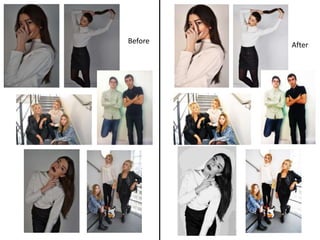
On the next slide, you will find a selection of
images from my magazine before and after
they were edited.
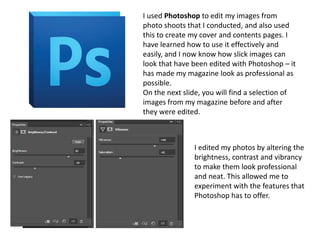
I edited my photos by altering the
brightness, contrast and vibrancy
to make them look professional
and neat. This allowed me to
experiment with the features that
Photoshop has to offer.
Before After
I used Microsoft Publisher to create my
double page spread as this software allowed
me to follow a template of a double page
layout (this was a feature of Publisher that I
was not familiar with, so creating my
magazine using this has taught me more
about what Publisher has to offer), therefore
it was the most effective software for me to
use. It allowed me to create columns for my
text so everything would be in the right
place – this ensured my double page spread
would look as professional as it could.
I used Dafont which is a website that
allowed me to download certain unusual
fonts to apply to my magazine. I did not
know about this website before I started my
work, therefore I have learned that the fonts
already included on Photoshop and
Publisher are not the only ones available.
Dafont allowed me to explore my options
and showed me what the internet has to
offer.
I of course used the Internet for many
purposes throughout my work – I used it to
research into different existing magazines
and for all my target audience research. I
also got my barcode image for my front
cover from Google Images, as this was the
only way I could get one for my magazine.
I used Slideshare to add some PowerPoint
presentations to my blog. This allowed me to
show some different uses of ICT within my
work, and is a neat way of presenting
information on my blog.
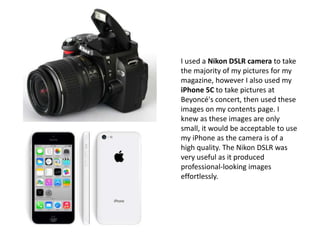
I used a Nikon DSLR camera to take
the majority of my pictures for my
magazine, however I also used my
iPhone 5C to take pictures at
Beyoncé's concert, then used these
images on my contents page. I
knew as these images are only
small, it would be acceptable to use
my iPhone as the camera is of a
high quality. The Nikon DSLR was
very useful as it produced
professional-looking images
effortlessly.
I used Prezi to display certain pieces of
information on my blog, as this again
allowed me to show my work through a
different type of ICT. Prezi allowed me to
display my information through the use
of a mind map, and is interesting to read
as it is a sort of animation (different
bubbles zoom in when they are clicked
on and the reader is able to click and
drag the mind map etc.).
Overall, I believe that different technologies can be
very useful when creating a magazine, and I think
they have encouraged and helped me to be more
creative with my work. I think that Photoshop has
been one of the most useful technologies I have
used, as it contains features such as allowing
professional edits to be added to simple photos to
help my product be of a high standard.

Evaluation Question 6

  • 1.
    I have learneda lot about different technologies from constructing my magazine, including how to use Photoshop effectively and how to use blogger correctly. I have also learned how to use some new websites that I hadn't heard of before I started my product, including Slideshare and Prezi.
  • 2.
    I used Bloggerto document my development and progress throughout the making of my magazine, as for me it was the most effective website to use to display my work. I have learned how to blog properly using Blogger, and how to add links to each post, for example images and Slideshare and Prezi links.
  • 3.
    I used Photoshopto edit my images from photo shoots that I conducted, and also used this to create my cover and contents pages. I have learned how to use it effectively and easily, and I now know how slick images can look that have been edited with Photoshop – it has made my magazine look as professional as possible. On the next slide, you will find a selection of images from my magazine before and after they were edited. I edited my photos by altering the brightness, contrast and vibrancy to make them look professional and neat. This allowed me to experiment with the features that Photoshop has to offer.
  • 4.
  • 5.
    I used MicrosoftPublisher to create my double page spread as this software allowed me to follow a template of a double page layout (this was a feature of Publisher that I was not familiar with, so creating my magazine using this has taught me more about what Publisher has to offer), therefore it was the most effective software for me to use. It allowed me to create columns for my text so everything would be in the right place – this ensured my double page spread would look as professional as it could.
  • 6.
    I used Dafontwhich is a website that allowed me to download certain unusual fonts to apply to my magazine. I did not know about this website before I started my work, therefore I have learned that the fonts already included on Photoshop and Publisher are not the only ones available. Dafont allowed me to explore my options and showed me what the internet has to offer.
  • 7.
    I of courseused the Internet for many purposes throughout my work – I used it to research into different existing magazines and for all my target audience research. I also got my barcode image for my front cover from Google Images, as this was the only way I could get one for my magazine.
  • 8.
    I used Slideshareto add some PowerPoint presentations to my blog. This allowed me to show some different uses of ICT within my work, and is a neat way of presenting information on my blog.
  • 9.
    I used aNikon DSLR camera to take the majority of my pictures for my magazine, however I also used my iPhone 5C to take pictures at Beyoncé's concert, then used these images on my contents page. I knew as these images are only small, it would be acceptable to use my iPhone as the camera is of a high quality. The Nikon DSLR was very useful as it produced professional-looking images effortlessly.
  • 10.
    I used Prezito display certain pieces of information on my blog, as this again allowed me to show my work through a different type of ICT. Prezi allowed me to display my information through the use of a mind map, and is interesting to read as it is a sort of animation (different bubbles zoom in when they are clicked on and the reader is able to click and drag the mind map etc.).
  • 11.
    Overall, I believethat different technologies can be very useful when creating a magazine, and I think they have encouraged and helped me to be more creative with my work. I think that Photoshop has been one of the most useful technologies I have used, as it contains features such as allowing professional edits to be added to simple photos to help my product be of a high standard.