Constructing SQL Queries
for AtoM
Constructing SQL Queries
for AtoM
An overview of AtoM's data model and start constructing simple queries for
reporting and data cleanup, among other uses, using MySQL Workbench.
Outline
Utilities to ease working with MySQL
Data model overview and resources
Explore the schema using SQL queries
Practical examples
MySQL Client
Utilities
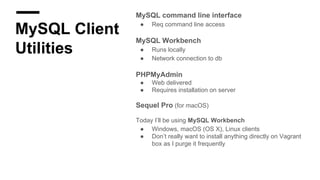
MySQL command line interface
● Req command line access
MySQL Workbench
● Runs locally
● Network connection to db
PHPMyAdmin
● Web delivered
● Requires installation on server
Sequel Pro (for macOS)
Today I’ll be using MySQL Workbench
● Windows, macOS (OS X), Linux clients
● Don’t really want to install anything directly on Vagrant
box as I purge it frequently
MySQL
Workbench
Installing for use with AtoM Vagrant box
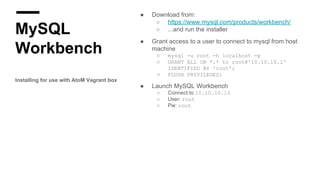
● Download from:
○ https://www.mysql.com/products/workbench/
○ ...and run the installer
● Grant access to a user to connect to mysql from host
machine
○ mysql -u root -h localhost -p
○ GRANT ALL ON *.* to root@'10.10.10.1'
IDENTIFIED BY 'root';
○ FLUSH PRIVILEGES;
● Launch MySQL Workbench
○ Connect to 10.10.10.10
○ User: root
○ Pw: root
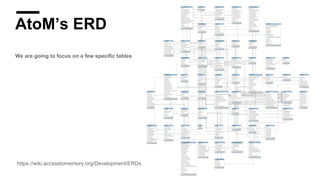
AtoM’s ERD
We are going to focus on a few specific tables
https://wiki.accesstomemory.org/Development/ERDs
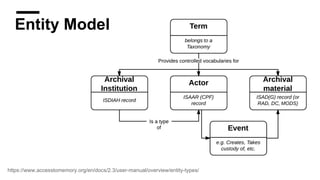
Entity Model
https://www.accesstomemory.org/en/docs/2.3/user-manual/overview/entity-types/
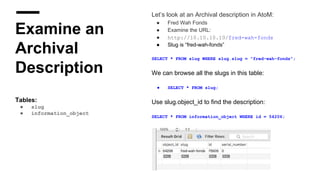
Let’s look at an Archival description in AtoM:
● Fred Wah Fonds
● Examine the URL:
● http://10.10.10.10/fred-wah-fonds
● Slug is “fred-wah-fonds”
SELECT * FROM slug WHERE slug.slug = "fred-wah-fonds";
We can browse all the slugs in this table:
● SELECT * FROM slug;
Use slug.object_id to find the description:
SELECT * FROM information_object WHERE id = 54206;
Examine an
Archival
Description
Tables:
● slug
● information_object
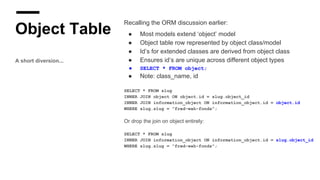
Object Table
A short diversion...
Recalling the ORM discussion earlier:
● Most models extend ‘object’ model
● Object table row represented by object class/model
● Id’s for extended classes are derived from object class
● Ensures id’s are unique across different object types
● SELECT * FROM object;
● Note: class_name, id
SELECT * FROM slug
INNER JOIN object ON object.id = slug.object_id
INNER JOIN information_object ON information_object.id = object.id
WHERE slug.slug = "fred-wah-fonds";
Or drop the join on object entirely:
SELECT * FROM slug
INNER JOIN information_object ON information_object.id = slug.object_id
WHERE slug.slug = "fred-wah-fonds";
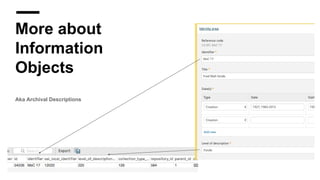
More about
Information
Objects
Aka Archival Descriptions
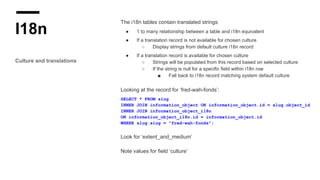
I18n
Culture and translations
The i18n tables contain translated strings
● 1 to many relationship between a table and i18n equivalent
● If a translation record is not available for chosen culture
○ Display strings from default culture i18n record
● If a translation record is available for chosen culture
○ Strings will be populated from this record based on selected culture
○ If the string is null for a specific field within i18n row
■ Fall back to i18n record matching system default culture
Looking at the record for ‘fred-wah-fonds’:
SELECT * FROM slug
INNER JOIN information_object ON information_object.id = slug.object_id
INNER JOIN information_object_i18n
ON information_object_i18n.id = information_object.id
WHERE slug.slug = "fred-wah-fonds";
Look for ‘extent_and_medium’
Note values for field ‘culture’
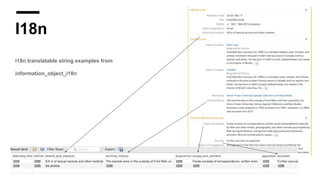
I18n
i18n translatable string examples from
information_object_i18n
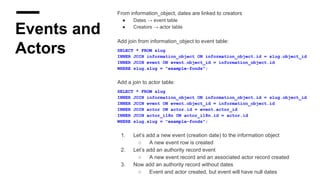
Events and
Actors
From information_object, dates are linked to creators
● Dates → event table
● Creators → actor table
Add join from information_object to event table:
SELECT * FROM slug
INNER JOIN information_object ON information_object.id = slug.object_id
INNER JOIN event ON event.object_id = information_object.id
WHERE slug.slug = "example-fonds";
Add a join to actor table:
SELECT * FROM slug
INNER JOIN information_object ON information_object.id = slug.object_id
INNER JOIN event ON event.object_id = information_object.id
INNER JOIN actor ON actor.id = event.actor_id
INNER JOIN actor_i18n ON actor_i18n.id = actor.id
WHERE slug.slug = "example-fonds";
1. Let’s add a new event (creation date) to the information object
○ A new event row is created
2. Let’s add an authority record event
○ A new event record and an associated actor record created
3. Now add an authority record without dates
○ Event and actor created, but event will have null dates
Terms
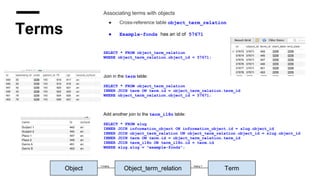
Associating terms with objects
● Cross-reference table object_term_relation
● Example-fonds has an id of 57671
SELECT * FROM object_term_relation
WHERE object_term_relation.object_id = 57671;
Join in the term table:
SELECT * FROM object_term_relation
INNER JOIN term ON term.id = object_term_relation.term_id
WHERE object_term_relation.object_id = 57671;
Add another join to the term_i18n table:
SELECT * FROM slug
INNER JOIN information_object ON information_object.id = slug.object_id
INNER JOIN object_term_relation ON object_term_relation.object_id = slug.object_id
INNER JOIN term ON term.id = object_term_relation.term_id
INNER JOIN term_i18n ON term_i18n.id = term.id
WHERE slug.slug = "example-fonds";
Object Object_term_relation Term
1:many many:1
Taxonomy
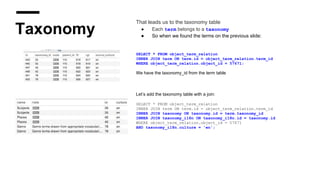
That leads us to the taxonomy table
● Each term belongs to a taxonomy
● So when we found the terms on the previous slide:
SELECT * FROM object_term_relation
INNER JOIN term ON term.id = object_term_relation.term_id
WHERE object_term_relation.object_id = 57671;
We have the taxonomy_id from the term table
Let’s add the taxonomy table with a join:
SELECT * FROM object_term_relation
INNER JOIN term ON term.id = object_term_relation.term_id
INNER JOIN taxonomy ON taxonomy.id = term.taxonomy_id
INNER JOIN taxonomy_i18n ON taxonomy_i18n.id = taxonomy.id
WHERE object_term_relation.object_id = 57671
AND taxonomy_i18n.culture = 'en';
Notes and
Properties
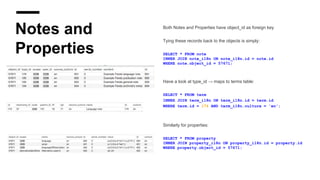
Both Notes and Properties have object_id as foreign key
Tying these records back to the objects is simply:
SELECT * FROM note
INNER JOIN note_i18n ON note_i18n.id = note.id
WHERE note.object_id = 57671;
Have a look at type_id → maps to terms table:
SELECT * FROM term
INNER JOIN term_i18n ON term_i18n.id = term.id
WHERE term.id = 174 AND term_i18n.culture = 'en';
Similarly for properties:
SELECT * FROM property
INNER JOIN property_i18n ON property_i18n.id = property.id
WHERE property.object_id = 57671;
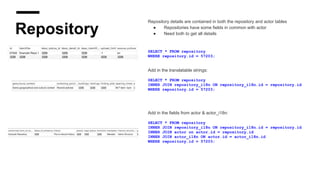
Repository
Repository details are contained in both the repository and actor tables
● Repositories have some fields in common with actor
● Need both to get all details
SELECT * FROM repository
WHERE repository.id = 57203;
Add in the translatable strings:
SELECT * FROM repository
INNER JOIN repository_i18n ON repository_i18n.id = repository.id
WHERE repository.id = 57203;
Add in the fields from actor & actor_i18n:
SELECT * FROM repository
INNER JOIN repository_i18n ON repository_i18n.id = repository.id
INNER JOIN actor on actor.id = repository.id
INNER JOIN actor_i18n ON actor.id = actor_i18n.id
WHERE repository.id = 57203;
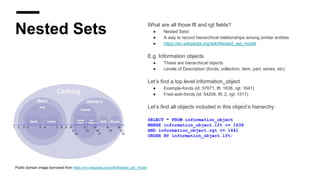
Nested Sets What are all those lft and rgt fields?
● Nested Sets!
● A way to record hierarchical relationships among similar entities
● https://en.wikipedia.org/wiki/Nested_set_model
E.g. Information objects
● These are hierarchical objects
● Levels of Description (fonds, collection, item, part, series, etc)
Let’s find a top level information_object
● Example-fonds (id: 57671, lft: 1638, rgt: 1641)
● Fred-wah-fonds (id: 54206, lft: 2, rgt: 1517)
Let’s find all objects included in this object’s hierarchy:
SELECT * FROM information_object
WHERE information_object.lft >= 1638
AND information_object.rgt <= 1641
ORDER BY information_object.lft;
Public domain image borrowed from https://en.wikipedia.org/wiki/Nested_set_model
Update Queries
Caution!
● Backups!
● Know how to restore from backups!
● Practice on a backup or offline copy
● Depending on what you’ve done, might need to:
○ Rebuild nested sets
○ Re-index
What’s next?
● Set all ‘Draft’ status objects to ‘Published’:
○ UPDATE status SET status_id=160 WHERE type_id=158;
● Find info object id when slug not known:
○ SELECT id FROM information_object_i18n WHERE title='TITLEHERE';
○ SELECT id FROM information_object_i18n WHERE title LIKE 'TITLEHE%';
● Get a count of descriptions in database:
○ SELECT COUNT(*) FROM information_object_i18n;
● Find titles containing quote characters:
○ SELECT io.title, s.slug FROM information_object_i18n io JOIN slug s ON io.id = s.object_id WHERE
io.title like '%"%';
● See all note type terms and get a count of each:
○ SELECT term.id, term_i18n.name, COUNT(note.type_id) FROM term
INNER JOIN term_i18n ON term.id = term_i18n.id
INNER JOIN note ON term.id = note.type_id
WHERE culture='en'
GROUP BY note.type_id;
See https://www.accesstomemory.org/docs/latest/admin-manual/maintenance/cli-tools/#common-atom-database-queries
SQL Join reference: http://www.codeproject.com/Articles/33052/Visual-Representation-of-SQL-Joins
Q&AQ&A
www.accesstomemory.org
www.artefactual.com

Constructing SQL queries for AtoM

  • 1.
    Constructing SQL Queries forAtoM Constructing SQL Queries for AtoM An overview of AtoM's data model and start constructing simple queries for reporting and data cleanup, among other uses, using MySQL Workbench.
  • 2.
    Outline Utilities to easeworking with MySQL Data model overview and resources Explore the schema using SQL queries Practical examples
  • 3.
    MySQL Client Utilities MySQL commandline interface ● Req command line access MySQL Workbench ● Runs locally ● Network connection to db PHPMyAdmin ● Web delivered ● Requires installation on server Sequel Pro (for macOS) Today I’ll be using MySQL Workbench ● Windows, macOS (OS X), Linux clients ● Don’t really want to install anything directly on Vagrant box as I purge it frequently
  • 4.
    MySQL Workbench Installing for usewith AtoM Vagrant box ● Download from: ○ https://www.mysql.com/products/workbench/ ○ ...and run the installer ● Grant access to a user to connect to mysql from host machine ○ mysql -u root -h localhost -p ○ GRANT ALL ON *.* to root@'10.10.10.1' IDENTIFIED BY 'root'; ○ FLUSH PRIVILEGES; ● Launch MySQL Workbench ○ Connect to 10.10.10.10 ○ User: root ○ Pw: root
  • 5.
    AtoM’s ERD We aregoing to focus on a few specific tables https://wiki.accesstomemory.org/Development/ERDs
  • 6.
  • 7.
    Let’s look atan Archival description in AtoM: ● Fred Wah Fonds ● Examine the URL: ● http://10.10.10.10/fred-wah-fonds ● Slug is “fred-wah-fonds” SELECT * FROM slug WHERE slug.slug = "fred-wah-fonds"; We can browse all the slugs in this table: ● SELECT * FROM slug; Use slug.object_id to find the description: SELECT * FROM information_object WHERE id = 54206; Examine an Archival Description Tables: ● slug ● information_object
  • 8.
    Object Table A shortdiversion... Recalling the ORM discussion earlier: ● Most models extend ‘object’ model ● Object table row represented by object class/model ● Id’s for extended classes are derived from object class ● Ensures id’s are unique across different object types ● SELECT * FROM object; ● Note: class_name, id SELECT * FROM slug INNER JOIN object ON object.id = slug.object_id INNER JOIN information_object ON information_object.id = object.id WHERE slug.slug = "fred-wah-fonds"; Or drop the join on object entirely: SELECT * FROM slug INNER JOIN information_object ON information_object.id = slug.object_id WHERE slug.slug = "fred-wah-fonds";
  • 9.
  • 10.
    I18n Culture and translations Thei18n tables contain translated strings ● 1 to many relationship between a table and i18n equivalent ● If a translation record is not available for chosen culture ○ Display strings from default culture i18n record ● If a translation record is available for chosen culture ○ Strings will be populated from this record based on selected culture ○ If the string is null for a specific field within i18n row ■ Fall back to i18n record matching system default culture Looking at the record for ‘fred-wah-fonds’: SELECT * FROM slug INNER JOIN information_object ON information_object.id = slug.object_id INNER JOIN information_object_i18n ON information_object_i18n.id = information_object.id WHERE slug.slug = "fred-wah-fonds"; Look for ‘extent_and_medium’ Note values for field ‘culture’
  • 11.
    I18n i18n translatable stringexamples from information_object_i18n
  • 12.
    Events and Actors From information_object,dates are linked to creators ● Dates → event table ● Creators → actor table Add join from information_object to event table: SELECT * FROM slug INNER JOIN information_object ON information_object.id = slug.object_id INNER JOIN event ON event.object_id = information_object.id WHERE slug.slug = "example-fonds"; Add a join to actor table: SELECT * FROM slug INNER JOIN information_object ON information_object.id = slug.object_id INNER JOIN event ON event.object_id = information_object.id INNER JOIN actor ON actor.id = event.actor_id INNER JOIN actor_i18n ON actor_i18n.id = actor.id WHERE slug.slug = "example-fonds"; 1. Let’s add a new event (creation date) to the information object ○ A new event row is created 2. Let’s add an authority record event ○ A new event record and an associated actor record created 3. Now add an authority record without dates ○ Event and actor created, but event will have null dates
  • 13.
    Terms Associating terms withobjects ● Cross-reference table object_term_relation ● Example-fonds has an id of 57671 SELECT * FROM object_term_relation WHERE object_term_relation.object_id = 57671; Join in the term table: SELECT * FROM object_term_relation INNER JOIN term ON term.id = object_term_relation.term_id WHERE object_term_relation.object_id = 57671; Add another join to the term_i18n table: SELECT * FROM slug INNER JOIN information_object ON information_object.id = slug.object_id INNER JOIN object_term_relation ON object_term_relation.object_id = slug.object_id INNER JOIN term ON term.id = object_term_relation.term_id INNER JOIN term_i18n ON term_i18n.id = term.id WHERE slug.slug = "example-fonds"; Object Object_term_relation Term 1:many many:1
  • 14.
    Taxonomy That leads usto the taxonomy table ● Each term belongs to a taxonomy ● So when we found the terms on the previous slide: SELECT * FROM object_term_relation INNER JOIN term ON term.id = object_term_relation.term_id WHERE object_term_relation.object_id = 57671; We have the taxonomy_id from the term table Let’s add the taxonomy table with a join: SELECT * FROM object_term_relation INNER JOIN term ON term.id = object_term_relation.term_id INNER JOIN taxonomy ON taxonomy.id = term.taxonomy_id INNER JOIN taxonomy_i18n ON taxonomy_i18n.id = taxonomy.id WHERE object_term_relation.object_id = 57671 AND taxonomy_i18n.culture = 'en';
  • 15.
    Notes and Properties Both Notesand Properties have object_id as foreign key Tying these records back to the objects is simply: SELECT * FROM note INNER JOIN note_i18n ON note_i18n.id = note.id WHERE note.object_id = 57671; Have a look at type_id → maps to terms table: SELECT * FROM term INNER JOIN term_i18n ON term_i18n.id = term.id WHERE term.id = 174 AND term_i18n.culture = 'en'; Similarly for properties: SELECT * FROM property INNER JOIN property_i18n ON property_i18n.id = property.id WHERE property.object_id = 57671;
  • 16.
    Repository Repository details arecontained in both the repository and actor tables ● Repositories have some fields in common with actor ● Need both to get all details SELECT * FROM repository WHERE repository.id = 57203; Add in the translatable strings: SELECT * FROM repository INNER JOIN repository_i18n ON repository_i18n.id = repository.id WHERE repository.id = 57203; Add in the fields from actor & actor_i18n: SELECT * FROM repository INNER JOIN repository_i18n ON repository_i18n.id = repository.id INNER JOIN actor on actor.id = repository.id INNER JOIN actor_i18n ON actor.id = actor_i18n.id WHERE repository.id = 57203;
  • 17.
    Nested Sets Whatare all those lft and rgt fields? ● Nested Sets! ● A way to record hierarchical relationships among similar entities ● https://en.wikipedia.org/wiki/Nested_set_model E.g. Information objects ● These are hierarchical objects ● Levels of Description (fonds, collection, item, part, series, etc) Let’s find a top level information_object ● Example-fonds (id: 57671, lft: 1638, rgt: 1641) ● Fred-wah-fonds (id: 54206, lft: 2, rgt: 1517) Let’s find all objects included in this object’s hierarchy: SELECT * FROM information_object WHERE information_object.lft >= 1638 AND information_object.rgt <= 1641 ORDER BY information_object.lft; Public domain image borrowed from https://en.wikipedia.org/wiki/Nested_set_model
  • 18.
    Update Queries Caution! ● Backups! ●Know how to restore from backups! ● Practice on a backup or offline copy ● Depending on what you’ve done, might need to: ○ Rebuild nested sets ○ Re-index
  • 19.
    What’s next? ● Setall ‘Draft’ status objects to ‘Published’: ○ UPDATE status SET status_id=160 WHERE type_id=158; ● Find info object id when slug not known: ○ SELECT id FROM information_object_i18n WHERE title='TITLEHERE'; ○ SELECT id FROM information_object_i18n WHERE title LIKE 'TITLEHE%'; ● Get a count of descriptions in database: ○ SELECT COUNT(*) FROM information_object_i18n; ● Find titles containing quote characters: ○ SELECT io.title, s.slug FROM information_object_i18n io JOIN slug s ON io.id = s.object_id WHERE io.title like '%"%'; ● See all note type terms and get a count of each: ○ SELECT term.id, term_i18n.name, COUNT(note.type_id) FROM term INNER JOIN term_i18n ON term.id = term_i18n.id INNER JOIN note ON term.id = note.type_id WHERE culture='en' GROUP BY note.type_id; See https://www.accesstomemory.org/docs/latest/admin-manual/maintenance/cli-tools/#common-atom-database-queries SQL Join reference: http://www.codeproject.com/Articles/33052/Visual-Representation-of-SQL-Joins
  • 20.