SQL cheat sheet
Basic Queries
Views
-- filter your columns
SELECT col1, col2, col3, ... FROM table1
-- filter the rows
WHERE col4 = 1 AND col5 = 2
-- aggregate the data
GROUP by …
-- limit aggregated data
HAVING count(*) > 1
-- order of the results
ORDER BY col2
Useful keywords for SELECTS:
DISTINCT - return unique results
BETWEEN a AND b - limit the range, the values can be
numbers, text, or dates
LIKE - pattern search within the column text
IN (a, b, c) - check if the value is contained among given.
Data Modification
-- update specific data with the WHERE clause
UPDATE table1 SET col1 = 1 WHERE col2 = 2
-- insert values manually
INSERT INTO table1 (ID, FIRST_NAME, LAST_NAME)
VALUES (1, ‘Rebel’, ‘Labs’);
-- or by using the results of a query
INSERT INTO table1 (ID, FIRST_NAME, LAST_NAME)
SELECT id, last_name, first_name FROM table2
A VIEW is a virtual table, which is a result of a query.
They can be used to create virtual tables of complex queries.
CREATE VIEW view1 AS
SELECT col1, col2
FROM table1
WHERE …
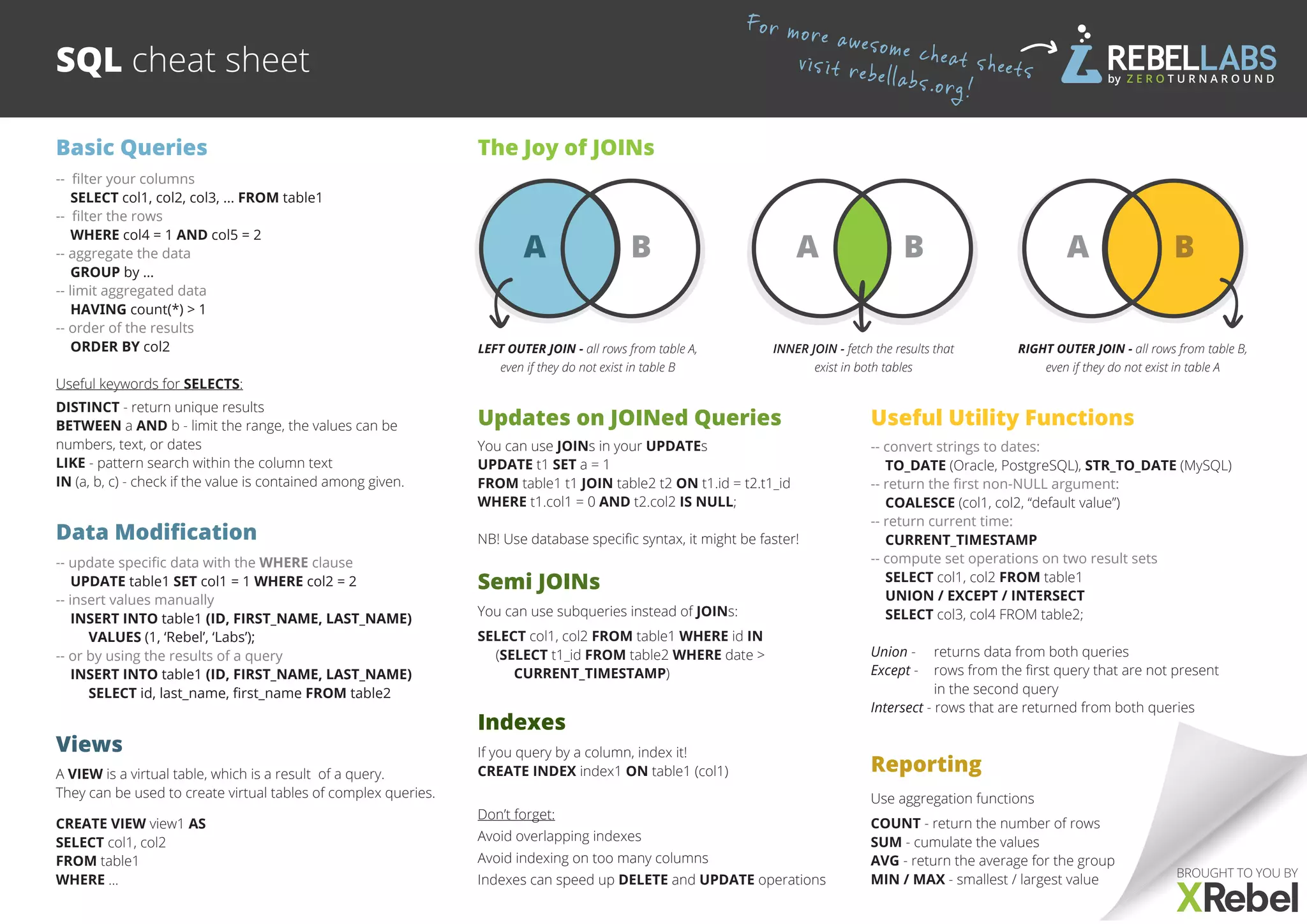
The Joy of JOINs
A B A B
RIGHT OUTER JOIN - all rows from table B,
even if they do not exist in table A
INNER JOIN - fetch the results that
exist in both tables
LEFT OUTER JOIN - all rows from table A,
even if they do not exist in table B
Updates on JOINed Queries
You can use JOINs in your UPDATEs
UPDATE t1 SET a = 1
FROM table1 t1 JOIN table2 t2 ON t1.id = t2.t1_id
WHERE t1.col1 = 0 AND t2.col2 IS NULL;
NB! Use database specific syntax, it might be faster!
Semi JOINs
You can use subqueries instead of JOINs:
SELECT col1, col2 FROM table1 WHERE id IN
(SELECT t1_id FROM table2 WHERE date >
CURRENT_TIMESTAMP)
Indexes
If you query by a column, index it!
CREATE INDEX index1 ON table1 (col1)
Don’t forget:
Avoid overlapping indexes
Avoid indexing on too many columns
Indexes can speed up DELETE and UPDATE operations
Reporting
Use aggregation functions
COUNT - return the number of rows
SUM - cumulate the values
AVG - return the average for the group
MIN / MAX - smallest / largest value
Useful Utility Functions
-- convert strings to dates:
TO_DATE (Oracle, PostgreSQL), STR_TO_DATE (MySQL)
-- return the first non-NULL argument:
COALESCE (col1, col2, “default value”)
-- return current time:
CURRENT_TIMESTAMP
-- compute set operations on two result sets
SELECT col1, col2 FROM table1
UNION / EXCEPT / INTERSECT
SELECT col3, col4 FROM table2;
Union -	 returns data from both queries
Except -	 rows from the first query that are not present
	 in the second query
Intersect - rows that are returned from both queries

Sql cheat-sheet

  • 1.
    SQL cheat sheet BasicQueries Views -- filter your columns SELECT col1, col2, col3, ... FROM table1 -- filter the rows WHERE col4 = 1 AND col5 = 2 -- aggregate the data GROUP by … -- limit aggregated data HAVING count(*) > 1 -- order of the results ORDER BY col2 Useful keywords for SELECTS: DISTINCT - return unique results BETWEEN a AND b - limit the range, the values can be numbers, text, or dates LIKE - pattern search within the column text IN (a, b, c) - check if the value is contained among given. Data Modification -- update specific data with the WHERE clause UPDATE table1 SET col1 = 1 WHERE col2 = 2 -- insert values manually INSERT INTO table1 (ID, FIRST_NAME, LAST_NAME) VALUES (1, ‘Rebel’, ‘Labs’); -- or by using the results of a query INSERT INTO table1 (ID, FIRST_NAME, LAST_NAME) SELECT id, last_name, first_name FROM table2 A VIEW is a virtual table, which is a result of a query. They can be used to create virtual tables of complex queries. CREATE VIEW view1 AS SELECT col1, col2 FROM table1 WHERE … The Joy of JOINs A B A B RIGHT OUTER JOIN - all rows from table B, even if they do not exist in table A INNER JOIN - fetch the results that exist in both tables LEFT OUTER JOIN - all rows from table A, even if they do not exist in table B Updates on JOINed Queries You can use JOINs in your UPDATEs UPDATE t1 SET a = 1 FROM table1 t1 JOIN table2 t2 ON t1.id = t2.t1_id WHERE t1.col1 = 0 AND t2.col2 IS NULL; NB! Use database specific syntax, it might be faster! Semi JOINs You can use subqueries instead of JOINs: SELECT col1, col2 FROM table1 WHERE id IN (SELECT t1_id FROM table2 WHERE date > CURRENT_TIMESTAMP) Indexes If you query by a column, index it! CREATE INDEX index1 ON table1 (col1) Don’t forget: Avoid overlapping indexes Avoid indexing on too many columns Indexes can speed up DELETE and UPDATE operations Reporting Use aggregation functions COUNT - return the number of rows SUM - cumulate the values AVG - return the average for the group MIN / MAX - smallest / largest value Useful Utility Functions -- convert strings to dates: TO_DATE (Oracle, PostgreSQL), STR_TO_DATE (MySQL) -- return the first non-NULL argument: COALESCE (col1, col2, “default value”) -- return current time: CURRENT_TIMESTAMP -- compute set operations on two result sets SELECT col1, col2 FROM table1 UNION / EXCEPT / INTERSECT SELECT col3, col4 FROM table2; Union - returns data from both queries Except - rows from the first query that are not present in the second query Intersect - rows that are returned from both queries