Modern Collaboration
using Microsoft Bot
Framework
Speaker Intro
Madan Marimuthu
Sr. Technical Architect
WinWire Technologies
• Madan has over 15 years of IT industry experience
• Microsoft Certified Professional (MCP)
• Specialized in managing, designing, securing and deploying
Microsoft Cloud, On-Premises and Hybrid based solutions
on SharePoint, Office 365 and Azure.
https://www.linkedin.com/in/madan-marimuthu
Agenda
Collaboration options in Office 365
Chatbot Overview
Guidelines for designing a chatbot
MS bot framework architecture
Collaboration Portal using chatbot - Demo
Q & A
Collaboration options in
Office 365
Enable Collaboration using Teams
Groups of people brought together for work, projects, or common interests
Teams, as the hub for teamwork, is where people - including people outside your organization -
can actively connect and collaborate in real time to get things done
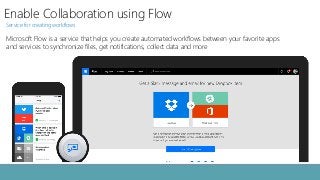
Enable Collaboration using Flow
Service for creating workflows
Microsoft Flow is a service that helps you create automated workflows between your favorite apps
and services to synchronize files, get notifications, collect data and more
Enable Collaboration using PowerApps
Apps built by your teams to streamline processes
Service for creating custom business apps across platforms and devices
Enable Collaboration using Exchange
Smart work with business class email and calendar
Exchange helps you collaborate on your critical documents and gives you a focused inbox that prioritizes
important messages and adapts to your work style, so you can get more done–faster
Enable Collaboration using SharePoint Online
Your mobile, intelligent intranet
Share and manage content, knowledge, and applications to empower teamwork, quickly find information, and
seamlessly collaborate across the organization.
Enable Collaboration using Office Online Apps
Work better together
Work with your team on presentations in PowerPoint or reports in Excel or documents in word simultaneously using a
mobile app, browser, or desktop-based Office suite
Other Collaboration Tools
OneDrive for Business
Yammer
Planner
Delve
StreamsProject Online
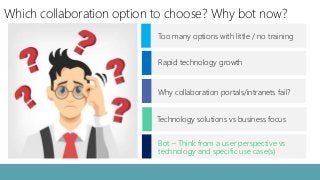
Which collaboration option to choose? Why bot now?
Why collaboration portals/intranets fail?
Rapid technology growth
Too many options with little / no training
Technology solutions vs business focus
Bot – Think from a user perspective vs
technology and specific use case(s)
Chatbot Overview
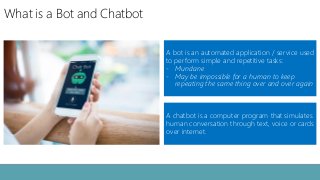
What is a Bot and Chatbot
A chatbot is a computer program that simulates
human conversation through text, voice or cards
over internet.
A bot is an automated application / service used
to perform simple and repetitive tasks:
- Mundane
- May be impossible for a human to keep
repeating the same thing over and over again
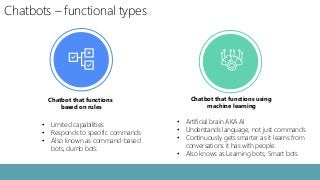
Chatbots – functional types
Chatbot that functions
based on rules
• Limited capabilities
• Responds to specific commands
• Also known as command-based
bots, dumb bots
Chatbot that functions using
machine learning
• Artificial brain AKA AI
• Understands language, not just commands
• Continuously gets smarter as it learns from
conversations it has with people.
• Also knows as Learning bots, Smart bots
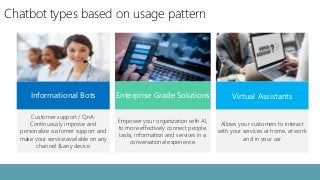
Chatbot types based on usage pattern
Virtual Assistants
Allows your customers to interact
with your services at home, at work
and in your car
Informational Bots
Customer support / QnA:
Continuously improve and
personalize customer support and
make your service available on any
channel & any device
Enterprise Grade Solutions
Empower your organization with AI,
to more effectively connect people,
tasks, information and services in a
conversational experience.
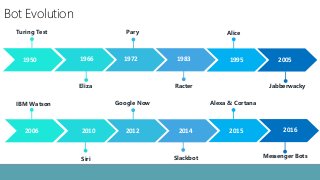
Bot Evolution
19831950 1966 1972 2005
20142006 2010 2012 20162015
1995
Eliza
Turing Test
Racter
Pary
Jabberwacky
Alice
Siri
IBM Watson
Slackbot
Google Now Alexa & Cortana
Messenger Bots
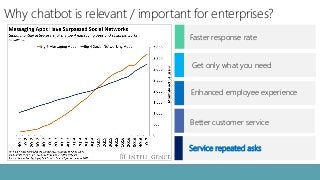
Why chatbot is relevant / important for enterprises?
Better customer service
Enhanced employee experience
Get only what you need
Faster response rate
Service repeated asks
Chatbots by leading cloud vendors
Guidelines for designing a
chatbot
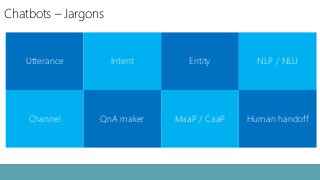
Chatbots – Jargons
Utterance Intent Entity NLP / NLU
Channel QnA maker MaaP / CaaP Human handoff
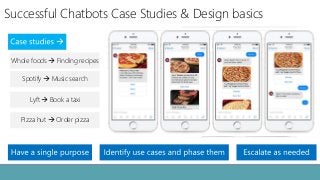
Successful Chatbots Case Studies & Design basics
Lyft → Book a taxi
Whole foods → Finding recipes
Spotify → Music search
Pizza hut → Order pizza
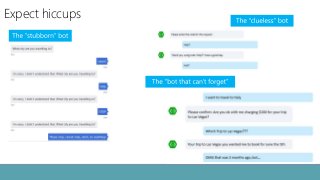
Expect hiccups
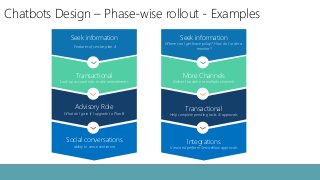
Chatbots Design – Phase-wise rollout - Examples
Seek information
Features of service plan A
Transactional
Look up account info, make amendments
Advisory Role
What do I gain if I upgrade to Plan B
Social conversations
ability to sense sentiment
Seek information
Where can I get leave policy?, How do I order a
monitor?
More Channels
Deliver the same in multiple channels
Transactional
Help complete pending tasks & approvals
Integrations
View and perform ServiceNow approvals
Microsoft bot framework
architecture
Azure Bot Framework Architecture
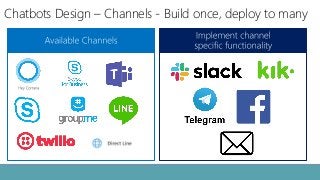
Chatbots Design – Channels - Build once, deploy to many
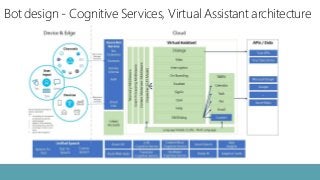
Bot design - Cognitive Services, Virtual Assistant architecture
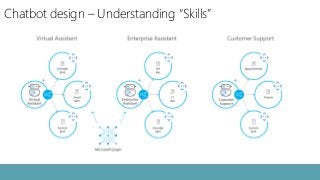
Chatbot design – Understanding “Skills”
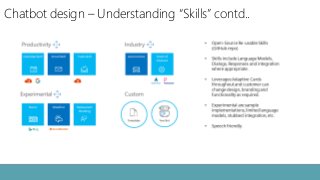
Chatbot design – Understanding “Skills” contd..
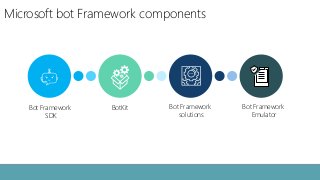
Microsoft bot Framework components
Bot Framework
SDK
BotKit Bot Framework
solutions
Bot Framework
Emulator
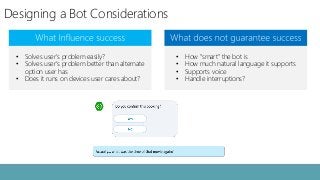
Designing a Bot Considerations
• Solves user’s problem easily?
• Solves user’s problem better than alternate
option user has
• Does it runs on devices user cares about?
• How “smart” the bot is
• How much natural language it supports
• Supports voice
• Handle interruptions?
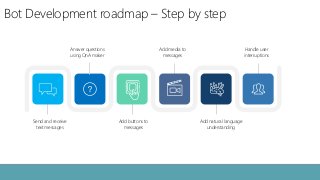
Bot Development roadmap – Step by step
Answer questions
using QnA maker
Handle user
interruptions
Send and receive
text messages
Add media to
messages
Add buttons to
messages
Add natural language
understanding
Collaboration Portal using
chatbot - Demo
Get Connected
info@WinWire.com www.WinWire.com
/company/WinWire-Technologies@WinWire
Madan M
Madan.M@WinWire.com
Q & A

Modern Collaboration Using Microsoft Bot Framework

  • 1.
  • 2.
    Speaker Intro Madan Marimuthu Sr.Technical Architect WinWire Technologies • Madan has over 15 years of IT industry experience • Microsoft Certified Professional (MCP) • Specialized in managing, designing, securing and deploying Microsoft Cloud, On-Premises and Hybrid based solutions on SharePoint, Office 365 and Azure. https://www.linkedin.com/in/madan-marimuthu
  • 3.
    Agenda Collaboration options inOffice 365 Chatbot Overview Guidelines for designing a chatbot MS bot framework architecture Collaboration Portal using chatbot - Demo Q & A
  • 4.
  • 5.
    Enable Collaboration usingTeams Groups of people brought together for work, projects, or common interests Teams, as the hub for teamwork, is where people - including people outside your organization - can actively connect and collaborate in real time to get things done
  • 6.
    Enable Collaboration usingFlow Service for creating workflows Microsoft Flow is a service that helps you create automated workflows between your favorite apps and services to synchronize files, get notifications, collect data and more
  • 7.
    Enable Collaboration usingPowerApps Apps built by your teams to streamline processes Service for creating custom business apps across platforms and devices
  • 8.
    Enable Collaboration usingExchange Smart work with business class email and calendar Exchange helps you collaborate on your critical documents and gives you a focused inbox that prioritizes important messages and adapts to your work style, so you can get more done–faster
  • 9.
    Enable Collaboration usingSharePoint Online Your mobile, intelligent intranet Share and manage content, knowledge, and applications to empower teamwork, quickly find information, and seamlessly collaborate across the organization.
  • 10.
    Enable Collaboration usingOffice Online Apps Work better together Work with your team on presentations in PowerPoint or reports in Excel or documents in word simultaneously using a mobile app, browser, or desktop-based Office suite
  • 11.
    Other Collaboration Tools OneDrivefor Business Yammer Planner Delve StreamsProject Online
  • 12.
    Which collaboration optionto choose? Why bot now? Why collaboration portals/intranets fail? Rapid technology growth Too many options with little / no training Technology solutions vs business focus Bot – Think from a user perspective vs technology and specific use case(s)
  • 13.
  • 14.
    What is aBot and Chatbot A chatbot is a computer program that simulates human conversation through text, voice or cards over internet. A bot is an automated application / service used to perform simple and repetitive tasks: - Mundane - May be impossible for a human to keep repeating the same thing over and over again
  • 15.
    Chatbots – functionaltypes Chatbot that functions based on rules • Limited capabilities • Responds to specific commands • Also known as command-based bots, dumb bots Chatbot that functions using machine learning • Artificial brain AKA AI • Understands language, not just commands • Continuously gets smarter as it learns from conversations it has with people. • Also knows as Learning bots, Smart bots
  • 16.
    Chatbot types basedon usage pattern Virtual Assistants Allows your customers to interact with your services at home, at work and in your car Informational Bots Customer support / QnA: Continuously improve and personalize customer support and make your service available on any channel & any device Enterprise Grade Solutions Empower your organization with AI, to more effectively connect people, tasks, information and services in a conversational experience.
  • 17.
    Bot Evolution 19831950 19661972 2005 20142006 2010 2012 20162015 1995 Eliza Turing Test Racter Pary Jabberwacky Alice Siri IBM Watson Slackbot Google Now Alexa & Cortana Messenger Bots
  • 18.
    Why chatbot isrelevant / important for enterprises? Better customer service Enhanced employee experience Get only what you need Faster response rate Service repeated asks
  • 19.
    Chatbots by leadingcloud vendors
  • 20.
  • 21.
    Chatbots – Jargons UtteranceIntent Entity NLP / NLU Channel QnA maker MaaP / CaaP Human handoff
  • 22.
    Successful Chatbots CaseStudies & Design basics Lyft → Book a taxi Whole foods → Finding recipes Spotify → Music search Pizza hut → Order pizza
  • 23.
  • 24.
    Chatbots Design –Phase-wise rollout - Examples Seek information Features of service plan A Transactional Look up account info, make amendments Advisory Role What do I gain if I upgrade to Plan B Social conversations ability to sense sentiment Seek information Where can I get leave policy?, How do I order a monitor? More Channels Deliver the same in multiple channels Transactional Help complete pending tasks & approvals Integrations View and perform ServiceNow approvals
  • 25.
  • 26.
    Azure Bot FrameworkArchitecture
  • 27.
    Chatbots Design –Channels - Build once, deploy to many
  • 28.
    Bot design -Cognitive Services, Virtual Assistant architecture
  • 29.
    Chatbot design –Understanding “Skills”
  • 30.
    Chatbot design –Understanding “Skills” contd..
  • 31.
    Microsoft bot Frameworkcomponents Bot Framework SDK BotKit Bot Framework solutions Bot Framework Emulator
  • 32.
    Designing a BotConsiderations • Solves user’s problem easily? • Solves user’s problem better than alternate option user has • Does it runs on devices user cares about? • How “smart” the bot is • How much natural language it supports • Supports voice • Handle interruptions?
  • 33.
    Bot Development roadmap– Step by step Answer questions using QnA maker Handle user interruptions Send and receive text messages Add media to messages Add buttons to messages Add natural language understanding
  • 34.
  • 35.