
EC Database System
Gibran Roye, Muntabir Choudhury, Jared Fellenbaum
Project Ideas
 Gathered data and information about school record and registration system
 Analyzed the data and figured out possible entities we need to construct our database
 We figured 10 entities for EC Database System: School, Department, Professor, Student,
Semester, Class, Course, Enroll, Room and Building.
Goals
 Created project narrative based on the information we had for EC Database System and
possible queries based on narrative
 Project specification included: Relationships, Relationship participation, ERD, and 3rd
Normalization Form
 Finally, created tables and inserted values into MySQL workbench and checked queries
through MySQL client server.
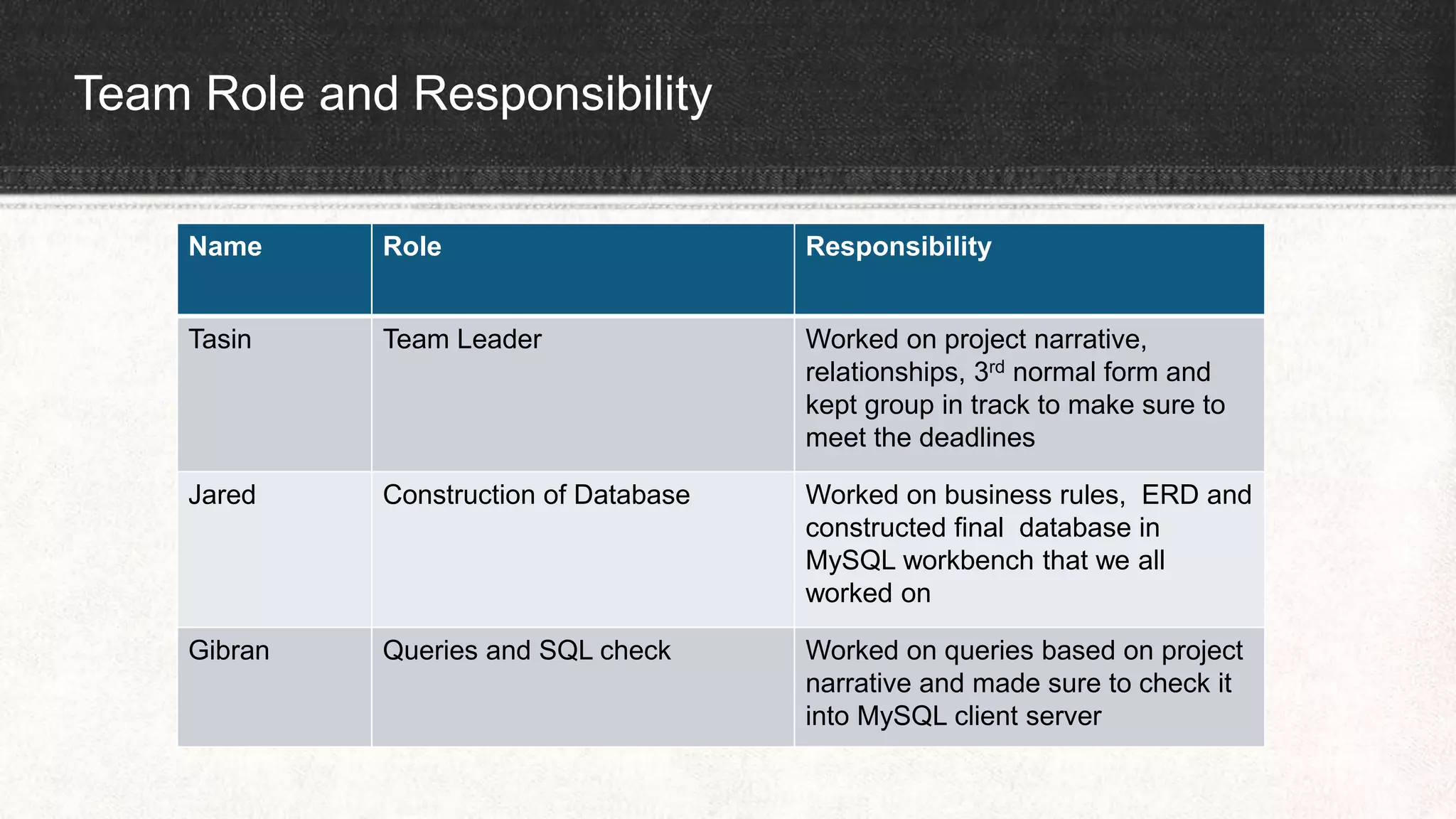
Team Role and Responsibility
Name Role Responsibility
Tasin Team Leader Worked on project narrative,
relationships, 3rd normal form and
kept group in track to make sure to
meet the deadlines
Jared Construction of Database Worked on business rules, ERD and
constructed final database in
MySQL workbench that we all
worked on
Gibran Queries and SQL check Worked on queries based on project
narrative and made sure to check it
into MySQL client server
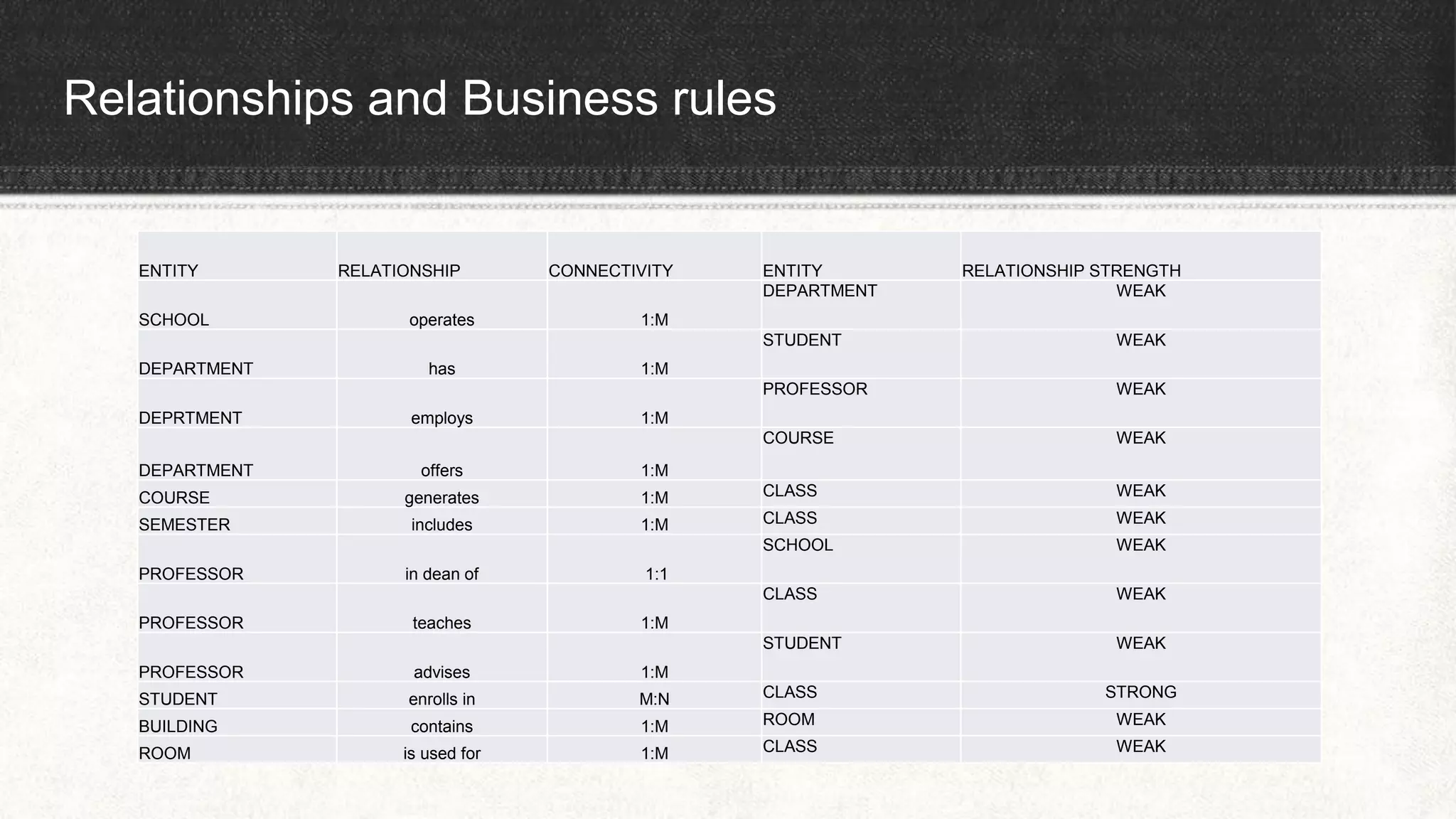
Relationships and Business rules
ENTITY RELATIONSHIP CONNECTIVITY ENTITY RELATIONSHIP STRENGTH
SCHOOL operates 1:M
DEPARTMENT WEAK
DEPARTMENT has 1:M
STUDENT WEAK
DEPRTMENT employs 1:M
PROFESSOR WEAK
DEPARTMENT offers 1:M
COURSE WEAK
COURSE generates 1:M CLASS WEAK
SEMESTER includes 1:M CLASS WEAK
PROFESSOR in dean of 1:1
SCHOOL WEAK
PROFESSOR teaches 1:M
CLASS WEAK
PROFESSOR advises 1:M
STUDENT WEAK
STUDENT enrolls in M:N CLASS STRONG
BUILDING contains 1:M ROOM WEAK
ROOM is used for 1:M CLASS WEAK
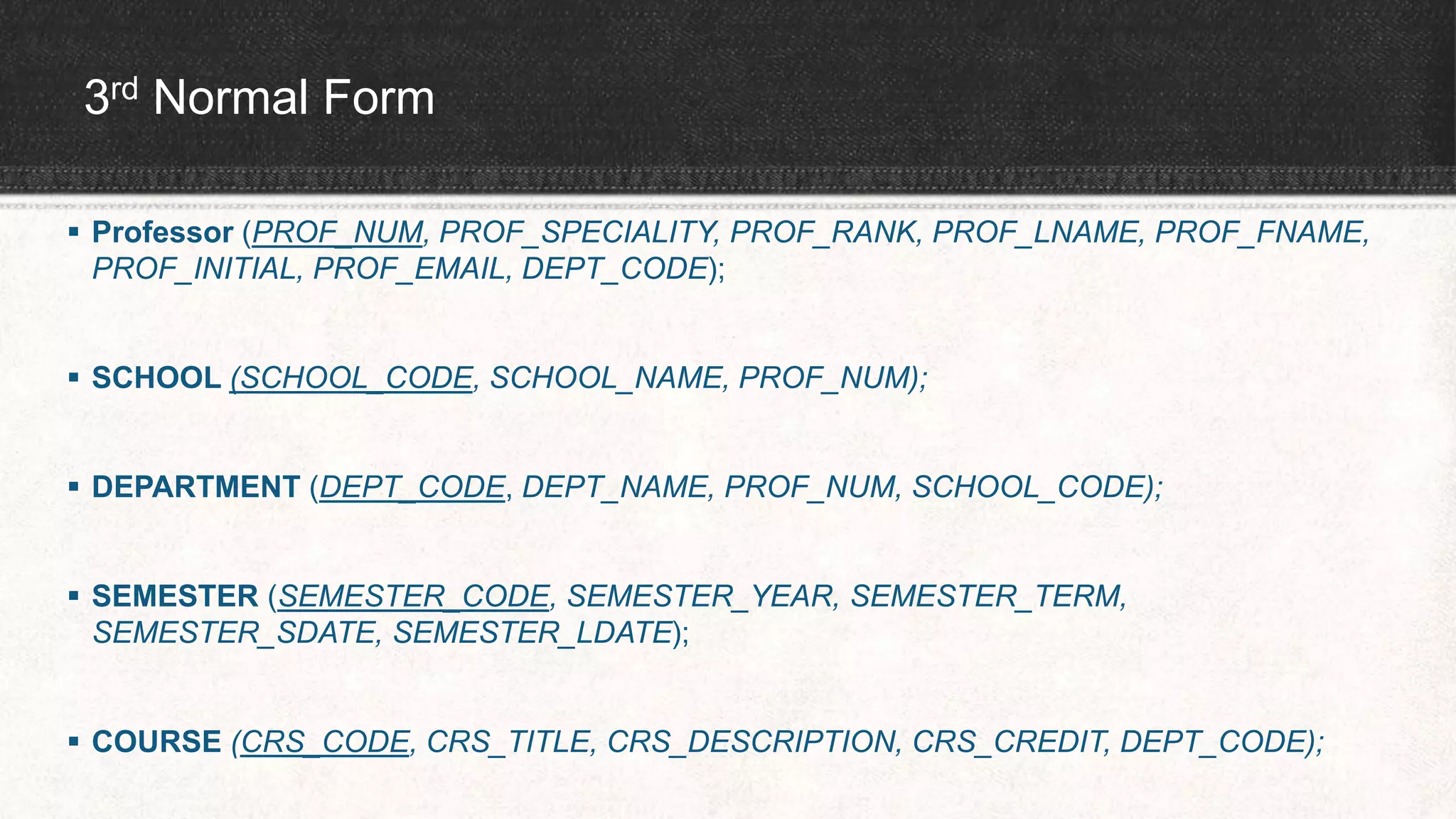
3rd Normal Form
 Professor (PROF_NUM, PROF_SPECIALITY, PROF_RANK, PROF_LNAME, PROF_FNAME,
PROF_INITIAL, PROF_EMAIL, DEPT_CODE);
 SCHOOL (SCHOOL_CODE, SCHOOL_NAME, PROF_NUM);
 DEPARTMENT (DEPT_CODE, DEPT_NAME, PROF_NUM, SCHOOL_CODE);
 SEMESTER (SEMESTER_CODE, SEMESTER_YEAR, SEMESTER_TERM,
SEMESTER_SDATE, SEMESTER_LDATE);
 COURSE (CRS_CODE, CRS_TITLE, CRS_DESCRIPTION, CRS_CREDIT, DEPT_CODE);
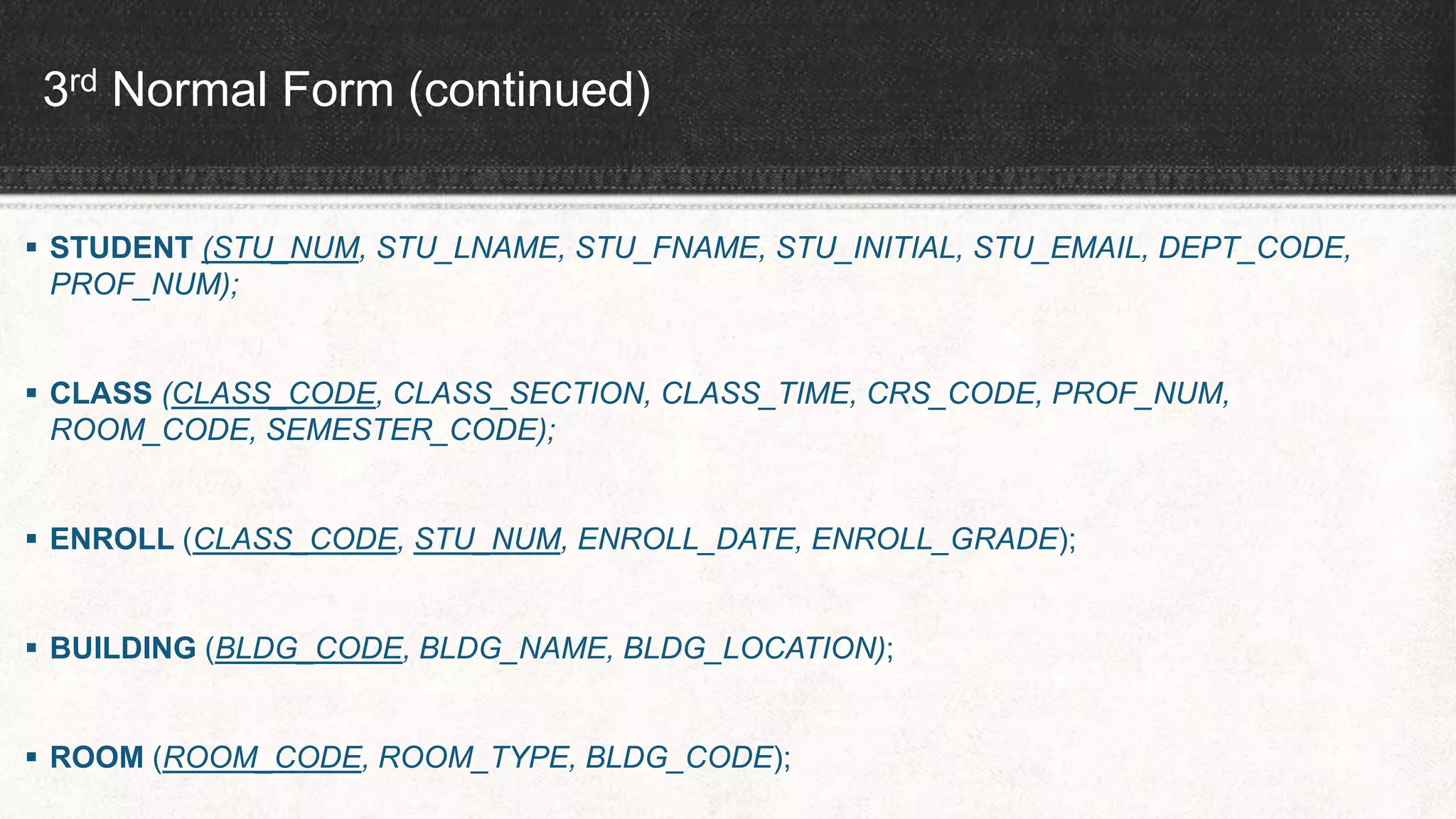
3rd Normal Form (continued)
 STUDENT (STU_NUM, STU_LNAME, STU_FNAME, STU_INITIAL, STU_EMAIL, DEPT_CODE,
PROF_NUM);
 CLASS (CLASS_CODE, CLASS_SECTION, CLASS_TIME, CRS_CODE, PROF_NUM,
ROOM_CODE, SEMESTER_CODE);
 ENROLL (CLASS_CODE, STU_NUM, ENROLL_DATE, ENROLL_GRADE);
 BUILDING (BLDG_CODE, BLDG_NAME, BLDG_LOCATION);
 ROOM (ROOM_CODE, ROOM_TYPE, BLDG_CODE);
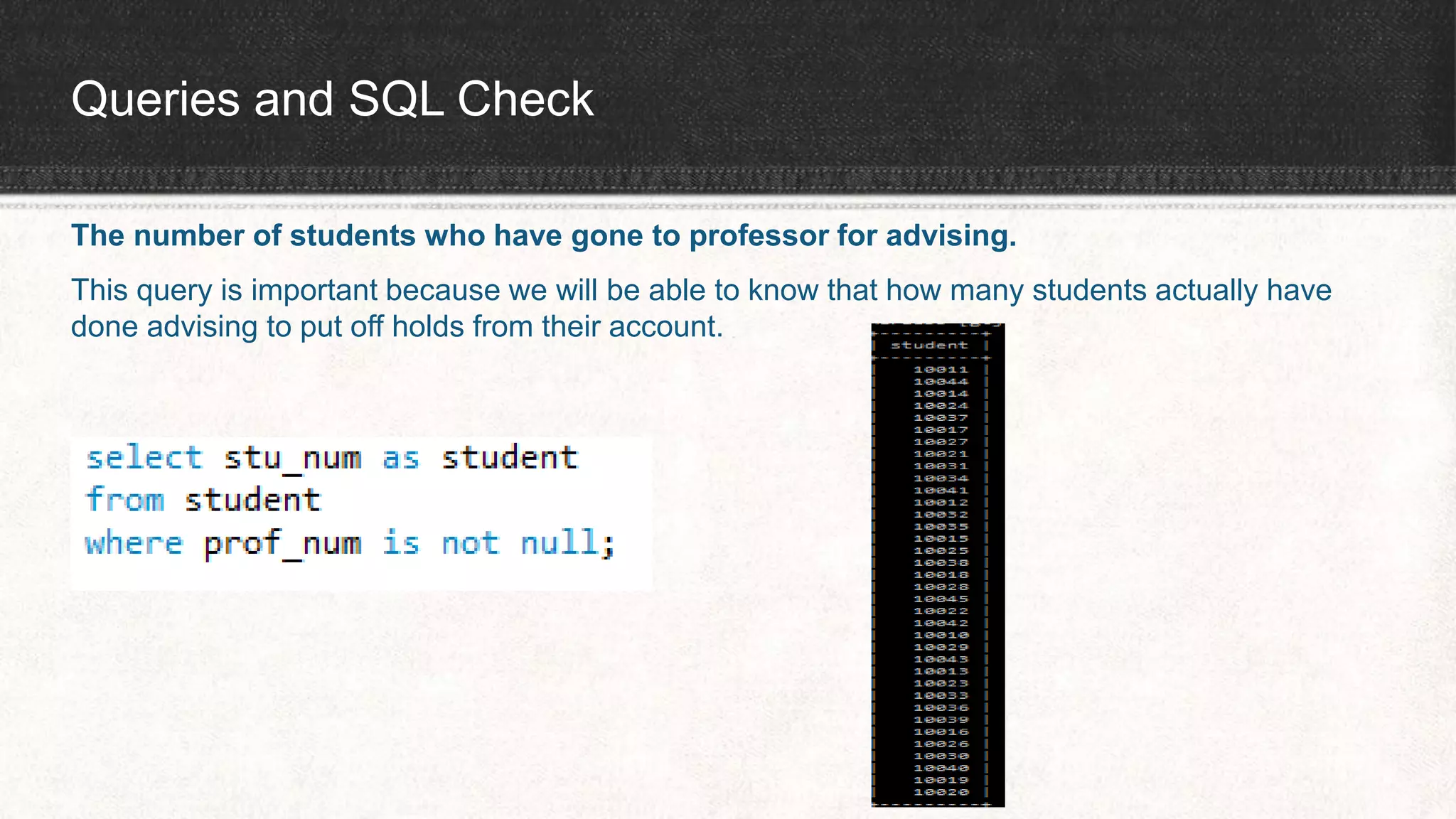
Queries and SQL Check
The number of students who have gone to professor for advising.
This query is important because we will be able to know that how many students actually have
done advising to put off holds from their account.
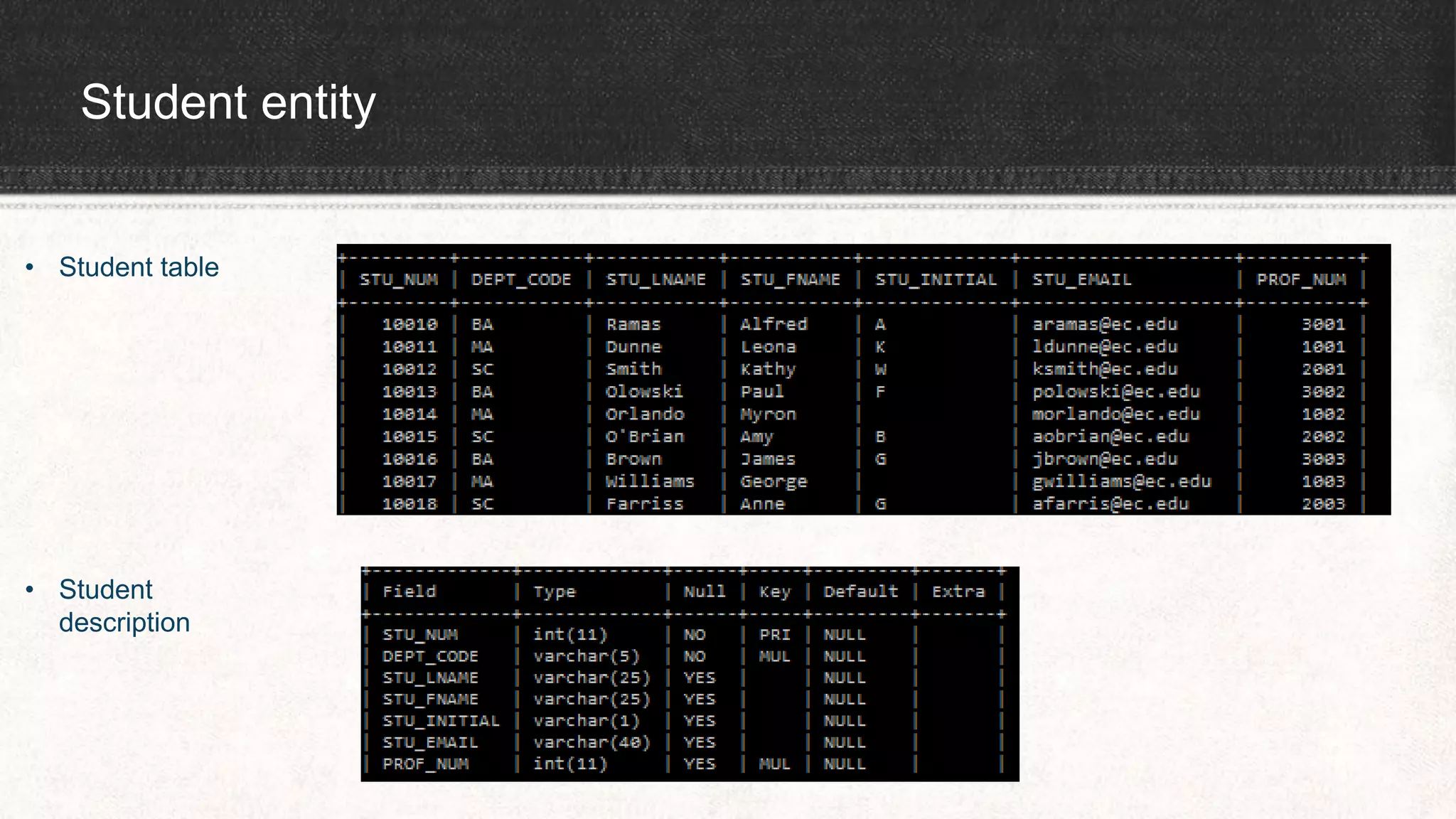
Student entity
• Student table
• Student
description
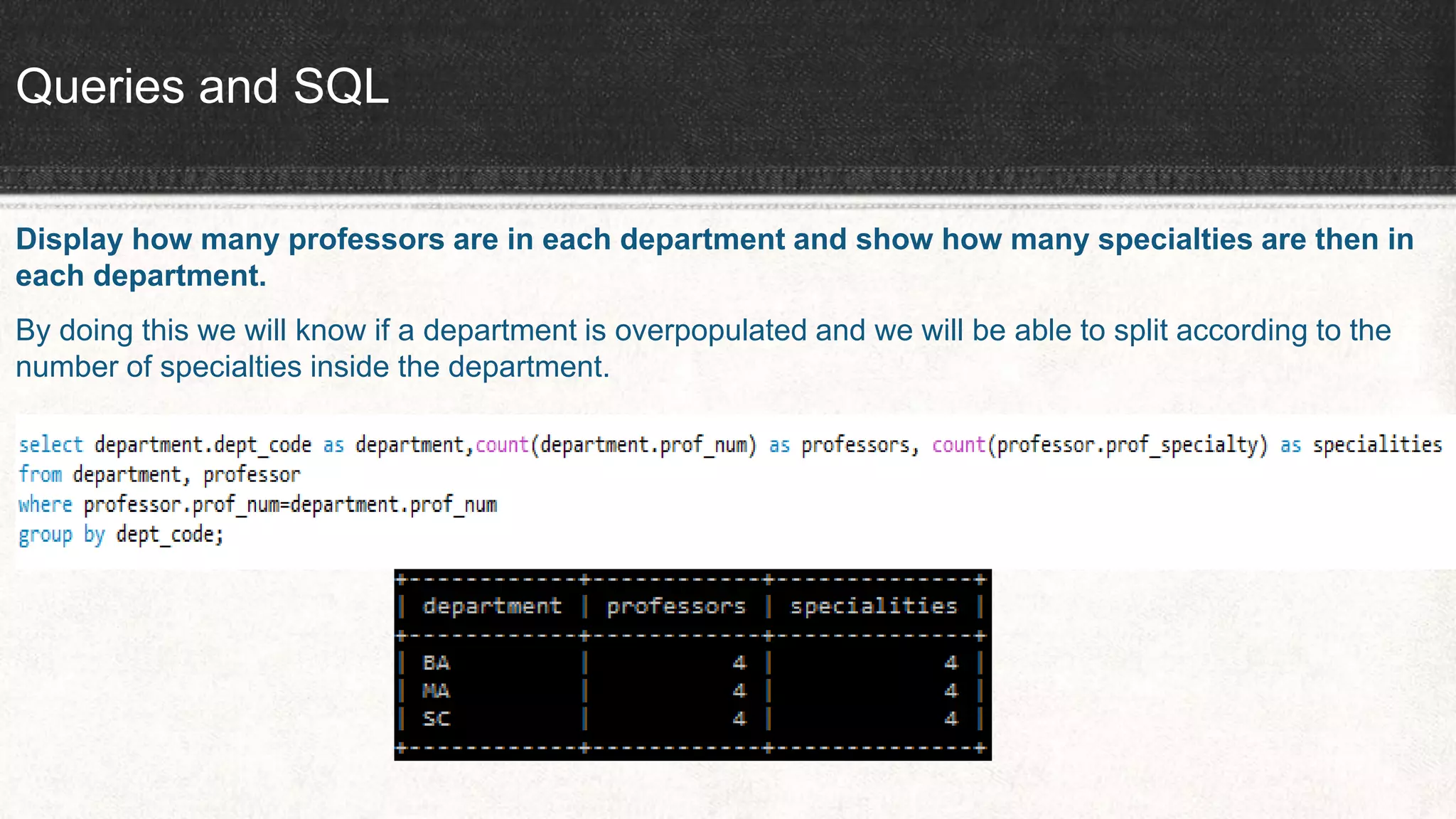
Queries and SQL
Display how many professors are in each department and show how many specialties are then in
each department.
By doing this we will know if a department is overpopulated and we will be able to split according to the
number of specialties inside the department.
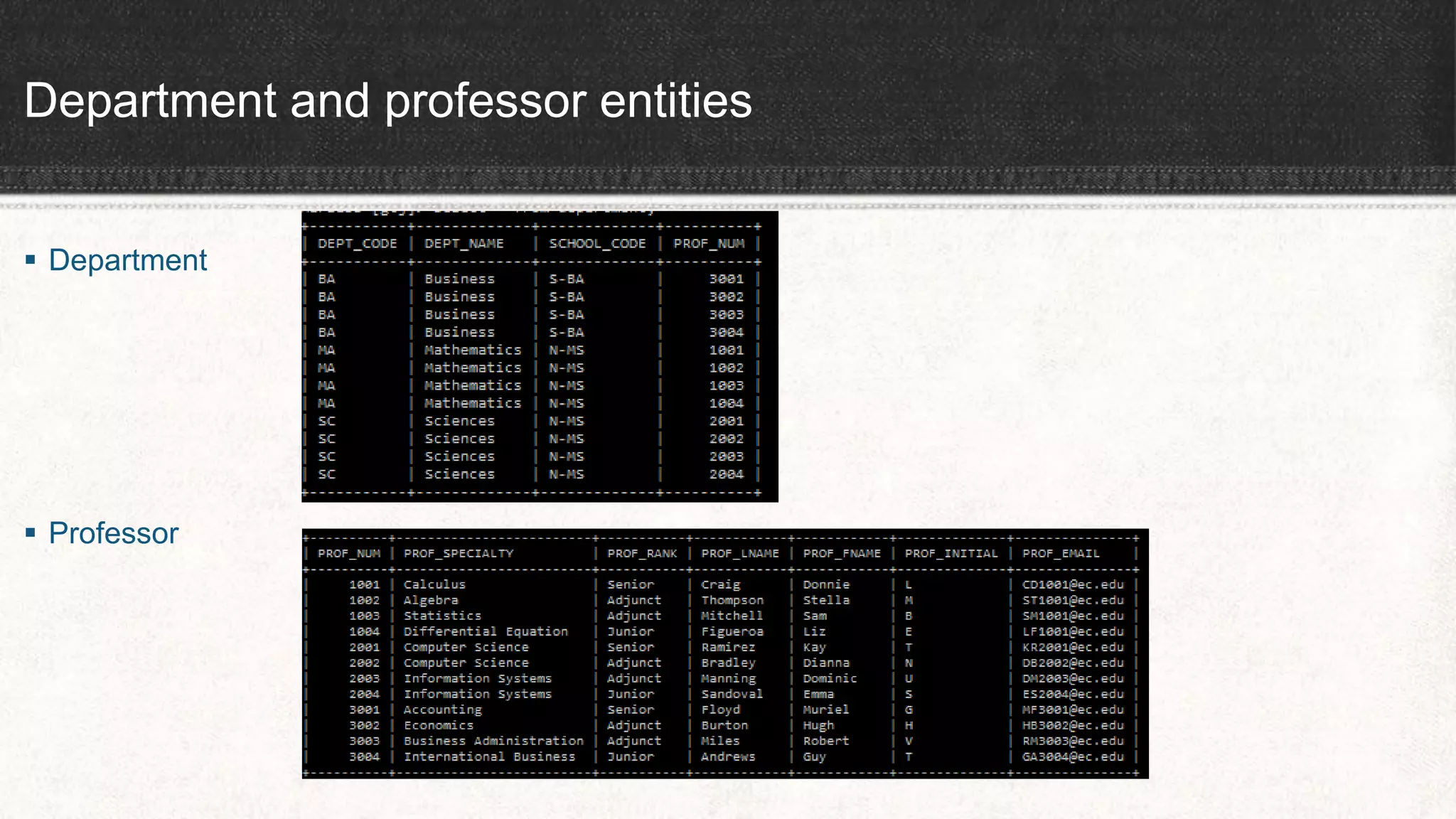
Department and professor entities
 Department
 Professor
Queries and SQL
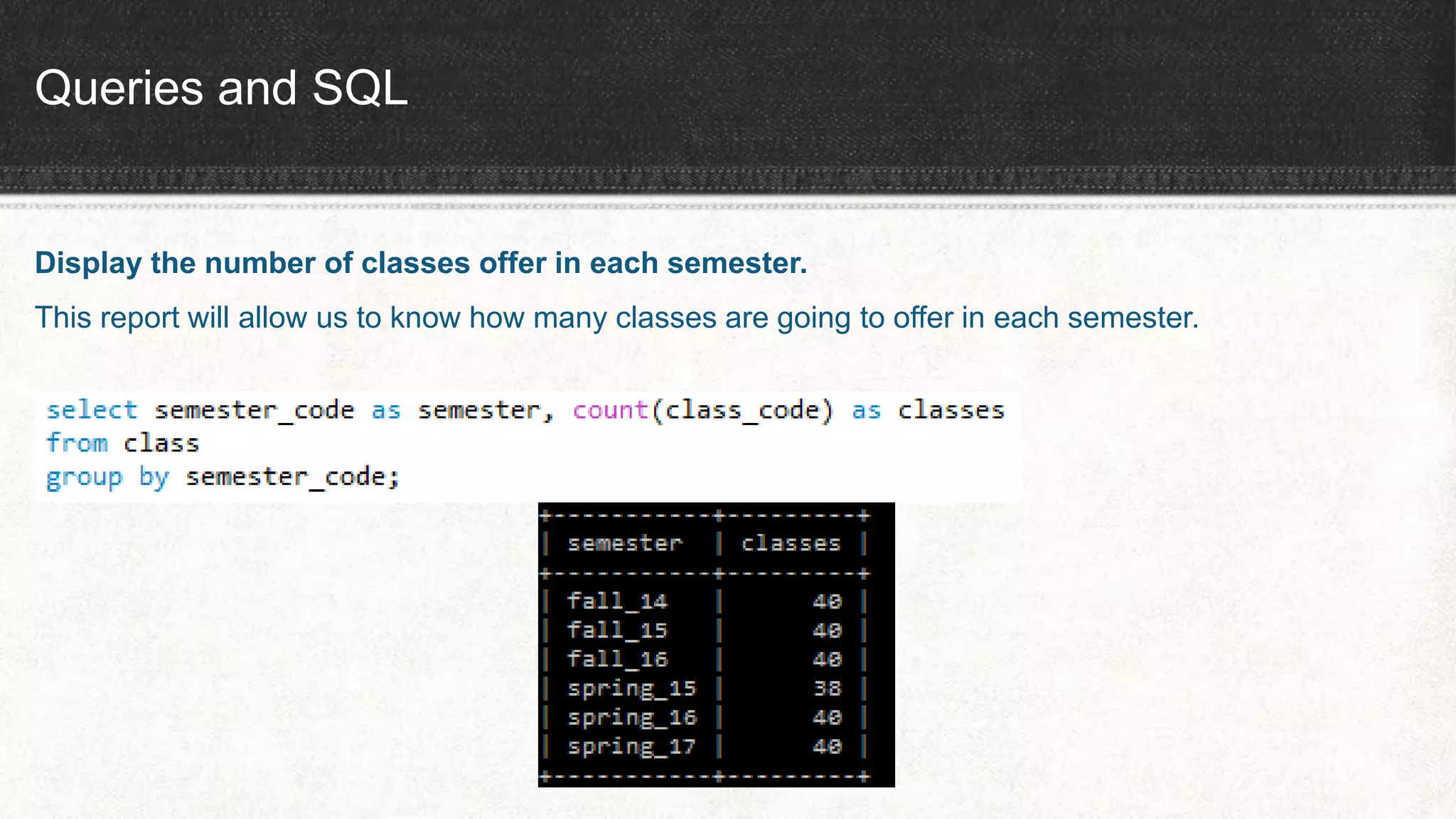
Display the number of classes offer in each semester.
This report will allow us to know how many classes are going to offer in each semester.
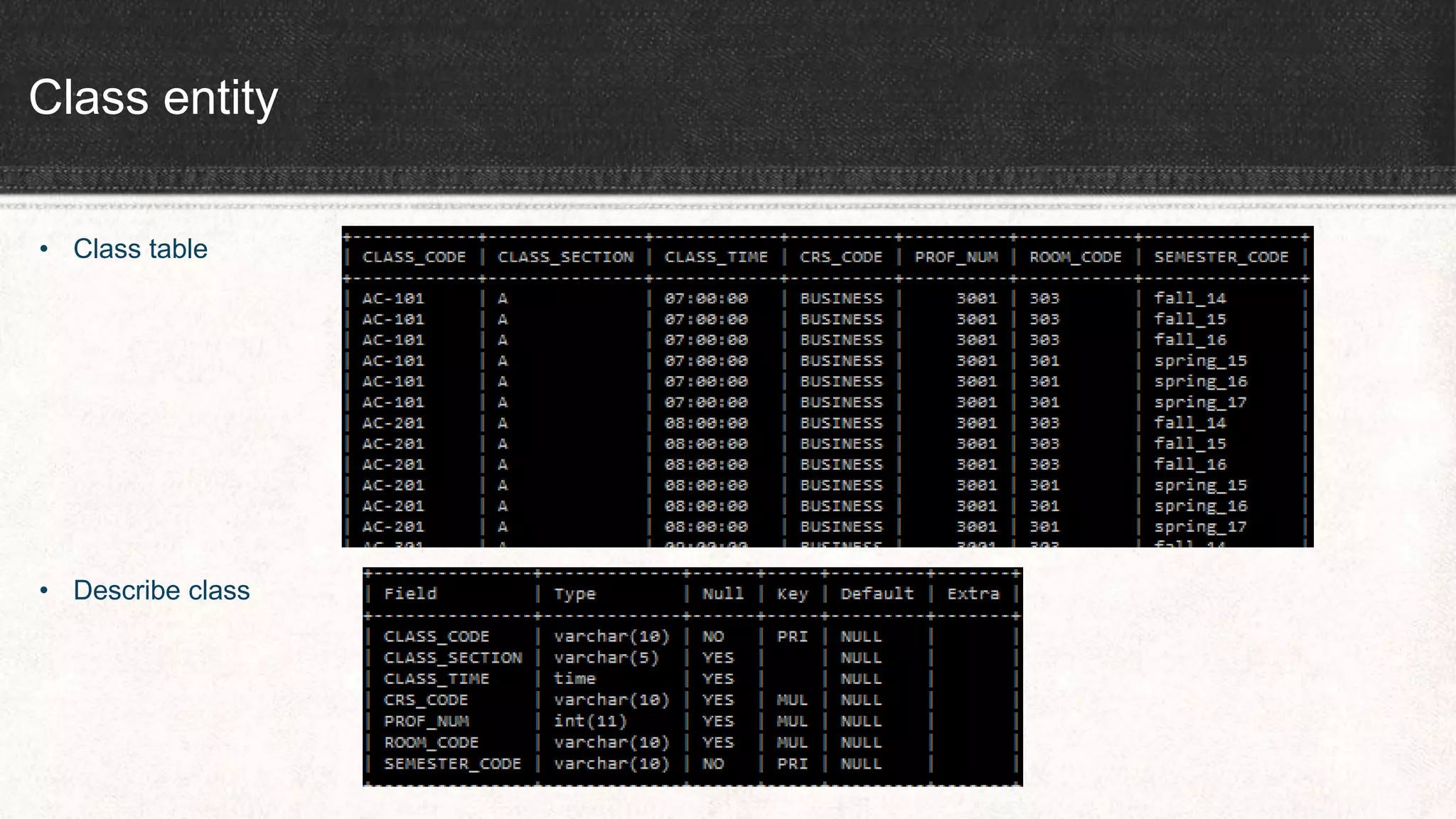
Class entity
• Class table
• Describe class
Thank You

EC Database System

  • 1.
    EC Database System GibranRoye, Muntabir Choudhury, Jared Fellenbaum
  • 2.
    Project Ideas  Gathereddata and information about school record and registration system  Analyzed the data and figured out possible entities we need to construct our database  We figured 10 entities for EC Database System: School, Department, Professor, Student, Semester, Class, Course, Enroll, Room and Building.
  • 3.
    Goals  Created projectnarrative based on the information we had for EC Database System and possible queries based on narrative  Project specification included: Relationships, Relationship participation, ERD, and 3rd Normalization Form  Finally, created tables and inserted values into MySQL workbench and checked queries through MySQL client server.
  • 4.
    Team Role andResponsibility Name Role Responsibility Tasin Team Leader Worked on project narrative, relationships, 3rd normal form and kept group in track to make sure to meet the deadlines Jared Construction of Database Worked on business rules, ERD and constructed final database in MySQL workbench that we all worked on Gibran Queries and SQL check Worked on queries based on project narrative and made sure to check it into MySQL client server
  • 5.
    Relationships and Businessrules ENTITY RELATIONSHIP CONNECTIVITY ENTITY RELATIONSHIP STRENGTH SCHOOL operates 1:M DEPARTMENT WEAK DEPARTMENT has 1:M STUDENT WEAK DEPRTMENT employs 1:M PROFESSOR WEAK DEPARTMENT offers 1:M COURSE WEAK COURSE generates 1:M CLASS WEAK SEMESTER includes 1:M CLASS WEAK PROFESSOR in dean of 1:1 SCHOOL WEAK PROFESSOR teaches 1:M CLASS WEAK PROFESSOR advises 1:M STUDENT WEAK STUDENT enrolls in M:N CLASS STRONG BUILDING contains 1:M ROOM WEAK ROOM is used for 1:M CLASS WEAK
  • 6.
    3rd Normal Form Professor (PROF_NUM, PROF_SPECIALITY, PROF_RANK, PROF_LNAME, PROF_FNAME, PROF_INITIAL, PROF_EMAIL, DEPT_CODE);  SCHOOL (SCHOOL_CODE, SCHOOL_NAME, PROF_NUM);  DEPARTMENT (DEPT_CODE, DEPT_NAME, PROF_NUM, SCHOOL_CODE);  SEMESTER (SEMESTER_CODE, SEMESTER_YEAR, SEMESTER_TERM, SEMESTER_SDATE, SEMESTER_LDATE);  COURSE (CRS_CODE, CRS_TITLE, CRS_DESCRIPTION, CRS_CREDIT, DEPT_CODE);
  • 7.
    3rd Normal Form(continued)  STUDENT (STU_NUM, STU_LNAME, STU_FNAME, STU_INITIAL, STU_EMAIL, DEPT_CODE, PROF_NUM);  CLASS (CLASS_CODE, CLASS_SECTION, CLASS_TIME, CRS_CODE, PROF_NUM, ROOM_CODE, SEMESTER_CODE);  ENROLL (CLASS_CODE, STU_NUM, ENROLL_DATE, ENROLL_GRADE);  BUILDING (BLDG_CODE, BLDG_NAME, BLDG_LOCATION);  ROOM (ROOM_CODE, ROOM_TYPE, BLDG_CODE);
  • 9.
    Queries and SQLCheck The number of students who have gone to professor for advising. This query is important because we will be able to know that how many students actually have done advising to put off holds from their account.
  • 10.
    Student entity • Studenttable • Student description
  • 11.
    Queries and SQL Displayhow many professors are in each department and show how many specialties are then in each department. By doing this we will know if a department is overpopulated and we will be able to split according to the number of specialties inside the department.
  • 12.
    Department and professorentities  Department  Professor
  • 13.
    Queries and SQL Displaythe number of classes offer in each semester. This report will allow us to know how many classes are going to offer in each semester.
  • 14.
    Class entity • Classtable • Describe class
  • 15.