WebSphere MQ V7 Enhanced Application 
Programming 
Morag Hughson - hughson@uk.ibm.com 
© 2008 IBM Corporation 
Conference materials may not be reproduced in whole or in part without the prior written permission of IBM.
What’’s New in WebSphere MQ API 
WebSphere Technical Conference and 
Transaction & Messaging Technical Conference 
© 2008 IBM Corporation 
N 
O 
T 
E 
S 
• WebSphere MQ V7 extends the MQ API (Application Programming 
Interface) in a number of ways. In this presentation we will cover the new 
API changes, excluding Publish/Subscribe:- 
 Asynchronous Consumption of messages 
 Asynchronous Put Response 
 Read-ahead of messages 
 Connection changes 
 Message Properties + Selectors 
 Simplified Browse + Co-operative Browse 
• The changes for Publish/Subscribe are covered in a different presentation.
What’’s New in WebSphere MQ API - 
Agenda 
• Asynchronous Consumption of messages 
• Asynchronous Put Response 
• Read-ahead of messages 
WebSphere Technical Conference and 
Transaction  Messaging Technical Conference 
© 2008 IBM Corporation 
• Connection changes 
• Message Properties + Selectors 
• Simplified Browse + Co-operative Browse
Asynchronous Consumption of Messages 
© 2008 IBM Corporation 
Conference materials may not be reproduced in whole or in part without the prior written permission of IBM.
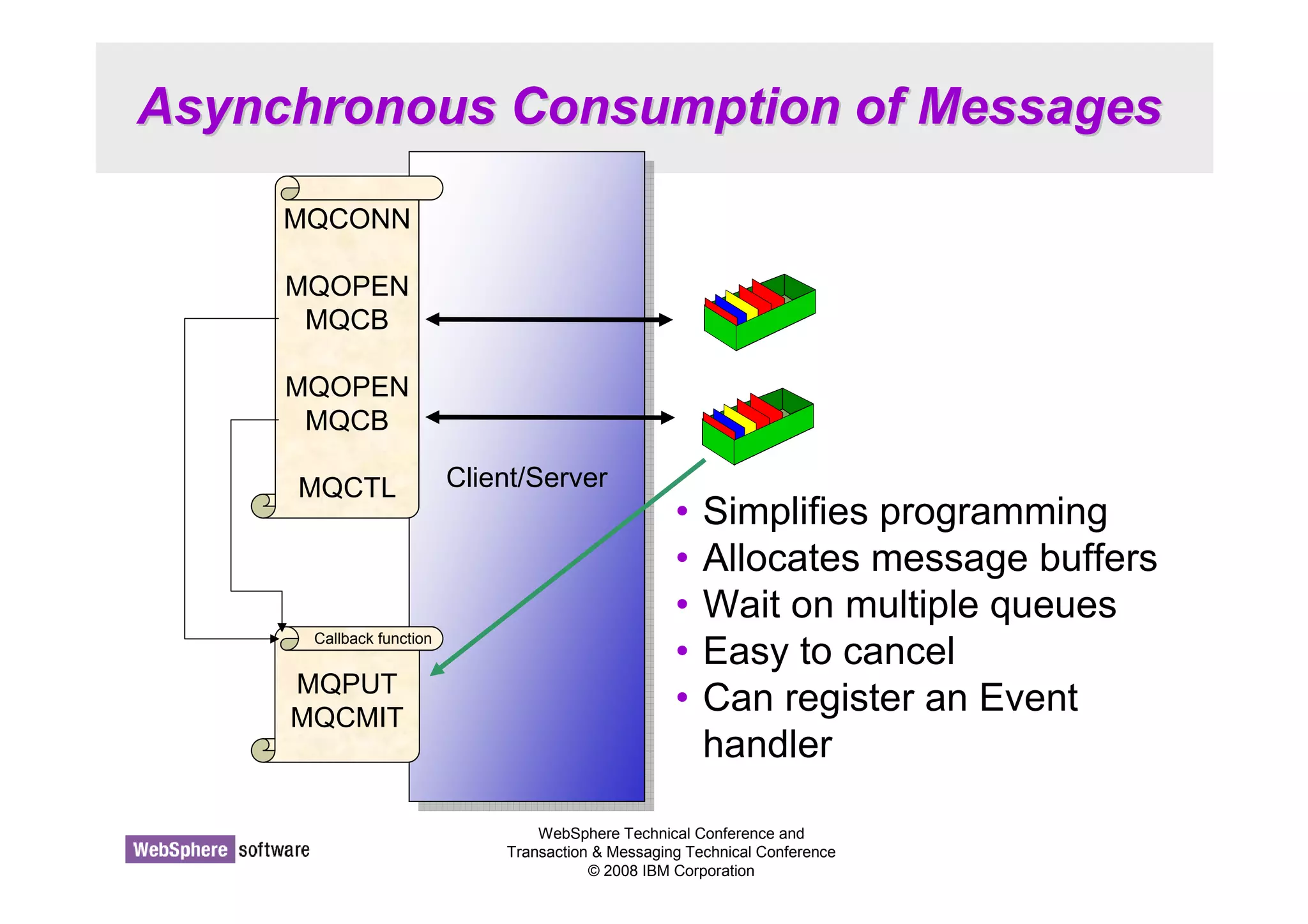
Asynchronous Consumption of Messages 
CClileiennt/tS/Seervrveerr 
• Simplifies programming 
• Allocates message buffers 
• Wait on multiple queues 
• Easy to cancel 
• Can register an Event 
handler 
WebSphere Technical Conference and 
Transaction  Messaging Technical Conference 
© 2008 IBM Corporation 
MQCONN 
MQOPEN 
MQCB 
MQOPEN 
MQCB 
MQCTL 
Callback function 
MQPUT 
MQCMIT
Asynchronous Consumption of Messages - 
Notes 
WebSphere Technical Conference and 
Transaction  Messaging Technical Conference 
© 2008 IBM Corporation 
N 
O 
T 
E 
S 
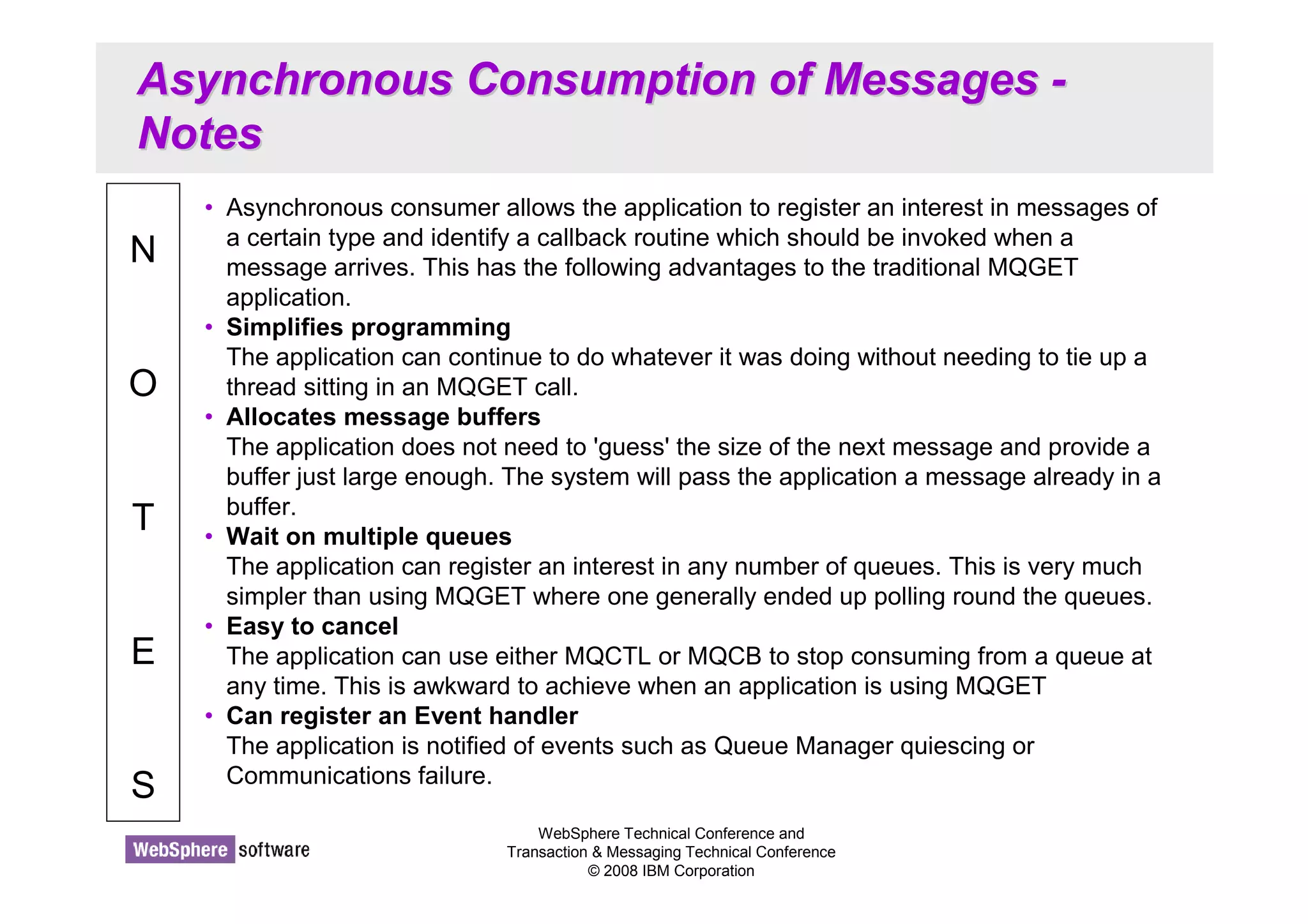
• Asynchronous consumer allows the application to register an interest in messages of 
a certain type and identify a callback routine which should be invoked when a 
message arrives. This has the following advantages to the traditional MQGET 
application. 
• Simplifies programming 
The application can continue to do whatever it was doing without needing to tie up a 
thread sitting in an MQGET call. 
• Allocates message buffers 
The application does not need to 'guess' the size of the next message and provide a 
buffer just large enough. The system will pass the application a message already in a 
buffer. 
• Wait on multiple queues 
The application can register an interest in any number of queues. This is very much 
simpler than using MQGET where one generally ended up polling round the queues. 
• Easy to cancel 
The application can use either MQCTL or MQCB to stop consuming from a queue at 
any time. This is awkward to achieve when an application is using MQGET 
• Can register an Event handler 
The application is notified of events such as Queue Manager quiescing or 
Communications failure.
Define your call-back functions 
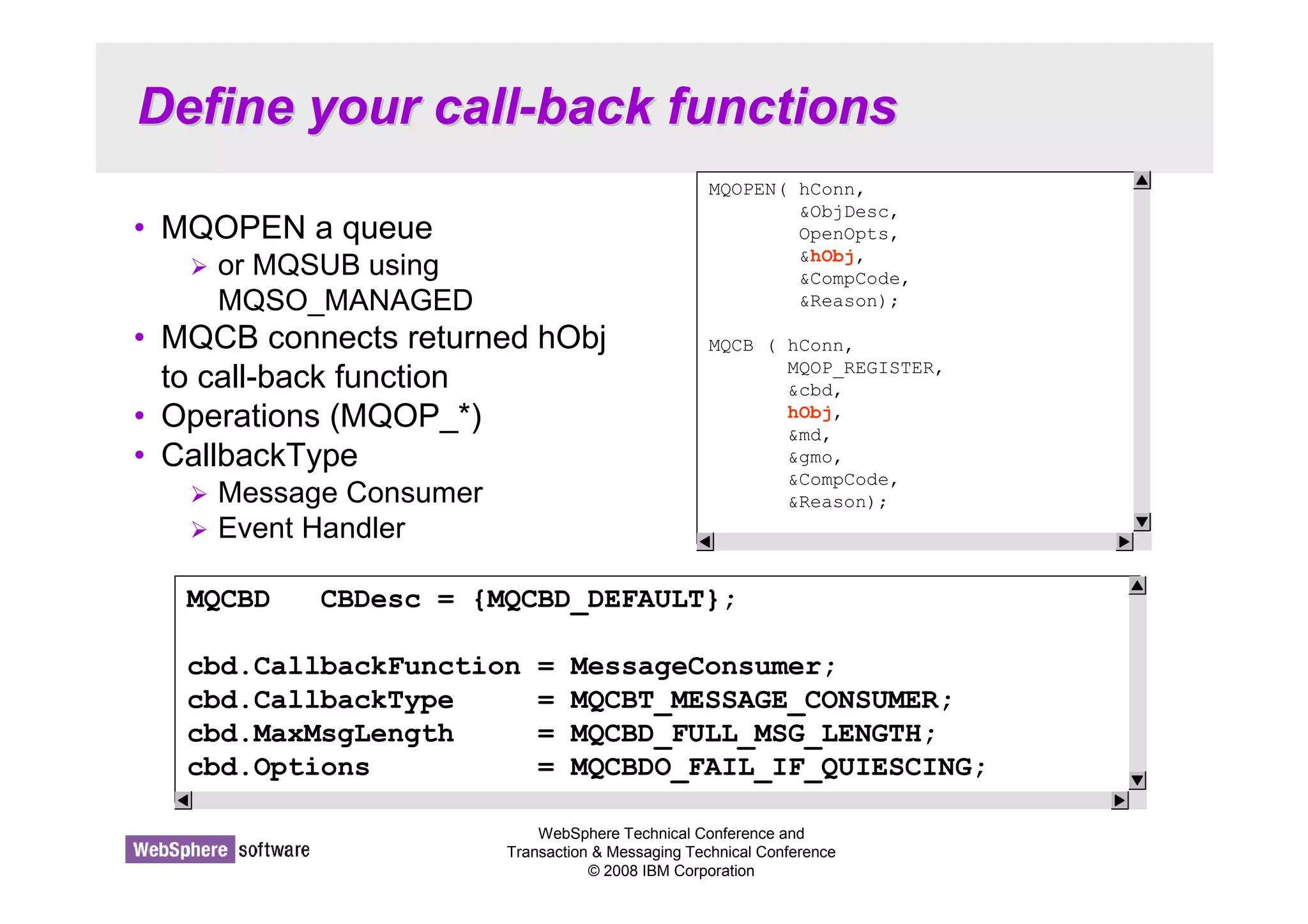
MQOPEN( hConn, 
ObjDesc, 
OpenOpts, 
hObj, 
CompCode, 
Reason); 
MQCB ( hConn, 
MQOP_REGISTER, 
cbd, 
hObj, 
md, 
gmo, 
CompCode, 
Reason); 
WebSphere Technical Conference and 
Transaction  Messaging Technical Conference 
© 2008 IBM Corporation 
• MQOPEN a queue 
 or MQSUB using 
MQSO_MANAGED 
• MQCB connects returned hObj 
to call-back function 
• Operations (MQOP_*) 
• CallbackType 
 Message Consumer 
 Event Handler 
MQCBD CBDesc = {MQCBD_DEFAULT}; 
cbd.CallbackFunction = MessageConsumer; 
cbd.CallbackType = MQCBT_MESSAGE_CONSUMER; 
cbd.MaxMsgLength = MQCBD_FULL_MSG_LENGTH; 
cbd.Options = MQCBDO_FAIL_IF_QUIESCING;
Define your call-back functions - Notes 
WebSphere Technical Conference and 
Transaction  Messaging Technical Conference 
© 2008 IBM Corporation 
N 
O 
T 
E 
S 
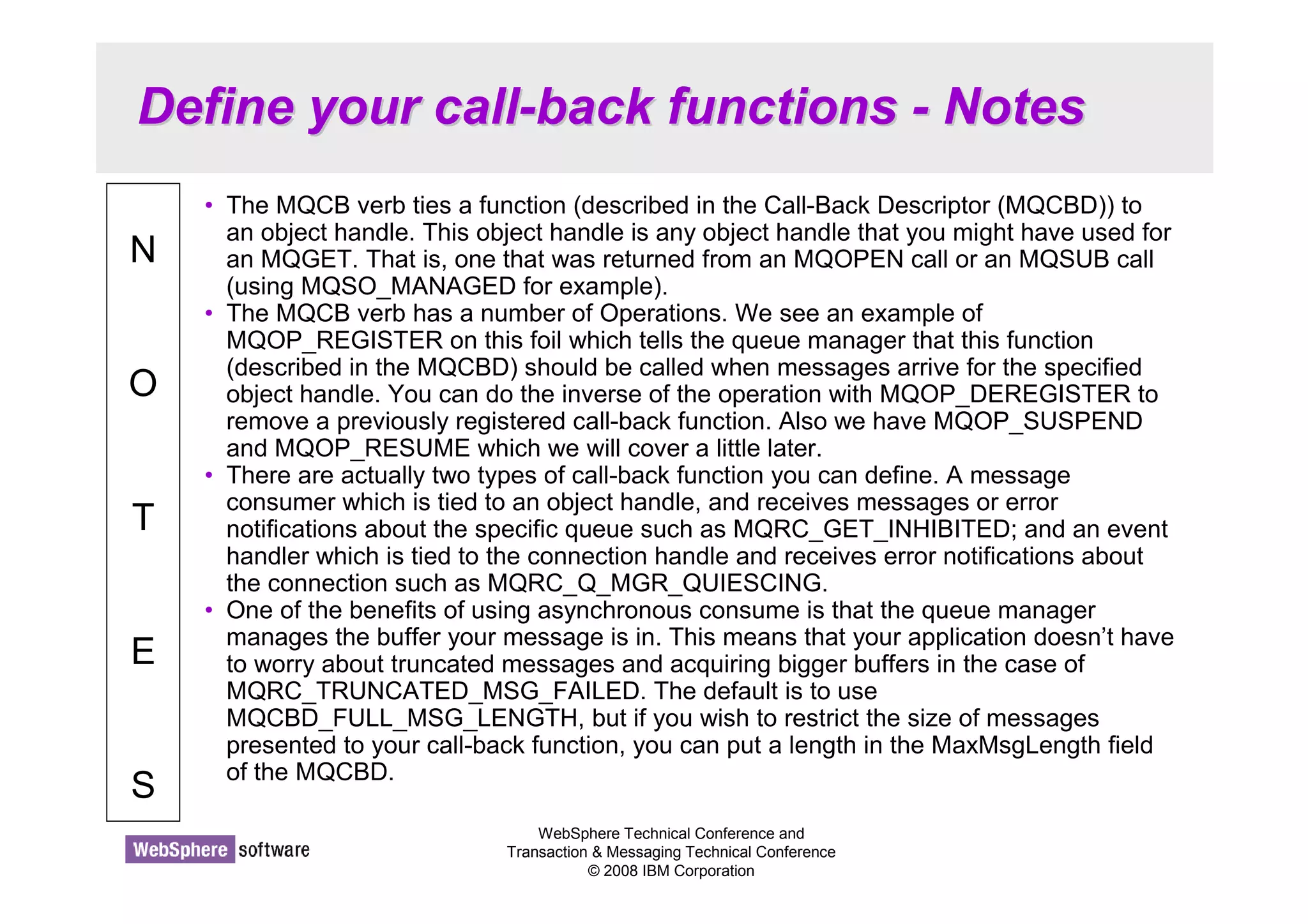
• The MQCB verb ties a function (described in the Call-Back Descriptor (MQCBD)) to 
an object handle. This object handle is any object handle that you might have used for 
an MQGET. That is, one that was returned from an MQOPEN call or an MQSUB call 
(using MQSO_MANAGED for example). 
• The MQCB verb has a number of Operations. We see an example of 
MQOP_REGISTER on this foil which tells the queue manager that this function 
(described in the MQCBD) should be called when messages arrive for the specified 
object handle. You can do the inverse of the operation with MQOP_DEREGISTER to 
remove a previously registered call-back function. Also we have MQOP_SUSPEND 
and MQOP_RESUME which we will cover a little later. 
• There are actually two types of call-back function you can define. A message 
consumer which is tied to an object handle, and receives messages or error 
notifications about the specific queue such as MQRC_GET_INHIBITED; and an event 
handler which is tied to the connection handle and receives error notifications about 
the connection such as MQRC_Q_MGR_QUIESCING. 
• One of the benefits of using asynchronous consume is that the queue manager 
manages the buffer your message is in. This means that your application doesn’t have 
to worry about truncated messages and acquiring bigger buffers in the case of 
MQRC_TRUNCATED_MSG_FAILED. The default is to use 
MQCBD_FULL_MSG_LENGTH, but if you wish to restrict the size of messages 
presented to your call-back function, you can put a length in the MaxMsgLength field 
of the MQCBD.
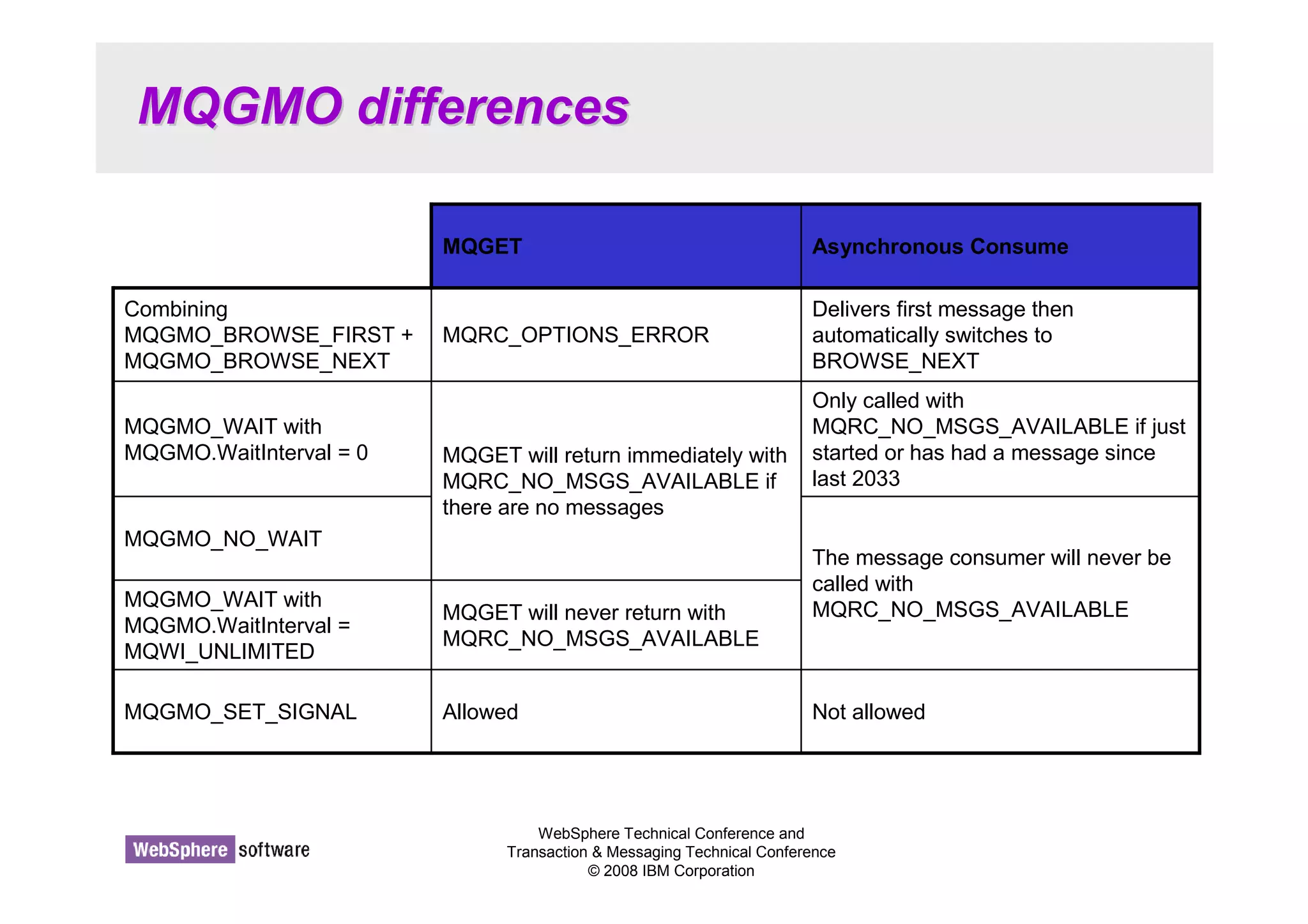
MQGMO differences 
MQGET Asynchronous Consume 
MQRC_OPTIONS_ERROR 
MQGET will return immediately with 
MQRC_NO_MSGS_AVAILABLE if 
there are no messages 
MQGET will never return with 
MQRC_NO_MSGS_AVAILABLE 
WebSphere Technical Conference and 
Delivers first message then 
automatically switches to 
BROWSE_NEXT 
Only called with 
MQRC_NO_MSGS_AVAILABLE if just 
started or has had a message since 
last 2033 
The message consumer will never be 
called with 
MQRC_NO_MSGS_AVAILABLE 
Transaction  Messaging Technical Conference 
© 2008 IBM Corporation 
Combining 
MQGMO_BROWSE_FIRST + 
MQGMO_BROWSE_NEXT 
MQGMO_WAIT with 
MQGMO.WaitInterval = 0 
MQGMO_NO_WAIT 
MQGMO_WAIT with 
MQGMO.WaitInterval = 
MQWI_UNLIMITED 
MQGMO_SET_SIGNAL Allowed Not allowed
MQGMO differences - Notes 
WebSphere Technical Conference and 
Transaction  Messaging Technical Conference 
© 2008 IBM Corporation 
N 
O 
T 
E 
S 
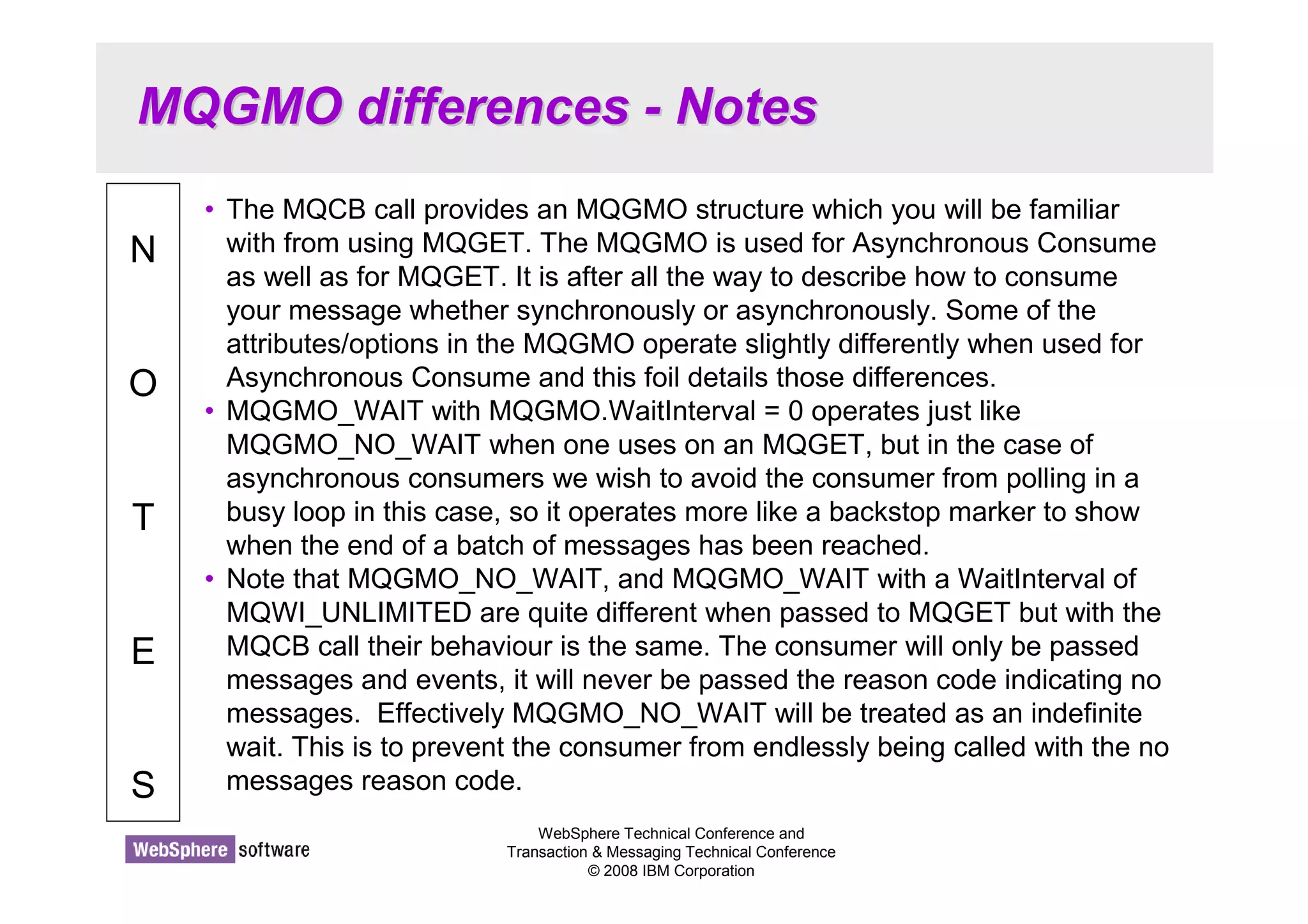
• The MQCB call provides an MQGMO structure which you will be familiar 
with from using MQGET. The MQGMO is used for Asynchronous Consume 
as well as for MQGET. It is after all the way to describe how to consume 
your message whether synchronously or asynchronously. Some of the 
attributes/options in the MQGMO operate slightly differently when used for 
Asynchronous Consume and this foil details those differences. 
• MQGMO_WAIT with MQGMO.WaitInterval = 0 operates just like 
MQGMO_NO_WAIT when one uses on an MQGET, but in the case of 
asynchronous consumers we wish to avoid the consumer from polling in a 
busy loop in this case, so it operates more like a backstop marker to show 
when the end of a batch of messages has been reached. 
• Note that MQGMO_NO_WAIT, and MQGMO_WAIT with a WaitInterval of 
MQWI_UNLIMITED are quite different when passed to MQGET but with the 
MQCB call their behaviour is the same. The consumer will only be passed 
messages and events, it will never be passed the reason code indicating no 
messages. Effectively MQGMO_NO_WAIT will be treated as an indefinite 
wait. This is to prevent the consumer from endlessly being called with the no 
messages reason code.
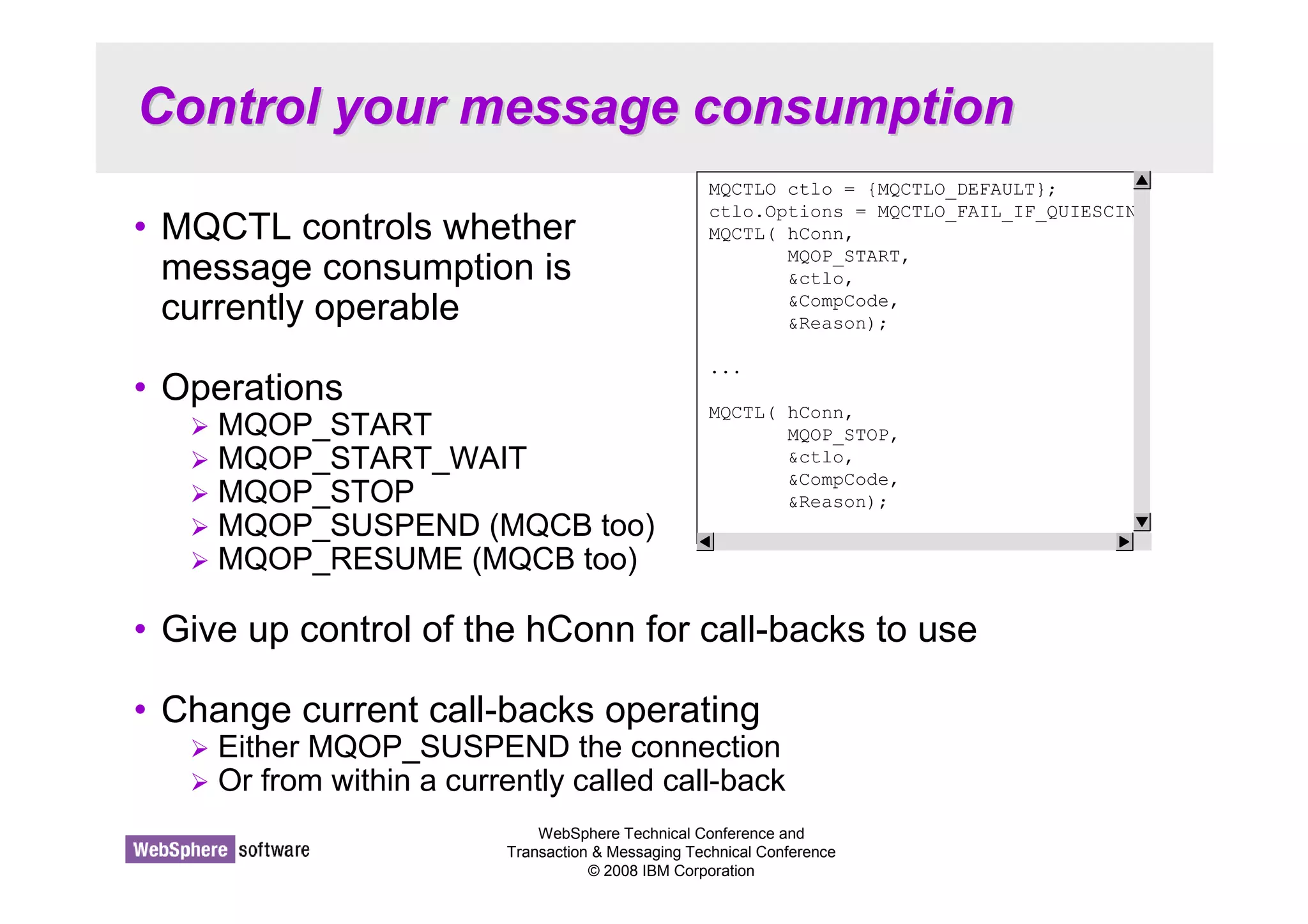
Control your message consumption 
MQCTLO ctlo = {MQCTLO_DEFAULT}; 
ctlo.Options = MQCTLO_FAIL_IF_QUIESCIN 
MQCTL( hConn, 
WebSphere Technical Conference and 
Transaction  Messaging Technical Conference 
© 2008 IBM Corporation 
• MQCTL controls whether 
message consumption is 
currently operable 
• Operations 
 MQOP_START 
 MQOP_START_WAIT 
 MQOP_STOP 
 MQOP_SUSPEND (MQCB too) 
 MQOP_RESUME (MQCB too) 
• Give up control of the hConn for call-backs to use 
• Change current call-backs operating 
 Either MQOP_SUSPEND the connection 
 Or from within a currently called call-back 
MQOP_START, 
ctlo, 
CompCode, 
Reason); 
... 
MQCTL( hConn, 
MQOP_STOP, 
ctlo, 
CompCode, 
Reason);
Control your message consumption - 
Notes 
WebSphere Technical Conference and 
Transaction  Messaging Technical Conference 
© 2008 IBM Corporation 
N 
O 
T 
E 
S 
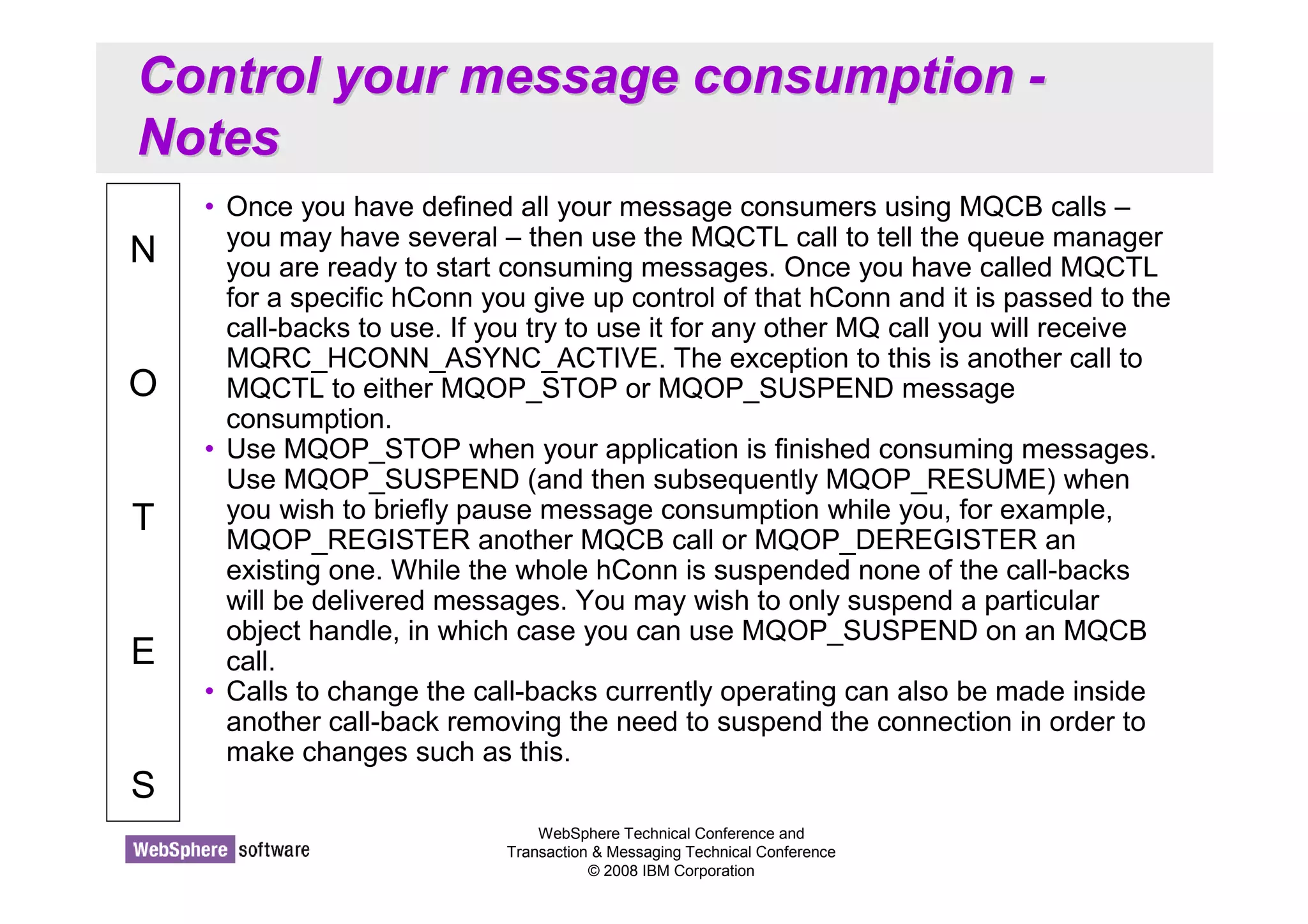
• Once you have defined all your message consumers using MQCB calls – 
you may have several – then use the MQCTL call to tell the queue manager 
you are ready to start consuming messages. Once you have called MQCTL 
for a specific hConn you give up control of that hConn and it is passed to the 
call-backs to use. If you try to use it for any other MQ call you will receive 
MQRC_HCONN_ASYNC_ACTIVE. The exception to this is another call to 
MQCTL to either MQOP_STOP or MQOP_SUSPEND message 
consumption. 
• Use MQOP_STOP when your application is finished consuming messages. 
Use MQOP_SUSPEND (and then subsequently MQOP_RESUME) when 
you wish to briefly pause message consumption while you, for example, 
MQOP_REGISTER another MQCB call or MQOP_DEREGISTER an 
existing one. While the whole hConn is suspended none of the call-backs 
will be delivered messages. You may wish to only suspend a particular 
object handle, in which case you can use MQOP_SUSPEND on an MQCB 
call. 
• Calls to change the call-backs currently operating can also be made inside 
another call-back removing the need to suspend the connection in order to 
make changes such as this.
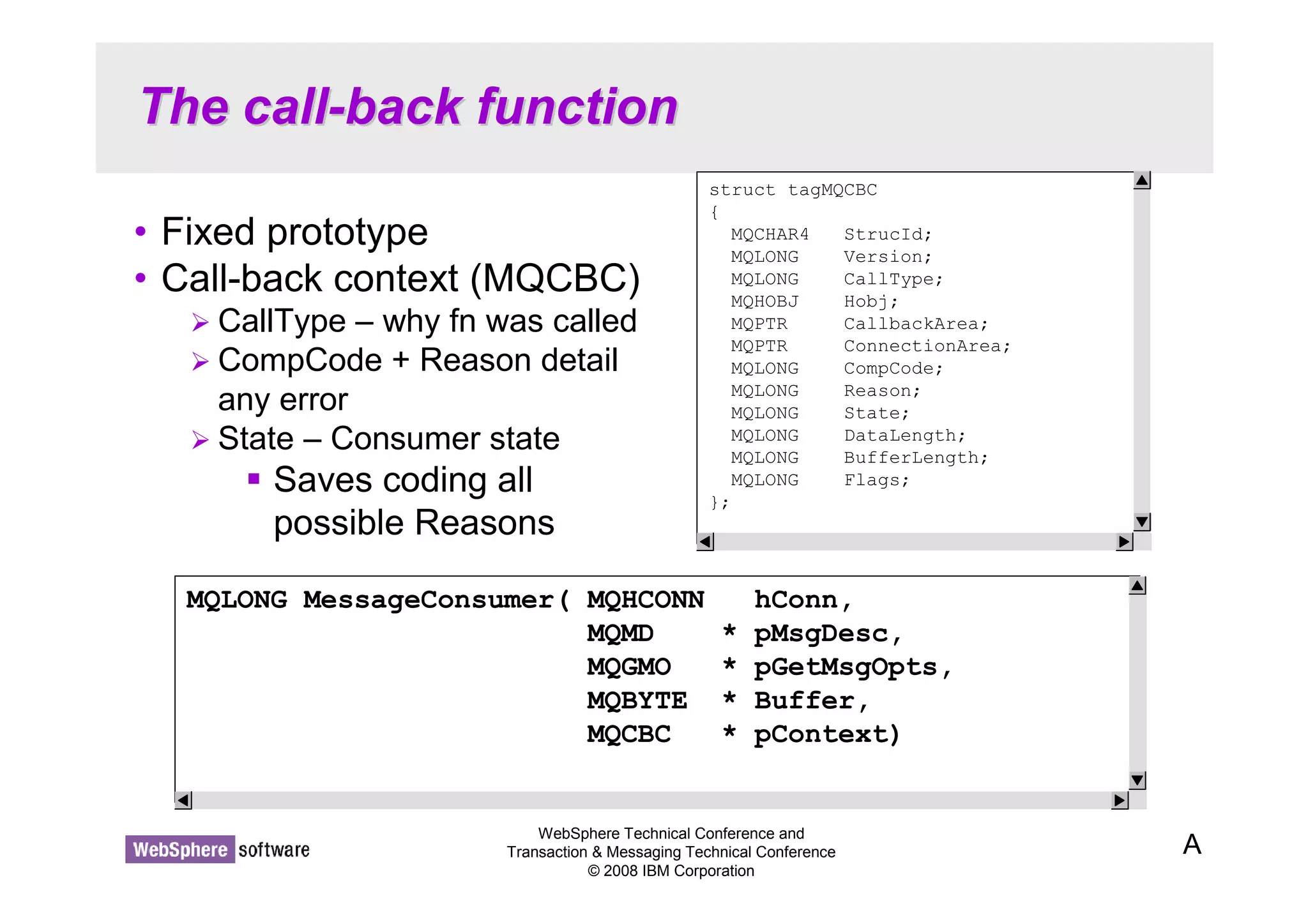
The call-back function 
• Fixed prototype 
• Call-back context (MQCBC) 
 CallType – why fn was called 
 CompCode + Reason detail 
any error 
 State – Consumer state 
WebSphere Technical Conference and 
Transaction  Messaging Technical Conference 
© 2008 IBM Corporation 
 Saves coding all 
possible Reasons 
A 
struct tagMQCBC 
{ 
MQCHAR4 StrucId; 
MQLONG Version; 
MQLONG CallType; 
MQHOBJ Hobj; 
MQPTR CallbackArea; 
MQPTR ConnectionArea; 
MQLONG CompCode; 
MQLONG Reason; 
MQLONG State; 
MQLONG DataLength; 
MQLONG BufferLength; 
MQLONG Flags; 
}; 
MQLONG MessageConsumer( MQHCONN hConn, 
MQMD * pMsgDesc, 
MQGMO * pGetMsgOpts, 
MQBYTE * Buffer, 
MQCBC * pContext)
The call-back function - Notes 
WebSphere Technical Conference and 
Transaction  Messaging Technical Conference 
© 2008 IBM Corporation 
N 
O 
T 
E 
S 
• Your call-back function can have any name you want, but it must conform to the 
prototype shown. When called with a message, you are passed the Message 
Descriptor (MQMD), the message buffer and the Get-Message Options structure 
(MQGMO) which contains a number of output fields about the message you have 
been given. You will know you have been given a message because the CallType 
field in the Call Back Context (MQCBC) will be set to either 
MQCBCT_MSG_REMOVED or MQCBCT_MSG_NOT_REMOVED (which one 
depends on the get options you used, i.e. browse or a few specific errors). 
• Your message consumer can also be called with CallType set to 
MQCBCT_EVENT_CALL (this is also the only way an Event handler can be called). 
The message consumer will be given events that are pertinent to the queue it is 
consuming from, for example, MQRC_GET_INHIBITED whereas the event handler 
gets connection wide events. If there is an error to report, in the case of an 
MQCBCT_EVENT_CALL or in some cases for MQCBCT_MSG_NOT_REMOVED, it 
will be reported in the CompCode and Reason fields of the MQCBC. When a Reason 
code is delivered to a call-back, the State field of the MQCBC details what has 
happened to the consumer as a result of the specific Reason. It can be used to 
simplify application programming by informing the application what has happened to 
the consumer function rather than the application having to know for each reason 
code what the behaviour will be. States such as 
MQCS_SUSPENDED_USER_ACTION which detail that some user intervention will 
be needed before message consumption can continue.
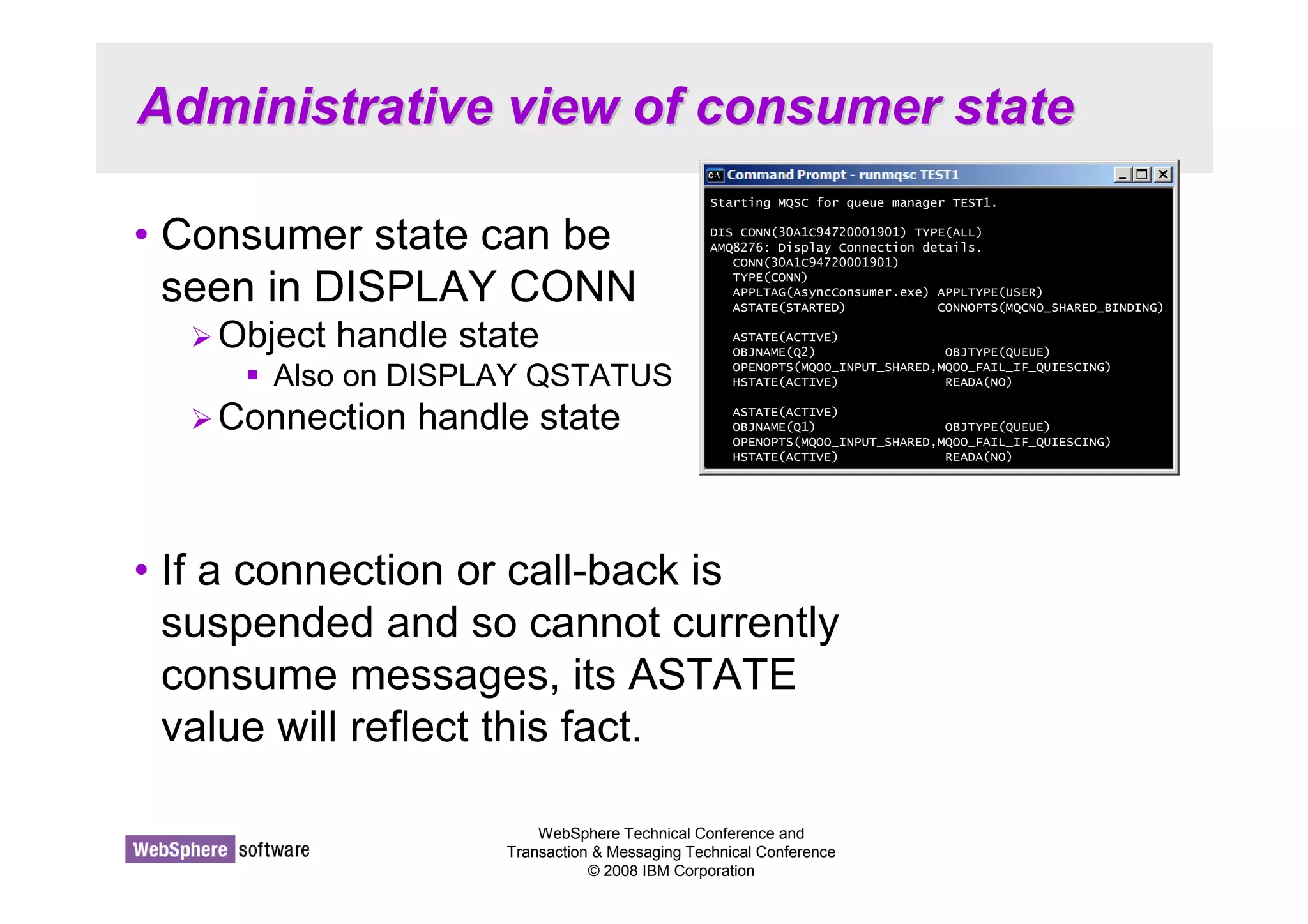
Administrative view of consumer state 
• Consumer state can be 
seen in DISPLAY CONN 
Starting MQSC for queue manager TEST1. 
DIS CONN(30A1C94720001901) TYPE(ALL) 
AMQ8276: Display Connection details. 
CONN(30A1C94720001901) 
TYPE(CONN) 
APPLTAG(AsyncConsumer.exe) APPLTYPE(USER) 
ASTATE(STARTED) CONNOPTS(MQCNO_SHARED_BINDING) 
ASTATE(ACTIVE) 
OBJNAME(Q2) OBJTYPE(QUEUE) 
OPENOPTS(MQOO_INPUT_SHARED,MQOO_FAIL_IF_QUIESCING) 
HSTATE(ACTIVE) READA(NO) 
ASTATE(ACTIVE) 
OBJNAME(Q1) OBJTYPE(QUEUE) 
OPENOPTS(MQOO_INPUT_SHARED,MQOO_FAIL_IF_QUIESCING) 
HSTATE(ACTIVE) READA(NO) 
WebSphere Technical Conference and 
Transaction  Messaging Technical Conference 
© 2008 IBM Corporation 
Object handle state 
 Also on DISPLAY QSTATUS 
Connection handle state 
• If a connection or call-back is 
suspended and so cannot currently 
consume messages, its ASTATE 
value will reflect this fact.
Administrative view of consumer state - 
Notes 
WebSphere Technical Conference and 
Transaction  Messaging Technical Conference 
© 2008 IBM Corporation 
N 
O 
T 
E 
S 
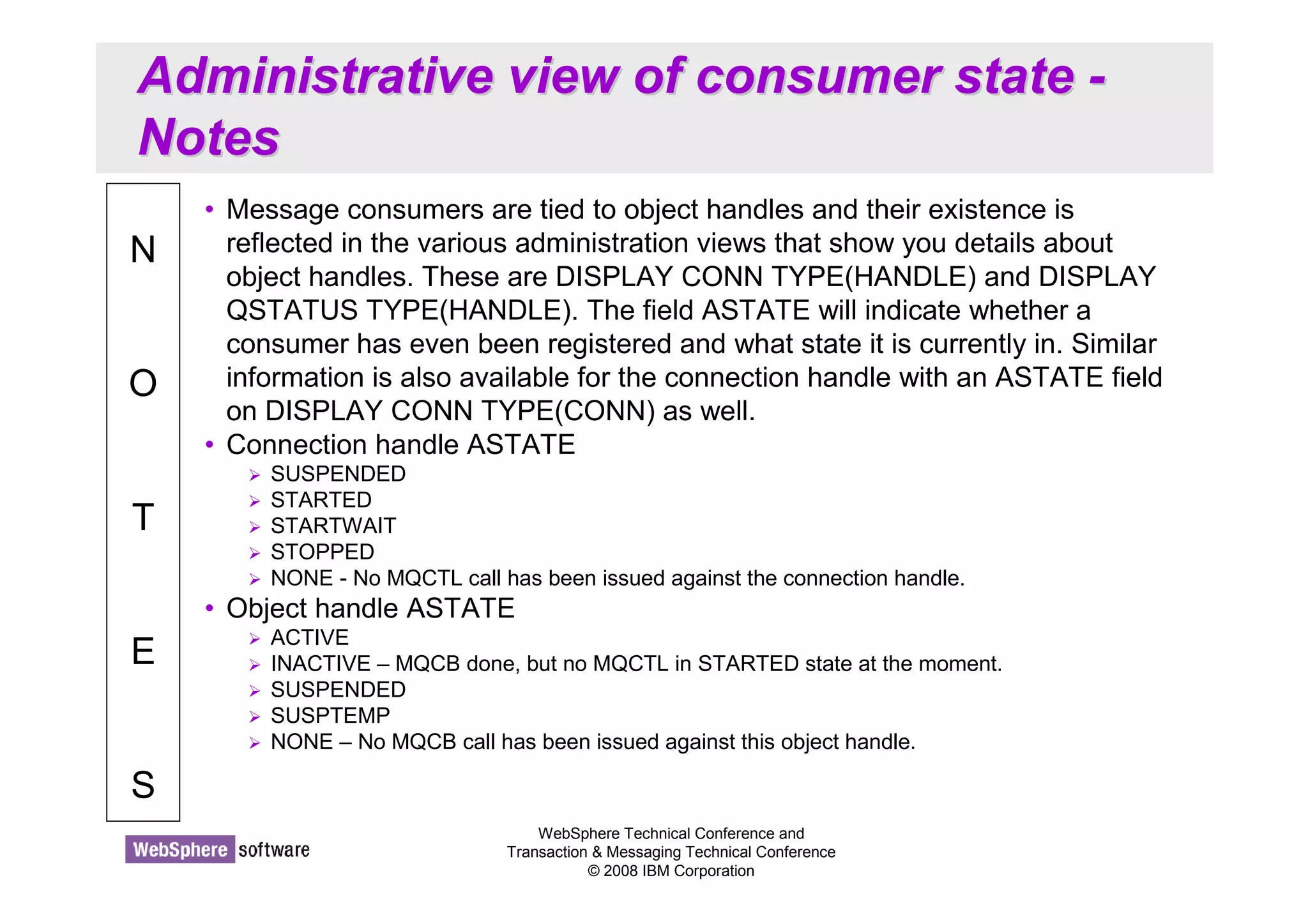
• Message consumers are tied to object handles and their existence is 
reflected in the various administration views that show you details about 
object handles. These are DISPLAY CONN TYPE(HANDLE) and DISPLAY 
QSTATUS TYPE(HANDLE). The field ASTATE will indicate whether a 
consumer has even been registered and what state it is currently in. Similar 
information is also available for the connection handle with an ASTATE field 
on DISPLAY CONN TYPE(CONN) as well. 
• Connection handle ASTATE 
 SUSPENDED 
 STARTED 
 STARTWAIT 
 STOPPED 
 NONE - No MQCTL call has been issued against the connection handle. 
• Object handle ASTATE 
 ACTIVE 
 INACTIVE – MQCB done, but no MQCTL in STARTED state at the moment. 
 SUSPENDED 
 SUSPTEMP 
 NONE – No MQCB call has been issued against this object handle.
Asynchronous Put Response 
© 2008 IBM Corporation 
Conference materials may not be reproduced in whole or in part without the prior written permission of IBM.
Asynchronous Put Response 
WebSphere Technical Conference and 
Transaction  Messaging Technical Conference 
© 2008 IBM Corporation 
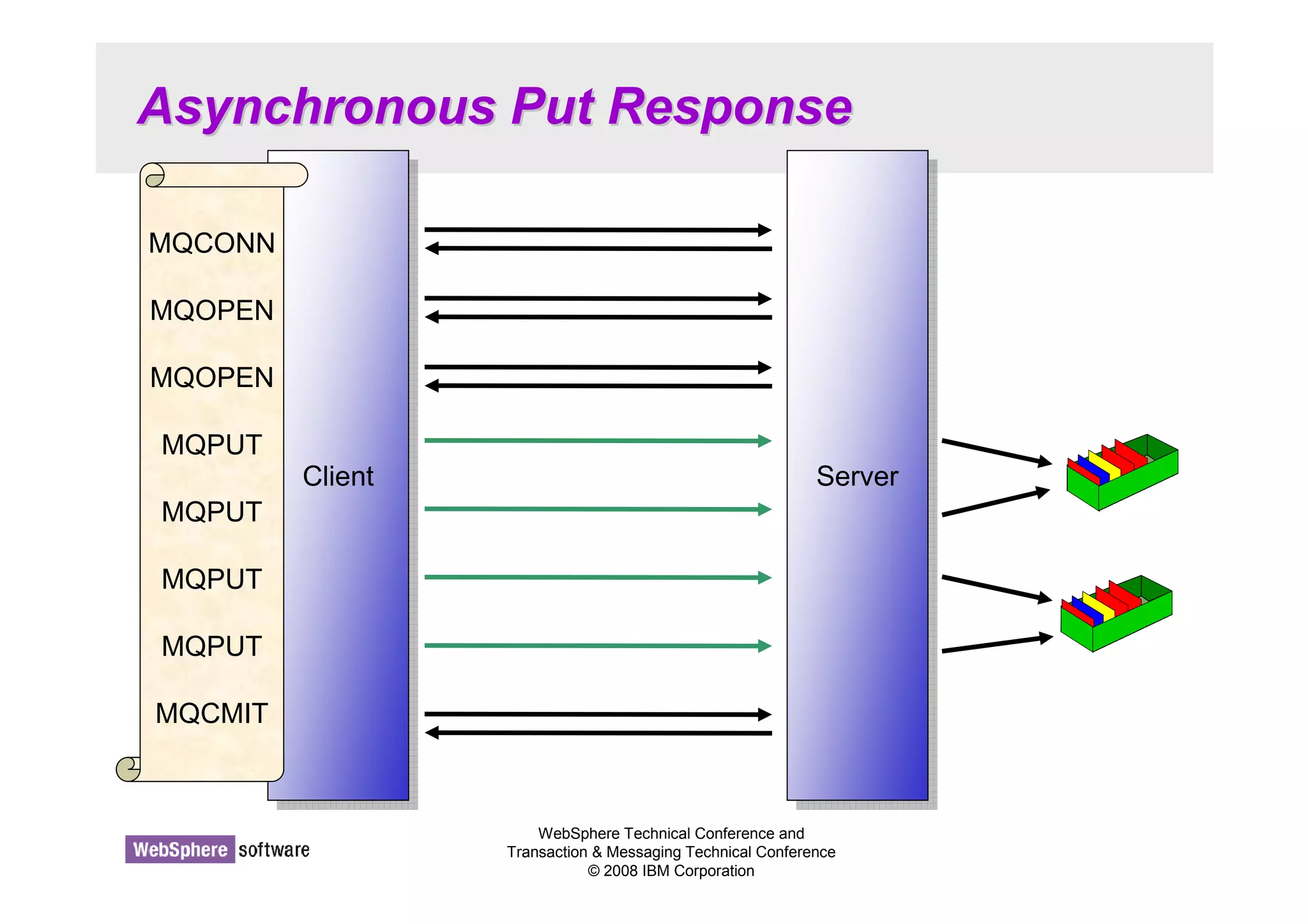
CClileienntt 
MQCONN 
MQOPEN 
MQOPEN 
MQPUT 
MQPUT 
MQPUT 
MQPUT 
MQCMIT 
SSeervrveerr
Asynchronous Put Response - Notes 
WebSphere Technical Conference and 
Transaction  Messaging Technical Conference 
© 2008 IBM Corporation 
N 
O 
T 
E 
S 
• Asynchronous Put (also known as 'Fire and Forget') is a recognition of the 
fact that a large proportion of the cost of an MQPUT from a client is the line 
turnaround of the network connection. When using Asynchronous Put the 
application sends the message to the server but does not wait for a 
response. Instead it returns immediately to the application. The application is 
then free to issue further MQI calls as required. The largest speed benefit 
will be seen where the application issues a number of MQPUT calls and 
where the network is slow. 
• Once the application has competed it's put sequence it will issue MQCMIT 
or MQDISC etc which will flush out any MQPUT calls which have not yet 
completed. 
• Because this mechanism is designed to remove the network delay it 
currently only has a benefit on client applications. However, it is 
recommended that applications that could benefit from it, use it for local 
bindings as well since in the future there is the possibility that the server 
could perform some optimisations when this option is used.
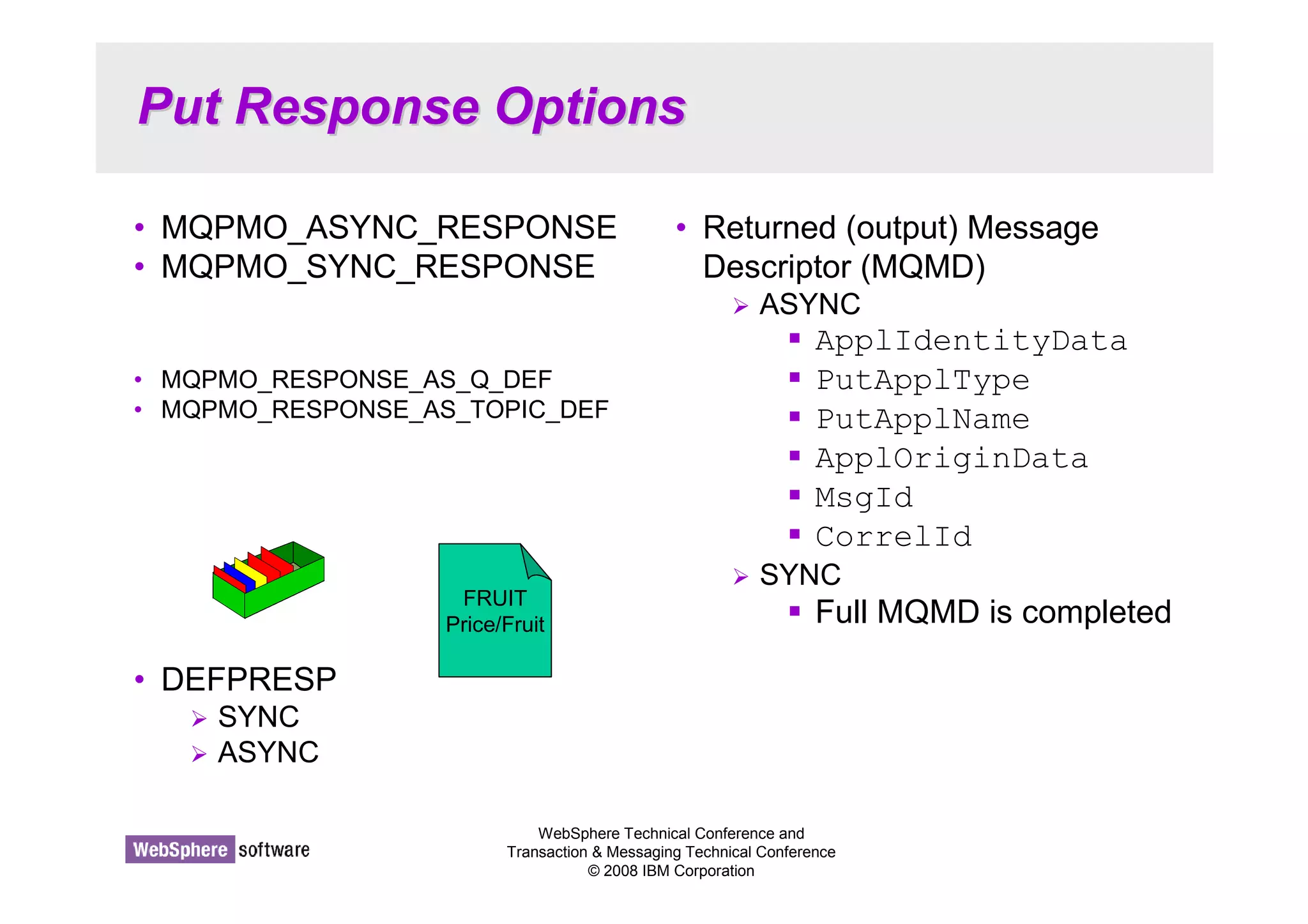
Put Response Options 
• MQPMO_ASYNC_RESPONSE 
• MQPMO_SYNC_RESPONSE 
• MQPMO_RESPONSE_AS_Q_DEF 
• MQPMO_RESPONSE_AS_TOPIC_DEF 
WebSphere Technical Conference and 
Transaction  Messaging Technical Conference 
© 2008 IBM Corporation 
• DEFPRESP 
 SYNC 
 ASYNC 
• Returned (output) Message 
Descriptor (MQMD) 
 ASYNC 
 ApplIdentityData 
 PutApplType 
 PutApplName 
 ApplOriginData 
 MsgId 
 CorrelId 
 SYNC 
 Full MQMD is completed FRUIT 
Price/Fruit
Put Response Options - Notes 
WebSphere Technical Conference and 
Transaction  Messaging Technical Conference 
© 2008 IBM Corporation 
N 
O 
T 
E 
S 
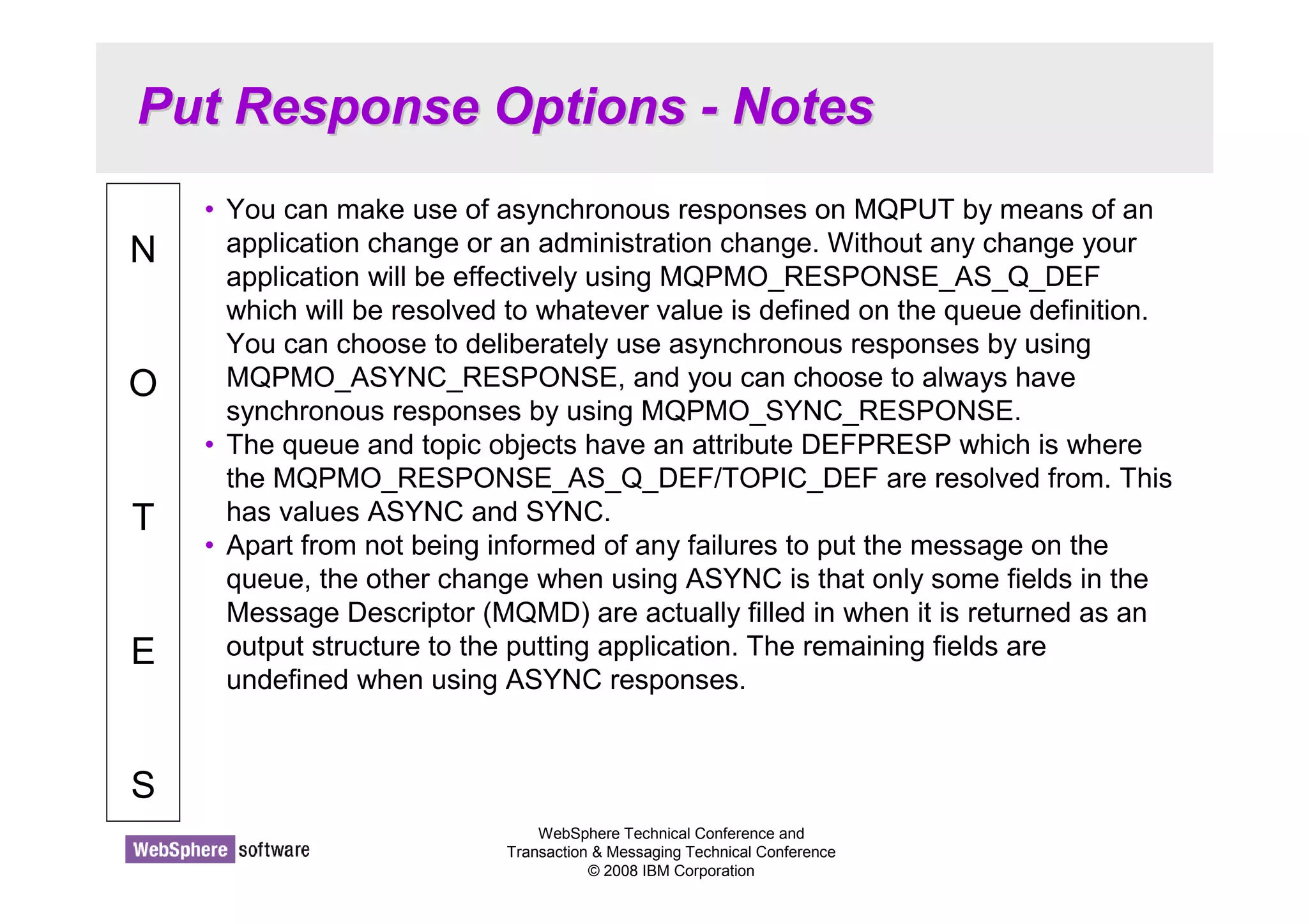
• You can make use of asynchronous responses on MQPUT by means of an 
application change or an administration change. Without any change your 
application will be effectively using MQPMO_RESPONSE_AS_Q_DEF 
which will be resolved to whatever value is defined on the queue definition. 
You can choose to deliberately use asynchronous responses by using 
MQPMO_ASYNC_RESPONSE, and you can choose to always have 
synchronous responses by using MQPMO_SYNC_RESPONSE. 
• The queue and topic objects have an attribute DEFPRESP which is where 
the MQPMO_RESPONSE_AS_Q_DEF/TOPIC_DEF are resolved from. This 
has values ASYNC and SYNC. 
• Apart from not being informed of any failures to put the message on the 
queue, the other change when using ASYNC is that only some fields in the 
Message Descriptor (MQMD) are actually filled in when it is returned as an 
output structure to the putting application. The remaining fields are 
undefined when using ASYNC responses.
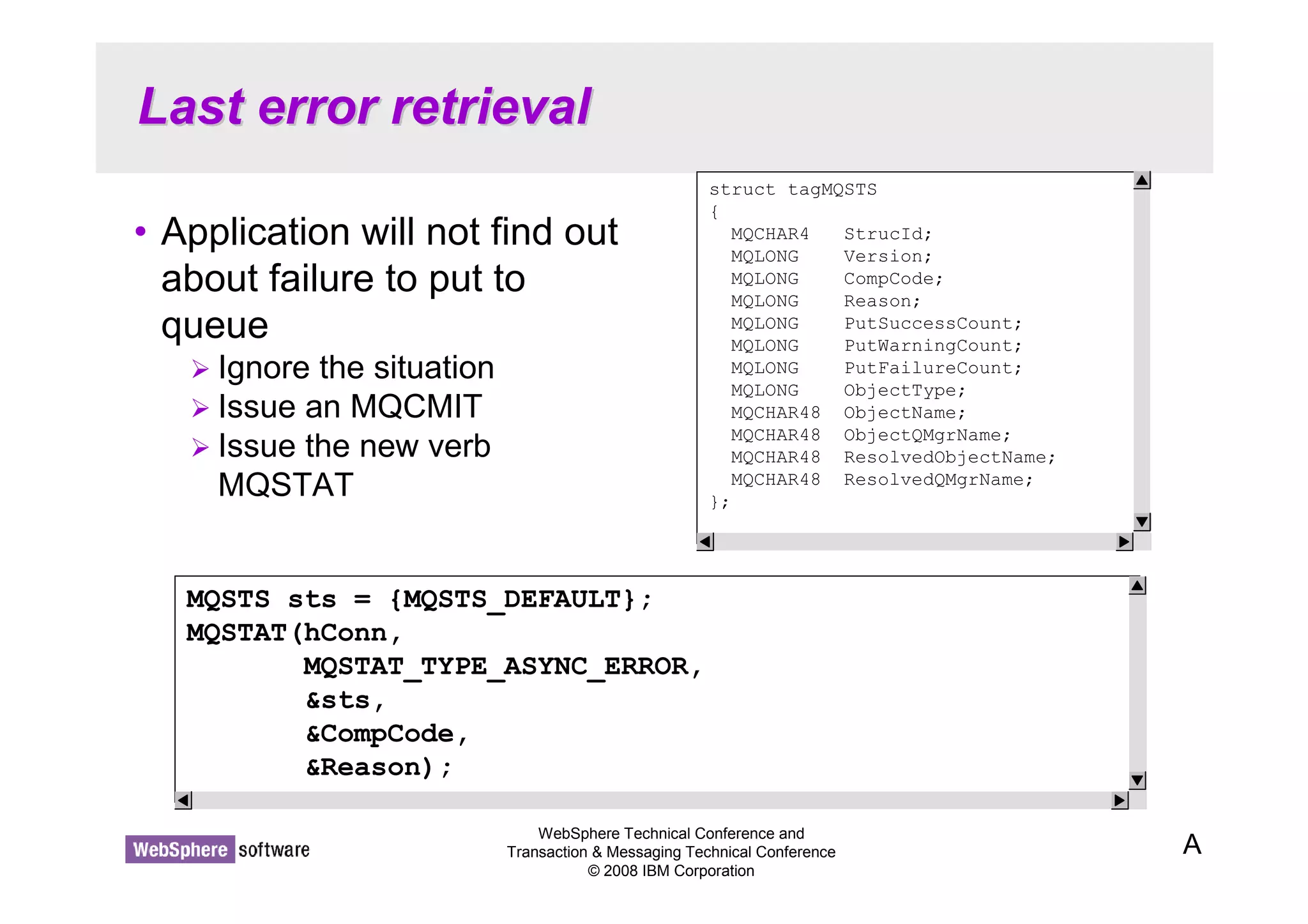
Last error retrieval 
• Application will not find out 
about failure to put to 
queue 
WebSphere Technical Conference and 
Transaction  Messaging Technical Conference 
© 2008 IBM Corporation 
 Ignore the situation 
 Issue an MQCMIT 
 Issue the new verb 
MQSTAT 
A 
struct tagMQSTS 
{ 
MQCHAR4 StrucId; 
MQLONG Version; 
MQLONG CompCode; 
MQLONG Reason; 
MQLONG PutSuccessCount; 
MQLONG PutWarningCount; 
MQLONG PutFailureCount; 
MQLONG ObjectType; 
MQCHAR48 ObjectName; 
MQCHAR48 ObjectQMgrName; 
MQCHAR48 ResolvedObjectName; 
MQCHAR48 ResolvedQMgrName; 
}; 
MQSTS sts = {MQSTS_DEFAULT}; 
MQSTAT(hConn, 
MQSTAT_TYPE_ASYNC_ERROR, 
sts, 
CompCode, 
Reason);
Last error retrieval - Notes 
WebSphere Technical Conference and 
Transaction  Messaging Technical Conference 
© 2008 IBM Corporation 
N 
O 
T 
E 
S 
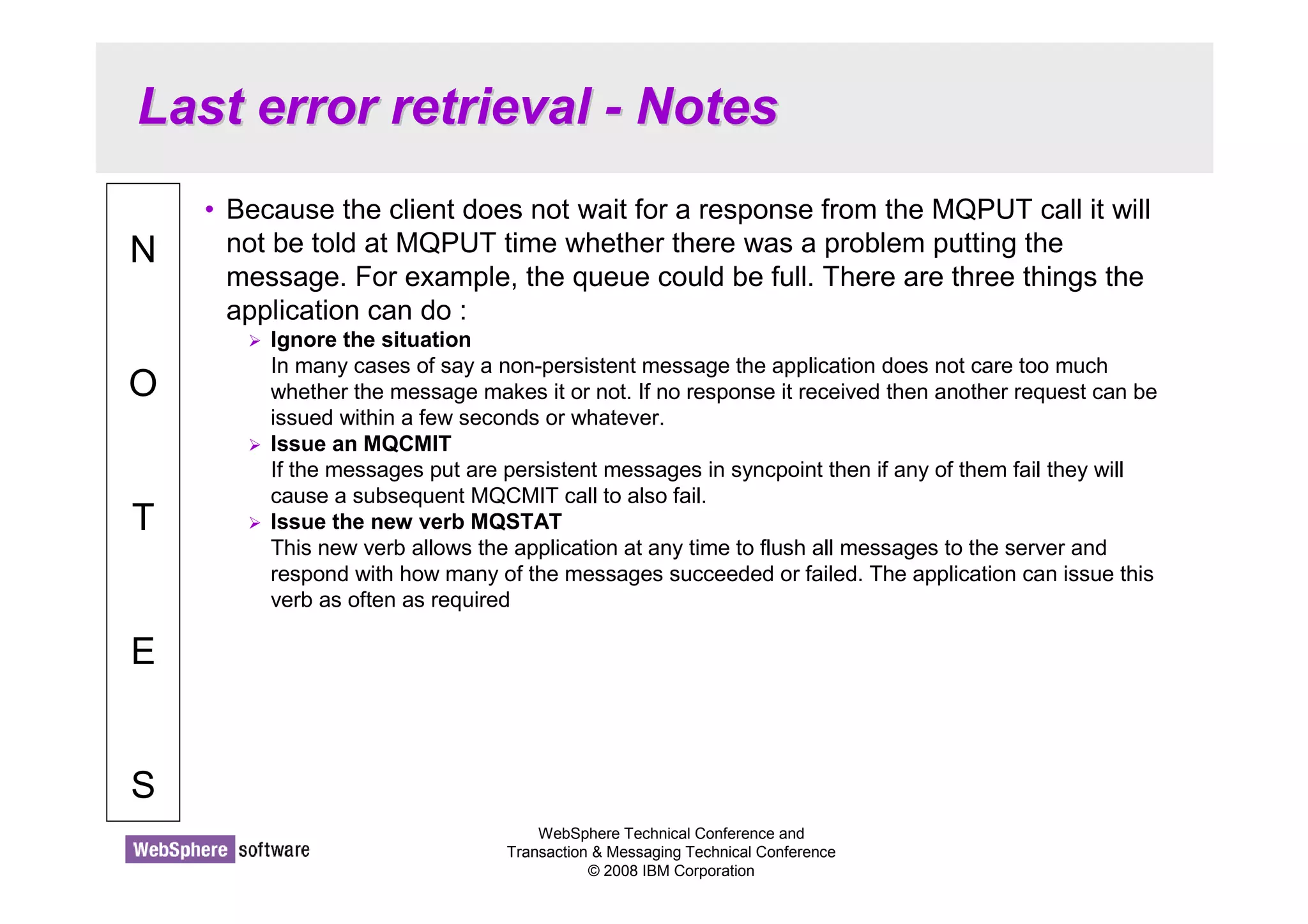
• Because the client does not wait for a response from the MQPUT call it will 
not be told at MQPUT time whether there was a problem putting the 
message. For example, the queue could be full. There are three things the 
application can do : 
 Ignore the situation 
In many cases of say a non-persistent message the application does not care too much 
whether the message makes it or not. If no response it received then another request can be 
issued within a few seconds or whatever. 
 Issue an MQCMIT 
If the messages put are persistent messages in syncpoint then if any of them fail they will 
cause a subsequent MQCMIT call to also fail. 
 Issue the new verb MQSTAT 
This new verb allows the application at any time to flush all messages to the server and 
respond with how many of the messages succeeded or failed. The application can issue this 
verb as often as required
Read-ahead of messages 
© 2008 IBM Corporation 
Conference materials may not be reproduced in whole or in part without the prior written permission of IBM.
Read-ahead of messages 
WebSphere Technical Conference and 
Transaction  Messaging Technical Conference 
© 2008 IBM Corporation 
CClileienntt 
MQCONN 
MQOPEN 
MQGET 
MQGET 
MQGET 
SSeervrveerr Request for 
‘n’ messages
Read-ahead of messages - Notes 
WebSphere Technical Conference and 
Transaction  Messaging Technical Conference 
© 2008 IBM Corporation 
N 
O 
T 
E 
S 
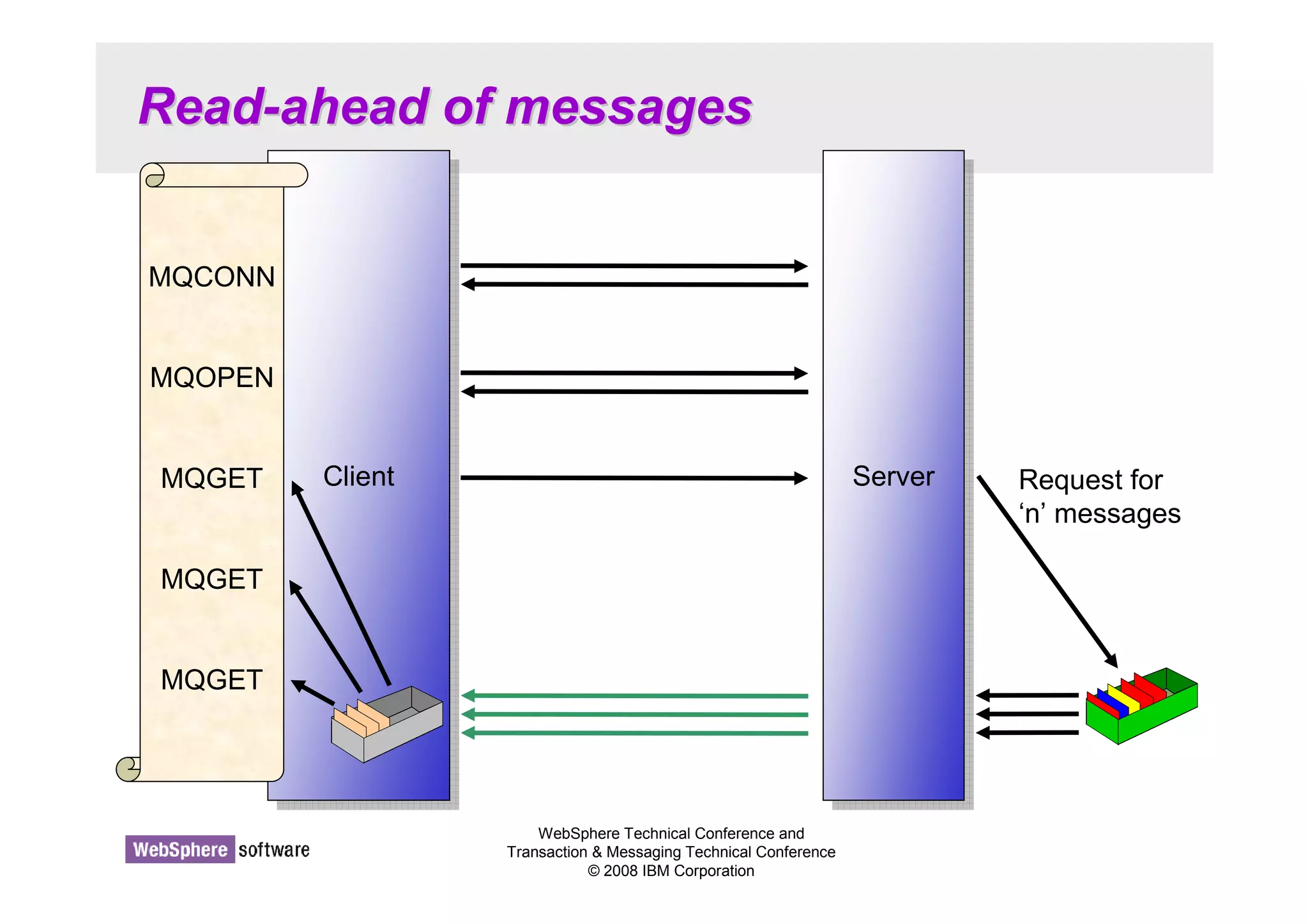
• Read Ahead (also known as 'Streaming') is a recognition of the fact that a large 
proportion of the cost of an MQGET from a client is the line turnaround of the network 
connection. When using Read Ahead the MQ client code makes a request for more 
than one message from the server. The server will send as many non-persistent 
messages matching the criteria (such as MsgId) as it can up to the limit set by the 
client. The largest speed benefit will be seen where there are a number of similar non-persistent 
messages to be delivered and where the network is slow. 
• Read Ahead is useful for applications which want to get large numbers of non-persistent 
messages, outside of syncpoint where they are not changing the selection 
criteria on a regular basis. For example, getting responses from a command server or 
a query such as a list of airline flights. 
• If an application requests read ahead but the messages are not suitable, for example, 
they are all persistent then only one message will be sent to the client at any one 
time. Read ahead is effectively turned off until a sequence of non-persistent 
messages are on the queue again. 
• The message buffer is purely an 'in memory' queue of messages. If the application 
ends or the machine crashes these messages will be lost. 
• Because this mechanism is designed to remove the network delay it currently only 
has a benefit on client applications. However, it is recommended that applications that 
might benefit from it, use it for local bindings as well since in the future there is the 
possibility that the server could perform some optimisations when this option is used.
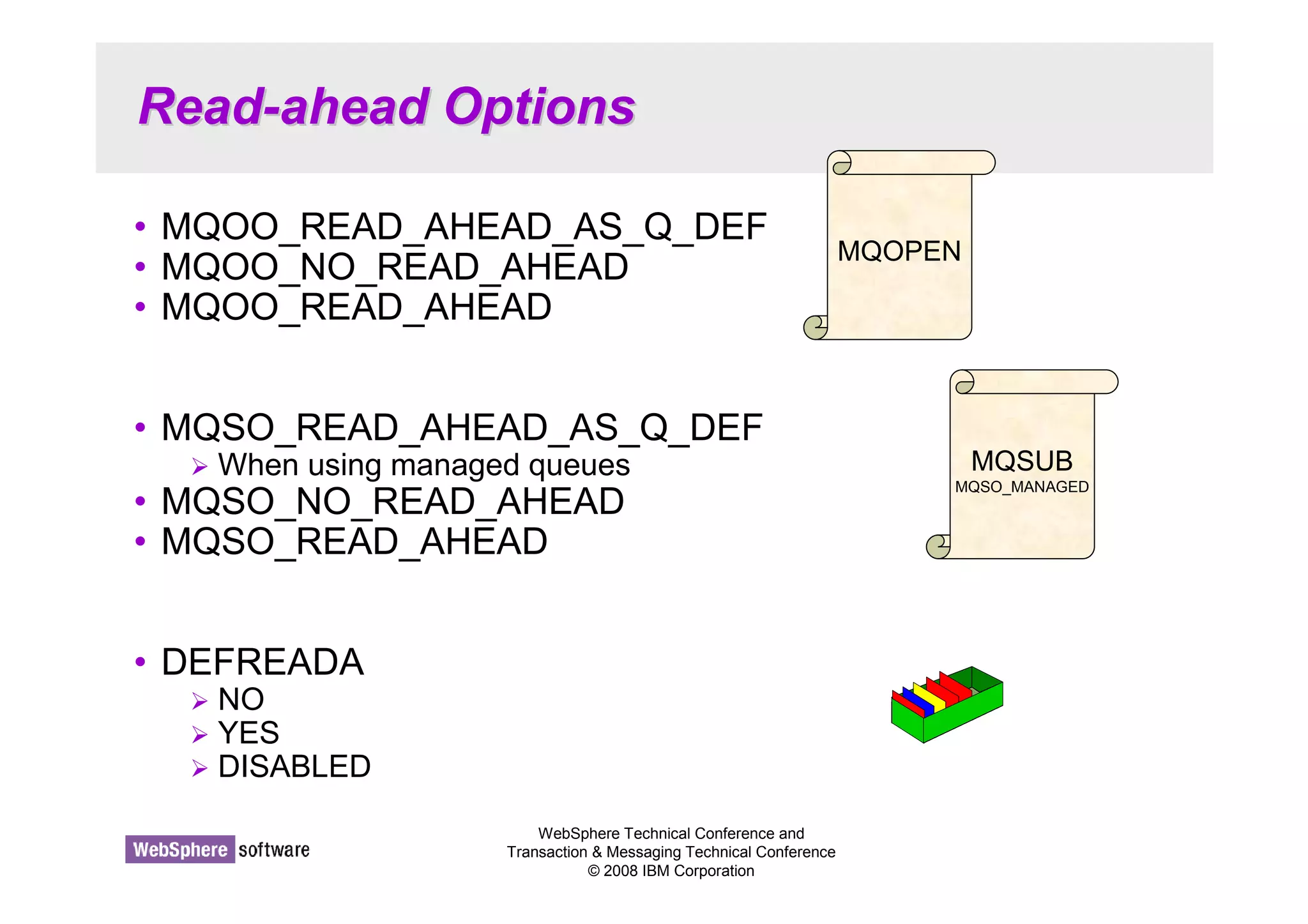
Read-ahead Options 
• MQOO_READ_AHEAD_AS_Q_DEF 
• MQOO_NO_READ_AHEAD 
• MQOO_READ_AHEAD 
• MQSO_READ_AHEAD_AS_Q_DEF 
 When using managed queues 
• MQSO_NO_READ_AHEAD 
• MQSO_READ_AHEAD 
WebSphere Technical Conference and 
Transaction  Messaging Technical Conference 
© 2008 IBM Corporation 
• DEFREADA 
 NO 
 YES 
 DISABLED 
MQOPEN 
MQSUB 
MQSO_MANAGED
Read-ahead Options - Notes 
WebSphere Technical Conference and 
Transaction  Messaging Technical Conference 
© 2008 IBM Corporation 
N 
O 
T 
E 
S 
• You can make use of read-ahead on MQGET by means of an application 
change or an administration change. Without any change your application 
will be effectively using MQOO_READ_AHEAD_AS_Q_DEF on MQOPEN 
which will be resolved to whatever value is defined on the queue definition. 
You can choose to deliberately use read-ahead by using 
MQOO_READ_AHEAD on your MQOPEN, and you can choose to turn off 
read-ahead by using MQOO_NO_READ_AHEAD. 
• If you are using a managed destination on MQSUB, by default your 
application will be effectively using MQSO_READ_AHEAD_AS_Q_DEF and 
taking its value from the model queue that is used to base managed 
destinations on. Non-durable subscriptions using the default provided model, 
SYSTEM.NDURABLE.MODEL.QUEUE, will find that read-ahead is turned 
on. You can choose to deliberately use read-ahead by using 
MQSO_READ_AHEAD on your MQSUB, and you can choose to turn off 
read-ahead by using MQSO_NO_READ_AHEAD on your MQSUB. 
• Queue objects have an attribute DEFREADA which is where the 
MQOO/SO_READ_AHEAD_AS_Q_DEF are resolved from. This has values 
YES and NO for this purpose and additionally a value DISABLED, which 
over-rides anything specified by the application and turns off any request for 
read-ahead on this queue.
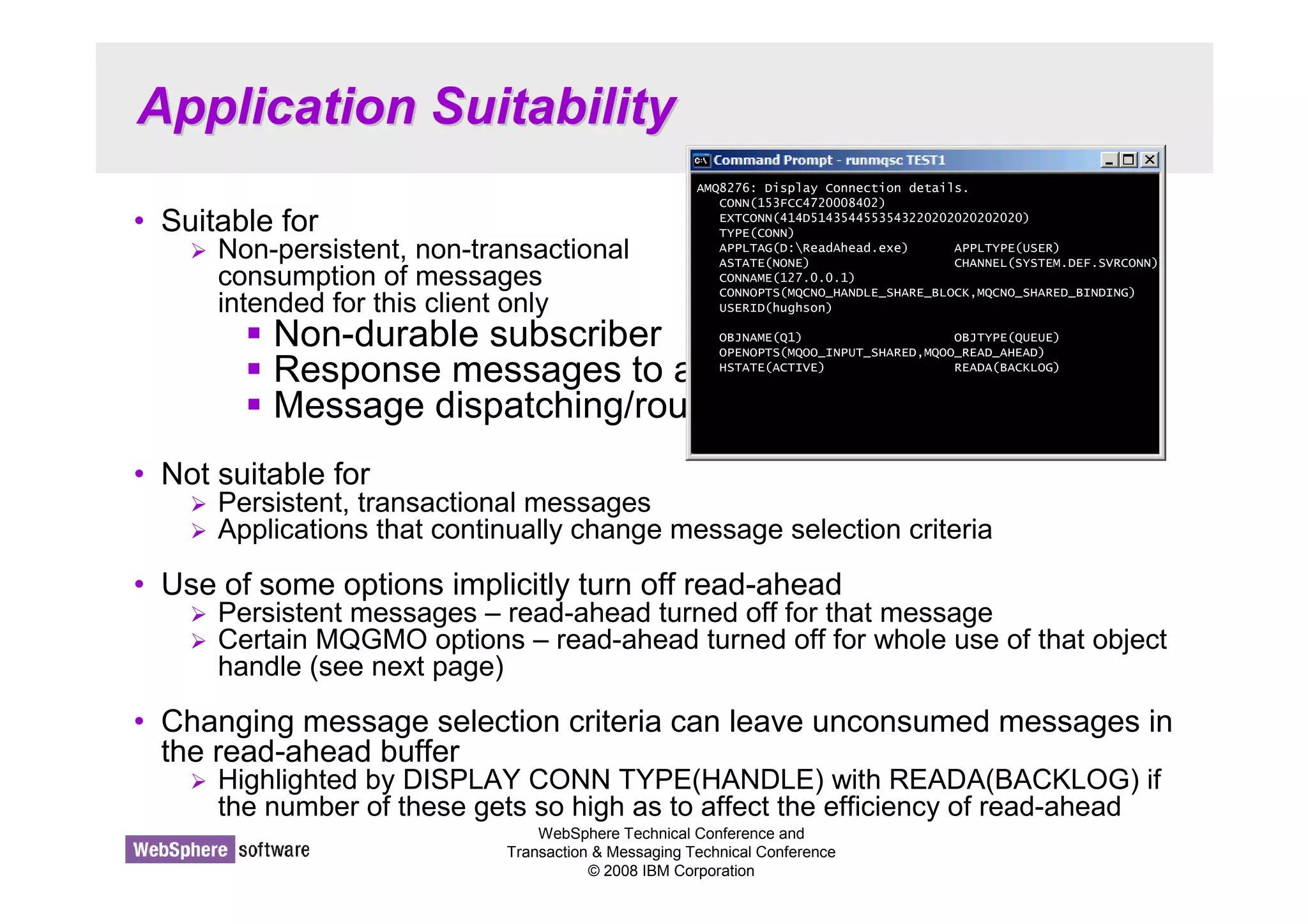
Application Suitability 
AMQ8276: Display Connection details. 
CONN(153FCC4720008402) 
EXTCONN(414D5143544553543220202020202020) 
TYPE(CONN) 
APPLTAG(D:ReadAhead.exe) APPLTYPE(USER) 
ASTATE(NONE) CHANNEL(SYSTEM.DEF.SVRCONN) 
CONNAME(127.0.0.1) 
CONNOPTS(MQCNO_HANDLE_SHARE_BLOCK,MQCNO_SHARED_BINDING) 
USERID(hughson) 
OBJNAME(Q1) OBJTYPE(QUEUE) 
OPENOPTS(MQOO_INPUT_SHARED,MQOO_READ_AHEAD) 
HSTATE(ACTIVE) READA(BACKLOG) 
WebSphere Technical Conference and 
Transaction  Messaging Technical Conference 
© 2008 IBM Corporation 
• Suitable for 
 Non-persistent, non-transactional 
consumption of messages 
intended for this client only 
 Non-durable subscriber 
 Response messages to a query 
 Message dispatching/routing 
• Not suitable for 
 Persistent, transactional messages 
 Applications that continually change message selection criteria 
• Use of some options implicitly turn off read-ahead 
 Persistent messages – read-ahead turned off for that message 
 Certain MQGMO options – read-ahead turned off for whole use of that object 
handle (see next page) 
• Changing message selection criteria can leave unconsumed messages in 
the read-ahead buffer 
 Highlighted by DISPLAY CONN TYPE(HANDLE) with READA(BACKLOG) if 
the number of these gets so high as to affect the efficiency of read-ahead
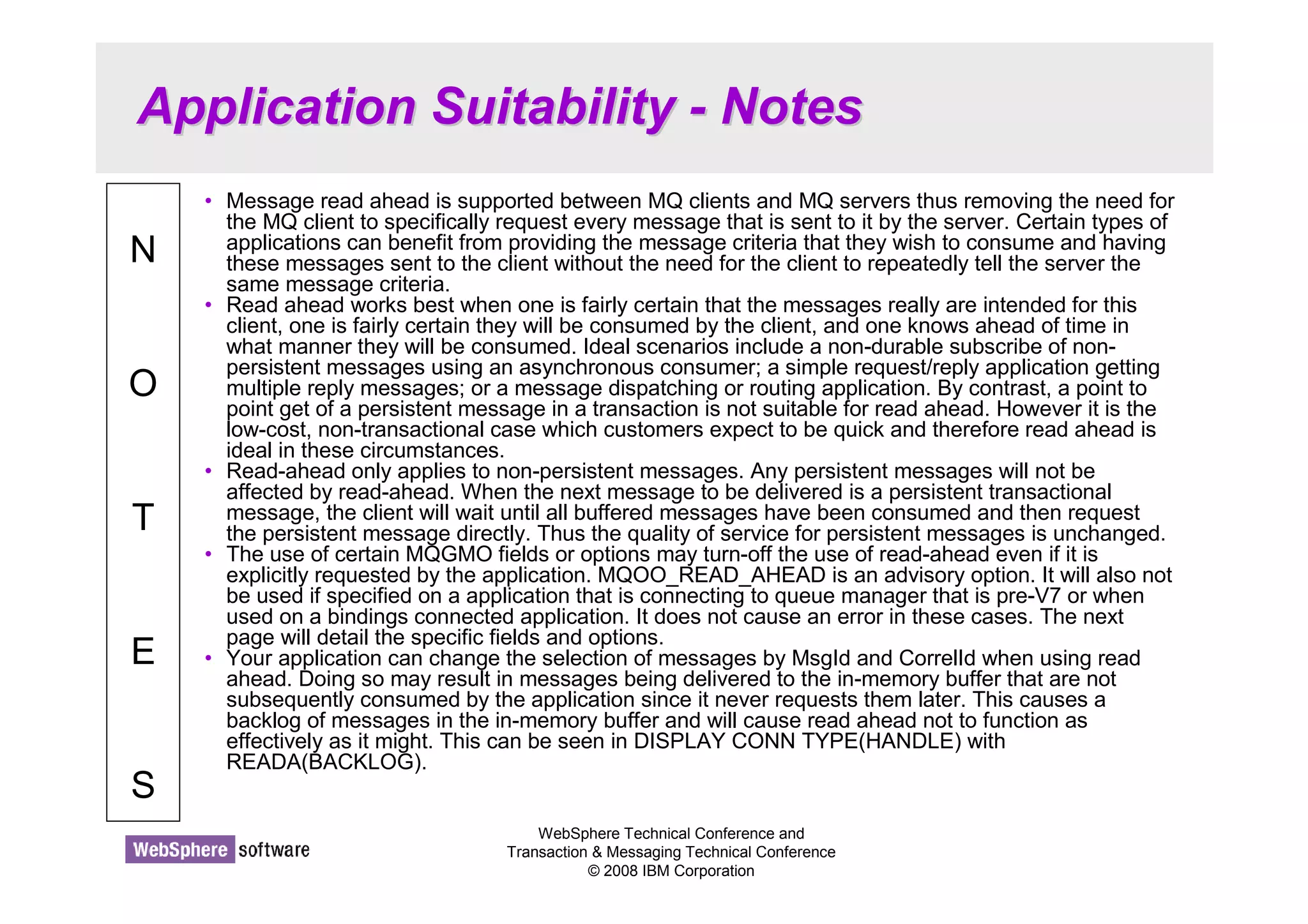
Application Suitability - Notes 
WebSphere Technical Conference and 
Transaction  Messaging Technical Conference 
© 2008 IBM Corporation 
N 
O 
T 
E 
S 
• Message read ahead is supported between MQ clients and MQ servers thus removing the need for 
the MQ client to specifically request every message that is sent to it by the server. Certain types of 
applications can benefit from providing the message criteria that they wish to consume and having 
these messages sent to the client without the need for the client to repeatedly tell the server the 
same message criteria. 
• Read ahead works best when one is fairly certain that the messages really are intended for this 
client, one is fairly certain they will be consumed by the client, and one knows ahead of time in 
what manner they will be consumed. Ideal scenarios include a non-durable subscribe of non-persistent 
messages using an asynchronous consumer; a simple request/reply application getting 
multiple reply messages; or a message dispatching or routing application. By contrast, a point to 
point get of a persistent message in a transaction is not suitable for read ahead. However it is the 
low-cost, non-transactional case which customers expect to be quick and therefore read ahead is 
ideal in these circumstances. 
• Read-ahead only applies to non-persistent messages. Any persistent messages will not be 
affected by read-ahead. When the next message to be delivered is a persistent transactional 
message, the client will wait until all buffered messages have been consumed and then request 
the persistent message directly. Thus the quality of service for persistent messages is unchanged. 
• The use of certain MQGMO fields or options may turn-off the use of read-ahead even if it is 
explicitly requested by the application. MQOO_READ_AHEAD is an advisory option. It will also not 
be used if specified on a application that is connecting to queue manager that is pre-V7 or when 
used on a bindings connected application. It does not cause an error in these cases. The next 
page will detail the specific fields and options. 
• Your application can change the selection of messages by MsgId and CorrelId when using read 
ahead. Doing so may result in messages being delivered to the in-memory buffer that are not 
subsequently consumed by the application since it never requests them later. This causes a 
backlog of messages in the in-memory buffer and will cause read ahead not to function as 
effectively as it might. This can be seen in DISPLAY CONN TYPE(HANDLE) with 
READA(BACKLOG).
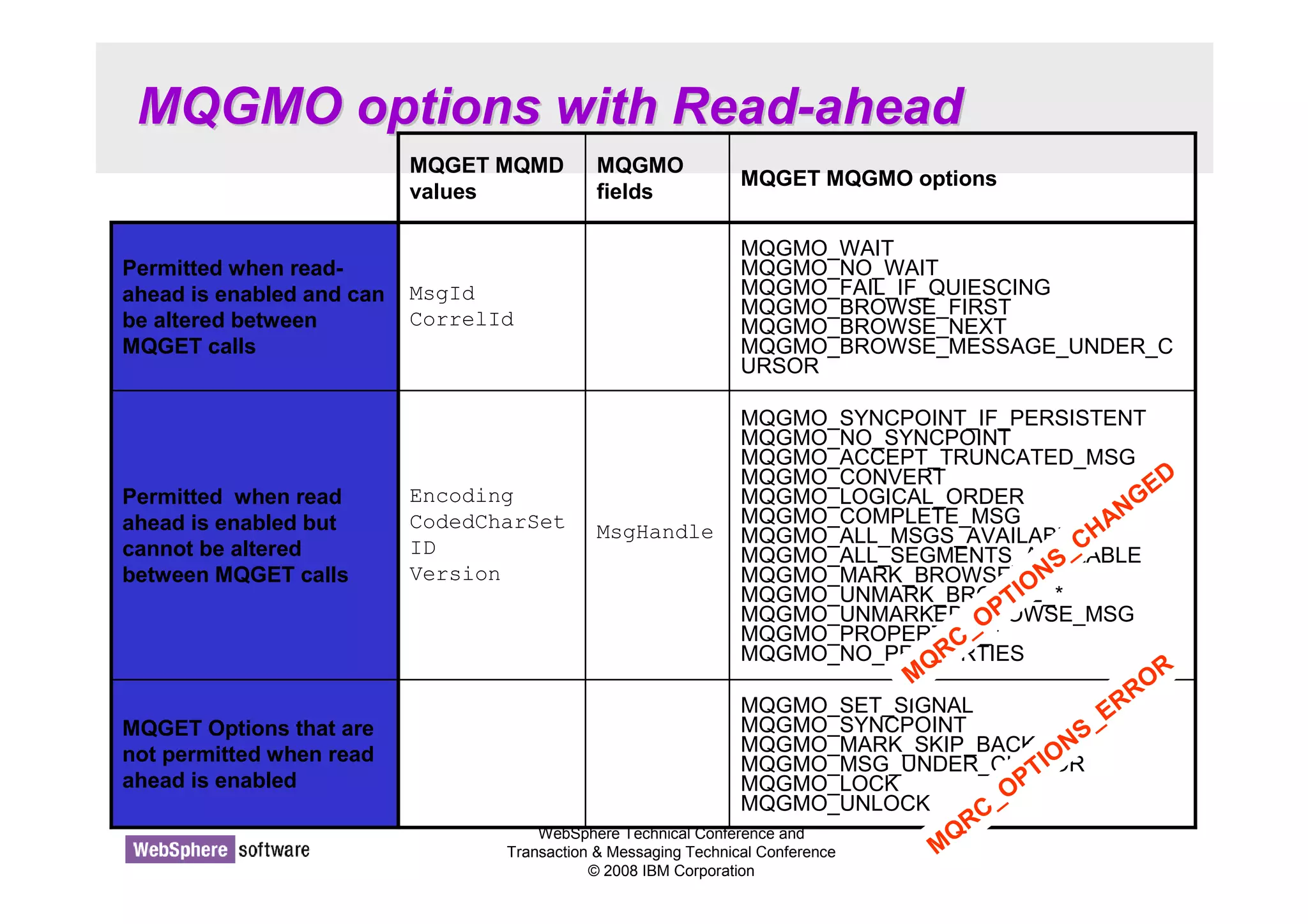
MQGMO options with Read-ahead 
MQGMO 
fields 
MsgHandle 
MQGET MQGMO options 
MQGMO_WAIT 
MQGMO_NO_WAIT 
MQGMO_FAIL_IF_QUIESCING 
MQGMO_BROWSE_FIRST 
MQGMO_BROWSE_NEXT 
MQGMO_BROWSE_MESSAGE_UNDER_C 
URSOR 
MQGMO_SET_SIGNAL 
MQGMO_SYNCPOINT 
MQGMO_MARK_SKIP_BACKOUT 
MQGMO_MSG_UNDER_CURSOR 
MQGMO_LOCK 
MQGMO_UNLOCK 
WebSphere Technical Conference and 
Transaction  Messaging Technical Conference 
© 2008 IBM Corporation 
MQGET Options that are 
not permitted when read 
ahead is enabled 
MQGMO_SYNCPOINT_IF_PERSISTENT 
MQGMO_NO_SYNCPOINT 
MQGMO_ACCEPT_TRUNCATED_MSG 
MQGMO_CONVERT 
MQGMO_LOGICAL_ORDER 
MQGMO_COMPLETE_MSG 
MQGMO_ALL_MSGS_AVAILABLE 
MQGMO_ALL_SEGMENTS_AVAILABLE 
MQGMO_MARK_BROWSE_* 
MQGMO_UNMARK_BROWSE_* 
MQGMO_UNMARKED_BROWSE_MSG 
MQGMO_PROPERTIES_* 
MQGMO_NO_PROPERTIES 
Encoding 
CodedCharSet 
ID 
Version 
Permitted when read 
ahead is enabled but 
cannot be altered 
between MQGET calls 
MsgId 
CorrelId 
Permitted when read-ahead 
is enabled and can 
be altered between 
MQGET calls 
MQGET MQMD 
values 
MQRC_OPTIONS_ERROR 
MQRC_OPTIONS_CHANGED
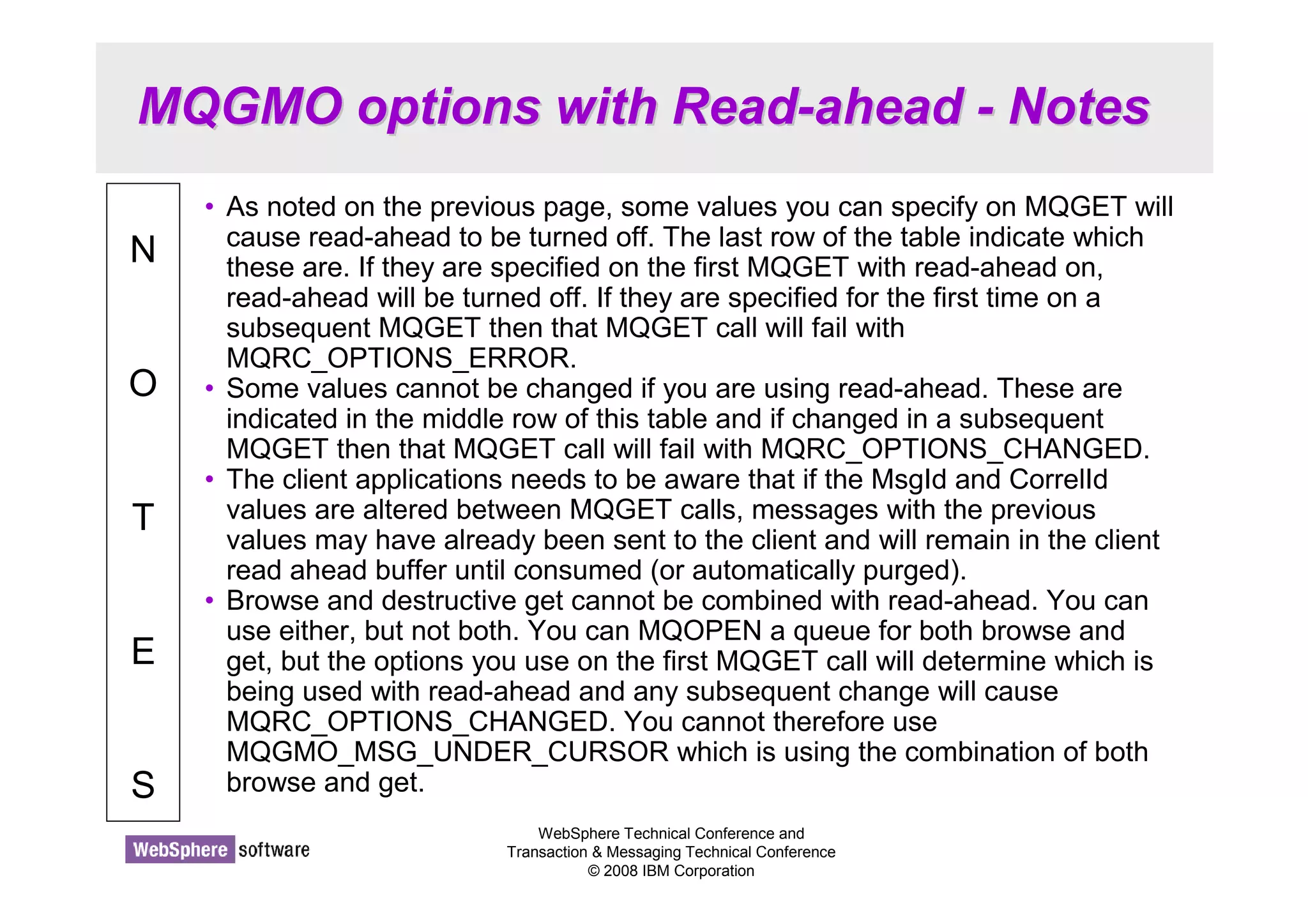
MQGMO options with Read-ahead - Notes 
WebSphere Technical Conference and 
Transaction  Messaging Technical Conference 
© 2008 IBM Corporation 
N 
O 
T 
E 
S 
• As noted on the previous page, some values you can specify on MQGET will 
cause read-ahead to be turned off. The last row of the table indicate which 
these are. If they are specified on the first MQGET with read-ahead on, 
read-ahead will be turned off. If they are specified for the first time on a 
subsequent MQGET then that MQGET call will fail with 
MQRC_OPTIONS_ERROR. 
• Some values cannot be changed if you are using read-ahead. These are 
indicated in the middle row of this table and if changed in a subsequent 
MQGET then that MQGET call will fail with MQRC_OPTIONS_CHANGED. 
• The client applications needs to be aware that if the MsgId and CorrelId 
values are altered between MQGET calls, messages with the previous 
values may have already been sent to the client and will remain in the client 
read ahead buffer until consumed (or automatically purged). 
• Browse and destructive get cannot be combined with read-ahead. You can 
use either, but not both. You can MQOPEN a queue for both browse and 
get, but the options you use on the first MQGET call will determine which is 
being used with read-ahead and any subsequent change will cause 
MQRC_OPTIONS_CHANGED. You cannot therefore use 
MQGMO_MSG_UNDER_CURSOR which is using the combination of both 
browse and get.
WebSphere Technical Conference and 
Transaction  Messaging Technical Conference 
© 2008 IBM Corporation 
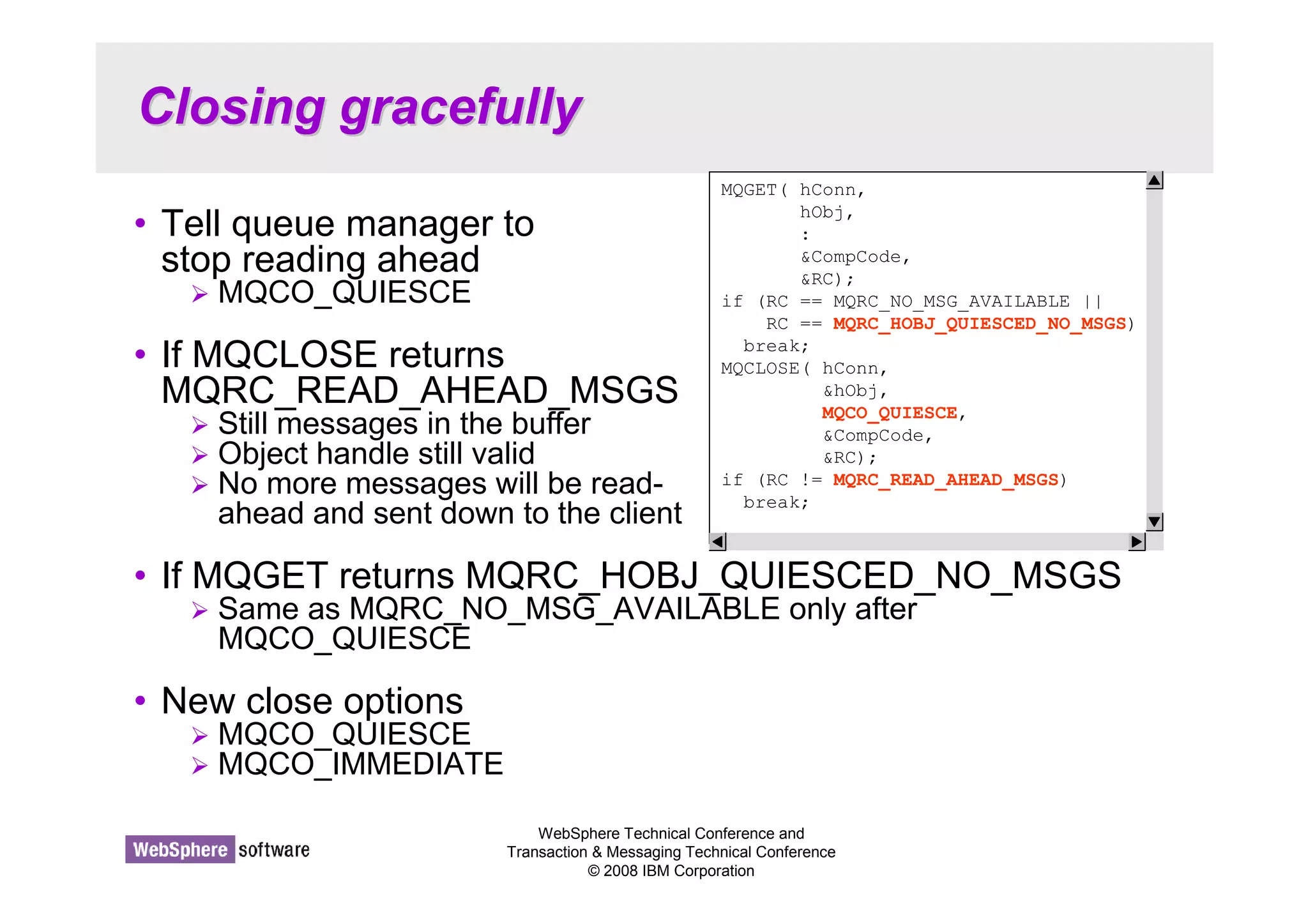
Closing gracefully 
• Tell queue manager to 
stop reading ahead 
 MQCO_QUIESCE 
• If MQCLOSE returns 
MQRC_READ_AHEAD_MSGS 
 Still messages in the buffer 
 Object handle still valid 
 No more messages will be read-ahead 
and sent down to the client 
• If MQGET returns MQRC_HOBJ_QUIESCED_NO_MSGS 
 Same as MQRC_NO_MSG_AVAILABLE only after 
MQCO_QUIESCE 
• New close options 
 MQCO_QUIESCE 
 MQCO_IMMEDIATE 
MQGET( hConn, 
hObj, 
: 
CompCode, 
RC); 
if (RC == MQRC_NO_MSG_AVAILABLE || 
RC == MQRC_HOBJ_QUIESCED_NO_MSGS) 
break; 
MQCLOSE( hConn, 
hObj, 
MQCO_QUIESCE, 
CompCode, 
RC); 
if (RC != MQRC_READ_AHEAD_MSGS) 
break;
Closing gracefully - Notes 
WebSphere Technical Conference and 
Transaction  Messaging Technical Conference 
© 2008 IBM Corporation 
N 
O 
T 
E 
S 
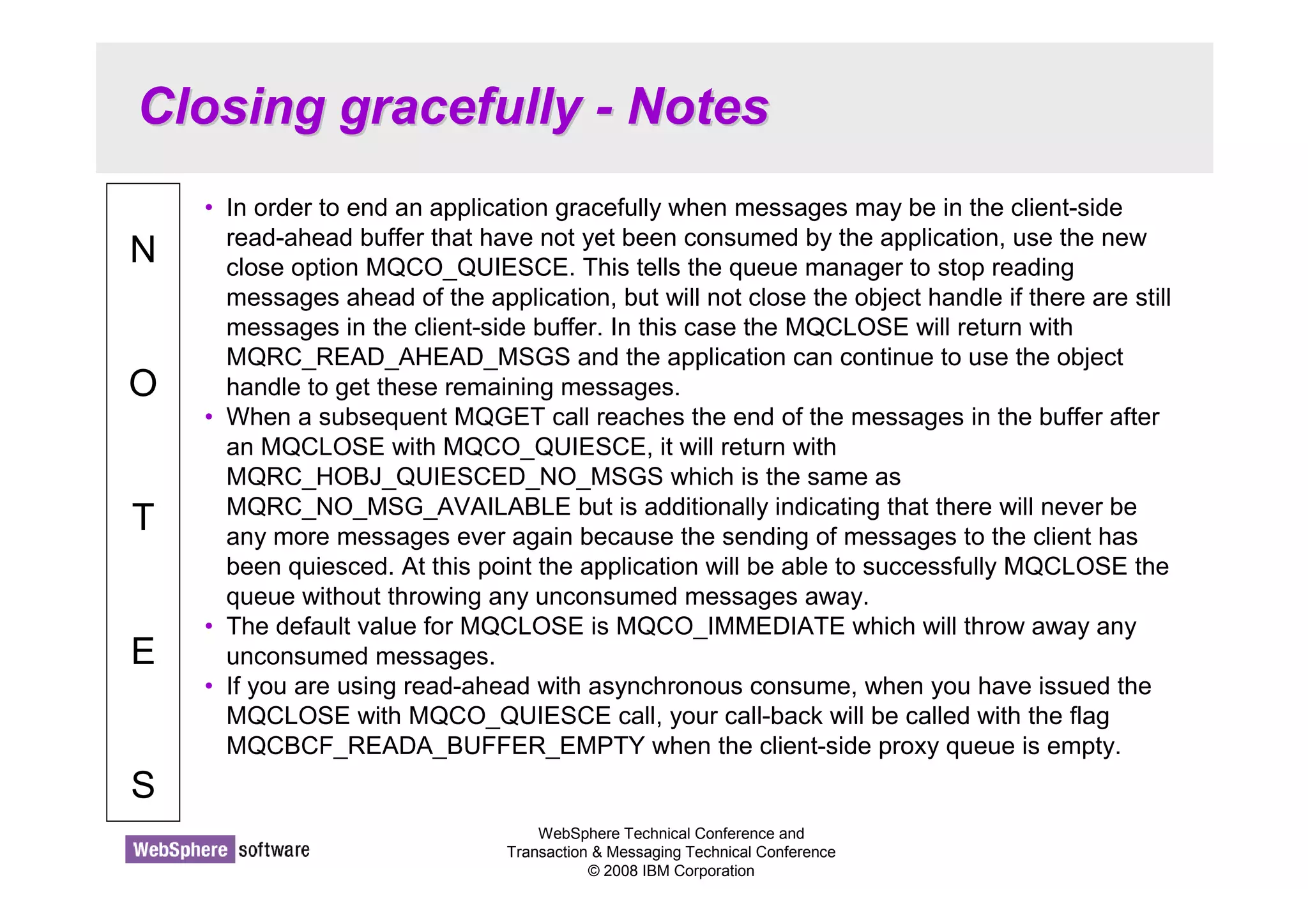
• In order to end an application gracefully when messages may be in the client-side 
read-ahead buffer that have not yet been consumed by the application, use the new 
close option MQCO_QUIESCE. This tells the queue manager to stop reading 
messages ahead of the application, but will not close the object handle if there are still 
messages in the client-side buffer. In this case the MQCLOSE will return with 
MQRC_READ_AHEAD_MSGS and the application can continue to use the object 
handle to get these remaining messages. 
• When a subsequent MQGET call reaches the end of the messages in the buffer after 
an MQCLOSE with MQCO_QUIESCE, it will return with 
MQRC_HOBJ_QUIESCED_NO_MSGS which is the same as 
MQRC_NO_MSG_AVAILABLE but is additionally indicating that there will never be 
any more messages ever again because the sending of messages to the client has 
been quiesced. At this point the application will be able to successfully MQCLOSE the 
queue without throwing any unconsumed messages away. 
• The default value for MQCLOSE is MQCO_IMMEDIATE which will throw away any 
unconsumed messages. 
• If you are using read-ahead with asynchronous consume, when you have issued the 
MQCLOSE with MQCO_QUIESCE call, your call-back will be called with the flag 
MQCBCF_READA_BUFFER_EMPTY when the client-side proxy queue is empty.
Connection Changes 
© 2008 IBM Corporation 
Conference materials may not be reproduced in whole or in part without the prior written permission of IBM.
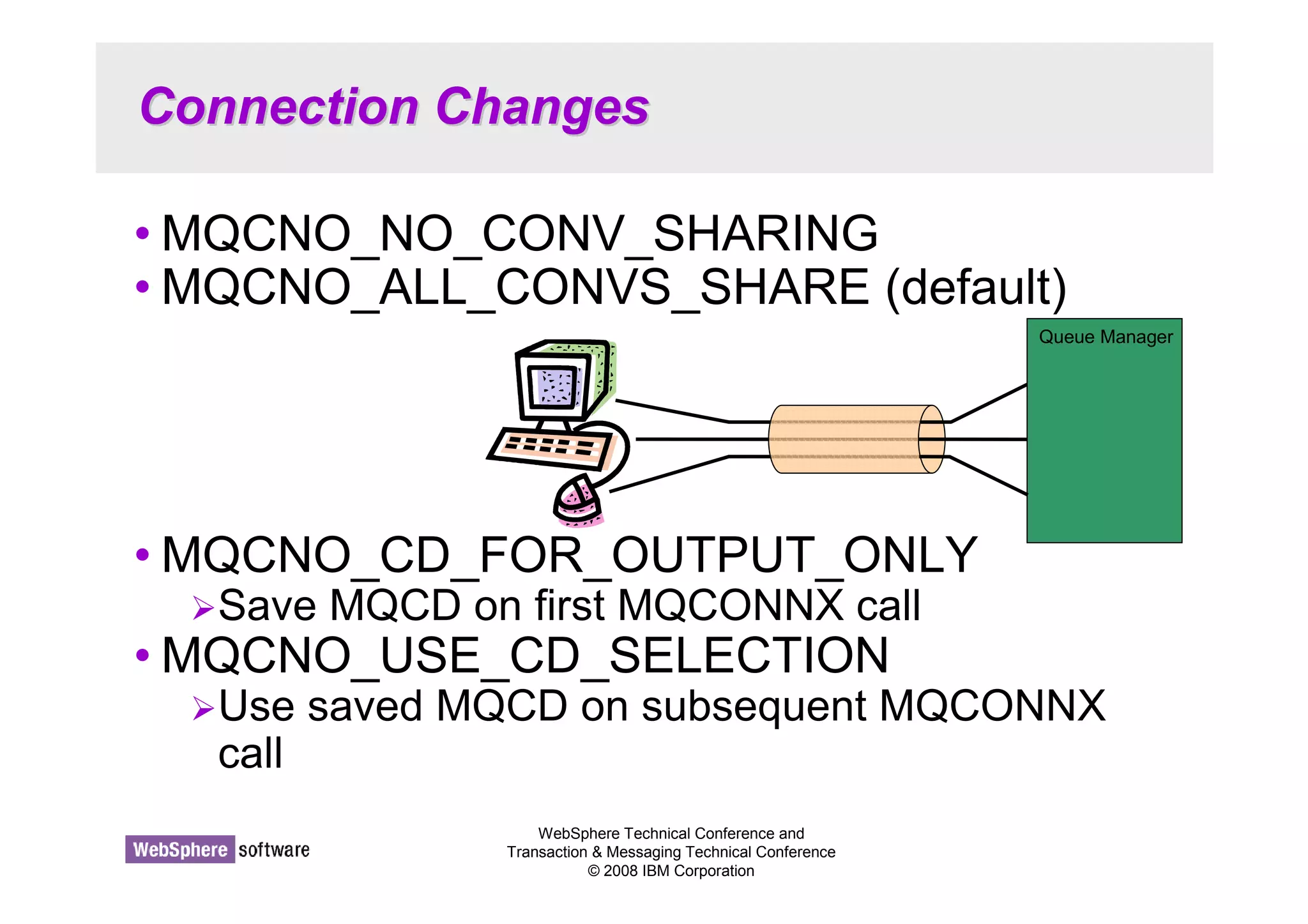
Connection Changes 
•MQCNO_NO_CONV_SHARING 
•MQCNO_ALL_CONVS_SHARE (default) 
•MQCNO_CD_FOR_OUTPUT_ONLY 
Save MQCD on first MQCONNX call 
•MQCNO_USE_CD_SELECTION 
Use saved MQCD on subsequent MQCONNX 
call 
WebSphere Technical Conference and 
Transaction  Messaging Technical Conference 
© 2008 IBM Corporation 
Queue Manager
Connection Changes - Notes 
WebSphere Technical Conference and 
Transaction  Messaging Technical Conference 
© 2008 IBM Corporation 
N 
O 
T 
E 
S 
• MQCNO_ALL_CONVS_SHARE is the default value if none are used explicitly and 
indicates that the application isn’t limiting the number of connections on the socket. It 
leaves control of sharing entirely to the configuration at the server-connection end of 
the channel. If the application indicates that the socket can be shared but the 
SharingConversations (SHARECNV) channel definition is set to 1, no sharing occurs 
and no warning is given to the application. Similarly, if the application indicates that 
sharing is permitted but the SharingConversations definition is set to zero, no warning 
is given, and the application exhibits the same behavior as a V6.0 client with regard to 
sharing conversations, read ahead, heartbeating and administrator stop-quiesce: the 
application setting relating to sharing conversations is ignored. 
• MQCNO_NO_CONV_SHARING indicates that this application does not want to share 
its socket regardless of the setting at the server-connection end of the channel. This is 
particularly useful in situations where conversations are very heavily loaded and 
therefore where contention is a possibility on the server-connection end of the socket 
on which the conversations are shared. 
• When obtaining your connection details from a client channel definition table (CCDT), 
you may wish to deliberately choose the same connection for your next call to 
MQCONNX. If so, you can request the MQCD describing the choice used from the 
CCDT be returned to you on the first MQCONNX by using 
MQCNO_CD_FOR_OUTPUT_ONLY, and then request it be used on the second 
MQCONNX by using MQCNO_USE_CD_SELECTION.
Message Properties 
© 2008 IBM Corporation 
Conference materials may not be reproduced in whole or in part without the prior written permission of IBM.
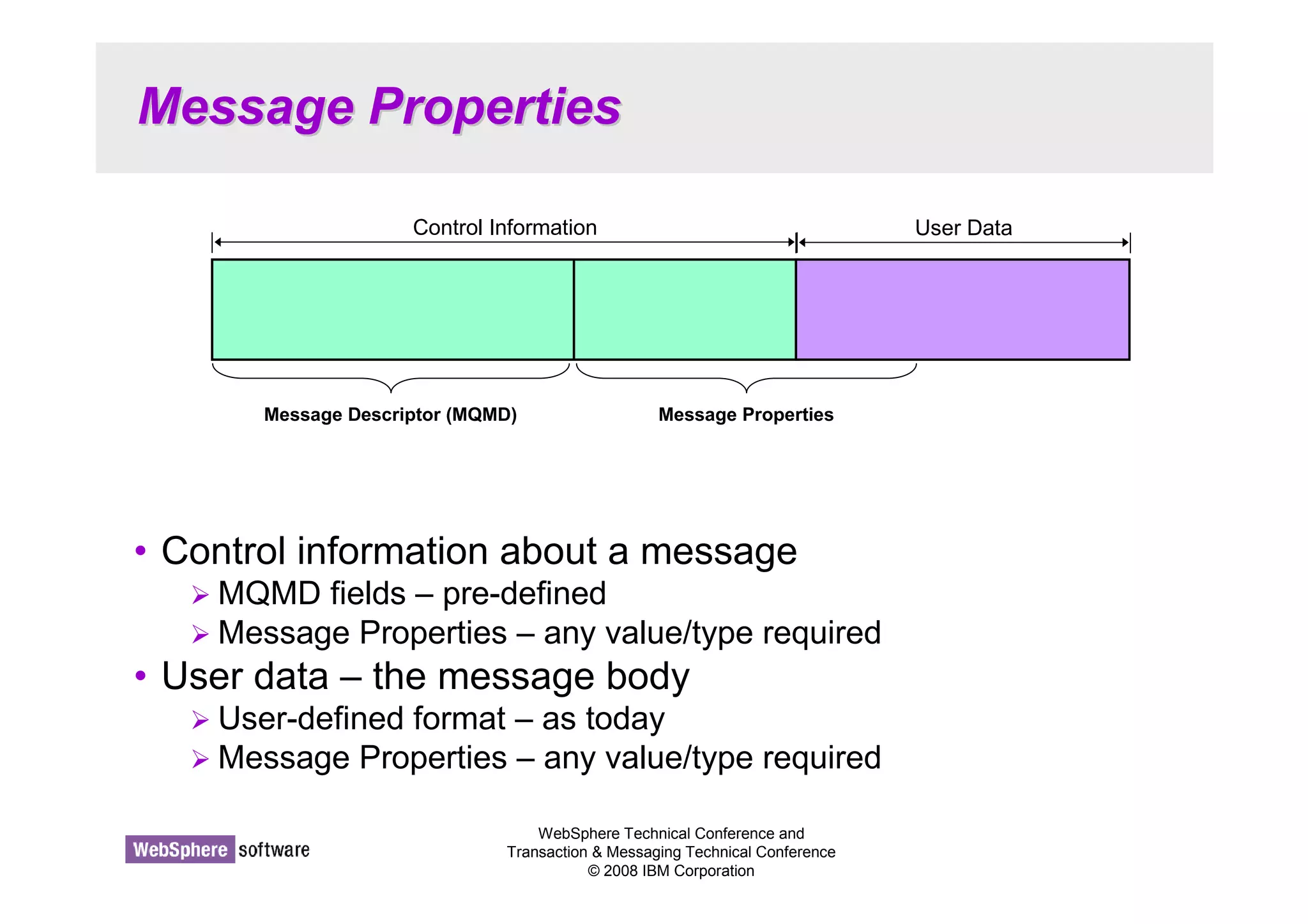
Message Properties 
Control Information User Data 
Message Descriptor (MQMD) Message Properties 
• Control information about a message 
MQMD fields – pre-defined 
Message Properties – any value/type required 
• User data – the message body 
 User-defined format – as today 
Message Properties – any value/type required 
WebSphere Technical Conference and 
Transaction  Messaging Technical Conference 
© 2008 IBM Corporation
Message Properties - Notes 
WebSphere Technical Conference and 
Transaction  Messaging Technical Conference 
© 2008 IBM Corporation 
N 
O 
T 
E 
S 
• Message properties are a concept allowing meta-data or control information 
to be carried with a message without the need to put it either in a field in the 
MQMD or build it into the application user-data structure. This control 
information may be nothing to do with the application, such as tracking 
information – maybe inserted by an API exit or intermediate serving 
application – which the end application can ignore, or may be pertinent 
information that the application uses, perhaps to select messages by. 
• Either way, properties are neither part of the user data, nor part of the 
MQMD. They are carried with the message and can be manipulated by 
means of a number of new API calls.
WebSphere Technical Conference and 
Transaction  Messaging Technical Conference 
© 2008 IBM Corporation 
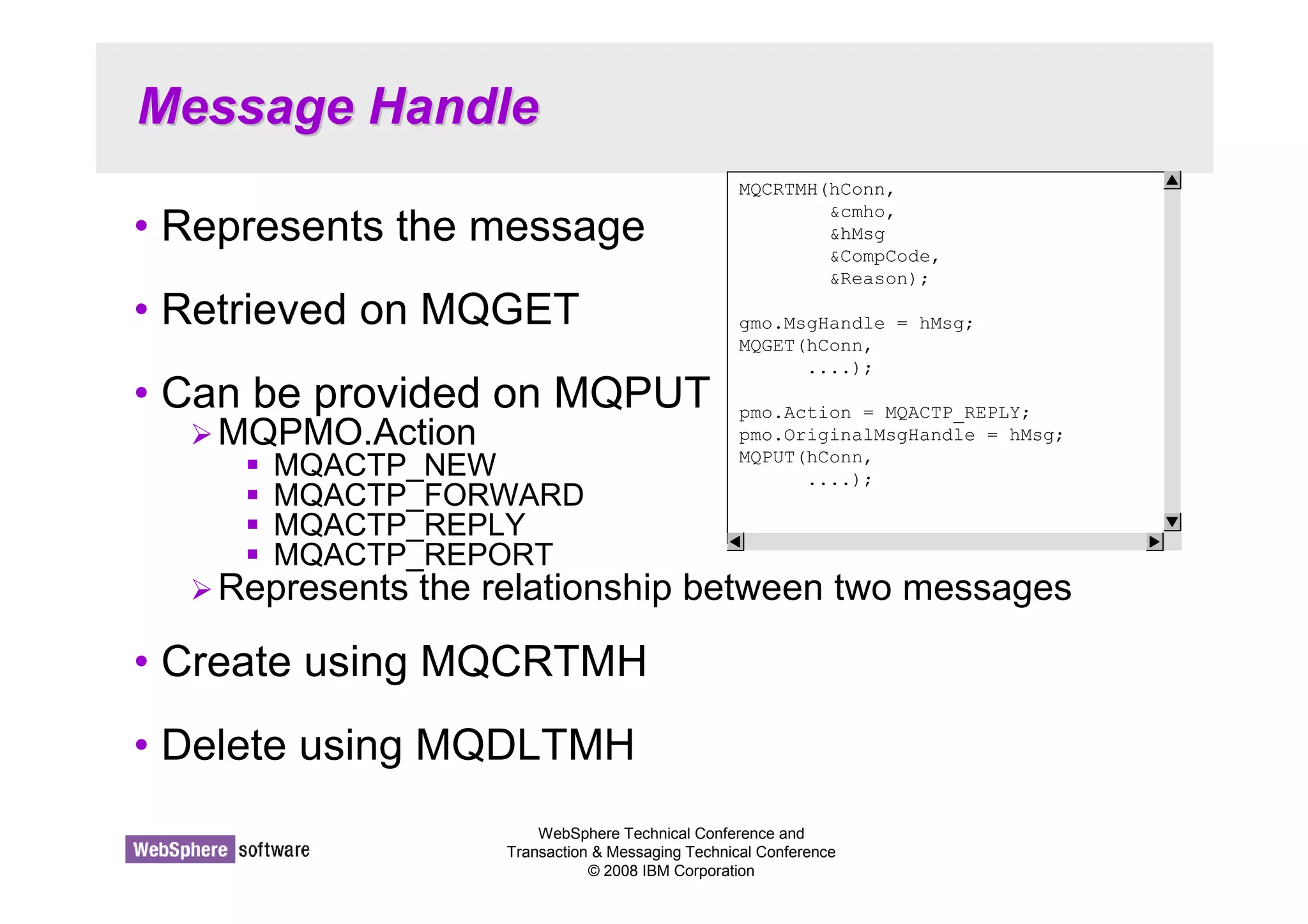
Message Handle 
• Represents the message 
• Retrieved on MQGET 
• Can be provided on MQPUT 
MQPMO.Action 
 MQACTP_NEW 
 MQACTP_FORWARD 
 MQACTP_REPLY 
 MQACTP_REPORT 
Represents the relationship between two messages 
• Create using MQCRTMH 
• Delete using MQDLTMH 
MQCRTMH(hConn, 
cmho, 
hMsg 
CompCode, 
Reason); 
gmo.MsgHandle = hMsg; 
MQGET(hConn, 
....); 
pmo.Action = MQACTP_REPLY; 
pmo.OriginalMsgHandle = hMsg; 
MQPUT(hConn, 
....);
Message Handle - Notes 
WebSphere Technical Conference and 
Transaction  Messaging Technical Conference 
© 2008 IBM Corporation 
N 
O 
T 
E 
S 
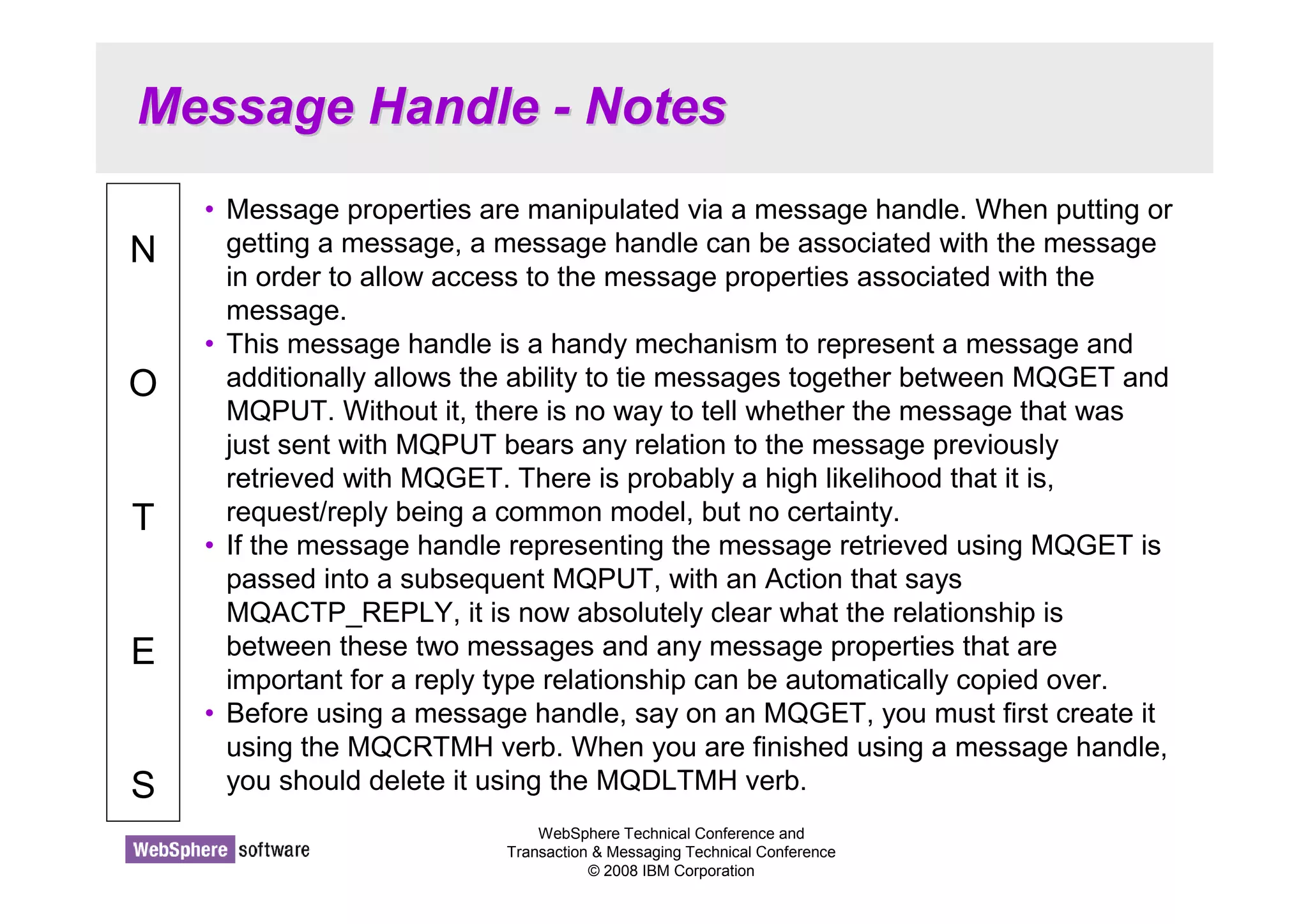
• Message properties are manipulated via a message handle. When putting or 
getting a message, a message handle can be associated with the message 
in order to allow access to the message properties associated with the 
message. 
• This message handle is a handy mechanism to represent a message and 
additionally allows the ability to tie messages together between MQGET and 
MQPUT. Without it, there is no way to tell whether the message that was 
just sent with MQPUT bears any relation to the message previously 
retrieved with MQGET. There is probably a high likelihood that it is, 
request/reply being a common model, but no certainty. 
• If the message handle representing the message retrieved using MQGET is 
passed into a subsequent MQPUT, with an Action that says 
MQACTP_REPLY, it is now absolutely clear what the relationship is 
between these two messages and any message properties that are 
important for a reply type relationship can be automatically copied over. 
• Before using a message handle, say on an MQGET, you must first create it 
using the MQCRTMH verb. When you are finished using a message handle, 
you should delete it using the MQDLTMH verb.
Message Properties 
MQSETMP(hConn, 
hMsg, 
smpo, 
propName, 
propDesc, 
MQTYPE_STRING, 
valuelen, 
value, 
CompCode, 
Reason); 
pmo.NewMsgHandle = hMsg; 
MQPUT(hConn, 
....); 
WebSphere Technical Conference and 
Transaction  Messaging Technical Conference 
© 2008 IBM Corporation 
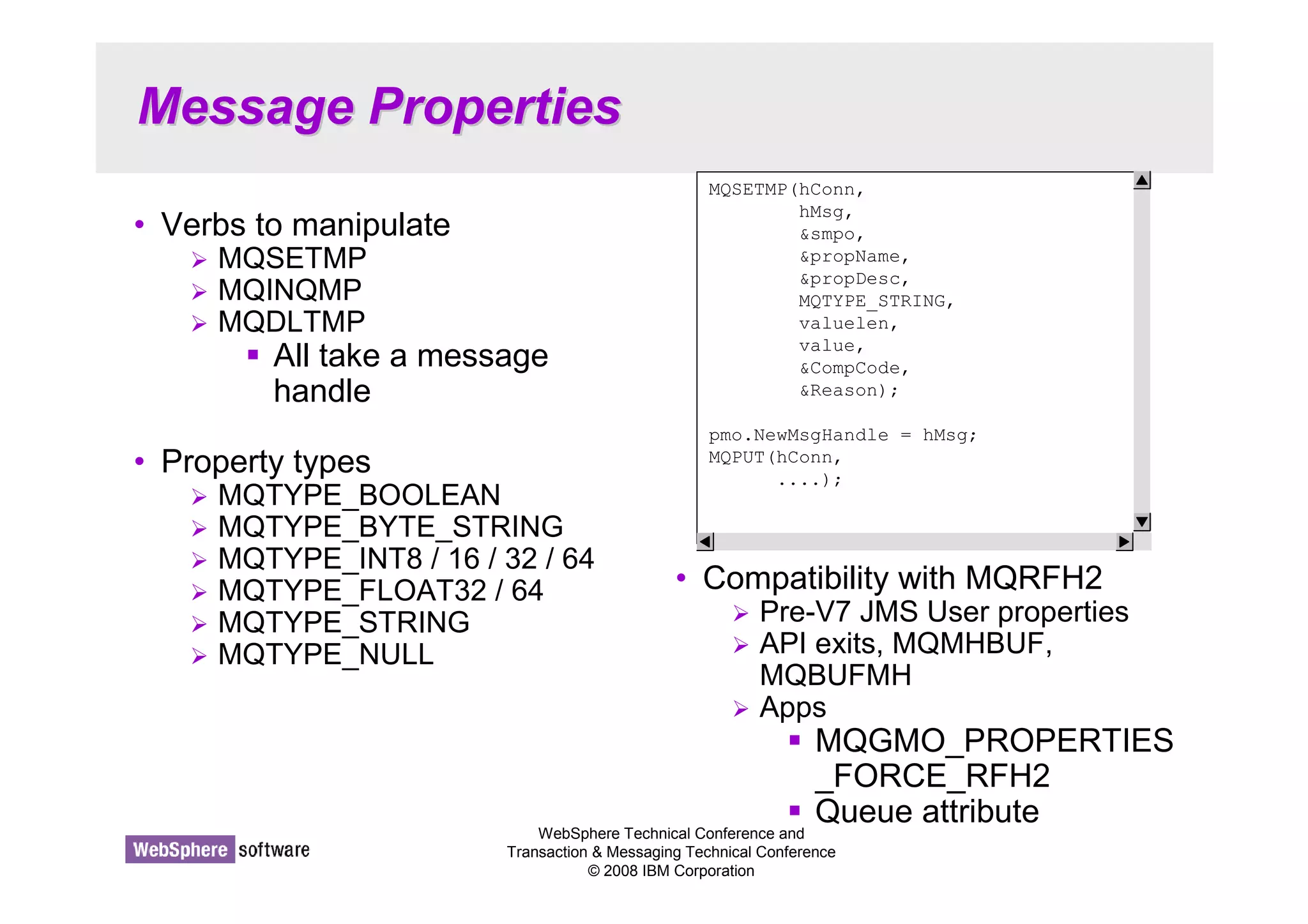
• Verbs to manipulate 
 MQSETMP 
 MQINQMP 
 MQDLTMP 
 All take a message 
handle 
• Property types 
 MQTYPE_BOOLEAN 
 MQTYPE_BYTE_STRING 
 MQTYPE_INT8 / 16 / 32 / 64 
 MQTYPE_FLOAT32 / 64 
 MQTYPE_STRING 
 MQTYPE_NULL 
• Compatibility with MQRFH2 
 Pre-V7 JMS User properties 
 API exits, MQMHBUF, 
MQBUFMH 
 Apps 
 MQGMO_PROPERTIES 
_FORCE_RFH2 
 Queue attribute
Message Properties - Notes 
WebSphere Technical Conference and 
Transaction  Messaging Technical Conference 
© 2008 IBM Corporation 
N 
O 
T 
E 
S 
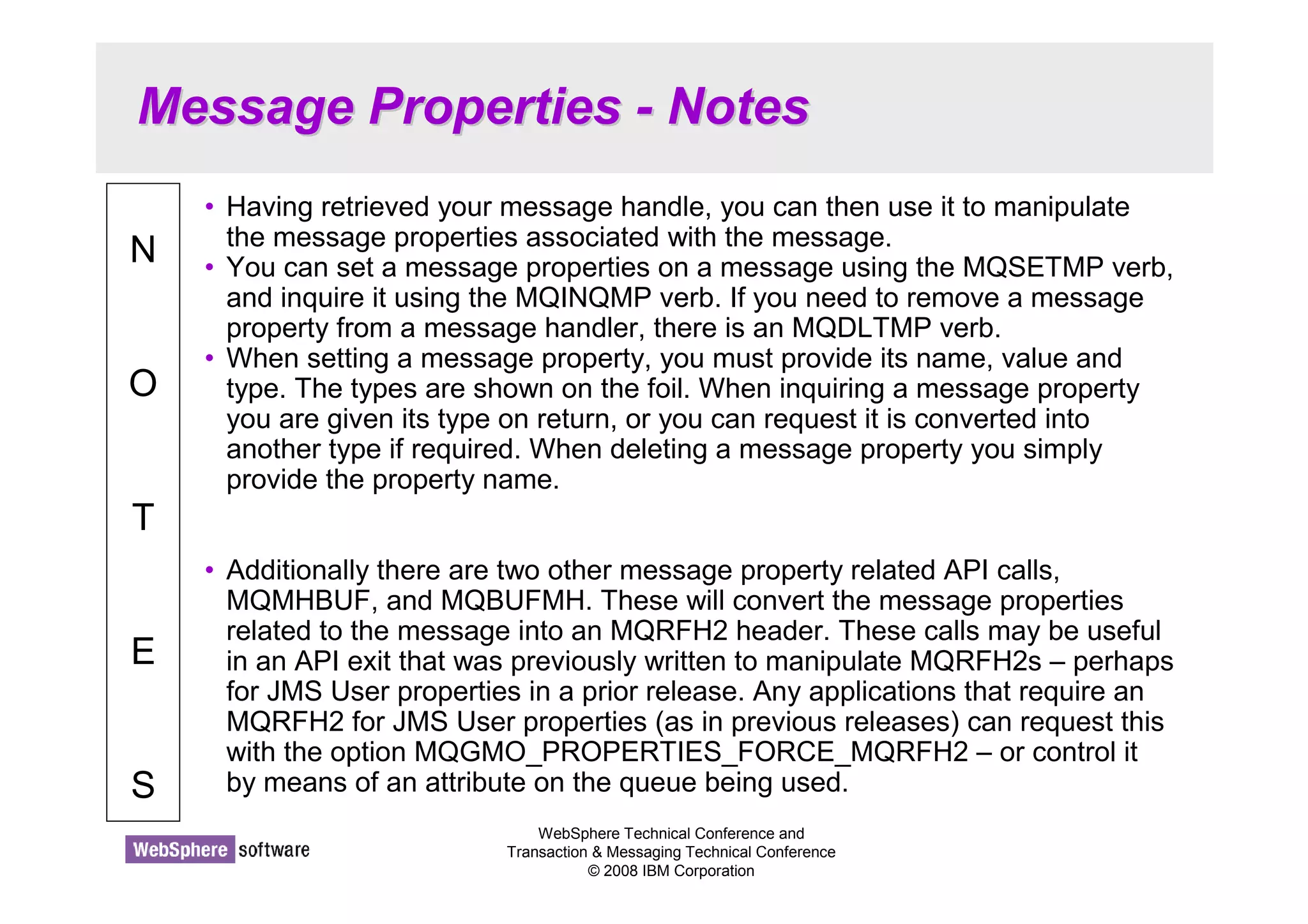
• Having retrieved your message handle, you can then use it to manipulate 
the message properties associated with the message. 
• You can set a message properties on a message using the MQSETMP verb, 
and inquire it using the MQINQMP verb. If you need to remove a message 
property from a message handler, there is an MQDLTMP verb. 
• When setting a message property, you must provide its name, value and 
type. The types are shown on the foil. When inquiring a message property 
you are given its type on return, or you can request it is converted into 
another type if required. When deleting a message property you simply 
provide the property name. 
• Additionally there are two other message property related API calls, 
MQMHBUF, and MQBUFMH. These will convert the message properties 
related to the message into an MQRFH2 header. These calls may be useful 
in an API exit that was previously written to manipulate MQRFH2s – perhaps 
for JMS User properties in a prior release. Any applications that require an 
MQRFH2 for JMS User properties (as in previous releases) can request this 
with the option MQGMO_PROPERTIES_FORCE_MQRFH2 – or control it 
by means of an attribute on the queue being used.
Selection of messages 
WebSphere Technical Conference and 
Transaction  Messaging Technical Conference 
© 2008 IBM Corporation 
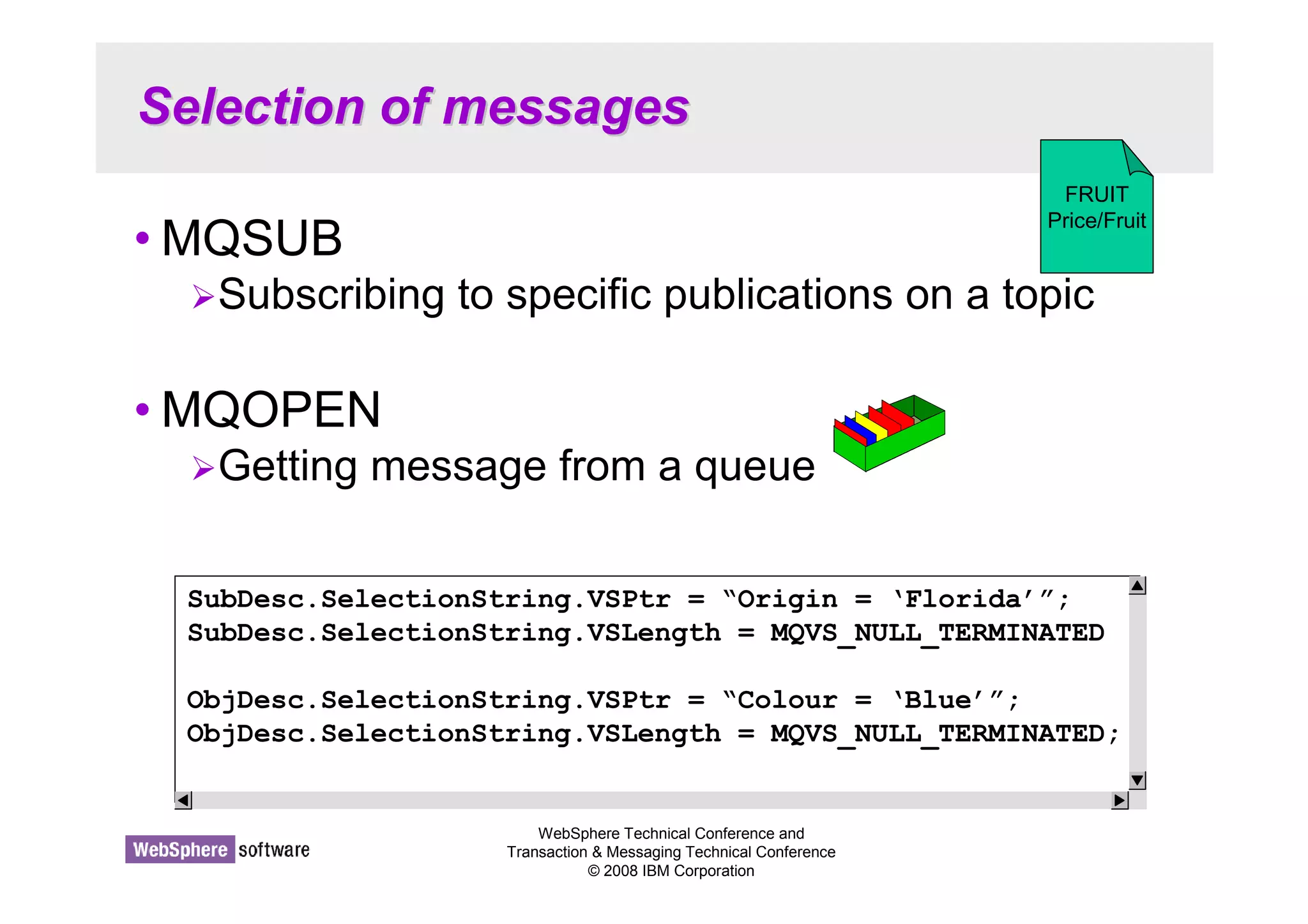
•MQSUB 
FRUIT 
Price/Fruit 
Subscribing to specific publications on a topic 
•MQOPEN 
Getting message from a queue 
SubDesc.SelectionString.VSPtr = “Origin = ‘Florida’”; 
SubDesc.SelectionString.VSLength = MQVS_NULL_TERMINATED 
ObjDesc.SelectionString.VSPtr = “Colour = ‘Blue’”; 
ObjDesc.SelectionString.VSLength = MQVS_NULL_TERMINATED;
Selection of messages - Notes 
WebSphere Technical Conference and 
Transaction  Messaging Technical Conference 
© 2008 IBM Corporation 
N 
O 
T 
E 
S 
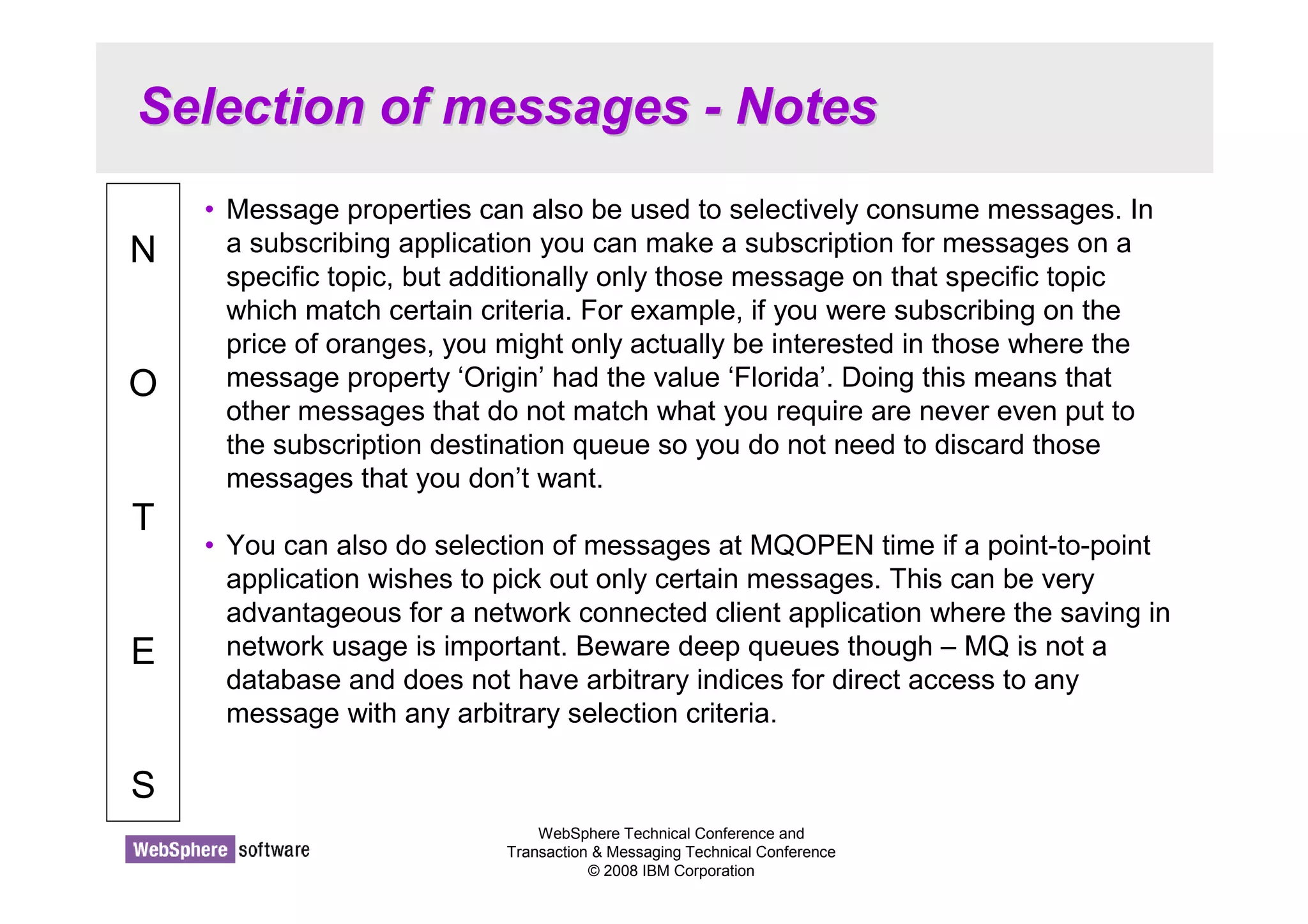
• Message properties can also be used to selectively consume messages. In 
a subscribing application you can make a subscription for messages on a 
specific topic, but additionally only those message on that specific topic 
which match certain criteria. For example, if you were subscribing on the 
price of oranges, you might only actually be interested in those where the 
message property ‘Origin’ had the value ‘Florida’. Doing this means that 
other messages that do not match what you require are never even put to 
the subscription destination queue so you do not need to discard those 
messages that you don’t want. 
• You can also do selection of messages at MQOPEN time if a point-to-point 
application wishes to pick out only certain messages. This can be very 
advantageous for a network connected client application where the saving in 
network usage is important. Beware deep queues though – MQ is not a 
database and does not have arbitrary indices for direct access to any 
message with any arbitrary selection criteria.
Migration administration for Message 
Properties 
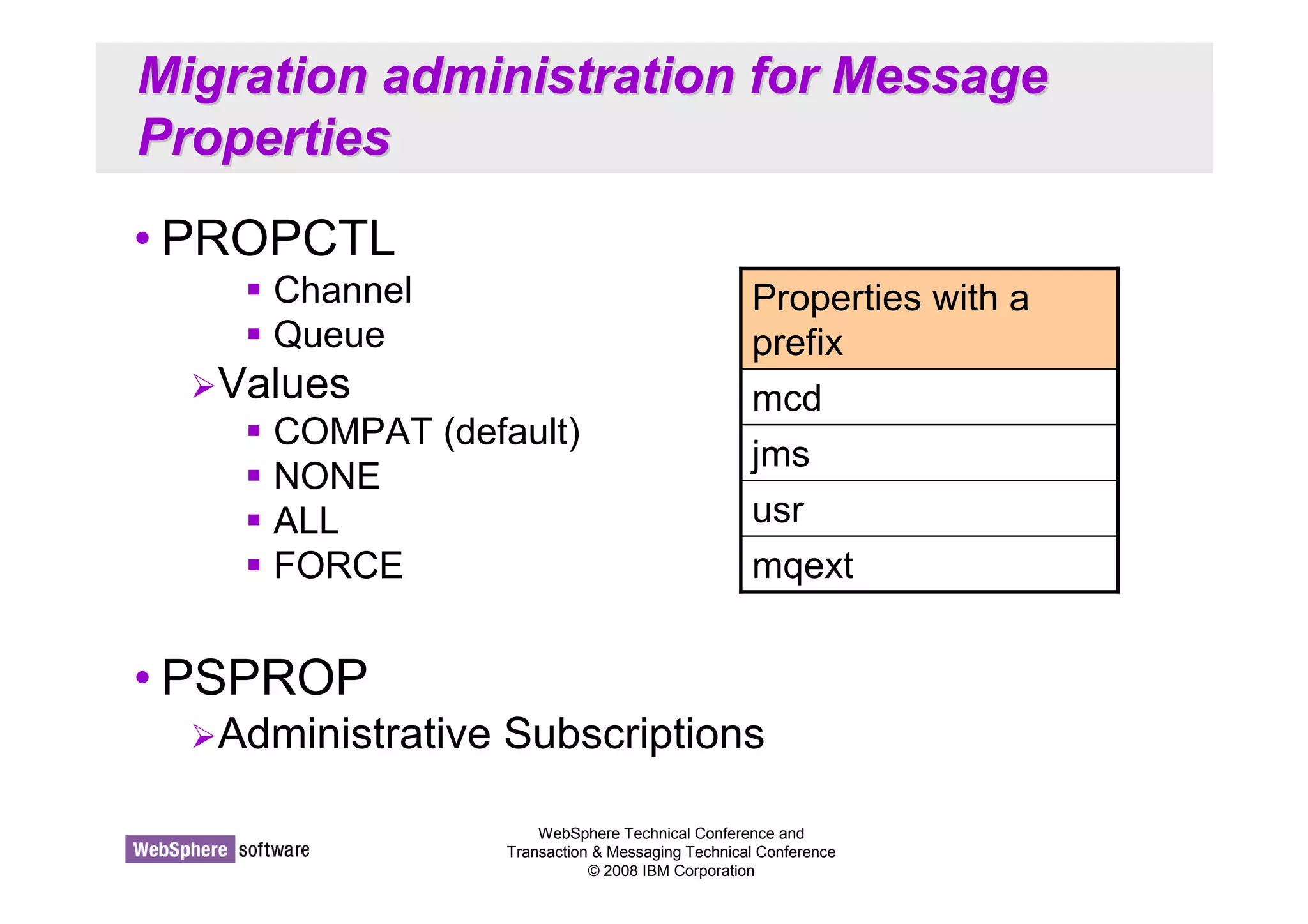
• PROPCTL 
Properties with a 
prefix 
mcd 
jms 
usr 
mqext 
WebSphere Technical Conference and 
Transaction  Messaging Technical Conference 
© 2008 IBM Corporation 
 Channel 
 Queue 
Values 
 COMPAT (default) 
 NONE 
 ALL 
 FORCE 
• PSPROP 
Administrative Subscriptions
Migration administration (Properties) - 
Notes 
WebSphere Technical Conference and 
Transaction  Messaging Technical Conference 
© 2008 IBM Corporation 
N 
O 
T 
E 
S 
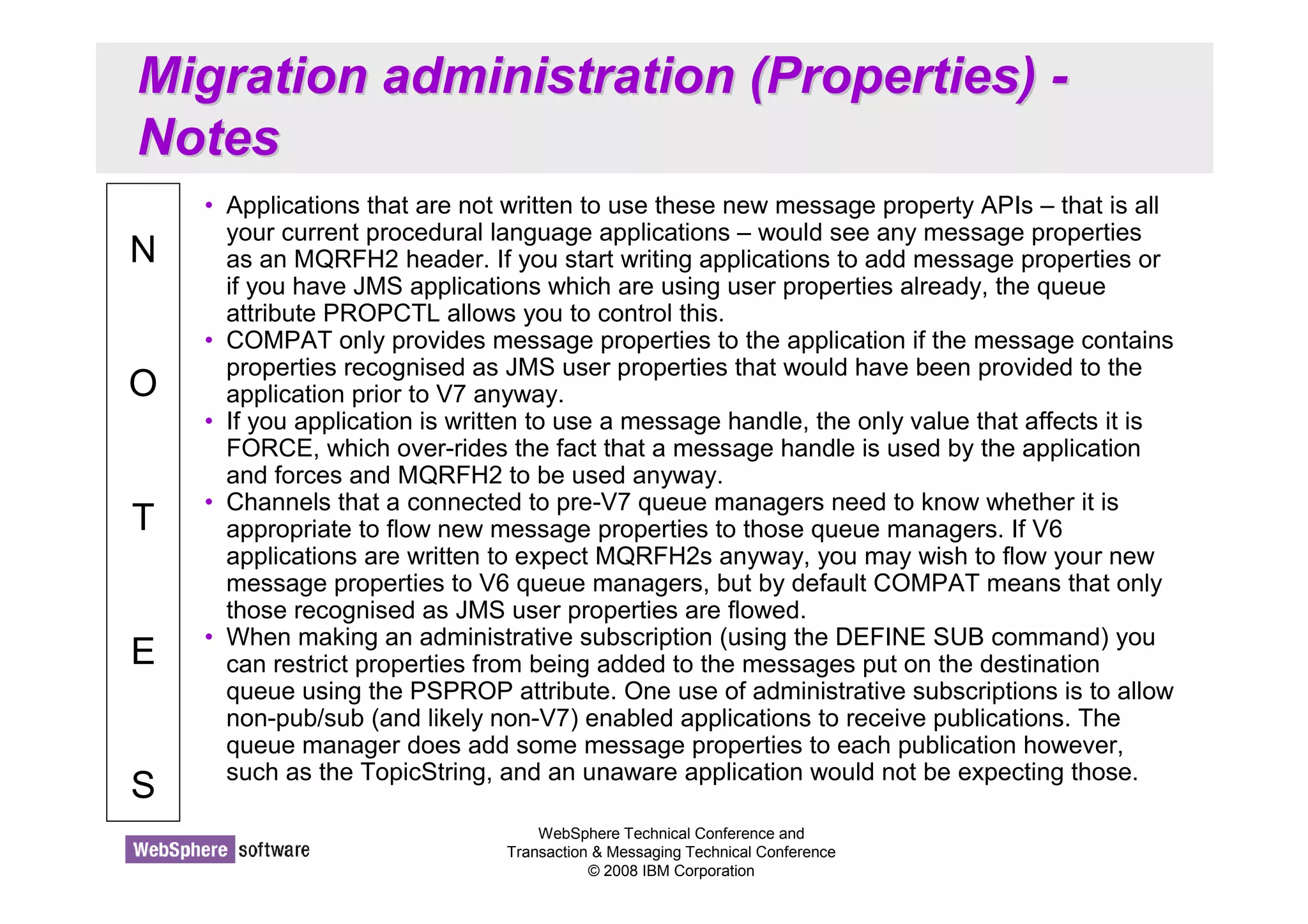
• Applications that are not written to use these new message property APIs – that is all 
your current procedural language applications – would see any message properties 
as an MQRFH2 header. If you start writing applications to add message properties or 
if you have JMS applications which are using user properties already, the queue 
attribute PROPCTL allows you to control this. 
• COMPAT only provides message properties to the application if the message contains 
properties recognised as JMS user properties that would have been provided to the 
application prior to V7 anyway. 
• If you application is written to use a message handle, the only value that affects it is 
FORCE, which over-rides the fact that a message handle is used by the application 
and forces and MQRFH2 to be used anyway. 
• Channels that a connected to pre-V7 queue managers need to know whether it is 
appropriate to flow new message properties to those queue managers. If V6 
applications are written to expect MQRFH2s anyway, you may wish to flow your new 
message properties to V6 queue managers, but by default COMPAT means that only 
those recognised as JMS user properties are flowed. 
• When making an administrative subscription (using the DEFINE SUB command) you 
can restrict properties from being added to the messages put on the destination 
queue using the PSPROP attribute. One use of administrative subscriptions is to allow 
non-pub/sub (and likely non-V7) enabled applications to receive publications. The 
queue manager does add some message properties to each publication however, 
such as the TopicString, and an unaware application would not be expecting those.
Simplified Browse + Cooperative Browse 
© 2008 IBM Corporation 
Conference materials may not be reproduced in whole or in part without the prior written permission of IBM.
WebSphere Technical Conference and 
Transaction  Messaging Technical Conference 
© 2008 IBM Corporation 
Simplified Browse 
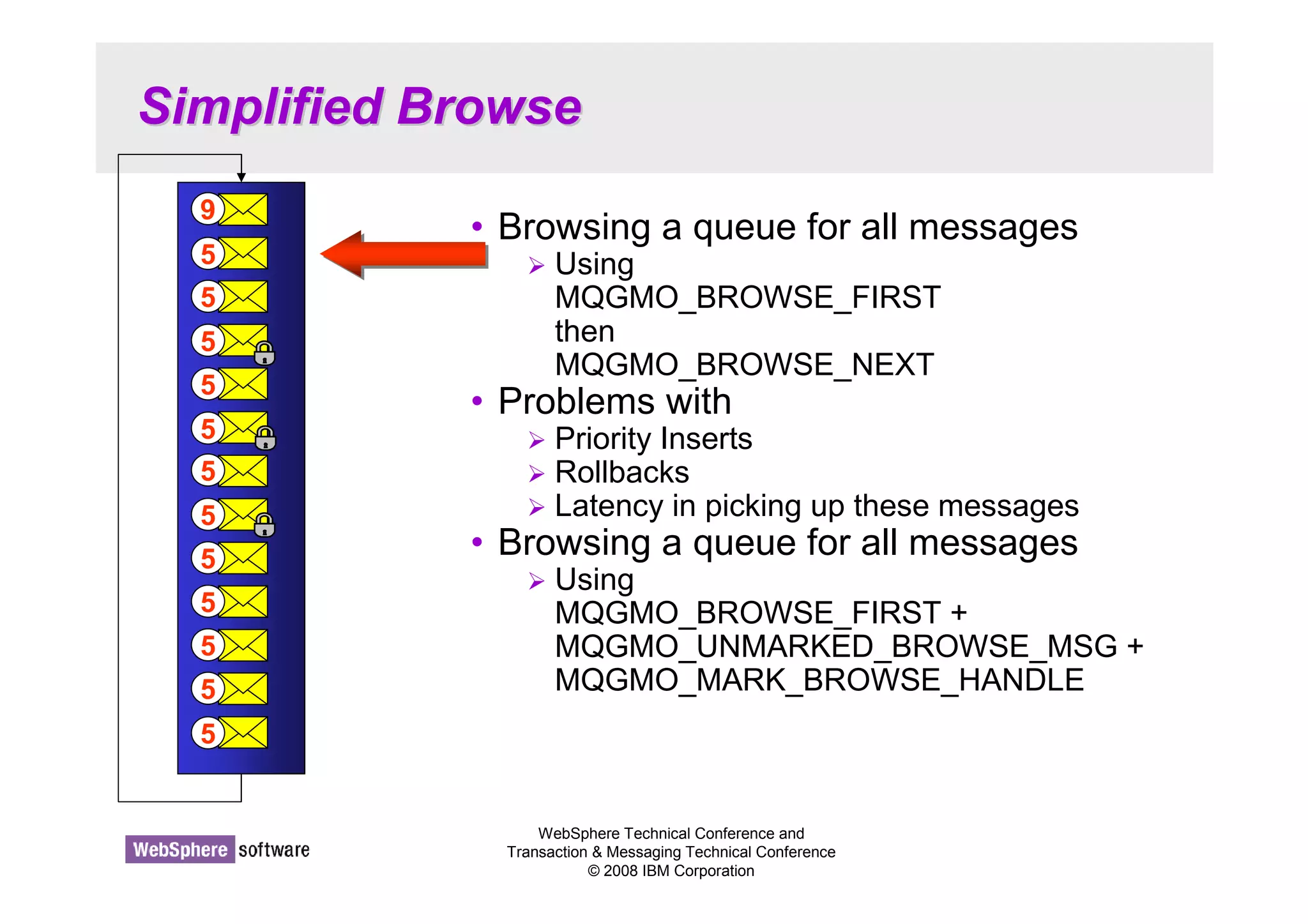
• Browsing a queue for all messages 
 Using 
MQGMO_BROWSE_FIRST 
then 
MQGMO_BROWSE_NEXT 
• Problems with 
 Priority Inserts 
 Rollbacks 
 Latency in picking up these messages 
• Browsing a queue for all messages 
 Using 
MQGMO_BROWSE_FIRST + 
MQGMO_UNMARKED_BROWSE_MSG + 
MQGMO_MARK_BROWSE_HANDLE 
9 
5 
5 
5 
5 
5 
5 
5 
5 
5 
5 
5 
5
WebSphere Technical Conference and 
Transaction  Messaging Technical Conference 
© 2008 IBM Corporation 
Simplified Browse 
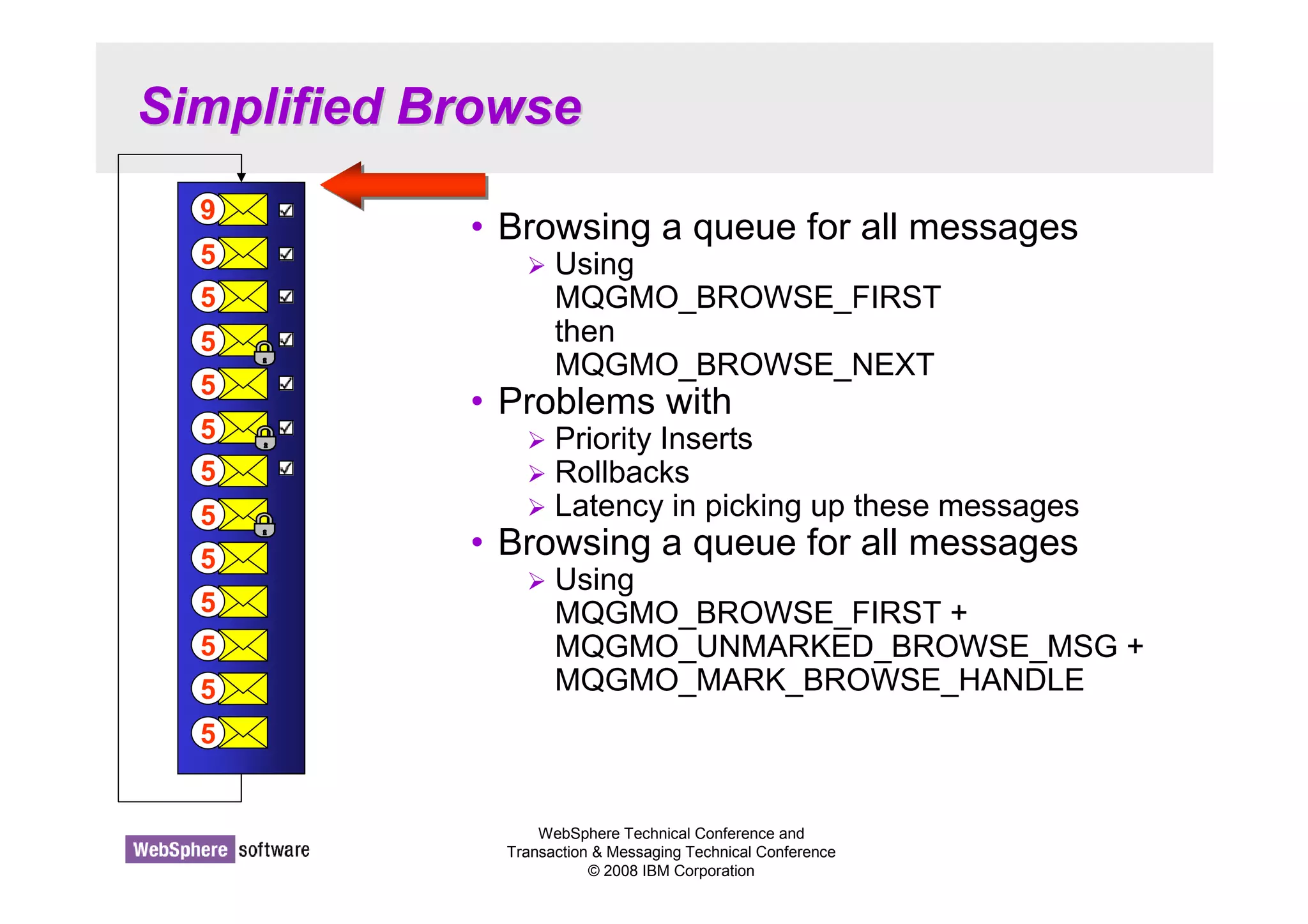
• Browsing a queue for all messages 
 Using 
MQGMO_BROWSE_FIRST 
then 
MQGMO_BROWSE_NEXT 
• Problems with 
 Priority Inserts 
 Rollbacks 
 Latency in picking up these messages 
• Browsing a queue for all messages 
 Using 
MQGMO_BROWSE_FIRST + 
MQGMO_UNMARKED_BROWSE_MSG + 
MQGMO_MARK_BROWSE_HANDLE 
9 
5 
5 
5 
5 
5 
5 
5 
5 
5 
5 
5 
5
Simplified Browse - Notes 
WebSphere Technical Conference and 
Transaction  Messaging Technical Conference 
© 2008 IBM Corporation 
N 
O 
T 
E 
S 
• Browsing a queue for all messages using the MQGMO Options 
MQGMO_BROWSE_FIRST followed by repeated calls with 
MQGMO_BROWSE_NEXT suffers from “missed” messages when browsing due to 
priority insertions and rollbacks of messages that were previously destructively got 
from the queue. There is a latency involved in finding these missed messages as the 
application has to go back to the start of the queue once it reaches the end to check if 
it had missed any. 
• An application that wishes to browse all the messages on a queue in the order that 
they would be returned to a destructive MQGET can in MQ V7 use the following 
MQGMO Options:- 
 MQGMO_BROWSE_FIRST + 
MQGMO_UNMARKED_BROWSE_MSG + 
MQGMO_MARK_BROWSE_HANDLE + 
MQGMO_WAIT 
• Repeated calls to MQGET with these options would return each message on the 
queue in turn. Each message returned is considered, by the object handle using in the 
MQGET call, to be marked. This prevents repeated delivery of messages even though 
MQGMO_BROWSE_FIRST is used to ensure that messages are not skipped. If 
MQRC_NO_MSG_AVAILABLE is returned, then at the time when the call was 
initiated, there were no messages on the queue that have not been browsed and that 
satisfied any match options supplied.
Browse with Mark options 
• MQGMO_MARK_BROWSE_HANDLE 
• MQGMO_UNMARKED_BROWSE_MSG 
• MQGMO_UNMARK_BROWSE_HANDLE 
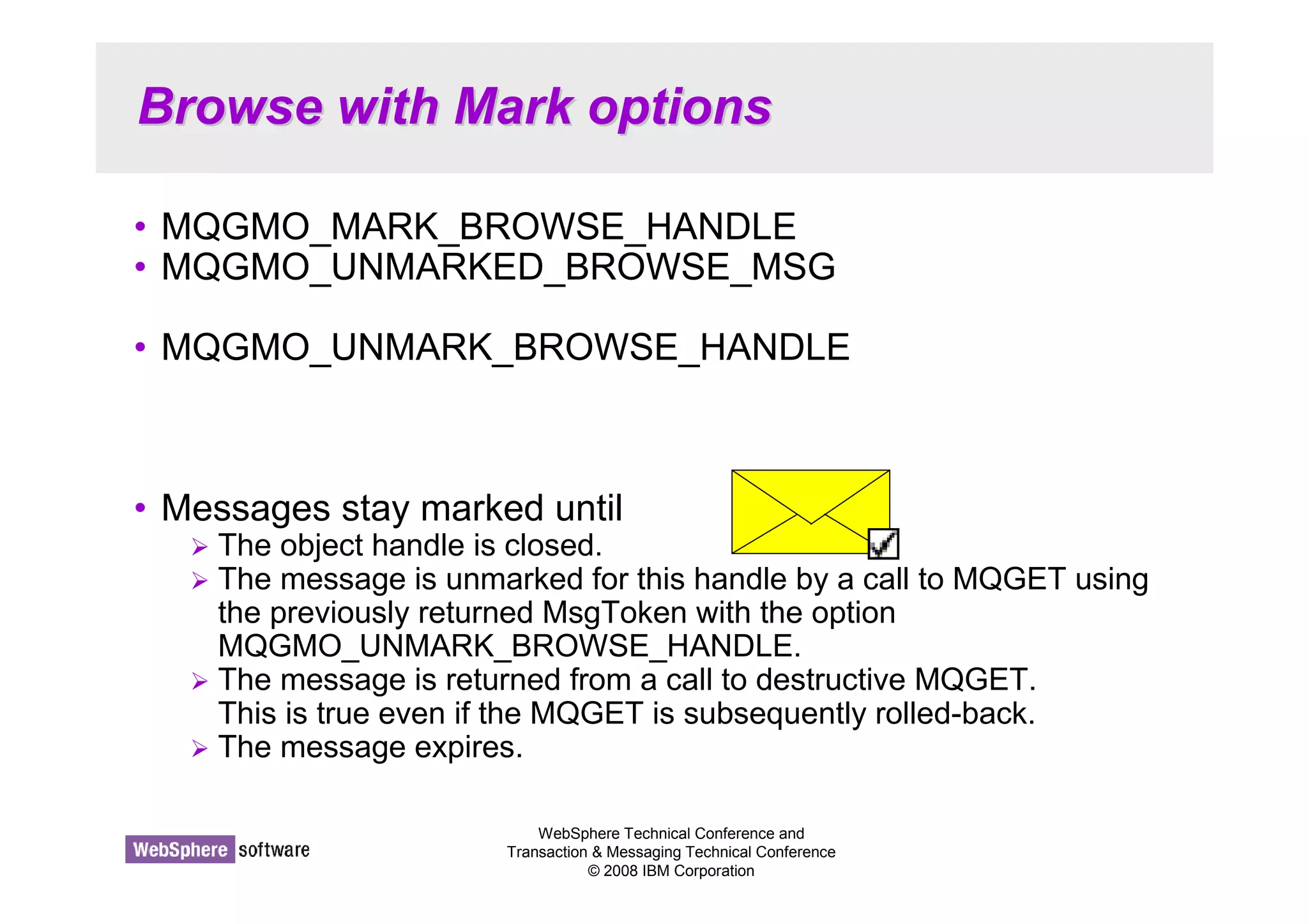
• Messages stay marked until 
 The object handle is closed. 
 The message is unmarked for this handle by a call to MQGET using 
the previously returned MsgToken with the option 
MQGMO_UNMARK_BROWSE_HANDLE. 
 The message is returned from a call to destructive MQGET. 
This is true even if the MQGET is subsequently rolled-back. 
 The message expires. 
WebSphere Technical Conference and 
Transaction  Messaging Technical Conference 
© 2008 IBM Corporation
Browse with Mark Options - Notes 
WebSphere Technical Conference and 
Transaction  Messaging Technical Conference 
© 2008 IBM Corporation 
N 
O 
T 
E 
S 
• On the previous foil we saw the use of 
MQGMO_MARK_BROWSE_HANDLE to mark which messages we had 
already seen. The undo action is MQGMO_UNMARK_BROWSE_HANDLE. 
• We also saw the use of MQGMO_UNMARKED_BROWSE_MSG for 
requesting that we are only given messages that we have not already 
marked as having seen. 
• Messages don’t stay marked forever though. There are various events that 
can remove marks.
Cooperative Browse 
WebSphere Technical Conference and 
Transaction  Messaging Technical Conference 
© 2008 IBM Corporation 
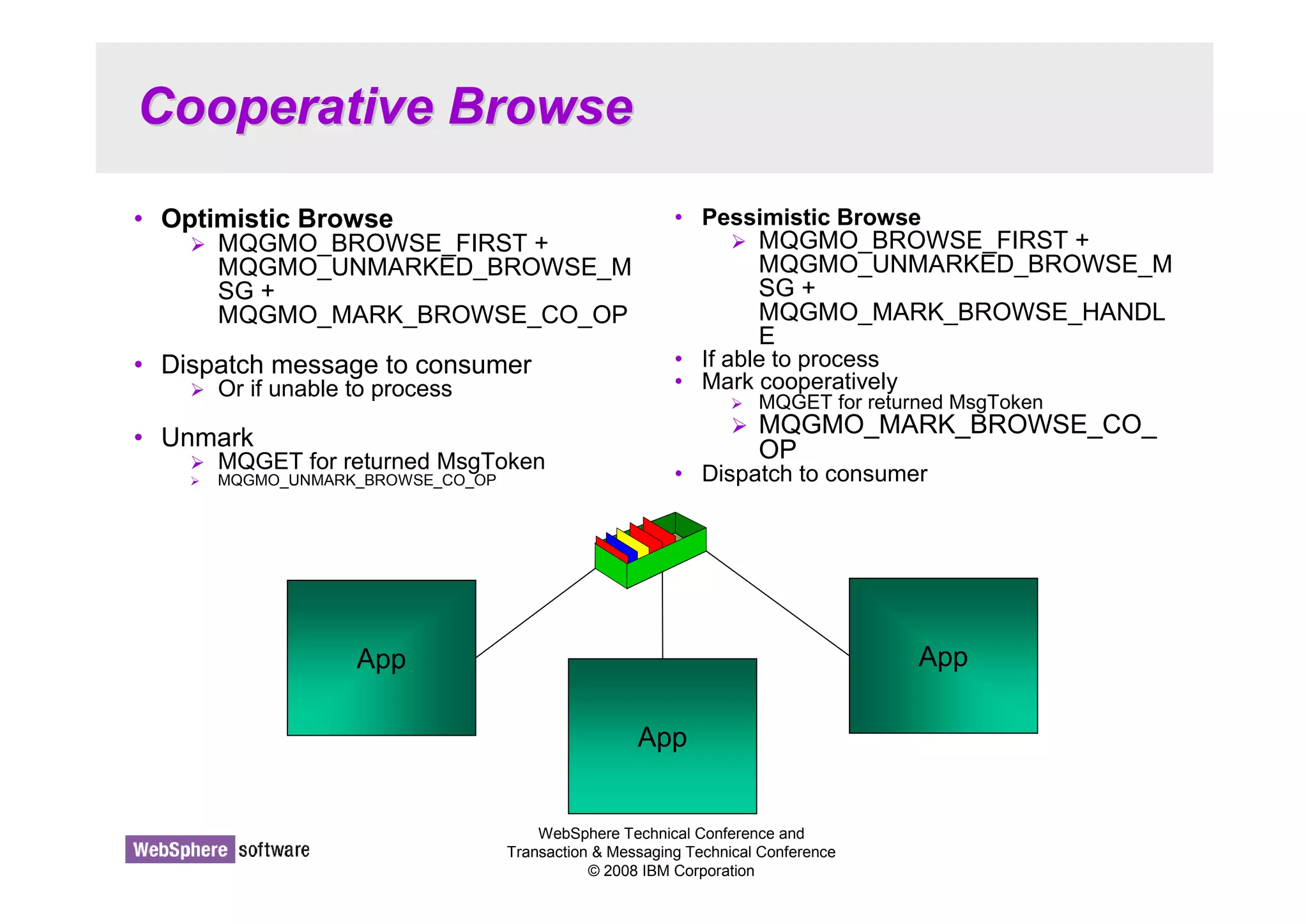
• Optimistic Browse 
 MQGMO_BROWSE_FIRST + 
MQGMO_UNMARKED_BROWSE_M 
SG + 
MQGMO_MARK_BROWSE_CO_OP 
• Dispatch message to consumer 
 Or if unable to process 
• Unmark 
 MQGET for returned MsgToken 
 MQGMO_UNMARK_BROWSE_CO_OP 
• Pessimistic Browse 
 MQGMO_BROWSE_FIRST + 
MQGMO_UNMARKED_BROWSE_M 
SG + 
MQGMO_MARK_BROWSE_HANDL 
E 
• If able to process 
• Mark cooperatively 
 MQGET for returned MsgToken 
 MQGMO_MARK_BROWSE_CO_ 
OP 
• Dispatch to consumer 
App 
App 
App
Cooperative Browse - Notes 
WebSphere Technical Conference and 
Transaction  Messaging Technical Conference 
© 2008 IBM Corporation 
N 
O 
T 
E 
S 
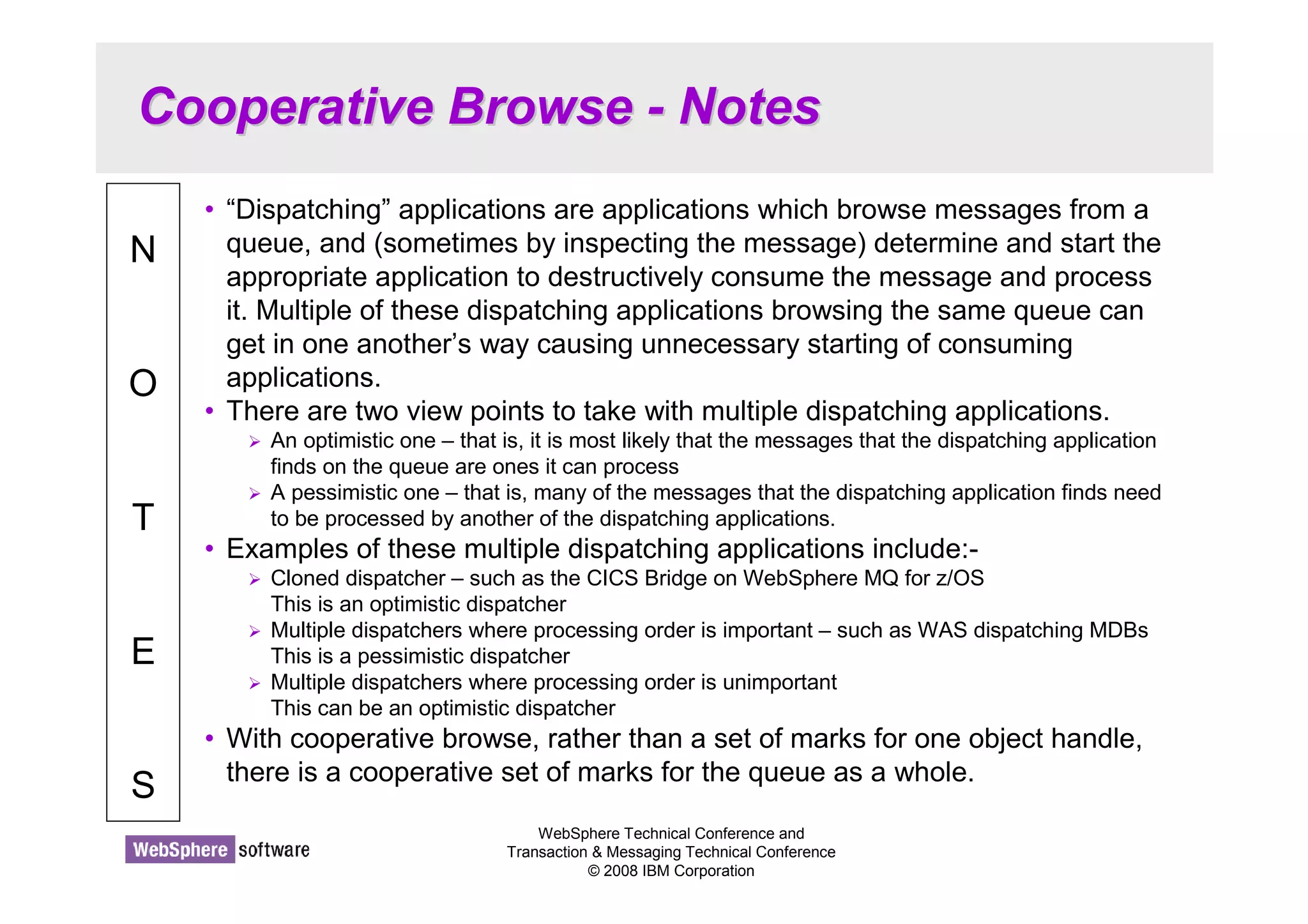
• “Dispatching” applications are applications which browse messages from a 
queue, and (sometimes by inspecting the message) determine and start the 
appropriate application to destructively consume the message and process 
it. Multiple of these dispatching applications browsing the same queue can 
get in one another’s way causing unnecessary starting of consuming 
applications. 
• There are two view points to take with multiple dispatching applications. 
 An optimistic one – that is, it is most likely that the messages that the dispatching application 
finds on the queue are ones it can process 
 A pessimistic one – that is, many of the messages that the dispatching application finds need 
to be processed by another of the dispatching applications. 
• Examples of these multiple dispatching applications include:- 
 Cloned dispatcher – such as the CICS Bridge on WebSphere MQ for z/OS 
This is an optimistic dispatcher 
 Multiple dispatchers where processing order is important – such as WAS dispatching MDBs 
This is a pessimistic dispatcher 
 Multiple dispatchers where processing order is unimportant 
This can be an optimistic dispatcher 
• With cooperative browse, rather than a set of marks for one object handle, 
there is a cooperative set of marks for the queue as a whole.
Cooperative Browse Options 
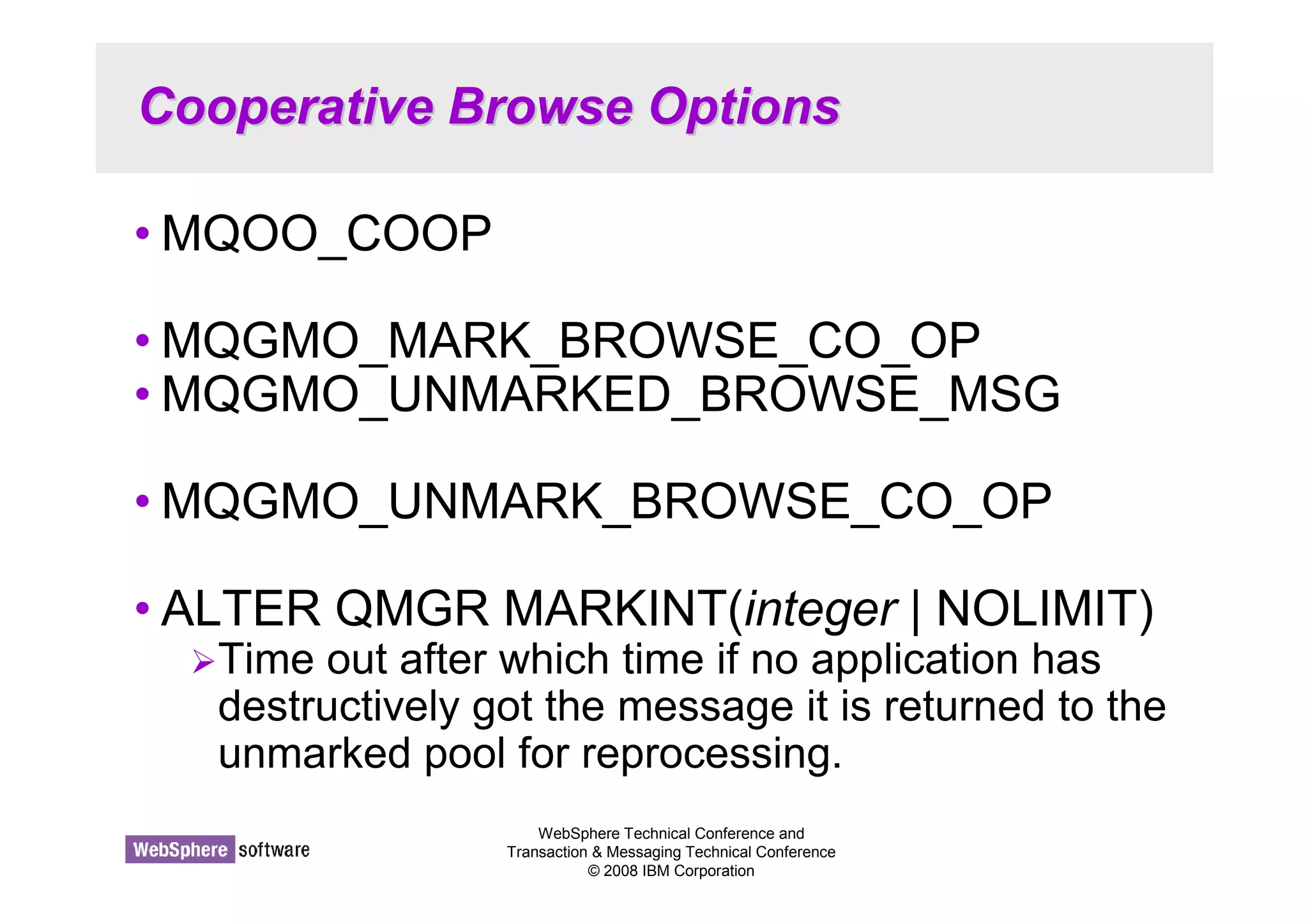
•MQOO_COOP 
•MQGMO_MARK_BROWSE_CO_OP 
•MQGMO_UNMARKED_BROWSE_MSG 
•MQGMO_UNMARK_BROWSE_CO_OP 
• ALTER QMGR MARKINT(integer | NOLIMIT) 
Time out after which time if no application has 
destructively got the message it is returned to the 
unmarked pool for reprocessing. 
WebSphere Technical Conference and 
Transaction  Messaging Technical Conference 
© 2008 IBM Corporation
Cooperative Browse Options - Notes 
WebSphere Technical Conference and 
Transaction  Messaging Technical Conference 
© 2008 IBM Corporation 
N 
O 
T 
E 
S 
• In order to indicate you wish to cooperate with other applications browsing 
this queue and be aware of their marked messages, you must MQOPEN the 
queue using the MQOO_CO_OP option. 
• Instead of using MQGMO_MARK_BROWSE_HANDLE, you use 
MQGMO_MARK_BROWSE_CO_OP to indicate that the marks are to be 
visible to all cooperating applications. To undo there is an option 
MQGMO_UNMARK_BROWSE_CO_OP. 
• In case a cooperatively marked message has been dispatched, but the 
consuming application has abended, there is a timeout to return messages 
such as this back to the pool to be reprocessed.
WebSphere Technical Conference and 
Transaction  Messaging Technical Conference 
© 2008 IBM Corporation 
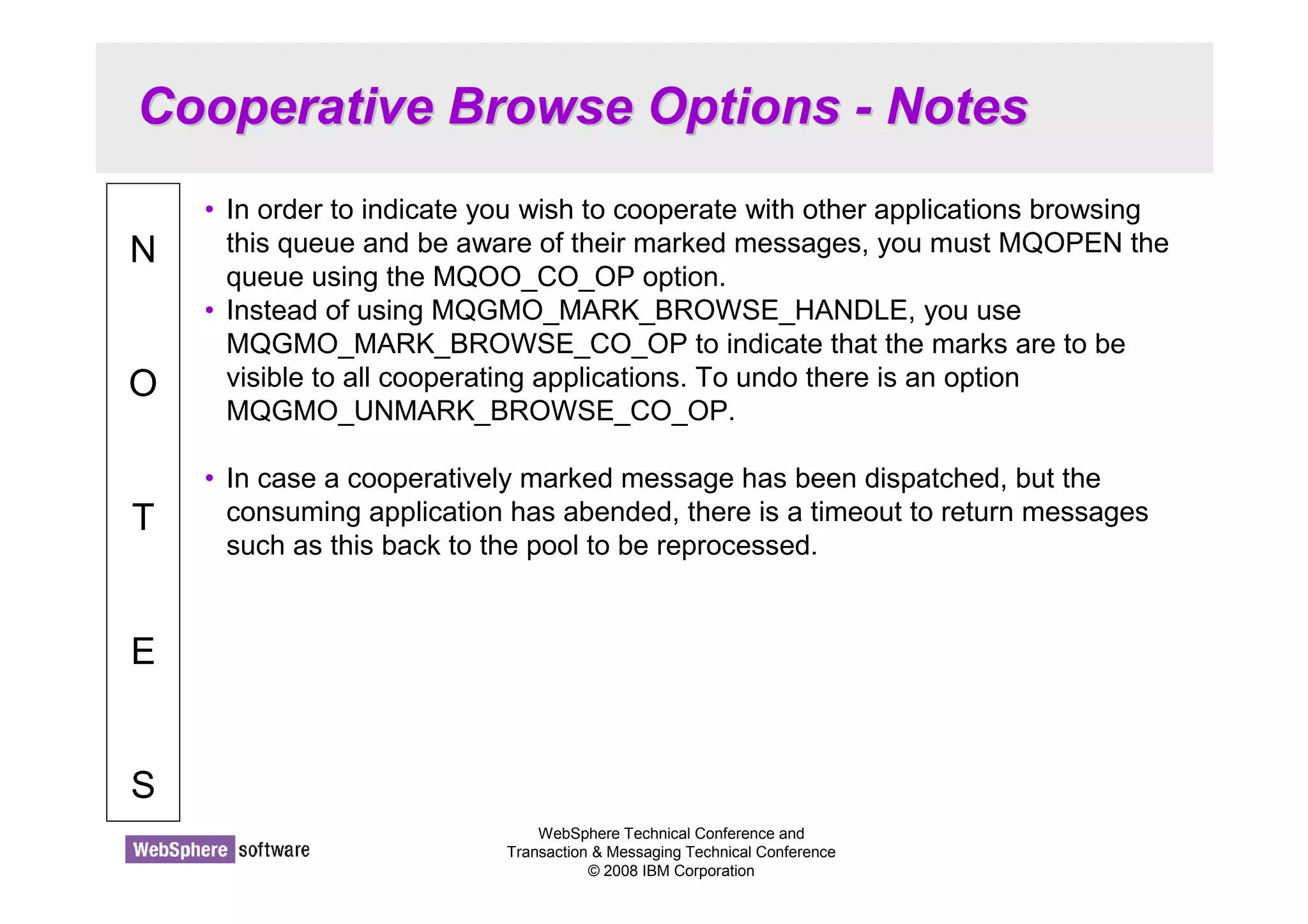
Summary 
• Asynchronous Consumption of messages 
• Asynchronous Put Response 
• Read-ahead of messages 
• Connection changes 
• Message Properties + Selectors 
• Simplified Browse + Co-operative Browse
Summary - Notes 
WebSphere Technical Conference and 
Transaction  Messaging Technical Conference 
© 2008 IBM Corporation 
N 
O 
T 
E 
S 
• WebSphere MQ V7 has substantially increased the functionality of the MQ 
API providing mechanisms for more efficient applications and ease of use 
improvements to avoid some of the more complicated parts of the MQ API.

WebSphere MQ V7 API Enhancements

  • 1.
    WebSphere MQ V7Enhanced Application Programming Morag Hughson - hughson@uk.ibm.com © 2008 IBM Corporation Conference materials may not be reproduced in whole or in part without the prior written permission of IBM.
  • 2.
    What’’s New inWebSphere MQ API WebSphere Technical Conference and Transaction & Messaging Technical Conference © 2008 IBM Corporation N O T E S • WebSphere MQ V7 extends the MQ API (Application Programming Interface) in a number of ways. In this presentation we will cover the new API changes, excluding Publish/Subscribe:- Asynchronous Consumption of messages Asynchronous Put Response Read-ahead of messages Connection changes Message Properties + Selectors Simplified Browse + Co-operative Browse • The changes for Publish/Subscribe are covered in a different presentation.
  • 3.
    What’’s New inWebSphere MQ API - Agenda • Asynchronous Consumption of messages • Asynchronous Put Response • Read-ahead of messages WebSphere Technical Conference and Transaction Messaging Technical Conference © 2008 IBM Corporation • Connection changes • Message Properties + Selectors • Simplified Browse + Co-operative Browse
  • 4.
    Asynchronous Consumption ofMessages © 2008 IBM Corporation Conference materials may not be reproduced in whole or in part without the prior written permission of IBM.
  • 5.
    Asynchronous Consumption ofMessages CClileiennt/tS/Seervrveerr • Simplifies programming • Allocates message buffers • Wait on multiple queues • Easy to cancel • Can register an Event handler WebSphere Technical Conference and Transaction Messaging Technical Conference © 2008 IBM Corporation MQCONN MQOPEN MQCB MQOPEN MQCB MQCTL Callback function MQPUT MQCMIT
  • 6.
    Asynchronous Consumption ofMessages - Notes WebSphere Technical Conference and Transaction Messaging Technical Conference © 2008 IBM Corporation N O T E S • Asynchronous consumer allows the application to register an interest in messages of a certain type and identify a callback routine which should be invoked when a message arrives. This has the following advantages to the traditional MQGET application. • Simplifies programming The application can continue to do whatever it was doing without needing to tie up a thread sitting in an MQGET call. • Allocates message buffers The application does not need to 'guess' the size of the next message and provide a buffer just large enough. The system will pass the application a message already in a buffer. • Wait on multiple queues The application can register an interest in any number of queues. This is very much simpler than using MQGET where one generally ended up polling round the queues. • Easy to cancel The application can use either MQCTL or MQCB to stop consuming from a queue at any time. This is awkward to achieve when an application is using MQGET • Can register an Event handler The application is notified of events such as Queue Manager quiescing or Communications failure.
  • 7.
    Define your call-backfunctions MQOPEN( hConn, ObjDesc, OpenOpts, hObj, CompCode, Reason); MQCB ( hConn, MQOP_REGISTER, cbd, hObj, md, gmo, CompCode, Reason); WebSphere Technical Conference and Transaction Messaging Technical Conference © 2008 IBM Corporation • MQOPEN a queue or MQSUB using MQSO_MANAGED • MQCB connects returned hObj to call-back function • Operations (MQOP_*) • CallbackType Message Consumer Event Handler MQCBD CBDesc = {MQCBD_DEFAULT}; cbd.CallbackFunction = MessageConsumer; cbd.CallbackType = MQCBT_MESSAGE_CONSUMER; cbd.MaxMsgLength = MQCBD_FULL_MSG_LENGTH; cbd.Options = MQCBDO_FAIL_IF_QUIESCING;
  • 8.
    Define your call-backfunctions - Notes WebSphere Technical Conference and Transaction Messaging Technical Conference © 2008 IBM Corporation N O T E S • The MQCB verb ties a function (described in the Call-Back Descriptor (MQCBD)) to an object handle. This object handle is any object handle that you might have used for an MQGET. That is, one that was returned from an MQOPEN call or an MQSUB call (using MQSO_MANAGED for example). • The MQCB verb has a number of Operations. We see an example of MQOP_REGISTER on this foil which tells the queue manager that this function (described in the MQCBD) should be called when messages arrive for the specified object handle. You can do the inverse of the operation with MQOP_DEREGISTER to remove a previously registered call-back function. Also we have MQOP_SUSPEND and MQOP_RESUME which we will cover a little later. • There are actually two types of call-back function you can define. A message consumer which is tied to an object handle, and receives messages or error notifications about the specific queue such as MQRC_GET_INHIBITED; and an event handler which is tied to the connection handle and receives error notifications about the connection such as MQRC_Q_MGR_QUIESCING. • One of the benefits of using asynchronous consume is that the queue manager manages the buffer your message is in. This means that your application doesn’t have to worry about truncated messages and acquiring bigger buffers in the case of MQRC_TRUNCATED_MSG_FAILED. The default is to use MQCBD_FULL_MSG_LENGTH, but if you wish to restrict the size of messages presented to your call-back function, you can put a length in the MaxMsgLength field of the MQCBD.
  • 9.
    MQGMO differences MQGETAsynchronous Consume MQRC_OPTIONS_ERROR MQGET will return immediately with MQRC_NO_MSGS_AVAILABLE if there are no messages MQGET will never return with MQRC_NO_MSGS_AVAILABLE WebSphere Technical Conference and Delivers first message then automatically switches to BROWSE_NEXT Only called with MQRC_NO_MSGS_AVAILABLE if just started or has had a message since last 2033 The message consumer will never be called with MQRC_NO_MSGS_AVAILABLE Transaction Messaging Technical Conference © 2008 IBM Corporation Combining MQGMO_BROWSE_FIRST + MQGMO_BROWSE_NEXT MQGMO_WAIT with MQGMO.WaitInterval = 0 MQGMO_NO_WAIT MQGMO_WAIT with MQGMO.WaitInterval = MQWI_UNLIMITED MQGMO_SET_SIGNAL Allowed Not allowed
  • 10.
    MQGMO differences -Notes WebSphere Technical Conference and Transaction Messaging Technical Conference © 2008 IBM Corporation N O T E S • The MQCB call provides an MQGMO structure which you will be familiar with from using MQGET. The MQGMO is used for Asynchronous Consume as well as for MQGET. It is after all the way to describe how to consume your message whether synchronously or asynchronously. Some of the attributes/options in the MQGMO operate slightly differently when used for Asynchronous Consume and this foil details those differences. • MQGMO_WAIT with MQGMO.WaitInterval = 0 operates just like MQGMO_NO_WAIT when one uses on an MQGET, but in the case of asynchronous consumers we wish to avoid the consumer from polling in a busy loop in this case, so it operates more like a backstop marker to show when the end of a batch of messages has been reached. • Note that MQGMO_NO_WAIT, and MQGMO_WAIT with a WaitInterval of MQWI_UNLIMITED are quite different when passed to MQGET but with the MQCB call their behaviour is the same. The consumer will only be passed messages and events, it will never be passed the reason code indicating no messages. Effectively MQGMO_NO_WAIT will be treated as an indefinite wait. This is to prevent the consumer from endlessly being called with the no messages reason code.
  • 11.
    Control your messageconsumption MQCTLO ctlo = {MQCTLO_DEFAULT}; ctlo.Options = MQCTLO_FAIL_IF_QUIESCIN MQCTL( hConn, WebSphere Technical Conference and Transaction Messaging Technical Conference © 2008 IBM Corporation • MQCTL controls whether message consumption is currently operable • Operations MQOP_START MQOP_START_WAIT MQOP_STOP MQOP_SUSPEND (MQCB too) MQOP_RESUME (MQCB too) • Give up control of the hConn for call-backs to use • Change current call-backs operating Either MQOP_SUSPEND the connection Or from within a currently called call-back MQOP_START, ctlo, CompCode, Reason); ... MQCTL( hConn, MQOP_STOP, ctlo, CompCode, Reason);
  • 12.
    Control your messageconsumption - Notes WebSphere Technical Conference and Transaction Messaging Technical Conference © 2008 IBM Corporation N O T E S • Once you have defined all your message consumers using MQCB calls – you may have several – then use the MQCTL call to tell the queue manager you are ready to start consuming messages. Once you have called MQCTL for a specific hConn you give up control of that hConn and it is passed to the call-backs to use. If you try to use it for any other MQ call you will receive MQRC_HCONN_ASYNC_ACTIVE. The exception to this is another call to MQCTL to either MQOP_STOP or MQOP_SUSPEND message consumption. • Use MQOP_STOP when your application is finished consuming messages. Use MQOP_SUSPEND (and then subsequently MQOP_RESUME) when you wish to briefly pause message consumption while you, for example, MQOP_REGISTER another MQCB call or MQOP_DEREGISTER an existing one. While the whole hConn is suspended none of the call-backs will be delivered messages. You may wish to only suspend a particular object handle, in which case you can use MQOP_SUSPEND on an MQCB call. • Calls to change the call-backs currently operating can also be made inside another call-back removing the need to suspend the connection in order to make changes such as this.
  • 13.
    The call-back function • Fixed prototype • Call-back context (MQCBC) CallType – why fn was called CompCode + Reason detail any error State – Consumer state WebSphere Technical Conference and Transaction Messaging Technical Conference © 2008 IBM Corporation Saves coding all possible Reasons A struct tagMQCBC { MQCHAR4 StrucId; MQLONG Version; MQLONG CallType; MQHOBJ Hobj; MQPTR CallbackArea; MQPTR ConnectionArea; MQLONG CompCode; MQLONG Reason; MQLONG State; MQLONG DataLength; MQLONG BufferLength; MQLONG Flags; }; MQLONG MessageConsumer( MQHCONN hConn, MQMD * pMsgDesc, MQGMO * pGetMsgOpts, MQBYTE * Buffer, MQCBC * pContext)
  • 14.
    The call-back function- Notes WebSphere Technical Conference and Transaction Messaging Technical Conference © 2008 IBM Corporation N O T E S • Your call-back function can have any name you want, but it must conform to the prototype shown. When called with a message, you are passed the Message Descriptor (MQMD), the message buffer and the Get-Message Options structure (MQGMO) which contains a number of output fields about the message you have been given. You will know you have been given a message because the CallType field in the Call Back Context (MQCBC) will be set to either MQCBCT_MSG_REMOVED or MQCBCT_MSG_NOT_REMOVED (which one depends on the get options you used, i.e. browse or a few specific errors). • Your message consumer can also be called with CallType set to MQCBCT_EVENT_CALL (this is also the only way an Event handler can be called). The message consumer will be given events that are pertinent to the queue it is consuming from, for example, MQRC_GET_INHIBITED whereas the event handler gets connection wide events. If there is an error to report, in the case of an MQCBCT_EVENT_CALL or in some cases for MQCBCT_MSG_NOT_REMOVED, it will be reported in the CompCode and Reason fields of the MQCBC. When a Reason code is delivered to a call-back, the State field of the MQCBC details what has happened to the consumer as a result of the specific Reason. It can be used to simplify application programming by informing the application what has happened to the consumer function rather than the application having to know for each reason code what the behaviour will be. States such as MQCS_SUSPENDED_USER_ACTION which detail that some user intervention will be needed before message consumption can continue.
  • 15.
    Administrative view ofconsumer state • Consumer state can be seen in DISPLAY CONN Starting MQSC for queue manager TEST1. DIS CONN(30A1C94720001901) TYPE(ALL) AMQ8276: Display Connection details. CONN(30A1C94720001901) TYPE(CONN) APPLTAG(AsyncConsumer.exe) APPLTYPE(USER) ASTATE(STARTED) CONNOPTS(MQCNO_SHARED_BINDING) ASTATE(ACTIVE) OBJNAME(Q2) OBJTYPE(QUEUE) OPENOPTS(MQOO_INPUT_SHARED,MQOO_FAIL_IF_QUIESCING) HSTATE(ACTIVE) READA(NO) ASTATE(ACTIVE) OBJNAME(Q1) OBJTYPE(QUEUE) OPENOPTS(MQOO_INPUT_SHARED,MQOO_FAIL_IF_QUIESCING) HSTATE(ACTIVE) READA(NO) WebSphere Technical Conference and Transaction Messaging Technical Conference © 2008 IBM Corporation Object handle state Also on DISPLAY QSTATUS Connection handle state • If a connection or call-back is suspended and so cannot currently consume messages, its ASTATE value will reflect this fact.
  • 16.
    Administrative view ofconsumer state - Notes WebSphere Technical Conference and Transaction Messaging Technical Conference © 2008 IBM Corporation N O T E S • Message consumers are tied to object handles and their existence is reflected in the various administration views that show you details about object handles. These are DISPLAY CONN TYPE(HANDLE) and DISPLAY QSTATUS TYPE(HANDLE). The field ASTATE will indicate whether a consumer has even been registered and what state it is currently in. Similar information is also available for the connection handle with an ASTATE field on DISPLAY CONN TYPE(CONN) as well. • Connection handle ASTATE SUSPENDED STARTED STARTWAIT STOPPED NONE - No MQCTL call has been issued against the connection handle. • Object handle ASTATE ACTIVE INACTIVE – MQCB done, but no MQCTL in STARTED state at the moment. SUSPENDED SUSPTEMP NONE – No MQCB call has been issued against this object handle.
  • 17.
    Asynchronous Put Response © 2008 IBM Corporation Conference materials may not be reproduced in whole or in part without the prior written permission of IBM.
  • 18.
    Asynchronous Put Response WebSphere Technical Conference and Transaction Messaging Technical Conference © 2008 IBM Corporation CClileienntt MQCONN MQOPEN MQOPEN MQPUT MQPUT MQPUT MQPUT MQCMIT SSeervrveerr
  • 19.
    Asynchronous Put Response- Notes WebSphere Technical Conference and Transaction Messaging Technical Conference © 2008 IBM Corporation N O T E S • Asynchronous Put (also known as 'Fire and Forget') is a recognition of the fact that a large proportion of the cost of an MQPUT from a client is the line turnaround of the network connection. When using Asynchronous Put the application sends the message to the server but does not wait for a response. Instead it returns immediately to the application. The application is then free to issue further MQI calls as required. The largest speed benefit will be seen where the application issues a number of MQPUT calls and where the network is slow. • Once the application has competed it's put sequence it will issue MQCMIT or MQDISC etc which will flush out any MQPUT calls which have not yet completed. • Because this mechanism is designed to remove the network delay it currently only has a benefit on client applications. However, it is recommended that applications that could benefit from it, use it for local bindings as well since in the future there is the possibility that the server could perform some optimisations when this option is used.
  • 20.
    Put Response Options • MQPMO_ASYNC_RESPONSE • MQPMO_SYNC_RESPONSE • MQPMO_RESPONSE_AS_Q_DEF • MQPMO_RESPONSE_AS_TOPIC_DEF WebSphere Technical Conference and Transaction Messaging Technical Conference © 2008 IBM Corporation • DEFPRESP SYNC ASYNC • Returned (output) Message Descriptor (MQMD) ASYNC ApplIdentityData PutApplType PutApplName ApplOriginData MsgId CorrelId SYNC Full MQMD is completed FRUIT Price/Fruit
  • 21.
    Put Response Options- Notes WebSphere Technical Conference and Transaction Messaging Technical Conference © 2008 IBM Corporation N O T E S • You can make use of asynchronous responses on MQPUT by means of an application change or an administration change. Without any change your application will be effectively using MQPMO_RESPONSE_AS_Q_DEF which will be resolved to whatever value is defined on the queue definition. You can choose to deliberately use asynchronous responses by using MQPMO_ASYNC_RESPONSE, and you can choose to always have synchronous responses by using MQPMO_SYNC_RESPONSE. • The queue and topic objects have an attribute DEFPRESP which is where the MQPMO_RESPONSE_AS_Q_DEF/TOPIC_DEF are resolved from. This has values ASYNC and SYNC. • Apart from not being informed of any failures to put the message on the queue, the other change when using ASYNC is that only some fields in the Message Descriptor (MQMD) are actually filled in when it is returned as an output structure to the putting application. The remaining fields are undefined when using ASYNC responses.
  • 22.
    Last error retrieval • Application will not find out about failure to put to queue WebSphere Technical Conference and Transaction Messaging Technical Conference © 2008 IBM Corporation Ignore the situation Issue an MQCMIT Issue the new verb MQSTAT A struct tagMQSTS { MQCHAR4 StrucId; MQLONG Version; MQLONG CompCode; MQLONG Reason; MQLONG PutSuccessCount; MQLONG PutWarningCount; MQLONG PutFailureCount; MQLONG ObjectType; MQCHAR48 ObjectName; MQCHAR48 ObjectQMgrName; MQCHAR48 ResolvedObjectName; MQCHAR48 ResolvedQMgrName; }; MQSTS sts = {MQSTS_DEFAULT}; MQSTAT(hConn, MQSTAT_TYPE_ASYNC_ERROR, sts, CompCode, Reason);
  • 23.
    Last error retrieval- Notes WebSphere Technical Conference and Transaction Messaging Technical Conference © 2008 IBM Corporation N O T E S • Because the client does not wait for a response from the MQPUT call it will not be told at MQPUT time whether there was a problem putting the message. For example, the queue could be full. There are three things the application can do : Ignore the situation In many cases of say a non-persistent message the application does not care too much whether the message makes it or not. If no response it received then another request can be issued within a few seconds or whatever. Issue an MQCMIT If the messages put are persistent messages in syncpoint then if any of them fail they will cause a subsequent MQCMIT call to also fail. Issue the new verb MQSTAT This new verb allows the application at any time to flush all messages to the server and respond with how many of the messages succeeded or failed. The application can issue this verb as often as required
  • 24.
    Read-ahead of messages © 2008 IBM Corporation Conference materials may not be reproduced in whole or in part without the prior written permission of IBM.
  • 25.
    Read-ahead of messages WebSphere Technical Conference and Transaction Messaging Technical Conference © 2008 IBM Corporation CClileienntt MQCONN MQOPEN MQGET MQGET MQGET SSeervrveerr Request for ‘n’ messages
  • 26.
    Read-ahead of messages- Notes WebSphere Technical Conference and Transaction Messaging Technical Conference © 2008 IBM Corporation N O T E S • Read Ahead (also known as 'Streaming') is a recognition of the fact that a large proportion of the cost of an MQGET from a client is the line turnaround of the network connection. When using Read Ahead the MQ client code makes a request for more than one message from the server. The server will send as many non-persistent messages matching the criteria (such as MsgId) as it can up to the limit set by the client. The largest speed benefit will be seen where there are a number of similar non-persistent messages to be delivered and where the network is slow. • Read Ahead is useful for applications which want to get large numbers of non-persistent messages, outside of syncpoint where they are not changing the selection criteria on a regular basis. For example, getting responses from a command server or a query such as a list of airline flights. • If an application requests read ahead but the messages are not suitable, for example, they are all persistent then only one message will be sent to the client at any one time. Read ahead is effectively turned off until a sequence of non-persistent messages are on the queue again. • The message buffer is purely an 'in memory' queue of messages. If the application ends or the machine crashes these messages will be lost. • Because this mechanism is designed to remove the network delay it currently only has a benefit on client applications. However, it is recommended that applications that might benefit from it, use it for local bindings as well since in the future there is the possibility that the server could perform some optimisations when this option is used.
  • 27.
    Read-ahead Options •MQOO_READ_AHEAD_AS_Q_DEF • MQOO_NO_READ_AHEAD • MQOO_READ_AHEAD • MQSO_READ_AHEAD_AS_Q_DEF When using managed queues • MQSO_NO_READ_AHEAD • MQSO_READ_AHEAD WebSphere Technical Conference and Transaction Messaging Technical Conference © 2008 IBM Corporation • DEFREADA NO YES DISABLED MQOPEN MQSUB MQSO_MANAGED
  • 28.
    Read-ahead Options -Notes WebSphere Technical Conference and Transaction Messaging Technical Conference © 2008 IBM Corporation N O T E S • You can make use of read-ahead on MQGET by means of an application change or an administration change. Without any change your application will be effectively using MQOO_READ_AHEAD_AS_Q_DEF on MQOPEN which will be resolved to whatever value is defined on the queue definition. You can choose to deliberately use read-ahead by using MQOO_READ_AHEAD on your MQOPEN, and you can choose to turn off read-ahead by using MQOO_NO_READ_AHEAD. • If you are using a managed destination on MQSUB, by default your application will be effectively using MQSO_READ_AHEAD_AS_Q_DEF and taking its value from the model queue that is used to base managed destinations on. Non-durable subscriptions using the default provided model, SYSTEM.NDURABLE.MODEL.QUEUE, will find that read-ahead is turned on. You can choose to deliberately use read-ahead by using MQSO_READ_AHEAD on your MQSUB, and you can choose to turn off read-ahead by using MQSO_NO_READ_AHEAD on your MQSUB. • Queue objects have an attribute DEFREADA which is where the MQOO/SO_READ_AHEAD_AS_Q_DEF are resolved from. This has values YES and NO for this purpose and additionally a value DISABLED, which over-rides anything specified by the application and turns off any request for read-ahead on this queue.
  • 29.
    Application Suitability AMQ8276:Display Connection details. CONN(153FCC4720008402) EXTCONN(414D5143544553543220202020202020) TYPE(CONN) APPLTAG(D:ReadAhead.exe) APPLTYPE(USER) ASTATE(NONE) CHANNEL(SYSTEM.DEF.SVRCONN) CONNAME(127.0.0.1) CONNOPTS(MQCNO_HANDLE_SHARE_BLOCK,MQCNO_SHARED_BINDING) USERID(hughson) OBJNAME(Q1) OBJTYPE(QUEUE) OPENOPTS(MQOO_INPUT_SHARED,MQOO_READ_AHEAD) HSTATE(ACTIVE) READA(BACKLOG) WebSphere Technical Conference and Transaction Messaging Technical Conference © 2008 IBM Corporation • Suitable for Non-persistent, non-transactional consumption of messages intended for this client only Non-durable subscriber Response messages to a query Message dispatching/routing • Not suitable for Persistent, transactional messages Applications that continually change message selection criteria • Use of some options implicitly turn off read-ahead Persistent messages – read-ahead turned off for that message Certain MQGMO options – read-ahead turned off for whole use of that object handle (see next page) • Changing message selection criteria can leave unconsumed messages in the read-ahead buffer Highlighted by DISPLAY CONN TYPE(HANDLE) with READA(BACKLOG) if the number of these gets so high as to affect the efficiency of read-ahead
  • 30.
    Application Suitability -Notes WebSphere Technical Conference and Transaction Messaging Technical Conference © 2008 IBM Corporation N O T E S • Message read ahead is supported between MQ clients and MQ servers thus removing the need for the MQ client to specifically request every message that is sent to it by the server. Certain types of applications can benefit from providing the message criteria that they wish to consume and having these messages sent to the client without the need for the client to repeatedly tell the server the same message criteria. • Read ahead works best when one is fairly certain that the messages really are intended for this client, one is fairly certain they will be consumed by the client, and one knows ahead of time in what manner they will be consumed. Ideal scenarios include a non-durable subscribe of non-persistent messages using an asynchronous consumer; a simple request/reply application getting multiple reply messages; or a message dispatching or routing application. By contrast, a point to point get of a persistent message in a transaction is not suitable for read ahead. However it is the low-cost, non-transactional case which customers expect to be quick and therefore read ahead is ideal in these circumstances. • Read-ahead only applies to non-persistent messages. Any persistent messages will not be affected by read-ahead. When the next message to be delivered is a persistent transactional message, the client will wait until all buffered messages have been consumed and then request the persistent message directly. Thus the quality of service for persistent messages is unchanged. • The use of certain MQGMO fields or options may turn-off the use of read-ahead even if it is explicitly requested by the application. MQOO_READ_AHEAD is an advisory option. It will also not be used if specified on a application that is connecting to queue manager that is pre-V7 or when used on a bindings connected application. It does not cause an error in these cases. The next page will detail the specific fields and options. • Your application can change the selection of messages by MsgId and CorrelId when using read ahead. Doing so may result in messages being delivered to the in-memory buffer that are not subsequently consumed by the application since it never requests them later. This causes a backlog of messages in the in-memory buffer and will cause read ahead not to function as effectively as it might. This can be seen in DISPLAY CONN TYPE(HANDLE) with READA(BACKLOG).
  • 31.
    MQGMO options withRead-ahead MQGMO fields MsgHandle MQGET MQGMO options MQGMO_WAIT MQGMO_NO_WAIT MQGMO_FAIL_IF_QUIESCING MQGMO_BROWSE_FIRST MQGMO_BROWSE_NEXT MQGMO_BROWSE_MESSAGE_UNDER_C URSOR MQGMO_SET_SIGNAL MQGMO_SYNCPOINT MQGMO_MARK_SKIP_BACKOUT MQGMO_MSG_UNDER_CURSOR MQGMO_LOCK MQGMO_UNLOCK WebSphere Technical Conference and Transaction Messaging Technical Conference © 2008 IBM Corporation MQGET Options that are not permitted when read ahead is enabled MQGMO_SYNCPOINT_IF_PERSISTENT MQGMO_NO_SYNCPOINT MQGMO_ACCEPT_TRUNCATED_MSG MQGMO_CONVERT MQGMO_LOGICAL_ORDER MQGMO_COMPLETE_MSG MQGMO_ALL_MSGS_AVAILABLE MQGMO_ALL_SEGMENTS_AVAILABLE MQGMO_MARK_BROWSE_* MQGMO_UNMARK_BROWSE_* MQGMO_UNMARKED_BROWSE_MSG MQGMO_PROPERTIES_* MQGMO_NO_PROPERTIES Encoding CodedCharSet ID Version Permitted when read ahead is enabled but cannot be altered between MQGET calls MsgId CorrelId Permitted when read-ahead is enabled and can be altered between MQGET calls MQGET MQMD values MQRC_OPTIONS_ERROR MQRC_OPTIONS_CHANGED
  • 32.
    MQGMO options withRead-ahead - Notes WebSphere Technical Conference and Transaction Messaging Technical Conference © 2008 IBM Corporation N O T E S • As noted on the previous page, some values you can specify on MQGET will cause read-ahead to be turned off. The last row of the table indicate which these are. If they are specified on the first MQGET with read-ahead on, read-ahead will be turned off. If they are specified for the first time on a subsequent MQGET then that MQGET call will fail with MQRC_OPTIONS_ERROR. • Some values cannot be changed if you are using read-ahead. These are indicated in the middle row of this table and if changed in a subsequent MQGET then that MQGET call will fail with MQRC_OPTIONS_CHANGED. • The client applications needs to be aware that if the MsgId and CorrelId values are altered between MQGET calls, messages with the previous values may have already been sent to the client and will remain in the client read ahead buffer until consumed (or automatically purged). • Browse and destructive get cannot be combined with read-ahead. You can use either, but not both. You can MQOPEN a queue for both browse and get, but the options you use on the first MQGET call will determine which is being used with read-ahead and any subsequent change will cause MQRC_OPTIONS_CHANGED. You cannot therefore use MQGMO_MSG_UNDER_CURSOR which is using the combination of both browse and get.
  • 33.
    WebSphere Technical Conferenceand Transaction Messaging Technical Conference © 2008 IBM Corporation Closing gracefully • Tell queue manager to stop reading ahead MQCO_QUIESCE • If MQCLOSE returns MQRC_READ_AHEAD_MSGS Still messages in the buffer Object handle still valid No more messages will be read-ahead and sent down to the client • If MQGET returns MQRC_HOBJ_QUIESCED_NO_MSGS Same as MQRC_NO_MSG_AVAILABLE only after MQCO_QUIESCE • New close options MQCO_QUIESCE MQCO_IMMEDIATE MQGET( hConn, hObj, : CompCode, RC); if (RC == MQRC_NO_MSG_AVAILABLE || RC == MQRC_HOBJ_QUIESCED_NO_MSGS) break; MQCLOSE( hConn, hObj, MQCO_QUIESCE, CompCode, RC); if (RC != MQRC_READ_AHEAD_MSGS) break;
  • 34.
    Closing gracefully -Notes WebSphere Technical Conference and Transaction Messaging Technical Conference © 2008 IBM Corporation N O T E S • In order to end an application gracefully when messages may be in the client-side read-ahead buffer that have not yet been consumed by the application, use the new close option MQCO_QUIESCE. This tells the queue manager to stop reading messages ahead of the application, but will not close the object handle if there are still messages in the client-side buffer. In this case the MQCLOSE will return with MQRC_READ_AHEAD_MSGS and the application can continue to use the object handle to get these remaining messages. • When a subsequent MQGET call reaches the end of the messages in the buffer after an MQCLOSE with MQCO_QUIESCE, it will return with MQRC_HOBJ_QUIESCED_NO_MSGS which is the same as MQRC_NO_MSG_AVAILABLE but is additionally indicating that there will never be any more messages ever again because the sending of messages to the client has been quiesced. At this point the application will be able to successfully MQCLOSE the queue without throwing any unconsumed messages away. • The default value for MQCLOSE is MQCO_IMMEDIATE which will throw away any unconsumed messages. • If you are using read-ahead with asynchronous consume, when you have issued the MQCLOSE with MQCO_QUIESCE call, your call-back will be called with the flag MQCBCF_READA_BUFFER_EMPTY when the client-side proxy queue is empty.
  • 35.
    Connection Changes ©2008 IBM Corporation Conference materials may not be reproduced in whole or in part without the prior written permission of IBM.
  • 36.
    Connection Changes •MQCNO_NO_CONV_SHARING •MQCNO_ALL_CONVS_SHARE (default) •MQCNO_CD_FOR_OUTPUT_ONLY Save MQCD on first MQCONNX call •MQCNO_USE_CD_SELECTION Use saved MQCD on subsequent MQCONNX call WebSphere Technical Conference and Transaction Messaging Technical Conference © 2008 IBM Corporation Queue Manager
  • 37.
    Connection Changes -Notes WebSphere Technical Conference and Transaction Messaging Technical Conference © 2008 IBM Corporation N O T E S • MQCNO_ALL_CONVS_SHARE is the default value if none are used explicitly and indicates that the application isn’t limiting the number of connections on the socket. It leaves control of sharing entirely to the configuration at the server-connection end of the channel. If the application indicates that the socket can be shared but the SharingConversations (SHARECNV) channel definition is set to 1, no sharing occurs and no warning is given to the application. Similarly, if the application indicates that sharing is permitted but the SharingConversations definition is set to zero, no warning is given, and the application exhibits the same behavior as a V6.0 client with regard to sharing conversations, read ahead, heartbeating and administrator stop-quiesce: the application setting relating to sharing conversations is ignored. • MQCNO_NO_CONV_SHARING indicates that this application does not want to share its socket regardless of the setting at the server-connection end of the channel. This is particularly useful in situations where conversations are very heavily loaded and therefore where contention is a possibility on the server-connection end of the socket on which the conversations are shared. • When obtaining your connection details from a client channel definition table (CCDT), you may wish to deliberately choose the same connection for your next call to MQCONNX. If so, you can request the MQCD describing the choice used from the CCDT be returned to you on the first MQCONNX by using MQCNO_CD_FOR_OUTPUT_ONLY, and then request it be used on the second MQCONNX by using MQCNO_USE_CD_SELECTION.
  • 38.
    Message Properties ©2008 IBM Corporation Conference materials may not be reproduced in whole or in part without the prior written permission of IBM.
  • 39.
    Message Properties ControlInformation User Data Message Descriptor (MQMD) Message Properties • Control information about a message MQMD fields – pre-defined Message Properties – any value/type required • User data – the message body User-defined format – as today Message Properties – any value/type required WebSphere Technical Conference and Transaction Messaging Technical Conference © 2008 IBM Corporation
  • 40.
    Message Properties -Notes WebSphere Technical Conference and Transaction Messaging Technical Conference © 2008 IBM Corporation N O T E S • Message properties are a concept allowing meta-data or control information to be carried with a message without the need to put it either in a field in the MQMD or build it into the application user-data structure. This control information may be nothing to do with the application, such as tracking information – maybe inserted by an API exit or intermediate serving application – which the end application can ignore, or may be pertinent information that the application uses, perhaps to select messages by. • Either way, properties are neither part of the user data, nor part of the MQMD. They are carried with the message and can be manipulated by means of a number of new API calls.
  • 41.
    WebSphere Technical Conferenceand Transaction Messaging Technical Conference © 2008 IBM Corporation Message Handle • Represents the message • Retrieved on MQGET • Can be provided on MQPUT MQPMO.Action MQACTP_NEW MQACTP_FORWARD MQACTP_REPLY MQACTP_REPORT Represents the relationship between two messages • Create using MQCRTMH • Delete using MQDLTMH MQCRTMH(hConn, cmho, hMsg CompCode, Reason); gmo.MsgHandle = hMsg; MQGET(hConn, ....); pmo.Action = MQACTP_REPLY; pmo.OriginalMsgHandle = hMsg; MQPUT(hConn, ....);
  • 42.
    Message Handle -Notes WebSphere Technical Conference and Transaction Messaging Technical Conference © 2008 IBM Corporation N O T E S • Message properties are manipulated via a message handle. When putting or getting a message, a message handle can be associated with the message in order to allow access to the message properties associated with the message. • This message handle is a handy mechanism to represent a message and additionally allows the ability to tie messages together between MQGET and MQPUT. Without it, there is no way to tell whether the message that was just sent with MQPUT bears any relation to the message previously retrieved with MQGET. There is probably a high likelihood that it is, request/reply being a common model, but no certainty. • If the message handle representing the message retrieved using MQGET is passed into a subsequent MQPUT, with an Action that says MQACTP_REPLY, it is now absolutely clear what the relationship is between these two messages and any message properties that are important for a reply type relationship can be automatically copied over. • Before using a message handle, say on an MQGET, you must first create it using the MQCRTMH verb. When you are finished using a message handle, you should delete it using the MQDLTMH verb.
  • 43.
    Message Properties MQSETMP(hConn, hMsg, smpo, propName, propDesc, MQTYPE_STRING, valuelen, value, CompCode, Reason); pmo.NewMsgHandle = hMsg; MQPUT(hConn, ....); WebSphere Technical Conference and Transaction Messaging Technical Conference © 2008 IBM Corporation • Verbs to manipulate MQSETMP MQINQMP MQDLTMP All take a message handle • Property types MQTYPE_BOOLEAN MQTYPE_BYTE_STRING MQTYPE_INT8 / 16 / 32 / 64 MQTYPE_FLOAT32 / 64 MQTYPE_STRING MQTYPE_NULL • Compatibility with MQRFH2 Pre-V7 JMS User properties API exits, MQMHBUF, MQBUFMH Apps MQGMO_PROPERTIES _FORCE_RFH2 Queue attribute
  • 44.
    Message Properties -Notes WebSphere Technical Conference and Transaction Messaging Technical Conference © 2008 IBM Corporation N O T E S • Having retrieved your message handle, you can then use it to manipulate the message properties associated with the message. • You can set a message properties on a message using the MQSETMP verb, and inquire it using the MQINQMP verb. If you need to remove a message property from a message handler, there is an MQDLTMP verb. • When setting a message property, you must provide its name, value and type. The types are shown on the foil. When inquiring a message property you are given its type on return, or you can request it is converted into another type if required. When deleting a message property you simply provide the property name. • Additionally there are two other message property related API calls, MQMHBUF, and MQBUFMH. These will convert the message properties related to the message into an MQRFH2 header. These calls may be useful in an API exit that was previously written to manipulate MQRFH2s – perhaps for JMS User properties in a prior release. Any applications that require an MQRFH2 for JMS User properties (as in previous releases) can request this with the option MQGMO_PROPERTIES_FORCE_MQRFH2 – or control it by means of an attribute on the queue being used.
  • 45.
    Selection of messages WebSphere Technical Conference and Transaction Messaging Technical Conference © 2008 IBM Corporation •MQSUB FRUIT Price/Fruit Subscribing to specific publications on a topic •MQOPEN Getting message from a queue SubDesc.SelectionString.VSPtr = “Origin = ‘Florida’”; SubDesc.SelectionString.VSLength = MQVS_NULL_TERMINATED ObjDesc.SelectionString.VSPtr = “Colour = ‘Blue’”; ObjDesc.SelectionString.VSLength = MQVS_NULL_TERMINATED;
  • 46.
    Selection of messages- Notes WebSphere Technical Conference and Transaction Messaging Technical Conference © 2008 IBM Corporation N O T E S • Message properties can also be used to selectively consume messages. In a subscribing application you can make a subscription for messages on a specific topic, but additionally only those message on that specific topic which match certain criteria. For example, if you were subscribing on the price of oranges, you might only actually be interested in those where the message property ‘Origin’ had the value ‘Florida’. Doing this means that other messages that do not match what you require are never even put to the subscription destination queue so you do not need to discard those messages that you don’t want. • You can also do selection of messages at MQOPEN time if a point-to-point application wishes to pick out only certain messages. This can be very advantageous for a network connected client application where the saving in network usage is important. Beware deep queues though – MQ is not a database and does not have arbitrary indices for direct access to any message with any arbitrary selection criteria.
  • 47.
    Migration administration forMessage Properties • PROPCTL Properties with a prefix mcd jms usr mqext WebSphere Technical Conference and Transaction Messaging Technical Conference © 2008 IBM Corporation Channel Queue Values COMPAT (default) NONE ALL FORCE • PSPROP Administrative Subscriptions
  • 48.
    Migration administration (Properties)- Notes WebSphere Technical Conference and Transaction Messaging Technical Conference © 2008 IBM Corporation N O T E S • Applications that are not written to use these new message property APIs – that is all your current procedural language applications – would see any message properties as an MQRFH2 header. If you start writing applications to add message properties or if you have JMS applications which are using user properties already, the queue attribute PROPCTL allows you to control this. • COMPAT only provides message properties to the application if the message contains properties recognised as JMS user properties that would have been provided to the application prior to V7 anyway. • If you application is written to use a message handle, the only value that affects it is FORCE, which over-rides the fact that a message handle is used by the application and forces and MQRFH2 to be used anyway. • Channels that a connected to pre-V7 queue managers need to know whether it is appropriate to flow new message properties to those queue managers. If V6 applications are written to expect MQRFH2s anyway, you may wish to flow your new message properties to V6 queue managers, but by default COMPAT means that only those recognised as JMS user properties are flowed. • When making an administrative subscription (using the DEFINE SUB command) you can restrict properties from being added to the messages put on the destination queue using the PSPROP attribute. One use of administrative subscriptions is to allow non-pub/sub (and likely non-V7) enabled applications to receive publications. The queue manager does add some message properties to each publication however, such as the TopicString, and an unaware application would not be expecting those.
  • 49.
    Simplified Browse +Cooperative Browse © 2008 IBM Corporation Conference materials may not be reproduced in whole or in part without the prior written permission of IBM.
  • 50.
    WebSphere Technical Conferenceand Transaction Messaging Technical Conference © 2008 IBM Corporation Simplified Browse • Browsing a queue for all messages Using MQGMO_BROWSE_FIRST then MQGMO_BROWSE_NEXT • Problems with Priority Inserts Rollbacks Latency in picking up these messages • Browsing a queue for all messages Using MQGMO_BROWSE_FIRST + MQGMO_UNMARKED_BROWSE_MSG + MQGMO_MARK_BROWSE_HANDLE 9 5 5 5 5 5 5 5 5 5 5 5 5
  • 51.
    WebSphere Technical Conferenceand Transaction Messaging Technical Conference © 2008 IBM Corporation Simplified Browse • Browsing a queue for all messages Using MQGMO_BROWSE_FIRST then MQGMO_BROWSE_NEXT • Problems with Priority Inserts Rollbacks Latency in picking up these messages • Browsing a queue for all messages Using MQGMO_BROWSE_FIRST + MQGMO_UNMARKED_BROWSE_MSG + MQGMO_MARK_BROWSE_HANDLE 9 5 5 5 5 5 5 5 5 5 5 5 5
  • 52.
    Simplified Browse -Notes WebSphere Technical Conference and Transaction Messaging Technical Conference © 2008 IBM Corporation N O T E S • Browsing a queue for all messages using the MQGMO Options MQGMO_BROWSE_FIRST followed by repeated calls with MQGMO_BROWSE_NEXT suffers from “missed” messages when browsing due to priority insertions and rollbacks of messages that were previously destructively got from the queue. There is a latency involved in finding these missed messages as the application has to go back to the start of the queue once it reaches the end to check if it had missed any. • An application that wishes to browse all the messages on a queue in the order that they would be returned to a destructive MQGET can in MQ V7 use the following MQGMO Options:- MQGMO_BROWSE_FIRST + MQGMO_UNMARKED_BROWSE_MSG + MQGMO_MARK_BROWSE_HANDLE + MQGMO_WAIT • Repeated calls to MQGET with these options would return each message on the queue in turn. Each message returned is considered, by the object handle using in the MQGET call, to be marked. This prevents repeated delivery of messages even though MQGMO_BROWSE_FIRST is used to ensure that messages are not skipped. If MQRC_NO_MSG_AVAILABLE is returned, then at the time when the call was initiated, there were no messages on the queue that have not been browsed and that satisfied any match options supplied.
  • 53.
    Browse with Markoptions • MQGMO_MARK_BROWSE_HANDLE • MQGMO_UNMARKED_BROWSE_MSG • MQGMO_UNMARK_BROWSE_HANDLE • Messages stay marked until The object handle is closed. The message is unmarked for this handle by a call to MQGET using the previously returned MsgToken with the option MQGMO_UNMARK_BROWSE_HANDLE. The message is returned from a call to destructive MQGET. This is true even if the MQGET is subsequently rolled-back. The message expires. WebSphere Technical Conference and Transaction Messaging Technical Conference © 2008 IBM Corporation
  • 54.
    Browse with MarkOptions - Notes WebSphere Technical Conference and Transaction Messaging Technical Conference © 2008 IBM Corporation N O T E S • On the previous foil we saw the use of MQGMO_MARK_BROWSE_HANDLE to mark which messages we had already seen. The undo action is MQGMO_UNMARK_BROWSE_HANDLE. • We also saw the use of MQGMO_UNMARKED_BROWSE_MSG for requesting that we are only given messages that we have not already marked as having seen. • Messages don’t stay marked forever though. There are various events that can remove marks.
  • 55.
    Cooperative Browse WebSphereTechnical Conference and Transaction Messaging Technical Conference © 2008 IBM Corporation • Optimistic Browse MQGMO_BROWSE_FIRST + MQGMO_UNMARKED_BROWSE_M SG + MQGMO_MARK_BROWSE_CO_OP • Dispatch message to consumer Or if unable to process • Unmark MQGET for returned MsgToken MQGMO_UNMARK_BROWSE_CO_OP • Pessimistic Browse MQGMO_BROWSE_FIRST + MQGMO_UNMARKED_BROWSE_M SG + MQGMO_MARK_BROWSE_HANDL E • If able to process • Mark cooperatively MQGET for returned MsgToken MQGMO_MARK_BROWSE_CO_ OP • Dispatch to consumer App App App
  • 56.
    Cooperative Browse -Notes WebSphere Technical Conference and Transaction Messaging Technical Conference © 2008 IBM Corporation N O T E S • “Dispatching” applications are applications which browse messages from a queue, and (sometimes by inspecting the message) determine and start the appropriate application to destructively consume the message and process it. Multiple of these dispatching applications browsing the same queue can get in one another’s way causing unnecessary starting of consuming applications. • There are two view points to take with multiple dispatching applications. An optimistic one – that is, it is most likely that the messages that the dispatching application finds on the queue are ones it can process A pessimistic one – that is, many of the messages that the dispatching application finds need to be processed by another of the dispatching applications. • Examples of these multiple dispatching applications include:- Cloned dispatcher – such as the CICS Bridge on WebSphere MQ for z/OS This is an optimistic dispatcher Multiple dispatchers where processing order is important – such as WAS dispatching MDBs This is a pessimistic dispatcher Multiple dispatchers where processing order is unimportant This can be an optimistic dispatcher • With cooperative browse, rather than a set of marks for one object handle, there is a cooperative set of marks for the queue as a whole.
  • 57.
    Cooperative Browse Options •MQOO_COOP •MQGMO_MARK_BROWSE_CO_OP •MQGMO_UNMARKED_BROWSE_MSG •MQGMO_UNMARK_BROWSE_CO_OP • ALTER QMGR MARKINT(integer | NOLIMIT) Time out after which time if no application has destructively got the message it is returned to the unmarked pool for reprocessing. WebSphere Technical Conference and Transaction Messaging Technical Conference © 2008 IBM Corporation
  • 58.
    Cooperative Browse Options- Notes WebSphere Technical Conference and Transaction Messaging Technical Conference © 2008 IBM Corporation N O T E S • In order to indicate you wish to cooperate with other applications browsing this queue and be aware of their marked messages, you must MQOPEN the queue using the MQOO_CO_OP option. • Instead of using MQGMO_MARK_BROWSE_HANDLE, you use MQGMO_MARK_BROWSE_CO_OP to indicate that the marks are to be visible to all cooperating applications. To undo there is an option MQGMO_UNMARK_BROWSE_CO_OP. • In case a cooperatively marked message has been dispatched, but the consuming application has abended, there is a timeout to return messages such as this back to the pool to be reprocessed.
  • 59.
    WebSphere Technical Conferenceand Transaction Messaging Technical Conference © 2008 IBM Corporation Summary • Asynchronous Consumption of messages • Asynchronous Put Response • Read-ahead of messages • Connection changes • Message Properties + Selectors • Simplified Browse + Co-operative Browse
  • 60.
    Summary - Notes WebSphere Technical Conference and Transaction Messaging Technical Conference © 2008 IBM Corporation N O T E S • WebSphere MQ V7 has substantially increased the functionality of the MQ API providing mechanisms for more efficient applications and ease of use improvements to avoid some of the more complicated parts of the MQ API.