December 20, 2017
How to do Code Review and use analysis tool in
Software Development?
www.mitosistech.com/blogs/how-to-do-code-review-and-use-analysis-tool-in-software-development/
by Kanna Dhasan
Definition
Code Inspection is a phase in the software development process to find
and correct the errors in functional and non-functional area in the early
stage. It is relatively inexpensive. It helps to reduce the more expensive
process of locating
and fixing bugs during later stages of development.
It is intend to improve overall code quality of Software.
Type of Code Inspection
Basic Code Review
Formal Code Review ( Detailed Code Review )
Who All Can be involved in Review process
In the code review process everyone should be involved to provide Quality of software unit
Developer
Lead
Architect
QA
Basic Code review
1/9
Basic Code Review Points
Easily Understandable ?
Coding Standard/Guidelines adopted ?
Duplicate code found ?
Unit Test found for Code ?
Is function or Class is too big ?
While reviewing the light weight code review, ask yourself the following basic questions:
1. Am I able to understand the code easily?
2. Is the code written following the coding standards/guidelines?
3. Is the same code duplicated more than twice?
4. Can I unit test / debug the code easily to find the root cause?
5. Is this function or class too big? If yes, is the function or class having too many
responsibilities?
If you feel that the answer is not satisfactory to any of the above questions, then you can
suggest/recommend code changes.
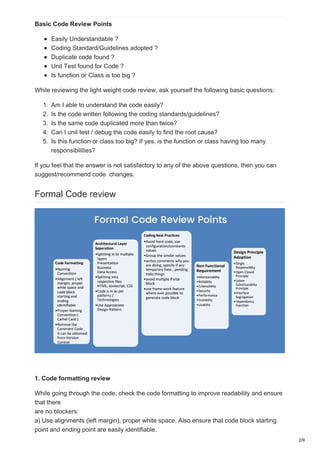
Formal Code review
1. Code formatting review
While going through the code, check the code formatting to improve readability and ensure
that there
are no blockers:
a) Use alignments (left margin), proper white space. Also ensure that code block starting
point and ending point are easily identifiable.
2/9
b) Ensure that proper naming conventions (Pascal, CamelCase etc.) have been followed.
c) Code should fit in the standard 14 inch laptop screen. There shouldn’t be a need to scroll
horizontally to view the code. In a 21 inch monitor, other windows (toolbox, properties etc.)
can be opened while modifying code, so always write code keeping in view a 14 inch
monitor.
d) Remove the commented code as this is always a blocker, while going through the code.
Commented code can be obtained from Source Control (like SVN), if required.
2. Architecture Review
a) The code should follow the defined architecture.
1. Separation of Concerns followed
Split into multiple layers and tiers as per requirements (Presentation, Business
and Data layers).
Split into respective files (HTML, JavaScript and CSS).
2. Code is in sync with existing code patterns/technologies.
3. Design patterns: Use appropriate design pattern (if it helps), after completely
understanding the problem and context.
3. Coding best practices review
1. No hard coding, use constants/configuration values.
2. Group similar values under an enumeration (enum).
3. Comments – Do not write comments for what you are doing, instead write comments
on why you are doing. Specify about any hacks, workaround and temporary fixes.
Additionally, mention pending.
4. Avoid multiple if/else blocks.
5. Use framework features, wherever possible instead of writing custom code.
4. Non Functional requirements Review
a) Maintainability (Supportability) – The application should require the least amount of
effort to support in near future. It should be easy to identify and fix a defect.
1. Readability: Code should be self-explanatory. Get a feel of story reading, while going
through the code. Use appropriate name for variables, functions and classes. If you
are taking more time to understand the code, then either code needs refactoring or at
least comments have to be written to make it clear.
2. Testability: The code should be easy to test. Refactor into a separate function (if
required). Use interfaces while talking to other layers, as interfaces can be mocked
easily. Try to avoid static functions, singleton classes as these are not easily testable
by mocks.
3. Debuggability: Provide support to log the flow of control, parameter data and
exception details to find the root cause easily. If you are using Log4J like component
then add support for database logging also, as querying the log table is easy.
4. Configurability: Keep the configurable values in place (XML file, database table) so
that no code
3/9
changes are required, if the data is changed frequently.
b) Re-usability
1. DRY (Do not Repeat Yourself) principle: The same code should not be repeated
more than twice.
2. Consider reusable services, functions and components.
3. Consider generic functions and classes.
c) Reliability – Exception handling and cleanup (dispose) resources.
d) Extensibility – Easy to add enhancements with minimal changes to the existing code.
One component should be easily replaceable by a better component.
e) Security – Authentication, authorization, input data validation against security threats
such as SQL injections and Cross Site Scripting (XSS), encrypting the sensitive data
(passwords, credit card information etc.). ZAP Test will provide the STIG compliance
vulnerability for your application.
f) Performance
1. Use a data type that best suits the needs such as String Builder, generic collection
classes.
2. Lazy loading, asynchronous and parallel processing.
3. Caching and session/application data.
g) Scalability – Consider if it supports a large user base/data? Can this be deployed into
web farms?
h) Usability – Put yourself in the shoes of a end-user and ascertain, if the user
interface/API is easy to
understand and use. If you are not convinced with the user interface design, then start
discussing
your ideas with the business analyst.
5. Design Principles Review
1. Single Responsibility Principle (SRS): Do not place more than one responsibility
into a single class or function, re-factor into separate classes and functions.
2. Open Closed Principle: While adding new functionality, existing code should not be
modified. New functionality should be written in new classes and functions.
3. Liskov substitutability principle: The child class should not change the behavior
(meaning) of the parent class. The child class can be used as a substitute for a base
class.
4. Interface segregation: Do not create lengthy interfaces, instead split them into
smaller interfaces
based on the functionality. The interface should not contain any dependencies
(parameters), which
are not required for the expected functionality.
5. Dependency Injection: Do not hardcode the dependencies, instead inject them.
4/9
Code Review Tools
The initial step for assessing the code quality of the entire project is through a static code
analysis tool.
There is various tools available based on the technology the static code analysis tool to be
used to check code review process .
Tools : SonarQube , NDepend, FxCop ..etc
Through the gitHub/ Bitbucket/ Crucible the code review comments can be tracked as a
part of code review process.
Some Common Code Review Check List
Project ID: Work product:
Checked By: Date :
Note:
I – DEVIATION OBJECTIVE
# I.1 – DEVIATION Yes No NA
1 Does the code correctly implement the design?
2. Does the code implement more than the design?
3. Is every parameter of every method passing mechanism (value or reference)
appropriate?
4. Does every method return the correct value at every method return point?
II – OMISSION OBJECTIVE
# II.1 –OMISSION Yes No NA
5. Does the code completely implement the design?
6. Are there any requirements of design that were not implemented?
III – DEFECT OBJECTIVE
# III.1 – Variable and Constant Declaration Yes No NA
7. Are descriptive variable and constant names used in accord with naming
conventions?
8. Is every variable correctly typed?
9. Is every variable properly initialized?
10. Are all for-loop control variables declared in the loop header?
11. Are there variables that should be constants?
12. Are there attributes that should be local variables?
5/9
13. Do all attributes have appropriate access modifiers (private, protected,
public)?
14. Are there static attributes that should be non-static or vice-versa?
# III.2 – Method Definition Yes No NA
15. Are descriptive method names used in accord with naming conventions?
16. Do all methods have appropriate access modifiers (private, protected,
public)?
17. Is every method parameter value checked before being used?
18. Are there static methods that should be non-static or vice-versa?
# III.3 – Class Definition Yes No NA
19. Does each class have an appropriate constructor?
20. Do any subclasses have common members that should be in the superclass?
21. Can the class inheritance hierarchy be simplified?
# III.4 – Data Reference Yes No NA
22. For every array reference: Is each subscript value within the defined bounds?
23. For every object or array reference: Is the value certain to be non-null?
# III.5 – Computation/Numeric Yes No NA
24. Are there any computations with mixed data types?
25. Is overflow or underflow possible during a computation?
26. For each expressions with more than one operator: Are the assumptions
about order of evaluation and precedence correct?
27. Are parentheses used to avoid ambiguity?
28. Does the code systematically prevent rounding errors?
29. Does the code avoid additions and subtractions on numbers with greatly
different magnitudes?
30. Are divisors tested for zero or noise?
# III.6 – Comparison/Relational Yes No NA
31. Has each boolean expression been simplified by driving negations inward?
32. For every boolean test: Is the correct condition checked?
33. Are there any comparisons between variables of inconsistent types?
34. Are the comparison operators correct?
35. Is each boolean expression correct?
36. Are there improper and unnoticed side-effects of a comparison?
37. Has an “&” inadvertently been interchanged with a “&&” or a “|” for a “||”?
38. Does the code avoid comparing floating-point numbers for equality?
39. Is every three-way branch (less,equal,greater) covered?
6/9
# III.7 – Control Flow Yes No NA
40. For each loop: Is the best choice of looping constructs used?
41. Will all loops terminate?
42. When there are multiple exits from a loop, is each exit necessary and handled
properly?
43. Does each switch statement have a default case?
44. Are missing switch case break statements correct and marked with a
comment?
45. Is the nesting of loops and branches too deep, and is it correct?
46. Can any nested if statements be converted into a switch statement?
47. Are null bodied control structures correct and marked with braces or
comments?
48. Does every method terminate?
49. Are all exceptions handled appropriately?
50. Do named break statements send control to the right place?
# III.8 – Input/Output Yes No NA
51. Have all files been opened before use?
52. Are the attributes of the open statement consistent with the use of the file?
53. Have all files been closed after use?
54. Is buffered data flushed?
55. Are there spelling or grammatical errors in any text printed or displayed?
56. Are error conditions checked?
57. Are files checked for existence before attempting to access them?
58. Are all I/O exceptions handled in a reasonable way?
# III.9 – Module Interface Yes No NA
59. Are the number, order, types, and values of parameters in every method call
in agreement with the called method’s declaration?
60. Do the values in units agree (e.g., inches versus yards)?
61. If an object or array is passed, does it get changed, and changed correctly by
the called method?
# III.10 – Comment Yes No NA
62. Does every method, class, and file have an appropriate header comment?
63. Does every attribute,variable or constant declaration have a comment?
64. Is the underlying behavior of each method and class expressed in plain
language?
65. Is the header comment for each method and class consistent with the
behavior of the method or class?
7/9
66. Are all comments consistent with the code?
67. Do the comments help in understanding the code?
68. Are there enough comments in the code?
69. Are there too many comments in the code?
# III.11 – Layout and Packing Yes No NA
70. Is a standard indentation and layout format used consistently?
71. For each method: Is it no more than about 60 lines long?
72. For each compile module: Is no more than about 600 lines long?
# III.12 – Modularity Yes No NA
73. Is there a low level of coupling between modules (methods and classes)?
74. Is there a high level of cohesion within each module (methods or class)?
75. Is there repetitive code that could be replaced by a call to a method that
provides the behavior of the repetitive code?
76. Are the Java class libraries used where and when appropriate?
# III.13 – Storage Usage Yes No NA
77. Are arrays large enough?
78. Are object and array references set to null once the object or array is no
longer needed?
# III.14 – Performance Yes No NA
79. Can better data structures or more efficient algorithms be used?
80. Are logical tests arranged such that the often successful and inexpensive
tests precede the more pensive and less frequently successful tests?
81. Can the cost of recomputing a value be reduced by computing it once and
storing the results?
82. Is every result that is computed and stored actually used?
83. Can a computation be moved outside a loop?
84. Are there tests within a loop that do not need to be done?
85. Can a short loop be unrolled?
86. Are there two loops operating on the same data that can be combined into
one?
87. Are frequently used variables declared register?
88. Are short and commonly called methods declared inline?
89. Are timeouts or error traps used for external device accesses?
IV – INCONSISTENCY OBJECTIVE
# IV.1 – Performance Yes No NA
90. Are there any code implement in inconsistent way?
8/9
V – AMBIGUITY OBJECTIVE
# V.1 – Variable and Constant Declaration Yes No NA
91. Are there variables with confusingly similar names?
92. Are all variables properly defined with meaningful, consistent, and clear
names?
# V.2 – Performance Yes No NA
93. Are any modules excessively complex and should be restructured or split into
multiple routines?
VI – REDUNDANCE OBJECTIVE
# VI.1 – Variables Yes No NA
94. Are there any redundant or unused variables or attributes?
95. Could any non-local variables be made local?
# VI.2 – Method Definition Yes No NA
96. Are there any uncalled or unneeded methods?
# VI.3 – Performance Yes No NA
97. Can any code be replaced by calls to external reusable objects?
98. Are there any blocks of repeated code that could be condensed into a single
method?
99. Are there any leftover stubs or test routines in the code?
VII – SIDE-EFFECT OBJECTIVE
# VII.1 – Method Definition Yes No NA
100. After changing of prototype of method, Have class which calls it considered
yet?
# VII.2 – Data Base Yes No NA
101. Do Upgrading and Migration process follow up changing of structures or
contents of a project’s data base?
9/9

How to do code review and use analysis tool in software development

  • 1.
    December 20, 2017 Howto do Code Review and use analysis tool in Software Development? www.mitosistech.com/blogs/how-to-do-code-review-and-use-analysis-tool-in-software-development/ by Kanna Dhasan Definition Code Inspection is a phase in the software development process to find and correct the errors in functional and non-functional area in the early stage. It is relatively inexpensive. It helps to reduce the more expensive process of locating and fixing bugs during later stages of development. It is intend to improve overall code quality of Software. Type of Code Inspection Basic Code Review Formal Code Review ( Detailed Code Review ) Who All Can be involved in Review process In the code review process everyone should be involved to provide Quality of software unit Developer Lead Architect QA Basic Code review 1/9
  • 2.
    Basic Code ReviewPoints Easily Understandable ? Coding Standard/Guidelines adopted ? Duplicate code found ? Unit Test found for Code ? Is function or Class is too big ? While reviewing the light weight code review, ask yourself the following basic questions: 1. Am I able to understand the code easily? 2. Is the code written following the coding standards/guidelines? 3. Is the same code duplicated more than twice? 4. Can I unit test / debug the code easily to find the root cause? 5. Is this function or class too big? If yes, is the function or class having too many responsibilities? If you feel that the answer is not satisfactory to any of the above questions, then you can suggest/recommend code changes. Formal Code review 1. Code formatting review While going through the code, check the code formatting to improve readability and ensure that there are no blockers: a) Use alignments (left margin), proper white space. Also ensure that code block starting point and ending point are easily identifiable. 2/9
  • 3.
    b) Ensure thatproper naming conventions (Pascal, CamelCase etc.) have been followed. c) Code should fit in the standard 14 inch laptop screen. There shouldn’t be a need to scroll horizontally to view the code. In a 21 inch monitor, other windows (toolbox, properties etc.) can be opened while modifying code, so always write code keeping in view a 14 inch monitor. d) Remove the commented code as this is always a blocker, while going through the code. Commented code can be obtained from Source Control (like SVN), if required. 2. Architecture Review a) The code should follow the defined architecture. 1. Separation of Concerns followed Split into multiple layers and tiers as per requirements (Presentation, Business and Data layers). Split into respective files (HTML, JavaScript and CSS). 2. Code is in sync with existing code patterns/technologies. 3. Design patterns: Use appropriate design pattern (if it helps), after completely understanding the problem and context. 3. Coding best practices review 1. No hard coding, use constants/configuration values. 2. Group similar values under an enumeration (enum). 3. Comments – Do not write comments for what you are doing, instead write comments on why you are doing. Specify about any hacks, workaround and temporary fixes. Additionally, mention pending. 4. Avoid multiple if/else blocks. 5. Use framework features, wherever possible instead of writing custom code. 4. Non Functional requirements Review a) Maintainability (Supportability) – The application should require the least amount of effort to support in near future. It should be easy to identify and fix a defect. 1. Readability: Code should be self-explanatory. Get a feel of story reading, while going through the code. Use appropriate name for variables, functions and classes. If you are taking more time to understand the code, then either code needs refactoring or at least comments have to be written to make it clear. 2. Testability: The code should be easy to test. Refactor into a separate function (if required). Use interfaces while talking to other layers, as interfaces can be mocked easily. Try to avoid static functions, singleton classes as these are not easily testable by mocks. 3. Debuggability: Provide support to log the flow of control, parameter data and exception details to find the root cause easily. If you are using Log4J like component then add support for database logging also, as querying the log table is easy. 4. Configurability: Keep the configurable values in place (XML file, database table) so that no code 3/9
  • 4.
    changes are required,if the data is changed frequently. b) Re-usability 1. DRY (Do not Repeat Yourself) principle: The same code should not be repeated more than twice. 2. Consider reusable services, functions and components. 3. Consider generic functions and classes. c) Reliability – Exception handling and cleanup (dispose) resources. d) Extensibility – Easy to add enhancements with minimal changes to the existing code. One component should be easily replaceable by a better component. e) Security – Authentication, authorization, input data validation against security threats such as SQL injections and Cross Site Scripting (XSS), encrypting the sensitive data (passwords, credit card information etc.). ZAP Test will provide the STIG compliance vulnerability for your application. f) Performance 1. Use a data type that best suits the needs such as String Builder, generic collection classes. 2. Lazy loading, asynchronous and parallel processing. 3. Caching and session/application data. g) Scalability – Consider if it supports a large user base/data? Can this be deployed into web farms? h) Usability – Put yourself in the shoes of a end-user and ascertain, if the user interface/API is easy to understand and use. If you are not convinced with the user interface design, then start discussing your ideas with the business analyst. 5. Design Principles Review 1. Single Responsibility Principle (SRS): Do not place more than one responsibility into a single class or function, re-factor into separate classes and functions. 2. Open Closed Principle: While adding new functionality, existing code should not be modified. New functionality should be written in new classes and functions. 3. Liskov substitutability principle: The child class should not change the behavior (meaning) of the parent class. The child class can be used as a substitute for a base class. 4. Interface segregation: Do not create lengthy interfaces, instead split them into smaller interfaces based on the functionality. The interface should not contain any dependencies (parameters), which are not required for the expected functionality. 5. Dependency Injection: Do not hardcode the dependencies, instead inject them. 4/9
  • 5.
    Code Review Tools Theinitial step for assessing the code quality of the entire project is through a static code analysis tool. There is various tools available based on the technology the static code analysis tool to be used to check code review process . Tools : SonarQube , NDepend, FxCop ..etc Through the gitHub/ Bitbucket/ Crucible the code review comments can be tracked as a part of code review process. Some Common Code Review Check List Project ID: Work product: Checked By: Date : Note: I – DEVIATION OBJECTIVE # I.1 – DEVIATION Yes No NA 1 Does the code correctly implement the design? 2. Does the code implement more than the design? 3. Is every parameter of every method passing mechanism (value or reference) appropriate? 4. Does every method return the correct value at every method return point? II – OMISSION OBJECTIVE # II.1 –OMISSION Yes No NA 5. Does the code completely implement the design? 6. Are there any requirements of design that were not implemented? III – DEFECT OBJECTIVE # III.1 – Variable and Constant Declaration Yes No NA 7. Are descriptive variable and constant names used in accord with naming conventions? 8. Is every variable correctly typed? 9. Is every variable properly initialized? 10. Are all for-loop control variables declared in the loop header? 11. Are there variables that should be constants? 12. Are there attributes that should be local variables? 5/9
  • 6.
    13. Do allattributes have appropriate access modifiers (private, protected, public)? 14. Are there static attributes that should be non-static or vice-versa? # III.2 – Method Definition Yes No NA 15. Are descriptive method names used in accord with naming conventions? 16. Do all methods have appropriate access modifiers (private, protected, public)? 17. Is every method parameter value checked before being used? 18. Are there static methods that should be non-static or vice-versa? # III.3 – Class Definition Yes No NA 19. Does each class have an appropriate constructor? 20. Do any subclasses have common members that should be in the superclass? 21. Can the class inheritance hierarchy be simplified? # III.4 – Data Reference Yes No NA 22. For every array reference: Is each subscript value within the defined bounds? 23. For every object or array reference: Is the value certain to be non-null? # III.5 – Computation/Numeric Yes No NA 24. Are there any computations with mixed data types? 25. Is overflow or underflow possible during a computation? 26. For each expressions with more than one operator: Are the assumptions about order of evaluation and precedence correct? 27. Are parentheses used to avoid ambiguity? 28. Does the code systematically prevent rounding errors? 29. Does the code avoid additions and subtractions on numbers with greatly different magnitudes? 30. Are divisors tested for zero or noise? # III.6 – Comparison/Relational Yes No NA 31. Has each boolean expression been simplified by driving negations inward? 32. For every boolean test: Is the correct condition checked? 33. Are there any comparisons between variables of inconsistent types? 34. Are the comparison operators correct? 35. Is each boolean expression correct? 36. Are there improper and unnoticed side-effects of a comparison? 37. Has an “&” inadvertently been interchanged with a “&&” or a “|” for a “||”? 38. Does the code avoid comparing floating-point numbers for equality? 39. Is every three-way branch (less,equal,greater) covered? 6/9
  • 7.
    # III.7 –Control Flow Yes No NA 40. For each loop: Is the best choice of looping constructs used? 41. Will all loops terminate? 42. When there are multiple exits from a loop, is each exit necessary and handled properly? 43. Does each switch statement have a default case? 44. Are missing switch case break statements correct and marked with a comment? 45. Is the nesting of loops and branches too deep, and is it correct? 46. Can any nested if statements be converted into a switch statement? 47. Are null bodied control structures correct and marked with braces or comments? 48. Does every method terminate? 49. Are all exceptions handled appropriately? 50. Do named break statements send control to the right place? # III.8 – Input/Output Yes No NA 51. Have all files been opened before use? 52. Are the attributes of the open statement consistent with the use of the file? 53. Have all files been closed after use? 54. Is buffered data flushed? 55. Are there spelling or grammatical errors in any text printed or displayed? 56. Are error conditions checked? 57. Are files checked for existence before attempting to access them? 58. Are all I/O exceptions handled in a reasonable way? # III.9 – Module Interface Yes No NA 59. Are the number, order, types, and values of parameters in every method call in agreement with the called method’s declaration? 60. Do the values in units agree (e.g., inches versus yards)? 61. If an object or array is passed, does it get changed, and changed correctly by the called method? # III.10 – Comment Yes No NA 62. Does every method, class, and file have an appropriate header comment? 63. Does every attribute,variable or constant declaration have a comment? 64. Is the underlying behavior of each method and class expressed in plain language? 65. Is the header comment for each method and class consistent with the behavior of the method or class? 7/9
  • 8.
    66. Are allcomments consistent with the code? 67. Do the comments help in understanding the code? 68. Are there enough comments in the code? 69. Are there too many comments in the code? # III.11 – Layout and Packing Yes No NA 70. Is a standard indentation and layout format used consistently? 71. For each method: Is it no more than about 60 lines long? 72. For each compile module: Is no more than about 600 lines long? # III.12 – Modularity Yes No NA 73. Is there a low level of coupling between modules (methods and classes)? 74. Is there a high level of cohesion within each module (methods or class)? 75. Is there repetitive code that could be replaced by a call to a method that provides the behavior of the repetitive code? 76. Are the Java class libraries used where and when appropriate? # III.13 – Storage Usage Yes No NA 77. Are arrays large enough? 78. Are object and array references set to null once the object or array is no longer needed? # III.14 – Performance Yes No NA 79. Can better data structures or more efficient algorithms be used? 80. Are logical tests arranged such that the often successful and inexpensive tests precede the more pensive and less frequently successful tests? 81. Can the cost of recomputing a value be reduced by computing it once and storing the results? 82. Is every result that is computed and stored actually used? 83. Can a computation be moved outside a loop? 84. Are there tests within a loop that do not need to be done? 85. Can a short loop be unrolled? 86. Are there two loops operating on the same data that can be combined into one? 87. Are frequently used variables declared register? 88. Are short and commonly called methods declared inline? 89. Are timeouts or error traps used for external device accesses? IV – INCONSISTENCY OBJECTIVE # IV.1 – Performance Yes No NA 90. Are there any code implement in inconsistent way? 8/9
  • 9.
    V – AMBIGUITYOBJECTIVE # V.1 – Variable and Constant Declaration Yes No NA 91. Are there variables with confusingly similar names? 92. Are all variables properly defined with meaningful, consistent, and clear names? # V.2 – Performance Yes No NA 93. Are any modules excessively complex and should be restructured or split into multiple routines? VI – REDUNDANCE OBJECTIVE # VI.1 – Variables Yes No NA 94. Are there any redundant or unused variables or attributes? 95. Could any non-local variables be made local? # VI.2 – Method Definition Yes No NA 96. Are there any uncalled or unneeded methods? # VI.3 – Performance Yes No NA 97. Can any code be replaced by calls to external reusable objects? 98. Are there any blocks of repeated code that could be condensed into a single method? 99. Are there any leftover stubs or test routines in the code? VII – SIDE-EFFECT OBJECTIVE # VII.1 – Method Definition Yes No NA 100. After changing of prototype of method, Have class which calls it considered yet? # VII.2 – Data Base Yes No NA 101. Do Upgrading and Migration process follow up changing of structures or contents of a project’s data base? 9/9