Dangerous Contents
Securing .NET Deserialization
Jonathan Birch - Microsoft Corporation
What this talk is about
• How misuse of serialization in .NET can lead to RCE vulnerabilities.
• How to prevent these vulnerabilities
• Advice for specific serialization API’s
• How to scan for serialization vulnerabilities
Background -
Serialization
Serialization – what is it?
• Serialization is a technique for packaging program data
into a more portable or storable form.
 Data stuctures are converted into streams or strings so
that they can be backed up or sent elsewhere.
 Serialization is typically used with the goal of restoring
the original data structures at some later time, possibly
somewhere else.
Serialization – how is it used?
Common use cases for serialization include:
• Transferring data between clients and servers.
• Backing up objects to a database.
• Creating equivalence between objects in different
environments (JSON serialization, XML
serialization).
How serialization can
be exploited
How can serialization be dangerous?
• Many serialization API’s package type information into
the stream. This allows the stream to contain types that
weren’t predicted at design time.
• Many scenarios where serialization is used involve the
stream coming from an untrusted party.
• This means an attacker can package objects into the
stream that the application doesn’t expect.
What’s the danger in unpacking
unexpected types?
• An application can only deserialize types that come from either the
framework or other modules it loads. An attacker can’t just define a
malicious type and have an application deserialize it.
• But many types built into the .NET framework have code that will
run just because they were instanced:
 Constructors
 OnDeserialize handlers
 Setters
 Destructors
• It’s possible to leverage these methods in combination to build
“gadgets” that allow arbitrary code execution.
Simple serialization exploit –
TempFileCollection via BinaryFormatter
• .Net has a class called “TempFileCollection”. It’s intended to manage a
collection of temporary files that it deletes when it’s garbage collected.
• This class is serializable, so it can be serialized to and deserialized from a
stream with BinaryFormatter.
• If an attacker has access to a stream that will be deserialized on a server
using BinaryFormatter they can populate a TempFileCollection object with a
list of files and then serialize it into the stream.
• When the server deserializes the stream, it creates the same
TempFileCollection object. When this object is garbage collected, it will
delete the list of files the attacker specified from the server.
Exploiting a server
Client StreamPurchase Order
Serialize
Server Stream Purchase Order
Deserialize
InternetBoundary
Client Server
Server deserializes order
and processes it.
Client Stream
Serialize
Server Stream
Deserialize
TempFileCollection TempFileCollection
Server deserializes TFC
and files get deleted.
Better attacks exist
• This is not the only way to exploit serialization, or even the best way.
• This is just an exploit that’s relatively straightforward to explain.
• James Forshaw has demonstrated a full RCE gadget chain that’s much more
powerful, but is somewhat harder to explain in a half hour talk. See
“Exploiting .Net Managed DCOM”.
Why is this a problem?
• Deserialization of untrusted streams is an unfortunately common
antipattern.
• This vulnerability used to be present in several Microsoft products. These
issues should be fixed now. If you find one, please let us know.
• It’s very easy to find services on the Internet with this vulnerability.
Microsoft has reached out in some cases where we’ve become aware of this
issue, but it’s not practical for us to try to find every vulnerable instance.
• Since exploits of this type of vulnerability lead to remote code execution, the
potential impact is very high.
Why not fix the dangerous types?
• .NET has hundreds of thousands of types. A large number of these are
potentially dangerous.
• Many of the “vulnerable” types are dangerous to deserialize because of the
functionality they provide. “Fixing” them would require breaking that
functionality, and hence can’t be done without at minimum breaking
framework compatibility.
• .NET (along with most frameworks) isn’t designed to be safe in the case
where a malicious user can generate arbitrary objects.
• The only solution to .NET deserialization vulnerabilities is for application
developers to avoid using deserialization insecurely.
“But I don’t use BinaryFormatter”
• Are you sure? Lots of API’s use BinaryFormatter under the hood:
 Anything that reads .resx files
 ASP .NET ViewState (more on this later)
 Various other “formatter” API’s, like ObjectStateFormatter and LoSFormatter
 A longer list can be found at the end of this deck and in the handout.
• Even serializers that don’t user BinaryFormatter can be vulnerable…
Exploiting JavaScriptSerializer*
• By default, JavaScriptSerializer does not serialize or deserialize type
information.
 But it will do so if a JavaScriptTypeResolver is provided to its constructor,
particularly if the built-in SimpleTypeResolver class is used.
• JavaScriptSerializer with SimpleTypeResolver will only create instances of
objects with public paramterless constuctors – this means the exploit I
demonstrated for BinaryFormatter won’t work.
• JavaScriptSerializer will only assign values to properties of objects
• But unlike BinaryFormatter, JavaScriptSerializer + SimpleTypeResolver
will deserialize types not marked as serializable. It will also call constructors
and setters for properties it sets.
*Credit to Alvaro Muñoz and Oleksandr Mirosh for this vulnerability.
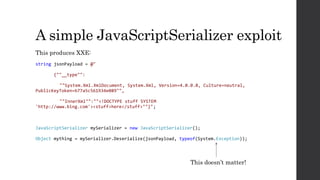
A simple JavaScriptSerializer exploit
This produces XXE:
string jsonPayload = @"
{""__type"":
""System.Xml.XmlDocument, System.Xml, Version=4.0.0.0, Culture=neutral,
PublicKeyToken=b77a5c561934e089"",
""InnerXml"":""<!DOCTYPE stuff SYSTEM
'http://www.bing.com'><stuff>here</stuff>""}";
JavaScriptSerializer mySerializer = new JavaScriptSerializer();
Object mything = mySerializer.Deserialize(jsonPayload, typeof(System.Exception));
This doesn’t matter!
Exploiting 3rd Party
Serializers
Exploiting JSON .NET
• JSON .Net does not deserialize type information, unless the
TypeNameHandling property is set.
• If TypeNameHandling is set to any value other than “None” deserialization
RCE is easy to achieve.
Here’s a simple Gadget*:
string json = @"{
""$type"": ""System.Security.Principal.WindowsIdentity, mscorlib,
Version=4.0.0.0, Culture=neutral,
PublicKeyToken=b77a5c561934e089"",""System.Security.ClaimsIdentity
.bootstrapContext"": ""AAEAAAD/////…""}";
*Credit to Levi Broderick for this gadget
Base64-encoded
BinaryFormatter payload
Exploiting ServiceStack.Text
• Templated serializer – requires that you provide an expected type
• Includes type information in stream for members of the root type.
• Decides whether or not to create objects based on whether
expectedType.IsAssignableFrom(providedType)
• This check is always true if the expected type is something like Object –
generic types like this acts like wildcards that will allow any type.
• This means that any type graph that can contain a generic member like
Object can be exploited in the same way as JavaScriptSerializer. You can get
to Object from a large number of types in .NET
• For example: System.Exception has a TargetSite property which has an
Attributes property which can be assigned a MethodInfo object. MethodInfo
has a ReturnParameter property which has a RawDefaultValue property of
type Object.
Exploiting ServiceStack.Text
This type of exploit used to work:
string json =
@"{""ChildNode"":{""__type"":""System.Xml.XmlDocument, System.Xml,
Version = 4.0.0.0, Culture = neutral, PublicKeyToken =
b77a5c561934e089"",""InnerXml"":""<?xml version=""1.0""
encoding=""UTF-8"" standalone=""no""?><!DOCTYPE html SYSETM
""blah"" ""http://www.bing.com""><blah>stuff</blah>""}}";
• I contacted the maintainers of ServiceStack.Text through MSVR and they
updated their API to only deserialize allow-listed types.
• ServiceStack.Text still allow-lists all ISerializable types by default – this
may leave some risk.
• The current version may still be exploitable, though I’m not aware of a
specific exploit gadget.
How to Prevent
Deserialization
Vulnerabilities
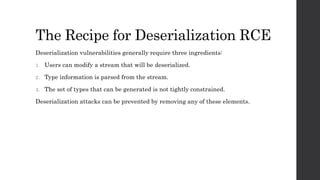
The Recipe for Deserialization RCE
Deserialization vulnerabilities generally require three ingredients:
1. Users can modify a stream that will be deserialized.
2. Type information is parsed from the stream.
3. The set of types that can be generated is not tightly constrained.
Deserialization attacks can be prevented by removing any of these elements.
Protecting the stream
• The easiest way to keep serialization safe is to only deserialize streams you
serialized in the first place.
• If the stream never leaves your back-end server, it might be safe. Make sure
there isn’t a different vulnerability that allows the stream to be modified.
• An HMAC is very useful here:
 Can be used to prevent users from modifying a stream you’re having them hold onto
in a cookie or form data.
 Can also act as a second layer of defense if you deserialize streams stored in a back-
end DB. SQL injection may allow an attacker to modify the stream, but an HMAC
with a secret stored elsewhere shouldn’t be spoofable.
Deserializing without types
• Some serializers don’t parse type information from the stream. These are
generally safe to use, even on untrusted streams.
 JavaScriptSerializer without a JavaScriptTypeResolver is safe because it doesn’t
resolve types.
 JSON .NET with TypeNameHandling set to “None” is safe.
 DataContractSerializer and XmlSerializer are also safe.
• Note that all of these serializers become unsafe if you take other measures
to let the stream contain type information. This includes letting the stream
pick the type used for a templated deserialization.
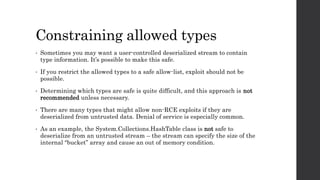
Constraining allowed types
• Sometimes you may want a user-controlled deserialized stream to contain
type information. It’s possible to make this safe.
• If you restrict the allowed types to a safe allow-list, exploit should not be
possible.
• Determining which types are safe is quite difficult, and this approach is not
recommended unless necessary.
• There are many types that might allow non-RCE exploits if they are
deserialized from untrusted data. Denial of service is especially common.
• As an example, the System.Collections.HashTable class is not safe to
deserialize from an untrusted stream – the stream can specify the size of the
internal “bucket” array and cause an out of memory condition.
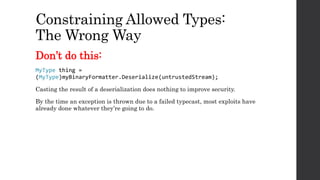
Constraining Allowed Types:
The Wrong Way
Don’t do this:
MyType thing =
(MyType)myBinaryFormatter.Deserialize(untrustedStream);
Casting the result of a deserialization does nothing to improve security.
By the time an exception is thrown due to a failed typecast, most exploits have
already done whatever they’re going to do.
Constraining Allowed Types:
The sort of ok way
• The “Right Way” to constrain what types may be instanced during
deserialization is with a allow list enforced by a SerializationBinder.
• BinaryFormatter, the JSON .NET serializer, and a few others allow a
SerializationBinder to be used to constrain which types can be created.
• To make a secure SerializationBinder, make a subclass of the
SerializationBinder class that overrides the BindToType method and throws
an exception if it encounters an unexpected type.
SerializationBinder Tips
• Your binder will be called for every type, even the types of members of your
expected types. You must allow-list all of them. It can help to make an initial
version that just logs encountered types.
• Don’t use IsAssignableFrom – this leads to the type of vulnerability I found
in ServiceStack.Text
• Don’t return null for unexpected types – this makes some serializers fall
back to a default binder, allowing exploits.
• Don’t use reflection to look up types – That is to say, don’t do this:
Assembly.Load(assemblyName).GetType(typeName);
Reflection is slow, and a malicious user can DoS your application by forcing it
to spend memory and time loading irrelevant assemblies.
SerializationBinder Example
sealed class AllowListSerializationBinder : SerializationBinder {
List<Tuple<string, Type>> allowedTypes = new List<Tuple<string, Type>>()
{ new Tuple<string,Type>("MyType", typeof(MyType)) };
public override Type BindToType(string assemblyName, string typeName) {
foreach(Tuple<string,Type> typeTuple in allowedTypes) {
if(typeName == typeTuple.Item1) {
return typeTuple.Item2;
}
}
throw new ArgumentOutOfRangeException("Disallowed type encountered");
}
}
myBinaryFormatter.Binder = new AllowListSerializationBinder();
Advice for specific
serialization API’s
Advice for BinaryFormatter
• Never use BinaryFormatter to deserialize an untrusted stream without a
binder.
• A SerializationBinder is difficult to implement well, so if you’re currently
using BinaryFormatter to deserialize an untrusted stream, consider doing
one of the following first:
 Prevent users from modifying streams by keep them server-side or by using an
HMAC.
 Consider using a safer serializer, like DataContractSerializer or XmlSerializer.
Advice for ASP .Net ViewState
• ASP .NET applications can use the ViewState object to store session data
client-side
• The ViewState is a collection of .Net objects which are serialized using
BinaryFormatter and stored in the form data for a page. The server
deserializes this data each time a request is made that contains a ViewState
field.
• ViewState uses an HMAC to prevent any tampering of this data that might
allow for an RCE exploit, but this HMAC is generated using a server’s
machinekey as a secret.
• It’s important to ensure that malicious users cannot discover or guess the
machinekey as this can allow an attack against the server-side
deserialization.
Advice for JSON .NET
• Never set TypeNameHandling to any value other than “None” on any object
that has the property. Even “Objects” is unsafe.
• If you must use TypeNameHandling with a different value, use a
SerializationBinder to prevent the deserialization of unexpected types.
• SerializationBinders for JSON .NET can be constructed identically to the
ones for BinaryFormatter, but they should implement the
ISerializationBinder interface instead of subclassing SerializationBinder.
• Like BinaryFormatter SerializationBinders, these should throw an
exception if an unexpected type is encountered.
Advice for JavaScriptSerializer
• Don’t use SimpleTypeResolver with JavaScriptSerializer – this is essentially
never safe.
• Don’t add logic to allow the serialized stream to pick the class used to
template the deserialization operation.
Advice for ServiceStack.Text
• Make sure that any stream deserialized using ServiceStack.Text cannot be
modified by users.
• If you choose to use ServiceStack.Text with a user-modifiable stream, avoid
using a template type that can contain an “Object” in its member graph.
Scanning for
serialization
vulnerabilities
Static analysis – Scan your source
• Serialization vulnerabilities are dangerous enough that it’s worth reviewing
any place you use a dangerous deserialization API. Searching your code for
calls to dangerous methods is a good place to start. There’s a list at the end
of this deck.
• If you use an unsafe serializer on untrusted data without a binder, it’s a
vulnerability you should fix immediately.
• Some serializers are safe by default but can be put into an “unsafe mode” by
setting certain properties. If you see either of the following strings in your
code, be very suspicious:
 TypeNameHandling
 SimpleTypeResolver
Dynamic Analysis
• Some common antipatterns can be identified just by looking at web traffic
logs.
• Base-64 encoded binary formatter streams always being with the sequence
AAEAAAD – this string is a very significant indicator of deserialization
RCE.
 For non-HTTP traffic, it may be useful to search for the non-encoded version of this
sequence.
• Similarly, the presence of $type or __type can indicate either a JSON .NET,
JavaScriptSerializer, or ServiceStack.Text vulnerability.
Questions?
Partial List of unsafe API’s (1)
1. System.Runtime.Serialization.Formatters.Binary.BinaryFormatter –
Deserialize, UnsafeDeserialize, UnsafeDeserializeMethodResponse
2. System.Runtime.Serialization.Formatters.Soap.SoapFormatter – Deserialize
3. System.Web.UI.ObjectStateFormatter- Deserialize
4. System.Runtime.Serialization.NetDataContractSerializer – Deserialize,
ReadObject
5. System.Web.UI.LosFormatter – Deserialize
6. System.Workflow.ComponentModel.Activity – Load
7. SoapServerFormatterSinkProvider, SoapClientFormatterSinkProvider,
BinaryServerFormatterSinkProvider, BinaryClientFormatterSinkProvider,
SoapClientFormatterSink, SoapServerFormatterSink,
BinaryClientFormatterSink, BinaryServerFormatterSink – unsafe if used
across an insecure channel or if used to talk to an untrusted party
Partial List of unsafe API’s (2)
8. System.Resource.ResourceReader – unsafe if used to read an untrusted
resource string or stream
9. Microsoft.Web.Design.Remote.ProxyObject – DecodeValue,
DecodeSerializedObject
10. System.Web.Script.Serialization.JavaScriptSerializer – unsafe if used to
deserialize an untrusted stream with a JavaScriptTypeResolver set
11. NewtonSoft / JSON.Net JSonSerializer – unsafe if the TypeNameHandling
property is set to any value other than “None”
12. ServiceStack.Text – unsafe if used to deserialize an object whose
membership graph can contain a member of type “Object”

BlueHat v17 || Dangerous Contents - Securing .Net Deserialization

  • 1.
    Dangerous Contents Securing .NETDeserialization Jonathan Birch - Microsoft Corporation
  • 2.
    What this talkis about • How misuse of serialization in .NET can lead to RCE vulnerabilities. • How to prevent these vulnerabilities • Advice for specific serialization API’s • How to scan for serialization vulnerabilities
  • 3.
  • 4.
    Serialization – whatis it? • Serialization is a technique for packaging program data into a more portable or storable form.  Data stuctures are converted into streams or strings so that they can be backed up or sent elsewhere.  Serialization is typically used with the goal of restoring the original data structures at some later time, possibly somewhere else.
  • 5.
    Serialization – howis it used? Common use cases for serialization include: • Transferring data between clients and servers. • Backing up objects to a database. • Creating equivalence between objects in different environments (JSON serialization, XML serialization).
  • 6.
  • 7.
    How can serializationbe dangerous? • Many serialization API’s package type information into the stream. This allows the stream to contain types that weren’t predicted at design time. • Many scenarios where serialization is used involve the stream coming from an untrusted party. • This means an attacker can package objects into the stream that the application doesn’t expect.
  • 8.
    What’s the dangerin unpacking unexpected types? • An application can only deserialize types that come from either the framework or other modules it loads. An attacker can’t just define a malicious type and have an application deserialize it. • But many types built into the .NET framework have code that will run just because they were instanced:  Constructors  OnDeserialize handlers  Setters  Destructors • It’s possible to leverage these methods in combination to build “gadgets” that allow arbitrary code execution.
  • 9.
    Simple serialization exploit– TempFileCollection via BinaryFormatter • .Net has a class called “TempFileCollection”. It’s intended to manage a collection of temporary files that it deletes when it’s garbage collected. • This class is serializable, so it can be serialized to and deserialized from a stream with BinaryFormatter. • If an attacker has access to a stream that will be deserialized on a server using BinaryFormatter they can populate a TempFileCollection object with a list of files and then serialize it into the stream. • When the server deserializes the stream, it creates the same TempFileCollection object. When this object is garbage collected, it will delete the list of files the attacker specified from the server.
  • 10.
    Exploiting a server ClientStreamPurchase Order Serialize Server Stream Purchase Order Deserialize InternetBoundary Client Server Server deserializes order and processes it. Client Stream Serialize Server Stream Deserialize TempFileCollection TempFileCollection Server deserializes TFC and files get deleted.
  • 11.
    Better attacks exist •This is not the only way to exploit serialization, or even the best way. • This is just an exploit that’s relatively straightforward to explain. • James Forshaw has demonstrated a full RCE gadget chain that’s much more powerful, but is somewhat harder to explain in a half hour talk. See “Exploiting .Net Managed DCOM”.
  • 12.
    Why is thisa problem? • Deserialization of untrusted streams is an unfortunately common antipattern. • This vulnerability used to be present in several Microsoft products. These issues should be fixed now. If you find one, please let us know. • It’s very easy to find services on the Internet with this vulnerability. Microsoft has reached out in some cases where we’ve become aware of this issue, but it’s not practical for us to try to find every vulnerable instance. • Since exploits of this type of vulnerability lead to remote code execution, the potential impact is very high.
  • 13.
    Why not fixthe dangerous types? • .NET has hundreds of thousands of types. A large number of these are potentially dangerous. • Many of the “vulnerable” types are dangerous to deserialize because of the functionality they provide. “Fixing” them would require breaking that functionality, and hence can’t be done without at minimum breaking framework compatibility. • .NET (along with most frameworks) isn’t designed to be safe in the case where a malicious user can generate arbitrary objects. • The only solution to .NET deserialization vulnerabilities is for application developers to avoid using deserialization insecurely.
  • 14.
    “But I don’tuse BinaryFormatter” • Are you sure? Lots of API’s use BinaryFormatter under the hood:  Anything that reads .resx files  ASP .NET ViewState (more on this later)  Various other “formatter” API’s, like ObjectStateFormatter and LoSFormatter  A longer list can be found at the end of this deck and in the handout. • Even serializers that don’t user BinaryFormatter can be vulnerable…
  • 15.
    Exploiting JavaScriptSerializer* • Bydefault, JavaScriptSerializer does not serialize or deserialize type information.  But it will do so if a JavaScriptTypeResolver is provided to its constructor, particularly if the built-in SimpleTypeResolver class is used. • JavaScriptSerializer with SimpleTypeResolver will only create instances of objects with public paramterless constuctors – this means the exploit I demonstrated for BinaryFormatter won’t work. • JavaScriptSerializer will only assign values to properties of objects • But unlike BinaryFormatter, JavaScriptSerializer + SimpleTypeResolver will deserialize types not marked as serializable. It will also call constructors and setters for properties it sets. *Credit to Alvaro Muñoz and Oleksandr Mirosh for this vulnerability.
  • 16.
    A simple JavaScriptSerializerexploit This produces XXE: string jsonPayload = @" {""__type"": ""System.Xml.XmlDocument, System.Xml, Version=4.0.0.0, Culture=neutral, PublicKeyToken=b77a5c561934e089"", ""InnerXml"":""<!DOCTYPE stuff SYSTEM 'http://www.bing.com'><stuff>here</stuff>""}"; JavaScriptSerializer mySerializer = new JavaScriptSerializer(); Object mything = mySerializer.Deserialize(jsonPayload, typeof(System.Exception)); This doesn’t matter!
  • 17.
  • 18.
    Exploiting JSON .NET •JSON .Net does not deserialize type information, unless the TypeNameHandling property is set. • If TypeNameHandling is set to any value other than “None” deserialization RCE is easy to achieve. Here’s a simple Gadget*: string json = @"{ ""$type"": ""System.Security.Principal.WindowsIdentity, mscorlib, Version=4.0.0.0, Culture=neutral, PublicKeyToken=b77a5c561934e089"",""System.Security.ClaimsIdentity .bootstrapContext"": ""AAEAAAD/////…""}"; *Credit to Levi Broderick for this gadget Base64-encoded BinaryFormatter payload
  • 19.
    Exploiting ServiceStack.Text • Templatedserializer – requires that you provide an expected type • Includes type information in stream for members of the root type. • Decides whether or not to create objects based on whether expectedType.IsAssignableFrom(providedType) • This check is always true if the expected type is something like Object – generic types like this acts like wildcards that will allow any type. • This means that any type graph that can contain a generic member like Object can be exploited in the same way as JavaScriptSerializer. You can get to Object from a large number of types in .NET • For example: System.Exception has a TargetSite property which has an Attributes property which can be assigned a MethodInfo object. MethodInfo has a ReturnParameter property which has a RawDefaultValue property of type Object.
  • 20.
    Exploiting ServiceStack.Text This typeof exploit used to work: string json = @"{""ChildNode"":{""__type"":""System.Xml.XmlDocument, System.Xml, Version = 4.0.0.0, Culture = neutral, PublicKeyToken = b77a5c561934e089"",""InnerXml"":""<?xml version=""1.0"" encoding=""UTF-8"" standalone=""no""?><!DOCTYPE html SYSETM ""blah"" ""http://www.bing.com""><blah>stuff</blah>""}}"; • I contacted the maintainers of ServiceStack.Text through MSVR and they updated their API to only deserialize allow-listed types. • ServiceStack.Text still allow-lists all ISerializable types by default – this may leave some risk. • The current version may still be exploitable, though I’m not aware of a specific exploit gadget.
  • 21.
  • 22.
    The Recipe forDeserialization RCE Deserialization vulnerabilities generally require three ingredients: 1. Users can modify a stream that will be deserialized. 2. Type information is parsed from the stream. 3. The set of types that can be generated is not tightly constrained. Deserialization attacks can be prevented by removing any of these elements.
  • 23.
    Protecting the stream •The easiest way to keep serialization safe is to only deserialize streams you serialized in the first place. • If the stream never leaves your back-end server, it might be safe. Make sure there isn’t a different vulnerability that allows the stream to be modified. • An HMAC is very useful here:  Can be used to prevent users from modifying a stream you’re having them hold onto in a cookie or form data.  Can also act as a second layer of defense if you deserialize streams stored in a back- end DB. SQL injection may allow an attacker to modify the stream, but an HMAC with a secret stored elsewhere shouldn’t be spoofable.
  • 24.
    Deserializing without types •Some serializers don’t parse type information from the stream. These are generally safe to use, even on untrusted streams.  JavaScriptSerializer without a JavaScriptTypeResolver is safe because it doesn’t resolve types.  JSON .NET with TypeNameHandling set to “None” is safe.  DataContractSerializer and XmlSerializer are also safe. • Note that all of these serializers become unsafe if you take other measures to let the stream contain type information. This includes letting the stream pick the type used for a templated deserialization.
  • 25.
    Constraining allowed types •Sometimes you may want a user-controlled deserialized stream to contain type information. It’s possible to make this safe. • If you restrict the allowed types to a safe allow-list, exploit should not be possible. • Determining which types are safe is quite difficult, and this approach is not recommended unless necessary. • There are many types that might allow non-RCE exploits if they are deserialized from untrusted data. Denial of service is especially common. • As an example, the System.Collections.HashTable class is not safe to deserialize from an untrusted stream – the stream can specify the size of the internal “bucket” array and cause an out of memory condition.
  • 26.
    Constraining Allowed Types: TheWrong Way Don’t do this: MyType thing = (MyType)myBinaryFormatter.Deserialize(untrustedStream); Casting the result of a deserialization does nothing to improve security. By the time an exception is thrown due to a failed typecast, most exploits have already done whatever they’re going to do.
  • 27.
    Constraining Allowed Types: Thesort of ok way • The “Right Way” to constrain what types may be instanced during deserialization is with a allow list enforced by a SerializationBinder. • BinaryFormatter, the JSON .NET serializer, and a few others allow a SerializationBinder to be used to constrain which types can be created. • To make a secure SerializationBinder, make a subclass of the SerializationBinder class that overrides the BindToType method and throws an exception if it encounters an unexpected type.
  • 28.
    SerializationBinder Tips • Yourbinder will be called for every type, even the types of members of your expected types. You must allow-list all of them. It can help to make an initial version that just logs encountered types. • Don’t use IsAssignableFrom – this leads to the type of vulnerability I found in ServiceStack.Text • Don’t return null for unexpected types – this makes some serializers fall back to a default binder, allowing exploits. • Don’t use reflection to look up types – That is to say, don’t do this: Assembly.Load(assemblyName).GetType(typeName); Reflection is slow, and a malicious user can DoS your application by forcing it to spend memory and time loading irrelevant assemblies.
  • 29.
    SerializationBinder Example sealed classAllowListSerializationBinder : SerializationBinder { List<Tuple<string, Type>> allowedTypes = new List<Tuple<string, Type>>() { new Tuple<string,Type>("MyType", typeof(MyType)) }; public override Type BindToType(string assemblyName, string typeName) { foreach(Tuple<string,Type> typeTuple in allowedTypes) { if(typeName == typeTuple.Item1) { return typeTuple.Item2; } } throw new ArgumentOutOfRangeException("Disallowed type encountered"); } } myBinaryFormatter.Binder = new AllowListSerializationBinder();
  • 30.
  • 31.
    Advice for BinaryFormatter •Never use BinaryFormatter to deserialize an untrusted stream without a binder. • A SerializationBinder is difficult to implement well, so if you’re currently using BinaryFormatter to deserialize an untrusted stream, consider doing one of the following first:  Prevent users from modifying streams by keep them server-side or by using an HMAC.  Consider using a safer serializer, like DataContractSerializer or XmlSerializer.
  • 32.
    Advice for ASP.Net ViewState • ASP .NET applications can use the ViewState object to store session data client-side • The ViewState is a collection of .Net objects which are serialized using BinaryFormatter and stored in the form data for a page. The server deserializes this data each time a request is made that contains a ViewState field. • ViewState uses an HMAC to prevent any tampering of this data that might allow for an RCE exploit, but this HMAC is generated using a server’s machinekey as a secret. • It’s important to ensure that malicious users cannot discover or guess the machinekey as this can allow an attack against the server-side deserialization.
  • 33.
    Advice for JSON.NET • Never set TypeNameHandling to any value other than “None” on any object that has the property. Even “Objects” is unsafe. • If you must use TypeNameHandling with a different value, use a SerializationBinder to prevent the deserialization of unexpected types. • SerializationBinders for JSON .NET can be constructed identically to the ones for BinaryFormatter, but they should implement the ISerializationBinder interface instead of subclassing SerializationBinder. • Like BinaryFormatter SerializationBinders, these should throw an exception if an unexpected type is encountered.
  • 34.
    Advice for JavaScriptSerializer •Don’t use SimpleTypeResolver with JavaScriptSerializer – this is essentially never safe. • Don’t add logic to allow the serialized stream to pick the class used to template the deserialization operation.
  • 35.
    Advice for ServiceStack.Text •Make sure that any stream deserialized using ServiceStack.Text cannot be modified by users. • If you choose to use ServiceStack.Text with a user-modifiable stream, avoid using a template type that can contain an “Object” in its member graph.
  • 36.
  • 37.
    Static analysis –Scan your source • Serialization vulnerabilities are dangerous enough that it’s worth reviewing any place you use a dangerous deserialization API. Searching your code for calls to dangerous methods is a good place to start. There’s a list at the end of this deck. • If you use an unsafe serializer on untrusted data without a binder, it’s a vulnerability you should fix immediately. • Some serializers are safe by default but can be put into an “unsafe mode” by setting certain properties. If you see either of the following strings in your code, be very suspicious:  TypeNameHandling  SimpleTypeResolver
  • 38.
    Dynamic Analysis • Somecommon antipatterns can be identified just by looking at web traffic logs. • Base-64 encoded binary formatter streams always being with the sequence AAEAAAD – this string is a very significant indicator of deserialization RCE.  For non-HTTP traffic, it may be useful to search for the non-encoded version of this sequence. • Similarly, the presence of $type or __type can indicate either a JSON .NET, JavaScriptSerializer, or ServiceStack.Text vulnerability.
  • 39.
  • 40.
    Partial List ofunsafe API’s (1) 1. System.Runtime.Serialization.Formatters.Binary.BinaryFormatter – Deserialize, UnsafeDeserialize, UnsafeDeserializeMethodResponse 2. System.Runtime.Serialization.Formatters.Soap.SoapFormatter – Deserialize 3. System.Web.UI.ObjectStateFormatter- Deserialize 4. System.Runtime.Serialization.NetDataContractSerializer – Deserialize, ReadObject 5. System.Web.UI.LosFormatter – Deserialize 6. System.Workflow.ComponentModel.Activity – Load 7. SoapServerFormatterSinkProvider, SoapClientFormatterSinkProvider, BinaryServerFormatterSinkProvider, BinaryClientFormatterSinkProvider, SoapClientFormatterSink, SoapServerFormatterSink, BinaryClientFormatterSink, BinaryServerFormatterSink – unsafe if used across an insecure channel or if used to talk to an untrusted party
  • 41.
    Partial List ofunsafe API’s (2) 8. System.Resource.ResourceReader – unsafe if used to read an untrusted resource string or stream 9. Microsoft.Web.Design.Remote.ProxyObject – DecodeValue, DecodeSerializedObject 10. System.Web.Script.Serialization.JavaScriptSerializer – unsafe if used to deserialize an untrusted stream with a JavaScriptTypeResolver set 11. NewtonSoft / JSON.Net JSonSerializer – unsafe if the TypeNameHandling property is set to any value other than “None” 12. ServiceStack.Text – unsafe if used to deserialize an object whose membership graph can contain a member of type “Object”