Raster Scan Graphics
Dheeraj S Sadawarte
Dheeraj S Sadawarte
https://dheerajsadawarte.blogspot.com
1
INTRODUCTION
2
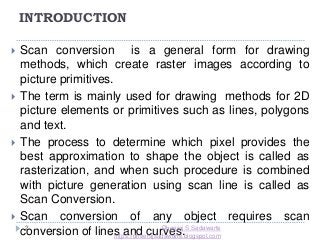
 Scan conversion is a general form for drawing
methods, which create raster images according to
picture primitives.
 The term is mainly used for drawing methods for 2D
picture elements or primitives such as lines, polygons
and text.
 The process to determine which pixel provides the
best approximation to shape the object is called as
rasterization, and when such procedure is combined
with picture generation using scan line is called as
Scan Conversion.
 Scan conversion of any object requires scan
conversion of lines and curves.Dheeraj S Sadawarte
https://dheerajsadawarte.blogspot.com
Digital differential analyzer(DDA)
Algorithm
3
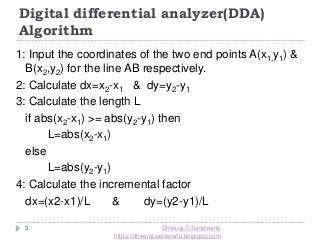
1: Input the coordinates of the two end points A(x1,y1) &
B(x2,y2) for the line AB respectively.
2: Calculate dx=x2-x1 & dy=y2-y1
3: Calculate the length L
if abs(x2-x1) >= abs(y2-y1) then
L=abs(x2-x1)
else
L=abs(y2-y1)
4: Calculate the incremental factor
dx=(x2-x1)/L & dy=(y2-y1)/L
Dheeraj S Sadawarte
https://dheerajsadawarte.blogspot.com
4
5: Initialize the initial point on the line & plot
xnew = x1 + 0.5 * (sign ∆x) &
ynew = y1 + 0.5 * (sign ∆x)
The values are rounded using the factor of 0.5
rather than truncating so that the central pixel
addressing is handled correctly.
6: [Obtain the new pixel on the line & plot the same]
Initialize i =1
Digital differential analyzer(DDA)
Algorithm
Dheeraj S Sadawarte
https://dheerajsadawarte.blogspot.com
5
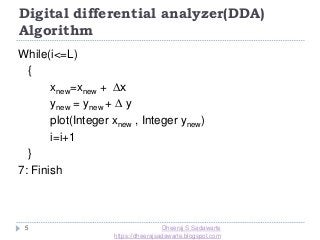
While(i<=L)
{
xnew=xnew + ∆x
ynew = ynew + ∆ y
plot(Integer xnew , Integer ynew)
i=i+1
}
7: Finish
Digital differential analyzer(DDA)
Algorithm
Dheeraj S Sadawarte
https://dheerajsadawarte.blogspot.com
6
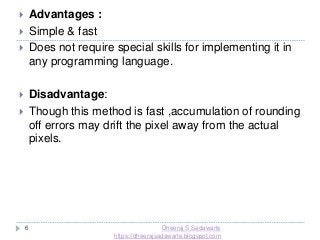
 Advantages :
 Simple & fast
 Does not require special skills for implementing it in
any programming language.
 Disadvantage:
 Though this method is fast ,accumulation of rounding
off errors may drift the pixel away from the actual
pixels.
Dheeraj S Sadawarte
https://dheerajsadawarte.blogspot.com
Examples
7
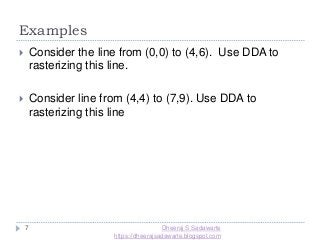
 Consider the line from (0,0) to (4,6). Use DDA to
rasterizing this line.
 Consider line from (4,4) to (7,9). Use DDA to
rasterizing this line
Dheeraj S Sadawarte
https://dheerajsadawarte.blogspot.com
Bresenham’s Line Drawing
Algorithm
8
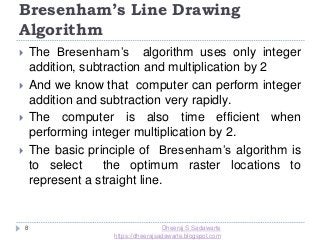
 The Bresenham’s algorithm uses only integer
addition, subtraction and multiplication by 2
 And we know that computer can perform integer
addition and subtraction very rapidly.
 The computer is also time efficient when
performing integer multiplication by 2.
 The basic principle of Bresenham’s algorithm is
to select the optimum raster locations to
represent a straight line.
Dheeraj S Sadawarte
https://dheerajsadawarte.blogspot.com
Bresenham’s Line Drawing Algorithm
9
 To accomplish this the algorithm always
increments either x or y by one unit depending
upon the slope of the line.
 The increment in other variable is determined by
examining the distance between the actual line
location and the nearest pixel.
 This distance is called decision variable or error.
 The error term is initially set as e=2*∆y- ∆x.
 Let us study the algorithm now:
Dheeraj S Sadawarte
https://dheerajsadawarte.blogspot.com
Algorithm:
10
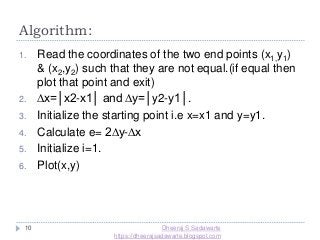
1. Read the coordinates of the two end points (x1,y1)
& (x2,y2) such that they are not equal.(if equal then
plot that point and exit)
2. ∆x=│x2-x1│ and ∆y=│y2-y1│.
3. Initialize the starting point i.e x=x1 and y=y1.
4. Calculate e= 2∆y-∆x
5. Initialize i=1.
6. Plot(x,y)
Dheeraj S Sadawarte
https://dheerajsadawarte.blogspot.com
11
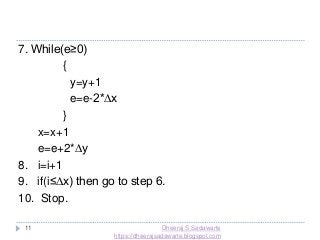
7. While(e≥0)
{
y=y+1
e=e-2*∆x
}
x=x+1
e=e+2*∆y
8. i=i+1
9. if(i≤∆x) then go to step 6.
10. Stop.
Dheeraj S Sadawarte
https://dheerajsadawarte.blogspot.com
Basic Concepts in Circle Drawing
12
 Circle is a symmetrical figure.
 The shape of the circle is similar in each
quadrant
 It has eight-way symmetry
Plot (x,y) Plot (-x,y)
Plot (y,x) Plot (y, -x)
Plot (-x,-y) Plot (x,-y)
Plot (-y,-x) Plot (-y,x)
Dheeraj S Sadawarte
https://dheerajsadawarte.blogspot.com
Representation of Circle
13
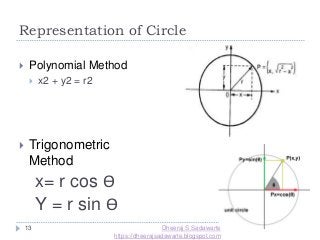
 Polynomial Method
 x2 + y2 = r2
 Trigonometric
Method
x= r cos Ө
Y = r sin Ө
Dheeraj S Sadawarte
https://dheerajsadawarte.blogspot.com
Bresenham’s Circle drawing
Algorithm:
14
 The Bresenham’s circle drawing algorithm considers
the eight way of the symmetry of the circle to
generate it.
 It plots 1/8th part of the circle i.e. from 90ᵒ to 45ᵒ.
 As circle is drawn from 90ᵒ to 45ᵒ,the x moves in x
direction and y moves in the negative direction.
Dheeraj S Sadawarte
https://dheerajsadawarte.blogspot.com
Bresenham’s Circle drawing
Algorithm:
15 Dheeraj S Sadawarte
https://dheerajsadawarte.blogspot.com
16
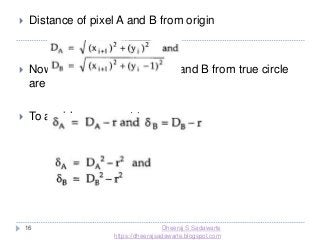
 Distance of pixel A and B from origin
 Now, the distances of pixel A and B from true circle
are
 To avoid square root term
Dheeraj S Sadawarte
https://dheerajsadawarte.blogspot.com
17
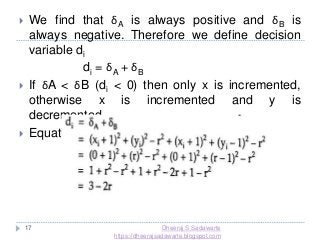
 We find that δA is always positive and δB is
always negative. Therefore we define decision
variable di
di = δA + δB
 If δA < δB (di < 0) then only x is incremented,
otherwise x is incremented and y is
decremented.
 Equation for di at starting point x=0, y=r
Dheeraj S Sadawarte
https://dheerajsadawarte.blogspot.com
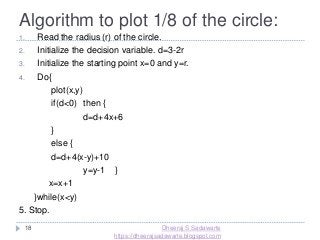
Algorithm to plot 1/8 of the circle:
18
1. Read the radius (r) of the circle.
2. Initialize the decision variable. d=3-2r
3. Initialize the starting point x=0 and y=r.
4. Do{
plot(x,y)
if(d<0) then {
d=d+4x+6
}
else {
d=d+4(x-y)+10
y=y-1 }
x=x+1
}while(x<y)
5. Stop.
Dheeraj S Sadawarte
https://dheerajsadawarte.blogspot.com
Polygon
19
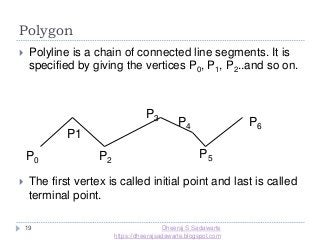
 Polyline is a chain of connected line segments. It is
specified by giving the vertices P0, P1, P2..and so on.
 The first vertex is called initial point and last is called
terminal point.
P0
P1
P2
P3
P4
P5
P6
Dheeraj S Sadawarte
https://dheerajsadawarte.blogspot.com
Polygon
20
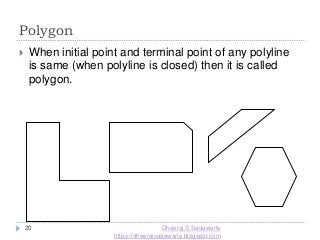
 When initial point and terminal point of any polyline
is same (when polyline is closed) then it is called
polygon.
Dheeraj S Sadawarte
https://dheerajsadawarte.blogspot.com
Types of Polygon
21
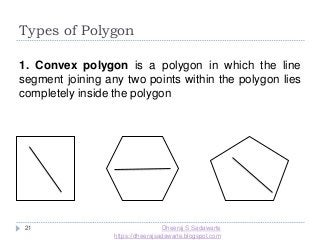
1. Convex polygon is a polygon in which the line
segment joining any two points within the polygon lies
completely inside the polygon
Dheeraj S Sadawarte
https://dheerajsadawarte.blogspot.com
Types of Polygon
22
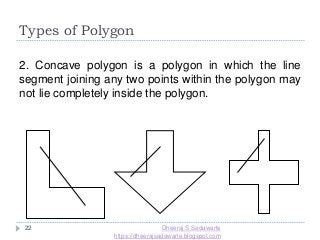
2. Concave polygon is a polygon in which the line
segment joining any two points within the polygon may
not lie completely inside the polygon.
Dheeraj S Sadawarte
https://dheerajsadawarte.blogspot.com
23
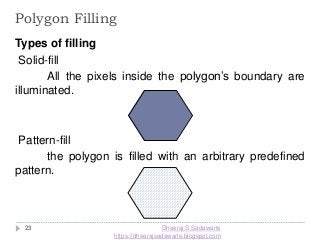
Polygon Filling
Types of filling
Solid-fill
All the pixels inside the polygon’s boundary are
illuminated.
Pattern-fill
the polygon is filled with an arbitrary predefined
pattern.
Dheeraj S Sadawarte
https://dheerajsadawarte.blogspot.com
24
Polygon Representation
The polygon can be represented by listing its n
vertices in an ordered list.
P = {(x1, y1), (x2, y2), ……., (xn, yn)}.
The polygon can be displayed by drawing a line
between (x1, y1), and (x2, y2), then a line between
(x2, y2), and (x3, y3), and so on until the end vertex.
In order to close up the polygon, a line between (xn,
yn), and (x1, y1) must be drawn.
One problem with this representation is that if we
wish to translate the polygon, it is necessary to
apply the translation transformation to each vertex
in order to obtain the translated polygon.Dheeraj S Sadawarte
https://dheerajsadawarte.blogspot.com
25
Polygon Representation
For objects described by many polygons with many
vertices, this can be a time consuming process.
One method for reducing the computational
time is to represent the polygon by the (absolute)
location of its first vertex, and represent
subsequent vertices as relative positions from the
previous vertex. This enables us to translate the
polygon simply by changing the coordinates of the
first vertex.
Dheeraj S Sadawarte
https://dheerajsadawarte.blogspot.com
Dheeraj S Sadawarte
https://dheerajsadawarte.blogspot.com
26
Download complete presentation in ppt
format from.....
https://dheerajsadawarte.blogspot.com/2019/
08/raster-scan-graphics-computer-
graphics.html

Raster scan graphics (line drawing, circle drawing, polygon, character generation)

  • 1.
    Raster Scan Graphics DheerajS Sadawarte Dheeraj S Sadawarte https://dheerajsadawarte.blogspot.com 1
  • 2.
    INTRODUCTION 2  Scan conversionis a general form for drawing methods, which create raster images according to picture primitives.  The term is mainly used for drawing methods for 2D picture elements or primitives such as lines, polygons and text.  The process to determine which pixel provides the best approximation to shape the object is called as rasterization, and when such procedure is combined with picture generation using scan line is called as Scan Conversion.  Scan conversion of any object requires scan conversion of lines and curves.Dheeraj S Sadawarte https://dheerajsadawarte.blogspot.com
  • 3.
    Digital differential analyzer(DDA) Algorithm 3 1:Input the coordinates of the two end points A(x1,y1) & B(x2,y2) for the line AB respectively. 2: Calculate dx=x2-x1 & dy=y2-y1 3: Calculate the length L if abs(x2-x1) >= abs(y2-y1) then L=abs(x2-x1) else L=abs(y2-y1) 4: Calculate the incremental factor dx=(x2-x1)/L & dy=(y2-y1)/L Dheeraj S Sadawarte https://dheerajsadawarte.blogspot.com
  • 4.
    4 5: Initialize theinitial point on the line & plot xnew = x1 + 0.5 * (sign ∆x) & ynew = y1 + 0.5 * (sign ∆x) The values are rounded using the factor of 0.5 rather than truncating so that the central pixel addressing is handled correctly. 6: [Obtain the new pixel on the line & plot the same] Initialize i =1 Digital differential analyzer(DDA) Algorithm Dheeraj S Sadawarte https://dheerajsadawarte.blogspot.com
  • 5.
    5 While(i<=L) { xnew=xnew + ∆x ynew= ynew + ∆ y plot(Integer xnew , Integer ynew) i=i+1 } 7: Finish Digital differential analyzer(DDA) Algorithm Dheeraj S Sadawarte https://dheerajsadawarte.blogspot.com
  • 6.
    6  Advantages : Simple & fast  Does not require special skills for implementing it in any programming language.  Disadvantage:  Though this method is fast ,accumulation of rounding off errors may drift the pixel away from the actual pixels. Dheeraj S Sadawarte https://dheerajsadawarte.blogspot.com
  • 7.
    Examples 7  Consider theline from (0,0) to (4,6). Use DDA to rasterizing this line.  Consider line from (4,4) to (7,9). Use DDA to rasterizing this line Dheeraj S Sadawarte https://dheerajsadawarte.blogspot.com
  • 8.
    Bresenham’s Line Drawing Algorithm 8 The Bresenham’s algorithm uses only integer addition, subtraction and multiplication by 2  And we know that computer can perform integer addition and subtraction very rapidly.  The computer is also time efficient when performing integer multiplication by 2.  The basic principle of Bresenham’s algorithm is to select the optimum raster locations to represent a straight line. Dheeraj S Sadawarte https://dheerajsadawarte.blogspot.com
  • 9.
    Bresenham’s Line DrawingAlgorithm 9  To accomplish this the algorithm always increments either x or y by one unit depending upon the slope of the line.  The increment in other variable is determined by examining the distance between the actual line location and the nearest pixel.  This distance is called decision variable or error.  The error term is initially set as e=2*∆y- ∆x.  Let us study the algorithm now: Dheeraj S Sadawarte https://dheerajsadawarte.blogspot.com
  • 10.
    Algorithm: 10 1. Read thecoordinates of the two end points (x1,y1) & (x2,y2) such that they are not equal.(if equal then plot that point and exit) 2. ∆x=│x2-x1│ and ∆y=│y2-y1│. 3. Initialize the starting point i.e x=x1 and y=y1. 4. Calculate e= 2∆y-∆x 5. Initialize i=1. 6. Plot(x,y) Dheeraj S Sadawarte https://dheerajsadawarte.blogspot.com
  • 11.
    11 7. While(e≥0) { y=y+1 e=e-2*∆x } x=x+1 e=e+2*∆y 8. i=i+1 9.if(i≤∆x) then go to step 6. 10. Stop. Dheeraj S Sadawarte https://dheerajsadawarte.blogspot.com
  • 12.
    Basic Concepts inCircle Drawing 12  Circle is a symmetrical figure.  The shape of the circle is similar in each quadrant  It has eight-way symmetry Plot (x,y) Plot (-x,y) Plot (y,x) Plot (y, -x) Plot (-x,-y) Plot (x,-y) Plot (-y,-x) Plot (-y,x) Dheeraj S Sadawarte https://dheerajsadawarte.blogspot.com
  • 13.
    Representation of Circle 13 Polynomial Method  x2 + y2 = r2  Trigonometric Method x= r cos Ө Y = r sin Ө Dheeraj S Sadawarte https://dheerajsadawarte.blogspot.com
  • 14.
    Bresenham’s Circle drawing Algorithm: 14 The Bresenham’s circle drawing algorithm considers the eight way of the symmetry of the circle to generate it.  It plots 1/8th part of the circle i.e. from 90ᵒ to 45ᵒ.  As circle is drawn from 90ᵒ to 45ᵒ,the x moves in x direction and y moves in the negative direction. Dheeraj S Sadawarte https://dheerajsadawarte.blogspot.com
  • 15.
    Bresenham’s Circle drawing Algorithm: 15Dheeraj S Sadawarte https://dheerajsadawarte.blogspot.com
  • 16.
    16  Distance ofpixel A and B from origin  Now, the distances of pixel A and B from true circle are  To avoid square root term Dheeraj S Sadawarte https://dheerajsadawarte.blogspot.com
  • 17.
    17  We findthat δA is always positive and δB is always negative. Therefore we define decision variable di di = δA + δB  If δA < δB (di < 0) then only x is incremented, otherwise x is incremented and y is decremented.  Equation for di at starting point x=0, y=r Dheeraj S Sadawarte https://dheerajsadawarte.blogspot.com
  • 18.
    Algorithm to plot1/8 of the circle: 18 1. Read the radius (r) of the circle. 2. Initialize the decision variable. d=3-2r 3. Initialize the starting point x=0 and y=r. 4. Do{ plot(x,y) if(d<0) then { d=d+4x+6 } else { d=d+4(x-y)+10 y=y-1 } x=x+1 }while(x<y) 5. Stop. Dheeraj S Sadawarte https://dheerajsadawarte.blogspot.com
  • 19.
    Polygon 19  Polyline isa chain of connected line segments. It is specified by giving the vertices P0, P1, P2..and so on.  The first vertex is called initial point and last is called terminal point. P0 P1 P2 P3 P4 P5 P6 Dheeraj S Sadawarte https://dheerajsadawarte.blogspot.com
  • 20.
    Polygon 20  When initialpoint and terminal point of any polyline is same (when polyline is closed) then it is called polygon. Dheeraj S Sadawarte https://dheerajsadawarte.blogspot.com
  • 21.
    Types of Polygon 21 1.Convex polygon is a polygon in which the line segment joining any two points within the polygon lies completely inside the polygon Dheeraj S Sadawarte https://dheerajsadawarte.blogspot.com
  • 22.
    Types of Polygon 22 2.Concave polygon is a polygon in which the line segment joining any two points within the polygon may not lie completely inside the polygon. Dheeraj S Sadawarte https://dheerajsadawarte.blogspot.com
  • 23.
    23 Polygon Filling Types offilling Solid-fill All the pixels inside the polygon’s boundary are illuminated. Pattern-fill the polygon is filled with an arbitrary predefined pattern. Dheeraj S Sadawarte https://dheerajsadawarte.blogspot.com
  • 24.
    24 Polygon Representation The polygoncan be represented by listing its n vertices in an ordered list. P = {(x1, y1), (x2, y2), ……., (xn, yn)}. The polygon can be displayed by drawing a line between (x1, y1), and (x2, y2), then a line between (x2, y2), and (x3, y3), and so on until the end vertex. In order to close up the polygon, a line between (xn, yn), and (x1, y1) must be drawn. One problem with this representation is that if we wish to translate the polygon, it is necessary to apply the translation transformation to each vertex in order to obtain the translated polygon.Dheeraj S Sadawarte https://dheerajsadawarte.blogspot.com
  • 25.
    25 Polygon Representation For objectsdescribed by many polygons with many vertices, this can be a time consuming process. One method for reducing the computational time is to represent the polygon by the (absolute) location of its first vertex, and represent subsequent vertices as relative positions from the previous vertex. This enables us to translate the polygon simply by changing the coordinates of the first vertex. Dheeraj S Sadawarte https://dheerajsadawarte.blogspot.com
  • 26.
    Dheeraj S Sadawarte https://dheerajsadawarte.blogspot.com 26 Downloadcomplete presentation in ppt format from..... https://dheerajsadawarte.blogspot.com/2019/ 08/raster-scan-graphics-computer- graphics.html