Linear Scheduling 101
How to create your most-valuable
project management tool on a single page.
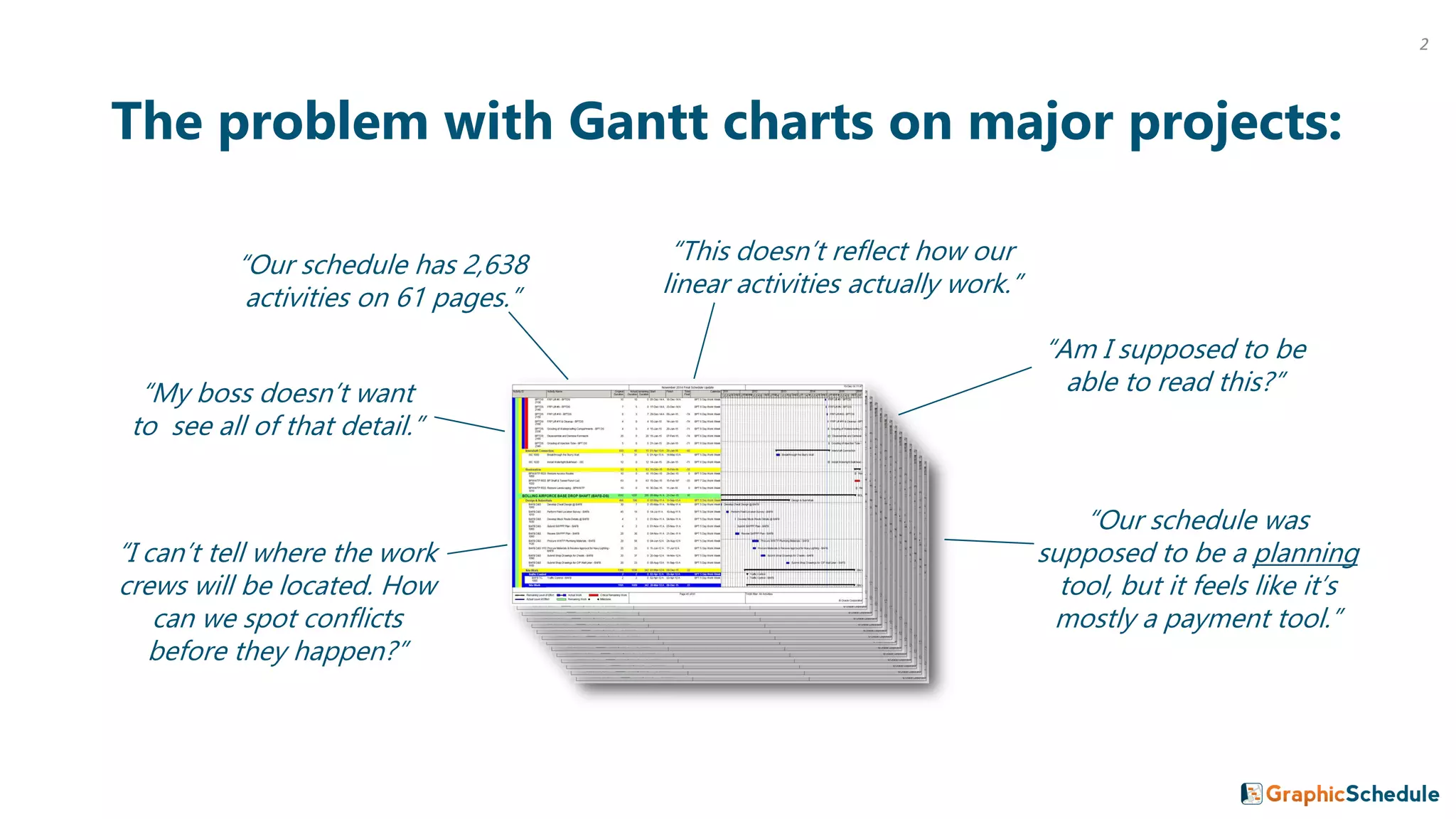
The problem with Gantt charts on major projects:
“Our schedule has 2,638
activities on 61 pages.”
“My boss doesn’t want
to see all of that detail.”
“Our schedule was
supposed to be a planning
tool, but it feels like it’s
mostly a payment tool.”
“I can’t tell where the work
crews will be located. How
can we spot conflicts
before they happen?”
“This doesn’t reflect how our
linear activities actually work.”
“Am I supposed to be
able to read this?”
2
We’ve been there. Major projects is what we do.
This guide was created by two construction managers who needed a better way to communicate
complex schedules with their project teams. We live and breathe this stuff every day.
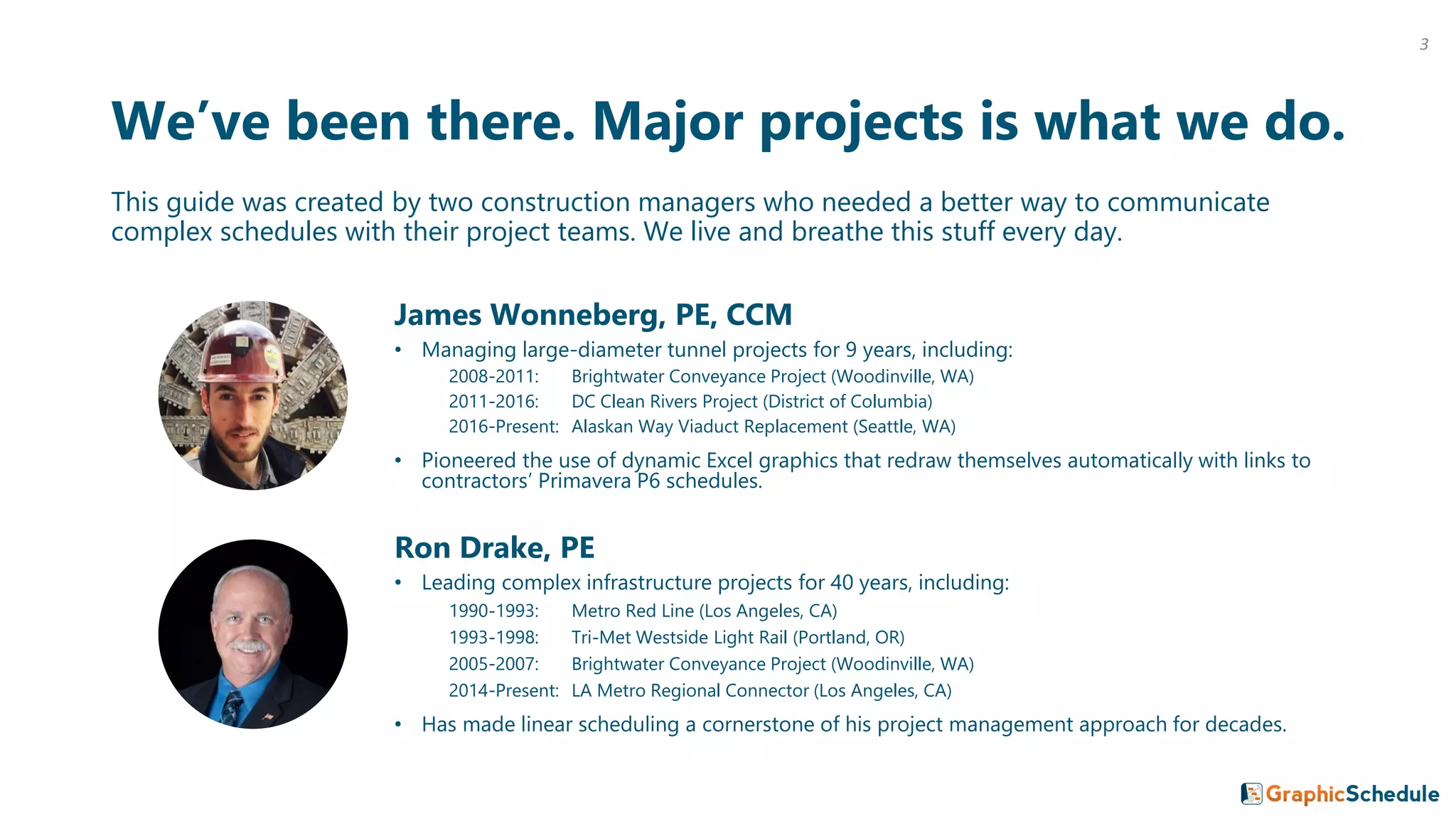
James Wonneberg, PE, CCM
• Managing large-diameter tunnel projects for 9 years, including:
2008-2011: Brightwater Conveyance Project (Woodinville, WA)
2011-2016: DC Clean Rivers Project (District of Columbia)
2016-Present: Alaskan Way Viaduct Replacement (Seattle, WA)
• Pioneered the use of dynamic Excel graphics that redraw themselves automatically with links to
contractors’ Primavera P6 schedules.
Ron Drake, PE
• Leading complex infrastructure projects for 40 years, including:
1990-1993: Metro Red Line (Los Angeles, CA)
1993-1998: Tri-Met Westside Light Rail (Portland, OR)
2005-2007: Brightwater Conveyance Project (Woodinville, WA)
2014-Present: LA Metro Regional Connector (Los Angeles, CA)
• Has made linear scheduling a cornerstone of his project management approach for decades.
3
What We Believe:
We believe that the vast majority of people that work on these projects really
do want to know what’s in that huge schedule with thousands of activities.
They want to know the master plan. They want to see the big picture and understand the relationships
between activities. They want to know about the deadlines that their crew must meet. But our industry
lacks the tools to communicate that information in a way that the entire team can understand.
We believe that if you make your schedule beautiful, your team will use it!
If you place a good-looking linear schedule on the table in any project office or jobsite trailer, people will
go out of their way to look at it, pick it up, and study it. Then they will ask questions, and give you
valuable feedback about how the work will actually be built.
(But if you don’t make your schedule beautiful, it will be ignored and forgotten like all the rest.)
4
What We Believe: CONTINUED
We believe that schedules should fit on one page.
The moment you have to flip the page to see the rest of your sequence of work, you’ve lost the
relationships between activities. This is not to say that we don’t create multiple sheets; in fact we do it all
the time to “zoom in” and “zoom out” on our projects. But each sheet should tell the whole story of what
you are trying to communicate.
We believe that adding a simple graphic of what you’re building makes your
schedule information 10x more useful and effective.
Most people are visual learners, and schedule data doesn’t sink in unless they can visualize the major
work elements and the spatial relationships between them. A one-page illustration of scope of work and
schedule becomes a very useful “talking paper” that helps you quickly explain your entire project to
anyone, anywhere. And your team members will undoubtedly start sketching right on top of it for all
sorts of problem solving, alternatives, and what-if-scenarios. This is when the magic happens – increasing
the chances of your team delivering a winning project.
5
6
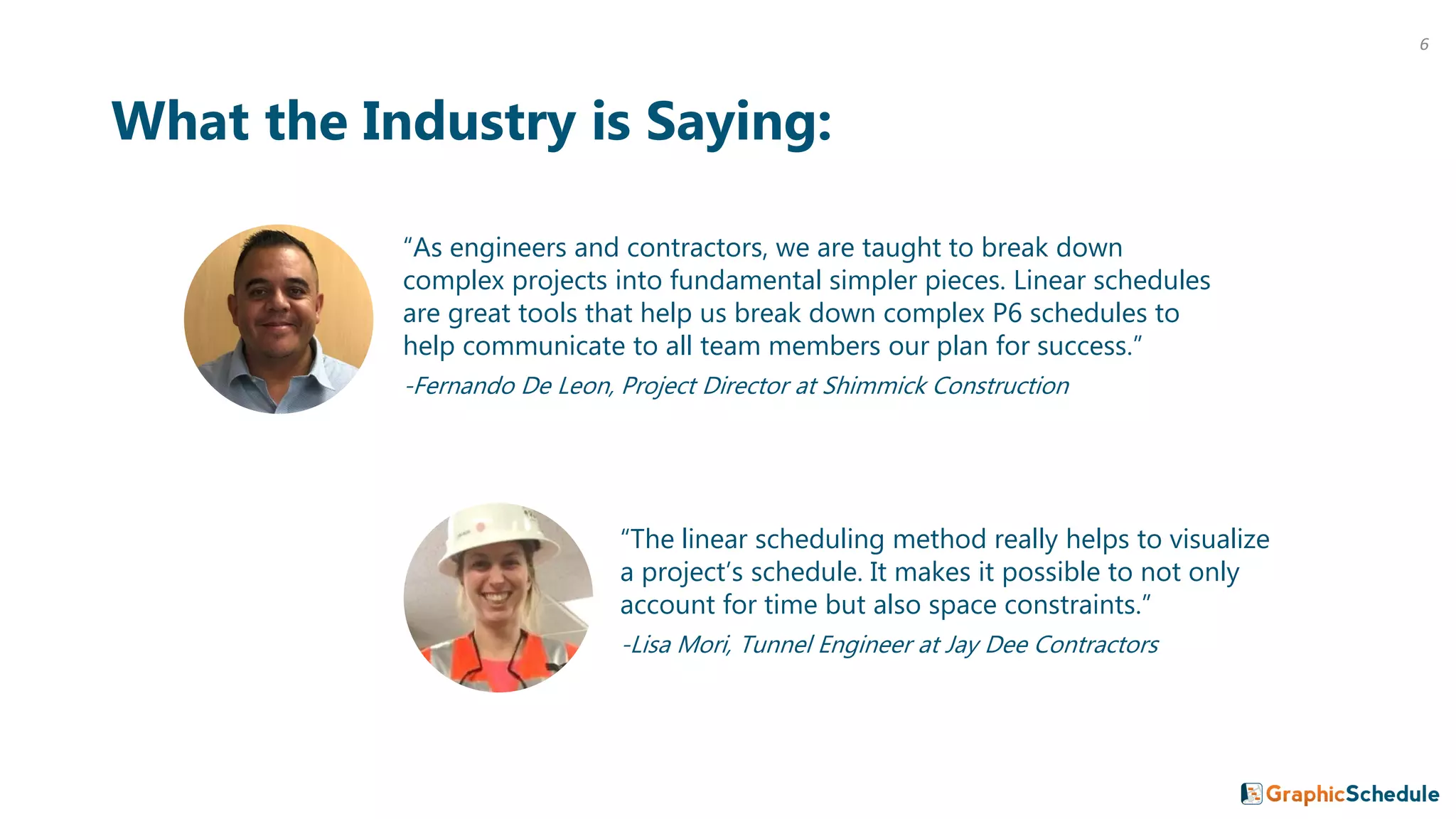
“As engineers and contractors, we are taught to break down
complex projects into fundamental simpler pieces. Linear schedules
are great tools that help us break down complex P6 schedules to
help communicate to all team members our plan for success.”
-Fernando De Leon, Project Director at Shimmick Construction
What the Industry is Saying:
“The linear scheduling method really helps to visualize
a project’s schedule. It makes it possible to not only
account for time but also space constraints.”
-Lisa Mori, Tunnel Engineer at Jay Dee Contractors
Coming Up:
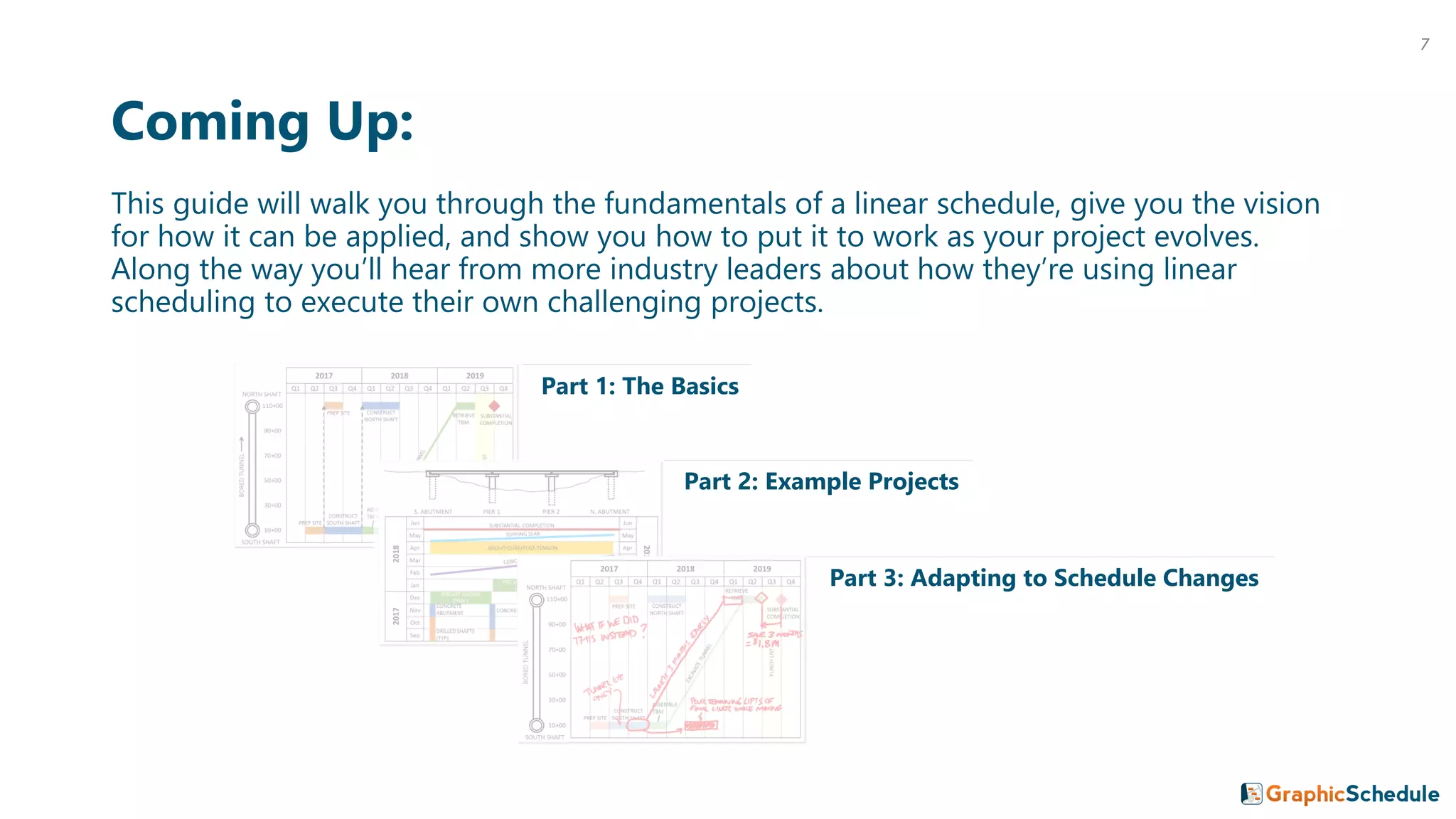
This guide will walk you through the fundamentals of a linear schedule, give you the vision
for how it can be applied, and show you how to put it to work as your project evolves.
Along the way you’ll hear from more industry leaders about how they’re using linear
scheduling to execute their own challenging projects.
Part 1: The Basics
Part 2: Example Projects
Part 3: Adapting to Schedule Changes
7
1 The Basics
8
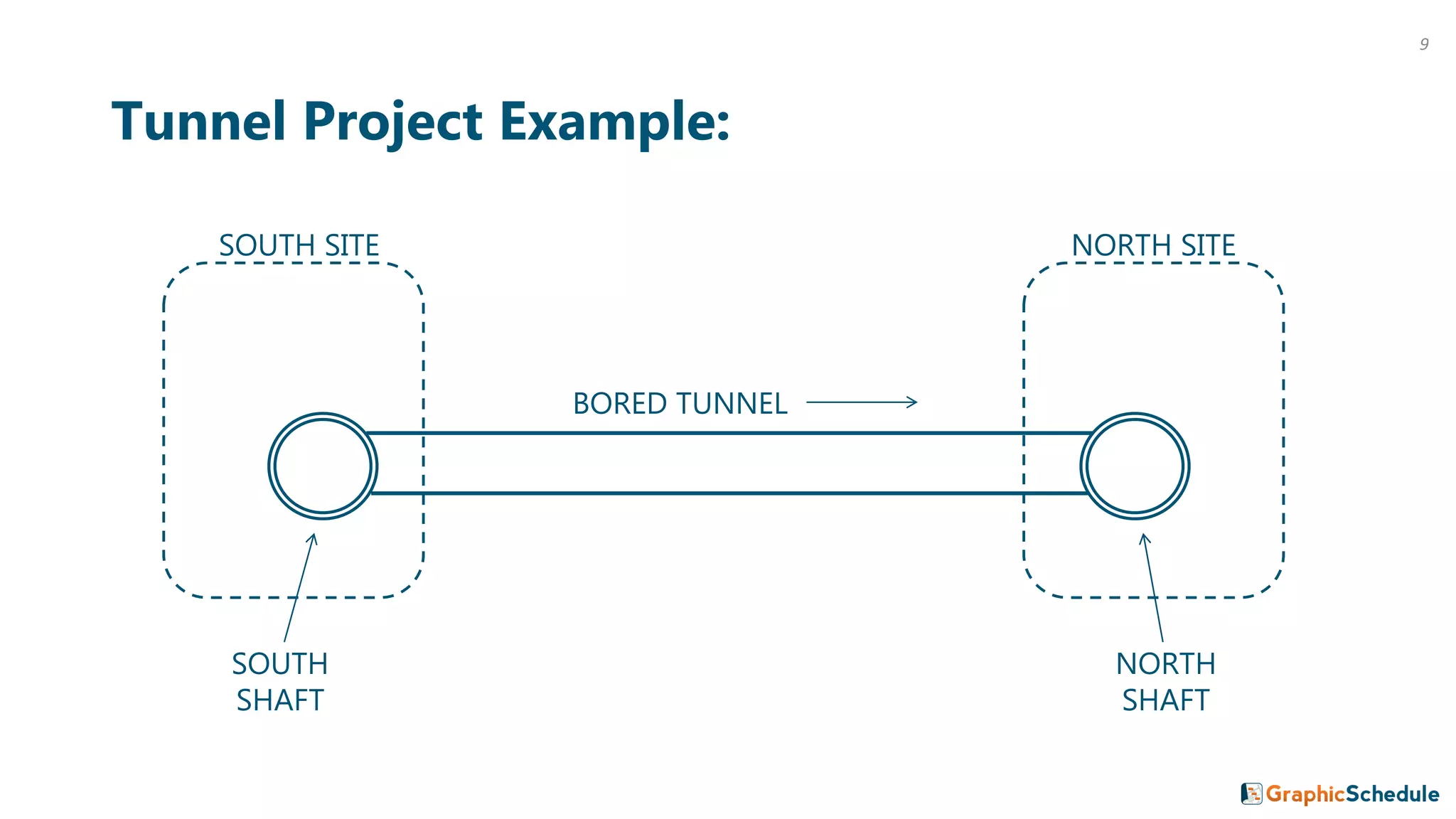
Tunnel Project Example:
SOUTH
SHAFT
NORTH
SHAFT
SOUTH SITE NORTH SITE
BORED TUNNEL
9
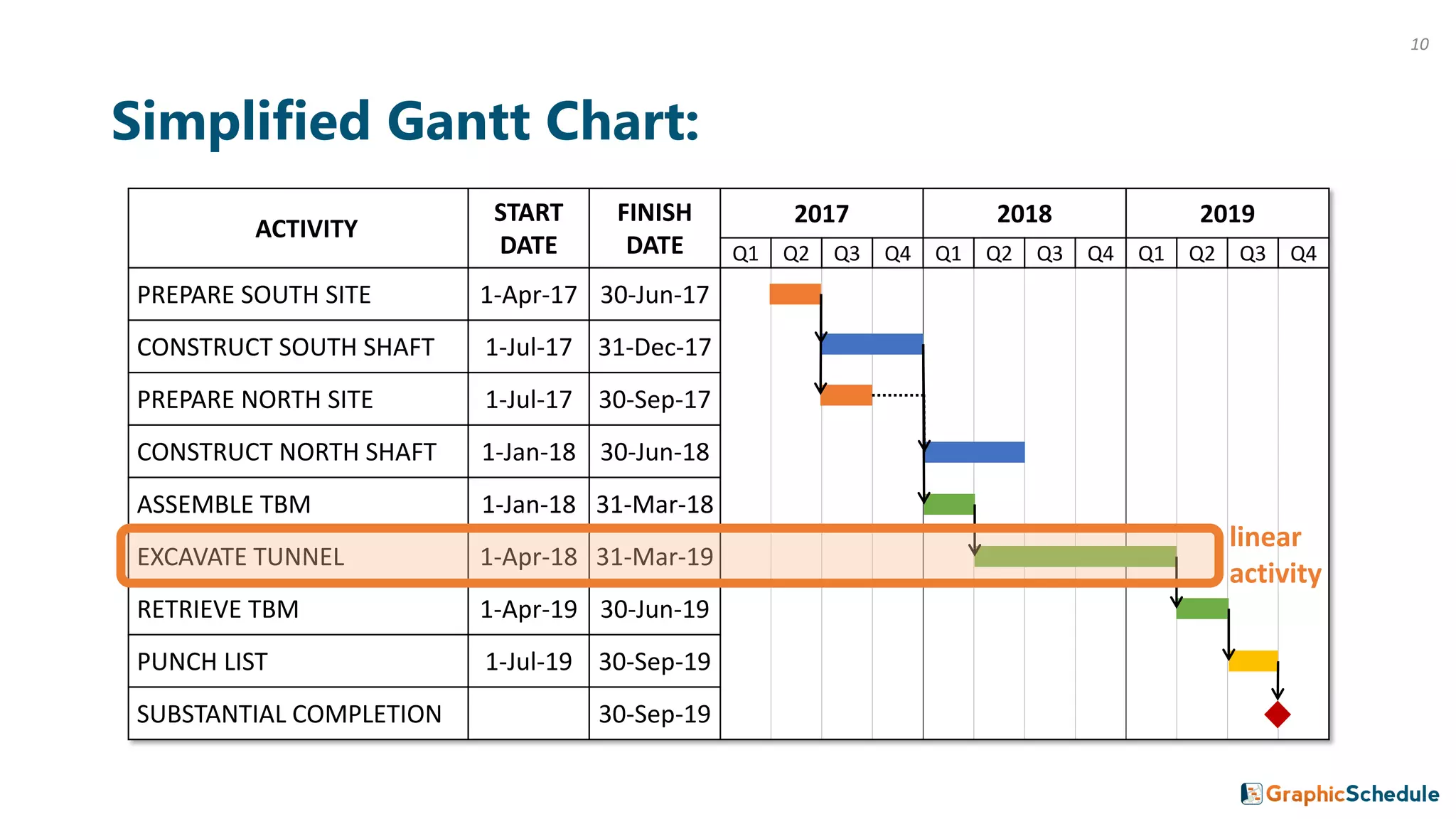
Simplified Gantt Chart:
ACTIVITY
START
DATE
FINISH
DATE
2017 2018 2019
Q1 Q2 Q3 Q4 Q1 Q2 Q3 Q4 Q1 Q2 Q3 Q4
PREPARE SOUTH SITE 1-Apr-17 30-Jun-17
CONSTRUCT SOUTH SHAFT 1-Jul-17 31-Dec-17
PREPARE NORTH SITE 1-Jul-17 30-Sep-17
CONSTRUCT NORTH SHAFT 1-Jan-18 30-Jun-18
ASSEMBLE TBM 1-Jan-18 31-Mar-18
EXCAVATE TUNNEL 1-Apr-18 31-Mar-19
RETRIEVE TBM 1-Apr-19 30-Jun-19
PUNCH LIST 1-Jul-19 30-Sep-19
SUBSTANTIAL COMPLETION 30-Sep-19
linear
activity
10
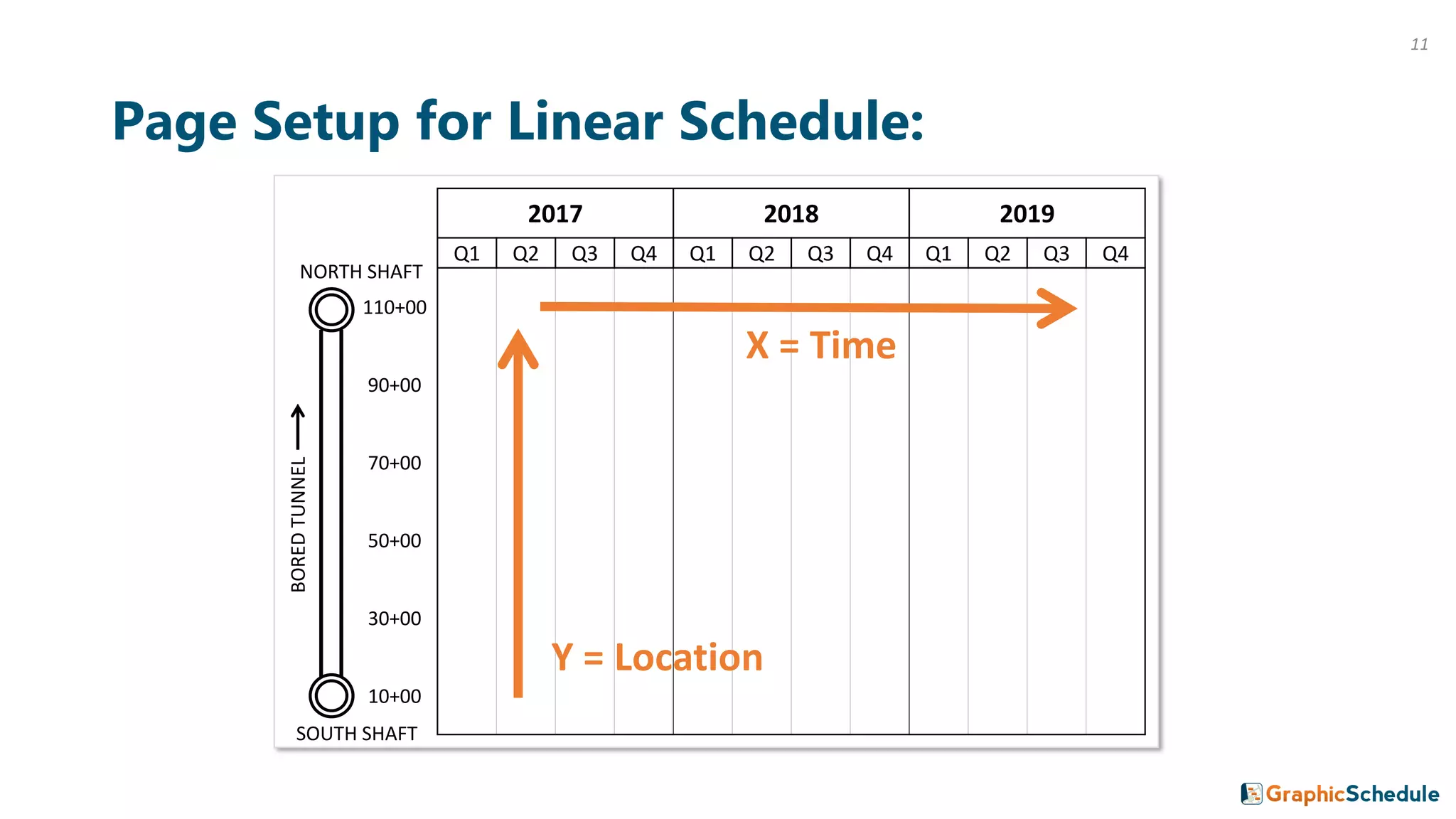
Page Setup for Linear Schedule:
2017 2018 2019
Q1 Q2 Q3 Q4 Q1 Q2 Q3 Q4 Q1 Q2 Q3 Q4
110+00
90+00
70+00
50+00
30+00
10+00
SOUTH SHAFT
BOREDTUNNEL
NORTH SHAFT
Y = Location
X = Time
11
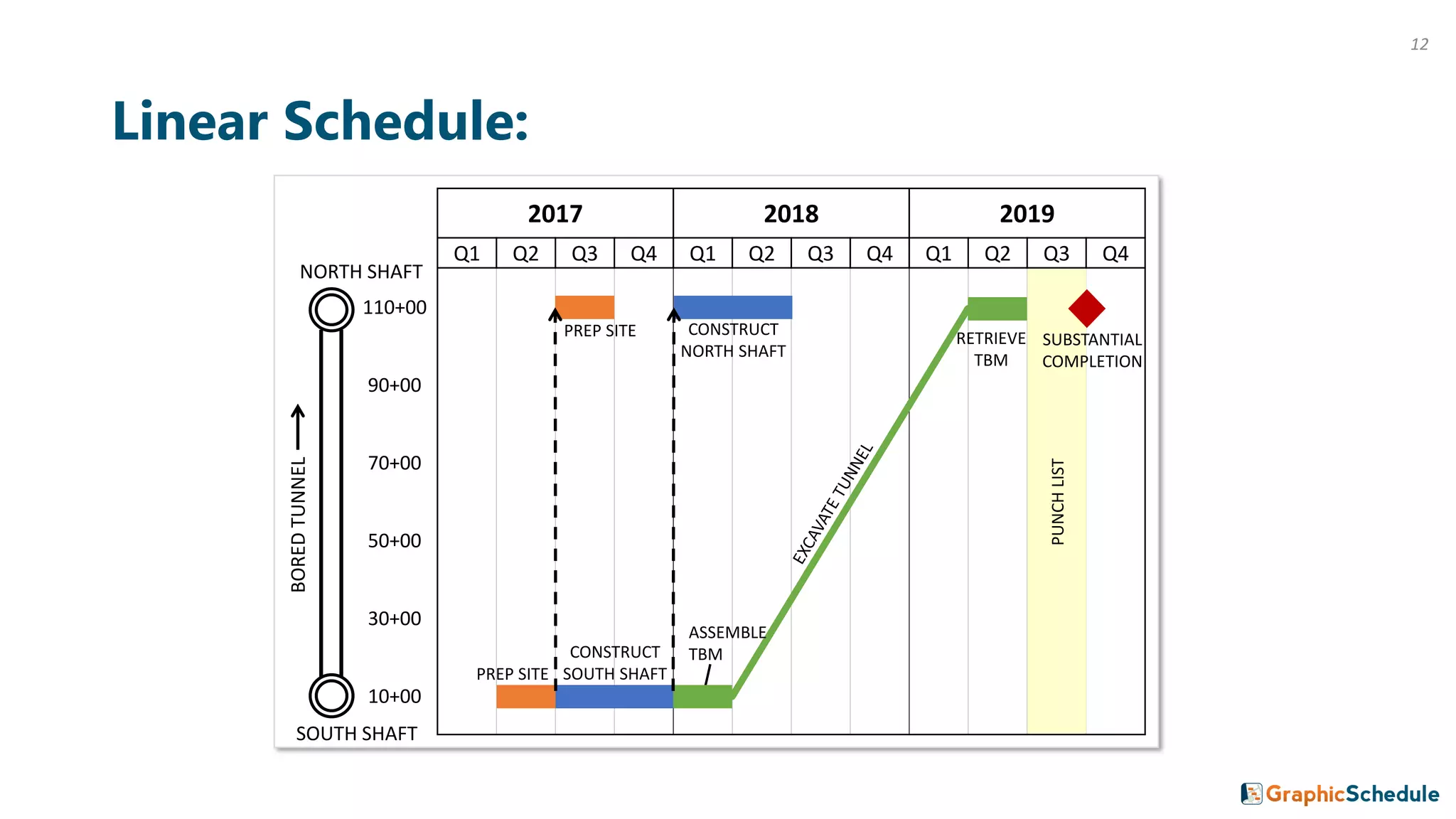
Linear Schedule:
2017 2018 2019
Q1 Q2 Q3 Q4 Q1 Q2 Q3 Q4 Q1 Q2 Q3 Q4
110+00
90+00
70+00
50+00
30+00
10+00
PREP SITE
CONSTRUCT
SOUTH SHAFT
ASSEMBLE
TBM
RETRIEVE
TBM
PREP SITE CONSTRUCT
NORTH SHAFT
PUNCHLIST
SUBSTANTIAL
COMPLETION
SOUTH SHAFT
BOREDTUNNEL
NORTH SHAFT
12
2017 2018 2019
Q1 Q2 Q3 Q4 Q1 Q2 Q3 Q4 Q1 Q2 Q3 Q4
110+00
90+00
70+00
50+00
30+00
10+00
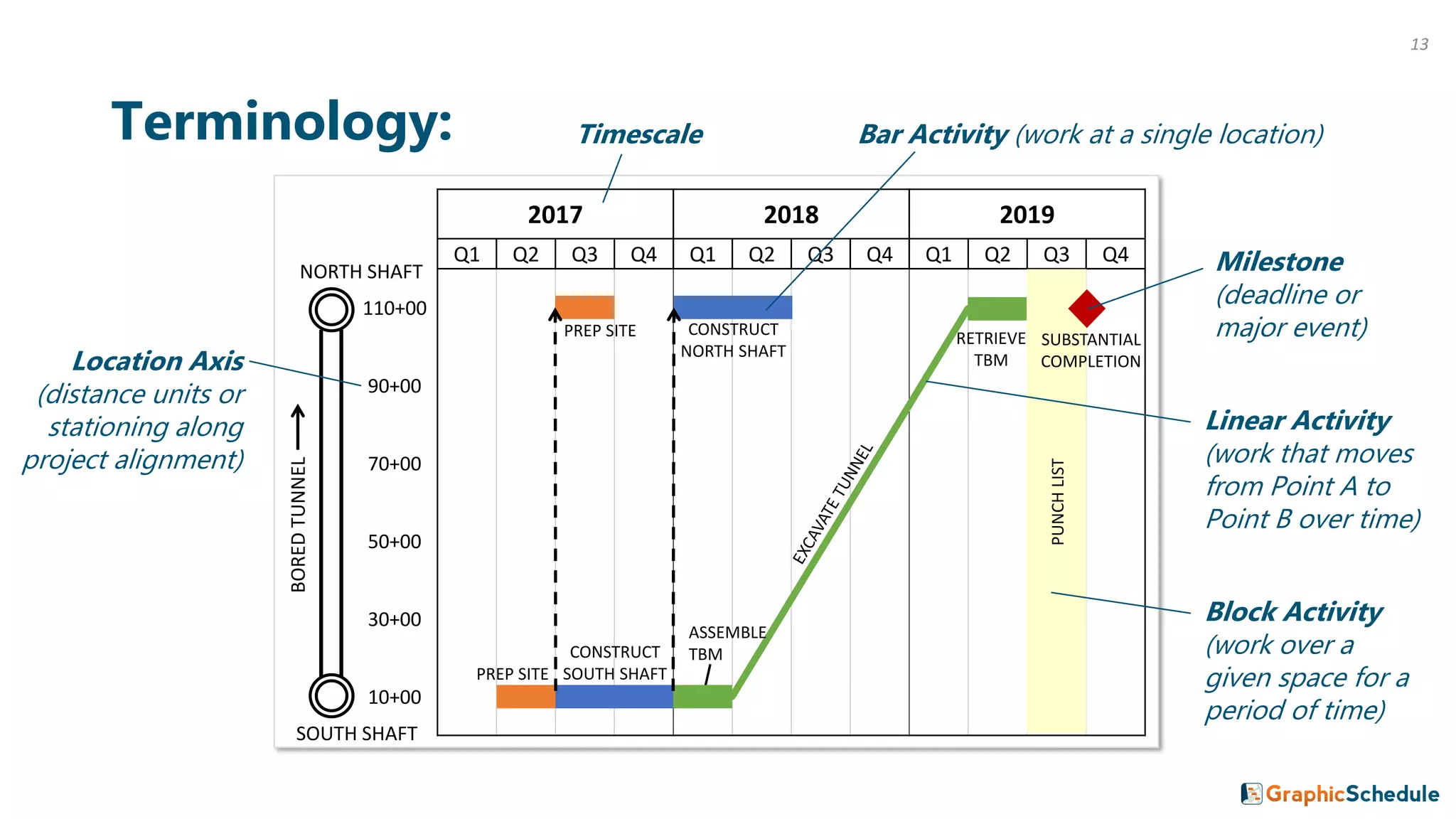
Terminology:
PREP SITE
CONSTRUCT
SOUTH SHAFT
ASSEMBLE
TBM
RETRIEVE
TBM
PREP SITE CONSTRUCT
NORTH SHAFT
PUNCHLIST
SUBSTANTIAL
COMPLETION
Timescale Bar Activity (work at a single location)
Block Activity
(work over a
given space for a
period of time)
Milestone
(deadline or
major event)
Linear Activity
(work that moves
from Point A to
Point B over time)
SOUTH SHAFT
BOREDTUNNEL
NORTH SHAFT
Location Axis
(distance units or
stationing along
project alignment)
13
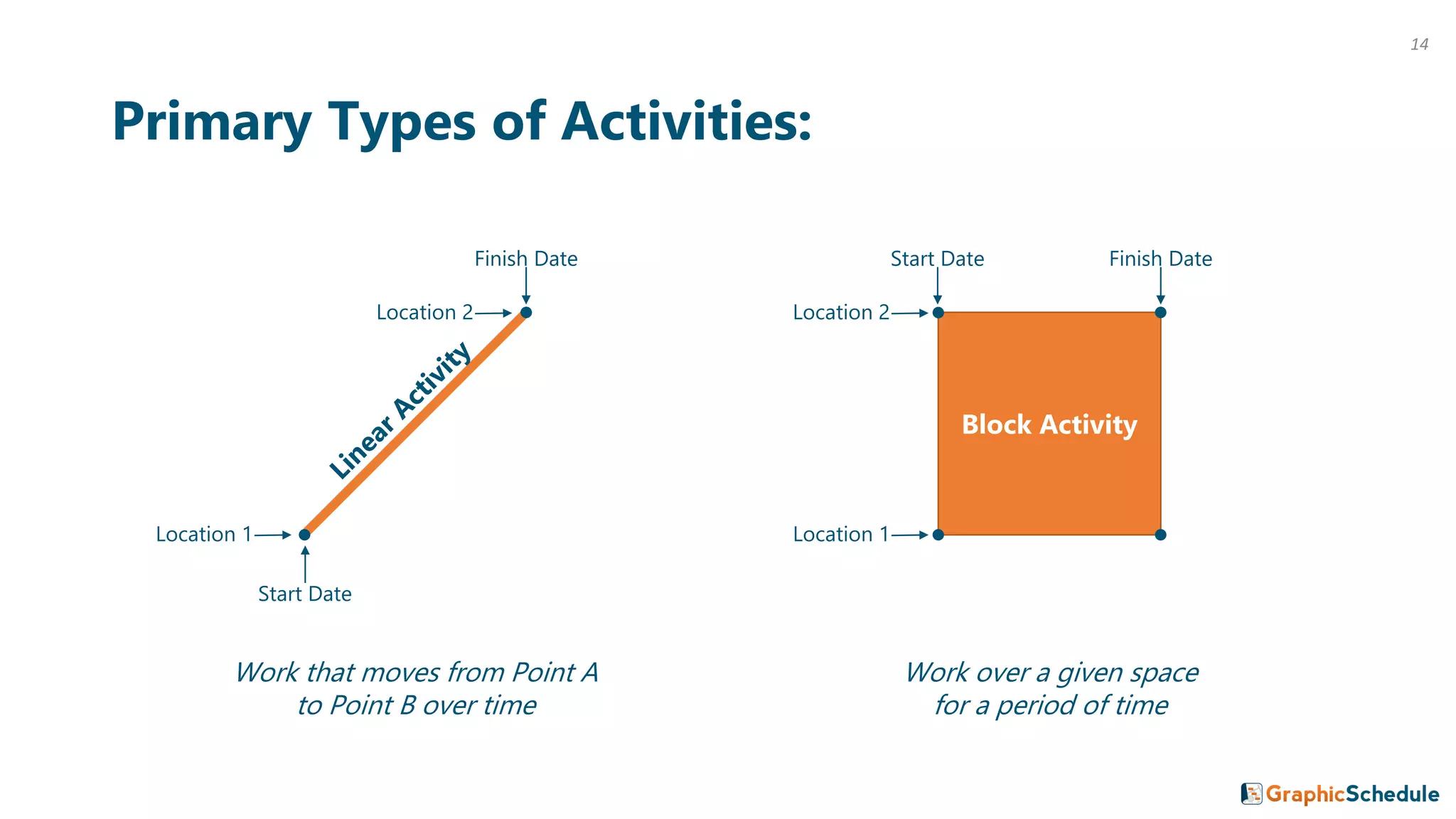
Primary Types of Activities:
Block Activity
Finish Date
Start Date
Location 1
Finish DateStart Date
Location 2 Location 2
Location 1
Work that moves from Point A
to Point B over time
Work over a given space
for a period of time
14
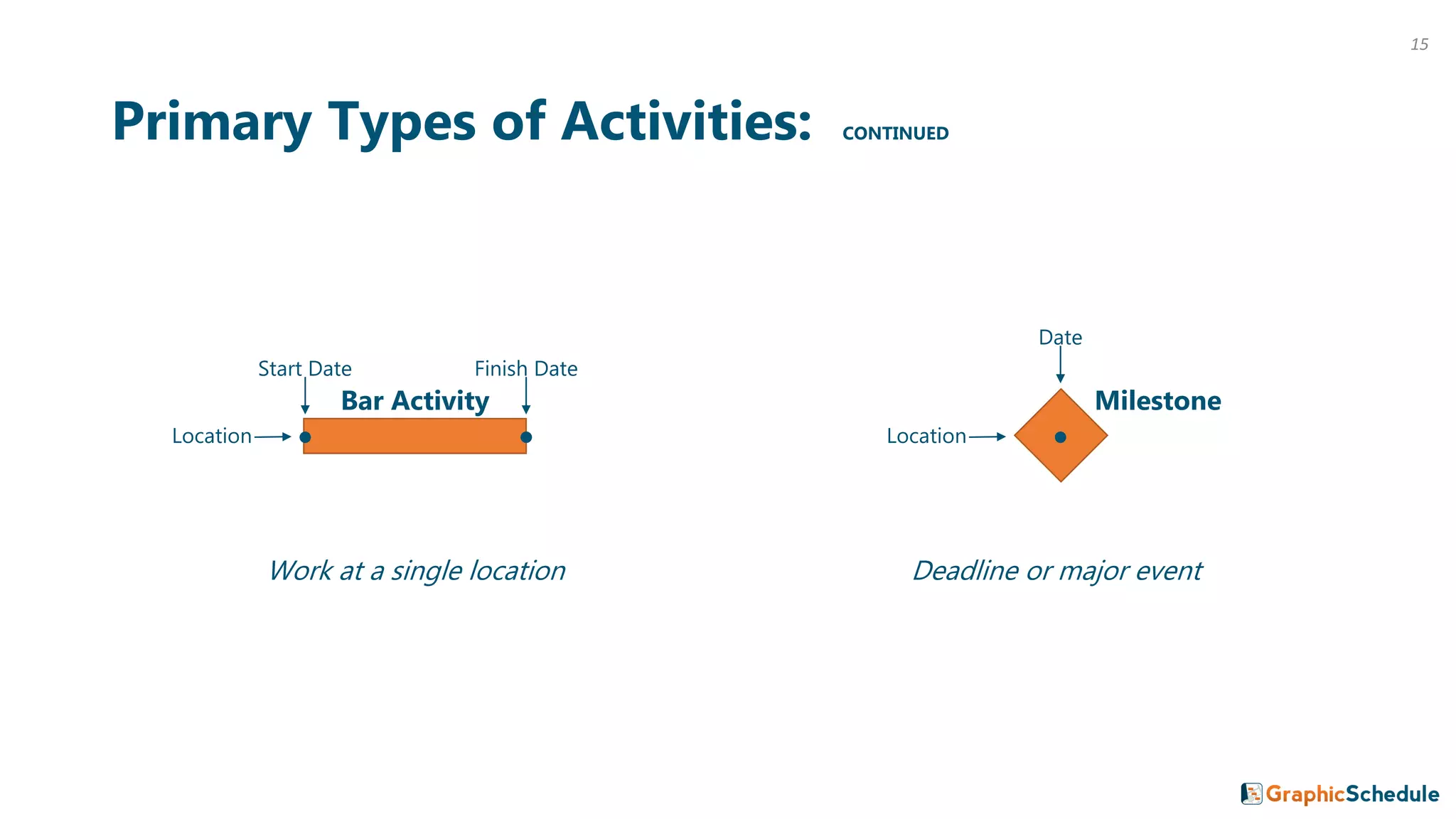
Primary Types of Activities: CONTINUED
Finish DateStart Date
Location
Date
Milestone
Location
Bar Activity
Work at a single location Deadline or major event
15
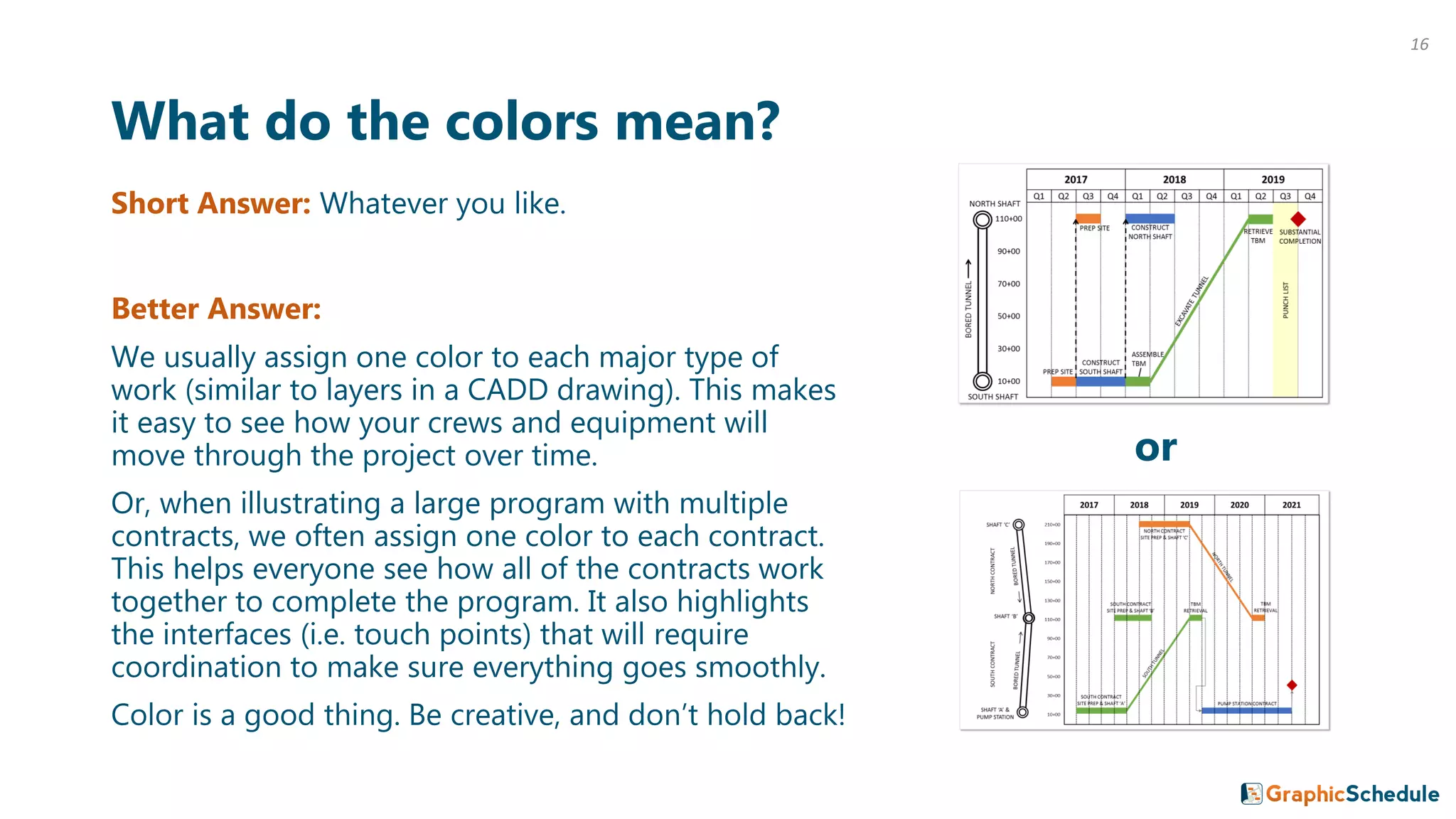
What do the colors mean?
Short Answer: Whatever you like.
Better Answer:
We usually assign one color to each major type of
work (similar to layers in a CADD drawing). This makes
it easy to see how your crews and equipment will
move through the project over time.
Or, when illustrating a large program with multiple
contracts, we often assign one color to each contract.
This helps everyone see how all of the contracts work
together to complete the program. It also highlights
the interfaces (i.e. touch points) that will require
coordination to make sure everything goes smoothly.
Color is a good thing. Be creative, and don’t hold back!
or
16
17
“Are we OK with three cranes or do we need to add a fourth? I can just
look down a specific month on the linear schedule and see right away
how many crews or spreads we will have working and at what locations.
All on one page. That is convenient compared to long P6 schedules.”
-Brett Zernich, Project Manager at Traylor Bros.
Advantages of a Linear Schedule:
“The linear schedule update is one email that I actually look
forward to receiving each month. It provides a concise and useful
snapshot of otherwise complex project and program schedules.”
-Rafael Castro, Principal at JCK Underground
“Linear schedules have been essential to communicating
inter-project and inter-agency construction relationships.”
-Brian Smith, Program Controls Manager at Mott MacDonald
Alternate Page Setup: Time on Vertical Axis
10+00 30+00 50+00 70+00 90+00 110+002017
Q1 Q1
2017
Q2 Q2
Q3 Q3
Q4 Q4
2018
Q1 Q1
2018
Q2 Q2
Q3 Q3
Q4 Q4
2019
Q1 Q1
2019
Q2 Q2
Q3 Q3
Q4 Q4
SOUTH
SHAFT
NORTH
SHAFT
BORED TUNNEL
Y = Time
X = Location
18
10+00 30+00 50+00 70+00 90+00 110+002017
Q1 Q1
2017
Q2 Q2
Q3 Q3
Q4 Q4
2018
Q1 Q1
2018
Q2 Q2
Q3 Q3
Q4 Q4
2019
Q1 Q1
2019
Q2 Q2
Q3 Q3
Q4 Q4
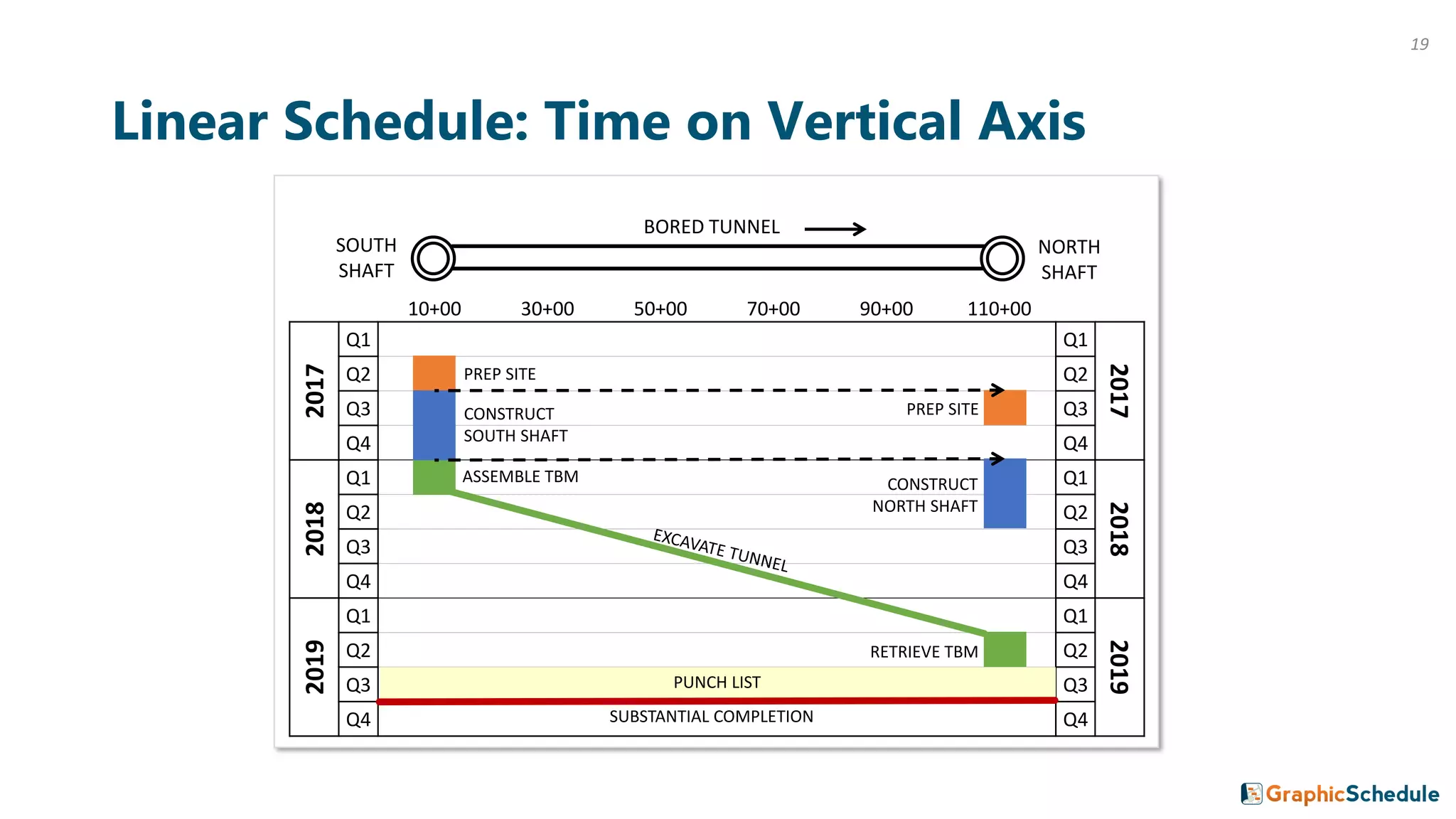
Linear Schedule: Time on Vertical Axis
SOUTH
SHAFT
PREP SITE
CONSTRUCT
SOUTH SHAFT
ASSEMBLE TBM
RETRIEVE TBM
NORTH
SHAFT
PUNCH LIST
SUBSTANTIAL COMPLETION
BORED TUNNEL
PREP SITE
CONSTRUCT
NORTH SHAFT
19
10+00 30+00 50+00 70+00 90+00 110+002017
Q1 Q1
2017
Q2 Q2
Q3 Q3
Q4 Q4
2018
Q1 Q1
2018
Q2 Q2
Q3 Q3
Q4 Q4
2019
Q1 Q1
2019
Q2 Q2
Q3 Q3
Q4 Q4
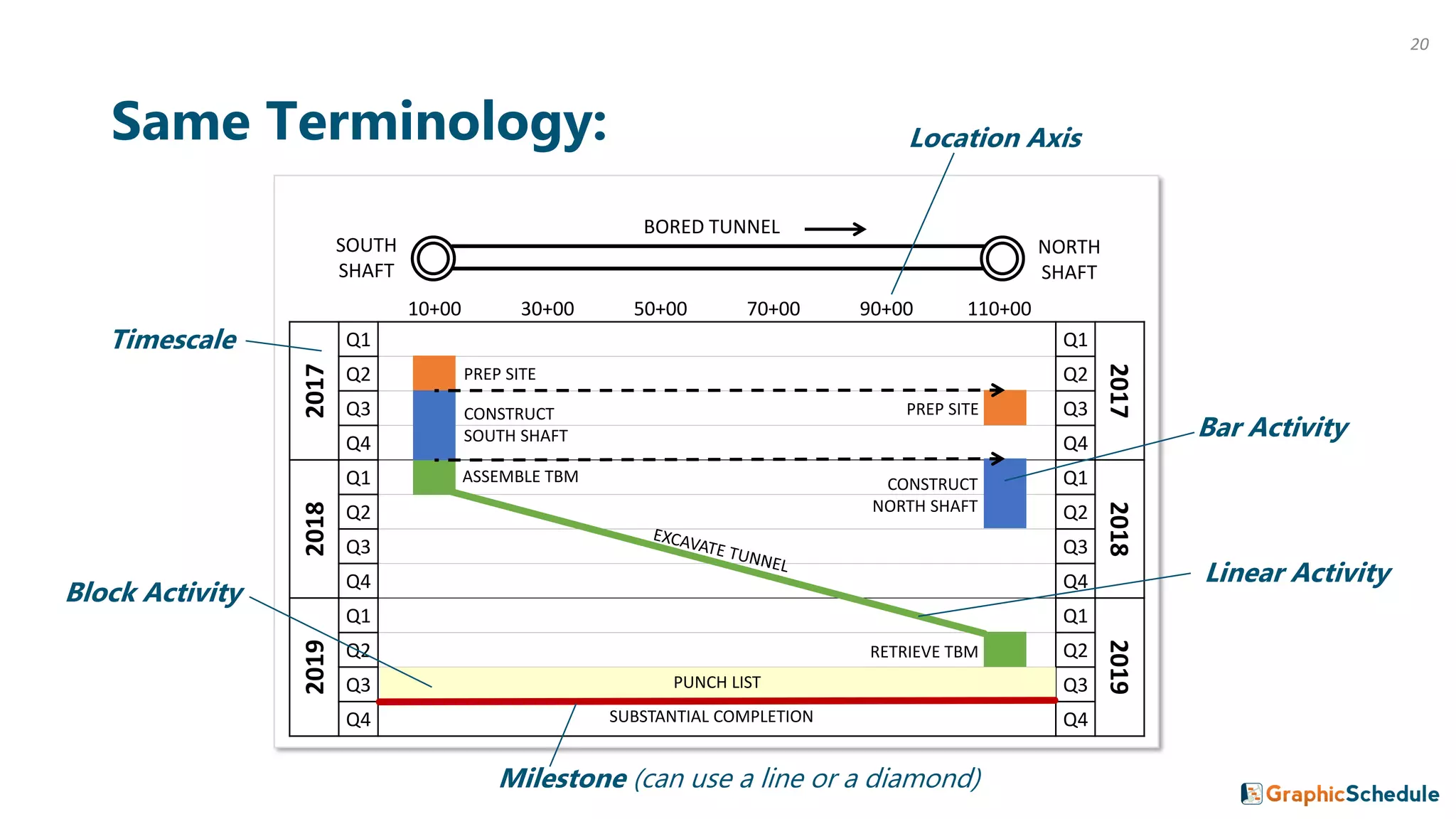
Same Terminology:
SOUTH
SHAFT
BORED TUNNEL
PREP SITE
CONSTRUCT
SOUTH SHAFT
ASSEMBLE TBM
RETRIEVE TBM
NORTH
SHAFT
PUNCH LIST
SUBSTANTIAL COMPLETION
PREP SITE
CONSTRUCT
NORTH SHAFT
Timescale
Location Axis
Bar Activity
Block Activity
Milestone (can use a line or a diamond)
Linear Activity
20
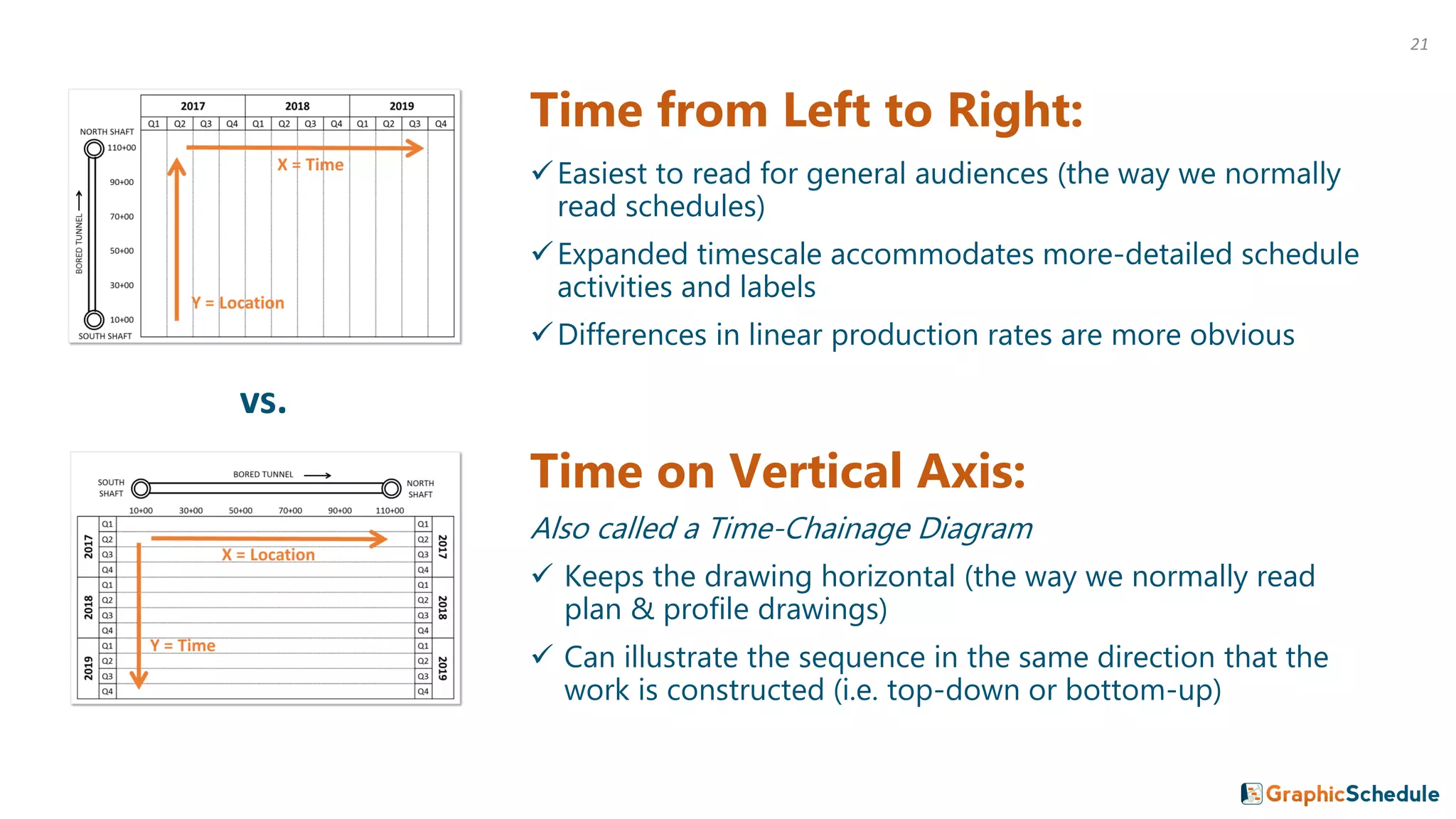
Time from Left to Right:
✓Easiest to read for general audiences (the way we normally
read schedules)
✓Expanded timescale accommodates more-detailed schedule
activities and labels
✓Differences in linear production rates are more obvious
Time on Vertical Axis:
Also called a Time-Chainage Diagram
✓ Keeps the drawing horizontal (the way we normally read
plan & profile drawings)
✓ Can illustrate the sequence in the same direction that the
work is constructed (i.e. top-down or bottom-up)
vs.
21
Which format to choose? Here’s our $0.02:
People that have never seen a linear schedule before usually find it
easiest to read time from left to right. When meeting with executives,
third party stakeholders or the Mayor, you need to bring them up to
speed quick. So we plot time from left to right whenever possible.
However, certain industries and regions have been plotting time on
the vertical axis for decades. In that case, stick with the format that
your target audience wants to see.
(Either way, your linear schedule is sure to communicate your plan
far better than that stack of Gantt charts ever could.)
22
2 Example Projects
23
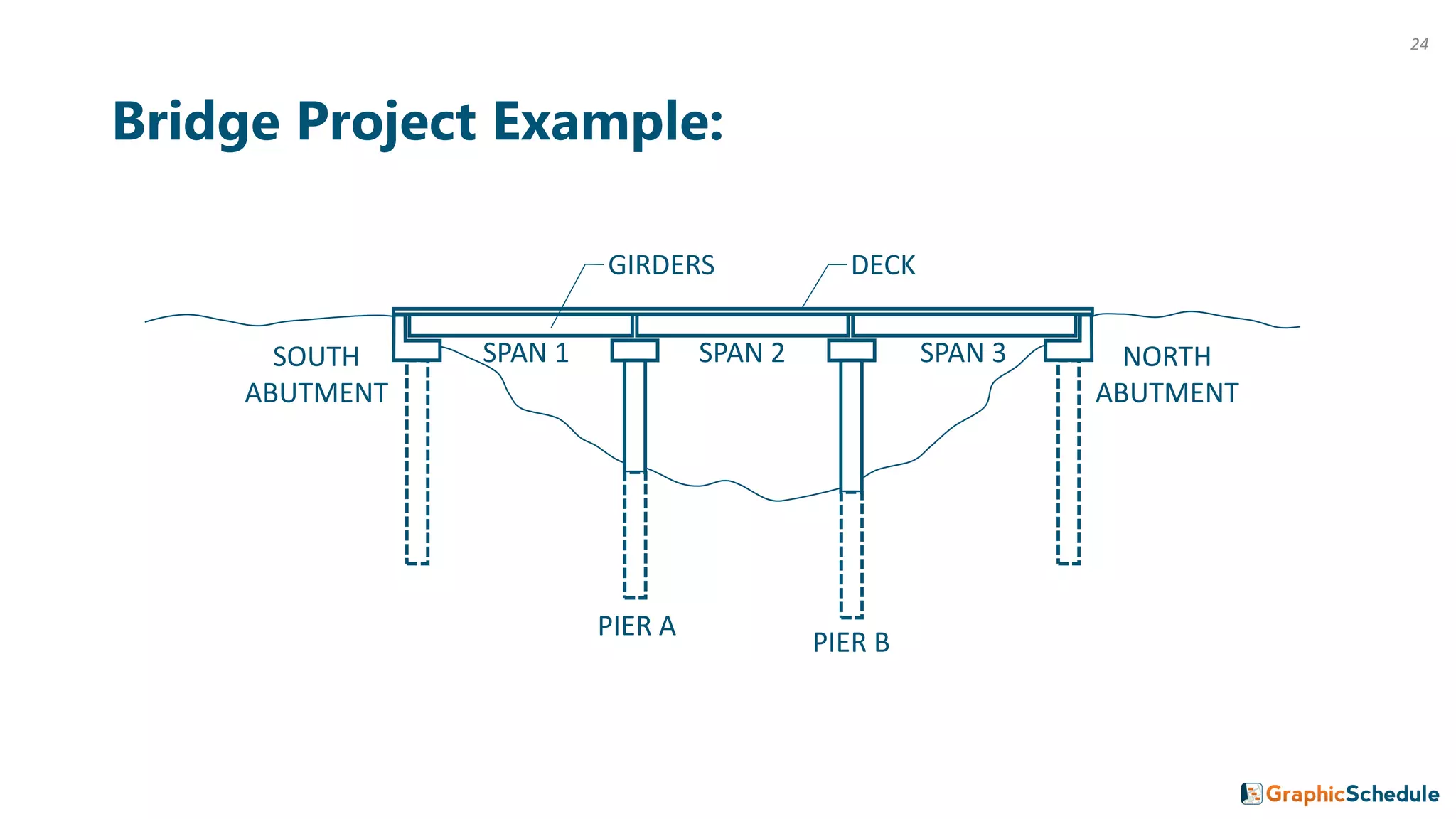
Bridge Project Example:
SOUTH
ABUTMENT
NORTH
ABUTMENT
PIER A
PIER B
GIRDERS DECK
SPAN 1 SPAN 2 SPAN 3
24
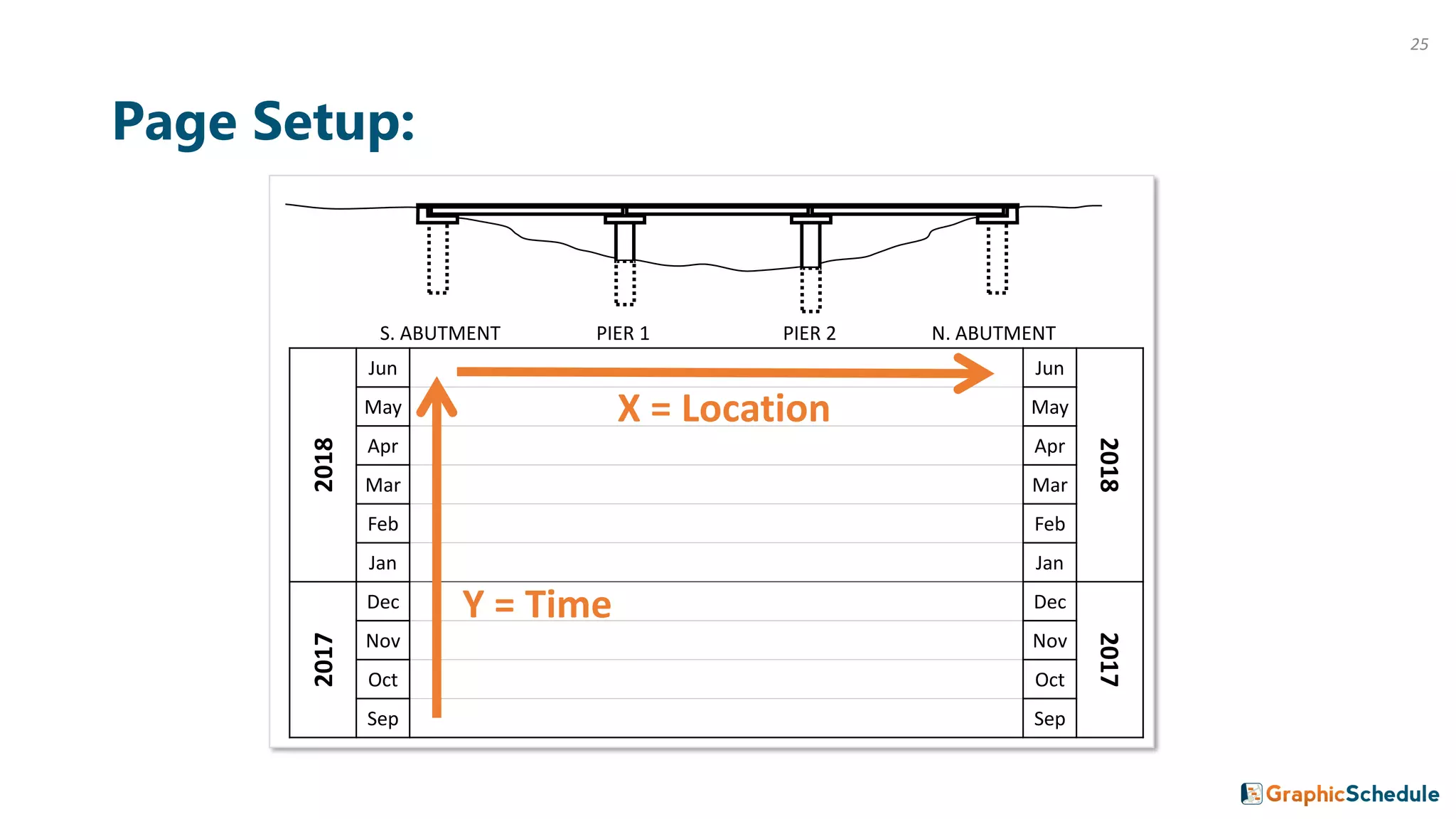
Page Setup:
S. ABUTMENT PIER 1 PIER 2 N. ABUTMENT2018
Jun Jun
2018
May May
Apr Apr
Mar Mar
Feb Feb
Jan Jan
2017
Dec Dec
2017
Nov Nov
Oct Oct
Sep Sep
Y = Time
X = Location
25
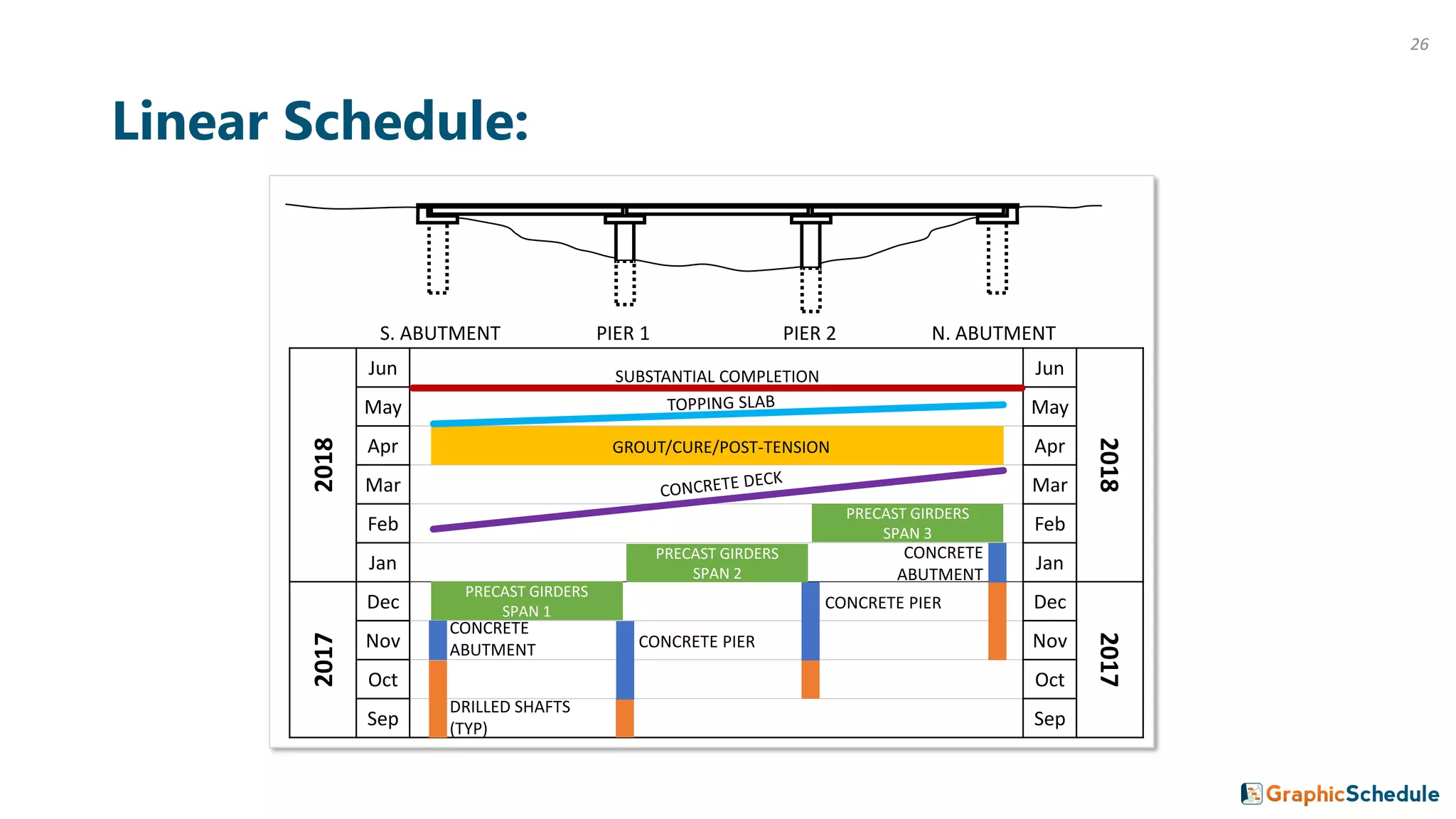
Linear Schedule:
S. ABUTMENT PIER 1 PIER 2 N. ABUTMENT2018
Jun Jun
2018
May May
Apr Apr
Mar Mar
Feb Feb
Jan Jan
2017
Dec Dec
2017
Nov Nov
Oct Oct
Sep Sep
DRILLED SHAFTS
(TYP)
SUBSTANTIAL COMPLETION
PRECAST GIRDERS
SPAN 1
PRECAST GIRDERS
SPAN 2
PRECAST GIRDERS
SPAN 3
CONCRETE
ABUTMENT
GROUT/CURE/POST-TENSION
CONCRETE
ABUTMENT
CONCRETE PIER
CONCRETE PIER
26
2018 2019
A M J J A S O N D J F M A M J J
130+00
120+00
110+00
100+00
90+00
80+00
70+00
60+00
50+00
40+00
30+00
20+00
10+00
0+00
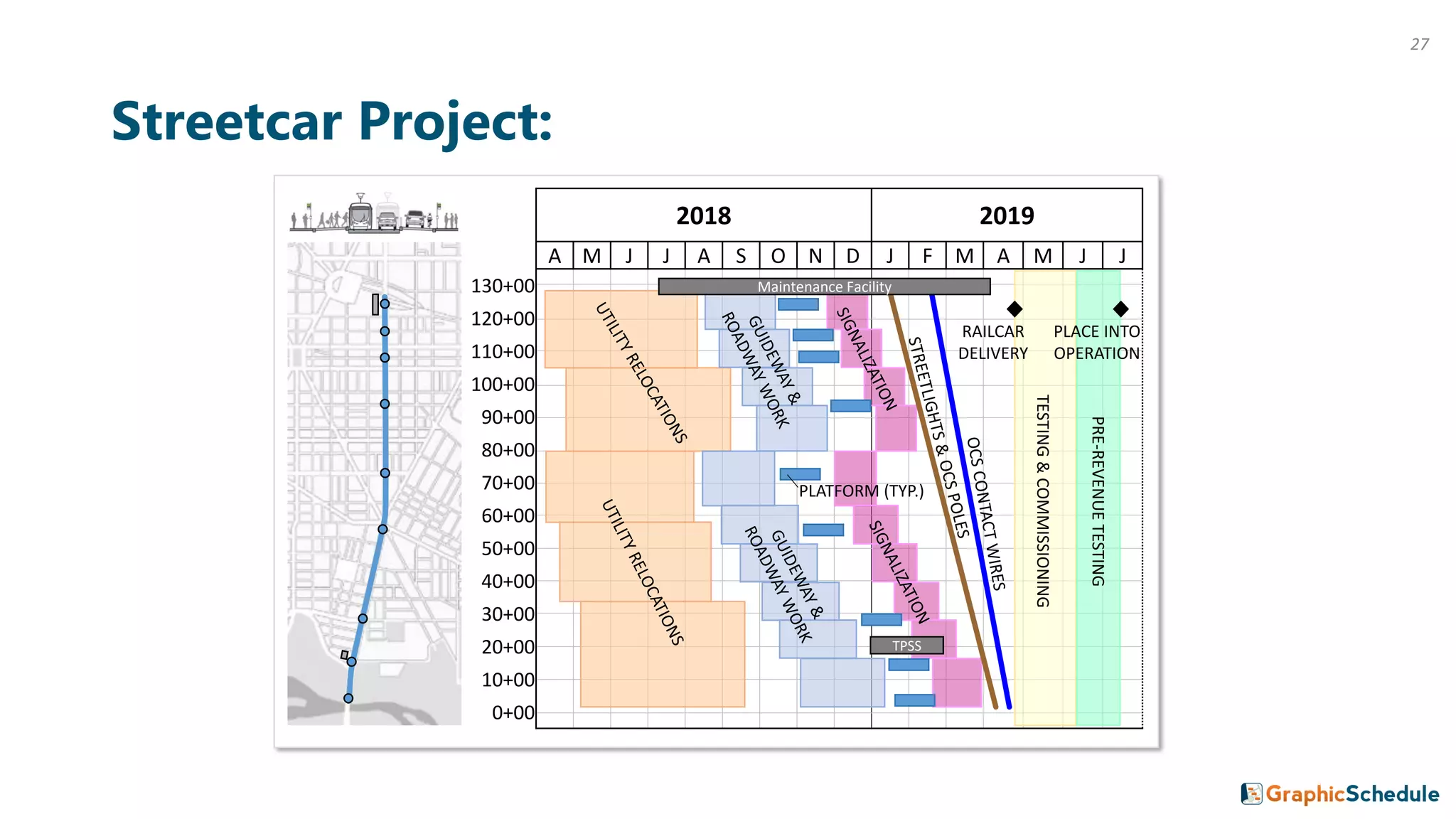
Streetcar Project:
TPSS
Maintenance Facility
TESTING&COMMISSIONING
PRE-REVENUETESTING
RAILCAR
DELIVERY
PLACE INTO
OPERATION
PLATFORM (TYP.)
27
28
“The intuitive format of a linear schedule helps us transform detailed
CPM schedules from overwhelming to understanding.”
-Brian Ellingson, Schedule Engineering Supervisor at Sound Transit
Industry Perspectives:
“Linear scheduling provides a graphic display of how crews and equipment
move through the project over time. This 1) helps contractors depict their
plan to construct the work and 2) allows for constructability analysis of the
schedule that may be lost by Gantt Chart review only.”
-Amy Heine, Principal at Hirschmugl, Heine & Associates
“Our linear schedule was extremely helpful on the floating bridge project.
We used it to manage the job and communicate with the public.”
-Walter Tarr, Principal at Polaris Project Controls
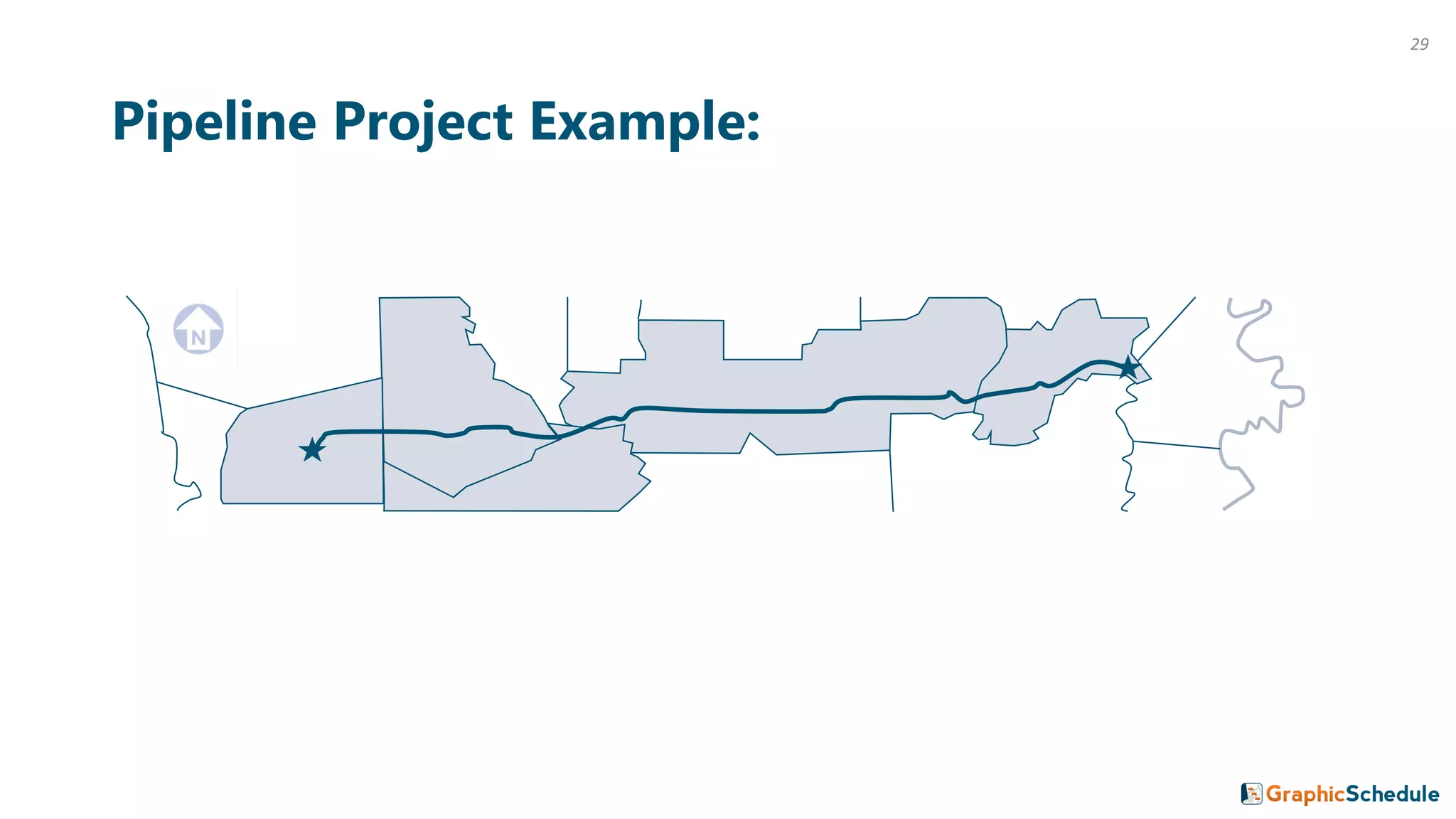
Pipeline Project Example:
29
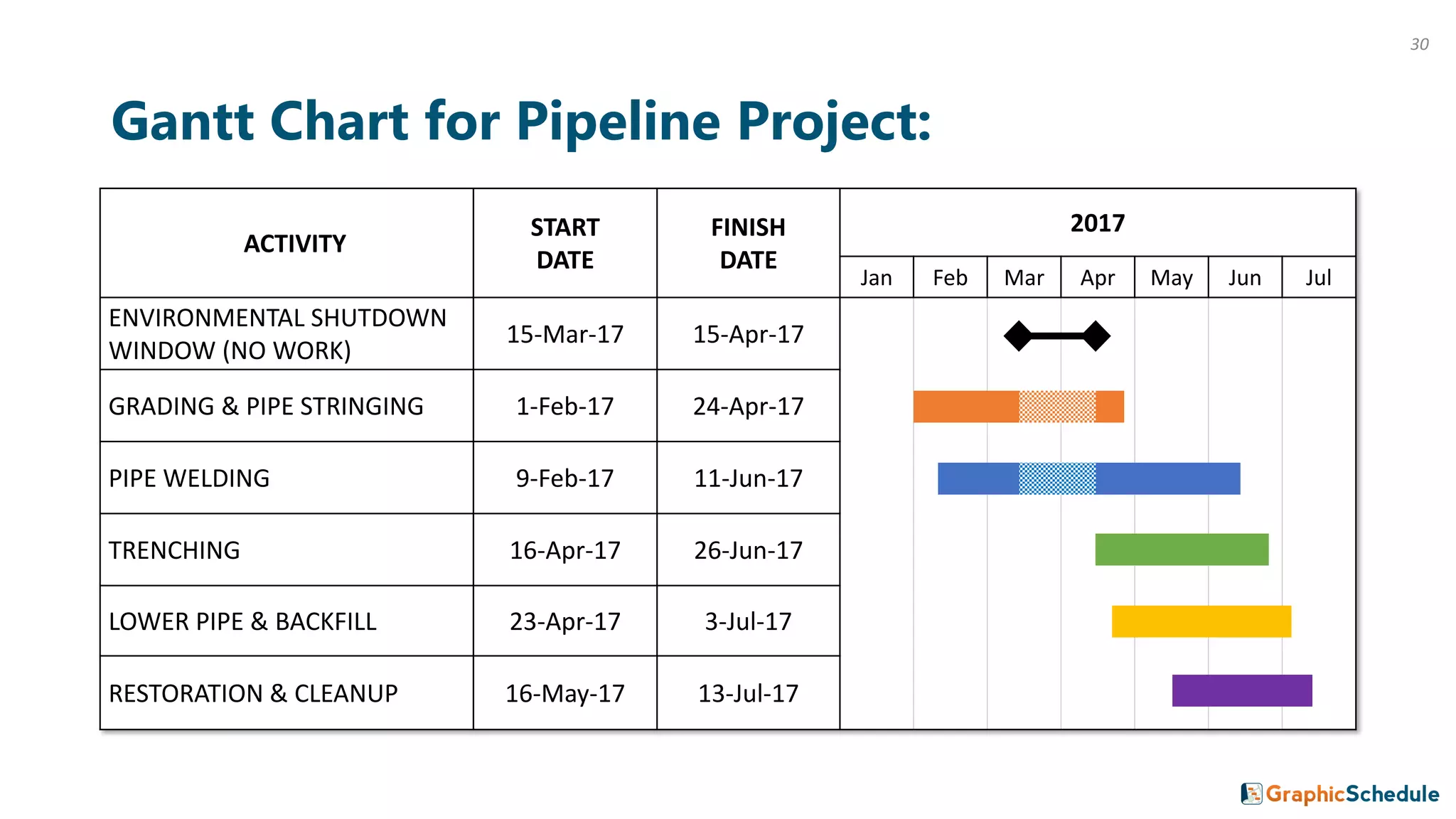
Gantt Chart for Pipeline Project:
ACTIVITY
START
DATE
FINISH
DATE
2017
Jan Feb Mar Apr May Jun Jul
ENVIRONMENTAL SHUTDOWN
WINDOW (NO WORK)
15-Mar-17 15-Apr-17
GRADING & PIPE STRINGING 1-Feb-17 24-Apr-17
PIPE WELDING 9-Feb-17 11-Jun-17
TRENCHING 16-Apr-17 26-Jun-17
LOWER PIPE & BACKFILL 23-Apr-17 3-Jul-17
RESTORATION & CLEANUP 16-May-17 13-Jul-17
30
2018
Jul Jul
2018
Jun Jun
May May
Apr Apr
Mar Mar
Feb Feb
Jan Jan
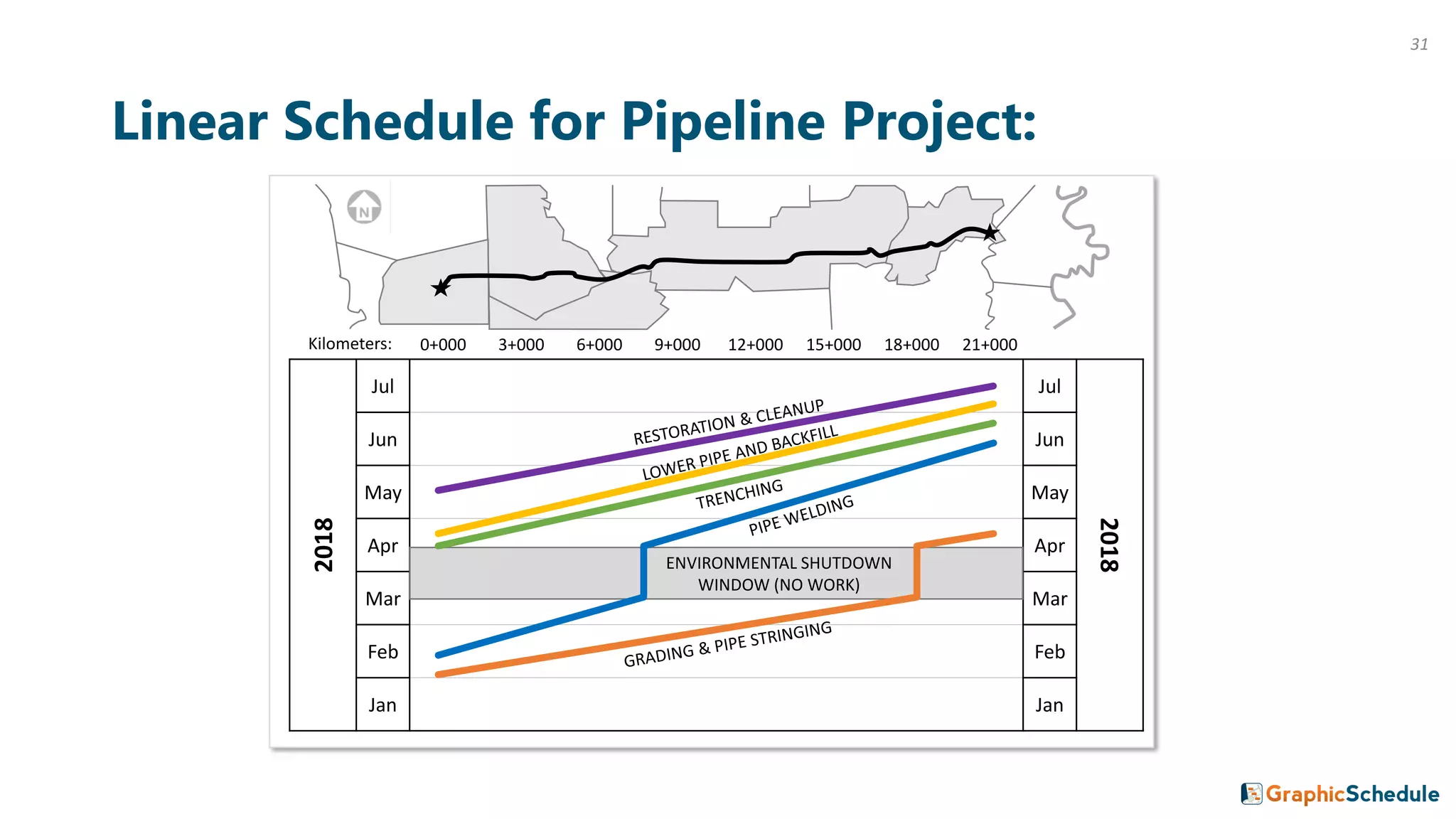
Linear Schedule for Pipeline Project:
ENVIRONMENTAL SHUTDOWN
WINDOW (NO WORK)
0+000 3+000 6+000 9+000 12+000 15+000 18+000 21+000Kilometers:
31
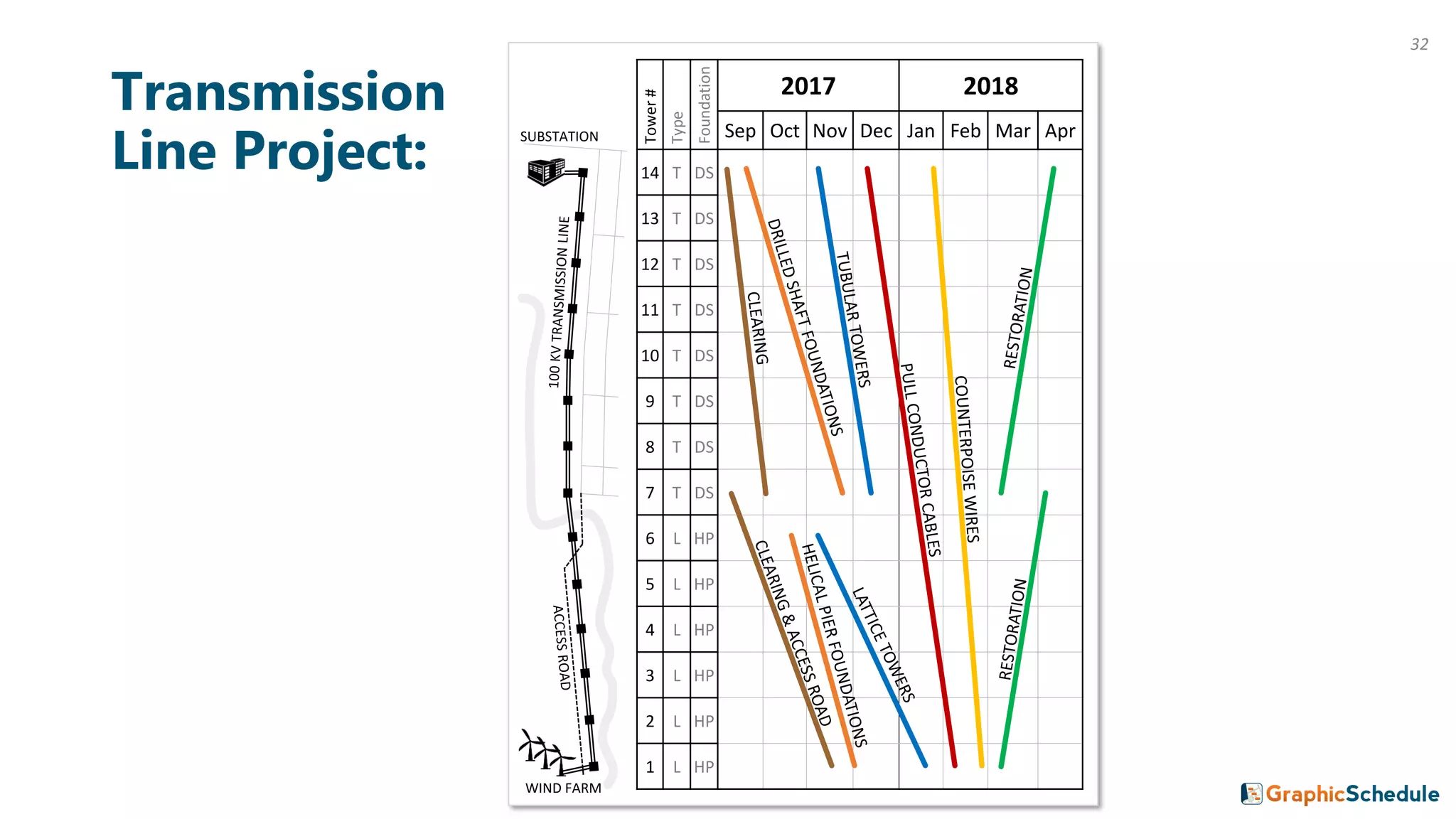
Transmission
Line Project:
Tower#
Type
Foundation
2017 2018
Sep Oct Nov Dec Jan Feb Mar Apr
14 T DS
13 T DS
12 T DS
11 T DS
10 T DS
9 T DS
8 T DS
7 T DS
6 L HP
5 L HP
4 L HP
3 L HP
2 L HP
1 L HP
SUBSTATION
WIND FARM
32
So far these examples have all been infrastructure projects.
This method works for vertical construction too.
33
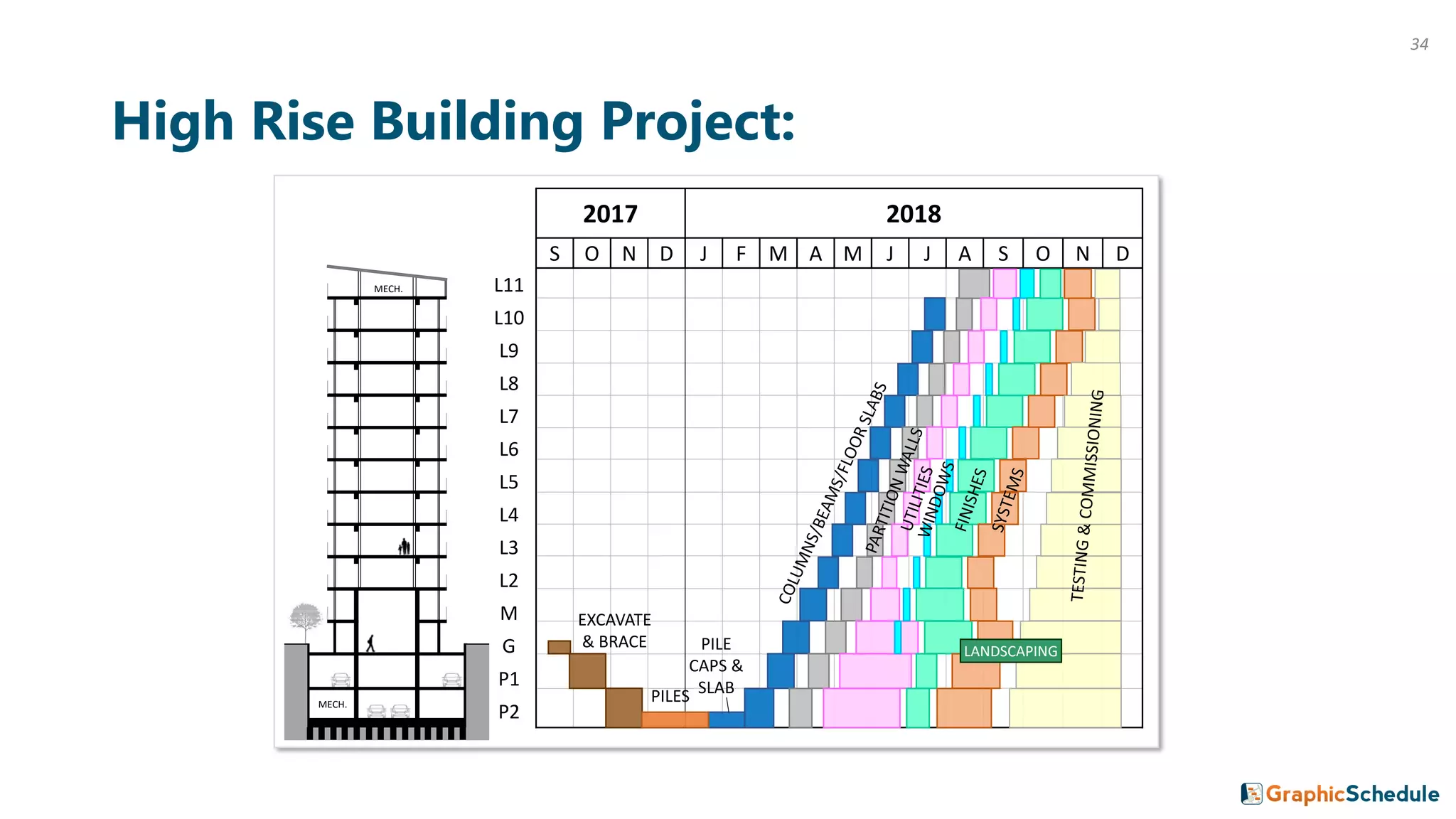
High Rise Building Project:
2017 2018
S O N D J F M A M J J A S O N D
L11
L10
L9
L8
L7
L6
L5
L4
L3
L2
M
G
P1
P2
EXCAVATE
& BRACE
PILES
PILE
CAPS &
SLAB
MECH.
MECH.
LANDSCAPING
34
3 Adapting to Schedule Changes
35
36
2017 2018 2019
Q1 Q2 Q3 Q4 Q1 Q2 Q3 Q4 Q1 Q2 Q3 Q4
110+00
90+00
70+00
50+00
30+00
10+00 ACTUAL PLANNED
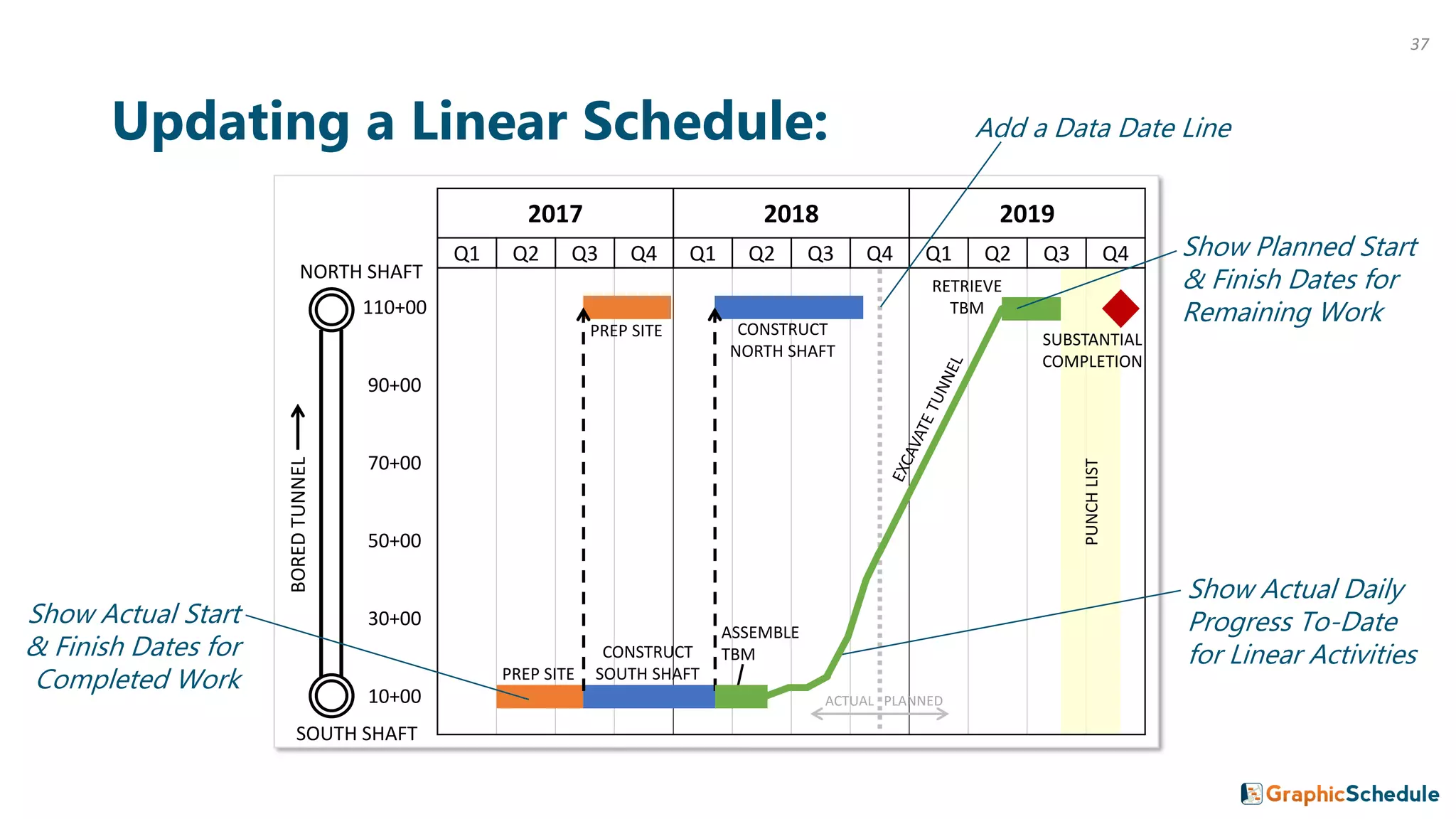
Updating a Linear Schedule:
PREP SITE
CONSTRUCT
SOUTH SHAFT
ASSEMBLE
TBM
RETRIEVE
TBM
PREP SITE CONSTRUCT
NORTH SHAFT
PUNCHLIST
SUBSTANTIAL
COMPLETION
Add a Data Date Line
Show Actual Daily
Progress To-Date
for Linear Activities
Show Planned Start
& Finish Dates for
Remaining Work
SOUTH SHAFT
BOREDTUNNEL
NORTH SHAFT
Show Actual Start
& Finish Dates for
Completed Work
37
2017 2018 2019
Q1 Q2 Q3 Q4 Q1 Q2 Q3 Q4 Q1 Q2 Q3 Q4
110+00
90+00
70+00
50+00
30+00
10+00
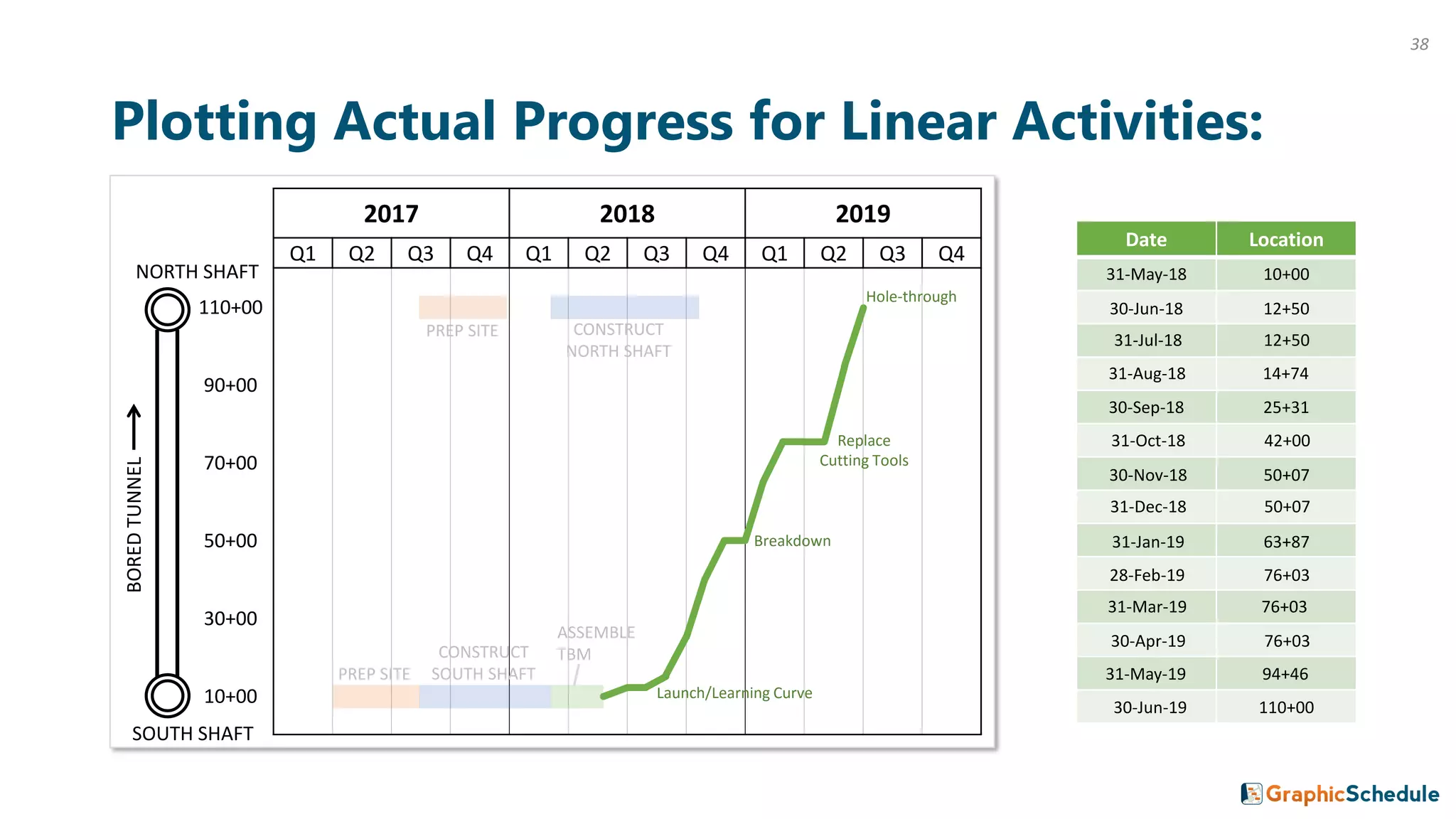
Plotting Actual Progress for Linear Activities:
PREP SITE
CONSTRUCT
SOUTH SHAFT
ASSEMBLE
TBM
PREP SITE CONSTRUCT
NORTH SHAFT
SOUTH SHAFT
BOREDTUNNEL
NORTH SHAFT
Date Location
31-May-18 10+00
30-Jun-18 12+50
31-Jul-18 12+50
31-Aug-18 14+74
30-Sep-18 25+31
31-Oct-18 42+00
30-Nov-18 50+07
31-Dec-18 50+07
31-Jan-19 63+87
28-Feb-19 76+03
31-Mar-19 76+03
30-Apr-19 76+03
31-May-19 94+46
30-Jun-19 110+00
Hole-through
Replace
Cutting Tools
Breakdown
Launch/Learning Curve
38
2017 2018 2019
Q1 Q2 Q3 Q4 Q1 Q2 Q3 Q4 Q1 Q2 Q3 Q4
110+00
90+00
70+00
50+00
30+00
10+00 ACTUAL PLANNED
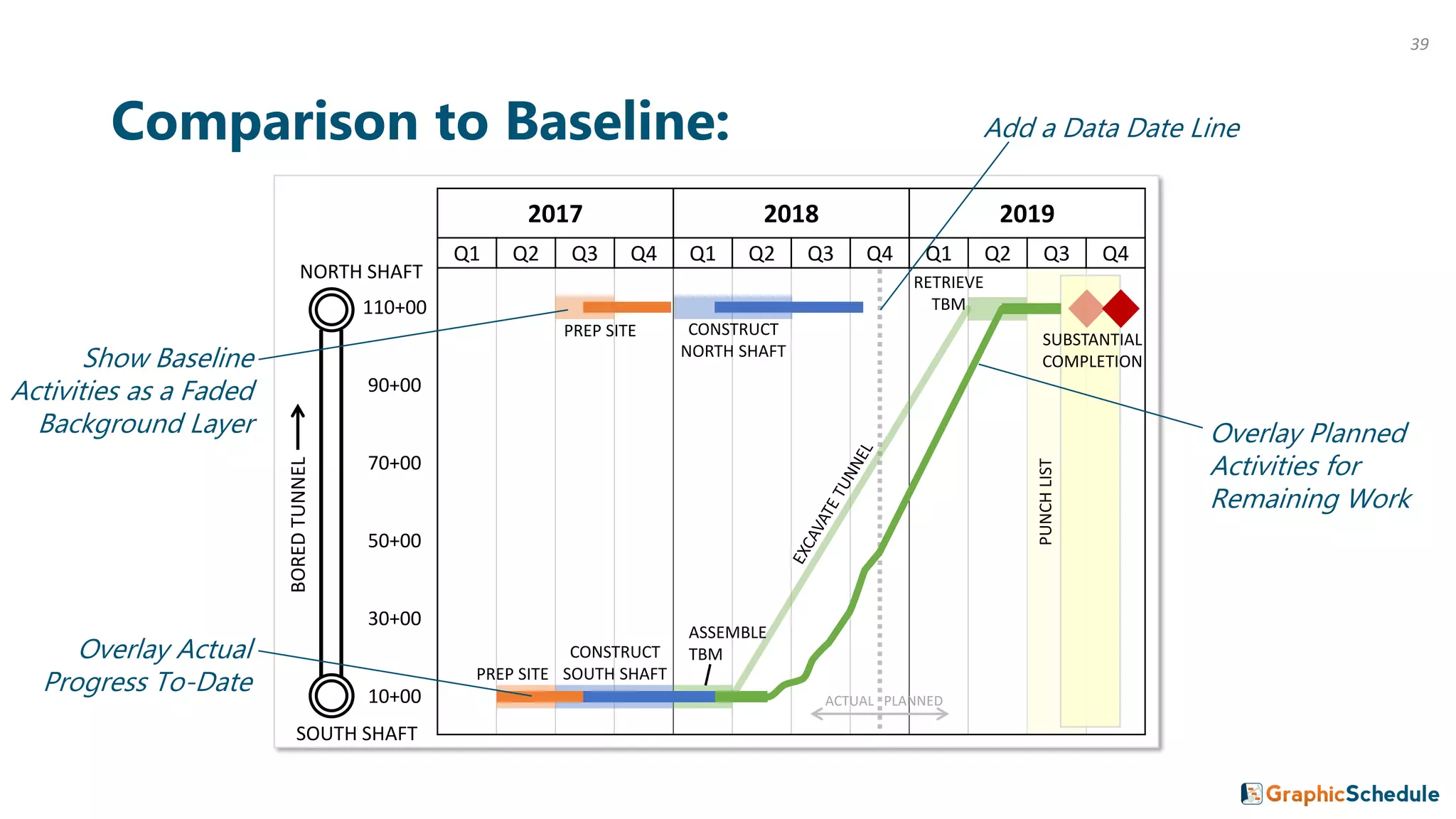
Comparison to Baseline:
PREP SITE
CONSTRUCT
SOUTH SHAFT
ASSEMBLE
TBM
RETRIEVE
TBM
PREP SITE CONSTRUCT
NORTH SHAFT
PUNCHLIST
SUBSTANTIAL
COMPLETION
SOUTH SHAFT
BOREDTUNNEL
NORTH SHAFT
Show Baseline
Activities as a Faded
Background Layer
Add a Data Date Line
Overlay Actual
Progress To-Date
Overlay Planned
Activities for
Remaining Work
39
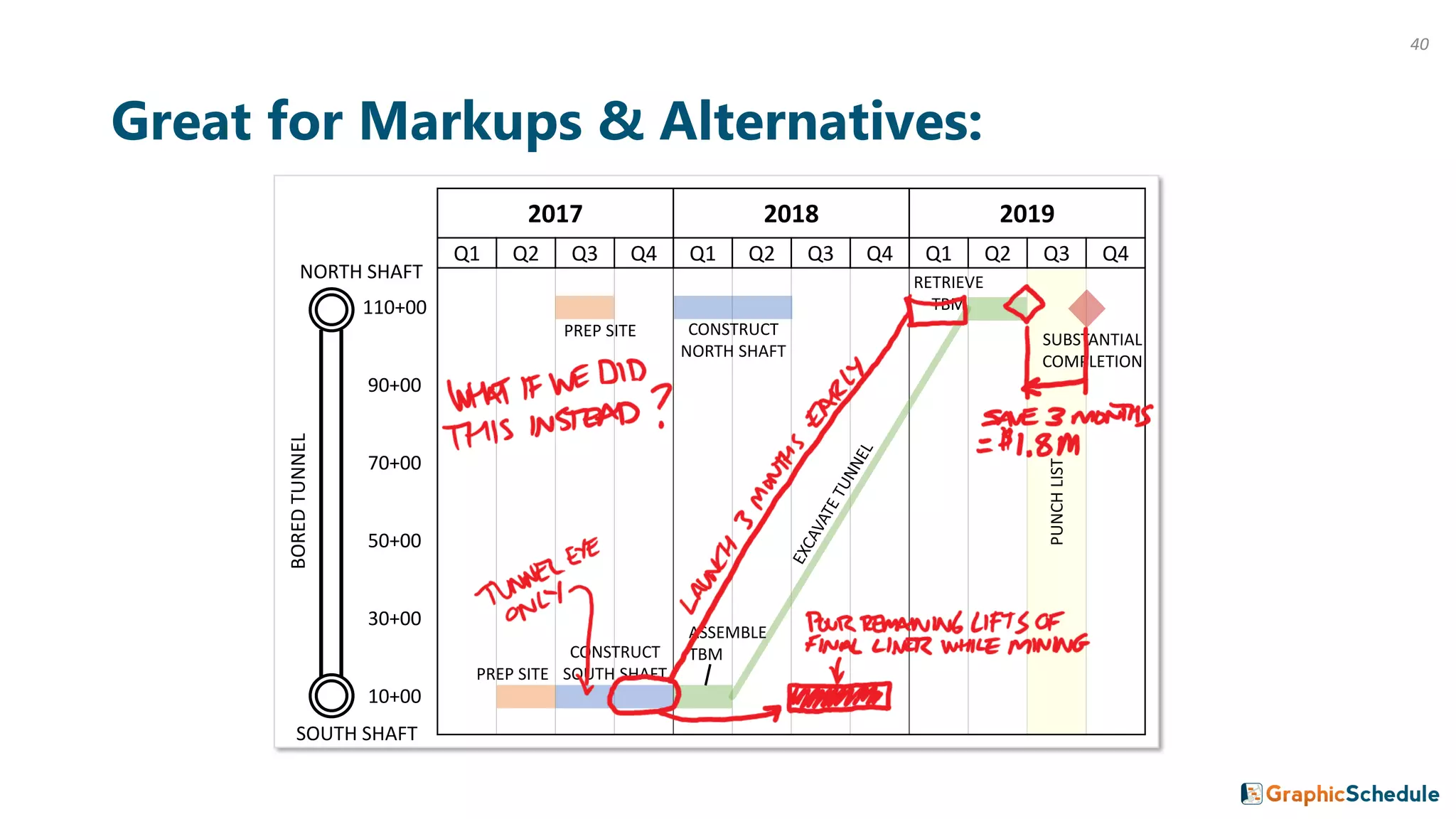
Great for Markups & Alternatives:
2017 2018 2019
Q1 Q2 Q3 Q4 Q1 Q2 Q3 Q4 Q1 Q2 Q3 Q4
110+00
90+00
70+00
50+00
30+00
10+00
PREP SITE
CONSTRUCT
SOUTH SHAFT
ASSEMBLE
TBM
RETRIEVE
TBM
PREP SITE CONSTRUCT
NORTH SHAFT
PUNCHLIST
SUBSTANTIAL
COMPLETION
SOUTH SHAFT
BOREDTUNNEL
NORTH SHAFT
40
2018
Jul Jul
2018
Jun Jun
May May
Apr Apr
Mar Mar
Feb Feb
Jan Jan
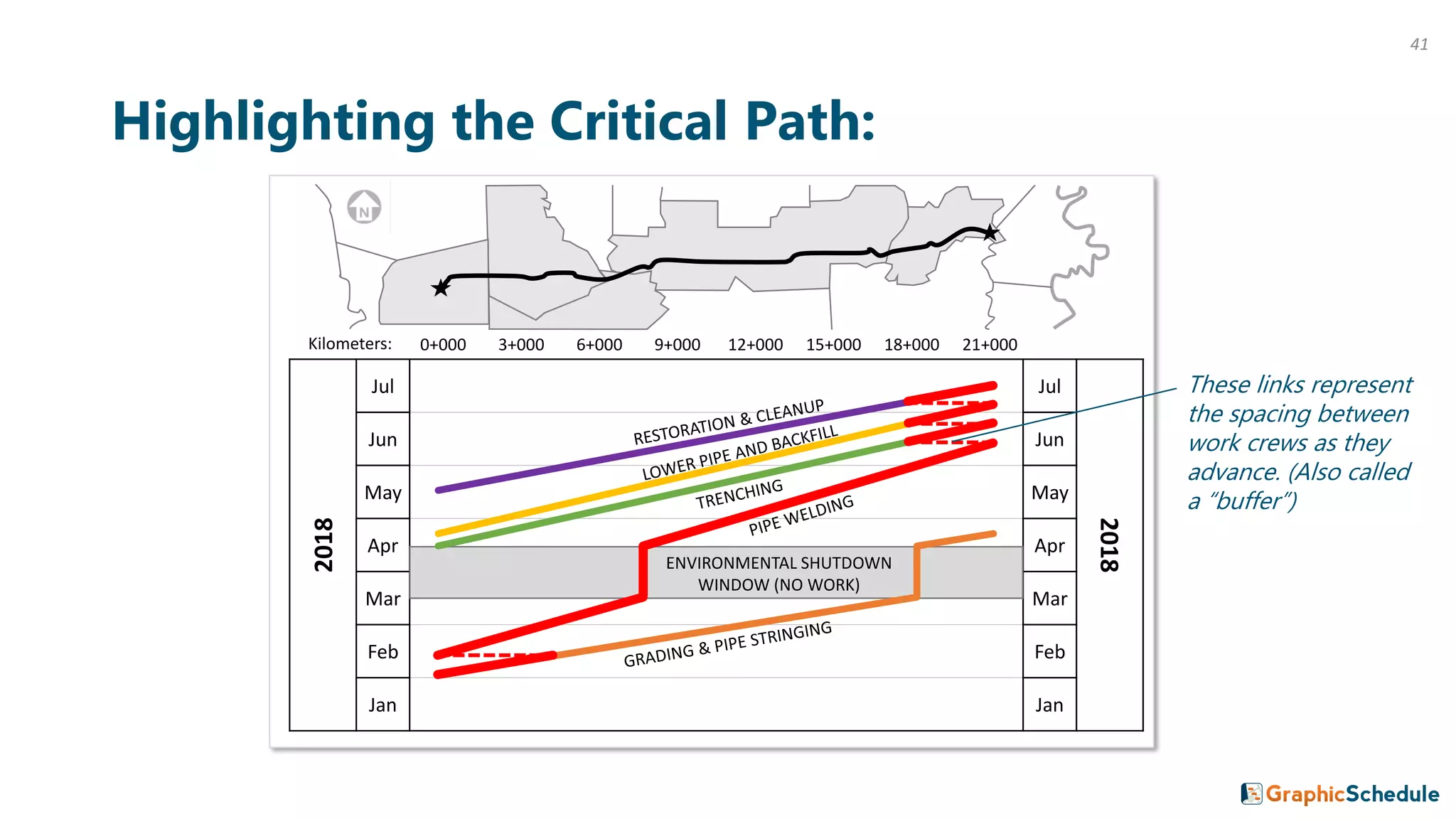
Highlighting the Critical Path:
ENVIRONMENTAL SHUTDOWN
WINDOW (NO WORK)
0+000 3+000 6+000 9+000 12+000 15+000 18+000 21+000Kilometers:
These links represent
the spacing between
work crews as they
advance. (Also called
a “buffer”)
41
42
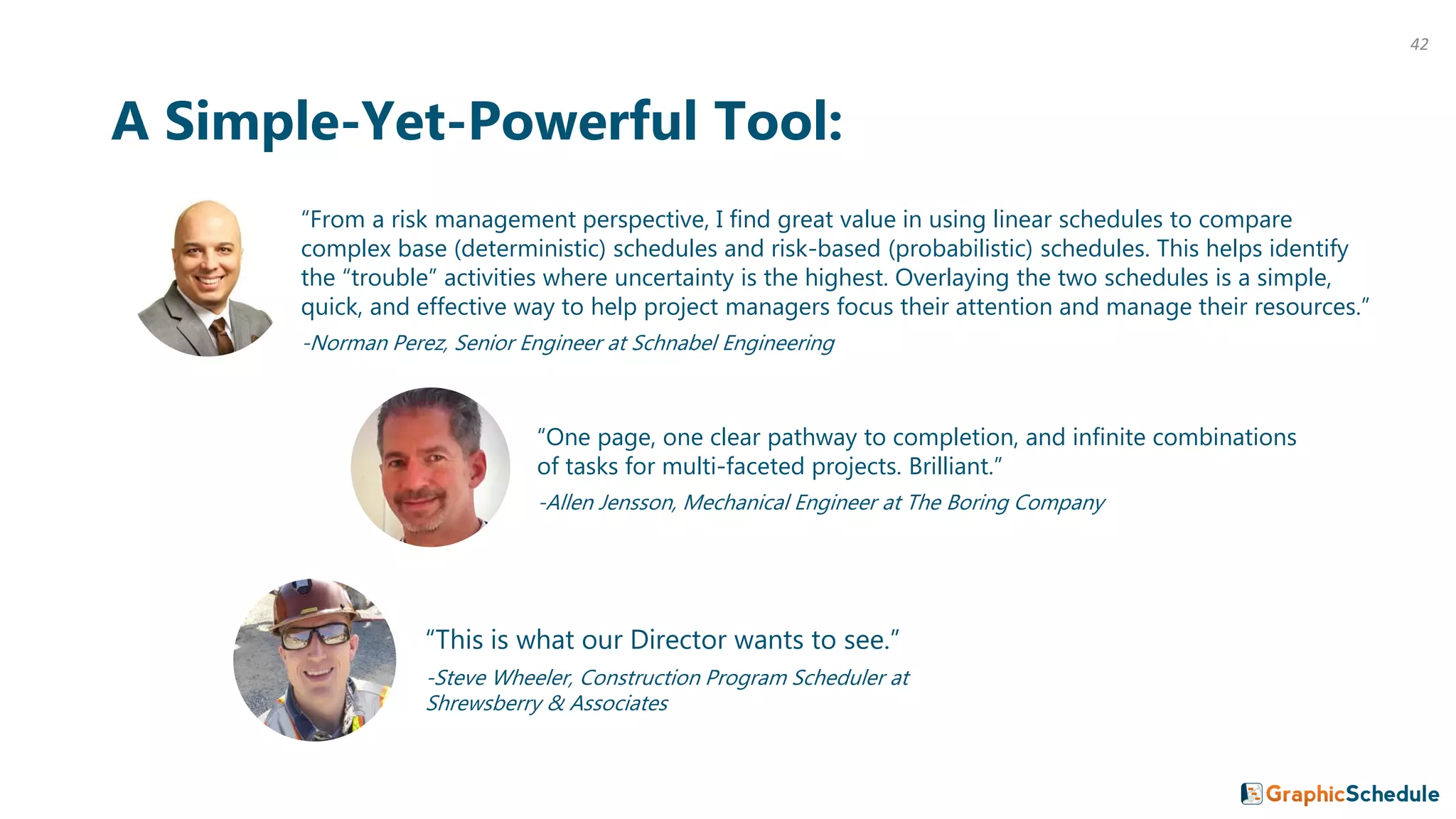
“From a risk management perspective, I find great value in using linear schedules to compare
complex base (deterministic) schedules and risk-based (probabilistic) schedules. This helps identify
the “trouble” activities where uncertainty is the highest. Overlaying the two schedules is a simple,
quick, and effective way to help project managers focus their attention and manage their resources.”
-Norman Perez, Senior Engineer at Schnabel Engineering
A Simple-Yet-Powerful Tool:
“This is what our Director wants to see.”
-Steve Wheeler, Construction Program Scheduler at
Shrewsberry & Associates
“One page, one clear pathway to completion, and infinite combinations
of tasks for multi-faceted projects. Brilliant.”
-Allen Jensson, Mechanical Engineer at The Boring Company
Thanks for making it this far!
Here’s where we’ve been together:
You’ve seen how a 1-page linear schedule can effectively
communicate your plan to a wide variety of audiences.
You’ve seen how this method can be applied to all sorts of projects
where location of the work is key.
And you’ve learned how to maintain your linear schedule during
construction, when the rubber meets the road.
We hope you’ve enjoyed this guide.
But more importantly, we hope you’ll do something with it.
43
Is there an app that creates linear schedules?
We thought you’d never ask.
There are a few products out there. Some are extremely powerful
and sophisticated, and can practically cook you breakfast if you can
get past the steep learning curve.
We’re taking a different approach; developing an app that’s easy to
use by non-schedulers and runs right in Microsoft Excel, which most
of you already use every day. If that sounds interesting to you, visit
GraphicSchedule.com to learn more.
44
Want to help more people discover linear scheduling?
…and get an awesome PowerPoint deck in the process.
Step 1: email james@graphicschedule.com and ask him to send you
the animated PowerPoint version that brings these examples to life.
Step 2: share this guide with your project team, your network, and
your boss. (Bosses love 1-page linear schedules because they can
show it to their boss too…)
Step 3: start sketching up a linear schedule for your own project and
let us know if you need any help along the way.
45
Create something your entire team will love!
46
About GraphicSchedule:
We’re a small startup with a big mission: to help
teams communicate their schedules more effectively
and deliver winning projects.
We got tired of drawing linear schedules by hand so
we developed an Excel app that makes it easy.
Visit our website: GraphicSchedule.com
Read our origin story
Get in touch: james@graphicschedule.com
47

Linear Scheduling 101

  • 1.
    Linear Scheduling 101 Howto create your most-valuable project management tool on a single page.
  • 2.
    The problem withGantt charts on major projects: “Our schedule has 2,638 activities on 61 pages.” “My boss doesn’t want to see all of that detail.” “Our schedule was supposed to be a planning tool, but it feels like it’s mostly a payment tool.” “I can’t tell where the work crews will be located. How can we spot conflicts before they happen?” “This doesn’t reflect how our linear activities actually work.” “Am I supposed to be able to read this?” 2
  • 3.
    We’ve been there.Major projects is what we do. This guide was created by two construction managers who needed a better way to communicate complex schedules with their project teams. We live and breathe this stuff every day. James Wonneberg, PE, CCM • Managing large-diameter tunnel projects for 9 years, including: 2008-2011: Brightwater Conveyance Project (Woodinville, WA) 2011-2016: DC Clean Rivers Project (District of Columbia) 2016-Present: Alaskan Way Viaduct Replacement (Seattle, WA) • Pioneered the use of dynamic Excel graphics that redraw themselves automatically with links to contractors’ Primavera P6 schedules. Ron Drake, PE • Leading complex infrastructure projects for 40 years, including: 1990-1993: Metro Red Line (Los Angeles, CA) 1993-1998: Tri-Met Westside Light Rail (Portland, OR) 2005-2007: Brightwater Conveyance Project (Woodinville, WA) 2014-Present: LA Metro Regional Connector (Los Angeles, CA) • Has made linear scheduling a cornerstone of his project management approach for decades. 3
  • 4.
    What We Believe: Webelieve that the vast majority of people that work on these projects really do want to know what’s in that huge schedule with thousands of activities. They want to know the master plan. They want to see the big picture and understand the relationships between activities. They want to know about the deadlines that their crew must meet. But our industry lacks the tools to communicate that information in a way that the entire team can understand. We believe that if you make your schedule beautiful, your team will use it! If you place a good-looking linear schedule on the table in any project office or jobsite trailer, people will go out of their way to look at it, pick it up, and study it. Then they will ask questions, and give you valuable feedback about how the work will actually be built. (But if you don’t make your schedule beautiful, it will be ignored and forgotten like all the rest.) 4
  • 5.
    What We Believe:CONTINUED We believe that schedules should fit on one page. The moment you have to flip the page to see the rest of your sequence of work, you’ve lost the relationships between activities. This is not to say that we don’t create multiple sheets; in fact we do it all the time to “zoom in” and “zoom out” on our projects. But each sheet should tell the whole story of what you are trying to communicate. We believe that adding a simple graphic of what you’re building makes your schedule information 10x more useful and effective. Most people are visual learners, and schedule data doesn’t sink in unless they can visualize the major work elements and the spatial relationships between them. A one-page illustration of scope of work and schedule becomes a very useful “talking paper” that helps you quickly explain your entire project to anyone, anywhere. And your team members will undoubtedly start sketching right on top of it for all sorts of problem solving, alternatives, and what-if-scenarios. This is when the magic happens – increasing the chances of your team delivering a winning project. 5
  • 6.
    6 “As engineers andcontractors, we are taught to break down complex projects into fundamental simpler pieces. Linear schedules are great tools that help us break down complex P6 schedules to help communicate to all team members our plan for success.” -Fernando De Leon, Project Director at Shimmick Construction What the Industry is Saying: “The linear scheduling method really helps to visualize a project’s schedule. It makes it possible to not only account for time but also space constraints.” -Lisa Mori, Tunnel Engineer at Jay Dee Contractors
  • 7.
    Coming Up: This guidewill walk you through the fundamentals of a linear schedule, give you the vision for how it can be applied, and show you how to put it to work as your project evolves. Along the way you’ll hear from more industry leaders about how they’re using linear scheduling to execute their own challenging projects. Part 1: The Basics Part 2: Example Projects Part 3: Adapting to Schedule Changes 7
  • 8.
  • 9.
  • 10.
    Simplified Gantt Chart: ACTIVITY START DATE FINISH DATE 20172018 2019 Q1 Q2 Q3 Q4 Q1 Q2 Q3 Q4 Q1 Q2 Q3 Q4 PREPARE SOUTH SITE 1-Apr-17 30-Jun-17 CONSTRUCT SOUTH SHAFT 1-Jul-17 31-Dec-17 PREPARE NORTH SITE 1-Jul-17 30-Sep-17 CONSTRUCT NORTH SHAFT 1-Jan-18 30-Jun-18 ASSEMBLE TBM 1-Jan-18 31-Mar-18 EXCAVATE TUNNEL 1-Apr-18 31-Mar-19 RETRIEVE TBM 1-Apr-19 30-Jun-19 PUNCH LIST 1-Jul-19 30-Sep-19 SUBSTANTIAL COMPLETION 30-Sep-19 linear activity 10
  • 11.
    Page Setup forLinear Schedule: 2017 2018 2019 Q1 Q2 Q3 Q4 Q1 Q2 Q3 Q4 Q1 Q2 Q3 Q4 110+00 90+00 70+00 50+00 30+00 10+00 SOUTH SHAFT BOREDTUNNEL NORTH SHAFT Y = Location X = Time 11
  • 12.
    Linear Schedule: 2017 20182019 Q1 Q2 Q3 Q4 Q1 Q2 Q3 Q4 Q1 Q2 Q3 Q4 110+00 90+00 70+00 50+00 30+00 10+00 PREP SITE CONSTRUCT SOUTH SHAFT ASSEMBLE TBM RETRIEVE TBM PREP SITE CONSTRUCT NORTH SHAFT PUNCHLIST SUBSTANTIAL COMPLETION SOUTH SHAFT BOREDTUNNEL NORTH SHAFT 12
  • 13.
    2017 2018 2019 Q1Q2 Q3 Q4 Q1 Q2 Q3 Q4 Q1 Q2 Q3 Q4 110+00 90+00 70+00 50+00 30+00 10+00 Terminology: PREP SITE CONSTRUCT SOUTH SHAFT ASSEMBLE TBM RETRIEVE TBM PREP SITE CONSTRUCT NORTH SHAFT PUNCHLIST SUBSTANTIAL COMPLETION Timescale Bar Activity (work at a single location) Block Activity (work over a given space for a period of time) Milestone (deadline or major event) Linear Activity (work that moves from Point A to Point B over time) SOUTH SHAFT BOREDTUNNEL NORTH SHAFT Location Axis (distance units or stationing along project alignment) 13
  • 14.
    Primary Types ofActivities: Block Activity Finish Date Start Date Location 1 Finish DateStart Date Location 2 Location 2 Location 1 Work that moves from Point A to Point B over time Work over a given space for a period of time 14
  • 15.
    Primary Types ofActivities: CONTINUED Finish DateStart Date Location Date Milestone Location Bar Activity Work at a single location Deadline or major event 15
  • 16.
    What do thecolors mean? Short Answer: Whatever you like. Better Answer: We usually assign one color to each major type of work (similar to layers in a CADD drawing). This makes it easy to see how your crews and equipment will move through the project over time. Or, when illustrating a large program with multiple contracts, we often assign one color to each contract. This helps everyone see how all of the contracts work together to complete the program. It also highlights the interfaces (i.e. touch points) that will require coordination to make sure everything goes smoothly. Color is a good thing. Be creative, and don’t hold back! or 16
  • 17.
    17 “Are we OKwith three cranes or do we need to add a fourth? I can just look down a specific month on the linear schedule and see right away how many crews or spreads we will have working and at what locations. All on one page. That is convenient compared to long P6 schedules.” -Brett Zernich, Project Manager at Traylor Bros. Advantages of a Linear Schedule: “The linear schedule update is one email that I actually look forward to receiving each month. It provides a concise and useful snapshot of otherwise complex project and program schedules.” -Rafael Castro, Principal at JCK Underground “Linear schedules have been essential to communicating inter-project and inter-agency construction relationships.” -Brian Smith, Program Controls Manager at Mott MacDonald
  • 18.
    Alternate Page Setup:Time on Vertical Axis 10+00 30+00 50+00 70+00 90+00 110+002017 Q1 Q1 2017 Q2 Q2 Q3 Q3 Q4 Q4 2018 Q1 Q1 2018 Q2 Q2 Q3 Q3 Q4 Q4 2019 Q1 Q1 2019 Q2 Q2 Q3 Q3 Q4 Q4 SOUTH SHAFT NORTH SHAFT BORED TUNNEL Y = Time X = Location 18
  • 19.
    10+00 30+00 50+0070+00 90+00 110+002017 Q1 Q1 2017 Q2 Q2 Q3 Q3 Q4 Q4 2018 Q1 Q1 2018 Q2 Q2 Q3 Q3 Q4 Q4 2019 Q1 Q1 2019 Q2 Q2 Q3 Q3 Q4 Q4 Linear Schedule: Time on Vertical Axis SOUTH SHAFT PREP SITE CONSTRUCT SOUTH SHAFT ASSEMBLE TBM RETRIEVE TBM NORTH SHAFT PUNCH LIST SUBSTANTIAL COMPLETION BORED TUNNEL PREP SITE CONSTRUCT NORTH SHAFT 19
  • 20.
    10+00 30+00 50+0070+00 90+00 110+002017 Q1 Q1 2017 Q2 Q2 Q3 Q3 Q4 Q4 2018 Q1 Q1 2018 Q2 Q2 Q3 Q3 Q4 Q4 2019 Q1 Q1 2019 Q2 Q2 Q3 Q3 Q4 Q4 Same Terminology: SOUTH SHAFT BORED TUNNEL PREP SITE CONSTRUCT SOUTH SHAFT ASSEMBLE TBM RETRIEVE TBM NORTH SHAFT PUNCH LIST SUBSTANTIAL COMPLETION PREP SITE CONSTRUCT NORTH SHAFT Timescale Location Axis Bar Activity Block Activity Milestone (can use a line or a diamond) Linear Activity 20
  • 21.
    Time from Leftto Right: ✓Easiest to read for general audiences (the way we normally read schedules) ✓Expanded timescale accommodates more-detailed schedule activities and labels ✓Differences in linear production rates are more obvious Time on Vertical Axis: Also called a Time-Chainage Diagram ✓ Keeps the drawing horizontal (the way we normally read plan & profile drawings) ✓ Can illustrate the sequence in the same direction that the work is constructed (i.e. top-down or bottom-up) vs. 21
  • 22.
    Which format tochoose? Here’s our $0.02: People that have never seen a linear schedule before usually find it easiest to read time from left to right. When meeting with executives, third party stakeholders or the Mayor, you need to bring them up to speed quick. So we plot time from left to right whenever possible. However, certain industries and regions have been plotting time on the vertical axis for decades. In that case, stick with the format that your target audience wants to see. (Either way, your linear schedule is sure to communicate your plan far better than that stack of Gantt charts ever could.) 22
  • 23.
  • 24.
    Bridge Project Example: SOUTH ABUTMENT NORTH ABUTMENT PIERA PIER B GIRDERS DECK SPAN 1 SPAN 2 SPAN 3 24
  • 25.
    Page Setup: S. ABUTMENTPIER 1 PIER 2 N. ABUTMENT2018 Jun Jun 2018 May May Apr Apr Mar Mar Feb Feb Jan Jan 2017 Dec Dec 2017 Nov Nov Oct Oct Sep Sep Y = Time X = Location 25
  • 26.
    Linear Schedule: S. ABUTMENTPIER 1 PIER 2 N. ABUTMENT2018 Jun Jun 2018 May May Apr Apr Mar Mar Feb Feb Jan Jan 2017 Dec Dec 2017 Nov Nov Oct Oct Sep Sep DRILLED SHAFTS (TYP) SUBSTANTIAL COMPLETION PRECAST GIRDERS SPAN 1 PRECAST GIRDERS SPAN 2 PRECAST GIRDERS SPAN 3 CONCRETE ABUTMENT GROUT/CURE/POST-TENSION CONCRETE ABUTMENT CONCRETE PIER CONCRETE PIER 26
  • 27.
    2018 2019 A MJ J A S O N D J F M A M J J 130+00 120+00 110+00 100+00 90+00 80+00 70+00 60+00 50+00 40+00 30+00 20+00 10+00 0+00 Streetcar Project: TPSS Maintenance Facility TESTING&COMMISSIONING PRE-REVENUETESTING RAILCAR DELIVERY PLACE INTO OPERATION PLATFORM (TYP.) 27
  • 28.
    28 “The intuitive formatof a linear schedule helps us transform detailed CPM schedules from overwhelming to understanding.” -Brian Ellingson, Schedule Engineering Supervisor at Sound Transit Industry Perspectives: “Linear scheduling provides a graphic display of how crews and equipment move through the project over time. This 1) helps contractors depict their plan to construct the work and 2) allows for constructability analysis of the schedule that may be lost by Gantt Chart review only.” -Amy Heine, Principal at Hirschmugl, Heine & Associates “Our linear schedule was extremely helpful on the floating bridge project. We used it to manage the job and communicate with the public.” -Walter Tarr, Principal at Polaris Project Controls
  • 29.
  • 30.
    Gantt Chart forPipeline Project: ACTIVITY START DATE FINISH DATE 2017 Jan Feb Mar Apr May Jun Jul ENVIRONMENTAL SHUTDOWN WINDOW (NO WORK) 15-Mar-17 15-Apr-17 GRADING & PIPE STRINGING 1-Feb-17 24-Apr-17 PIPE WELDING 9-Feb-17 11-Jun-17 TRENCHING 16-Apr-17 26-Jun-17 LOWER PIPE & BACKFILL 23-Apr-17 3-Jul-17 RESTORATION & CLEANUP 16-May-17 13-Jul-17 30
  • 31.
    2018 Jul Jul 2018 Jun Jun MayMay Apr Apr Mar Mar Feb Feb Jan Jan Linear Schedule for Pipeline Project: ENVIRONMENTAL SHUTDOWN WINDOW (NO WORK) 0+000 3+000 6+000 9+000 12+000 15+000 18+000 21+000Kilometers: 31
  • 32.
    Transmission Line Project: Tower# Type Foundation 2017 2018 SepOct Nov Dec Jan Feb Mar Apr 14 T DS 13 T DS 12 T DS 11 T DS 10 T DS 9 T DS 8 T DS 7 T DS 6 L HP 5 L HP 4 L HP 3 L HP 2 L HP 1 L HP SUBSTATION WIND FARM 32
  • 33.
    So far theseexamples have all been infrastructure projects. This method works for vertical construction too. 33
  • 34.
    High Rise BuildingProject: 2017 2018 S O N D J F M A M J J A S O N D L11 L10 L9 L8 L7 L6 L5 L4 L3 L2 M G P1 P2 EXCAVATE & BRACE PILES PILE CAPS & SLAB MECH. MECH. LANDSCAPING 34
  • 35.
    3 Adapting toSchedule Changes 35
  • 36.
  • 37.
    2017 2018 2019 Q1Q2 Q3 Q4 Q1 Q2 Q3 Q4 Q1 Q2 Q3 Q4 110+00 90+00 70+00 50+00 30+00 10+00 ACTUAL PLANNED Updating a Linear Schedule: PREP SITE CONSTRUCT SOUTH SHAFT ASSEMBLE TBM RETRIEVE TBM PREP SITE CONSTRUCT NORTH SHAFT PUNCHLIST SUBSTANTIAL COMPLETION Add a Data Date Line Show Actual Daily Progress To-Date for Linear Activities Show Planned Start & Finish Dates for Remaining Work SOUTH SHAFT BOREDTUNNEL NORTH SHAFT Show Actual Start & Finish Dates for Completed Work 37
  • 38.
    2017 2018 2019 Q1Q2 Q3 Q4 Q1 Q2 Q3 Q4 Q1 Q2 Q3 Q4 110+00 90+00 70+00 50+00 30+00 10+00 Plotting Actual Progress for Linear Activities: PREP SITE CONSTRUCT SOUTH SHAFT ASSEMBLE TBM PREP SITE CONSTRUCT NORTH SHAFT SOUTH SHAFT BOREDTUNNEL NORTH SHAFT Date Location 31-May-18 10+00 30-Jun-18 12+50 31-Jul-18 12+50 31-Aug-18 14+74 30-Sep-18 25+31 31-Oct-18 42+00 30-Nov-18 50+07 31-Dec-18 50+07 31-Jan-19 63+87 28-Feb-19 76+03 31-Mar-19 76+03 30-Apr-19 76+03 31-May-19 94+46 30-Jun-19 110+00 Hole-through Replace Cutting Tools Breakdown Launch/Learning Curve 38
  • 39.
    2017 2018 2019 Q1Q2 Q3 Q4 Q1 Q2 Q3 Q4 Q1 Q2 Q3 Q4 110+00 90+00 70+00 50+00 30+00 10+00 ACTUAL PLANNED Comparison to Baseline: PREP SITE CONSTRUCT SOUTH SHAFT ASSEMBLE TBM RETRIEVE TBM PREP SITE CONSTRUCT NORTH SHAFT PUNCHLIST SUBSTANTIAL COMPLETION SOUTH SHAFT BOREDTUNNEL NORTH SHAFT Show Baseline Activities as a Faded Background Layer Add a Data Date Line Overlay Actual Progress To-Date Overlay Planned Activities for Remaining Work 39
  • 40.
    Great for Markups& Alternatives: 2017 2018 2019 Q1 Q2 Q3 Q4 Q1 Q2 Q3 Q4 Q1 Q2 Q3 Q4 110+00 90+00 70+00 50+00 30+00 10+00 PREP SITE CONSTRUCT SOUTH SHAFT ASSEMBLE TBM RETRIEVE TBM PREP SITE CONSTRUCT NORTH SHAFT PUNCHLIST SUBSTANTIAL COMPLETION SOUTH SHAFT BOREDTUNNEL NORTH SHAFT 40
  • 41.
    2018 Jul Jul 2018 Jun Jun MayMay Apr Apr Mar Mar Feb Feb Jan Jan Highlighting the Critical Path: ENVIRONMENTAL SHUTDOWN WINDOW (NO WORK) 0+000 3+000 6+000 9+000 12+000 15+000 18+000 21+000Kilometers: These links represent the spacing between work crews as they advance. (Also called a “buffer”) 41
  • 42.
    42 “From a riskmanagement perspective, I find great value in using linear schedules to compare complex base (deterministic) schedules and risk-based (probabilistic) schedules. This helps identify the “trouble” activities where uncertainty is the highest. Overlaying the two schedules is a simple, quick, and effective way to help project managers focus their attention and manage their resources.” -Norman Perez, Senior Engineer at Schnabel Engineering A Simple-Yet-Powerful Tool: “This is what our Director wants to see.” -Steve Wheeler, Construction Program Scheduler at Shrewsberry & Associates “One page, one clear pathway to completion, and infinite combinations of tasks for multi-faceted projects. Brilliant.” -Allen Jensson, Mechanical Engineer at The Boring Company
  • 43.
    Thanks for makingit this far! Here’s where we’ve been together: You’ve seen how a 1-page linear schedule can effectively communicate your plan to a wide variety of audiences. You’ve seen how this method can be applied to all sorts of projects where location of the work is key. And you’ve learned how to maintain your linear schedule during construction, when the rubber meets the road. We hope you’ve enjoyed this guide. But more importantly, we hope you’ll do something with it. 43
  • 44.
    Is there anapp that creates linear schedules? We thought you’d never ask. There are a few products out there. Some are extremely powerful and sophisticated, and can practically cook you breakfast if you can get past the steep learning curve. We’re taking a different approach; developing an app that’s easy to use by non-schedulers and runs right in Microsoft Excel, which most of you already use every day. If that sounds interesting to you, visit GraphicSchedule.com to learn more. 44
  • 45.
    Want to helpmore people discover linear scheduling? …and get an awesome PowerPoint deck in the process. Step 1: email james@graphicschedule.com and ask him to send you the animated PowerPoint version that brings these examples to life. Step 2: share this guide with your project team, your network, and your boss. (Bosses love 1-page linear schedules because they can show it to their boss too…) Step 3: start sketching up a linear schedule for your own project and let us know if you need any help along the way. 45
  • 46.
    Create something yourentire team will love! 46
  • 47.
    About GraphicSchedule: We’re asmall startup with a big mission: to help teams communicate their schedules more effectively and deliver winning projects. We got tired of drawing linear schedules by hand so we developed an Excel app that makes it easy. Visit our website: GraphicSchedule.com Read our origin story Get in touch: james@graphicschedule.com 47