Aydin Akcasu
Senior Software Architect
Interactive Business Systems, Inc.
Who am I?
 Aydin has been writing software for close to 30 years. He has

provided inventive solutions using technologies such as
Java, JavaScript, ASP, Visual Basic, VB.Net, C#.Net, ASP.Net, Flash.
 He has given presentations and classes in the past to local groups
(as well as in India) in topics such as "KPL-Kids Programming
Language", ‘Help, I need to learn Javascript’, ‘Cover you ASP’, ‘VBWhat is it good for?’,
 ‘FLASH-in-the-Pants?’, ‘C#, ASP.Net on a Budget’, ‘Introduction to
‘C#.Net’, ‘AJAX – A What’, ‘Google Maps APIWheres’Waldo?’, "Cross-Platform Mobile Development". He also
created course content and taught at Washtenaw Community
College (C#.Net, Advanced C#.Net), for many years.
Who are we?
Interactive Business Systems
200+ Consultants in U.S.

4 Business Units and
2 Development Centers
Strategic Staffing Solutions
Application & Infrastructure
Custom Solutions

U.S. Headquarters,
Oak Brook, Illinois
Intro Videos
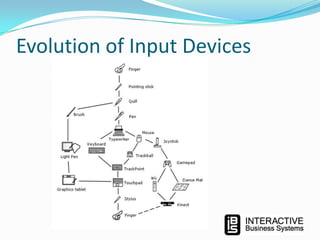
Evolution of Input Devices
The Leap Motion Controller
 Description:

• With just your hands and fingers in the air – swipe, pinch, wave, and grab for just

 The Leap Motion Controller tracks both hands and all 10 fingers with

pinpoint precision and incredible speed. That wide-open space
between you and your computer is now yours—to play, create and
explore. Reach into another world without actually touching anything.

 Website:
 https://www.leapmotion.com/
 Cost:
 $79.99.
 Buy:

 Best Buy or Online

 Applications:
 More than 150 free and paid apps in Airspace, the Leap Motion App
Store.
 https://airspace.leapmotion.com/
Architecture:
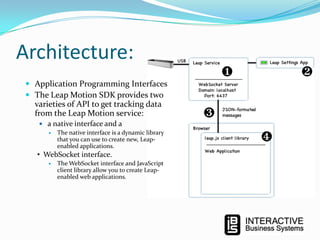
 Application Programming Interfaces
 The Leap Motion SDK provides two

varieties of API to get tracking data
from the Leap Motion service:
 a native interface and a
 The native interface is a dynamic library
that you can use to create new, Leapenabled applications.

• WebSocket interface.


The WebSocket interface and JavaScript
client library allow you to create Leapenabled web applications.
Programming Language Support
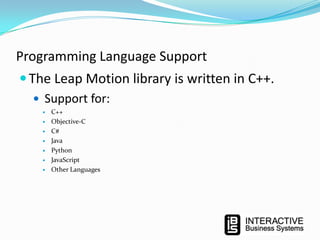
 The Leap Motion library is written in C++.
 Support for:








C++
Objective-C
C#
Java
Python
JavaScript
Other Languages
LeapMotion Overview
 The Leap detects and tracks hands, fingers and finger-

like tools.
 The Leap software analyzes the objects observed in the
device field of view. It recognizes hands, fingers, and
tools, reporting both discrete positions, gestures, and
motion.
Field of View
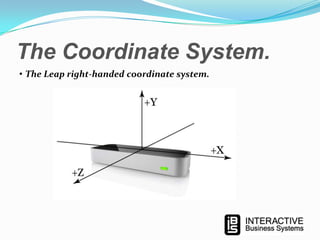
 The Leap field of view is an inverted pyramid centered

on the device.
 The effective range of the Leap extends from
approximately 25 to 600 millimeters above the device
(1 inch to 2 feet).
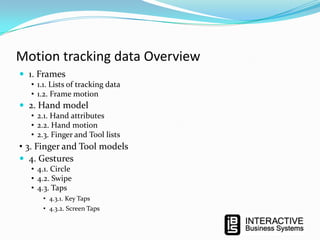
The Coordinate System.
• The Leap right-handed coordinate system.
Motion tracking data Overview
 1. Frames
• 1.1. Lists of tracking data
• 1.2. Frame motion

 2. Hand model
• 2.1. Hand attributes
• 2.2. Hand motion
• 2.3. Finger and Tool lists

• 3. Finger and Tool models
 4. Gestures
• 4.1. Circle
• 4.2. Swipe
• 4.3. Taps
• 4.3.1. Key Taps
• 4.3.2. Screen Taps
1. Frames
 A Frame object describes the overall motion observed in the Leap

field of view. It provides lists of:
 the tracking data
 gestures
 factors
1.1.

Lists of tracking data

 Hands
 All hands.

 Pointables
 All fingers and tools as Pointable objects.

 Fingers
 All the fingers.

 Tools
 All the tools.

 Gestures
 All the gestures that started, ended, or which had an update.
1.2. Frame motion
 rotationAxis
 A direction vector expressing the axis of rotation.

 rotationAngle
 The angle of rotation clockwise around the rotation axis (using the right-

hand rule).

 rotationMatrix
 A transform matrix expressing the rotation.

 scaleFactor
 A factor expressing expansion or contraction.

 translation
 A vector expressing the linear movement.
2. Hand model
 The hand model provides information about the:
 position
 characteristics
 movement of a detected hand
 lists of the fingers
 tools associated with the hand
2.1. Hand attribute
The Hand object provides several attributes reporting the physical characteristics
of a detected hand:
 palmPosition
 The center of the palm measured in millimeters from the Leap origin.

 palmVelocity
 The speed of the palm in millimeters per second.

 palmNormal
 A vector perpendicular to the plane formed by the palm of the hand. The vector points

downward out of the palm.

 direction
 A vector pointing from the center of the palm toward the fingers.

 sphereCenter
 The center of a sphere fit to the curvature of the hand (as if it were holding a ball).

 sphereRadius
 The radius of a sphere fit to the curvature of the hand. The radius changes with the shape

of the hand.
2.1.1. The

Normal Vector

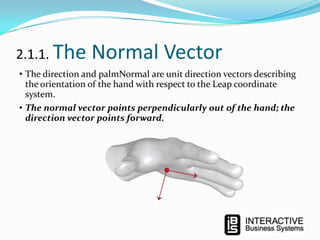
• The direction and palmNormal are unit direction vectors describing
the orientation of the hand with respect to the Leap coordinate
system.
• The normal vector points perpendicularly out of the hand; the
direction vector points forward.
2.1.2. Sphere

Size

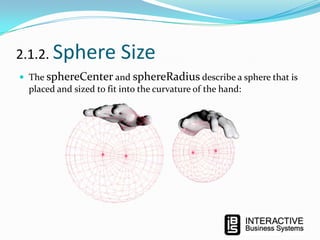
 The sphereCenter and sphereRadius describe a sphere that is

placed and sized to fit into the curvature of the hand:
2.2. Hand motion
 The Hand object also provides several attributes reporting the motion of a

detected hand between frames. The Leap analyzes the motion of the
hand, as well as its associated fingers and tools and reports representative
translation, rotation, and scale factors.
 The attributes describing the synthesized motion include:
 rotationAxis
 A direction vector expressing the axis of rotation.
 rotationAngle
 The angle of rotation clockwise around the rotation axis (using the right-hand rule).
 rotationMatrix
 A transform matrix expressing the rotation.
 scaleFactor
 A factor expressing expansion or contraction.
 translation
 A vector expressing the linear movement.
2.3. Finger and Tool lists
 You can access the fingers and tools associated with a hand using

one of three lists:
 Pointables
 Both fingers and tools as Pointable objects.
 Fingers
 Just the fingers.
 Tools
 Just the tools.
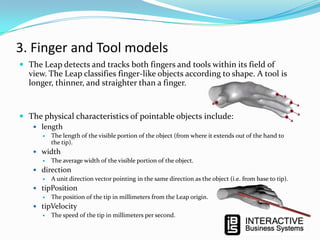
3. Finger and Tool models
 The Leap detects and tracks both fingers and tools within its field of

view. The Leap classifies finger-like objects according to shape. A tool is
longer, thinner, and straighter than a finger.

 The physical characteristics of pointable objects include:
 length
 The length of the visible portion of the object (from where it extends out of the hand to
the tip).
 width
 The average width of the visible portion of the object.
 direction
 A unit direction vector pointing in the same direction as the object (i.e. from base to tip).
 tipPosition
 The position of the tip in millimeters from the Leap origin.
 tipVelocity
 The speed of the tip in millimeters per second.
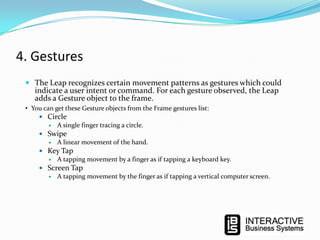
4. Gestures
 The Leap recognizes certain movement patterns as gestures which could
indicate a user intent or command. For each gesture observed, the Leap

adds a Gesture object to the frame.

• You can get these Gesture objects from the Frame gestures list:
 Circle
 A single finger tracing a circle.
 Swipe
 A linear movement of the hand.
 Key Tap
 A tapping movement by a finger as if tapping a keyboard key.
 Screen Tap
 A tapping movement by the finger as if tapping a vertical computer screen.
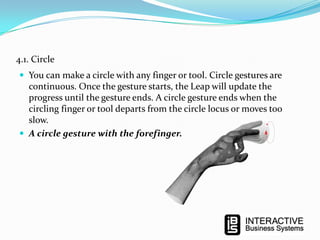
4.1. Circle
 You can make a circle with any finger or tool. Circle gestures are

continuous. Once the gesture starts, the Leap will update the
progress until the gesture ends. A circle gesture ends when the
circling finger or tool departs from the circle locus or moves too
slow.
 A circle gesture with the forefinger.
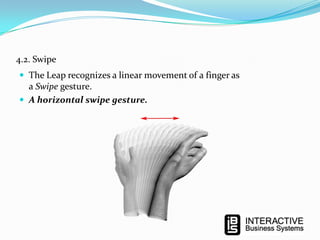
4.2. Swipe
 The Leap recognizes a linear movement of a finger as

a Swipe gesture.
 A horizontal swipe gesture.
4.3. Taps
• The Leap recognizes two types of taps:
• the downward Key Tap
• the forward Screen Tap.
4.3.1. Key Taps
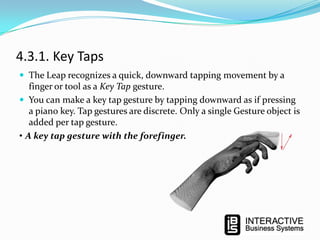
 The Leap recognizes a quick, downward tapping movement by a

finger or tool as a Key Tap gesture.
 You can make a key tap gesture by tapping downward as if pressing
a piano key. Tap gestures are discrete. Only a single Gesture object is
added per tap gesture.
• A key tap gesture with the forefinger.
4.3.2. Screen Taps
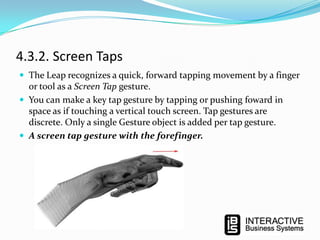
 The Leap recognizes a quick, forward tapping movement by a finger

or tool as a Screen Tap gesture.
 You can make a key tap gesture by tapping or pushing foward in
space as if touching a vertical touch screen. Tap gestures are
discrete. Only a single Gesture object is added per tap gesture.
 A screen tap gesture with the forefinger.
For More Information:
 Me:
 Aydin Akcasu
 Aakcasu@ibs.com
 @Aakcasu
• Leap Motion
• https://www.leapmotion.com/
• https://developer.leapmotion.com/

• https://developer.leapmotion.com/documentation/Languages/JavaScript/G
uides/Leap_Overview.html
Questions

Leap Motion - Aydin Akcasu

  • 1.
    Aydin Akcasu Senior SoftwareArchitect Interactive Business Systems, Inc.
  • 2.
    Who am I? Aydin has been writing software for close to 30 years. He has provided inventive solutions using technologies such as Java, JavaScript, ASP, Visual Basic, VB.Net, C#.Net, ASP.Net, Flash.  He has given presentations and classes in the past to local groups (as well as in India) in topics such as "KPL-Kids Programming Language", ‘Help, I need to learn Javascript’, ‘Cover you ASP’, ‘VBWhat is it good for?’,  ‘FLASH-in-the-Pants?’, ‘C#, ASP.Net on a Budget’, ‘Introduction to ‘C#.Net’, ‘AJAX – A What’, ‘Google Maps APIWheres’Waldo?’, "Cross-Platform Mobile Development". He also created course content and taught at Washtenaw Community College (C#.Net, Advanced C#.Net), for many years.
  • 3.
    Who are we? InteractiveBusiness Systems 200+ Consultants in U.S. 4 Business Units and 2 Development Centers Strategic Staffing Solutions Application & Infrastructure Custom Solutions U.S. Headquarters, Oak Brook, Illinois
  • 4.
  • 5.
  • 6.
    The Leap MotionController  Description: • With just your hands and fingers in the air – swipe, pinch, wave, and grab for just  The Leap Motion Controller tracks both hands and all 10 fingers with pinpoint precision and incredible speed. That wide-open space between you and your computer is now yours—to play, create and explore. Reach into another world without actually touching anything.  Website:  https://www.leapmotion.com/  Cost:  $79.99.  Buy:  Best Buy or Online  Applications:  More than 150 free and paid apps in Airspace, the Leap Motion App Store.  https://airspace.leapmotion.com/
  • 7.
    Architecture:  Application ProgrammingInterfaces  The Leap Motion SDK provides two varieties of API to get tracking data from the Leap Motion service:  a native interface and a  The native interface is a dynamic library that you can use to create new, Leapenabled applications. • WebSocket interface.  The WebSocket interface and JavaScript client library allow you to create Leapenabled web applications.
  • 8.
    Programming Language Support The Leap Motion library is written in C++.  Support for:        C++ Objective-C C# Java Python JavaScript Other Languages
  • 9.
    LeapMotion Overview  TheLeap detects and tracks hands, fingers and finger- like tools.  The Leap software analyzes the objects observed in the device field of view. It recognizes hands, fingers, and tools, reporting both discrete positions, gestures, and motion.
  • 10.
    Field of View The Leap field of view is an inverted pyramid centered on the device.  The effective range of the Leap extends from approximately 25 to 600 millimeters above the device (1 inch to 2 feet).
  • 11.
    The Coordinate System. •The Leap right-handed coordinate system.
  • 12.
    Motion tracking dataOverview  1. Frames • 1.1. Lists of tracking data • 1.2. Frame motion  2. Hand model • 2.1. Hand attributes • 2.2. Hand motion • 2.3. Finger and Tool lists • 3. Finger and Tool models  4. Gestures • 4.1. Circle • 4.2. Swipe • 4.3. Taps • 4.3.1. Key Taps • 4.3.2. Screen Taps
  • 13.
    1. Frames  AFrame object describes the overall motion observed in the Leap field of view. It provides lists of:  the tracking data  gestures  factors
  • 14.
    1.1. Lists of trackingdata  Hands  All hands.  Pointables  All fingers and tools as Pointable objects.  Fingers  All the fingers.  Tools  All the tools.  Gestures  All the gestures that started, ended, or which had an update.
  • 15.
    1.2. Frame motion rotationAxis  A direction vector expressing the axis of rotation.  rotationAngle  The angle of rotation clockwise around the rotation axis (using the right- hand rule).  rotationMatrix  A transform matrix expressing the rotation.  scaleFactor  A factor expressing expansion or contraction.  translation  A vector expressing the linear movement.
  • 16.
    2. Hand model The hand model provides information about the:  position  characteristics  movement of a detected hand  lists of the fingers  tools associated with the hand
  • 17.
    2.1. Hand attribute TheHand object provides several attributes reporting the physical characteristics of a detected hand:  palmPosition  The center of the palm measured in millimeters from the Leap origin.  palmVelocity  The speed of the palm in millimeters per second.  palmNormal  A vector perpendicular to the plane formed by the palm of the hand. The vector points downward out of the palm.  direction  A vector pointing from the center of the palm toward the fingers.  sphereCenter  The center of a sphere fit to the curvature of the hand (as if it were holding a ball).  sphereRadius  The radius of a sphere fit to the curvature of the hand. The radius changes with the shape of the hand.
  • 18.
    2.1.1. The Normal Vector •The direction and palmNormal are unit direction vectors describing the orientation of the hand with respect to the Leap coordinate system. • The normal vector points perpendicularly out of the hand; the direction vector points forward.
  • 19.
    2.1.2. Sphere Size  ThesphereCenter and sphereRadius describe a sphere that is placed and sized to fit into the curvature of the hand:
  • 20.
    2.2. Hand motion The Hand object also provides several attributes reporting the motion of a detected hand between frames. The Leap analyzes the motion of the hand, as well as its associated fingers and tools and reports representative translation, rotation, and scale factors.  The attributes describing the synthesized motion include:  rotationAxis  A direction vector expressing the axis of rotation.  rotationAngle  The angle of rotation clockwise around the rotation axis (using the right-hand rule).  rotationMatrix  A transform matrix expressing the rotation.  scaleFactor  A factor expressing expansion or contraction.  translation  A vector expressing the linear movement.
  • 21.
    2.3. Finger andTool lists  You can access the fingers and tools associated with a hand using one of three lists:  Pointables  Both fingers and tools as Pointable objects.  Fingers  Just the fingers.  Tools  Just the tools.
  • 22.
    3. Finger andTool models  The Leap detects and tracks both fingers and tools within its field of view. The Leap classifies finger-like objects according to shape. A tool is longer, thinner, and straighter than a finger.  The physical characteristics of pointable objects include:  length  The length of the visible portion of the object (from where it extends out of the hand to the tip).  width  The average width of the visible portion of the object.  direction  A unit direction vector pointing in the same direction as the object (i.e. from base to tip).  tipPosition  The position of the tip in millimeters from the Leap origin.  tipVelocity  The speed of the tip in millimeters per second.
  • 23.
    4. Gestures  TheLeap recognizes certain movement patterns as gestures which could indicate a user intent or command. For each gesture observed, the Leap adds a Gesture object to the frame. • You can get these Gesture objects from the Frame gestures list:  Circle  A single finger tracing a circle.  Swipe  A linear movement of the hand.  Key Tap  A tapping movement by a finger as if tapping a keyboard key.  Screen Tap  A tapping movement by the finger as if tapping a vertical computer screen.
  • 24.
    4.1. Circle  Youcan make a circle with any finger or tool. Circle gestures are continuous. Once the gesture starts, the Leap will update the progress until the gesture ends. A circle gesture ends when the circling finger or tool departs from the circle locus or moves too slow.  A circle gesture with the forefinger.
  • 25.
    4.2. Swipe  TheLeap recognizes a linear movement of a finger as a Swipe gesture.  A horizontal swipe gesture.
  • 26.
    4.3. Taps • TheLeap recognizes two types of taps: • the downward Key Tap • the forward Screen Tap.
  • 27.
    4.3.1. Key Taps The Leap recognizes a quick, downward tapping movement by a finger or tool as a Key Tap gesture.  You can make a key tap gesture by tapping downward as if pressing a piano key. Tap gestures are discrete. Only a single Gesture object is added per tap gesture. • A key tap gesture with the forefinger.
  • 28.
    4.3.2. Screen Taps The Leap recognizes a quick, forward tapping movement by a finger or tool as a Screen Tap gesture.  You can make a key tap gesture by tapping or pushing foward in space as if touching a vertical touch screen. Tap gestures are discrete. Only a single Gesture object is added per tap gesture.  A screen tap gesture with the forefinger.
  • 29.
    For More Information: Me:  Aydin Akcasu  Aakcasu@ibs.com  @Aakcasu • Leap Motion • https://www.leapmotion.com/ • https://developer.leapmotion.com/ • https://developer.leapmotion.com/documentation/Languages/JavaScript/G uides/Leap_Overview.html
  • 30.

Editor's Notes

  • #10 The Leap detects and tracks hands, fingers and finger-like tools. The device operates in an intimate proximity with high precision and tracking frame rate.The Leap software analyzes the objects observed in the device field of view. It recognizes hands, fingers, and tools, reporting both discrete positions, gestures, and motion. The Leap field of view is an inverted pyramid centered on the device. The effective range of the Leap extends from approximately 25 to 600 millimeters above the device (1 inch to 2 feet).
  • #12 The Leap employs a right-handed Cartesian coordinate system. Values reported are in units of real-world millimeters. The origin is centered at the center of the Leap Motion Controller. The x- and z-axes lie in the horizontal plane, with the x-axis running parallel to the long edge of the device. The y-axis is vertical, with positive values increasing upwards (in contrast to the downward orientation of most computer graphics coordinate systems). The z-axis has positive values increasing away from the computer screen.
  • #13 As the Leap tracks hands, fingers, and tools in its field of view, it provides updates as a set, or frame, of data. Each frame contains lists of the basic tracking data, such as hands, fingers, and tools, as well as recognized gestures and factors describing the overall motion in the scene.When it detects a hand, finger, tool, or gesture, the Leap assigns it a unique ID designator. The ID remains the same as long as that entity remains visible within the device's field of view. If tracking is lost and regained, the Leap may assign a new ID (the software may not know that the hand or finger is the same as the one visible earlier).
  • #17 The hand model provides information about the position, characteristics, and movement of a detected hand as well as lists of the fingers and tools associated with the hand.The Leap API provides as much information about a hand as possible. However, the Leap may not be able to determine all hand attributes in every frame. For example, when a hand is clenched into a fist, its fingers are not visible to the Leap so the finger list will be empty. Your code should handle the cases where an attribute in the model is not available.The Leap does not determine whether a hand is a left or right hand. More than two hands can appear in the hand list for a frame if more than one person's hands or other hand-like objects are in view. However, we recommend keeping at most two hands in the Leap Motion Controller's field of view for optimal motion tracking quality.
  • #21 The Hand object also provides several attributes reporting the motion of a detected hand between frames. The Leap analyzes the motion of the hand, as well as its associated fingers and tools and reports representative translation, rotation, and scale factors. Moving your hand around the Leap field of view produces translation. Turning, twisting, or tilting your hand produces rotation. Moving fingers or tools toward or away from each other produces scaling.Hand motions are derived by comparing the characteristics of the hand in the current frame to those in a specified earlier frame. The attributes describing the synthesized motion include: