

DECISION SUPPORT SYSTEMS
Information System Engineering Project
Outline
• Definition
• History
• Types of Problems
• Taxonomies
• Components
• Using DSS
• Characteristics
• Benefits
• Applications
Definition
Definition
• Decision Support System (DSS) is an interactive computer-
based system or subsystem intended to help decision makers
use communications technologies, data, documents,
knowledge and/or models to identify and solve problems,
complete decision process tasks, and make decisions.
• Decision Support System is a general term for any computer
application that enhances a person or group’s ability to make
decisions.
Definition
• Typical information that a decision support application might
gather and present includes:
• inventories of information assets (including legacy and relational data
sources, cubes, data warehouses, and data marts).
• comparative sales figures between one period and the next.
• projected revenue figures based on product sales assumptions.
History
A brief history of Dss
1950
1960
1970
1980
1990
History
• Academic Researchers from many disciplines has been
studying DSS for approximately 40 years.
• The concept of decision support has evolved from two main
areas of research: the theoretical studies of organizational
decision making done 1950s and early 1960s, and the
technical work on interactive computer systems.
• It is considered that the concept of DSS became an area of
research of its own in the middle of the 1970s, before gaining
in intensity during the 1980s.
History
• In the middle and late 1980s, Executive Information Systems
(EIS), group decision support systems (GDSS), and
organizational decision support systems (ODSS) evolved from
the single user and model-oriented DSS.
• Beginning in about 1990, data warehousing and on-line
analytical processing (OLAP) began broadening the realm of
DSS.
• As the turn of the millennium approached, new Web-based
analytical applications were introduced.
Types of problems
Types of problems
• Structured: situations where the procedures to follow when a decision is
needed can be specified in advance
– Repetitive
– Standard solution methods exist
– Complete automation may be feasible
• Unstructured: decision situations where it is not possible to specify in
advance most of the decision procedures to follow
– One-time
– No standard solutions
– Rely on judgment
– Automation is usually infeasible
• Semi-structured: decision procedures that can be pre specified, but not
enough to lead to a definite recommended decision
– Some elements and/or phases of decision making process have repetitive
elements
DSS most useful for repetitive aspects of semi-structured problems
Taxonomies
Taxonomies
• There is no universally accepted taxonomy of DSS
• Different authors propose different classifications using
different criterion:
• Using the relationship with the user as the criterion, Haettenschwiler
differentiates passive, active, and cooperative DSS
• Using scope as the criterion, Power differentiates enterprise-wide DSS
and desktop DSS
• Using the mode of assistance as the criterion, Daniel Power
differentiates communication-driven DSS, data-driven DSS, document-
driven DSS, knowledge-driven DSS, and model-driven DSS (Most used
taxonomy)
Model-driven dss
• A model-driven DSS emphasizes access to and manipulation of
a statistical, financial, optimization, or simulation model.
Model-driven DSS use data and parameters provided by users
to assist decision makers in analyzing a situation; they are not
necessarily data intensive. Dicodess is an example of an open
source model-driven DSS generator (Gachet 2004).
• Other examples:
• A spread-sheet with formulas in
• A statistical forecasting model
• An optimum routing model
Data-driven (retrieving) DSS
• A data-driven DSS or data-oriented DSS emphasizes access to
and manipulation of a time series of internal company data
and, sometimes, external data.
• Simple file systems accessed by query and retrieval tools
provides the elementary level of functionality. Data
warehouses provide additional functionality. OLAP provides
highest level of functionality.
• Examples:
• Accessing AMMIS data base for all maintenance Jan89-Jul94 for CH124
• Accessing INTERPOL database for crimes
• Accessing border patrol database for all incidents in Sector ...
Model and data-retrieving DSS
• Examples:
• Collect weather observations at all stations and forecast tomorrow’s
weather
• Collect data on all civilian casualties to predict casualties over the next
month
Communication-driven DSS
• A communication-driven DSS use network and comminication
technologies to faciliate collaboartion on decision making. It
supports more than one person working on a shared task.
• examples include integrated tools like Microsoft's NetMeeting
or Groove (Stanhope 2002), Vide conferencing.
• It is related to group decision support systems.
Document-driven DSS
• A document-driven DSS uses storage and processing
technologies to document retrieval and analysis. It manages,
retrieves and manipulates unstructured information in a
variety of electronic formats.
• Document database may include: Scanned documents,
hypertext documents, images, sound and video.
• A search engine is a primary tool associated with document
driven DSS.
Knowledge-driven DSS
• A knowledge-driven DSS provides specialized problem solving
expertise stored as facts, rules, procedures, or in similar
structures. It suggest or recommend actions to managers.
• MYCIN: A rule based reasoning program which help physicians
diagnose blood disease.
Components
Components
• Three fundamental components of a DSS architecture are:
• The database
• The model
• The user interface
• The users themselves are also important components of the
architecture.
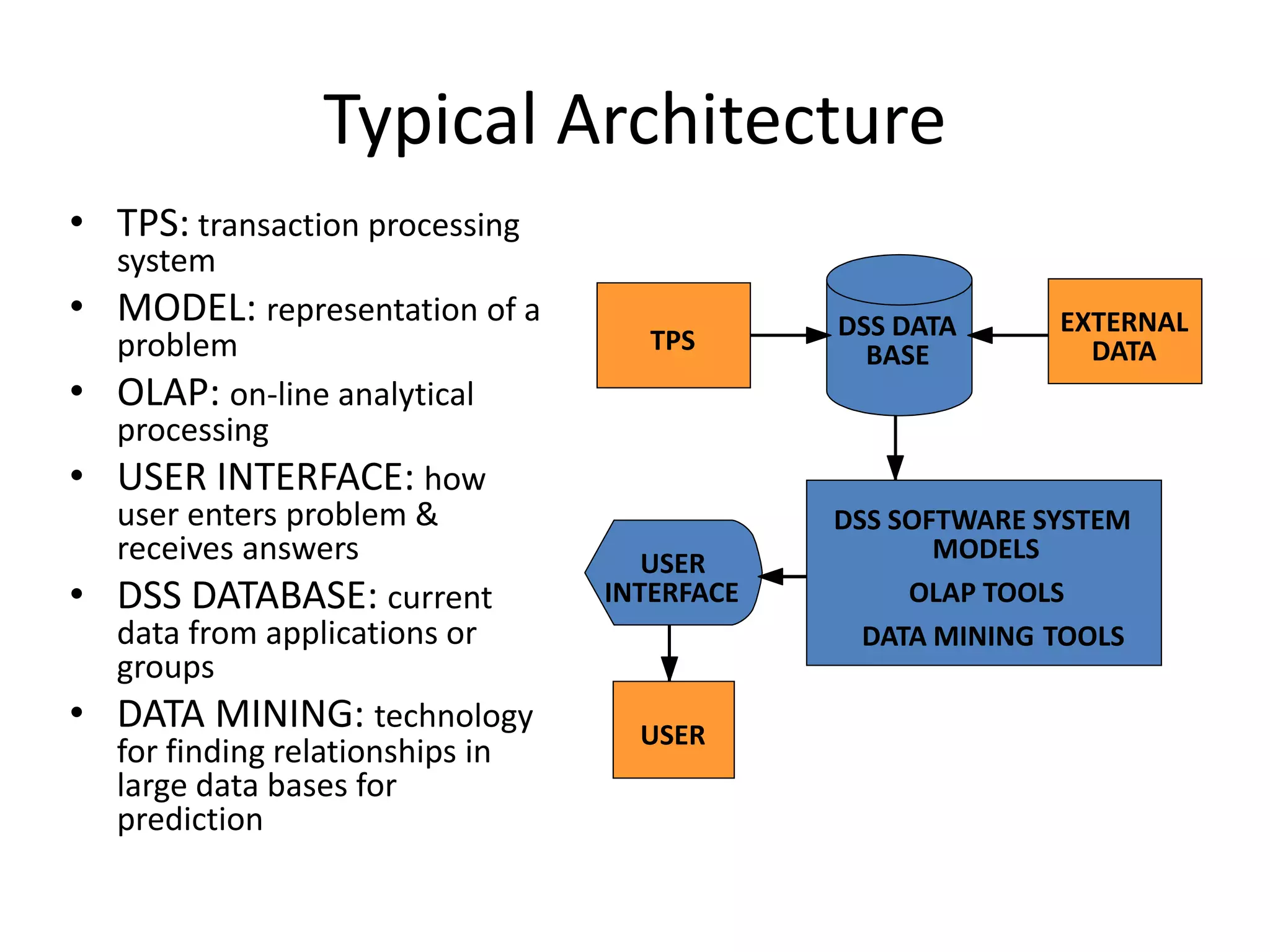
Typical Architecture
• TPS: transaction processing
system
• MODEL: representation of a
problem
• OLAP: on-line analytical
processing
• USER INTERFACE: how
user enters problem &
receives answers
• DSS DATABASE: current
data from applications or
groups
• DATA MINING: technology
for finding relationships in
large data bases for
prediction
TPS
EXTERNAL
DATA
DSS DATA
BASE
DSS SOFTWARE SYSTEM
MODELS
OLAP TOOLS
DATA MINING TOOLS
USER
INTERFACE
USER
DSS Model base
– Model base
• A software component that consists of models used in
computational and analytical routines that mathematically express
relations among variables
– Examples:
• Linear programming models
• Multiple regression forecasting models
• Capital budgeting present value models
DSS Model base Tools
• Online Analytical Processing
• Enables mangers and analysts to examine and manipulate large amounts
of detailed and consolidated data from many perspectives
• Geographic Information Systems
• DSS that uses geographic databases to construct and display maps and other
graphics displays
• Data Mining
• Main purpose is to provide decision support to managers and business
professionals through knowledge discovery
• Tries to discover patterns, trends, and correlations hidden in the data that
can help a company improve its business performance
• Data Visualization Systems
• DSS that represents complex data using interactive three-dimensional
graphical forms such as charts, graphs, and maps
Using DSS
Using DSS
• What-if Analysis
– End user makes changes to variables, or
relationships among variables, and observes the
resulting changes in the values of other variables
• Sensitivity Analysis
– Value of only one variable is changed repeatedly
and the resulting changes in other variables are
observed
Using DSS
• Goal-Seeking
– Set a target value for a variable and then repeatedly
change other variables until the target value is
achieved
• Optimization
– Goal is to find the optimum value for one or more
target variables given certain constraints
– One or more other variables are changed repeatedly
until the best values for the target variables are
discovered
Characteristics
DSS Characteristics and capabilities
Characteristics
• Solve semi-structured & Unstructured problems
• Support To Managers At All Levels
• Support Individual and groups
• Inter dependence and Sequence Decision.
• Support Intelligence, Designee , Choice.
• Adaptable & Flexible.
• Interactive and ease of use
• Interactive and efficiency
Characteristics
• Human control the process
• Ease of development by end user
• Modeling and Analysis
• Data Access
• Stand alone Integration & Web Based
• Support Varieties Of Decision Process
Benefits
Benefits
• Improves personal efficiency
• Speed up the process of decision making
• Increases organizational control
• Encourages exploration and discovery on the part of the
decision maker
• Speeds up problem solving in an organization
• Facilitates interpersonal communication
Benefits
• Promotes learning or training
• Generates new evidence in support of a decision
• Creates a competitive advantage over competition
• Reveals new approaches to thinking about the problem space
• Helps automate managerial processes
• Create Innovative ideas to speed up the performance
Applications
Applications
• There are theoretical possibilities of building such
systems in any knowledge domain.
• Clinical decision support system for medical diagnosis.
• a bank loan officer verifying the credit of a loan applicant
• DSS is extensively used in business and management. Executive
dashboards and other business performance software allow
faster decision making, identification of negative trends, and
better allocation of business resources.

Decision Support Systems

  • 1.
    DECISION SUPPORT SYSTEMS InformationSystem Engineering Project
  • 2.
    Outline • Definition • History •Types of Problems • Taxonomies • Components • Using DSS • Characteristics • Benefits • Applications
  • 3.
  • 4.
    Definition • Decision SupportSystem (DSS) is an interactive computer- based system or subsystem intended to help decision makers use communications technologies, data, documents, knowledge and/or models to identify and solve problems, complete decision process tasks, and make decisions. • Decision Support System is a general term for any computer application that enhances a person or group’s ability to make decisions.
  • 5.
    Definition • Typical informationthat a decision support application might gather and present includes: • inventories of information assets (including legacy and relational data sources, cubes, data warehouses, and data marts). • comparative sales figures between one period and the next. • projected revenue figures based on product sales assumptions.
  • 6.
    History A brief historyof Dss 1950 1960 1970 1980 1990
  • 7.
    History • Academic Researchersfrom many disciplines has been studying DSS for approximately 40 years. • The concept of decision support has evolved from two main areas of research: the theoretical studies of organizational decision making done 1950s and early 1960s, and the technical work on interactive computer systems. • It is considered that the concept of DSS became an area of research of its own in the middle of the 1970s, before gaining in intensity during the 1980s.
  • 8.
    History • In themiddle and late 1980s, Executive Information Systems (EIS), group decision support systems (GDSS), and organizational decision support systems (ODSS) evolved from the single user and model-oriented DSS. • Beginning in about 1990, data warehousing and on-line analytical processing (OLAP) began broadening the realm of DSS. • As the turn of the millennium approached, new Web-based analytical applications were introduced.
  • 9.
  • 10.
    Types of problems •Structured: situations where the procedures to follow when a decision is needed can be specified in advance – Repetitive – Standard solution methods exist – Complete automation may be feasible • Unstructured: decision situations where it is not possible to specify in advance most of the decision procedures to follow – One-time – No standard solutions – Rely on judgment – Automation is usually infeasible • Semi-structured: decision procedures that can be pre specified, but not enough to lead to a definite recommended decision – Some elements and/or phases of decision making process have repetitive elements DSS most useful for repetitive aspects of semi-structured problems
  • 11.
  • 12.
    Taxonomies • There isno universally accepted taxonomy of DSS • Different authors propose different classifications using different criterion: • Using the relationship with the user as the criterion, Haettenschwiler differentiates passive, active, and cooperative DSS • Using scope as the criterion, Power differentiates enterprise-wide DSS and desktop DSS • Using the mode of assistance as the criterion, Daniel Power differentiates communication-driven DSS, data-driven DSS, document- driven DSS, knowledge-driven DSS, and model-driven DSS (Most used taxonomy)
  • 13.
    Model-driven dss • Amodel-driven DSS emphasizes access to and manipulation of a statistical, financial, optimization, or simulation model. Model-driven DSS use data and parameters provided by users to assist decision makers in analyzing a situation; they are not necessarily data intensive. Dicodess is an example of an open source model-driven DSS generator (Gachet 2004). • Other examples: • A spread-sheet with formulas in • A statistical forecasting model • An optimum routing model
  • 14.
    Data-driven (retrieving) DSS •A data-driven DSS or data-oriented DSS emphasizes access to and manipulation of a time series of internal company data and, sometimes, external data. • Simple file systems accessed by query and retrieval tools provides the elementary level of functionality. Data warehouses provide additional functionality. OLAP provides highest level of functionality. • Examples: • Accessing AMMIS data base for all maintenance Jan89-Jul94 for CH124 • Accessing INTERPOL database for crimes • Accessing border patrol database for all incidents in Sector ...
  • 15.
    Model and data-retrievingDSS • Examples: • Collect weather observations at all stations and forecast tomorrow’s weather • Collect data on all civilian casualties to predict casualties over the next month
  • 16.
    Communication-driven DSS • Acommunication-driven DSS use network and comminication technologies to faciliate collaboartion on decision making. It supports more than one person working on a shared task. • examples include integrated tools like Microsoft's NetMeeting or Groove (Stanhope 2002), Vide conferencing. • It is related to group decision support systems.
  • 17.
    Document-driven DSS • Adocument-driven DSS uses storage and processing technologies to document retrieval and analysis. It manages, retrieves and manipulates unstructured information in a variety of electronic formats. • Document database may include: Scanned documents, hypertext documents, images, sound and video. • A search engine is a primary tool associated with document driven DSS.
  • 18.
    Knowledge-driven DSS • Aknowledge-driven DSS provides specialized problem solving expertise stored as facts, rules, procedures, or in similar structures. It suggest or recommend actions to managers. • MYCIN: A rule based reasoning program which help physicians diagnose blood disease.
  • 19.
  • 20.
    Components • Three fundamentalcomponents of a DSS architecture are: • The database • The model • The user interface • The users themselves are also important components of the architecture.
  • 21.
    Typical Architecture • TPS:transaction processing system • MODEL: representation of a problem • OLAP: on-line analytical processing • USER INTERFACE: how user enters problem & receives answers • DSS DATABASE: current data from applications or groups • DATA MINING: technology for finding relationships in large data bases for prediction TPS EXTERNAL DATA DSS DATA BASE DSS SOFTWARE SYSTEM MODELS OLAP TOOLS DATA MINING TOOLS USER INTERFACE USER
  • 22.
    DSS Model base –Model base • A software component that consists of models used in computational and analytical routines that mathematically express relations among variables – Examples: • Linear programming models • Multiple regression forecasting models • Capital budgeting present value models
  • 23.
    DSS Model baseTools • Online Analytical Processing • Enables mangers and analysts to examine and manipulate large amounts of detailed and consolidated data from many perspectives • Geographic Information Systems • DSS that uses geographic databases to construct and display maps and other graphics displays • Data Mining • Main purpose is to provide decision support to managers and business professionals through knowledge discovery • Tries to discover patterns, trends, and correlations hidden in the data that can help a company improve its business performance • Data Visualization Systems • DSS that represents complex data using interactive three-dimensional graphical forms such as charts, graphs, and maps
  • 24.
  • 25.
    Using DSS • What-ifAnalysis – End user makes changes to variables, or relationships among variables, and observes the resulting changes in the values of other variables • Sensitivity Analysis – Value of only one variable is changed repeatedly and the resulting changes in other variables are observed
  • 26.
    Using DSS • Goal-Seeking –Set a target value for a variable and then repeatedly change other variables until the target value is achieved • Optimization – Goal is to find the optimum value for one or more target variables given certain constraints – One or more other variables are changed repeatedly until the best values for the target variables are discovered
  • 27.
  • 28.
    Characteristics • Solve semi-structured& Unstructured problems • Support To Managers At All Levels • Support Individual and groups • Inter dependence and Sequence Decision. • Support Intelligence, Designee , Choice. • Adaptable & Flexible. • Interactive and ease of use • Interactive and efficiency
  • 29.
    Characteristics • Human controlthe process • Ease of development by end user • Modeling and Analysis • Data Access • Stand alone Integration & Web Based • Support Varieties Of Decision Process
  • 30.
  • 31.
    Benefits • Improves personalefficiency • Speed up the process of decision making • Increases organizational control • Encourages exploration and discovery on the part of the decision maker • Speeds up problem solving in an organization • Facilitates interpersonal communication
  • 32.
    Benefits • Promotes learningor training • Generates new evidence in support of a decision • Creates a competitive advantage over competition • Reveals new approaches to thinking about the problem space • Helps automate managerial processes • Create Innovative ideas to speed up the performance
  • 33.
  • 34.
    Applications • There aretheoretical possibilities of building such systems in any knowledge domain. • Clinical decision support system for medical diagnosis. • a bank loan officer verifying the credit of a loan applicant • DSS is extensively used in business and management. Executive dashboards and other business performance software allow faster decision making, identification of negative trends, and better allocation of business resources.