Summary of Facebook
Haystack (OSDI’10)
Original paper: “Finding a needle in Haystack: Facebook’s photo
storage”. D. Beaver, et al. OSDI 2010.
Haystack vs GFS
• GFS
o Targeting video files. Each video file divided into a bunch of “chunks” (64MB each)
o Each chunk is replicated several times (three by default)
o File->Chunk mapping maintained by a central master
o All metadata kept in memory
• Haystack
o Several photos combine into a single large file known as a logical volume (100GB)
o Each logical volume corresponds to several physical volumes (replicas)
o photoID->(logicalVolume, fileOffset, fileSize) mapping maintained by a separate
“Haystack Directory” component
o All metadata kept in memory
Why another Custom Storage System?
• One-photo-per-file is wasteful: a lot of the per-file metadata are not
needed for photos, e.g., file permissions
• Photos are written once and never modified: only need to support
read/write/delete operations
Haystack Architecture
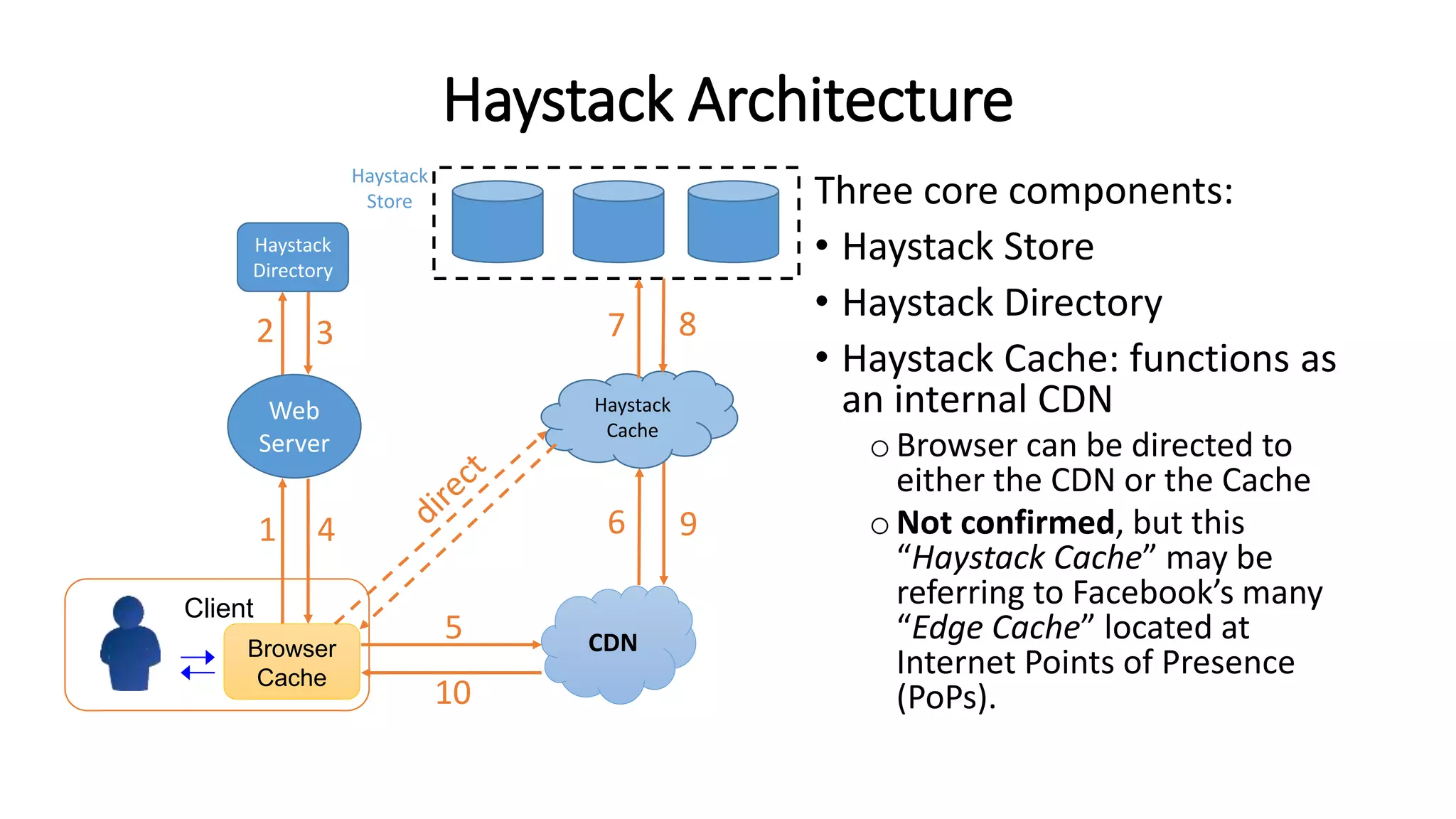
Three core components:
• Haystack Store
• Haystack Directory
• Haystack Cache: functions as
an internal CDN
oBrowser can be directed to
either the CDN or the Cache
oNot confirmed, but this
“Haystack Cache” may be
referring to Facebook’s many
“Edge Cache” located at
Internet Points of Presence
(PoPs).
CDNBrowser
Cache
Client
Web
Server
1 4
5
6 9
10
Haystack
Directory
Haystack
Store
Haystack
Cache
2 3 7 8
Haystack Store
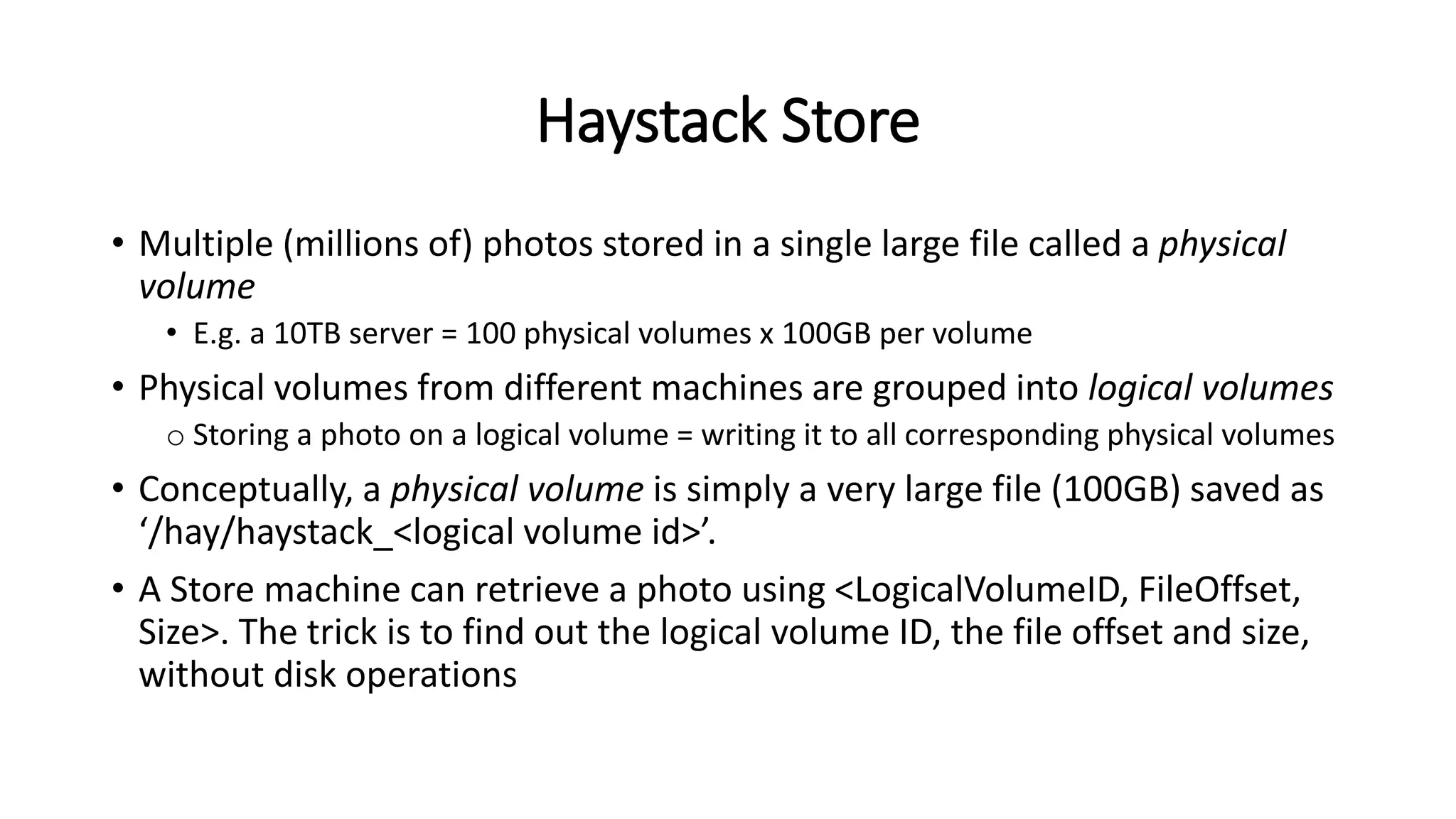
• Multiple (millions of) photos stored in a single large file called a physical
volume
• E.g. a 10TB server = 100 physical volumes x 100GB per volume
• Physical volumes from different machines are grouped into logical volumes
o Storing a photo on a logical volume = writing it to all corresponding physical volumes
• Conceptually, a physical volume is simply a very large file (100GB) saved as
‘/hay/haystack_<logical volume id>’.
• A Store machine can retrieve a photo using <LogicalVolumeID, FileOffset,
Size>. The trick is to find out the logical volume ID, the file offset and size,
without disk operations
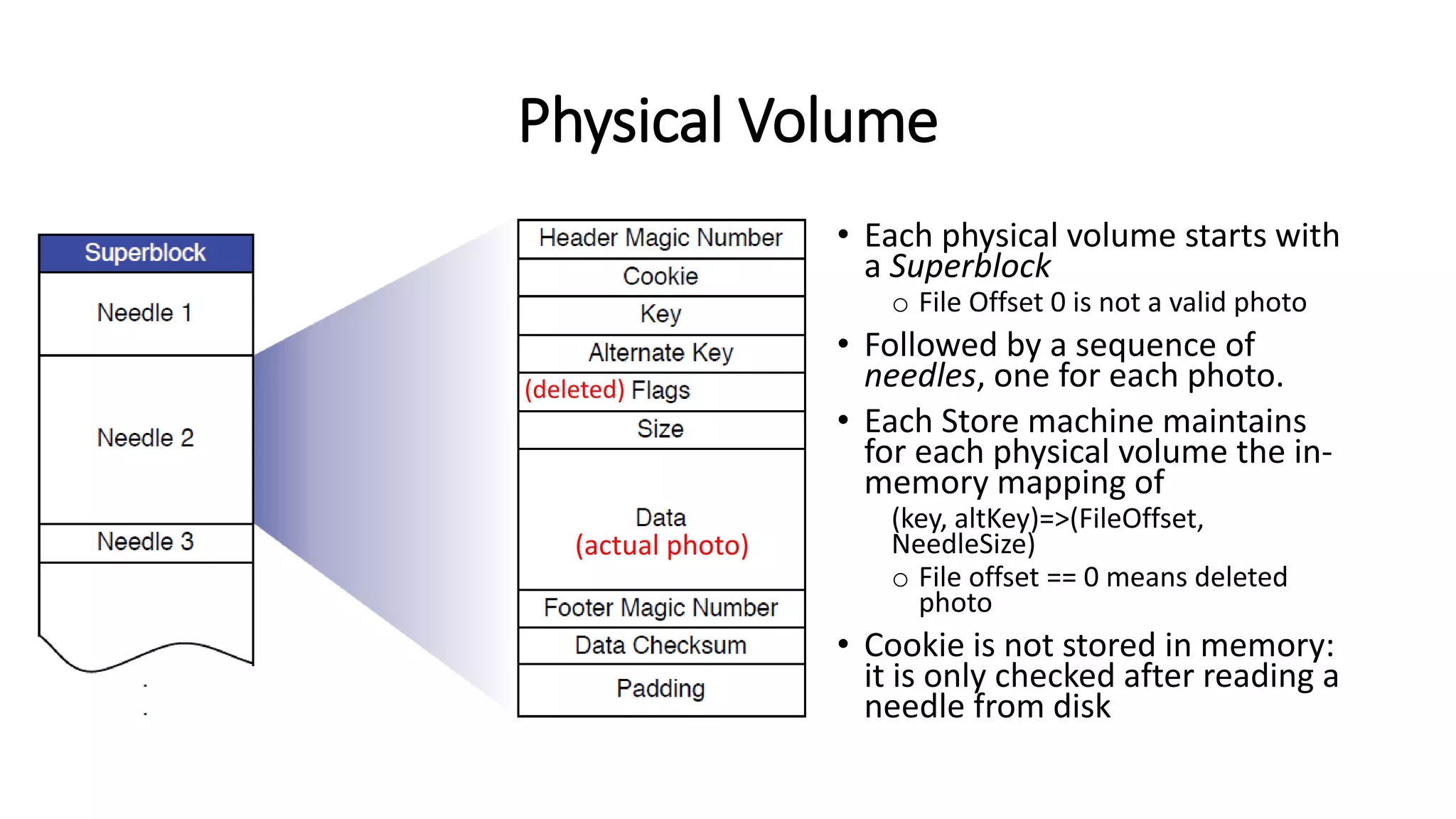
Physical Volume
• Each physical volume starts with
a Superblock
o File Offset 0 is not a valid photo
• Followed by a sequence of
needles, one for each photo.
• Each Store machine maintains
for each physical volume the in-
memory mapping of
(key, altKey)=>(FileOffset,
NeedleSize)
o File offset == 0 means deleted
photo
• Cookie is not stored in memory:
it is only checked after reading a
needle from disk
(actual photo)
(deleted)
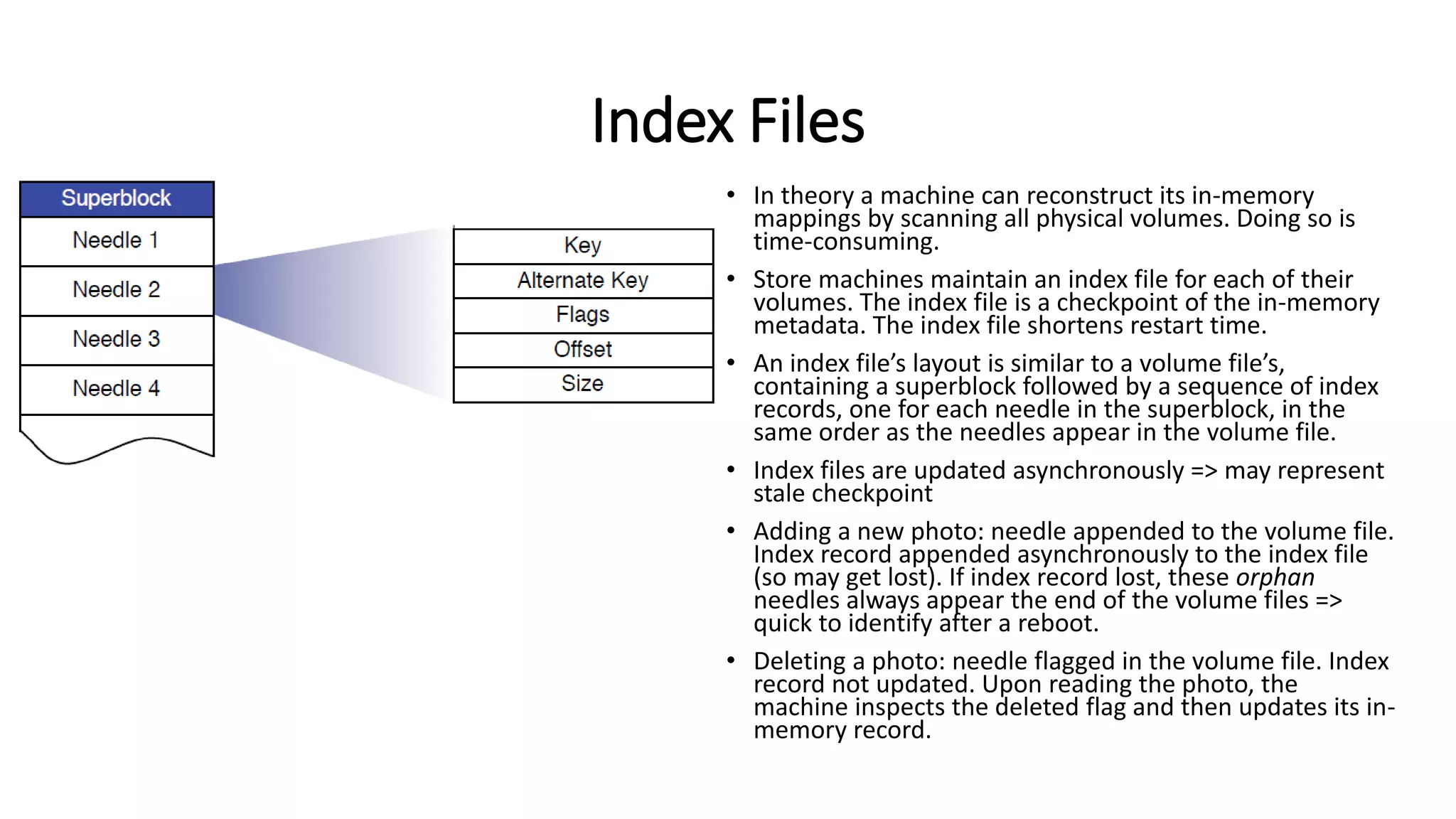
Index Files
• In theory a machine can reconstruct its in-memory
mappings by scanning all physical volumes. Doing so is
time-consuming.
• Store machines maintain an index file for each of their
volumes. The index file is a checkpoint of the in-memory
metadata. The index file shortens restart time.
• An index file’s layout is similar to a volume file’s,
containing a superblock followed by a sequence of index
records, one for each needle in the superblock, in the
same order as the needles appear in the volume file.
• Index files are updated asynchronously => may represent
stale checkpoint
• Adding a new photo: needle appended to the volume file.
Index record appended asynchronously to the index file
(so may get lost). If index record lost, these orphan
needles always appear the end of the volume files =>
quick to identify after a reboot.
• Deleting a photo: needle flagged in the volume file. Index
record not updated. Upon reading the photo, the
machine inspects the deleted flag and then updates its in-
memory record.
Write-Enables vs Read-Only
• When new machines are added to the Haystack Store, they are write-
enabled
• Only write-enabled machines receive uploads
• Over time the available capacity on these machines decreases. When
a machine exhausts its capacity, it is marked as read-only (by the
Haystack Directory)
Haystack Directory
• Haystack Directory
oMaintains logical volume=>physical volumes mapping. Web server uses this
mapping when uploading photos and also (FIXME: how?) when constructing
image URLs
othe logical volume where each photo resides
oLoad balances: which logical volume receives a write request; which physical
volume (machineID) receives a read request;
oDetermines whether a read request should be handled by the CDN or by the
Cache
oIdentify logical volumes that are read-only and mark them as such
• The Directory stores its information in a replicated database accessed
via a PHP interface that leverages memcache to reduce latency
Haystack Cache
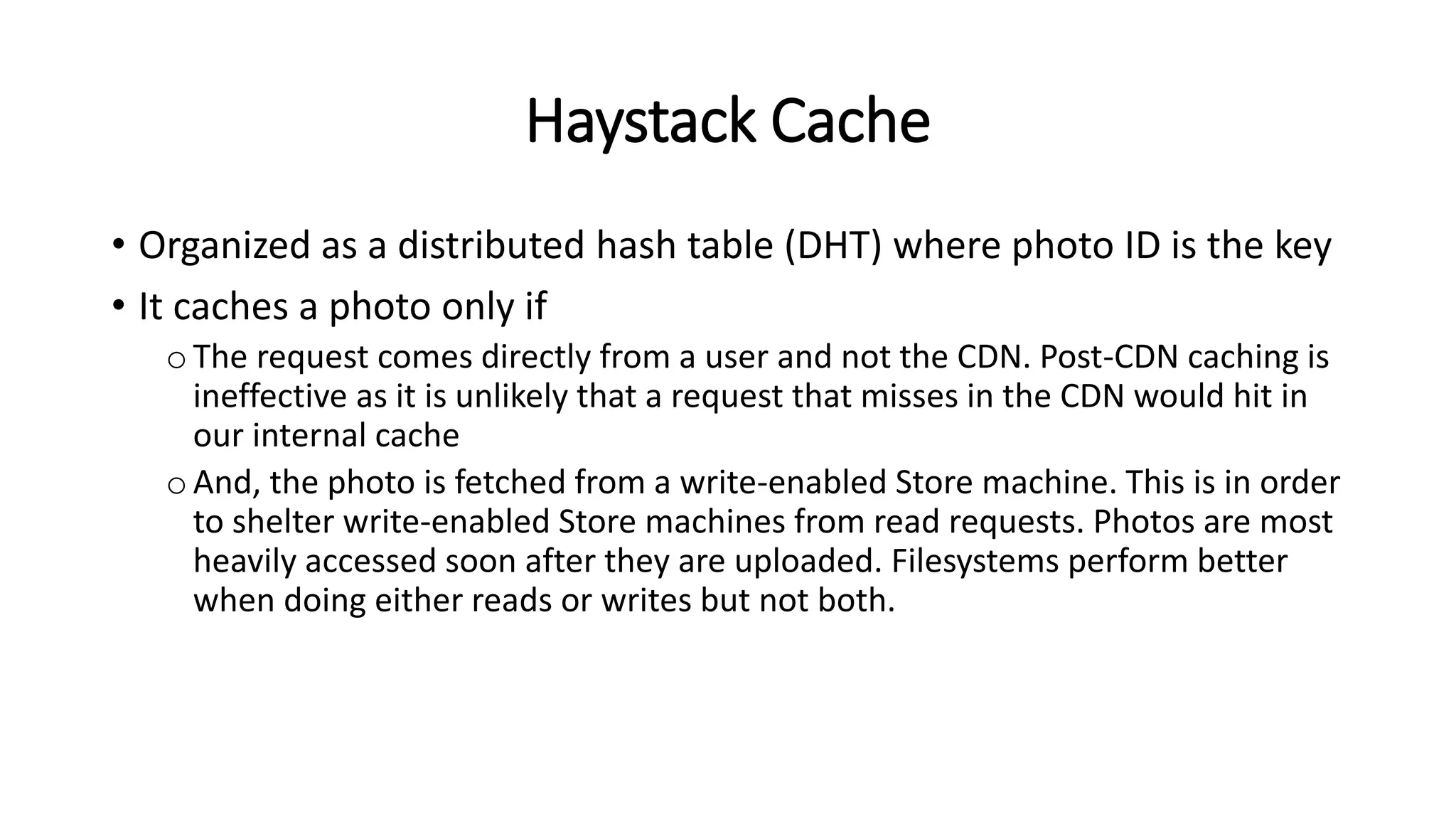
• Organized as a distributed hash table (DHT) where photo ID is the key
• It caches a photo only if
oThe request comes directly from a user and not the CDN. Post-CDN caching is
ineffective as it is unlikely that a request that misses in the CDN would hit in
our internal cache
oAnd, the photo is fetched from a write-enabled Store machine. This is in order
to shelter write-enabled Store machines from read requests. Photos are most
heavily accessed soon after they are uploaded. Filesystems perform better
when doing either reads or writes but not both.
Haystack Architecture
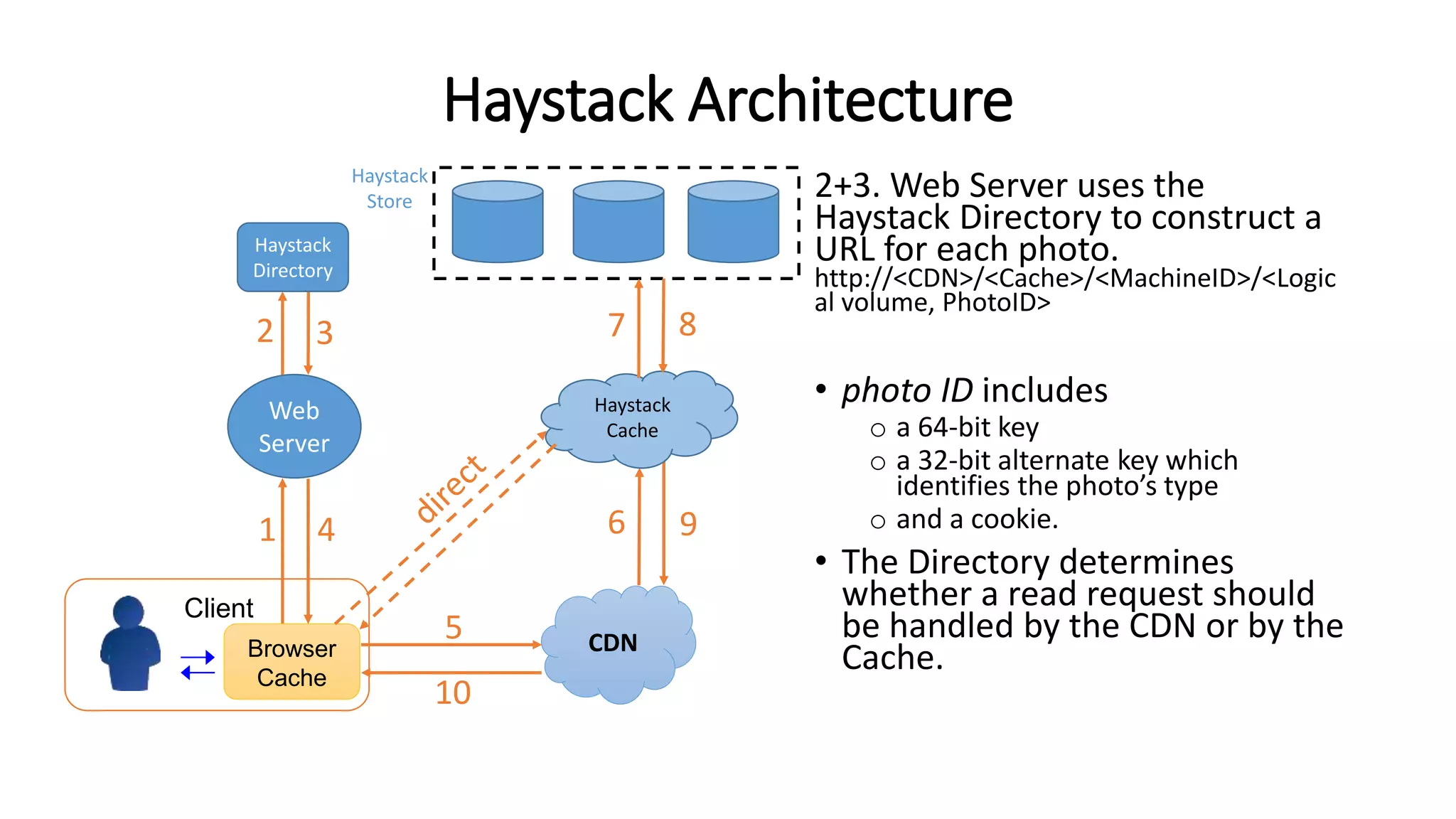
2+3. Web Server uses the
Haystack Directory to construct a
URL for each photo.
http://<CDN>/<Cache>/<MachineID>/<Logic
al volume, PhotoID>
• photo ID includes
o a 64-bit key
o a 32-bit alternate key which
identifies the photo’s type
o and a cookie.
• The Directory determines
whether a read request should
be handled by the CDN or by the
Cache.CDNBrowser
Cache
Client
Web
Server
1 4
5
6 9
10
Haystack
Directory
Haystack
Store
Haystack
Cache
2 3 7 8
Haystack Architecture
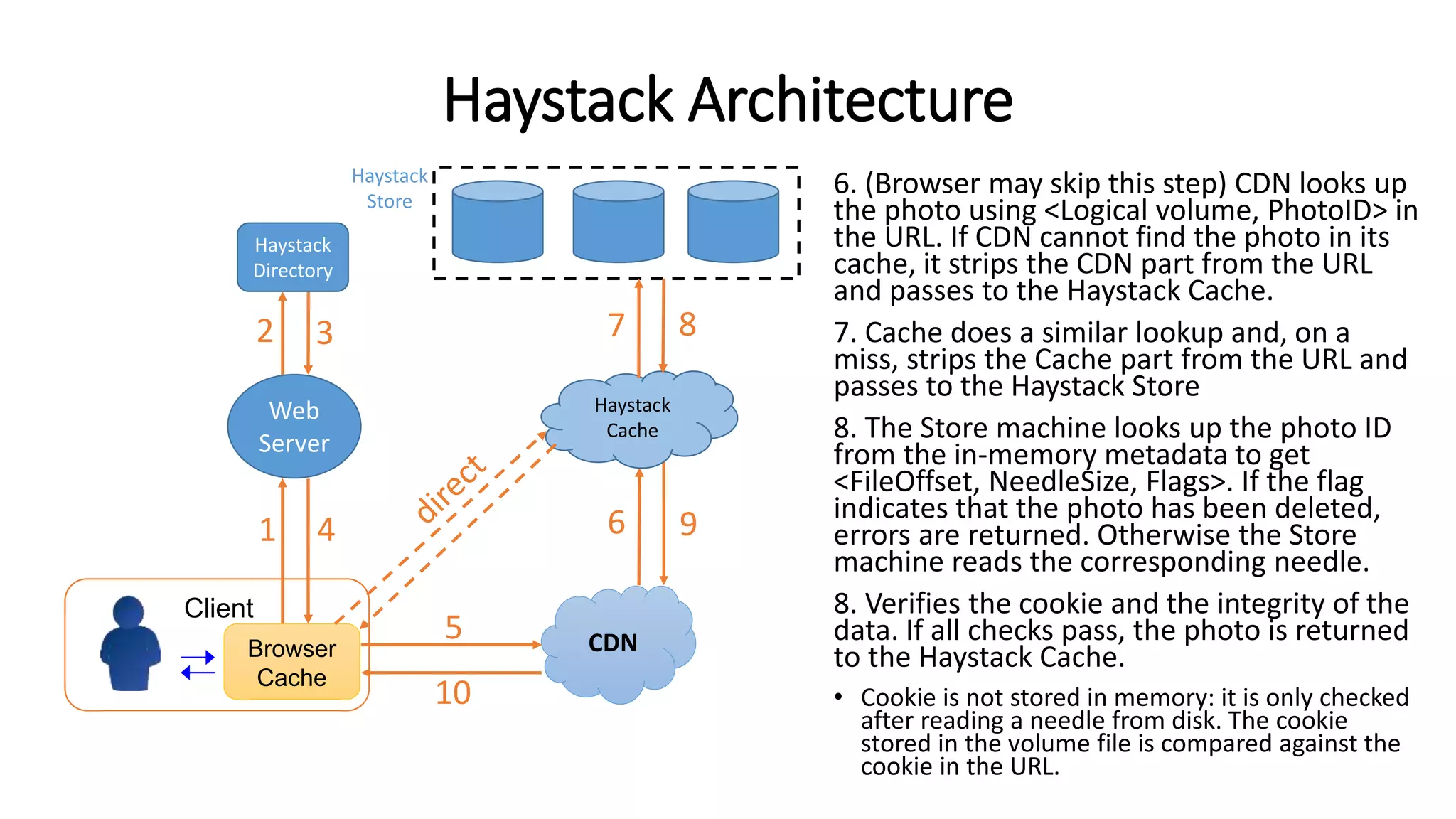
6. (Browser may skip this step) CDN looks up
the photo using <Logical volume, PhotoID> in
the URL. If CDN cannot find the photo in its
cache, it strips the CDN part from the URL
and passes to the Haystack Cache.
7. Cache does a similar lookup and, on a
miss, strips the Cache part from the URL and
passes to the Haystack Store
8. The Store machine looks up the photo ID
from the in-memory metadata to get
<FileOffset, NeedleSize, Flags>. If the flag
indicates that the photo has been deleted,
errors are returned. Otherwise the Store
machine reads the corresponding needle.
8. Verifies the cookie and the integrity of the
data. If all checks pass, the photo is returned
to the Haystack Cache.
• Cookie is not stored in memory: it is only checked
after reading a needle from disk. The cookie
stored in the volume file is compared against the
cookie in the URL.
CDNBrowser
Cache
Client
Web
Server
1 4
5
6 9
10
Haystack
Directory
Haystack
Store
Haystack
Cache
2 3 7 8
Haystack: Write Operation
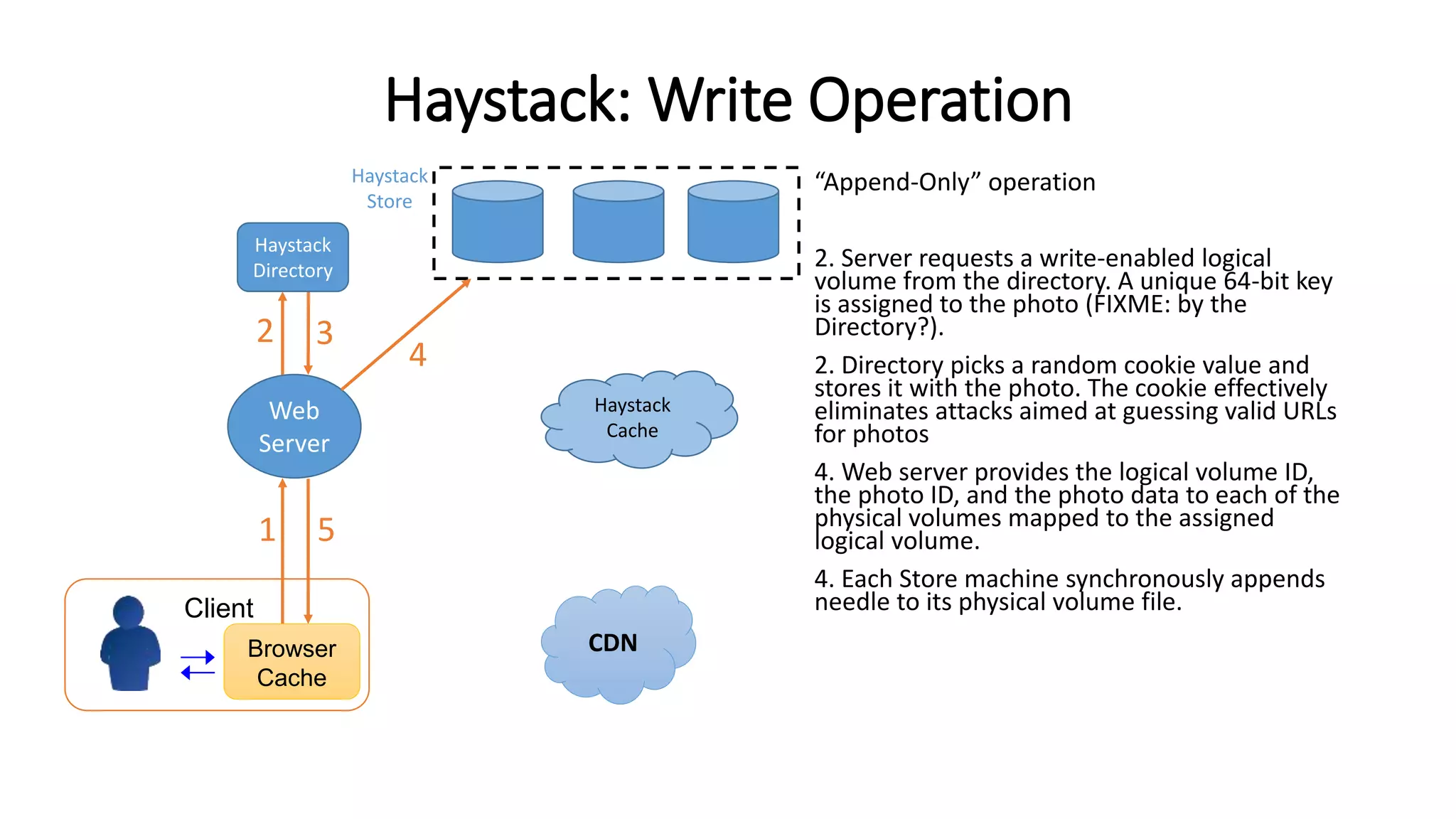
“Append-Only” operation
2. Server requests a write-enabled logical
volume from the directory. A unique 64-bit key
is assigned to the photo (FIXME: by the
Directory?).
2. Directory picks a random cookie value and
stores it with the photo. The cookie effectively
eliminates attacks aimed at guessing valid URLs
for photos
4. Web server provides the logical volume ID,
the photo ID, and the photo data to each of the
physical volumes mapped to the assigned
logical volume.
4. Each Store machine synchronously appends
needle to its physical volume file.
CDNBrowser
Cache
Client
Web
Server
1 5
Haystack
Directory
Haystack
Store
Haystack
Cache
2 3
4
Redundant Space in Physical Volume
(deleted photo)
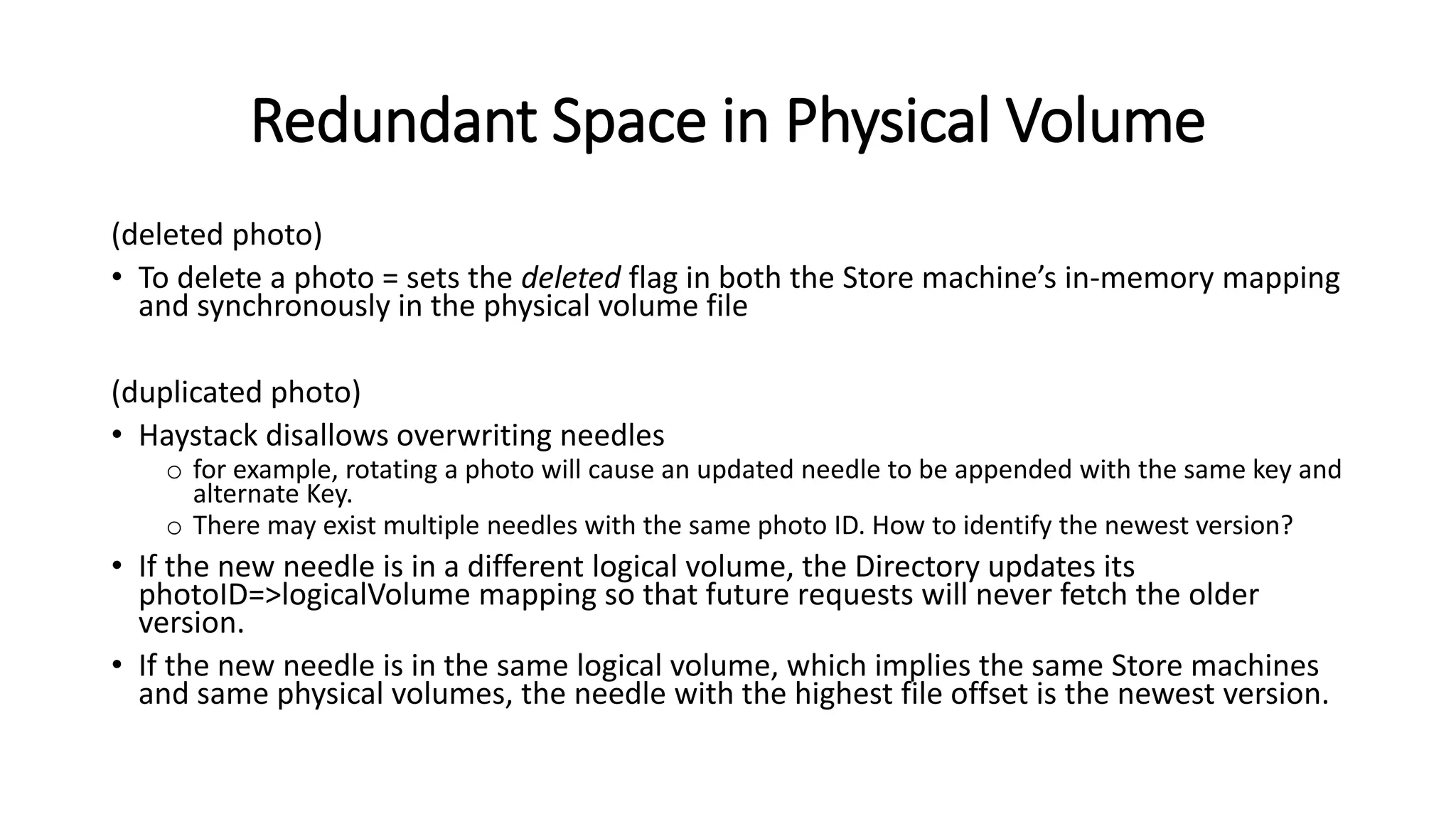
• To delete a photo = sets the deleted flag in both the Store machine’s in-memory mapping
and synchronously in the physical volume file
(duplicated photo)
• Haystack disallows overwriting needles
o for example, rotating a photo will cause an updated needle to be appended with the same key and
alternate Key.
o There may exist multiple needles with the same photo ID. How to identify the newest version?
• If the new needle is in a different logical volume, the Directory updates its
photoID=>logicalVolume mapping so that future requests will never fetch the older
version.
• If the new needle is in the same logical volume, which implies the same Store machines
and same physical volumes, the needle with the highest file offset is the newest version.
Background Tasks
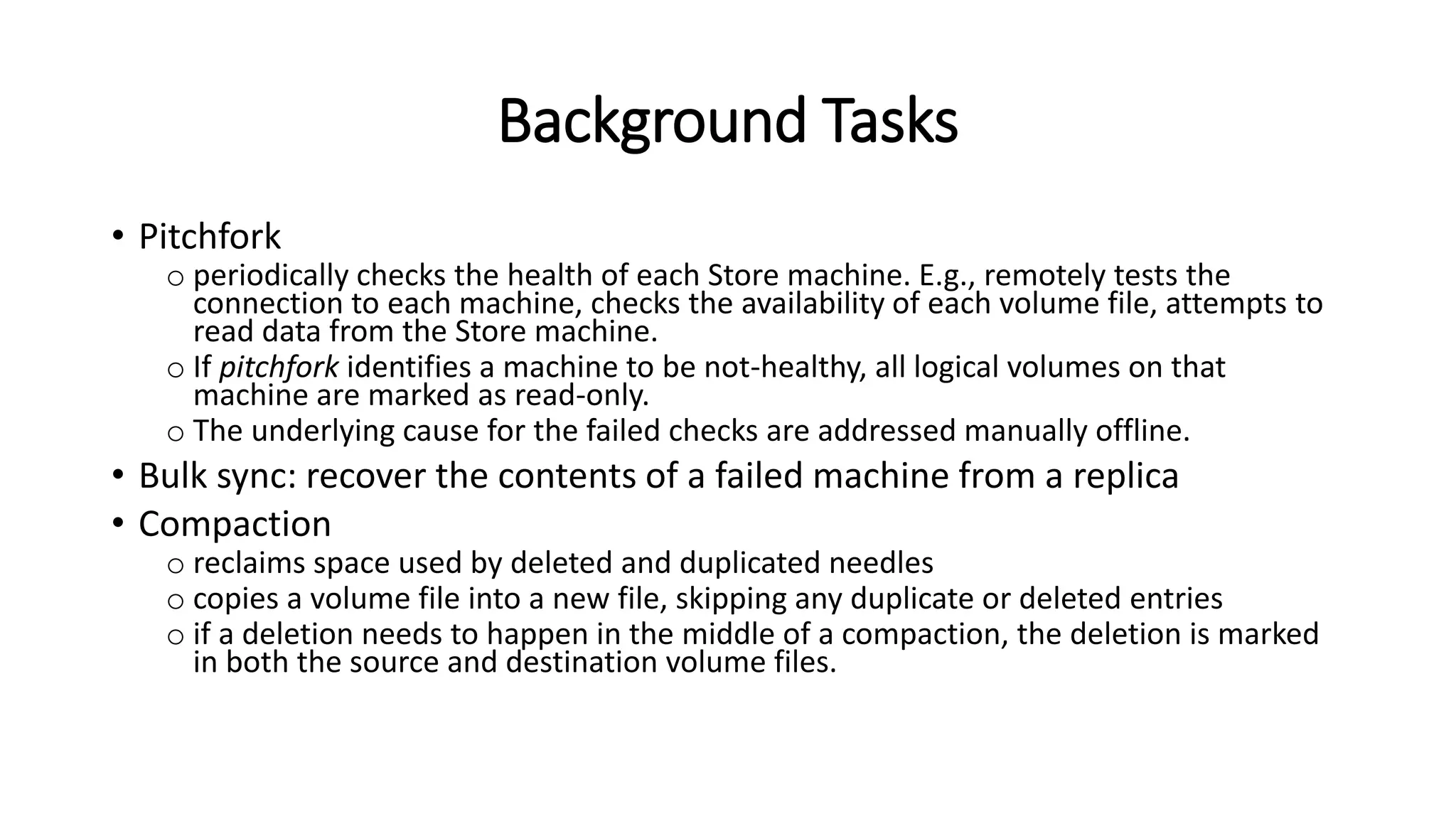
• Pitchfork
o periodically checks the health of each Store machine. E.g., remotely tests the
connection to each machine, checks the availability of each volume file, attempts to
read data from the Store machine.
o If pitchfork identifies a machine to be not-healthy, all logical volumes on that
machine are marked as read-only.
o The underlying cause for the failed checks are addressed manually offline.
• Bulk sync: recover the contents of a failed machine from a replica
• Compaction
o reclaims space used by deleted and duplicated needles
o copies a volume file into a new file, skipping any duplicate or deleted entries
o if a deletion needs to happen in the middle of a compaction, the deletion is marked
in both the source and destination volume files.
Per-Photo Metadata
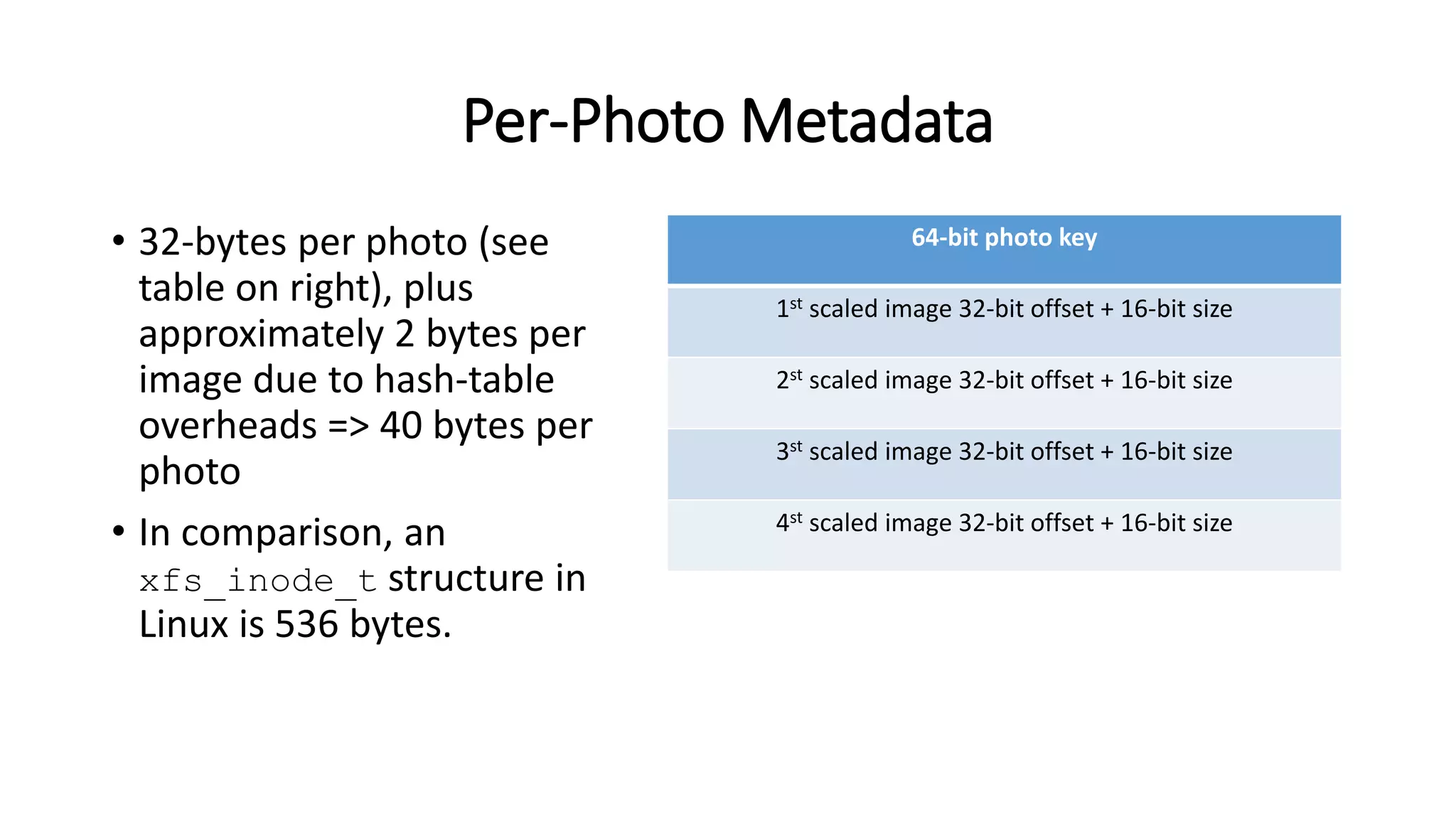
• 32-bytes per photo (see
table on right), plus
approximately 2 bytes per
image due to hash-table
overheads => 40 bytes per
photo
• In comparison, an
xfs_inode_t structure in
Linux is 536 bytes.
64-bit photo key
1st scaled image 32-bit offset + 16-bit size
2st scaled image 32-bit offset + 16-bit size
3st scaled image 32-bit offset + 16-bit size
4st scaled image 32-bit offset + 16-bit size

Study Notes: Facebook Haystack

  • 1.
    Summary of Facebook Haystack(OSDI’10) Original paper: “Finding a needle in Haystack: Facebook’s photo storage”. D. Beaver, et al. OSDI 2010.
  • 2.
    Haystack vs GFS •GFS o Targeting video files. Each video file divided into a bunch of “chunks” (64MB each) o Each chunk is replicated several times (three by default) o File->Chunk mapping maintained by a central master o All metadata kept in memory • Haystack o Several photos combine into a single large file known as a logical volume (100GB) o Each logical volume corresponds to several physical volumes (replicas) o photoID->(logicalVolume, fileOffset, fileSize) mapping maintained by a separate “Haystack Directory” component o All metadata kept in memory
  • 3.
    Why another CustomStorage System? • One-photo-per-file is wasteful: a lot of the per-file metadata are not needed for photos, e.g., file permissions • Photos are written once and never modified: only need to support read/write/delete operations
  • 4.
    Haystack Architecture Three corecomponents: • Haystack Store • Haystack Directory • Haystack Cache: functions as an internal CDN oBrowser can be directed to either the CDN or the Cache oNot confirmed, but this “Haystack Cache” may be referring to Facebook’s many “Edge Cache” located at Internet Points of Presence (PoPs). CDNBrowser Cache Client Web Server 1 4 5 6 9 10 Haystack Directory Haystack Store Haystack Cache 2 3 7 8
  • 5.
    Haystack Store • Multiple(millions of) photos stored in a single large file called a physical volume • E.g. a 10TB server = 100 physical volumes x 100GB per volume • Physical volumes from different machines are grouped into logical volumes o Storing a photo on a logical volume = writing it to all corresponding physical volumes • Conceptually, a physical volume is simply a very large file (100GB) saved as ‘/hay/haystack_<logical volume id>’. • A Store machine can retrieve a photo using <LogicalVolumeID, FileOffset, Size>. The trick is to find out the logical volume ID, the file offset and size, without disk operations
  • 6.
    Physical Volume • Eachphysical volume starts with a Superblock o File Offset 0 is not a valid photo • Followed by a sequence of needles, one for each photo. • Each Store machine maintains for each physical volume the in- memory mapping of (key, altKey)=>(FileOffset, NeedleSize) o File offset == 0 means deleted photo • Cookie is not stored in memory: it is only checked after reading a needle from disk (actual photo) (deleted)
  • 7.
    Index Files • Intheory a machine can reconstruct its in-memory mappings by scanning all physical volumes. Doing so is time-consuming. • Store machines maintain an index file for each of their volumes. The index file is a checkpoint of the in-memory metadata. The index file shortens restart time. • An index file’s layout is similar to a volume file’s, containing a superblock followed by a sequence of index records, one for each needle in the superblock, in the same order as the needles appear in the volume file. • Index files are updated asynchronously => may represent stale checkpoint • Adding a new photo: needle appended to the volume file. Index record appended asynchronously to the index file (so may get lost). If index record lost, these orphan needles always appear the end of the volume files => quick to identify after a reboot. • Deleting a photo: needle flagged in the volume file. Index record not updated. Upon reading the photo, the machine inspects the deleted flag and then updates its in- memory record.
  • 8.
    Write-Enables vs Read-Only •When new machines are added to the Haystack Store, they are write- enabled • Only write-enabled machines receive uploads • Over time the available capacity on these machines decreases. When a machine exhausts its capacity, it is marked as read-only (by the Haystack Directory)
  • 9.
    Haystack Directory • HaystackDirectory oMaintains logical volume=>physical volumes mapping. Web server uses this mapping when uploading photos and also (FIXME: how?) when constructing image URLs othe logical volume where each photo resides oLoad balances: which logical volume receives a write request; which physical volume (machineID) receives a read request; oDetermines whether a read request should be handled by the CDN or by the Cache oIdentify logical volumes that are read-only and mark them as such • The Directory stores its information in a replicated database accessed via a PHP interface that leverages memcache to reduce latency
  • 10.
    Haystack Cache • Organizedas a distributed hash table (DHT) where photo ID is the key • It caches a photo only if oThe request comes directly from a user and not the CDN. Post-CDN caching is ineffective as it is unlikely that a request that misses in the CDN would hit in our internal cache oAnd, the photo is fetched from a write-enabled Store machine. This is in order to shelter write-enabled Store machines from read requests. Photos are most heavily accessed soon after they are uploaded. Filesystems perform better when doing either reads or writes but not both.
  • 11.
    Haystack Architecture 2+3. WebServer uses the Haystack Directory to construct a URL for each photo. http://<CDN>/<Cache>/<MachineID>/<Logic al volume, PhotoID> • photo ID includes o a 64-bit key o a 32-bit alternate key which identifies the photo’s type o and a cookie. • The Directory determines whether a read request should be handled by the CDN or by the Cache.CDNBrowser Cache Client Web Server 1 4 5 6 9 10 Haystack Directory Haystack Store Haystack Cache 2 3 7 8
  • 12.
    Haystack Architecture 6. (Browsermay skip this step) CDN looks up the photo using <Logical volume, PhotoID> in the URL. If CDN cannot find the photo in its cache, it strips the CDN part from the URL and passes to the Haystack Cache. 7. Cache does a similar lookup and, on a miss, strips the Cache part from the URL and passes to the Haystack Store 8. The Store machine looks up the photo ID from the in-memory metadata to get <FileOffset, NeedleSize, Flags>. If the flag indicates that the photo has been deleted, errors are returned. Otherwise the Store machine reads the corresponding needle. 8. Verifies the cookie and the integrity of the data. If all checks pass, the photo is returned to the Haystack Cache. • Cookie is not stored in memory: it is only checked after reading a needle from disk. The cookie stored in the volume file is compared against the cookie in the URL. CDNBrowser Cache Client Web Server 1 4 5 6 9 10 Haystack Directory Haystack Store Haystack Cache 2 3 7 8
  • 13.
    Haystack: Write Operation “Append-Only”operation 2. Server requests a write-enabled logical volume from the directory. A unique 64-bit key is assigned to the photo (FIXME: by the Directory?). 2. Directory picks a random cookie value and stores it with the photo. The cookie effectively eliminates attacks aimed at guessing valid URLs for photos 4. Web server provides the logical volume ID, the photo ID, and the photo data to each of the physical volumes mapped to the assigned logical volume. 4. Each Store machine synchronously appends needle to its physical volume file. CDNBrowser Cache Client Web Server 1 5 Haystack Directory Haystack Store Haystack Cache 2 3 4
  • 14.
    Redundant Space inPhysical Volume (deleted photo) • To delete a photo = sets the deleted flag in both the Store machine’s in-memory mapping and synchronously in the physical volume file (duplicated photo) • Haystack disallows overwriting needles o for example, rotating a photo will cause an updated needle to be appended with the same key and alternate Key. o There may exist multiple needles with the same photo ID. How to identify the newest version? • If the new needle is in a different logical volume, the Directory updates its photoID=>logicalVolume mapping so that future requests will never fetch the older version. • If the new needle is in the same logical volume, which implies the same Store machines and same physical volumes, the needle with the highest file offset is the newest version.
  • 15.
    Background Tasks • Pitchfork operiodically checks the health of each Store machine. E.g., remotely tests the connection to each machine, checks the availability of each volume file, attempts to read data from the Store machine. o If pitchfork identifies a machine to be not-healthy, all logical volumes on that machine are marked as read-only. o The underlying cause for the failed checks are addressed manually offline. • Bulk sync: recover the contents of a failed machine from a replica • Compaction o reclaims space used by deleted and duplicated needles o copies a volume file into a new file, skipping any duplicate or deleted entries o if a deletion needs to happen in the middle of a compaction, the deletion is marked in both the source and destination volume files.
  • 16.
    Per-Photo Metadata • 32-bytesper photo (see table on right), plus approximately 2 bytes per image due to hash-table overheads => 40 bytes per photo • In comparison, an xfs_inode_t structure in Linux is 536 bytes. 64-bit photo key 1st scaled image 32-bit offset + 16-bit size 2st scaled image 32-bit offset + 16-bit size 3st scaled image 32-bit offset + 16-bit size 4st scaled image 32-bit offset + 16-bit size

Editor's Notes

  • #13 In practice, the flag is not stored in the in-memory metadata. If the in-memory metadata has FileOffset==0, it means the file is deleted. Otherwise, the needle will be read, and the flag stored in the needle (i.e., in the volume file) will be checked again to see whether the file is deleted.