Necessary Number of Operators (if the process were stable)
• Calculate number of operators
Outcome Metrics
• Graph (a) output per shift, (b) overtime and any other desired outcome metrics
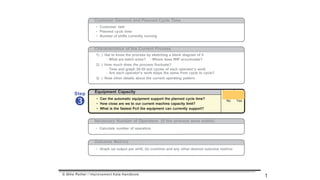
Customer Demand and Planned Cycle Time
• Customer takt
• Planned cycle time
• Number of shifts currently running
Characteristics of the Current Process
1) ) Get to know the process by sketching a block diagram of it
- What are batch sizes? - Where does WIP accumulate?
2) ) How much does the process fluctuate?
- Time and graph 20-30 exit cycles of each operator's work
- Are each operator's work steps the same from cycle to cycle?
3) ) Note other details about the current operating pattern
Step

Equipment Capacity
• Can the automatic equipment support the planned cycle time?
• How close are we to our current machine capacity limit?
• What is the fastest Pc/t the equipment can currently support?
® ©
No Yes
© Mike Rother / Improvement Kata Handbook
1
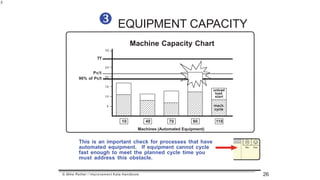
EQUIPMENT CAPACITY
Machine Capacity Chart
35
TT
25
5
10
20
10 40 70 90 110
Pc/t
90% of Pc/t
unload
load
start
mach.
cycle
15
Machines (Automated Equipment)

This is an important check for processes that have
automated equipment. If equipment cannot cycle
fast enough to meet the planned cycle time you
must address this obstacle.
© Mike Rother / Improvement Kata Handbook
2
26
This guideline applies only to automated machines that are able to cycle while
the operator does something else. Do not include machines that
require operator guidance, such as hand tools, hand welders, arbor presses,
etc. Those cycles are naturally included when you measure operator times.
The basic point: It's OK for a machine to finish cycling and wait for the
operator to return, but an operator should never have to wait for a
machine to finish. A machine only needs to cycle once per takt.
Total machine cycle should be no > 90% of Pc/t in order to make a
consistent 1x1 flow possible. (In fully automated lines 95% of Pc/t may
be acceptable.) [This guideline applies to machines, not operators.]
1. If machine utilization is too high workstations become close-
coupled and small cycle variations telegraph up- and
downstream. This causes instability and leads to buffers.
2. If machine utilization is too high operators will have to wait for a
machine to finish at some workstations, which interrupts their
work cycle and causes instability.
The fastest Pc/t a line can run a 1x1 flow (current capacity) is:
Longest total machine cycle time
0.90
MACHINE CYCLE 90% GUIDELINE
© Mike Rother / Improvement Kata Handbook
3
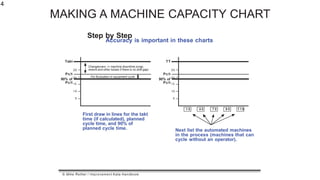
MAKING A MACHINE CAPACITY CHART
Step by Step
Accuracy is important in these charts
Changeovers (+ machine downtime,scrap,
rework and other losses if there is no shift gap)
5
10
90% of 20
25
Pc/t 15
For fluctuation in equipment cycle
Takt
Pc/t
First draw in lines for the takt
time (if calculated), planned
cycle time, and 90% of
planned cycle time.
1 0 4 0 7 0 9 0 1 1 0
5
10
90% of 20
25
Pc/t 15
TT
Pc/t
Next list the automated machines
in the process (machines that can
cycle without an operator).
© Mike Rother / Improvement Kata Handbook
4
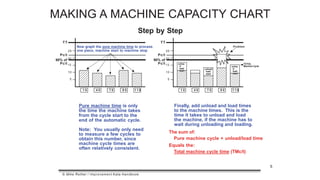
Now graph the pure machine time to process
one piece, machine start to machine stop
1 0 4 0 7 0 9 0 1 1 0
5
10
90% of 20
25
Pc/t 15
TT
Pc/t
Pure machine time is only
the time the machine takes
from the cycle start to the
end of the automatic cycle.
Note: You usually only need
to measure a few cycles to
obtain this number, since
machine cycle times are
often relatively consistent.
4 0 7 0 9 0 1 1 0
90% of 20
Pc/t 15 TOTAL
Machine Cycle
1 0
5
10
25
TT
Pc/t
unloa
d
load
start
unload
load
start
unloa
d
load
start
Problem
Finally, add unload and load times
to the machine times. This is the
time it takes to unload and load
the machine, if the machine has to
wait during unloading and loading.
The sum of:
Pure machine cycle + unload/load time
Equals the:
Total machine cycle time (TMc/t)
© Mike Rother / Improvement Kata Handbook
5
MAKING A MACHINE CAPACITY CHART
Step by Step

Equipment Capacity

  • 1.
    Necessary Number ofOperators (if the process were stable) • Calculate number of operators Outcome Metrics • Graph (a) output per shift, (b) overtime and any other desired outcome metrics Customer Demand and Planned Cycle Time • Customer takt • Planned cycle time • Number of shifts currently running Characteristics of the Current Process 1) ) Get to know the process by sketching a block diagram of it - What are batch sizes? - Where does WIP accumulate? 2) ) How much does the process fluctuate? - Time and graph 20-30 exit cycles of each operator's work - Are each operator's work steps the same from cycle to cycle? 3) ) Note other details about the current operating pattern Step  Equipment Capacity • Can the automatic equipment support the planned cycle time? • How close are we to our current machine capacity limit? • What is the fastest Pc/t the equipment can currently support? ® © No Yes © Mike Rother / Improvement Kata Handbook 1
  • 2.
    EQUIPMENT CAPACITY Machine CapacityChart 35 TT 25 5 10 20 10 40 70 90 110 Pc/t 90% of Pc/t unload load start mach. cycle 15 Machines (Automated Equipment)  This is an important check for processes that have automated equipment. If equipment cannot cycle fast enough to meet the planned cycle time you must address this obstacle. © Mike Rother / Improvement Kata Handbook 2 26
  • 3.
    This guideline appliesonly to automated machines that are able to cycle while the operator does something else. Do not include machines that require operator guidance, such as hand tools, hand welders, arbor presses, etc. Those cycles are naturally included when you measure operator times. The basic point: It's OK for a machine to finish cycling and wait for the operator to return, but an operator should never have to wait for a machine to finish. A machine only needs to cycle once per takt. Total machine cycle should be no > 90% of Pc/t in order to make a consistent 1x1 flow possible. (In fully automated lines 95% of Pc/t may be acceptable.) [This guideline applies to machines, not operators.] 1. If machine utilization is too high workstations become close- coupled and small cycle variations telegraph up- and downstream. This causes instability and leads to buffers. 2. If machine utilization is too high operators will have to wait for a machine to finish at some workstations, which interrupts their work cycle and causes instability. The fastest Pc/t a line can run a 1x1 flow (current capacity) is: Longest total machine cycle time 0.90 MACHINE CYCLE 90% GUIDELINE © Mike Rother / Improvement Kata Handbook 3
  • 4.
    MAKING A MACHINECAPACITY CHART Step by Step Accuracy is important in these charts Changeovers (+ machine downtime,scrap, rework and other losses if there is no shift gap) 5 10 90% of 20 25 Pc/t 15 For fluctuation in equipment cycle Takt Pc/t First draw in lines for the takt time (if calculated), planned cycle time, and 90% of planned cycle time. 1 0 4 0 7 0 9 0 1 1 0 5 10 90% of 20 25 Pc/t 15 TT Pc/t Next list the automated machines in the process (machines that can cycle without an operator). © Mike Rother / Improvement Kata Handbook 4
  • 5.
    Now graph thepure machine time to process one piece, machine start to machine stop 1 0 4 0 7 0 9 0 1 1 0 5 10 90% of 20 25 Pc/t 15 TT Pc/t Pure machine time is only the time the machine takes from the cycle start to the end of the automatic cycle. Note: You usually only need to measure a few cycles to obtain this number, since machine cycle times are often relatively consistent. 4 0 7 0 9 0 1 1 0 90% of 20 Pc/t 15 TOTAL Machine Cycle 1 0 5 10 25 TT Pc/t unloa d load start unload load start unloa d load start Problem Finally, add unload and load times to the machine times. This is the time it takes to unload and load the machine, if the machine has to wait during unloading and loading. The sum of: Pure machine cycle + unload/load time Equals the: Total machine cycle time (TMc/t) © Mike Rother / Improvement Kata Handbook 5 MAKING A MACHINE CAPACITY CHART Step by Step

Editor's Notes

  • #2 Bring them back to the last 4 steps.