Building Highly Scalable Immersive
Media Solutions on AWS
Konstantin Wilms & Chad Schmutzer
Amazon Web Services
INTRODUCTION
Immersive Media in the Cloud
Origination Delivery
MULTI-CAMERA MEZ, LIVE
OR VOD CONTENT
B2C PLAYBACK TO CONSUMER
OR B2B DELIVERY
Encoding
CDN
Devices
Cost
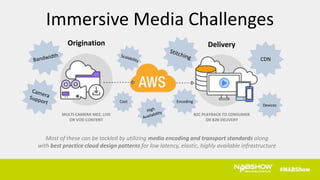
Most of these can be tackled by utilizing media encoding and transport standards along
with best practice cloud design patterns for low latency, elastic, highly available infrastructure
Immersive Media Challenges
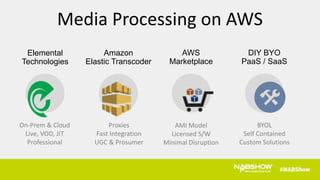
AWS
Marketplace
Amazon
Elastic Transcoder
Elemental
Technologies
AMI Model
Licensed S/W
Minimal Disruption
Proxies
Fast Integration
UGC & Prosumer
On-Prem & Cloud
Live, VOD, JIT
Professional
DIY BYO
PaaS / SaaS
BYOL
Self Contained
Custom Solutions
Media Processing on AWS
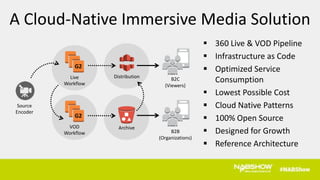
VOD
Workflow
G2
Distribution B2C
(Viewers)
Live
Workflow
G2
Archive
Source
Encoder
B2B
(Organizations)
A Cloud-Native Immersive Media Solution
 360 Live & VOD Pipeline
 Infrastructure as Code
 Optimized Service
Consumption
 Lowest Possible Cost
 Cloud Native Patterns
 100% Open Source
 Designed for Growth
 Reference Architecture
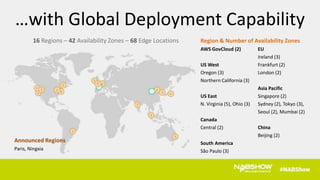
16 Regions – 42 Availability Zones – 68 Edge Locations Region & Number of Availability Zones
AWS GovCloud (2) EU
Ireland (3)
US West Frankfurt (2)
Oregon (3) London (2)
Northern California (3)
Asia Pacific
US East Singapore (2)
N. Virginia (5), Ohio (3) Sydney (2), Tokyo (3),
Seoul (2), Mumbai (2)
Canada
Central (2) China
Beijing (2)
South America
São Paulo (3)
…with Global Deployment Capability
Announced Regions
Paris, Ningxia
So where do we start?
BUILDING A PIPELINE
Mapping Services & Partners to an End to End Workflow
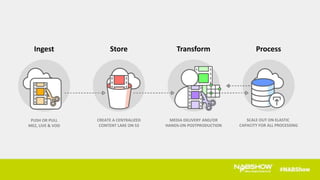
Ingest Store Transform Process
PUSH OR PULL
MEZ, LIVE & VOD
CREATE A CENTRALIZED
CONTENT LAKE ON S3
MEDIA DELIVERY AND/OR
HANDS-ON POSTPRODUCTION
SCALE OUT ON ELASTIC
CAPACITY FOR ALL PROCESSING
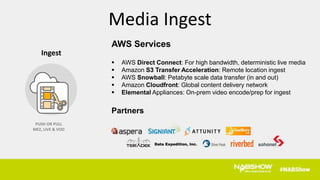
Ingest
PUSH OR PULL
MEZ, LIVE & VOD
AWS Services
 AWS Direct Connect: For high bandwidth, deterministic live media
 Amazon S3 Transfer Acceleration: Remote location ingest
 AWS Snowball: Petabyte scale data transfer (in and out)
 Amazon Cloudfront: Global content delivery network
 Elemental Appliances: On-prem video encode/prep for ingest
Partners
Media Ingest
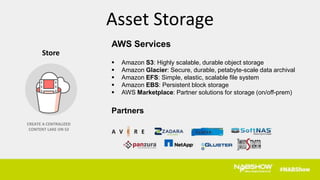
AWS Services
 Amazon S3: Highly scalable, durable object storage
 Amazon Glacier: Secure, durable, petabyte-scale data archival
 Amazon EFS: Simple, elastic, scalable file system
 Amazon EBS: Persistent block storage
 AWS Marketplace: Partner solutions for storage (on/off-prem)
Partners
Store
CREATE A CENTRALIZED
CONTENT LAKE ON S3
Asset Storage
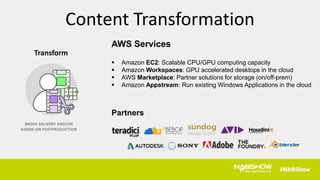
Transform
MEDIA DELIVERY AND/OR
HANDS-ON POSTPRODUCTION
AWS Services
 Amazon EC2: Scalable CPU/GPU computing capacity
 Amazon Workspaces: GPU accelerated desktops in the cloud
 AWS Marketplace: Partner solutions for storage (on/off-prem)
 Amazon Appstream: Run existing Windows Applications in the cloud
Partners
Content Transformation
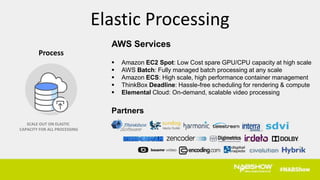
Process
SCALE OUT ON ELASTIC
CAPACITY FOR ALL PROCESSING
AWS Services
 Amazon EC2 Spot: Low Cost spare GPU/CPU capacity at high scale
 AWS Batch: Fully managed batch processing at any scale
 Amazon ECS: High scale, high performance container management
 ThinkBox Deadline: Hassle-free scheduling for rendering & compute
 Elemental Cloud: On-demand, scalable video processing
Partners
Elastic Processing
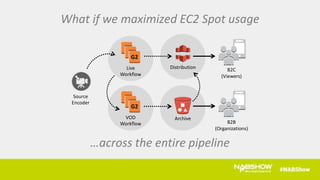
What if we maximized EC2 Spot usage
…across the entire pipeline
VOD
Workflow
G2
Distribution B2C
(Viewers)
Live
Workflow
G2
Archive
Source
Encoder
B2B
(Organizations)
EC2 SPOT
Compute Capacity at Scale
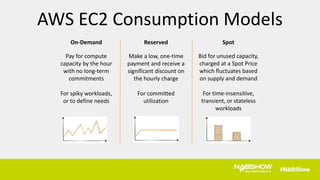
On-Demand
Pay for compute
capacity by the hour
with no long-term
commitments
For spiky workloads,
or to define needs
AWS EC2 Consumption Models
Reserved
Make a low, one-time
payment and receive a
significant discount on
the hourly charge
For committed
utilization
Spot
Bid for unused capacity,
charged at a Spot Price
which fluctuates based
on supply and demand
For time-insensitive,
transient, or stateless
workloads
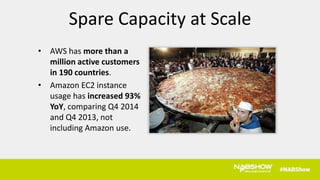
Spare Capacity at Scale
• AWS has more than a
million active customers
in 190 countries.
• Amazon EC2 instance
usage has increased 93%
YoY, comparing Q4 2014
and Q4 2013, not
including Amazon use.
EC2 Spot instances are
spare EC2 On-Demand capacity
with very simple rules…
What are EC2 Spot Instances?
Markets where the price of compute
changes based on supply and demand
You’ll never pay more than your bid.
When the market exceeds your bid you
get 2 minutes to wrap up your work
The Very Simple Rules of Spot
 Since Spot instances typically cost 50-90%
less than On-Demand, you can increase
your compute capacity by 2-10x within
the same budget
 Or you could save 50-90% on your
existing workload
 Either way, you should try it!
Get the Best Value for EC2 Capacity
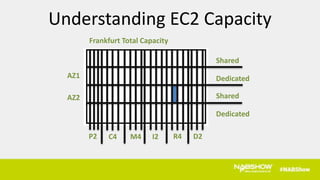
AZ1
AZ2
Frankfurt Total Capacity
P2 C4 M4 I2 R4 D2
Shared
Dedicated
Shared
Dedicated
Understanding EC2 Capacity
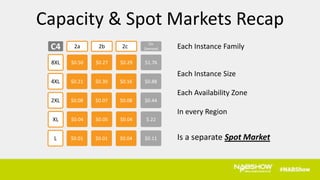
$0.27 $0.29$0.50
2b 2cc2a
8XL
$0.30 $0.16$0.214XL
$0.07 $0.08$0.082XL
$0.05 $0.04$0.04XL
$0.01 $0.04$0.01L
C4
$1.76
On
Demand
$0.88
$0.44
$.22
$0.11
Each Instance Family
Each Instance Size
Each Availability Zone
In every Region
Is a separate Spot Market
Capacity & Spot Markets Recap
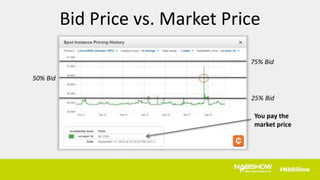
Bid Price vs. Market Price
50% Bid
75% Bid
You pay the
market price
25% Bid
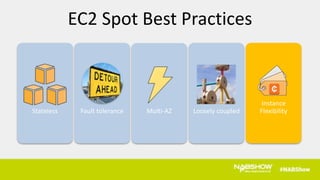
Fault toleranceStateless Multi-AZ Loosely coupled
Instance
Flexibility
EC2 Spot Best Practices
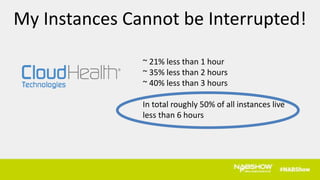
~ 21% less than 1 hour
~ 35% less than 2 hours
~ 40% less than 3 hours
In total roughly 50% of all instances live
less than 6 hours
My Instances Cannot be Interrupted!
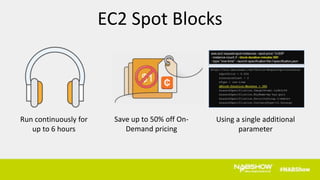
Using a single additional
parameter
Run continuously for
up to 6 hours
Save up to 50% off On-
Demand pricing
$1
EC2 Spot Blocks
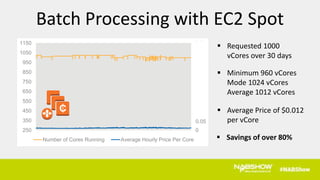
 Requested 1000
vCores over 30 days
 Minimum 960 vCores
Mode 1024 vCores
Average 1012 vCores
 Average Price of $0.012
per vCore
0
0.05
0.1
0.15
0.2
0.25
0.3
0.35
0.4
0.45
0.5
250
350
450
550
650
750
850
950
1050
1150
Number of Cores Running Average Hourly Price Per Core  Savings of over 80%
Batch Processing with EC2 Spot
DESIGN
Media Protocols, Transports & Cloud Architecture Patterns
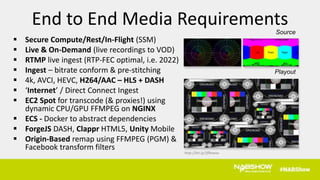
Source
Playout
http://bit.ly/2fRnwvv
 Secure Compute/Rest/In-Flight (SSM)
 Live & On-Demand (live recordings to VOD)
 RTMP live ingest (RTP-FEC optimal, i.e. 2022)
 Ingest – bitrate conform & pre-stitching
 4k, AVCI, HEVC, H264/AAC – HLS + DASH
 ‘Internet’ / Direct Connect Ingest
 EC2 Spot for transcode (& proxies!) using
dynamic CPU/GPU FFMPEG on NGINX
 ECS - Docker to abstract dependencies
 ForgeJS DASH, Clappr HTML5, Unity Mobile
 Origin-Based remap using FFMPEG (PGM) &
Facebook transform filters
End to End Media Requirements
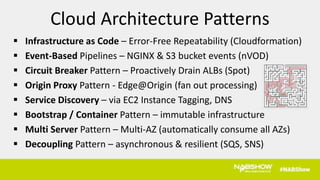
 Infrastructure as Code – Error-Free Repeatability (Cloudformation)
 Event-Based Pipelines – NGINX & S3 bucket events (nVOD)
 Circuit Breaker Pattern – Proactively Drain ALBs (Spot)
 Origin Proxy Pattern - Edge@Origin (fan out processing)
 Service Discovery – via EC2 Instance Tagging, DNS
 Bootstrap / Container Pattern – immutable infrastructure
 Multi Server Pattern – Multi-AZ (automatically consume all AZs)
 Decoupling Pattern – asynchronous & resilient (SQS, SNS)
Cloud Architecture Patterns
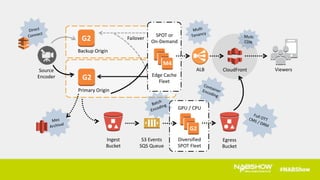
SOLUTION ARCHITECTURE
Live & nVOD Immersive Media Delivery
Backup Origin
Primary Origin
G2
G2
Ingest
Bucket
S3 Events
SQS Queue
Source
Encoder
SPOT or
On-Demand
Edge Cache
Fleet
Failover
ALB CloudFront Viewers
Diversified
SPOT Fleet
G2
M4
Egress
Bucket
GPU / CPU
Reference Architecture Available Soon
(ask us!)
Thank You!

Building Highly Scalable Immersive Media Solutions on AWS

  • 2.
    Building Highly ScalableImmersive Media Solutions on AWS Konstantin Wilms & Chad Schmutzer Amazon Web Services
  • 3.
  • 4.
    Origination Delivery MULTI-CAMERA MEZ,LIVE OR VOD CONTENT B2C PLAYBACK TO CONSUMER OR B2B DELIVERY Encoding CDN Devices Cost Most of these can be tackled by utilizing media encoding and transport standards along with best practice cloud design patterns for low latency, elastic, highly available infrastructure Immersive Media Challenges
  • 5.
    AWS Marketplace Amazon Elastic Transcoder Elemental Technologies AMI Model LicensedS/W Minimal Disruption Proxies Fast Integration UGC & Prosumer On-Prem & Cloud Live, VOD, JIT Professional DIY BYO PaaS / SaaS BYOL Self Contained Custom Solutions Media Processing on AWS
  • 6.
    VOD Workflow G2 Distribution B2C (Viewers) Live Workflow G2 Archive Source Encoder B2B (Organizations) A Cloud-NativeImmersive Media Solution  360 Live & VOD Pipeline  Infrastructure as Code  Optimized Service Consumption  Lowest Possible Cost  Cloud Native Patterns  100% Open Source  Designed for Growth  Reference Architecture
  • 7.
    16 Regions –42 Availability Zones – 68 Edge Locations Region & Number of Availability Zones AWS GovCloud (2) EU Ireland (3) US West Frankfurt (2) Oregon (3) London (2) Northern California (3) Asia Pacific US East Singapore (2) N. Virginia (5), Ohio (3) Sydney (2), Tokyo (3), Seoul (2), Mumbai (2) Canada Central (2) China Beijing (2) South America São Paulo (3) …with Global Deployment Capability Announced Regions Paris, Ningxia
  • 8.
    So where dowe start?
  • 9.
    BUILDING A PIPELINE MappingServices & Partners to an End to End Workflow
  • 10.
    Ingest Store TransformProcess PUSH OR PULL MEZ, LIVE & VOD CREATE A CENTRALIZED CONTENT LAKE ON S3 MEDIA DELIVERY AND/OR HANDS-ON POSTPRODUCTION SCALE OUT ON ELASTIC CAPACITY FOR ALL PROCESSING
  • 11.
    Ingest PUSH OR PULL MEZ,LIVE & VOD AWS Services  AWS Direct Connect: For high bandwidth, deterministic live media  Amazon S3 Transfer Acceleration: Remote location ingest  AWS Snowball: Petabyte scale data transfer (in and out)  Amazon Cloudfront: Global content delivery network  Elemental Appliances: On-prem video encode/prep for ingest Partners Media Ingest
  • 12.
    AWS Services  AmazonS3: Highly scalable, durable object storage  Amazon Glacier: Secure, durable, petabyte-scale data archival  Amazon EFS: Simple, elastic, scalable file system  Amazon EBS: Persistent block storage  AWS Marketplace: Partner solutions for storage (on/off-prem) Partners Store CREATE A CENTRALIZED CONTENT LAKE ON S3 Asset Storage
  • 13.
    Transform MEDIA DELIVERY AND/OR HANDS-ONPOSTPRODUCTION AWS Services  Amazon EC2: Scalable CPU/GPU computing capacity  Amazon Workspaces: GPU accelerated desktops in the cloud  AWS Marketplace: Partner solutions for storage (on/off-prem)  Amazon Appstream: Run existing Windows Applications in the cloud Partners Content Transformation
  • 14.
    Process SCALE OUT ONELASTIC CAPACITY FOR ALL PROCESSING AWS Services  Amazon EC2 Spot: Low Cost spare GPU/CPU capacity at high scale  AWS Batch: Fully managed batch processing at any scale  Amazon ECS: High scale, high performance container management  ThinkBox Deadline: Hassle-free scheduling for rendering & compute  Elemental Cloud: On-demand, scalable video processing Partners Elastic Processing
  • 15.
    What if wemaximized EC2 Spot usage …across the entire pipeline VOD Workflow G2 Distribution B2C (Viewers) Live Workflow G2 Archive Source Encoder B2B (Organizations)
  • 16.
  • 17.
    On-Demand Pay for compute capacityby the hour with no long-term commitments For spiky workloads, or to define needs AWS EC2 Consumption Models Reserved Make a low, one-time payment and receive a significant discount on the hourly charge For committed utilization Spot Bid for unused capacity, charged at a Spot Price which fluctuates based on supply and demand For time-insensitive, transient, or stateless workloads
  • 18.
    Spare Capacity atScale • AWS has more than a million active customers in 190 countries. • Amazon EC2 instance usage has increased 93% YoY, comparing Q4 2014 and Q4 2013, not including Amazon use.
  • 19.
    EC2 Spot instancesare spare EC2 On-Demand capacity with very simple rules… What are EC2 Spot Instances?
  • 20.
    Markets where theprice of compute changes based on supply and demand You’ll never pay more than your bid. When the market exceeds your bid you get 2 minutes to wrap up your work The Very Simple Rules of Spot
  • 21.
     Since Spotinstances typically cost 50-90% less than On-Demand, you can increase your compute capacity by 2-10x within the same budget  Or you could save 50-90% on your existing workload  Either way, you should try it! Get the Best Value for EC2 Capacity
  • 22.
    AZ1 AZ2 Frankfurt Total Capacity P2C4 M4 I2 R4 D2 Shared Dedicated Shared Dedicated Understanding EC2 Capacity
  • 23.
    $0.27 $0.29$0.50 2b 2cc2a 8XL $0.30$0.16$0.214XL $0.07 $0.08$0.082XL $0.05 $0.04$0.04XL $0.01 $0.04$0.01L C4 $1.76 On Demand $0.88 $0.44 $.22 $0.11 Each Instance Family Each Instance Size Each Availability Zone In every Region Is a separate Spot Market Capacity & Spot Markets Recap
  • 24.
    Bid Price vs.Market Price 50% Bid 75% Bid You pay the market price 25% Bid
  • 25.
    Fault toleranceStateless Multi-AZLoosely coupled Instance Flexibility EC2 Spot Best Practices
  • 26.
    ~ 21% lessthan 1 hour ~ 35% less than 2 hours ~ 40% less than 3 hours In total roughly 50% of all instances live less than 6 hours My Instances Cannot be Interrupted!
  • 27.
    Using a singleadditional parameter Run continuously for up to 6 hours Save up to 50% off On- Demand pricing $1 EC2 Spot Blocks
  • 28.
     Requested 1000 vCoresover 30 days  Minimum 960 vCores Mode 1024 vCores Average 1012 vCores  Average Price of $0.012 per vCore 0 0.05 0.1 0.15 0.2 0.25 0.3 0.35 0.4 0.45 0.5 250 350 450 550 650 750 850 950 1050 1150 Number of Cores Running Average Hourly Price Per Core  Savings of over 80% Batch Processing with EC2 Spot
  • 29.
    DESIGN Media Protocols, Transports& Cloud Architecture Patterns
  • 30.
    Source Playout http://bit.ly/2fRnwvv  Secure Compute/Rest/In-Flight(SSM)  Live & On-Demand (live recordings to VOD)  RTMP live ingest (RTP-FEC optimal, i.e. 2022)  Ingest – bitrate conform & pre-stitching  4k, AVCI, HEVC, H264/AAC – HLS + DASH  ‘Internet’ / Direct Connect Ingest  EC2 Spot for transcode (& proxies!) using dynamic CPU/GPU FFMPEG on NGINX  ECS - Docker to abstract dependencies  ForgeJS DASH, Clappr HTML5, Unity Mobile  Origin-Based remap using FFMPEG (PGM) & Facebook transform filters End to End Media Requirements
  • 31.
     Infrastructure asCode – Error-Free Repeatability (Cloudformation)  Event-Based Pipelines – NGINX & S3 bucket events (nVOD)  Circuit Breaker Pattern – Proactively Drain ALBs (Spot)  Origin Proxy Pattern - Edge@Origin (fan out processing)  Service Discovery – via EC2 Instance Tagging, DNS  Bootstrap / Container Pattern – immutable infrastructure  Multi Server Pattern – Multi-AZ (automatically consume all AZs)  Decoupling Pattern – asynchronous & resilient (SQS, SNS) Cloud Architecture Patterns
  • 32.
    SOLUTION ARCHITECTURE Live &nVOD Immersive Media Delivery
  • 33.
    Backup Origin Primary Origin G2 G2 Ingest Bucket S3Events SQS Queue Source Encoder SPOT or On-Demand Edge Cache Fleet Failover ALB CloudFront Viewers Diversified SPOT Fleet G2 M4 Egress Bucket GPU / CPU
  • 34.
  • 35.

Editor's Notes

  • #5 - these are common processes for content production across pp/p/finishing/etc
  • #8 And finally… lots of options for global deployment. Gartner estimates that AWS has significantly more compute capacity than all other major cloud providers combined, and we do that while providing extremely high reliability. We currently provide 15 regions and 40 availability zones (or AZ’s). For us, a region will always contain at least two AZ’s on wholly separate power grids and flood plains, and an AZ is always comprised of multiple data centers to provide redundancy within the AZ. We don’t build single data center regions, because it wouldn’t offer the reliability required for enterprise businesses.   This highly available global network allows you deploy your applications near your customers much faster and simpler than what can be achieved with a traditional model.
  • #11 - these are common processes for content production across pp/p/finishing/etc
  • #12 - ingest - moving content to aws in part or whole - does not preclude hybrid - key here is flexibility to rapidly import source content
  • #13 - storage not limited to aws alone - global filesystem, caching appliances for editors that work on-prem - in cloud, on prem or hybrid partner solutions - marketplace to spin many up
  • #14 - appliances for edit - protocols to move bits - local and attached storage - desktop apps all the way up to full paas solutions that incorporate spot, etc.
  • #15 - spot for ec2 - scheduling and management - rendering, processing, encryption (watermarking), proxies, etc. - s3 output, which enables cloudfront -> delivery
  • #18 Slide: AWS Purchase Models As shown by the previous slide, it is possible to launch significant amounts of compute power for a low cost. Customer have several models available when using Amazon EC2. - Cover the three pricing models on the slide On demand is the easiest way to get started with AWS. No commitment, pay as you go. Reserved instances provide a significant discount in exchange for a commitment to use the services for some period of time, either 1 or 3 years. Reserved instances also come with an actual capacity reservation, which can be important for large enterprises who need a high level of assurance that computing resources will be available when they are needed. Spot instances are a unique and powerful pricing model, in particular for HPC. With Spot, customers can bid on unused AWS capacity and are often able to launch instances on the cloud for as little as 10% of the equivalent on-demand rate. The tradeoff for Spot is if other customers are willing to pay more than you for the same AWS instance type, or capacity of that type becomes constrained, your running jobs may be terminated without warning. Jobs running on Spot therefore need to be fault-tolerant, or able to be restarted again at a later time.
  • #19 What spare capacity looks like at scale. AWS has more than a million active customers in 190 countries. Amazon EC2 instance usage has increased 93% YoY, comparing Q4 2014 and Q4 2013, not including Amazon use. Amazon S3 holds trillions of objects and regularly peaks at millions of requests per second.
  • #21 So with EC2 Spot the rules are actually really simple. Rule 1: The Spot market is where price of compute fluctuations based on supply and demand. Rule 2: You’ll never pay more than your bid, in fact you’ll only ever pay the market price. When the market price exceeds your bid you get 2 minutes to wrap up. Market price is on average 85% lower than On-Demand prices
  • #24 What is in a market.. This is one of the most important, and unfortunately misunderstood elements of how the spot market works. While we say Spot market there are actually hundreds of Spot markets available to all our customers. AWS has 11 (?) regions around the world, in each region there are multiple availability zones and multiple instance families and multiple instance sizes per family.. (START CLICK THROUGH and READ). E.g. c3. e.g. large, xlarge, 8xlarge, e.g. US-West-2a, US-West-2b, e.g. Dublin Region, Oregon Region, Sydney Region.
  • #25 Now that we understand what a spot market is and that there are many I’ll explain how we acquire the capacity. I’m going to pick just one market to highlight this. There are two numbers you care about with Spot. Bid price. Think of this as the cap, the maximum you’re willing to pay for a given instance per hour. Market price. This is the price you pay. Market price is set by periodic auctions The r3.4xlarge costs $1.4 under our On-Demand purchasing option. See it in action via 3 bids. 25%, 50%, 75%. Single Zone. 25% you kept your instance for almost 7 days, being impacted during a few short periods. However, you only paid the market price which was 86% off, just less than 20c per hour during the last week, only 14% of the OD price. At 50% you would have been interrupted just once, for a very short period of time during the sixth day. You’re average discount during the week is 85% just 21c per hour, paying just 15% of OD. At 75% you would not once have been interrupted, achieving an average discount of 85% just 21c an hour, again paying just 15% of OD.
  • #26 We will first run through what the ‘best practices’ for EC2. While these are not necessary, they’re what the most sophisticated customers do to get high performance, high availability and low costs. Standard practice Stateless Fault tolerant Multi-AZ SOA/Loosely coupled design Spot Practice Be instance flexible This can mean c3.large, c3.xlarge,..r3.large Or m3.large, r3.large, c3.large (ELB) No seriously, your application can work with other instances (use example, drive this message home hard). You use c3.xlarge and you can’t AT all use c3.2xlarge? Really? Really?  Even if we give you 70% off for twice the c3.xlarge specs?
  • #29 1000 vCores, at an average saving of 80% off On-Demand. While some capacity fluctuated we had our desired capacity of 1000 for over 98% of the time. During the 30 days we were never more than 4%, or 40 cores below our desired capacity while maintaining an average of 1012 cores. Instances used - c3.2xlarge c3.4xlarge c3.8xlarge cc2.8xlarge cr1.8xlarge r3.2xlarge r3.4xlarge r3.8xlarge in All AZs