Java and Containers – Make it Awesome !
2
About Me
●
Co-Maintain the AdoptOpenJDK Community Docker Images
●
Eclipse OpenJ9 Cloud Optimization Architect
●
Interested in every aspect of running Java Apps in K8s including
Cloud Native as well as Legacy migration to Cloud
●
Ex Linux Kernel and glibc hacker
Dinakar Guniguntala (@dinogun)
IBM Runtime Technologies
3
Demo Repo
https://github.com/dinogun/watson-springboot
4
What is AdoptOpenJDK
●
AdoptOpenJDK provides prebuilt OpenJDK binaries from a
fully open source set of build scripts and infrastructure.
– https://adoptopenjdk.net
●
Extensive testing as part of the CI pipeline.
●
REST API for scriptable downloads.
Docker Images
Unofficial →
https://hub.docker.com/u/adoptopenjdk
Official →
https://hub.docker.com/_/adoptopenjdk
5
Step 1: Begin at the Beginning
Build !
6
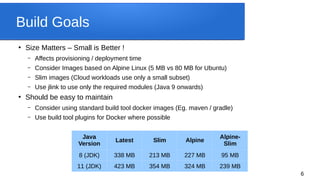
Build Goals
●
Size Matters – Small is Better !
– Affects provisioning / deployment time
– Consider Images based on Alpine Linux (5 MB vs 80 MB for Ubuntu)
– Slim images (Cloud workloads use only a small subset)
– Use jlink to use only the required modules (Java 9 onwards)
●
Should be easy to maintain
– Consider using standard build tool docker images (Eg. maven / gradle)
– Use build tool plugins for Docker where possible
Java
Version
Latest Slim Alpine
Alpine-
Slim
8 (JDK) 338 MB 213 MB 227 MB 95 MB
11 (JDK) 423 MB 354 MB 324 MB 239 MB
7
Step 2: Expand and Flourish
Startup and Scale !
8
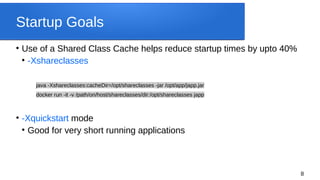
Startup Goals

Use of a Shared Class Cache helps reduce startup times by upto 40%

-Xshareclasses
java -Xshareclasses:cacheDir=/opt/shareclasses -jar /opt/app/japp.jar
docker run -it -v /path/on/host/shareclasses/dir:/opt/shareclasses japp

-Xquickstart mode

Good for very short running applications
9
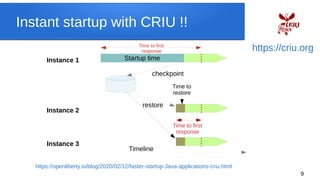
Instant startup with CRIU !!
Startup time
checkpoint
restore
Time to
restore
Instance 1
Time to first
response
Time to first
response
Instance 2
Instance 3
Timeline
https://criu.org
https://openliberty.io/blog/2020/02/12/faster-startup-Java-applications-criu.html
10
Step 3: Keep it Steady
Container Aware !
11
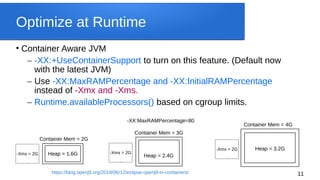
Optimize at Runtime

Container Aware JVM
– -XX:+UseContainerSupport to turn on this feature. (Default now
with the latest JVM)
– Use -XX:MaxRAMPercentage and -XX:InitialRAMPercentage
instead of -Xmx and -Xms.
– Runtime.availableProcessors() based on cgroup limits.
Heap = 2.4G
Container Mem = 3G
Container Mem = 2G
Heap = 1.6G
Heap = 3.2G
Container Mem = 4G
-Xmx = 2G -Xmx = 2G
-Xmx = 2G
-XX:MaxRAMPercentage=80
https://blog.openj9.org/2018/06/12/eclipse-openj9-in-containers/
12
Kruize:
Right size and Optimize your Containers !
https://github.com/kruize/kruize
13
Step 4: Don’t Lose When You Snooze
Idle Aware !
14
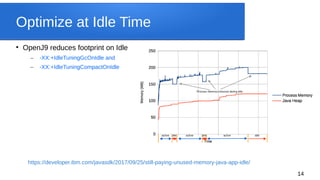
Optimize at Idle Time

OpenJ9 reduces footprint on Idle
– -XX:+IdleTuningGcOnIdle and
– -XX:+IdleTuningCompactOnIdle
https://developer.ibm.com/javasdk/2017/09/25/still-paying-unused-memory-java-app-idle/
15
Step 5: Crashing in the Cloud ? NP !
Javacores and Dumps
16
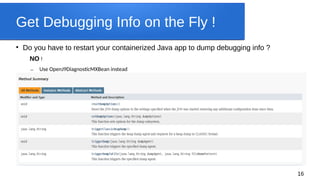
Get Debugging Info on the Fly !

Do you have to restart your containerized Java app to dump debugging info ?
NO !
– Use OpenJ9DiagnosticMXBean instead
17
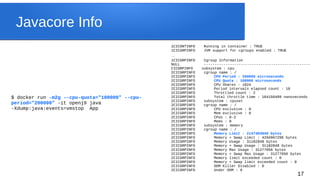
Javacore Info
1CICONTINFO Running in container : TRUE
1CICGRPINFO JVM support for cgroups enabled : TRUE
…
1CICGRPINFO Cgroup Information
NULL -------------------------------------------------
CICGRPINFO subsystem : cpu
2CICGRPINFO cgroup name : /
2CICGRPINFO CPU Period : 200000 microseconds
2CICGRPINFO CPU Quota : 100000 microseconds
2CICGRPINFO CPU Shares : 1024
2CICGRPINFO Period intervals elapsed count : 16
2CICGRPINFO Throttled count : 2
2CICGRPINFO Total throttle time : 164156409 nanoseconds
2CICGRPINFO subsystem : cpuset
2CICGRPINFO cgroup name : /
2CICGRPINFO CPU exclusive : 0
2CICGRPINFO Mem exclusive : 0
2CICGRPINFO CPUs : 0-3
2CICGRPINFO Mems : 0
2CICGRPINFO subsystem : memory
2CICGRPINFO cgroup name : /
2CICGRPINFO Memory Limit : 2147483648 bytes
2CICGRPINFO Memory + Swap Limit : 4294967296 bytes
2CICGRPINFO Memory Usage : 31182848 bytes
2CICGRPINFO Memory + Swap Usage : 31182848 bytes
2CICGRPINFO Memory Max Usage : 31277056 bytes
2CICGRPINFO Memory + Swap Max Usage : 31277056 bytes
2CICGRPINFO Memory limit exceeded count : 0
2CICGRPINFO Memory + Swap limit exceeded count : 0
2CICGRPINFO OOM Killer Disabled : 0
2CICGRPINFO Under OOM : 0
$ docker run -m2g --cpu-quota="100000" --cpu-
period="200000" -it openj9 java
-Xdump:java:events=vmstop App
18
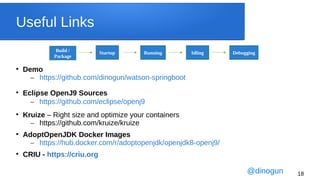
Useful Links

Demo
– https://github.com/dinogun/watson-springboot

Eclipse OpenJ9 Sources
– https://github.com/eclipse/openj9

Kruize – Right size and optimize your containers
– https://github.com/kruize/kruize

AdoptOpenJDK Docker Images
– https://hub.docker.com/r/adoptopenjdk/openjdk8-openj9/

CRIU - https://criu.org
Build /
Package
Startup Running Idling Debugging
@dinogun
19
Qs
@dinogun

Java and Container - Make it Awesome !

  • 1.
    Java and Containers– Make it Awesome !
  • 2.
    2 About Me ● Co-Maintain theAdoptOpenJDK Community Docker Images ● Eclipse OpenJ9 Cloud Optimization Architect ● Interested in every aspect of running Java Apps in K8s including Cloud Native as well as Legacy migration to Cloud ● Ex Linux Kernel and glibc hacker Dinakar Guniguntala (@dinogun) IBM Runtime Technologies
  • 3.
  • 4.
    4 What is AdoptOpenJDK ● AdoptOpenJDKprovides prebuilt OpenJDK binaries from a fully open source set of build scripts and infrastructure. – https://adoptopenjdk.net ● Extensive testing as part of the CI pipeline. ● REST API for scriptable downloads. Docker Images Unofficial → https://hub.docker.com/u/adoptopenjdk Official → https://hub.docker.com/_/adoptopenjdk
  • 5.
    5 Step 1: Beginat the Beginning Build !
  • 6.
    6 Build Goals ● Size Matters– Small is Better ! – Affects provisioning / deployment time – Consider Images based on Alpine Linux (5 MB vs 80 MB for Ubuntu) – Slim images (Cloud workloads use only a small subset) – Use jlink to use only the required modules (Java 9 onwards) ● Should be easy to maintain – Consider using standard build tool docker images (Eg. maven / gradle) – Use build tool plugins for Docker where possible Java Version Latest Slim Alpine Alpine- Slim 8 (JDK) 338 MB 213 MB 227 MB 95 MB 11 (JDK) 423 MB 354 MB 324 MB 239 MB
  • 7.
    7 Step 2: Expandand Flourish Startup and Scale !
  • 8.
    8 Startup Goals  Use ofa Shared Class Cache helps reduce startup times by upto 40%  -Xshareclasses java -Xshareclasses:cacheDir=/opt/shareclasses -jar /opt/app/japp.jar docker run -it -v /path/on/host/shareclasses/dir:/opt/shareclasses japp  -Xquickstart mode  Good for very short running applications
  • 9.
    9 Instant startup withCRIU !! Startup time checkpoint restore Time to restore Instance 1 Time to first response Time to first response Instance 2 Instance 3 Timeline https://criu.org https://openliberty.io/blog/2020/02/12/faster-startup-Java-applications-criu.html
  • 10.
    10 Step 3: Keepit Steady Container Aware !
  • 11.
    11 Optimize at Runtime  ContainerAware JVM – -XX:+UseContainerSupport to turn on this feature. (Default now with the latest JVM) – Use -XX:MaxRAMPercentage and -XX:InitialRAMPercentage instead of -Xmx and -Xms. – Runtime.availableProcessors() based on cgroup limits. Heap = 2.4G Container Mem = 3G Container Mem = 2G Heap = 1.6G Heap = 3.2G Container Mem = 4G -Xmx = 2G -Xmx = 2G -Xmx = 2G -XX:MaxRAMPercentage=80 https://blog.openj9.org/2018/06/12/eclipse-openj9-in-containers/
  • 12.
    12 Kruize: Right size andOptimize your Containers ! https://github.com/kruize/kruize
  • 13.
    13 Step 4: Don’tLose When You Snooze Idle Aware !
  • 14.
    14 Optimize at IdleTime  OpenJ9 reduces footprint on Idle – -XX:+IdleTuningGcOnIdle and – -XX:+IdleTuningCompactOnIdle https://developer.ibm.com/javasdk/2017/09/25/still-paying-unused-memory-java-app-idle/
  • 15.
    15 Step 5: Crashingin the Cloud ? NP ! Javacores and Dumps
  • 16.
    16 Get Debugging Infoon the Fly !  Do you have to restart your containerized Java app to dump debugging info ? NO ! – Use OpenJ9DiagnosticMXBean instead
  • 17.
    17 Javacore Info 1CICONTINFO Runningin container : TRUE 1CICGRPINFO JVM support for cgroups enabled : TRUE … 1CICGRPINFO Cgroup Information NULL ------------------------------------------------- CICGRPINFO subsystem : cpu 2CICGRPINFO cgroup name : / 2CICGRPINFO CPU Period : 200000 microseconds 2CICGRPINFO CPU Quota : 100000 microseconds 2CICGRPINFO CPU Shares : 1024 2CICGRPINFO Period intervals elapsed count : 16 2CICGRPINFO Throttled count : 2 2CICGRPINFO Total throttle time : 164156409 nanoseconds 2CICGRPINFO subsystem : cpuset 2CICGRPINFO cgroup name : / 2CICGRPINFO CPU exclusive : 0 2CICGRPINFO Mem exclusive : 0 2CICGRPINFO CPUs : 0-3 2CICGRPINFO Mems : 0 2CICGRPINFO subsystem : memory 2CICGRPINFO cgroup name : / 2CICGRPINFO Memory Limit : 2147483648 bytes 2CICGRPINFO Memory + Swap Limit : 4294967296 bytes 2CICGRPINFO Memory Usage : 31182848 bytes 2CICGRPINFO Memory + Swap Usage : 31182848 bytes 2CICGRPINFO Memory Max Usage : 31277056 bytes 2CICGRPINFO Memory + Swap Max Usage : 31277056 bytes 2CICGRPINFO Memory limit exceeded count : 0 2CICGRPINFO Memory + Swap limit exceeded count : 0 2CICGRPINFO OOM Killer Disabled : 0 2CICGRPINFO Under OOM : 0 $ docker run -m2g --cpu-quota="100000" --cpu- period="200000" -it openj9 java -Xdump:java:events=vmstop App
  • 18.
    18 Useful Links  Demo – https://github.com/dinogun/watson-springboot  EclipseOpenJ9 Sources – https://github.com/eclipse/openj9  Kruize – Right size and optimize your containers – https://github.com/kruize/kruize  AdoptOpenJDK Docker Images – https://hub.docker.com/r/adoptopenjdk/openjdk8-openj9/  CRIU - https://criu.org Build / Package Startup Running Idling Debugging @dinogun
  • 19.