How to Manage SharePoint
Without a SharePointTeam
Let’s Meet.
TedTheodoropoulos
• Acrowire Founder & President
• 20+ years as a business owner
• 10 years in IT Audit/Risk
Management at Bank of America
• Former member of Microsoft SQL
Server team
• Certified Scrum Master / Lean Six
Sigma Black Belt
Brian Gough
• Acrowire Solutions Architect
• 20+ years experience with
Microsoft technologies
• 7+ years SharePoint experience
as Developer and Administrator
• Twice recognized as SharePoint
MostValued Professional
(MVP)
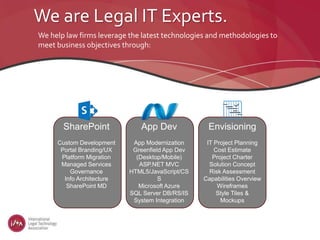
We are Legal IT Experts.
SharePoint
Custom Development
Portal Branding/UX
Platform Migration
Managed Services
Governance
Info Architecture
SharePoint MD
We help law firms leverage the latest technologies and methodologies to
meet business objectives through:
App Dev
App Modernization
Greenfield App Dev
(Desktop/Mobile)
ASP.NET MVC
HTML5/JavaScript/CS
S
Microsoft Azure
SQL Server DB/RS/IS
System Integration
Envisioning
IT Project Planning
Cost Estimate
Project Charter
Solution Concept
Risk Assessment
Capabilities Overview
Wireframes
Style Tiles &
Mockups
WhatWe’ll CoverToday
• Introductions
• What Makes SharePoint - SharePoint?
• SharePoint Management
• Training
• Vendor Support
• Customizing SharePoint
• SharePoint Managed Services
• Q&A
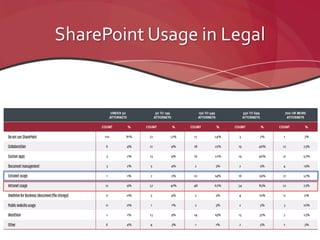
SharePoint Usage in Legal
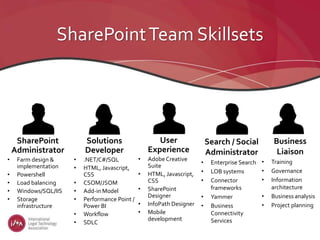
SharePointTeam Skillsets
SharePoint
Administrator
• Farm design &
implementation
• Powershell
• Load balancing
• Windows/SQL/IIS
• Storage
infrastructure
Solutions
Developer
• .NET/C#/SQL
• HTML, Javascript,
CSS
• CSOM/JSOM
• Add-in Model
• Performance Point /
Power BI
• Workflow
• SDLC
User
Experience
• AdobeCreative
Suite
• HTML, Javascript,
CSS
• SharePoint
Designer
• InfoPath Designer
• Mobile
development
Search / Social
Administrator
• Enterprise Search
• LOB systems
• Connector
frameworks
• Yammer
• Business
Connectivity
Services
Business
Liaison
• Training
• Governance
• Information
architecture
• Business analysis
• Project planning
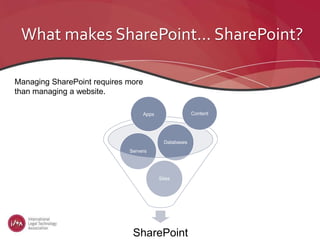
What makes SharePoint… SharePoint?
Managing SharePoint requires more
than managing a website.
SharePoint
Sites
Servers
Databases
ContentApps
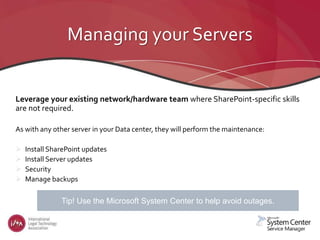
Managing your Servers
Leverage your existing network/hardware team where SharePoint-specific skills
are not required.
As with any other server in your Data center, they will perform the maintenance:
 Install SharePoint updates
 Install Server updates
 Security
 Manage backups
What tools are available to avoid outages?Tip! Use the Microsoft System Center to help avoid outages.
Managing your Databases
Leverage your existing DatabaseAdministrators (DBA’s).
 Database Management and monitoring
 Backups/Restores
Tools are available to help you manage your database. Use them!
Managing SharePoint Content
Beware “Share-plosion”
 Be sure to have a Governance plan
 Control Permissions
 Control site architecture
http://yourock.share-gate.com/sharepoint-administration/
http://www.metalogix.com/Products/ControlPoint.aspx
http://ngageintelligence.com/
Managing SharePoint Service Applications
How can I configure Search, Excel Services and other Service Applications?
No known 3rd party products exist for managing all the possible Service Applications.
BUT…
 There are scripts to install and a default set up is available
AND…
 Vendors or Contractors
Be ProactiveAboutTraining
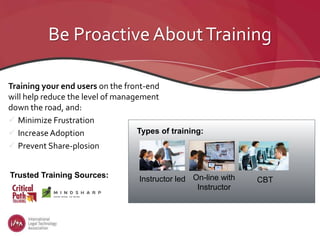
Training your end users on the front-end
will help reduce the level of management
down the road, and:
 Minimize Frustration
 Increase Adoption
 Prevent Share-plosion
Instructor led On-line with
Instructor
CBT
Types of training:
Trusted Training Sources:
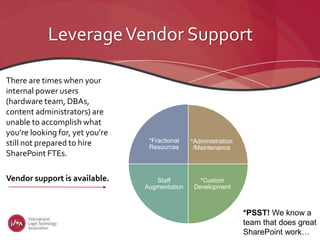
LeverageVendor Support
There are times when your
internal power users
(hardware team, DBAs,
content administrators) are
unable to accomplish what
you’re looking for, yet you’re
still not prepared to hire
SharePoint FTEs.
Vendor support is available.
*PSST! We know a
team that does great
SharePoint work…
*Administration
/Maintenance
*Custom
Development
Staff
Augmentation
*Fractional
Resources
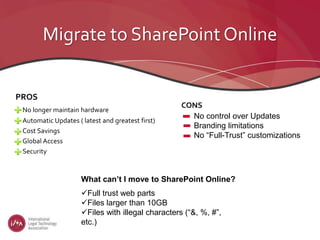
Migrate to SharePoint Online
PROS
No longer maintain hardware
Automatic Updates ( latest and greatest first)
Cost Savings
Global Access
Security
CONS
No control over Updates
Branding limitations
No “Full-Trust” customizations
Full trust web parts
Files larger than 10GB
Files with illegal characters (“&, %, #”,
etc.)
What can’t I move to SharePoint Online?
Private Cloud Option
Want the experience of an On-Prem farm but keep
vendors/contractors out of your data center?
Install SharePoint onAzure servers
Create full trust apps
Gain control
Maintain privacy
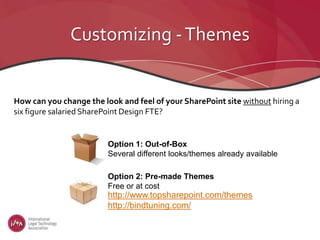
Customizing -Themes
How can you change the look and feel of your SharePoint site without hiring a
six figure salaried SharePoint Design FTE?
Option 1: Out-of-Box
Several different looks/themes already available
http://www.topsharepoint.com/themes
http://bindtuning.com/
Option 2: Pre-made Themes
Free or at cost
Customizing – Adding an App
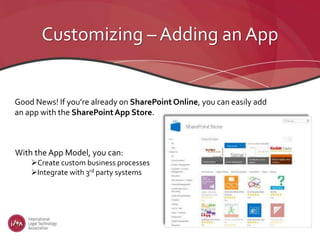
Good News! If you’re already on SharePoint Online, you can easily add
an app with the SharePointApp Store.
With the App Model, you can:
Create custom business processes
Integrate with 3rd party systems
NowYou’re An Expert.
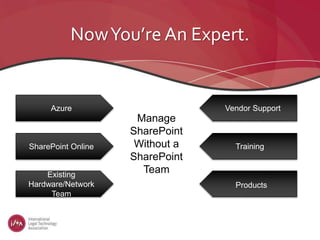
Azure
SharePoint Online
Existing
Hardware/Network
Team
Vendor Support
Training
Products
Manage
SharePoint
Without a
SharePoint
Team
But,We're Still Here to Help.
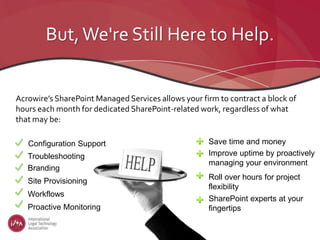
Acrowire’s SharePoint Managed Services allows your firm to contract a block of
hours each month for dedicated SharePoint-related work, regardless of what
that may be:
Troubleshooting
Branding
Site Provisioning
Workflows
Proactive Monitoring
Configuration Support Save time and money
Improve uptime by proactively
managing your environment
Roll over hours for project
flexibility
SharePoint experts at your
fingertips
Questions and Answers
info@acrowire.com

Managesp 160805190411

  • 1.
    How to ManageSharePoint Without a SharePointTeam
  • 2.
    Let’s Meet. TedTheodoropoulos • AcrowireFounder & President • 20+ years as a business owner • 10 years in IT Audit/Risk Management at Bank of America • Former member of Microsoft SQL Server team • Certified Scrum Master / Lean Six Sigma Black Belt Brian Gough • Acrowire Solutions Architect • 20+ years experience with Microsoft technologies • 7+ years SharePoint experience as Developer and Administrator • Twice recognized as SharePoint MostValued Professional (MVP)
  • 3.
    We are LegalIT Experts. SharePoint Custom Development Portal Branding/UX Platform Migration Managed Services Governance Info Architecture SharePoint MD We help law firms leverage the latest technologies and methodologies to meet business objectives through: App Dev App Modernization Greenfield App Dev (Desktop/Mobile) ASP.NET MVC HTML5/JavaScript/CS S Microsoft Azure SQL Server DB/RS/IS System Integration Envisioning IT Project Planning Cost Estimate Project Charter Solution Concept Risk Assessment Capabilities Overview Wireframes Style Tiles & Mockups
  • 4.
    WhatWe’ll CoverToday • Introductions •What Makes SharePoint - SharePoint? • SharePoint Management • Training • Vendor Support • Customizing SharePoint • SharePoint Managed Services • Q&A
  • 5.
  • 6.
    SharePointTeam Skillsets SharePoint Administrator • Farmdesign & implementation • Powershell • Load balancing • Windows/SQL/IIS • Storage infrastructure Solutions Developer • .NET/C#/SQL • HTML, Javascript, CSS • CSOM/JSOM • Add-in Model • Performance Point / Power BI • Workflow • SDLC User Experience • AdobeCreative Suite • HTML, Javascript, CSS • SharePoint Designer • InfoPath Designer • Mobile development Search / Social Administrator • Enterprise Search • LOB systems • Connector frameworks • Yammer • Business Connectivity Services Business Liaison • Training • Governance • Information architecture • Business analysis • Project planning
  • 7.
    What makes SharePoint…SharePoint? Managing SharePoint requires more than managing a website. SharePoint Sites Servers Databases ContentApps
  • 8.
    Managing your Servers Leverageyour existing network/hardware team where SharePoint-specific skills are not required. As with any other server in your Data center, they will perform the maintenance:  Install SharePoint updates  Install Server updates  Security  Manage backups What tools are available to avoid outages?Tip! Use the Microsoft System Center to help avoid outages.
  • 9.
    Managing your Databases Leverageyour existing DatabaseAdministrators (DBA’s).  Database Management and monitoring  Backups/Restores Tools are available to help you manage your database. Use them!
  • 10.
    Managing SharePoint Content Beware“Share-plosion”  Be sure to have a Governance plan  Control Permissions  Control site architecture http://yourock.share-gate.com/sharepoint-administration/ http://www.metalogix.com/Products/ControlPoint.aspx http://ngageintelligence.com/
  • 11.
    Managing SharePoint ServiceApplications How can I configure Search, Excel Services and other Service Applications? No known 3rd party products exist for managing all the possible Service Applications. BUT…  There are scripts to install and a default set up is available AND…  Vendors or Contractors
  • 12.
    Be ProactiveAboutTraining Training yourend users on the front-end will help reduce the level of management down the road, and:  Minimize Frustration  Increase Adoption  Prevent Share-plosion Instructor led On-line with Instructor CBT Types of training: Trusted Training Sources:
  • 13.
    LeverageVendor Support There aretimes when your internal power users (hardware team, DBAs, content administrators) are unable to accomplish what you’re looking for, yet you’re still not prepared to hire SharePoint FTEs. Vendor support is available. *PSST! We know a team that does great SharePoint work… *Administration /Maintenance *Custom Development Staff Augmentation *Fractional Resources
  • 14.
    Migrate to SharePointOnline PROS No longer maintain hardware Automatic Updates ( latest and greatest first) Cost Savings Global Access Security CONS No control over Updates Branding limitations No “Full-Trust” customizations Full trust web parts Files larger than 10GB Files with illegal characters (“&, %, #”, etc.) What can’t I move to SharePoint Online?
  • 15.
    Private Cloud Option Wantthe experience of an On-Prem farm but keep vendors/contractors out of your data center? Install SharePoint onAzure servers Create full trust apps Gain control Maintain privacy
  • 16.
    Customizing -Themes How canyou change the look and feel of your SharePoint site without hiring a six figure salaried SharePoint Design FTE? Option 1: Out-of-Box Several different looks/themes already available http://www.topsharepoint.com/themes http://bindtuning.com/ Option 2: Pre-made Themes Free or at cost
  • 17.
    Customizing – Addingan App Good News! If you’re already on SharePoint Online, you can easily add an app with the SharePointApp Store. With the App Model, you can: Create custom business processes Integrate with 3rd party systems
  • 18.
    NowYou’re An Expert. Azure SharePointOnline Existing Hardware/Network Team Vendor Support Training Products Manage SharePoint Without a SharePoint Team
  • 19.
    But,We're Still Hereto Help. Acrowire’s SharePoint Managed Services allows your firm to contract a block of hours each month for dedicated SharePoint-related work, regardless of what that may be: Troubleshooting Branding Site Provisioning Workflows Proactive Monitoring Configuration Support Save time and money Improve uptime by proactively managing your environment Roll over hours for project flexibility SharePoint experts at your fingertips
  • 20.

Editor's Notes

  • #8 I am deliberately leaving out explicit references to Search or Workflows as there are no 3rd party tools to assist in “Managing” those aspects and it also opens the door to all the other Service Apps, which again, have no 3rd party tools for Admin
  • #9 We can mention other tools for hardware administration if anyone knows of some other tools that are note worthy
  • #10 We can mention other tools for DB administration if anyone knows of some other tools that are note worthy
  • #11 We will verbally cover the many aspects a Gov plan covers.. Naming conventions, when to create new sites, what content is stored or not stored in SP, etc.. I have the link to Ngage if we want to include that here, and we can verbally explain what it brings to the table ( Avoid mentioning its cost?? )
  • #13 Do we want to offer that we can provide training even though we do not have any actual formal training curriculum??? If we do, what would the particulars be for what we offer?
  • #15 We can go a deep as we want here about the various pros/cons/issues with SPO Expound on the double-edge sword of the updates What “Cant” move…. Files with certain illegal characters in the file name… “&, %, #”, etc.. Files larger tan 10GB
  • #16 Are there other Pros/Cons that Ted would want mentioned here??
  • #18 We should mention that getting the App Store set up on-prem is not a simple process. Involves site collections, DNS Certs, etc..