DIGITAL SMILE DESIGNING
Guided by:
Dr.S.R.Godbole
Presented by:
Apurva Deshmukh
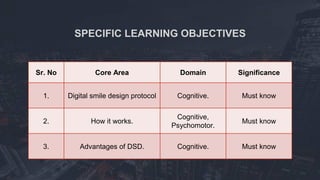
SPECIFIC LEARNING OBJECTIVES
Sr. No Core Area Domain Significance
1. Digital smile design protocol Cognitive. Must know
2. How it works.
Cognitive,
Psychomotor.
Must know
3. Advantages of DSD. Cognitive. Must know
CONTENTS
• Introduction.
• DSD workflow
• Advantages of DSD
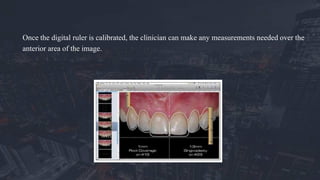
• Other similar softwares.
• Summary
• References.
INTRODUCTION
To obtain consistent esthetic outcomes, the design of dental restorations
should be defined. The importance of gathering diagnostic data from
questionnaires and checklists cannot be overlooked; however, much of this
information may be lost if it is not transferred adequately to the design of the
restorations.
The diagnostic data must guide the subsequent treatment phases,
integrating all of the patient’s needs, desires, and functional and biologic issues
into an esthetic treatment design.
One of dentistry’s most challenging dilemmas relates to
whether or not we can actually meet or exceed patients’
expectations for treatment in the esthetic zone.
The Digital Smile Design (DSD) is a multi-use diagnosis
tool that is very useful for dento-gingival alterations and can
strengthen the diagnostic vision, improve communication, and
enhance predictability throughout treatment.
It was introduced by an American technician turned dentist,
Dr Christian Coachman in 2004.
DSD works in presentation softwares such as Keynote or Microsoft
PowerPoint.
It allows for careful analysis of the patient’s facial and dental
characteristics along with any critical factors that may have been overlooked
during clinical, photographic, or diagnostic cast based evaluation procedures.
The drawing of reference lines and shapes on intra- and extra-oral
photographs in a predetermined sequence widens the diagnostic visualization
and helps the restorative team evaluate the limitations of a given case,
including asymmetries, disharmonies, and violations of esthetic principles.
DSD WORKFLOW
A. STEP I: Photography
a. Three basic photographic views are necessary: Full face with a wide smile and the teeth
apart, full face at rest, and retracted view of the full maxillary arch with teeth apart.
b. A short video is recommended in which the patient is prompted by the clinician to explain
his or her treatment concerns and expectations.
Simultaneously, the video captures all possible dental and smile positions, including 45-
degree and profile views.
c. The photographs and videos are downloaded and inserted into the slide presentation. The
DSD work flow then proceeds further.
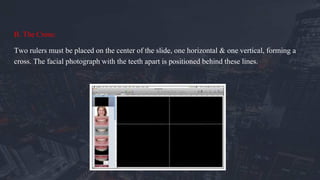
B. The Cross:
Two rulers must be placed on the center of the slide, one horizontal & one vertical, forming a
cross. The facial photograph with the teeth apart is positioned behind these lines.
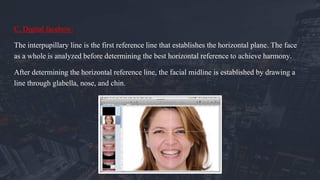
C. Digital facebow:
The interpupillary line is the first reference line that establishes the horizontal plane. The face
as a whole is analyzed before determining the best horizontal reference to achieve harmony.
After determining the horizontal reference line, the facial midline is established by drawing a
line through glabella, nose, and chin.
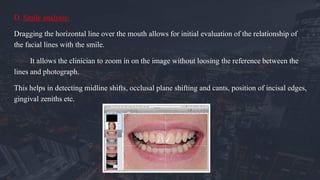
D. Smile analysis:
Dragging the horizontal line over the mouth allows for initial evaluation of the relationship of
the facial lines with the smile.
It allows the clinician to zoom in on the image without loosing the reference between the
lines and photograph.
This helps in detecting midline shifts, occlusal plane shifting and cants, position of incisal edges,
gingival zeniths etc.
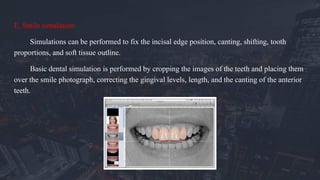
E. Smile simulation:
Simulations can be performed to fix the incisal edge position, canting, shifting, tooth
proportions, and soft tissue outline.
Basic dental simulation is performed by cropping the images of the teeth and placing them
over the smile photograph, correcting the gingival levels, length, and the canting of the anterior
teeth.
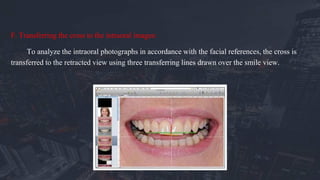
F. Transferring the cross to the intraoral images:
To analyze the intraoral photographs in accordance with the facial references, the cross is
transferred to the retracted view using three transferring lines drawn over the smile view.
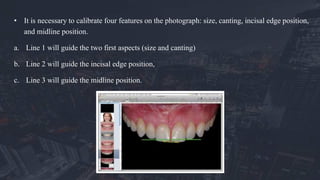
• It is necessary to calibrate four features on the photograph: size, canting, incisal edge position,
and midline position.
a. Line 1 will guide the two first aspects (size and canting)
b. Line 2 will guide the incisal edge position,
c. Line 3 will guide the midline position.
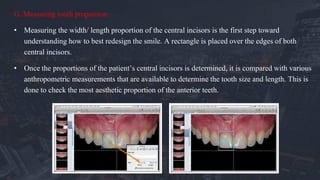
G. Measuring tooth proportion:
• Measuring the width/ length proportion of the central incisors is the first step toward
understanding how to best redesign the smile. A rectangle is placed over the edges of both
central incisors.
• Once the proportions of the patient’s central incisors is determined, it is compared with various
anthropometric measurements that are available to determine the tooth size and length. This is
done to check the most aesthetic proportion of the anterior teeth.
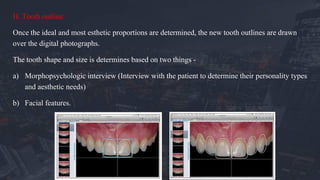
H. Tooth outline:
Once the ideal and most esthetic proportions are determined, the new tooth outlines are drawn
over the digital photographs.
The tooth shape and size is determines based on two things -
a) Morphopsychologic interview (Interview with the patient to determine their personality types
and aesthetic needs)
b) Facial features.
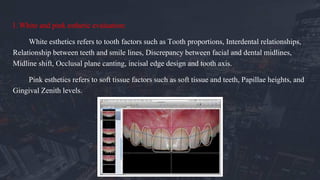
I. White and pink esthetic evaluation:
White esthetics refers to tooth factors such as Tooth proportions, Interdental relationships,
Relationship between teeth and smile lines, Discrepancy between facial and dental midlines,
Midline shift, Occlusal plane canting, incisal edge design and tooth axis.
Pink esthetics refers to soft tissue factors such as soft tissue and teeth, Papillae heights, and
Gingival Zenith levels.
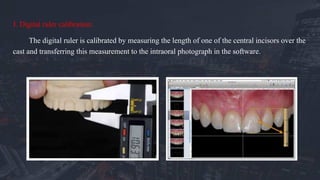
J. Digital ruler calibration:
The digital ruler is calibrated by measuring the length of one of the central incisors over the
cast and transferring this measurement to the intraoral photograph in the software.
Once the digital ruler is calibrated, the clinician can make any measurements needed over the
anterior area of the image.
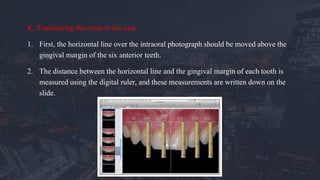
K. Transferring the cross to the cast:
1. First, the horizontal line over the intraoral photograph should be moved above the
gingival margin of the six anterior teeth.
2. The distance between the horizontal line and the gingival margin of each tooth is
measured using the digital ruler, and these measurements are written down on the
slide.
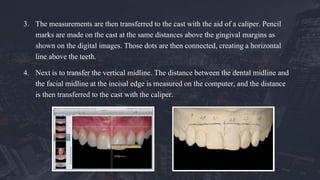
3. The measurements are then transferred to the cast with the aid of a caliper. Pencil
marks are made on the cast at the same distances above the gingival margins as
shown on the digital images. Those dots are then connected, creating a horizontal
line above the teeth.
4. Next is to transfer the vertical midline. The distance between the dental midline and
the facial midline at the incisal edge is measured on the computer, and the distance
is then transferred to the cast with the caliper.
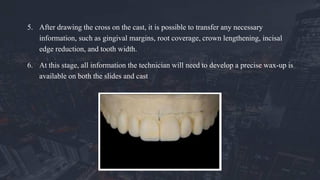
5. After drawing the cross on the cast, it is possible to transfer any necessary
information, such as gingival margins, root coverage, crown lengthening, incisal
edge reduction, and tooth width.
6. At this stage, all information the technician will need to develop a precise wax-up is
available on both the slides and cast
The guided diagnostic wax-up will be an important reference for any surgical,
orthodontic, and restorative procedures. Several guides can be produced over this wax-
up to control the procedures, such as surgical stents, orthodontic guides, implant guides,
crown lengthening guides, and tooth preparation guides.
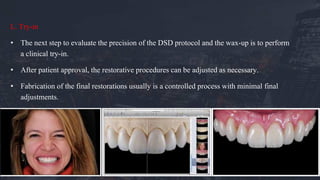
L. Try-in
• The next step to evaluate the precision of the DSD protocol and the wax-up is to perform
a clinical try-in.
• After patient approval, the restorative procedures can be adjusted as necessary.
• Fabrication of the final restorations usually is a controlled process with minimal final
adjustments.
The DSD protocol offers advantages in the following areas:
• Esthetic diagnosis
• Communication
• Feedback
• Patient management
ESTHETIC DIAGNOSIS
When the dentist first evaluates a new patient with esthetic concerns,
many critical factors may be overlooked.
A digital photography and digital analysis protocol enables the dentist to
visualize and analyze issues that he or she may not notice clinically.
Drawing of reference lines and shapes over extra- and intraoral digital
photographs can easily be performed using the presentation software.
COMMUNICATION
Traditionally, smile design has been instituted by the dental technician. The technician
performs the restorative wax-up, creates the tooth shapes and dental arrangements, and
follows the instructions and guidelines provided by the dentist.
However, if insufficient information is given to the dental technician, it leads to reduced
utilization of his or her skills to maximum potential. As a result, the final restoration is less
likely to fully satisfy the patient’s desires.
When the dentist develops a personal rapport with the patient, she/he has better ability
to communicate the patient’s personal preferences to the technician, elevating the excellence
of the restoration from acceptable to exceptional.
• Successful restorative treatment involves controlling the four dimensions of treatment:
a. Esthetics,
b. function,
c. Structure,
d. biology.
• In relation to esthetics, there are four main issues that must be controlled to improve
predictability and meet patient expectations:
a. the horizontal reference plane,
b. facial midline,
c. smile design (tooth shape and arrangement),
d. Color.
The primary goal of the DSD protocol is to facilitate the process of precisely
transferring this information from the face and the mouth, to the cast, and to the final
restoration.
With this valuable information in hand, the dental technician efficiently fabricates a three-
dimensional wax-up, focusing on developing anatomical features within the parameters
provided, including the planes of reference, facial and dental midlines, recommended
incisal edge position, lip dynamics, basic tooth arrangement, and incisal plane.
This information is transferred to the try-in phase through a provisional restoration.
FEEDBACK
• The DSD allows for precise evaluation of the results obtained in every treatment
phase.
• The sequence of treatment is organized on the slides with photographs, videos,
notes, graphics, and drawings.
• At any time, team members can access the slide presentation to track and analyze
the treatment provided.
• With the digital ruler, drawings, and reference lines, easy comparisons can
be made between pre- and post- treatment photographs.
• The dental technician also gains feedback related to tooth shape,
arrangement, and color to facilitate any necessary refinements.
• This constant double-checking ensures the excellence of the final result
and provides a great learning tool for the entire interdisciplinary team.
PATIENT MANAGEMENT
• It can used as a tool to motivate the patient, an educational tool to help
explain issues related to treatment, and an evaluative tool by comparing
before and after photographs.
• Further, the library of slides from past treatments can be used to
demonstrate treatment possibilities during patient consultation.
• The treatment planning presentation is much more effective because DSD
allows patients to visualize the multiple factors responsible for their orofacial
issues.
• The problems presented in each case can be put up in list form directly over the
patient’s own photographs.
• In addition, DSD aids in patient acceptance by helping them visualize and
understand both past and future treatments.
OTHER SIMILAR SMILE DESIGNING
SOFTWARES
Some other popular softwares are:
1. Smile designer Pro.
2. SNAP – Cosmetic simulation Software.
3. Visagismile design software.
4. G design software.
5. Smart smile design software.
6. Smylist Aesthetic design software.
The Digital Smile Design is a multi-use tool that can assist the restorative team
throughout treatment, improving the dental team’s understanding of the esthetic issues and
increasing patient acceptance of the final result. The digital photographs widens the dental
team’s diagnostic vision and helps to evaluate the limitations, risk factors, and esthetic
principles of a given case. These critical data leads to improved results in all phases of
treatment.
SUMMARY
1. Coachman C, Van Dooren E, Gürel G, Landsberg CJ, Calamita MA, Bichacho N. Smile design: From
digital treatment planning to clinical reality. In: Cohen M (ed). Interdisciplinary Treatment Planning.
Vol 2: Comprehensive Case Studies. Chicago: Quintessence, 2012:119–174
2. Coachman, C & Calamita, Marcelo. (2012). Digital Smile Design: A Tool for Treatment Planning and
Communication in Esthetic Dentistry. QDT 2012 Quintessence. 35. 1-9
3. Thumati P. Evaluation of function and esthetics for creating a beautiful smile in dental practice using
digital smile designing. J Interdiscip Dentistry 2014;4:144-7.
4. Zanardi PR, Laia Rocha Zanardi R, Chaib Stegun R, Sesma N, Costa B, Cruz Laganá D. The Use of the
Digital Smile Design Concept as an Auxiliary Tool in Aesthetic Rehabilitation: A Case Report. The
Open Dentistry Journal. 2016;10:28-34.
REFERENCES
Digital Smile Designing

Digital Smile Designing

  • 1.
    DIGITAL SMILE DESIGNING Guidedby: Dr.S.R.Godbole Presented by: Apurva Deshmukh
  • 2.
    SPECIFIC LEARNING OBJECTIVES Sr.No Core Area Domain Significance 1. Digital smile design protocol Cognitive. Must know 2. How it works. Cognitive, Psychomotor. Must know 3. Advantages of DSD. Cognitive. Must know
  • 3.
    CONTENTS • Introduction. • DSDworkflow • Advantages of DSD • Other similar softwares. • Summary • References.
  • 4.
    INTRODUCTION To obtain consistentesthetic outcomes, the design of dental restorations should be defined. The importance of gathering diagnostic data from questionnaires and checklists cannot be overlooked; however, much of this information may be lost if it is not transferred adequately to the design of the restorations. The diagnostic data must guide the subsequent treatment phases, integrating all of the patient’s needs, desires, and functional and biologic issues into an esthetic treatment design.
  • 5.
    One of dentistry’smost challenging dilemmas relates to whether or not we can actually meet or exceed patients’ expectations for treatment in the esthetic zone. The Digital Smile Design (DSD) is a multi-use diagnosis tool that is very useful for dento-gingival alterations and can strengthen the diagnostic vision, improve communication, and enhance predictability throughout treatment. It was introduced by an American technician turned dentist, Dr Christian Coachman in 2004.
  • 6.
    DSD works inpresentation softwares such as Keynote or Microsoft PowerPoint. It allows for careful analysis of the patient’s facial and dental characteristics along with any critical factors that may have been overlooked during clinical, photographic, or diagnostic cast based evaluation procedures. The drawing of reference lines and shapes on intra- and extra-oral photographs in a predetermined sequence widens the diagnostic visualization and helps the restorative team evaluate the limitations of a given case, including asymmetries, disharmonies, and violations of esthetic principles.
  • 7.
    DSD WORKFLOW A. STEPI: Photography a. Three basic photographic views are necessary: Full face with a wide smile and the teeth apart, full face at rest, and retracted view of the full maxillary arch with teeth apart. b. A short video is recommended in which the patient is prompted by the clinician to explain his or her treatment concerns and expectations. Simultaneously, the video captures all possible dental and smile positions, including 45- degree and profile views. c. The photographs and videos are downloaded and inserted into the slide presentation. The DSD work flow then proceeds further.
  • 8.
    B. The Cross: Tworulers must be placed on the center of the slide, one horizontal & one vertical, forming a cross. The facial photograph with the teeth apart is positioned behind these lines.
  • 9.
    C. Digital facebow: Theinterpupillary line is the first reference line that establishes the horizontal plane. The face as a whole is analyzed before determining the best horizontal reference to achieve harmony. After determining the horizontal reference line, the facial midline is established by drawing a line through glabella, nose, and chin.
  • 10.
    D. Smile analysis: Draggingthe horizontal line over the mouth allows for initial evaluation of the relationship of the facial lines with the smile. It allows the clinician to zoom in on the image without loosing the reference between the lines and photograph. This helps in detecting midline shifts, occlusal plane shifting and cants, position of incisal edges, gingival zeniths etc.
  • 11.
    E. Smile simulation: Simulationscan be performed to fix the incisal edge position, canting, shifting, tooth proportions, and soft tissue outline. Basic dental simulation is performed by cropping the images of the teeth and placing them over the smile photograph, correcting the gingival levels, length, and the canting of the anterior teeth.
  • 12.
    F. Transferring thecross to the intraoral images: To analyze the intraoral photographs in accordance with the facial references, the cross is transferred to the retracted view using three transferring lines drawn over the smile view.
  • 13.
    • It isnecessary to calibrate four features on the photograph: size, canting, incisal edge position, and midline position. a. Line 1 will guide the two first aspects (size and canting) b. Line 2 will guide the incisal edge position, c. Line 3 will guide the midline position.
  • 14.
    G. Measuring toothproportion: • Measuring the width/ length proportion of the central incisors is the first step toward understanding how to best redesign the smile. A rectangle is placed over the edges of both central incisors. • Once the proportions of the patient’s central incisors is determined, it is compared with various anthropometric measurements that are available to determine the tooth size and length. This is done to check the most aesthetic proportion of the anterior teeth.
  • 15.
    H. Tooth outline: Oncethe ideal and most esthetic proportions are determined, the new tooth outlines are drawn over the digital photographs. The tooth shape and size is determines based on two things - a) Morphopsychologic interview (Interview with the patient to determine their personality types and aesthetic needs) b) Facial features.
  • 16.
    I. White andpink esthetic evaluation: White esthetics refers to tooth factors such as Tooth proportions, Interdental relationships, Relationship between teeth and smile lines, Discrepancy between facial and dental midlines, Midline shift, Occlusal plane canting, incisal edge design and tooth axis. Pink esthetics refers to soft tissue factors such as soft tissue and teeth, Papillae heights, and Gingival Zenith levels.
  • 17.
    J. Digital rulercalibration: The digital ruler is calibrated by measuring the length of one of the central incisors over the cast and transferring this measurement to the intraoral photograph in the software.
  • 18.
    Once the digitalruler is calibrated, the clinician can make any measurements needed over the anterior area of the image.
  • 19.
    K. Transferring thecross to the cast: 1. First, the horizontal line over the intraoral photograph should be moved above the gingival margin of the six anterior teeth. 2. The distance between the horizontal line and the gingival margin of each tooth is measured using the digital ruler, and these measurements are written down on the slide.
  • 20.
    3. The measurementsare then transferred to the cast with the aid of a caliper. Pencil marks are made on the cast at the same distances above the gingival margins as shown on the digital images. Those dots are then connected, creating a horizontal line above the teeth. 4. Next is to transfer the vertical midline. The distance between the dental midline and the facial midline at the incisal edge is measured on the computer, and the distance is then transferred to the cast with the caliper.
  • 21.
    5. After drawingthe cross on the cast, it is possible to transfer any necessary information, such as gingival margins, root coverage, crown lengthening, incisal edge reduction, and tooth width. 6. At this stage, all information the technician will need to develop a precise wax-up is available on both the slides and cast
  • 22.
    The guided diagnosticwax-up will be an important reference for any surgical, orthodontic, and restorative procedures. Several guides can be produced over this wax- up to control the procedures, such as surgical stents, orthodontic guides, implant guides, crown lengthening guides, and tooth preparation guides.
  • 23.
    L. Try-in • Thenext step to evaluate the precision of the DSD protocol and the wax-up is to perform a clinical try-in. • After patient approval, the restorative procedures can be adjusted as necessary. • Fabrication of the final restorations usually is a controlled process with minimal final adjustments.
  • 24.
    The DSD protocoloffers advantages in the following areas: • Esthetic diagnosis • Communication • Feedback • Patient management
  • 25.
    ESTHETIC DIAGNOSIS When thedentist first evaluates a new patient with esthetic concerns, many critical factors may be overlooked. A digital photography and digital analysis protocol enables the dentist to visualize and analyze issues that he or she may not notice clinically. Drawing of reference lines and shapes over extra- and intraoral digital photographs can easily be performed using the presentation software.
  • 26.
    COMMUNICATION Traditionally, smile designhas been instituted by the dental technician. The technician performs the restorative wax-up, creates the tooth shapes and dental arrangements, and follows the instructions and guidelines provided by the dentist. However, if insufficient information is given to the dental technician, it leads to reduced utilization of his or her skills to maximum potential. As a result, the final restoration is less likely to fully satisfy the patient’s desires. When the dentist develops a personal rapport with the patient, she/he has better ability to communicate the patient’s personal preferences to the technician, elevating the excellence of the restoration from acceptable to exceptional.
  • 27.
    • Successful restorativetreatment involves controlling the four dimensions of treatment: a. Esthetics, b. function, c. Structure, d. biology. • In relation to esthetics, there are four main issues that must be controlled to improve predictability and meet patient expectations: a. the horizontal reference plane, b. facial midline, c. smile design (tooth shape and arrangement), d. Color.
  • 28.
    The primary goalof the DSD protocol is to facilitate the process of precisely transferring this information from the face and the mouth, to the cast, and to the final restoration. With this valuable information in hand, the dental technician efficiently fabricates a three- dimensional wax-up, focusing on developing anatomical features within the parameters provided, including the planes of reference, facial and dental midlines, recommended incisal edge position, lip dynamics, basic tooth arrangement, and incisal plane. This information is transferred to the try-in phase through a provisional restoration.
  • 29.
    FEEDBACK • The DSDallows for precise evaluation of the results obtained in every treatment phase. • The sequence of treatment is organized on the slides with photographs, videos, notes, graphics, and drawings. • At any time, team members can access the slide presentation to track and analyze the treatment provided.
  • 30.
    • With thedigital ruler, drawings, and reference lines, easy comparisons can be made between pre- and post- treatment photographs. • The dental technician also gains feedback related to tooth shape, arrangement, and color to facilitate any necessary refinements. • This constant double-checking ensures the excellence of the final result and provides a great learning tool for the entire interdisciplinary team.
  • 31.
    PATIENT MANAGEMENT • Itcan used as a tool to motivate the patient, an educational tool to help explain issues related to treatment, and an evaluative tool by comparing before and after photographs. • Further, the library of slides from past treatments can be used to demonstrate treatment possibilities during patient consultation.
  • 32.
    • The treatmentplanning presentation is much more effective because DSD allows patients to visualize the multiple factors responsible for their orofacial issues. • The problems presented in each case can be put up in list form directly over the patient’s own photographs. • In addition, DSD aids in patient acceptance by helping them visualize and understand both past and future treatments.
  • 33.
    OTHER SIMILAR SMILEDESIGNING SOFTWARES Some other popular softwares are: 1. Smile designer Pro. 2. SNAP – Cosmetic simulation Software. 3. Visagismile design software. 4. G design software. 5. Smart smile design software. 6. Smylist Aesthetic design software.
  • 34.
    The Digital SmileDesign is a multi-use tool that can assist the restorative team throughout treatment, improving the dental team’s understanding of the esthetic issues and increasing patient acceptance of the final result. The digital photographs widens the dental team’s diagnostic vision and helps to evaluate the limitations, risk factors, and esthetic principles of a given case. These critical data leads to improved results in all phases of treatment. SUMMARY
  • 35.
    1. Coachman C,Van Dooren E, Gürel G, Landsberg CJ, Calamita MA, Bichacho N. Smile design: From digital treatment planning to clinical reality. In: Cohen M (ed). Interdisciplinary Treatment Planning. Vol 2: Comprehensive Case Studies. Chicago: Quintessence, 2012:119–174 2. Coachman, C & Calamita, Marcelo. (2012). Digital Smile Design: A Tool for Treatment Planning and Communication in Esthetic Dentistry. QDT 2012 Quintessence. 35. 1-9 3. Thumati P. Evaluation of function and esthetics for creating a beautiful smile in dental practice using digital smile designing. J Interdiscip Dentistry 2014;4:144-7. 4. Zanardi PR, Laia Rocha Zanardi R, Chaib Stegun R, Sesma N, Costa B, Cruz Laganá D. The Use of the Digital Smile Design Concept as an Auxiliary Tool in Aesthetic Rehabilitation: A Case Report. The Open Dentistry Journal. 2016;10:28-34. REFERENCES

Editor's Notes

  • #8 DSD protocol is carried out using Keynote software or Microsoft PowerPoint
  • #9 Slide presentation software (Keynote, iWork, Apple) with crossing lines placed on the middle of the slide.
  • #10 1. Relating the full-face smile image to the horizontal reference line is the most important step in the smile design process. Img: The facial photograph with a wide smile and the teeth apart is moved behind the cross to determine the ideal horizontal plane and vertical midline (ie, the digital facebow).
  • #11 Img: Transferring the cross to the smile to analyze the relationship between the facial lines, lips, teeth, and gingiva.
  • #13 a) Line 1: from the tip of one canine to the tip of the contralateral canine. b) Line 2: from the middle of the incisal edge of one central incisor to the middle of the incisal edge of the contralateral central incisor. c) Line 3: over the dental midline, from the tip of the midline interdental papillae to the incisal embrasure.
  • #14 Line 1 joining tips of two maxillary canines. Line 2: from the middle of the incisal edge of one central incisor to the other. Line 3: over the dental midline
  • #16 Img1:Drawing the tooth outline, as guided by the cross and by the rectangle proportion. Img2: Final teeth outline showing the relationship between the preoperative situation and the ideal design.
  • #21 4. Because the vertical line must be perpendicular to the horizontal line, only one point is necessary to determine its location.
  • #30 These comparisons help determine whether the treatment has successfully followed the original plan or if other adjunctive procedures are necessary to improve the final outcome.
  • #31 The DSD tool also serves as a useful library of treatment procedures. Clinicians can revisit treatments performed years ago and learn from past results.
  • #33 3. The clinician can express the severity of the case, introduce treatment strategies, discuss the prognosis, and make case management recommendations.
  • #34 DSD : One time / Monthly basis = 69$ / 4500/- = 3 cases. Yearly basis = 83$ / 5500/- = unlimited cases.