

Aaron Gustafson presents


  Solving CSS
   Problems
with eCSStender
Where in the world is CSS3?
Progress
               elements
               attributes


100


75


50


25


0

      HTML 1
Progress
                        elements
                        attributes


100


75


50


25


0

      HTML 1   HTML 2
Progress
                                 elements
                                 attributes


100


75


50


25


0

      HTML 1   HTML 2   HTML 3
Progress
                                            elements
                                            attributes


100


75


50


25


0

      HTML 1   HTML 2   HTML 3   HTML 3.2
Progress
                                                        elements
                                                        attributes


100


75


50


25


0

      HTML 1   HTML 2   HTML 3   HTML 3.2     HTML 4
                                            HTML 4.01
                                             XHTML 1
Progress
                                                        elements
                                                        attributes


100


75


50


25


0

      HTML 1   HTML 2   HTML 3   HTML 3.2    HTML 4     HTML 5
                                            HTML 4.01
                                             XHTML 1
Progress?
                                                                              elements
                                                                              attributes


100


                                                                                   HTML 5
                   HTML 3


75
                                       HTML 4


                                                HTML 4.01


                                                             XHTML 1
50
                            HTML 3.2
         HTML 2
HTML 1


25


0

                  1995                                      2000       2005     Future
CSS 2.1 became a candidate
recommendation last month
Some modules of CSS3 have
been in development
since 1999
Where does CSS
 come from?
Officially?
Officially?


Semi-officially


    ®         ®   ®
Officially?


Semi-officially


    ®           ®                 ®
  -moz-   -webkit-   -ms-   -o-
Browsers “extend” CSS

           opacity


         border-radius


         column-count
Browsers “extend” CSS

           -moz-opacity


         -moz-border-radius
       -webkit-border-radius
        -khtml-border-radius


        -moz-column-count
Browsers “extend” CSS
      #foo {
        border-radius: 3px;
      }
Browsers “extend” CSS
      #foo {
        -moz-border-radius: 3px;
        -webkit-border-radius: 3px;
        -o-border-radius: 3px;
        -khtml-border-radius: 3px;
      }
Browsers “extend” CSS
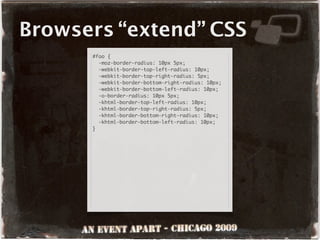
      #foo {
        border-radius: 10px 5px;
      }
Browsers “extend” CSS
      #foo {
        -moz-border-radius: 10px 5px;
        -webkit-border-top-left-radius: 10px;
        -webkit-border-top-right-radius: 5px;
        -webkit-border-bottom-right-radius: 10px;
        -webkit-border-bottom-left-radius: 10px;
        -o-border-radius: 10px 5px;
        -khtml-border-top-left-radius: 10px;
        -khtml-border-top-right-radius: 5px;
        -khtml-border-bottom-right-radius: 10px;
        -khtml-border-bottom-left-radius: 10px;
      }
Browsers “extend” CSS
      #foo {
        padding: 10px;
        width: 200px;
        width: 180px;
        height: 200px;
        height: 180px;
      }

      /* or */

      #foo {
        padding: 10px;
        width: 200px;
        height: 200px;
      }
      * html #foo {
        width: 180px;
        height: 180px;
      }
Can we play too?
First Experiment: 2005
     #content:before {
       -gfss-source: url(spiral.swf);
       -gfss-background-color: #000;
       -gfss-flash-version: 6;
       -gfss-quality: high;
       -gfss-flash-vars: "foo=bar&bar=foo";
       -gfss-width: 50;
       -gfss-height: 50;
       position: absolute;
       top: 0;
       left: 0;
     }
First Experiment: 2005
3 years later...
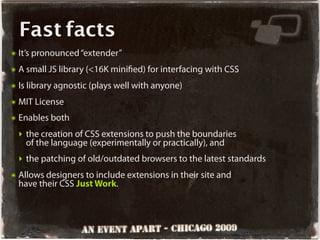
Fast facts
๏   It’s pronounced “extender”
๏   A small JS library (<16K mini ed) for interfacing with CSS
๏   Is library agnostic (plays well with anyone)
๏   MIT License
๏   Enables both
    ‣ the creation of CSS extensions to push the boundaries
      of the language (experimentally or practically), and
    ‣ the patching of old/outdated browsers to the latest standards
๏   Allows designers to include extensions in their site and
    have their CSS Just Work.
Fast facts
๏   It’s media aware (including @media)
๏   It can handle both linked and imported CSS (nesting too)
๏   It understands concepts like @font-face and @page
๏   It runs on DOM ready (undetectably in many cases)
๏   Its CSS parser functions much like a browser’s,
    paying attention to the two key concepts:
    ‣ Speci city
    ‣ Cascade
๏   It supports local storage (window.localStorage and IE’s UserData)
    for client-side caching
How does it work?


 eCSStender.register(
   { selector: 'h1' },
   '*',
   function( selector, properties, media, specificity ){
     // do something
   });
How does it work?


 eCSStender.register(
   { selector: 'h1' },
   '*',
   function( selector, properties, media, specificity ){
     // do something
   });


         extension registration
How does it work?


 eCSStender.register(
   { selector: 'h1' },
   '*',
   function( selector, properties, media, specificity ){
     // do something
   });


          de ne the extension
How does it work?


 eCSStender.register(
   { selector: 'h1' },
   '*',
   function( selector, properties, media, specificity ){
     // do something
   });


             property request
How does it work?


 eCSStender.register(
   { selector: 'h1' },
   '*',
   function( selector, properties, media, specificity ){
     // do something
   });


              callback function
In prose
๏   Search for a selector containing “h1”
๏   Collect every property set on it
๏   Send each selector, its properties, media type and speci city to my
    function so I can do something with it.

       eCSStender.register(
         { selector: 'h1' },
         '*',
         function( selector, properties, media, specificity ){
           // do something
         });
Do you want to
see something
     cool?
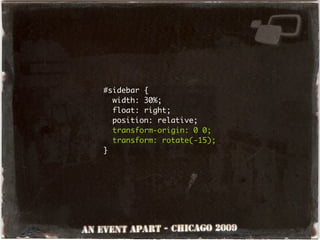
#sidebar {
  width: 30%;
  float: right;
  position: relative;
  transform-origin: 0 0;
  transform: rotate(-15);
}
Finding what
  you want
The definition
๏   Requires a lookup method
    ‣ selector
     - simple selector string:      { selector: 'h1' }

     - compound selector string:    { selector: 'h1, h2' }

     - regular expression:          { selector: /s*h1s*/ }

     - array of any of the above:   { selector: [ 'h1', /s*h1s*/ ] }

     - a selector function:
       {
           selector: function(){
             return ( this.match(/s*h1s*/) !== null );
           }
       }
The definition
๏   Requires a lookup method
    ‣ property
     - simple string:      { property: 'border-radius' }

     - array of strings:   { property: [ 'border-radius' ] }

    ‣ fragment             { fragment: 'radius' }
    ‣ prefix               { prefix: 'moz' }
The definition
๏   Can be
    ‣ media-restricted:
       {
           selector: 'h1',
           media: 'screen, projection'
       }

    ‣ ltered by property name or value:
       {
           property: 'transform',
           filter: {
             value: /rotate(-?d+?)/
           }
       }
The definition
๏   Can be
    ‣ ngerprinted:
       {
           fragment:    'radius',
           fingerprint: 'net.easy-designs.border-radius'
       }
Getting what
 you want
Properties, please.
๏   eCSStender tries to be smart about properties you want
    ‣ property-based lookups (property, fragment, pre x)
      always return the matching properties, allowing you to
      supply false as the second argument of register()
       eCSStender.register(
        {
           fragment:    'radius',
           fingerprint: 'net.easy-designs.border-radius'
        },
        false,
        function(){});
Properties, please.
๏   You can still specify what you want though
    ‣ Get every property on the matching element using “*”
       eCSStender.register(
        { selector: 'h1' },
        '*',
        function(){});

    ‣ or you can specify the properties you want using a string:
       eCSStender.register(                eCSStender.register(
        { selector: 'h1' },         or      { selector: 'h1' },
        'color',                            ['color','visibility'],
        function(){});                      function(){});
Doing something
with what you find
The callback
๏   When matches are found, your callback function is run
๏   eCSStender supplies your callback function with the following
    four arguments (in order)
    ‣ selector - the selector that was matched
    ‣ properties - a hash of the desired properties from a match
    ‣ medium - the medium in which the match was found
    ‣ speci city - a sum-total of the selector’s speci city
The callback
 eCSStender.register(
  { selector: 'h1' },
  '*',
  function( selector, properties, medium, specificity ){

    alert( 'my extension found ' + selector );

    if ( typeof properties['color'] != 'undefined' )
    {
      alert ( 'this h1 has a color!' );
    }

    alert( 'the medium is ' + medium );

    alert( 'it has a specificity of ' + specificity );

  });
Testing
Testing
 1-2-3
It’s wishful thinking...
๏   but what happens when browsers start doing things correctly?
๏   eCSStender helps you prepare by supporting robust testing
    for selector and property support: eCSStender.isSupported()
    ‣ test for property support*:
       eCSStender.isSupported( 'property',
                               'border-top-left-radius: 3px' );
It’s wishful thinking...
๏   but what happens when browsers start doing things correctly?
๏   eCSStender helps you prepare by supporting robust testing
    for selector and property support: eCSStender.isSupported()
    ‣ test for property support*:
       eCSStender.isSupported( 'property',
                               'border-top-left-radius: 3px' );


     * pay attention to how browsers store values    !
It’s wishful thinking...
๏   but what happens when browsers start doing things correctly?
๏   eCSStender helps you prepare by supporting robust testing
    for selector and property support: eCSStender.isSupported()
    ‣ test for selector support:
       var
       div = document.createElement('div'),
       p    = document.createElement('p'),
       p2   = p.cloneNode(true);
       div.appendChild( p ); div.appendChild( p2 );
       eCSStender.isSupported( 'selector', 'div p ~ p',
                               div, p2 );


                        html context    element that this
                                          should select
Where to test
๏   Testing can be useful in many places
    ‣ The test property of your extension de nition (true == run):
       eCSStender.register(
         { selector: /:empty/,
            test:     function(){
              var
              div = document.createElement('div'),
              p    = document.createElement('p');
              div.appendChild( p );
              return ( ! eCSStender.isSupported(
                'selector', 'div p:empty', div, p ) );
            }
         },
         ...
Where to test
๏   Testing can be useful in many places
    ‣ Within your callback function:
       eCSStender.register( ... function( ... ){ ...
           if ( ( eCSStender.isSupported( 'selector',
                     'p:nth-child(odd)', div, p ) &&
                  ! eCSStender.isSupported( 'selector',
                       'p:nth-child(2n+1)', div, p ) &&
                  selector.match(
                    /:nth-child(s*(?:even|odd)s*)/ ) != null )
                || eCSStender.isSupported( 'selector',
                      'p:nth-child(2n+1)', div, p ) ){
             // support is incomplete, but fixable
           } else {
             // we need to compensate for no support
           }
         });
Helpers
Working with styles
๏   Basic premise in eCSStender: applying inline style sucks
    and should be avoided because it
    ‣ has the greatest speci city
    ‣ runs roughshod over the cascade
Working with styles
๏   eCSStender encourages other methods of style application:
    ‣ eCSStender.embedCSS()
     - takes 2 arguments: the styles to apply and (optionally) the
       medium to which to apply them
       var styles = 'h1 { color: red; } h2 { color: pink; }';
       eCSStender.embedCSS( styles );

                                   or
       var styles = 'h1 { color: red; } h2 { color: pink; }';
       eCSStender.embedCSS( styles, 'screen' );
Working with styles
๏   eCSStender encourages other methods of style application:
    ‣ eCSStender.newStyleElement()
     - allows for the creation of your own embedded stylesheet
     - takes two optional string arguments: the medium and id to apply
     - returns a reference to the style element
    ‣ eCSStender.addRules()
     - takes two arguments: the style element and the styles to add
       var myCSS = eCSStender.newStyleElement(),
       styles = 'h1 { color: red; } h2 { color: pink; }';
       eCSStender.addRules( myCSS, styles );
Working with styles
๏   Sometimes, however, you can’t avoid applying inline style,
    so eCSStender tries to make it better
๏   eCSStender.applyWeightedStyle() takes 3 arguments:

    ‣ a reference to the element
    ‣ an JSON object containing the properties to apply
    ‣ the speci city with which to apply them
    ‣ keeps track of the speci city with which each property is
      applied in order to facilitate smarter inline style application
Working with styles
๏   Sometimes, however, you can’t avoid applying inline style,
    so eCSStender tries to make it better
       eCSStender.applyWeightedStyle( el,
         { 'visibility': 'hidden' }, 10 );        // el is hidden

       eCSStender.applyWeightedStyle( el,
         { 'visibility': 'visible' }, 1 );        // el is still hidden

       eCSStender.applyWeightedStyle( el,
         { 'visibility': 'visible' }, 10 ); // el is visible

       eCSStender.applyWeightedStyle( el,
         { 'visibility': 'hidden' }, 100 ); // el is hidden again
Fonts and pages
๏   eCSStender exposes various “@“ rules, including
    ‣ @font-face as an object in the eCSStender.fonts array

     CSS:
       @font-face {
         font-family: 'Comfortaa';
         font-weight: normal;
         src: url('/fonts/Comfortaa_Regular');
       }

     eCSStender.fonts:

       [ { 'font-family': 'Comfortaa',
           'font-weight': 'normal',
           src:           "url('/fonts/Comfortaa_Regular')" } ]
Fonts and pages
๏   eCSStender exposes various “@“ rules, including
    ‣ @page as a property of the eCSStender.pages object

     CSS:
       @page {
         margin: 3cm;
       }
       @page :right {
         margin-left: 5cm;
       }

     eCSStender.pages:

       {
           all: { margin: '3cm' },
           right: { 'margin-left': '5cm' }
       }
Performance
๏   eCSStender tries to be smart about which stylesheets it
    pays attention to and which it doesn’t
    ‣ foreign stylesheets are always ignored
    ‣ you can tell eCSStender to ignore speci c on-site stylesheets
       eCSStender.ignore('foo.css');
       eCSStender.ignore(['foo.css', 'bar.css']);

๏   eCSStender will attempt to cache extensions and the rules
    they apply to automatically, but you can disable that
       eCSStender.disableCache();
Advanced eCSStender
๏   Use eCSStender.lookup() to gain introspection into the stylesheets
    from your callback function
    ‣ lookup by selector, property, fragment or pre x
    ‣ restrict results by medium and/or speci city
       matches = eCSStender.lookup(
         {
            selector:    'h1',
            specificity: 0     // max specificity
         },
         '*'
       ); // matches.length === 0
Advanced eCSStender
๏   Use eCSStender.lookup() to gain introspection into the stylesheets
    from your callback function
    ‣ lookup by selector, property, fragment or pre x
    ‣ restrict results by medium and/or speci city
       matches = eCSStender.lookup(
          {
             selector:    'h1',
             specificity: { min: 0, max: 2 }
          },
          '*'
       );
Advanced eCSStender
๏   Use eCSStender.lookup() to gain introspection into the stylesheets
    from your callback function
    ‣ lookup by selector, property, fragment or pre x
    ‣ restrict results by medium and/or speci city
    ‣ returns an array of style objects:
       [ { medium:          'all'
           selector:        'h1',
           specificity:     1
           properties:      { color: 'red' }
         }, ... ]
Advanced eCSStender
๏   Create new eCSStender methods
       eCSStender.addMethod('myMethod',function(){
         alert('hello');
       });
       eCSStender.methods.myMethod();
       eCSStender.methods['myMethod']();

๏   Supply custom functions to be run when eCSStender nishes
       eCSStender.onComplete(function({
         alert('eCSStender is finished processing!');
       });
Let’s make an
  extension
Solving CSS Problems with eCSStender
                     by Aaron Gustafson

                     Slides available at
          http://slideshare.net/AaronGustafson

           This presentation is licensed under
                   Creative Commons
      Attribution-Noncommercial-Share Alike 3.0

                        eCSStender
                   http://eCSStender.org

                    flickr Photo Credits
                       “Photo plate 5” by SophieG*
  “World Map 1689 — No. 1” by Caveman 92223 — Great to be Home
                “Calendar Card - January” by Joe Lanman
        “Wheeled School Bus - Right Front” by Bill Ward's Brickpile
                     “Röck!! on the right” by Adactio
http:// ickr.com/photos/aarongustafson/galleries/72157622372250877/

Solving CSS Problems With eCSStender - An Event Apart - Chicago 2009

  • 1.
    Aaron Gustafson presents Solving CSS Problems with eCSStender
  • 2.
    Where in theworld is CSS3?
  • 3.
    Progress elements attributes 100 75 50 25 0 HTML 1
  • 4.
    Progress elements attributes 100 75 50 25 0 HTML 1 HTML 2
  • 5.
    Progress elements attributes 100 75 50 25 0 HTML 1 HTML 2 HTML 3
  • 6.
    Progress elements attributes 100 75 50 25 0 HTML 1 HTML 2 HTML 3 HTML 3.2
  • 7.
    Progress elements attributes 100 75 50 25 0 HTML 1 HTML 2 HTML 3 HTML 3.2 HTML 4 HTML 4.01 XHTML 1
  • 8.
    Progress elements attributes 100 75 50 25 0 HTML 1 HTML 2 HTML 3 HTML 3.2 HTML 4 HTML 5 HTML 4.01 XHTML 1
  • 9.
    Progress? elements attributes 100 HTML 5 HTML 3 75 HTML 4 HTML 4.01 XHTML 1 50 HTML 3.2 HTML 2 HTML 1 25 0 1995 2000 2005 Future
  • 10.
    CSS 2.1 becamea candidate recommendation last month
  • 11.
    Some modules ofCSS3 have been in development since 1999
  • 12.
    Where does CSS come from?
  • 13.
  • 14.
  • 15.
    Officially? Semi-officially ® ® ® -moz- -webkit- -ms- -o-
  • 16.
    Browsers “extend” CSS opacity border-radius column-count
  • 17.
    Browsers “extend” CSS -moz-opacity -moz-border-radius -webkit-border-radius -khtml-border-radius -moz-column-count
  • 18.
    Browsers “extend” CSS #foo { border-radius: 3px; }
  • 19.
    Browsers “extend” CSS #foo { -moz-border-radius: 3px; -webkit-border-radius: 3px; -o-border-radius: 3px; -khtml-border-radius: 3px; }
  • 20.
    Browsers “extend” CSS #foo { border-radius: 10px 5px; }
  • 21.
    Browsers “extend” CSS #foo { -moz-border-radius: 10px 5px; -webkit-border-top-left-radius: 10px; -webkit-border-top-right-radius: 5px; -webkit-border-bottom-right-radius: 10px; -webkit-border-bottom-left-radius: 10px; -o-border-radius: 10px 5px; -khtml-border-top-left-radius: 10px; -khtml-border-top-right-radius: 5px; -khtml-border-bottom-right-radius: 10px; -khtml-border-bottom-left-radius: 10px; }
  • 22.
    Browsers “extend” CSS #foo { padding: 10px; width: 200px; width: 180px; height: 200px; height: 180px; } /* or */ #foo { padding: 10px; width: 200px; height: 200px; } * html #foo { width: 180px; height: 180px; }
  • 23.
  • 24.
    First Experiment: 2005 #content:before { -gfss-source: url(spiral.swf); -gfss-background-color: #000; -gfss-flash-version: 6; -gfss-quality: high; -gfss-flash-vars: "foo=bar&bar=foo"; -gfss-width: 50; -gfss-height: 50; position: absolute; top: 0; left: 0; }
  • 25.
  • 26.
  • 28.
    Fast facts ๏ It’s pronounced “extender” ๏ A small JS library (<16K mini ed) for interfacing with CSS ๏ Is library agnostic (plays well with anyone) ๏ MIT License ๏ Enables both ‣ the creation of CSS extensions to push the boundaries of the language (experimentally or practically), and ‣ the patching of old/outdated browsers to the latest standards ๏ Allows designers to include extensions in their site and have their CSS Just Work.
  • 29.
    Fast facts ๏ It’s media aware (including @media) ๏ It can handle both linked and imported CSS (nesting too) ๏ It understands concepts like @font-face and @page ๏ It runs on DOM ready (undetectably in many cases) ๏ Its CSS parser functions much like a browser’s, paying attention to the two key concepts: ‣ Speci city ‣ Cascade ๏ It supports local storage (window.localStorage and IE’s UserData) for client-side caching
  • 30.
    How does itwork? eCSStender.register( { selector: 'h1' }, '*', function( selector, properties, media, specificity ){ // do something });
  • 31.
    How does itwork? eCSStender.register( { selector: 'h1' }, '*', function( selector, properties, media, specificity ){ // do something }); extension registration
  • 32.
    How does itwork? eCSStender.register( { selector: 'h1' }, '*', function( selector, properties, media, specificity ){ // do something }); de ne the extension
  • 33.
    How does itwork? eCSStender.register( { selector: 'h1' }, '*', function( selector, properties, media, specificity ){ // do something }); property request
  • 34.
    How does itwork? eCSStender.register( { selector: 'h1' }, '*', function( selector, properties, media, specificity ){ // do something }); callback function
  • 35.
    In prose ๏ Search for a selector containing “h1” ๏ Collect every property set on it ๏ Send each selector, its properties, media type and speci city to my function so I can do something with it. eCSStender.register( { selector: 'h1' }, '*', function( selector, properties, media, specificity ){ // do something });
  • 36.
    Do you wantto see something cool?
  • 37.
    #sidebar { width: 30%; float: right; position: relative; transform-origin: 0 0; transform: rotate(-15); }
  • 41.
    Finding what you want
  • 42.
    The definition ๏ Requires a lookup method ‣ selector - simple selector string: { selector: 'h1' } - compound selector string: { selector: 'h1, h2' } - regular expression: { selector: /s*h1s*/ } - array of any of the above: { selector: [ 'h1', /s*h1s*/ ] } - a selector function: { selector: function(){ return ( this.match(/s*h1s*/) !== null ); } }
  • 43.
    The definition ๏ Requires a lookup method ‣ property - simple string: { property: 'border-radius' } - array of strings: { property: [ 'border-radius' ] } ‣ fragment { fragment: 'radius' } ‣ prefix { prefix: 'moz' }
  • 44.
    The definition ๏ Can be ‣ media-restricted: { selector: 'h1', media: 'screen, projection' } ‣ ltered by property name or value: { property: 'transform', filter: { value: /rotate(-?d+?)/ } }
  • 45.
    The definition ๏ Can be ‣ ngerprinted: { fragment: 'radius', fingerprint: 'net.easy-designs.border-radius' }
  • 46.
  • 47.
    Properties, please. ๏ eCSStender tries to be smart about properties you want ‣ property-based lookups (property, fragment, pre x) always return the matching properties, allowing you to supply false as the second argument of register() eCSStender.register( { fragment: 'radius', fingerprint: 'net.easy-designs.border-radius' }, false, function(){});
  • 48.
    Properties, please. ๏ You can still specify what you want though ‣ Get every property on the matching element using “*” eCSStender.register( { selector: 'h1' }, '*', function(){}); ‣ or you can specify the properties you want using a string: eCSStender.register( eCSStender.register( { selector: 'h1' }, or { selector: 'h1' }, 'color', ['color','visibility'], function(){}); function(){});
  • 49.
  • 50.
    The callback ๏ When matches are found, your callback function is run ๏ eCSStender supplies your callback function with the following four arguments (in order) ‣ selector - the selector that was matched ‣ properties - a hash of the desired properties from a match ‣ medium - the medium in which the match was found ‣ speci city - a sum-total of the selector’s speci city
  • 51.
    The callback eCSStender.register( { selector: 'h1' }, '*', function( selector, properties, medium, specificity ){ alert( 'my extension found ' + selector ); if ( typeof properties['color'] != 'undefined' ) { alert ( 'this h1 has a color!' ); } alert( 'the medium is ' + medium ); alert( 'it has a specificity of ' + specificity ); });
  • 52.
  • 53.
    It’s wishful thinking... ๏ but what happens when browsers start doing things correctly? ๏ eCSStender helps you prepare by supporting robust testing for selector and property support: eCSStender.isSupported() ‣ test for property support*: eCSStender.isSupported( 'property', 'border-top-left-radius: 3px' );
  • 54.
    It’s wishful thinking... ๏ but what happens when browsers start doing things correctly? ๏ eCSStender helps you prepare by supporting robust testing for selector and property support: eCSStender.isSupported() ‣ test for property support*: eCSStender.isSupported( 'property', 'border-top-left-radius: 3px' ); * pay attention to how browsers store values !
  • 55.
    It’s wishful thinking... ๏ but what happens when browsers start doing things correctly? ๏ eCSStender helps you prepare by supporting robust testing for selector and property support: eCSStender.isSupported() ‣ test for selector support: var div = document.createElement('div'), p = document.createElement('p'), p2 = p.cloneNode(true); div.appendChild( p ); div.appendChild( p2 ); eCSStender.isSupported( 'selector', 'div p ~ p', div, p2 ); html context element that this should select
  • 56.
    Where to test ๏ Testing can be useful in many places ‣ The test property of your extension de nition (true == run): eCSStender.register( { selector: /:empty/, test: function(){ var div = document.createElement('div'), p = document.createElement('p'); div.appendChild( p ); return ( ! eCSStender.isSupported( 'selector', 'div p:empty', div, p ) ); } }, ...
  • 57.
    Where to test ๏ Testing can be useful in many places ‣ Within your callback function: eCSStender.register( ... function( ... ){ ... if ( ( eCSStender.isSupported( 'selector', 'p:nth-child(odd)', div, p ) && ! eCSStender.isSupported( 'selector', 'p:nth-child(2n+1)', div, p ) && selector.match( /:nth-child(s*(?:even|odd)s*)/ ) != null ) || eCSStender.isSupported( 'selector', 'p:nth-child(2n+1)', div, p ) ){ // support is incomplete, but fixable } else { // we need to compensate for no support } });
  • 58.
  • 59.
    Working with styles ๏ Basic premise in eCSStender: applying inline style sucks and should be avoided because it ‣ has the greatest speci city ‣ runs roughshod over the cascade
  • 60.
    Working with styles ๏ eCSStender encourages other methods of style application: ‣ eCSStender.embedCSS() - takes 2 arguments: the styles to apply and (optionally) the medium to which to apply them var styles = 'h1 { color: red; } h2 { color: pink; }'; eCSStender.embedCSS( styles ); or var styles = 'h1 { color: red; } h2 { color: pink; }'; eCSStender.embedCSS( styles, 'screen' );
  • 61.
    Working with styles ๏ eCSStender encourages other methods of style application: ‣ eCSStender.newStyleElement() - allows for the creation of your own embedded stylesheet - takes two optional string arguments: the medium and id to apply - returns a reference to the style element ‣ eCSStender.addRules() - takes two arguments: the style element and the styles to add var myCSS = eCSStender.newStyleElement(), styles = 'h1 { color: red; } h2 { color: pink; }'; eCSStender.addRules( myCSS, styles );
  • 62.
    Working with styles ๏ Sometimes, however, you can’t avoid applying inline style, so eCSStender tries to make it better ๏ eCSStender.applyWeightedStyle() takes 3 arguments: ‣ a reference to the element ‣ an JSON object containing the properties to apply ‣ the speci city with which to apply them ‣ keeps track of the speci city with which each property is applied in order to facilitate smarter inline style application
  • 63.
    Working with styles ๏ Sometimes, however, you can’t avoid applying inline style, so eCSStender tries to make it better eCSStender.applyWeightedStyle( el, { 'visibility': 'hidden' }, 10 ); // el is hidden eCSStender.applyWeightedStyle( el, { 'visibility': 'visible' }, 1 ); // el is still hidden eCSStender.applyWeightedStyle( el, { 'visibility': 'visible' }, 10 ); // el is visible eCSStender.applyWeightedStyle( el, { 'visibility': 'hidden' }, 100 ); // el is hidden again
  • 64.
    Fonts and pages ๏ eCSStender exposes various “@“ rules, including ‣ @font-face as an object in the eCSStender.fonts array CSS: @font-face { font-family: 'Comfortaa'; font-weight: normal; src: url('/fonts/Comfortaa_Regular'); } eCSStender.fonts: [ { 'font-family': 'Comfortaa', 'font-weight': 'normal', src: "url('/fonts/Comfortaa_Regular')" } ]
  • 65.
    Fonts and pages ๏ eCSStender exposes various “@“ rules, including ‣ @page as a property of the eCSStender.pages object CSS: @page { margin: 3cm; } @page :right { margin-left: 5cm; } eCSStender.pages: { all: { margin: '3cm' }, right: { 'margin-left': '5cm' } }
  • 66.
    Performance ๏ eCSStender tries to be smart about which stylesheets it pays attention to and which it doesn’t ‣ foreign stylesheets are always ignored ‣ you can tell eCSStender to ignore speci c on-site stylesheets eCSStender.ignore('foo.css'); eCSStender.ignore(['foo.css', 'bar.css']); ๏ eCSStender will attempt to cache extensions and the rules they apply to automatically, but you can disable that eCSStender.disableCache();
  • 67.
    Advanced eCSStender ๏ Use eCSStender.lookup() to gain introspection into the stylesheets from your callback function ‣ lookup by selector, property, fragment or pre x ‣ restrict results by medium and/or speci city matches = eCSStender.lookup( { selector: 'h1', specificity: 0 // max specificity }, '*' ); // matches.length === 0
  • 68.
    Advanced eCSStender ๏ Use eCSStender.lookup() to gain introspection into the stylesheets from your callback function ‣ lookup by selector, property, fragment or pre x ‣ restrict results by medium and/or speci city matches = eCSStender.lookup( { selector: 'h1', specificity: { min: 0, max: 2 } }, '*' );
  • 69.
    Advanced eCSStender ๏ Use eCSStender.lookup() to gain introspection into the stylesheets from your callback function ‣ lookup by selector, property, fragment or pre x ‣ restrict results by medium and/or speci city ‣ returns an array of style objects: [ { medium: 'all' selector: 'h1', specificity: 1 properties: { color: 'red' } }, ... ]
  • 70.
    Advanced eCSStender ๏ Create new eCSStender methods eCSStender.addMethod('myMethod',function(){ alert('hello'); }); eCSStender.methods.myMethod(); eCSStender.methods['myMethod'](); ๏ Supply custom functions to be run when eCSStender nishes eCSStender.onComplete(function({ alert('eCSStender is finished processing!'); });
  • 71.
  • 72.
    Solving CSS Problemswith eCSStender by Aaron Gustafson Slides available at http://slideshare.net/AaronGustafson This presentation is licensed under Creative Commons Attribution-Noncommercial-Share Alike 3.0 eCSStender http://eCSStender.org flickr Photo Credits “Photo plate 5” by SophieG* “World Map 1689 — No. 1” by Caveman 92223 — Great to be Home “Calendar Card - January” by Joe Lanman “Wheeled School Bus - Right Front” by Bill Ward's Brickpile “Röck!! on the right” by Adactio http:// ickr.com/photos/aarongustafson/galleries/72157622372250877/