Chef for OpenStack
Deployment Workshop
May 14, 2014
!
Justin Shepherd
Matt Ray
Agenda
• Background
• Instructions: http://bit.ly/ATLChef
• Deep-dive walkthrough
Introductions
• Justin Shepherd
• Rackspace
• Principal Architect
• justin.shepherd@rackspace.com
• GitHub: galstrom21
• IRC: galstrom
• Matt Ray
• Chef
• Director of Partner Integration
• matt@getchef.com
• GitHub: mattray
• IRC: mattray
• Twitter: mattray
Overview & Current Status
Chef for OpenStack: Project
• Developer & Operator Community around the automated
deployment and management of OpenStack
• Reduce fragmentation and increase collaboration
• Deploying OpenStack is not "Secret Sauce"
• Community Project, not a 'Product'
• Apache 2 License
Community
• #openstack-chef on irc.freenode.net
• groups.google.com/group/opscode-chef-openstack
• @chefopenstack
• Weekly Status Hangouts (Monday 11am EST)
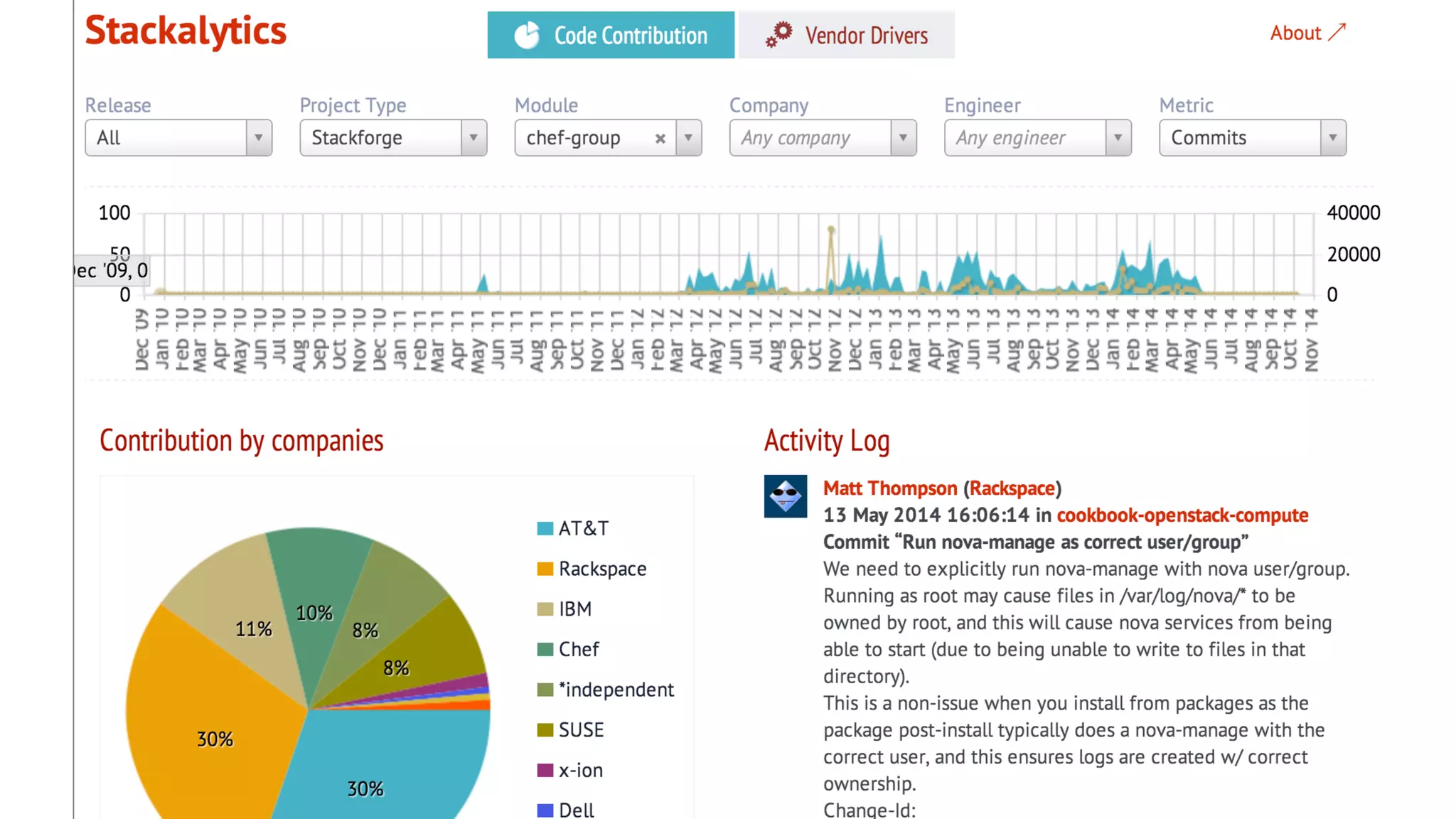
• Stackalytics (stackforge->chef-group)
Who's Involved?
• AT&T
• Blue Box
• Dell
• DreamHost
• Gap
• HP
• HubSpot
• IBM
• Korea Telecom
• Opscode
• Rackspace
• SUSE
• and many more
Chef Requirements
• Chef 11
• Ruby 1.9.x
• Foodcritic, ChefSpec, Rubocop for
testing
• attribute-driven by Environments
• platform logic in attributes
• currently packages-only installation
StackForge: Cookbooks
• "Official" OpenStack StackForge repositories
•github.com/stackforge/cookbook-openstack-*
•gated by review.openstack.org
• OpenStack services for Grizzly, Havana and Icehouse cookbooks
•block-storage, common, compute, dashboard, identity, image, telemetry,
network, object-storage, orchestration, test-integration
• Operational support cookbooks
•ceph, ops-database, ops-messaging
StackForge: Deployment
• Chef repository for deploying Grizzly, Havana or Icehouse
•example Environments and Roles
•example "All-in-One" Vagrant deployments
•github.com/stackforge/openstack-chef-repo
• Gated by review.openstack.org
•More single and multi-node testing coming
Reference Implementation
• Deployment examples in documentation
•All-in-One Compute
•Single Controller + N Compute
•more coming
• Will provide example HA configurations
• Operations outside of scope of core repository
•logging, monitoring, provisioning
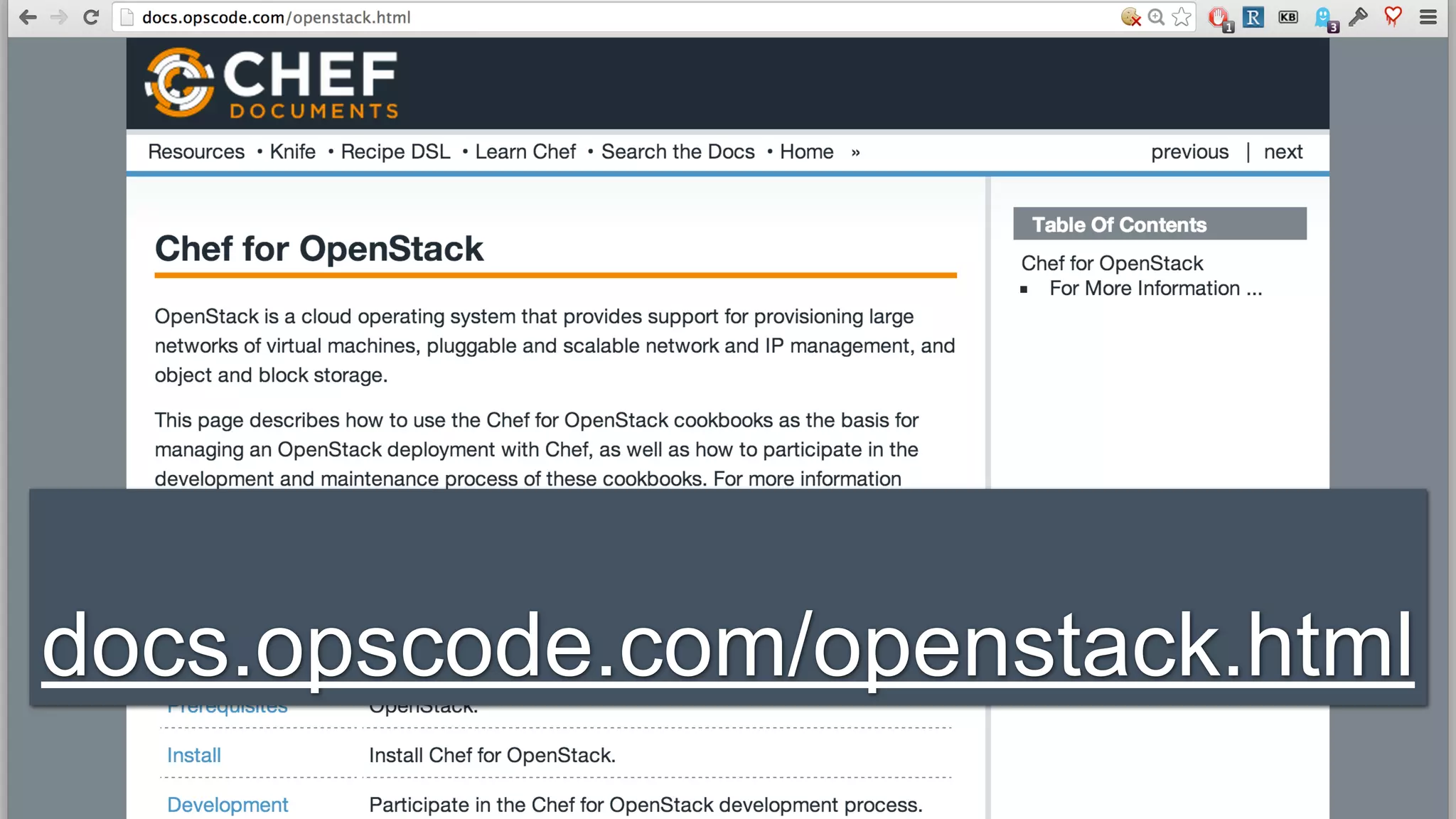
docs.opscode.com/openstack.html
Documentation
• docs.opscode.com/openstack.html
•Architecture
•Deployment Prerequisites
•Installation
•Development
•Cookbooks and Repositories
•Example Deployments
• github.com/opscode/chef-docs
•Creative Commons, no CLA required
Example Deployments
• Vagrant "All-in-One" for development/testing
•nova-network or Neutron
•Ubuntu 12.04 or CentOS 6.5
• Developer lab deployment "1+N"
•Single controller, N compute boxes
•5 boxes, consumer-grade hardware
StackForge: Grizzly Status
• branch ‘stable/grizzly’
• Operating Systems: Ubuntu 12.04, SLES 11 SP2
• Databases: MySQL, SQLite (testing)
• Messaging: RabbitMQ
• Compute: KVM, LXC, Qemu
• Network: Nova + Quantum (Open vSwitch)
• Block Storage: LVM
• Object Storage: Swift
• Dashboard: Apache or Nginx
StackForge: Havana Status
• branch ‘stable/havana’
• Operating Systems: RHEL 6.x, Ubuntu 12.04, SLES 11
SP2
• Databases: DB2, MySQL, Postgres, SQLite (testing)
• Messaging: RabbitMQ, Qpid
• Compute: ESX, Hyper-V, KVM, LXC, Qemu
• Network: Nova + Neutron (Open vSwitch, Linux bridge)
• Block Storage: Ceph, EMC, IBM, LVM, NetApp
• Object Storage: Swift
• Dashboard: Apache or Nginx
StackForge: Icehouse Roadmap
• ‘master' branch currently on 'Icehouse'
•Ceph
•Trove
•Sahara
•Heat enhancements
•ml2 linuxbridge L2/openvswitch L3 networking
• Juno branch (J3, August)
StackForge: Potential Roadmap
• Operating Systems: Debian
• Compute: Bare metal, Docker, Xen
• Messaging: ZeroMQ
• Network: NSX, OpenDaylight
• Block Storage: NetApp
• Object Storage: Ceph
• Source builds via Omnibus
StackForge: Infra Roadmap
• ChefDK
• Test Kitchen and ServerSpec
• Spiceweasel/Chef Metal reference
deployments
Chef Community Summit
• Developer/Community unconference
• October 2 & 3 in Seattle, WA
knife openstack
Available openstack subcommands: (for details, knife
SUB-COMMAND --help)!
!
** OPENSTACK COMMANDS **!
knife openstack flavor list (options)!
knife openstack group list (options)!
knife openstack image list (options)!
knife openstack network list (options)!
knife openstack server create (options)!
knife openstack server delete SERVER [SERVER] (options)!
knife openstack server list (options)
$ knife openstack
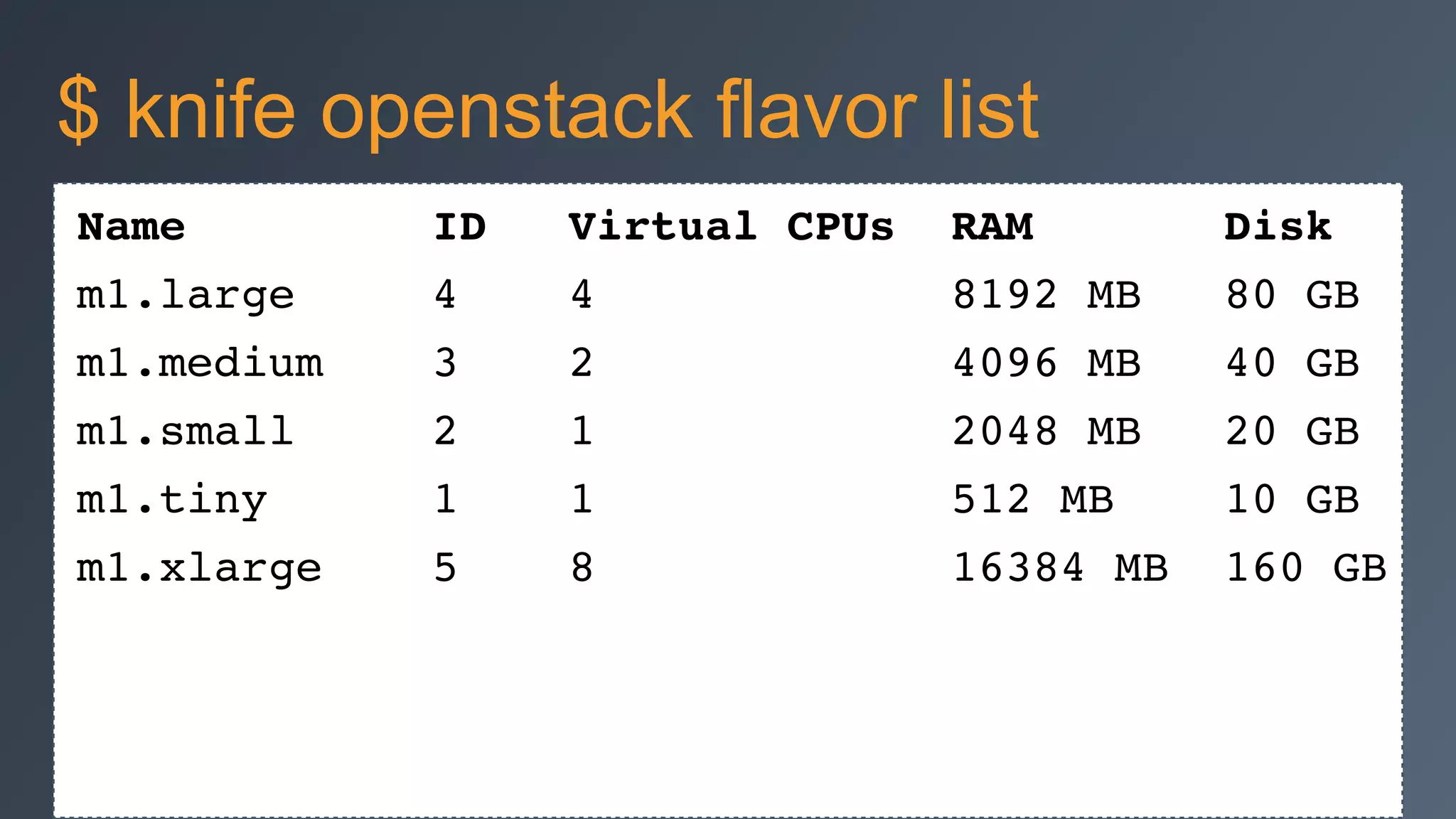
Name ID Virtual CPUs RAM Disk!
m1.large 4 4 8192 MB 80 GB!
m1.medium 3 2 4096 MB 40 GB!
m1.small 2 1 2048 MB 20 GB!
m1.tiny 1 1 512 MB 10 GB!
m1.xlarge 5 8 16384 MB 160 GB
$ knife openstack flavor list
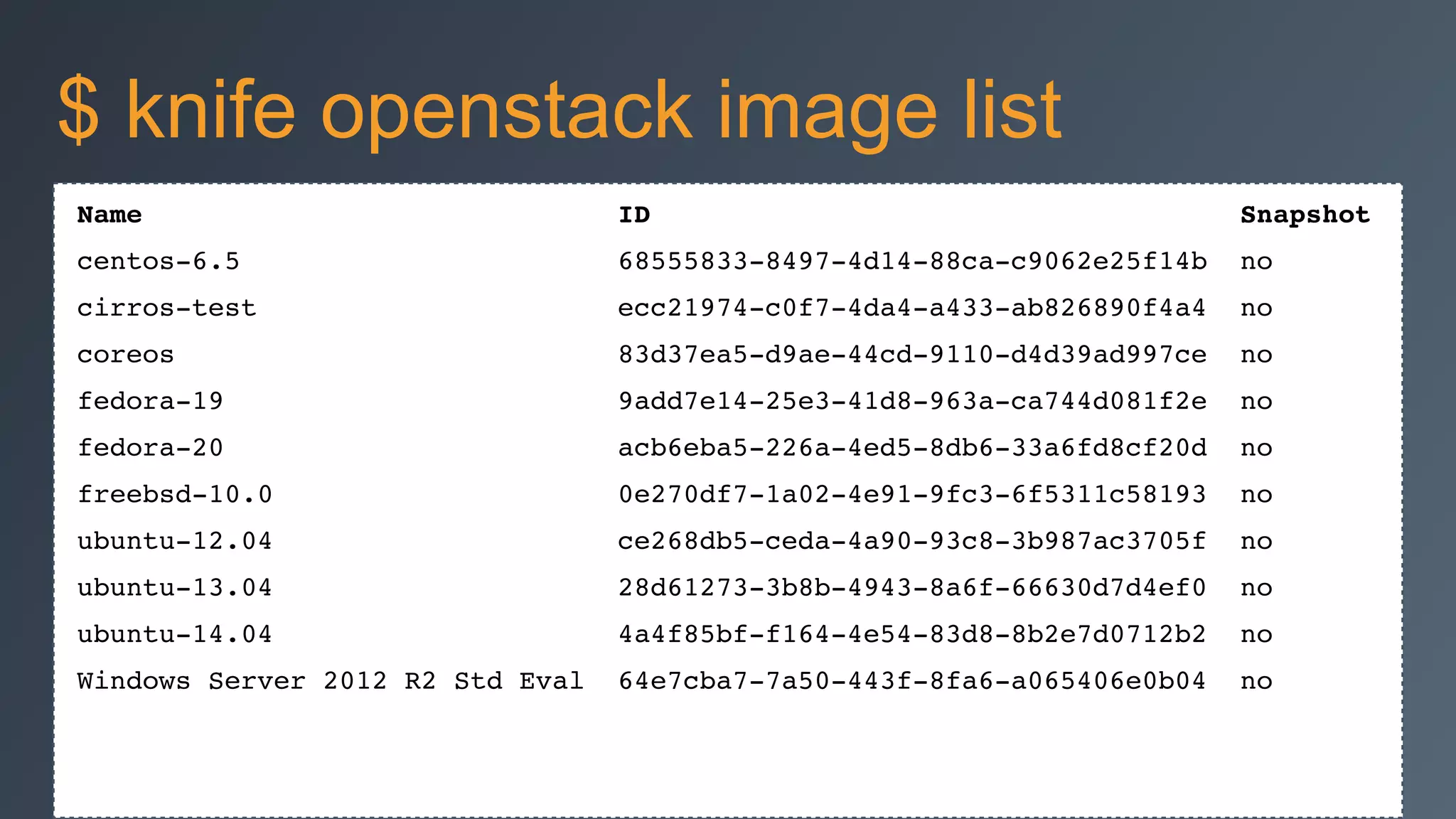
Name ID Snapshot!
centos-6.5 68555833-8497-4d14-88ca-c9062e25f14b no!
cirros-test ecc21974-c0f7-4da4-a433-ab826890f4a4 no!
coreos 83d37ea5-d9ae-44cd-9110-d4d39ad997ce no!
fedora-19 9add7e14-25e3-41d8-963a-ca744d081f2e no!
fedora-20 acb6eba5-226a-4ed5-8db6-33a6fd8cf20d no!
freebsd-10.0 0e270df7-1a02-4e91-9fc3-6f5311c58193 no!
ubuntu-12.04 ce268db5-ceda-4a90-93c8-3b987ac3705f no!
ubuntu-13.04 28d61273-3b8b-4943-8a6f-66630d7d4ef0 no!
ubuntu-14.04 4a4f85bf-f164-4e54-83d8-8b2e7d0712b2 no!
Windows Server 2012 R2 Std Eval 64e7cba7-7a50-443f-8fa6-a065406e0b04 no
$ knife openstack image list
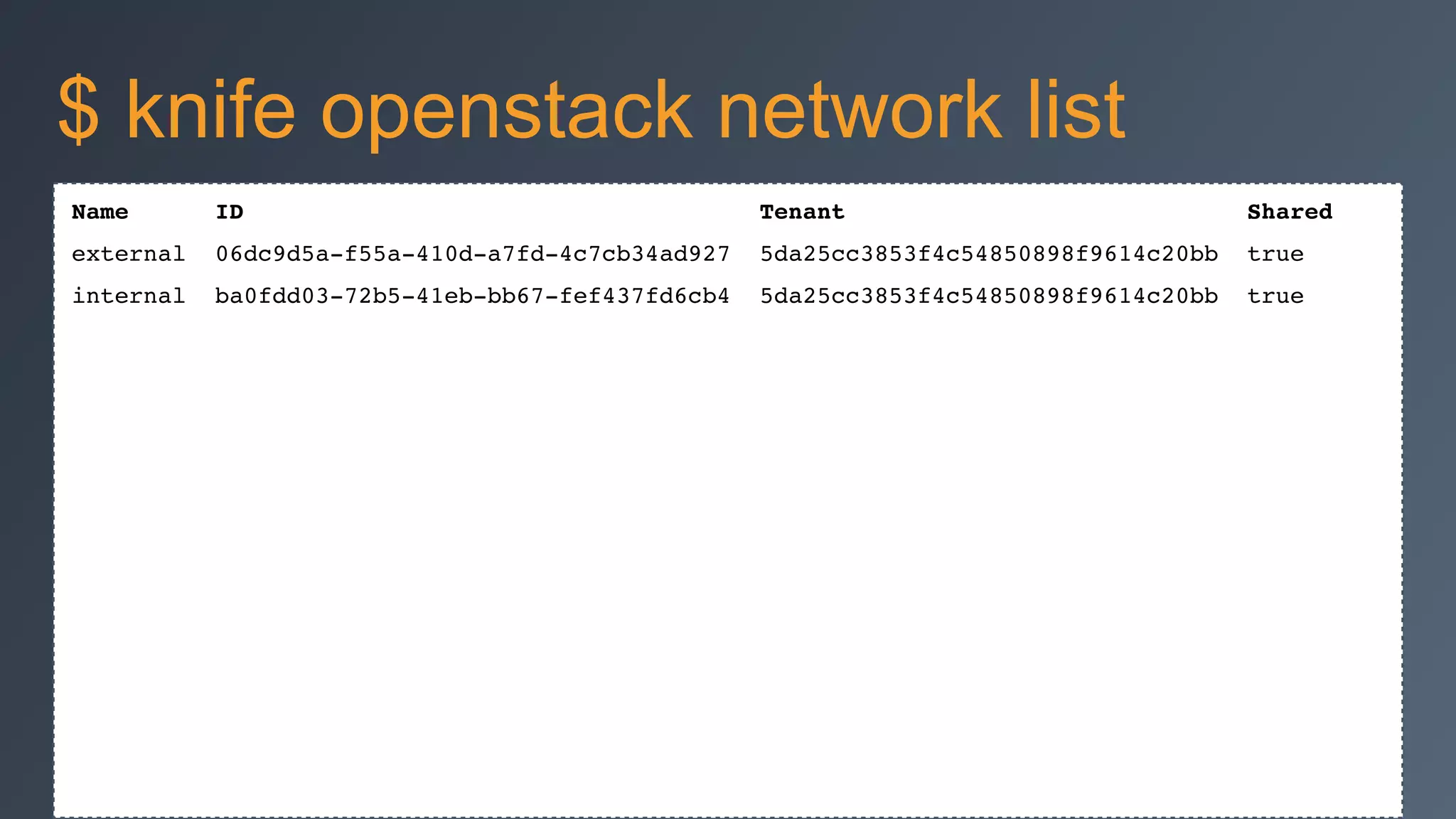
Name ID Tenant Shared!
external 06dc9d5a-f55a-410d-a7fd-4c7cb34ad927 5da25cc3853f4c54850898f9614c20bb true!
internal ba0fdd03-72b5-41eb-bb67-fef437fd6cb4 5da25cc3853f4c54850898f9614c20bb true!
$ knife openstack network list
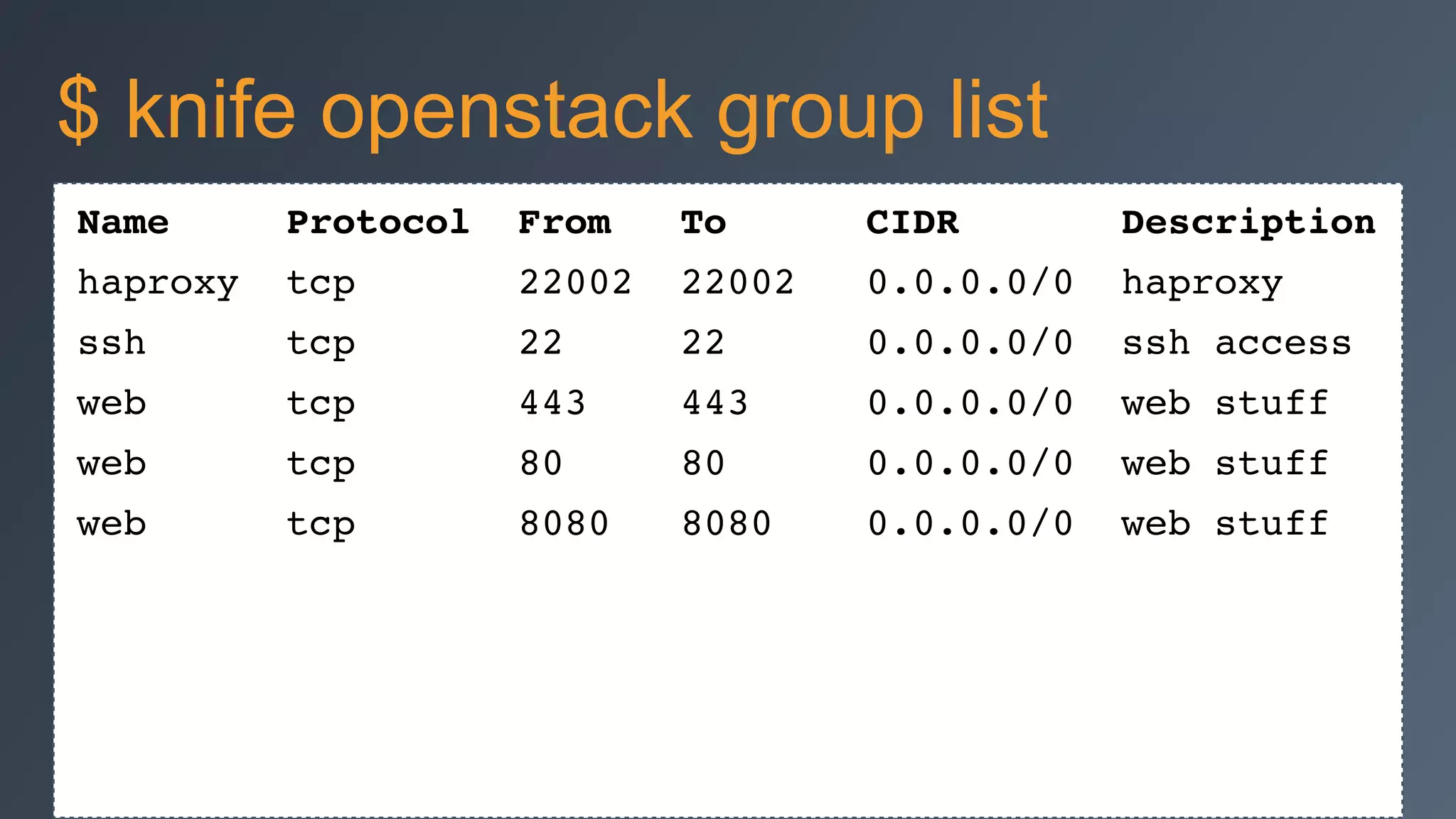
Name Protocol From To CIDR Description!
haproxy tcp 22002 22002 0.0.0.0/0 haproxy!
ssh tcp 22 22 0.0.0.0/0 ssh access!
web tcp 443 443 0.0.0.0/0 web stuff!
web tcp 80 80 0.0.0.0/0 web stuff!
web tcp 8080 8080 0.0.0.0/0 web stuff
$ knife openstack group list
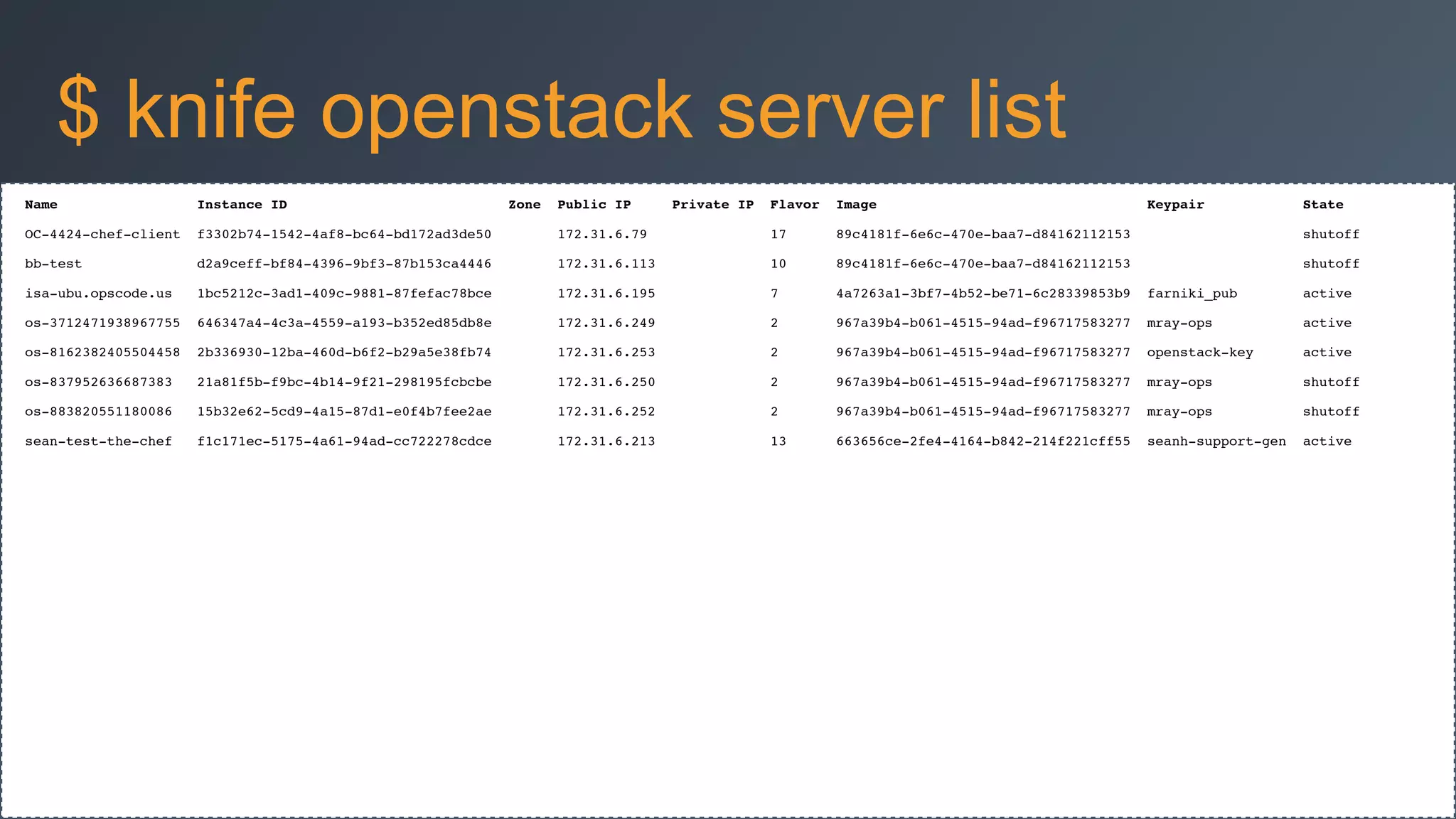
Name Instance ID Zone Public IP Private IP Flavor Image Keypair State!
OC-4424-chef-client f3302b74-1542-4af8-bc64-bd172ad3de50 172.31.6.79 17 89c4181f-6e6c-470e-baa7-d84162112153 shutoff!
bb-test d2a9ceff-bf84-4396-9bf3-87b153ca4446 172.31.6.113 10 89c4181f-6e6c-470e-baa7-d84162112153 shutoff!
isa-ubu.opscode.us 1bc5212c-3ad1-409c-9881-87fefac78bce 172.31.6.195 7 4a7263a1-3bf7-4b52-be71-6c28339853b9 farniki_pub active!
os-3712471938967755 646347a4-4c3a-4559-a193-b352ed85db8e 172.31.6.249 2 967a39b4-b061-4515-94ad-f96717583277 mray-ops active!
os-8162382405504458 2b336930-12ba-460d-b6f2-b29a5e38fb74 172.31.6.253 2 967a39b4-b061-4515-94ad-f96717583277 openstack-key active!
os-837952636687383 21a81f5b-f9bc-4b14-9f21-298195fcbcbe 172.31.6.250 2 967a39b4-b061-4515-94ad-f96717583277 mray-ops shutoff!
os-883820551180086 15b32e62-5cd9-4a15-87d1-e0f4b7fee2ae 172.31.6.252 2 967a39b4-b061-4515-94ad-f96717583277 mray-ops shutoff!
sean-test-the-chef f1c171ec-5175-4a61-94ad-cc722278cdce 172.31.6.213 13 663656ce-2fe4-4164-b842-214f221cff55 seanh-support-gen active
$ knife openstack server list
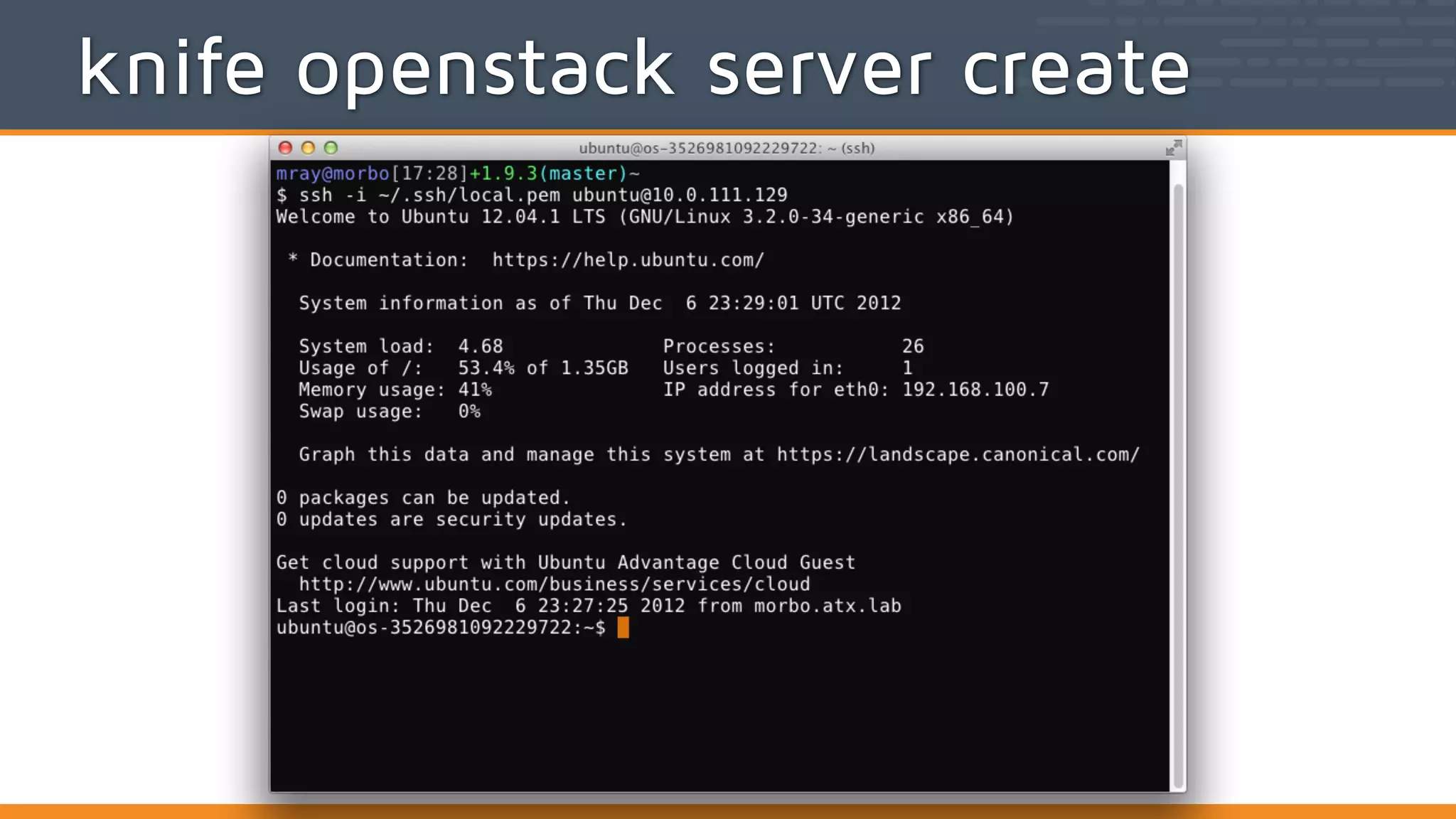
knife openstack server create (options)!
-Z ZONE_NAME, The availability zone for this server!
--availability-zone!
--bootstrap-network NAME Specify network for bootstrapping. Default is 'public'.!
--bootstrap-protocol protocol!
Protocol to bootstrap Windows servers. options: winrm!
--bootstrap-proxy PROXY_URL The proxy server for the node being bootstrapped!
--bootstrap-version VERSION The version of Chef to install!
--ca-trust-file CA_TRUST_FILE!
The Certificate Authority (CA) trust file used for SSL
transport!
-N, --node-name NAME The Chef node name for your new node!
-s, --server-url URL Chef Server URL!
--chef-zero-port PORT Port to start chef-zero on!
-k, --key KEY API Client Key!
--[no-]color Use colored output, defaults to false on Windows, true
otherwise!
-c, --config CONFIG The configuration file to use!
--defaults Accept default values for all questions!
$ knife openstack server create
knife openstack server create
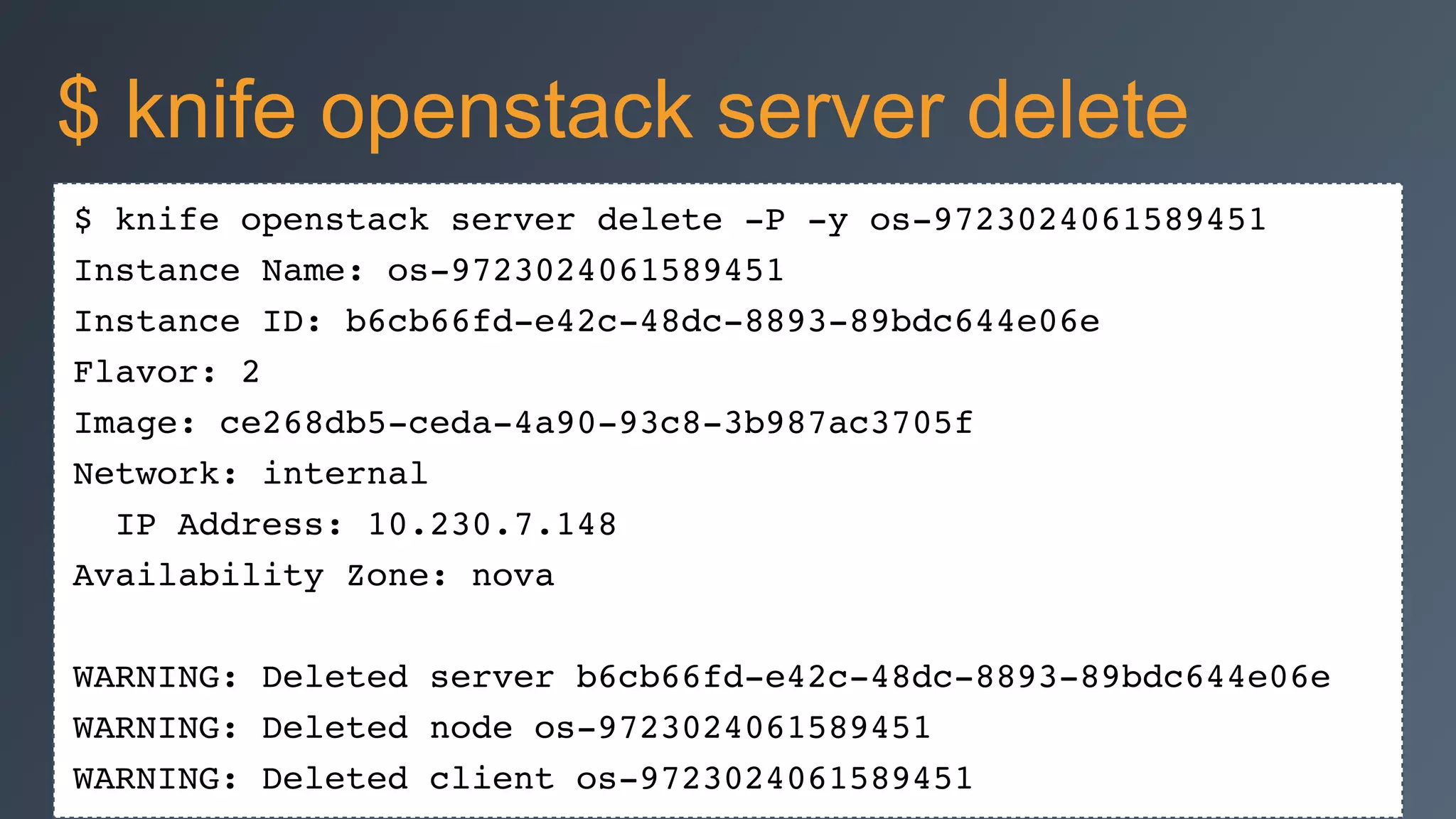
$ knife openstack server delete -P -y os-9723024061589451!
Instance Name: os-9723024061589451!
Instance ID: b6cb66fd-e42c-48dc-8893-89bdc644e06e!
Flavor: 2!
Image: ce268db5-ceda-4a90-93c8-3b987ac3705f!
Network: internal!
IP Address: 10.230.7.148!
Availability Zone: nova!
!
WARNING: Deleted server b6cb66fd-e42c-48dc-8893-89bdc644e06e!
WARNING: Deleted node os-9723024061589451!
WARNING: Deleted client os-9723024061589451
$ knife openstack server delete
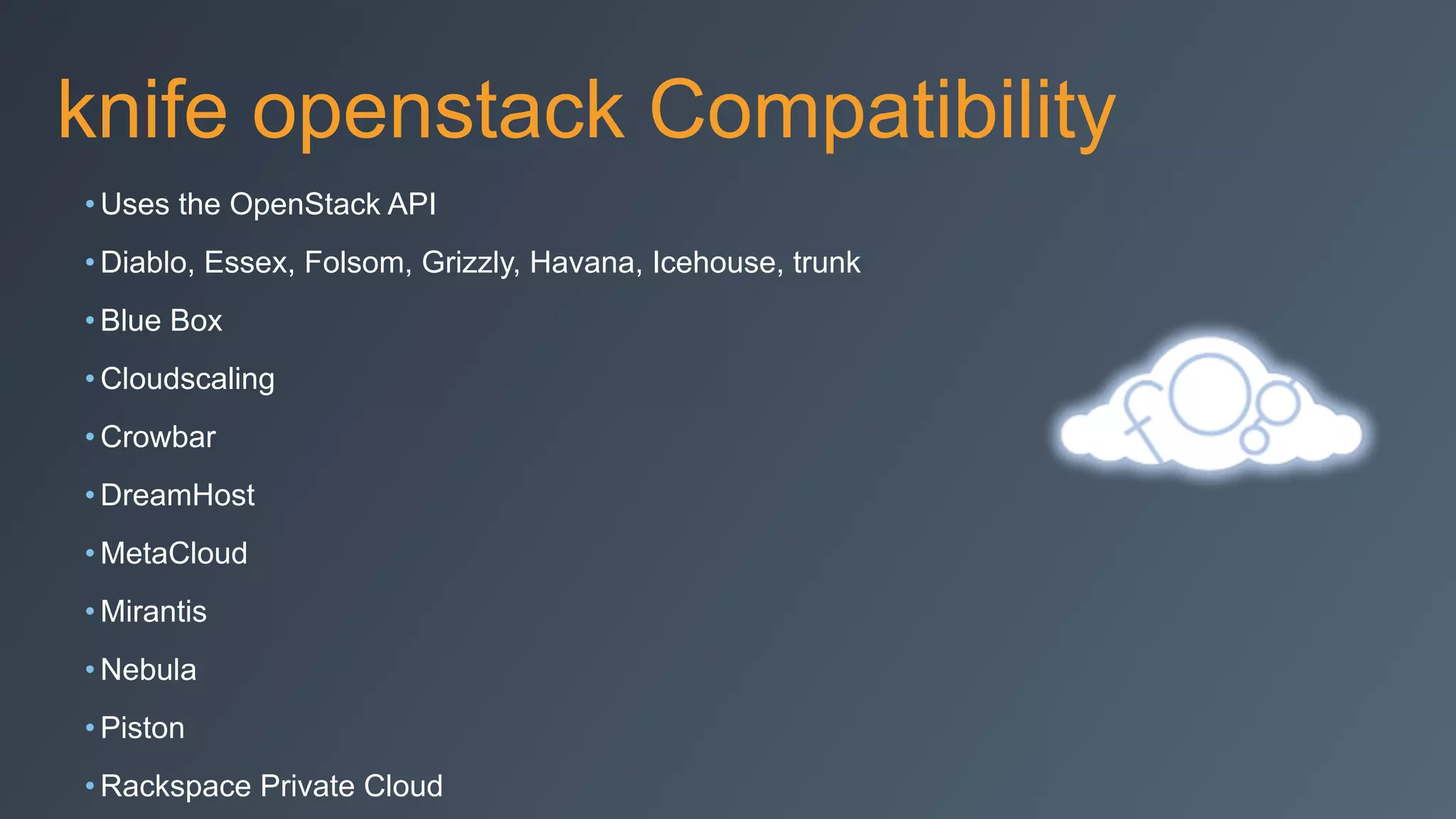
knife openstack Compatibility
• Uses the OpenStack API
• Diablo, Essex, Folsom, Grizzly, Havana, Icehouse, trunk
• Blue Box
• Cloudscaling
• Crowbar
• DreamHost
• MetaCloud
• Mirantis
• Nebula
• Piston
• Rackspace Private Cloud
knife openstack Resources
• knife openstack --help
• docs.opscode.com/
plugin_knife_openstack.html
• github.com/opscode/knife-openstack
• tickets.opscode.com/browse/KNIFE/
component/
knife openstack 0.10.0
• Specify metadata during server
create
• Select network IDs to attach and
bootstrap
• Support availability zones
• Use of names instead of only UUIDs
knife openstack Roadmap
• more network and UUID cleanups
• knife-hp/knife-rackspace consolidation
• knife-cloud common base class
• TravisCI for Chef-supported knife
plugins
Test Kitchen
Test Kitchen
• Integration tool for developing and testing
infrastructure code and software on isolated target
platforms
• Integration test platform for your cookbooks on all the
supported platforms with virtual machines
• https://github.com/test-kitchen/kitchen-openstack
driver:!
name: openstack!
openstack_username: [YOUR OPENSTACK USERNAME]!
openstack_api_key: [YOUR OPENSTACK API KEY]!
openstack_auth_url: [YOUR OPENSTACK AUTH URL]!
require_chef_omnibus: latest!
image_ref: [SERVER IMAGE ID]!
flavor_ref: [SERVER FLAVOR ID]
Test Kitchen: kitchen.yml
Test Kitchen: OpenStack
• Need blueprints for development
• need a busser for Tempest
• Possibly use RefStack for testing as well
Chef Metal
• Chef recipes for deploying infrastructure
• Libraries for repeatably creating machines and
deployments with Chef primitives
• Bootstrappers for many infrastructure types
Chef Metal: Providers
• Cloud
• Digital Ocean, EC2, Fog, OpenStack
• Virtualization
• Vagrant (VirtualBox, Fusion), VSphere
• Containers
• Docker & LXC
• SSH
• PXE in progress
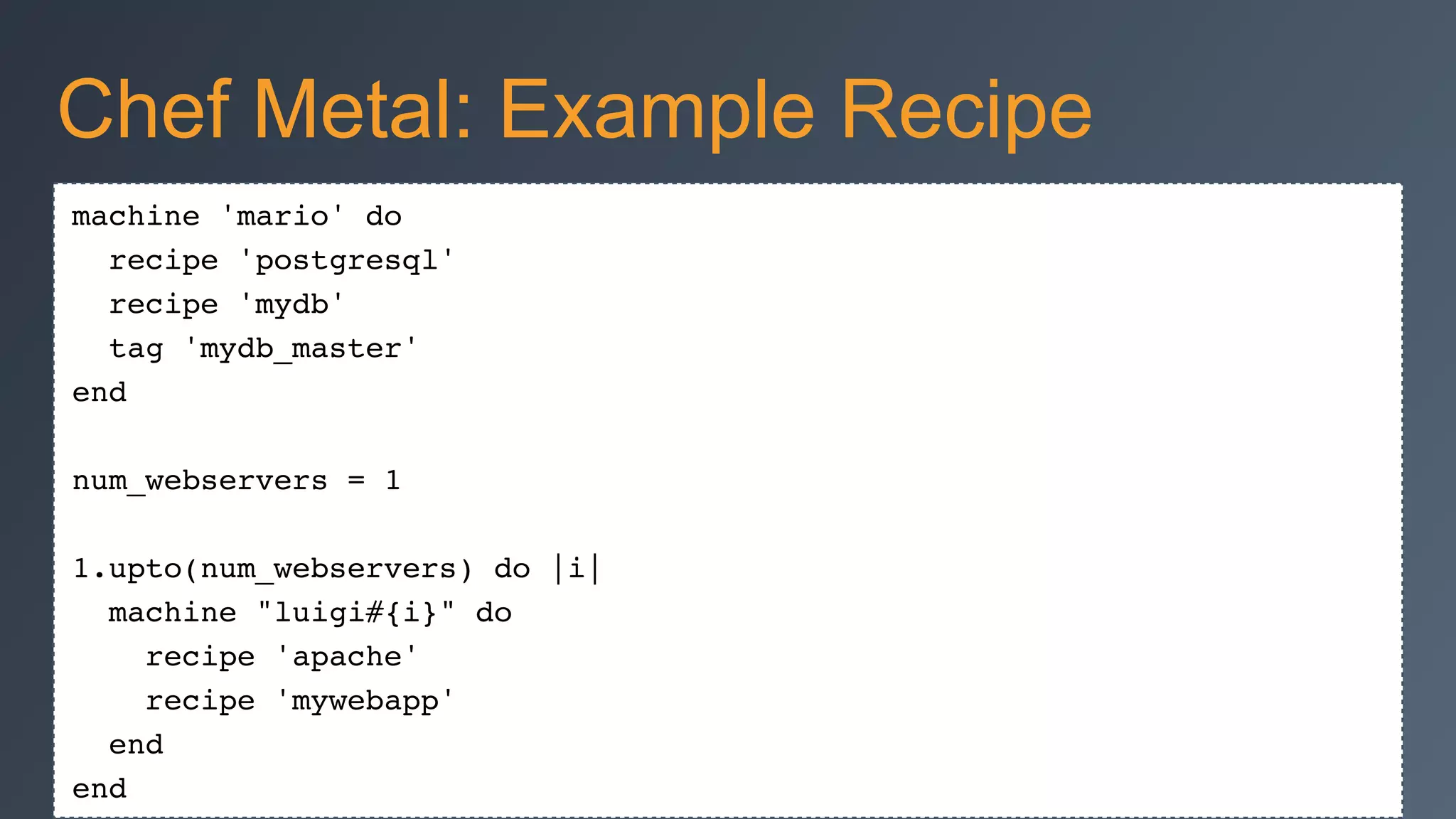
machine 'mario' do!
recipe 'postgresql'!
recipe 'mydb'!
tag 'mydb_master'!
end!
!
num_webservers = 1!
!
1.upto(num_webservers) do |i|!
machine "luigi#{i}" do!
recipe 'apache'!
recipe 'mywebapp'!
end!
end
Chef Metal: Example Recipe
Vagrant All-in-One Walkthrough
Setup
• Instructions: http://bit.ly/ATLChef
• ChefDK, Vagrant, Virtualbox installed
"The Plan"
• Setup
• Tools
• Vagrantfile
• Environment
• Roles
• Cookbooks
• Dashboard
• knife
Tools used
• Bento
•JEOS images
•github.com/opscode/bento
• Packer
•image builder
•packer.io
• Chef Zero
• Berkshelf
Vagrantfile
• Vagrant plugins
•vagrant-chef-zero
•vagrant-omnibus
• chef-client provider
•environment = Vagrant-aio-nova
•run_list = [“role[allinone-compute]”,
“role[GLANCE]” ]
Environment
• vagrant setup for all-in-one nova-
network developer_mode = true
• services each have attributes
• network setup
Roles
• allinone-compute
• os-compute-single-controller
• os-compute-worker
os-compute-single-controller
• os-base
• os-ops-database
• openstack-ops-database::openstack-db
• os-ops-messaging
• os-identity
• os-image
• os-network
• ...
os-compute-single-controller 2
• os-compute-setup
• os-compute-conductor
• os-compute-scheduler
• os-compute-api
• os-block-storage
• os-compute-cert
• os-compute-vncproxy
• os-dashboard
os-compute-worker
• os-base
• openstack-compute::compute
Dashboard
• https://localhost:8443
• admin/admin
chef_server_url 'http://10.10.6.135:4002'!
node_name 'mray'!
client_key '.chef/mray.pem'!
knife[:openstack_username] = "admin"!
knife[:openstack_password] = "admin"!
knife[:openstack_tenant] = "admin"!
knife with Vagrant
knife-openstack
• Chef Zero creds
•knife node list -c zero.rb
• OpenStack creds
•knife openstack -c zero.rb
Thanks!
Justin Shepherd
justin.shepherd@rackspace.com
!
Matt Ray
matt@opscode.com

Atlanta OpenStack 2014 Chef for OpenStack Deployment Workshop

  • 2.
    Chef for OpenStack DeploymentWorkshop May 14, 2014 ! Justin Shepherd Matt Ray
  • 3.
    Agenda • Background • Instructions:http://bit.ly/ATLChef • Deep-dive walkthrough
  • 4.
    Introductions • Justin Shepherd •Rackspace • Principal Architect • justin.shepherd@rackspace.com • GitHub: galstrom21 • IRC: galstrom • Matt Ray • Chef • Director of Partner Integration • matt@getchef.com • GitHub: mattray • IRC: mattray • Twitter: mattray
  • 5.
  • 6.
    Chef for OpenStack:Project • Developer & Operator Community around the automated deployment and management of OpenStack • Reduce fragmentation and increase collaboration • Deploying OpenStack is not "Secret Sauce" • Community Project, not a 'Product' • Apache 2 License
  • 7.
    Community • #openstack-chef onirc.freenode.net • groups.google.com/group/opscode-chef-openstack • @chefopenstack • Weekly Status Hangouts (Monday 11am EST) • Stackalytics (stackforge->chef-group)
  • 8.
    Who's Involved? • AT&T •Blue Box • Dell • DreamHost • Gap • HP • HubSpot • IBM • Korea Telecom • Opscode • Rackspace • SUSE • and many more
  • 10.
    Chef Requirements • Chef11 • Ruby 1.9.x • Foodcritic, ChefSpec, Rubocop for testing • attribute-driven by Environments • platform logic in attributes • currently packages-only installation
  • 11.
    StackForge: Cookbooks • "Official"OpenStack StackForge repositories •github.com/stackforge/cookbook-openstack-* •gated by review.openstack.org • OpenStack services for Grizzly, Havana and Icehouse cookbooks •block-storage, common, compute, dashboard, identity, image, telemetry, network, object-storage, orchestration, test-integration • Operational support cookbooks •ceph, ops-database, ops-messaging
  • 12.
    StackForge: Deployment • Chefrepository for deploying Grizzly, Havana or Icehouse •example Environments and Roles •example "All-in-One" Vagrant deployments •github.com/stackforge/openstack-chef-repo • Gated by review.openstack.org •More single and multi-node testing coming
  • 13.
    Reference Implementation • Deploymentexamples in documentation •All-in-One Compute •Single Controller + N Compute •more coming • Will provide example HA configurations • Operations outside of scope of core repository •logging, monitoring, provisioning
  • 14.
  • 15.
    Documentation • docs.opscode.com/openstack.html •Architecture •Deployment Prerequisites •Installation •Development •Cookbooksand Repositories •Example Deployments • github.com/opscode/chef-docs •Creative Commons, no CLA required
  • 16.
    Example Deployments • Vagrant"All-in-One" for development/testing •nova-network or Neutron •Ubuntu 12.04 or CentOS 6.5 • Developer lab deployment "1+N" •Single controller, N compute boxes •5 boxes, consumer-grade hardware
  • 17.
    StackForge: Grizzly Status •branch ‘stable/grizzly’ • Operating Systems: Ubuntu 12.04, SLES 11 SP2 • Databases: MySQL, SQLite (testing) • Messaging: RabbitMQ • Compute: KVM, LXC, Qemu • Network: Nova + Quantum (Open vSwitch) • Block Storage: LVM • Object Storage: Swift • Dashboard: Apache or Nginx
  • 18.
    StackForge: Havana Status •branch ‘stable/havana’ • Operating Systems: RHEL 6.x, Ubuntu 12.04, SLES 11 SP2 • Databases: DB2, MySQL, Postgres, SQLite (testing) • Messaging: RabbitMQ, Qpid • Compute: ESX, Hyper-V, KVM, LXC, Qemu • Network: Nova + Neutron (Open vSwitch, Linux bridge) • Block Storage: Ceph, EMC, IBM, LVM, NetApp • Object Storage: Swift • Dashboard: Apache or Nginx
  • 19.
    StackForge: Icehouse Roadmap •‘master' branch currently on 'Icehouse' •Ceph •Trove •Sahara •Heat enhancements •ml2 linuxbridge L2/openvswitch L3 networking • Juno branch (J3, August)
  • 20.
    StackForge: Potential Roadmap •Operating Systems: Debian • Compute: Bare metal, Docker, Xen • Messaging: ZeroMQ • Network: NSX, OpenDaylight • Block Storage: NetApp • Object Storage: Ceph • Source builds via Omnibus
  • 21.
    StackForge: Infra Roadmap •ChefDK • Test Kitchen and ServerSpec • Spiceweasel/Chef Metal reference deployments
  • 22.
    Chef Community Summit •Developer/Community unconference • October 2 & 3 in Seattle, WA
  • 23.
  • 24.
    Available openstack subcommands:(for details, knife SUB-COMMAND --help)! ! ** OPENSTACK COMMANDS **! knife openstack flavor list (options)! knife openstack group list (options)! knife openstack image list (options)! knife openstack network list (options)! knife openstack server create (options)! knife openstack server delete SERVER [SERVER] (options)! knife openstack server list (options) $ knife openstack
  • 25.
    Name ID VirtualCPUs RAM Disk! m1.large 4 4 8192 MB 80 GB! m1.medium 3 2 4096 MB 40 GB! m1.small 2 1 2048 MB 20 GB! m1.tiny 1 1 512 MB 10 GB! m1.xlarge 5 8 16384 MB 160 GB $ knife openstack flavor list
  • 26.
    Name ID Snapshot! centos-6.568555833-8497-4d14-88ca-c9062e25f14b no! cirros-test ecc21974-c0f7-4da4-a433-ab826890f4a4 no! coreos 83d37ea5-d9ae-44cd-9110-d4d39ad997ce no! fedora-19 9add7e14-25e3-41d8-963a-ca744d081f2e no! fedora-20 acb6eba5-226a-4ed5-8db6-33a6fd8cf20d no! freebsd-10.0 0e270df7-1a02-4e91-9fc3-6f5311c58193 no! ubuntu-12.04 ce268db5-ceda-4a90-93c8-3b987ac3705f no! ubuntu-13.04 28d61273-3b8b-4943-8a6f-66630d7d4ef0 no! ubuntu-14.04 4a4f85bf-f164-4e54-83d8-8b2e7d0712b2 no! Windows Server 2012 R2 Std Eval 64e7cba7-7a50-443f-8fa6-a065406e0b04 no $ knife openstack image list
  • 27.
    Name ID TenantShared! external 06dc9d5a-f55a-410d-a7fd-4c7cb34ad927 5da25cc3853f4c54850898f9614c20bb true! internal ba0fdd03-72b5-41eb-bb67-fef437fd6cb4 5da25cc3853f4c54850898f9614c20bb true! $ knife openstack network list
  • 28.
    Name Protocol FromTo CIDR Description! haproxy tcp 22002 22002 0.0.0.0/0 haproxy! ssh tcp 22 22 0.0.0.0/0 ssh access! web tcp 443 443 0.0.0.0/0 web stuff! web tcp 80 80 0.0.0.0/0 web stuff! web tcp 8080 8080 0.0.0.0/0 web stuff $ knife openstack group list
  • 29.
    Name Instance IDZone Public IP Private IP Flavor Image Keypair State! OC-4424-chef-client f3302b74-1542-4af8-bc64-bd172ad3de50 172.31.6.79 17 89c4181f-6e6c-470e-baa7-d84162112153 shutoff! bb-test d2a9ceff-bf84-4396-9bf3-87b153ca4446 172.31.6.113 10 89c4181f-6e6c-470e-baa7-d84162112153 shutoff! isa-ubu.opscode.us 1bc5212c-3ad1-409c-9881-87fefac78bce 172.31.6.195 7 4a7263a1-3bf7-4b52-be71-6c28339853b9 farniki_pub active! os-3712471938967755 646347a4-4c3a-4559-a193-b352ed85db8e 172.31.6.249 2 967a39b4-b061-4515-94ad-f96717583277 mray-ops active! os-8162382405504458 2b336930-12ba-460d-b6f2-b29a5e38fb74 172.31.6.253 2 967a39b4-b061-4515-94ad-f96717583277 openstack-key active! os-837952636687383 21a81f5b-f9bc-4b14-9f21-298195fcbcbe 172.31.6.250 2 967a39b4-b061-4515-94ad-f96717583277 mray-ops shutoff! os-883820551180086 15b32e62-5cd9-4a15-87d1-e0f4b7fee2ae 172.31.6.252 2 967a39b4-b061-4515-94ad-f96717583277 mray-ops shutoff! sean-test-the-chef f1c171ec-5175-4a61-94ad-cc722278cdce 172.31.6.213 13 663656ce-2fe4-4164-b842-214f221cff55 seanh-support-gen active $ knife openstack server list
  • 30.
    knife openstack servercreate (options)! -Z ZONE_NAME, The availability zone for this server! --availability-zone! --bootstrap-network NAME Specify network for bootstrapping. Default is 'public'.! --bootstrap-protocol protocol! Protocol to bootstrap Windows servers. options: winrm! --bootstrap-proxy PROXY_URL The proxy server for the node being bootstrapped! --bootstrap-version VERSION The version of Chef to install! --ca-trust-file CA_TRUST_FILE! The Certificate Authority (CA) trust file used for SSL transport! -N, --node-name NAME The Chef node name for your new node! -s, --server-url URL Chef Server URL! --chef-zero-port PORT Port to start chef-zero on! -k, --key KEY API Client Key! --[no-]color Use colored output, defaults to false on Windows, true otherwise! -c, --config CONFIG The configuration file to use! --defaults Accept default values for all questions! $ knife openstack server create
  • 31.
  • 32.
    $ knife openstackserver delete -P -y os-9723024061589451! Instance Name: os-9723024061589451! Instance ID: b6cb66fd-e42c-48dc-8893-89bdc644e06e! Flavor: 2! Image: ce268db5-ceda-4a90-93c8-3b987ac3705f! Network: internal! IP Address: 10.230.7.148! Availability Zone: nova! ! WARNING: Deleted server b6cb66fd-e42c-48dc-8893-89bdc644e06e! WARNING: Deleted node os-9723024061589451! WARNING: Deleted client os-9723024061589451 $ knife openstack server delete
  • 33.
    knife openstack Compatibility •Uses the OpenStack API • Diablo, Essex, Folsom, Grizzly, Havana, Icehouse, trunk • Blue Box • Cloudscaling • Crowbar • DreamHost • MetaCloud • Mirantis • Nebula • Piston • Rackspace Private Cloud
  • 34.
    knife openstack Resources •knife openstack --help • docs.opscode.com/ plugin_knife_openstack.html • github.com/opscode/knife-openstack • tickets.opscode.com/browse/KNIFE/ component/
  • 35.
    knife openstack 0.10.0 •Specify metadata during server create • Select network IDs to attach and bootstrap • Support availability zones • Use of names instead of only UUIDs
  • 36.
    knife openstack Roadmap •more network and UUID cleanups • knife-hp/knife-rackspace consolidation • knife-cloud common base class • TravisCI for Chef-supported knife plugins
  • 37.
  • 38.
    Test Kitchen • Integrationtool for developing and testing infrastructure code and software on isolated target platforms • Integration test platform for your cookbooks on all the supported platforms with virtual machines • https://github.com/test-kitchen/kitchen-openstack
  • 39.
    driver:! name: openstack! openstack_username: [YOUROPENSTACK USERNAME]! openstack_api_key: [YOUR OPENSTACK API KEY]! openstack_auth_url: [YOUR OPENSTACK AUTH URL]! require_chef_omnibus: latest! image_ref: [SERVER IMAGE ID]! flavor_ref: [SERVER FLAVOR ID] Test Kitchen: kitchen.yml
  • 40.
    Test Kitchen: OpenStack •Need blueprints for development • need a busser for Tempest • Possibly use RefStack for testing as well
  • 42.
    Chef Metal • Chefrecipes for deploying infrastructure • Libraries for repeatably creating machines and deployments with Chef primitives • Bootstrappers for many infrastructure types
  • 43.
    Chef Metal: Providers •Cloud • Digital Ocean, EC2, Fog, OpenStack • Virtualization • Vagrant (VirtualBox, Fusion), VSphere • Containers • Docker & LXC • SSH • PXE in progress
  • 44.
    machine 'mario' do! recipe'postgresql'! recipe 'mydb'! tag 'mydb_master'! end! ! num_webservers = 1! ! 1.upto(num_webservers) do |i|! machine "luigi#{i}" do! recipe 'apache'! recipe 'mywebapp'! end! end Chef Metal: Example Recipe
  • 45.
  • 46.
    Setup • Instructions: http://bit.ly/ATLChef •ChefDK, Vagrant, Virtualbox installed
  • 47.
    "The Plan" • Setup •Tools • Vagrantfile • Environment • Roles • Cookbooks • Dashboard • knife
  • 48.
    Tools used • Bento •JEOSimages •github.com/opscode/bento • Packer •image builder •packer.io • Chef Zero • Berkshelf
  • 49.
    Vagrantfile • Vagrant plugins •vagrant-chef-zero •vagrant-omnibus •chef-client provider •environment = Vagrant-aio-nova •run_list = [“role[allinone-compute]”, “role[GLANCE]” ]
  • 50.
    Environment • vagrant setupfor all-in-one nova- network developer_mode = true • services each have attributes • network setup
  • 51.
  • 52.
    os-compute-single-controller • os-base • os-ops-database •openstack-ops-database::openstack-db • os-ops-messaging • os-identity • os-image • os-network • ...
  • 53.
    os-compute-single-controller 2 • os-compute-setup •os-compute-conductor • os-compute-scheduler • os-compute-api • os-block-storage • os-compute-cert • os-compute-vncproxy • os-dashboard
  • 54.
  • 55.
  • 56.
    chef_server_url 'http://10.10.6.135:4002'! node_name 'mray'! client_key'.chef/mray.pem'! knife[:openstack_username] = "admin"! knife[:openstack_password] = "admin"! knife[:openstack_tenant] = "admin"! knife with Vagrant
  • 57.
    knife-openstack • Chef Zerocreds •knife node list -c zero.rb • OpenStack creds •knife openstack -c zero.rb
  • 58.