Operating-System Structures
 Operating System Services
 User Operating System Interface
 System Calls
 Types of System Calls
 System Programs
 Operating System Design and Implementation
 Operating System Structure
 Virtual Machines
 Operating System Generation
 System Boot
                                                           1
                                  Loganathan R, CSE , HKBKCE
1. Operating System Services
•   One set of operating-system services provides functions that are helpful to the user:
     – User interface - Almost all operating systems have a user interface (UI)
       Command-Line (CLI), Batch Interface & Graphics User Interface (GUI)
     – Program execution - Load a program into memory and to run that program, end
       execution, either normally or abnormally (indicating error)
     – I/O operations - A running program may require I/O, which may involve a file or
       an I/O device.
     – File-system manipulation - Programs need to read and write files and
       directories, create and delete them, search them, list file Information,
       permission management.
     – Communications – Between process in the same or different computer via
       shared memory or message passing
     – Error Detection - Errors may occur in the CPU and memory hardware ( memory
       error or power failure), in I/O devices (parity error on tape, a connection failure
       on a network, or lack of paper in the printer) and in the user program
       (arithmetic overflow, illegal memory location access, or a too-great use of CPU
       time)


                                                                                           2
                                                                   Loganathan R, CSE , HKBKCE
1. Operating System Services Contd..
•   Another set of OS functions exists for ensuring the efficient operation of the
    system itself via resource sharing
     – Resource allocation - When multiple users or multiple jobs running
        concurrently, resources must be allocated to each of them
          • Many types of resources - Some (such as CPU cycles, main memory, and
             file storage) may have special allocation code, others (such as I/O
             devices) may have general request and release code.
     – Accounting - To keep track of which users use how much and what kinds of
        computer resources
     – Protection and security - The owners of information stored in a multiuser or
        networked computer system may want to control use of that information,
        concurrent processes should not interfere with each other
          • Protection involves ensuring that all access to system resources is
             controlled
          • Security of the system from outsiders requires user authentication,
             extends to defending external I/O devices from invalid access attempts
          • If a system is to be protected and secure, precautions must be instituted
             throughout it. A chain is only as strong as its weakest link.


                               Loganathan R, CSE , HKBKCE                           3
2.User Operating System Interface
• 2.1 Command Interpreter / CLI
  • Implemented in kernel, sometimes by systems program
  • Function of the command interpreter is to get and execute
    the user-specified command.
  • Multiple command interpreters to choose from the
    interpreters are known as shells
  • Example :Bourne shell, C shell, Bourne-Again shell, the Korn
    shell
  • Command Interpreter Implementation
     • Command interpreter itself contains the code to execute the
       command
     • Through system programs – uses the command to identify a file to
       be loaded into memory and executed
     • Example rm file.txt


                       Loganathan R, CSE , HKBKCE                    4
User Operating System Interface Cntd..
 2.2 Graphical User Interfaces
  User-friendly desktop metaphor interface
   ◦ Usually mouse, keyboard, and monitor
   ◦ Icons represent files, programs, actions, etc
   ◦ Various mouse buttons over objects in the interface cause various
     actions (provide information, options, execute function, open
     directory (known as a folder)
   ◦ Invented at Xerox PARC
  Many systems now include both CLI and GUI interfaces
   ◦ Microsoft Windows is GUI with CLI “command” shell
   ◦ Apple Mac OS X as “Aqua” GUI interface with UNIX kernel
     underneath and shells available
   ◦ Solaris is CLI with optional GUI interfaces (Java Desktop, KDE)


                        Loganathan R, CSE , HKBKCE                       5
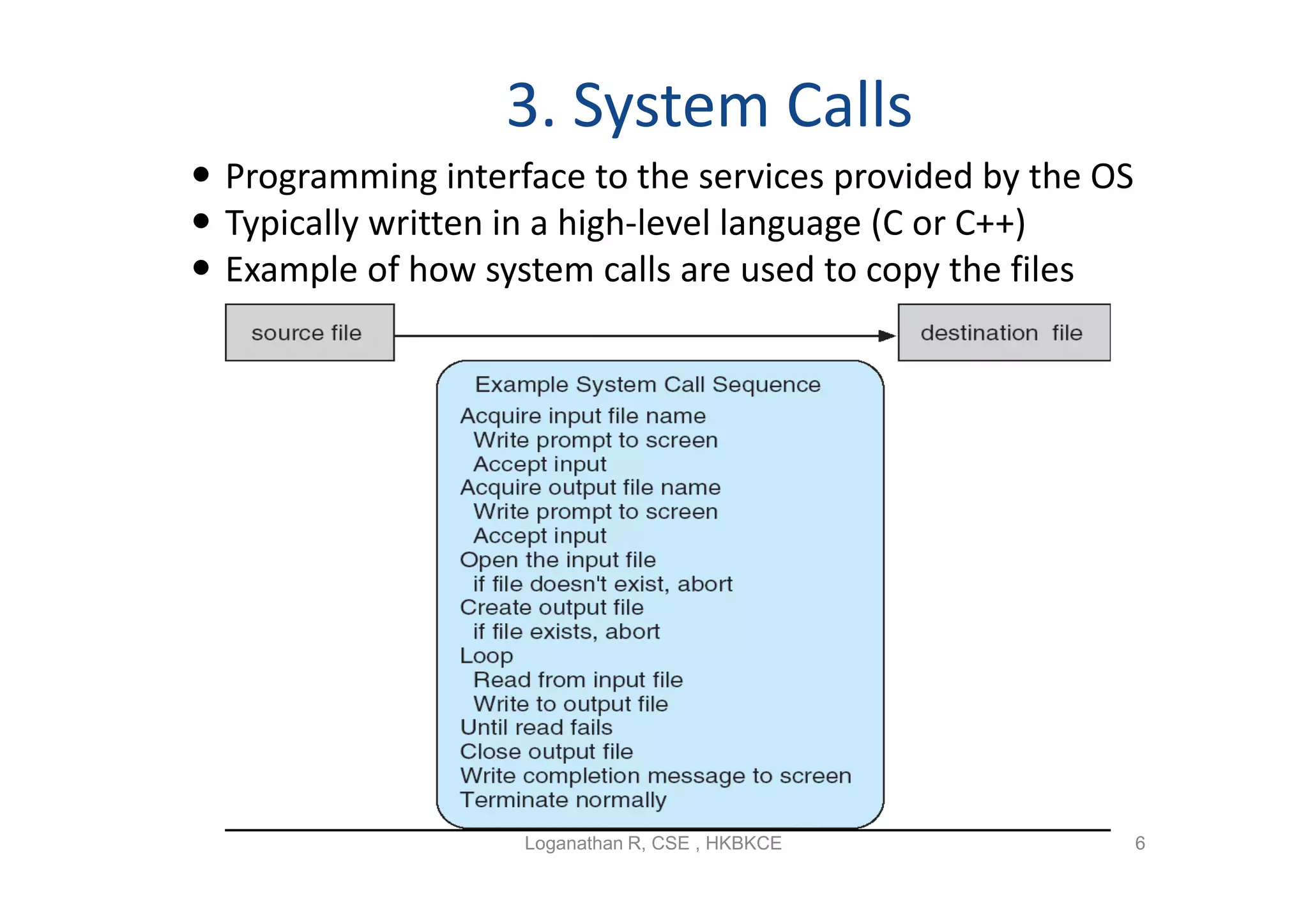
3. System Calls
 Programming interface to the services provided by the OS
 Typically written in a high-level language (C or C++)
 Example of how system calls are used to copy the files


                    Loganathan R, CSE , HKBKCE               6
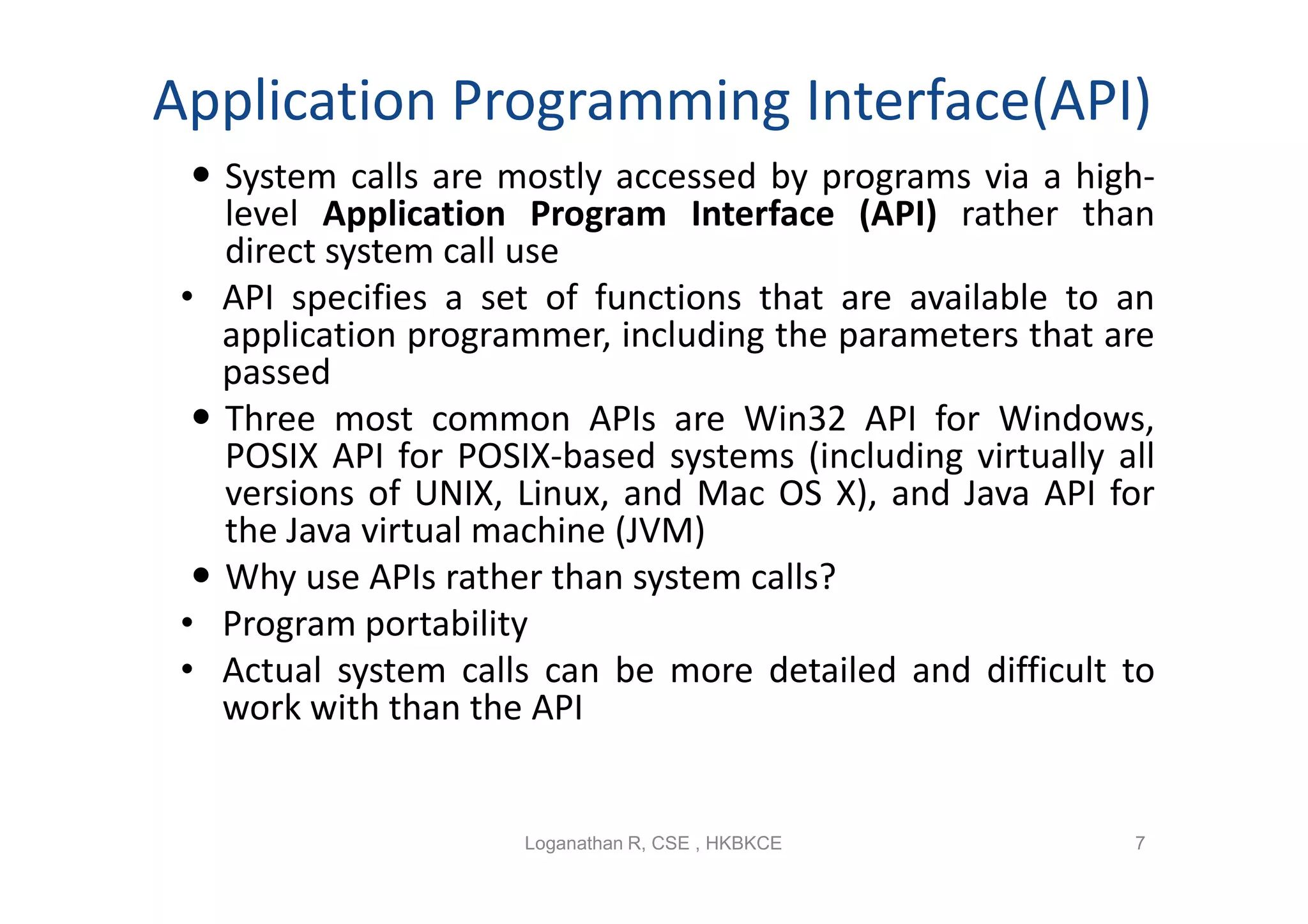
Application Programming Interface(API)
   System calls are mostly accessed by programs via a high-
    level Application Program Interface (API) rather than
    direct system call use
 • API specifies a set of functions that are available to an
    application programmer, including the parameters that are
    passed
   Three most common APIs are Win32 API for Windows,
    POSIX API for POSIX-based systems (including virtually all
    versions of UNIX, Linux, and Mac OS X), and Java API for
    the Java virtual machine (JVM)
   Why use APIs rather than system calls?
 • Program portability
 • Actual system calls can be more detailed and difficult to
    work with than the API


                      Loganathan R, CSE , HKBKCE            7
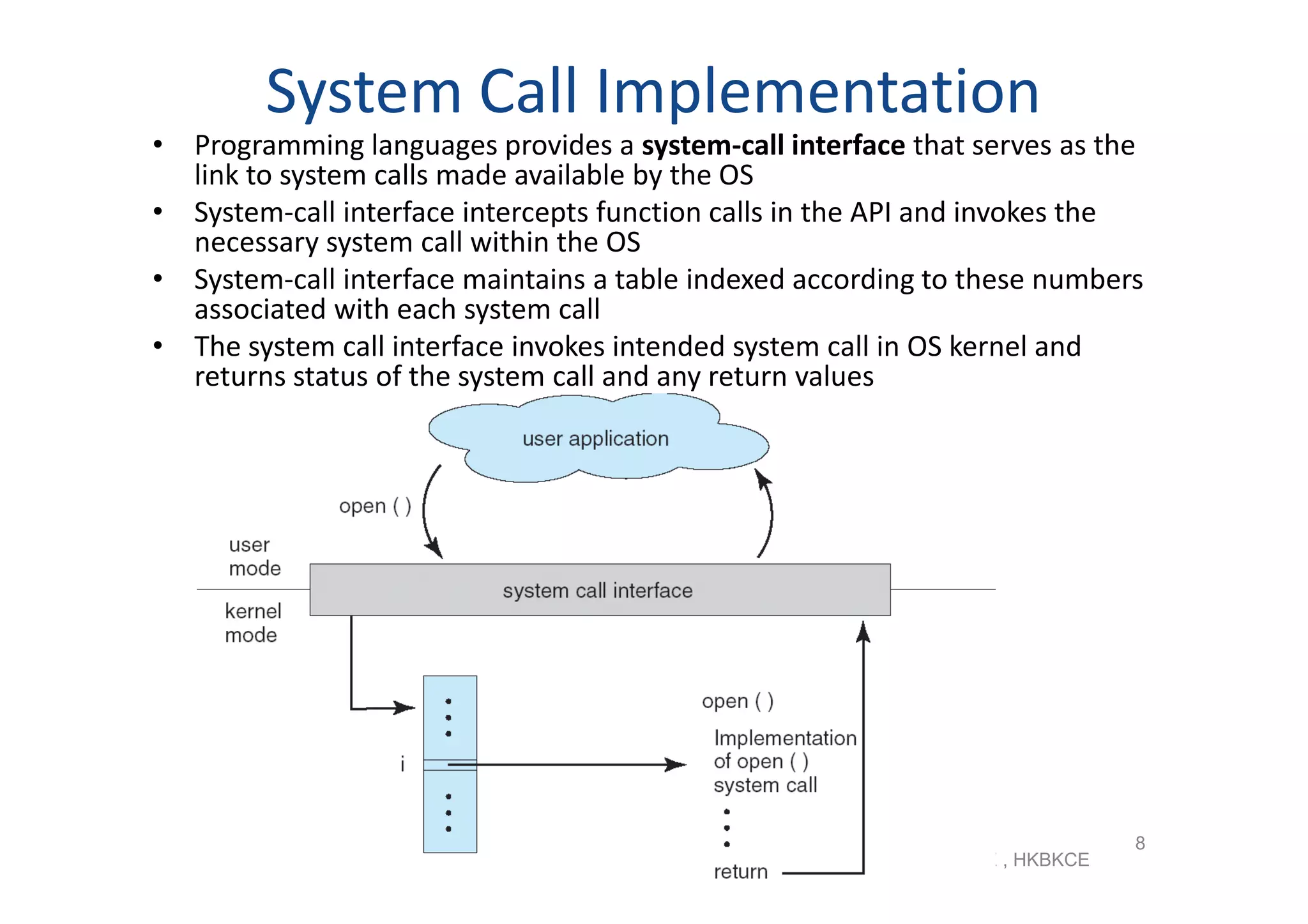
System Call Implementation
• Programming languages provides a system-call interface that serves as the
  link to system calls made available by the OS
• System-call interface intercepts function calls in the API and invokes the
  necessary system call within the OS
• System-call interface maintains a table indexed according to these numbers
  associated with each system call
• The system call interface invokes intended system call in OS kernel and
  returns status of the system call and any return values


                                                                                 8
                                                    Loganathan R, CSE , HKBKCE
System Call Parameter Passing
• Registers
• Parameters stored in a block, or table, in memory, and address of block
  passed as a parameter in a register (Linux and Solaris) as shown
• Parameters placed, or pushed, onto the stack by the program and popped off
  the stack by the operating system
   – Block and stack methods do not limit the number or length of parameters
      being passed


                                                    Loganathan R, CSE , HKBKCE   9
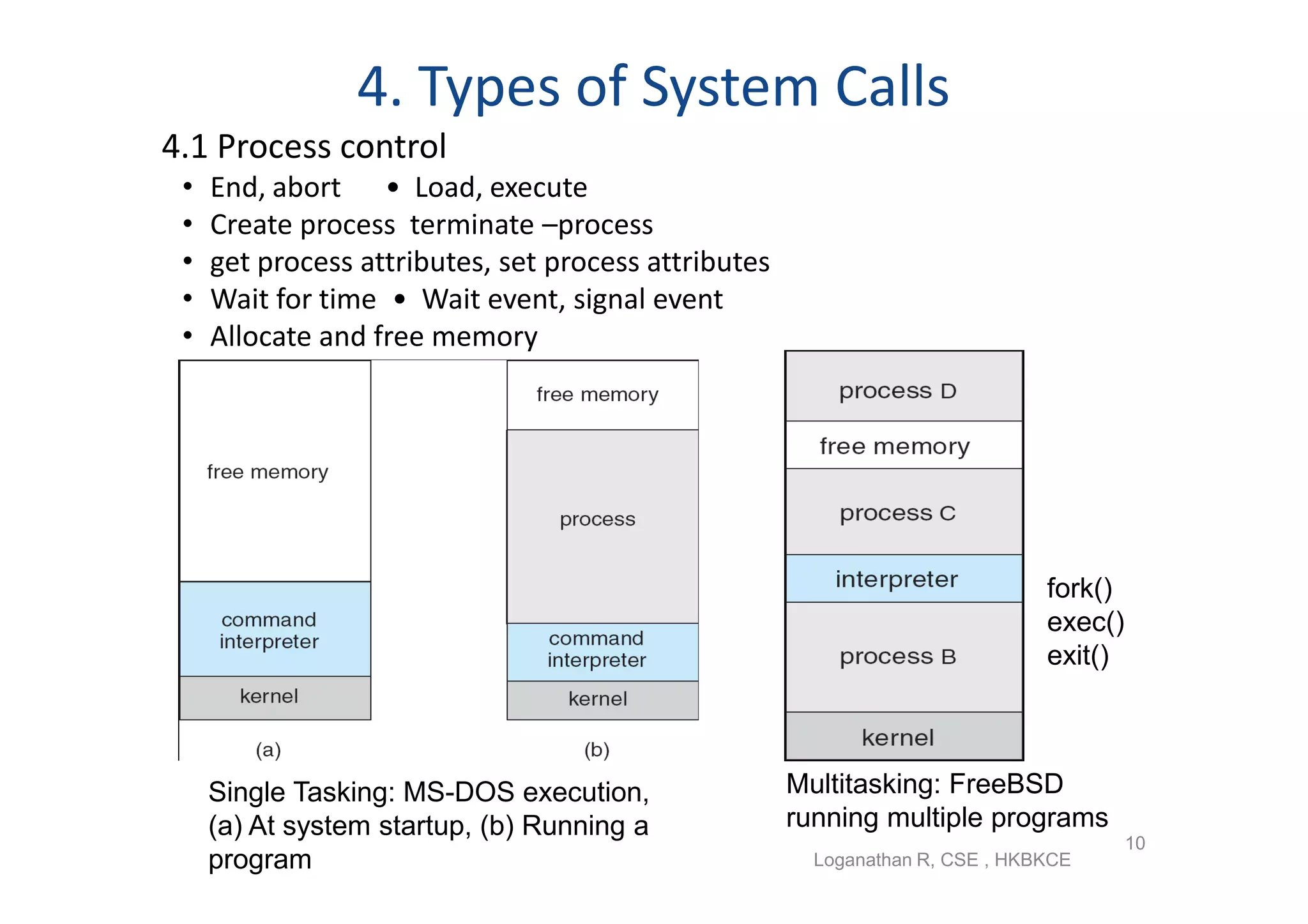
4. Types of System Calls
4.1 Process control
 •   End, abort • Load, execute
 •   Create process terminate –process
 •   get process attributes, set process attributes
 •   Wait for time • Wait event, signal event
 •   Allocate and free memory


                                                                               fork()
                                                                               exec()
                                                                               exit()


     Single Tasking: MS-DOS execution,                Multitasking: FreeBSD
     (a) At system startup, (b) Running a             running multiple programs
                                                                                        10
     program                                            Loganathan R, CSE , HKBKCE
4. Types of System Calls Contd
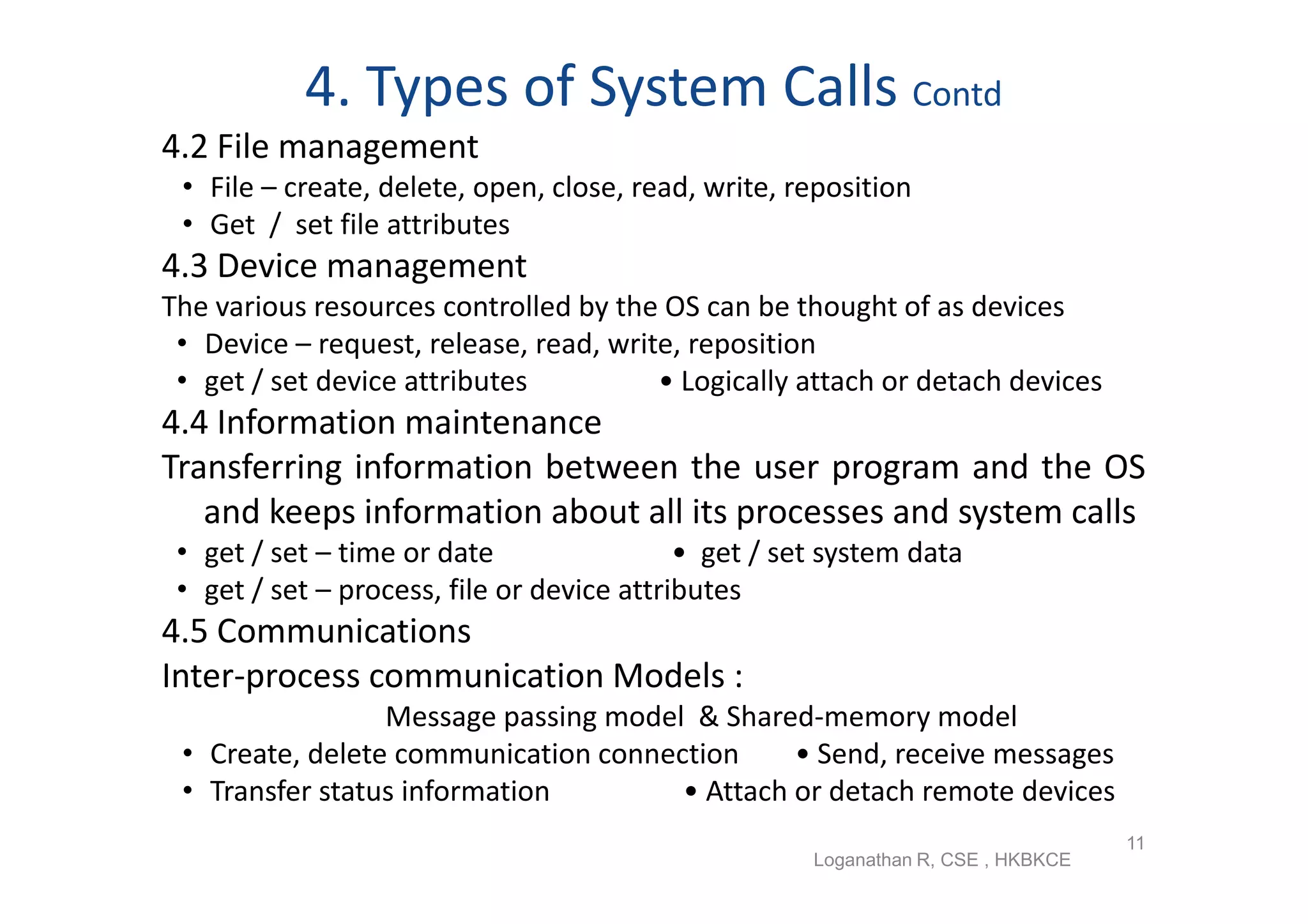
4.2 File management
 • File – create, delete, open, close, read, write, reposition
 • Get / set file attributes
4.3 Device management
The various resources controlled by the OS can be thought of as devices
 • Device – request, release, read, write, reposition
 • get / set device attributes          • Logically attach or detach devices
4.4 Information maintenance
Transferring information between the user program and the OS
   and keeps information about all its processes and system calls
 • get / set – time or date                 • get / set system data
 • get / set – process, file or device attributes
4.5 Communications
Inter-process communication Models :
                 Message passing model & Shared-memory model
 • Create, delete communication connection     • Send, receive messages
 • Transfer status information        • Attach or detach remote devices
                                                                                   11
                                                      Loganathan R, CSE , HKBKCE
5. System Programs
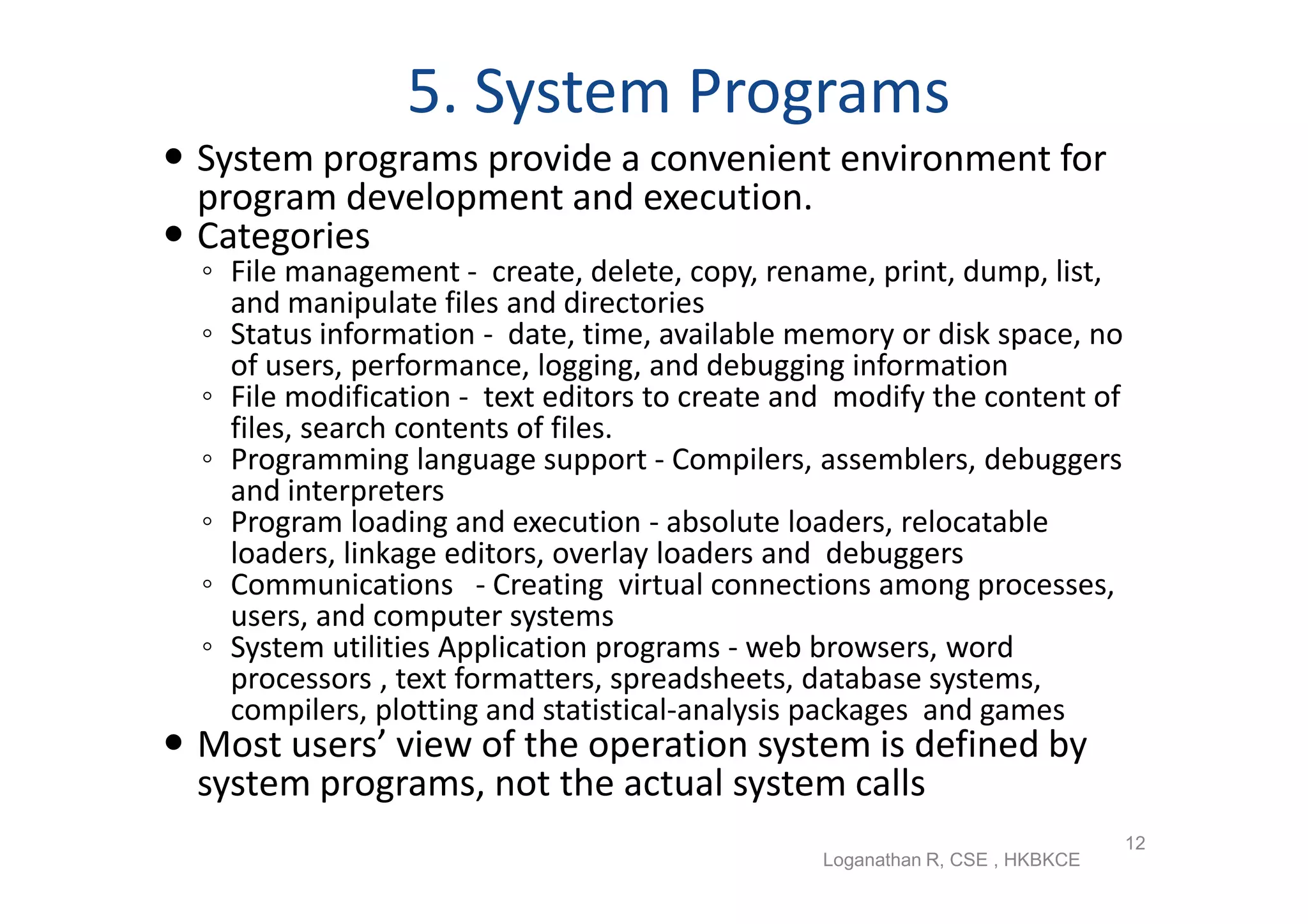
 System programs provide a convenient environment for
  program development and execution.
 Categories
  ◦ File management - create, delete, copy, rename, print, dump, list,
    and manipulate files and directories
  ◦ Status information - date, time, available memory or disk space, no
    of users, performance, logging, and debugging information
  ◦ File modification - text editors to create and modify the content of
    files, search contents of files.
  ◦ Programming language support - Compilers, assemblers, debuggers
    and interpreters
  ◦ Program loading and execution - absolute loaders, relocatable
    loaders, linkage editors, overlay loaders and debuggers
  ◦ Communications - Creating virtual connections among processes,
    users, and computer systems
  ◦ System utilities Application programs - web browsers, word
    processors , text formatters, spreadsheets, database systems,
    compilers, plotting and statistical-analysis packages and games
 Most users’ view of the operation system is defined by
  system programs, not the actual system calls
                                                                              12
                                                 Loganathan R, CSE , HKBKCE
6. OS Design and Implementation
 Design and Implementation of OS not “solvable”,
  but some approaches have proven successful
 6.1 Design Goals
  – The design of the system is affected by the choice of
    hardware and the type of system: batch, time shared,
    single user, multiuser, distributed, real time, or general
    purpose
  – The requirement can be divided to User goals and
    System goals
    ◦ User goals – operating system should be convenient to use,
      easy to learn, reliable, safe, and fast
    ◦ System goals – operating system should be easy to design,
      implement, and maintain, as well as flexible, reliable, error-
      free, and efficient


                         Loganathan R, CSE , HKBKCE                    13
6. OS Design and Implementation Contd..
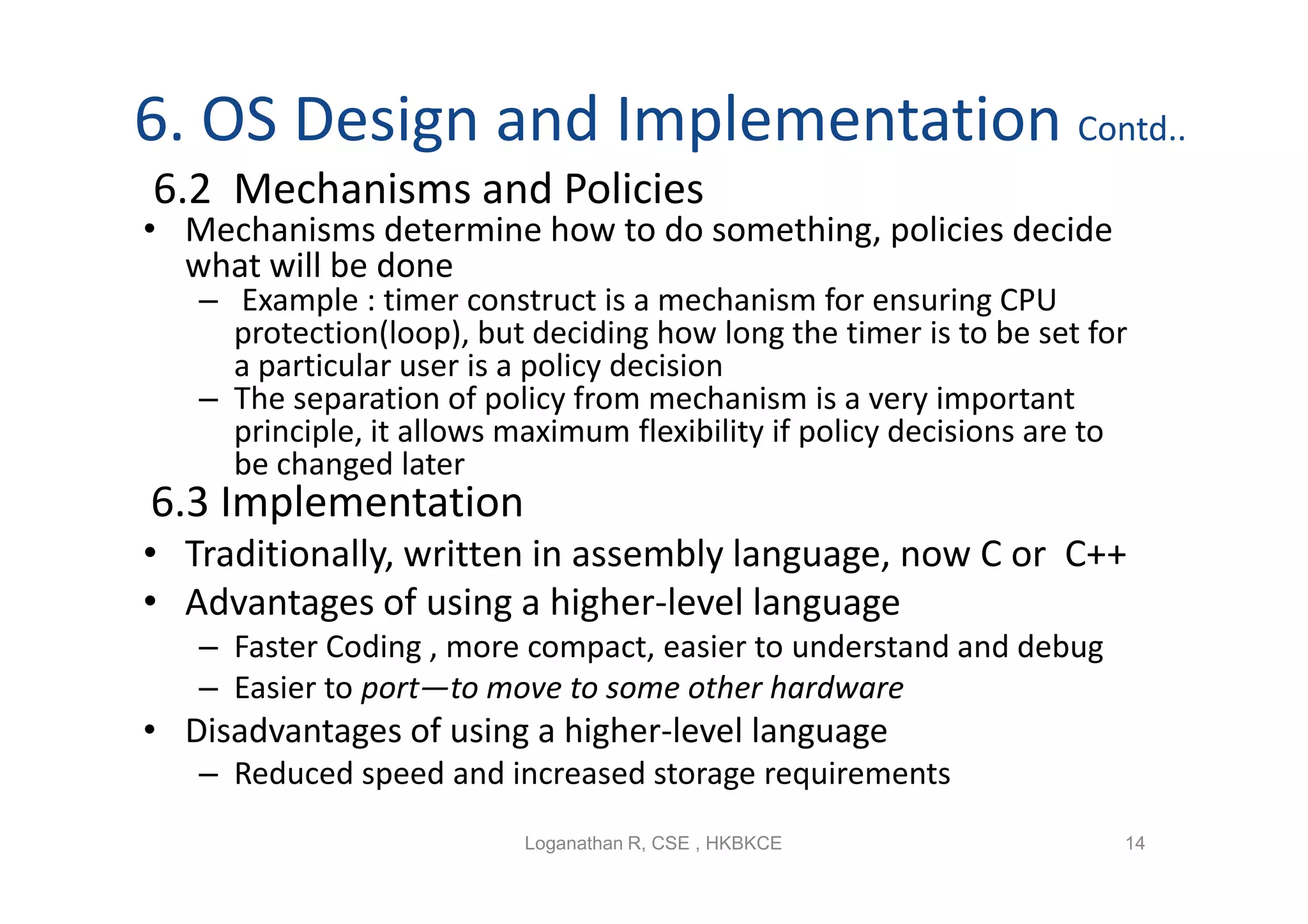
6.2 Mechanisms and Policies
• Mechanisms determine how to do something, policies decide
  what will be done
   – Example : timer construct is a mechanism for ensuring CPU
     protection(loop), but deciding how long the timer is to be set for
     a particular user is a policy decision
   – The separation of policy from mechanism is a very important
     principle, it allows maximum flexibility if policy decisions are to
     be changed later
6.3 Implementation
• Traditionally, written in assembly language, now C or C++
• Advantages of using a higher-level language
   – Faster Coding , more compact, easier to understand and debug
   – Easier to port—to move to some other hardware
• Disadvantages of using a higher-level language
   – Reduced speed and increased storage requirements
                           Loganathan R, CSE , HKBKCE                  14
7. Operating-System Structure
• How     OS    components     are
  interconnected and melded into a
  kernel.
7.1 Simple Structure
• Started as small, simple, and limited
  systems and then grown beyond their
  original scope
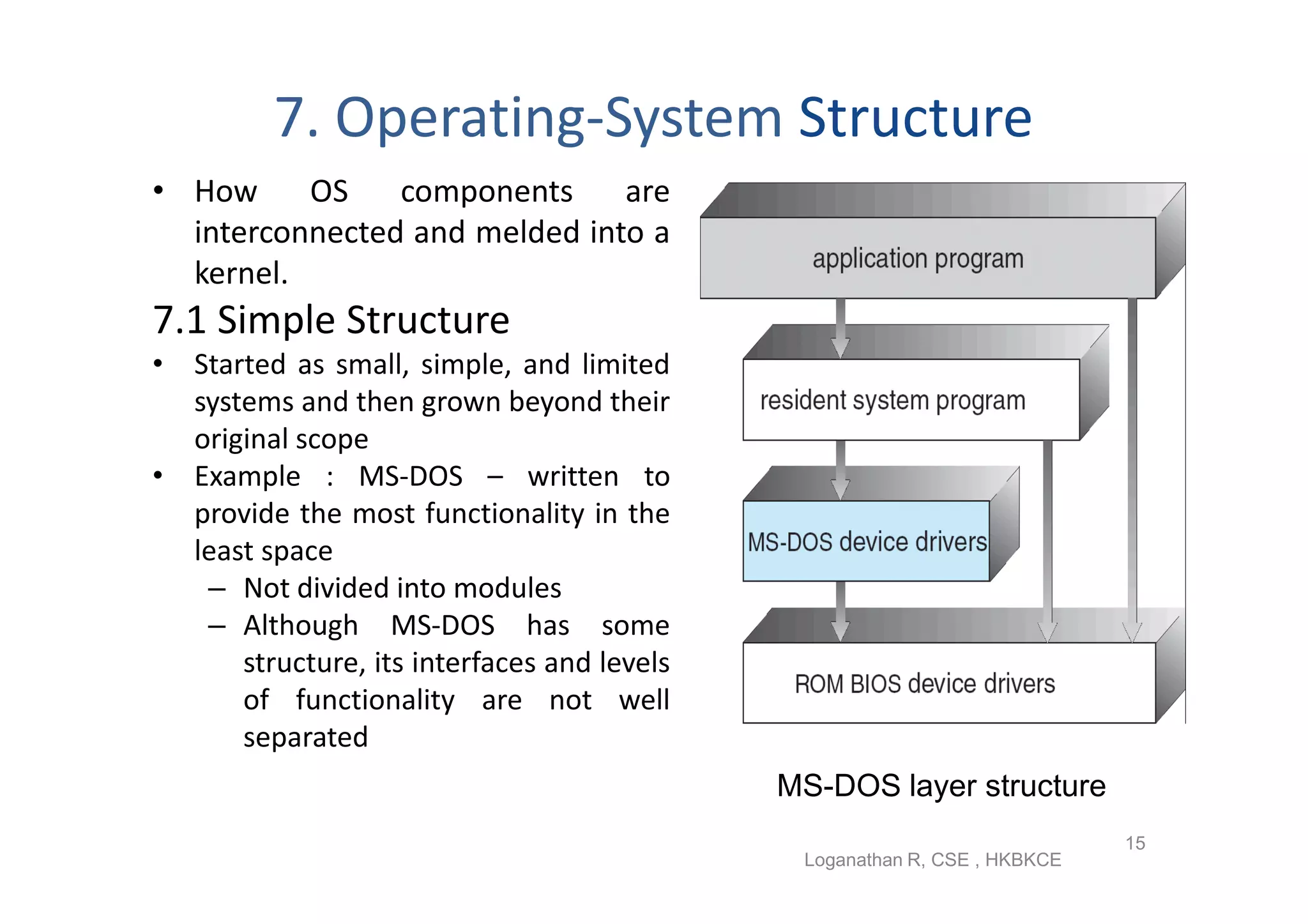
• Example : MS-DOS – written to
  provide the most functionality in the
  least space
   – Not divided into modules
   – Although MS-DOS has some
      structure, its interfaces and levels
      of functionality are not well
      separated
                                             MS-DOS layer structure
                                                                           15
                                              Loganathan R, CSE , HKBKCE
7. Operating-System Structure Contd…
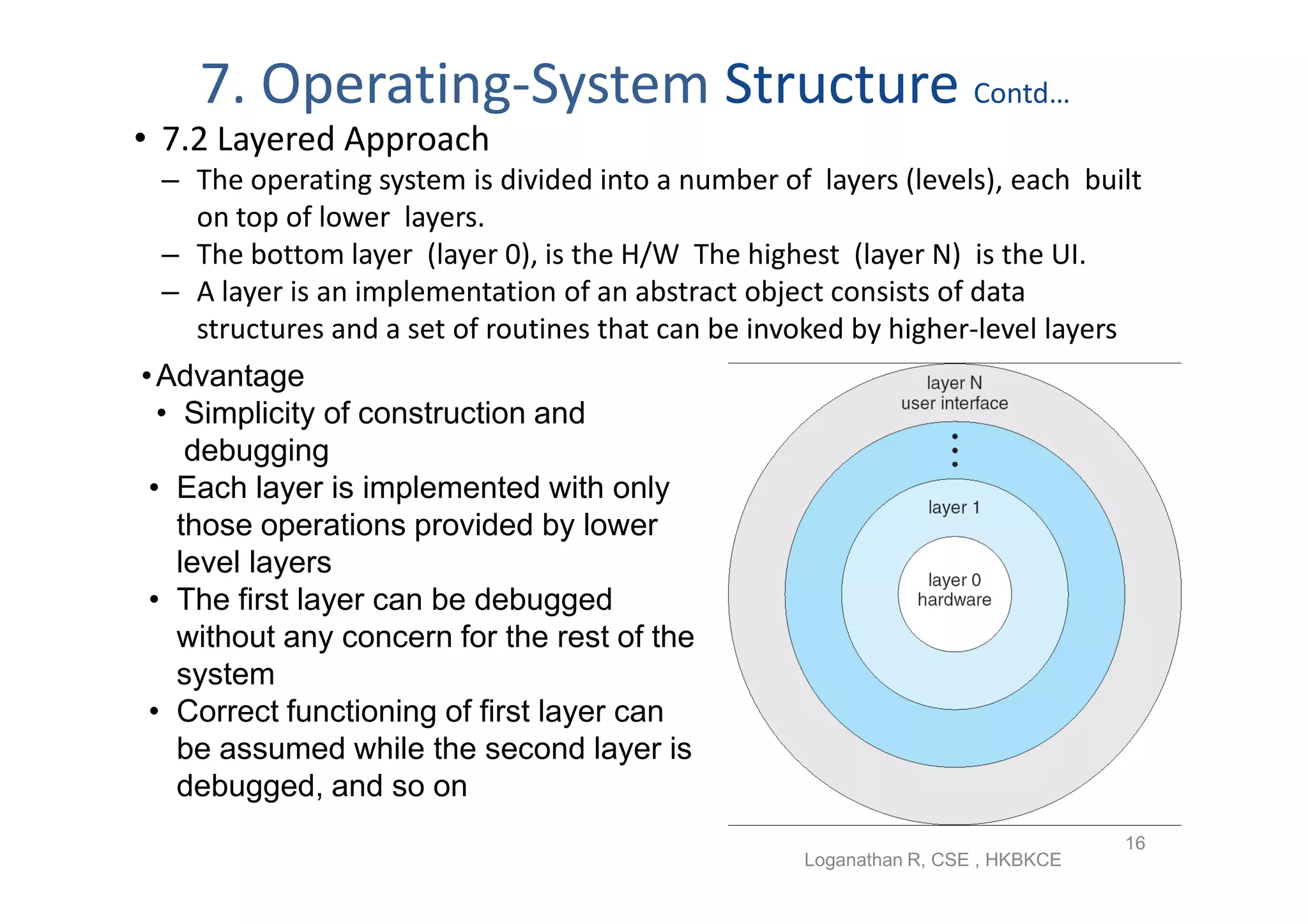
• 7.2 Layered Approach
 – The operating system is divided into a number of layers (levels), each built
   on top of lower layers.
 – The bottom layer (layer 0), is the H/W The highest (layer N) is the UI.
 – A layer is an implementation of an abstract object consists of data
   structures and a set of routines that can be invoked by higher-level layers
• Advantage
  • Simplicity of construction and
     debugging
 • Each layer is implemented with only
    those operations provided by lower
    level layers
 • The first layer can be debugged
    without any concern for the rest of the
    system
 • Correct functioning of first layer can
    be assumed while the second layer is
    debugged, and so on
                                                                                 16
                                                    Loganathan R, CSE , HKBKCE
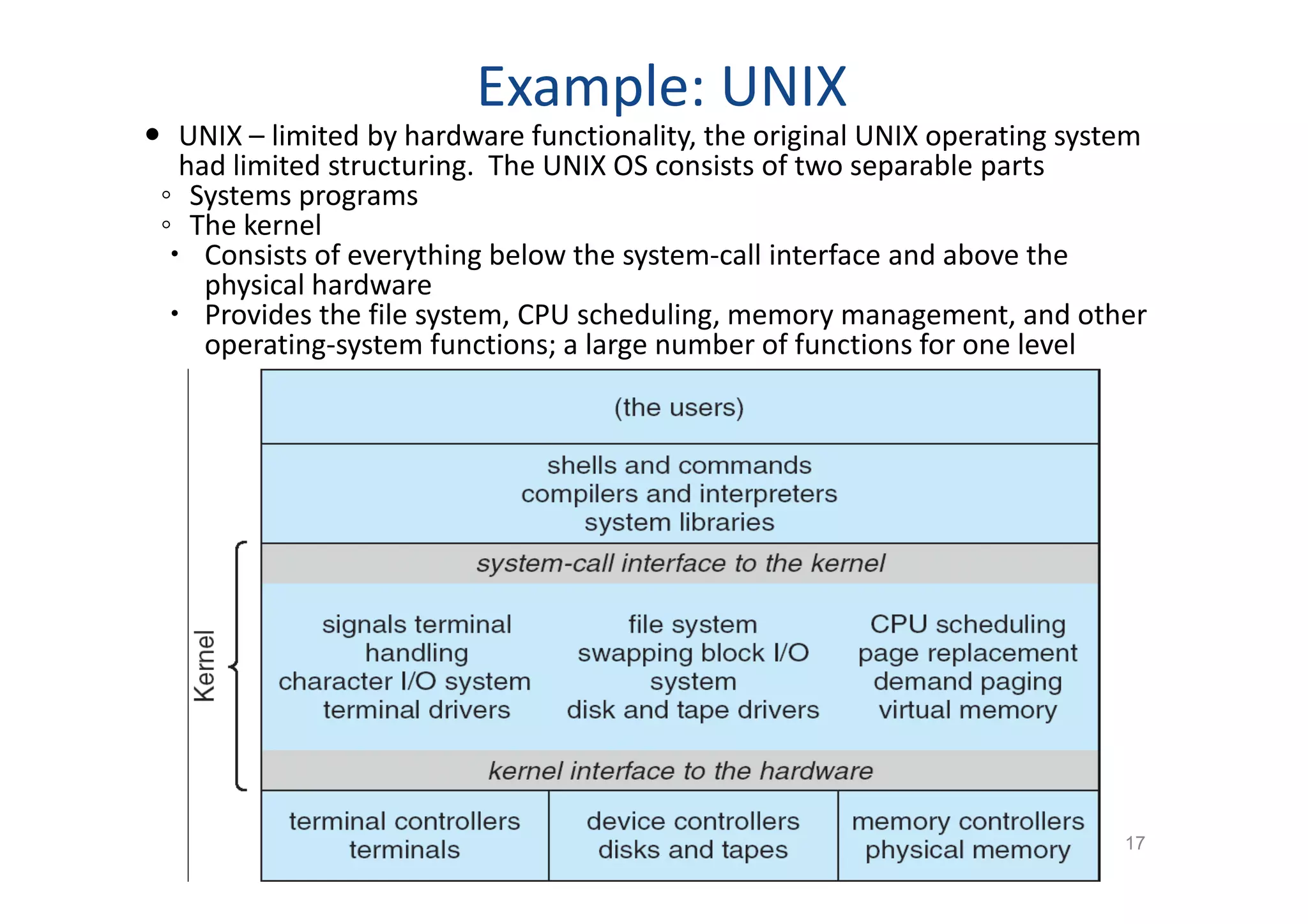
Example: UNIX
 UNIX – limited by hardware functionality, the original UNIX operating system
   had limited structuring. The UNIX OS consists of two separable parts
 ◦ Systems programs
 ◦ The kernel
   Consists of everything below the system-call interface and above the
     physical hardware
   Provides the file system, CPU scheduling, memory management, and other
     operating-system functions; a large number of functions for one level


                                                  Loganathan R, CSE , HKBKCE
                                                                               17
7. Operating-System Structure Contd…
 7.3 Microkernels
• Structures the OS by removing all nonessential
   components from the kernel and implementing
   them as system and user-level programs.
  Communication takes place between user modules
   using message passing
  Benefits:
  ◦   Easier to extend a microkernel
  ◦   Easier to port the operating system to new architectures
  ◦   More reliable (less code is running in kernel mode)
  ◦   More secure
 Detriments:
  ◦ Performance overhead of user space to kernel space
    communication

                       Loganathan R, CSE , HKBKCE                18
7. Operating-System Structure Contd…
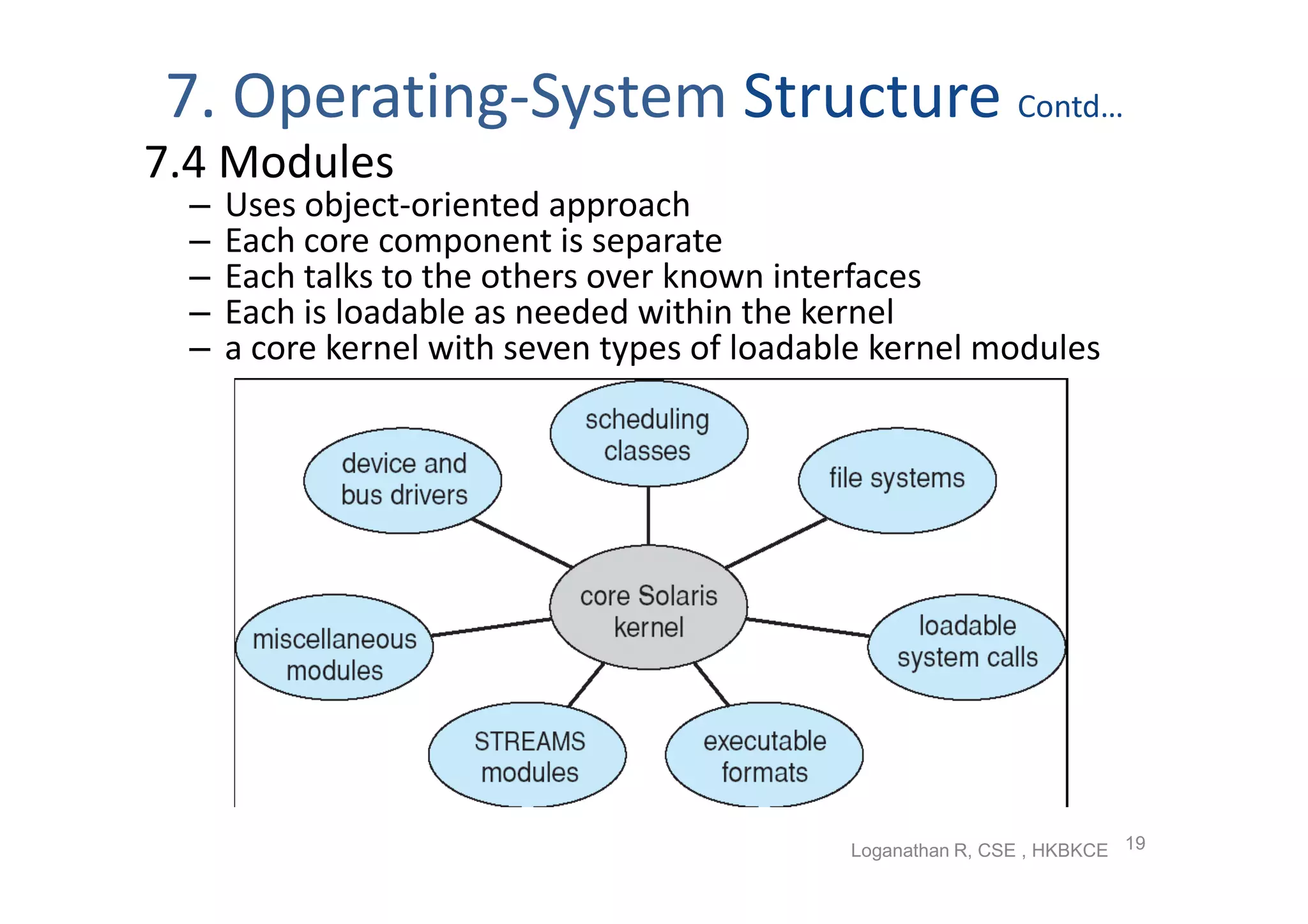
7.4 Modules
  –   Uses object-oriented approach
  –   Each core component is separate
  –   Each talks to the others over known interfaces
  –   Each is loadable as needed within the kernel
  –   a core kernel with seven types of loadable kernel modules


                                              Loganathan R, CSE , HKBKCE 19
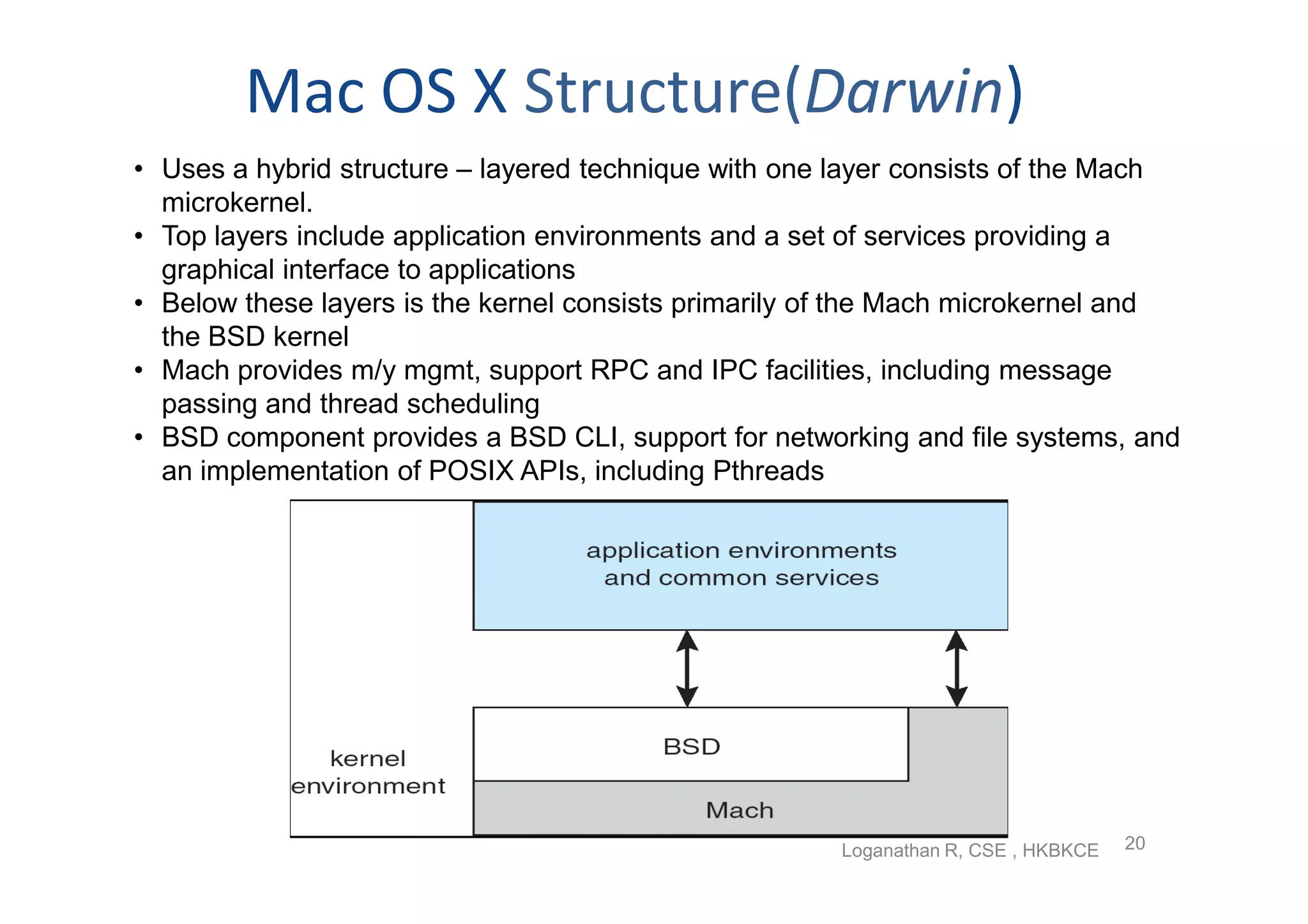
Mac OS X Structure(Darwin)
• Uses a hybrid structure – layered technique with one layer consists of the Mach
  microkernel.
• Top layers include application environments and a set of services providing a
  graphical interface to applications
• Below these layers is the kernel consists primarily of the Mach microkernel and
  the BSD kernel
• Mach provides m/y mgmt, support RPC and IPC facilities, including message
  passing and thread scheduling
• BSD component provides a BSD CLI, support for networking and file systems, and
  an implementation of POSIX APIs, including Pthreads


                                                      Loganathan R, CSE , HKBKCE   20
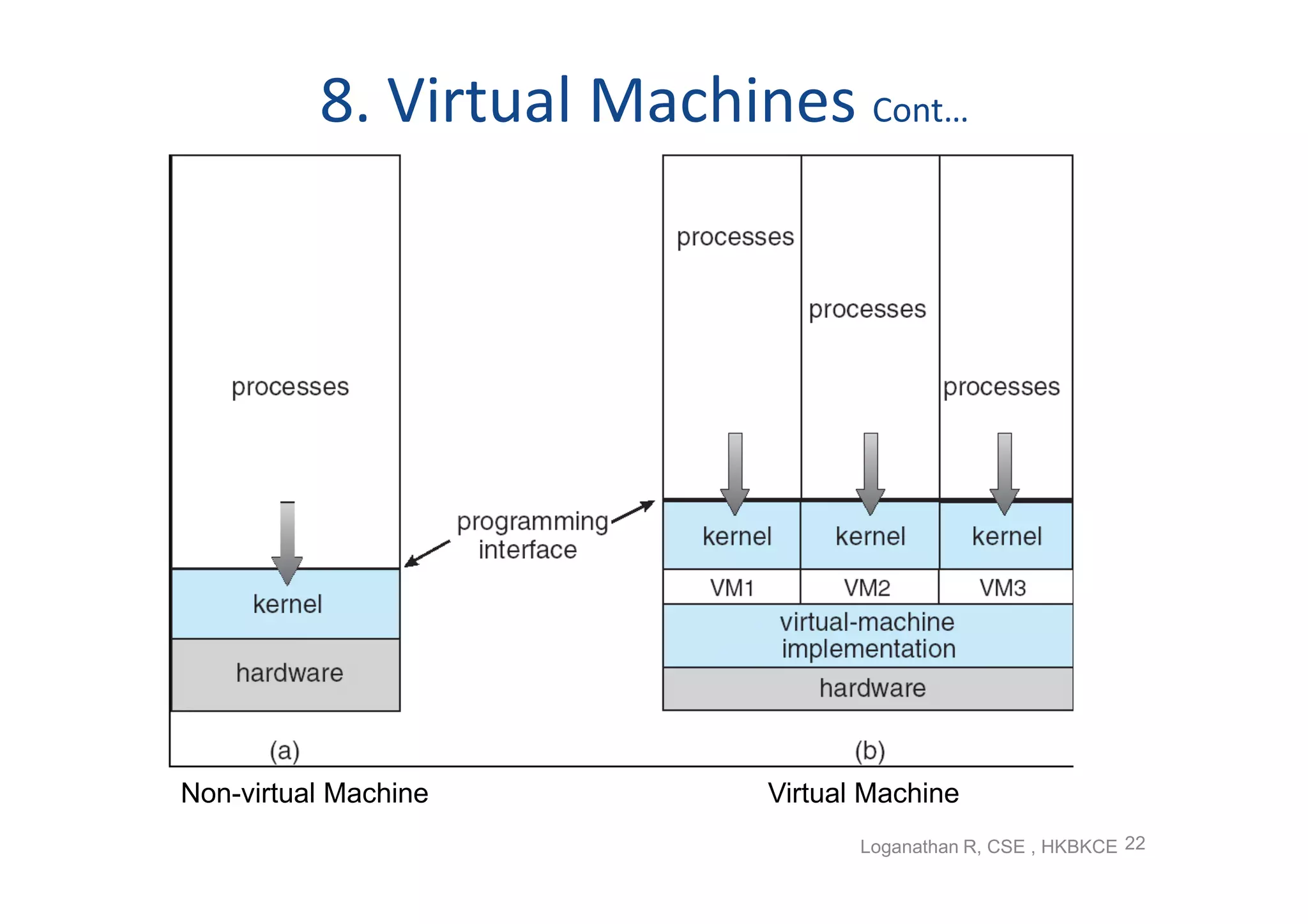
8. Virtual Machines
• A virtual machine takes the layered approach to its logical
  conclusion.
• It abstracts hardware of a single computer into several different
  execution environments i.e.         creates illusion of separate
  execution environment is running its own private computer.
• Provides an interface identical to the underlying bare hardware
• The operating system creates the illusion of multiple processes,
  each executing on its own processor with its own (virtual)
  memory
• The resources of the physical computer are shared to create the
  virtual machines
• A major difficulty is disk systems, solved using Virtual disks
  (minidisks in IBM)
• Users are given their own virtual machines and they can run any
  of the operating systems or software packages that are available


                                              Loganathan R, CSE , HKBKCE 21
8. Virtual Machines Cont…


Non-virtual Machine        Virtual Machine
                                  Loganathan R, CSE , HKBKCE 22
8. Virtual Machines Cont…
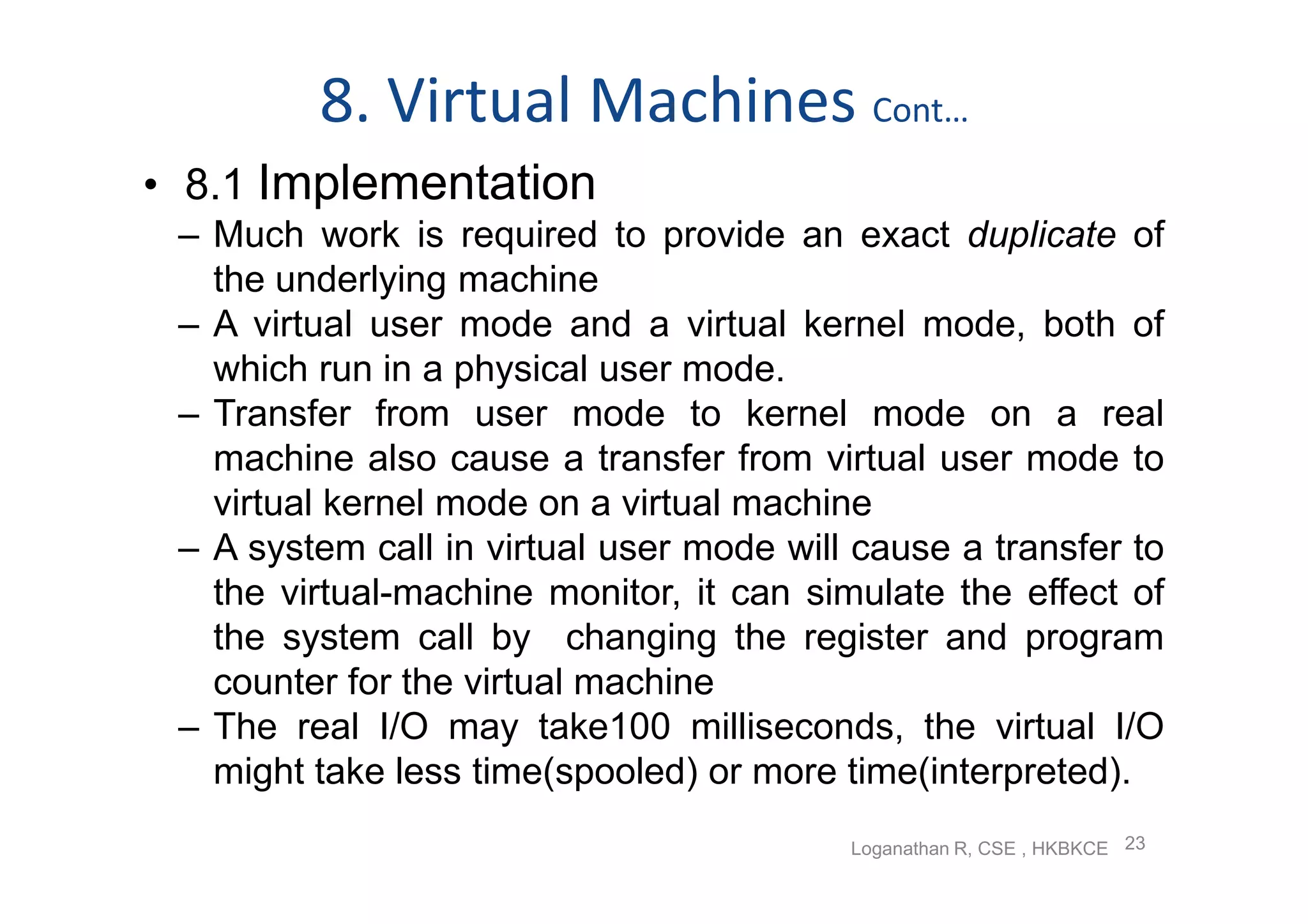
• 8.1 Implementation
 – Much work is required to provide an exact duplicate of
   the underlying machine
 – A virtual user mode and a virtual kernel mode, both of
   which run in a physical user mode.
 – Transfer from user mode to kernel mode on a real
   machine also cause a transfer from virtual user mode to
   virtual kernel mode on a virtual machine
 – A system call in virtual user mode will cause a transfer to
   the virtual-machine monitor, it can simulate the effect of
   the system call by changing the register and program
   counter for the virtual machine
 – The real I/O may take100 milliseconds, the virtual I/O
   might take less time(spooled) or more time(interpreted).
                                          Loganathan R, CSE , HKBKCE 23
8. Virtual Machines Cont…
• 8.2 Benefits
 – Complete protection of the various system resources
 – No direct sharing of resources and implementation
   through
     • Share a minidisk and thus to share files through
       software
     • Network of virtual machines over the virtual
       communications network
 – VM system is a perfect vehicle for OS research and
   development
 – A virtual-machine system eliminates system development
   time
     • System must be stopped and taken out of use while
       changes are made and tested , this period is called
       system development time
                                       Loganathan R, CSE , HKBKCE 24
8. Virtual Machines Cont…
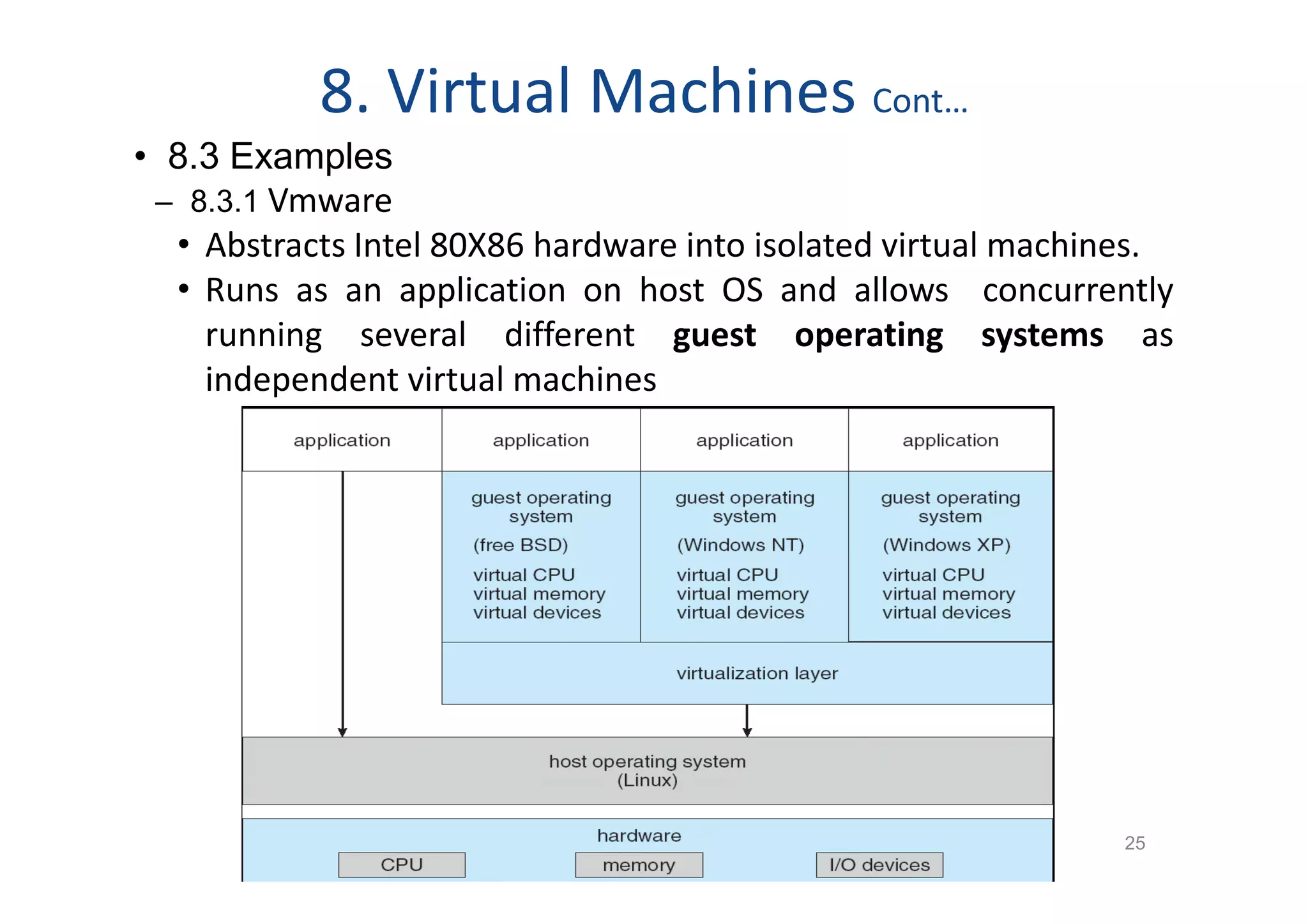
• 8.3 Examples
 – 8.3.1 Vmware
  • Abstracts Intel 80X86 hardware into isolated virtual machines.
  • Runs as an application on host OS and allows concurrently
    running several different guest operating systems as
    independent virtual machines


                                                              25
8. Virtual Machines Cont…
• 8.3 Examples
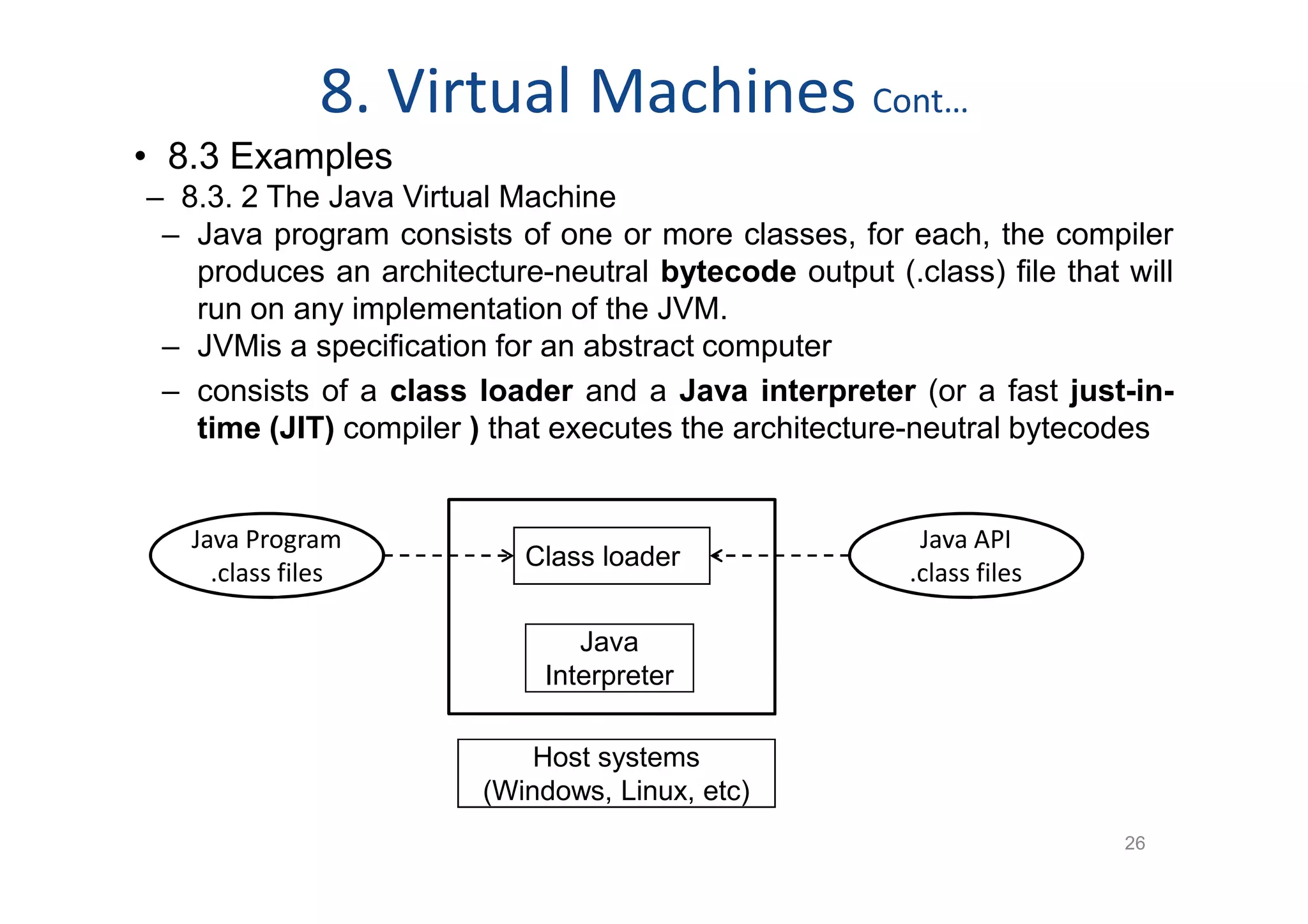
– 8.3. 2 The Java Virtual Machine
 – Java program consists of one or more classes, for each, the compiler
   produces an architecture-neutral bytecode output (.class) file that will
   run on any implementation of the JVM.
 – JVMis a specification for an abstract computer
 – consists of a class loader and a Java interpreter (or a fast just-in-
   time (JIT) compiler ) that executes the architecture-neutral bytecodes


   Java Program                                         Java API
                           Class loader
     .class files                                      .class files

                                Java
                             Interpreter

                            Host systems
                        (Windows, Linux, etc)
                                                                       26
9. Operating-System Generation
• It is possible to design, code, and implement an operating system
  specifically for one machine at one site
• A processes of configuring or generating system for each specific
  computer site, is known as system generation (SYSGEN)
• The SYSGEN program reads from a given file, or asks the operator for
  the specific configuration of the hardware system, or probes the
  hardware directly
• Once information is determined , a system administrator can use it
  to modify the source code of OS , then compile and the output
  object version is tailored to the system
• A slightly less tailored level modules are selected from a
  precompiled library and linked together to form OS
• Other extreme, all the code is always part of the system, and
  selection occurs at execution time, rather than at compile or link
  time.
• The major differences among these approaches are the size and
  generality                                                      27
10. System Boot
• Operating system must be made available to hardware so
  hardware can start it
• When power initialized on system, execution starts at a
  predefined memory location (in ROM) where initial bootstrap
  program stored
• Small piece of code – bootstrap program or bootstrap
  loader, locates the kernel, loads it into memory, and starts its
  execution
• Sometimes two-step process where simple boot block /
  bootstrap loader fetches a complex boot program, which
  loads kernel
• A disk that has a boot partition is called a boot disk or system
  disk.
• Problem with ROM is that changing the bootstrap code
  requires changing the ROM hardware chips which is resolved
  using erasable programmable read-only memory (EPROM)
                                                              28
                        Loganathan R, CSE , HKBKCE

2 operating system structures

  • 1.
    Operating-System Structures  OperatingSystem Services  User Operating System Interface  System Calls  Types of System Calls  System Programs  Operating System Design and Implementation  Operating System Structure  Virtual Machines  Operating System Generation  System Boot 1 Loganathan R, CSE , HKBKCE
  • 2.
    1. Operating SystemServices • One set of operating-system services provides functions that are helpful to the user: – User interface - Almost all operating systems have a user interface (UI) Command-Line (CLI), Batch Interface & Graphics User Interface (GUI) – Program execution - Load a program into memory and to run that program, end execution, either normally or abnormally (indicating error) – I/O operations - A running program may require I/O, which may involve a file or an I/O device. – File-system manipulation - Programs need to read and write files and directories, create and delete them, search them, list file Information, permission management. – Communications – Between process in the same or different computer via shared memory or message passing – Error Detection - Errors may occur in the CPU and memory hardware ( memory error or power failure), in I/O devices (parity error on tape, a connection failure on a network, or lack of paper in the printer) and in the user program (arithmetic overflow, illegal memory location access, or a too-great use of CPU time) 2 Loganathan R, CSE , HKBKCE
  • 3.
    1. Operating SystemServices Contd.. • Another set of OS functions exists for ensuring the efficient operation of the system itself via resource sharing – Resource allocation - When multiple users or multiple jobs running concurrently, resources must be allocated to each of them • Many types of resources - Some (such as CPU cycles, main memory, and file storage) may have special allocation code, others (such as I/O devices) may have general request and release code. – Accounting - To keep track of which users use how much and what kinds of computer resources – Protection and security - The owners of information stored in a multiuser or networked computer system may want to control use of that information, concurrent processes should not interfere with each other • Protection involves ensuring that all access to system resources is controlled • Security of the system from outsiders requires user authentication, extends to defending external I/O devices from invalid access attempts • If a system is to be protected and secure, precautions must be instituted throughout it. A chain is only as strong as its weakest link. Loganathan R, CSE , HKBKCE 3
  • 4.
    2.User Operating SystemInterface • 2.1 Command Interpreter / CLI • Implemented in kernel, sometimes by systems program • Function of the command interpreter is to get and execute the user-specified command. • Multiple command interpreters to choose from the interpreters are known as shells • Example :Bourne shell, C shell, Bourne-Again shell, the Korn shell • Command Interpreter Implementation • Command interpreter itself contains the code to execute the command • Through system programs – uses the command to identify a file to be loaded into memory and executed • Example rm file.txt Loganathan R, CSE , HKBKCE 4
  • 5.
    User Operating SystemInterface Cntd..  2.2 Graphical User Interfaces  User-friendly desktop metaphor interface ◦ Usually mouse, keyboard, and monitor ◦ Icons represent files, programs, actions, etc ◦ Various mouse buttons over objects in the interface cause various actions (provide information, options, execute function, open directory (known as a folder) ◦ Invented at Xerox PARC  Many systems now include both CLI and GUI interfaces ◦ Microsoft Windows is GUI with CLI “command” shell ◦ Apple Mac OS X as “Aqua” GUI interface with UNIX kernel underneath and shells available ◦ Solaris is CLI with optional GUI interfaces (Java Desktop, KDE) Loganathan R, CSE , HKBKCE 5
  • 6.
    3. System Calls Programming interface to the services provided by the OS  Typically written in a high-level language (C or C++)  Example of how system calls are used to copy the files Loganathan R, CSE , HKBKCE 6
  • 7.
    Application Programming Interface(API)  System calls are mostly accessed by programs via a high- level Application Program Interface (API) rather than direct system call use • API specifies a set of functions that are available to an application programmer, including the parameters that are passed  Three most common APIs are Win32 API for Windows, POSIX API for POSIX-based systems (including virtually all versions of UNIX, Linux, and Mac OS X), and Java API for the Java virtual machine (JVM)  Why use APIs rather than system calls? • Program portability • Actual system calls can be more detailed and difficult to work with than the API Loganathan R, CSE , HKBKCE 7
  • 8.
    System Call Implementation •Programming languages provides a system-call interface that serves as the link to system calls made available by the OS • System-call interface intercepts function calls in the API and invokes the necessary system call within the OS • System-call interface maintains a table indexed according to these numbers associated with each system call • The system call interface invokes intended system call in OS kernel and returns status of the system call and any return values 8 Loganathan R, CSE , HKBKCE
  • 9.
    System Call ParameterPassing • Registers • Parameters stored in a block, or table, in memory, and address of block passed as a parameter in a register (Linux and Solaris) as shown • Parameters placed, or pushed, onto the stack by the program and popped off the stack by the operating system – Block and stack methods do not limit the number or length of parameters being passed Loganathan R, CSE , HKBKCE 9
  • 10.
    4. Types ofSystem Calls 4.1 Process control • End, abort • Load, execute • Create process terminate –process • get process attributes, set process attributes • Wait for time • Wait event, signal event • Allocate and free memory fork() exec() exit() Single Tasking: MS-DOS execution, Multitasking: FreeBSD (a) At system startup, (b) Running a running multiple programs 10 program Loganathan R, CSE , HKBKCE
  • 11.
    4. Types ofSystem Calls Contd 4.2 File management • File – create, delete, open, close, read, write, reposition • Get / set file attributes 4.3 Device management The various resources controlled by the OS can be thought of as devices • Device – request, release, read, write, reposition • get / set device attributes • Logically attach or detach devices 4.4 Information maintenance Transferring information between the user program and the OS and keeps information about all its processes and system calls • get / set – time or date • get / set system data • get / set – process, file or device attributes 4.5 Communications Inter-process communication Models : Message passing model & Shared-memory model • Create, delete communication connection • Send, receive messages • Transfer status information • Attach or detach remote devices 11 Loganathan R, CSE , HKBKCE
  • 12.
    5. System Programs System programs provide a convenient environment for program development and execution.  Categories ◦ File management - create, delete, copy, rename, print, dump, list, and manipulate files and directories ◦ Status information - date, time, available memory or disk space, no of users, performance, logging, and debugging information ◦ File modification - text editors to create and modify the content of files, search contents of files. ◦ Programming language support - Compilers, assemblers, debuggers and interpreters ◦ Program loading and execution - absolute loaders, relocatable loaders, linkage editors, overlay loaders and debuggers ◦ Communications - Creating virtual connections among processes, users, and computer systems ◦ System utilities Application programs - web browsers, word processors , text formatters, spreadsheets, database systems, compilers, plotting and statistical-analysis packages and games  Most users’ view of the operation system is defined by system programs, not the actual system calls 12 Loganathan R, CSE , HKBKCE
  • 13.
    6. OS Designand Implementation  Design and Implementation of OS not “solvable”, but some approaches have proven successful  6.1 Design Goals – The design of the system is affected by the choice of hardware and the type of system: batch, time shared, single user, multiuser, distributed, real time, or general purpose – The requirement can be divided to User goals and System goals ◦ User goals – operating system should be convenient to use, easy to learn, reliable, safe, and fast ◦ System goals – operating system should be easy to design, implement, and maintain, as well as flexible, reliable, error- free, and efficient Loganathan R, CSE , HKBKCE 13
  • 14.
    6. OS Designand Implementation Contd.. 6.2 Mechanisms and Policies • Mechanisms determine how to do something, policies decide what will be done – Example : timer construct is a mechanism for ensuring CPU protection(loop), but deciding how long the timer is to be set for a particular user is a policy decision – The separation of policy from mechanism is a very important principle, it allows maximum flexibility if policy decisions are to be changed later 6.3 Implementation • Traditionally, written in assembly language, now C or C++ • Advantages of using a higher-level language – Faster Coding , more compact, easier to understand and debug – Easier to port—to move to some other hardware • Disadvantages of using a higher-level language – Reduced speed and increased storage requirements Loganathan R, CSE , HKBKCE 14
  • 15.
    7. Operating-System Structure •How OS components are interconnected and melded into a kernel. 7.1 Simple Structure • Started as small, simple, and limited systems and then grown beyond their original scope • Example : MS-DOS – written to provide the most functionality in the least space – Not divided into modules – Although MS-DOS has some structure, its interfaces and levels of functionality are not well separated MS-DOS layer structure 15 Loganathan R, CSE , HKBKCE
  • 16.
    7. Operating-System StructureContd… • 7.2 Layered Approach – The operating system is divided into a number of layers (levels), each built on top of lower layers. – The bottom layer (layer 0), is the H/W The highest (layer N) is the UI. – A layer is an implementation of an abstract object consists of data structures and a set of routines that can be invoked by higher-level layers • Advantage • Simplicity of construction and debugging • Each layer is implemented with only those operations provided by lower level layers • The first layer can be debugged without any concern for the rest of the system • Correct functioning of first layer can be assumed while the second layer is debugged, and so on 16 Loganathan R, CSE , HKBKCE
  • 17.
    Example: UNIX  UNIX– limited by hardware functionality, the original UNIX operating system had limited structuring. The UNIX OS consists of two separable parts ◦ Systems programs ◦ The kernel  Consists of everything below the system-call interface and above the physical hardware  Provides the file system, CPU scheduling, memory management, and other operating-system functions; a large number of functions for one level Loganathan R, CSE , HKBKCE 17
  • 18.
    7. Operating-System StructureContd… 7.3 Microkernels • Structures the OS by removing all nonessential components from the kernel and implementing them as system and user-level programs.  Communication takes place between user modules using message passing  Benefits: ◦ Easier to extend a microkernel ◦ Easier to port the operating system to new architectures ◦ More reliable (less code is running in kernel mode) ◦ More secure  Detriments: ◦ Performance overhead of user space to kernel space communication Loganathan R, CSE , HKBKCE 18
  • 19.
    7. Operating-System StructureContd… 7.4 Modules – Uses object-oriented approach – Each core component is separate – Each talks to the others over known interfaces – Each is loadable as needed within the kernel – a core kernel with seven types of loadable kernel modules Loganathan R, CSE , HKBKCE 19
  • 20.
    Mac OS XStructure(Darwin) • Uses a hybrid structure – layered technique with one layer consists of the Mach microkernel. • Top layers include application environments and a set of services providing a graphical interface to applications • Below these layers is the kernel consists primarily of the Mach microkernel and the BSD kernel • Mach provides m/y mgmt, support RPC and IPC facilities, including message passing and thread scheduling • BSD component provides a BSD CLI, support for networking and file systems, and an implementation of POSIX APIs, including Pthreads Loganathan R, CSE , HKBKCE 20
  • 21.
    8. Virtual Machines •A virtual machine takes the layered approach to its logical conclusion. • It abstracts hardware of a single computer into several different execution environments i.e. creates illusion of separate execution environment is running its own private computer. • Provides an interface identical to the underlying bare hardware • The operating system creates the illusion of multiple processes, each executing on its own processor with its own (virtual) memory • The resources of the physical computer are shared to create the virtual machines • A major difficulty is disk systems, solved using Virtual disks (minidisks in IBM) • Users are given their own virtual machines and they can run any of the operating systems or software packages that are available Loganathan R, CSE , HKBKCE 21
  • 22.
    8. Virtual MachinesCont… Non-virtual Machine Virtual Machine Loganathan R, CSE , HKBKCE 22
  • 23.
    8. Virtual MachinesCont… • 8.1 Implementation – Much work is required to provide an exact duplicate of the underlying machine – A virtual user mode and a virtual kernel mode, both of which run in a physical user mode. – Transfer from user mode to kernel mode on a real machine also cause a transfer from virtual user mode to virtual kernel mode on a virtual machine – A system call in virtual user mode will cause a transfer to the virtual-machine monitor, it can simulate the effect of the system call by changing the register and program counter for the virtual machine – The real I/O may take100 milliseconds, the virtual I/O might take less time(spooled) or more time(interpreted). Loganathan R, CSE , HKBKCE 23
  • 24.
    8. Virtual MachinesCont… • 8.2 Benefits – Complete protection of the various system resources – No direct sharing of resources and implementation through • Share a minidisk and thus to share files through software • Network of virtual machines over the virtual communications network – VM system is a perfect vehicle for OS research and development – A virtual-machine system eliminates system development time • System must be stopped and taken out of use while changes are made and tested , this period is called system development time Loganathan R, CSE , HKBKCE 24
  • 25.
    8. Virtual MachinesCont… • 8.3 Examples – 8.3.1 Vmware • Abstracts Intel 80X86 hardware into isolated virtual machines. • Runs as an application on host OS and allows concurrently running several different guest operating systems as independent virtual machines 25
  • 26.
    8. Virtual MachinesCont… • 8.3 Examples – 8.3. 2 The Java Virtual Machine – Java program consists of one or more classes, for each, the compiler produces an architecture-neutral bytecode output (.class) file that will run on any implementation of the JVM. – JVMis a specification for an abstract computer – consists of a class loader and a Java interpreter (or a fast just-in- time (JIT) compiler ) that executes the architecture-neutral bytecodes Java Program Java API Class loader .class files .class files Java Interpreter Host systems (Windows, Linux, etc) 26
  • 27.
    9. Operating-System Generation •It is possible to design, code, and implement an operating system specifically for one machine at one site • A processes of configuring or generating system for each specific computer site, is known as system generation (SYSGEN) • The SYSGEN program reads from a given file, or asks the operator for the specific configuration of the hardware system, or probes the hardware directly • Once information is determined , a system administrator can use it to modify the source code of OS , then compile and the output object version is tailored to the system • A slightly less tailored level modules are selected from a precompiled library and linked together to form OS • Other extreme, all the code is always part of the system, and selection occurs at execution time, rather than at compile or link time. • The major differences among these approaches are the size and generality 27
  • 28.
    10. System Boot •Operating system must be made available to hardware so hardware can start it • When power initialized on system, execution starts at a predefined memory location (in ROM) where initial bootstrap program stored • Small piece of code – bootstrap program or bootstrap loader, locates the kernel, loads it into memory, and starts its execution • Sometimes two-step process where simple boot block / bootstrap loader fetches a complex boot program, which loads kernel • A disk that has a boot partition is called a boot disk or system disk. • Problem with ROM is that changing the bootstrap code requires changing the ROM hardware chips which is resolved using erasable programmable read-only memory (EPROM) 28 Loganathan R, CSE , HKBKCE