Ambari
1.2
How Ambari Agents Register


© Hortonworks Inc. 2013      Page 1
Summary
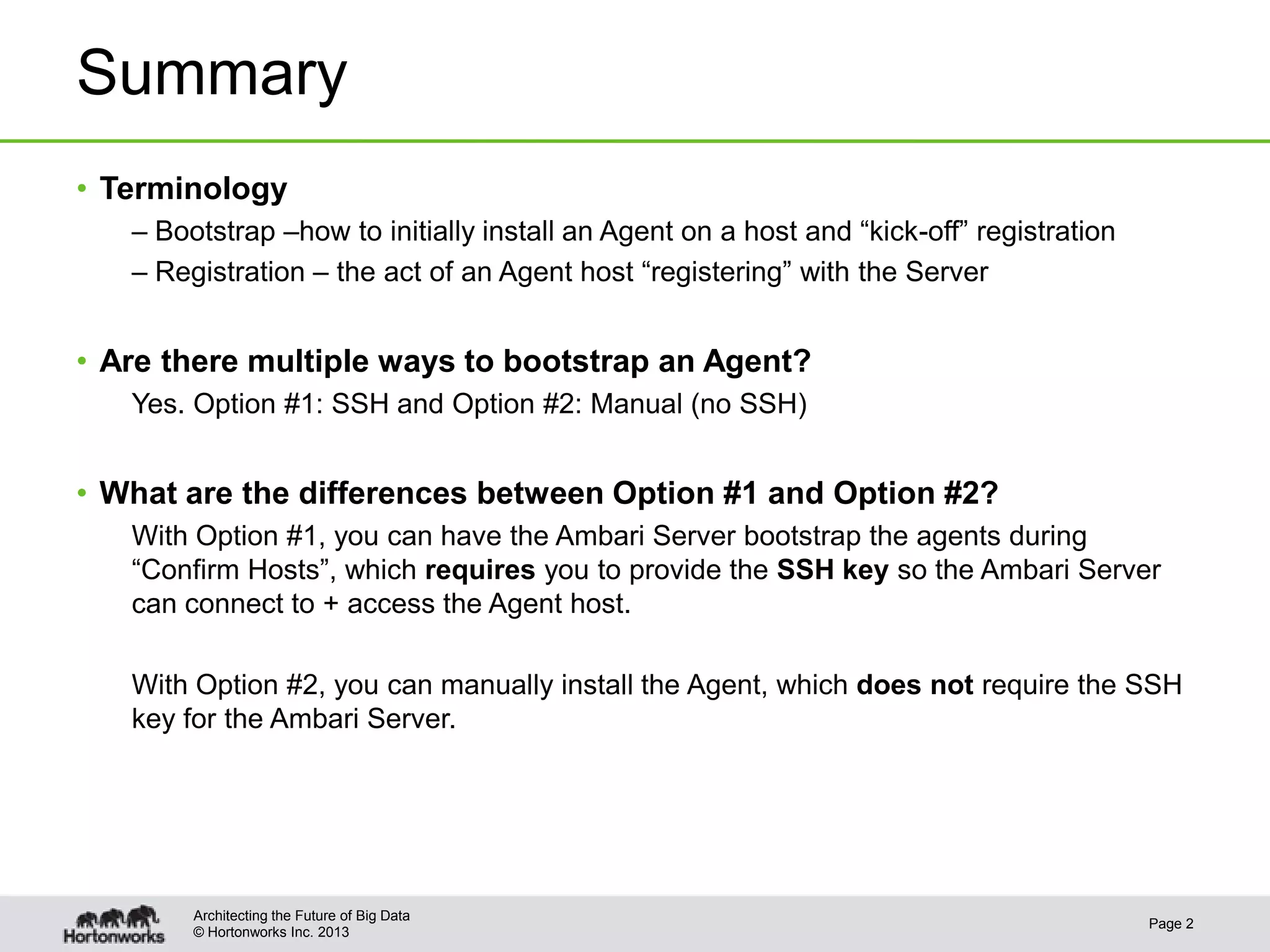
• Terminology
   – Bootstrap –how to initially install an Agent on a host and “kick-off” registration
   – Registration – the act of an Agent host “registering” with the Server


• Are there multiple ways to bootstrap an Agent?
   Yes. Option #1: SSH and Option #2: Manual (no SSH)


• What are the differences between Option #1 and Option #2?
   With Option #1, you can have the Ambari Server bootstrap the agents during
   “Confirm Hosts”, which requires you to provide the SSH key so the Ambari Server
   can connect to + access the Agent host.

   With Option #2, you can manually install the Agent, which does not require the SSH
   key for the Ambari Server.


        Architecting the Future of Big Data
                                                                                          Page 2
        © Hortonworks Inc. 2013
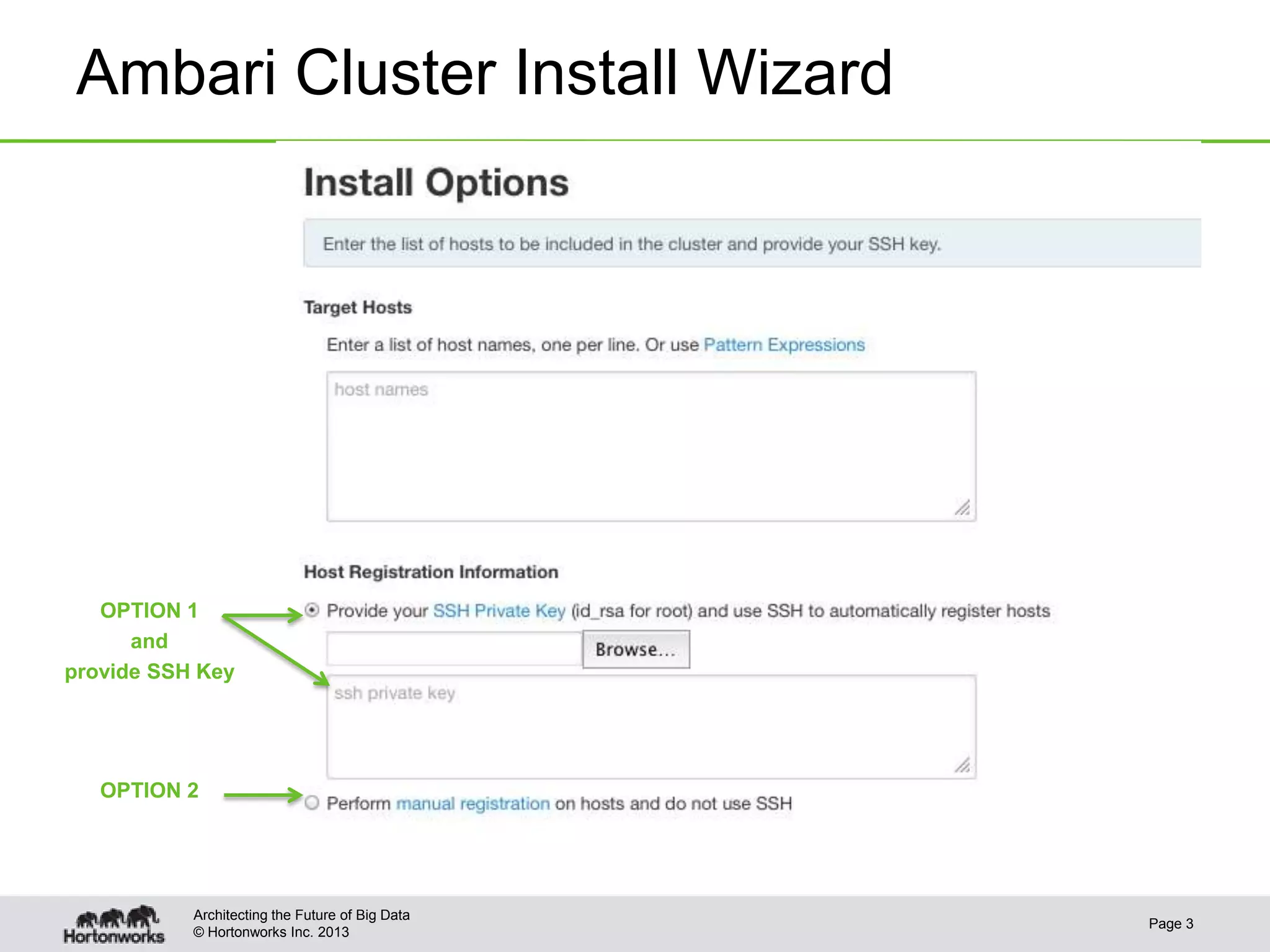
Ambari Cluster Install Wizard


   OPTION 1
      and
provide SSH Key


   OPTION 2


           Architecting the Future of Big Data
                                                 Page 3
           © Hortonworks Inc. 2013
Bootstrap
Operational Flows


Architecting the Future of Big Data
                                      Page 4
© Hortonworks Inc. 2013
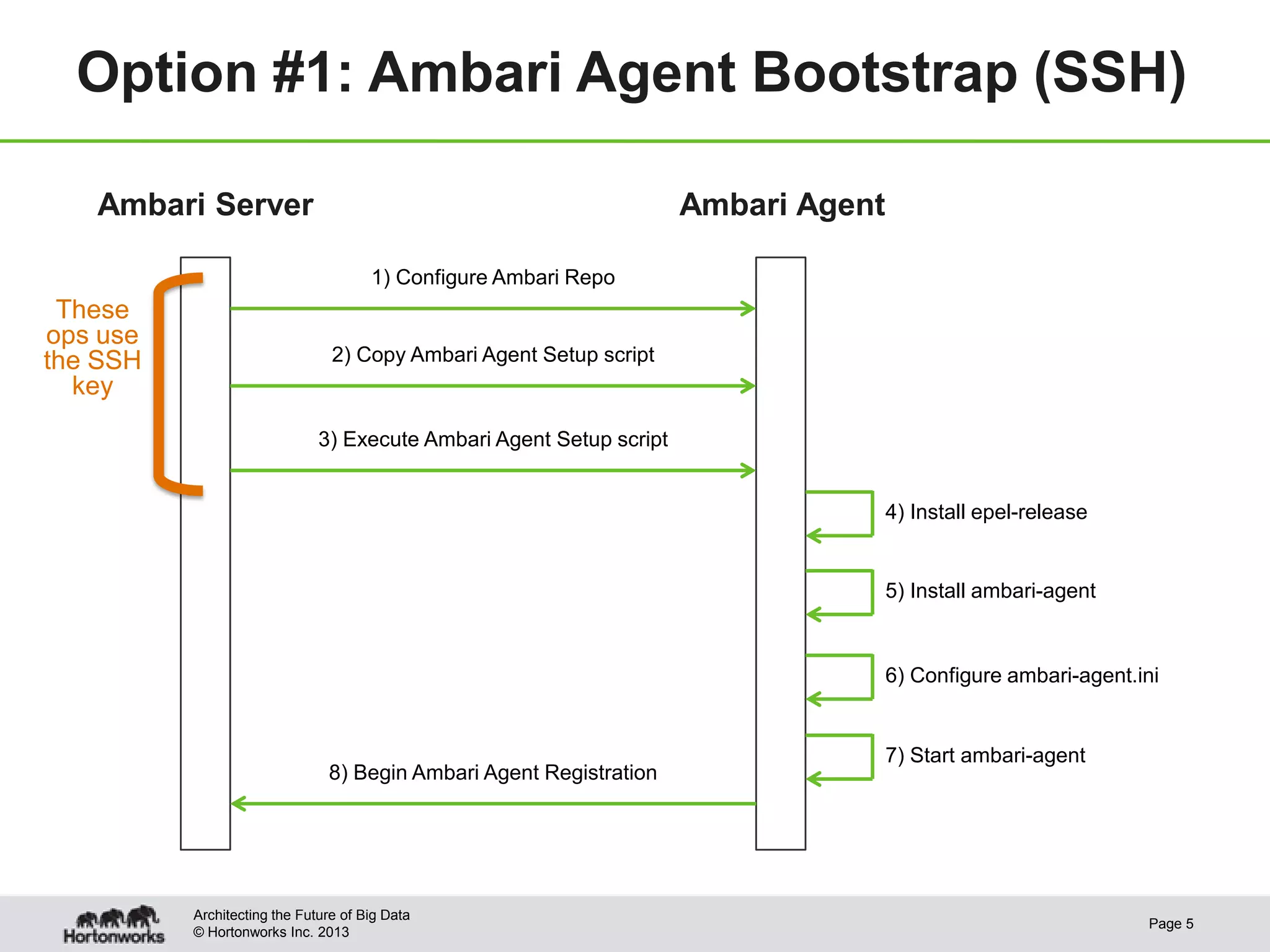
Option #1: Ambari Agent Bootstrap (SSH)

   Ambari Server                                                     Ambari Agent

                                      1) Configure Ambari Repo
 These
ops use
the SSH                         2) Copy Ambari Agent Setup script
  key
                              3) Execute Ambari Agent Setup script


                                                                                    4) Install epel-release


                                                                                    5) Install ambari-agent


                                                                                    6) Configure ambari-agent.ini


                                                                                    7) Start ambari-agent
                               8) Begin Ambari Agent Registration


          Architecting the Future of Big Data
                                                                                                               Page 5
          © Hortonworks Inc. 2013
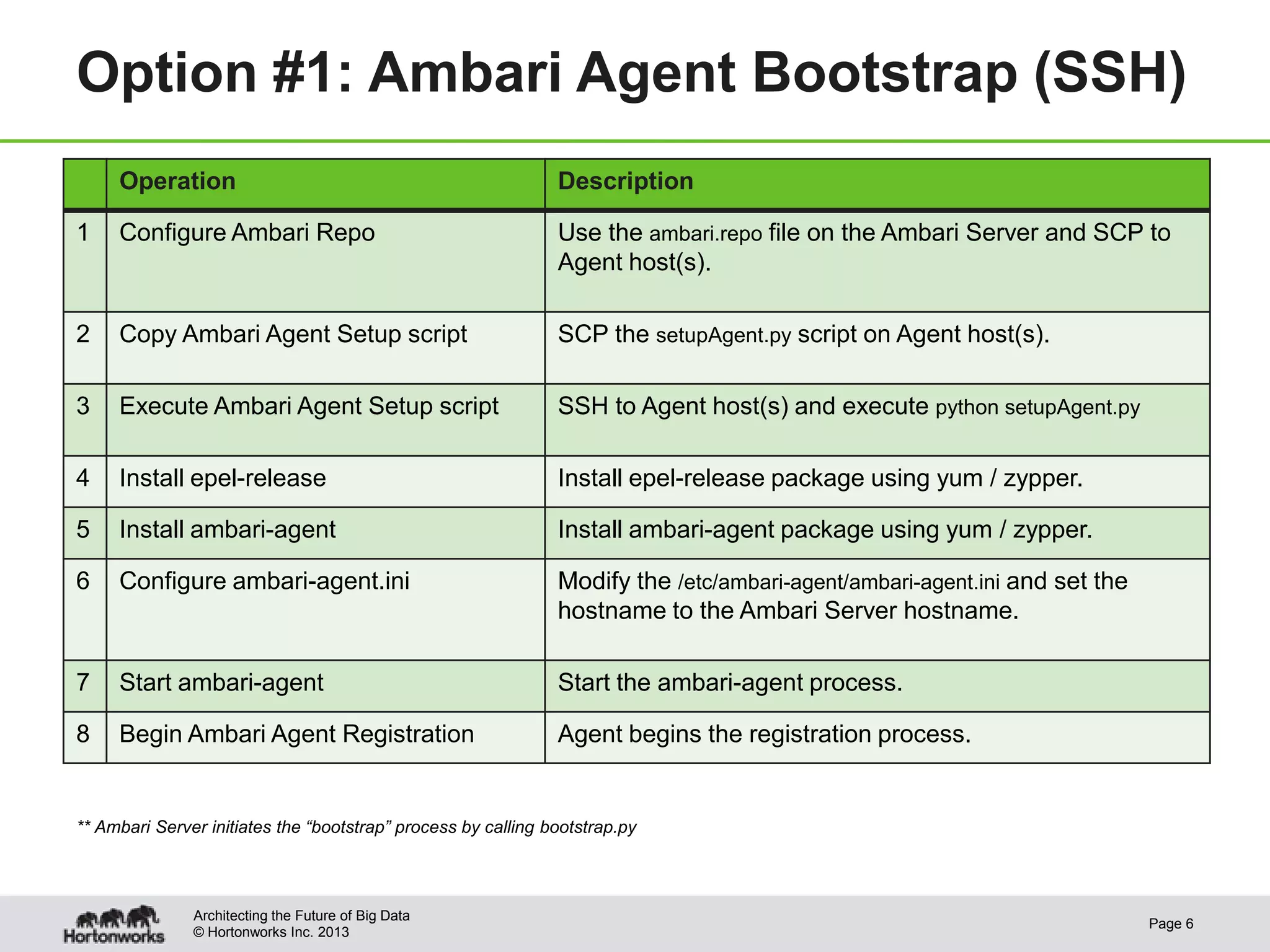
Option #1: Ambari Agent Bootstrap (SSH)
     Operation                                                 Description

1    Configure Ambari Repo                                     Use the ambari.repo file on the Ambari Server and SCP to
                                                               Agent host(s).

2    Copy Ambari Agent Setup script                            SCP the setupAgent.py script on Agent host(s).

3    Execute Ambari Agent Setup script                         SSH to Agent host(s) and execute python setupAgent.py

4    Install epel-release                                      Install epel-release package using yum / zypper.

5    Install ambari-agent                                      Install ambari-agent package using yum / zypper.

6    Configure ambari-agent.ini                                Modify the /etc/ambari-agent/ambari-agent.ini and set the
                                                               hostname to the Ambari Server hostname.

7    Start ambari-agent                                        Start the ambari-agent process.

8    Begin Ambari Agent Registration                           Agent begins the registration process.


** Ambari Server initiates the “bootstrap” process by calling bootstrap.py


               Architecting the Future of Big Data
                                                                                                                           Page 6
               © Hortonworks Inc. 2013
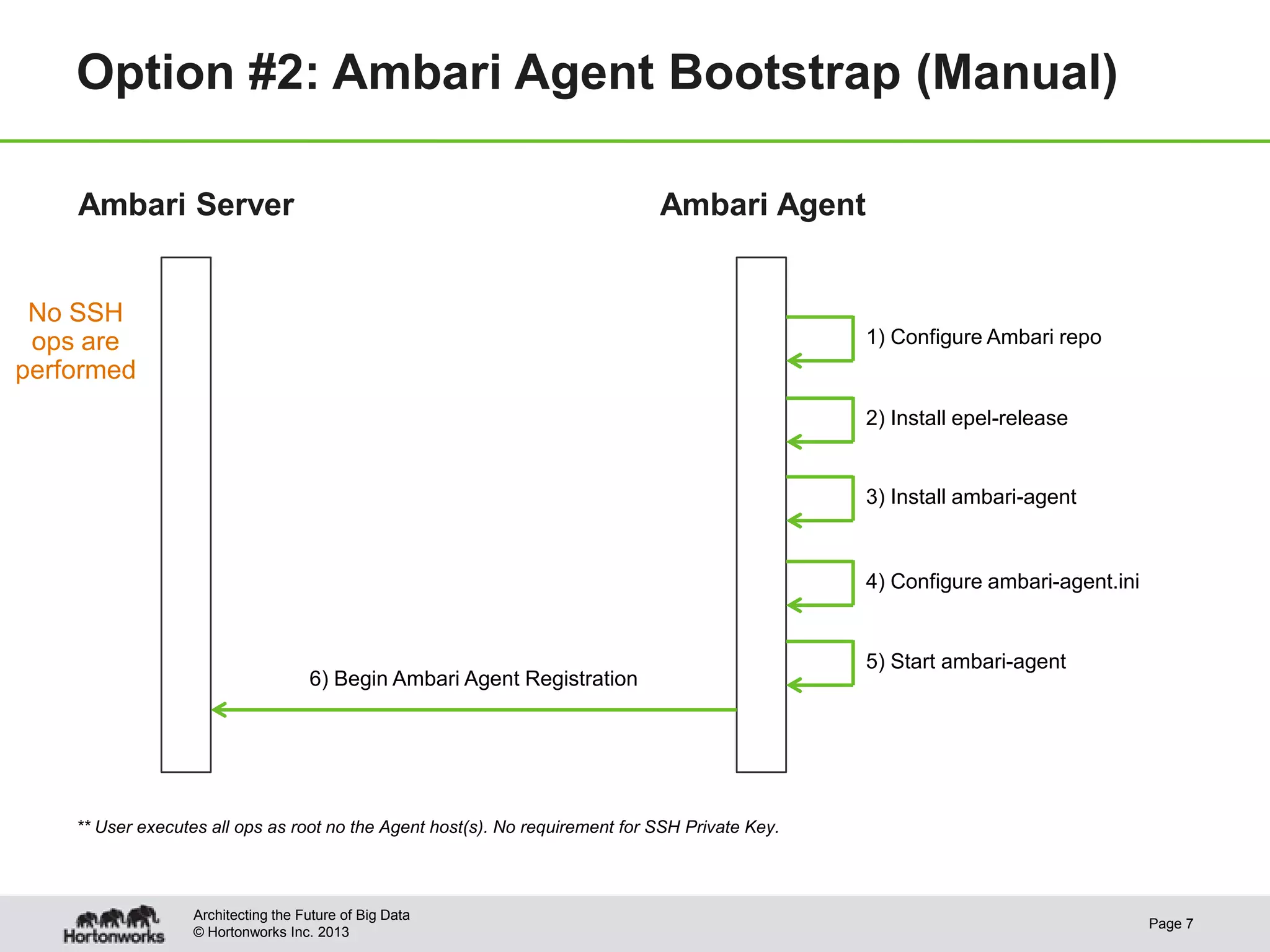
Option #2: Ambari Agent Bootstrap (Manual)

    Ambari Server                                                             Ambari Agent


 No SSH
 ops are                                                                                         1) Configure Ambari repo
performed
                                                                                                 2) Install epel-release


                                                                                                 3) Install ambari-agent


                                                                                                 4) Configure ambari-agent.ini


                                                                                                 5) Start ambari-agent
                                     6) Begin Ambari Agent Registration


    ** User executes all ops as root no the Agent host(s). No requirement for SSH Private Key.


                   Architecting the Future of Big Data
                                                                                                                                 Page 7
                   © Hortonworks Inc. 2013
Agent Registration


Architecting the Future of Big Data
                                      Page 8
© Hortonworks Inc. 2013
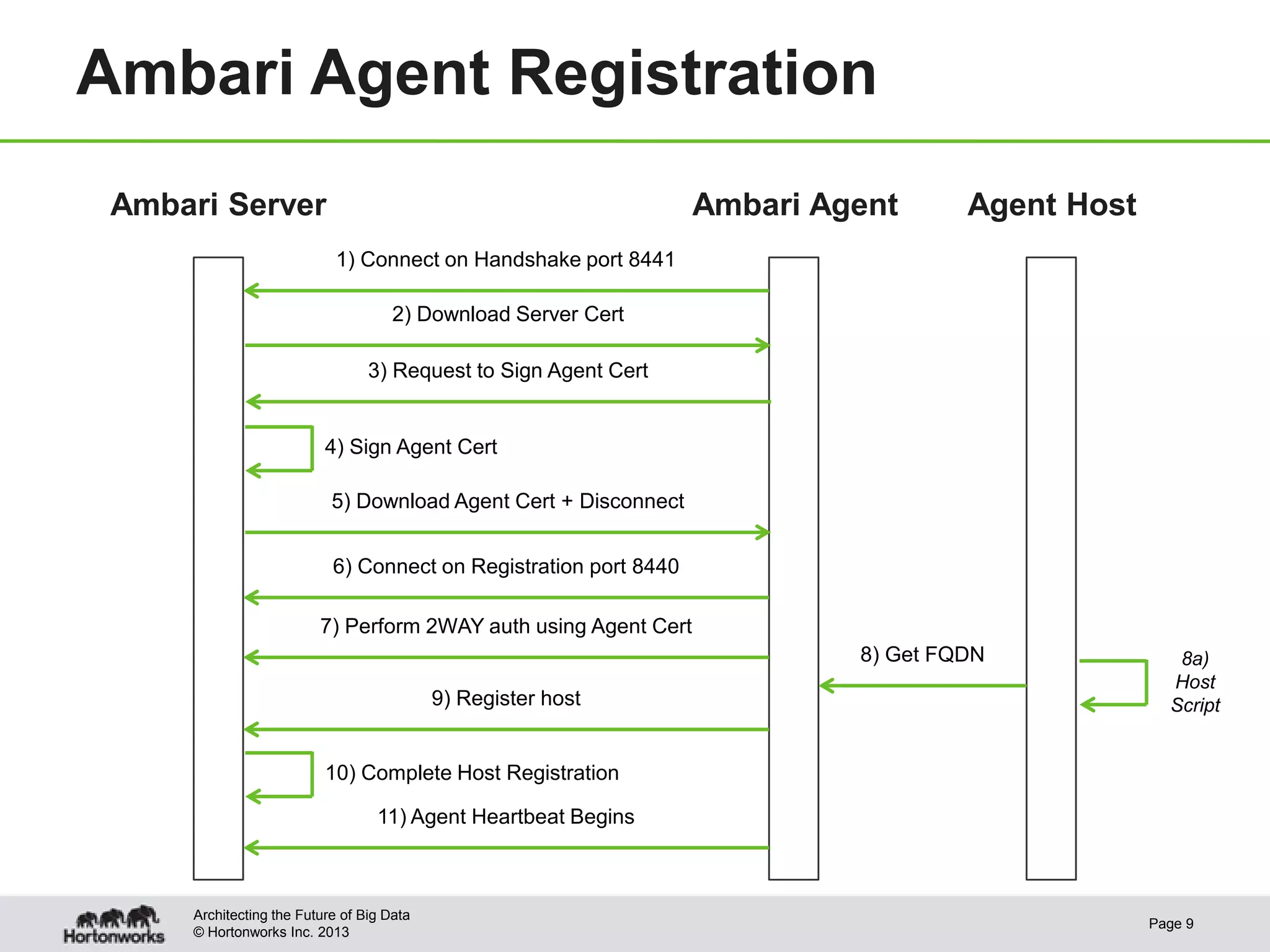
Ambari Agent Registration
 Ambari Server                                                     Ambari Agent      Agent Host
                            1) Connect on Handshake port 8441

                                      2) Download Server Cert

                                  3) Request to Sign Agent Cert


                           4) Sign Agent Cert

                            5) Download Agent Cert + Disconnect


                            6) Connect on Registration port 8440

                          7) Perform 2WAY auth using Agent Cert
                                                                            8) Get FQDN              8a)
                                                                                                    Host
                                            9) Register host                                        Script


                           10) Complete Host Registration

                                   11) Agent Heartbeat Begins


      Architecting the Future of Big Data
                                                                                                  Page 9
      © Hortonworks Inc. 2013
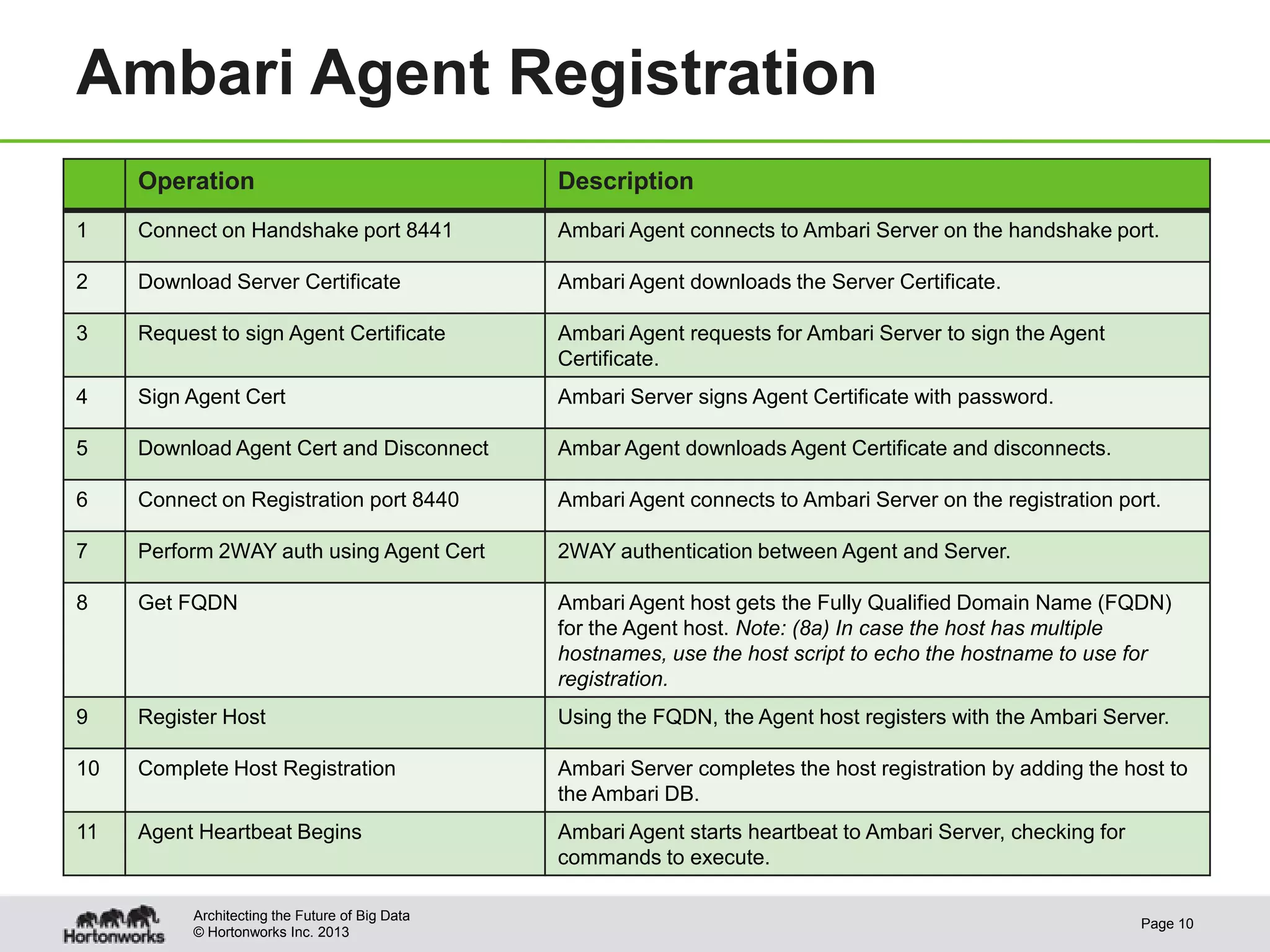
Ambari Agent Registration
     Operation                                  Description
1    Connect on Handshake port 8441             Ambari Agent connects to Ambari Server on the handshake port.

2    Download Server Certificate                Ambari Agent downloads the Server Certificate.

3    Request to sign Agent Certificate          Ambari Agent requests for Ambari Server to sign the Agent
                                                Certificate.
4    Sign Agent Cert                            Ambari Server signs Agent Certificate with password.

5    Download Agent Cert and Disconnect         Ambar Agent downloads Agent Certificate and disconnects.

6    Connect on Registration port 8440          Ambari Agent connects to Ambari Server on the registration port.

7    Perform 2WAY auth using Agent Cert         2WAY authentication between Agent and Server.

8    Get FQDN                                   Ambari Agent host gets the Fully Qualified Domain Name (FQDN)
                                                for the Agent host. Note: (8a) In case the host has multiple
                                                hostnames, use the host script to echo the hostname to use for
                                                registration.
9    Register Host                              Using the FQDN, the Agent host registers with the Ambari Server.

10   Complete Host Registration                 Ambari Server completes the host registration by adding the host to
                                                the Ambari DB.
11   Agent Heartbeat Begins                     Ambari Agent starts heartbeat to Ambari Server, checking for
                                                commands to execute.

          Architecting the Future of Big Data
                                                                                                               Page 10
          © Hortonworks Inc. 2013
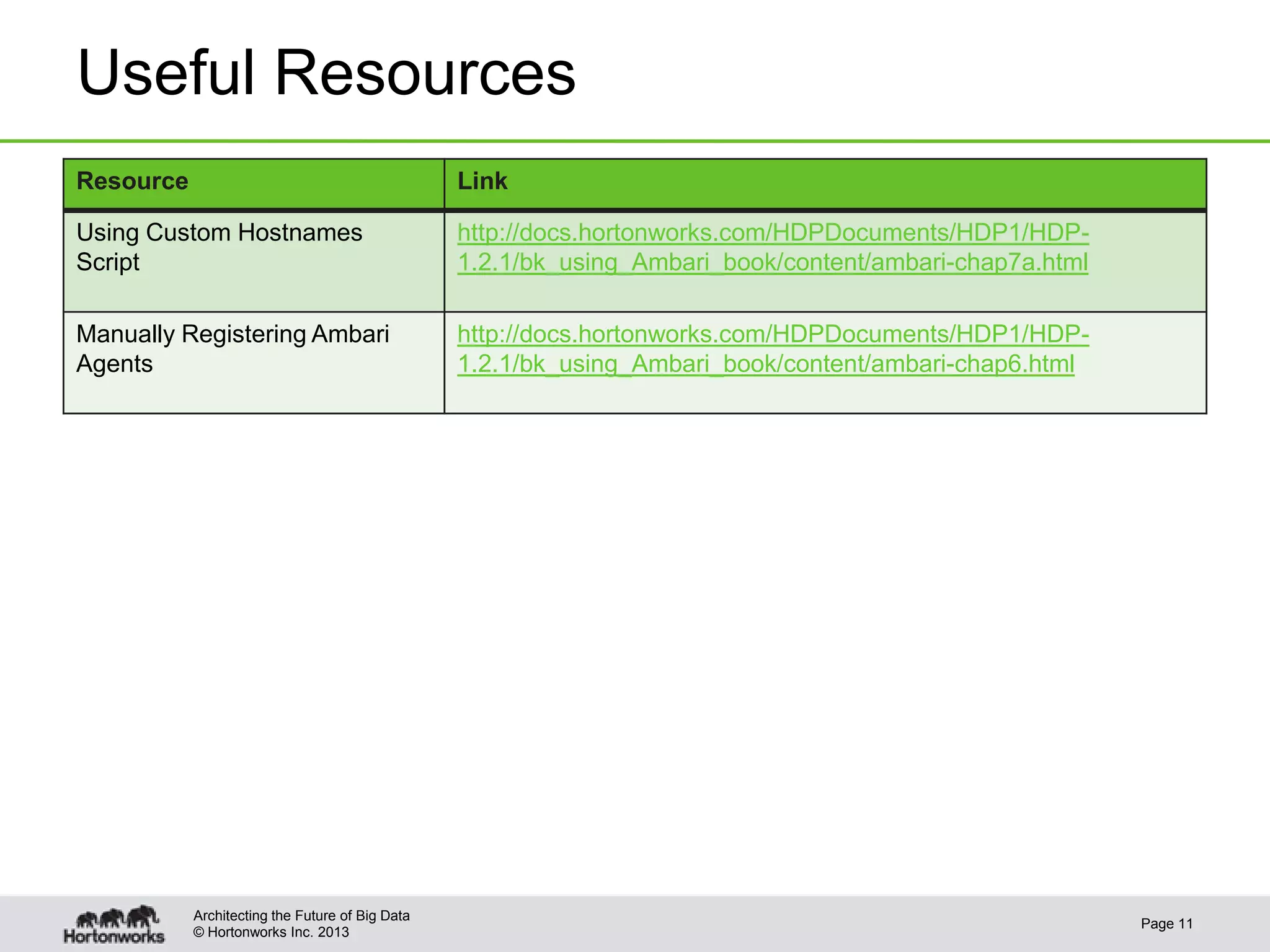
Useful Resources
Resource                                         Link

Using Custom Hostnames                           http://docs.hortonworks.com/HDPDocuments/HDP1/HDP-
Script                                           1.2.1/bk_using_Ambari_book/content/ambari-chap7a.html

Manually Registering Ambari                      http://docs.hortonworks.com/HDPDocuments/HDP1/HDP-
Agents                                           1.2.1/bk_using_Ambari_book/content/ambari-chap6.html


           Architecting the Future of Big Data
                                                                                                         Page 11
           © Hortonworks Inc. 2013

Ambari: Agent Registration Flow

  • 1.
    Ambari 1.2 How Ambari AgentsRegister © Hortonworks Inc. 2013 Page 1
  • 2.
    Summary • Terminology – Bootstrap –how to initially install an Agent on a host and “kick-off” registration – Registration – the act of an Agent host “registering” with the Server • Are there multiple ways to bootstrap an Agent? Yes. Option #1: SSH and Option #2: Manual (no SSH) • What are the differences between Option #1 and Option #2? With Option #1, you can have the Ambari Server bootstrap the agents during “Confirm Hosts”, which requires you to provide the SSH key so the Ambari Server can connect to + access the Agent host. With Option #2, you can manually install the Agent, which does not require the SSH key for the Ambari Server. Architecting the Future of Big Data Page 2 © Hortonworks Inc. 2013
  • 3.
    Ambari Cluster InstallWizard OPTION 1 and provide SSH Key OPTION 2 Architecting the Future of Big Data Page 3 © Hortonworks Inc. 2013
  • 4.
    Bootstrap Operational Flows Architecting theFuture of Big Data Page 4 © Hortonworks Inc. 2013
  • 5.
    Option #1: AmbariAgent Bootstrap (SSH) Ambari Server Ambari Agent 1) Configure Ambari Repo These ops use the SSH 2) Copy Ambari Agent Setup script key 3) Execute Ambari Agent Setup script 4) Install epel-release 5) Install ambari-agent 6) Configure ambari-agent.ini 7) Start ambari-agent 8) Begin Ambari Agent Registration Architecting the Future of Big Data Page 5 © Hortonworks Inc. 2013
  • 6.
    Option #1: AmbariAgent Bootstrap (SSH) Operation Description 1 Configure Ambari Repo Use the ambari.repo file on the Ambari Server and SCP to Agent host(s). 2 Copy Ambari Agent Setup script SCP the setupAgent.py script on Agent host(s). 3 Execute Ambari Agent Setup script SSH to Agent host(s) and execute python setupAgent.py 4 Install epel-release Install epel-release package using yum / zypper. 5 Install ambari-agent Install ambari-agent package using yum / zypper. 6 Configure ambari-agent.ini Modify the /etc/ambari-agent/ambari-agent.ini and set the hostname to the Ambari Server hostname. 7 Start ambari-agent Start the ambari-agent process. 8 Begin Ambari Agent Registration Agent begins the registration process. ** Ambari Server initiates the “bootstrap” process by calling bootstrap.py Architecting the Future of Big Data Page 6 © Hortonworks Inc. 2013
  • 7.
    Option #2: AmbariAgent Bootstrap (Manual) Ambari Server Ambari Agent No SSH ops are 1) Configure Ambari repo performed 2) Install epel-release 3) Install ambari-agent 4) Configure ambari-agent.ini 5) Start ambari-agent 6) Begin Ambari Agent Registration ** User executes all ops as root no the Agent host(s). No requirement for SSH Private Key. Architecting the Future of Big Data Page 7 © Hortonworks Inc. 2013
  • 8.
    Agent Registration Architecting theFuture of Big Data Page 8 © Hortonworks Inc. 2013
  • 9.
    Ambari Agent Registration Ambari Server Ambari Agent Agent Host 1) Connect on Handshake port 8441 2) Download Server Cert 3) Request to Sign Agent Cert 4) Sign Agent Cert 5) Download Agent Cert + Disconnect 6) Connect on Registration port 8440 7) Perform 2WAY auth using Agent Cert 8) Get FQDN 8a) Host 9) Register host Script 10) Complete Host Registration 11) Agent Heartbeat Begins Architecting the Future of Big Data Page 9 © Hortonworks Inc. 2013
  • 10.
    Ambari Agent Registration Operation Description 1 Connect on Handshake port 8441 Ambari Agent connects to Ambari Server on the handshake port. 2 Download Server Certificate Ambari Agent downloads the Server Certificate. 3 Request to sign Agent Certificate Ambari Agent requests for Ambari Server to sign the Agent Certificate. 4 Sign Agent Cert Ambari Server signs Agent Certificate with password. 5 Download Agent Cert and Disconnect Ambar Agent downloads Agent Certificate and disconnects. 6 Connect on Registration port 8440 Ambari Agent connects to Ambari Server on the registration port. 7 Perform 2WAY auth using Agent Cert 2WAY authentication between Agent and Server. 8 Get FQDN Ambari Agent host gets the Fully Qualified Domain Name (FQDN) for the Agent host. Note: (8a) In case the host has multiple hostnames, use the host script to echo the hostname to use for registration. 9 Register Host Using the FQDN, the Agent host registers with the Ambari Server. 10 Complete Host Registration Ambari Server completes the host registration by adding the host to the Ambari DB. 11 Agent Heartbeat Begins Ambari Agent starts heartbeat to Ambari Server, checking for commands to execute. Architecting the Future of Big Data Page 10 © Hortonworks Inc. 2013
  • 11.
    Useful Resources Resource Link Using Custom Hostnames http://docs.hortonworks.com/HDPDocuments/HDP1/HDP- Script 1.2.1/bk_using_Ambari_book/content/ambari-chap7a.html Manually Registering Ambari http://docs.hortonworks.com/HDPDocuments/HDP1/HDP- Agents 1.2.1/bk_using_Ambari_book/content/ambari-chap6.html Architecting the Future of Big Data Page 11 © Hortonworks Inc. 2013