Information Design Tool (**Universe
Design Tool)
Creating a Universe using IDT


**Here the data is stored in a MS Access DB and connection to the DB is made
using ODBC**

Our intension is to design/develop a Universe, which can be used by the webI
users to create reports as per the requirements. The process is as follows;

1: Creating a project
2: Creating Database Connections
3: Creating Data Foundation layer
4: Insert Tables and Joins to DFX layer
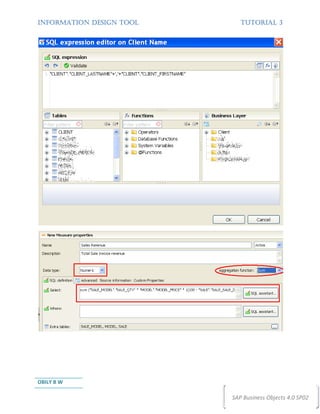
5: Creating Business Layer
6: Creating Folders/Classes and Objects in BLX layer                     Tutorial 3

7: Creating Queries to Test
8: Publish to repository


OBILY B W                                                      SAP Business Objects 4.0 SP02
INFORMATION DESIGN TOOL          TUTORIAL 3


Working with Business Layer


OBILY B W

                              SAP Business Objects 4.0 SP02
INFORMATION DESIGN TOOL                                              TUTORIAL 3


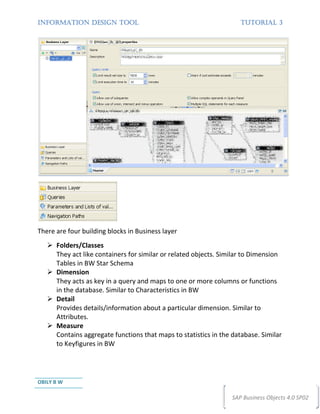
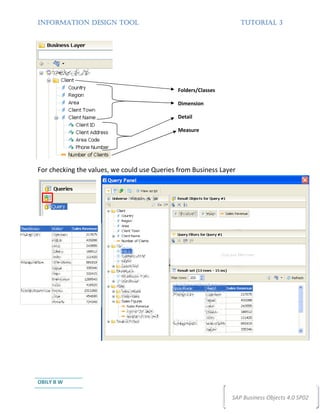
There are four building blocks in Business layer
      Folders/Classes
      They act like containers for similar or related objects. Similar to Dimension
      Tables in BW Star Schema
      Dimension
      They acts as key in a query and maps to one or more columns or functions
      in the database. Similar to Characteristics in BW
      Detail
      Provides details/information about a particular dimension. Similar to
      Attributes.
      Measure
      Contains aggregate functions that maps to statistics in the database. Similar
      to Keyfigures in BW


OBILY B W

                                                                  SAP Business Objects 4.0 SP02
INFORMATION DESIGN TOOL      TUTORIAL 3


OBILY B W

                          SAP Business Objects 4.0 SP02
INFORMATION DESIGN TOOL      TUTORIAL 3


OBILY B W

                          SAP Business Objects 4.0 SP02
INFORMATION DESIGN TOOL                                             TUTORIAL 3


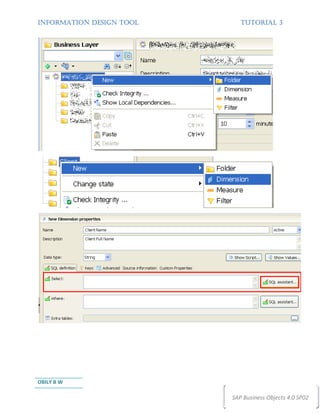
                                              Folders/Classes

                                              Dimension

                                              Detail

                                              Measure


For checking the values, we could use Queries from Business Layer


OBILY B W

                                                                SAP Business Objects 4.0 SP02

Information Design Tool -Tutorial3

  • 1.
    Information Design Tool(**Universe Design Tool) Creating a Universe using IDT **Here the data is stored in a MS Access DB and connection to the DB is made using ODBC** Our intension is to design/develop a Universe, which can be used by the webI users to create reports as per the requirements. The process is as follows; 1: Creating a project 2: Creating Database Connections 3: Creating Data Foundation layer 4: Insert Tables and Joins to DFX layer 5: Creating Business Layer 6: Creating Folders/Classes and Objects in BLX layer Tutorial 3 7: Creating Queries to Test 8: Publish to repository OBILY B W SAP Business Objects 4.0 SP02
  • 2.
    INFORMATION DESIGN TOOL TUTORIAL 3 Working with Business Layer OBILY B W SAP Business Objects 4.0 SP02
  • 3.
    INFORMATION DESIGN TOOL TUTORIAL 3 There are four building blocks in Business layer Folders/Classes They act like containers for similar or related objects. Similar to Dimension Tables in BW Star Schema Dimension They acts as key in a query and maps to one or more columns or functions in the database. Similar to Characteristics in BW Detail Provides details/information about a particular dimension. Similar to Attributes. Measure Contains aggregate functions that maps to statistics in the database. Similar to Keyfigures in BW OBILY B W SAP Business Objects 4.0 SP02
  • 4.
    INFORMATION DESIGN TOOL TUTORIAL 3 OBILY B W SAP Business Objects 4.0 SP02
  • 5.
    INFORMATION DESIGN TOOL TUTORIAL 3 OBILY B W SAP Business Objects 4.0 SP02
  • 6.
    INFORMATION DESIGN TOOL TUTORIAL 3 Folders/Classes Dimension Detail Measure For checking the values, we could use Queries from Business Layer OBILY B W SAP Business Objects 4.0 SP02