Date: 04/20/15
File: PRO1_07E.1
SIMATIC S7
Siemens AG 2004. All rights reserved.
SITRAIN Training for
Automation and Drives
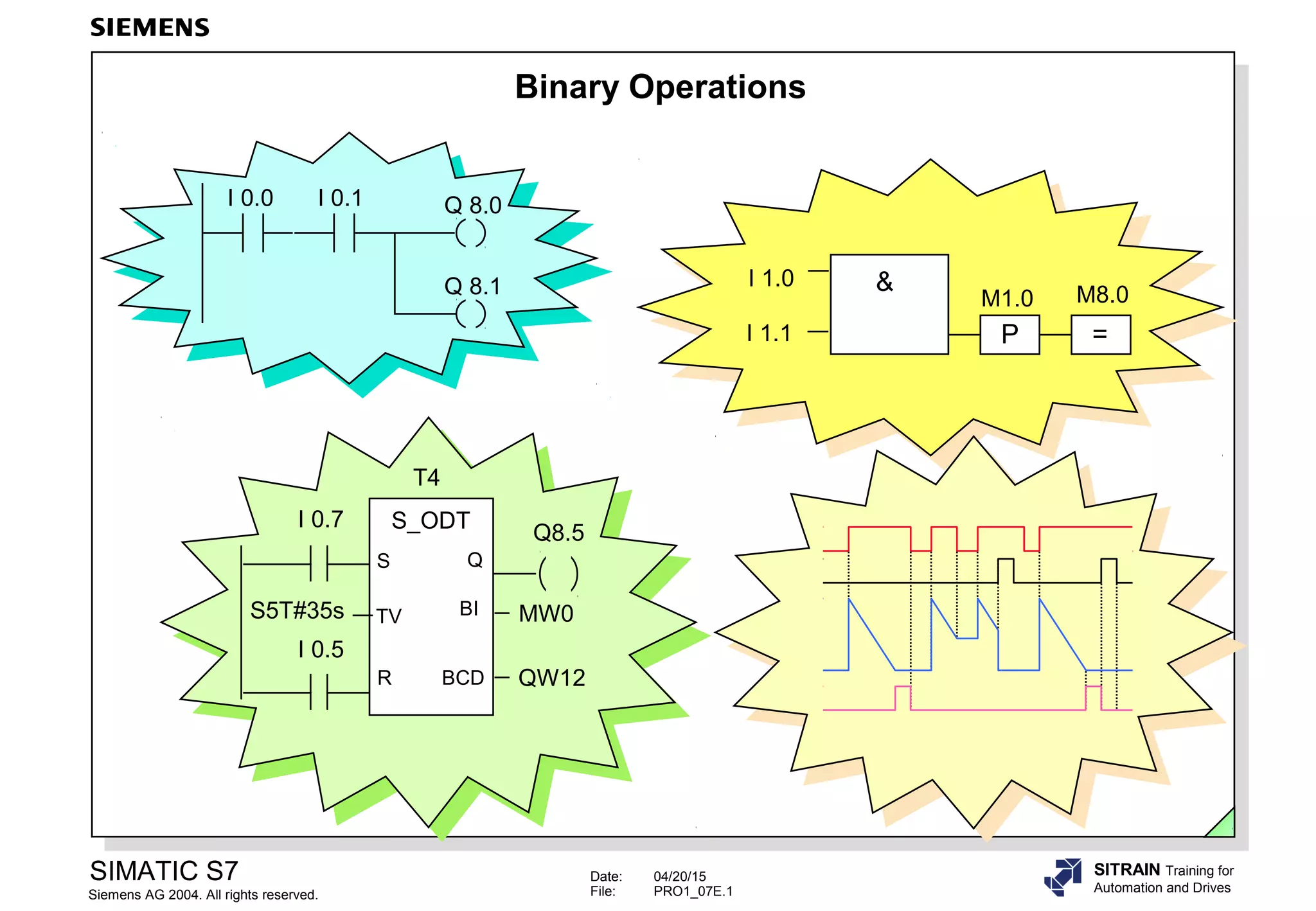
Binary Operations
I 0.0 I 0.1 Q 8.0
Q 8.1 I 1.0
I 1.1 P =
&
M1.0 M8.0
T4
S_ODT
TV
S Q
BCD
BI
R
I 0.7
I 0.5
S5T#35s
Q8.5
MW0
QW12
Date: 04/20/15
File: PRO1_07E.2
SIMATIC S7
Siemens AG 2004. All rights reserved.
SITRAIN Training for
Automation and Drives
Objectives
Upon completion of the chapter the participant will …
... understand the difference between ‘real‘ connected NC contacts
and NO contacts, and programmed symbols
... be able to explain the terms Result of Logic Operation (RLO),
Status (STAT) and First Check
... be able to program basic binary logic operations
Date: 04/20/15
File: PRO1_07E.3
SIMATIC S7
Siemens AG 2004. All rights reserved.
SITRAIN Training for
Automation and Drives
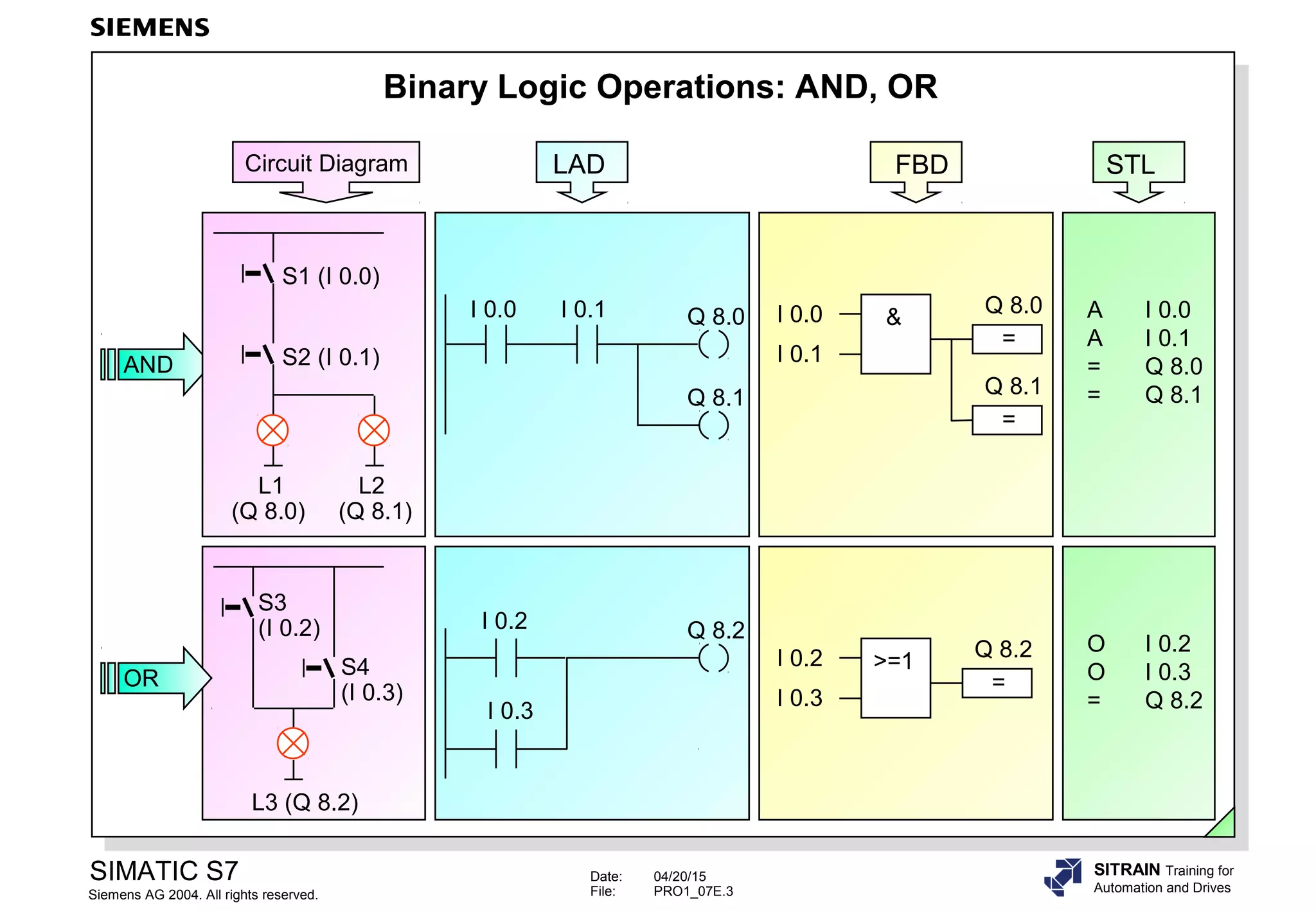
Binary Logic Operations: AND, OR
I 0.2
I 0.3
>=1
=
Q 8.2 O I 0.2
O I 0.3
= Q 8.2
I 0.0 I 0.1 Q 8.0
Q 8.1
LAD
=
Q 8.0
&I 0.0
I 0.1
=
Q 8.1
FBD
A I 0.0
A I 0.1
= Q 8.0
= Q 8.1
STL
I 0.2
I 0.3
Q 8.2
L3 (Q 8.2)
S3
(I 0.2)
S4
(I 0.3)
OR
AND
L1
(Q 8.0)
S1 (I 0.0)
S2 (I 0.1)
L2
(Q 8.1)
Circuit Diagram
Date: 04/20/15
File: PRO1_07E.4
SIMATIC S7
Siemens AG 2004. All rights reserved.
SITRAIN Training for
Automation and Drives
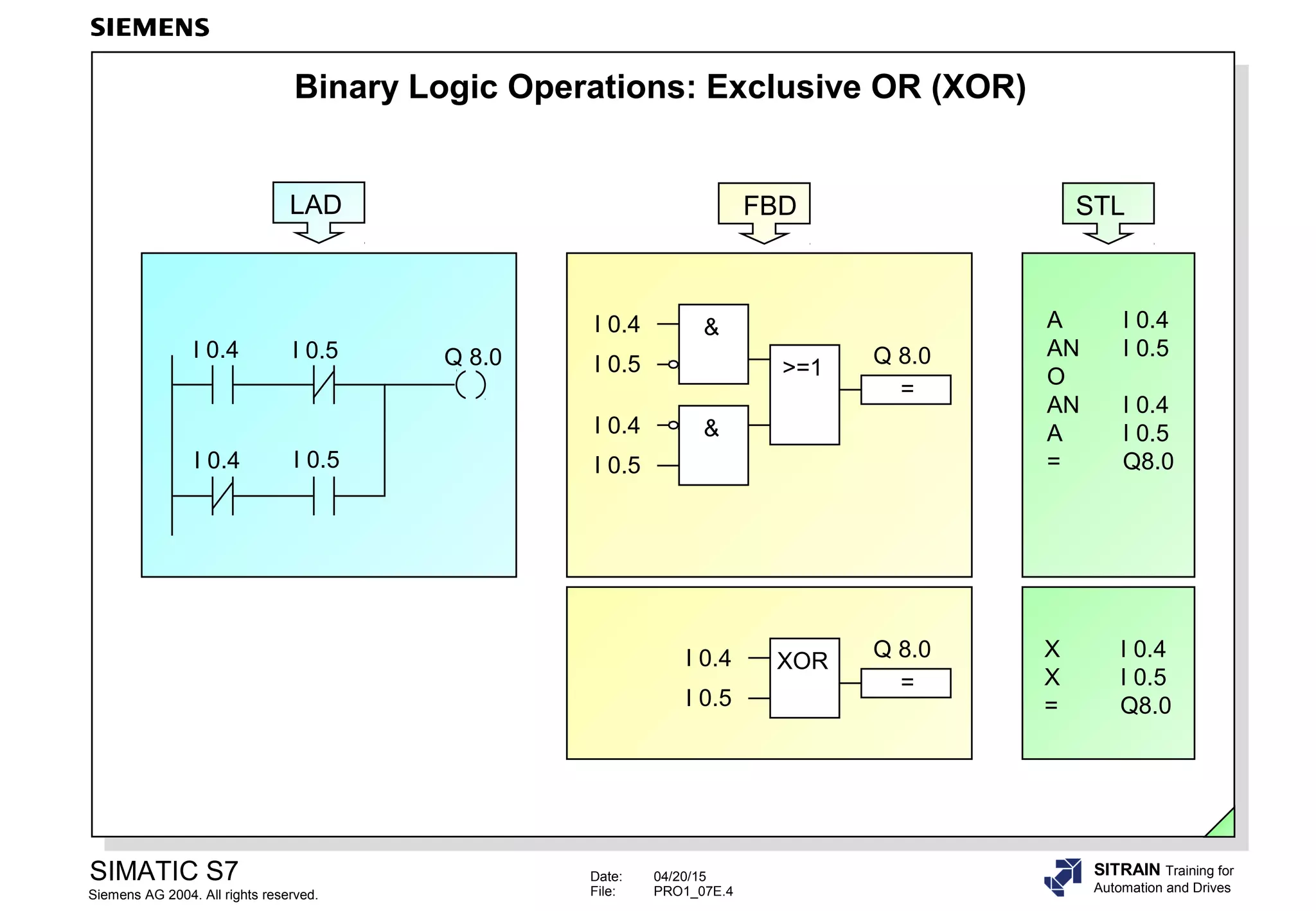
Binary Logic Operations: Exclusive OR (XOR)
I 0.4
I 0.5
XOR
=
Q 8.0
I 0.4 I 0.5
I 0.4 I 0.5
Q 8.0
LAD
>=1
=
Q 8.0
&I 0.4
I 0.5
&I 0.4
I 0.5
FBD
A I 0.4
AN I 0.5
O
AN I 0.4
A I 0.5
= Q8.0
STL
X I 0.4
X I 0.5
= Q8.0
Date: 04/20/15
File: PRO1_07E.5
SIMATIC S7
Siemens AG 2004. All rights reserved.
SITRAIN Training for
Automation and Drives
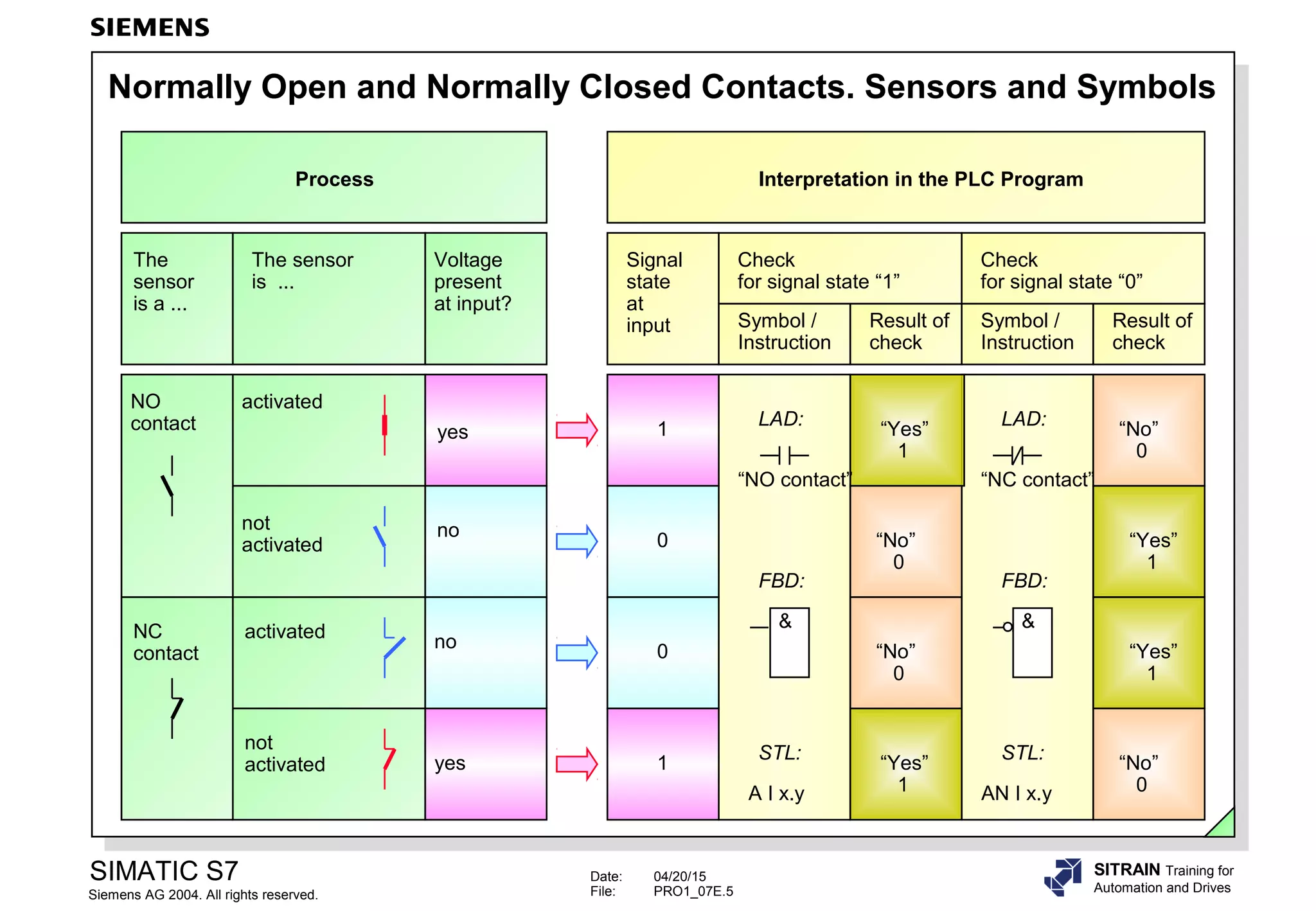
Normally Open and Normally Closed Contacts. Sensors and Symbols
Signal
state
at
input
Check
for signal state “1”
Symbol /
Instruction
Result of
check
Check
for signal state “0”
Symbol /
Instruction
Result of
check
yes
Voltage
present
at input?
no
yes
no
The
sensor
is a ...
The sensor
is ...
1
0
0
1
“Yes”
1
LAD:
“NO contact”
&
FBD:
A I x.y
STL:
AN I x.y
STL:
&
FBD:
LAD:
“NC contact”
“No”
0
“Yes”
1
“No”
0
“No”
0
“Yes”
1
“Yes”
1
“No”
0
Process Interpretation in the PLC Program
activated
not
activated
activated
not
activated
NO
contact
NC
contact
Date: 04/20/15
File: PRO1_07E.6
SIMATIC S7
Siemens AG 2004. All rights reserved.
SITRAIN Training for
Automation and Drives
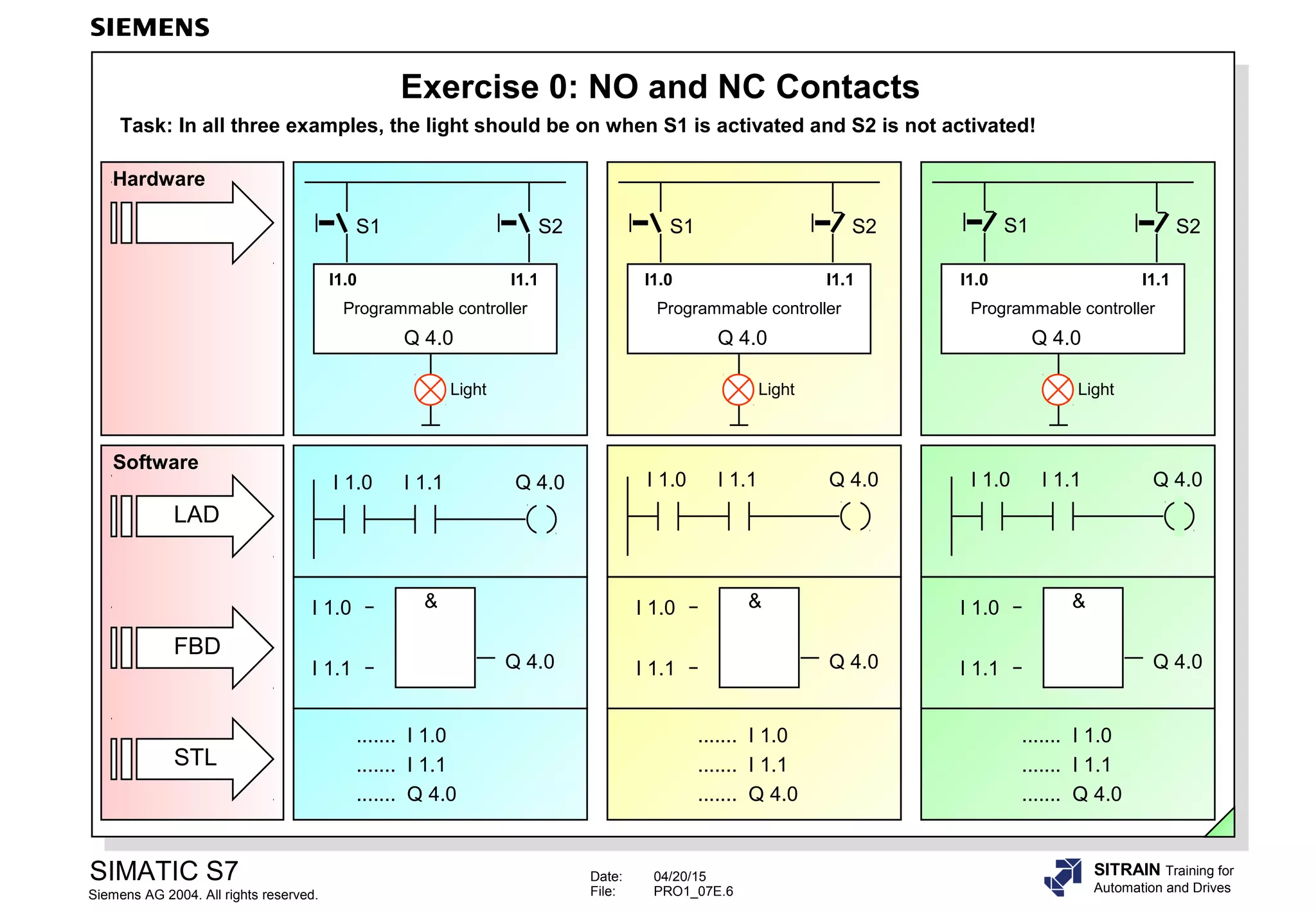
Exercise 0: NO and NC Contacts
Task: In all three examples, the light should be on when S1 is activated and S2 is not activated!
I 1.0 I 1.1 Q 4.0 I 1.0 I 1.1 Q 4.0
....... I 1.0
....... I 1.1
....... Q 4.0
Q 4.0
I 1.0
I 1.1
&
Q 4.0
I 1.0
I 1.1
&
Q 4.0
I 1.0
I 1.1
&
....... I 1.0
....... I 1.1
....... Q 4.0
....... I 1.0
....... I 1.1
....... Q 4.0
Software
E 1.0
S1
E 1.1
S2
E 1.0
S1
E 1.1
S2
E 1.0
S1
E 1.1
S2
Q 4.0
Programmable controller
LightLight Light
Q 4.0
Programmable controller
Q 4.0
Programmable controller
FBD
STL
LAD
Hardware
I 1.0 I 1.1 Q 4.0
I1.0 I1.0I1.0 I1.1I1.1I1.1
Date: 04/20/15
File: PRO1_07E.7
SIMATIC S7
Siemens AG 2004. All rights reserved.
SITRAIN Training for
Automation and Drives
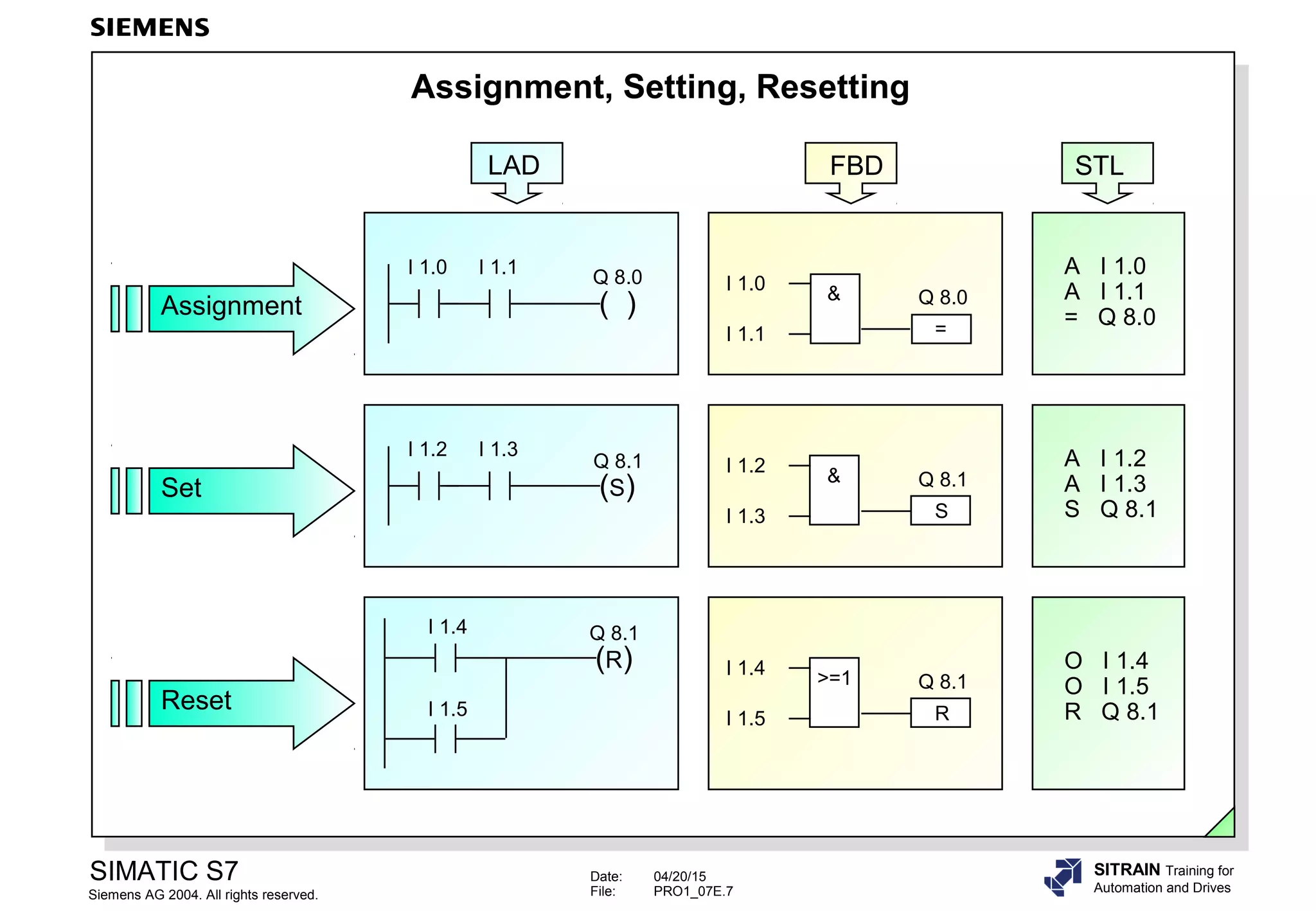
Assignment, Setting, Resetting
(S)
Q 8.1
I 1.2 I 1.3
I 1.2
&
S
Q 8.1
I 1.3
I 1.4
>=1
R
Q 8.1
I 1.5
A I 1.2
A I 1.3
S Q 8.1
O I 1.4
O I 1.5
R Q 8.1
I 1.0
&
=
Q 8.0
I 1.1
A I 1.0
A I 1.1
= Q 8.0Assignment
Set
Reset
(R)
Q 8.1I 1.4
I 1.5
( )
Q 8.0
I 1.0 I 1.1
LAD FBD STL
Date: 04/20/15
File: PRO1_07E.8
SIMATIC S7
Siemens AG 2004. All rights reserved.
SITRAIN Training for
Automation and Drives
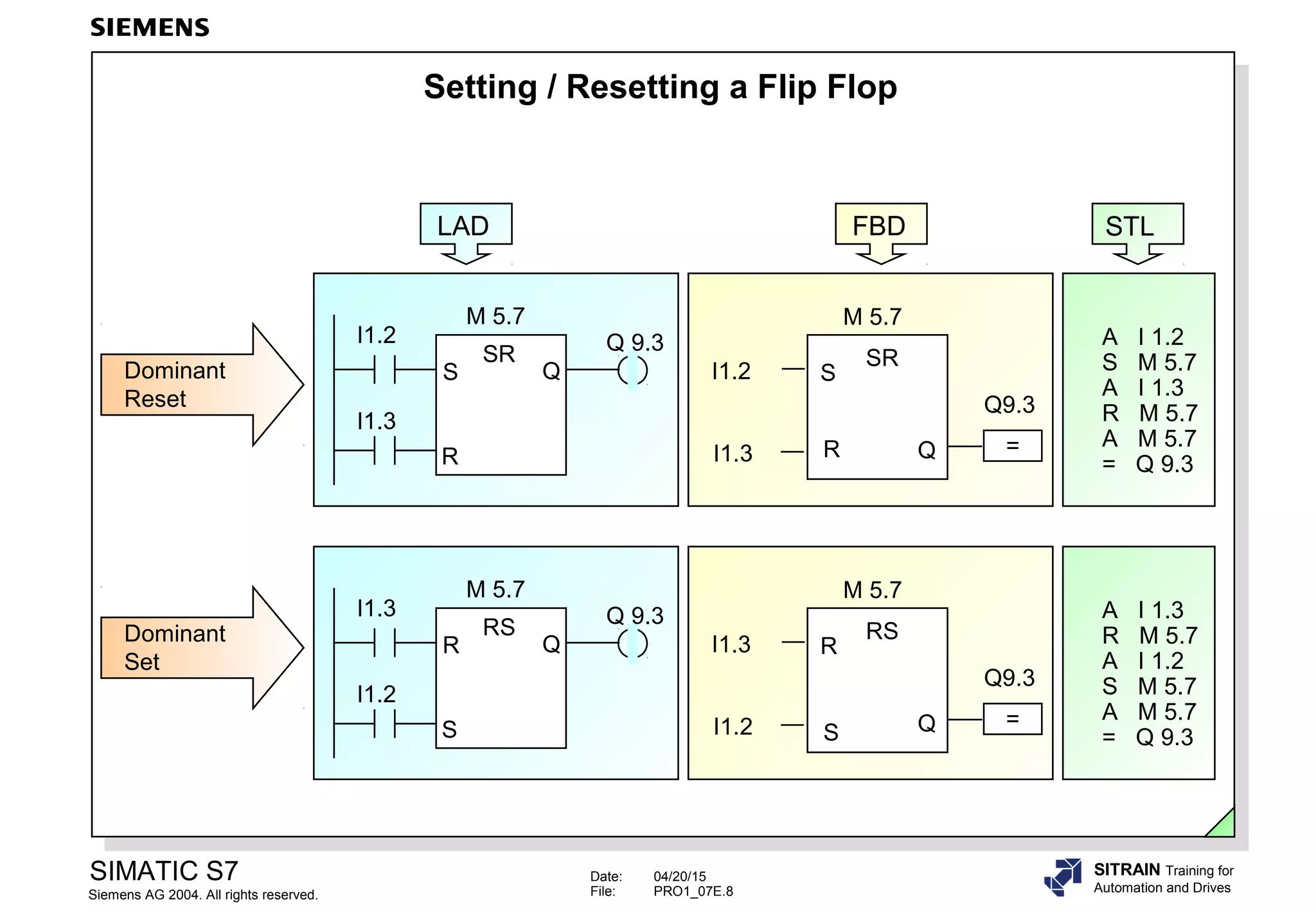
Setting / Resetting a Flip Flop
SR
R Q
SI1.2
I1.3
M 5.7
=
Q9.3
Dominant
Reset
SR
S Q
R
I1.2
I1.3
M 5.7
Q 9.3 A I 1.2
S M 5.7
A I 1.3
R M 5.7
A M 5.7
= Q 9.3
RS
S Q
RI1.3
I1.2
M 5.7
=
Q9.3
Dominant
Set
RS
R Q
S
I1.3
I1.2
M 5.7
Q 9.3 A I 1.3
R M 5.7
A I 1.2
S M 5.7
A M 5.7
= Q 9.3
LAD FBD STL
Date: 04/20/15
File: PRO1_07E.9
SIMATIC S7
Siemens AG 2004. All rights reserved.
SITRAIN Training for
Automation and Drives
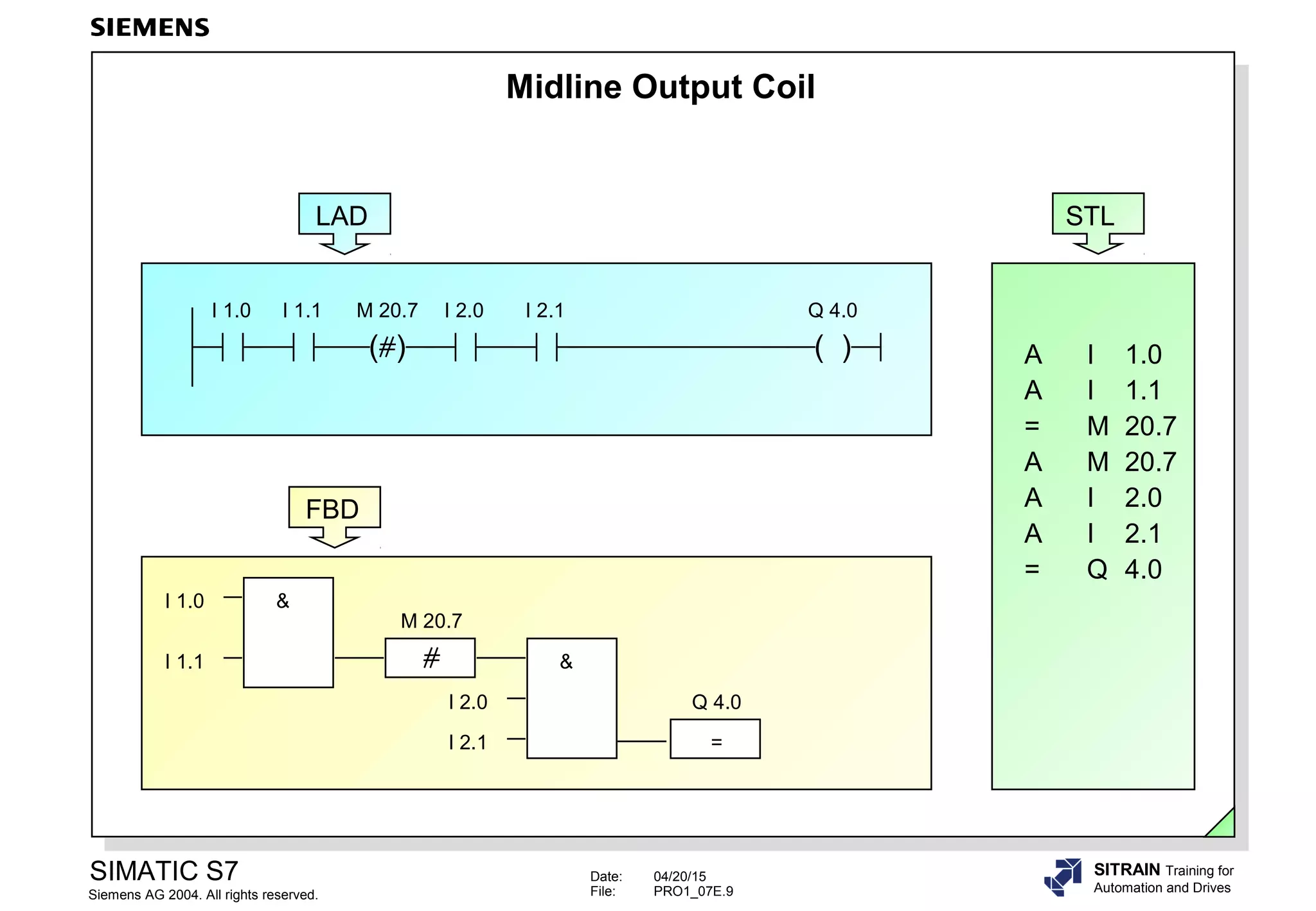
Midline Output Coil
LAD
I 1.0 I 1.1
( )
M 20.7 I 2.0 I 2.1
( )
Q 4.0
A I 1.0
A I 1.1
= M 20.7
A M 20.7
A I 2.0
A I 2.1
= Q 4.0
STL
I 1.0
I 1.1
&
&
I 2.0
I 2.1
M 20.7
Q 4.0
=
FBD
Date: 04/20/15
File: PRO1_07E.10
SIMATIC S7
Siemens AG 2004. All rights reserved.
SITRAIN Training for
Automation and Drives
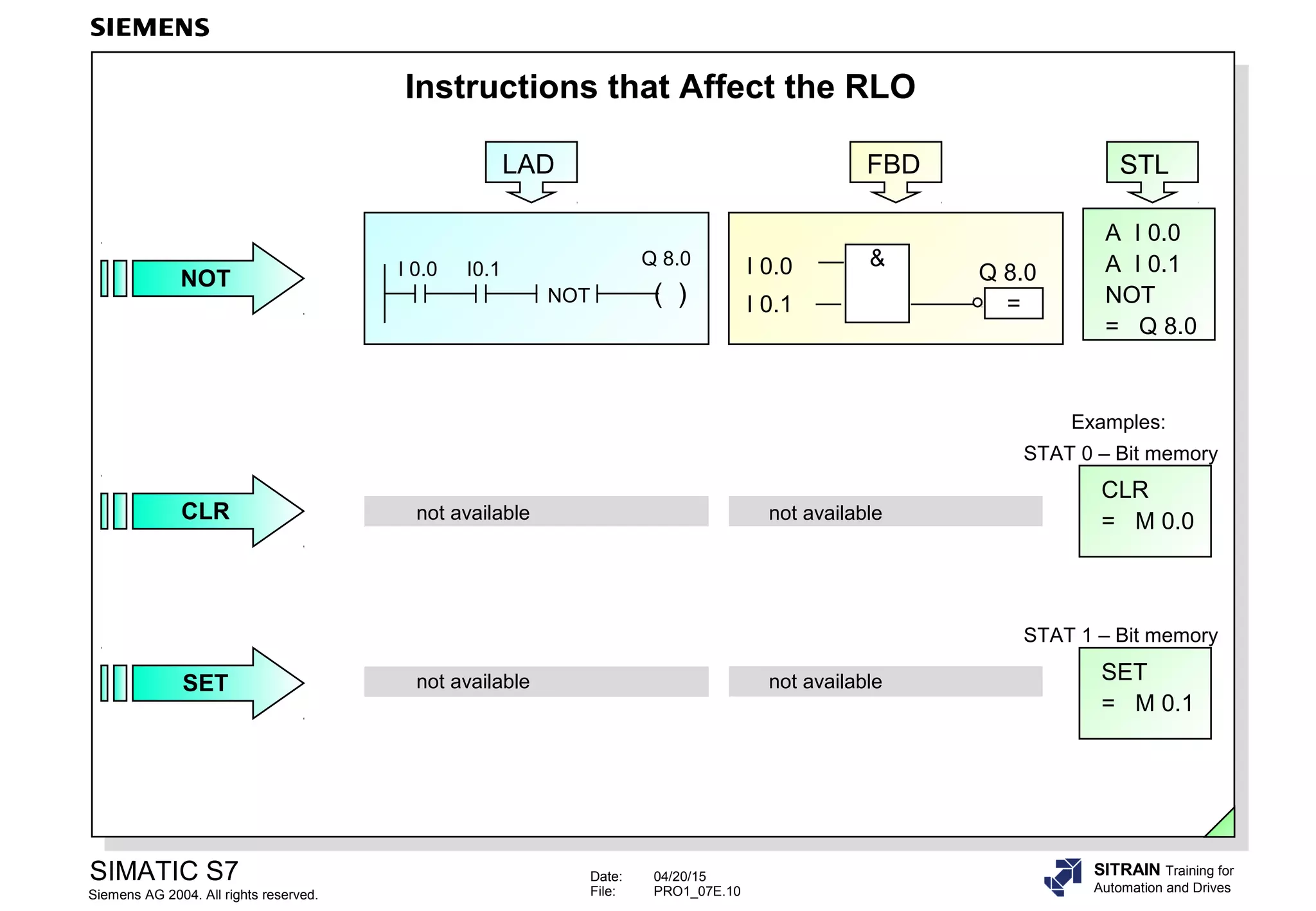
Instructions that Affect the RLO
=
Q 8.0
&I 0.0
I 0.1
A I 0.0
A I 0.1
NOT
= Q 8.0
( )
Q 8.0
NOT
I 0.0 I0.1
LAD FBD STL
NOT
STAT 0 – Bit memory
not available not availableCLR
CLR
= M 0.0
Examples:
not available not availableSET SET
= M 0.1
STAT 1 – Bit memory
Date: 04/20/15
File: PRO1_07E.11
SIMATIC S7
Siemens AG 2004. All rights reserved.
SITRAIN Training for
Automation and Drives
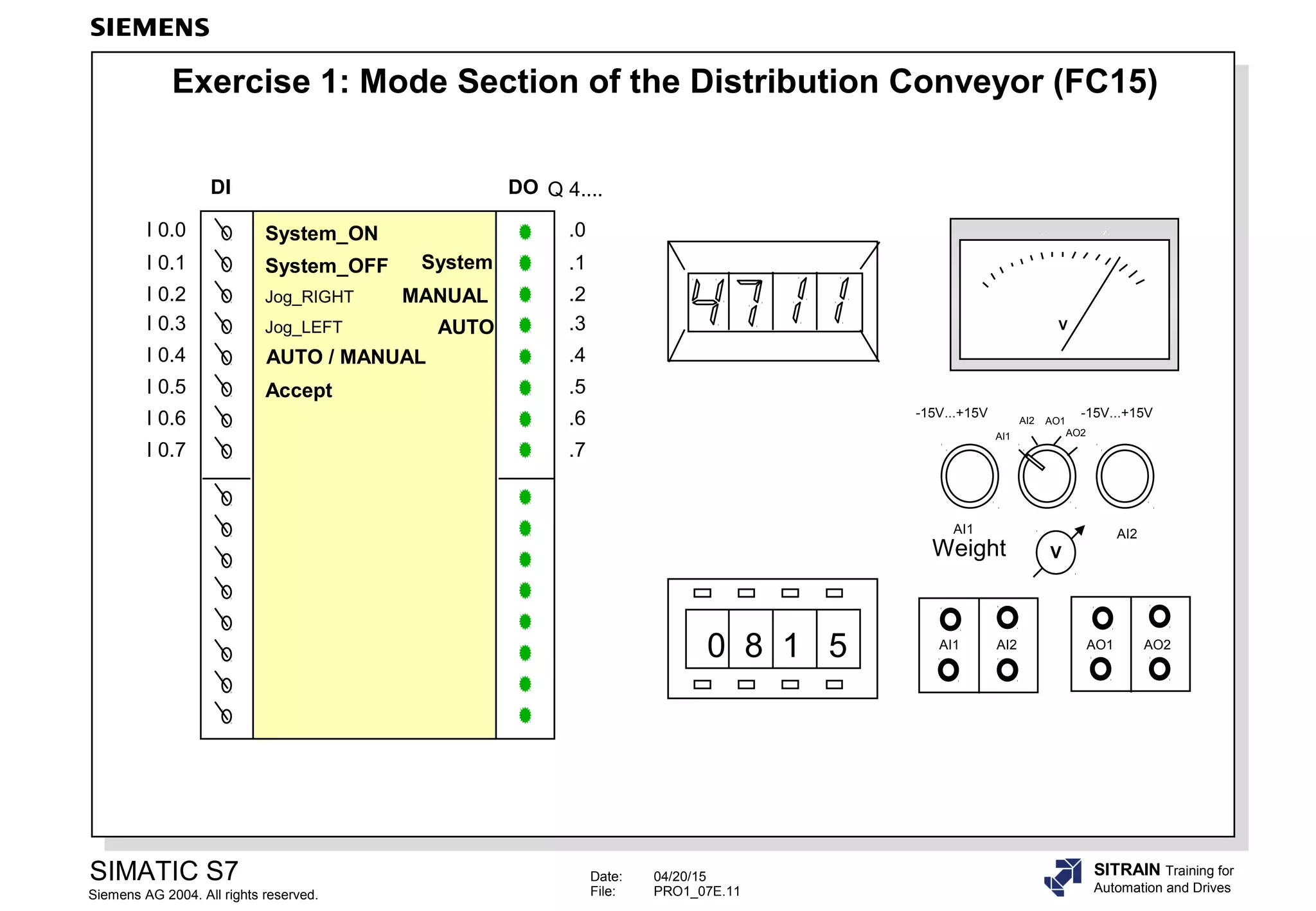
Exercise 1: Mode Section of the Distribution Conveyor (FC15)
V
0 8 1 5 AI1 AI2 AO1 AO2
AI2AI1
-15V...+15V -15V...+15V
AI1
AI2 AO1
AO2
V
DI
I 0.0
I 0.1
I 0.2
I 0.3
I 0.4
I 0.5
I 0.6
I 0.7
DO
.0
.1
.2
.3
.4
.5
.6
.7
AUTO / MANUAL
System_ON
Accept
System
MANUAL
AUTO
System_OFF
Q 4....
Jog_RIGHT
Jog_LEFT
Weight
Date: 04/20/15
File: PRO1_07E.12
SIMATIC S7
Siemens AG 2004. All rights reserved.
SITRAIN Training for
Automation and Drives
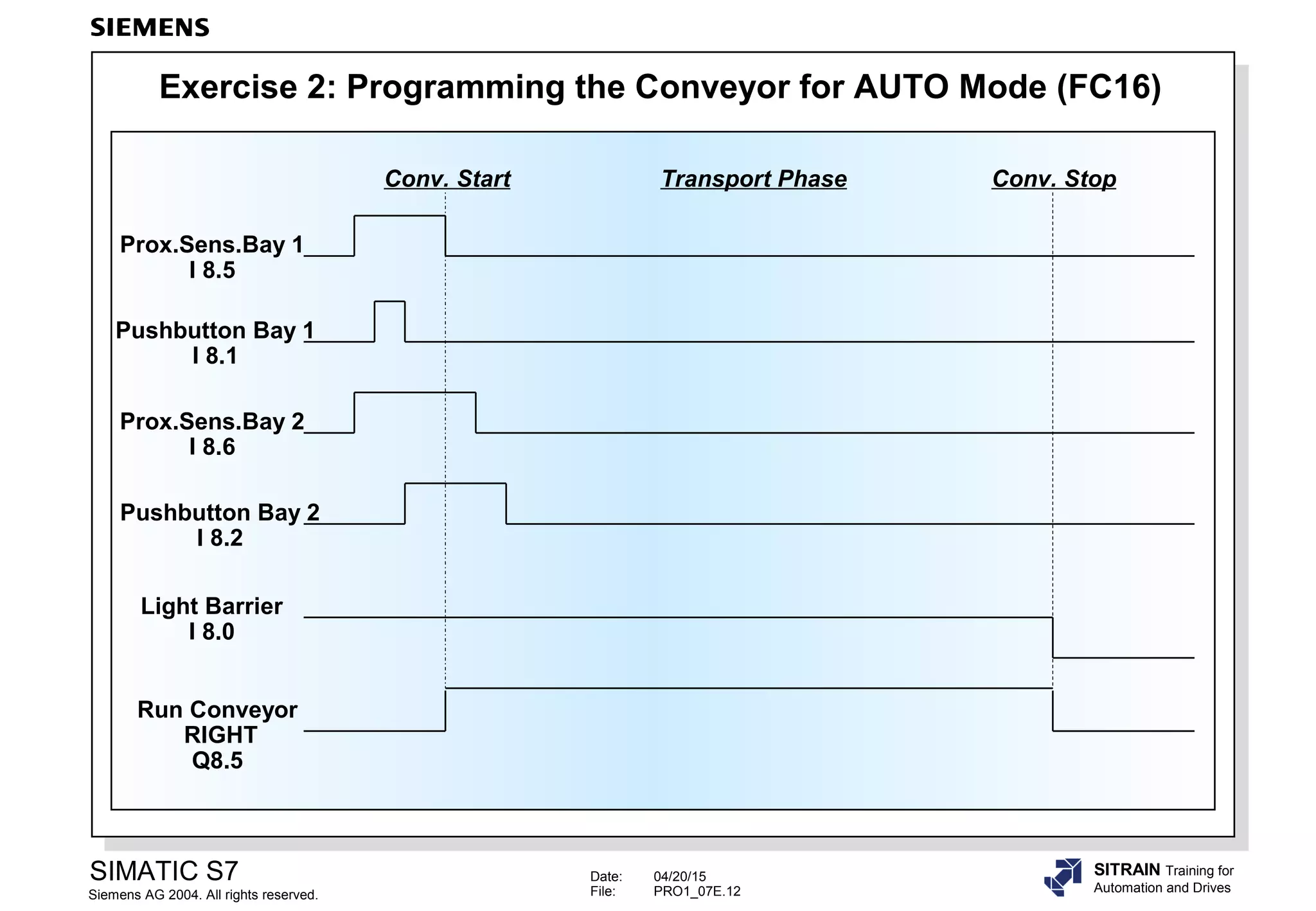
Exercise 2: Programming the Conveyor for AUTO Mode (FC16)
Pushbutton Bay 1
I 8.1
Prox.Sens.Bay 1
I 8.5
Run Conveyor
RIGHT
Q8.5
Light Barrier
I 8.0
Conv. Start Conv. StopTransport Phase
Pushbutton Bay 2
I 8.2
Prox.Sens.Bay 2
I 8.6
Date: 04/20/15
File: PRO1_07E.13
SIMATIC S7
Siemens AG 2004. All rights reserved.
SITRAIN Training for
Automation and Drives
RLO – Edge Detection
A I 1.0
A I 1.1
FP M1.0
= M8.0
A I 1.0
A I 1.1
FN M1.1
= M8.1
P
I 1.0 I 1.1 M1.0 M8.0
N
I 1.0 I 1.1 M1.1 M8.1
I 1.0
I 1.1 P =
&
M1.0 M8.0
I 1.0
I 1.1 N =
&
M1.1 M8.1
I 1.0
I 1.1
RLO
M1.0
M8.0
M8.1
M1.1
LAD FBD STL
OB1 Cycle
Example
Date: 04/20/15
File: PRO1_07E.14
SIMATIC S7
Siemens AG 2004. All rights reserved.
SITRAIN Training for
Automation and Drives
A I 1.0
A (
A I 1.1
FP
M1.0
)
=
M8.0
A I 1.0
A (
A I 1.1
FN
M1.1
)
=
M8.1
Example
Signal – Edge Detection
I 1.0
I 1.1
M1.0
M8.0
M8.1
M1.1
OB1 Cycle
STL
I 1.1
=
M8.0POS
M_BITM1.0
&I 1.0
I 1.1
=
M8.1NEG
M_BITM1.1
&I 1.0
FBDLAD
I 1.1
M8.0
POS
M_BITM1.0
Q
I 1.0
I 1.1
M8.1
NEG
M_BITM1.1
Q
I 1.0
Date: 04/20/15
File: PRO1_07E.15
SIMATIC S7
Siemens AG 2004. All rights reserved.
SITRAIN Training for
Automation and Drives
Exercise 3: Edge Detection
Run Conveyor
RIGHT
(Q8.5)
Light Barrier
(I 8.0)
Conv. Start Conv. StopTransport Phase
Start condition
in AUTO mode
Part at
Light barrier
Date: 04/20/15
File: PRO1_07E.16
SIMATIC S7
Siemens AG 2004. All rights reserved.
SITRAIN Training for
Automation and Drives
Exercise 4: Optimizing the Mode Section FC 15
T_System_ON
(I 0.0)
T_System_OFF
(I 0.1, NC contact)
L_System_ON
(Q4.1)
OLD: without edge detection
T_System_ON
(I 0.0)
T_System_OFF
(I 0.1, NC contact)
L_System_ON
(Q4.1)
NEW: with edge detection
Date: 04/20/15
File: PRO1_07E.17
SIMATIC S7
Siemens AG 2004. All rights reserved.
SITRAIN Training for
Automation and Drives
If You Want to Know More
Date: 04/20/15
File: PRO1_07E.18
SIMATIC S7
Siemens AG 2004. All rights reserved.
SITRAIN Training for
Automation and Drives
Unconditional Jump (Regardless of the RLO)
( JMP )
NEW1
Network 1
Network 2
:
:
:
:
Network x
NEW1
( )
M69.0I 4.7M5.5
LAD
NEW1
JMP....
NEW1
&M5.5
I 4.7 =
M69.0
Network 1
Network 2
:
:
:
:
Network x
FBD
Network 1
JU NEW1
Network 2
:
:
:
:
Network x
NEW1: AN M5.5
AN I 4.7
= M69.0
STL
Date: 04/20/15
File: PRO1_07E.19
SIMATIC S7
Siemens AG 2004. All rights reserved.
SITRAIN Training for
Automation and Drives
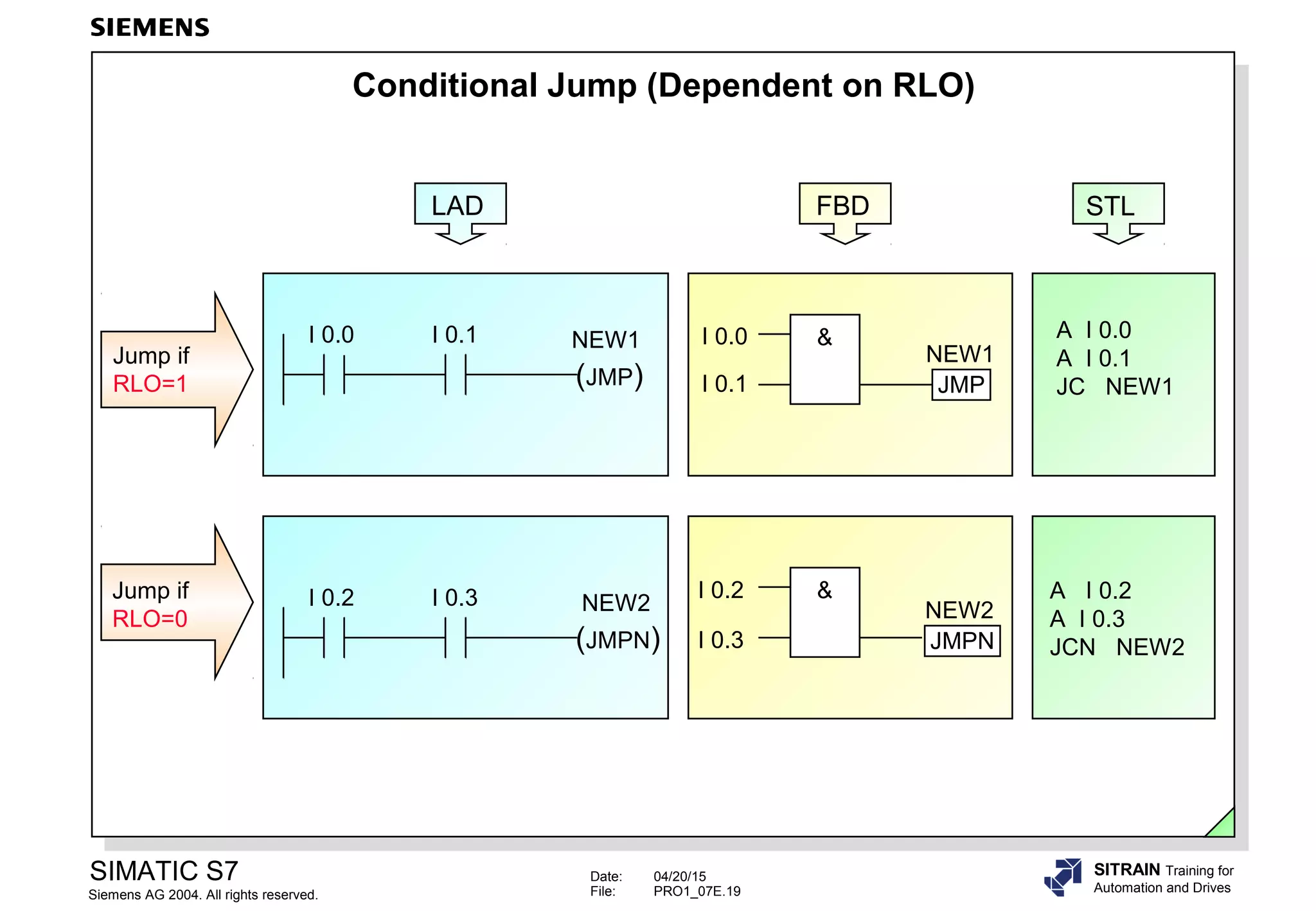
Conditional Jump (Dependent on RLO)
A I 0.0
A I 0.1
JC NEW1
A I 0.2
A I 0.3
JCN NEW2
Jump if
RLO=1
Jump if
RLO=0
NEW2I 0.2 I 0.3
(JMPN)
NEW1I 0.0 I 0.1
(JMP)
&I 0.0
I 0.1 JMP
NEW1
JMPN
I 0.2
I 0.3
NEW2
&
LAD FBD STL

06 binary operations

  • 1.
    Date: 04/20/15 File: PRO1_07E.1 SIMATICS7 Siemens AG 2004. All rights reserved. SITRAIN Training for Automation and Drives Binary Operations I 0.0 I 0.1 Q 8.0 Q 8.1 I 1.0 I 1.1 P = & M1.0 M8.0 T4 S_ODT TV S Q BCD BI R I 0.7 I 0.5 S5T#35s Q8.5 MW0 QW12
  • 2.
    Date: 04/20/15 File: PRO1_07E.2 SIMATICS7 Siemens AG 2004. All rights reserved. SITRAIN Training for Automation and Drives Objectives Upon completion of the chapter the participant will … ... understand the difference between ‘real‘ connected NC contacts and NO contacts, and programmed symbols ... be able to explain the terms Result of Logic Operation (RLO), Status (STAT) and First Check ... be able to program basic binary logic operations
  • 3.
    Date: 04/20/15 File: PRO1_07E.3 SIMATICS7 Siemens AG 2004. All rights reserved. SITRAIN Training for Automation and Drives Binary Logic Operations: AND, OR I 0.2 I 0.3 >=1 = Q 8.2 O I 0.2 O I 0.3 = Q 8.2 I 0.0 I 0.1 Q 8.0 Q 8.1 LAD = Q 8.0 &I 0.0 I 0.1 = Q 8.1 FBD A I 0.0 A I 0.1 = Q 8.0 = Q 8.1 STL I 0.2 I 0.3 Q 8.2 L3 (Q 8.2) S3 (I 0.2) S4 (I 0.3) OR AND L1 (Q 8.0) S1 (I 0.0) S2 (I 0.1) L2 (Q 8.1) Circuit Diagram
  • 4.
    Date: 04/20/15 File: PRO1_07E.4 SIMATICS7 Siemens AG 2004. All rights reserved. SITRAIN Training for Automation and Drives Binary Logic Operations: Exclusive OR (XOR) I 0.4 I 0.5 XOR = Q 8.0 I 0.4 I 0.5 I 0.4 I 0.5 Q 8.0 LAD >=1 = Q 8.0 &I 0.4 I 0.5 &I 0.4 I 0.5 FBD A I 0.4 AN I 0.5 O AN I 0.4 A I 0.5 = Q8.0 STL X I 0.4 X I 0.5 = Q8.0
  • 5.
    Date: 04/20/15 File: PRO1_07E.5 SIMATICS7 Siemens AG 2004. All rights reserved. SITRAIN Training for Automation and Drives Normally Open and Normally Closed Contacts. Sensors and Symbols Signal state at input Check for signal state “1” Symbol / Instruction Result of check Check for signal state “0” Symbol / Instruction Result of check yes Voltage present at input? no yes no The sensor is a ... The sensor is ... 1 0 0 1 “Yes” 1 LAD: “NO contact” & FBD: A I x.y STL: AN I x.y STL: & FBD: LAD: “NC contact” “No” 0 “Yes” 1 “No” 0 “No” 0 “Yes” 1 “Yes” 1 “No” 0 Process Interpretation in the PLC Program activated not activated activated not activated NO contact NC contact
  • 6.
    Date: 04/20/15 File: PRO1_07E.6 SIMATICS7 Siemens AG 2004. All rights reserved. SITRAIN Training for Automation and Drives Exercise 0: NO and NC Contacts Task: In all three examples, the light should be on when S1 is activated and S2 is not activated! I 1.0 I 1.1 Q 4.0 I 1.0 I 1.1 Q 4.0 ....... I 1.0 ....... I 1.1 ....... Q 4.0 Q 4.0 I 1.0 I 1.1 & Q 4.0 I 1.0 I 1.1 & Q 4.0 I 1.0 I 1.1 & ....... I 1.0 ....... I 1.1 ....... Q 4.0 ....... I 1.0 ....... I 1.1 ....... Q 4.0 Software E 1.0 S1 E 1.1 S2 E 1.0 S1 E 1.1 S2 E 1.0 S1 E 1.1 S2 Q 4.0 Programmable controller LightLight Light Q 4.0 Programmable controller Q 4.0 Programmable controller FBD STL LAD Hardware I 1.0 I 1.1 Q 4.0 I1.0 I1.0I1.0 I1.1I1.1I1.1
  • 7.
    Date: 04/20/15 File: PRO1_07E.7 SIMATICS7 Siemens AG 2004. All rights reserved. SITRAIN Training for Automation and Drives Assignment, Setting, Resetting (S) Q 8.1 I 1.2 I 1.3 I 1.2 & S Q 8.1 I 1.3 I 1.4 >=1 R Q 8.1 I 1.5 A I 1.2 A I 1.3 S Q 8.1 O I 1.4 O I 1.5 R Q 8.1 I 1.0 & = Q 8.0 I 1.1 A I 1.0 A I 1.1 = Q 8.0Assignment Set Reset (R) Q 8.1I 1.4 I 1.5 ( ) Q 8.0 I 1.0 I 1.1 LAD FBD STL
  • 8.
    Date: 04/20/15 File: PRO1_07E.8 SIMATICS7 Siemens AG 2004. All rights reserved. SITRAIN Training for Automation and Drives Setting / Resetting a Flip Flop SR R Q SI1.2 I1.3 M 5.7 = Q9.3 Dominant Reset SR S Q R I1.2 I1.3 M 5.7 Q 9.3 A I 1.2 S M 5.7 A I 1.3 R M 5.7 A M 5.7 = Q 9.3 RS S Q RI1.3 I1.2 M 5.7 = Q9.3 Dominant Set RS R Q S I1.3 I1.2 M 5.7 Q 9.3 A I 1.3 R M 5.7 A I 1.2 S M 5.7 A M 5.7 = Q 9.3 LAD FBD STL
  • 9.
    Date: 04/20/15 File: PRO1_07E.9 SIMATICS7 Siemens AG 2004. All rights reserved. SITRAIN Training for Automation and Drives Midline Output Coil LAD I 1.0 I 1.1 ( ) M 20.7 I 2.0 I 2.1 ( ) Q 4.0 A I 1.0 A I 1.1 = M 20.7 A M 20.7 A I 2.0 A I 2.1 = Q 4.0 STL I 1.0 I 1.1 & & I 2.0 I 2.1 M 20.7 Q 4.0 = FBD
  • 10.
    Date: 04/20/15 File: PRO1_07E.10 SIMATICS7 Siemens AG 2004. All rights reserved. SITRAIN Training for Automation and Drives Instructions that Affect the RLO = Q 8.0 &I 0.0 I 0.1 A I 0.0 A I 0.1 NOT = Q 8.0 ( ) Q 8.0 NOT I 0.0 I0.1 LAD FBD STL NOT STAT 0 – Bit memory not available not availableCLR CLR = M 0.0 Examples: not available not availableSET SET = M 0.1 STAT 1 – Bit memory
  • 11.
    Date: 04/20/15 File: PRO1_07E.11 SIMATICS7 Siemens AG 2004. All rights reserved. SITRAIN Training for Automation and Drives Exercise 1: Mode Section of the Distribution Conveyor (FC15) V 0 8 1 5 AI1 AI2 AO1 AO2 AI2AI1 -15V...+15V -15V...+15V AI1 AI2 AO1 AO2 V DI I 0.0 I 0.1 I 0.2 I 0.3 I 0.4 I 0.5 I 0.6 I 0.7 DO .0 .1 .2 .3 .4 .5 .6 .7 AUTO / MANUAL System_ON Accept System MANUAL AUTO System_OFF Q 4.... Jog_RIGHT Jog_LEFT Weight
  • 12.
    Date: 04/20/15 File: PRO1_07E.12 SIMATICS7 Siemens AG 2004. All rights reserved. SITRAIN Training for Automation and Drives Exercise 2: Programming the Conveyor for AUTO Mode (FC16) Pushbutton Bay 1 I 8.1 Prox.Sens.Bay 1 I 8.5 Run Conveyor RIGHT Q8.5 Light Barrier I 8.0 Conv. Start Conv. StopTransport Phase Pushbutton Bay 2 I 8.2 Prox.Sens.Bay 2 I 8.6
  • 13.
    Date: 04/20/15 File: PRO1_07E.13 SIMATICS7 Siemens AG 2004. All rights reserved. SITRAIN Training for Automation and Drives RLO – Edge Detection A I 1.0 A I 1.1 FP M1.0 = M8.0 A I 1.0 A I 1.1 FN M1.1 = M8.1 P I 1.0 I 1.1 M1.0 M8.0 N I 1.0 I 1.1 M1.1 M8.1 I 1.0 I 1.1 P = & M1.0 M8.0 I 1.0 I 1.1 N = & M1.1 M8.1 I 1.0 I 1.1 RLO M1.0 M8.0 M8.1 M1.1 LAD FBD STL OB1 Cycle Example
  • 14.
    Date: 04/20/15 File: PRO1_07E.14 SIMATICS7 Siemens AG 2004. All rights reserved. SITRAIN Training for Automation and Drives A I 1.0 A ( A I 1.1 FP M1.0 ) = M8.0 A I 1.0 A ( A I 1.1 FN M1.1 ) = M8.1 Example Signal – Edge Detection I 1.0 I 1.1 M1.0 M8.0 M8.1 M1.1 OB1 Cycle STL I 1.1 = M8.0POS M_BITM1.0 &I 1.0 I 1.1 = M8.1NEG M_BITM1.1 &I 1.0 FBDLAD I 1.1 M8.0 POS M_BITM1.0 Q I 1.0 I 1.1 M8.1 NEG M_BITM1.1 Q I 1.0
  • 15.
    Date: 04/20/15 File: PRO1_07E.15 SIMATICS7 Siemens AG 2004. All rights reserved. SITRAIN Training for Automation and Drives Exercise 3: Edge Detection Run Conveyor RIGHT (Q8.5) Light Barrier (I 8.0) Conv. Start Conv. StopTransport Phase Start condition in AUTO mode Part at Light barrier
  • 16.
    Date: 04/20/15 File: PRO1_07E.16 SIMATICS7 Siemens AG 2004. All rights reserved. SITRAIN Training for Automation and Drives Exercise 4: Optimizing the Mode Section FC 15 T_System_ON (I 0.0) T_System_OFF (I 0.1, NC contact) L_System_ON (Q4.1) OLD: without edge detection T_System_ON (I 0.0) T_System_OFF (I 0.1, NC contact) L_System_ON (Q4.1) NEW: with edge detection
  • 17.
    Date: 04/20/15 File: PRO1_07E.17 SIMATICS7 Siemens AG 2004. All rights reserved. SITRAIN Training for Automation and Drives If You Want to Know More
  • 18.
    Date: 04/20/15 File: PRO1_07E.18 SIMATICS7 Siemens AG 2004. All rights reserved. SITRAIN Training for Automation and Drives Unconditional Jump (Regardless of the RLO) ( JMP ) NEW1 Network 1 Network 2 : : : : Network x NEW1 ( ) M69.0I 4.7M5.5 LAD NEW1 JMP.... NEW1 &M5.5 I 4.7 = M69.0 Network 1 Network 2 : : : : Network x FBD Network 1 JU NEW1 Network 2 : : : : Network x NEW1: AN M5.5 AN I 4.7 = M69.0 STL
  • 19.
    Date: 04/20/15 File: PRO1_07E.19 SIMATICS7 Siemens AG 2004. All rights reserved. SITRAIN Training for Automation and Drives Conditional Jump (Dependent on RLO) A I 0.0 A I 0.1 JC NEW1 A I 0.2 A I 0.3 JCN NEW2 Jump if RLO=1 Jump if RLO=0 NEW2I 0.2 I 0.3 (JMPN) NEW1I 0.0 I 0.1 (JMP) &I 0.0 I 0.1 JMP NEW1 JMPN I 0.2 I 0.3 NEW2 & LAD FBD STL

Editor's Notes

  • #2 ContentsPage Objectives........................................................................................................................................2 Binary Logic Operations: AND, OR...................................................................................................3 Binary Logic Operations: Exclusive OR (XOR).................................................................................4 Normally Open and Normally Closed Contacts. Sensors and Symbols.............................................5 Exercise 0: NO and NC Contacts.....................................................................................................6 Assignment, Setting, Resetting.........................................................................................................7 Setting / Resetting a Flip Flop...........................................................................................................8 Midline Output Coil...........................................................................................................................9 Instructions that Affect the RLO........................................................................................................10 Exercise 1: Mode Section of the Distribution Conveyor (FC15).........................................................11 Exercise 2: Programming the Conveyor for AUTO Mode (FC16)......................................................12 RLO – Edge Detection......................................................................................................................13 Signal – Edge Detection...................................................................................................................14 Exercise 3: Edge Detection..............................................................................................................15 Exercise 4: Optimizing the Mode Section FC 15...............................................................................16 If You Want to Know More................................................................................................................17 Unconditional Jump (Regardless of the RLO)...................................................................................18 Conditional Jump (Dependent on RLO)............................................................................................19
  • #4 Logic Tables ANDI 0.0I 0.1Q 8.0 00011011 ORI 0.2I 0.3Q 8.2 00 01 10 11
  • #5 Logic Table XOR I 0.4I 0.5Q 8.0 00 01 10 11 RuleThe following rule is valid for the logic operation of two addresses after XOR: the output has signal state "1", when one and only one of the two checks is fulfilled. Careful!This rule cannot be generalized to "one and only one of n" ! for the logic operation of several addresses after XOR !! As of the third XOR instruction, the old RLO is gated with the new result of check after XOR.
  • #6 ProcessThe use of normally open or normally closed contacts for the sensors in a controlled process depends on the safety regulations for that process. Normally closed contacts are always used for limit switches and safety switches, so that dangerous conditions do not arise if a wire break occurs in the sensor circuit. Normally closed contacts are also used for switching off machinery for the same reason. SymbolsIn LAD, a symbol with the name "NO contact" is used for checking for signal state "1" and a symbol with the name "NC contact" to check for signal state "0".It makes no difference whether the process signal "1" is supplied by an activated NO contact or a non-activated NC contact. ExampleIf an NC contact in the machine is not activated, the signal in the process image table will be "1". You use the NO contact symbol in LAD to check for a signal state of "1". General: The "NC contact" symbol delivers the result of check "1" when the checked address state or status is "0".
  • #7 ExerciseComplete the programs above to obtain the following functionality: When switch S1 is activated and switch S2 is not activated, the light should be ON in all three cases. Note !The terms "NO contact" and "NC contact" have different meanings depending on whether they are used in the process hardware context or as symbols in the software.
  • #8 AssignmentAn assignment passes the RLO on to the specified address (Q, M, D). When the RLO changes, the signal state of that address also changes. SetIf RLO= "1", the specified address is set to signal state "1" and remains set until another instruction resets the address. ResetIf RLO= "1", the specified address is reset to signal state "0" and remains in this state until another instruction sets the address again.
  • #9 Flip FlopA flip flop has a Set input and a Reset input. The memory bit is set or reset, depending on which input has an RLO=1. If there is an RLO=1 at both inputs at the same time, the priority must be determined. PriorityIn LAD and FBD there are different symbols for Dominant Set and Dominant Reset memory functions. In STL, the instruction that was programmed last has priority. NoteIf an output is set with a set instruction, the output is reset on a warm restart of the CPU. If M 5.7 in the example above has been declared retentive, it will remain in the set state after a warm restart of the CPU, and the reset output Q 9.3 will be assigned the set state again.
  • #10 Midline Output CoilThe midline output coil exists only in the LAD and FBD graphic languages. It is an intermediate assignment element with assignment function that assigns the current RLO at a specified address (M20.7 in the slide). The midline output coil provides this same address in the same network for subsequent gating. In the STL language, this is equivalent to = M 20.7 A M 20.7 In the LAD language, when connected in series with other elements, the "midline output coil" instruction is inserted in the same way as a contact.
  • #11 NOTThe NOT instruction inverts the RLO. CLRThe CLEAR instruction sets the RLO to "0" without pre-conditions (available only in STL at present !).The CLR instruction completes the RLO, thus the next scan becomes a first check. SET The SET instruction sets the RLO to "1" without pre-conditions (available only in STL at present !). The SET instruction completes the RLO, thus the next scan becomes a first check.
  • #12 TaskYou are to program a "mode" section in FC 15 (symbolic name "FC_Modes") for the distribution conveyor and integrate the message MANUAL mode (Q 4.2) as a lock-out in the FC 16 block. Function of the mode section in the FC 15 : •The system (LED Q4.1) is turned "on" using I 0.0, the simulator pushbutton. It is turned "off" using I 0.1 (NC contact), the simulator pushbutton. •You can preselect "MANUAL" mode (LED Q 4.2) or "AUTO" mode (LED Q 4.3) through switch I 0.4 as follows:-I 0.4 switched off (= ´0´): "MANUAL" mode preselected,-I 0.4 switched on (= ´1´): "AUTO" mode preselected. •The operating mode that you preselect through switch I 0.4 is acknowledged or switched on through pushbutton I 0.5 •The operating modes are switched off when you change the preselection of the operating mode (I 0.4) or when the system is switched off (Q 4.1 = ´0´). Integrating the MANUAL mode (Q 4.2): •The "Jog Conveyor Motor" programmed in FC 16 is now only to be possible when the "MANUAL" mode is switched on. Program the relevant lock-out in FC 16. What to Do1.Create an FC 15 block in your S7 program called "My Program" and program Networks 1 to 3 according to the task. 2.Program the required lock-out in FC 16. 3.Download all blocks into the CPU and test your program.
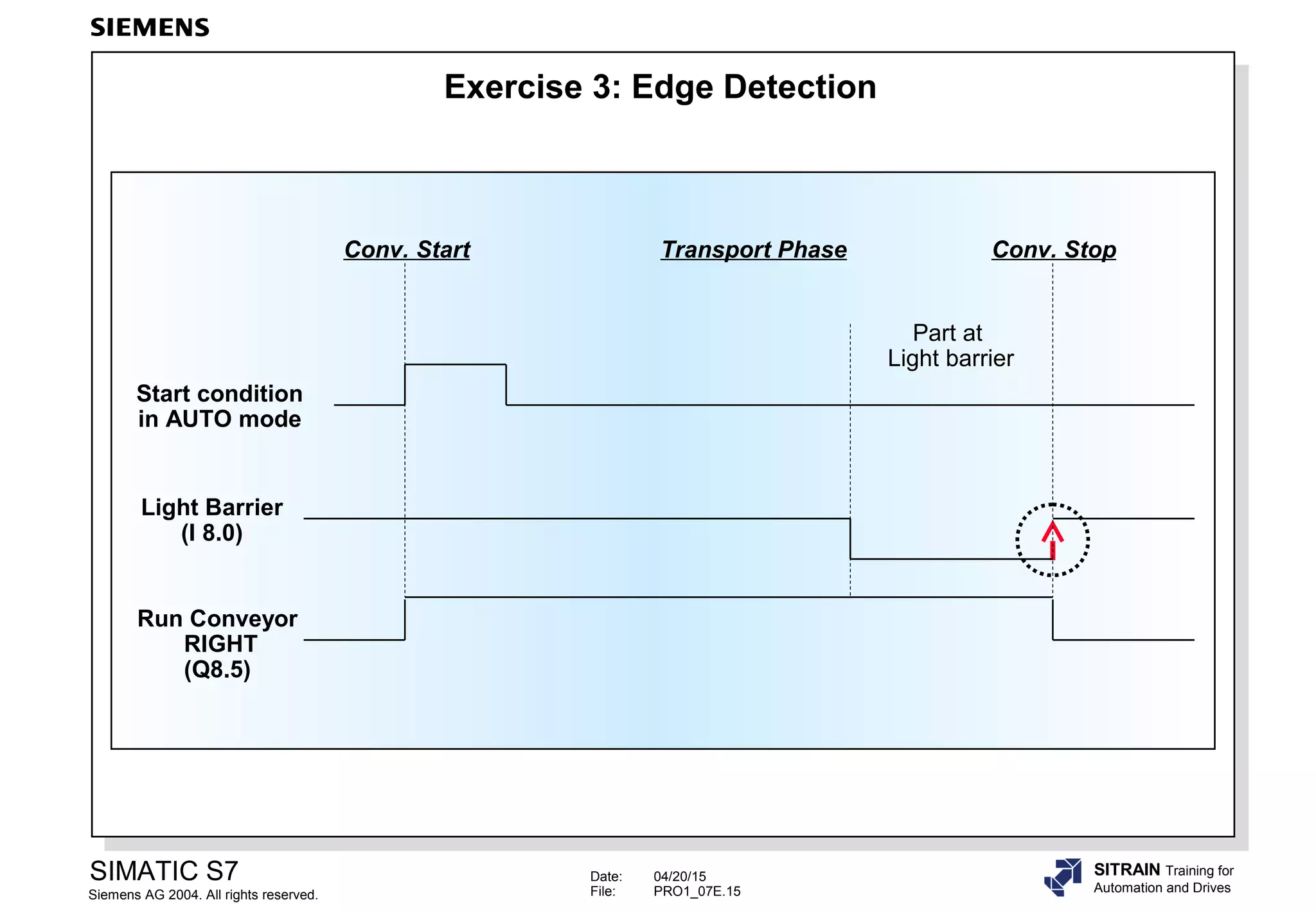
  • #13 FunctionIn AUTO mode, parts are to be transported from Bay 1 or Bay 2 to the Final Control (light barrier). Run Conveyor RIGHT starts when •Bay 1 proximity sensor is activated AND NOT Bay 2 proximity sensor AND Bay 1 pushbutton is activated OR •Bay 2 proximity sensor is activated AND NOT Bay 1 proximity sensor AND Bay 2 pushbutton is activated Run Conveyor RIGHT is stopped when •the part has reached the Final Control or the light barrier OR •AUTO mode is switched off What to Do1.Check whether your program in FC16 fulfills the desired function! 2. Modify your program in such a way that the conveyor stops when AUTO mode is switched off. 3.Test the function "Jog left" and "Jog right" in manual mode (Mode_Manual). NoteTo prevent double assignments, you should program a bit memory for each of the two conditions: -Bit memory M16.0:Bit memory for "Jog right" in manual mode -Bit memory M16.1:Bit memory for "Run conveyor right" in auto mode Both bit memories are then assigned to the output "Run conveyor right" in an additional network using an OR function.
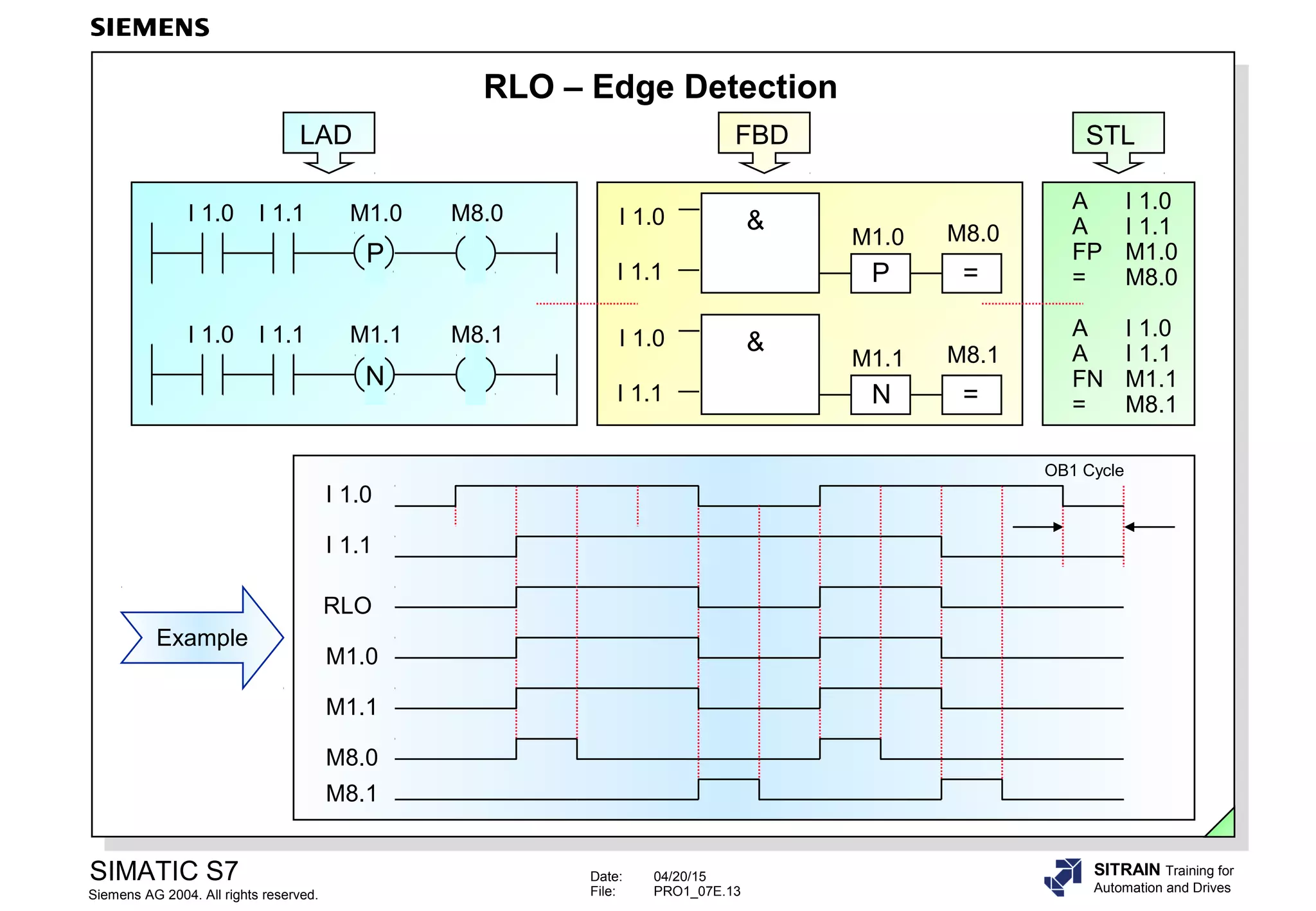
  • #14 RLO Edge DetectionAn "RLO edge" detection is when the result of a logic operation changes from "0" to "1" or from "1" to "0". Positive Edge(Positive RLO Edge Detection) detects a signal change in the address from "0" to "1", and displays it as RLO = "1" after the instruction (such as at M 8.0) for one cycle. To enable the system to detect the edge change, the RLO must be saved in an FP bit memory (such as M 1.0), or a data bit. Negative Edge(Negative RLO Edge Detection) detects a signal change in the address from "1" to "0" and displays it as RLO = "1" after the instruction (such as at M 8.1) for one cycle. To enable the system to detect the edge change, the RLO must be saved in an FN bit memory (such as M 1.1), or a data bit.
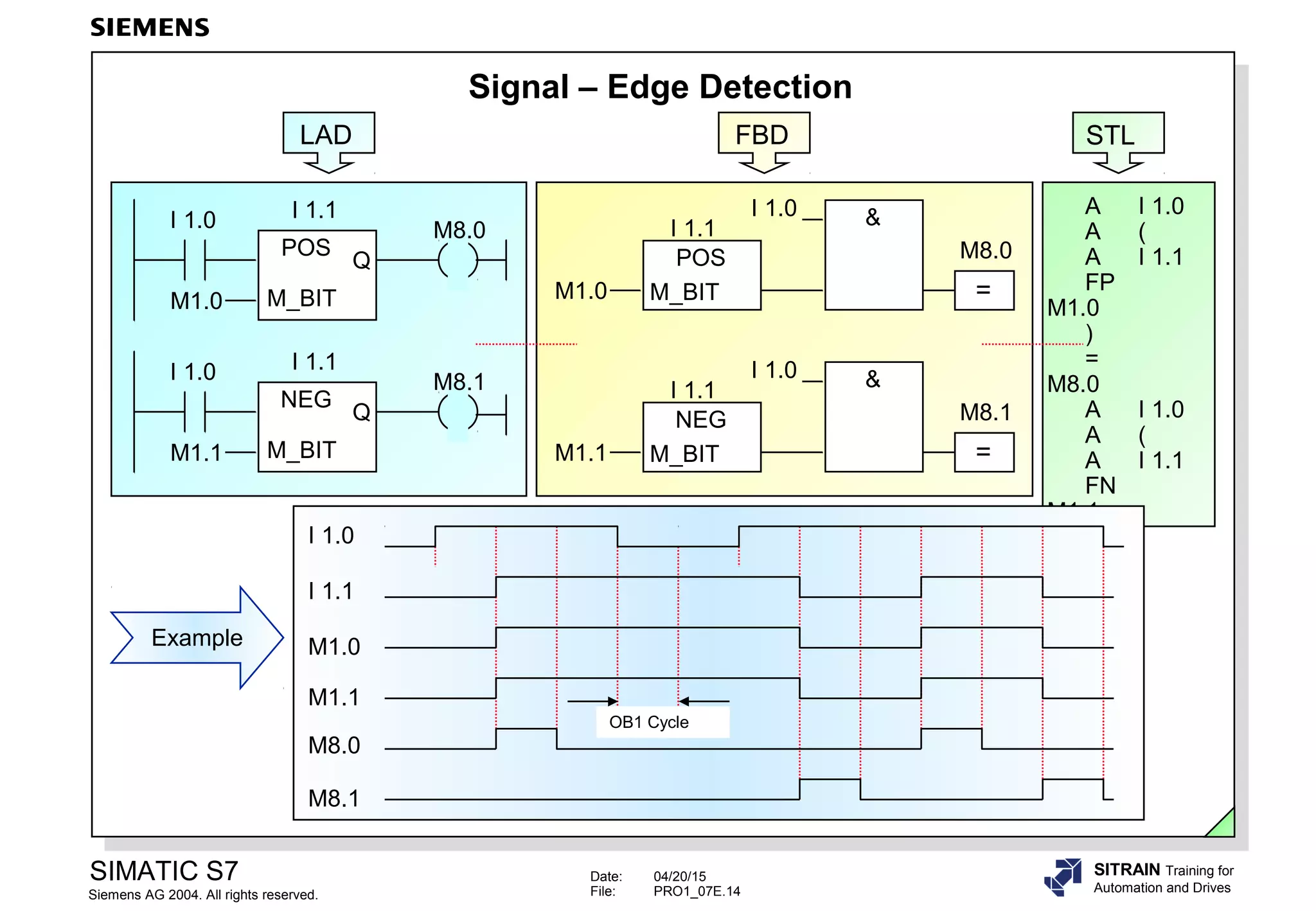
  • #15 Signal EdgeA "signal edge" is when a signal changes its state. ExampleInput I 1.0 acts as a static enable. Input I 1.1 is to be monitored dynamically and every signal change is to be detected. Positive EdgeWhen the signal state at I 1.1 changes from "0" to "1", the "POS" check instruction results in signal state "1" at output Q for one cycle, provided input I 1.0 also has signal state "1" (as in the example above). To enable the system to detect the edge change, the signal state of I 1.1 must also be saved in an M_BIT (bit memory or data bit) (such as M 1.0). Negative EdgeWhen the signal state at I 1.1 changes from "1" to "0", the "NEG" check instruction results in signal state "1" at output Q for one cycle, provided input I 1.0 has signal state "1" (as in the example above). To enable the system to detect the edge change, the signal state of I 1.1 must also be saved in an M_BIT (bit memory or data bit) (such as M 1.1).
  • #16 FC 16 Up Till NowIn MANUAL mode (Q 4.2 = ´1´), you can jog the conveyor motor direction to the RIGHT and LEFT using the pushbuttons I 0.2 and I 0.3. In AUTO mode (Q 4.3 = ´1´), the Run Conveyor RIGHT is switched on when a part is laid on the conveyor exactly in front of a proximity sensor at Bay 1 or 2, (EXOR -logic operation) and the occupied Bay‘s pushbutton is activated. The conveyor motor is stopped when the part has reached the Final Control (the light barrier) OR the AUTO mode is switched off. TaskThe function of the FC 16 to control the conveyor motor in AUTO mode is to remain fundamentally unchanged. However, the conveyor motor is to be stopped as soon as the part has passed through the light barrier (-> edge detection necessary, see slide). What to Do1.Program the necessary changes in FC 16, by changing the reset condition of M 16.1 (bit memory for Run conveyor RIGHT in AUTO mode) from the light barrier signal itself (I 8.0 ) to its positive edge.For the necessary edge detection of the light barrier signal use the bit memory M 16.2 as an edge memory bit. 2.Save the modified FC 16 block and download it into the CPU 3.Check whether your program fulfills the desired function !
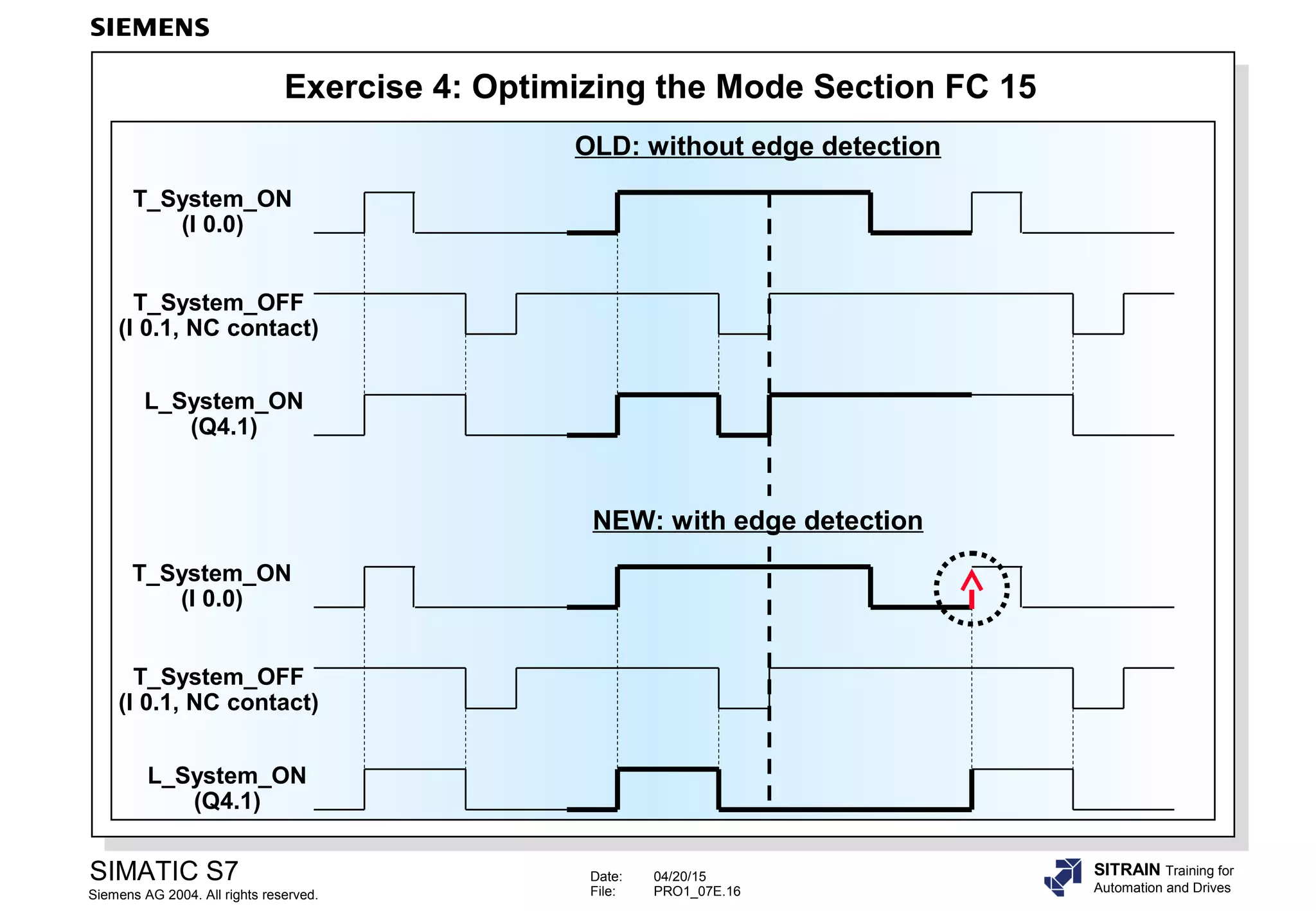
  • #17 FC 15 Up Till NowThe system (Q 4.1) is switched on with the simulator pushbutton I 0.0, and switched off with the simulator pushbutton I 0.1 (NC) . If you press both pushbuttons simultaneously, the system remains switched off or is switched off if currently on. However, if both pushbuttons are pressed and you let go of the OFF pushbutton, the system switches on again without having to first press the ON pushbutton once more (see slide, upper function diagram "OLD: without edge detection"). Task (1)Expand the functionality of FC 15 using edge detection so that the ON pushbutton must be pressed every time the system is switched on (see slide, lower function diagram "NEW: with edge detection"). The criteria for switching on the system is no longer to be the pressed ON pushbutton or its ´1´ signal, but the function of pressing or the "positive edge" of the ON pushbutton signal. What to Do1.In the set condition for "L_System", insert an edge detection of the pushbutton "T_System_ON". For the edge detection, use the bit memory "EM_System_ON" (M 15.0) as edge memory bit. 2.Save the modified FC 15 block and download it into the CPU 3.Check whether your program fulfills the desired function ! Task (2) Just as with switching on the system, accepting and/or switching on "L_Mode_Manual" (Q 4.2) and "L_Mode_Auto" (Q 4.3) is also to happen using "S_Mode_Select" (I 0.4). Every time there is a mode change, the pushbutton "T_ Mode _Enable" (I 0.5) must be pressed once more. Use the bit memories "EM_Manual_ON" (M 15.1) and "EM_Auto_ON" (M 15.2) for the required edge detections.
  • #18 NoteThe following pages contain either further information or are for reference to complete a topic.
  • #19 Jump InstructionIn LAD/FBD, the label (NEW1) is entered as an identifier above the coil symbol or assignment symbol. In STL it comes after the Jump (JU) instruction. The label can have up to four characters, the first of which must be a letter or the “_” character. The label marks the point where execution of the program is to continue. Any instructions or networks between the jump instruction and the label are not executed. Jumps can be made both forwards and backwards. The jump instruction and the jump destination must both be in the same block (max. jump length = 64kbyte). The jump destination can only be used once in a block. Jump instructions can be used in FBs, FCs and OBs. Jump Label A jump label (maximum four characters long) identifies the jump destination of a jump instruction. In STL, this is an instruction, in LAD and FBD it is the beginning of a network. In STL, the label is specified to the left of the instruction from where program execution is to continue. In LAD and FBD, you use the Program Elements browser to insert a label: Program Elements -> Jumps -> LABEL. JMPAn unconditional jump instruction causes a program jump to a label regardless of the RLO.
  • #20 JCThe "JC" conditional jump is only executed if the RLO is "1".If the RLO is "0", the jump is not executed, the RLO is set to "1" and program execution continues with the next instruction. JCNThe "JCN" conditional jump is only executed if the RLO is "0".If the RLO is "1", the jump is not executed and program execution continues with the next instruction. NoteSTL provides additional jump operations, which are discussed in an advanced programming course.