ROS and the
Raspberry Pi
http://www.robopgmr.com/?page_id=3589
Arnold Bailey
+ROS
Contents
• The complexity of robotics
• What is ROS?
• Hardware and software options
• Creating an ROS user application.
• Conclusion
2
3
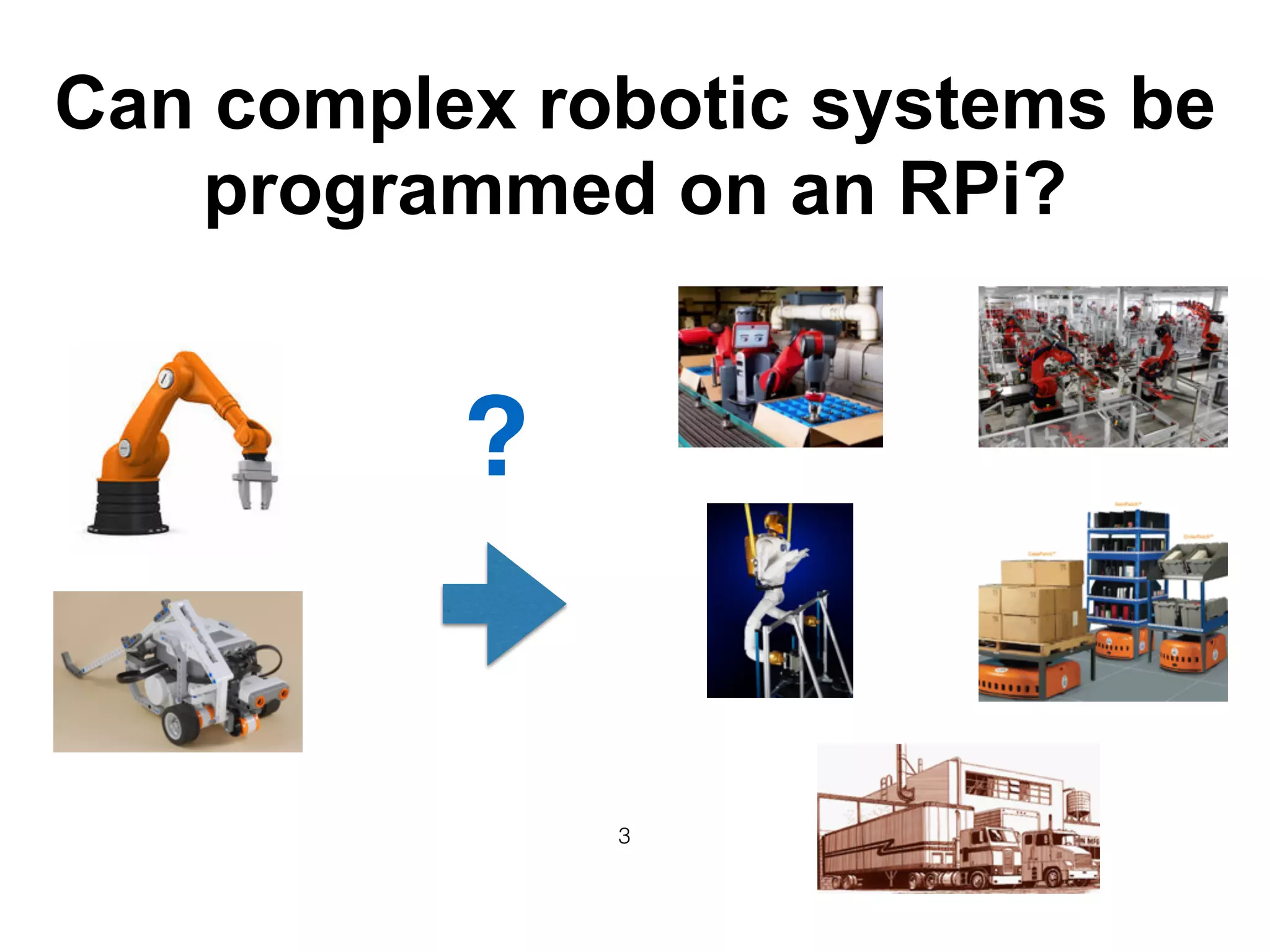
Can complex robotic systems be
programmed on an RPi?
?
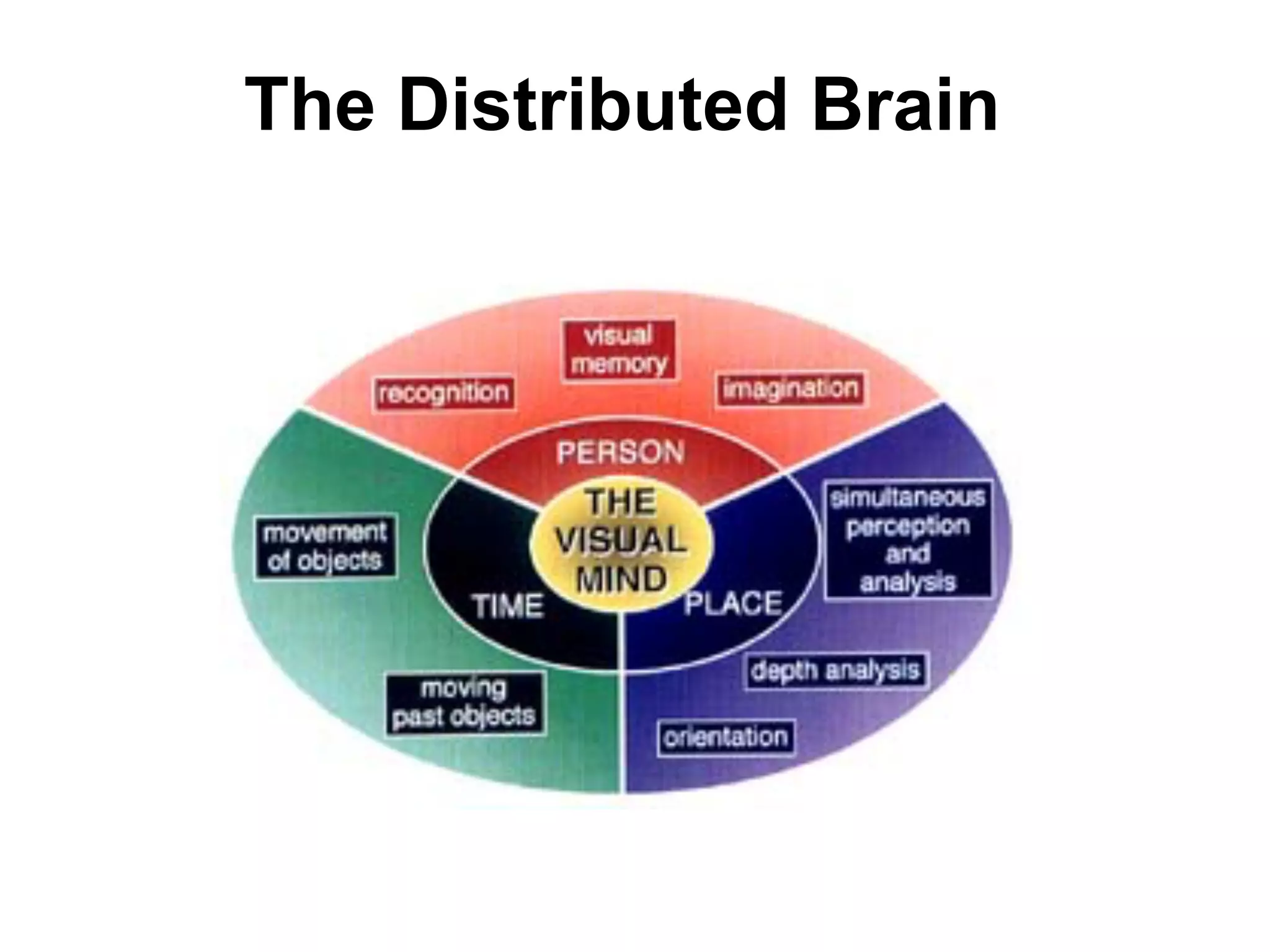
The Distributed Brain
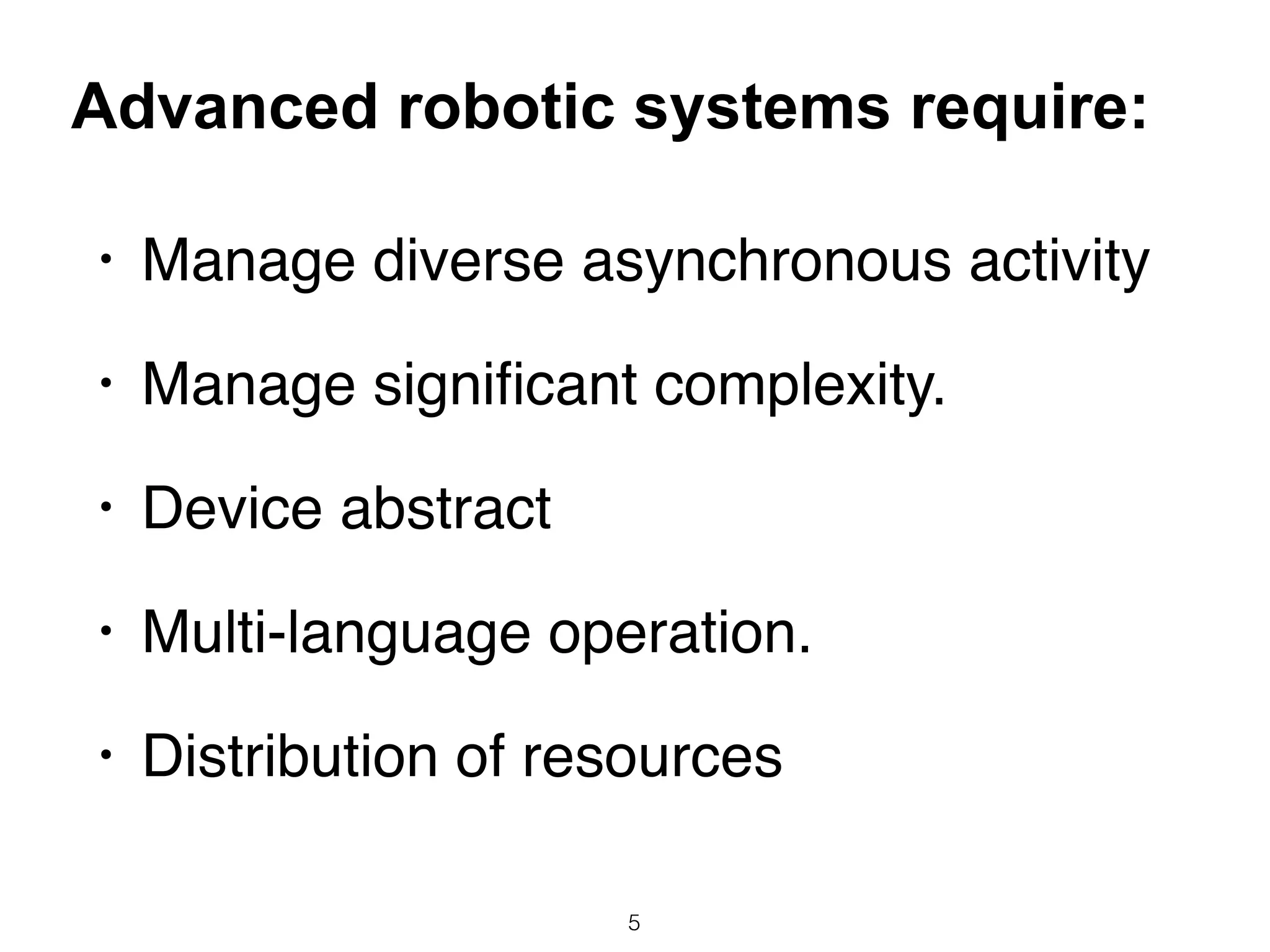
• Manage diverse asynchronous activity
• Manage significant complexity.
• Device abstract
• Multi-language operation.
• Distribution of resources
5
Advanced robotic systems require:
6
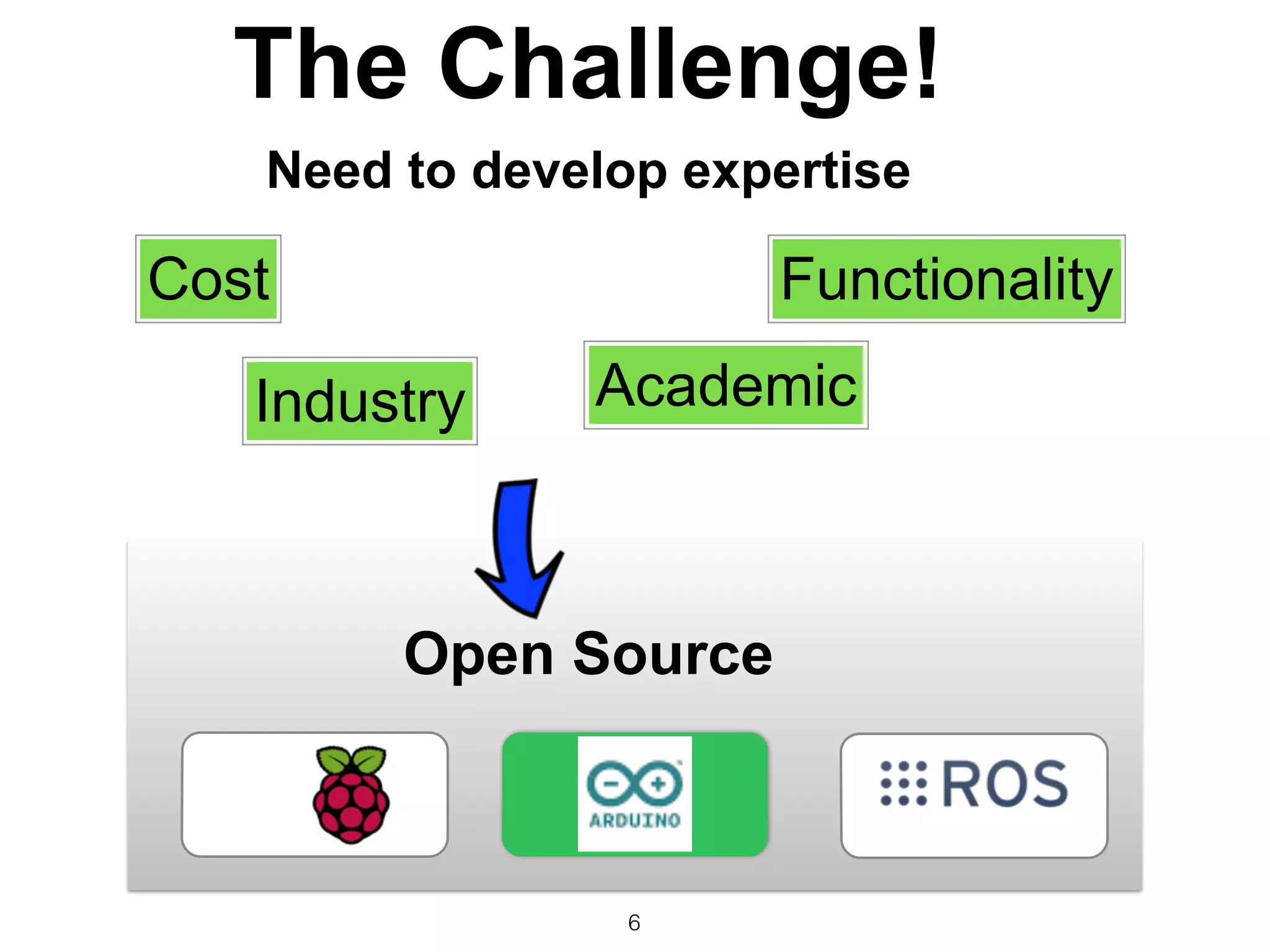
The Challenge!
Need to develop expertise
Cost Functionality
Industry Academic
Open Source
7
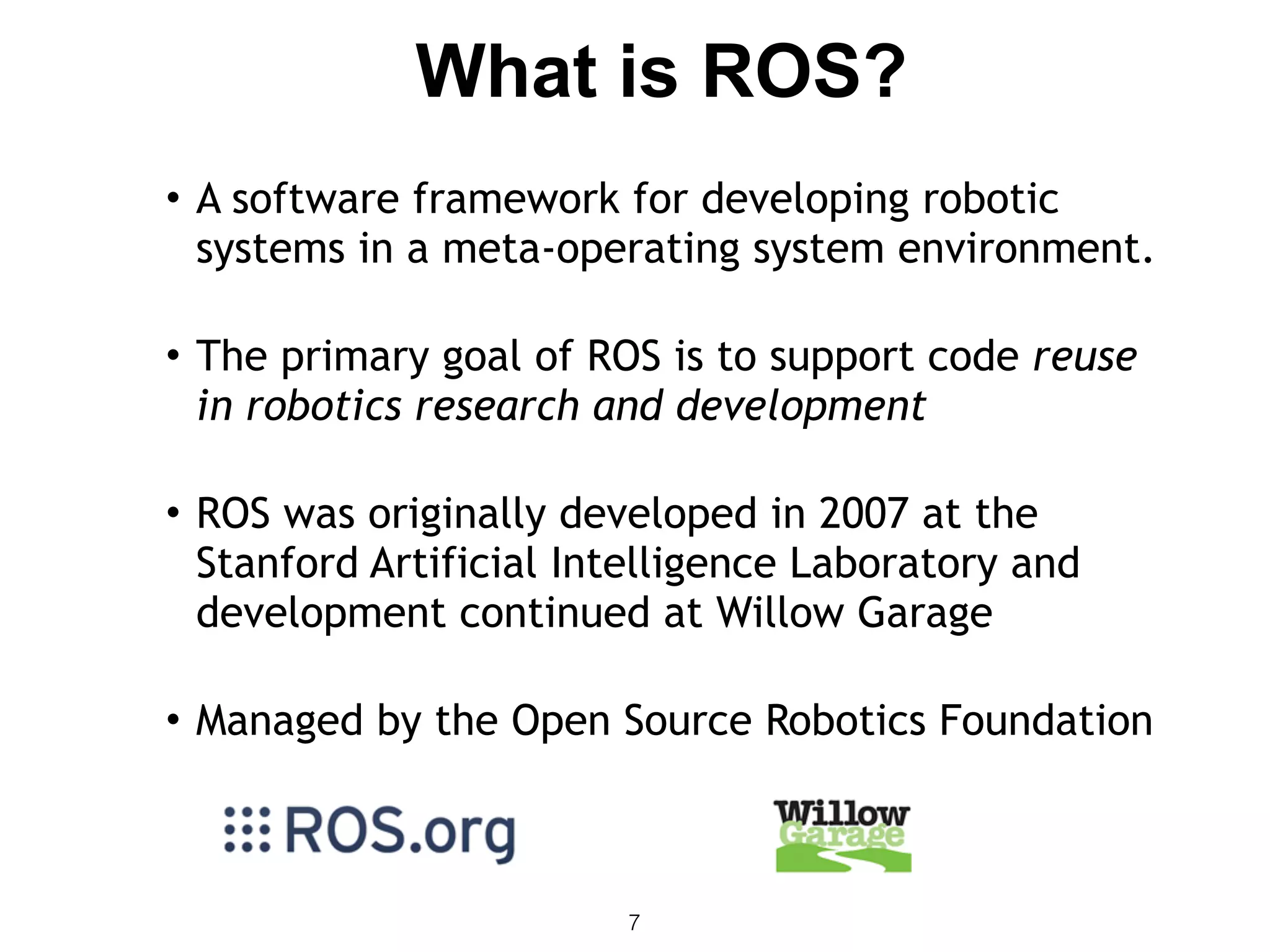
• A software framework for developing robotic
systems in a meta-operating system environment.

• The primary goal of ROS is to support code reuse
in robotics research and development

• ROS was originally developed in 2007 at the
Stanford Artificial Intelligence Laboratory and
development continued at Willow Garage

• Managed by the Open Source Robotics Foundation
What is ROS?
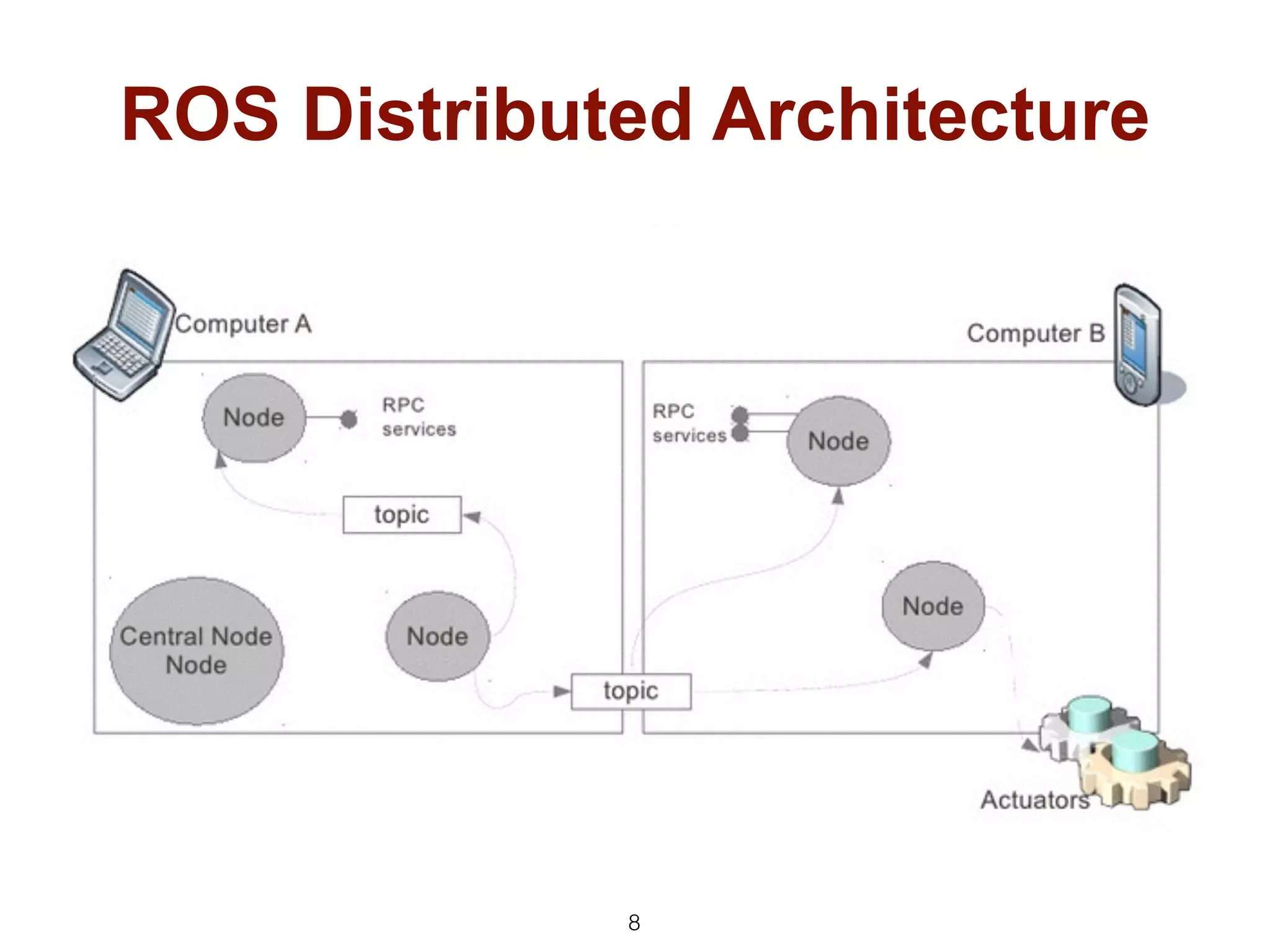
ROS Distributed Architecture
8
9
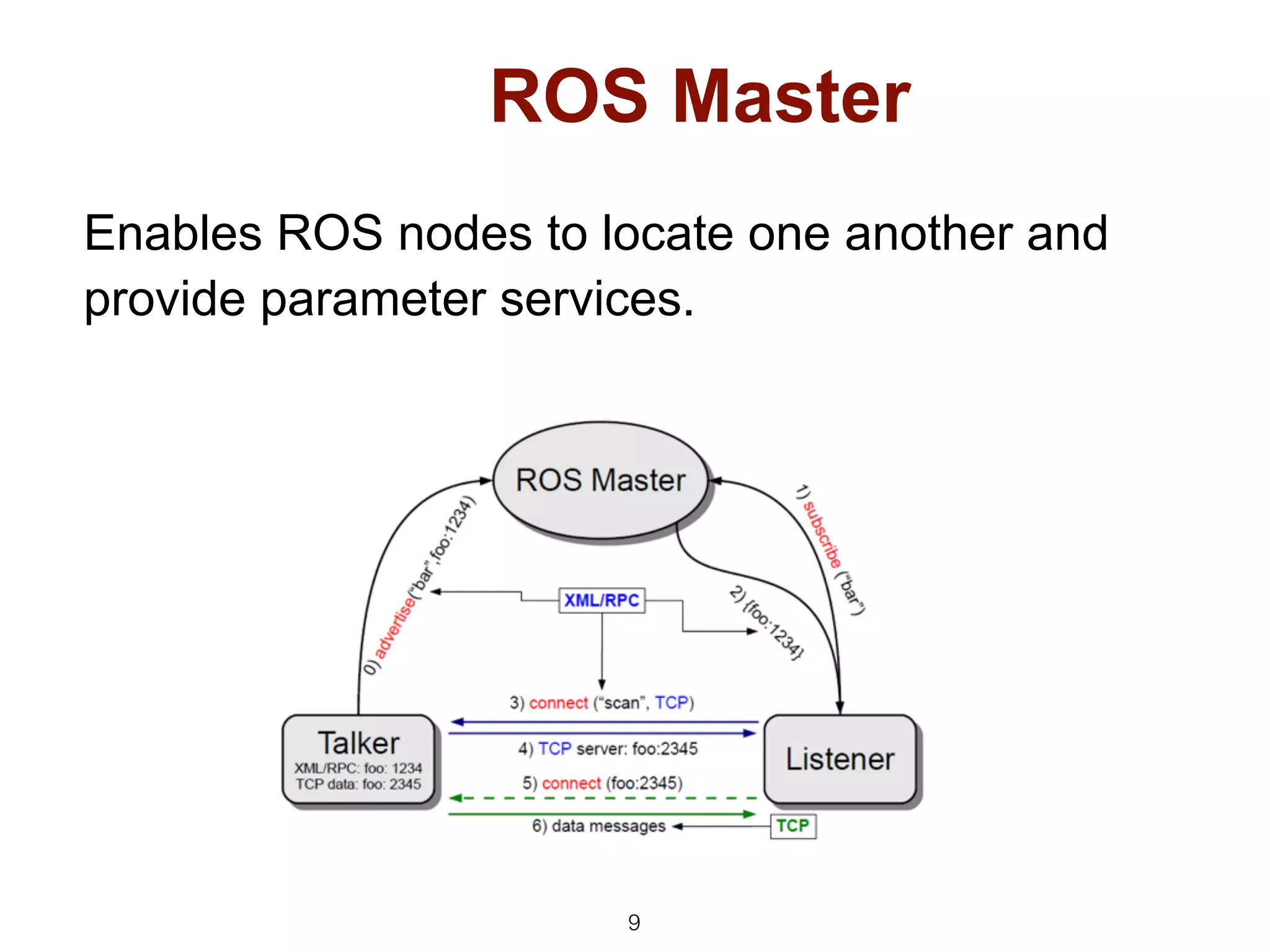
ROS Master
Enables ROS nodes to locate one another and
provide parameter services.
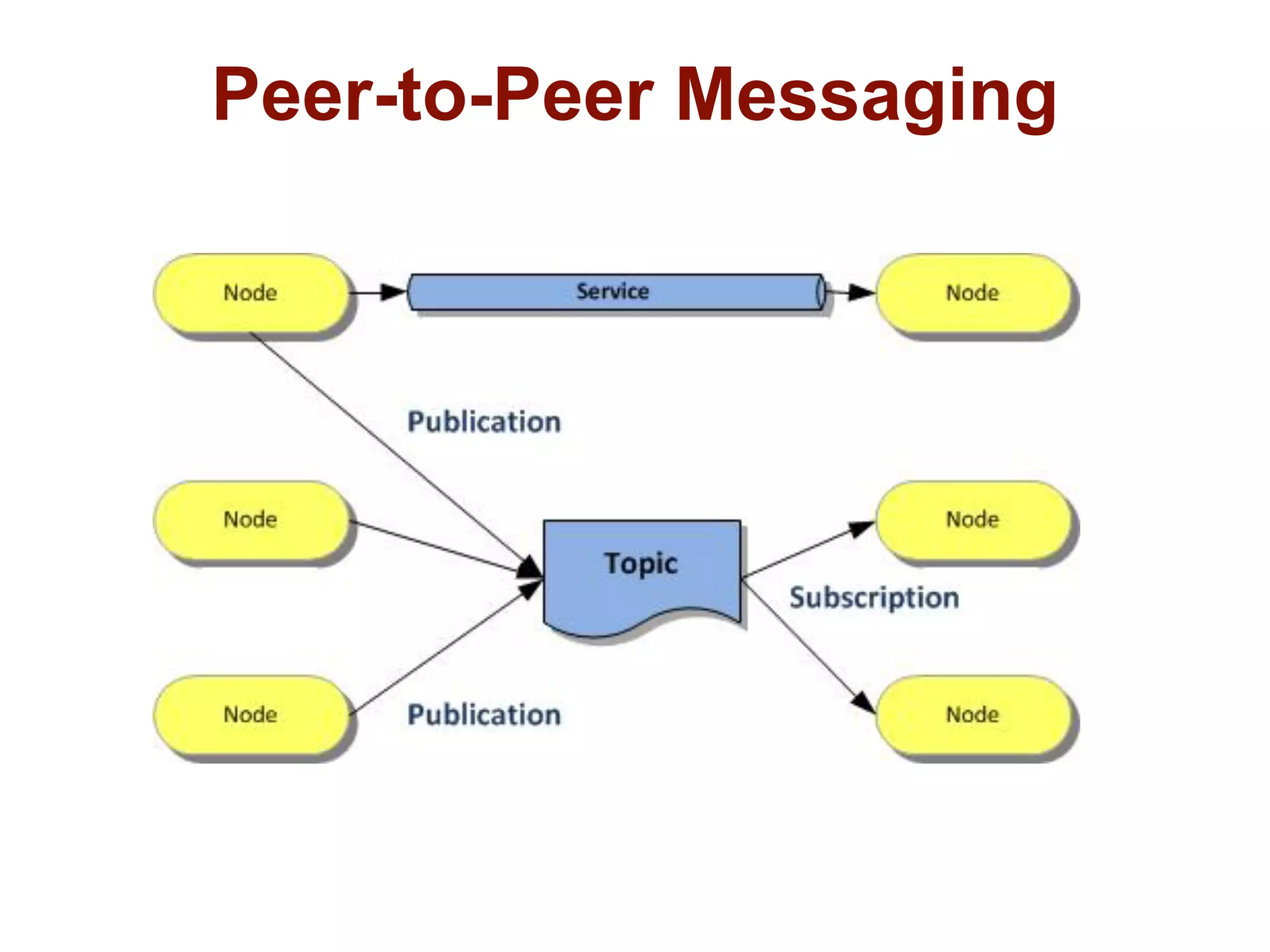
Peer-to-Peer Messaging
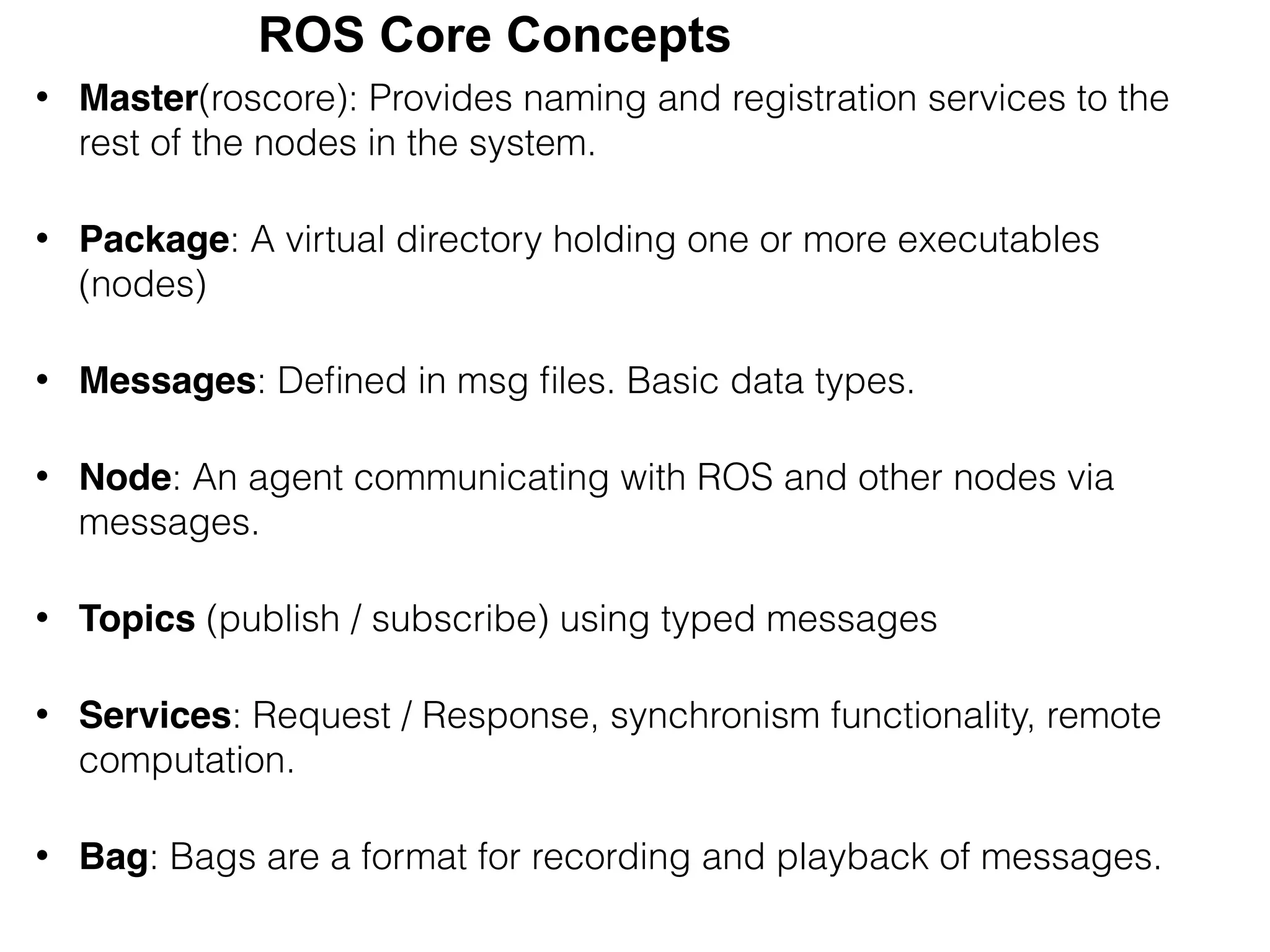
• Master(roscore): Provides naming and registration services to the
rest of the nodes in the system.
• Package: A virtual directory holding one or more executables
(nodes)
• Messages: Defined in msg files. Basic data types.
• Node: An agent communicating with ROS and other nodes via
messages.
• Topics (publish / subscribe) using typed messages
• Services: Request / Response, synchronism functionality, remote
computation.
• Bag: Bags are a format for recording and playback of messages.
ROS Core Concepts
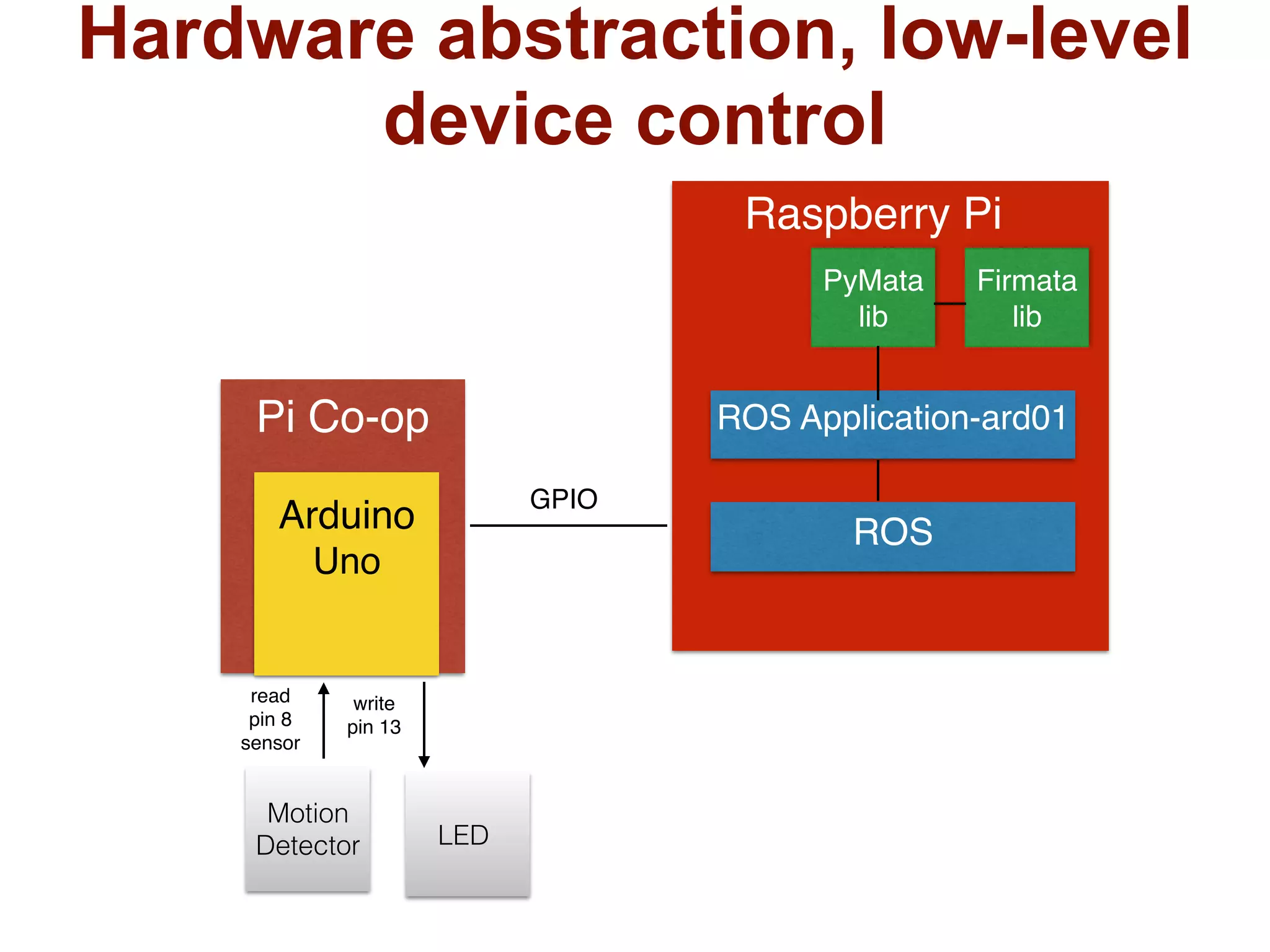
Arduino
Uno
Pi Co-op
Raspberry Pi
ROS Application-ard01
ROS
PyMata
lib
Firmata
lib
GPIO
Motion
Detector LED
Hardware abstraction, low-level
device control
read
pin 8
sensor
write
pin 13
13
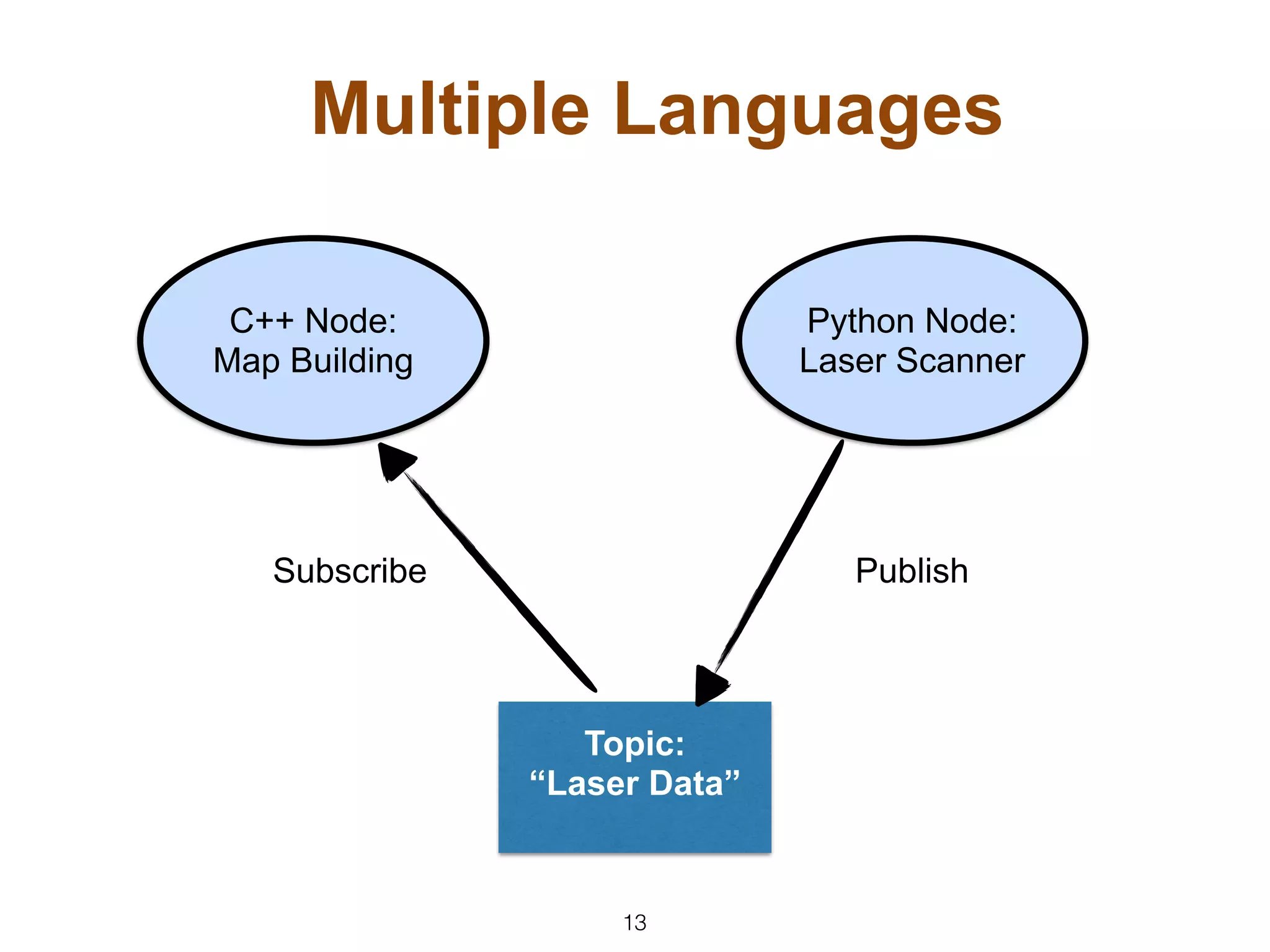
Multiple Languages
C++ Node:
Map Building
Python Node:
Laser Scanner
Topic:
“Laser Data”
Subscribe Publish
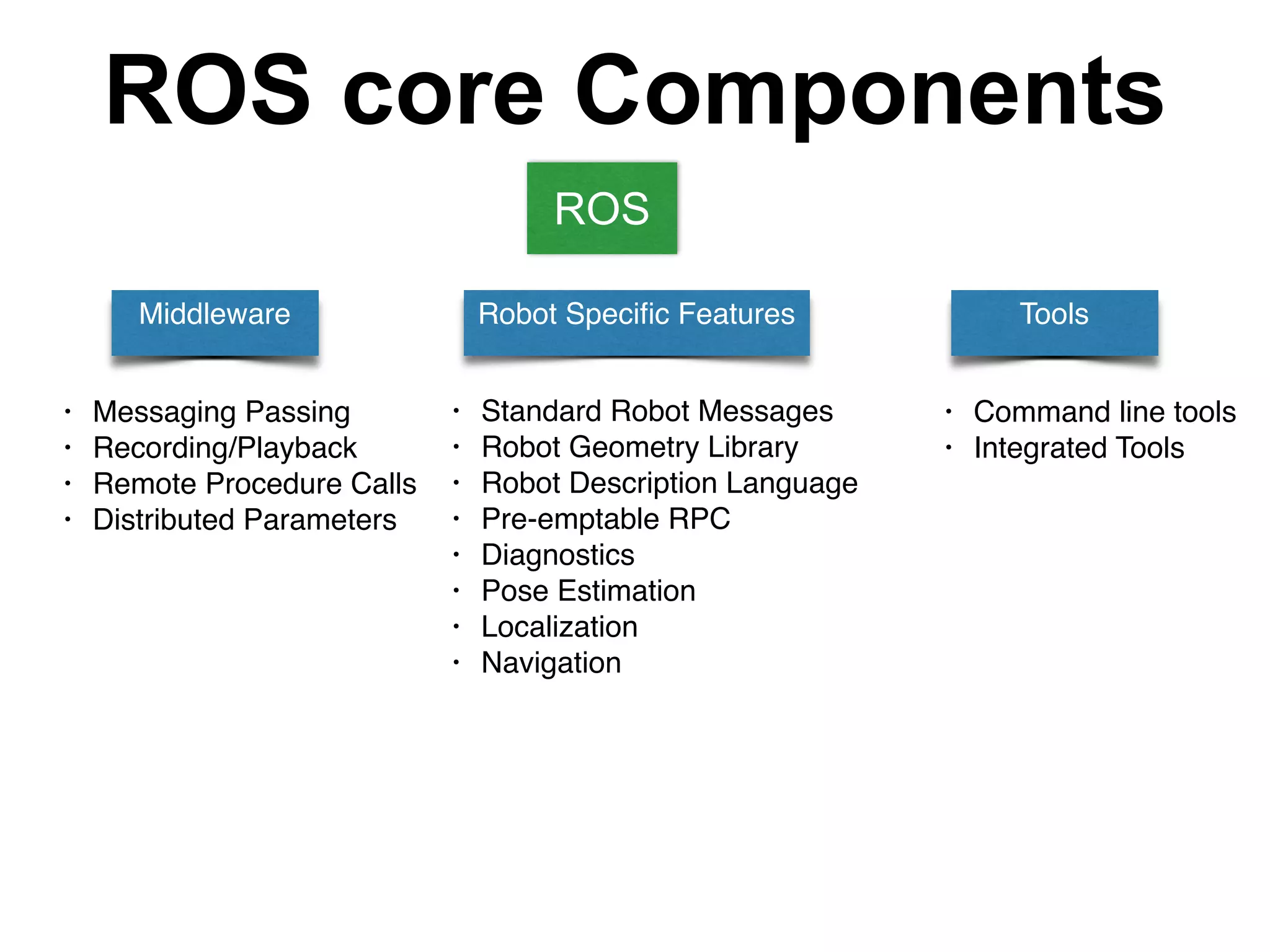
ROS core Components
Middleware Robot Specific Features Tools
• Messaging Passing
• Recording/Playback
• Remote Procedure Calls
• Distributed Parameters
• Standard Robot Messages
• Robot Geometry Library
• Robot Description Language
• Pre-emptable RPC
• Diagnostics
• Pose Estimation
• Localization
• Navigation
• Command line tools
• Integrated Tools
ROS
15
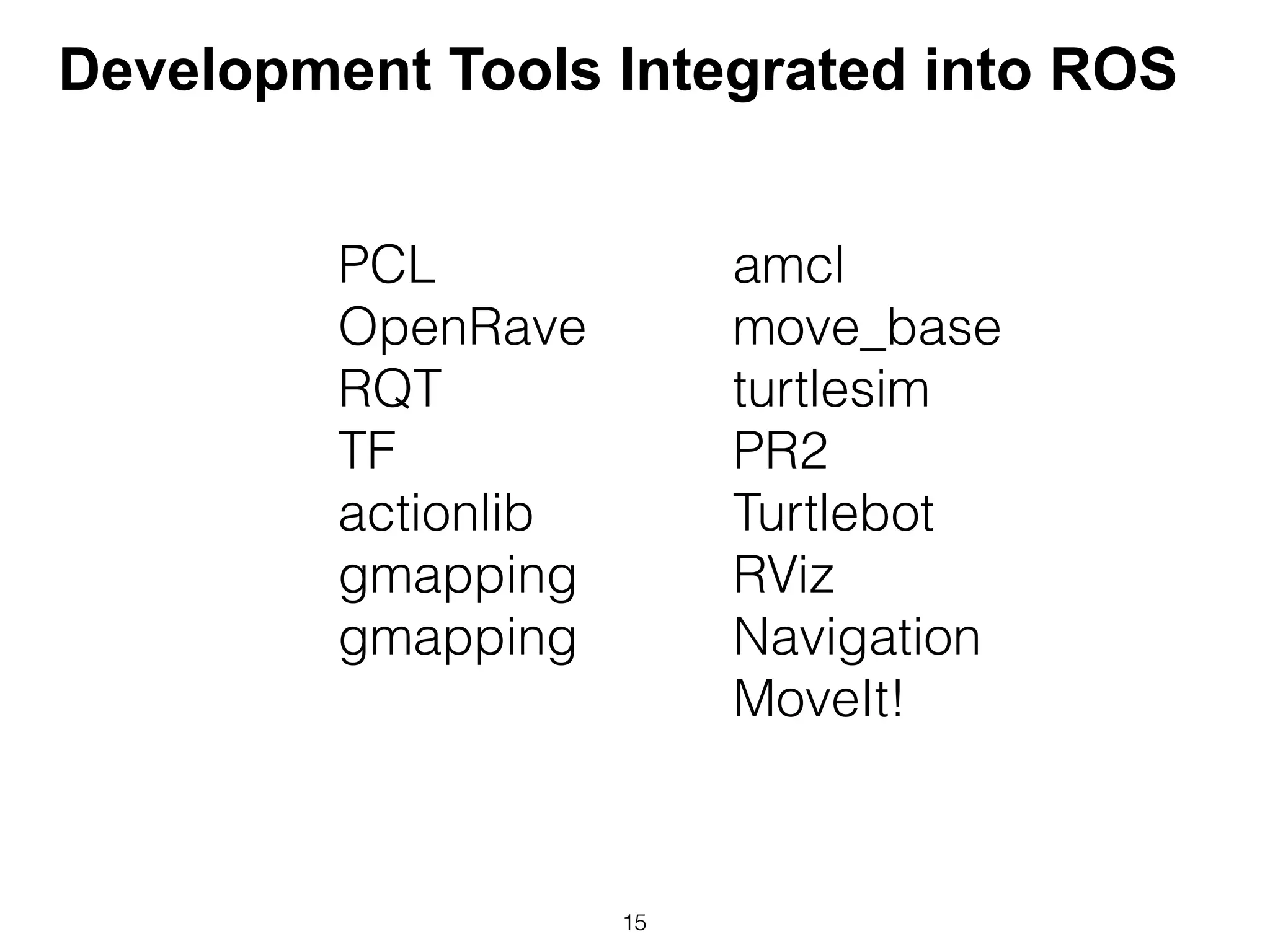
PCL
OpenRave
RQT
TF
actionlib
gmapping
gmapping
amcl
move_base
turtlesim
PR2
Turtlebot
RViz
Navigation
MoveIt!
Development Tools Integrated into ROS
16
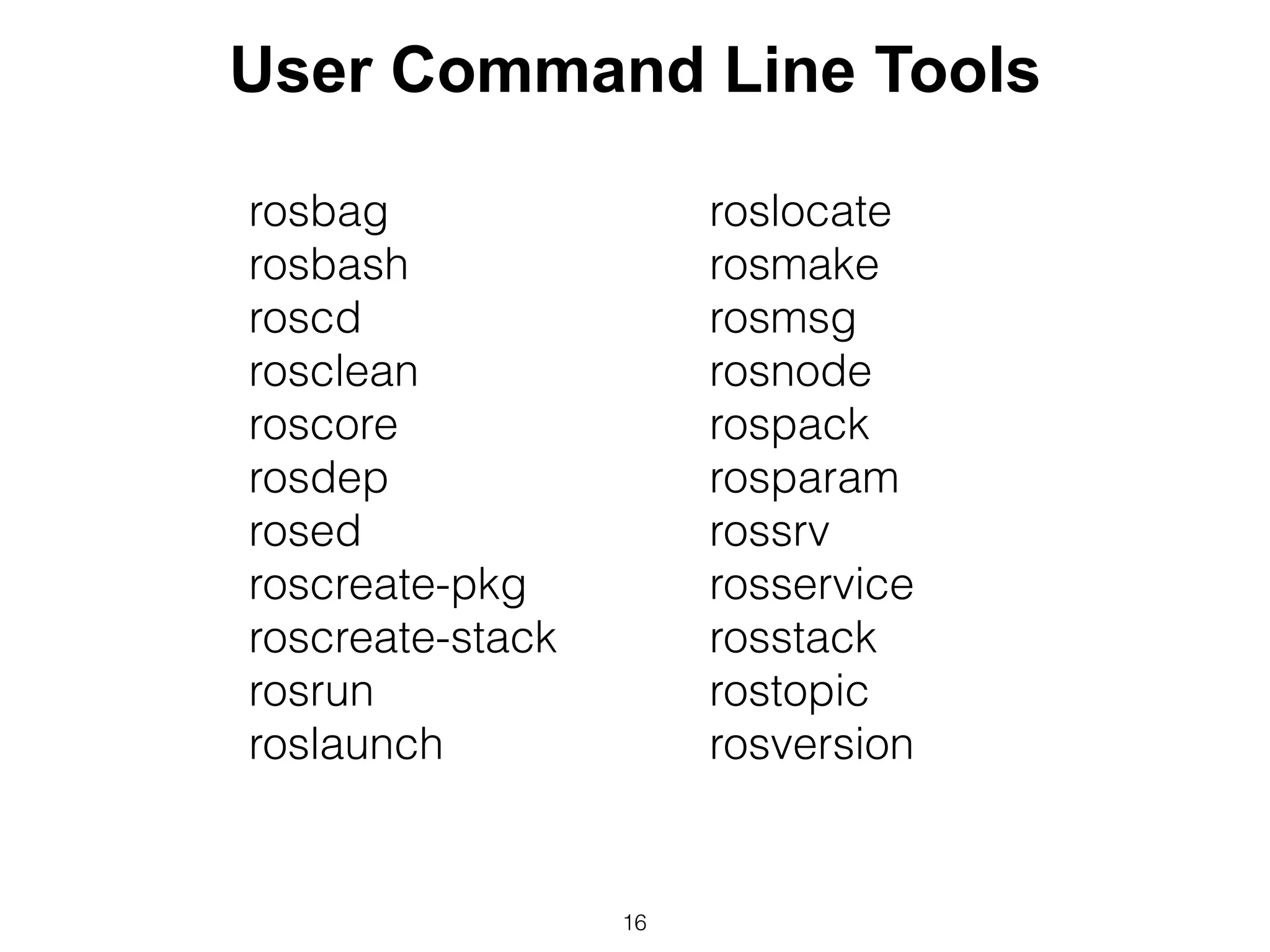
rosbag
rosbash
roscd
rosclean
roscore
rosdep
rosed
roscreate-pkg
roscreate-stack
rosrun
roslaunch
roslocate
rosmake
rosmsg
rosnode
rospack
rosparam
rossrv
rosservice
rosstack
rostopic
rosversion
User Command Line Tools
Example Hardware
• Raspberry Pi
• Model B
• 16 GB SD (Could use 8 GB)
• Pi Co-op Board
• Arduino Uno (resides on board)
• Parallax Motion Detecter
• Breadboard
17
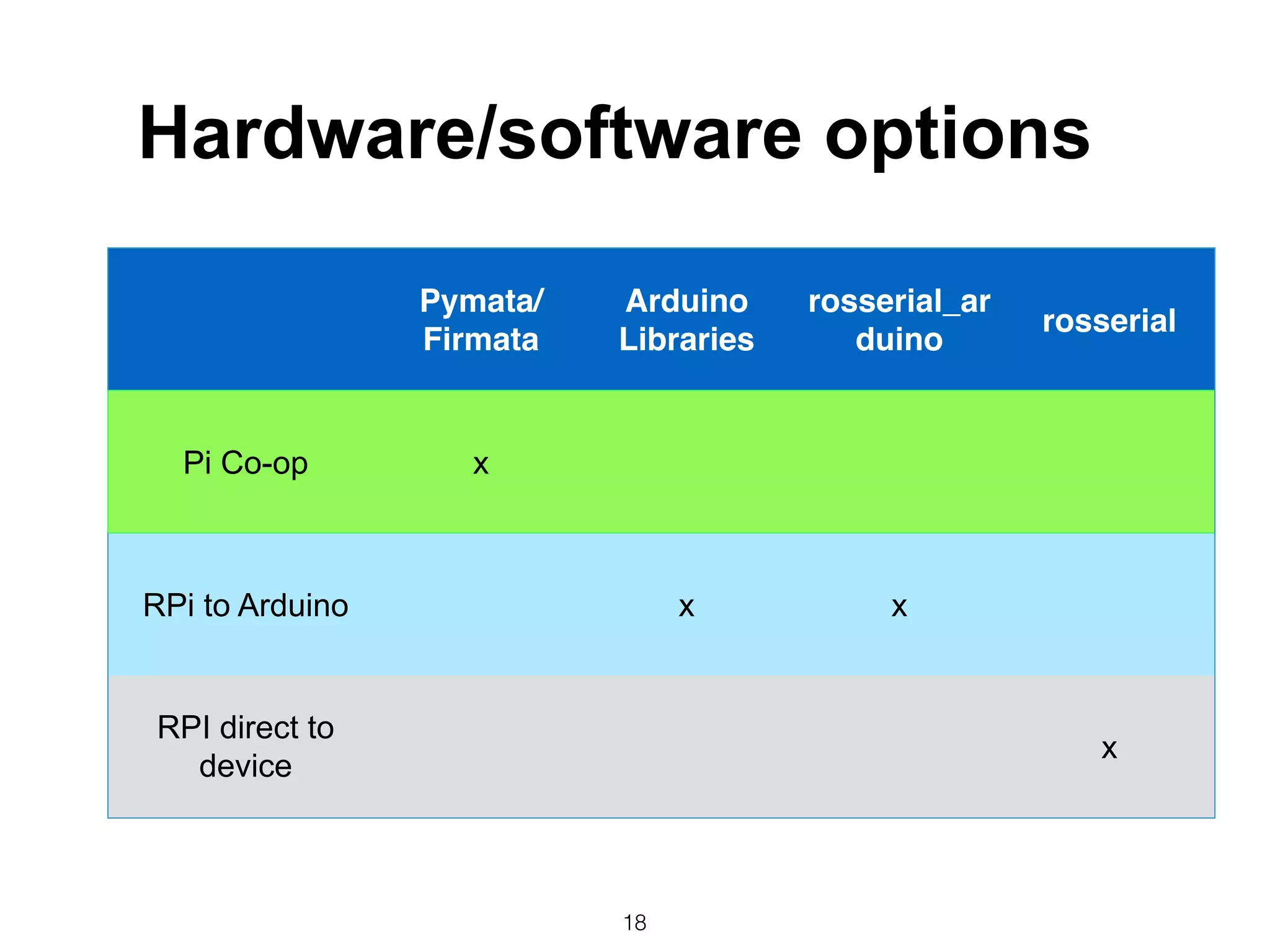
18
Pymata/
Firmata
Arduino
Libraries
rosserial_ar
duino
rosserial
Pi Co-op x
RPi to Arduino x x
RPI direct to
device
x
Hardware/software options
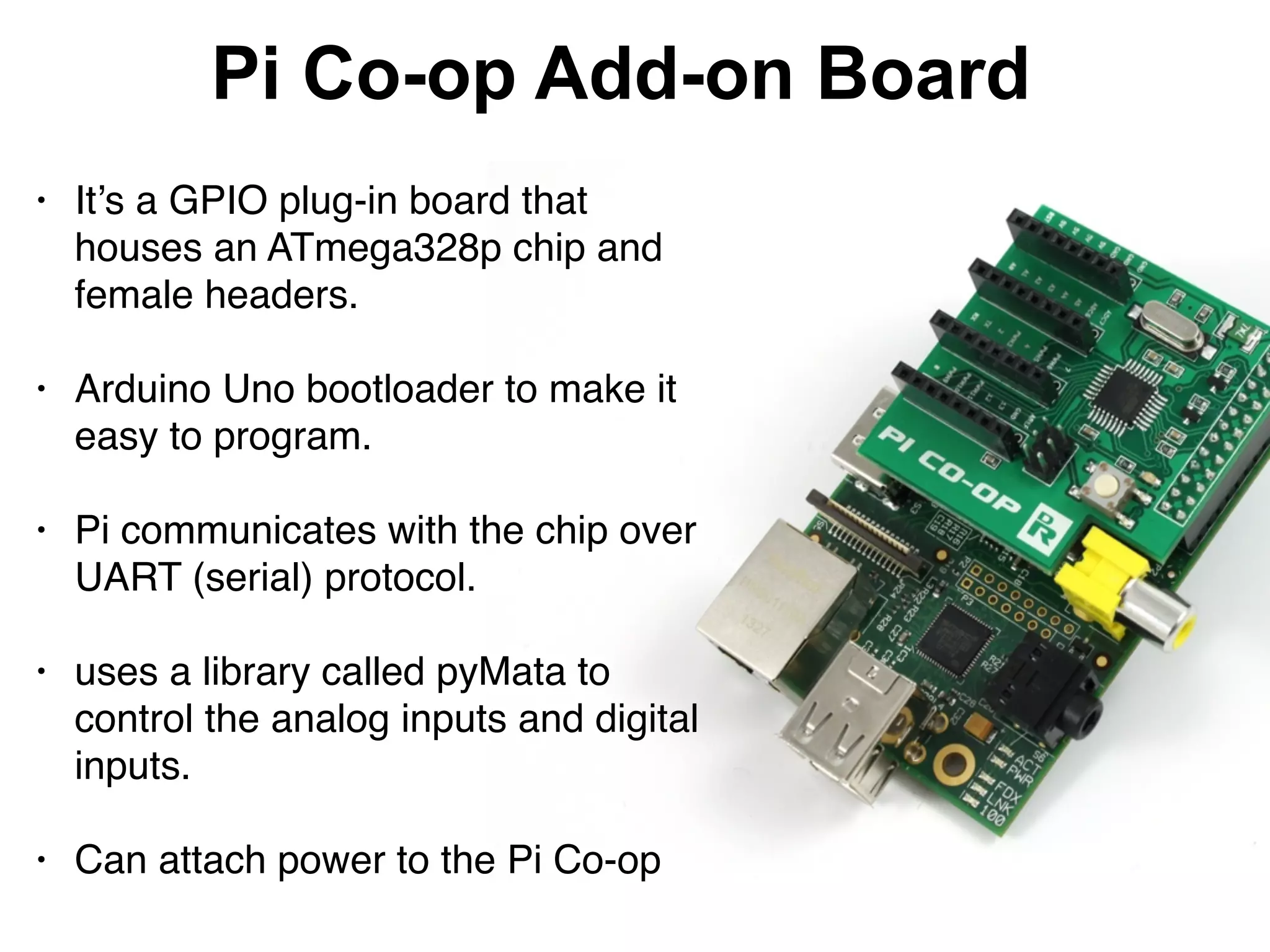
Pi Co-op Add-on Board
• It’s a GPIO plug-in board that
houses an ATmega328p chip and
female headers. 

• Arduino Uno bootloader to make it
easy to program.

• Pi communicates with the chip over
UART (serial) protocol.

• uses a library called pyMata to
control the analog inputs and digital
inputs.

• Can attach power to the Pi Co-op
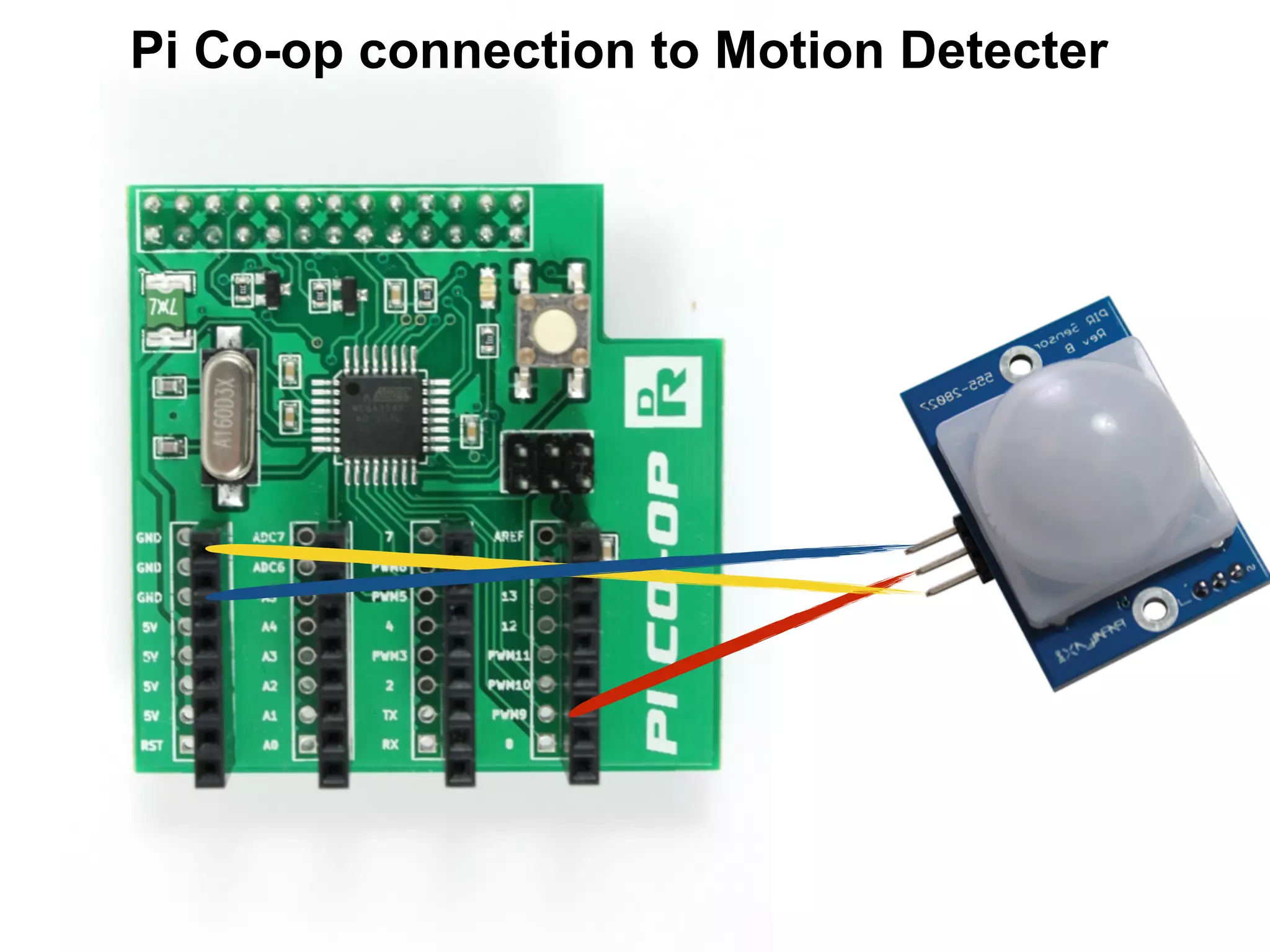
Pi Co-op connection to Motion Detecter
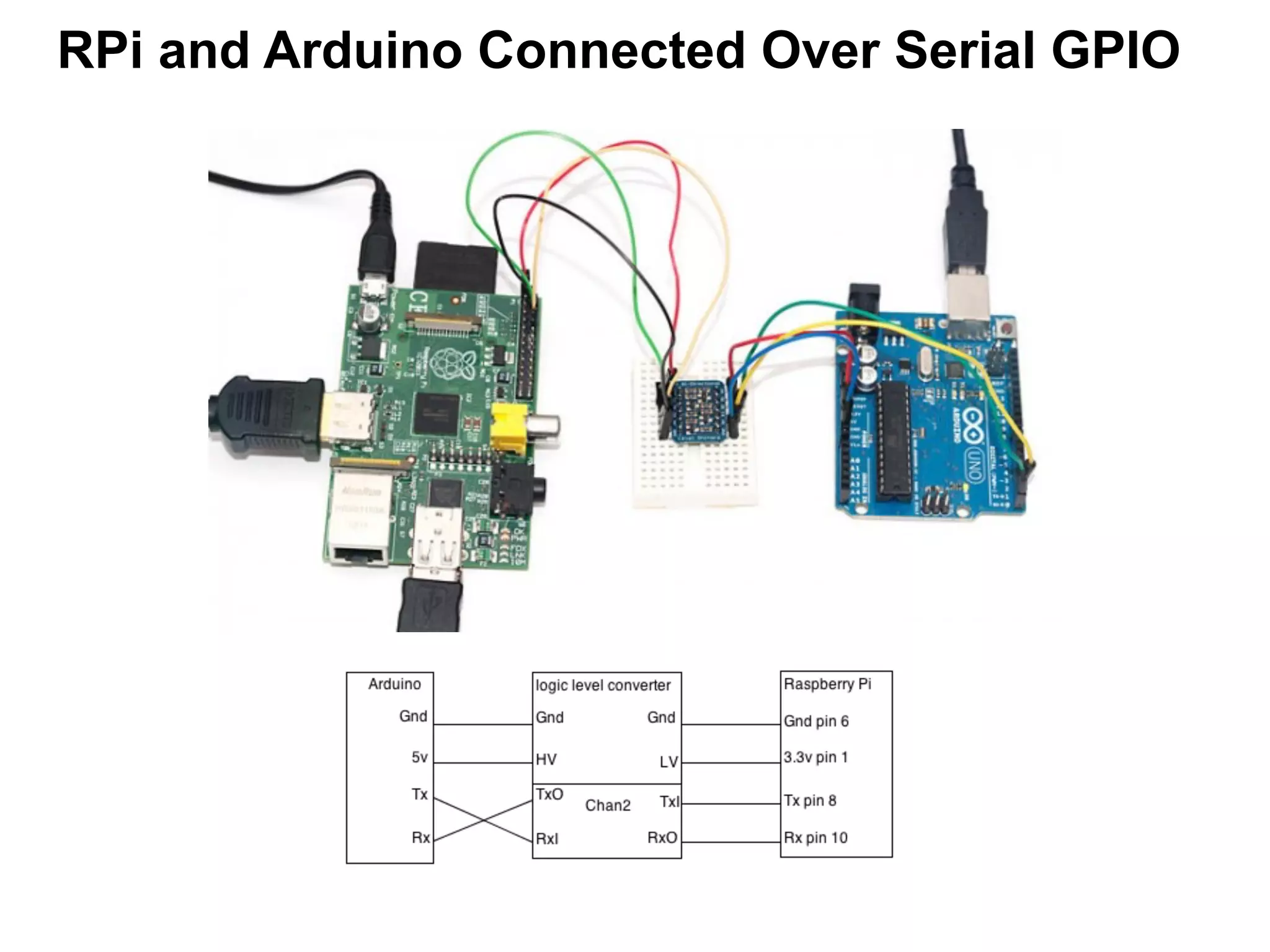
RPi and Arduino Connected Over Serial GPIO
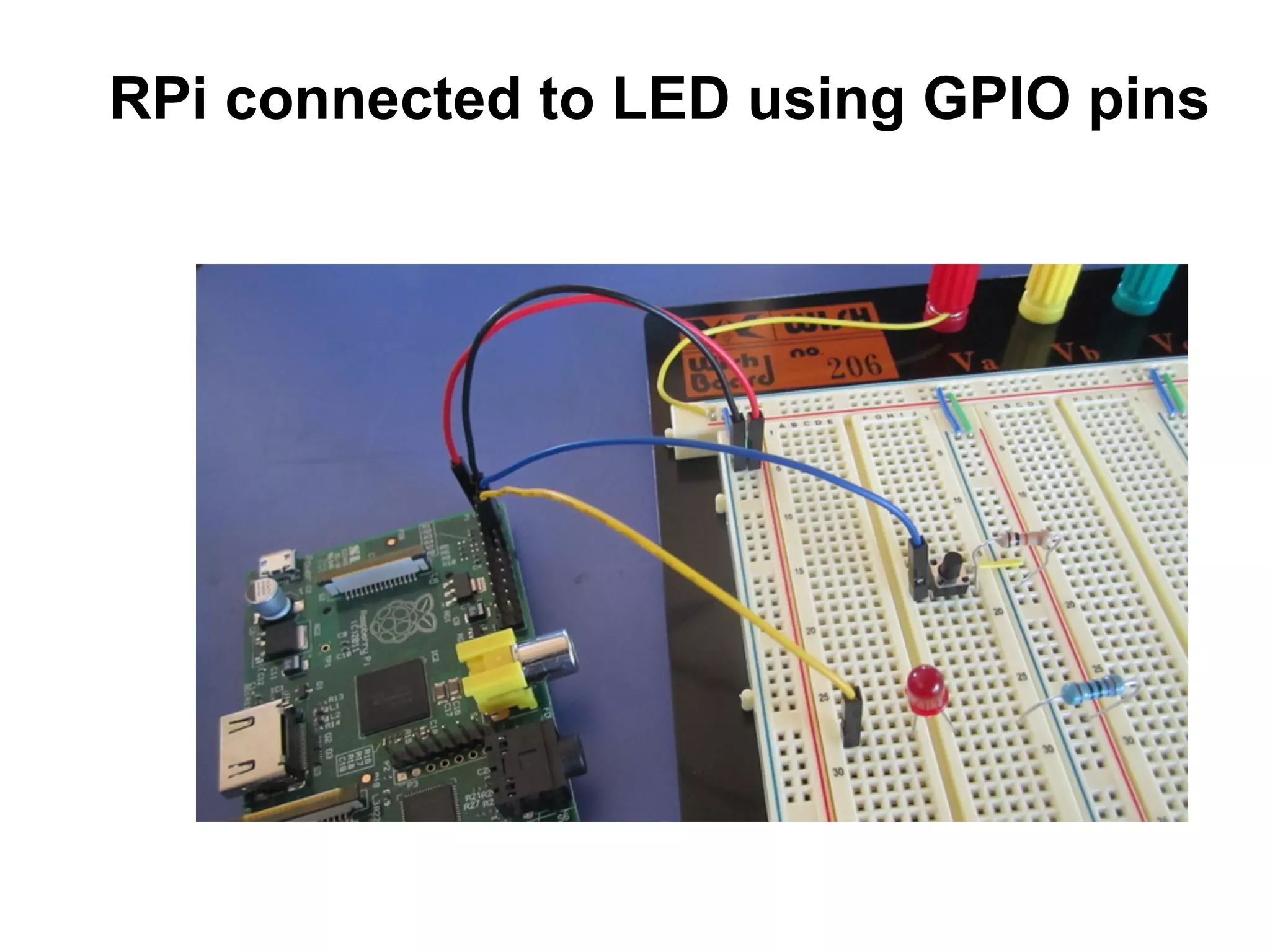
RPi connected to LED using GPIO pins
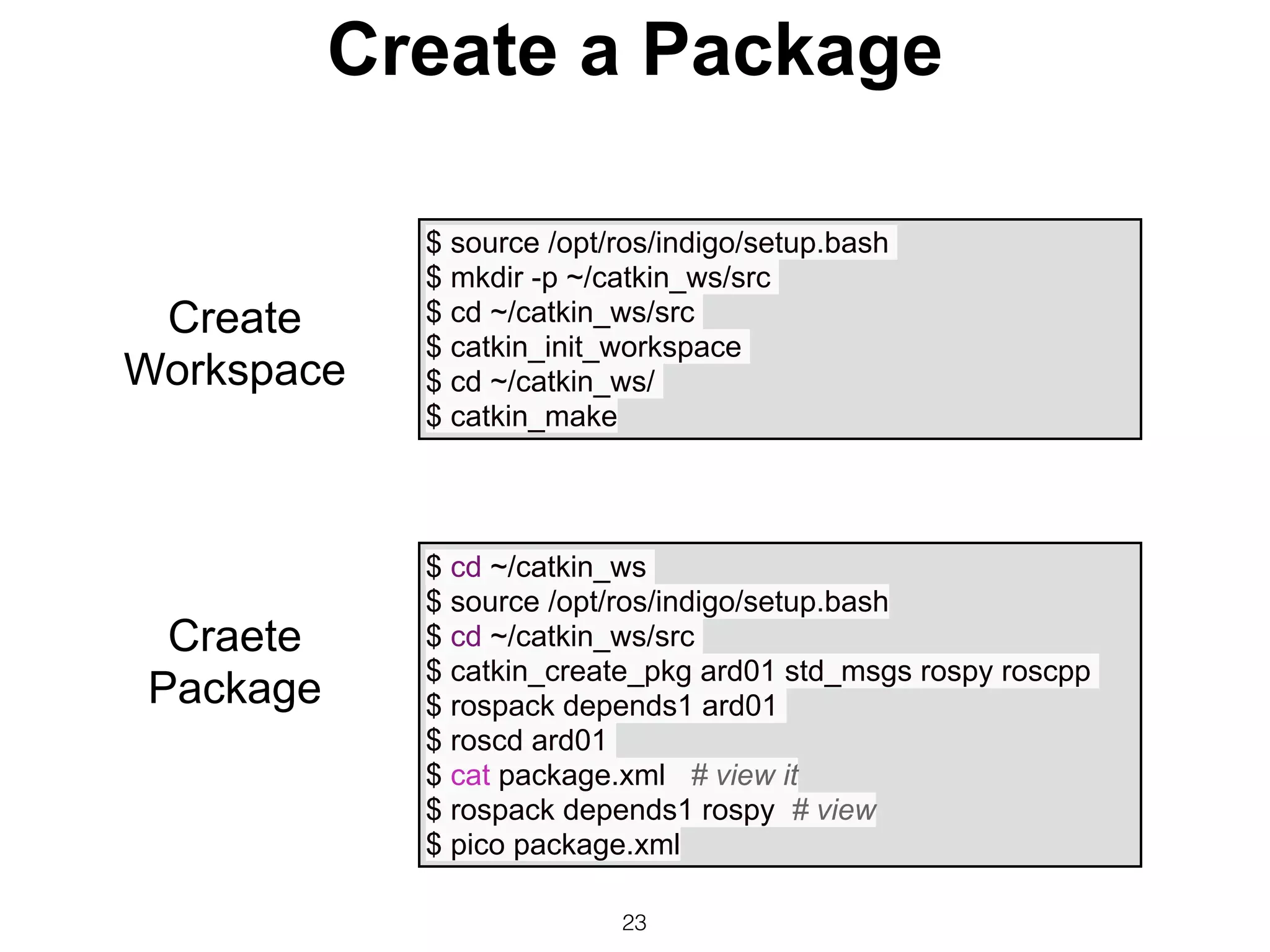
Create a Package
23
$ source /opt/ros/indigo/setup.bash
$ mkdir -p ~/catkin_ws/src
$ cd ~/catkin_ws/src
$ catkin_init_workspace
$ cd ~/catkin_ws/
$ catkin_make
$ cd ~/catkin_ws
$ source /opt/ros/indigo/setup.bash
$ cd ~/catkin_ws/src
$ catkin_create_pkg ard01 std_msgs rospy roscpp
$ rospack depends1 ard01
$ roscd ard01
$ cat package.xml # view it
$ rospack depends1 rospy # view
$ pico package.xml
Create
Workspace
Craete
Package
24
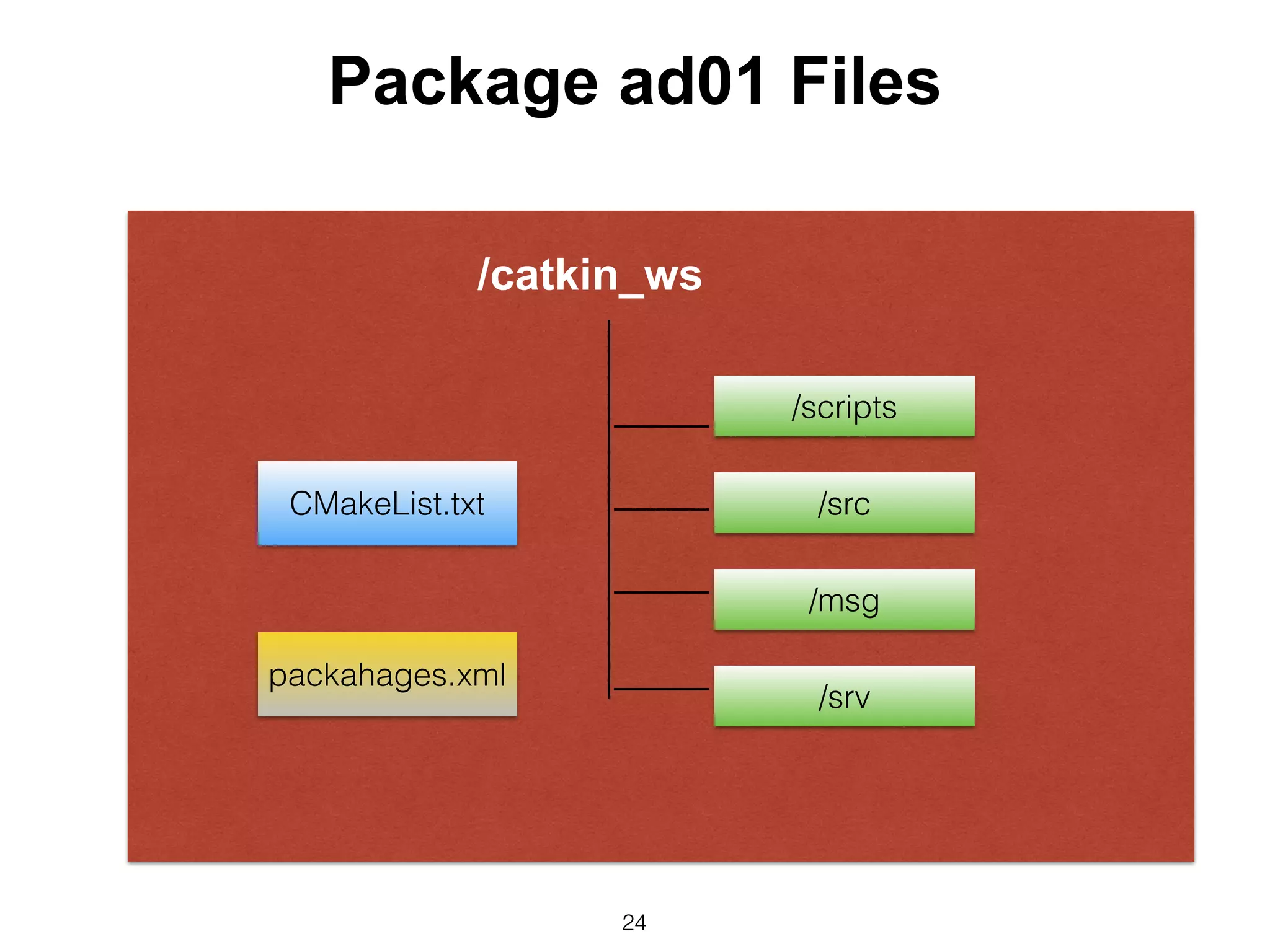
Package ad01 Files
CMakeList.txt
packahages.xml
/catkin_ws
/scripts
/src
/msg
/srv
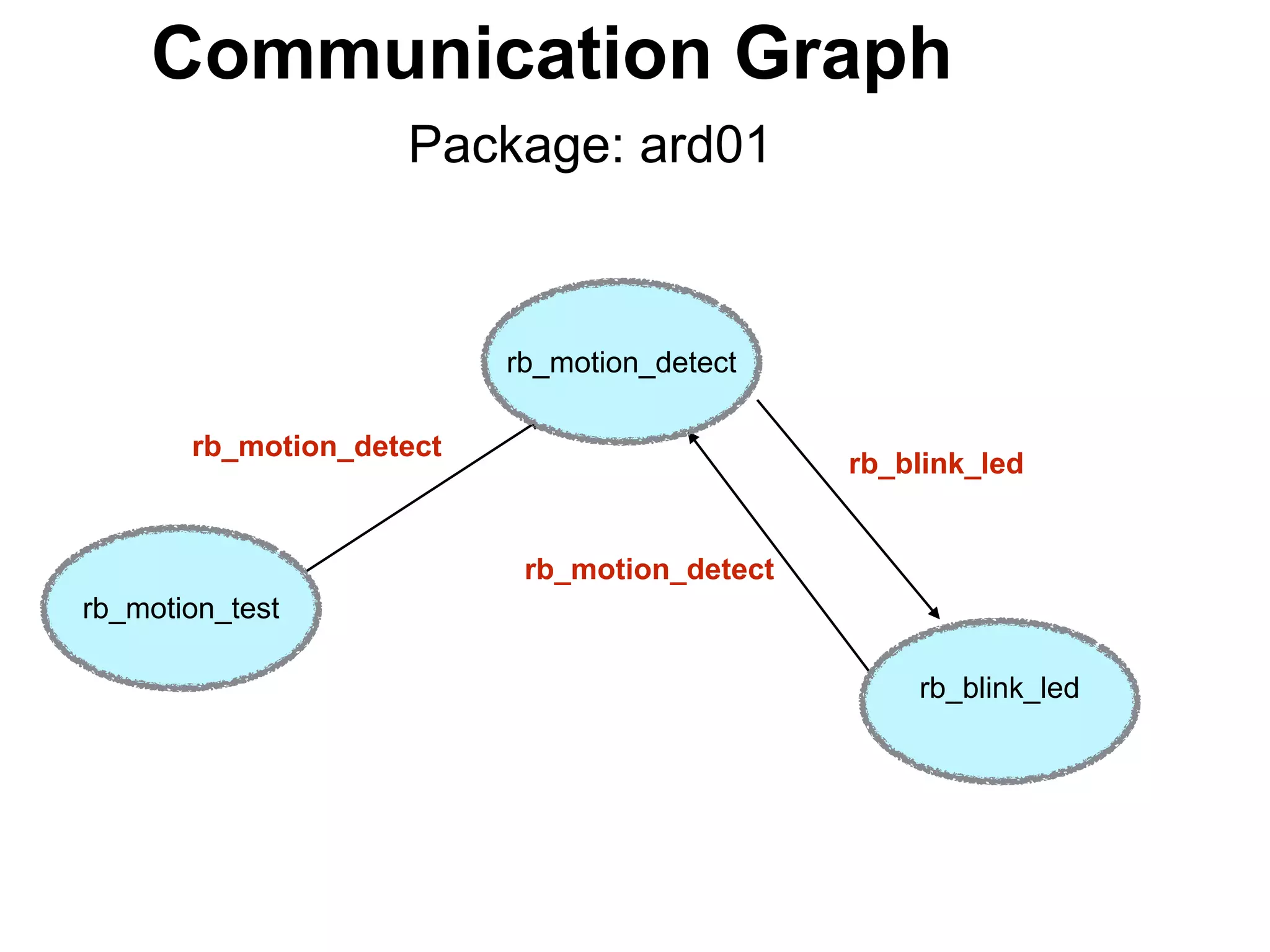
rb_motion_test
Communication Graph
Package: ard01
rb_motion_detect
rb_blink_led
rb_motion_detect
rb_motion_detect
rb_blink_led
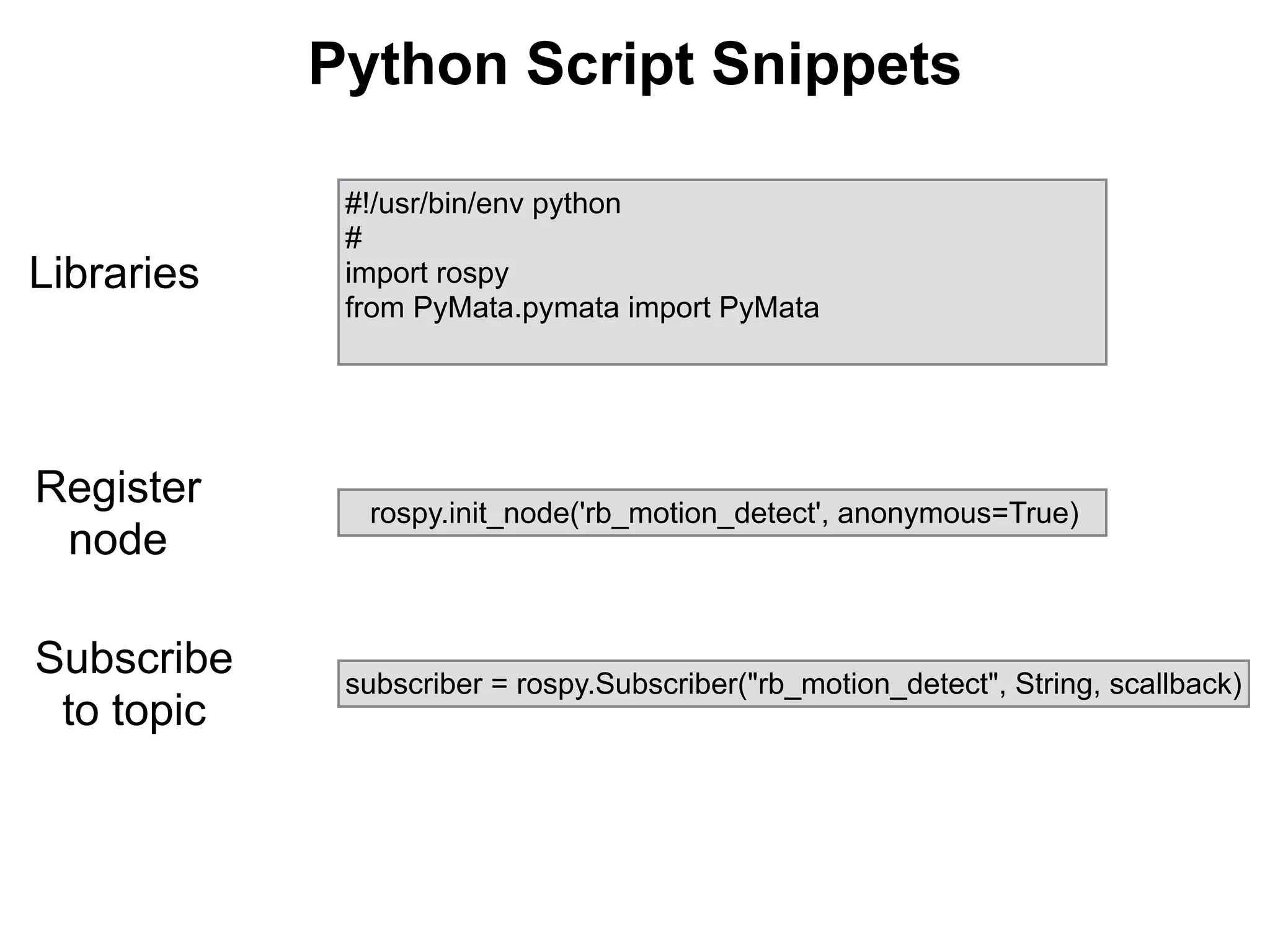
#!/usr/bin/env python
#
import rospy
from PyMata.pymata import PyMata
subscriber = rospy.Subscriber("rb_motion_detect", String, scallback)
rospy.init_node('rb_motion_detect', anonymous=True)
Python Script Snippets
Libraries
Register
node
Subscribe
to topic
27
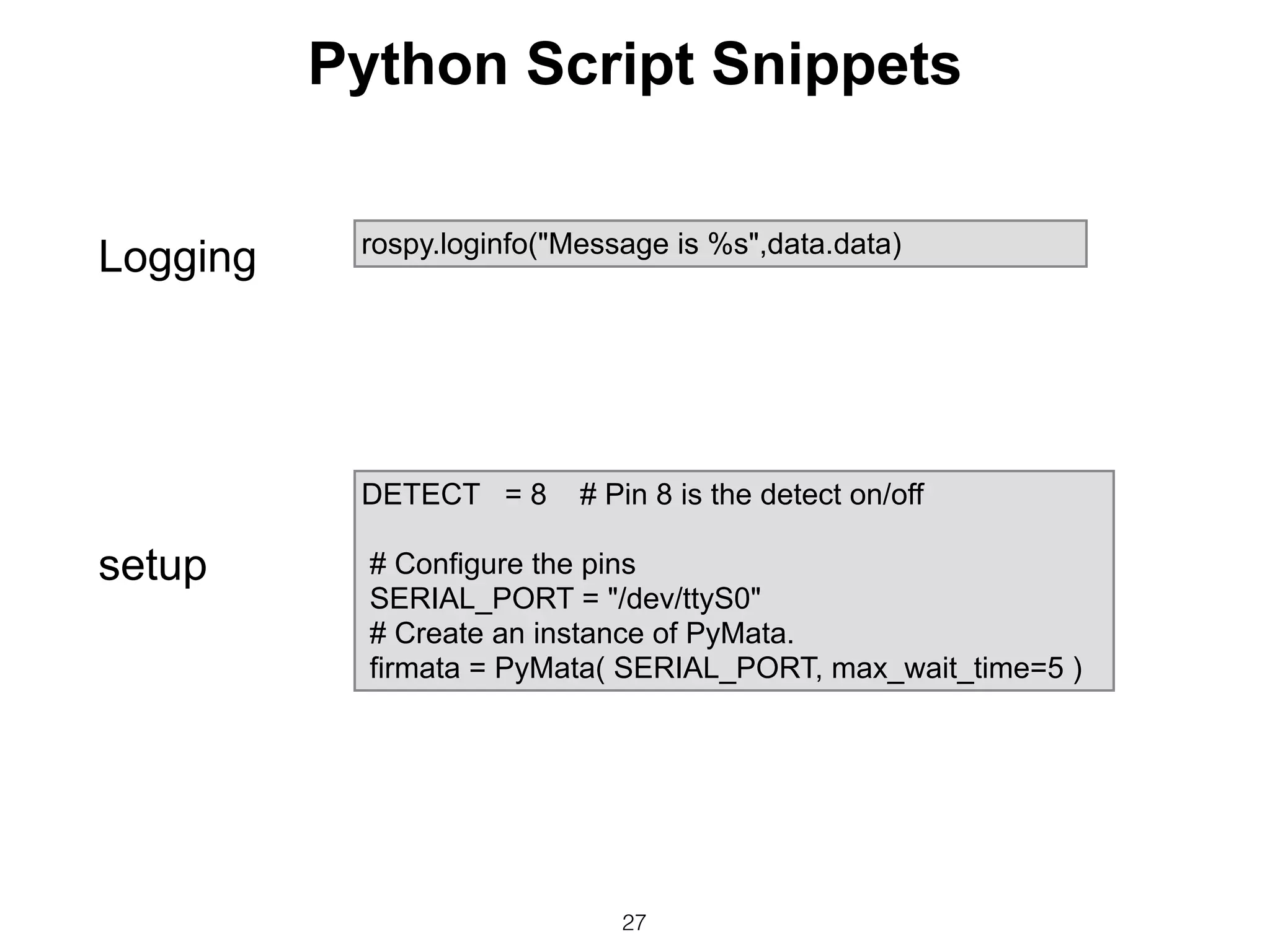
rospy.loginfo("Message is %s",data.data)
DETECT = 8 # Pin 8 is the detect on/off
# Configure the pins
SERIAL_PORT = "/dev/ttyS0"
# Create an instance of PyMata.
firmata = PyMata( SERIAL_PORT, max_wait_time=5 )
setup
Logging
Python Script Snippets
28
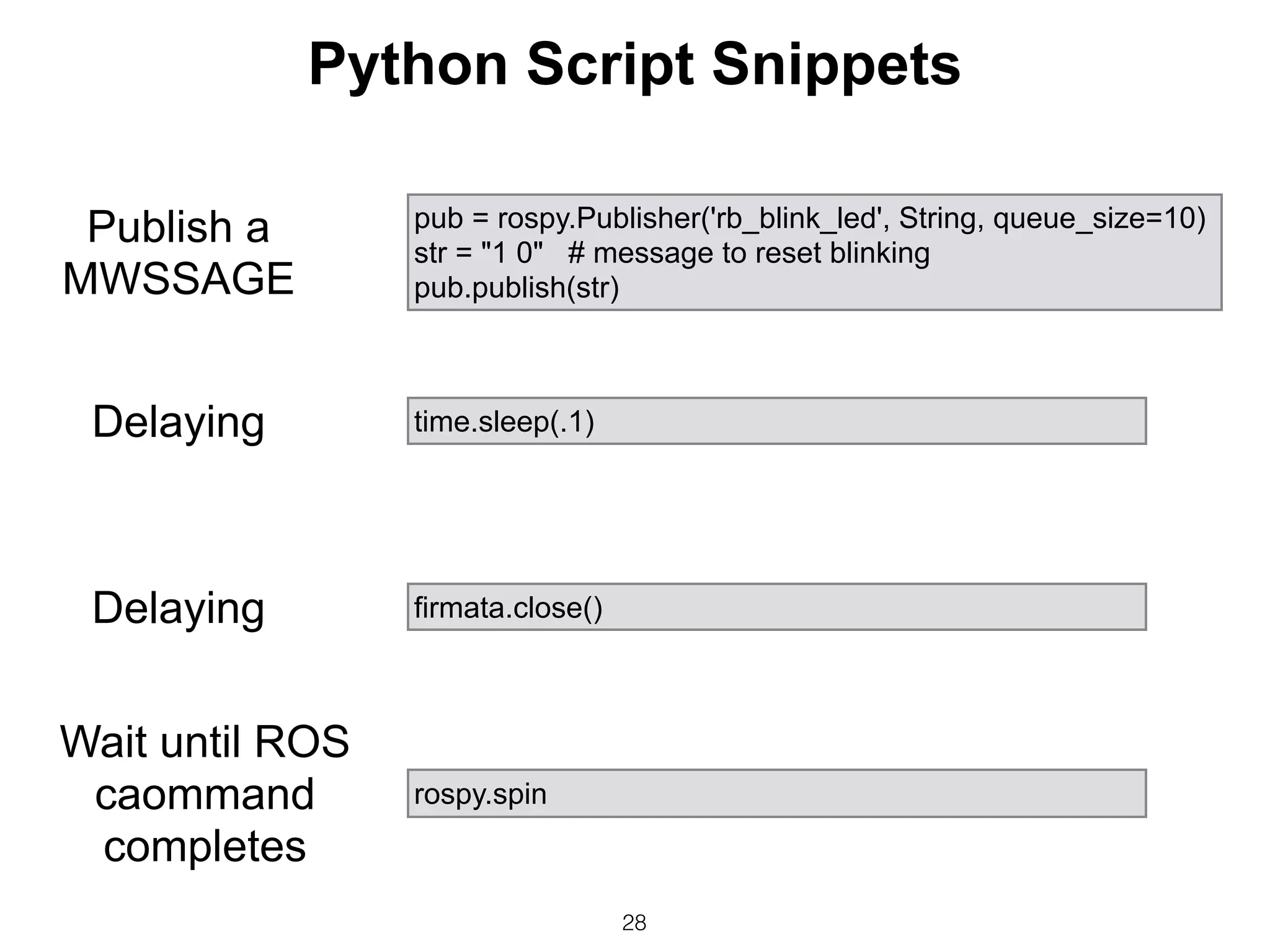
pub = rospy.Publisher('rb_blink_led', String, queue_size=10)
str = "1 0" # message to reset blinking
pub.publish(str)
rospy.spin
time.sleep(.1)
firmata.close()
Publish a
MWSSAGE
Delaying
Delaying
Wait until ROS
caommand
completes
Python Script Snippets
Execution
Terminal session 1 Roscore
pi@raspberrypi ~ $ cd ~/catkin_ws
pi@raspberrypi ~/catkin_ws $ source ./devel/setup.bash
pi@raspberrypi ~/catkin_ws $ roscore
... logging to /home/pi/.ros/log/c4b68850-6434-11e4-a4b6-b827eb6d59e5/roslaunch-
raspberrypi-2639.log
pi@raspberrypi ~/catkin_ws $ rosrun ard01 rb_motion_test.py
Enter start/stop/exit motion detection:start
[INFO] [WallTime: 1415119214.484039] motion_detect mode requested -start
Enter start/stop/exit motion detection:
blepi@raspberrypi ~/catkin_ws $ rosrun ard01 rb_motion_detect.py
[INFO] [WallTime: 1415119214.521525] Message is start
Terminal session 3 rb_motion_detect
^Cpi@raspberrypi ~/catkin_ws $ rosrun ard01 rb_blink_led.py
[INFO] [WallTime: 1415119236.277651] Message is 1 5
[INFO] [WallTime: 1415119236.290445] Requested blink rate is 1, 5
Opening Arduino Serial port /dev/ttyS0
Please wait while Arduino is being detected. This can take up to 5 seconds ...
Board initialized in 0 seconds
Total Number of Pins Detected = 20
Total Number of Analog Pins Detected = 6
PyMata close(): Calling sys.exit(0): Hope to see you soon!
Terminal session 2 rb_motion_test
Terminal session 3 rb_blink_led
Conclusion
• ROS, on the Raspberry Pi is a very viable and easy
to use approach to provide robotic system
functionality at a very low cost.
• Because ROS is used industrywide and in many of
the leading universities, ROS and RPi should be the
method of choice to teach robotics in the advanced
high school and university levels.
30
Attachments
• References
• Sample Arduino sketch
• Existing Systems vs ROS
31
References
• Installing ROS Indigo on the RPi
• Pi Co-OP video describes Pi Co-op
• Reference Pi Co-op and Arduino Software
Installation – Notes for the detailed instructions.
• Installs PyMata (Python library)
• Loads Firmata (protocol used by Pymata to I/F
with the Arquino)
32
33
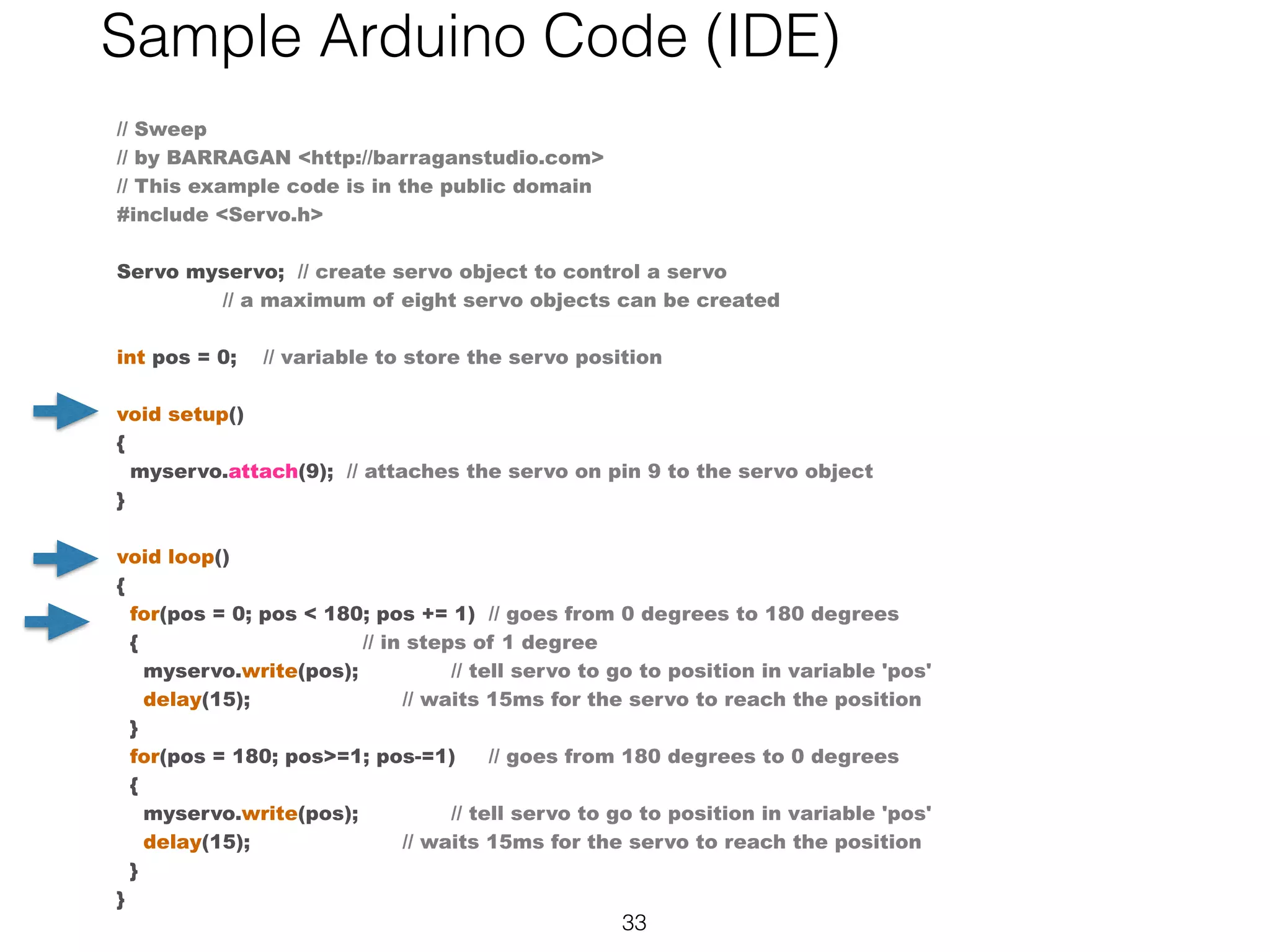
// Sweep
// by BARRAGAN <http://barraganstudio.com>
// This example code is in the public domain
#include <Servo.h>
 
Servo myservo;  // create servo object to control a servo
                // a maximum of eight servo objects can be created
 
int pos = 0;    // variable to store the servo position
 
void setup()
{
  myservo.attach(9);  // attaches the servo on pin 9 to the servo object
}
 
void loop()
{
  for(pos = 0; pos < 180; pos += 1)  // goes from 0 degrees to 180 degrees
  {                                  // in steps of 1 degree
    myservo.write(pos);              // tell servo to go to position in variable 'pos'
    delay(15);                       // waits 15ms for the servo to reach the position
  }
  for(pos = 180; pos>=1; pos-=1)     // goes from 180 degrees to 0 degrees
  {                                
    myservo.write(pos);              // tell servo to go to position in variable 'pos'
    delay(15);                       // waits 15ms for the servo to reach the position
  }
}
Sample Arduino Code (IDE)
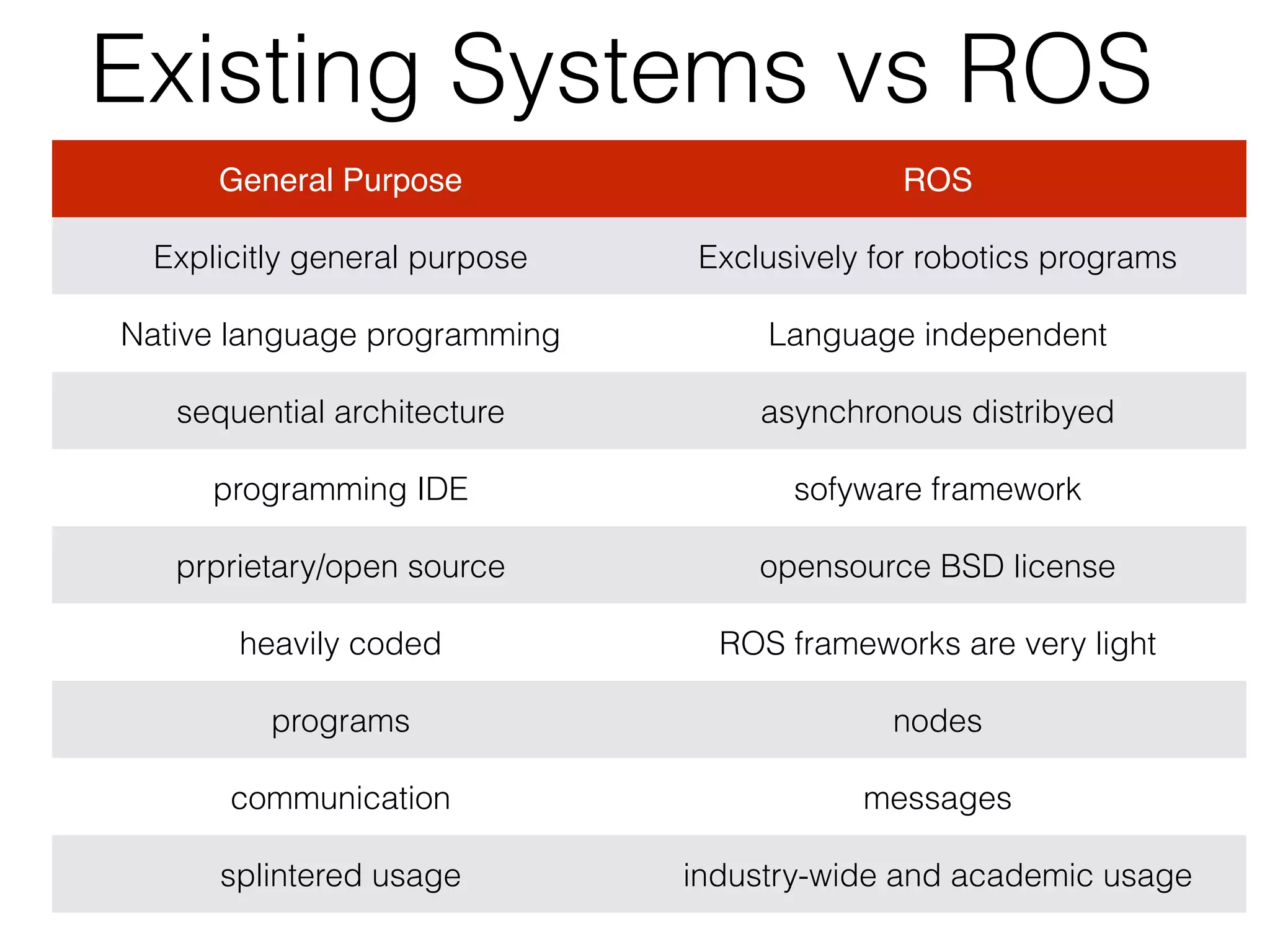
Existing Systems vs ROS
General Purpose ROS
Explicitly general purpose Exclusively for robotics programs
Native language programming Language independent
sequential architecture asynchronous distribyed
programming IDE sofyware framework
prprietary/open source opensource BSD license
heavily coded ROS frameworks are very light
programs nodes
communication messages
splintered usage industry-wide and academic usage

Raspberry Pi + ROS

  • 1.
    ROS and the RaspberryPi http://www.robopgmr.com/?page_id=3589 Arnold Bailey +ROS
  • 2.
    Contents • The complexityof robotics • What is ROS? • Hardware and software options • Creating an ROS user application. • Conclusion 2
  • 3.
    3 Can complex roboticsystems be programmed on an RPi? ?
  • 4.
  • 5.
    • Manage diverseasynchronous activity • Manage significant complexity. • Device abstract • Multi-language operation. • Distribution of resources 5 Advanced robotic systems require:
  • 6.
    6 The Challenge! Need todevelop expertise Cost Functionality Industry Academic Open Source
  • 7.
    7 • A softwareframework for developing robotic systems in a meta-operating system environment.
 • The primary goal of ROS is to support code reuse in robotics research and development
 • ROS was originally developed in 2007 at the Stanford Artificial Intelligence Laboratory and development continued at Willow Garage
 • Managed by the Open Source Robotics Foundation What is ROS?
  • 8.
  • 9.
    9 ROS Master Enables ROSnodes to locate one another and provide parameter services.
  • 10.
  • 11.
    • Master(roscore): Providesnaming and registration services to the rest of the nodes in the system. • Package: A virtual directory holding one or more executables (nodes) • Messages: Defined in msg files. Basic data types. • Node: An agent communicating with ROS and other nodes via messages. • Topics (publish / subscribe) using typed messages • Services: Request / Response, synchronism functionality, remote computation. • Bag: Bags are a format for recording and playback of messages. ROS Core Concepts
  • 12.
    Arduino Uno Pi Co-op Raspberry Pi ROSApplication-ard01 ROS PyMata lib Firmata lib GPIO Motion Detector LED Hardware abstraction, low-level device control read pin 8 sensor write pin 13
  • 13.
    13 Multiple Languages C++ Node: MapBuilding Python Node: Laser Scanner Topic: “Laser Data” Subscribe Publish
  • 14.
    ROS core Components MiddlewareRobot Specific Features Tools • Messaging Passing • Recording/Playback • Remote Procedure Calls • Distributed Parameters • Standard Robot Messages • Robot Geometry Library • Robot Description Language • Pre-emptable RPC • Diagnostics • Pose Estimation • Localization • Navigation • Command line tools • Integrated Tools ROS
  • 15.
  • 16.
  • 17.
    Example Hardware • RaspberryPi • Model B • 16 GB SD (Could use 8 GB) • Pi Co-op Board • Arduino Uno (resides on board) • Parallax Motion Detecter • Breadboard 17
  • 18.
    18 Pymata/ Firmata Arduino Libraries rosserial_ar duino rosserial Pi Co-op x RPito Arduino x x RPI direct to device x Hardware/software options
  • 19.
    Pi Co-op Add-onBoard • It’s a GPIO plug-in board that houses an ATmega328p chip and female headers. 
 • Arduino Uno bootloader to make it easy to program.
 • Pi communicates with the chip over UART (serial) protocol.
 • uses a library called pyMata to control the analog inputs and digital inputs.
 • Can attach power to the Pi Co-op
  • 20.
    Pi Co-op connectionto Motion Detecter
  • 21.
    RPi and ArduinoConnected Over Serial GPIO
  • 22.
    RPi connected toLED using GPIO pins
  • 23.
    Create a Package 23 $source /opt/ros/indigo/setup.bash $ mkdir -p ~/catkin_ws/src $ cd ~/catkin_ws/src $ catkin_init_workspace $ cd ~/catkin_ws/ $ catkin_make $ cd ~/catkin_ws $ source /opt/ros/indigo/setup.bash $ cd ~/catkin_ws/src $ catkin_create_pkg ard01 std_msgs rospy roscpp $ rospack depends1 ard01 $ roscd ard01 $ cat package.xml # view it $ rospack depends1 rospy # view $ pico package.xml Create Workspace Craete Package
  • 24.
  • 25.
  • 26.
    #!/usr/bin/env python # import rospy fromPyMata.pymata import PyMata subscriber = rospy.Subscriber("rb_motion_detect", String, scallback) rospy.init_node('rb_motion_detect', anonymous=True) Python Script Snippets Libraries Register node Subscribe to topic
  • 27.
    27 rospy.loginfo("Message is %s",data.data) DETECT= 8 # Pin 8 is the detect on/off # Configure the pins SERIAL_PORT = "/dev/ttyS0" # Create an instance of PyMata. firmata = PyMata( SERIAL_PORT, max_wait_time=5 ) setup Logging Python Script Snippets
  • 28.
    28 pub = rospy.Publisher('rb_blink_led',String, queue_size=10) str = "1 0" # message to reset blinking pub.publish(str) rospy.spin time.sleep(.1) firmata.close() Publish a MWSSAGE Delaying Delaying Wait until ROS caommand completes Python Script Snippets
  • 29.
    Execution Terminal session 1Roscore pi@raspberrypi ~ $ cd ~/catkin_ws pi@raspberrypi ~/catkin_ws $ source ./devel/setup.bash pi@raspberrypi ~/catkin_ws $ roscore ... logging to /home/pi/.ros/log/c4b68850-6434-11e4-a4b6-b827eb6d59e5/roslaunch- raspberrypi-2639.log pi@raspberrypi ~/catkin_ws $ rosrun ard01 rb_motion_test.py Enter start/stop/exit motion detection:start [INFO] [WallTime: 1415119214.484039] motion_detect mode requested -start Enter start/stop/exit motion detection: blepi@raspberrypi ~/catkin_ws $ rosrun ard01 rb_motion_detect.py [INFO] [WallTime: 1415119214.521525] Message is start Terminal session 3 rb_motion_detect ^Cpi@raspberrypi ~/catkin_ws $ rosrun ard01 rb_blink_led.py [INFO] [WallTime: 1415119236.277651] Message is 1 5 [INFO] [WallTime: 1415119236.290445] Requested blink rate is 1, 5 Opening Arduino Serial port /dev/ttyS0 Please wait while Arduino is being detected. This can take up to 5 seconds ... Board initialized in 0 seconds Total Number of Pins Detected = 20 Total Number of Analog Pins Detected = 6 PyMata close(): Calling sys.exit(0): Hope to see you soon! Terminal session 2 rb_motion_test Terminal session 3 rb_blink_led
  • 30.
    Conclusion • ROS, onthe Raspberry Pi is a very viable and easy to use approach to provide robotic system functionality at a very low cost. • Because ROS is used industrywide and in many of the leading universities, ROS and RPi should be the method of choice to teach robotics in the advanced high school and university levels. 30
  • 31.
    Attachments • References • SampleArduino sketch • Existing Systems vs ROS 31
  • 32.
    References • Installing ROSIndigo on the RPi • Pi Co-OP video describes Pi Co-op • Reference Pi Co-op and Arduino Software Installation – Notes for the detailed instructions. • Installs PyMata (Python library) • Loads Firmata (protocol used by Pymata to I/F with the Arquino) 32
  • 33.
    33 // Sweep // byBARRAGAN <http://barraganstudio.com> // This example code is in the public domain #include <Servo.h>   Servo myservo;  // create servo object to control a servo                 // a maximum of eight servo objects can be created   int pos = 0;    // variable to store the servo position   void setup() {   myservo.attach(9);  // attaches the servo on pin 9 to the servo object }   void loop() {   for(pos = 0; pos < 180; pos += 1)  // goes from 0 degrees to 180 degrees   {                                  // in steps of 1 degree     myservo.write(pos);              // tell servo to go to position in variable 'pos'     delay(15);                       // waits 15ms for the servo to reach the position   }   for(pos = 180; pos>=1; pos-=1)     // goes from 180 degrees to 0 degrees   {                                     myservo.write(pos);              // tell servo to go to position in variable 'pos'     delay(15);                       // waits 15ms for the servo to reach the position   } } Sample Arduino Code (IDE)
  • 34.
    Existing Systems vsROS General Purpose ROS Explicitly general purpose Exclusively for robotics programs Native language programming Language independent sequential architecture asynchronous distribyed programming IDE sofyware framework prprietary/open source opensource BSD license heavily coded ROS frameworks are very light programs nodes communication messages splintered usage industry-wide and academic usage