Lean Prototyping: 
Prototyping for Lean Process 
Nov 27, Tony Kim 
We build a network of techie startups 
And build for forward-looking products 
1
Tony Kim, 김수 
• FuturePlay – Inventor in Residence 
• Google – Interaction Designer 
• Naver China – UX Manager 
• KAIST – Industrial Design 
2
뭘 했나요? 
3 
연구원 디자이너 발명가? 
2006 2007 2008 2009 2010 2011 2012 2013 2014
프로토타입을 왜 만들어야할까? 
어떻게 만들어야할까?
프로토타입의 종류 
• 시각적 완성도에 따른 구분: Lo-Fi vs. Mid-Fi vs. Hi-Fi 
• 작동 여부에 따른 구분: Static vs. Working (Interactive) 
• 사용기간에 따른 구분: Throwaway vs. Evolutionary 
• 구현 대상에 따른 구분: Behavioral(Skin) vs. Structural(Bone) 
5
다른 디자인 산출물과의 비교 
스케치(Sketch) 
6 
Source: http://grahamtodman.co.uk/blog/category/sketches/
7 
다른 디자인 산출물과의 비교 
화면설계(Wireframe) 
Source: http://www.strangesystems.net/archives/2005/03/using_wireframe.php
8 
다른 디자인 산출물과의 비교 
스토리보드 (Storyboard) 
Source: http://www.ac4d.com/2013/09/28/heartline-a-lifeline-to-your-loved-ones-storyboard/
9 
다른 디자인 산출물과의 비교 
목업, 디자인 (Mockup, Design) 
Source: http://www.seekoften.com/portfolio/web/modern-website-mockup-in-photoshop.php
디자인 프로세스에서 협의의 프로토타입 
10
디자인 프로세스에서 협의의 프로토타입 
• 시각적 완성도에 따른 구분: Lo-Fi vs. Mid-Fi vs. Hi-Fi 
• 작동 여부에 따른 구분: Static vs. Working (Interactive) 
• 사용기간에 따른 구분: Throwaway vs. Evolutionary 
• 구현 대상에 따른 구분: Behavioral(Skin) vs. Structural(Bone) 
11
Welcome to Lean/Agile World!
우리는 모두 Agile/Lean으로 간다! 
13 
Agile Waterfall 
* 해당 기업의 디자이너, 기획자 35명 인터뷰를 통한 상대적인 결과임
Lean UX Process에서 디자인 산출물 
14 
“화면설계는 하지 않습니다.”
Lean UX Process에서 디자인 산출물 
15 
• 문서작업은 최소화, 바로 디자인 
• 팀원들이 함께 디자인 
• 계속되는 수정작업
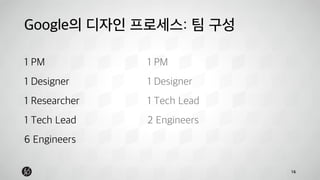
Google의 디자인 프로세스: 팀 구성 
16 
1 PM 
1 Designer 
1 Researcher 
1 Tech Lead 
6 Engineers 
1 PM 
1 Designer 
1 Tech Lead 
2 Engineers
Google의 디자인 프로세스: 팀 구성 
17 
PM 
Designer 
제품컨셉정의 
기능정의 
사용자 시나리오 
화면설계 
화면 디자인 
프로토타입 
기획자, UX 
디자이너
18 
Google의 디자인 프로세스: 프로젝트 규모 
Source: http://wallpaperszoo.com/wp-content/uploads/2014/04/turtle-eating-strawberry.jpg
Google의 디자인 프로세스: 프로젝트 규모 
19 
• One-bite feature only 
• 대신 빠르게, 완벽하게 
• 글로벌 대상 서비스 (경우에 따라 순차적으로)
Google의 디자인 프로세스: 산출물 
20 
스케치 
(Lo-Fi) 
목업 
(Hi-Fi) 
프로토타입 
(Hi-Fi)
21 
Google의 디자인 프로세스: 산출물
22 
Google의 디자인 프로세스: 산출물
Lean UX Process에서 Prototype 
• One-bite feature에 대한 Prototype 
• 협업을 지원 
• 프로토타입은 커뮤니케이션 툴: 내부 협업/보고 & 고객으로부터 
의 피드백 
• MVP로써의 Prototype 
23
MVP vs. Prototype 
24 
“The MVP is that version of a new product which allows a team to collect maximum amount of 
validated learning about customers with the least effort” 
“MVP는 팀이 최소한의 노력으로 고객에 대한 학습을 최대화할 수 있는 제품의 버전” 
Eric Ries 
“An MVP is not a minimal product, it is strategy and process directed toward making and selling a 
product to customers. It is an iterative process of idea generation, prototyping, presentation, data 
collection, analysis, and learning.” 
“MVP는 최소화된 제품이 아니라 고객을 위한 제품을 만들고 고객에게 판매하기 위한 전략 및 프로세스이다. 여 
기에는 아이디어, 프로토타이핑, 프리젠테이션, 데이터 수집, 분석, 학습이 포함되며 반복적인 프로세스이다.” 
Jon Radoff
MVP vs. Prototype 
25 
MVP Prototype 
• 제품의 디자인/기능의 전체 혹 
은 일부를 실제와 같이 구현 
• 고객 혹은 팀원으로부터 피드 
백을 얻음 
• 제품의 가치를 학습하기 
위한 모든 활동 
• 고객으로부터 피드백을 
얻음
Dropbox MVP 
26
Lean UX 적용을 위한 당면 과제
문제는 디자인의 패러다임이 변하고 있다는 점… 
28 
Page base 
interaction 
Object base 
interaction 
Sensor aid 
interaction 
• By Apple 
• Page transition 
• Page level hierarchy 
• By Google 
• Layer concept 
• Z-index 
• By Facebook 
• Contextual input 
• Sensor signal
인터랙션 = 세일즈 포인트 
29 
Clear
인터랙션 = 아이덴티티 
30 
Facebook Paper
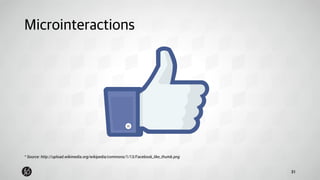
Microinteractions 
31 
* Source: http://upload.wikimedia.org/wikipedia/commons/1/13/Facebook_like_thumb.png
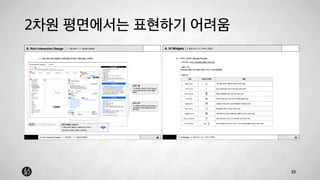
2차원 평면에서는 표현하기 어려움 
32
2차원 평면에서는 표현하기 어려움 
33
해답은 Working Prototype뿐인가? 
34 
• 움직이는 것은 움직임을 보여주어야 
• 하지만, 86% 디자이너는 움직임을 설계하는데 어려움을 느낌* 
• 그렇다면 멋진 툴이 없을까? 
* How designers design and program behaviors, HCII, CMU, Brad A. Myers, 2008
프로토타이핑툴 
35 
Wireframing tool Prototyping tool 
Communication tool 
제한적인 
인터랙션 지원 
정교한 인터랙션 
설계 가능 
센서 기반 
프로토타이핑
Origami (facebook.github.io/origami/) 
36 
* Source: http://www.grapefruit.ro/ideas/designing-killer-mobile-apps-prototype-story/
Framer (framerjs.com) 
37 
* Source: http://framerjs.com/static/images/home/ss-framer.jpg
Pixate (pixate.com) 
38 
* Source: http://www.grapefruit.ro/ideas/designing-killer-mobile-apps-prototype-story/
SNAP (snap.so) 
39 
Private Beta 
Early Jan, 2015
정교한 프로토타이핑
인터랙션의 해부 
41 
* Source: http://microinteractions.com/what-is-a-microinteraction/
인터랙션의 해부 
42 
Trigger Object Response 
* Based on Bill Scott’s “Trigger > Operation > Update” model
인터랙션의 해부 
43
인터랙션의 해부 
44 
개인정보&메뉴 
컬러로고 
검색창 
마이크 버튼 
나우 카드1 
* Source: http://cdn.iphonehacks.com/wp-content/uploads/2013/12/google-search-app.jpg 
배경 
상태바 
흰색로고 
검색창 
나우 카드1 
나우 카드2 
Trigger: 스와입 
Object: 나우카드 1 
Response: 위로 이동 
Trigger: 위와 함께 
Object: 마이크버튼 
Response: 투명도 변경 
Trigger: 위와 함께 
Object: 검색창 
Response: 위로 이동 
. 
. 
.
부드러운 움직임의 핵심은 가속도 
45 
* Source: http://cubic-bezier.com/#.66,.3,.3,.8
정리하면…
Recap: How to do Lean Prototyping 
• 필요한 수준을 미리 정의할 것, (단, 움직이는 건 움직이도록 만들 것) 
• 문서 작성은 잊어버릴 것, 일단 그려보고 만들어볼 것 
• 한사람이 만들어서 공유할 것 
• 정교하게, 무한 반복 
• 하나의 툴로 Mid-Fi, Hi-Fi를 할 수 있는 툴을 선택할 것 
(혹은 그래픽툴 1 + 프로토타이핑툴 1) 
• 인터랙션의 분해! 분해! 분해! 
47
Thank you 
Contact 
Tony Kim 김수 
Inventor in Residence | Interaction Designer 
tony.kim@futureplay.co
Lean prototyping: Prototyping for Lean Process

  • 1.
    Lean Prototyping: Prototypingfor Lean Process Nov 27, Tony Kim We build a network of techie startups And build for forward-looking products 1
  • 2.
    Tony Kim, 김수 • FuturePlay – Inventor in Residence • Google – Interaction Designer • Naver China – UX Manager • KAIST – Industrial Design 2
  • 3.
    뭘 했나요? 3 연구원 디자이너 발명가? 2006 2007 2008 2009 2010 2011 2012 2013 2014
  • 4.
    프로토타입을 왜 만들어야할까? 어떻게 만들어야할까?
  • 5.
    프로토타입의 종류 •시각적 완성도에 따른 구분: Lo-Fi vs. Mid-Fi vs. Hi-Fi • 작동 여부에 따른 구분: Static vs. Working (Interactive) • 사용기간에 따른 구분: Throwaway vs. Evolutionary • 구현 대상에 따른 구분: Behavioral(Skin) vs. Structural(Bone) 5
  • 6.
    다른 디자인 산출물과의비교 스케치(Sketch) 6 Source: http://grahamtodman.co.uk/blog/category/sketches/
  • 7.
    7 다른 디자인산출물과의 비교 화면설계(Wireframe) Source: http://www.strangesystems.net/archives/2005/03/using_wireframe.php
  • 8.
    8 다른 디자인산출물과의 비교 스토리보드 (Storyboard) Source: http://www.ac4d.com/2013/09/28/heartline-a-lifeline-to-your-loved-ones-storyboard/
  • 9.
    9 다른 디자인산출물과의 비교 목업, 디자인 (Mockup, Design) Source: http://www.seekoften.com/portfolio/web/modern-website-mockup-in-photoshop.php
  • 10.
  • 11.
    디자인 프로세스에서 협의의프로토타입 • 시각적 완성도에 따른 구분: Lo-Fi vs. Mid-Fi vs. Hi-Fi • 작동 여부에 따른 구분: Static vs. Working (Interactive) • 사용기간에 따른 구분: Throwaway vs. Evolutionary • 구현 대상에 따른 구분: Behavioral(Skin) vs. Structural(Bone) 11
  • 12.
  • 13.
    우리는 모두 Agile/Lean으로간다! 13 Agile Waterfall * 해당 기업의 디자이너, 기획자 35명 인터뷰를 통한 상대적인 결과임
  • 14.
    Lean UX Process에서디자인 산출물 14 “화면설계는 하지 않습니다.”
  • 15.
    Lean UX Process에서디자인 산출물 15 • 문서작업은 최소화, 바로 디자인 • 팀원들이 함께 디자인 • 계속되는 수정작업
  • 16.
    Google의 디자인 프로세스:팀 구성 16 1 PM 1 Designer 1 Researcher 1 Tech Lead 6 Engineers 1 PM 1 Designer 1 Tech Lead 2 Engineers
  • 17.
    Google의 디자인 프로세스:팀 구성 17 PM Designer 제품컨셉정의 기능정의 사용자 시나리오 화면설계 화면 디자인 프로토타입 기획자, UX 디자이너
  • 18.
    18 Google의 디자인프로세스: 프로젝트 규모 Source: http://wallpaperszoo.com/wp-content/uploads/2014/04/turtle-eating-strawberry.jpg
  • 19.
    Google의 디자인 프로세스:프로젝트 규모 19 • One-bite feature only • 대신 빠르게, 완벽하게 • 글로벌 대상 서비스 (경우에 따라 순차적으로)
  • 20.
    Google의 디자인 프로세스:산출물 20 스케치 (Lo-Fi) 목업 (Hi-Fi) 프로토타입 (Hi-Fi)
  • 21.
    21 Google의 디자인프로세스: 산출물
  • 22.
    22 Google의 디자인프로세스: 산출물
  • 23.
    Lean UX Process에서Prototype • One-bite feature에 대한 Prototype • 협업을 지원 • 프로토타입은 커뮤니케이션 툴: 내부 협업/보고 & 고객으로부터 의 피드백 • MVP로써의 Prototype 23
  • 24.
    MVP vs. Prototype 24 “The MVP is that version of a new product which allows a team to collect maximum amount of validated learning about customers with the least effort” “MVP는 팀이 최소한의 노력으로 고객에 대한 학습을 최대화할 수 있는 제품의 버전” Eric Ries “An MVP is not a minimal product, it is strategy and process directed toward making and selling a product to customers. It is an iterative process of idea generation, prototyping, presentation, data collection, analysis, and learning.” “MVP는 최소화된 제품이 아니라 고객을 위한 제품을 만들고 고객에게 판매하기 위한 전략 및 프로세스이다. 여 기에는 아이디어, 프로토타이핑, 프리젠테이션, 데이터 수집, 분석, 학습이 포함되며 반복적인 프로세스이다.” Jon Radoff
  • 25.
    MVP vs. Prototype 25 MVP Prototype • 제품의 디자인/기능의 전체 혹 은 일부를 실제와 같이 구현 • 고객 혹은 팀원으로부터 피드 백을 얻음 • 제품의 가치를 학습하기 위한 모든 활동 • 고객으로부터 피드백을 얻음
  • 26.
  • 27.
    Lean UX 적용을위한 당면 과제
  • 28.
    문제는 디자인의 패러다임이변하고 있다는 점… 28 Page base interaction Object base interaction Sensor aid interaction • By Apple • Page transition • Page level hierarchy • By Google • Layer concept • Z-index • By Facebook • Contextual input • Sensor signal
  • 29.
    인터랙션 = 세일즈포인트 29 Clear
  • 30.
  • 31.
    Microinteractions 31 *Source: http://upload.wikimedia.org/wikipedia/commons/1/13/Facebook_like_thumb.png
  • 32.
  • 33.
  • 34.
    해답은 Working Prototype뿐인가? 34 • 움직이는 것은 움직임을 보여주어야 • 하지만, 86% 디자이너는 움직임을 설계하는데 어려움을 느낌* • 그렇다면 멋진 툴이 없을까? * How designers design and program behaviors, HCII, CMU, Brad A. Myers, 2008
  • 35.
    프로토타이핑툴 35 Wireframingtool Prototyping tool Communication tool 제한적인 인터랙션 지원 정교한 인터랙션 설계 가능 센서 기반 프로토타이핑
  • 36.
    Origami (facebook.github.io/origami/) 36 * Source: http://www.grapefruit.ro/ideas/designing-killer-mobile-apps-prototype-story/
  • 37.
    Framer (framerjs.com) 37 * Source: http://framerjs.com/static/images/home/ss-framer.jpg
  • 38.
    Pixate (pixate.com) 38 * Source: http://www.grapefruit.ro/ideas/designing-killer-mobile-apps-prototype-story/
  • 39.
    SNAP (snap.so) 39 Private Beta Early Jan, 2015
  • 40.
  • 41.
    인터랙션의 해부 41 * Source: http://microinteractions.com/what-is-a-microinteraction/
  • 42.
    인터랙션의 해부 42 Trigger Object Response * Based on Bill Scott’s “Trigger > Operation > Update” model
  • 43.
  • 44.
    인터랙션의 해부 44 개인정보&메뉴 컬러로고 검색창 마이크 버튼 나우 카드1 * Source: http://cdn.iphonehacks.com/wp-content/uploads/2013/12/google-search-app.jpg 배경 상태바 흰색로고 검색창 나우 카드1 나우 카드2 Trigger: 스와입 Object: 나우카드 1 Response: 위로 이동 Trigger: 위와 함께 Object: 마이크버튼 Response: 투명도 변경 Trigger: 위와 함께 Object: 검색창 Response: 위로 이동 . . .
  • 45.
    부드러운 움직임의 핵심은가속도 45 * Source: http://cubic-bezier.com/#.66,.3,.3,.8
  • 46.
  • 47.
    Recap: How todo Lean Prototyping • 필요한 수준을 미리 정의할 것, (단, 움직이는 건 움직이도록 만들 것) • 문서 작성은 잊어버릴 것, 일단 그려보고 만들어볼 것 • 한사람이 만들어서 공유할 것 • 정교하게, 무한 반복 • 하나의 툴로 Mid-Fi, Hi-Fi를 할 수 있는 툴을 선택할 것 (혹은 그래픽툴 1 + 프로토타이핑툴 1) • 인터랙션의 분해! 분해! 분해! 47
  • 48.
    Thank you Contact Tony Kim 김수 Inventor in Residence | Interaction Designer tony.kim@futureplay.co