1	

NASAVERVE: Interactive 3DVisualization within Eclipse	

NASAVERVE: 	

Interactive 3DVisualization within Eclipse	

Tamar Cohen and Mark B.Allan	

Intelligent Robotics Group	

NASA Ames Research Center
2	

NASAVERVE: Interactive 3DVisualization within Eclipse	

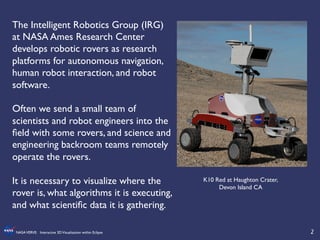
The Intelligent Robotics Group (IRG)
at NASA Ames Research Center
develops robotic rovers as research
platforms for autonomous navigation,
human robot interaction, and robot
software. 	


Often we send a small team of
scientists and robot engineers into the
field with some rovers, and science and
engineering backroom teams remotely
operate the rovers.	


It is necessary to visualize where the
rover is, what algorithms it is executing,
and what scientific data it is gathering. 	


K10 Red at Haughton Crater, 	

Devon Island CA
3	

NASAVERVE: Interactive 3DVisualization within Eclipse	

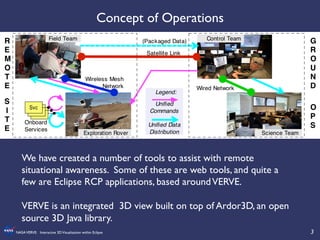
We have created a number of tools to assist with remote
situational awareness. Some of these are web tools, and quite a
few are Eclipse RCP applications, based aroundVERVE. 	


VERVE is an integrated 3D view built on top of Ardor3D, an open
source 3D Java library.	


Concept of Operations
4	

NASAVERVE: Interactive 3DVisualization within Eclipse	

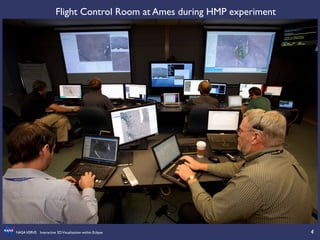
Flight Control Room at Ames during HMP experiment
5	

NASAVERVE: Interactive 3DVisualization within Eclipse	

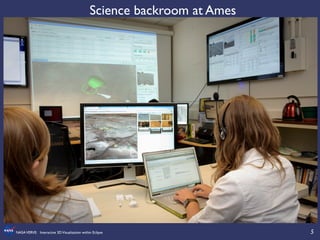
Science backroom at Ames
6	

NASAVERVE: Interactive 3DVisualization within Eclipse	

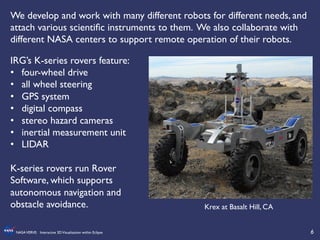
We develop and work with many different robots for different needs, and
attach various scientific instruments to them. We also collaborate with
different NASA centers to support remote operation of their robots.	


IRG’s K-series rovers feature:	

•  four-wheel drive	

•  all wheel steering 	

•  GPS system	

•  digital compass	

•  stereo hazard cameras	

•  inertial measurement unit	

•  LIDAR	


K-series rovers run Rover
Software, which supports
autonomous navigation and
obstacle avoidance.	


Krex at Basalt Hill, CA
7	

NASAVERVE: Interactive 3DVisualization within Eclipse	

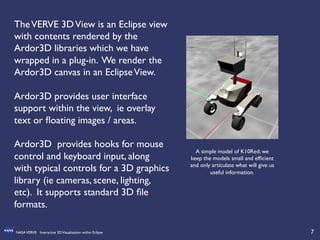
A simple model of K10Red; we
keep the models small and efficient
and only articulate what will give us
useful information.	

TheVERVE 3DView is an Eclipse view
with contents rendered by the
Ardor3D libraries which we have
wrapped in a plug-in. We render the
Ardor3D canvas in an EclipseView.	


Ardor3D provides user interface
support within the view, ie overlay
text or floating images / areas.	


Ardor3D provides hooks for mouse
control and keyboard input, along
with typical controls for a 3D graphics
library (ie cameras, scene, lighting,
etc). It supports standard 3D file
formats.
8	

NASAVERVE: Interactive 3DVisualization within Eclipse	

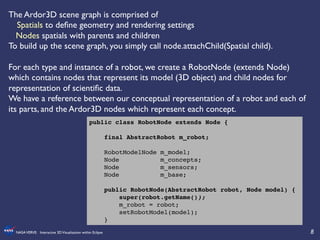
The Ardor3D scene graph is comprised of 	


Spatials to define geometry and rendering settings	

Nodes spatials with parents and children	

To build up the scene graph, you simply call node.attachChild(Spatial child).	


For each type and instance of a robot, we create a RobotNode (extends Node)
which contains nodes that represent its model (3D object) and child nodes for
representation of scientific data.	

We have a reference between our conceptual representation of a robot and each of
its parts, and the Ardor3D nodes which represent each concept.	

public class RobotNode extends Node {!
!
final AbstractRobot m_robot;!
!
RobotModelNode m_model;!
Node m_concepts;!
Node m_sensors;!
Node m_base;!
!
public RobotNode(AbstractRobot robot, Node model) {!
super(robot.getName());!
m_robot = robot;!
setRobotModel(model);!
}!
9	

NASAVERVE: Interactive 3DVisualization within Eclipse	

/**!
* interface for scenegraph -> telemetry glue for robot visualization parts!
*/!
public interface IRobotPart {!
public String getPartName();!
public AbstractRobot getRobot();!
!
public void connectTelemetry() throws TelemetryException;!
public void disconnectTelemetry() throws TelemetryException;!
!
public void attachToNodesIn(Node model) throws TelemetryException,
IllegalStateException;!
!
public void handleFrameUpdate(long currentTime);!
public void reset();!
!
public boolean isVisible();!
public void setVisible(boolean state);!
}!
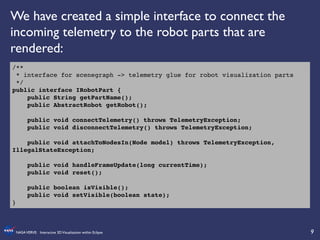
We have created a simple interface to connect the
incoming telemetry to the robot parts that are
rendered:
10	

NASAVERVE: Interactive 3DVisualization within Eclipse	

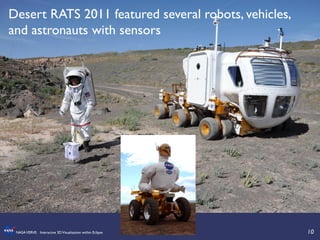
Desert RATS 2011 featured several robots, vehicles,
and astronauts with sensors
11	

NASAVERVE: Interactive 3DVisualization within Eclipse	

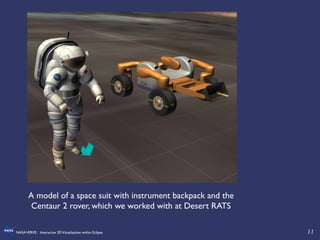
A model of a space suit with instrument backpack and the
Centaur 2 rover, which we worked with at Desert RATS
12	

NASAVERVE: Interactive 3DVisualization within Eclipse	

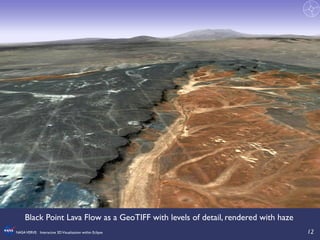
Black Point Lava Flow as a GeoTIFF with levels of detail, rendered with haze
13	

NASAVERVE: Interactive 3DVisualization within Eclipse	

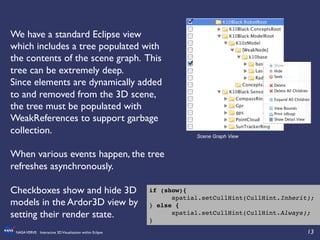
We have a standard Eclipse view
which includes a tree populated with
the contents of the scene graph. This
tree can be extremely deep.	

Since elements are dynamically added
to and removed from the 3D scene,
the tree must be populated with
WeakReferences to support garbage
collection.	


When various events happen, the tree
refreshes asynchronously.	


Checkboxes show and hide 3D
models in the Ardor3D view by
setting their render state.	

Scene Graph View
if (show){!
!spatial.setCullHint(CullHint.Inherit);
} else {!
!spatial.setCullHint(CullHint.Always);!
}!
14	

NASAVERVE: Interactive 3DVisualization within Eclipse	

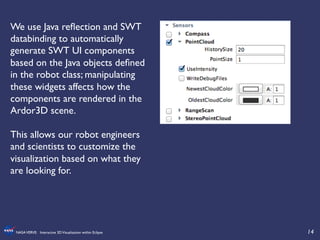
We use Java reflection and SWT
databinding to automatically
generate SWT UI components
based on the Java objects defined
in the robot class; manipulating
these widgets affects how the
components are rendered in the
Ardor3D scene.	


This allows our robot engineers
and scientists to customize the
visualization based on what they
are looking for.
15	

NASAVERVE: Interactive 3DVisualization within Eclipse	

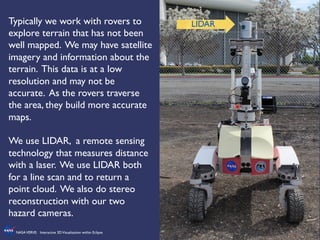
Typically we work with rovers to
explore terrain that has not been
well mapped. We may have satellite
imagery and information about the
terrain. This data is at a low
resolution and may not be
accurate. As the rovers traverse
the area, they build more accurate
maps. 	


We use LIDAR, a remote sensing
technology that measures distance
with a laser. We use LIDAR both
for a line scan and to return a
point cloud. We also do stereo
reconstruction with our two
hazard cameras.	


LIDAR
16	

NASAVERVE: Interactive 3DVisualization within Eclipse	

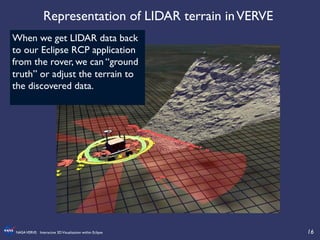
Representation of LIDAR terrain inVERVE	

When we get LIDAR data back
to our Eclipse RCP application
from the rover, we can “ground
truth” or adjust the terrain to
the discovered data.
17	

NASAVERVE: Interactive 3DVisualization within Eclipse	

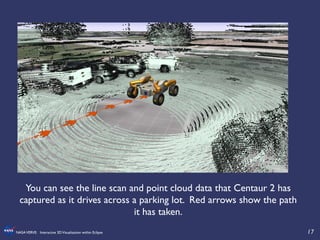
You can see the line scan and point cloud data that Centaur 2 has
captured as it drives across a parking lot. Red arrows show the path
it has taken.
18	

NASAVERVE: Interactive 3DVisualization within Eclipse	

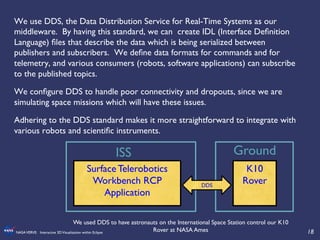
We use DDS, the Data Distribution Service for Real-Time Systems as our
middleware. By having this standard, we can create IDL (Interface Definition
Language) files that describe the data which is being serialized between
publishers and subscribers. We define data formats for commands and for
telemetry, and various consumers (robots, software applications) can subscribe
to the published topics. 	

We configure DDS to handle poor connectivity and dropouts, since we are
simulating space missions which will have these issues.	

Adhering to the DDS standard makes it more straightforward to integrate with
various robots and scientific instruments.	


Surface Telerobotics
Workbench RCP
Application	

K10
Rover 	

DDS	

Ground	

ISS	

We used DDS to have astronauts on the International Space Station control our K10
Rover at NASA Ames
19	

NASAVERVE: Interactive 3DVisualization within Eclipse	

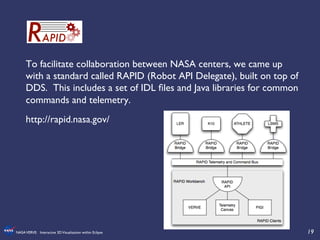
To facilitate collaboration between NASA centers, we came up
with a standard called RAPID (Robot API Delegate), built on top of
DDS. This includes a set of IDL files and Java libraries for common
commands and telemetry.	

http://rapid.nasa.gov/
20	

NASAVERVE: Interactive 3DVisualization within Eclipse	

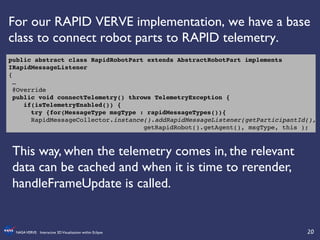
For our RAPID VERVE implementation, we have a base
class to connect robot parts to RAPID telemetry.	

public abstract class RapidRobotPart extends AbstractRobotPart implements
IRapidMessageListener!
{!
…!
@Override!
public void connectTelemetry() throws TelemetryException {!
if(isTelemetryEnabled()) {!
try {for(MessageType msgType : rapidMessageTypes()){!
!RapidMessageCollector.instance().addRapidMessageListener(getParticipantId(),!
! ! ! ! ! !getRapidRobot().getAgent(), msgType, this );!
This way, when the telemetry comes in, the relevant
data can be cached and when it is time to rerender,
handleFrameUpdate is called.
21	

NASAVERVE: Interactive 3DVisualization within Eclipse	


!
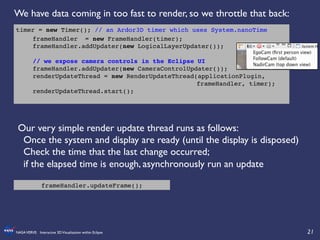
Our very simple render update thread runs as follows:	

Once the system and display are ready (until the display is disposed)	

Check the time that the last change occurred; 	

if the elapsed time is enough, asynchronously run an update	

!
	

timer = new Timer(); // an Ardor3D timer which uses System.nanoTime!
!frameHandler = new FrameHandler(timer);!
!frameHandler.addUpdater(new LogicalLayerUpdater());!
!
!// we expose camera controls in the Eclipse UI!
!frameHandler.addUpdater(new CameraControlUpdater()); !!
!renderUpdateThread = new RenderUpdateThread(applicationPlugin,
! ! ! ! ! ! ! ! ! ! ! ! ! ! ! frameHandler, timer);!
!renderUpdateThread.start();!
	

frameHandler.updateFrame();	

We have data coming in too fast to render, so we throttle that back:
22	

NASAVERVE: Interactive 3DVisualization within Eclipse	

!
public void handleFrameUpdate(long currentTime) {!
if(isDirty()) {!
try {!
float[] ja = m_angleData;!
JointInfo joint;!
for(int i = 0; i < m_joints.length; i++) {!
if(i < m_angleData.length) {!
joint = m_joints[i];!
if( joint.spatial != null && !Float.isNaN(ja[i]) ) {!
m_rot.fromAngleNormalAxis(ja[i]+joint.offset,
! ! ! ! ! ! !joint.rotAxis);!
joint.spatial.setRotation(m_rot);!
}!
}!
}!
}!
catch(Throwable t) {!
logger.log(t);!
}!
setDirty(false);!
}!
}!
Sample handleFrameUpdate for joint data
23	

NASAVERVE: Interactive 3DVisualization within Eclipse	

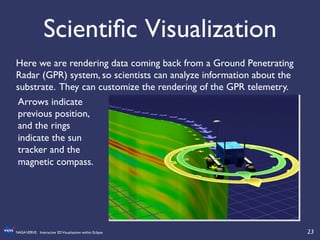
Scientific Visualization	

Here we are rendering data coming back from a Ground Penetrating
Radar (GPR) system, so scientists can analyze information about the
substrate. They can customize the rendering of the GPR telemetry.	

Arrows indicate
previous position,
and the rings
indicate the sun
tracker and the
magnetic compass.
24	

NASAVERVE: Interactive 3DVisualization within Eclipse	

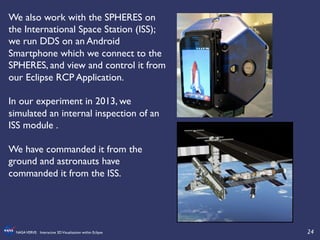
We also work with the SPHERES on
the International Space Station (ISS);
we run DDS on an Android
Smartphone which we connect to the
SPHERES, and view and control it from
our Eclipse RCP Application. 	


In our experiment in 2013, we
simulated an internal inspection of an
ISS module .	


We have commanded it from the
ground and astronauts have
commanded it from the ISS.
25	

NASAVERVE: Interactive 3DVisualization within Eclipse	

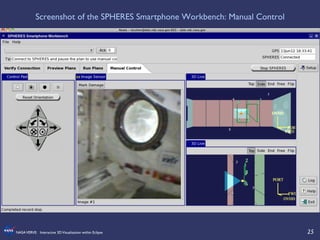
Screenshot of the SPHERES Smartphone Workbench: Manual Control
26	

NASAVERVE: Interactive 3DVisualization within Eclipse	

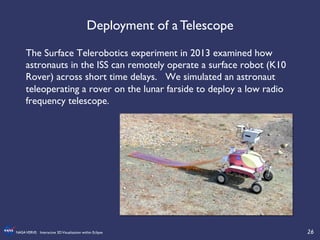
The Surface Telerobotics experiment in 2013 examined how
astronauts in the ISS can remotely operate a surface robot (K10
Rover) across short time delays. We simulated an astronaut
teleoperating a rover on the lunar farside to deploy a low radio
frequency telescope. 	


Deployment of a Telescope
27	

NASAVERVE: Interactive 3DVisualization within Eclipse	

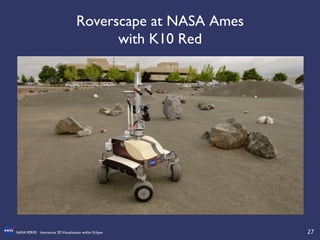
Roverscape at NASA Ames
with K10 Red
28	

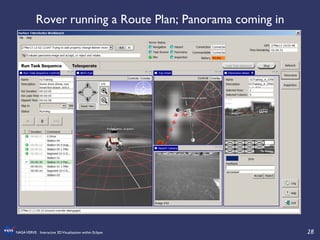
NASAVERVE: Interactive 3DVisualization within Eclipse	

Rover running a Route Plan; Panorama coming in
29	

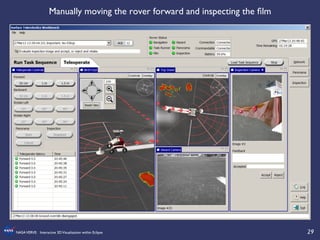
NASAVERVE: Interactive 3DVisualization within Eclipse	

Manually moving the rover forward and inspecting the film
30	

NASAVERVE: Interactive 3DVisualization within Eclipse	

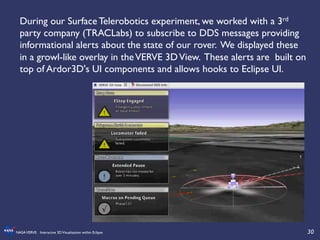
During our Surface Telerobotics experiment, we worked with a 3rd
party company (TRACLabs) to subscribe to DDS messages providing
informational alerts about the state of our rover. We displayed these
in a growl-like overlay in theVERVE 3DView. These alerts are built on
top of Ardor3D's UI components and allows hooks to Eclipse UI.
31	

NASAVERVE: Interactive 3DVisualization within Eclipse	

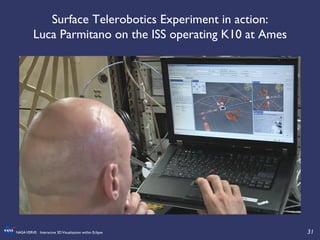
Surface Telerobotics Experiment in action:
Luca Parmitano on the ISS operating K10 at Ames
32	

NASAVERVE: Interactive 3DVisualization within Eclipse	

VERVE open source release:	

http://sourceforge.net/projects/irg-verve/	


Ardor3D in Java:	

http://www.ardor3d.com	


Goo Technologies, Ardor3D in Javascript: 	

http://www.gootechnologies.com/
33	

NASAVERVE: Interactive 3DVisualization within Eclipse	

Upcoming IRG Work	

•  We have been doing a huge push to migrate our infrastructure
to use maven, Nexus and git.	

•  We are just beginning migration to Eclipse E4	

•  We continue to develop free-flying robots for the ISS	

•  We are working with KRex2, preparing to look for water in the
Mojave in the fall as part of the Volatile Prospector efforts	

•  http://www.astrobotic.com/2013/12/02/resource-aware-
planning-for-robot-operations-at-the-lunar-pole/	

•  This Mojave work is in support of the RESOLVE project, to
develop a new set of instruments to use in the search for water	

•  http://www.spacenews.com/article/civil-space/39307nasa-
planning-for-mission-to-mine-water-on-the-moon
34	

NASAVERVE: Interactive 3DVisualization within Eclipse	

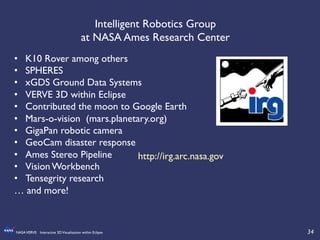
Intelligent Robotics Group 	

at NASA Ames Research Center 	

•  K10 Rover among others	

•  SPHERES	

•  xGDS Ground Data Systems	

•  VERVE 3D within Eclipse	

•  Contributed the moon to Google Earth	

•  Mars-o-vision (mars.planetary.org)	

•  GigaPan robotic camera	

•  GeoCam disaster response	

•  Ames Stereo Pipeline	

•  Vision Workbench	

•  Tensegrity research	

… and more!	

http://irg.arc.nasa.gov

NASA VERVE: Interactive 3D Visualization within Eclipse

  • 1.
    1 NASAVERVE: Interactive 3DVisualizationwithin Eclipse NASAVERVE: Interactive 3DVisualization within Eclipse Tamar Cohen and Mark B.Allan Intelligent Robotics Group NASA Ames Research Center
  • 2.
    2 NASAVERVE: Interactive 3DVisualizationwithin Eclipse The Intelligent Robotics Group (IRG) at NASA Ames Research Center develops robotic rovers as research platforms for autonomous navigation, human robot interaction, and robot software. Often we send a small team of scientists and robot engineers into the field with some rovers, and science and engineering backroom teams remotely operate the rovers. It is necessary to visualize where the rover is, what algorithms it is executing, and what scientific data it is gathering. K10 Red at Haughton Crater, Devon Island CA
  • 3.
    3 NASAVERVE: Interactive 3DVisualizationwithin Eclipse We have created a number of tools to assist with remote situational awareness. Some of these are web tools, and quite a few are Eclipse RCP applications, based aroundVERVE. VERVE is an integrated 3D view built on top of Ardor3D, an open source 3D Java library. Concept of Operations
  • 4.
    4 NASAVERVE: Interactive 3DVisualizationwithin Eclipse Flight Control Room at Ames during HMP experiment
  • 5.
    5 NASAVERVE: Interactive 3DVisualizationwithin Eclipse Science backroom at Ames
  • 6.
    6 NASAVERVE: Interactive 3DVisualizationwithin Eclipse We develop and work with many different robots for different needs, and attach various scientific instruments to them. We also collaborate with different NASA centers to support remote operation of their robots. IRG’s K-series rovers feature: •  four-wheel drive •  all wheel steering •  GPS system •  digital compass •  stereo hazard cameras •  inertial measurement unit •  LIDAR K-series rovers run Rover Software, which supports autonomous navigation and obstacle avoidance. Krex at Basalt Hill, CA
  • 7.
    7 NASAVERVE: Interactive 3DVisualizationwithin Eclipse A simple model of K10Red; we keep the models small and efficient and only articulate what will give us useful information. TheVERVE 3DView is an Eclipse view with contents rendered by the Ardor3D libraries which we have wrapped in a plug-in. We render the Ardor3D canvas in an EclipseView. Ardor3D provides user interface support within the view, ie overlay text or floating images / areas. Ardor3D provides hooks for mouse control and keyboard input, along with typical controls for a 3D graphics library (ie cameras, scene, lighting, etc). It supports standard 3D file formats.
  • 8.
    8 NASAVERVE: Interactive 3DVisualizationwithin Eclipse The Ardor3D scene graph is comprised of Spatials to define geometry and rendering settings Nodes spatials with parents and children To build up the scene graph, you simply call node.attachChild(Spatial child). For each type and instance of a robot, we create a RobotNode (extends Node) which contains nodes that represent its model (3D object) and child nodes for representation of scientific data. We have a reference between our conceptual representation of a robot and each of its parts, and the Ardor3D nodes which represent each concept. public class RobotNode extends Node {! ! final AbstractRobot m_robot;! ! RobotModelNode m_model;! Node m_concepts;! Node m_sensors;! Node m_base;! ! public RobotNode(AbstractRobot robot, Node model) {! super(robot.getName());! m_robot = robot;! setRobotModel(model);! }!
  • 9.
    9 NASAVERVE: Interactive 3DVisualizationwithin Eclipse /**! * interface for scenegraph -> telemetry glue for robot visualization parts! */! public interface IRobotPart {! public String getPartName();! public AbstractRobot getRobot();! ! public void connectTelemetry() throws TelemetryException;! public void disconnectTelemetry() throws TelemetryException;! ! public void attachToNodesIn(Node model) throws TelemetryException, IllegalStateException;! ! public void handleFrameUpdate(long currentTime);! public void reset();! ! public boolean isVisible();! public void setVisible(boolean state);! }! We have created a simple interface to connect the incoming telemetry to the robot parts that are rendered:
  • 10.
    10 NASAVERVE: Interactive 3DVisualizationwithin Eclipse Desert RATS 2011 featured several robots, vehicles, and astronauts with sensors
  • 11.
    11 NASAVERVE: Interactive 3DVisualizationwithin Eclipse A model of a space suit with instrument backpack and the Centaur 2 rover, which we worked with at Desert RATS
  • 12.
    12 NASAVERVE: Interactive 3DVisualizationwithin Eclipse Black Point Lava Flow as a GeoTIFF with levels of detail, rendered with haze
  • 13.
    13 NASAVERVE: Interactive 3DVisualizationwithin Eclipse We have a standard Eclipse view which includes a tree populated with the contents of the scene graph. This tree can be extremely deep. Since elements are dynamically added to and removed from the 3D scene, the tree must be populated with WeakReferences to support garbage collection. When various events happen, the tree refreshes asynchronously. Checkboxes show and hide 3D models in the Ardor3D view by setting their render state. Scene Graph View if (show){! !spatial.setCullHint(CullHint.Inherit); } else {! !spatial.setCullHint(CullHint.Always);! }!
  • 14.
    14 NASAVERVE: Interactive 3DVisualizationwithin Eclipse We use Java reflection and SWT databinding to automatically generate SWT UI components based on the Java objects defined in the robot class; manipulating these widgets affects how the components are rendered in the Ardor3D scene. This allows our robot engineers and scientists to customize the visualization based on what they are looking for.
  • 15.
    15 NASAVERVE: Interactive 3DVisualizationwithin Eclipse Typically we work with rovers to explore terrain that has not been well mapped. We may have satellite imagery and information about the terrain. This data is at a low resolution and may not be accurate. As the rovers traverse the area, they build more accurate maps. We use LIDAR, a remote sensing technology that measures distance with a laser. We use LIDAR both for a line scan and to return a point cloud. We also do stereo reconstruction with our two hazard cameras. LIDAR
  • 16.
    16 NASAVERVE: Interactive 3DVisualizationwithin Eclipse Representation of LIDAR terrain inVERVE When we get LIDAR data back to our Eclipse RCP application from the rover, we can “ground truth” or adjust the terrain to the discovered data.
  • 17.
    17 NASAVERVE: Interactive 3DVisualizationwithin Eclipse You can see the line scan and point cloud data that Centaur 2 has captured as it drives across a parking lot. Red arrows show the path it has taken.
  • 18.
    18 NASAVERVE: Interactive 3DVisualizationwithin Eclipse We use DDS, the Data Distribution Service for Real-Time Systems as our middleware. By having this standard, we can create IDL (Interface Definition Language) files that describe the data which is being serialized between publishers and subscribers. We define data formats for commands and for telemetry, and various consumers (robots, software applications) can subscribe to the published topics. We configure DDS to handle poor connectivity and dropouts, since we are simulating space missions which will have these issues. Adhering to the DDS standard makes it more straightforward to integrate with various robots and scientific instruments. Surface Telerobotics Workbench RCP Application K10 Rover DDS Ground ISS We used DDS to have astronauts on the International Space Station control our K10 Rover at NASA Ames
  • 19.
    19 NASAVERVE: Interactive 3DVisualizationwithin Eclipse To facilitate collaboration between NASA centers, we came up with a standard called RAPID (Robot API Delegate), built on top of DDS. This includes a set of IDL files and Java libraries for common commands and telemetry. http://rapid.nasa.gov/
  • 20.
    20 NASAVERVE: Interactive 3DVisualizationwithin Eclipse For our RAPID VERVE implementation, we have a base class to connect robot parts to RAPID telemetry. public abstract class RapidRobotPart extends AbstractRobotPart implements IRapidMessageListener! {! …! @Override! public void connectTelemetry() throws TelemetryException {! if(isTelemetryEnabled()) {! try {for(MessageType msgType : rapidMessageTypes()){! !RapidMessageCollector.instance().addRapidMessageListener(getParticipantId(),! ! ! ! ! ! !getRapidRobot().getAgent(), msgType, this );! This way, when the telemetry comes in, the relevant data can be cached and when it is time to rerender, handleFrameUpdate is called.
  • 21.
    21 NASAVERVE: Interactive 3DVisualizationwithin Eclipse ! Our very simple render update thread runs as follows: Once the system and display are ready (until the display is disposed) Check the time that the last change occurred; if the elapsed time is enough, asynchronously run an update ! timer = new Timer(); // an Ardor3D timer which uses System.nanoTime! !frameHandler = new FrameHandler(timer);! !frameHandler.addUpdater(new LogicalLayerUpdater());! ! !// we expose camera controls in the Eclipse UI! !frameHandler.addUpdater(new CameraControlUpdater()); !! !renderUpdateThread = new RenderUpdateThread(applicationPlugin, ! ! ! ! ! ! ! ! ! ! ! ! ! ! ! frameHandler, timer);! !renderUpdateThread.start();! frameHandler.updateFrame(); We have data coming in too fast to render, so we throttle that back:
  • 22.
    22 NASAVERVE: Interactive 3DVisualizationwithin Eclipse ! public void handleFrameUpdate(long currentTime) {! if(isDirty()) {! try {! float[] ja = m_angleData;! JointInfo joint;! for(int i = 0; i < m_joints.length; i++) {! if(i < m_angleData.length) {! joint = m_joints[i];! if( joint.spatial != null && !Float.isNaN(ja[i]) ) {! m_rot.fromAngleNormalAxis(ja[i]+joint.offset, ! ! ! ! ! ! !joint.rotAxis);! joint.spatial.setRotation(m_rot);! }! }! }! }! catch(Throwable t) {! logger.log(t);! }! setDirty(false);! }! }! Sample handleFrameUpdate for joint data
  • 23.
    23 NASAVERVE: Interactive 3DVisualizationwithin Eclipse Scientific Visualization Here we are rendering data coming back from a Ground Penetrating Radar (GPR) system, so scientists can analyze information about the substrate. They can customize the rendering of the GPR telemetry. Arrows indicate previous position, and the rings indicate the sun tracker and the magnetic compass.
  • 24.
    24 NASAVERVE: Interactive 3DVisualizationwithin Eclipse We also work with the SPHERES on the International Space Station (ISS); we run DDS on an Android Smartphone which we connect to the SPHERES, and view and control it from our Eclipse RCP Application. In our experiment in 2013, we simulated an internal inspection of an ISS module . We have commanded it from the ground and astronauts have commanded it from the ISS.
  • 25.
    25 NASAVERVE: Interactive 3DVisualizationwithin Eclipse Screenshot of the SPHERES Smartphone Workbench: Manual Control
  • 26.
    26 NASAVERVE: Interactive 3DVisualizationwithin Eclipse The Surface Telerobotics experiment in 2013 examined how astronauts in the ISS can remotely operate a surface robot (K10 Rover) across short time delays. We simulated an astronaut teleoperating a rover on the lunar farside to deploy a low radio frequency telescope. Deployment of a Telescope
  • 27.
    27 NASAVERVE: Interactive 3DVisualizationwithin Eclipse Roverscape at NASA Ames with K10 Red
  • 28.
    28 NASAVERVE: Interactive 3DVisualizationwithin Eclipse Rover running a Route Plan; Panorama coming in
  • 29.
    29 NASAVERVE: Interactive 3DVisualizationwithin Eclipse Manually moving the rover forward and inspecting the film
  • 30.
    30 NASAVERVE: Interactive 3DVisualizationwithin Eclipse During our Surface Telerobotics experiment, we worked with a 3rd party company (TRACLabs) to subscribe to DDS messages providing informational alerts about the state of our rover. We displayed these in a growl-like overlay in theVERVE 3DView. These alerts are built on top of Ardor3D's UI components and allows hooks to Eclipse UI.
  • 31.
    31 NASAVERVE: Interactive 3DVisualizationwithin Eclipse Surface Telerobotics Experiment in action: Luca Parmitano on the ISS operating K10 at Ames
  • 32.
    32 NASAVERVE: Interactive 3DVisualizationwithin Eclipse VERVE open source release: http://sourceforge.net/projects/irg-verve/ Ardor3D in Java: http://www.ardor3d.com Goo Technologies, Ardor3D in Javascript: http://www.gootechnologies.com/
  • 33.
    33 NASAVERVE: Interactive 3DVisualizationwithin Eclipse Upcoming IRG Work •  We have been doing a huge push to migrate our infrastructure to use maven, Nexus and git. •  We are just beginning migration to Eclipse E4 •  We continue to develop free-flying robots for the ISS •  We are working with KRex2, preparing to look for water in the Mojave in the fall as part of the Volatile Prospector efforts •  http://www.astrobotic.com/2013/12/02/resource-aware- planning-for-robot-operations-at-the-lunar-pole/ •  This Mojave work is in support of the RESOLVE project, to develop a new set of instruments to use in the search for water •  http://www.spacenews.com/article/civil-space/39307nasa- planning-for-mission-to-mine-water-on-the-moon
  • 34.
    34 NASAVERVE: Interactive 3DVisualizationwithin Eclipse Intelligent Robotics Group at NASA Ames Research Center •  K10 Rover among others •  SPHERES •  xGDS Ground Data Systems •  VERVE 3D within Eclipse •  Contributed the moon to Google Earth •  Mars-o-vision (mars.planetary.org) •  GigaPan robotic camera •  GeoCam disaster response •  Ames Stereo Pipeline •  Vision Workbench •  Tensegrity research … and more! http://irg.arc.nasa.gov