Level Design <Team 9>
PRESENTATION
2
Light weight
branching model
Index
▷ Expected problems
▷ Lightweight Branching Model
▷ Lightweight vs Git flow
▷ Lightweight vs GitHub flow
3
Expected problems
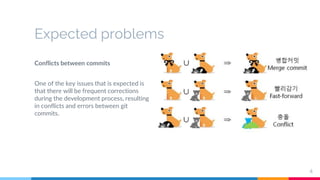
Conflicts between commits
One of the key issues that is expected is
that there will be frequent corrections
during the development process, resulting
in conflicts and errors between git
commits.
4
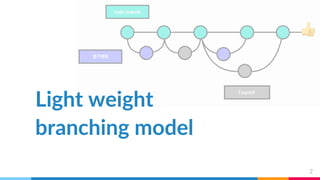
Light weight branching model
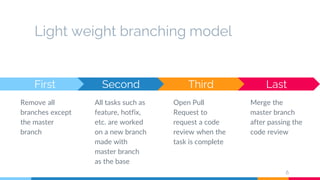
Last
Merge the
master branch
after passing the
code review
First
Remove all
branches except
the master
branch
Second
All tasks such as
feature, hotfix,
etc. are worked
on a new branch
made with
master branch
as the base
6
Third
Open Pull
Request to
request a code
review when the
task is complete
GIt merge method
First : Normal merge
It is a commonly used merge
method and is used to leave all
commits. Merge can divided
into two merging methods:
Fast-forward and Recursive.
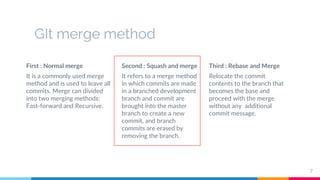
Second : Squash and merge
It refers to a merge method
in which commits are made
in a branched development
branch and commit are
brought into the master
branch to create a new
commit, and branch
commits are erased by
removing the branch.
Third : Rebase and Merge
Relocate the commit
contents to the branch that
becomes the base and
proceed with the merge
without any additional
commit message.
7
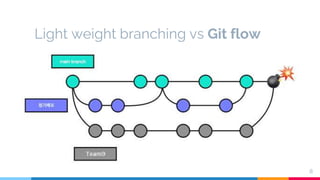
Light weight branching vs Git flow
8
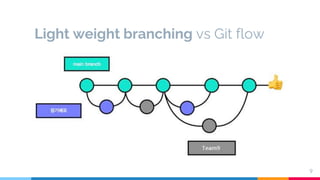
Light weight branching vs Git flow
9
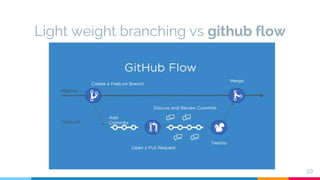
Light weight branching vs github flow
10
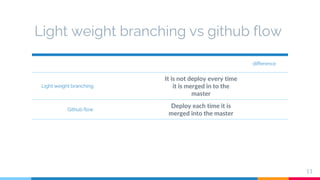
Light weight branching vs github flow
difference
Light weight branching
It is not deploy every time
it is merged in to the
master
Github flow
Deploy each time it is
merged into the master
11
Thanks!
Any questions?

Level Design

  • 1.
    Level Design <Team9> PRESENTATION
  • 2.
  • 3.
    Index ▷ Expected problems ▷Lightweight Branching Model ▷ Lightweight vs Git flow ▷ Lightweight vs GitHub flow 3
  • 4.
    Expected problems Conflicts betweencommits One of the key issues that is expected is that there will be frequent corrections during the development process, resulting in conflicts and errors between git commits. 4
  • 5.
  • 6.
    Light weight branchingmodel Last Merge the master branch after passing the code review First Remove all branches except the master branch Second All tasks such as feature, hotfix, etc. are worked on a new branch made with master branch as the base 6 Third Open Pull Request to request a code review when the task is complete
  • 7.
    GIt merge method First: Normal merge It is a commonly used merge method and is used to leave all commits. Merge can divided into two merging methods: Fast-forward and Recursive. Second : Squash and merge It refers to a merge method in which commits are made in a branched development branch and commit are brought into the master branch to create a new commit, and branch commits are erased by removing the branch. Third : Rebase and Merge Relocate the commit contents to the branch that becomes the base and proceed with the merge without any additional commit message. 7
  • 8.
  • 9.
  • 10.
    Light weight branchingvs github flow 10
  • 11.
    Light weight branchingvs github flow difference Light weight branching It is not deploy every time it is merged in to the master Github flow Deploy each time it is merged into the master 11
  • 12.

Editor's Notes

  • #2 안녕하세요 level design을 담당하게 된 <9> 조 입니다. 저희가 선택한 git work flow는 lightweight branching model입니다.
  • #4 목차입니다.
  • #5 개발 과정 중에 예상되는 이슈들에 유연하게 대처할 수 있을 것 같다는 판단 예상되는 핵심 문제 :개발 과정 중에 수정이 빈번함. 그 영향으로 커밋간 충돌 및 오류 발생이 나타남.
  • #6 후보로 고려한 work flow: 세가지. Git flow, Giithub flow, 그리고 최종적으로 선택한 lightweight Branching model 먼저 lightweight 방식이 무엇인지 설명하겠습니다. 이 방식은 금융관리기업 뱅크샐러드에서 사용하고 있는 방식입니다. 뱅크샐러드는 기존에 git-flow 방식을 사용. 그러나 사용하는 과정에서, 하나의 기능을 배포하는 데에 5번의 branch switching, 6번의 pull request, 6번의  code review가 필요했습니다. 따라서 복잡한 프로세스로 인해 다양한 문제가 끊임없이 야기되었고, 이런 문제를 해결하기 위해 배포를 자주 하고자 과정을 단축 시킨 방식이 바로 lightweight 방식입니다.
  • #7 해당 방식에서 공식적인 branch 는 master branch만 존재하며, 그 외에 feature,hotfix 등의 작업은 필요할 때 master branch에서 별도의 branch를 따로 생성해서 진행합니다. 이후 필요한 작업을 완료하였을 경우 merge를 할 수 있습니다
  • #8 이때 Merge 시 squash and merge 방식을 사용합니다. Github에서는 총 3가지 merge 방식을 지원하고 있습니다.  Merge : Fast-forward는 분기된 branch가 master와 분기된 시점 이후로 추가된 내용이 그대로 붙게 됩니다. 이때 branch는 master보다 최신 버전이라고 전제합니다. 이 때 커밋 메세지는 발생하지 않습니다.  Recursive는 master에서 문제가 발생하여 분기된 브랜치가 존재할때, 해당 branch가 현재 master branch보다 최신 버전이라 하기 어려울 때 사용됩니다. 이 경우, 두 브랜치를 합쳐서 새로운 커밋 메시지를 만들어 병합합니다. Rebase and Merge 는 커밋 내용을 Base가 되는 branch에 재배치하고 추가로 커밋 메시지 없이 병합을 진행하는 방식입니다. Squash and Merge 는 이전 커밋 내용을 모두 합쳐서 하나의 새로운 커밋 메시지로 만들고 난 다음 이전 커밋 내용을 모두 지우는 병합 방식입니다. lightweight branching model은 필요한 branch를 그때 그때 만들어 나가기 때문에 사용했던 branch를 그때 그때 지우기 위해서 squash and merge를 사용했습니다. 여기까지가 lightweight Branching model입니다.
  • #9 그렇다면. Git flow? git flow는 master branch, develop branch, release branch, feature branch, hotfix branch 5개의 branch를 사용하는 방식입니다. 각각의 branch는 독립적으로 존재합니다. 하나의 기능을 추가하기 위해서는 복잡하지만 안정적인 프로세스를 지니는 것이 큰 특징입니다.  저희가 그러한 git workflow 보다 lightweight branching model이 더 적합하다고 생각한 이유는 다음과 같습니다. 먼저, git flow의 엄격한 기능 추가 프로세스를 사용하기에는 시간이 많이 소요될 것 같았습니다. 그리고 엄격함으로 인해 작은 수정들을 merge 하는 것을 미루게 되어 다음과 같이 병합시 큰 오류가 발생할 것 같았습니다.
  • #10 lightweight branching model은 기본적으로 배포시까지의 과정이 그보다 단순하고 그에 따른 미루는 일 발생이 줄어 오류 발생이 줄어듭니다. 
  • #11 마지막으로 고려한 git hub flow는 어떤  방식일까요? git hub flow는 lightweight branching model과 거의 동일한 프로세스를 가집니다. master branch만 존재하고, 모든 브랜치는 master branch에서 분기합니다. 그리고 기능 개발이 완료된 후 master에 머지합니다. 그리고 배포하는 방식입니다..
  • #12 저희가 이러한 git-hub flow를 제치고 lightweight branching model을 채택한 이유는 다음과 같습니다. git hub flow와 다르게 Lightweight branchibg 방식은 merge 후 바로 배포하지 않습니다. 따라서 서비스가 커졌을 때 그 과정에서 발생 가능한 충돌에 유연하게 대처 가능합니다. 그래서 저희에게 github flow보다도 더 유리하다고 판단이 되었습니다.     결과적으로 lightweight branching model은 기존의 git flow 보다는 시간관리가 용이하고 배포에 유리하며,  git hub flow보다는 충돌에 유연한 대처에 대한 확장성이 좋아 저희의 개발 과정에 있어서도 적합하다고 판단하였습니다. 따라서 저희는 LightWeight Branching Model을 사용하기로 결정했습니다.