In 4 simple steps
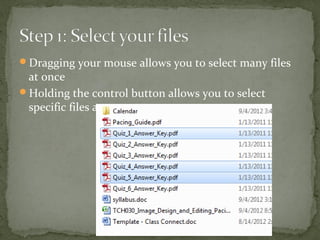
Dragging your mouse allows you to select many files
at once
Holding the control button allows you to select
specific files at once
Your zipped file will probably look different than
mine, I installed a special zipping program on my
computer and it changes how zipped files look on my
computer, but none of these steps used that other
software.
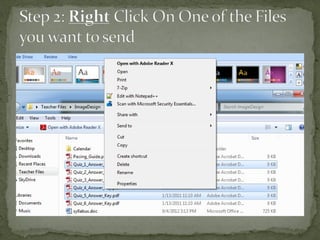
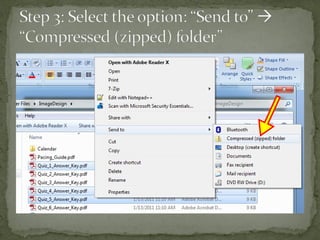
Your “right click menu” may appear somewhat
different from mine, but yours should still have the
same “Send to”  “Compressed (zipped) folder”
option
These instructions only work on Windows 7 and (I
think) Windows Vista. Previous versions of windows
won’t have the automatic zipping capabilities installed and
require additional software to zip/unzip files.
What is the point of zipping files?
 Compresses multiple files into a single file.
 Good for e-mailing or submitting a “single file” when you’re
restricted to how many files you can send
 Good for changing the file format to something that will be
accepted by our dropboxes)
Despite the word “compress”, you’re not actually making
your documents smaller. (compressing won’t turn a 30MB
file into a 20 MB file)
Feel free to send me an e-mail.
Hope this was helpful
Judson Birkel

Zipping files

  • 1.
  • 2.
    Dragging your mouseallows you to select many files at once Holding the control button allows you to select specific files at once
  • 6.
    Your zipped filewill probably look different than mine, I installed a special zipping program on my computer and it changes how zipped files look on my computer, but none of these steps used that other software. Your “right click menu” may appear somewhat different from mine, but yours should still have the same “Send to”  “Compressed (zipped) folder” option
  • 7.
    These instructions onlywork on Windows 7 and (I think) Windows Vista. Previous versions of windows won’t have the automatic zipping capabilities installed and require additional software to zip/unzip files. What is the point of zipping files?  Compresses multiple files into a single file.  Good for e-mailing or submitting a “single file” when you’re restricted to how many files you can send  Good for changing the file format to something that will be accepted by our dropboxes) Despite the word “compress”, you’re not actually making your documents smaller. (compressing won’t turn a 30MB file into a 20 MB file)
  • 8.
    Feel free tosend me an e-mail. Hope this was helpful Judson Birkel