Zend Lab
leonguyen.com
Features
- Purpose: An open source Zend CMS
- GUI: Bootstrap + jQuery + Dojo
- Technology: Zend 2 + Node.js + NoSQL
Modules
- Content:
+ News, Media (Photo-Video|Infographic-Mindmap), Slide
+ Products-Cart, Vote-Survey-Chat, Form+App
- Channel:
+ Web, Tablet, Mobile, Email, SMS, Print
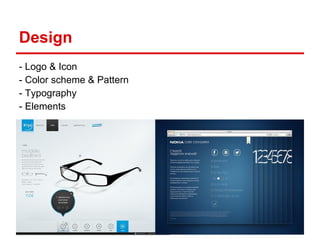
Design
- Logo & Icon
- Color scheme & Pattern
- Typography
- Elements
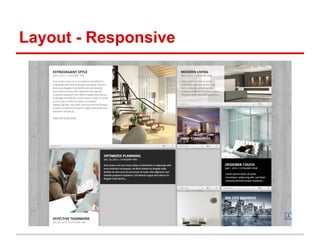
Layout - Responsive
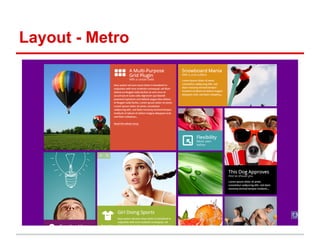
Layout - Metro
Zend Core
Installation
- Download Zend Server Community Edition (include Zend
Framework 2.0) (http://framework.zend.com/downloads/latest)
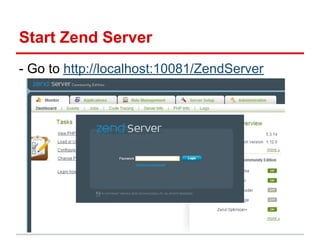
Start Zend Server
- Go to http://localhost:10081/ZendServer
Generate a Trial License for Zend Server
- Go to http://www.zend.com/en/products/server/license
Config Zend Application
- Download Zend Skeleton Application (https://github.
com/zendframework/ZendSkeletonApplication)
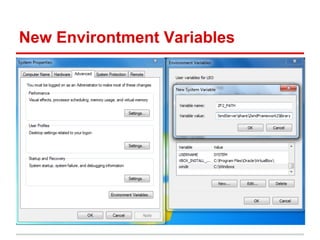
New Environtment Variables
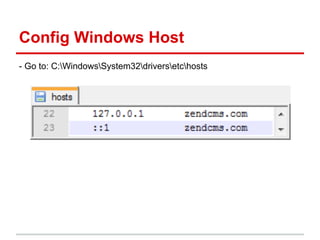
Config Windows Host
- Go to: C:WindowsSystem32driversetchosts
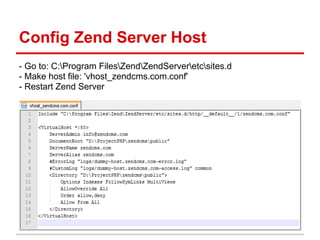
Config Zend Server Host
- Go to: C:Program FilesZendZendServeretcsites.d
- Make host file: 'vhost_zendcms.com.conf'
- Restart Zend Server
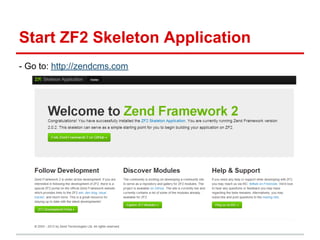
Start ZF2 Skeleton Application
- Go to: http://zendcms.com
Config Zend Module
- Download Zend Skeleton Module (https://github.
com/zendframework/ZendSkeletonModule)
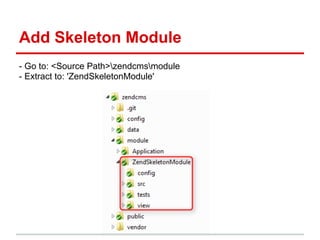
Add Skeleton Module
- Go to: <Source Path>zendcmsmodule
- Extract to: 'ZendSkeletonModule'
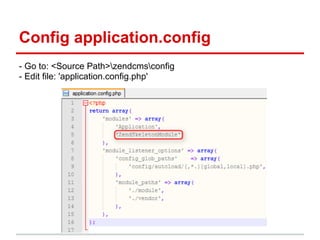
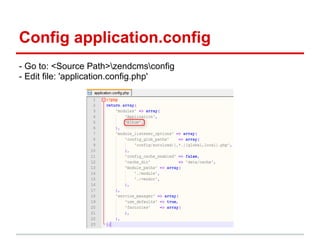
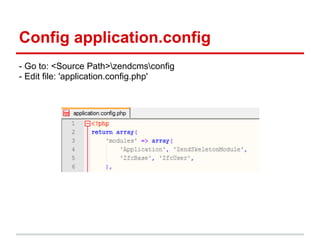
Config application.config
- Go to: <Source Path>zendcmsconfig
- Edit file: 'application.config.php'
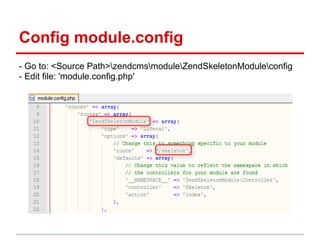
Config module.config
- Go to: <Source Path>zendcmsmoduleZendSkeletonModuleconfig
- Edit file: 'module.config.php'
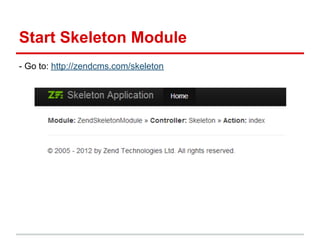
Start Skeleton Module
- Go to: http://zendcms.com/skeleton
Zend MVC
- Programmer’s Reference Guide of Zend Framework 2: http://framework.zend.com/manual/2.
0/en/index.html#zendframeworkreference
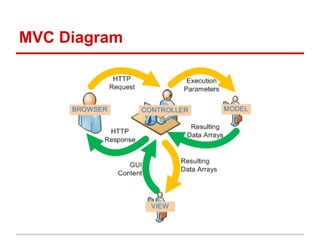
MVC Diagram
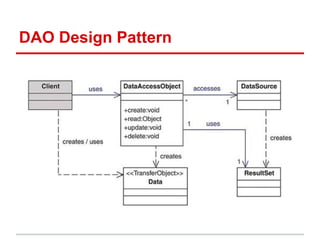
DAO Design Pattern
Describe Album Module
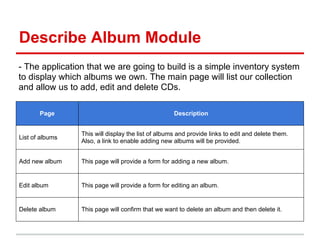
- The application that we are going to build is a simple inventory system
to display which albums we own. The main page will list our collection
and allow us to add, edit and delete CDs.
Page Description
List of albums
This will display the list of albums and provide links to edit and delete them.
Also, a link to enable adding new albums will be provided.
Add new album This page will provide a form for adding a new album.
Edit album This page will provide a form for editing an album.
Delete album This page will confirm that we want to delete an album and then delete it.
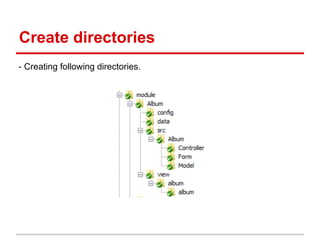
Create directories
- Creating following directories.
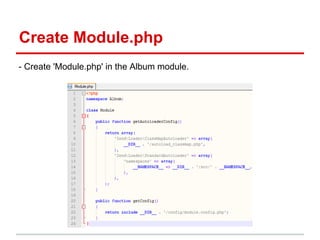
Create Module.php
- Create 'Module.php' in the Album module.
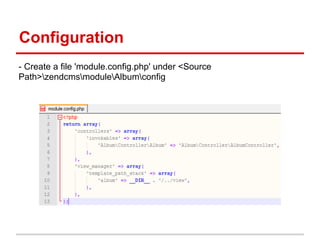
Configuration
- Create a file 'module.config.php' under <Source
Path>zendcmsmoduleAlbumconfig
Config application.config
- Go to: <Source Path>zendcmsconfig
- Edit file: 'application.config.php'
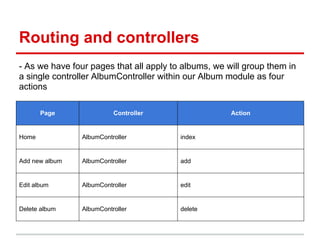
Routing and controllers
- As we have four pages that all apply to albums, we will group them in
a single controller AlbumController within our Album module as four
actions
Page Controller Action
Home AlbumController index
Add new album AlbumController add
Edit album AlbumController edit
Delete album AlbumController delete
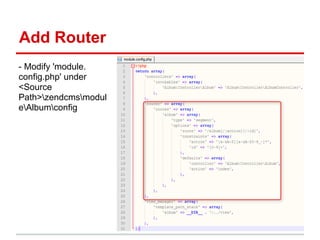
Add Router
- Modify 'module.
config.php' under
<Source
Path>zendcmsmodul
eAlbumconfig
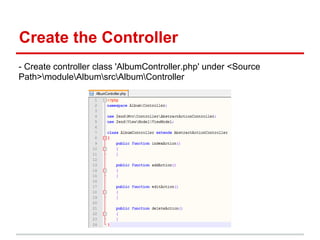
Create the Controller
- Create controller class 'AlbumController.php' under <Source
Path>moduleAlbumsrcAlbumController
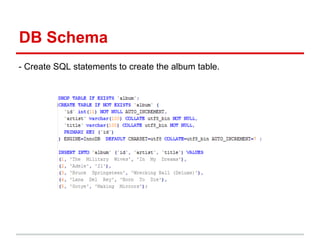
DB Schema
- Create SQL statements to create the album table.
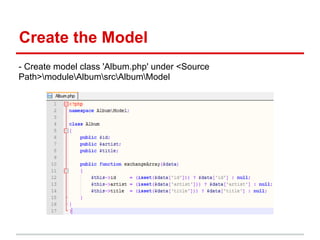
Create the Model
- Create model class 'Album.php' under <Source
Path>moduleAlbumsrcAlbumModel
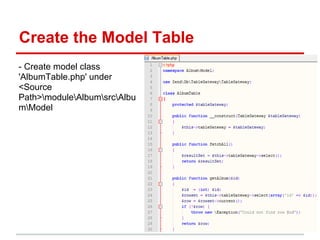
Create the Model Table
- Create model class
'AlbumTable.php' under
<Source
Path>moduleAlbumsrcAlbu
mModel
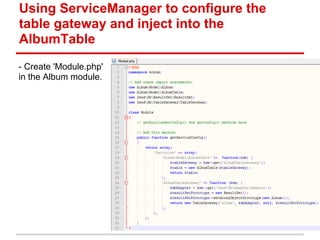
Using ServiceManager to configure the
table gateway and inject into the
AlbumTable
- Create 'Module.php'
in the Album module.
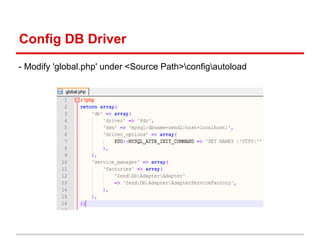
Config DB Driver
- Modify 'global.php' under <Source Path>configautoload
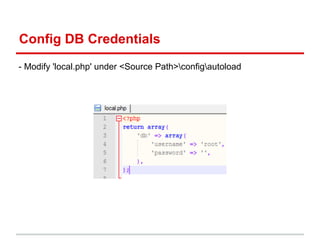
Config DB Credentials
- Modify 'local.php' under <Source Path>configautoload
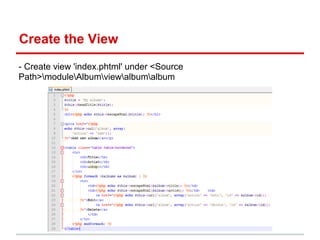
Create the View
- Create view 'index.phtml' under <Source
Path>moduleAlbumviewalbumalbum
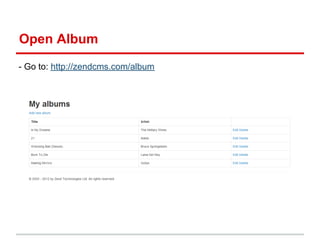
Open Album
- Go to: http://zendcms.com/album
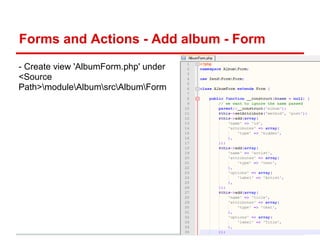
Forms and Actions - Add album - Form
- Create view 'AlbumForm.php' under
<Source
Path>moduleAlbumsrcAlbumForm
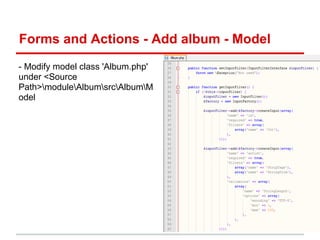
Forms and Actions - Add album - Model
- Modify model class 'Album.php'
under <Source
Path>moduleAlbumsrcAlbumM
odel
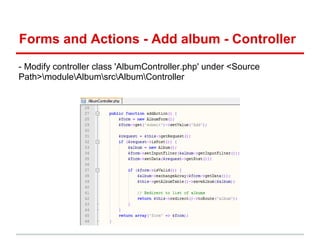
Forms and Actions - Add album - Controller
- Modify controller class 'AlbumController.php' under <Source
Path>moduleAlbumsrcAlbumController
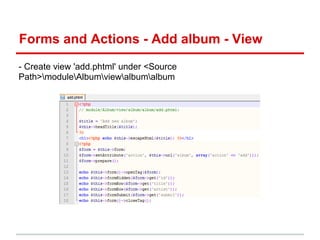
Forms and Actions - Add album - View
- Create view 'add.phtml' under <Source
Path>moduleAlbumviewalbumalbum
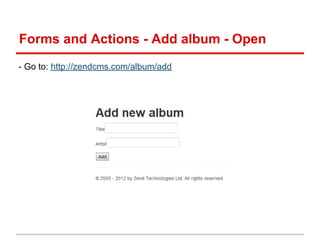
Forms and Actions - Add album - Open
- Go to: http://zendcms.com/album/add
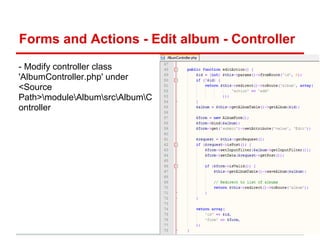
Forms and Actions - Edit album - Controller
- Modify controller class
'AlbumController.php' under
<Source
Path>moduleAlbumsrcAlbumC
ontroller
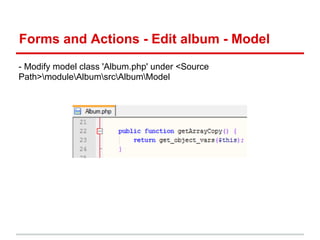
Forms and Actions - Edit album - Model
- Modify model class 'Album.php' under <Source
Path>moduleAlbumsrcAlbumModel
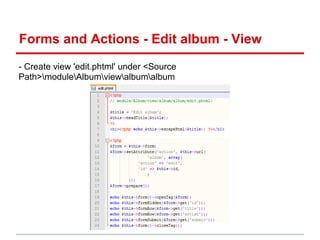
Forms and Actions - Edit album - View
- Create view 'edit.phtml' under <Source
Path>moduleAlbumviewalbumalbum
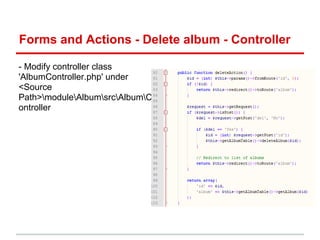
Forms and Actions - Delete album - Controller
- Modify controller class
'AlbumController.php' under
<Source
Path>moduleAlbumsrcAlbumC
ontroller
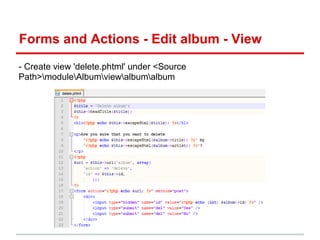
Forms and Actions - Edit album - View
- Create view 'delete.phtml' under <Source
Path>moduleAlbumviewalbumalbum
Zend Authentication
Zfc [Base.User.Acl]
- Download (https://github.com/ZF-Commons/ZfcUser)
(https://github.com/ZF-Commons/ZfcBase)
(https://github.com/bjyoungblood/BjyAuthorize)
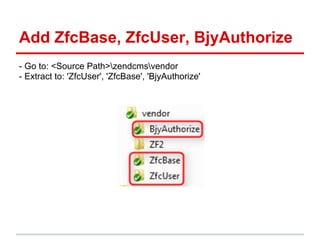
Add ZfcBase, ZfcUser, BjyAuthorize
- Go to: <Source Path>zendcmsvendor
- Extract to: 'ZfcUser', 'ZfcBase', 'BjyAuthorize'
Config application.config
- Go to: <Source Path>zendcmsconfig
- Edit file: 'application.config.php'
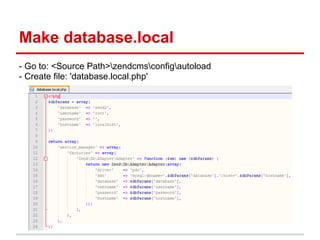
Make database.local
- Go to: <Source Path>zendcmsconfigautoload
- Create file: 'database.local.php'
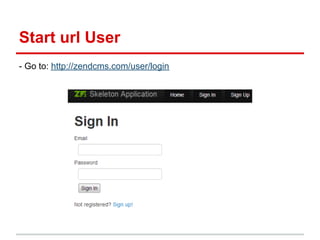
Start url User
- Go to: http://zendcms.com/user/login
DB List
Star:
1) User (u)
2) Tag (t): Page, Menu, Category
3) Post (p): Article, Products, Banner
4) Meta (m): Media
5) Option (o): Configuration
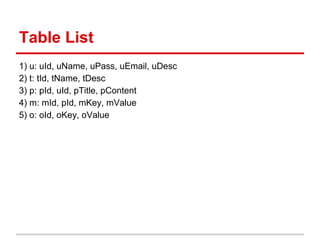
Table List
1) u: uId, uName, uPass, uEmail, uDesc
2) t: tId, tName, tDesc
3) p: pId, uId, pTitle, pContent
4) m: mId, pId, mKey, mValue
5) o: oId, oKey, oValue
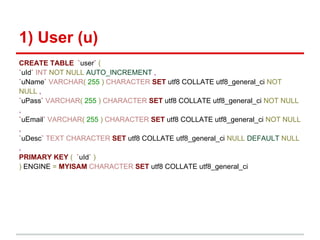
1) User (u)
CREATE TABLE `user` (
`uId` INT NOT NULL AUTO_INCREMENT ,
`uName` VARCHAR( 255 ) CHARACTER SET utf8 COLLATE utf8_general_ci NOT
NULL ,
`uPass` VARCHAR( 255 ) CHARACTER SET utf8 COLLATE utf8_general_ci NOT NULL
,
`uEmail` VARCHAR( 255 ) CHARACTER SET utf8 COLLATE utf8_general_ci NOT NULL
,
`uDesc` TEXT CHARACTER SET utf8 COLLATE utf8_general_ci NULL DEFAULT NULL
,
PRIMARY KEY ( `uId` )
) ENGINE = MYISAM CHARACTER SET utf8 COLLATE utf8_general_ci
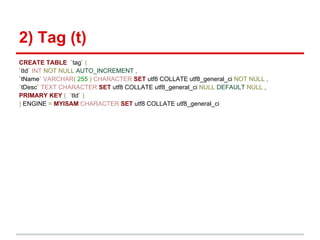
2) Tag (t)
CREATE TABLE `tag` (
`tId` INT NOT NULL AUTO_INCREMENT ,
`tName` VARCHAR( 255 ) CHARACTER SET utf8 COLLATE utf8_general_ci NOT NULL ,
`tDesc` TEXT CHARACTER SET utf8 COLLATE utf8_general_ci NULL DEFAULT NULL ,
PRIMARY KEY ( `tId` )
) ENGINE = MYISAM CHARACTER SET utf8 COLLATE utf8_general_ci
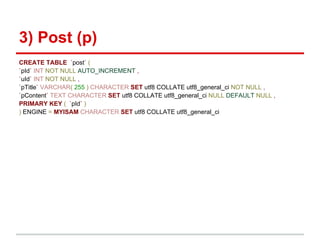
3) Post (p)
CREATE TABLE `post` (
`pId` INT NOT NULL AUTO_INCREMENT ,
`uId` INT NOT NULL ,
`pTitle` VARCHAR( 255 ) CHARACTER SET utf8 COLLATE utf8_general_ci NOT NULL ,
`pContent` TEXT CHARACTER SET utf8 COLLATE utf8_general_ci NULL DEFAULT NULL ,
PRIMARY KEY ( `pId` )
) ENGINE = MYISAM CHARACTER SET utf8 COLLATE utf8_general_ci
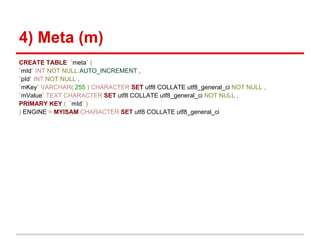
4) Meta (m)
CREATE TABLE `meta` (
`mId` INT NOT NULL AUTO_INCREMENT ,
`pId` INT NOT NULL ,
`mKey` VARCHAR( 255 ) CHARACTER SET utf8 COLLATE utf8_general_ci NOT NULL ,
`mValue` TEXT CHARACTER SET utf8 COLLATE utf8_general_ci NOT NULL ,
PRIMARY KEY ( `mId` )
) ENGINE = MYISAM CHARACTER SET utf8 COLLATE utf8_general_ci
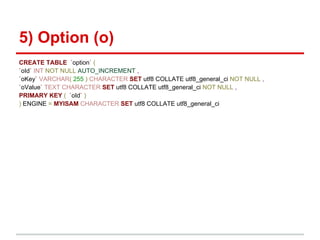
5) Option (o)
CREATE TABLE `option` (
`oId` INT NOT NULL AUTO_INCREMENT ,
`oKey` VARCHAR( 255 ) CHARACTER SET utf8 COLLATE utf8_general_ci NOT NULL ,
`oValue` TEXT CHARACTER SET utf8 COLLATE utf8_general_ci NOT NULL ,
PRIMARY KEY ( `oId` )
) ENGINE = MYISAM CHARACTER SET utf8 COLLATE utf8_general_ci
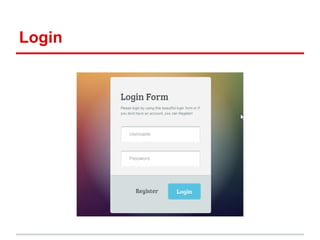
Login
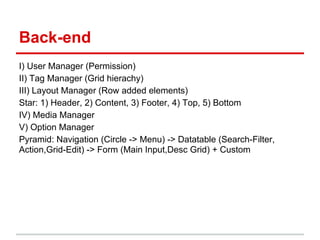
Back-end
I) User Manager (Permission)
II) Tag Manager (Grid hierachy)
III) Layout Manager (Row added elements)
Star: 1) Header, 2) Content, 3) Footer, 4) Top, 5) Bottom
IV) Media Manager
V) Option Manager
Pyramid: Navigation (Circle -> Menu) -> Datatable (Search-Filter,
Action,Grid-Edit) -> Form (Main Input,Desc Grid) + Custom
Github
- Go to: https://github.com/leonguyen/zendcms

Zend Lab

  • 1.
  • 2.
    Features - Purpose: Anopen source Zend CMS - GUI: Bootstrap + jQuery + Dojo - Technology: Zend 2 + Node.js + NoSQL
  • 3.
    Modules - Content: + News,Media (Photo-Video|Infographic-Mindmap), Slide + Products-Cart, Vote-Survey-Chat, Form+App - Channel: + Web, Tablet, Mobile, Email, SMS, Print
  • 4.
    Design - Logo &Icon - Color scheme & Pattern - Typography - Elements
  • 5.
  • 6.
  • 7.
  • 8.
    Installation - Download ZendServer Community Edition (include Zend Framework 2.0) (http://framework.zend.com/downloads/latest)
  • 9.
    Start Zend Server -Go to http://localhost:10081/ZendServer
  • 10.
    Generate a TrialLicense for Zend Server - Go to http://www.zend.com/en/products/server/license
  • 11.
    Config Zend Application -Download Zend Skeleton Application (https://github. com/zendframework/ZendSkeletonApplication)
  • 12.
  • 13.
    Config Windows Host -Go to: C:WindowsSystem32driversetchosts
  • 14.
    Config Zend ServerHost - Go to: C:Program FilesZendZendServeretcsites.d - Make host file: 'vhost_zendcms.com.conf' - Restart Zend Server
  • 15.
    Start ZF2 SkeletonApplication - Go to: http://zendcms.com
  • 16.
    Config Zend Module -Download Zend Skeleton Module (https://github. com/zendframework/ZendSkeletonModule)
  • 17.
    Add Skeleton Module -Go to: <Source Path>zendcmsmodule - Extract to: 'ZendSkeletonModule'
  • 18.
    Config application.config - Goto: <Source Path>zendcmsconfig - Edit file: 'application.config.php'
  • 19.
    Config module.config - Goto: <Source Path>zendcmsmoduleZendSkeletonModuleconfig - Edit file: 'module.config.php'
  • 20.
    Start Skeleton Module -Go to: http://zendcms.com/skeleton
  • 21.
    Zend MVC - Programmer’sReference Guide of Zend Framework 2: http://framework.zend.com/manual/2. 0/en/index.html#zendframeworkreference
  • 22.
  • 23.
  • 24.
    Describe Album Module -The application that we are going to build is a simple inventory system to display which albums we own. The main page will list our collection and allow us to add, edit and delete CDs. Page Description List of albums This will display the list of albums and provide links to edit and delete them. Also, a link to enable adding new albums will be provided. Add new album This page will provide a form for adding a new album. Edit album This page will provide a form for editing an album. Delete album This page will confirm that we want to delete an album and then delete it.
  • 25.
    Create directories - Creatingfollowing directories.
  • 26.
    Create Module.php - Create'Module.php' in the Album module.
  • 27.
    Configuration - Create afile 'module.config.php' under <Source Path>zendcmsmoduleAlbumconfig
  • 28.
    Config application.config - Goto: <Source Path>zendcmsconfig - Edit file: 'application.config.php'
  • 29.
    Routing and controllers -As we have four pages that all apply to albums, we will group them in a single controller AlbumController within our Album module as four actions Page Controller Action Home AlbumController index Add new album AlbumController add Edit album AlbumController edit Delete album AlbumController delete
  • 30.
    Add Router - Modify'module. config.php' under <Source Path>zendcmsmodul eAlbumconfig
  • 31.
    Create the Controller -Create controller class 'AlbumController.php' under <Source Path>moduleAlbumsrcAlbumController
  • 32.
    DB Schema - CreateSQL statements to create the album table.
  • 33.
    Create the Model -Create model class 'Album.php' under <Source Path>moduleAlbumsrcAlbumModel
  • 34.
    Create the ModelTable - Create model class 'AlbumTable.php' under <Source Path>moduleAlbumsrcAlbu mModel
  • 35.
    Using ServiceManager toconfigure the table gateway and inject into the AlbumTable - Create 'Module.php' in the Album module.
  • 36.
    Config DB Driver -Modify 'global.php' under <Source Path>configautoload
  • 37.
    Config DB Credentials -Modify 'local.php' under <Source Path>configautoload
  • 38.
    Create the View -Create view 'index.phtml' under <Source Path>moduleAlbumviewalbumalbum
  • 39.
    Open Album - Goto: http://zendcms.com/album
  • 40.
    Forms and Actions- Add album - Form - Create view 'AlbumForm.php' under <Source Path>moduleAlbumsrcAlbumForm
  • 41.
    Forms and Actions- Add album - Model - Modify model class 'Album.php' under <Source Path>moduleAlbumsrcAlbumM odel
  • 42.
    Forms and Actions- Add album - Controller - Modify controller class 'AlbumController.php' under <Source Path>moduleAlbumsrcAlbumController
  • 43.
    Forms and Actions- Add album - View - Create view 'add.phtml' under <Source Path>moduleAlbumviewalbumalbum
  • 44.
    Forms and Actions- Add album - Open - Go to: http://zendcms.com/album/add
  • 45.
    Forms and Actions- Edit album - Controller - Modify controller class 'AlbumController.php' under <Source Path>moduleAlbumsrcAlbumC ontroller
  • 46.
    Forms and Actions- Edit album - Model - Modify model class 'Album.php' under <Source Path>moduleAlbumsrcAlbumModel
  • 47.
    Forms and Actions- Edit album - View - Create view 'edit.phtml' under <Source Path>moduleAlbumviewalbumalbum
  • 48.
    Forms and Actions- Delete album - Controller - Modify controller class 'AlbumController.php' under <Source Path>moduleAlbumsrcAlbumC ontroller
  • 49.
    Forms and Actions- Edit album - View - Create view 'delete.phtml' under <Source Path>moduleAlbumviewalbumalbum
  • 50.
  • 51.
    Zfc [Base.User.Acl] - Download(https://github.com/ZF-Commons/ZfcUser) (https://github.com/ZF-Commons/ZfcBase) (https://github.com/bjyoungblood/BjyAuthorize)
  • 52.
    Add ZfcBase, ZfcUser,BjyAuthorize - Go to: <Source Path>zendcmsvendor - Extract to: 'ZfcUser', 'ZfcBase', 'BjyAuthorize'
  • 53.
    Config application.config - Goto: <Source Path>zendcmsconfig - Edit file: 'application.config.php'
  • 54.
    Make database.local - Goto: <Source Path>zendcmsconfigautoload - Create file: 'database.local.php'
  • 55.
    Start url User -Go to: http://zendcms.com/user/login
  • 56.
    DB List Star: 1) User(u) 2) Tag (t): Page, Menu, Category 3) Post (p): Article, Products, Banner 4) Meta (m): Media 5) Option (o): Configuration
  • 57.
    Table List 1) u:uId, uName, uPass, uEmail, uDesc 2) t: tId, tName, tDesc 3) p: pId, uId, pTitle, pContent 4) m: mId, pId, mKey, mValue 5) o: oId, oKey, oValue
  • 58.
    1) User (u) CREATETABLE `user` ( `uId` INT NOT NULL AUTO_INCREMENT , `uName` VARCHAR( 255 ) CHARACTER SET utf8 COLLATE utf8_general_ci NOT NULL , `uPass` VARCHAR( 255 ) CHARACTER SET utf8 COLLATE utf8_general_ci NOT NULL , `uEmail` VARCHAR( 255 ) CHARACTER SET utf8 COLLATE utf8_general_ci NOT NULL , `uDesc` TEXT CHARACTER SET utf8 COLLATE utf8_general_ci NULL DEFAULT NULL , PRIMARY KEY ( `uId` ) ) ENGINE = MYISAM CHARACTER SET utf8 COLLATE utf8_general_ci
  • 59.
    2) Tag (t) CREATETABLE `tag` ( `tId` INT NOT NULL AUTO_INCREMENT , `tName` VARCHAR( 255 ) CHARACTER SET utf8 COLLATE utf8_general_ci NOT NULL , `tDesc` TEXT CHARACTER SET utf8 COLLATE utf8_general_ci NULL DEFAULT NULL , PRIMARY KEY ( `tId` ) ) ENGINE = MYISAM CHARACTER SET utf8 COLLATE utf8_general_ci
  • 60.
    3) Post (p) CREATETABLE `post` ( `pId` INT NOT NULL AUTO_INCREMENT , `uId` INT NOT NULL , `pTitle` VARCHAR( 255 ) CHARACTER SET utf8 COLLATE utf8_general_ci NOT NULL , `pContent` TEXT CHARACTER SET utf8 COLLATE utf8_general_ci NULL DEFAULT NULL , PRIMARY KEY ( `pId` ) ) ENGINE = MYISAM CHARACTER SET utf8 COLLATE utf8_general_ci
  • 61.
    4) Meta (m) CREATETABLE `meta` ( `mId` INT NOT NULL AUTO_INCREMENT , `pId` INT NOT NULL , `mKey` VARCHAR( 255 ) CHARACTER SET utf8 COLLATE utf8_general_ci NOT NULL , `mValue` TEXT CHARACTER SET utf8 COLLATE utf8_general_ci NOT NULL , PRIMARY KEY ( `mId` ) ) ENGINE = MYISAM CHARACTER SET utf8 COLLATE utf8_general_ci
  • 62.
    5) Option (o) CREATETABLE `option` ( `oId` INT NOT NULL AUTO_INCREMENT , `oKey` VARCHAR( 255 ) CHARACTER SET utf8 COLLATE utf8_general_ci NOT NULL , `oValue` TEXT CHARACTER SET utf8 COLLATE utf8_general_ci NOT NULL , PRIMARY KEY ( `oId` ) ) ENGINE = MYISAM CHARACTER SET utf8 COLLATE utf8_general_ci
  • 63.
  • 64.
    Back-end I) User Manager(Permission) II) Tag Manager (Grid hierachy) III) Layout Manager (Row added elements) Star: 1) Header, 2) Content, 3) Footer, 4) Top, 5) Bottom IV) Media Manager V) Option Manager Pyramid: Navigation (Circle -> Menu) -> Datatable (Search-Filter, Action,Grid-Edit) -> Form (Main Input,Desc Grid) + Custom
  • 65.
    Github - Go to:https://github.com/leonguyen/zendcms