XML to XML transformation in Mule
As we know, there can be multiple types of payload we need
to deal daily, starting from JSON, XML or String, we also
require different type of data transformation in our application
like XML to JSON, JSON to XML or String etc . In Mule
application, we have a various set of transformers that we
can use to obtain our required data format.
Here we will be discussing on transformation of XML to XML
format of data. If you have gone through my previous slides
on JSON to JSON transformation here , you will realize how
easy it is to perform such type of transformation in Mule.
Here we will take the same example, but will be doing it on
XML instead of JSON this time.
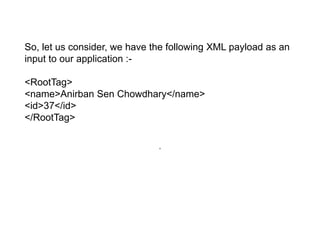
So, let us consider, we have the following XML payload as an
input to our application :-
<RootTag>
<name>Anirban Sen Chowdhary</name>
<id>37</id>
</RootTag>
.
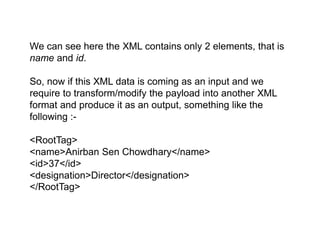
We can see here the XML contains only 2 elements, that is
name and id.
So, now if this XML data is coming as an input and we
require to transform/modify the payload into another XML
format and produce it as an output, something like the
following :-
<RootTag>
<name>Anirban Sen Chowdhary</name>
<id>37</id>
<designation>Director</designation>
</RootTag>
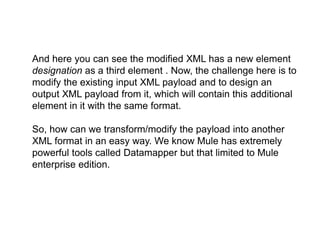
And here you can see the modified XML has a new element
designation as a third element . Now, the challenge here is to
modify the existing input XML payload and to design an
output XML payload from it, which will contain this additional
element in it with the same format.
So, how can we transform/modify the payload into another
XML format in an easy way. We know Mule has extremely
powerful tools called Datamapper but that limited to Mule
enterprise edition.
How to transform or modify a XML payload in
Mule ??
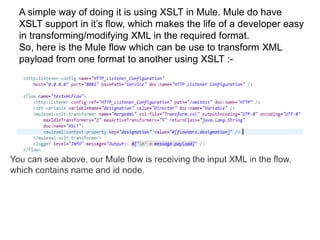
A simple way of doing it is using XSLT in Mule. Mule do have
XSLT support in it’s flow, which makes the life of a developer easy
in transforming/modifying XML in the required format.
So, here is the Mule flow which can be use to transform XML
payload from one format to another using XSLT :-
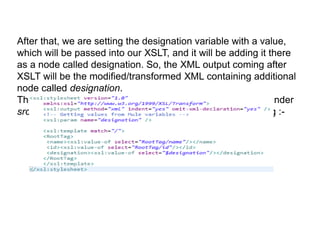
After that, we are setting the designation variable with a value,
which will be passed into our XSLT, and it will be adding it there
as a node called designation. So, the XML output coming after
XSLT will be the modified/transformed XML containing additional
node called designation.
The XSL file here named as Transform.xsl should be kept under
src/main/resources folder and the xsl file will be as following :-
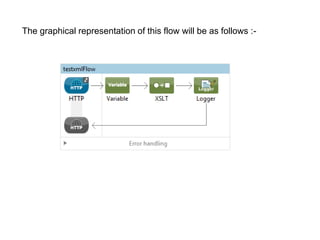
The graphical representation of this flow will be as follows :-
Testing our application ……
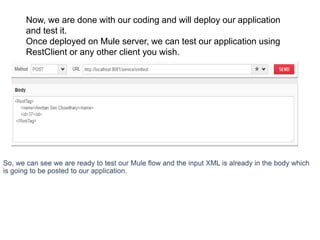
Now, we are done with our coding and will deploy our application
and test it.
Once deployed on Mule server, we can test our application using
RestClient or any other client you wish.
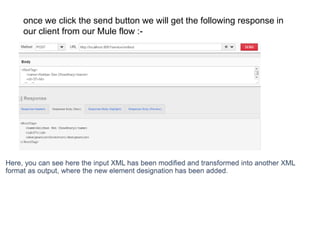
once we click the send button we will get the following response in
our client from our Mule flow :-
Conclusion
So, you can find transforming or modifying a XML payload into
another XML format is extremely easy in Mule using the XSLT .
And that means you can design your output XML payload in any
format you require using XSLT easily in your Mule flow and Mule
also support this by it’s XSLT transformer !!!
That’s all !!! I’ve hopefully been clear enough in displaying the
implementation of XSLT and XSLT transformer in designing and
modifying your XML payload which you can produce as an output
from your Mule application.
I hope you liked this !!!
Hope you enjoyed the simple yet an amazing trick in Mule
You can also find this post here :- http://bushorn.com/xml-to-xml-
transformation-in-mule/
Xml to xml transformation in mule

Xml to xml transformation in mule

  • 1.
    XML to XMLtransformation in Mule
  • 2.
    As we know,there can be multiple types of payload we need to deal daily, starting from JSON, XML or String, we also require different type of data transformation in our application like XML to JSON, JSON to XML or String etc . In Mule application, we have a various set of transformers that we can use to obtain our required data format. Here we will be discussing on transformation of XML to XML format of data. If you have gone through my previous slides on JSON to JSON transformation here , you will realize how easy it is to perform such type of transformation in Mule. Here we will take the same example, but will be doing it on XML instead of JSON this time.
  • 3.
    So, let usconsider, we have the following XML payload as an input to our application :- <RootTag> <name>Anirban Sen Chowdhary</name> <id>37</id> </RootTag> .
  • 4.
    We can seehere the XML contains only 2 elements, that is name and id. So, now if this XML data is coming as an input and we require to transform/modify the payload into another XML format and produce it as an output, something like the following :- <RootTag> <name>Anirban Sen Chowdhary</name> <id>37</id> <designation>Director</designation> </RootTag>
  • 5.
    And here youcan see the modified XML has a new element designation as a third element . Now, the challenge here is to modify the existing input XML payload and to design an output XML payload from it, which will contain this additional element in it with the same format. So, how can we transform/modify the payload into another XML format in an easy way. We know Mule has extremely powerful tools called Datamapper but that limited to Mule enterprise edition.
  • 6.
    How to transformor modify a XML payload in Mule ??
  • 7.
    A simple wayof doing it is using XSLT in Mule. Mule do have XSLT support in it’s flow, which makes the life of a developer easy in transforming/modifying XML in the required format. So, here is the Mule flow which can be use to transform XML payload from one format to another using XSLT :-
  • 8.
    After that, weare setting the designation variable with a value, which will be passed into our XSLT, and it will be adding it there as a node called designation. So, the XML output coming after XSLT will be the modified/transformed XML containing additional node called designation. The XSL file here named as Transform.xsl should be kept under src/main/resources folder and the xsl file will be as following :-
  • 9.
    The graphical representationof this flow will be as follows :-
  • 10.
  • 11.
    Now, we aredone with our coding and will deploy our application and test it. Once deployed on Mule server, we can test our application using RestClient or any other client you wish.
  • 12.
    once we clickthe send button we will get the following response in our client from our Mule flow :-
  • 13.
  • 14.
    So, you canfind transforming or modifying a XML payload into another XML format is extremely easy in Mule using the XSLT . And that means you can design your output XML payload in any format you require using XSLT easily in your Mule flow and Mule also support this by it’s XSLT transformer !!! That’s all !!! I’ve hopefully been clear enough in displaying the implementation of XSLT and XSLT transformer in designing and modifying your XML payload which you can produce as an output from your Mule application. I hope you liked this !!!
  • 15.
    Hope you enjoyedthe simple yet an amazing trick in Mule You can also find this post here :- http://bushorn.com/xml-to-xml- transformation-in-mule/