Unit2 CS19.414 Advanced
RDBMS
XML: Extensible Markup Language
Unit 2 XML Outline
• Introduction
• Structured, Semi structured, and Unstructured
Data.
• XML Querying.
– XPath
– XQuery
Slide 27- 2
Introduction
• Although HTML is widely used for formatting and structuring
Web documents, it is not suitable for specifying structured
data that is extracted from databases.
• A new language—namely XML (eXtended Markup Language)
has emerged as the standard for structuring and exchanging
data over the Web.
– XML can be used to provide more information about the
structure and meaning of the data in the Web pages rather than
just specifying how the Web pages are formatted for display on
the screen.
• The formatting aspects are specified separately—for example,
by using a formatting language such as XSL (eXtended
Stylesheet Language).
Slide 27- 3
Structured, Semi Structured
and Unstructured Data
• Three characterizations:
– Structured Data
– Semi-Structured Data
– Unstructured Data
• Structured Data:
– Information stored in databases is known as
structured data because it is represented in a
strict format.
– The DBMS then checks to ensure that all data
follows the structures and constraints specified in
the schema.
Slide 27- 4
Structured, Semi Structured
and Unstructured Data (contd.)
• Semi-Structured Data:
– In some applications, data is collected in an ad-hoc manner
before it is known how it will be stored and managed.
– This data may have a certain structure, but not all the
information collected will have identical structure. This
type of data is known as semi-structured data.
– In semi-structured data, the schema information is mixed
in with the data values, since each data object can have
different attributes that are not known in advance. Hence,
this type of data is sometimes referred to as self-describing
data.
Slide 27- 5
Structured, Semi Structured
and Unstructured Data (contd.)
• Unstructured Data:
– A third category is known as unstructured data, because
there is very limited indication of the type of data.
– A typical example would be a text document that contains
information embedded within it. Web pages in HTML that
contain some data are considered as unstructured data.
Slide 27- 6
Structured, Semi Structured
and Unstructured Data (contd.)
• Semi-structured data may be
displayed as a directed graph...
– The labels or tags on the directed edges represent
the schema names—the names of attributes,
object types (or entity types or classes), and
relationships.
– The internal nodes represent individual objects or
composite attributes.
– The leaf nodes represent actual data values of
simple (atomic) attributes.
Slide 27- 7
FIGURE 27.1 Representing semistructured data
as a graph.
Slide 27- 8
XML Hierarchical (Tree) Data Model (contd.)
• It is possible to characterize three main types of XML
documents:
1. Data-centric XML documents
• These documents have many small data items that follow a
specific structure, and hence may be extracted from a
structured database. They are formatted as XML documents in
order to exchange them or display them over the Web.
2. Document-centric XML documents:
• These are documents with large amounts of text, such as news
articles or books. There is little or no structured data elements
in these documents.
3. Hybrid XML documents:
• These documents may have parts that contains structured data
and other parts that are predominantly textual or unstructured.
Slide 27- 9
XML Documents, DTD, and XML
Schema
• Two types of XML
– Well-Formed XML
– Valid XML
Slide 27- 10
XML Documents, DTD, and XML
Schema
• Well-Formed XML
– It must start with an XML declaration to indicate
the version of XML being used—as well as any
other relevant attributes.
– It must follow the syntactic guidelines of the tree
model.
• This means that there should be a single root element,
and every element must include a matching pair of
start tag and end tag within the start and end tags of
the parent element.
Slide 27- 11
XML Documents, DTD, and XML
Schema
• Well-Formed XML (contd.)
– A well-formed XML document is syntactically
correct
• This allows it to be processed by generic processors
that traverse the document and create an internal tree
representation.
– DOM (Document Object Model) - Allows programs to
manipulate the resulting tree representation corresponding to
a well-formed XML document. The whole document must be
parsed beforehand when using dom.
– SAX - Allows processing of XML documents on the fly by
notifying the processing program whenever a start or end tag
is encountered.
Slide 27- 12
XML Documents, DTD, and XML
Schema
• Valid XML
– A stronger criterion is for an XML document to be
valid.
– In this case, the document must be well-formed,
and in addition the element names used in the
start and end tag pairs must follow the structure
specified in a separate XML DTD (Document Type
Definition) file or XML schema file.
Slide 27- 13
XML Querying
• XPath
– An XPath expression returns a collection of
element nodes that satisfy certain patterns
specified in the expression.
– The names in the XPath expression are node
names in the XML document tree that are either
tag (element) names or attribute names, possibly
with additional qualifier conditions to further
restrict the nodes that satisfy the pattern.
Slide 27- 14
XML Querying
• XPath (contd.)
– There are two main separators when specifying a path:
• single slash (/) and double slash (//)
– A single slash before a tag specifies that the tag must appear as a
direct child of the previous (parent) tag, whereas a double slash
specifies that the tag can appear as a descendant of the previous tag
at any level.
– It is customary to include the file name in any XPath query
allowing us to specify any local file name or path name that
specifies the path.
– doc(www.company.com/info.XML)/company => COMPANY XML
doc
Slide 27- 15
XML Querying
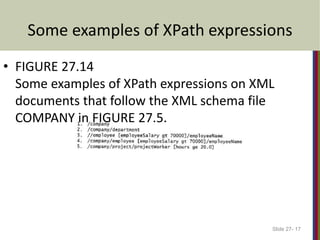
1. Returns the COMPANY root node and all its descendant nodes, which
means that it returns the whole XML document.
2. Returns all department nodes (elements) and their descendant subtrees.
3. Returns all employeeName nodes that are direct children of an employee
node, such that the employee node has another child element
employeeSalary whose value is greater than 70000.
4. This returns the same result as the previous one except that we specified
the full path name in this example.
5. This returns all projectWorker nodes and their descendant nodes that are
children under a path /company/project and that have a child node hours
with value greater than 20.0 hours.
Slide 27- 16
Some examples of XPath expressions
Slide 27- 17
• FIGURE 27.14
Some examples of XPath expressions on XML
documents that follow the XML schema file
COMPANY in FIGURE 27.5.
XML Querying
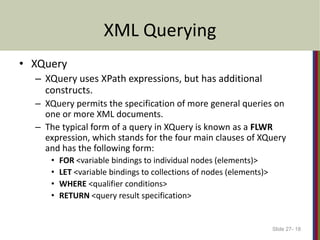
• XQuery
– XQuery uses XPath expressions, but has additional
constructs.
– XQuery permits the specification of more general queries on
one or more XML documents.
– The typical form of a query in XQuery is known as a FLWR
expression, which stands for the four main clauses of XQuery
and has the following form:
• FOR <variable bindings to individual nodes (elements)>
• LET <variable bindings to collections of nodes (elements)>
• WHERE <qualifier conditions>
• RETURN <query result specification>
Slide 27- 18
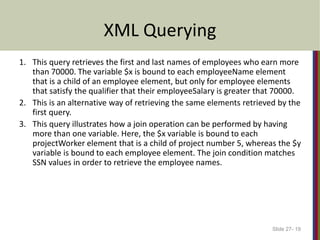
XML Querying
1. This query retrieves the first and last names of employees who earn more
than 70000. The variable $x is bound to each employeeName element
that is a child of an employee element, but only for employee elements
that satisfy the qualifier that their employeeSalary is greater that 70000.
2. This is an alternative way of retrieving the same elements retrieved by the
first query.
3. This query illustrates how a join operation can be performed by having
more than one variable. Here, the $x variable is bound to each
projectWorker element that is a child of project number 5, whereas the $y
variable is bound to each employee element. The join condition matches
SSN values in order to retrieve the employee names.
Slide 27- 19
Some Examples of XQuery Queries
Slide 27- 20

Unit2_XML_S_SS_US Data_CS19414.pptx

  • 1.
    Unit2 CS19.414 Advanced RDBMS XML:Extensible Markup Language
  • 2.
    Unit 2 XMLOutline • Introduction • Structured, Semi structured, and Unstructured Data. • XML Querying. – XPath – XQuery Slide 27- 2
  • 3.
    Introduction • Although HTMLis widely used for formatting and structuring Web documents, it is not suitable for specifying structured data that is extracted from databases. • A new language—namely XML (eXtended Markup Language) has emerged as the standard for structuring and exchanging data over the Web. – XML can be used to provide more information about the structure and meaning of the data in the Web pages rather than just specifying how the Web pages are formatted for display on the screen. • The formatting aspects are specified separately—for example, by using a formatting language such as XSL (eXtended Stylesheet Language). Slide 27- 3
  • 4.
    Structured, Semi Structured andUnstructured Data • Three characterizations: – Structured Data – Semi-Structured Data – Unstructured Data • Structured Data: – Information stored in databases is known as structured data because it is represented in a strict format. – The DBMS then checks to ensure that all data follows the structures and constraints specified in the schema. Slide 27- 4
  • 5.
    Structured, Semi Structured andUnstructured Data (contd.) • Semi-Structured Data: – In some applications, data is collected in an ad-hoc manner before it is known how it will be stored and managed. – This data may have a certain structure, but not all the information collected will have identical structure. This type of data is known as semi-structured data. – In semi-structured data, the schema information is mixed in with the data values, since each data object can have different attributes that are not known in advance. Hence, this type of data is sometimes referred to as self-describing data. Slide 27- 5
  • 6.
    Structured, Semi Structured andUnstructured Data (contd.) • Unstructured Data: – A third category is known as unstructured data, because there is very limited indication of the type of data. – A typical example would be a text document that contains information embedded within it. Web pages in HTML that contain some data are considered as unstructured data. Slide 27- 6
  • 7.
    Structured, Semi Structured andUnstructured Data (contd.) • Semi-structured data may be displayed as a directed graph... – The labels or tags on the directed edges represent the schema names—the names of attributes, object types (or entity types or classes), and relationships. – The internal nodes represent individual objects or composite attributes. – The leaf nodes represent actual data values of simple (atomic) attributes. Slide 27- 7
  • 8.
    FIGURE 27.1 Representingsemistructured data as a graph. Slide 27- 8
  • 9.
    XML Hierarchical (Tree)Data Model (contd.) • It is possible to characterize three main types of XML documents: 1. Data-centric XML documents • These documents have many small data items that follow a specific structure, and hence may be extracted from a structured database. They are formatted as XML documents in order to exchange them or display them over the Web. 2. Document-centric XML documents: • These are documents with large amounts of text, such as news articles or books. There is little or no structured data elements in these documents. 3. Hybrid XML documents: • These documents may have parts that contains structured data and other parts that are predominantly textual or unstructured. Slide 27- 9
  • 10.
    XML Documents, DTD,and XML Schema • Two types of XML – Well-Formed XML – Valid XML Slide 27- 10
  • 11.
    XML Documents, DTD,and XML Schema • Well-Formed XML – It must start with an XML declaration to indicate the version of XML being used—as well as any other relevant attributes. – It must follow the syntactic guidelines of the tree model. • This means that there should be a single root element, and every element must include a matching pair of start tag and end tag within the start and end tags of the parent element. Slide 27- 11
  • 12.
    XML Documents, DTD,and XML Schema • Well-Formed XML (contd.) – A well-formed XML document is syntactically correct • This allows it to be processed by generic processors that traverse the document and create an internal tree representation. – DOM (Document Object Model) - Allows programs to manipulate the resulting tree representation corresponding to a well-formed XML document. The whole document must be parsed beforehand when using dom. – SAX - Allows processing of XML documents on the fly by notifying the processing program whenever a start or end tag is encountered. Slide 27- 12
  • 13.
    XML Documents, DTD,and XML Schema • Valid XML – A stronger criterion is for an XML document to be valid. – In this case, the document must be well-formed, and in addition the element names used in the start and end tag pairs must follow the structure specified in a separate XML DTD (Document Type Definition) file or XML schema file. Slide 27- 13
  • 14.
    XML Querying • XPath –An XPath expression returns a collection of element nodes that satisfy certain patterns specified in the expression. – The names in the XPath expression are node names in the XML document tree that are either tag (element) names or attribute names, possibly with additional qualifier conditions to further restrict the nodes that satisfy the pattern. Slide 27- 14
  • 15.
    XML Querying • XPath(contd.) – There are two main separators when specifying a path: • single slash (/) and double slash (//) – A single slash before a tag specifies that the tag must appear as a direct child of the previous (parent) tag, whereas a double slash specifies that the tag can appear as a descendant of the previous tag at any level. – It is customary to include the file name in any XPath query allowing us to specify any local file name or path name that specifies the path. – doc(www.company.com/info.XML)/company => COMPANY XML doc Slide 27- 15
  • 16.
    XML Querying 1. Returnsthe COMPANY root node and all its descendant nodes, which means that it returns the whole XML document. 2. Returns all department nodes (elements) and their descendant subtrees. 3. Returns all employeeName nodes that are direct children of an employee node, such that the employee node has another child element employeeSalary whose value is greater than 70000. 4. This returns the same result as the previous one except that we specified the full path name in this example. 5. This returns all projectWorker nodes and their descendant nodes that are children under a path /company/project and that have a child node hours with value greater than 20.0 hours. Slide 27- 16
  • 17.
    Some examples ofXPath expressions Slide 27- 17 • FIGURE 27.14 Some examples of XPath expressions on XML documents that follow the XML schema file COMPANY in FIGURE 27.5.
  • 18.
    XML Querying • XQuery –XQuery uses XPath expressions, but has additional constructs. – XQuery permits the specification of more general queries on one or more XML documents. – The typical form of a query in XQuery is known as a FLWR expression, which stands for the four main clauses of XQuery and has the following form: • FOR <variable bindings to individual nodes (elements)> • LET <variable bindings to collections of nodes (elements)> • WHERE <qualifier conditions> • RETURN <query result specification> Slide 27- 18
  • 19.
    XML Querying 1. Thisquery retrieves the first and last names of employees who earn more than 70000. The variable $x is bound to each employeeName element that is a child of an employee element, but only for employee elements that satisfy the qualifier that their employeeSalary is greater that 70000. 2. This is an alternative way of retrieving the same elements retrieved by the first query. 3. This query illustrates how a join operation can be performed by having more than one variable. Here, the $x variable is bound to each projectWorker element that is a child of project number 5, whereas the $y variable is bound to each employee element. The join condition matches SSN values in order to retrieve the employee names. Slide 27- 19
  • 20.
    Some Examples ofXQuery Queries Slide 27- 20