








My Resource for Excellence.


Get More Bytes for your Bucks!
Workshop #3: The Plan of Attack
9:00am-10:00am, Friday, September 18th, 2009
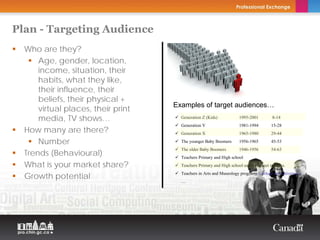
Plan - Targeting Audience
  Who are they?
      Age, gender, location,                                         Copyright Thierry Arsenault


      income, situation, their
      habits, what they like,
      their influence, their
      beliefs, their physical +
                                    Examples of target audiences…
      virtual places, their print
      media, TV shows…                Generation Z (Kids)            1995-2001           8-14
                                      Generation Y                   1981-1994           15-28
  How many are there?                 Generation X                   1965-1980           29-44

      Number                          The younger Baby Boomers       1956-1965           45-53

  Trends (Behavioural)
                                      The older Baby Boomers         1946-1956           54-63
                                      Teachers Primary and High school
  What is your market share?          Teachers Primary and High school using Internet in Class.

  Growth potential                    Teachers in Arts and Museology programs (college and university)
                                      …
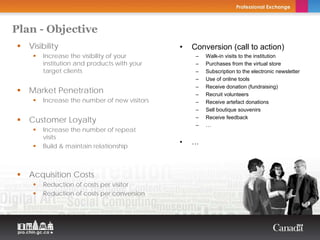
Plan - Objective
   Visibility                                               •   Conversion (call to action)
       Increase the visibility of your                           –   Walk-in visits to the institution
       institution and products with your                        –   Purchases from the virtual store
       target clients                                            –   Subscription to the electronic newsletter
                              Copyright Thierry Arsenault        –   Use of online tools
                                                                 –   Receive donation (fundraising)
   Market Penetration                                            –   Recruit volunteers
       Increase the number of new visitors                       –   Receive artefact donations
                                                                 –   Sell boutique souvenirs

   Customer Loyalty                                              –   Receive feedback
                                                                 –   …
       Increase the number of repeat
       visits
                                                            •   …
       Build & maintain relationship


   Acquisition Costs
       Reduction of costs per visitor
       Reduction of costs per conversion
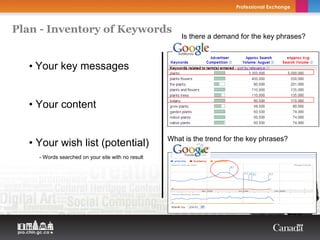
Plan - Inventory of Keywords
                                                                Is there a demand for the key phrases?
Copyright Thierry Arsenault


       • Your key messages


       • Your content


                                                            What is the trend for the key phrases?
       • Your wish list (potential)
             - Words searched on your site with no result
Plan - Inventory of Keywords
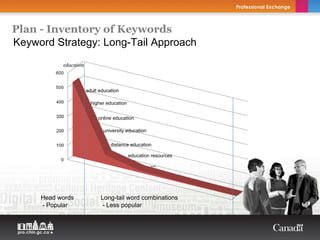
Keyword Strategy: Long-Tail Approach
           education


                       adult education

                         higher education


                            online education

                              university education

                                  distance education

                                            education resources
                                                     ...


     Head words              Long-tail word combinations
     - Popular                - Less popular
Plan - Inventory of Keywords
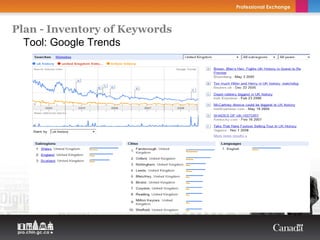
  Tool: Google Trends
Plan - Inventory of Keywords
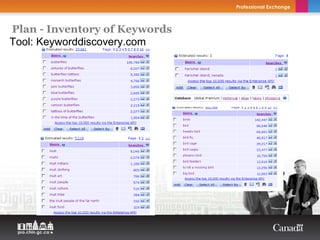
Tool: Keyworddiscovery.com
Plan - Inventory of Keywords
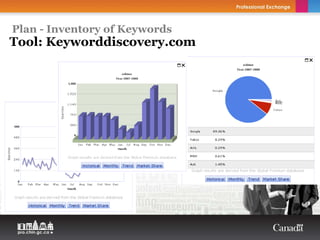
Tool: Keyworddiscovery.com
Plan - Inventory of Keywords
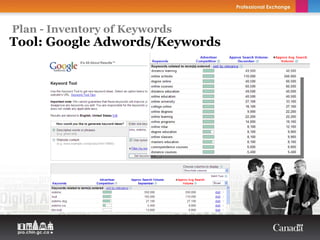
Tool: Google Adwords/Keywords
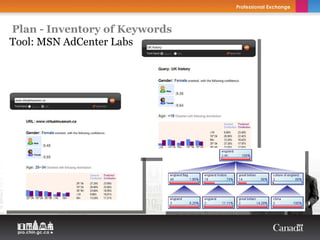
Plan - Inventory of Keywords
Tool: MSN AdCenter Labs
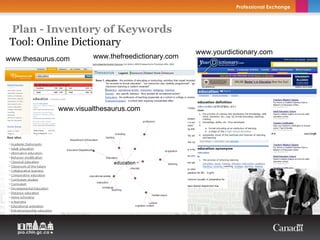
Plan - Inventory of Keywords
Tool: Online Dictionary
                                                  www.yourdictionary.com
www.thesaurus.com     www.thefreedictionary.com


             www.visualthesaurus.com
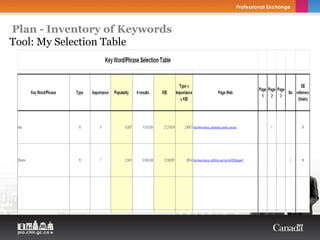
Plan - Inventory of Keywords
Tool: My Selection Table


                               Copyright Thierry Arsenault
My Resource for Excellence.


Get More Bytes for your Bucks!
My Resource for Excellence.


Get More Bytes for your Bucks!
Workshop #4: Writing for the Web
10:15am-2:45pm, Friday, September 18th, 2009
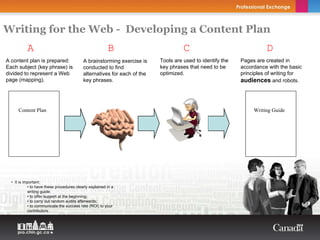
Writing for the Web - Developing a Content Plan
          A                                               B                        C                                 D
A content plan is prepared:                A brainstorming exercise is    Tools are used to identify the   Pages are created in
Each subject (key phrase) is               conducted to find              key phrases that need to be      accordance with the basic
divided to represent a Web                 alternatives for each of the   optimized.                       principles of writing for
page (mapping).                            key phrases.                                                    audiences and robots.


      Content Plan                                                                                              Writing Guide


                                     Copyright Thierry Arsenault


  • It is important:
            • to have these procedures clearly explained in a
            writing guide;
            • to offer support at the beginning;
            • to carry out random audits afterwards;
            • to communicate the success rate (ROI) to your
            contributors.
Writing for the Web - Web User Reading Habit

     Short attention span
     Don’t like long text
     They scan text                         Back
     They look for specific key
     phrase/information that answer their
     needs (their search terms)
     They look for headlines
     They like short sentences
     …
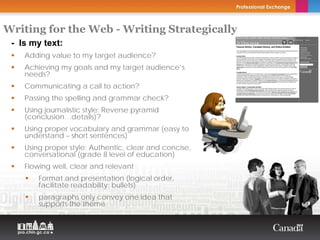
Writing for the Web - Writing Strategically
 - Is my text:                           Copyright Thierry Arsenault


    Adding value to my target audience?
    Achieving my goals and my target audience’s
    needs?
    Communicating a call to action?
    Passing the spelling and grammar check?
    Using journalistic style: Reverse pyramid
    (conclusion…details)?
    Using proper vocabulary and grammar (easy to
    understand – short sentences)
    Using proper style: Authentic, clear and concise,
    conversational (grade 8 level of education)
    Flowing well, clear and relevant
        Format and presentation (logical order,
        facilitate readability: bullets)
        paragraphs only convey one idea that
        supports the theme
Writing for the Web - Writing Strategically
 - Is my text:                           Copyright Thierry Arsenault


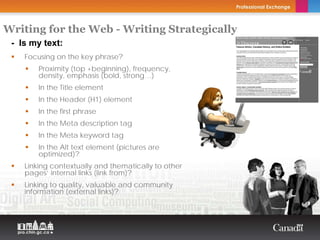
    Focusing on the key phrase?
        Proximity (top +beginning), frequency,
        density, emphasis (bold, strong…)
        In the Title element
        In the Header (H1) element
        In the first phrase
        In the Meta description tag
        In the Meta keyword tag
        In the Alt text element (pictures are
        optimized)?
    Linking contextually and thematically to other
    pages’ internal links (link from)?
    Linking to quality, valuable and community
    information (external links)?
Writing for the Web - Writing Strategically
                                        Copyright Thierry Arsenault


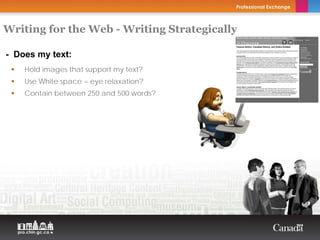
- Does my text:
    Hold images that support my text?
    Use White space = eye relaxation?
    Contain between 250 and 500 words?
Writing for the Web - Title element
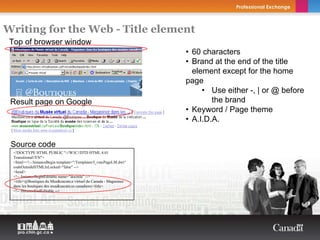
 Top of browser window
                                                                           • 60 characters
                                                                           • Brand at the end of the title
                                                                             element except for the home
                                                                           page
                                                                                • Use either -, | or @ before
 Result page on Google                                                             the brand
                                                                           • Keyword / Page theme
                                                                           • A.I.D.A.
                                                                    Copyright Thierry Arsenault


 Source code
  <!DOCTYPE HTML PUBLIC "-//W3C//DTD HTML 4.01
  Transitional//EN">
  <html><!-- InstanceBegin template="/Templates/f_vmcPageLM.dwt"
  codeOutsideHTMLIsLocked="false" -->
  <head>
  <!-- InstanceBeginEditable name="doctitle" -->
  <title>@Boutiques du Mus&eacute;e virtuel du Canada - Magasinez
  dans les boutiques des mus&eacute;es canadiens</title>
  <!-- InstanceEndEditable -->
Writing for the Web - Source code
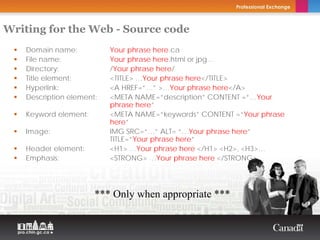
    Domain name:           Your phrase here.ca
    File name:             Your phrase here.html or jpg…
    Directory:             /Your phrase here/
    Title element:         <TITLE> …Your phrase here</TITLE>
    Hyperlink:             <A HREF=“…” >…Your phrase here</A>
    Description element:   <META NAME=“description” CONTENT =“…Your
                           phrase here”
    Keyword element:       <META NAME=“keywords” CONTENT =“Your phrase
                           here”
    Image:                 IMG SRC=“…” ALT= “…Your phrase here”
                           TITLE=“Your phrase here”
    Header element:        <H1> …Your phrase here </H1> <H2>, <H3>…
    Emphasis:              <STRONG> …Your phrase here </STRONG>


                       *** Only when appropriate ***
Writing for the Web - Density…2% Is Enough


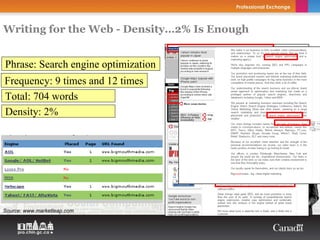
Phrase: Search engine optimization
Frequency: 9 times and 12 times
Total: 704 words
Density: 2%
           Copyright Thierry Arsenault


Source: www.marketleap.com
Writing for the Web - Optimizing Images

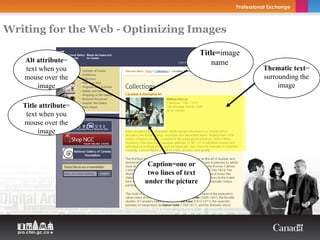
                                             Title=image
   Alt attribute=                                name
   text when you                                           Thematic text=
   mouse over the                                          surrounding the
       image                                                    image

   Title attribute=
    text when you
   mouse over the
        image


                         Caption=one or
                         two lines of text
                        under the picture
Writing for the Web - Optimizing Images


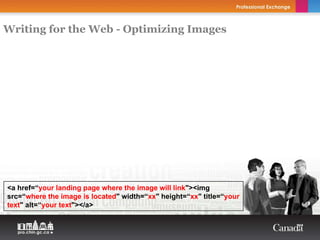
<a href=“your landing page where the image will link"><img
src=“where the image is located" width=“xx" height=“xx" title=“your
text" alt=“your text"></a>
Writing for the Web - Optimizing Images
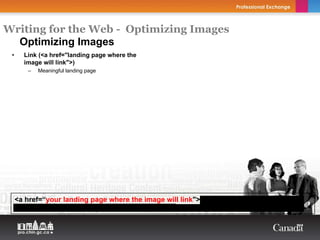
  Optimizing Images
 •     Link (<a href="landing page where the
       image will link">)
        –   Meaningful landing page


     <a href=“your landing page where the image will link"><img src=“where the image is
     located" width=“xx" height=“xx" title=“your text" alt=“your text"></a>
Writing for the Web - Optimizing Images
  Optimizing Images
 •     Link (<a href="landing page where the
       image will link">)
        –   Meaningful landing page

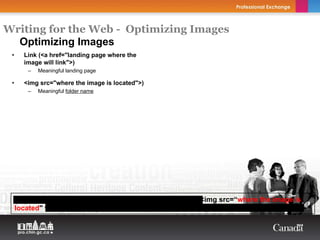
 •     <img src="where the image is located">)
        –   Meaningful folder name


     <a href=“your landing page where the image will link"><img src=“where the image is
     located" width=“xx" height=“xx" title=“your text" alt=“your text"></a>
Writing for the Web - Optimizing Images
  Optimizing Images
 •     Link (<a href="landing page where the
       image will link">)
        –   Meaningful landing page

 •     <img src="where the image is located">)
        –   Meaningful folder name

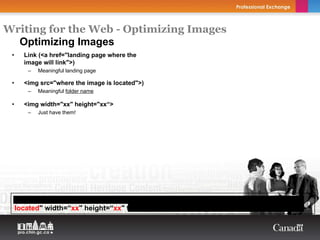
 •     <img width="xx" height="xx“>
        –   Just have them!


     <a href=“your landing page where the image will link"><img src=“where the image is
     located" width=“xx" height=“xx" title=“your text" alt=“your text"></a>
Writing for the Web - Optimizing Images
  Optimizing Images
 •     Link (<a href="landing page where the
       image will link">)
        –   Meaningful landing page

 •     <img src="where the image is located">)
        –   Meaningful folder name

 •     <img width="xx" height="xx“>
        –   Just have them!

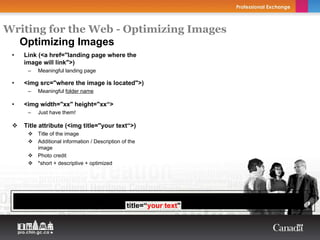
       Title attribute (<img title="your text“>)
            Title of the image
            Additional information / Description of the
            image
            Photo credit
            *short + descriptive + optimized


     <a href=“your landing page where the image will link"><img src=“where the image is
     located" width=“xx" height=“xx" title=“your text" alt=“your text"></a>
Writing for the Web - Optimizing Images
  Optimizing Images
 •     Link (<a href="landing page where the
       image will link">)
        –   Meaningful landing page

 •     <img src="where the image is located">)
        –   Meaningful folder name

 •     <img width="xx" height="xx“>
        –   Just have them!

       Title attribute (<img title="your text“>)
            Title of the image
            Additional information / Description of the
            image
            Photo credit
            *short + descriptive + optimized

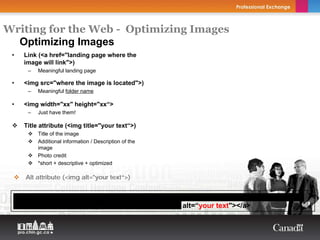
        Alt attribute (<img alt="your text“>)


     <a href=“your landing page where the image will link"><img src=“where the image is
     located" width=“xx" height=“xx" title=“your text" alt=“your text"></a>
Writing for the Web - Optimizing Images
  Optimizing Images
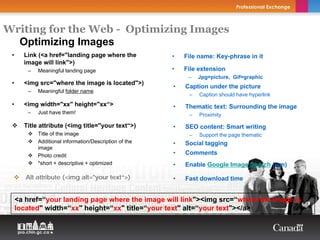
 •     Link (<a href="landing page where the            •   File name: Key-phrase in it
       image will link">)
        –   Meaningful landing page                     •   File extension
                                                             –   Jpg=picture, Gif=graphic
 •     <img src="where the image is located">)
                                                        •   Caption under the picture
        –   Meaningful folder name
                                                             –   Caption should have hyperlink
 •     <img width="xx" height="xx“>                     •   Thematic text: Surrounding the image
        –   Just have them!                                  –   Proximity

       Title attribute (<img title="your text“>)        •   SEO content: Smart writing
            Title of the image                               –   Support the page thematic
            Additional information/Description of the   •   Social tagging
            image
            Photo credit                                •   Comments
            *short + descriptive + optimized            •   Enable Google Image Search (wm)

        Alt attribute (<img alt="your text“>)           •   Fast download time


     <a href=“your landing page where the image will link"><img src=“where the image is
     located" width=“xx" height=“xx" title=“your text" alt=“your text"></a>
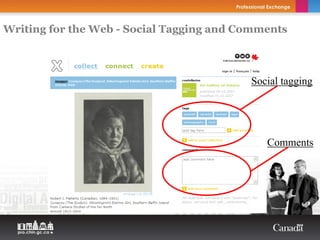
Writing for the Web - Social Tagging and Comments


                                          Social tagging


                                             Comments
My Resource for Excellence.


Get More Bytes for your Bucks!
My Resource for Excellence.


Get More Bytes for your Bucks!
Workshop #5: Evaluation (Web Analytics)
3:00pm-4:00pm, Friday, September 18th, 2009
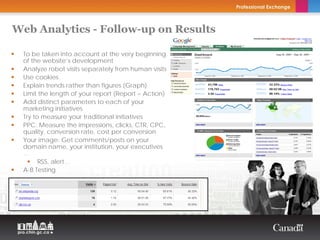
Web Analytics - Follow-up on Results

 To be taken into account at the very beginning
 of the website’s development
 Analyze robot visits separately from human visits
 Use cookies.
 Explain trends rather than figures (Graph)
 Limit the length of your report (Report = Action)
 Add distinct parameters to each of your
 marketing initiatives
 Try to measure your traditional initiatives
 PPC: Measure the impressions, clicks, CTR, CPC,
 quality, conversion rate, cost per conversion
 Your image: Get comments/posts on your
 domain name, your institution, your executives
 …
       RSS, alert…
 A-B Testing
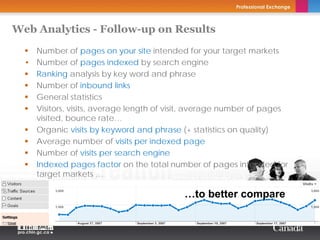
Web Analytics - Follow-up on Results
    Number of pages on your site intended for your target markets
  • Number of pages indexed by search engine
    Ranking analysis by key word and phrase
    Number of inbound links
    General statistics
    Visitors, visits, average length of visit, average number of pages
    visited, bounce rate…
    Organic visits by keyword and phrase (+ statistics on quality)
    Average number of visits per indexed page
    Number of visits per search engine
    Indexed pages factor on the total number of pages intended for
    target markets …

                                           …to better compare
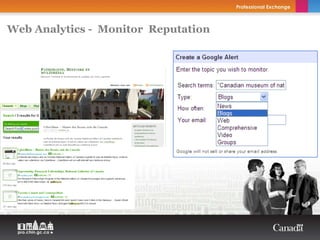
Web Analytics - Monitor Reputation


  Twitter                 General


                          Yahoo Pipes

        Plaxo
My Resource for Excellence.


Get More Bytes for your Bucks!

Day 2: Workshop 3, 4 and 5 Web Writing | September 18

  • 1.
    My Resource forExcellence. Get More Bytes for your Bucks! Workshop #3: The Plan of Attack 9:00am-10:00am, Friday, September 18th, 2009
  • 2.
    Plan - TargetingAudience Who are they? Age, gender, location, Copyright Thierry Arsenault income, situation, their habits, what they like, their influence, their beliefs, their physical + Examples of target audiences… virtual places, their print media, TV shows… Generation Z (Kids) 1995-2001 8-14 Generation Y 1981-1994 15-28 How many are there? Generation X 1965-1980 29-44 Number The younger Baby Boomers 1956-1965 45-53 Trends (Behavioural) The older Baby Boomers 1946-1956 54-63 Teachers Primary and High school What is your market share? Teachers Primary and High school using Internet in Class. Growth potential Teachers in Arts and Museology programs (college and university) …
  • 3.
    Plan - Objective Visibility • Conversion (call to action) Increase the visibility of your – Walk-in visits to the institution institution and products with your – Purchases from the virtual store target clients – Subscription to the electronic newsletter Copyright Thierry Arsenault – Use of online tools – Receive donation (fundraising) Market Penetration – Recruit volunteers Increase the number of new visitors – Receive artefact donations – Sell boutique souvenirs Customer Loyalty – Receive feedback – … Increase the number of repeat visits • … Build & maintain relationship Acquisition Costs Reduction of costs per visitor Reduction of costs per conversion
  • 4.
    Plan - Inventoryof Keywords Is there a demand for the key phrases? Copyright Thierry Arsenault • Your key messages • Your content What is the trend for the key phrases? • Your wish list (potential) - Words searched on your site with no result
  • 5.
    Plan - Inventoryof Keywords Keyword Strategy: Long-Tail Approach education adult education higher education online education university education distance education education resources ... Head words Long-tail word combinations - Popular - Less popular
  • 6.
    Plan - Inventoryof Keywords Tool: Google Trends
  • 7.
    Plan - Inventoryof Keywords Tool: Keyworddiscovery.com
  • 8.
    Plan - Inventoryof Keywords Tool: Keyworddiscovery.com
  • 9.
    Plan - Inventoryof Keywords Tool: Google Adwords/Keywords
  • 10.
    Plan - Inventoryof Keywords Tool: MSN AdCenter Labs
  • 11.
    Plan - Inventoryof Keywords Tool: Online Dictionary www.yourdictionary.com www.thesaurus.com www.thefreedictionary.com www.visualthesaurus.com
  • 12.
    Plan - Inventoryof Keywords Tool: My Selection Table Copyright Thierry Arsenault
  • 14.
    My Resource forExcellence. Get More Bytes for your Bucks!
  • 15.
    My Resource forExcellence. Get More Bytes for your Bucks! Workshop #4: Writing for the Web 10:15am-2:45pm, Friday, September 18th, 2009
  • 16.
    Writing for theWeb - Developing a Content Plan A B C D A content plan is prepared: A brainstorming exercise is Tools are used to identify the Pages are created in Each subject (key phrase) is conducted to find key phrases that need to be accordance with the basic divided to represent a Web alternatives for each of the optimized. principles of writing for page (mapping). key phrases. audiences and robots. Content Plan Writing Guide Copyright Thierry Arsenault • It is important: • to have these procedures clearly explained in a writing guide; • to offer support at the beginning; • to carry out random audits afterwards; • to communicate the success rate (ROI) to your contributors.
  • 17.
    Writing for theWeb - Web User Reading Habit Short attention span Don’t like long text They scan text Back They look for specific key phrase/information that answer their needs (their search terms) They look for headlines They like short sentences …
  • 18.
    Writing for theWeb - Writing Strategically - Is my text: Copyright Thierry Arsenault Adding value to my target audience? Achieving my goals and my target audience’s needs? Communicating a call to action? Passing the spelling and grammar check? Using journalistic style: Reverse pyramid (conclusion…details)? Using proper vocabulary and grammar (easy to understand – short sentences) Using proper style: Authentic, clear and concise, conversational (grade 8 level of education) Flowing well, clear and relevant Format and presentation (logical order, facilitate readability: bullets) paragraphs only convey one idea that supports the theme
  • 19.
    Writing for theWeb - Writing Strategically - Is my text: Copyright Thierry Arsenault Focusing on the key phrase? Proximity (top +beginning), frequency, density, emphasis (bold, strong…) In the Title element In the Header (H1) element In the first phrase In the Meta description tag In the Meta keyword tag In the Alt text element (pictures are optimized)? Linking contextually and thematically to other pages’ internal links (link from)? Linking to quality, valuable and community information (external links)?
  • 20.
    Writing for theWeb - Writing Strategically Copyright Thierry Arsenault - Does my text: Hold images that support my text? Use White space = eye relaxation? Contain between 250 and 500 words?
  • 21.
    Writing for theWeb - Title element Top of browser window • 60 characters • Brand at the end of the title element except for the home page • Use either -, | or @ before Result page on Google the brand • Keyword / Page theme • A.I.D.A. Copyright Thierry Arsenault Source code <!DOCTYPE HTML PUBLIC "-//W3C//DTD HTML 4.01 Transitional//EN"> <html><!-- InstanceBegin template="/Templates/f_vmcPageLM.dwt" codeOutsideHTMLIsLocked="false" --> <head> <!-- InstanceBeginEditable name="doctitle" --> <title>@Boutiques du Mus&eacute;e virtuel du Canada - Magasinez dans les boutiques des mus&eacute;es canadiens</title> <!-- InstanceEndEditable -->
  • 22.
    Writing for theWeb - Source code Domain name: Your phrase here.ca File name: Your phrase here.html or jpg… Directory: /Your phrase here/ Title element: <TITLE> …Your phrase here</TITLE> Hyperlink: <A HREF=“…” >…Your phrase here</A> Description element: <META NAME=“description” CONTENT =“…Your phrase here” Keyword element: <META NAME=“keywords” CONTENT =“Your phrase here” Image: IMG SRC=“…” ALT= “…Your phrase here” TITLE=“Your phrase here” Header element: <H1> …Your phrase here </H1> <H2>, <H3>… Emphasis: <STRONG> …Your phrase here </STRONG> *** Only when appropriate ***
  • 23.
    Writing for theWeb - Density…2% Is Enough Phrase: Search engine optimization Frequency: 9 times and 12 times Total: 704 words Density: 2% Copyright Thierry Arsenault Source: www.marketleap.com
  • 24.
    Writing for theWeb - Optimizing Images Title=image Alt attribute= name text when you Thematic text= mouse over the surrounding the image image Title attribute= text when you mouse over the image Caption=one or two lines of text under the picture
  • 25.
    Writing for theWeb - Optimizing Images <a href=“your landing page where the image will link"><img src=“where the image is located" width=“xx" height=“xx" title=“your text" alt=“your text"></a>
  • 26.
    Writing for theWeb - Optimizing Images Optimizing Images • Link (<a href="landing page where the image will link">) – Meaningful landing page <a href=“your landing page where the image will link"><img src=“where the image is located" width=“xx" height=“xx" title=“your text" alt=“your text"></a>
  • 27.
    Writing for theWeb - Optimizing Images Optimizing Images • Link (<a href="landing page where the image will link">) – Meaningful landing page • <img src="where the image is located">) – Meaningful folder name <a href=“your landing page where the image will link"><img src=“where the image is located" width=“xx" height=“xx" title=“your text" alt=“your text"></a>
  • 28.
    Writing for theWeb - Optimizing Images Optimizing Images • Link (<a href="landing page where the image will link">) – Meaningful landing page • <img src="where the image is located">) – Meaningful folder name • <img width="xx" height="xx“> – Just have them! <a href=“your landing page where the image will link"><img src=“where the image is located" width=“xx" height=“xx" title=“your text" alt=“your text"></a>
  • 29.
    Writing for theWeb - Optimizing Images Optimizing Images • Link (<a href="landing page where the image will link">) – Meaningful landing page • <img src="where the image is located">) – Meaningful folder name • <img width="xx" height="xx“> – Just have them! Title attribute (<img title="your text“>) Title of the image Additional information / Description of the image Photo credit *short + descriptive + optimized <a href=“your landing page where the image will link"><img src=“where the image is located" width=“xx" height=“xx" title=“your text" alt=“your text"></a>
  • 30.
    Writing for theWeb - Optimizing Images Optimizing Images • Link (<a href="landing page where the image will link">) – Meaningful landing page • <img src="where the image is located">) – Meaningful folder name • <img width="xx" height="xx“> – Just have them! Title attribute (<img title="your text“>) Title of the image Additional information / Description of the image Photo credit *short + descriptive + optimized Alt attribute (<img alt="your text“>) <a href=“your landing page where the image will link"><img src=“where the image is located" width=“xx" height=“xx" title=“your text" alt=“your text"></a>
  • 31.
    Writing for theWeb - Optimizing Images Optimizing Images • Link (<a href="landing page where the • File name: Key-phrase in it image will link">) – Meaningful landing page • File extension – Jpg=picture, Gif=graphic • <img src="where the image is located">) • Caption under the picture – Meaningful folder name – Caption should have hyperlink • <img width="xx" height="xx“> • Thematic text: Surrounding the image – Just have them! – Proximity Title attribute (<img title="your text“>) • SEO content: Smart writing Title of the image – Support the page thematic Additional information/Description of the • Social tagging image Photo credit • Comments *short + descriptive + optimized • Enable Google Image Search (wm) Alt attribute (<img alt="your text“>) • Fast download time <a href=“your landing page where the image will link"><img src=“where the image is located" width=“xx" height=“xx" title=“your text" alt=“your text"></a>
  • 32.
    Writing for theWeb - Social Tagging and Comments Social tagging Comments
  • 34.
    My Resource forExcellence. Get More Bytes for your Bucks!
  • 35.
    My Resource forExcellence. Get More Bytes for your Bucks! Workshop #5: Evaluation (Web Analytics) 3:00pm-4:00pm, Friday, September 18th, 2009
  • 36.
    Web Analytics -Follow-up on Results To be taken into account at the very beginning of the website’s development Analyze robot visits separately from human visits Use cookies. Explain trends rather than figures (Graph) Limit the length of your report (Report = Action) Add distinct parameters to each of your marketing initiatives Try to measure your traditional initiatives PPC: Measure the impressions, clicks, CTR, CPC, quality, conversion rate, cost per conversion Your image: Get comments/posts on your domain name, your institution, your executives … RSS, alert… A-B Testing
  • 37.
    Web Analytics -Follow-up on Results Number of pages on your site intended for your target markets • Number of pages indexed by search engine Ranking analysis by key word and phrase Number of inbound links General statistics Visitors, visits, average length of visit, average number of pages visited, bounce rate… Organic visits by keyword and phrase (+ statistics on quality) Average number of visits per indexed page Number of visits per search engine Indexed pages factor on the total number of pages intended for target markets … …to better compare
  • 38.
    Web Analytics -Monitor Reputation
  • 39.
    Web Analytics -Monitor Reputation Twitter General Yahoo Pipes Plaxo
  • 41.
    My Resource forExcellence. Get More Bytes for your Bucks!