WordPress
Themes for Beginners
(non-programmers)
Bonnie Vasko
VaskoInteractive.com
@vaskointeractv
Bonnie Vasko
UI Developer at Comcast
(until recently, that is)
Developer at NetReach
(maker of cmScribe cms)
Freelance web developer
@vaskointeractv
About this Talk:
High Level Overview
Not a code review
Walk away with an understanding of
Where to find themes
Paid vs. Free
Parent / Child Themes
Theme Frameworks
Theme Structure
What is a theme?
It’s a way to your skin your site
How your site looks
How your site works
Keeps the functionality separate from the core
wordpress files
3 Ways to Install a
Theme
1 - Search and Install from the admin panel
2 - Upload a zip file from your computer, let
wordpress decompress, and install
3 - FTP your theme to wp-content/themes
How to choose a theme
Plan your site layout before choosing
Not choose the theme, and follow that
Think about what functionality you will need
Have your site content planned
Will you be using pages or posts
Categories or tags
social media integration
PAGES
CATEGORIES
JQUERY SLIDER
WITH CUSTOM HTML
RECENT
POSTS
SOCIAL MEDIA
FEATURED
CONTENT
AREA
PHOTO
FEED
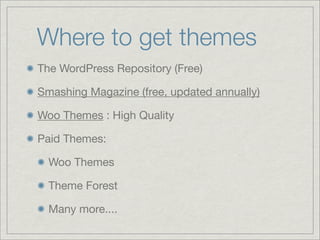
Where to get themes
The WordPress Repository (Free)
Smashing Magazine (free, updated annually)
Woo Themes : High Quality
Paid Themes:
Woo Themes
Theme Forest
Many more....
Parent / Child Themes
A child theme inherits the functionality of the
parent theme
You can create a child of any theme
Upgrade the parent theme without losing your
changes
Live Demo
Child Theme Basics
Setting up a child theme
(in 4 easy steps)
Create a new folder, and add a style.css file
Modify the child theme’s style.css header
Import & override parent styles
Optional step: Override parent theme templates
Theme Frameworks
What is a framework?
Gives you a starting point - styles and layout that
are common to all themes are already set up
3 free frameworks: Hybrid, Thematic & Sandbox
Advantages: Large community, widely used, open
Paid frameworks: Thesis & Genesis
Template Files
Template files are the building blocks of your WordPress site. They fit together like the pieces of a
puzzle to generate the web pages on your site. Some templates (the header and footer template files
for example) are used on all the web pages, while others are used only under specific conditions.
Header <?php get_header(); ?> this is a template tag
Footer <?php get_footer(); ?>
Content
“The Loop”
Sidebar
<?php get_sidebar(); ?>
REPRODUCED (WITH PERMISSION) FROM “DIG INTO WORDPRESS” BY CHRIS COYIER AND JEFF STARR
Theme Files
REPRODUCED (WITH PERMISSION) FROM “DIG INTO WORDPRESS” BY CHRIS COYIER AND JEFF STARR
The Loop
The Loop is used by WordPress to display each of your posts. Using The Loop, WordPress
processes each of the posts to be displayed on the current page and formats them according to how
they match specified criteria within The Loop tags. Any HTML or PHP code placed in the Loop will be
repeated on each post. When WordPress documentation states "This tag must be within The Loop",
such as for specific Template Tag or plugins, the tag will be repeated for each post.
<?php
// The Loop
if (have_posts()) : while (have_posts()) : the_post();
?>
HTTP://CODEX.WORDPRESS.ORG/THE_LOOP

Wordcamp 2010

  • 1.
    WordPress Themes for Beginners (non-programmers) BonnieVasko VaskoInteractive.com @vaskointeractv
  • 2.
    Bonnie Vasko UI Developerat Comcast (until recently, that is) Developer at NetReach (maker of cmScribe cms) Freelance web developer @vaskointeractv
  • 3.
    About this Talk: HighLevel Overview Not a code review Walk away with an understanding of Where to find themes Paid vs. Free Parent / Child Themes Theme Frameworks Theme Structure
  • 4.
    What is atheme? It’s a way to your skin your site How your site looks How your site works Keeps the functionality separate from the core wordpress files
  • 5.
    3 Ways toInstall a Theme 1 - Search and Install from the admin panel 2 - Upload a zip file from your computer, let wordpress decompress, and install 3 - FTP your theme to wp-content/themes
  • 6.
    How to choosea theme Plan your site layout before choosing Not choose the theme, and follow that Think about what functionality you will need Have your site content planned Will you be using pages or posts Categories or tags social media integration
  • 8.
    PAGES CATEGORIES JQUERY SLIDER WITH CUSTOMHTML RECENT POSTS SOCIAL MEDIA FEATURED CONTENT AREA PHOTO FEED
  • 9.
    Where to getthemes The WordPress Repository (Free) Smashing Magazine (free, updated annually) Woo Themes : High Quality Paid Themes: Woo Themes Theme Forest Many more....
  • 10.
    Parent / ChildThemes A child theme inherits the functionality of the parent theme You can create a child of any theme Upgrade the parent theme without losing your changes Live Demo Child Theme Basics
  • 11.
    Setting up achild theme (in 4 easy steps) Create a new folder, and add a style.css file Modify the child theme’s style.css header Import & override parent styles Optional step: Override parent theme templates
  • 12.
    Theme Frameworks What isa framework? Gives you a starting point - styles and layout that are common to all themes are already set up 3 free frameworks: Hybrid, Thematic & Sandbox Advantages: Large community, widely used, open Paid frameworks: Thesis & Genesis
  • 13.
    Template Files Template filesare the building blocks of your WordPress site. They fit together like the pieces of a puzzle to generate the web pages on your site. Some templates (the header and footer template files for example) are used on all the web pages, while others are used only under specific conditions. Header <?php get_header(); ?> this is a template tag Footer <?php get_footer(); ?> Content “The Loop” Sidebar <?php get_sidebar(); ?>
  • 14.
    REPRODUCED (WITH PERMISSION)FROM “DIG INTO WORDPRESS” BY CHRIS COYIER AND JEFF STARR
  • 15.
    Theme Files REPRODUCED (WITHPERMISSION) FROM “DIG INTO WORDPRESS” BY CHRIS COYIER AND JEFF STARR
  • 16.
    The Loop The Loopis used by WordPress to display each of your posts. Using The Loop, WordPress processes each of the posts to be displayed on the current page and formats them according to how they match specified criteria within The Loop tags. Any HTML or PHP code placed in the Loop will be repeated on each post. When WordPress documentation states "This tag must be within The Loop", such as for specific Template Tag or plugins, the tag will be repeated for each post. <?php // The Loop if (have_posts()) : while (have_posts()) : the_post(); ?> HTTP://CODEX.WORDPRESS.ORG/THE_LOOP